




Acknowledgments: Special thanks to Anton Ovrutsky for his contributions to this investigation and writeup.
Background
Between July 14, 2026 and September 22, 2026, Huntress detected 497 Microsoft 365 sign-in events across 79 victim organizations related to a token replay campaign using an IP address block from the German hosting provider 1337 Services GmbH. Rather than guessing passwords, the attacker replayed sign-in tokens stolen from victims, and we've traced more than 200,000 failed login attempts from the campaign window back to the 193.26.115[.]0/24 IP range.
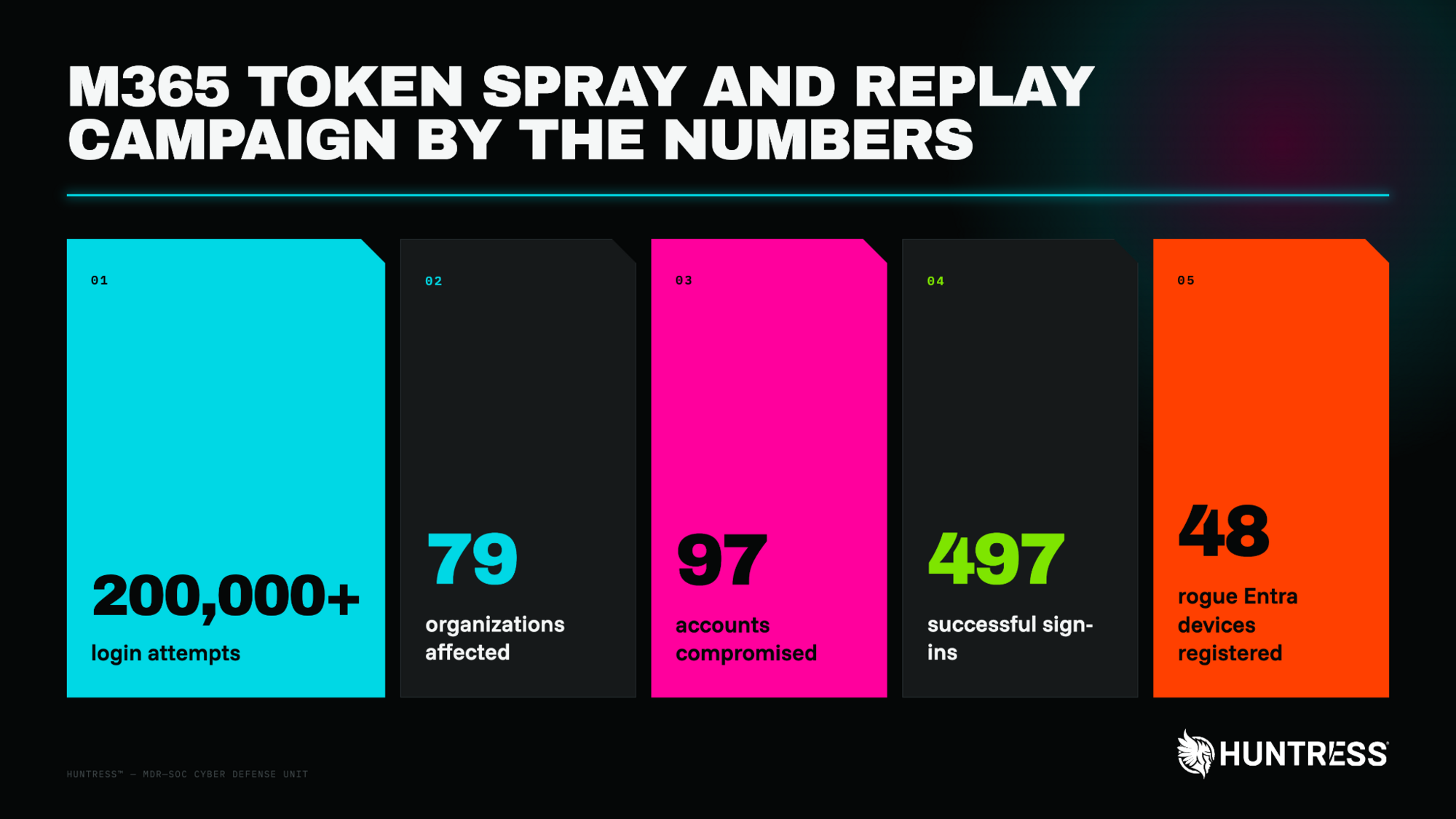
Figure 1: Overall statistics of the activity Huntress observed
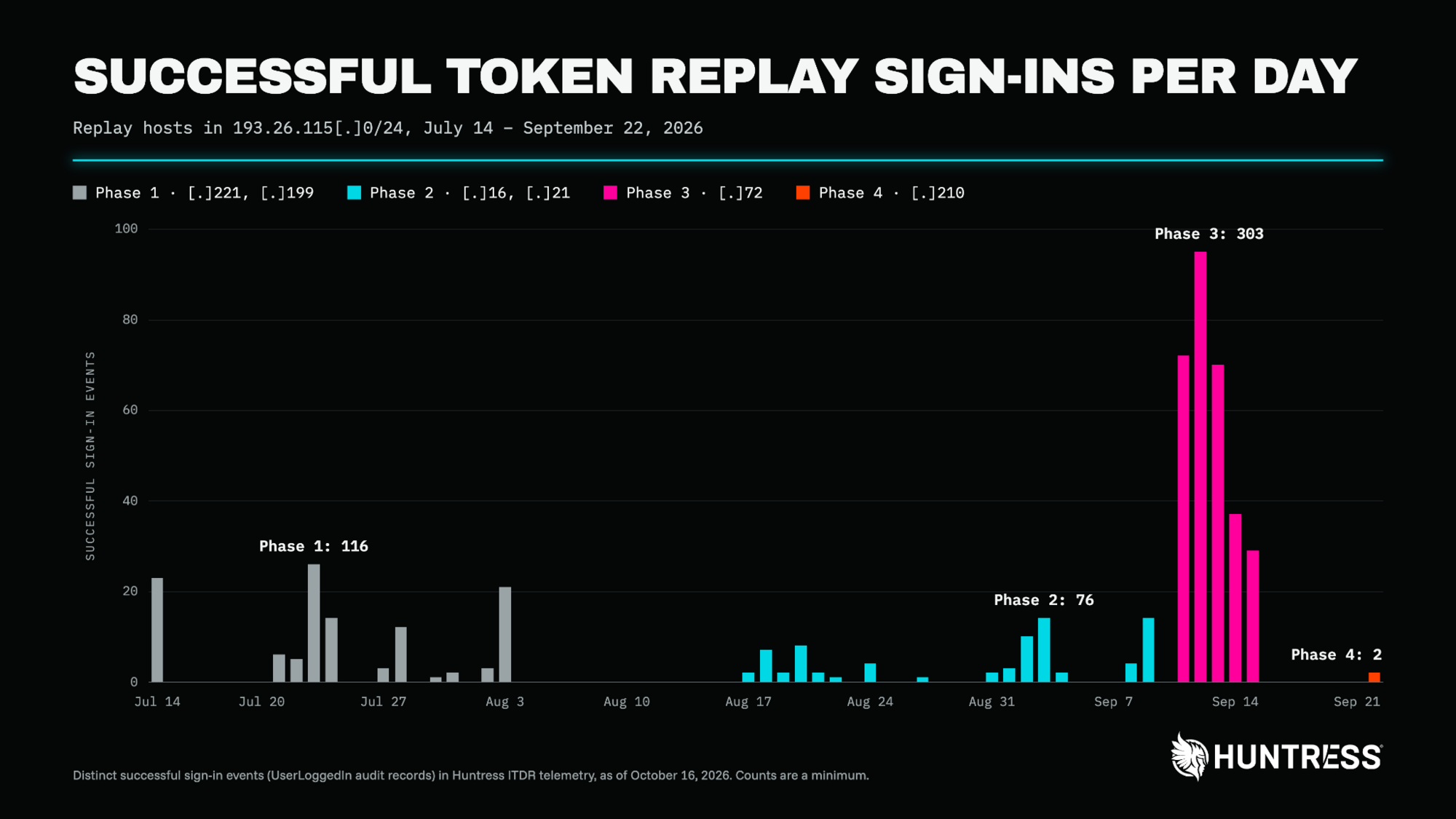
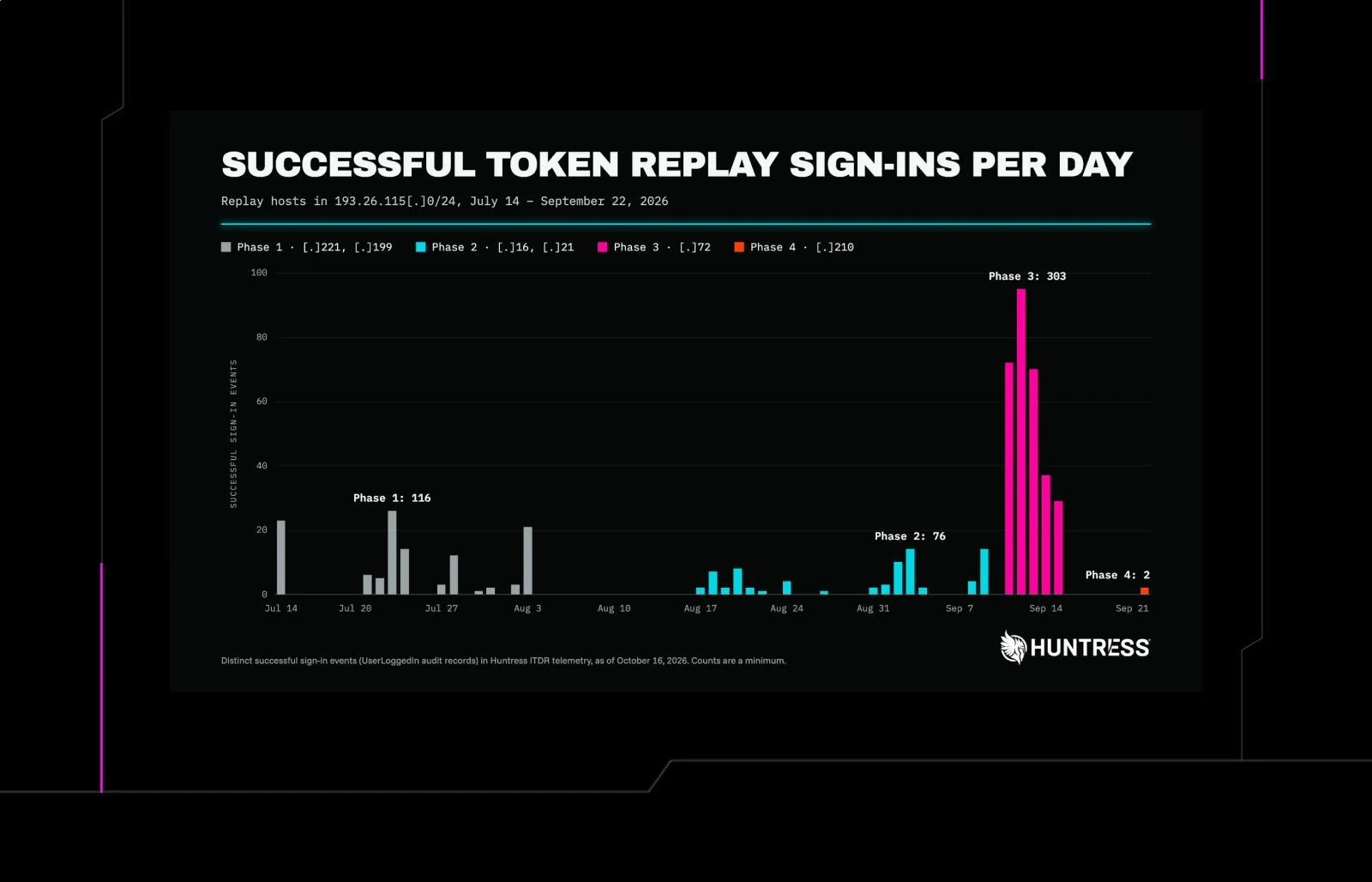
Figure 2: Successful sign-in events using token replays over the course of the campaign
Also known as AS210558, 1337 Services GmbH is incorporated in Hamburg, Germany. While 1337 Services GmbH offers a legitimate IP hosting service, attackers use these kinds of ISP providers to host malicious traffic, a tactic referred to as "bring your own IP" (BYOIP). A February 2025 Krebs on Security article suggests that 1337 Services GmbH's founder may have operated the Cracked cybercrime forum.
The Microsoft accounts were compromised without the attacker ever needing a password. In an adversary-in-the-middle (AiTM) attack, the victim signs in through a relay that sits between them and Microsoft. The relay passes the real login page and MFA prompt through to the victim, then keeps the "proof of login" token Microsoft issues once the victim finishes signing in. Because that token is minted after MFA, whoever holds it doesn't need to pass MFA again. The threat actor then replayed the stolen tokens from their own machines in automated sign-in attempts against Microsoft 365 services. Because the attacker replayed many stolen tokens at volume across many organizations, we refer to this as "token spraying:" the same pattern as password spraying, but with stolen tokens instead of guessed passwords.
In this campaign, tokens came from multiple sources: AiTM relays behind fake sign-in pages, device-code phishing, and social engineering during a legitimate login process.
Huntress first detected this activity on July 14, 2026, when a sign-in from 193.26.115[.]221 came from an Entra-joined device named DESKTOP- plus eight hex characters. Microsoft independently flagged the same infrastructure: Microsoft Entra ID Protection raised verified threat actor IP detections against 193.26.115[.]221, [.]72, [.]16, and [.]21 in multiple customer tenants. Microsoft describes this detection as "sign-in activity that is consistent with known IP addresses associated with nation state actors or cyber crime groups, based on Microsoft Security Intelligence (MSTIC)."
A July 21 detection from 193.26.115[.]199 gave us a view of how the attacker was able to steal and reuse a token in less than an hour:
Time (UTC) | Event |
|---|---|
17:18:20 | An AiTM relay at |
17:30:21 | The session was hijacked from |
17:43:15 | The same session was in use from a second 1337 Services address, |
18:08:50 | A new authenticator app, labeled "iPhone 13", was activated on the account |
Registering their own authenticator app is a persistence method. A stolen session token eventually expires or gets revoked, but an MFA method stays on the account. With their own authenticator registered, the attacker can complete MFA for new sign-ins whenever they want, and that access survives a password reset unless someone audits the account's MFA methods and removes the rogue one. In 19 organizations, the victim's existing MFA methods were wiped and a new method registered within three hours of the first sign-in from a campaign address.
Rogue devices served the same purpose. Across the compromises we investigated, the threat actor registered at least 48 fake computers in victim organizations' Microsoft directories. A registered device can give the attacker a more durable way to request tokens than the stolen session alone, and it stays in the directory until someone deletes it.
We also observed the threat actor setting up hidden email rules in victim inboxes that quietly moved messages from specific contacts out of sight. In at least one case, the threat actor used the email account to send a payroll-related email to an outside contact. None of the email rules were created from the 1337 Services GmbH network; each one came from a different rented or VPN address.
Technical Details
Over the 10-week campaign, the threat actor replayed stolen Microsoft 365 sessions using rented hosts in one block of IP addresses, 193.26.115[.]0/24. They used six addresses in the /24 range, one after another:
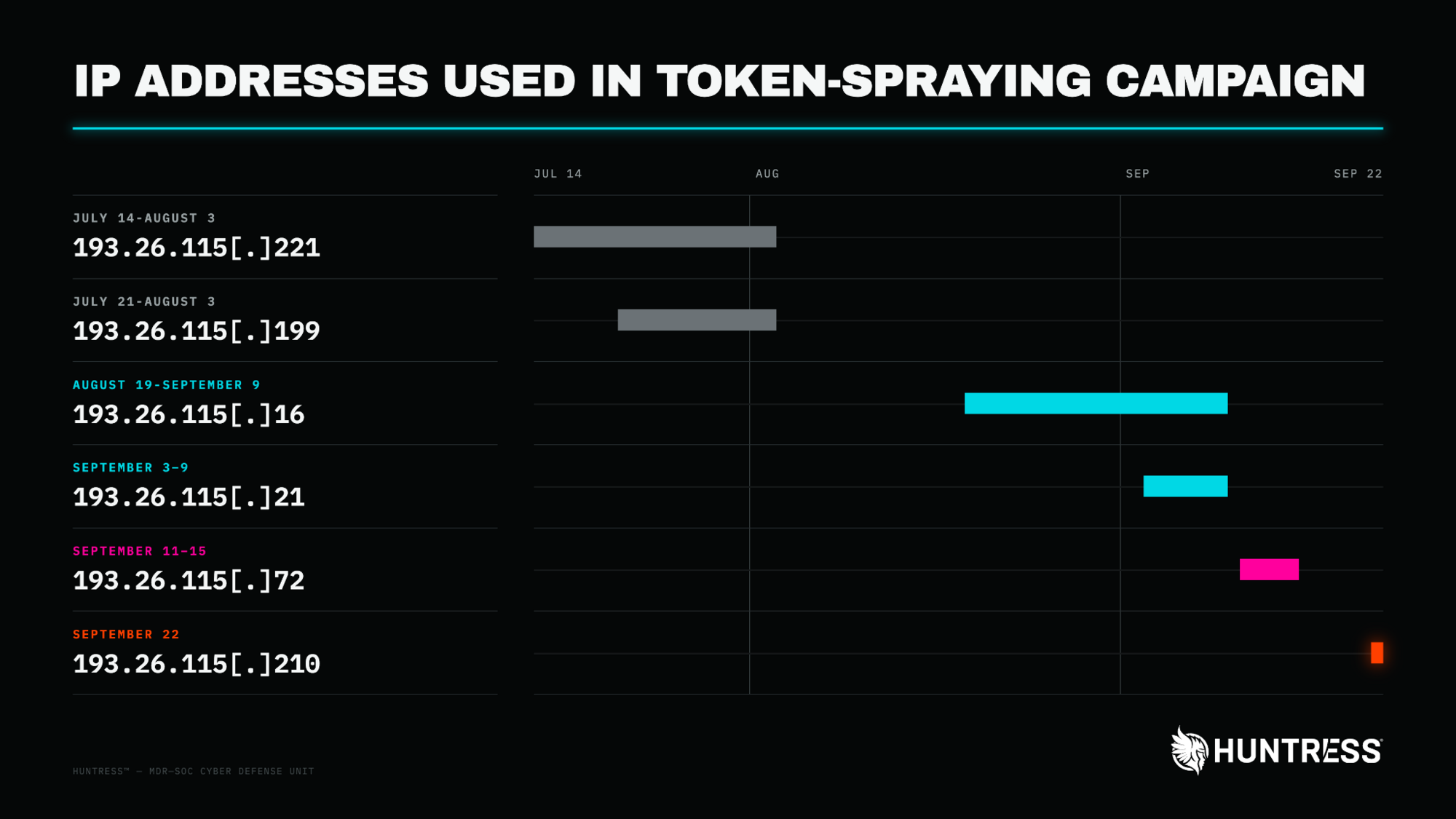
Figure 3: IP addresses used throughout the token spraying campaign
We can't state with certainty why the operator rotated addresses, but the effect is clear. A block, alert, or Conditional Access rule written for one address does nothing against the next, and Microsoft flagged addresses individually: its incidents named [.]221, [.]72, [.]16, and [.]21, not the range. Several switches followed a quiet period, about two weeks between Phases 1 and 2 and a week before the September 22 takeover. Blocking any single address would have stopped one phase at most. Blocking the /24 would have covered all six main replay hosts, though the operator also used a few other 1337 Services addresses outside it.
Two tiers: relays capture, 1337 replays
The operator split the attack across two kinds of infrastructure. First, the victim signs in through an AiTM relay. The relay passes the victim's MFA prompt through and keeps the resulting session. Then, within minutes, the stolen session reappears from a 1337 Services address. On July 21, the gap between the victim reaching the MFA prompt and the hijacked session appearing was 12 minutes. On September 22, it was four.
Because the two halves sit on different providers, blocking the 1337 range doesn't stop credentials from being captured, and blocking a relay doesn't stop replay of tokens that were already stolen.
Two builds
The replay hosts ran two distinct toolsets, which we refer to as Build A and Build B:
Attribute | Build A: Scripted token replay | Build B: Browser session replay |
|---|---|---|
Hosts |
|
|
User agent |
| Current Chrome/Edge on Windows |
Request type |
|
|
Client app | Microsoft Office, Microsoft Authentication Broker | OfficeHome |
Target | Microsoft Graph, Exchange Online, SharePoint Online, Device Registration Service | OfficeHome, Exchange Online |
Device | Rogue Entra-joined device named | None |
Across Build A sign-ins, we observed 48 distinct Entra-joined devices named DESKTOP- plus exactly eight uppercase hexadecimal characters (for example, DESKTOP-54521F46). That doesn't match Windows' own out-of-box default, which is DESKTOP- plus seven alphanumeric characters.
With these shifts in the IP addresses came variations in tradecraft. We tracked four distinct phases throughout the campaign.
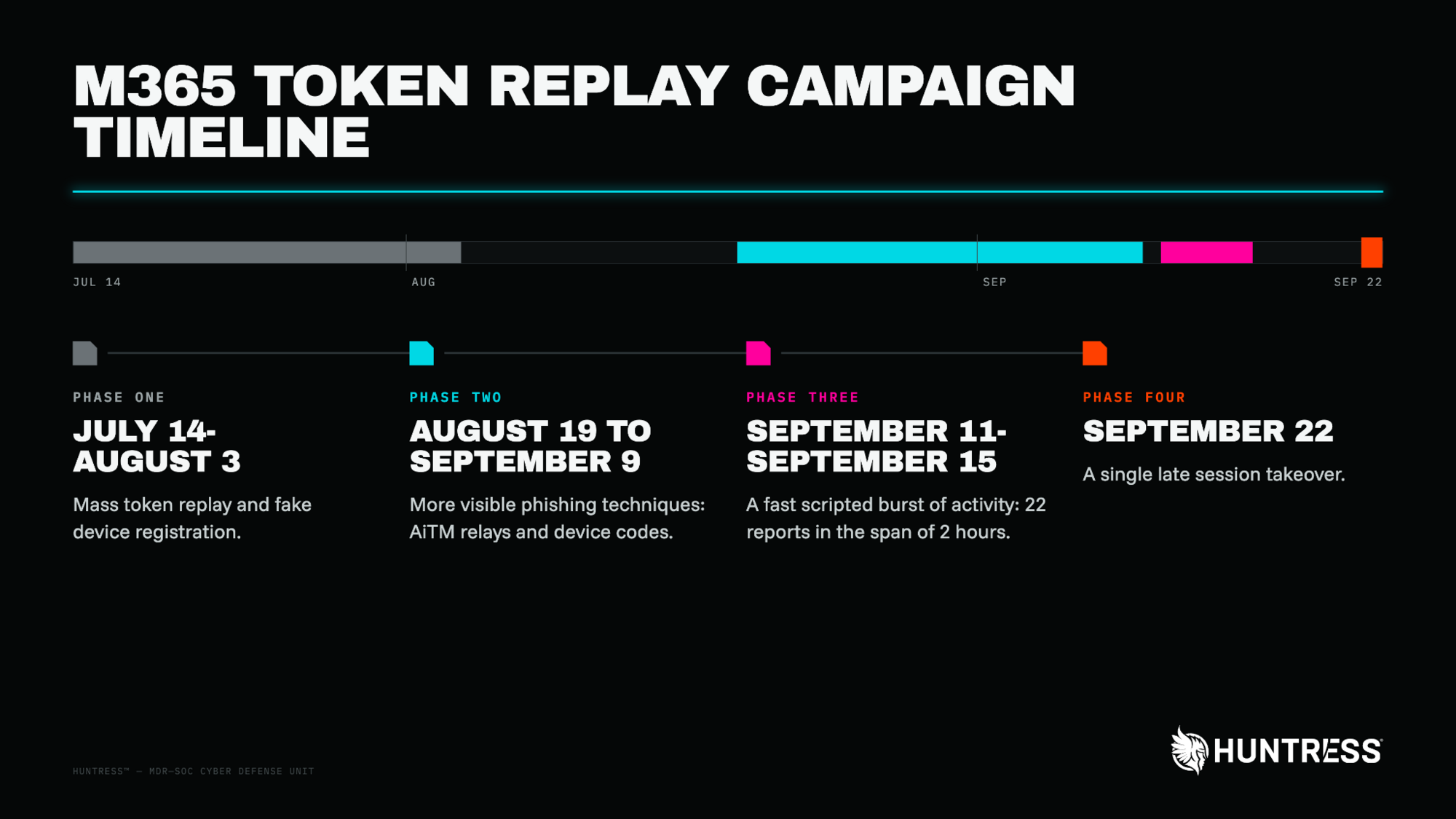
Figure 4: Token replay campaign timeline
Phase 1: The July Wave ([.]221 and [.]199)
Huntress began observing stolen tokens being used to access more than a dozen organizations starting on July 14, 2026. In 13 of the 14 incidents Huntress responded to on that day, the attacker had registered a fake Windows-style computer in the victim organization's directory, named DESKTOP- plus eight hex characters. These sign-ins all used Build A: the node user agent, replaying tokens through the Microsoft Office client. After registering the rogue device from the 1337 Services GmbH address, the attacker would often pivot to an ExpressVPN or CrownCloud address for further activity. Alongside it, 193.26.115[.]199 ran Build B, replaying browser sessions straight from AiTM relays, as in the July 21 timeline above.
The attacker created malicious email rules in a number of the compromised accounts to delete or move messages with certain keywords to an obscure folder, like RSS Feeds. In one compromised mailbox, an email rule named sss was created to mark all incoming mail as read and then delete it. The attacker then used the mailbox to send outbound spam to hundreds of external recipients before Microsoft Entra ID Protection rated the account high risk, and Huntress disabled the rule.
We last detected activity from the [.]221 IP address on August 3. By then, the attacker had successfully signed in to 37 organizations and registered 37 rogue Entra devices.
Phase 2: The August–September Wave ([.]16 and [.]21)
After a two-week gap, the threat actor came back using two new IP addresses on August 17. This burst saw more email-hiding rules, and in one case the threat actor registered a lookalike of a business partner's web address.
This wave also added device-code phishing. We recorded sign-ins through the Microsoft Office device-code flow from 193.26.115[.]16, where the victim is tricked into entering a code on Microsoft's legitimate sign-in page and directly hands and attacker a valid refresh and access token, unknowingly authorizing the attacker's session. The same address also signed in to the Device Registration Service, the endpoint used to join new devices to the tenant. 193.26.115[.]21 replayed tokens against SharePoint Online with a bare Mozilla/5.0 user agent.
In this second wave, we started observing the attacker clearing compromised users' MFA settings to allow for first-time device registration with no device tokens or one-time passwords. The pattern was consistent: the victim's MFA methods were wiped through Microsoft's security-info registration service, and a new authenticator was registered minutes later. In one incident, we observed the threat actor using a deviceless authenticator method that was already on the account.
Phase 3: The September 11 Burst ([.]72)
On the afternoon of September 11, the threat actor switched to a new address again, this time running an automated program (user agent node) that reused stolen sign-in passes. Within two hours, Huntress sent incident reports to 22 customers. Every sign-in we recorded from this address used the Microsoft Office or Authentication Broker client and OAuth2:Token requests (the action of trading one token for another), most of them targeting Microsoft Graph. Over four days, the address completed 303 successful sign-ins across 29 organizations.
Conditional Access did real work here. The same address logged 1,052 blocked sign-ins as the attempts continued, but all of those blocks came from just four organizations. In the 29 organizations where it got in, nothing stood in the way.
In one incident, the threat actor used the compromised mailbox to send a payroll-related email to an external CPA's email address. The attacker first modified an inbox rule named s to catch any message mentioning payroll, direct deposit, bank, or bonus. Five minutes later, from the same Interserver address (167.148.41[.]96), they created a second rule named d that marked all email from the CPA's address as read and moved it to the Conversation History folder, effectively hiding the responses from the victim.
Phase 4: Relay and replay, September 2–22 ([.]210)
The final address paired an AiTM relay at a different hosting provider, Evoxt Sdn. Bhd. (2400:8d60:2::1:841d:5dd), with replay from 193.26.115[.]210. It first appeared on September 2. On September 3, the attacker tried to replay, from [.]210, the session stolen the day before, but the session was no longer valid and the attempt failed with Microsoft's SsoArtifactRevoked error (AADSTS50133).
After a full week of quiet following the Phase 3 burst, we detected one final session takeover on September 22. The victim reached the MFA prompt through the Evoxt relay at 20:46 UTC and completed it a minute later, from a macOS browser using the OfficeHome client. At 20:50, the attacker replayed the session from 193.26.115[.]210. Routing through a Remote Desktop Protocol VDI tunnel operator, the session's OS changed from macOS to Windows, and the threat actor accessed the victim's email.
Post-compromise: Hidden inbox rules
Every suspicious inbox rule we found on accounts compromised in this campaign was created from VPN or rented hosting, never from 1337 Services: ExpressVPN, NordVPN, CrownCloud, DataWagon, GLOBALTELEHOST, LeaseWeb, Dynu, and Interserver. The rule names were deliberately forgettable:
Rule name | Action | Trigger |
|---|---|---|
| Mark as read, delete | All mail |
| Mark as read, delete | All mail |
| Move to RSS Feeds, mark as read | Messages mentioning a business partner's domain |
| Move to Conversation History, mark as read | All mail |
| Move to Conversation History, mark as read | All mail |
| Move to RSS Subscriptions, mark as read | All mail |
| Hide | Subject or body contains payroll, direct deposit, bank, or bonus |
| Move to Conversation History, mark as read | One external CPA's address |
In four mailboxes, rules were created through the Outlook REST API rather than Outlook itself, two of them within minutes of the first sign-in from a campaign address.
The stolen session stopped working
The operator kept coming back. In one organization, they tried to reuse the same stolen session three more times in August: once from 193.26.115[.]199 and twice from other 1337 Services addresses (45.83.31[.]44 and 192.159.99[.]172). Every attempt failed with Microsoft's SsoArtifactRevoked error (AADSTS50133), which Microsoft returns when a session is no longer valid after a password expires or is changed. Although the refresh token and session cookie are expired, the access token will remain valid unless the identity sessions have been revoked or disabled.
Mitigation Guidance: Conditional Access FTW
As we saw in the massive LSHIY password-spraying campaign we reported on earlier this year, Conditional Access Policies (CAP) can help fill some of the security gaps that MFA can't, as long as they're appropriately implemented. Businesses setting up CAPs should require MFA (or block) for All Users, All Cloud Apps, and All Client App types, unconditionally.
Do not trigger response based on spray volume, as it points at the most-sprayed, least-compromised tenants; prioritize by credential validity instead. Phase 3 shows why: All 1,052 of [.]72's blocked sign-ins came from four organizations, and its 232 successful sign-ins landed in 28 different organizations, with no overlap between the two groups. Ranking tenants by failed attempts would have pointed responders at the four where Conditional Access was already working.
If you suspect a token replay compromise:
Revoke sessions and reset the password. A password reset alone does not remove attacker-registered devices or MFA methods. Additionally, you must revoke sessions; a password reset alone does not invalidate the access token, which means the attacker could keep access until the token expires (Time to live of approximately 90 minutes)
Audit Entra devices. Investigate devices named
DESKTOP-, Device-, or Work Pcplus eight hex characters, especially ones registered from hosting IP addresses. The pattern is rare, but not unique to this campaign, so confirm before deleting.Audit MFA methods. Look for MFA methods cleared and then re-registered within minutes, and remove any authenticator the user doesn't recognize.
Review inbox rules. Look for rules with one to three-character or punctuation-only names, rules that move mail to RSS Feeds, RSS Subscriptions, or Conversation History, and rules keyed on payroll or banking terms.
Treat Conditional Access blocks (
AADSTS53003) as a sign of a valid credential, not a save. The block happens after authentication succeeds.Restrict device-code flow with Conditional Access authentication-flow policies. If you need it, create service accounts with restricted permissions and exclusions as necessary.
Hunt for OAuth2:Token and Cmsi:Cmsi sign-ins from hosting infrastructure that use the Microsoft Office or Authentication Broker client with a
nodeor bareMozilla/5.0user agent. Expect some legitimate automation; focus on sign-ins that touch user mailboxes or the Device Registration Service.Hunt for new enterprise applications. Attackers will attempt to maintain persistence by granting new applications access to a tenant, with the level of access varying based on the application's permissions. Better yet, disable the ability for standard users to consent to new applications and instead require users to request new applications.
MITRE ATT&CK Mapping
Tactic | Technique | Observed |
|---|---|---|
Credential Access | Adversary-in-the-Middle (T1557) | AiTM relays captured post-MFA sessions |
Initial Access | Phishing: Spearphishing Link (T1566.002) | Fake sign-in pages and Microsoft Office device-code phishing to trick victims into entering codes on legitimate authentication pages. |
Defense Evasion, Lateral Movement | Use Alternate Authentication Material: Application Access Token (T1550.001) | OAuth2:Token replay from 1337 Services addresses through automated scripts running the |
Persistence | Account Manipulation: Device Registration (T1098.005) | 48 rogue |
Persistence, Defense Evasion | Modify Authentication Process: Multi-Factor Authentication (T1556.006) | MFA methods are modified by wiped and replaced. |
Defense Evasion | Hide Artifacts: Email Hiding Rules (T1564.008) | The threat actor abuses inbox |
Command and Control | Proxy: Multi-hop Proxy (T1090.003) | Rented VDI tunnel infrastructure and consumer VPNs |
Indicators of Compromise (IOCs)
Indicators are grouped by role. Each IP address links to VirusTotal and Censys.
Token replay hosts (1337 Services GmbH, AS210558)
Item | Description |
|---|---|
| Build A token replay and rogue device join host (Phase 1, July 14 to August 3). |
| Build B session replay host (Phase 1). |
| Build A token replay host; device-code phishing (Phase 2). |
| Build A token replay host, bare Mozilla/5.0 user agent (Phase 2). |
| Build A token replay host (Phase 3 burst, September 11 to 15). |
| Build B session replay host (Phase 4, September 2 to 22). |
| 1337 Services address that continued a hijacked session (Phase 1). |
| Failed replay of a stolen session (August). |
| Failed replay of a stolen session (August). |
AiTM relays and mailbox-action infrastructure
Item | Description |
|---|---|
| AiTM relay that captured the July 21 session. |
| AiTM relay, Evoxt Sdn. Bhd. (Phase 4). |
| Interserver address that created the payroll-hiding inbox rules (Phase 3). |
Client application IDs
Item | Description |
|---|---|
| Microsoft Office (Build A) |
| Microsoft Authentication Broker (Build A) |
| OfficeHome (Build B) |
Target resources
Item | Description |
|---|---|
| Microsoft Graph (Build A) |
| Office 365 Exchange Online (Builds A and B) |
| SharePoint Online ([.]21) |
| Device Registration Service (Build A); hunt for sign-ins to this resource from hosting infrastructure |
User agents
Item | Description |
|---|---|
| Build A token replay |
| Bare, with no platform details. Build A on [.]21 |
| Build B; looks like normal browsing on its own |
Request types and error codes
Item | Description |
|---|---|
| Token exchange; Build A replay from hosting infrastructure |
| Session replay; Build B |
| Device-code and broker sign-ins (Phase 2) |
| Valid credential stopped by policy |
| Replay of a session that is no longer valid |
Host and mailbox artifacts
Item | Description |
|---|---|
| Rogue Entra device names |
| Attacker-registered authenticator device label |
| Inbox rule names |
| Inbox rule destination folders |