



Acknowledgements: Special thanks to Tanner Filip, Susannah Matt, Truman Kain, and Rich Mozeleski for their contributions to this investigation and writeup.
While investigating an AiTM attack on an organization on August 18, 2026 Huntress researchers came across the console for a phishing kit called Knight Office.
The incident followed the structure of a standard AiTM attack: it started via a DocuSign-style phishing email with a redirect link that went through a Monday.com tracking service and sent the victim to a compromised Joomla site, as a way to conceal the final phishing landing page from reputation scanners and analysts inspecting the email. These redirects paved the way for the AiTM attack itself, where the attacker was able to capture the victim's session tokens. After gaining initial access, the threat actor enrolled an unauthorized host into Microsoft Entra ID, completed a rogue, attacker-controlled device registration, and bound a Windows Hello for Business (WHfB) key credential to the account.
During initial detections of this incident, Huntress telemetry picked up the IP address 104.37.188[.]94 being linked to stolen token replays during the incident. A Huntress Security Operations Center (SOC) analyst searched for this IP address in Validin and found the phishing operator's management console for Knight Office. Meanwhile, inspecting the IP itself via both Validin and VirusTotal reveals at least 25 web domains with a .vu top-level domain name to host the phishing sites.
As seen in Figure 1, the console itself (Login — KNIGHT OFFICE) boasts various features: "Capture & Management from Single place", "Webmail access & auto-refresh", "Deploy custom links", and "Real-time visitor statistics". The attacker's server-side web application was built with Python Flask (with the Flask-WTF add-on) and includes a Cloudflare Turnstile.
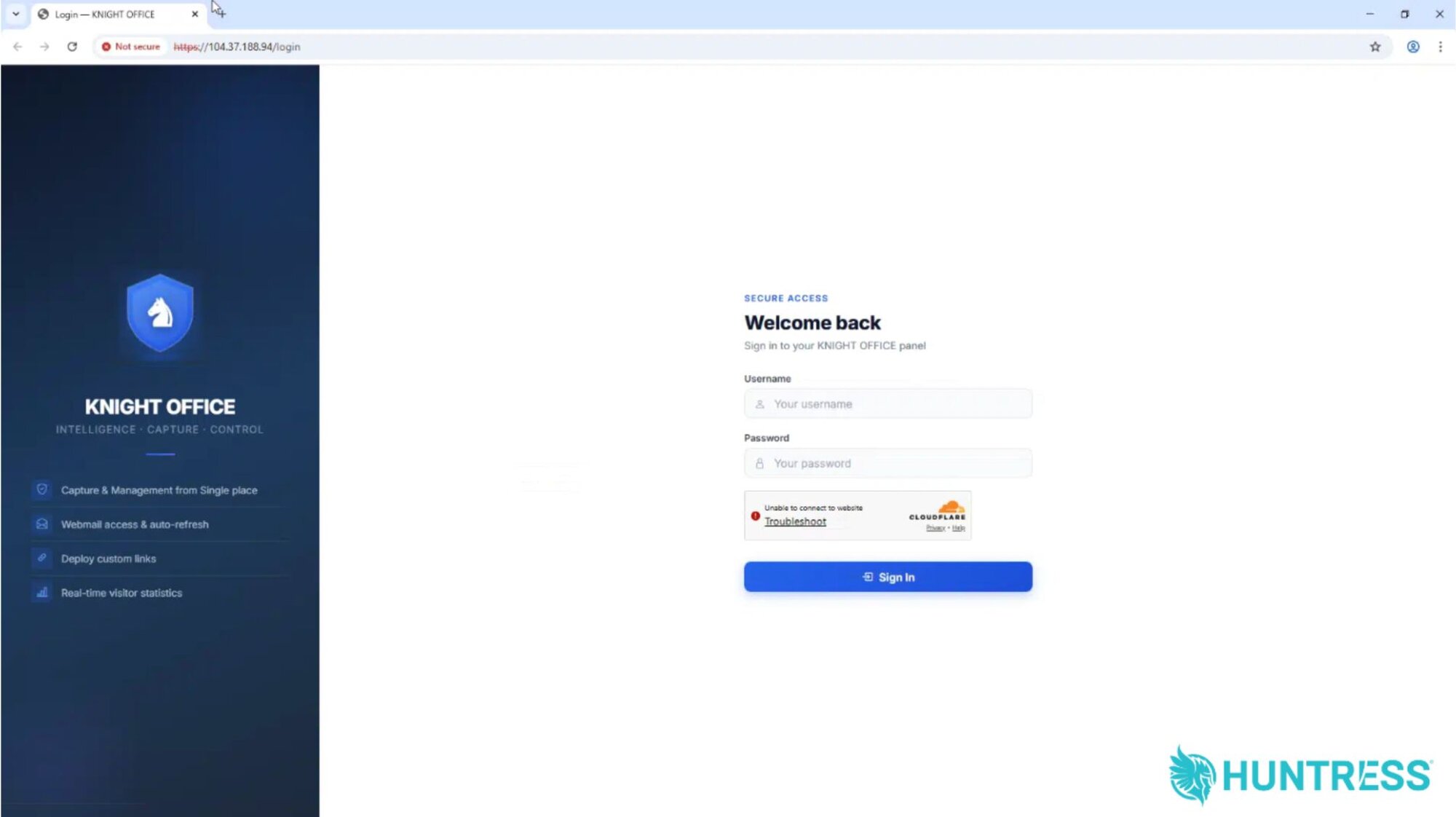
Figure 1: The Knight Office console
One important distinction: Our researchers uncovered the Knight Office console, which is the operator-facing dashboard built on top of the underlying kit's source code. This is the login page for the web interface where attackers can monitor live victim sessions, view captured credentials, and export stolen data. This is different from the source code itself, which provides the majority of the victim-facing components of the kits, such as the HTML templates used for phishing attacks, credential-capture scripts, and more.
As such, during our investigation we used our own detection telemetry from the initial AiTM attack, as well OSINT from external platforms like Validin and VirusTotal, to better understand how the attack chain linked to the kit worked, to investigate the IP hosting the console, and to find related domains and other infrastructure.
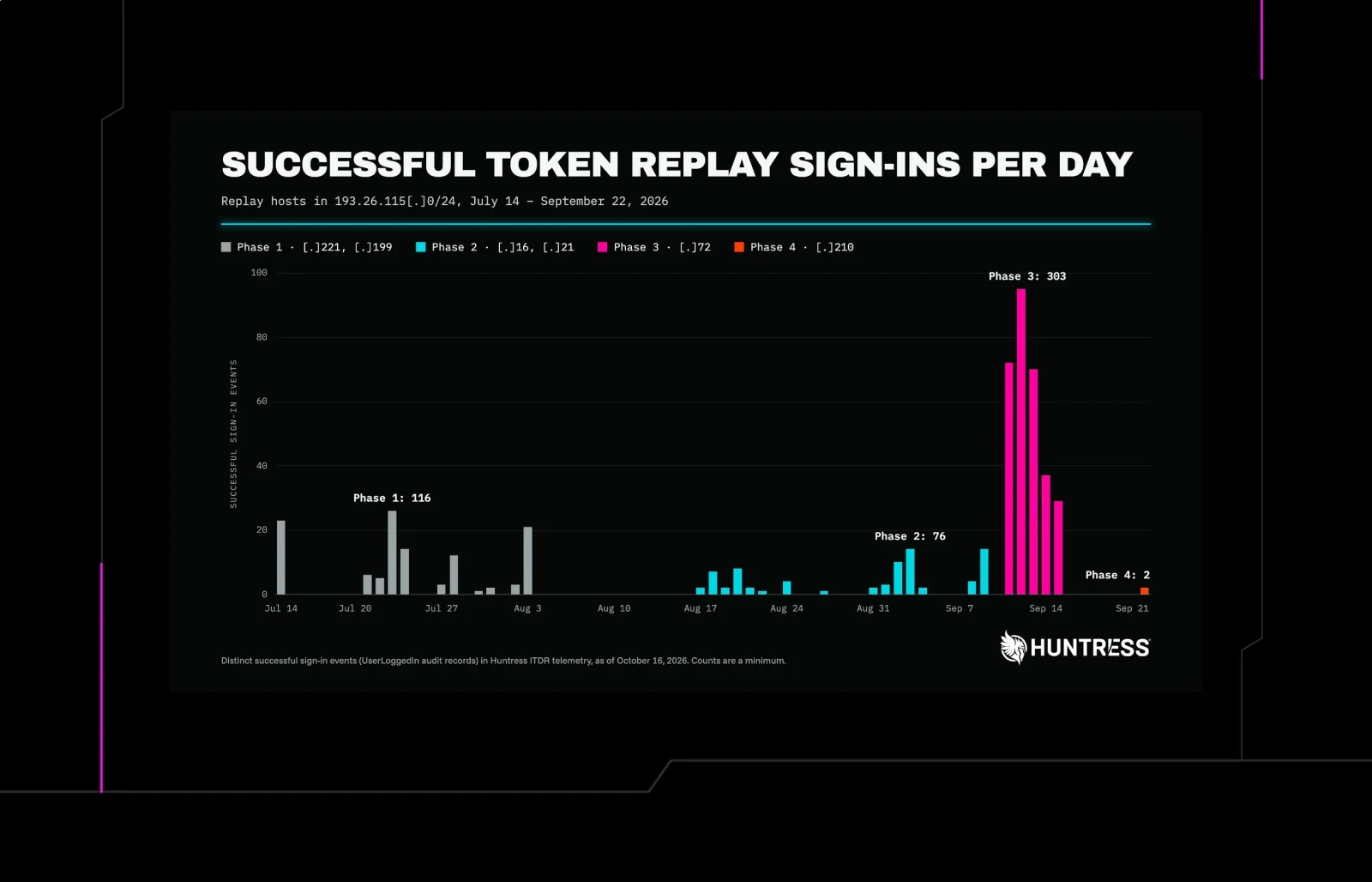
What's also clear is that this attack is not one-off phishing; a look across Huntress telemetry using this IP revealed that at least nine total token replay logins on identities have been linked to this kit over the past two weeks. Internal telemetry also shows that hundreds of emails with the same message template used in this attack have been reported through the Huntress Security Awareness Training (SAT) platform since April. Below is a breakdown of the attack.
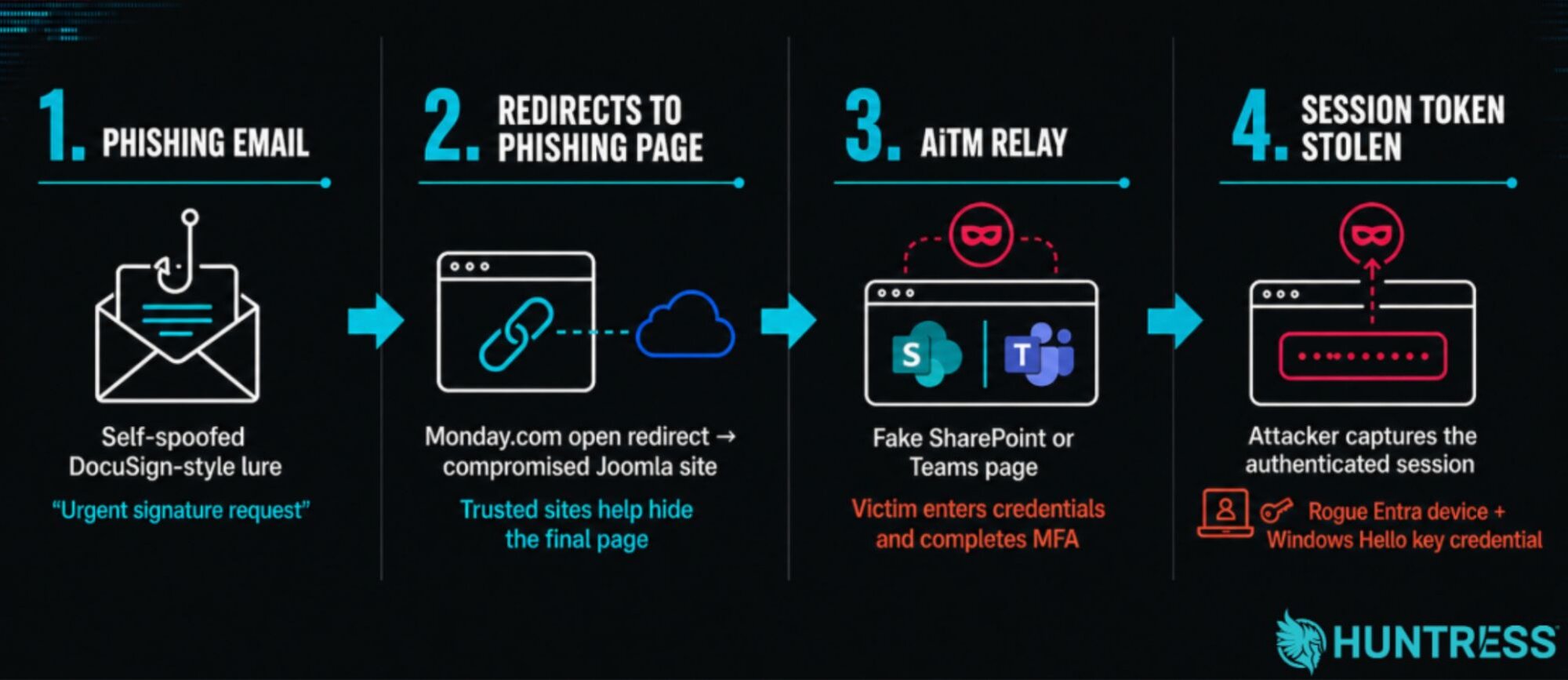
Figure 2: Breakdown of the attack based on detection telemetry and VirusTotal OSINT
An August AiTM attack opens the door
On August 18, the SOC responded to suspicious authentication activity linked to a Microsoft 365 account. The activity consisted of two post-MFA authentication events against the Microsoft Authentication Broker app. The app came from an IP (73.125.13[.]x) that is registered to Comcast Cable Communications, but is flagged by IP intelligence company Spur as a callback proxy that has been associated with multiple proxy resale operators (as such, we have redacted this IP in this blog).
The IP offered the first hint that the employee had been targeted by an AiTM attack. Callback proxy IPs reveal a break in the normal one-to-one connection between users and identity providers. While legitimate logins show consistent IPs across the sign-in and token-callback steps, in AiTM, a reverse-proxy phishing kit sits between the victim and real service as a way for threat actors to relay credentials and MFA in real time. The initial request might show the victim's IP, but the callback where the token is actually issued completes via an attacker proxy server, usually with an IP unrelated to the victim's location, as was the case with this incident.
Our further investigation into the incident revealed more details about the attack chain.
The lure
We obtained the initial email lure while investigating this incident. As seen in Figure 3, the threat actor initiated this incident by delivering a DocuSign-style email with a pressing subject line asking for a signature to be completed: Reminder: Signature Required - Approval Pending Your Review!!! Ref ID-<random>
The lure used a self-spoofing technique, which is when a phishing email is forged to appear as though it came from the recipient's own address (via the From, To, and Return-Path headers).
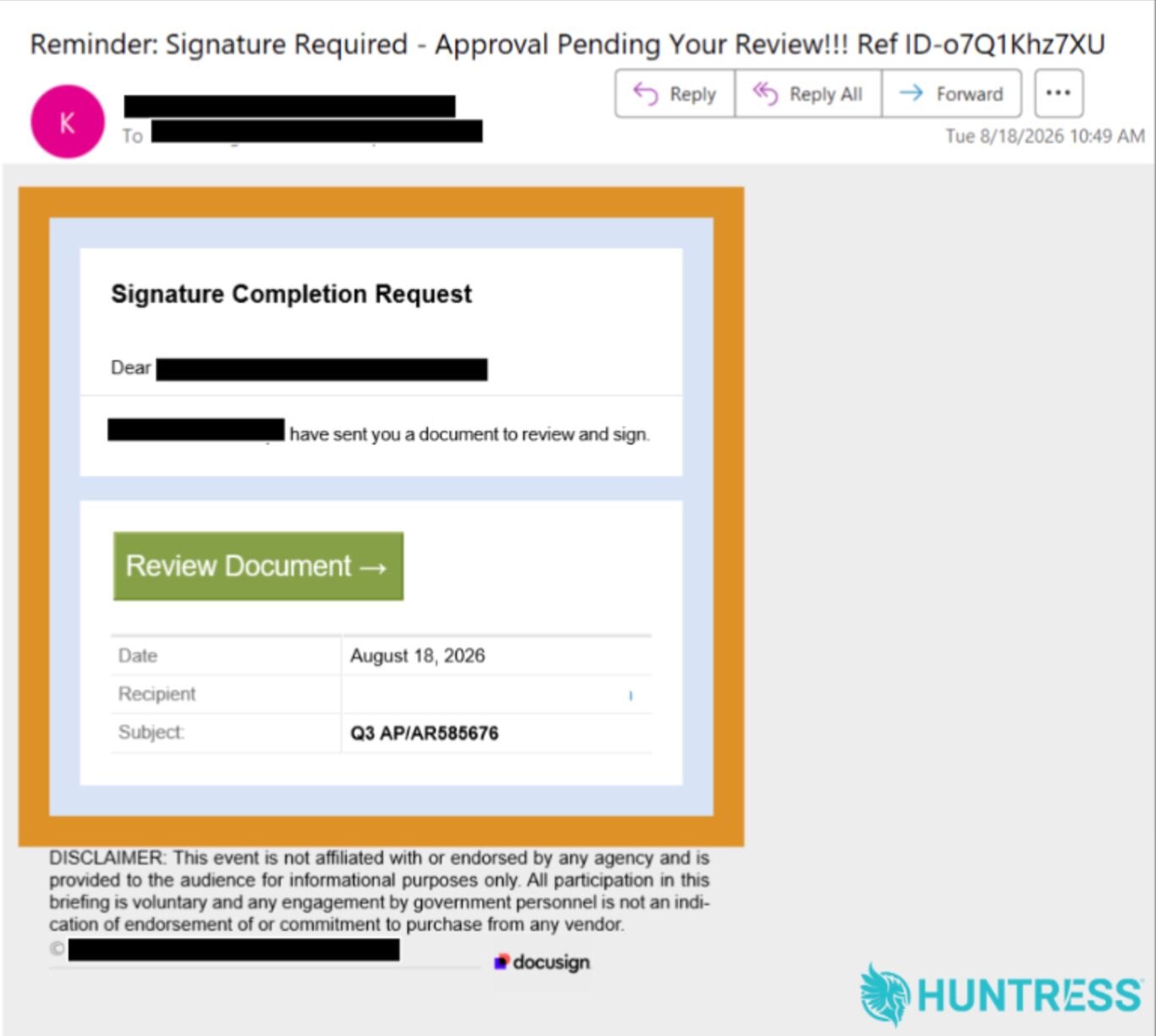
Figure 3: The lure email behind the AiTM attack
Upon looking through our SAT telemetry, which collects data about phishing emails that have been reported by customers, we found at least 700 emails that have been reported since April with several variations of this lure, subject line, and template.
Externally, the phishing lure seemed to be prevalent as well. In this specific attack, the initial email sender's IP linked to the email was 154.127.53[.]78.
A closer inspection of this IP address on VirusTotal showed an additional 14 email messages that were all related to the original email based on both the email content (the subject lines follow a pattern) and the final phishing page. Each of the messages contained links pointing to different websites that redirect the user's browser to one of a smaller number of final URLs where the phishing pages are hosted.
The subject lines of these messages included:
Reminder: Signature Required - Approval Pending Your Review!!! REF-ID[10 random letters]You Missed (2) lmportant VoiceMessage; Please Review Now!!! REF -[10 random letters]Sjc Shared an lmportant Document with you that required your Attention and Slgnature!! - REF -[10 random letters]VERlVIED: Caller left[random digits]minutes[random digits]seconds REF -[10 random letters]lmportant: (3) Playback-MSG Arrived from[name]- Listen Now
It's worth noting the substitution of the lowercase "L" character in place of the letter "i" in words like lmportant, Slgnature, and VERlVIED as a distinctive characteristic of this campaign, as well as the frequent use of exclamation points.
The "login" pages
Looking back at Huntress detection telemetry from the AiTM attack gave researchers further information about the next phase of this attack. The "Review Button" prompt in the email led to a malicious link. This redirect link was via a domain from the Monday work management platform. The target was then redirected to a compromised Joomla site. However, when Huntress researchers inspected this compromised Joomla webpage, it had been taken down.
Because this initial killchain was dead, we investigated the original spam email and used the emails found via VirusTotal (detailed in the previous section) to hunt down copies of a similar message that linked to the same URL. Through this, we determined how threat actors likely launched the next phase of the attack: Victims would be presented with a page that purports to be either a message from Microsoft Sharepoint or Teams. The page implies that there was either a document (in the case of the SharePoint version) or a voicemail (in the case of the Teams version) for targets to download.
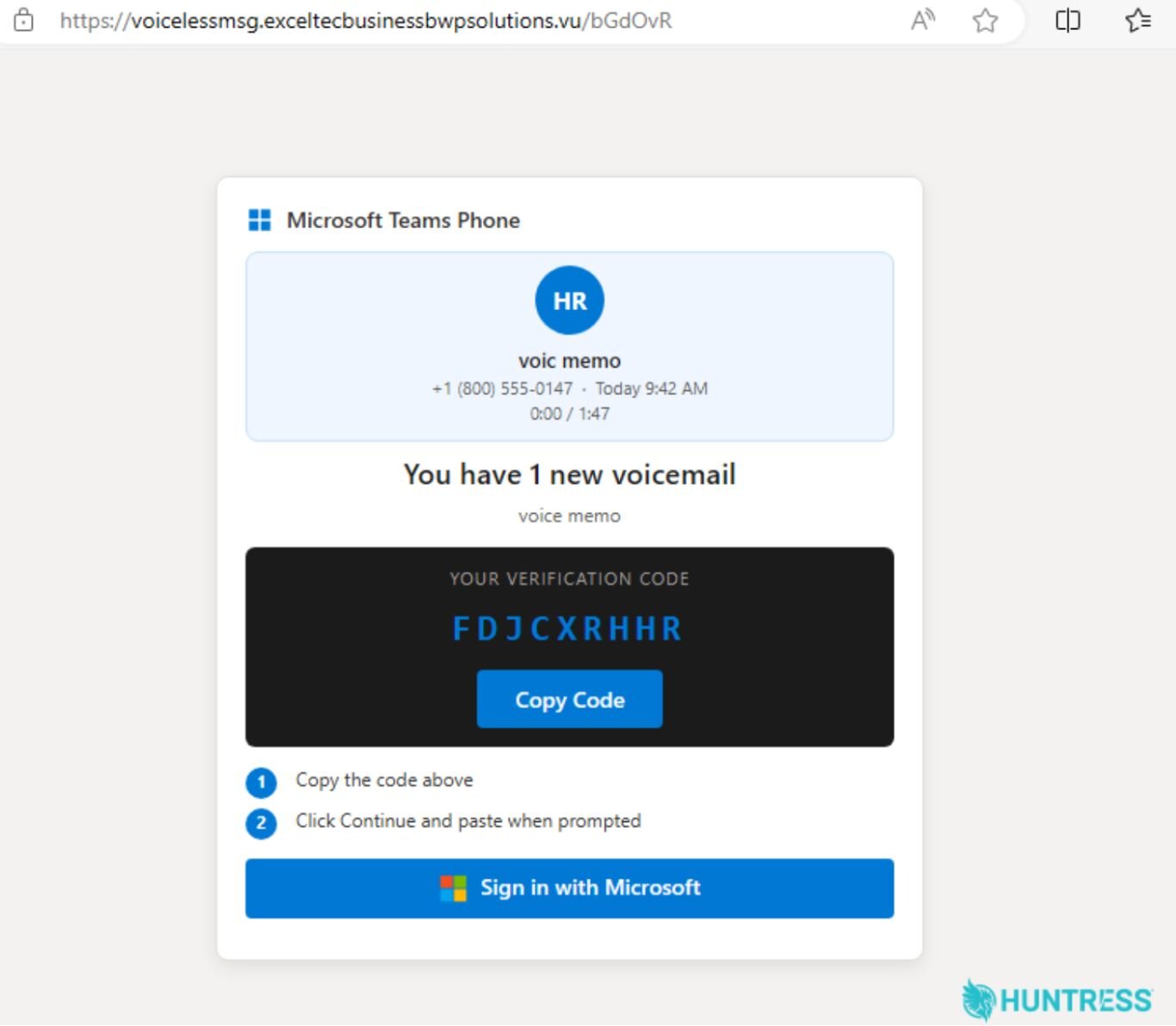
Figure 4: The phishing page presents the visitor with a device authentication code. If the visitor enters this code and logs in to their Microsoft account, it provides the threat actor with access to the target's computer.
The page gives the targets a verification code to copy and tells them to "Sign In With Microsoft," upon which they're presented with the page on Figure 5.
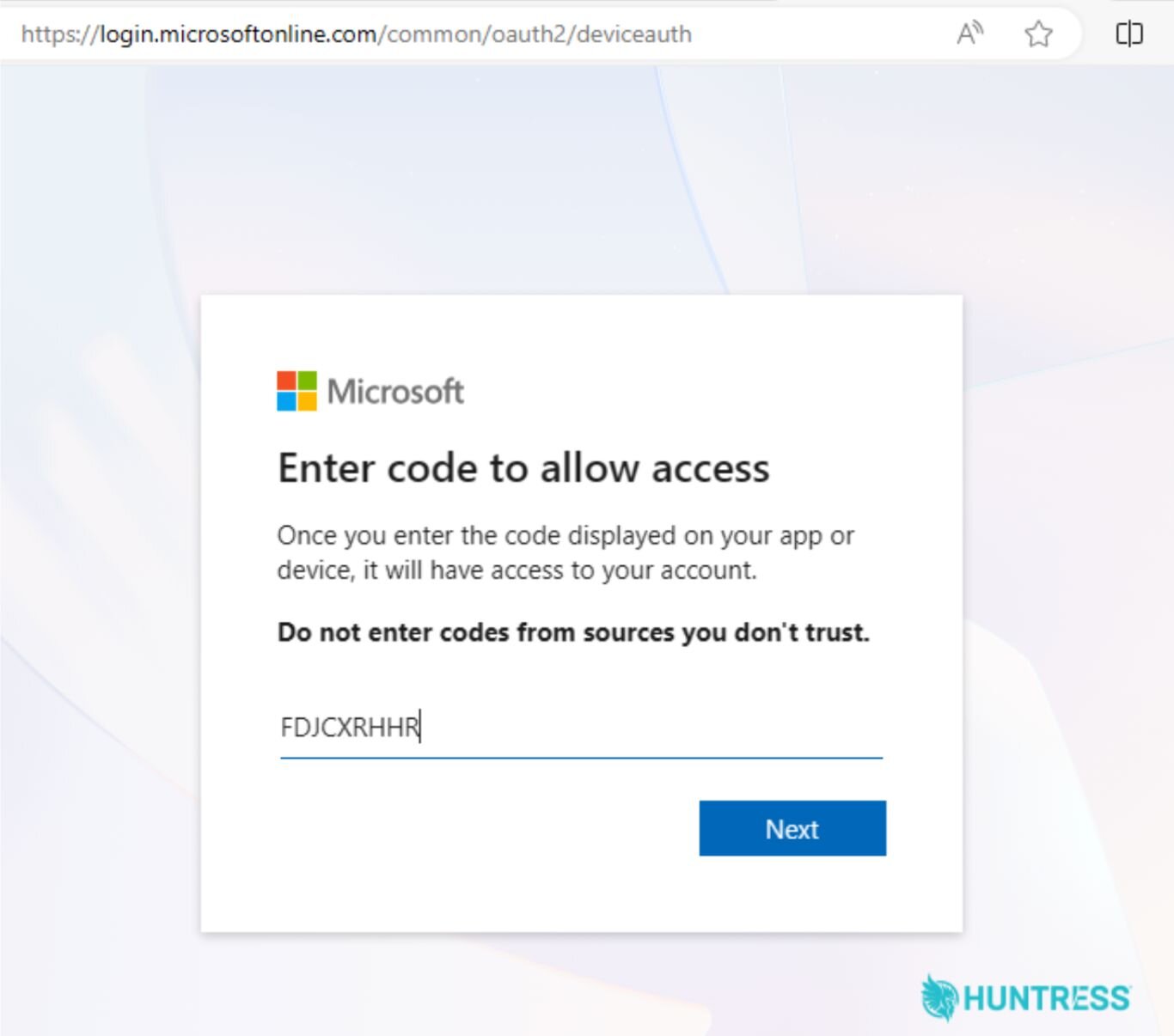
Figure 5: The phishing page opens a new tab to Microsoft's login window for Device Authentication codes, and its instructions prompt the target to paste the code into the form. The form ironically states: don't enter codes from sources you don't trust.
This next page opens a new tab in the browser to Microsoft's "deviceauth" login screen. If the target follows the instructions on the previous page and pastes the nine-letter deviceauth code into the form, and clicks Next, the page prompts the target to enter their Microsoft credentials and complete the follow-on MFA push prompt (via Microsoft Authentication Broker / OfficeHome).
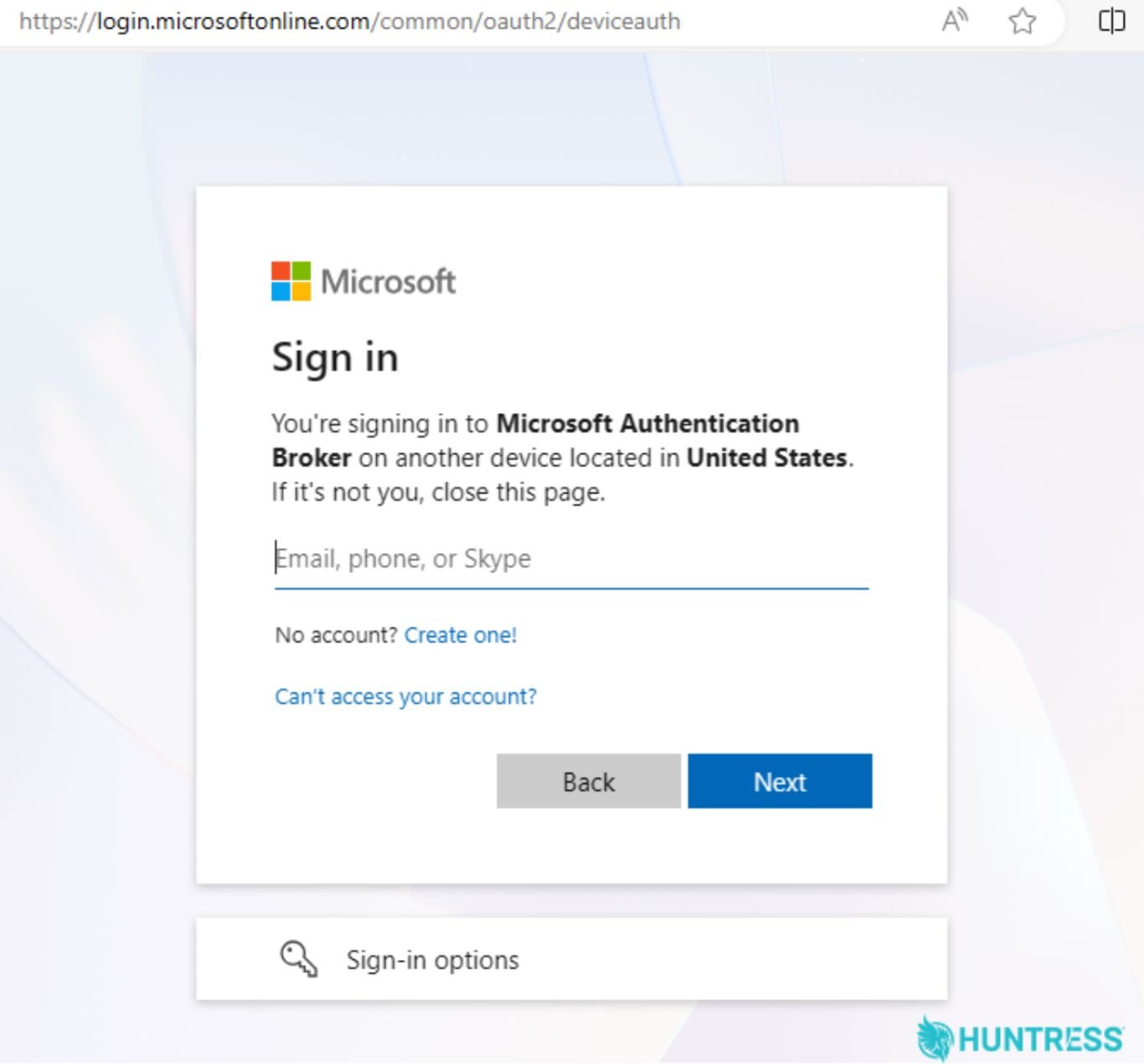
Figure 6: After entering the device code authentication token, the target gets prompted to log in using their credentials, including MFA if they have it set up.
the relay. Behind the scenes, captured session tokens would then be fed into the threat actor's operator console.
At this point, the puzzle pieces started to come back together when we revisited the initial AiTM attack. Huntress telemetry showed the stolen tokens being replayed from the data center hosting ranges via the default python-requests/2.34.2, OAuth2:Token User-Agent.
Because the operator used pre-validated session tokens, they could bypass authentication controls without triggering password-based detection alerts on the user's computer. The authentication logs showed zero bad password attempts, and the other observed failed attempts were purely from expired tokens or missing device keys.
Login attempts and persistence
After retrieving the session tokens, the threat actor registered a rogue device from 104.37.188[.]94 and then made two OAuth 2.0 token-authentication attempts using the replayed session tokens—but both failed because the required NGC key was not yet available. The NGC key is used for the Windows Hello for Business (WHfB) passwordless authentication feature.
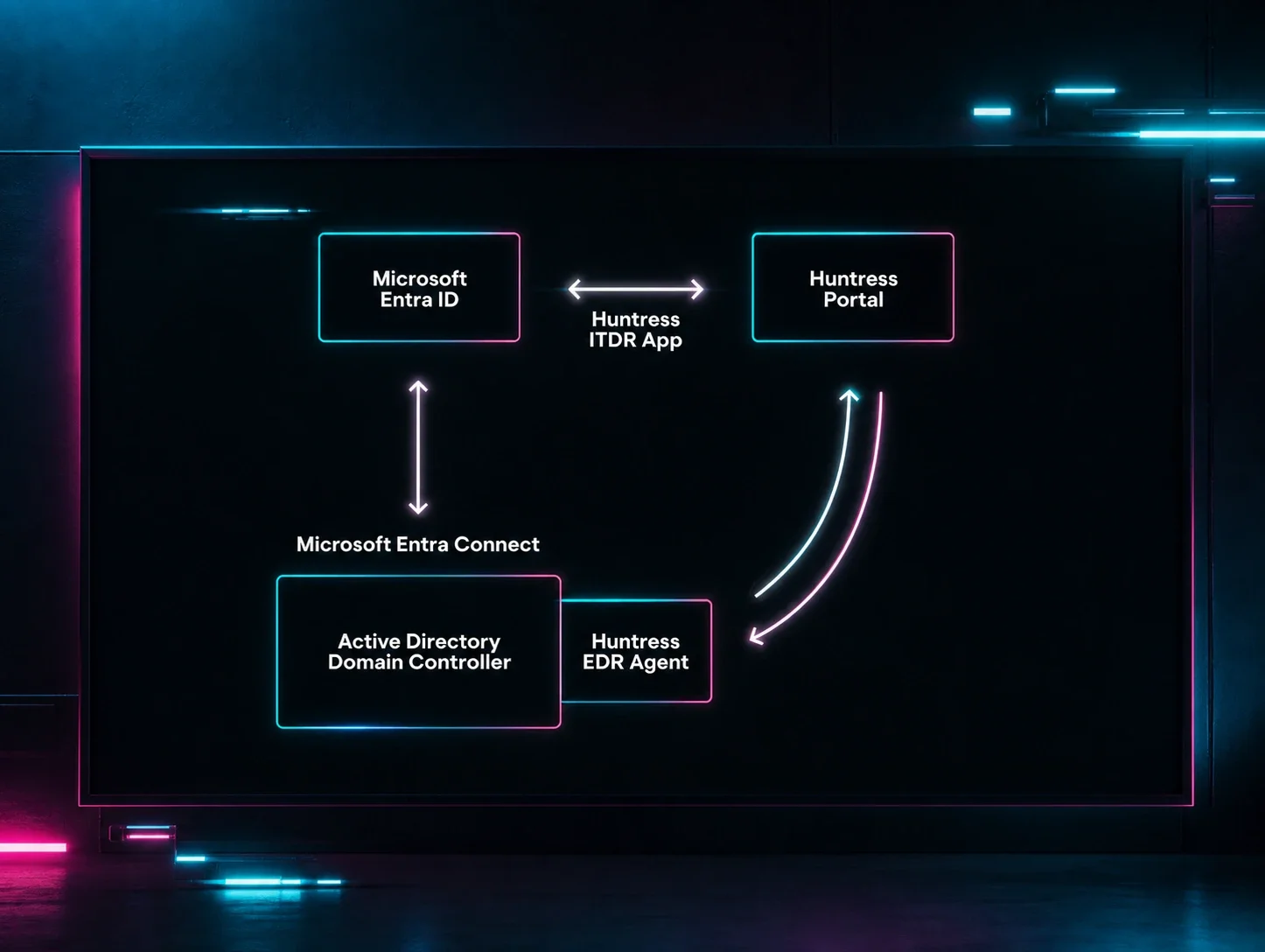
Shortly after, the threat actor enrolled an unauthorized host into Microsoft Entra ID and completed a rogue, attacker-controlled device registration.
Then, they bound a WHfB key credential to the account (as identified via Dsreg/10.0 (Windows 10.0.19044.1826). While WHfB usually provides strong passwordless authentication for legitimate users, if an attacker enrolls their own key they can easily regain access after existing tokens on an account are revoked.
The threat actor then signed in again, this time successfully, using WHfB passwordless authentication.
AiTM and phishing kits
Knight Office is just one of many phishing kits we've seen that specifically target valid session tokens in an effort to skirt around MFA. While the control panel looked simple, it was only part of the broader attack chain that used trusted redirect infrastructure, compromised websites, and residential callback proxies in order to launch an AiTM attack. Once the victim completed MFA, they unknowingly gave the attacker a valid session token, shifting the focus from stealing passwords to abusing already authenticated access.
Like many other phishing kits we have seen over the past year (such as EvilTokens, Kali365, and more) the attack linked to Knight Office relies on AiTM, which has grown popular because it bypasses MFA. Rather than just stealing passwords, AiTM steals session tokens after the real user completes the MFA, giving attackers valid, persistent, already-authenticated sessions.
For defenders, AiTM attacks like these call for looking beyond failed logins and suspicious password activity:
Detect unexpected post-MFA authentication from callback proxies, and sign-ins associated with unfamiliar devices, can help expose session token theft.
Review newly registered Microsoft Entra devices and Windows Hello for Business credentials.
Remove unauthorized authentication methods.
Disable any synchronized accounts in on-premises identity systems.
Related: another way to steal M365 sessions. Kits like Knight Office capture sessions through a fake login page. Device code phishing reaches the same outcome using Microsoft's real sign-in. Watch a live demo.
Indicators of Compromise (IOCs)
Item | Description |
|---|---|
| IP address of the lure sender in example case |
| Subject line of lure email |
| IP address of the phishing control panel host found by pivoting from the phishing page title |
| Domain of the phishing control panel host found via reverse IP lookup of |
| Operator console page title |
| Redacted IP address of the first AiTM authentication (residential callback proxy) |
| Cloudflare Turnstile Sitekey |
| User agent string |
| Windows Hello for Business (WHfB) added user agent. |
| Observed replay infrastructure |
| Phishing domains used by the threat actors involved in this campaign |
MITRE ATT&CK Mapping
Tactic | Technique | Context |
|---|---|---|
Resource Development | Stage Capabilities: Link Target (T1608.005) | Threat actors potentially set up a target page to mask the true destination by using an open direct parameter on |
Initial Access | Phishing: Spearphishing Link (T1566.002) | Threat actor sends a phishing email that lures the victim to a malicious site via an |
Execution | User Execution: Malicious Link (T1204.001) | Threat actor uses social engineering via a phishing email to urge the victim into actively clicking an |
Persistence | Account Manipulation: Device Registration (T1098.005) | Threat actor uses an active hijacked session to enroll an unauthorized host into Microsoft Entra ID, completes a rogue device registration, and binds a WHfB key credential to the compromised account. |
Stealth | Valid Accounts: Cloud Accounts (T1078.004) | Threat actor uses captured legitimate session tokens to bypass authentication controls without triggering password-based detection alerts. |
Stealth | Social Engineering: Email Spoofing (T1684.002) | Threat actor modifies email header values to change the identity of the sender and trick the recipient under false pretenses. |
Credential Access | Multi-Factor Authentication Interception (T1111) | Threat actor sets up a relay to capture valid authentication artifacts right as the victim accepts the MFA push prompt. |
Credential Access | Adversary-in-the-Middle (T1557) | Threat actor steps in between the victim and authenticating services to hijack valid session tokens in real time. |
Credential Access | Steal Application Access Tokens (T1528) | Threat actor intercepts and harvests legitimate session tokens to gain unauthorized access to the victim's Microsoft 365 environment. |
Command and Control | Proxy: Multi-hop Proxy (T1090.003) | Threat actor chains multiple routing layers to hide the actual origin of their malicious traffic while targeting victims and capturing valid credentials. |
Command and Control | Hide Infrastructure (T1665) | Threat actor potentially masks their operational servers behind trusted, valid platforms, hijacked sites, and proxy networks. |