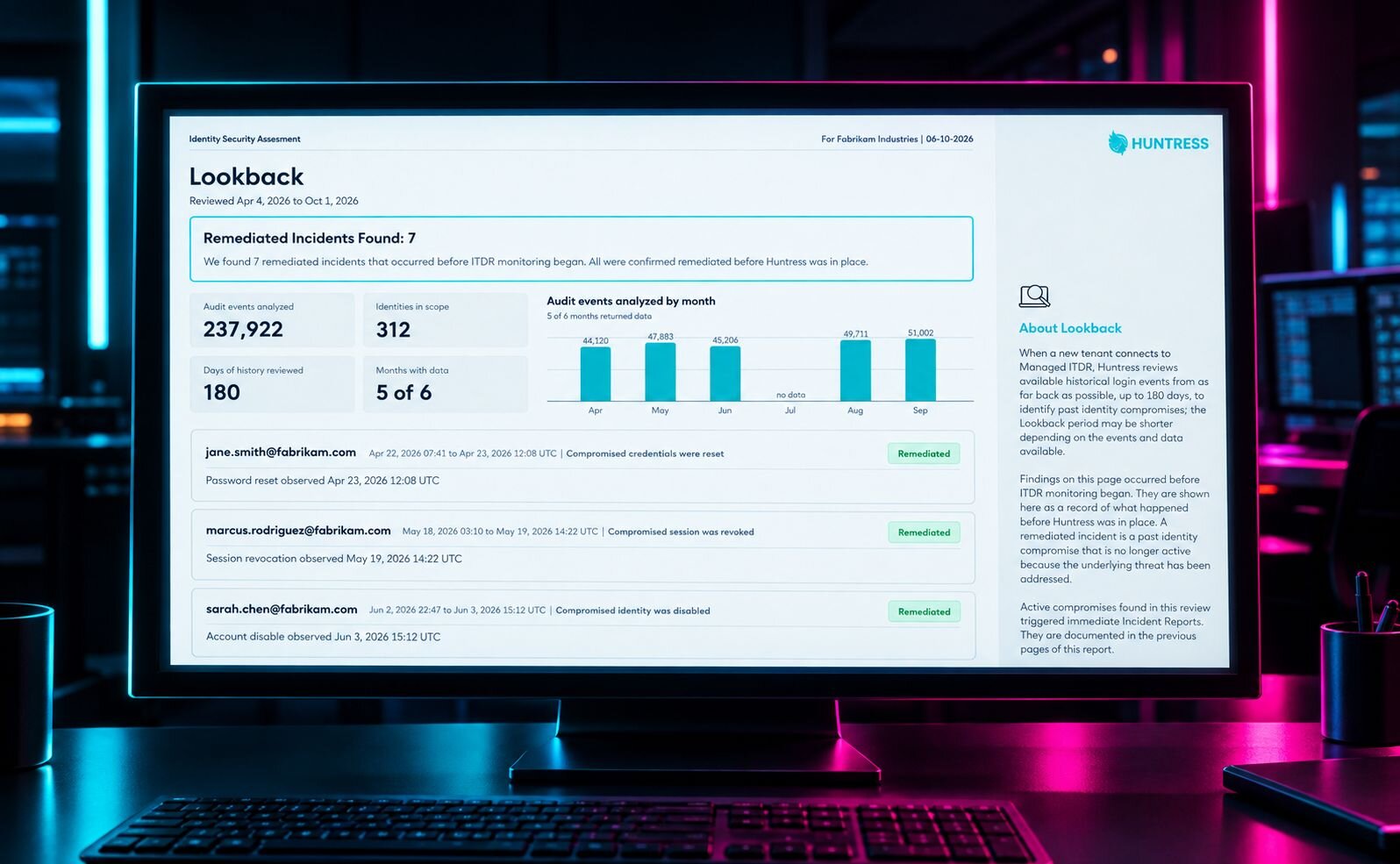


Today, Huntress Managed ITDR's Lookback feature is generally available for newly onboarded Microsoft 365 tenants. Lookback automatically examines up to 180 days of login history to uncover evidence of compromise before Huntress connected. When a compromise is still active, our Security Operations Center (SOC) investigates and revokes the identity's active sessions.
Onboarding a Microsoft 365 tenant feels like a fresh start. You go through your checklist, and a successful connection tells you monitoring has started. But it doesn't tell you if an attacker got there first. Your first day protecting a tenant might be an attacker's twenty-seventh day inside.
That's what Lookback seeks to solve. You get a clearer picture of the tenant you've inherited, plus defenders who act on what they find. And yes, that includes trial tenants.
Six months of login history. A much stronger start.
Lookback runs once, automatically, when a Microsoft 365 tenant finishes onboarding to Managed ITDR. There's nothing extra to configure and no separate scan to remember to launch.
Huntress Managed ITDR's new Lookback feature is generally available, bringing up to 180 days of Microsoft 365 login history into the hunt for existing compromises.
Lookback applies Huntress's full set of Unwanted Access detections to the tenant's available Microsoft 365 login history, looking back up to 180 days. That includes detections for credential theft, token theft, adversary-in-the-middle attacks, suspicious browsers, and datacenter logins.
Here's the tricky part: evidence of an old compromise doesn't necessarily mean an attacker still has access. Someone may have already reset the password or revoked the compromised sessions. Treating every historical finding as a fresh emergency would make onboarding pretty miserable.
Lookback separates findings based on whether the compromise is still active:
Active compromises receive a critical Incident Report investigated by the Huntress AI-centric SOC, with the identity's active sessions revoked. This turns historical evidence into a reason to act right away.
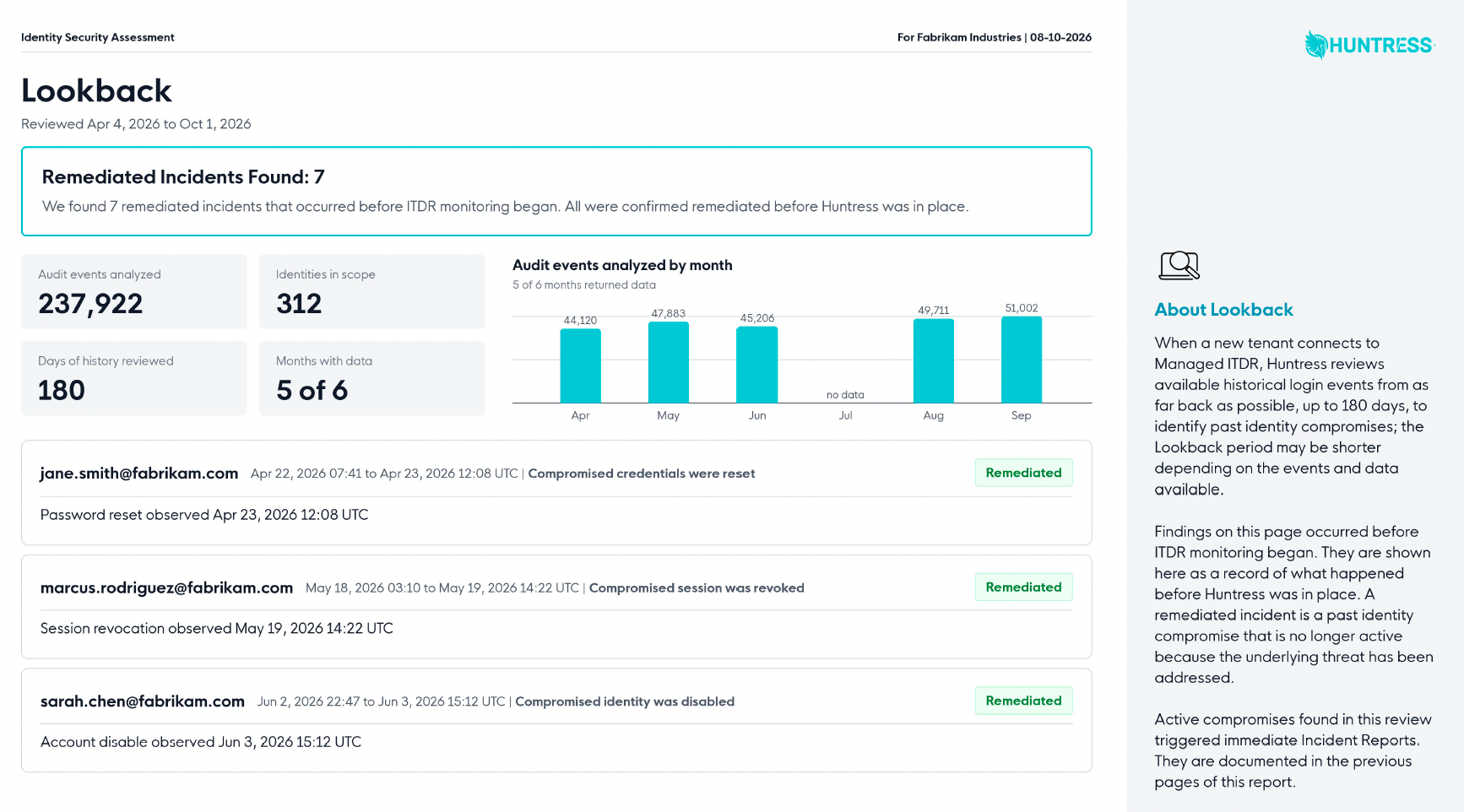
Previously remediated compromises appear in the Identity Security Assessment as historical context. They don't trigger a new incident or an unnecessary lockdown for something you've already fixed.
That distinction matters. A raw list of suspicious logins leaves the sorting to you. Lookback does it first, so you can see what happened and which parts still need attention.
What's in the report, and where do you find it?
Lookback adds a dedicated section to the Identity Security Assessment, covering compromises that predate Huntress monitoring. It shows the period reviewed and previously remediated incidents, including affected identities, relevant dates, and observed remediation evidence, such as a password reset or session revocation. The report gives you a documented history you can use in a customer conversation or share with leadership.
That history sits alongside the assessment's existing coverage of identities, Rogue Apps, Shadow Workflows such as malicious inbox rules, Unwanted Access, and SOC findings and containment actions. Active compromises uncovered by Lookback also receive their own Incident Reports.
Lookback is part of onboarding for newly connected Microsoft 365 tenants. The assessment is generated automatically after onboarding and waits for Lookback to finish, so you receive one complete document. Once that historical review is complete, Managed ITDR continues monitoring for new threats with the Huntress SOC behind it.
The attackers who arrived before we did
In Lookback's first two weeks of early testing, Huntress reviewed more than 400 tenants. Among them were three very different organizations with the same unwelcome surprise: an active compromise already in progress.
A title company and a $2 million wire
A device-code phishing attack gave an adversary access three days before the tenant onboarded. The attacker persisted through a rogue Entra device and was watching a $2 million real estate wire transfer. Lookback surfaced the active compromise, which Huntress contained.
For a business moving that kind of money, "let's wait until the attacker does something else" is a lousy security strategy.
A school district with an unwanted administrator
A school district's Global Admin account had been compromised 27 days before onboarding. An unrevoked refresh token and a rogue Azure AD device kept the attacker's access alive, with the privileges to control the tenant. Lookback uncovered the compromise, and Huntress contained it. Twenty-seven days is a long head start. Connecting a new security tool shouldn't give the attacker more time simply because the break-in happened earlier.
An architecture firm turned into a phishing launchpad
An architecture firm onboarded with a nine-day foothold still active. The attack involved a hidden inbox rule and 103 external OneDrive phishing invitations sent in a single scripted second. The compromised account had become infrastructure for targeting other people. Lookback surfaced the compromise, which Huntress contained.
In all three cases, the attack began before onboarding. Looking backward gave our defenders evidence to act on right away, without waiting for an attacker's next move.
Less guesswork for you, more proof for your customers
If you're an MSP, every new client brings a history you didn't write. You still have to explain what you've inherited and what you plan to do about it.
Lookback helps you start that relationship with evidence from the client's own environment. You can show past compromises, distinguish resolved activity from active threats, and explain where Huntress has intervened. The shareable assessment makes that conversation easier, while SOC investigation and containment keep the historical review from becoming another helpdesk project.
Internal IT teams get the same benefit. Whether you've inherited a tenant through an acquisition, a vendor change, or staff turnover, you don't have to become a Microsoft audit log specialist to spot signs of prior compromise.
And if you're evaluating Huntress, your trial includes the same Lookback protection as a paid tenant. You can see what we find in your environment and how we respond to active threats while you're still making your decision.
Looking back is how we keep moving forward
Lookback is the latest step in our work to build best-in-class Managed ITDR that earns its place in your security stack every day.
The new ITDR dashboard puts identity activity and investigation tools closer at hand, including Rapid Identity Triage, Failed Login Characterization, and Quick SIEM Search. And the recently released ITDR Executive Summary makes technical incident findings easier to explain to business leaders, with plain-English context about what happened and the response.
Lookback extends that progress into the history you inherit at onboarding. Together, these releases help you understand existing threats, investigate current activity, and explain the work being done to protect the business.
Our standard for innovation is practical: does it help find an attacker, take work off your team, or give you an answer you couldn't easily get before? Lookback delivers on all three, backed by the same 24/7 SOC that protects your identities going forward.
Your tenant has a past, and now you can find out who's still living in it.
Ready to see what came before day one? Start a free trial of Huntress Managed ITDR and connect a Microsoft 365 tenant. Lookback runs automatically, with findings in your Identity Security Assessment and SOC response for active compromises.