


Background
In early October, Huntress began seeing threat actors exploit two flaws in AhsayCBS, the management console for Ahsay's backup software: CVE-2026-105133, an authentication bypass, and CVE-2026-105134, unauthenticated remote code execution as SYSTEM through /rps/api/json/UpdateReceivers.do. Our original blog post covered the first wave: webshells, an XMRig miner dressed up as Microsoft Edge, and a script that hid the miner from Task Manager. Ahsay has since released hotfixes (10.3.4.45 for v10, and 9.15.2.70 for v7 through v9), and we verified that 10.3.4.45 blocks the entry point we saw.
The impacted organization's servers in this post were exploited between October 8 and October 11, 2026, which was before Ahsay released its hotfixes. During our investigation into the attack, we analyzed webshells, loaders, and an implant that the threat actor used during the attack.
This activity matches the campaign in our first post. We tied it to AhsayCBS exploitation because the webshells sat inside AhsayCBS's own web directories, the AhsayCBS access logs show an exploit source address that is listed in that post, and one of the servers also held files matching that post's indicators.
When organizations apply hotfixes, it mitigates the issue moving forward, but if a compromise has already happened it does not remove files an actor has already planted. If your AhsayCBS servers were exposed before patching, it's worth searching your environment for the artifacts in this post.
What we found, at a glance
Our initial report described incidents that involved a quick smash and grab: a webshell or a few commands, then a miner. However, this incident reflects a much larger intrusion with more patience; the operator planted shells in several places, ran two different miners, staged tunneling tools, and installed a custom implant, all on servers whose job is to hold backups. The rest of this post takes apart the pieces one at a time.
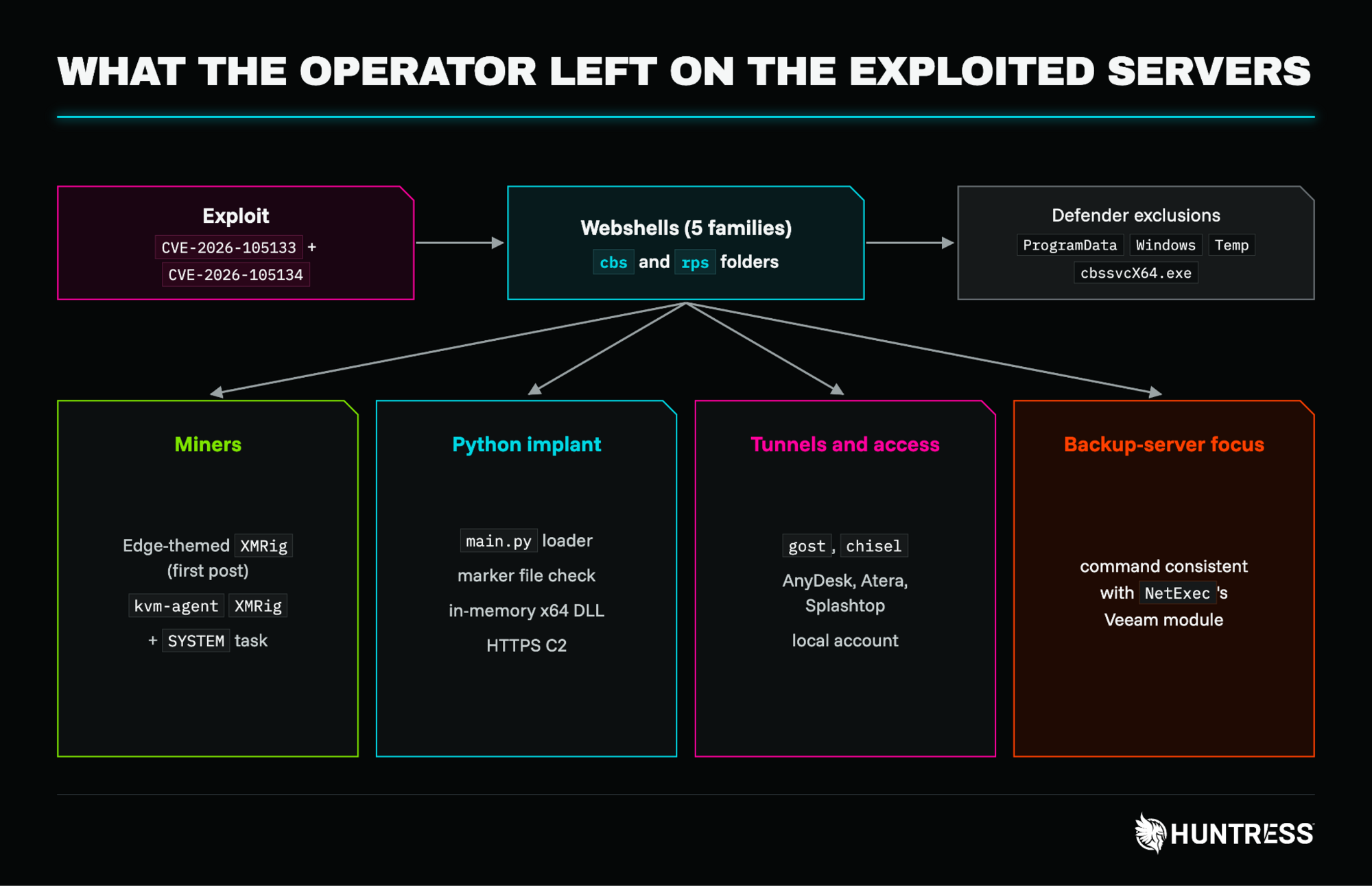
Figure 1: An overview of what the operator left on the exploited servers
Webshells, in several flavors
Overall, we saw five webshell families during our investigation (seen in the table below), all with varying parameters and characteristics.
One of the most common webshells we found in this environment was small in size: it compared a hardcoded key in the p parameter against its own copy and returned a plain 404 if the key is wrong, so a scanner that does not know the key would see an empty page. With the right key, the c parameter would be passed to cmd.exe /c and the output would come back Base64-encoded.
The second webshell family included w and d parameters, which were designed to write Base64-decoded bytes to any path the service account can reach and make it easy to drop more tools. Every file carried its own key (always 12 hex characters followed by a capital P).
The third family looked completely different, and included files named status_ followed by six random letters. These shells used auth, cmd, del, and rm parameters: they were designed to run commands, recursively delete any path they are given, and delete themselves. To the latter point, defenders should keep in mind that the shell can delete itself after use, so not finding the file on disk does not prove it was never present.
A smaller variant of this family, named st_ followed by six random letters, drops the authentication and the delete function. It takes c with no authentication at all, plus a get=env parameter that prints the application home, the Catalina base, the operating system and the temp directory, and an rm=1 parameter that deletes the file.
Family | Parameters and behavior |
|---|---|
|
|
| Same as above, plus |
|
|
| Signed API with |
| Loader for an encrypted payload hidden in a PNG, described below. |
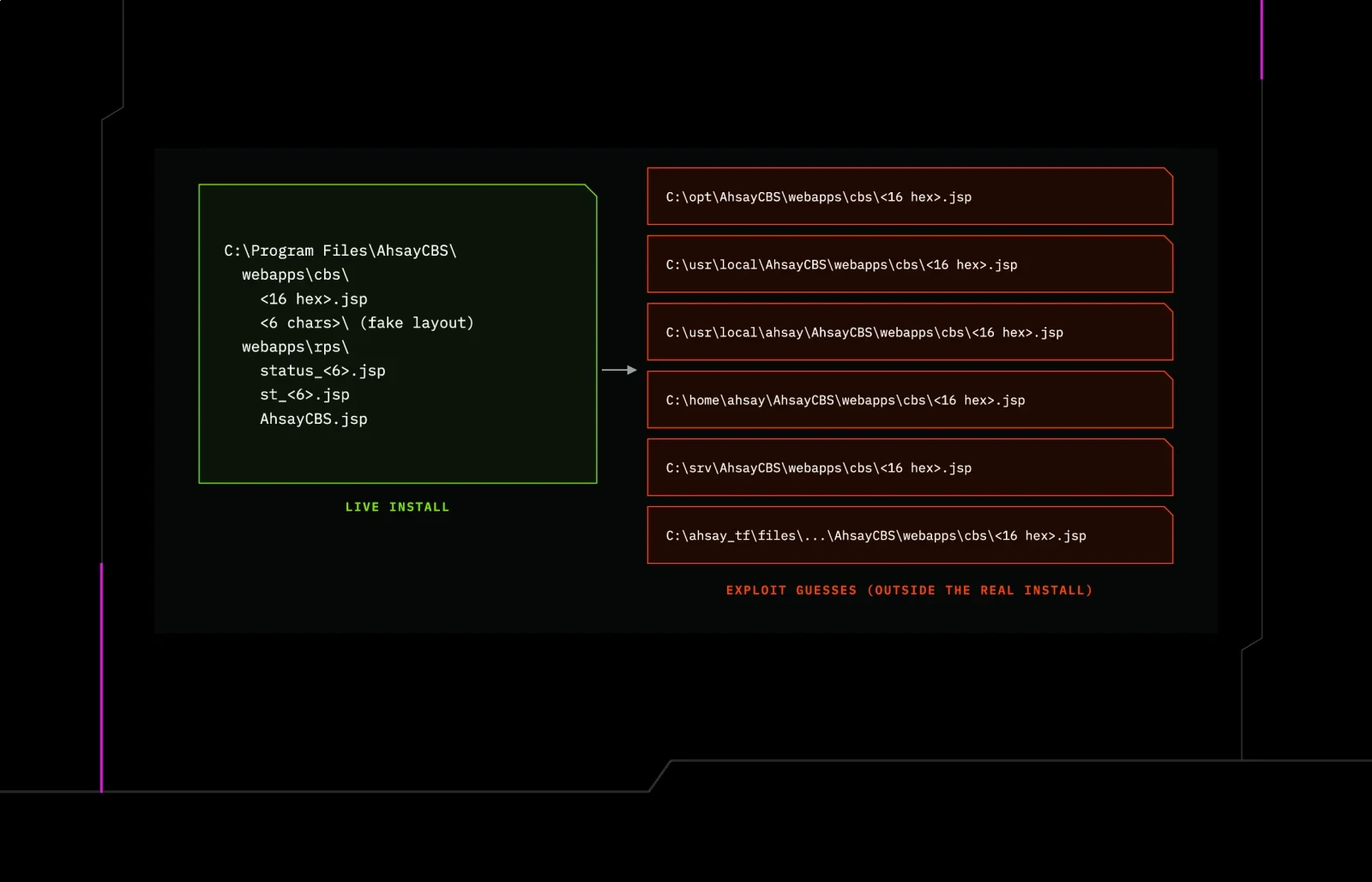
The folder locations where we found these webshells gave us further insight into how the attack might vary across operating systems. The impacted servers here ran Windows: however, the exploit also attempted Linux-style installation paths, suggesting the exploit was not tailored to one operating system.
In addition to webapps\cbs and webapps\rps in the real install, we found copies in directories matching Linux-style paths, including /opt/AhsayCBS, /usr/local/AhsayCBS, and /home/ahsay/AhsayCBS. On one of the affected Windows servers, these appeared as folders under C:\opt, C:\usr, and C:\home, with a staging folder, C:\ahsay_tf, holding another copy. That suggests the exploit was not designed for a specific operating system or install path, and simply tried every likely location.
The copies outside the live install were not served by the web application, so they probably cannot be used as shells on Windows, but they are a reliable tell. Several shells also sat in random six-character folders, each containing its own app, conf, and webapps\cbs subfolders. These imitate the structure of an AhsayCBS install, but none of the components are part of the real application. Some of those folders held empty pb_ marker files in the conf folder, and folders named ahsay_poc_*, ahsay_tf, ahsay_th and ahsay_t0 showed up in Program Files.
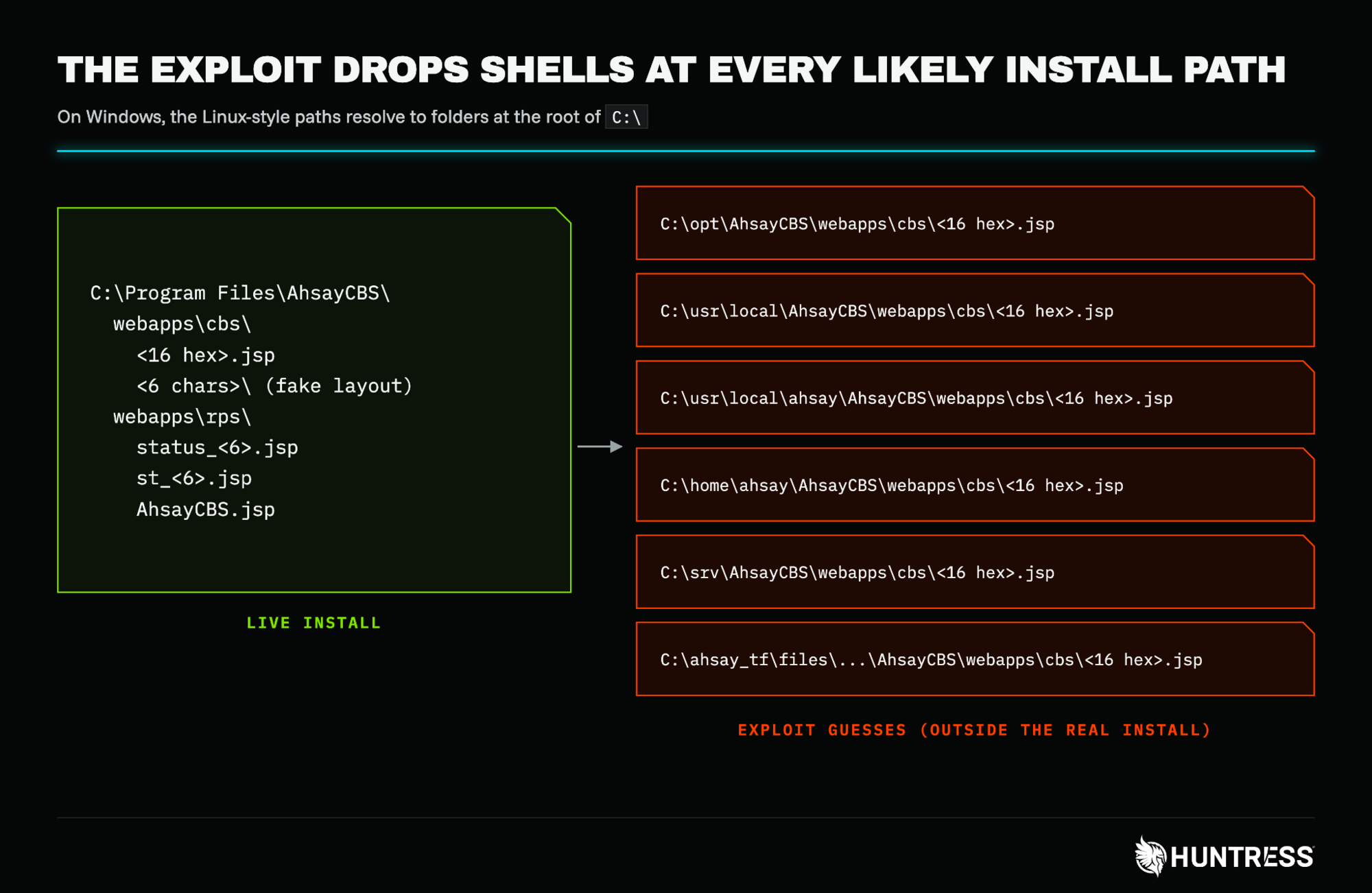
Figure 2: Shell locations on a Windows host: the live install, and the Linux-style paths the exploit also tries
A webshell that hides inside an image
One of the webshell families, AhsayCBS.jsp (in webapps\rps), was disguised as an image-preview service: it was designed to extract encrypted code from uploaded PNGs and run it in memory while making its traffic resemble ordinary image requests.
The webshell's disguise as an internal image preview service even extended down to a comment block describing a watermark endpoint. The webshell used only JSP implicit objects and fully qualified class names, meaning it would compile on any servlet container and on Java Development Kit (JDK) 6 and later.
On the sample we saw, the webshell was designed to work as follows:
First, the operator POSTs a PNG.
Then the page reads the least-significant bit of each pixel's red, green and blue values, one pixel at a time.
It strings those bits together and packs them into bytes, with the first bit read becoming the most significant bit of each byte.
That rebuilds a four-byte big-endian length followed by that many bytes of payload, which it then decrypts with AES.
The key is hardcoded, and the cipher is Java's default
AEStransformation (translating to ECB mode with PKCS5 padding).
On the first request, the decrypted bytes are loaded as a Java class through a small custom ClassLoader and stored in the application context under the attribute name QuCh, and the page answers with its built-in cover image. On later requests, it creates an instance of that class, hands it the request, an output buffer and the decrypted data through calls to equals(), and calls toString() to run it. Whatever the class produces is encrypted again and written into a new PNG.
Passing arguments through equals() is a convention used by some open-source in-memory webshell frameworks, though we have not tied this one to a specific framework. The practical effect is that the functionality arrives per request and lives in memory. The access log showed what looked like image traffic, and there was no c or p parameter to search for. We analyzed the loader, not the class it receives, so we cannot confirm what the operator actually ran through it.
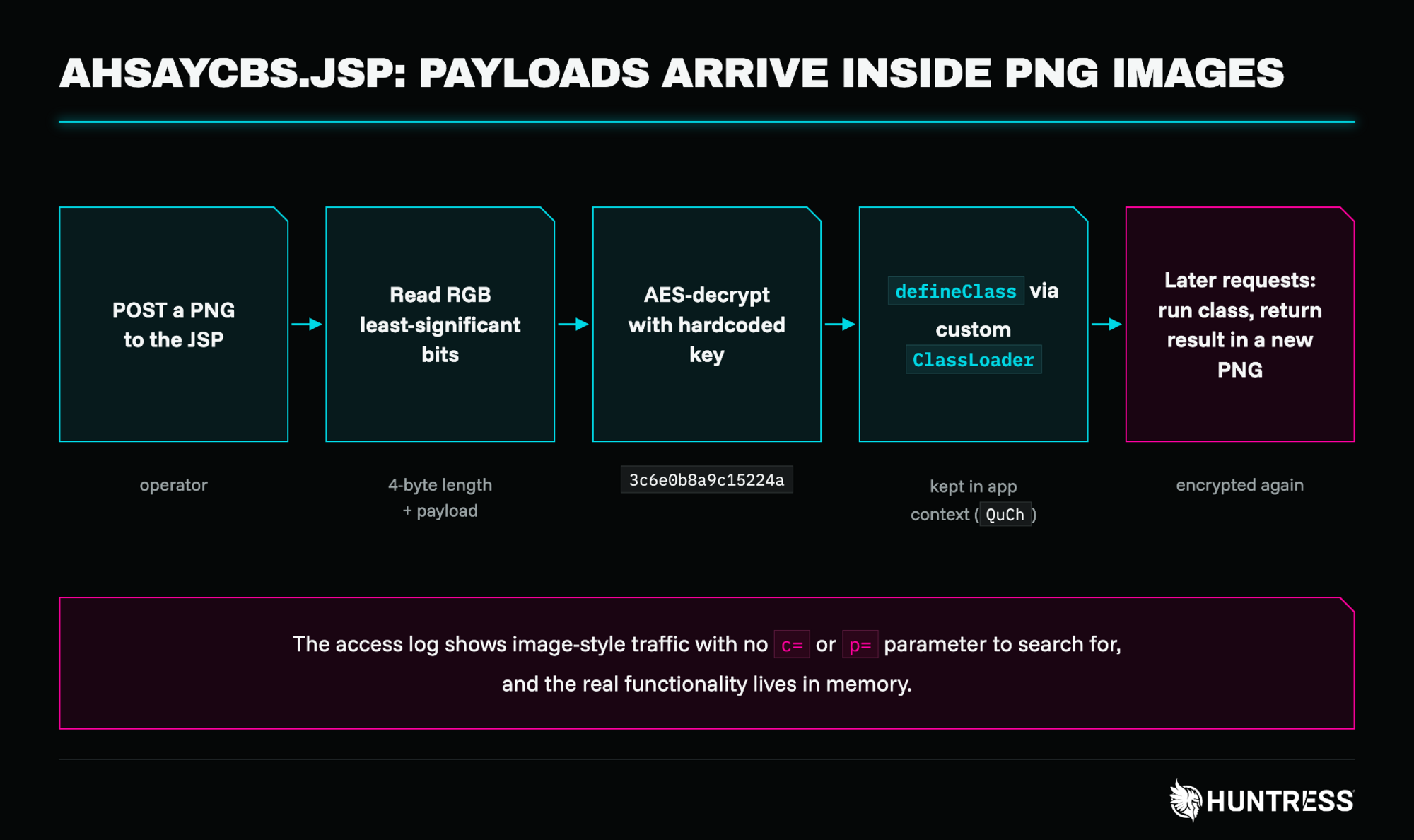
Figure 3: How AhsayCBS.jsp turns an uploaded image into running code
A webshell with a signed API
Not every shell was a one-liner. nsmind.jsp, also in webapps\rps, behaved like a small remote administration service.
In the sample we saw, every request must carry an X-Auth-Token header that matches a hardcoded API key, plus X-Timestamp, X-Nonce and an X-Signature header holding an HMAC-SHA256 of the request parameters. The timestamp has to be within five minutes of the server's clock, and each nonce is stored in the application context so a captured request cannot be replayed. A request that fails any check gets a short JSON error, so the page behaves like an ordinary API that rejects unauthenticated callers.
Behind the checks, the action parameter selects exec, cd, upload or download. exec runs the command through cmd.exe /c (after chcp 65001, so output comes back as UTF-8) and tracks the working directory between calls, so the operator gets a persistent shell. upload and download move files in chunks using an offset parameter, with a limit of 4 GB per file, which means a large file can be pulled off the server through many small requests.
On a server that holds backups, this download action is the part to worry about: it is a ready-made exfiltration channel that looks like normal API traffic. We did not see logs showing download in use, so we cannot say what, if anything, was taken.
The files also showed the operator iterating. In the same rps folder we found three timestamp-named folders, each holding a single copy of a shell. The oldest held the simple cmd, del and rm shell described above, and the two newer ones contained nsmind.jsp, which suggested the operator upgraded from a basic shell to this tool. We also found byte-identical copies of nsmind.jsp and AhsayCBS.jsp on two of the servers, which pointed to one operator or one script working across hosts.
A second miner, with its own persistence
The Edge-themed miner analyzed in our initial blog was not the only one: we also found another miner in our follow-up investigation.
The XMRig miner we observed (kvm-agent.exe) is configured like a standard XMRig build: donate level 0, MSR access enabled (the same capability the WinRing0 driver in the first post provides), and TLS connections on port 443 to SupportXMR pools. The wallet and password differed from the Kryptex pool and user listed in the first post, making us believe this was a separate miner and not a second copy of the first. We found the same file, with the same hash, on two servers, and the task on both was created the same night and edited within seconds of each other, which again points to one operator or one script working across hosts.
During our analysis, we found a scheduled task named kvm running as SYSTEM every minute. Its command used a tasklist to check whether kvm-agent.exe was running and, if it wasn't, it would start it from C:\Windows\SysWOW64\kvm-agent. This means that if the miner was killed, it would be back up and running within a minute. The task's start time was set well before the intrusion (making it look older than it was in task listings).
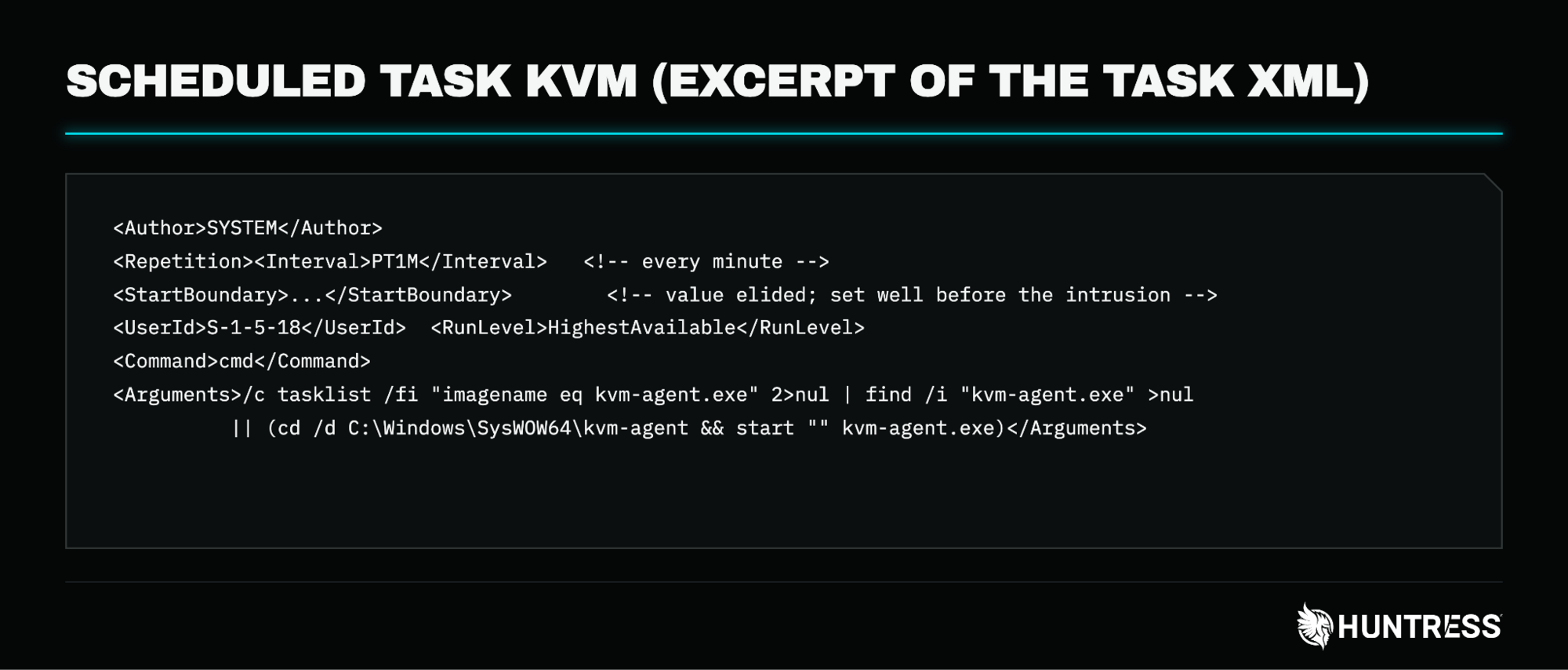
Figure 4: The kvm scheduled task (start time elided)
A Python implant that only runs where it was staged
The most interesting file we pulled was main.py, which sits in an embedded Python distribution under the SYSTEM profile and is started from a Run key through explorer.exe. The script is only a wrapper: Base64, then lzma, then a marshaled Python code object that it passes to exec. Decoding it without running it shows that the code was compiled from a file called heap_shellcode_runner_bound_weaponized.py.
The code computes the SHA-256 of the host's MachineGuid and looks for a file with that name next to main.py. Based on the bytecode, if the marker file is missing, the script exits. That would keep the implant from running in a sandbox or on an analyst's machine, because the marker only exists on the host it was provisioned for. We did not find a marker file in the folder we collected, so either it was not part of what we pulled or it was removed. If the marker is present, the script copies a 673 KB blob into an executable heap (HeapCreate, HeapAlloc, RtlMoveMemory) and starts it on a new thread with CreateThread.
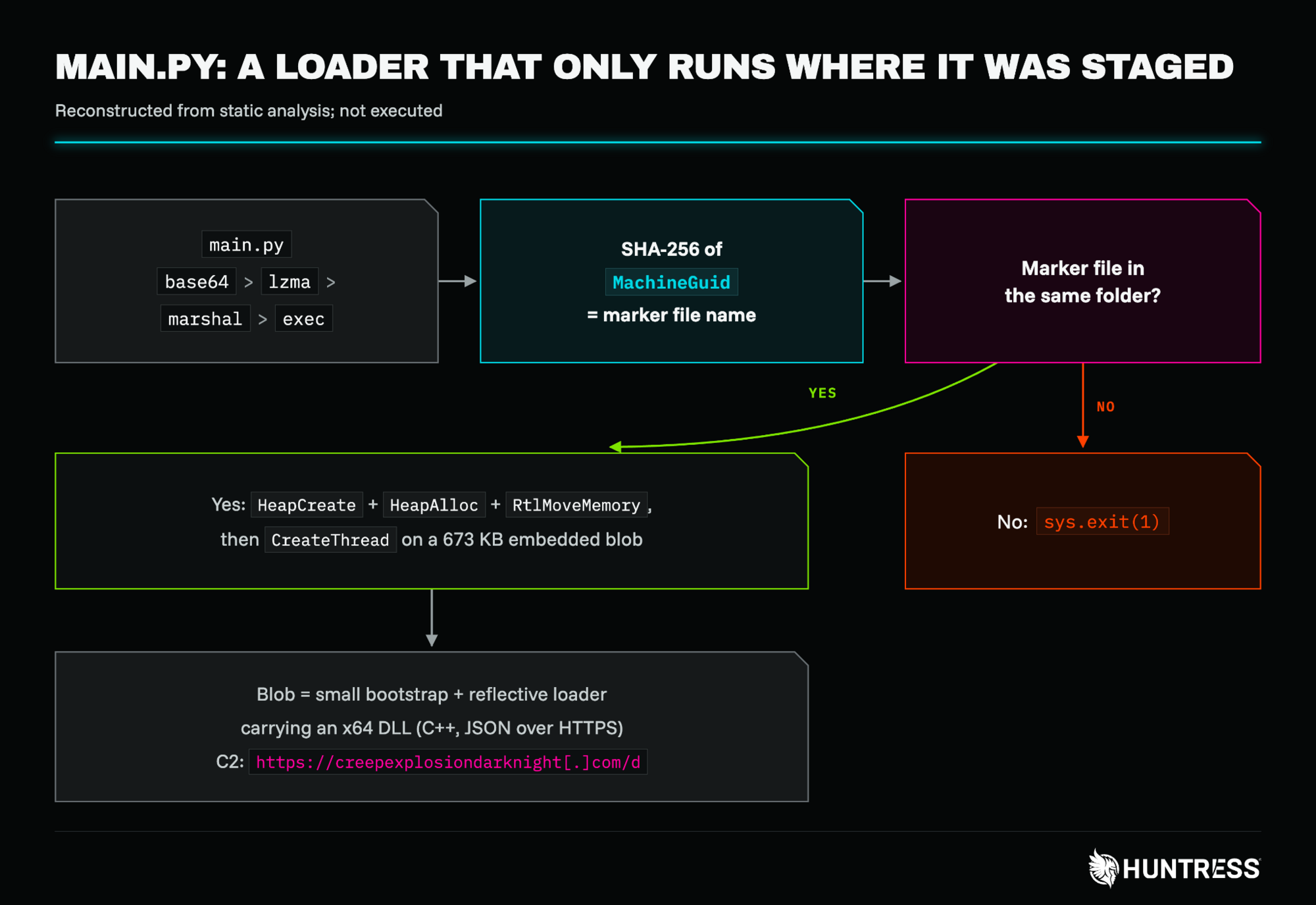
Figure 5: The implant's execution flow, reconstructed from static analysis
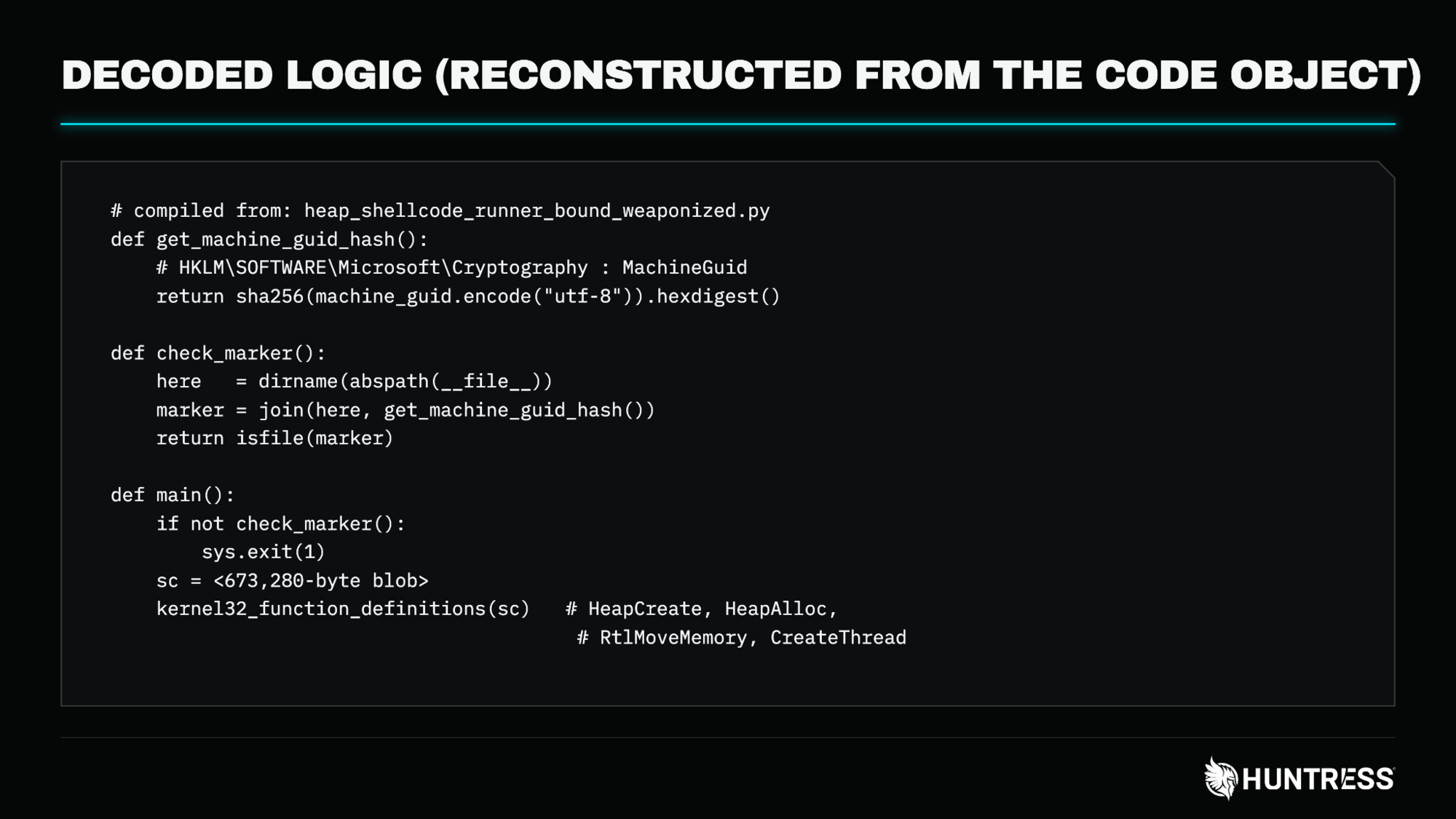
Figure 6: The decoded logic, reconstructed from the code object
The blob starts with a short bootstrap that calls a reflective loader at the end of the blob, which in turn maps an x64 DLL carried inside it. The DLL is C++ with a JSON library and imports very little: bcrypt, KERNEL32, OLEAUT32 and SHLWAPI, with the networking functions resolved at run time. It has no export table, no PDB path and no version resource, so the usual attribution breadcrumbs have been stripped.
Its strings include the C2 URL hxxps://creepexplosiondarknight[.]com/d, a JSON content type, a mutex, and string fragments (dns.quad with 9.net, and dns.goog) consistent with DNS-over-HTTPS lookups through Quad9 and Google. It also reads MachineGuid and Windows version information, which fits host identification. We have not identified the malware family and have not watched the implant run, so what it does after it checks in is still an open question.
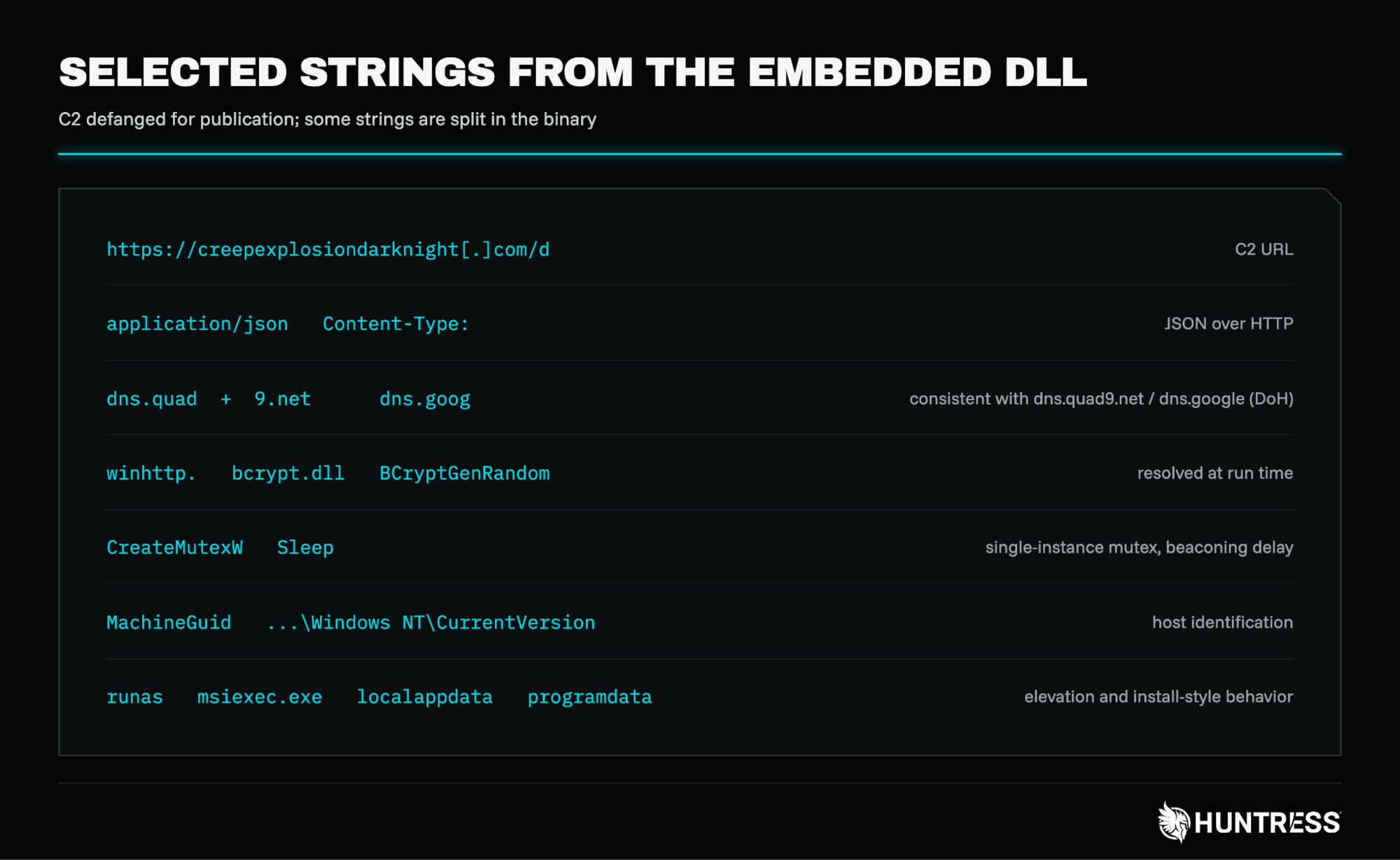
Figure 7: Selected strings from the embedded DLL (C2 defanged)
The rest of the toolkit
Around those pieces, the same environment held the tunneling tools gost and chisel, staged in .st<id> folders as wust<id>a.exe and wust<id>b.exe, the remote access tools AnyDesk, Atera and Splashtop, a local account named wdguest, and a Mimikatz package on disk. We also saw Microsoft Defender exclusions that covered C:\ProgramData, C:\Windows, temp folders, the dropper processes, and the AhsayCBS service process (cbssvcX64.exe). These exclusions would have reduced Defender's ability to scan files in those locations and files accessed by the excluded processes, creating broad blind spots for the operator's tooling.
Backup servers as a target
Everything above ran on servers whose purpose is to hold or manage backups. On a related Veeam server in the same environment, we also saw a command consistent with NetExec's Veeam credential-theft module: a PowerShell script, apparently launched remotely through WMI, that queried the VeeamBackup PostgreSQL database for stored credentials and decrypted them with DPAPI. Backup software holds credentials for hypervisors, repositories and domain accounts. We cannot say how many of those credentials were retrieved, but the pairing of an Ahsay foothold with a Veeam credential query suggested the operator was interested in backup infrastructure on purpose, not by accident.
What to check for
Patching closes the entry point. It does not clean up what already happened, so on any server that was exposed before the hotfix, look for:
Unexpected
.jspfiles underwebapps\cbsandwebapps\rps, especially random names and thestatus_andst_patterns, and requests toUpdateReceivers.doin the AhsayCBS access logsFolders named
ahsay_*,home,opt,srvorusrat the root of the drive or in Program Files, and timestamp-named folders (year-month-day-hour-minute-second) next to the shells, which in some cases held a single copy of oneScheduled tasks and services you did not create, including a
SYSTEMtask with a one-minute repeat that tests for a process withtasklistDefender exclusions you did not add, especially for
C:\ProgramData,C:\Windowsand the AhsayCBS service processAn embedded Python install under the
SYSTEMprofile and a Run key that launches it
A few behaviors make useful detections even when the files are gone:
python.exeorpythonw.exerunning from a path under theSYSTEMprofileOutbound requests to public DNS-over-HTTPS resolvers from a process that is not a browser
New
.jspfiles created under the AhsayCBS web directoriesThe parent-child pattern our earlier Sigma rule already looks for, where
cbssvcX64.exespawns a command shell.
If you find any of the above, we recommend a full re-image from a trusted backup and rotating credentials stored on or reachable from the server, including those saved in AhsayCBS and in any backup software on the same network.
Indicators of Compromise (IOCs)
Item | Description |
|---|---|
| Command-and-control for the Python-based implant |
Wallet: Password: | Mining pools and wallet used by |
SHA256:
SHA256:
Task XML SHA256:
Scheduled task: | XMRig miner, its configuration and its persistence (SYSTEM, every minute, backdated start time) |
SHA256:
Decoded payload (marshal object) SHA256:
Embedded blob (bootstrap, x64 DLL and loader) SHA256:
x64 DLL SHA256:
Reflective loader tail SHA256:
| Python loader and the payload extracted from it (compiled from heap_shellcode_runner_bound_weaponized.py). The marker file is named with the SHA-256 of the host's MachineGuid. |
SHA256:
AES key: Application attribute: | JSP loader that reads an encrypted payload from PNG pixel data and runs it in memory |
SHA256:
X-Auth-Token / API key: HMAC-SHA256 secret: | JSP webshell with signed requests, command execution and chunked file upload and download |
SHA256:
Key parameter | Keyed JSP webshell that runs commands and returns Base64-encoded output. Related shells share this code and carry different keys, and some add a file-write function ( |
| Hardcoded keys (parameter |
Fixed secrets: SHA256
SHA256
SHA256
|
|
| Per-host 32-character auth secrets found in |
SHA256:
SHA256:
| Tunneling tools staged in .st<id> folders as wust<id>a.exe and wust<id>b.exe |
Folders: Local account: | Folders created at the drive root or in Program Files during exploitation, and a local account created by the operator |
MITRE ATT&CK Mapping
Tactic | Technique ID | Technique Name | Description |
|---|---|---|---|
Initial Access | T1190 | Exploit Public-Facing Application | Chained CVE-2026-105133 and CVE-2026-105134 against internet-exposed AhsayCBS |
Execution | T1059.003 | Command and Scripting Interpreter: Windows Command Shell | Webshells ran commands through |
T1059.006 | Command and Scripting Interpreter: Python |
| |
Persistence | T1505.003 | Server Software Component: Web Shell | Five families of JSP webshells in |
T1053.005 | Scheduled Task/Job: Scheduled Task | The | |
T1547.001 | Boot or Logon Autostart Execution: Registry Run Keys / Startup Folder | A Run key started the Python implant | |
Defense Evasion | T1562.001 | Impair Defenses: Disable or Modify Tools | Defender exclusions for system paths, file extensions and the AhsayCBS service process |
T1027 | Obfuscated Files or Information |
| |
T1027.003 | Obfuscated Files or Information: Steganography |
| |
T1620 | Reflective Code Loading | The implant loaded an x64 DLL through a reflective loader; the JSP loader defined a Java class in memory | |
T1480.001 | Execution Guardrails: Environmental Keying | The implant required a marker file named after the SHA-256 of the host's | |
Credential Access | T1555 | Credentials from Password Stores | A command consistent with NetExec's Veeam module queried stored backup credentials |
Command and Control | T1071.001 | Application Layer Protocol: Web Protocols | The implant used HTTPS to |
T1572 | Protocol Tunneling |
| |
T1219 | Remote Access Software | AnyDesk, Atera and Splashtop | |
Impact | T1496.001 | Resource Hijacking: Compute Hijacking |
|
References
Threat Actors Exploit Critical AhsayCBS Flaws to Drop Webshells and XMRig Cryptominer:https://www.huntress.com/blog/ahsaycbs-flaws-exploit