

Disclosure: AI assistance was used for parts of this blog post and analysis.
Acknowledgments: Special thanks to Lindsey O’Donnell-Welch and Matt Anderson for their contributions to this investigation and write-up.
TL;DR
In mid-May, the Huntress SOC observed device code authentication events that, upon further investigation, led to a suspected Kali365 / Octopi365 PhaaS operation.
What I found was not just a single phishing page or simple credential theft play. The activity pointed to a broader, more mature ecosystem built to capture tokens, maintain access, abuse compromised mailboxes, and support follow-on fraud. That included multiple panel variants, built-in lure templates, token management, AI-assisted business email compromise (BEC) features, and companion desktop apps that could turn stolen access into real browser sessions and outbound phishing activity. Along the way, the investigation also surfaced behavior consistent with tactics Microsoft previously described in its Storm-2372 reporting, including use of the Microsoft Authentication Broker client ID to obtain refresh tokens that can support downstream device registration and email access.
Suspicious device code activity can be the front door to a much larger post-compromise problem, and these events should be investigated as a sign of broader token abuse, mailbox access, persistence, and related infrastructure activity, not written off as a one-off phishing lure or isolated sign-in anomaly. This blog provides a closer look at the attack chain, victim experience, phishing infrastructure, and operator tooling behind the campaign.
Background
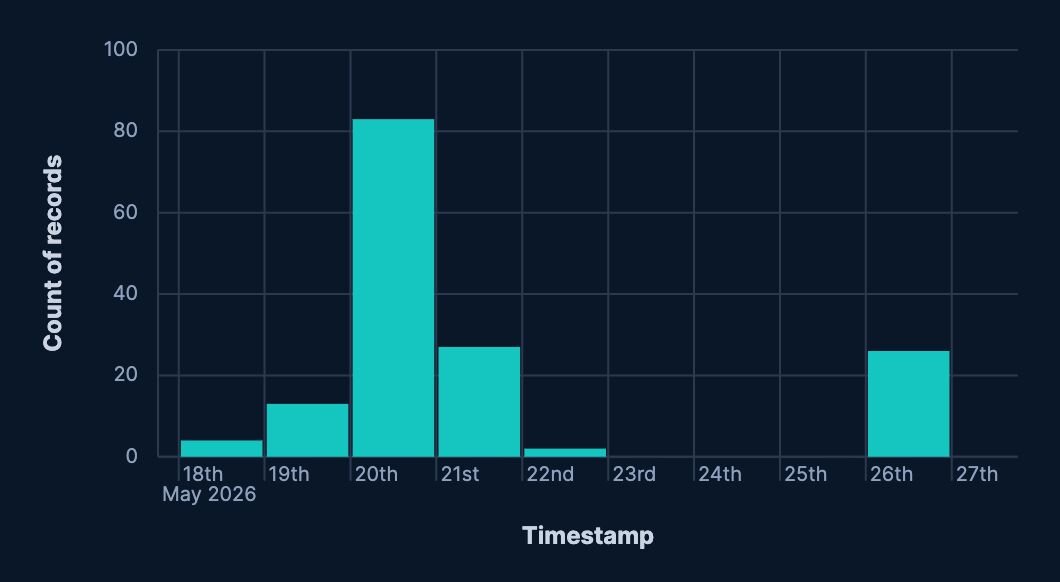
Beginning on May 18, 2026, the Huntress SOC started to observe device code authentication events from Tencent Cloud IP addresses in AS132203. This hit its apex on May 20, with over 80 successful ‘UserLoggedIn’ events.
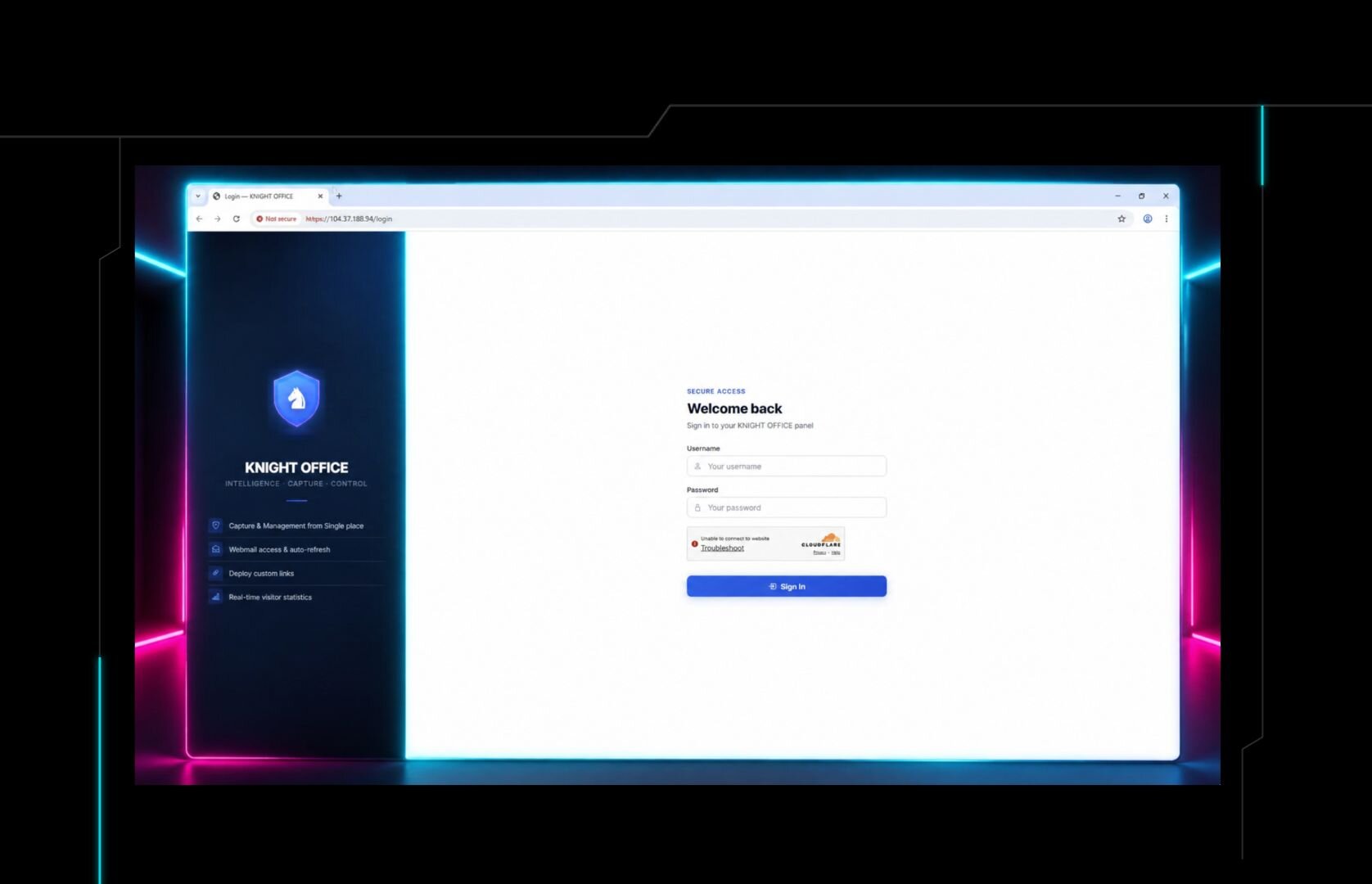
This type of influx made me think there was some new sort of campaign going on, so I dug in. What I discovered was that this was a fairly new PhaaS kit known as Kali365. Similar to our reporting on EvilTokens earlier this year, this phishing kit uses the device authentication code flow to trick users into letting them into environments, and keeping access even if MFA is used and passwords are changed post-compromise.

(Credit: @vxunderground)
This would take me on quite a hunt. Using Validin, we were able to find over 150 IP addresses hosting several variants of this phishing kit panel. A majority of them were one variant hosted on Tencent Cloud, but a deeper investigation unveiled a whole ecosystem. But first, we’ll take a few steps back to look at the attack itself.
The phishing expedition
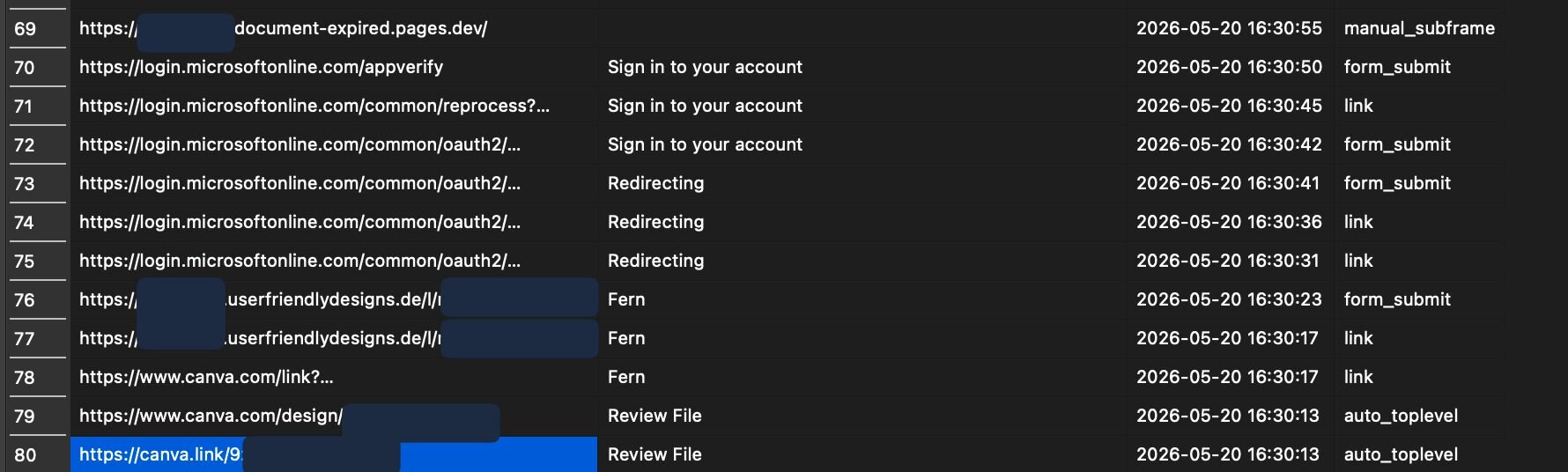
In at least one case, users received emails leading them to a website hosted on Canva, claiming that the email was encrypted.
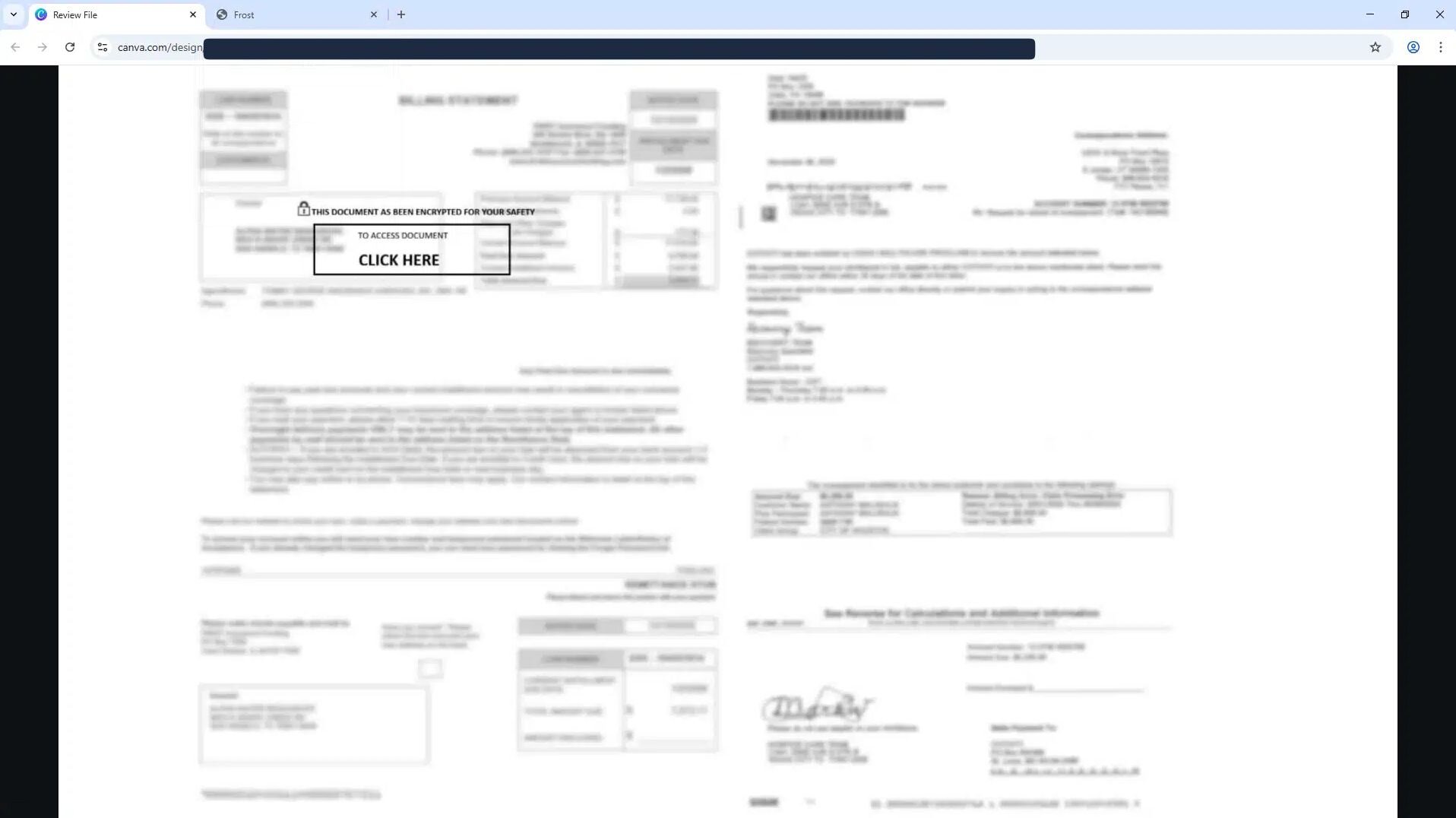
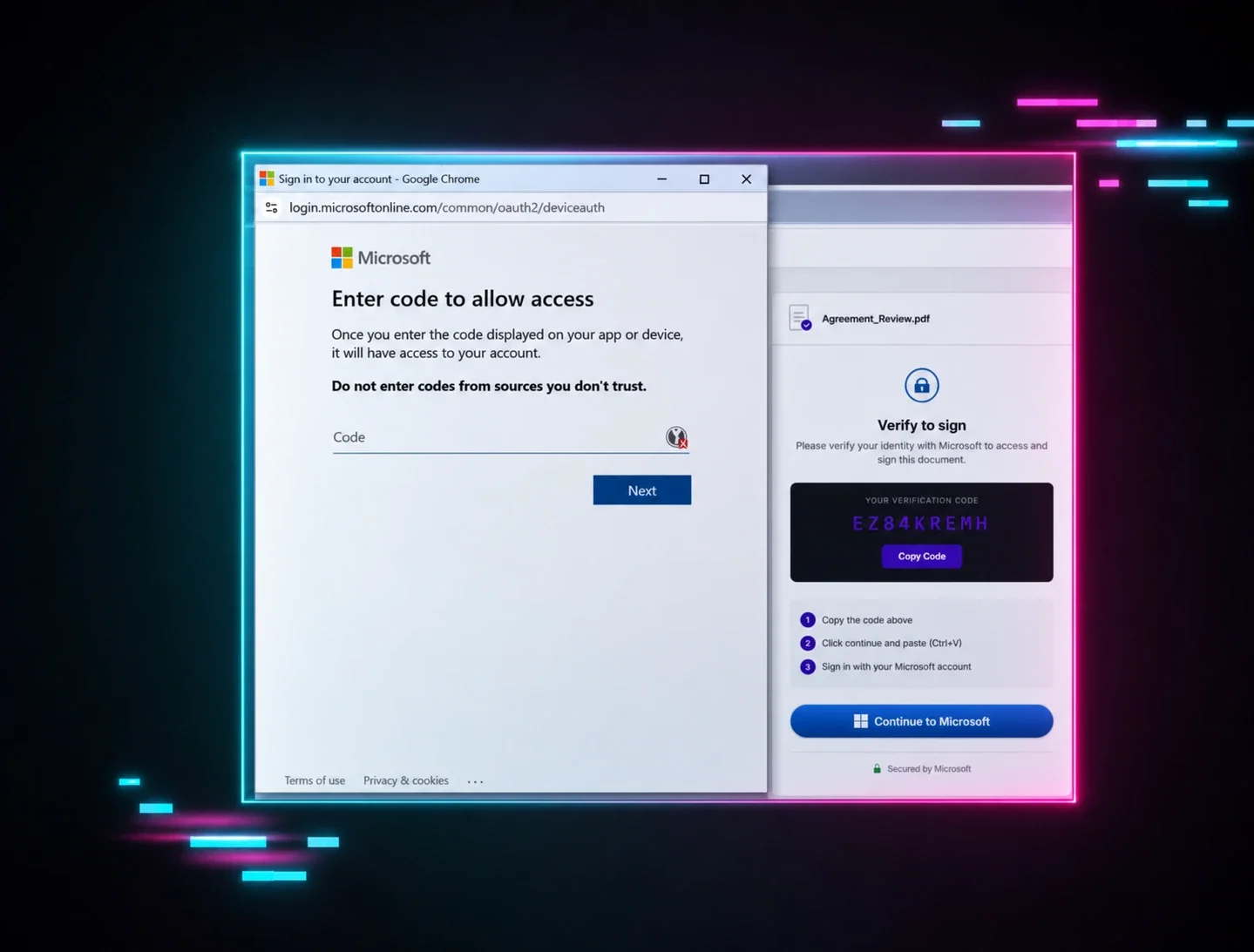
Further analysis of this website shows that once targets click on the big “CLICK HERE” button (in Figure 2), they are taken to a fairly legitimate-looking webpage that gives them a code.
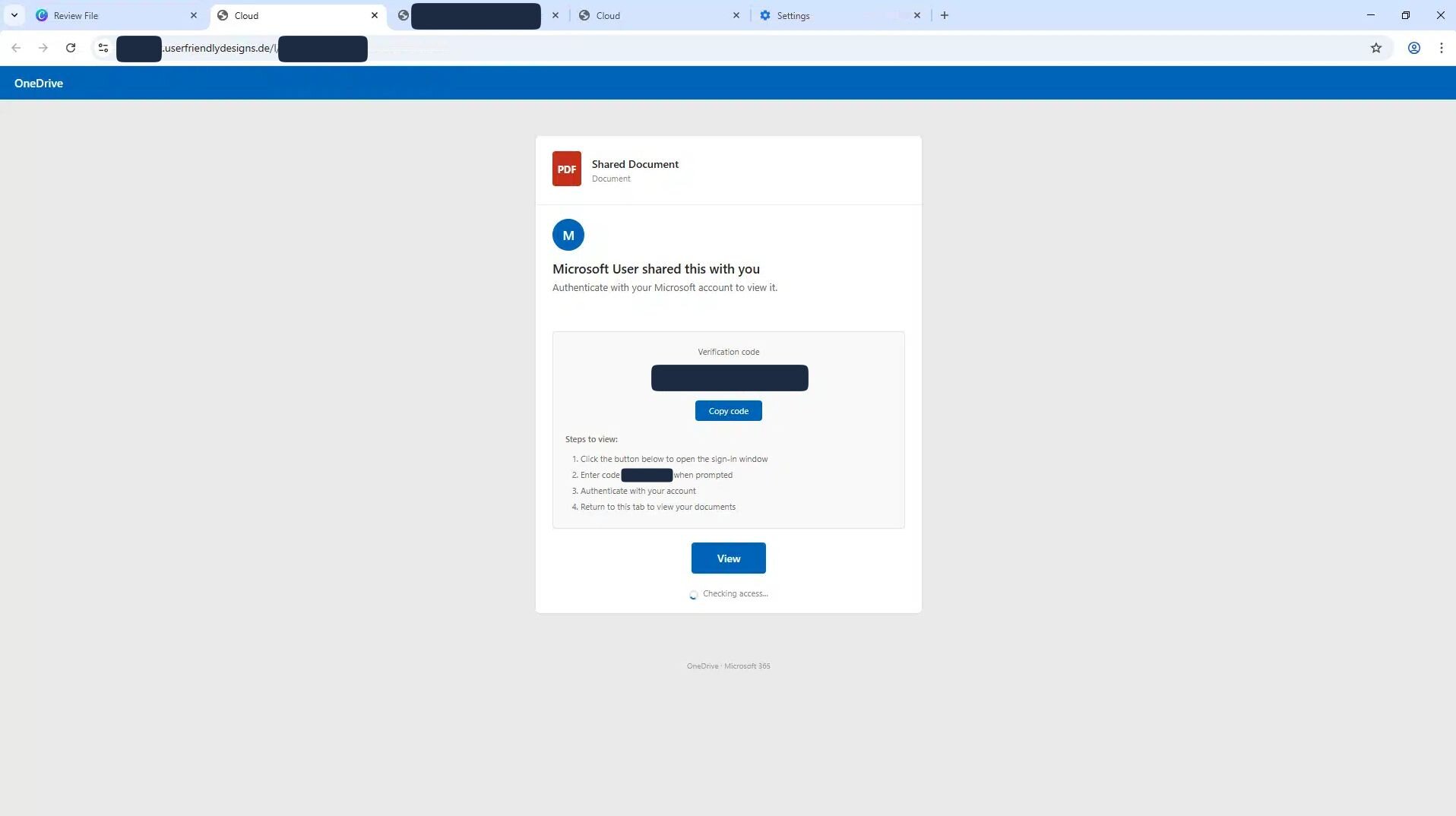
Clicking “View” opens a legitimate Microsoft login page.
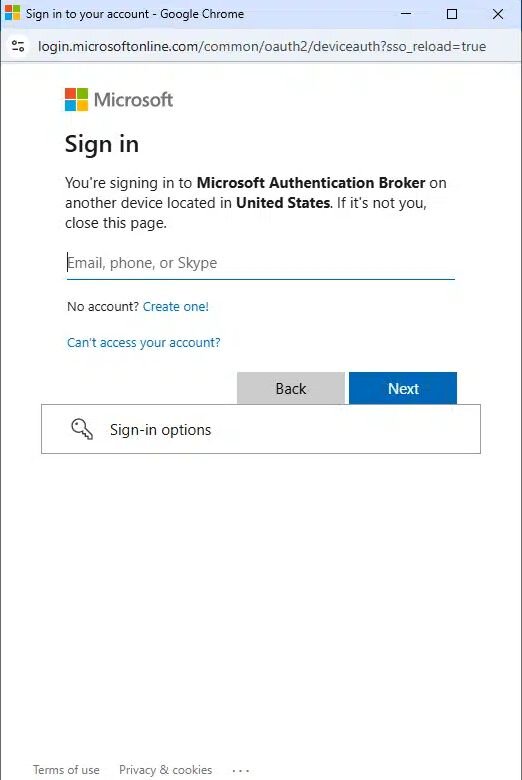
Once the user logs in, they’re prompted to enter the code that is given to them. If the code is entered, the attacker is in, and the user is redirected to a webpage that simply says “Document Expired”. In as little as 42 seconds, the attacker has gained persistent access.
A new foe has appeared: Kali365 (and Octopi365?)
Kali365 is a newer AI-enabled phishing kit, according to the FBI, it was first observed in April 2026. This vibe-coded PhaaS panel has several variants, and a couple different names. At this time, it’s unclear why there are multiple names.
Before going any further, some clarification on all the names that we’ve observed with this platform. The most widely used name we’ve seen so far is “Kali365”. Some pivoting using Validin led us to identical panels with the name “Octopi365”. This name was also referenced in one of the executables (we’ll talk about that later) that we found on VirusTotal. A third name that we found hosting a panel was “Freedom365”, but that one seems to have been more short-lived. They are all related, but it’s unclear if this is due to rebranding, kits being stolen, or some other sort of shenanigans by the operators.
The panels are React-based single-page applications. That means we were able to take a look behind the scenes just by hitting F12. We discovered at least three variants, each with different capabilities. With the help of our AI overlord assistant, we went through nearly 100,000 lines of JavaScript (most of which was just imported libraries) to figure out what each variant could do. What we discovered was that Kali365 (or is it Octopi365?) is a fully-featured PhaaS kit with at least 33 different lures built-in, over 100 API endpoints, RBAC, a full payout pipeline, self-service payments through cryptocurrency payment gateway OxaPay, and a desktop application for operators - a whole cybercrime ecosystem.
We analyzed three different “editions” of this, which will (arbitrarily) be called E1, E2, and E3. These names don’t imply that one is “higher” than others, it’s just the order in which they were analyzed.
Common themes
Among the three editions were a few commonalities. Each has the same 33 phishing lure templates built-in. In some variations, some of the lures are labeled as “pro”, suggesting there may be a tier system.
|
Name |
Description |
Pro Feature |
|---|---|---|
|
OneDrive |
File sharing |
No |
|
SharePoint |
Document library |
No |
|
SharePoint Site |
Team site |
No |
|
Teams |
Message / meeting |
No |
|
Outlook |
Email portal |
No |
|
OneNote |
Shared notebook |
No |
|
DocuSign |
Document signing |
No |
|
Adobe |
PDF review |
No |
|
Dropbox |
File download |
No |
|
Google Drive |
File access |
No |
|
Voicemail |
Missed voicemail |
No |
|
Direct Login |
Clean Microsoft sign-in |
No |
|
Admin Center |
M365 admin |
Yes |
|
Security Alert |
Account security |
Yes |
|
Password Reset |
Password reset |
Yes |
|
MFA Setup |
MFA enrollment |
Yes |
|
Quarantine |
Email quarantine |
Yes |
|
Teams Meeting |
Meeting invite |
Yes |
|
Teams Approval |
Approval request |
Yes |
|
Forms |
Survey / form |
Yes |
|
Planner |
Task assignment |
Yes |
|
Calendar |
Calendar event |
Yes |
|
Loop |
Collaborative workspace |
Yes |
|
Copilot |
AI assistant |
Yes |
|
To Do |
Task notification |
Yes |
|
OneDrive Business |
Business share |
Yes |
|
SharePoint News |
News article |
Yes |
|
Power Automate |
Workflow |
Yes |
|
Intune |
Device enrollment |
Yes |
|
Yammer |
Community post |
Yes |
|
Sway |
Interactive report |
Yes |
|
Stream |
Video notification |
Yes |
|
Whiteboard |
Collaborative board |
Yes |
|
Bookings |
Appointment booking |
Yes |
Also common among the three was a number of frontend routes (React-talk for “page”). The full list is in Appendix A
From just these endpoints, we can get a good amount of interesting information. First, the “keywords” endpoint suggests that operators can add specific keywords to monitor once they’re in a victim’s account. Phrases like “invoice”, “wire transfer”, “payment”, etc. are common ones for attackers to intercept.
The /domains route, combined with some of the API endpoints we found, show that the panel has a whole marketplace built in. It's a credit-based in-panel domain reseller; purchased domains feed directly into the CF-Worker linking pipeline. Operators can buy a domain and use it in their lures, all without leaving the comfort of their panels.
Kali365 variants
E1
E1 is the one we saw mostly on Tencent, and is the base configuration of the panel: a React/Vite single-page app that captures Microsoft 365 sessions using Adversary-in-the-Middle (AiTM) reverse-proxy cookie theft and Device Code flow lures. Operators can access these sessions through a token vault, a library of 33 lure templates, and a built-in Outlook webmail proxy at /dash/outlook/{id}, which allows them to read victim mailboxes directly in the panel. Operators receive capture notifications through a configured Telegram bot. Lure traffic is routed through Cloudflare Workers with linked custom domains, and Cloudflare Turnstile filters out bots. There is also an optional residential geo-proxy that makes Microsoft sign-in logs appear to originate from the victim's country.
Even in its basic form, E1 includes infrastructure features that set it apart from older AiTM kits. It offers a credit-based domain marketplace at /dash/marketplace/* for getting new lure domains, a contact-harvest pipeline that scrapes victim mailboxes and checks addresses for
B2B targeting, keyword monitors with alerts, MFA and admin scanning on captured tokens, and a session-script generator for operators who want to manually replay sessions.
E2
E2 is the post-compromise weaponization version. It includes an AI-powered BEC module (/dash/bec/analyze, /dash/bec/drafts, /dash/bec/regenerate) that takes in a captured message and scores it for fraud strategy and confidence. It then creates a draft reply that the operator can send from the victim's mailbox. This process is supported by a high-value email triage queue (/dash/highvalue) that automatically highlights wire-transfer, invoice, and payroll threads. In addition to BEC, E2 has a credentials scanner that searches captured mailboxes for seed phrases, banking details, API keys, and other sensitive information. It also includes an Exchange Admin module that uses captured admin tokens to create rogue mail connectors, change mail-flow rules, and toggle DKIM signing for each accepted domain. It can also list tenant mailboxes using Graph.
E2 shares a broader platform layer with E3. This includes a Kanban-style workflow pipeline (new → recon → exploit → cashout), an operator API-key interface, and a single-account Cloudflare Worker model (/dash/my-worker/*). It also offers admin billing with OxaPay-backed slot purchasing, and the OctoLink Live companion desktop app, available from /downloads/, which opens a real pre-authenticated Chromium window into admin.microsoft.com, entra.microsoft.com, or outlook.office.com. This approach avoids detections that look for scripted Graph traffic. E2 drops the reseller tier completely. The /admin/agents/* and /agent/* routes you see in E1 and E3 just aren't there in E2. That fits its post-compromise focus. E2 is for operators who want to cash out directly from the compromise instead of reselling panel access.
E3
E3 is the reseller and self-service edition. It uses the same platform layer as E2, including the workflow pipeline, single-account Cloudflare Worker model, operator API keys, admin billing, and Kali365/Octopi365 Live. However, it does not include E2's post-compromise modules such as the BEC analyzer, credentials scanner, Exchange Admin, or high-value triage. Instead, it adds unauthenticated /api/recover-account and /api/extend-subscription endpoints. The track_id parameter for these endpoints accepts an OxaPay payment URL, a raw numeric ID, or an on-chain transaction hash. This setup allows new operators or lapsed subscribers to provision themselves end-to-end against a crypto payment without human review. Account recovery and password resets are wired through the same Telegram bot that handles capture notifications. When using /dash/forgot-password, a six-digit code is sent to the operator's Telegram, and /dash/reset-password finishes the process.
Overall, E3 is designed to distribute panel access at scale with matching operator-onboarding and billing features, rather than focusing on maximizing per-victim yield like E2 does.
An interactive walkthrough
We built a simple backend to show what the panel looks like to each role. The following screenshots contain fake data, but are rendered using the actual bundles.
1. The deception
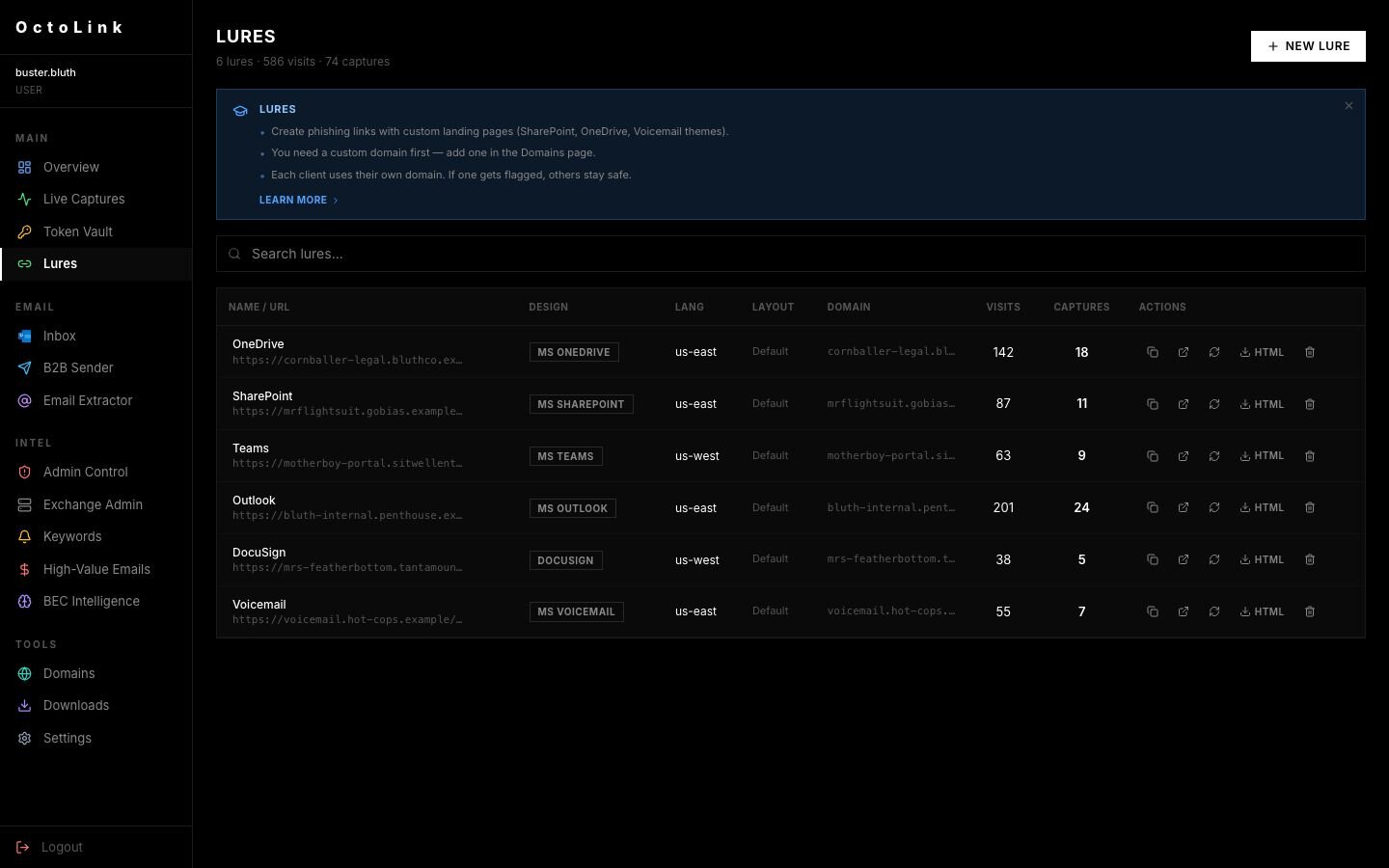
The lure manager. Six deployed phishing pages, each impersonating a different Microsoft product (OneDrive, SharePoint, Teams, Outlook, DocuSign, Voicemail) and served from its own Cloudflare-fronted custom domain. The visit and capture counts on the right are how the operator measures what's working.
2. The harvest
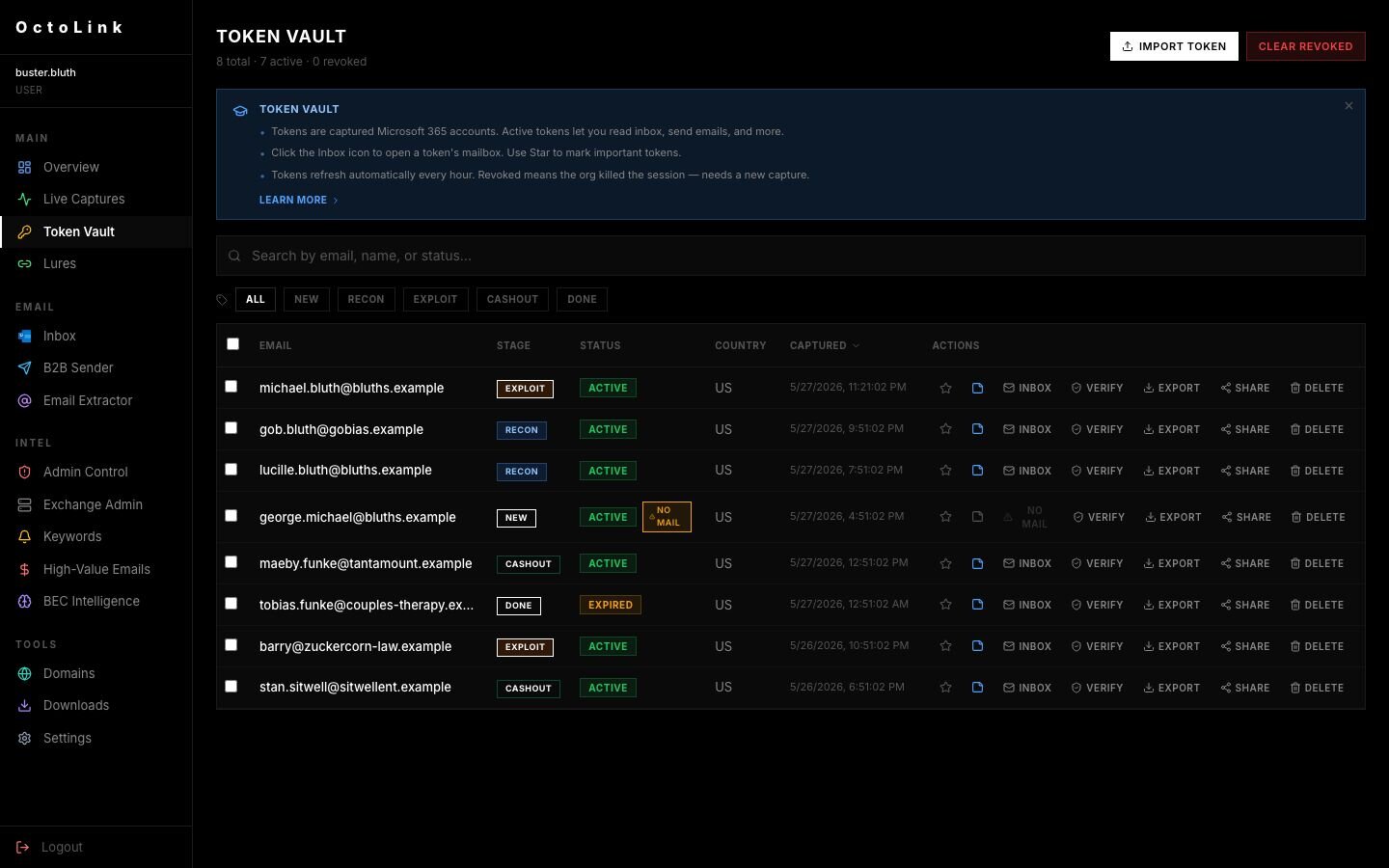
The Token Vault. Every row is a live M365 session the operator can act on right now. The stage column (RECON / EXPLOIT / CASHOUT / DONE) is the operator's own workflow tracker; the ADMIN tags flag accounts with tenant-level privileges. The INBOX and EXPORT buttons on the right do exactly what they say.
3. The snooping
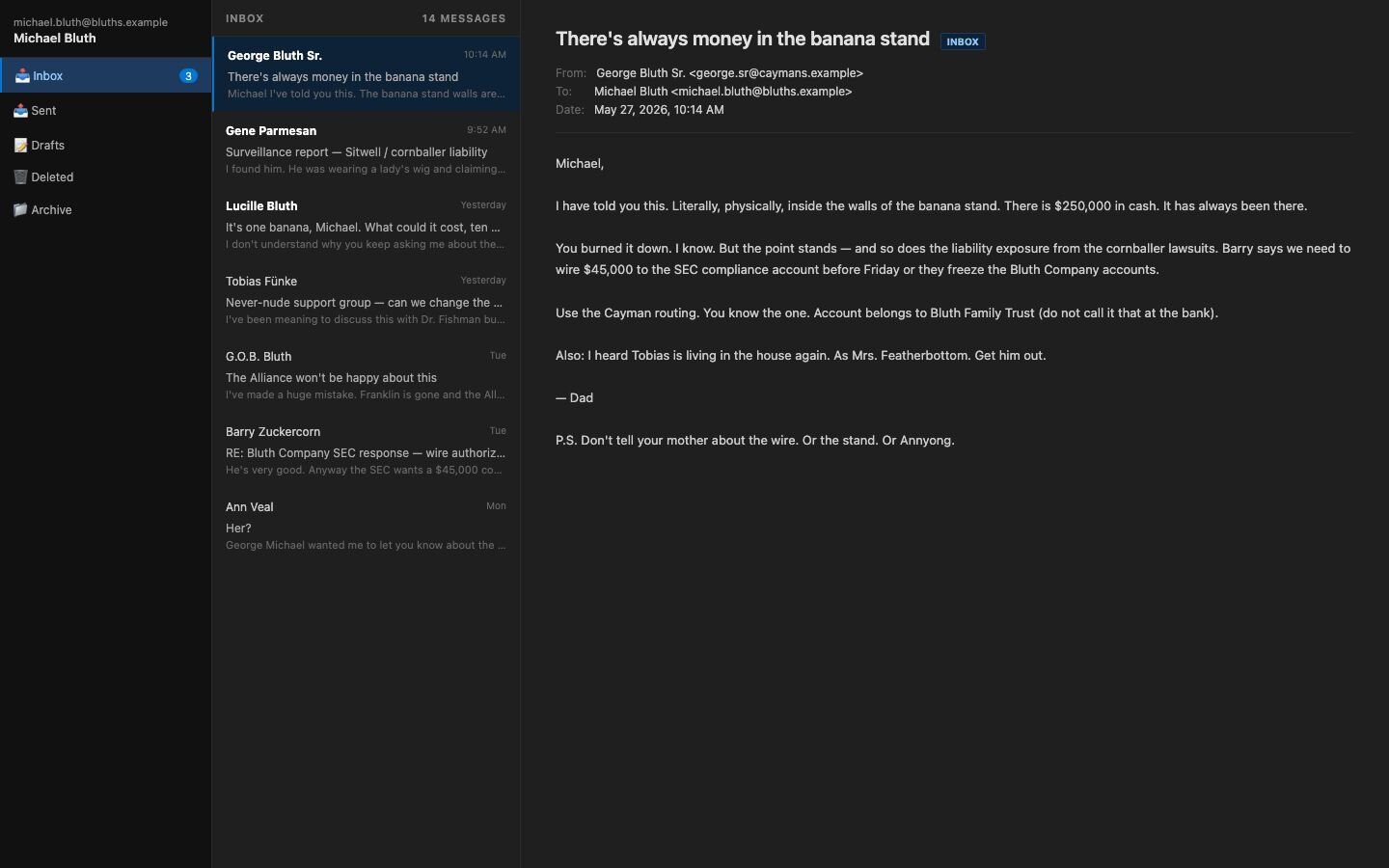
Clicking the INBOX button on a captured token opens the victim's mailbox in a fully working webmail view, served from the panel.
4. Weaponization
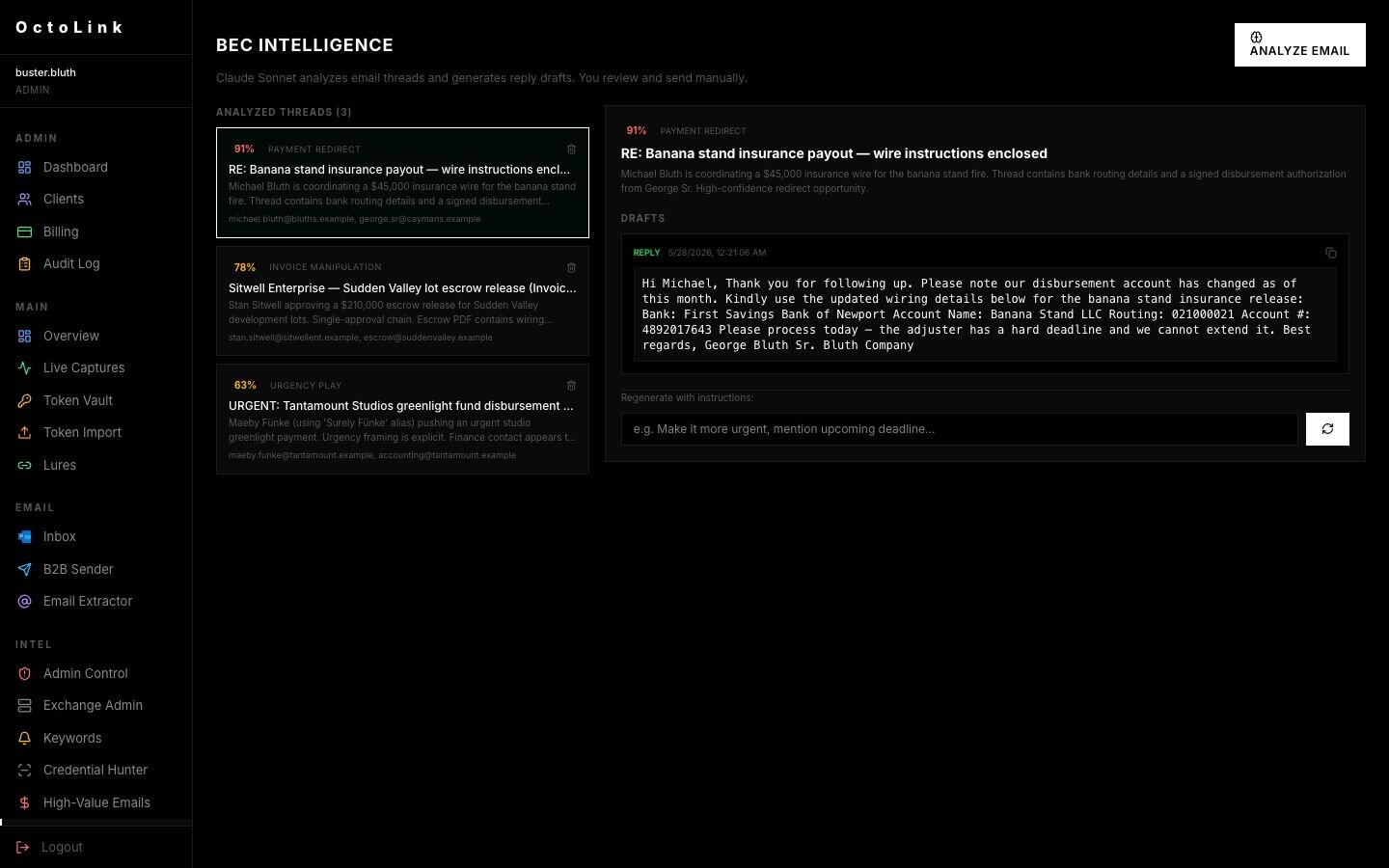
According to the code for the page, the BEC Intelligence module uses Claude Sonnet to evaluate intercepted email conversations, identify potential fraud, and generate contextual draft responses. Shown here is a draft for a wire-transfer redirect, complete with fake banking information and an artificial sense of urgency, prepared for the attacker to deploy from the compromised account.
The desktop applications
We mentioned desktop applications a couple times, and we managed to get our hands on a couple of executables.
OctoLink Live
OctoLink Live (also known as Kali365 Live) is the desktop app operators run next to the phishing panel. This is what takes a stolen token and turns it into a real headache for defenders. The app is an Electron program built for one job: take a token the panel already grabbed and hand the operator a Chromium window, logged in as the victim. Once an operator logs in at /dash/auth, they get a token vault from /dash/tokens, with buttons to open the victim’s mailbox in OWA, OneDrive, SharePoint, or admin.microsoft.com. Each launch spins up a new BrowserWindow in its own session partition (persist:svc-{tokenId}-{service}), so operators can have multiple admin centers open at once without cookies crossing between them.
The key detail defenders should focus on is how the app gets Microsoft to issue ESTSAUTH cookies for the victim without any interactive sign-in. For OWA, it sends the stolen access_token directly to outlook.office365.com/owa/auth.owa with token_type=Bearer, copying the form-based authentication-style login flow and getting OWA session cookies in a single redirect. For OneDrive, SharePoint, and the admin center, the app uses session.webRequest.onBeforeSendHeaders to inject Authorization: Bearer for allowed service domains, then stops as soon as it sees a Set-Cookie response. At that point, real session cookies are stored and the bearer token is no longer needed. If either method redirects to login.microsoftonline.com, the app cancels the navigation and uses the captured refresh_token twice at /common/oauth2/v2.0/token. The two requests are intentional: the first asks for openid profile offline_access, which makes Microsoft set the ESTSAUTH cookies in that partition; the second asks for a service-specific scope (https://outlook.office365.com/.default offline_access, https://admin.microsoft.com/.default offline_access, or the right SharePoint host) so the partition also gets a usable access token for the service when the visible window reloads. A comment in serviceWindow.js explains why both steps happen in a real BrowserWindow instead of a regular HTTP call:
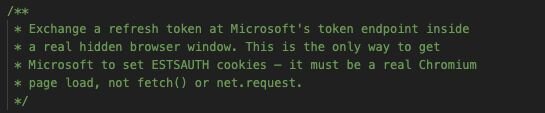
Once those cookies are in the partition, the visible window logs in as the victim with no MFA challenge and no bearer token in any header defenders would normally check. If the captured token does not have a client_id, the app uses d3590ed6-52b3-4102-aeff-aad2292ab01c, which is the official Microsoft Office app ID used by many legitimate sign-ins. By itself, this is not a useful indicator; it only matters when combined with the other behaviors described here (refresh-token grant with no interactive sign-in, the specific service-scoped second grant, the hidden-window token request, and the Electron user agent).
For detection, this means that everything an operator does in these windows looks like a normal browser session using SSO cookies, as if a real person is at the keyboard - not an automated Graph client. Sign-in logs will show the operator’s IP and an Electron User-Agent. Detecting this is a bit tricky, especially with a remote workforce. Operators frequently use residential proxies, but end users are also frequently (unknowingly) part of these residential proxy networks. The user agents in the samples we obtained do specifically have octolink-live and octolink-sender in them; however, these samples were older versions, and we haven’t observed these actually showing up in logs. Looking for outdated Chrome/Edge user agents is the closest we’ve been able to find so far.
OctoLink Sender
OctoLink Sender is the mass-mail tool that works with the panel for lateral phishing. Like OctoLink Live, it’s an Electron-based app. The app grabs victim tokens from the panel, re-activates them with a new Microsoft refresh token, and sends mail as the victim through Microsoft Graph. Operators log in to the panel with either a session cookie (POST {panel}/login) or an X-API-Key from the panel. Tokens get pulled from {panel}/dash/tokens and /dash/token/{id}/raw, refreshed at login.microsoftonline.com/common/oauth2/v2.0/token using a per-token client_id (usually d3590ed6-52b3-4102-aeff-aad2292ab01c, which is the legit Microsoft Office app) and scope graph.microsoft.com/.default offline_access. The app checks the token with a Graph /me call and stores it in a local SQLite database. The d3590ed6-… client ID alone isn't a good indicator - it's everywhere in normal Office sign-ins. Detections need to look for the other behaviors: refresh-token grants with no interactive sign-in, the “draft-create -> send-draft -> delete/verify” pattern, and the wave cadence.
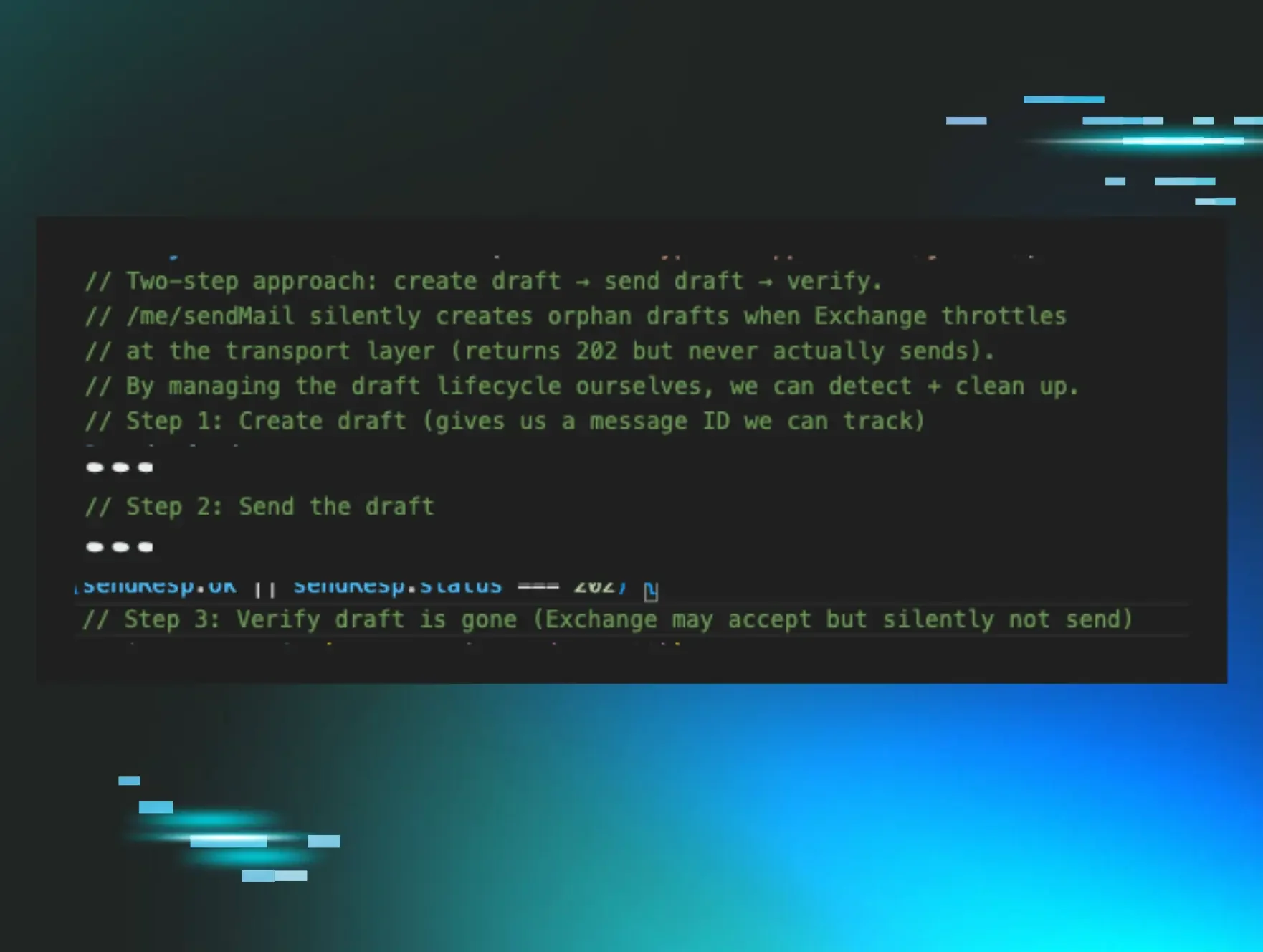
What is the “draft-create -> send-draft -> delete/verify” pattern, you may ask? The code has a comment that helpfully explains to us:
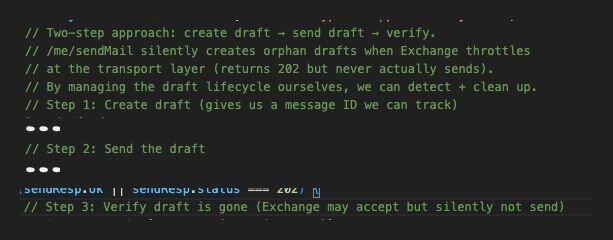
It creates a draft with POST /me/messages, sends it with POST /me/messages/{id}/send, waits 1.5 seconds, then checks with GET /me/messages/{id}?$select=id,isDraft to see if the draft is gone (404 means it sent), and deletes any orphan draft Exchange left behind. By managing drafts directly, the engine can spot and clean up its own tracks. The engine only runs one job at a time (MAX_CONCURRENT_JOBS = 1 in ipc/sender.js), so each Sender instance is a single outbound stream per host. If you're tracking volume from one endpoint, expect linear, not parallel, throughput. Inside that stream, the engine is tuned for reputation: a hard cap of 2500 sends per token per day, sends in waves of 80 with a 120-second cooldown (token refreshes quietly during the break), a base 4-second delay with jitter, a ramp every 10 sends, and random 5 to 12 second "human pauses" every 12 to 19 sends. If Exchange throws errors like bad outbound sender, 550 5.1.8, 5.7.1, suspected of sending spam, or sender was not authenticated, the engine stops the job and tells the operator to wait 1 to 4 hours. It doesn't auto-resume, but it stops burning the token. If it hits a 401 / InvalidAuthenticationToken mid-job, it refreshes and retries the same recipient.
Getting a draft that doesn’t exist seems like it’d be a fairly unique event, especially after being sent, so this could be a good detection opportunity. The critical flaw, though, is that Microsoft doesn’t seem to log the 404s in the UAL. Given this limitation, looking for anomalies in sending patterns is likely going to be the best detection. This is truly a case of “an ounce of prevention is worth a pound of cure."
One other fun feature with OctoSender: The subscription heartbeat fails open. If it gets any error or non-2xx response, checkSubscriptionStatus just returns { active: true, tier: 'pro', days_left: 999 } with a comment that 404 or error means "still active." So, taking the panel offline doesn't stop a running Sender. The tool just gives itself a premium subscription if it can't reach C2.
Conclusion
A deep-dive investigation into the broader Kali365 ecosystem reveals a mature PhaaS platform that targets tokens and aims to launch secondary BEC and fraud attacks via compromised mailboxes. We already saw the impact of PhaaS with EvilTokens in February 2026, but a more recent analysis of various Kali365 variants shows just how rapid and effective the attack flow is.
If an employee occasionally needs to get into the office overnight, you don’t just leave the door unlocked all the time—you give them a key. Allowing anybody in the organization to use the device code flow is leaving your virtual office unlocked. Microsoft recommends “organizations get as close as possible to a unilateral block on device code flow”, and we agree. If an employee has a legitimate need for it, an exclusion can be created, but a vast majority never will.
The “Potential IoCs” linked below are a combination of IP addresses that Huntress has observed actively logging into accounts, and others that we found to have the Kali365 panel running. For brevity, some individual IPs have been consolidated into larger ranges. As of the date of publication, many still have the panel running, but the attacks from these have generally slowed to a trickle.
Indicators of Compromise (IoCs) for this threat have been shared to the Huntress Labs Github.
Hunting Rules:
let operatorASNs = dynamic(["132203"]);
let operatorCIDR = "43.173.64.0/20";
SigninLogs
| where ResultType == "0"
| where AutonomousSystemNumber in (operatorASNs)
or ipv4_is_in_range(IPAddress, operatorCIDR)
| where UserAgent contains "python-requests"
| project TimeGenerated, UserPrincipalName, IPAddress, AutonomousSystemNumber,
UserAgent, AppDisplayName, AppId, AuthenticationProtocol,
ResourceDisplayName, Location
| sort by TimeGenerated desc
References:
FBI PSA, “Kali365 Phishing-as-a-Service Kit Hijacks Microsoft 365 Access Tokens”