


A patch management strategy is a structured approach to identifying, testing, and deploying software updates across your environment. Having a dedicated strategy matters because ad hoc patching leaves gaps, and gaps are what attackers look for. |
|---|
Most security incidents don't start with a sophisticated attack.
They start with a known vulnerability that never got patched. In fact, patching is one of the most direct ways to disrupt an attack before it starts. A weaponized exploit targeting a vulnerability your team already patched has nowhere to go.
A patch management strategy is a structured approach to identifying, testing, deploying, and verifying software updates across your environment. Having a dedicated strategy matters because ad hoc patching leaves gaps—and those exposed systems are exactly what attackers look for.
Learn how to build a patch management strategy that holds up under real operational pressure, not just on paper. You'll find a step-by-step framework, best practices, and common mistakes to avoid before they cost you.
What is patch management?
Patch management is a proactive security discipline. It's the process of identifying, evaluating, and applying updates to software, operating systems, and firmware across your environment. But it goes well beyond clicking "install" on a notification and moving on.
Think of it this way: A patch dropping is just the starting gun. Before anything touches production, your team needs to know what systems are affected, how urgent the fix actually is, and whether the update could break something else in the process. That whole workflow, from discovery to verified deployment, is what patch management actually covers.
IT teams typically manage three categories of updates:
OS patches (Windows, Linux, macOS): Core system updates that often carry the highest security risks
Third-party application patches: Browsers, productivity tools, plugins, and other software that threat actors frequently exploit because they're easy to overlook
Firmware and driver updates: Lower-level updates for hardware like network switches, servers, and endpoints that can introduce risk if left unaddressed
The lifecycle spans from initial discovery through final verification that a vulnerability is actually gone. Each stage carries its own risks and requires its own judgment call.
Security patches vs. bug fixes vs. feature updates
Not all updates are equal, and treating them the same way is a recipe for patch fatigue or, worse, a broken production system. Here's how they stack up:
Security patches | Bug fixes | Feature updates | |
|---|---|---|---|
Purpose | Close known vulnerabilities | Correct unintended behavior | Add new functionality |
Trigger | Vulnerability disclosure or active exploit | Software defect or crash report | Product roadmap or user request |
Urgency | High to critical | Low to medium | Low |
Testing requirements | Expedited but still necessary | Standard | Thorough |
Risk | High if delayed | Moderate | Low to moderate |
User impact | Usually minimal | Minimal to moderate | Can change workflows |
Who owns | Security team drives, IT deploys | IT or dev team | Change management or IT |
The core tension here is speed vs. stability. Security patches often need aggressive timelines because attackers move fast once a vulnerability is public. A zero-day vulnerability can go from disclosed to actively exploited within hours, leaving little room for a slow approval process.
Feature updates, on the other hand, can usually afford a longer wait time. Rolling them out too fast without testing is how you end up with a broken workflow that's harder to fix than the patch was worth.
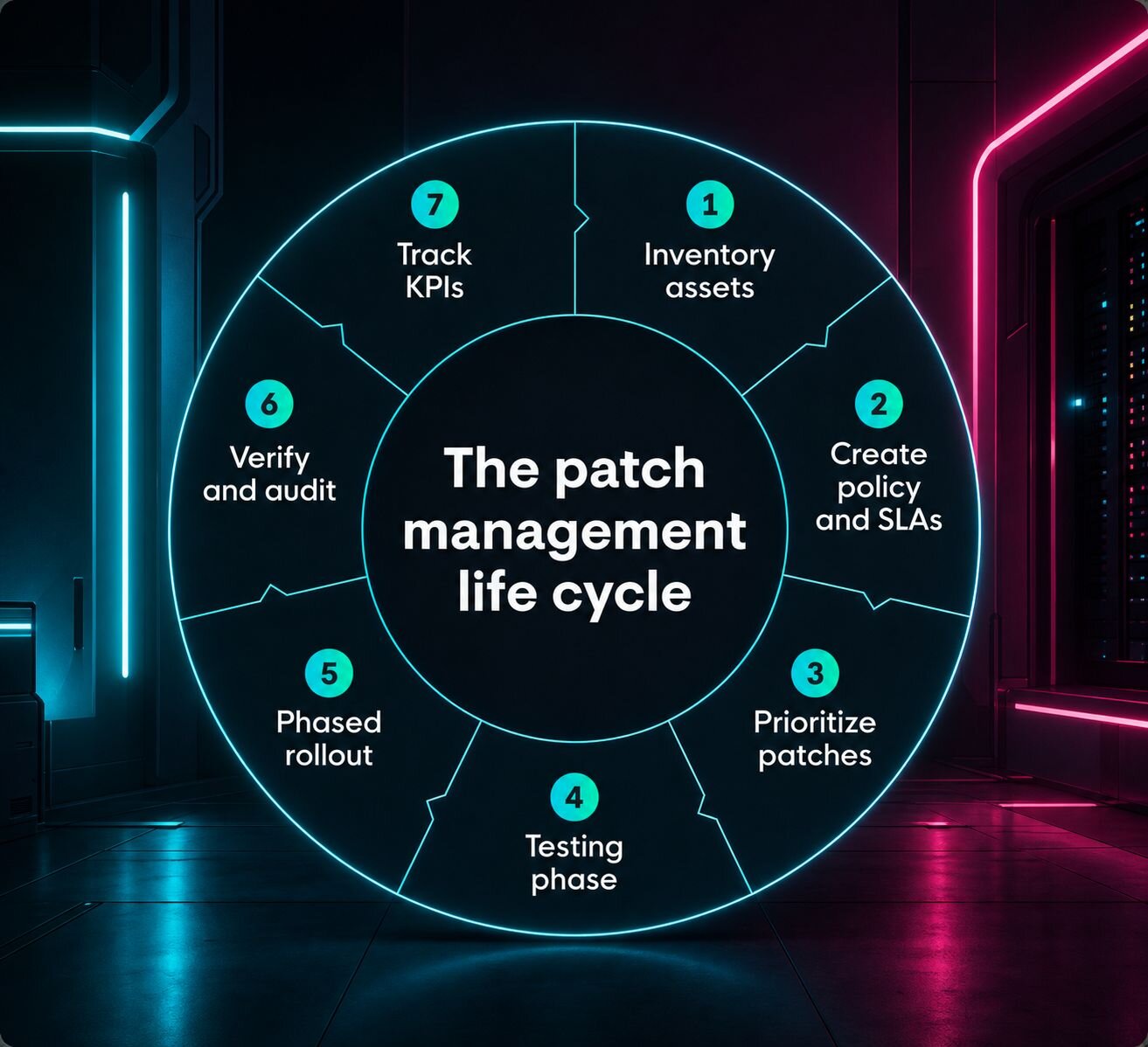
7 steps to building a patch management strategy from the ground up
A solid patch management strategy is a repeatable system your team can actually execute under pressure. The sequence below matters: skipping foundational steps like inventory or policy tends to cause deployment failures down the line, not just headaches.
Step 1: Establish a comprehensive asset inventory
You can't patch what you can't see.
Shadow IT, remote endpoints, and cloud assets that never made it into your configuration management database (CMDB) are exactly where vulnerabilities hide. Before you can build any kind of patching workflow, you need a clear picture of everything on your network.
Most teams handle discovery in one of two ways:
Agent-based scanning: Software installed directly on each endpoint gives you continuous, detailed visibility, even for devices that are off the corporate network
Agentless scanning: Uses network-level probing to detect devices without requiring installed software, which is useful for assets you don't fully control
Neither approach is perfect on its own, and most mature programs use both. The bigger point is that inventory isn't a one-time project. As your environment changes, your asset list needs to keep up.
Step 2: Define a policy with clear ownership and SLAs
Without a written policy, patching becomes whoever-gets-to-it-first territory. That's a problem.
A solid patch policy spells out:
Maintenance windows: When patches can be deployed, and which systems can tolerate downtime
Approval workflows: Who signs off before something hits production
Remediation timelines: How quickly patches must be applied based on severity (more on that in Step 3)
Rollback procedures: What happens when a patch breaks something
Named accountability matters here. "The IT team owns patching" isn't enough. Specific roles should own specific phases: discovery, testing, deployment, and verification. When something goes wrong, you don't want to be figuring out who's responsible in the middle of an incident.
Patch windows should also align with business operations. Pushing updates during peak hours is a fast way to create friction with the rest of the organization.
Step 3: Prioritize updates based on risk, not release date
Not every patch needs to ship this week. Trying to patch everything at maximum speed is one of the biggest drivers of patch fatigue, and it's unsustainable for any team that isn't fully dedicated to this work.
Risk-based prioritization means looking at a few key factors before deciding where to focus:
CVSS score: A standardized severity rating, but not the whole picture on its own
EPSS score: Estimates the probability that a vulnerability will actually be exploited in the wild
Asset criticality: A vulnerability on your domain controller hits differently than one on a test machine
Exposure: Internet-facing systems generally get patched first
The CISA Known Exploited Vulnerabilities (KEV) catalog is worth bookmarking. It's a running list of vulnerabilities actively being exploited, cutting through much of the noise around vendor severity ratings.
Speaking of which, don't take vendor critical labels at face value. Local context determines actual risk. A critical patch for software you don't run isn't urgent. A medium-severity patch for a system exposed to the internet might be.
Step 4: Implement a rigorous testing phase
Testing is the safety valve of the whole process. It's what keeps a patch from causing a larger outage than the vulnerability it was supposed to fix.
The goal is a test environment that actually mirrors your production setup.
If your test environment runs different OS versions, application configurations, or hardware profiles, you're not testing your real environment.
For teams with limited resources, a few practical options include:
Canary groups: Deploy to a small subset of endpoints first and monitor for issues before rolling out broadly
Phased rollouts: Start with non-critical systems before touching anything business-critical
Ring-based deployment: Segment your environment into rings and move patches through them sequentially
Testing timelines will vary by severity. A critical patch with active exploitation may significantly narrow your testing window. A routine OS update can follow a standard cycle.
Step 5: Execute deployment with a phased rollout
Most patching follows a predictable rhythm, like Patch Tuesday for Windows environments. But that routine cadence is for standard patches. Emergency out-of-band patching is an entirely different mode.
For routine deployment, a phased approach looks something like this:
Pilot group: A small set of volunteer or designated endpoints, ideally representative of your broader environment
Non-critical systems: Workstations, internal tools, and lower-risk infrastructure
Production servers and critical systems: Last in line, after you've confirmed the patch is stable
Remote workforces add complexity here. Devices that are rarely on the corporate network need a patching mechanism that doesn't depend on a VPN connection or a trip to the office. Agent-based tools and cloud-managed endpoint solutions handle this better than legacy approaches.
Step 6: Verify and audit patch success
A "successful" status in your deployment tool doesn't mean the vulnerability is gone. Patches fail silently. Some require a reboot that never happened. Others get applied but don't actually remediate the CVE due to configuration issues.
Post-deployment scanning is how you confirm the patch actually did its job. Run a follow-up scan after each deployment cycle and cross-reference the results against what your tool reported.
Also watch for patch drift, which happens when a system is patched, then later restored from a backup or reimaged, reverting to its original vulnerable state. Without continuous scanning, those systems can stay exposed indefinitely without anyone noticing.
Step 7: Track KPIs and measure program health
What you measure shapes how you improve. A few metrics worth tracking consistently:
Mean Time to Respond (MTTR): How long it takes from vulnerability disclosure to verified remediation
Patch coverage: The percentage of in-scope systems with current patches applied
Exception count: How many systems or patches have open exceptions, and how long they've been sitting
Stale vulnerabilities: Known issues that haven't been remediated within your SLA window
When reporting to leadership, tie these numbers to risk reduction rather than operational activity. "We patched 94% of critical vulnerabilities within 72 hours," lands better than "we ran 12 patch cycles last quarter."
Non-technical stakeholders care about exposure, not process.
Patch management best practices for a stronger security strategy
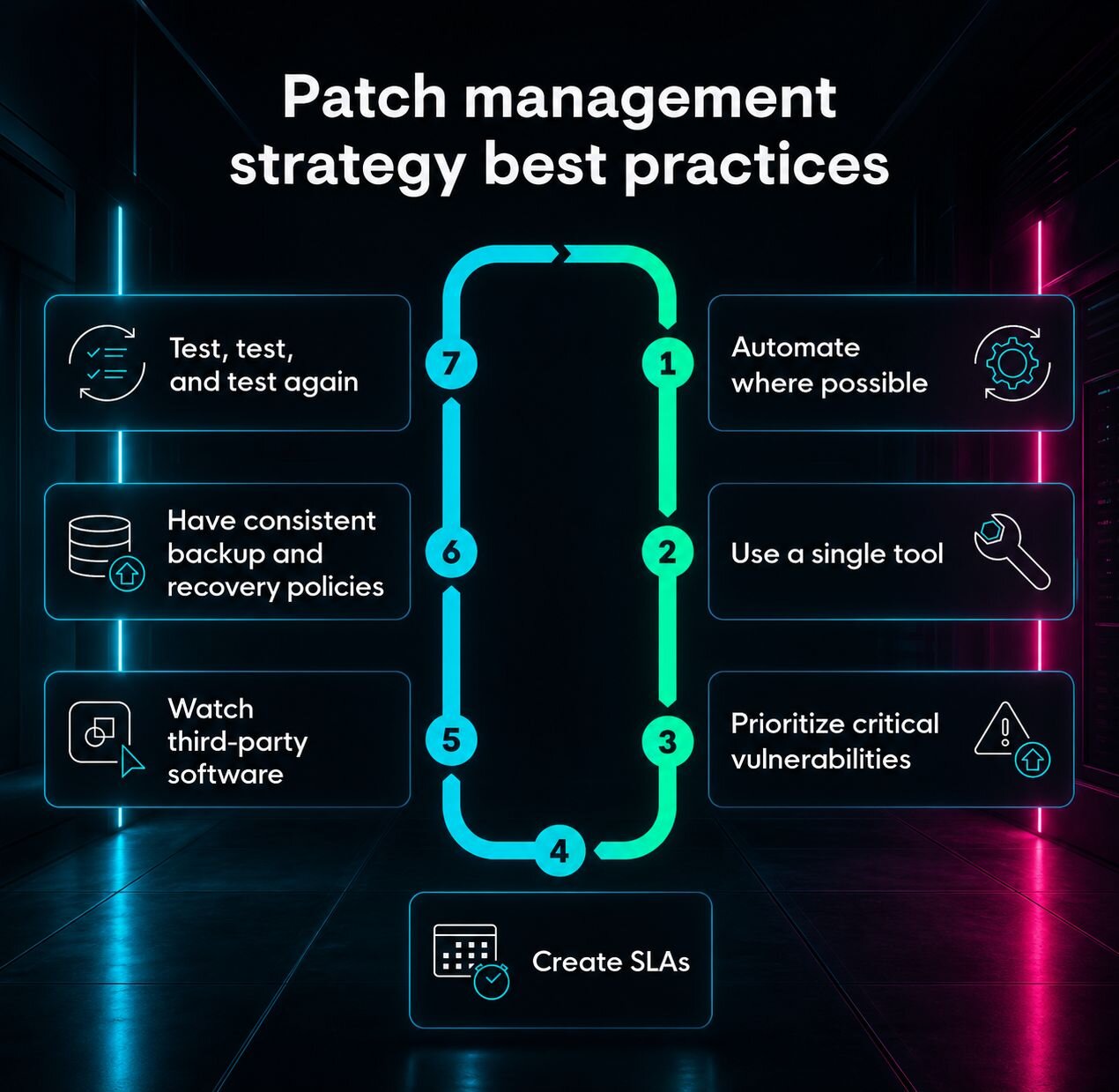
A strong patch management strategy only holds up if the day-to-day habits behind it are solid. These aren't one-time setup tasks; they're the operational discipline that keeps your program from quietly falling apart between cycles.
Automate where possible: Manual patching doesn't scale. Automation handles routine deployment, scheduling, and reporting so your team can focus on exceptions and edge cases that actually need human judgment.
Use a single tool: Fragmented tooling creates blind spots. A centralized patch management platform gives you a consistent view across your environment and reduces the chance that something slips through because two tools told you different things.
Prioritize critical vulnerabilities: Not everything can be urgent, and treating it that way leads to burnout. Triage by exploitability and asset exposure so your team is spending time where the actual risk is.
Create SLAs: Without defined remediation timelines, patching becomes reactive and inconsistent. SLAs create accountability and give you a clear baseline for measuring whether your program is working.
Watch third-party software: Operating systems get a lot of attention, but browsers, plugins, and productivity tools are just as commonly exploited and easier to overlook. Make sure third-party apps are in scope for your patching program, not just an afterthought.
Have consistent backup and recovery policies: If a patch breaks something, you need a clean path to roll back. Consistent backups mean a bad deployment doesn't turn into a prolonged outage.
Test, test, and test again: The time you spend validating a patch in a staging environment is almost always less than the time you'd spend recovering from a bad deployment in production. Don't skip this step when timelines get tight.
Common patch management pitfalls and how to avoid them
Most patching problems stem from recurring mistakes. A few to watch for:
Trying to patch everything at once: Treating every update as urgent leads to burnout and shortcuts. Risk-based prioritization exists for a reason—use it.
Test environments that don't mirror production: If your staging setup runs different OS versions or configurations, you're not testing your real environment. Phased rollouts help fill that gap.
Assuming deployment equals remediation: Deploying a patch successfully doesn't mean the vulnerability is gone. Post-deployment scanning is what confirms it.
Letting exceptions sit: Every approved exception that gets forgotten is an open vulnerability on a timer. Track them, set expiration dates, and review them regularly.
Mapping patch management to compliance frameworks
Timely patching is a baseline requirement across nearly every major compliance framework. The good news is that a well-run patch management program generates most of the documentation you need for an audit without extra effort.
A few key frameworks to be aware of:
NIST SP 800-40: The go-to federal guidance on patch management. It covers the full lifecycle from planning through verification and emphasizes risk-based prioritization over treating all patches equally.
PCI DSS: Requirement 6 specifically calls out the need to protect systems against known vulnerabilities by installing applicable security patches on a timely basis, typically within defined timeframes for high-risk issues.
HIPAA: While the Security Rule doesn't explicitly call out patch management, it requires covered entities to add procedures to guard against malicious software, which regulators consistently interpret to include patching.
The framing here matters. Audit-ready reporting should be a byproduct of a good patching program, not a separate project you scramble to put together once a year. If your program has clear SLAs, documented approvals, and verified remediation records, you're already most of the way there.
Strengthen your patch management for long-term fixes
Vulnerabilities keep coming, and they don't stop coming (or whatever Smash Mouth said), environments keep changing, and the attackers looking for gaps in your patch management strategy aren't slowing down. The teams that stay ahead are the ones patching smarter, with a repeatable process built for better long-term endpoint security.
If you're looking to close the gaps that a standard patching workflow misses, Huntress Managed ESPM goes beyond basic patch deployment to give you continuous visibility into your endpoint exposure and security posture, so you can make proactive changes rather than reactive ones.
FAQ
What are the key steps in patch management?
The core steps are: Inventory your assets, define a patching policy with clear ownership, prioritize updates by risk, test patches before broad deployment, roll out in phases, verify remediation, and track KPIs. Skipping early steps like inventory or policy tends to create problems downstream.
What is a patch management example?
Microsoft's Patch Tuesday is a common one. Every second Tuesday of the month, Microsoft releases security updates for Windows and related software. IT teams assess which patches apply to their environment, test them, and deploy them based on severity and asset criticality.
What are the KPIs for patch management?
The most useful ones are Mean Time to Respond (MTTR), patch coverage percentage, open exception count, and stale vulnerability count. Tying these to risk reduction rather than activity volume makes them more useful when reporting to leadership.
What is the difference between patch and vulnerability management?
Vulnerability management is the broader process of identifying, assessing, and prioritizing security weaknesses across your environment. Patch management is one way to remediate those weaknesses, specifically by applying vendor-released updates. Not every vulnerability has a patch available, which is where compensating controls come in.
How quickly should critical patches be deployed?
Most frameworks recommend deploying critical patches within 24 to 72 hours of release, especially if there's evidence of active exploitation. The CISA KEV catalog is a useful signal here; if a vulnerability is on that list, it's already being exploited in the wild and should be treated with urgency.
What is the NIST standard for patch management?
NIST SP 800-40 is the primary guidance document. It outlines a risk-based approach to patch management covering planning, implementation, and ongoing maintenance, and federal and enterprise security programs widely reference it.
How do you handle legacy systems that cannot be patched?
When a system can't be patched, the focus shifts to compensating controls: network segmentation to limit exposure, application whitelisting, enhanced monitoring, and strict access controls. These don't eliminate the risk, but they reduce the attack surface until the system can be upgraded or decommissioned.
What is a realistic patch coverage goal?
Most security teams aim for 95% or higher on critical patches within defined SLA windows. Getting to 100% consistently is difficult in practice due to legacy systems, exceptions, and operational constraints. The more useful question is whether your coverage on high-risk, internet-facing systems is close to 100%.