

Acknowledgements: Special thanks to Lindsey Welch, Anton Ovrutsky, and Harlan Carvey for their contributions to this investigation and writeup.
Background
Huntress has observed several incidents recently where threat actors have leveraged mobile device management (MDM) applications to carry out attacks. In these cases, legitimate management tools are being weaponized for malicious purposes, as opposed to threat actors taking advantage of inherent weaknesses in the applications themselves, such as vulnerabilities.
MDM platforms are legitimate tools that organizations use to manage employee laptops, phones, and other devices. These tools help IT teams to enroll and configure company devices remotely, enforce security policies, and deploy approved applications. However, these applications' centralized control and trusted level of access can create an entry point for threat actors if the tools are misused.
These incidents often begin with social engineering—users falling subject to business-themed lures that arrive through messaging applications and email. While not a definitive list of MDMs that could be used in such attacks, we have seen threat actors recently using well-known applications from Hexnode and Rippling.
Once registered with the MDM application, the attacker gains a trusted and privileged management path on the system. In both cases described here, Huntress observed the threat actors installing unauthorized RMM (remote monitoring and management) tools in order to further their attacks.
Mystery of the reappearing ScreenConnect
Imagine receiving an alert for an unauthorized ScreenConnect installation. Naturally, given the severity of such an alert, you prioritize it and remove the ScreenConnect agent immediately. However, several hours later, you receive another alert—same unauthorized installation. Something's clearly going on behind the scenes.
A recurring ScreenConnect installation is the first clue that this is more than an isolated, rogue RMM deployment. If both installations connected to the same destination relay, this would suggest the same threat actor was involved both times.
So how are they managing to get back in after being removed once?
We observed this activity in a recent incident, where two Huntress alerts for unauthorized ScreenConnect activity on the same device, separated by several hours, connected to the same relay.
As it happened, a threat actor had previously managed to install an MDM client from Hexnode on the system that ScreenConnect kept appearing on. Removing the RMM did little to deter them. They simply staged and installed the RMM software again.
The attack began with a phishing email. The target received several emails with proposal-related subjects like "ATTN: Official Invitation to Submit Proposal" and "Review Required" that mentioned an organization that the target likely had a business relationship with.
Clicking a link contained within the email downloaded a file from https://webdocusign.viewportal[.]es/Windows/download/index.php
which was saved to the Microsoft Edge temporary downloads folder as eD0cuSign_Installer.msi.
While the file had been named to mimic a DocuSign installer, it actually contained an installation package for a Hexnode MDM, a legitimate device management application. The package included Hexnode Gateway, the Hexnode agent, and supporting PostgreSQL components, all of which were installed on the system.
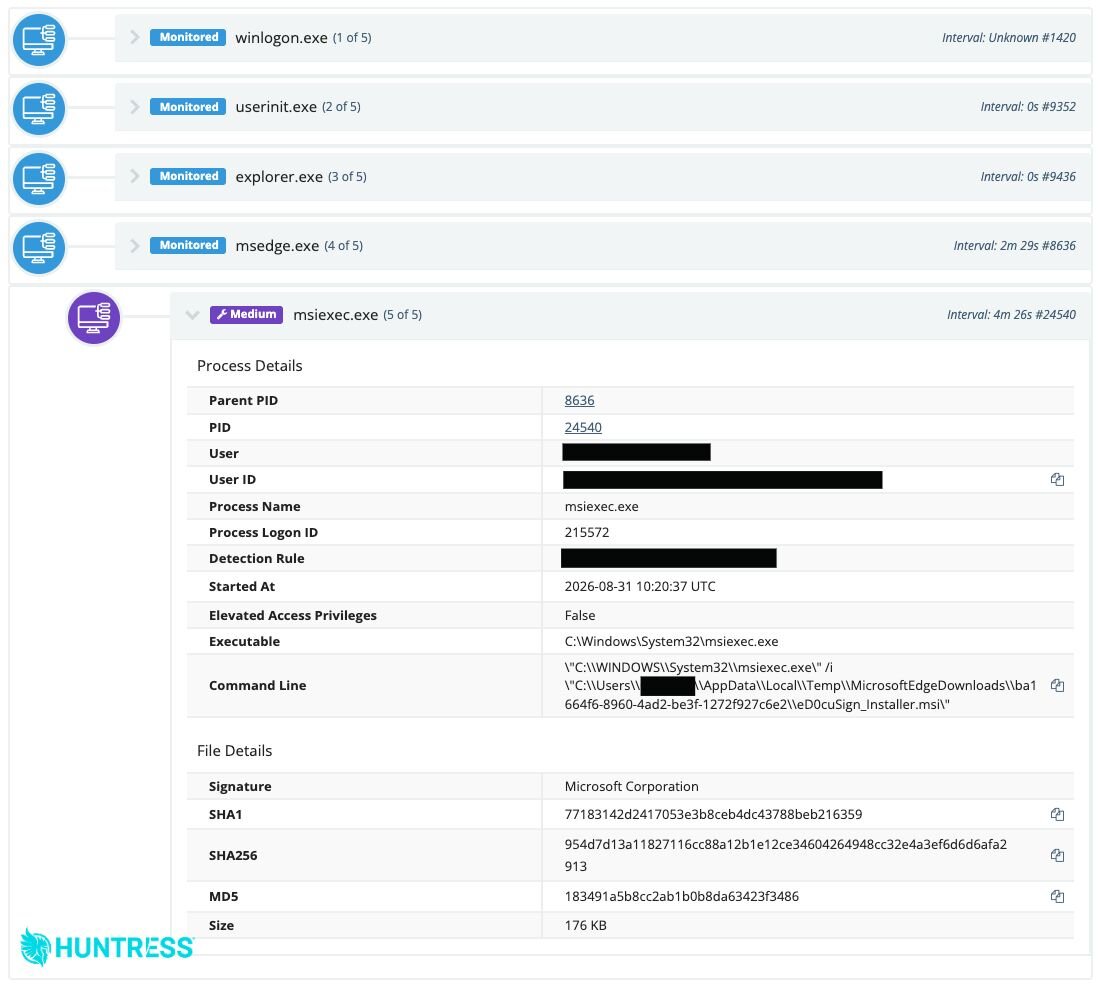
Figure 1: Execution of the Hexnode MSI, designed to resemble a (fake) DocuSign installer.
The threat actor followed up by installing ScreenConnect shortly thereafter and connecting to the attacker-controlled relay, relay.bobdthjau[.]com:8041. This resulted in a Huntress alert for an unauthorized ScreenConnect installation, and the MSP removed the RMM from the compromised computer shortly thereafter.
However, several hours later another instance of ScreenConnect was installed and reconnected to the relay. This triggered another alert, which led Huntress to isolate the endpoint, and a thorough remediation began.
Enrollment from a link
Not all incidents involve phishing techniques that trick a user into running an MSI installer. In another instance, a receptionist opened an email titled "Re: Tax Planning and Preparation Inquiry." The email included a link to what appeared to be a Microsoft Teams meeting invitation.
Clicking the link brought the target to a page titled "Calendar." While the site was taken down shortly after the attempt, it likely impersonated a Teams scheduling calendar. This page redirected to a .php file that appears to have helped facilitate enrollment into an attacker-controlled Rippling MDM tenant. All three links resided on the following domain (see the IoCs section for full URLs):
https://teams-microsoftcom5d41402abc4b2a76b9719d911017c592.kiratham[.]com
About a minute after clicking the link, a Rippling enrollment registry key appeared on the compromised system, which is consistent with registration in the MDM platform. An installation MSI for the Rippling agent was subsequently downloaded to C:\Windows\System32\config\systemprofile\AppData\Local\mdm\{GUID}.msi. The agent was then installed with SYSTEM-level permissions as C:\Rippling\daemon.exe.
Further investigation by Huntress determined that this activity originated from the online Rippling management agent, suggesting that the threat actor had previously created an account to carry out the attack.
Approximately 35 minutes after installation, the attackers used the MDM to stage and run a ScreenConnect installer as SYSTEM, connecting back to an attacker-controlled domain relay.pronconetydesire[.]online:8041, triggering a Huntress alert for a malicious ScreenConnect instance.
Tradecraft patterns & motivations
These instances, and the abuse of MDM applications in general, highlights a frustrating situation for security practitioners. The challenge is that more tools designed to help organizations manage endpoints are becoming mechanisms to compromise them. Similar to the illegitimate use of RMMs, this further complicates what we can safely consider trusted software, because reputation alone is just not sufficient to determine intent. Neither Hexnode nor Rippling are at fault here—users are simply being socially engineered into installing their software.
So where does this leave us? MDM enrollment should be treated as security-sensitive activity as opposed to a routine administrative task. An unexpected enrollment can establish persistence, provide a privileged deployment path, and allow an attacker to introduce additional tooling without relying on conspicuous payloads like known malware.
These incidents also demonstrate how detection cannot treat RMM installation as an isolated event. While the RMM client, and its subsequent activity, may have been the most visible part of the intrusion, removing it does not remove the unauthorized management architecture that delivered it.
The sequence of events observed makes for a stronger signal—social engineering -> a new MDM enrollment -> RMM installation -> outbound communication with an unfamiliar relay. Because the chain can vary, correlation across identity, MDM, endpoint, and network telemetry is our best hope in providing the resiliency needed to defend against these attacks.
Mitigation Guidance
Organizations can reduce the risk faced by these techniques by controlling both the enrollment path and the applications that MDM platforms are allowed to deploy.
Maintain an inventory of authorized MDM products, tenants, agents, and RMM instances. Treat any unexpected enrollment, management agent, or RMM instance as a security event.
Train users to verify unexpected meeting, document-signing, and proposal-review requests. Email and web controls should also scrutinize business-themed lures.
If a compromise is suspected, isolate the endpoint, remove the endpoint from the unauthorized MDM tenant, disable attacker-created accounts, revoke active sessions or tokens, reset affected credentials, and reimage the endpoint if its integrity cannot be confirmed.
Indicators of Compromise (IOCs)
Item | Description |
|---|---|
| Delivery URL for the fake DocuSign/proposal installer in the Hexnode case. |
| MSI masquerading as a DocuSign-related application, installed Hexnode components. |
| Attacker-controlled ScreenConnect relay used by the Hexnode case. |
| URL included in email pointing to a lookalike Teams page from the Rippling case. |
| Lookalike Teams URL for the page title "Calendar" from the Rippling case. |
| Lookalike Teams URL used to facilitate Rippling enrollment. |
| Attacker-controlled ScreenConnect relay used by the Rippling case. |