Most identity attacks don't start with a zero-day. They start with a short-term MFA exemption nobody removed, a Conditional Access policy that quietly drifted, or a guest account that still has access six months after the project ended. Identity Security Posture Management (ISPM) exists to find and close those gaps before an attacker does, but for MSPs and SMBs running Microsoft 365, most of the ISPM landscape is written for enterprises with in-house security teams and identity architects on staff who can keep up with the ongoing effort of managing baselines.
That leaves a real gap for organizations managing somewhere between 50 and 500 identities: tools that assume you have the time and expertise to design your own hardening baseline, test every policy change yourself, and chase drift on a schedule. We compared eight platforms MSPs and growing businesses actually evaluate to strengthen their Microsoft 365 identity posture, from dedicated configuration management tools to identity modules bundled inside broader security platforms — on whether the work is managed for you or left for your team to run.
Most identity attacks don't start with a zero-day. They start with a short-term MFA exemption nobody removed, a Conditional Access policy that quietly drifted, or a guest account that still has access six months after the project ended. Identity Security Posture Management (ISPM) exists to find and close those gaps before an attacker does, but for MSPs and SMBs running Microsoft 365, most of the ISPM landscape is written for enterprises with in-house security teams and identity architects on staff who can keep up with the ongoing effort of managing baselines.
That leaves a real gap for organizations managing somewhere between 50 and 500 identities: tools that assume you have the time and expertise to design your own hardening baseline, test every policy change yourself, and chase drift on a schedule. We compared eight platforms MSPs and growing businesses actually evaluate to strengthen their Microsoft 365 identity posture, from dedicated configuration management tools to identity modules bundled inside broader security platforms — on whether the work is managed for you or left for your team to run.
This comparison draws on Huntress's own competitive research into each platform's publicly available materials, documentation, and pricing, cross-checked against operational insight from the Huntress SOC, which manages security posture for more than 17 million identities. We focused specifically on the segment most existing ISPM buyer's guides don't address: MSPs and SMBs managing Microsoft 365 (and Google Workspace) identities in the 50–500 range, rather than enterprise-scale, multi-cloud identity estates.
As a vendor in this category, we have an obvious point of view — we've tried to be specific about where competitors genuinely do something well (Augmentt's compliance reporting, CIPP's free admin plane, Inforcer's workload breadth) rather than presenting a one-sided list.
The Managed vs. Self-Managed Divide
This is the distinction that matters most for MSPs and SMBs evaluating ISPM, and it's the one most buyer's guides skip. Self-managed tools give you a console: baselines, policy templates, and drift reports. You still decide what "hardened" looks like, test whether a new Conditional Access policy will lock anyone out, and clean up drift when it's found. Managed platforms take that judgment off your plate — a vendor's team (ideally backed by insights from a 24/7 SOC) owns the baseline, validates impact before enforcement, and closes drift automatically.
Of the eight platforms below, only Huntress Managed ISPM includes a fully managed configuration management and enforcement layer by default; a subset of Sophos, CrowdStrike, and Blackpoint capabilities reach that level only at higher paid tiers. CIPP, Augmentt, and Inforcer are self-managed by design — genuinely strong tools, but the operating model puts the ongoing work back on your team.
Best for: MSPs and growing businesses that want Microsoft 365 identity hardening done for them, not just flagged
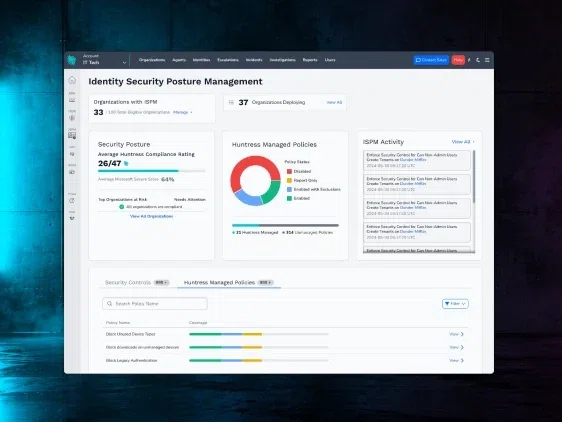
Huntress Managed ISPM continuously hardens Microsoft 365 identity posture under a fully managed model: Huntress defines the policy baseline, tests every new Conditional Access policy in Learning Mode before it goes live, rolls policies out on a prioritized schedule, and auto-remediates drift within minutes. It runs on the same platform as Managed ITDR and is backed by the insights of a 24/7 human-led AI-Centric SOC.
Key Features
75+ managed controls/policies covering Entra, SharePoint, Exchange, Teams, and more
Directly addresses the security controls which can impair hacker tradecraft like Unwanted Access, Account Takeovers and Shadow Workflows
Learning Mode collects real sign-in data and shows exactly who a new policy would affect before it's enforced
Drift detection with continuous enforcement to auto-remediate, typically within 10–15 minutes of a change
Recommended policies are prioritized and built from real attacker tradecraft observed across 17M+ identities under management, not just a CIS/NIST checklist (though it covers that too)
Pairs natively with Managed ITDR on one platform with a 24/7SOC
Microsoft 365 Integration Depth: Huntress provides a fully managed hardening model that prioritizes the highest-impact security settings based on real-world attacker behavior. We own the framework, the rollout sequencing, and the enforcement decision—it isn't just a dashboard your team operates, it's a managed outcome.
Google Workspace Coverage: Managed identity threat detection and response via Huntress Managed ITDR. Managed ISPM itself is focused on Microsoft 365 posture today.
Who Is This For? MSPs and internal IT teams managing roughly 50–500 identities on Microsoft 365 who don't want to build an in-house identity hardening practice to keep up with drift and Conditional Access changes.
Pricing model: Per-identity, volume-tiered managed service
Strengths
Fully managed from security control selection, through enforcement and drift remediation
Managed Deployments prioritizes and implements the scheduling, deployment, and maintenance of policies so your Secure Score improves without manual effort
Learning Mode de-risks rollout, no guessing at what a new policy will break
Unified platform with Managed ITDR
Considerations
Newer as a dedicated posture product. Managed ISPM reached general availability July 1, 2026, but already protects thousands of organizations
Scope is intentionally focused on Microsoft 365 identity hardening, not user administration
Sasha Roshan, Sales Engineer at Huntress, walks through Huntress Managed ISPM for Microsoft 365. The demo covers the ISPM dashboard, conditional access policies, learning mode, and a real story about a partner locked out of their own tenant. Turn on managed deployments and let Huntress keep your Microsoft 365 configuration airtight. Watch below:
2. CIPP
Best for: MSPs that want a free or low-cost multi-tenant Microsoft 365 admin console
CIPP is an open-source, self-hostable (or affordably hosted) multi-tenant Microsoft 365 administration console built for MSPs. It handles user lifecycle, licensing, offboarding, and standards deployment across tenants better than most paid admin tools.
Key Features
Free to self-host, or roughly $99/month hosted
Broad day-to-day Microsoft 365 admin controls: mailboxes, licensing, onboarding, offboarding, group management
Free, open-source browser extension that blocks AiTM phishing at the login page
Drift detection on a scan cadence (commonly daily), surfaced as a report
Microsoft 365 Integration Depth: Deep on the admin plane — CIPP is genuinely one of the best free tools for day-to-day Microsoft 365 tenant management. Posture and drift work is manual: CIPP surfaces the finding, your team fixes it.
Google Workspace Coverage: Not covered.
Who Is This For? MSPs with the in-house Microsoft/Conditional Access expertise and the time to own baseline design, pre-enforcement testing, and drift cleanup themselves, who primarily need a free multi-tenant admin console.
Pricing model: Free (self-hosted) or flat ~$99/tenant/month (hosted)
Strengths
Best free Microsoft 365 admin plane in the MSP channel
Deep, broad day-to-day admin functionality across tenants
Free anti-phishing browser extension
Considerations
Drift is caught on a scan cadence and handed back as a report, not fixed automatically
No built-in report-only impact testing before enforcing new Conditional Access policies
No managed detection and response layer
3. Augmentt
Best for: MSPs that want self-service Microsoft 365 posture management with license-aware compliance reporting.
Augmentt Secure is a Microsoft 365 posture and administration platform for MSPs: security baselines, Conditional Access management, drift detection and correction, and rules-based alerting on risky sign-ins. Its Engage module adds direct tenant and user administration.
Key Features
One-click baselines aligned to Secure Score, NIST, CIS, or custom frameworks
Granular group- and role-based policy deployment with break-glass exceptions
License-aware insurance and compliance reporting used in QBRs and cyber-insurance documentation
Engage module for onboarding/offboarding, license assignment, and user lockout
Microsoft 365 Integration Depth: Broad functionality across multiple workloads (e.g., Entra, Intune), but lacks deep, specialized depth in any individual area; drift detection occurs on a scheduled (roughly 24-hour) cadence rather than through continuous enforcement.
Google Workspace Coverage: Not covered (Microsoft 365-focused).
Who Is This For? MSPs around 250+ seats who want to run posture management themselves alongside broader Microsoft 365 administration, and who need license-aware reporting for QBRs.
Pricing model: Per-user self-service, ~$0.80/user, 250-seat minimum, no annual commitment; no managed tier to upgrade into.
Strengths
License-aware insurance and compliance reporting is a genuine, documented differentiator
Granular break-glass policy exclusions
Direct tenant administration in the same tool as posture management
Considerations
No management — alerts and remediation actions still require MSP review and ownership
Drift correction runs on a scheduled cadence rather than continuously
No integrated ITDR capabilities in the same platform
4. Inforcer
Best for: MSPs with strong in-house Microsoft identity expertise who want a broad policy-administration plane
Inforcer helps MSPs push and standardize Microsoft 365 policies across tenants — Entra, Intune, Defender, and Purview — and recently added early-access Threat Detection &
Response (TDR) built on top of Microsoft XDR signals.
Key Features
Policy library import/build and rollout across tenants
Drift checked against a customer-defined baseline on a 24-hour cycle
Early-access TDR layered on the customer's Microsoft XDR signals
Microsoft 365 Integration Depth: Broad workload coverage (Entra, Intune, Defender, Purview) in one console, but the MSP defines and maintains the baseline itself. The platform offers no scheduling or managed deployments, and provides no recommendations on which settings to align to the baseline first; instead, it focuses on matching a "golden template" rather than closing specific security gaps. There is no built-in Learning Mode-style impact analysis before enforcement.
Google Workspace Coverage: Not covered.
Who Is This For? MSPs that already have strong Microsoft identity expertise and want a broader admin plane to standardize policy at scale — not a team looking for a fully managed outcome.
Pricing model: Tenant-based pricing with annual agreements and volume discounts; no published price card (custom quote).
Strengths
Broad Microsoft workload coverage in a single console
New TDR layer shows continued platform investment beyond pure posture
Useful for MSPs standardizing policy across many tenants at once
Considerations
Not managed— Inforcer's own leadership has said they are not building this
TDR detection depth depends on the client's Microsoft license tier (richest signal needs Entra ID P2 or Defender/E5)
Baseline ownership, pre-deployment testing, and drift response all stay with the MSP
5. Blackpoint (CompassOne)
Best for: MSPs that want bundled EDR, identity, SIEM, and SAT under one 24/7 SOC at accessible entry pricing
Blackpoint's CompassOne platform pairs an endpoint agent (SNAP-Defense) with posture visibility for Microsoft 365 — including limited settings rollback — inside a broader, multi-product security platform.
Key Features
24/7 SOC across endpoint and identity alerts
CompassOne posture visibility with limited settings rollback
MDR Essentials available month-to-month starting at 50+ endpoints
Microsoft 365 Integration Depth: Posture visibility exists and some settings can be rolled back, but baseline design and ongoing upkeep stay with the MSP. Posture is one module inside a broader platform, not a dedicated hardening product.
Google Workspace Coverage: Not covered.
Who Is This For? MSPs in the 50+ endpoint range who want one bundled platform (endpoint, identity, SIEM, SAT) with accessible month-to-month entry pricing, and who are comfortable owning baseline decisions with SOC support on alerts.
Pricing model: Tiered; month-to-month available at the entry tier, enterprise capabilities require a higher commitment tier (custom quote).
Strengths
Accessible entry-level, month-to-month pricing
24/7 SOC on both endpoint and identity alerts
Considerations
No published API, which limits automation and custom integration
Posture management is visibility-plus-partial-rollback, not full managed enforcement
Users report response leans on alert-driven calls rather than proactive SOC-led remediation
6. Kaseya (SaaS Alerts + Fortify)
Best for: MSPs already standardized on the Kaseya RMM/PSA/backup stack who want security bundled in
Kaseya's identity posture story runs through SaaS Alerts (broad SaaS event monitoring with configurable automated rules and PSA ticketing) and Fortify (bulk application of Microsoft's baseline recommendations), inside Kaseya's larger IT-management platform.
Key Features
Broad SaaS event monitoring across many applications, not just Microsoft 365
Automated, rules-based actions with native PSA ticket integration
Fortify bulk-applies Microsoft's security recommendations across tenants
Microsoft 365 Integration Depth: Broad SaaS visibility but shallower on Microsoft 365-specific hardening depth. There's no single, fully managed ISPM product — posture is a mix of tools and native Microsoft 365 controls the MSP configures and tunes.
Google Workspace Coverage: SaaS Alerts monitors broad SaaS applications generally, but Google Workspace-specific identity hardening isn't documented as a dedicated capability.
Who Is This For? MSPs already standardized on Kaseya for RMM, PSA, and backup who want security bundled into the same ecosystem and are comfortable owning ongoing tuning and policy work.
Pricing model: Mix of bundles and à la carte modules across Kaseya 365, RocketCyber, and SaaS Alerts; often multi-year contracts with separate SKUs and onboarding/upgrade fees (custom quote).
Strengths
One ecosystem for RMM, PSA, backup, and security
Broad SaaS event monitoring beyond just Microsoft 365
PSA-native ticketing for identity alerts
Considerations
No single, dedicated, fully managed ISPM service comparable to a purpose-built posture platform
Automated rules and PSA tickets stand in for 24/7 human SOC validation on identity alerts
Partners report account-management turnover, frequent sunsetting of products, and a fragmented support experience across the stack
7. Sophos
Best for: Larger, more enterprise-leaning organizations that want ISPM as one module inside a broad security ecosystem
Sophos's identity story sits inside its wider MDR/XDR ecosystem. ITDR is available as an add-on, Microsoft 365 identity configuration is largely left for the customer to design and maintain.
Key Features
ITDR add-on with dark-web credential monitoring and posture checks
Broader identity governance and access-lifecycle tooling for multi-IdP environments
Tiered MDR (Essentials/Complete) with an optional Technical Account Manager
Microsoft 365 Integration Depth: Scores Entra + on-prem AD identity posture and recommends fixes; customer still owns config enforcement and drift. Managed MDR is available as an add-on that ties to their product.
Google Workspace Coverage: Not documented as a dedicated capability in current materials.
Who Is This For? Larger organizations that want identity coverage across multiple identity providers or broader app governance beyond Microsoft 365, with budget for tiered MDR add-ons.
Identity governance option extends beyond Microsoft 365 to multiple identity providers
Established enterprise MDR ecosystem
24/7 SOC available at higher tiers
Considerations
Microsoft 365-specific posture design and upkeep stays with the customer
Reaching full coverage compounds cost across several SKUs; published initial response target is 30 minutes
8. CrowdStrike Falcon Identity Protection
Best for: Enterprises already invested in the Falcon platform with in-house security teams
Falcon Identity Protection delivers identity posture and detection across on-prem Active Directory and cloud identity providers (Entra ID, Okta), correlating identity signals with endpoint, workload, and cloud data through CrowdStrike's single-sensor architecture.
Key Features
AI/ML-driven behavioral baselines for identity activity
Dark-web credential-exposure monitoring
Hygiene checks: weak passwords, stale accounts, over-privileged service accounts
Cross-layer correlation with Falcon EDR and cloud telemetry
Microsoft 365 Integration Depth: Identity posture is real, but it's a module within the broader Falcon platform. Fully managed, SOC-led response requires the Falcon Complete tier — built and priced around enterprise deployments rather than standalone Microsoft 365-only environments.
Google Workspace Coverage: Not documented as covered.
Who Is This For? Enterprises with dedicated security teams, deep budgets, and existing Falcon investment who want identity signals correlated with endpoint and cloud telemetry in one console. Generally a mismatch for MSPs or SMBs in the 50–500 identity range evaluating a first ISPM purchase.
Pricing model: Contact for quote; fully managed detection and response is an add-on to Falcon Complete.
Strengths
Inline, real-time blocking of AD compromise, lateral movement, and pass-the-hash attacks
Unified visibility across human and non-human identities on-prem, in the cloud, and in SaaS
Automated identity + endpoint correlation for faster incident response
Considerations
Requires the Falcon agent/ecosystem and configuration expertise
Fully managed response is gated behind the Complete tier
Built and priced for enterprise scale, which adds cost and complexity for smaller identity estates
Pricing Comparison
ISPM and Microsoft 365 posture pricing is inconsistent across this category with some vendors publishing a clean per-seat rate, most require a quote, and several only reach full capability once you stack multiple add-on SKUs. The table below reflects publicly documented pricing structures; confirm current figures directly with each vendor before making a purchasing decision.
Product
Pricing Model Type
Starting Price / Structure
Huntress Managed ISPM
Per-identity
Volume-tiered, quoted per identity; fully managed, and built within the same platform as Huntress’s SOC-backed Managed ITDR
CIPP
Free / flat fee
Free self-hosted, or ~$99/month hosted
Augmentt
Per-user
~$0.80/user, 250-seat minimum, no annual commitment
Inforcer
Per-tenant / custom quote
Tenant-based, annual agreements with volume discounts; no public price card
Blackpoint (CompassOne)
Tiered / custom quote
MDR Essentials month-to-month from 50+ endpoints; higher tiers for full capability
Kaseya (SaaS Alerts + Fortify)
Bundled / custom quote
Mix of bundles and à la carte modules; often multi-year contracts with extra fees
Sophos
Custom quote
MDR Essentials/Complete + ITDR add-on + integrations, priced by quote
CrowdStrike Falcon Identity Protection
Custom quote
Contact for quote; managed response is an add-on to Falcon Complete
Per-identity pricing (Huntress's model) is a structural advantage for buyers: the cost scales predictably with what you're protecting, it’s fully managed with no additional managed fees, and it's quoted up front rather than assembled from a base license plus MDR add-on plus ITDR add-on plus extended retention.
Several platforms in this comparison: Sophos, CrowdStrike, Kaseya, Blackpoint — require exactly that kind of stacking to reach comparable managed coverage, which makes true cost harder to pin down until you're deep into a sales cycle.
The bottom line
If you're an MSP or growing business managing Microsoft 365 identities in the 50–500 range and you'd rather have the hardening owned end-to-end — baseline, impact testing, drift remediation, and identity threat response. Huntress Managed ISPMis built specifically for that gap—and, paired with Managed ITDR, lets you cover identity threats across both Microsoft 365 and Google Workspace from one fully-managed platform.
For MSPs and growing businesses managing Microsoft 365identities in the 50–500 range, Huntress Managed ISPM is the top pick in 2026 because it's the only fully managed option in this comparison: Huntress defines the Microsoft 365 hardening baseline, manages policy rollouts and updates, tests every new policy in Learning Mode before enforcing it, and auto-remediates drift within minutes, backed by insights from a 24/7 human-led AI-Centric SOC.
Dedicated Microsoft 365 posture tools like CIPP, Augmentt, and Inforcer are strong choices if your team wants to own that work directly; bundled platforms like CrowdStrike, Sophos, Kaseya, and Blackpoint fold identity posture into a broader, pricier security stack. There's no single universal "best", the right choice depends on whether you want the hardening owned for you or a toolkit to run yourself.
Among the platforms compared here, Augmentt stands out today for license-aware insurance and compliance reporting built specifically for QBRs and cyber-insurance documentation. Huntress Managed ISPM provides posture reporting that can be combined with with Managed SIEM's audit-ready log retention of up to seven years. Bitdefender and Sophos offer compliance-adjacent reporting through their SIEM/XDR add-ons, but both require additional paid tiers to unlock it. If license-tier insurance documentation is your immediate need, evaluate Augmentt directly against your requirements; if you need broader identity-posture compliance evidence tied to active enforcement, Huntress is the stronger fit.
ISPM continuously finds and fixes identity weaknesses, misconfigured permissions, orphaned accounts, excessive privileges, MFA gaps, and risky access paths before attackers can exploit them, rather than detecting an attack after it's already happening.
For MSPs and SMBs, ISPM most often means Microsoft 365 identity hardening: Conditional Access, Entra ID configuration, MFA enforcement, admin and guest permissions, and legacy authentication protocols. Platforms differ most in how the work gets done — whether a tool hands you a dashboard and a list of findings for your team to action, or a vendor's team defines the baseline, tests changes before they go live, and owns drift remediation as an ongoing managed outcome.
Yes. Managed ISPM andManaged ITDR are separate products, but they're designed to work together on the Huntress agentic platform. Managed ITDR focuses on detecting and responding to active identity threats, while Managed ISPM continuously hardens your Microsoft 365 environment so those attack paths stay closed. Telemetry and SOC findings from Managed ITDR feed back into Managed ISPM's identity security framework, so the specific gaps attackers try to exploit get prioritized and closed first, but either product can be deployed on its own.
We've seen this play out directly when our SOC tracked two large-scale Microsoft 365 campaigns, device code phishing tied to Railway.com infrastructure, and a separate ROPC credential-replay attack from LSHIY LLC. Managed ITDR caught the active compromises and generated incident reports so affected organizations could respond in real time. At the same time, the two Conditional Access controls that would have prevented both attacks (blocking device code flow, and closing legacy auth/ROPC gaps) were already deployed by default for Managed ISPM customers, because earlier SOC intelligence had already fed into the ISPM policy framework. ITDR detects and responds to what gets through, and ISPM makes sure the same path can't be used the same way twice
Not every ISPM tool actually hardens your posture, some just give you another dashboard to monitor. The Practical Buyer's Guide to ISPM breaks down the capabilities that matter, the questions to ask vendors, and whether a managed or self-managed model fits your team.
Too Many Alerts, Too Little Time: Cutting False Positives for MSPs
Alert overload is a growing challenge for MSPs, slowing response times and increasing the risk of missed threats. This guide explores why false positives happen, how to reduce noise through proactive hardening and smarter tuning, and how to focus on high-confidence alerts tied to real attacker behavior.
For Managed Service Providers (MSPs), making sure client data stays safe means constantly staying ahead of cybercriminals launching waves of malicious attacks like ransomware, data-theft trojans, phishing, and business email compromise (BEC).