


Acknowledgments: Thanks to Stephanie Fairless and Andrew Brandt for their help in analysing this attack.
Background
A simple search on Google or Bing for a VPN client download may seem like a run-of-the-mill task, but it can also expose users to convincing credential phishing sites.
In January 2026, WatchGuard's Secplicity team published research into a credential-harvesting campaign targeting VPN providers, covering lookalike download sites for WatchGuard, F5, Fortinet, SonicWall, and Sophos clients. This campaign included two domains impersonating WatchGuard itself: watchguard-vpn[.]com and watchguard-vpn[.]net. The findings included a .NET executable posing as their Mobile VPN with SSL application, served from a GitHub repository, that sent entered credentials to a command-and-control (C2) server. Researchers said they also observed Bing's Copilot recommending watchguard-vpn[.]net when asked about "watchguard vpn," although at the time of their research that domain had "no backend logic to direct users to the spoofed downloads page."
Two months later, Microsoft Threat Intelligence reported activity linked specifically to watchguard-vpn[.]com. Microsoft attributed this wider campaign iteration to Storm-2561, a financially motivated actor that has been active since May 2025. The attack chain highlighted by Microsoft involved pushing spoofed vendor sites up the search results, delivering a signed, fake MSI that sideloads malicious DLLs, harvesting credentials typed into a fake client, and then showing an installation error and pointing the victim to the real vendor download so nothing looks wrong afterwards.
Fast forward to October: the Huntress SOC analyzed an incident that involved one of the initial domains that WatchGuard had reported back in January – watchguard-vpn[.]net – that was consistent with previous reports of this credential-theft campaign targeting WatchGuard VPN credentials. However, further investigation into the incident showed that this latest iteration of the attack chain is slightly different. Rather than downloading a fake client, the domain instead downloads a genuine, validly signed WatchGuard installer.
As of October 13, the main domain linked to the activity Huntress observed (watchguard-vpn[.]net) was offline. Prior to publishing, Huntress notified WatchGuard about this active campaign and shared the relevant infrastructure details.
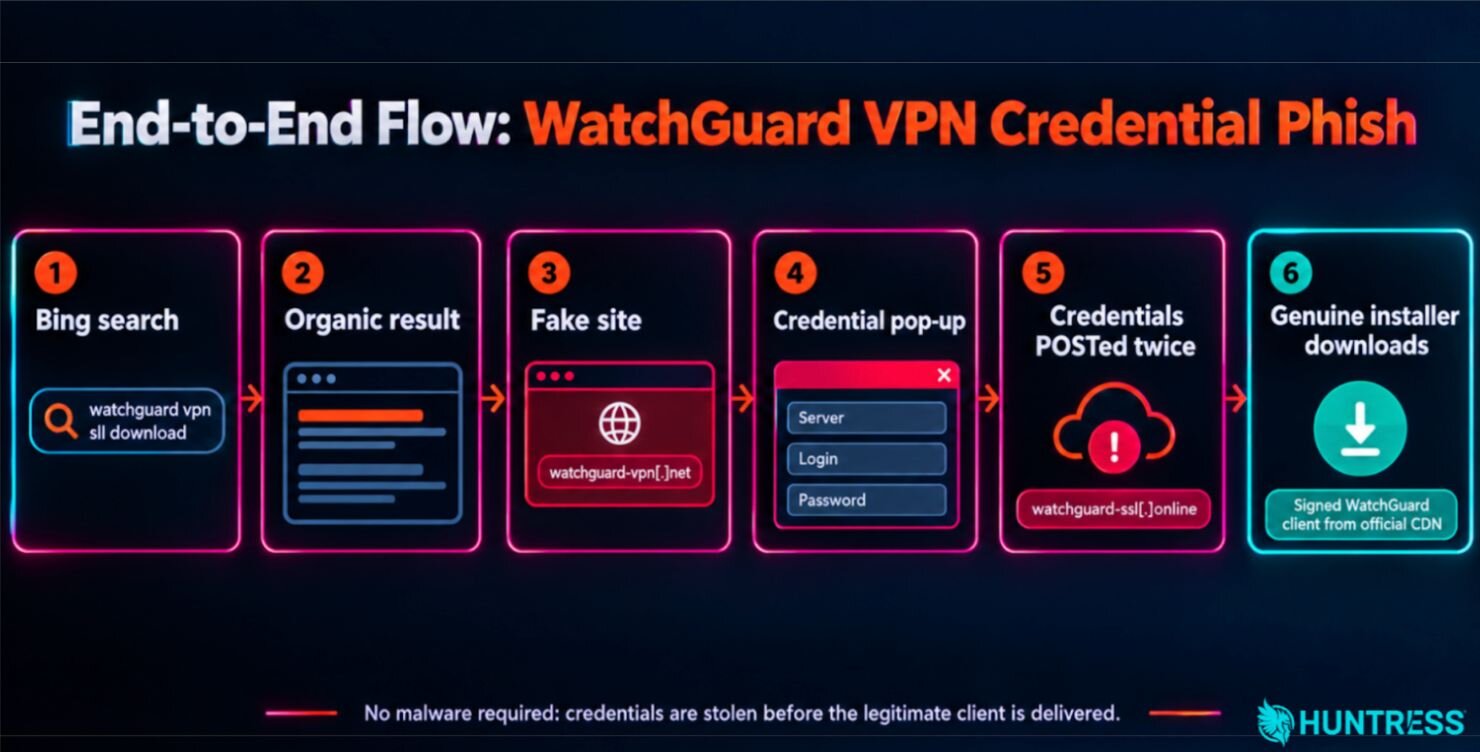
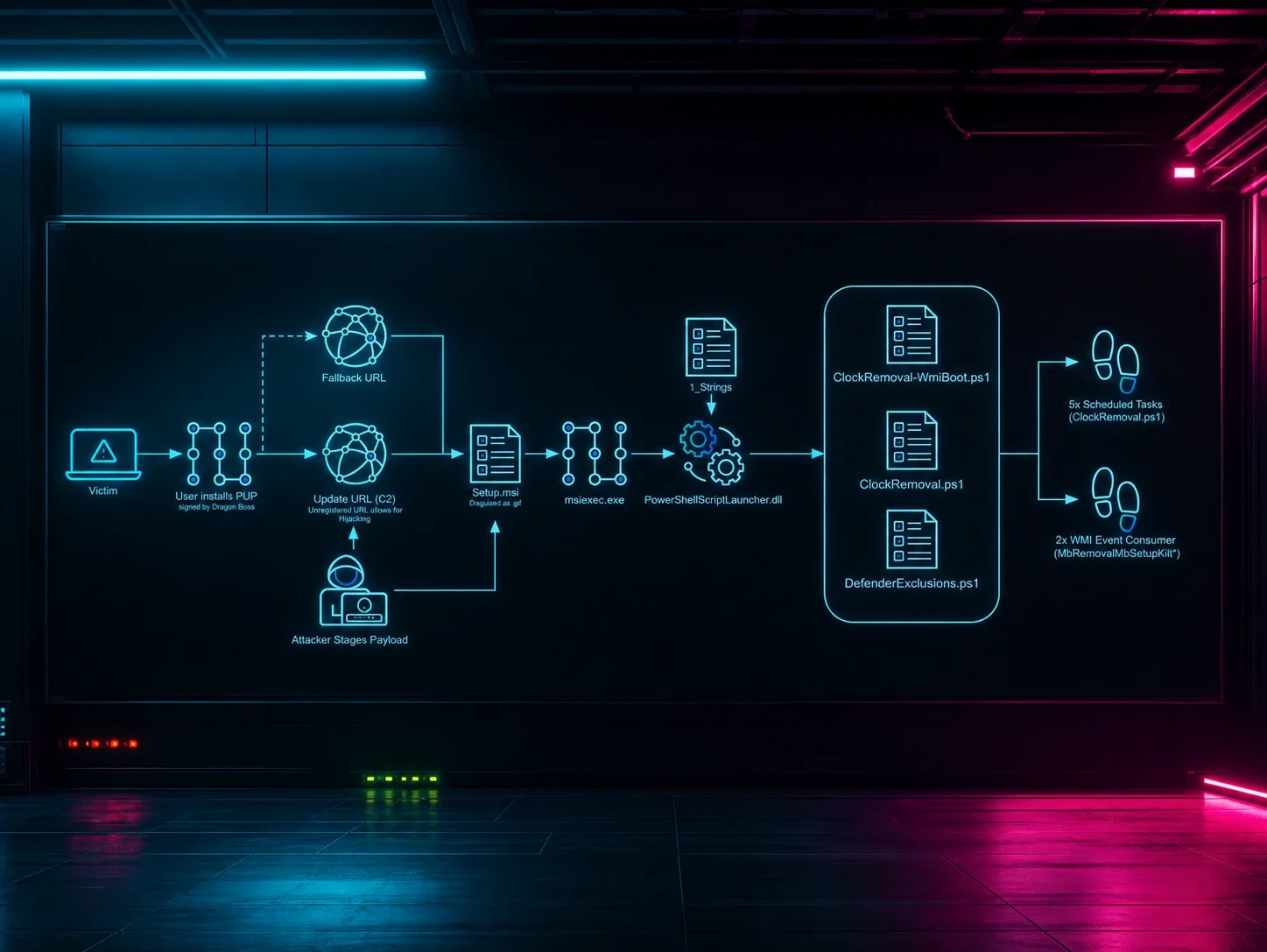
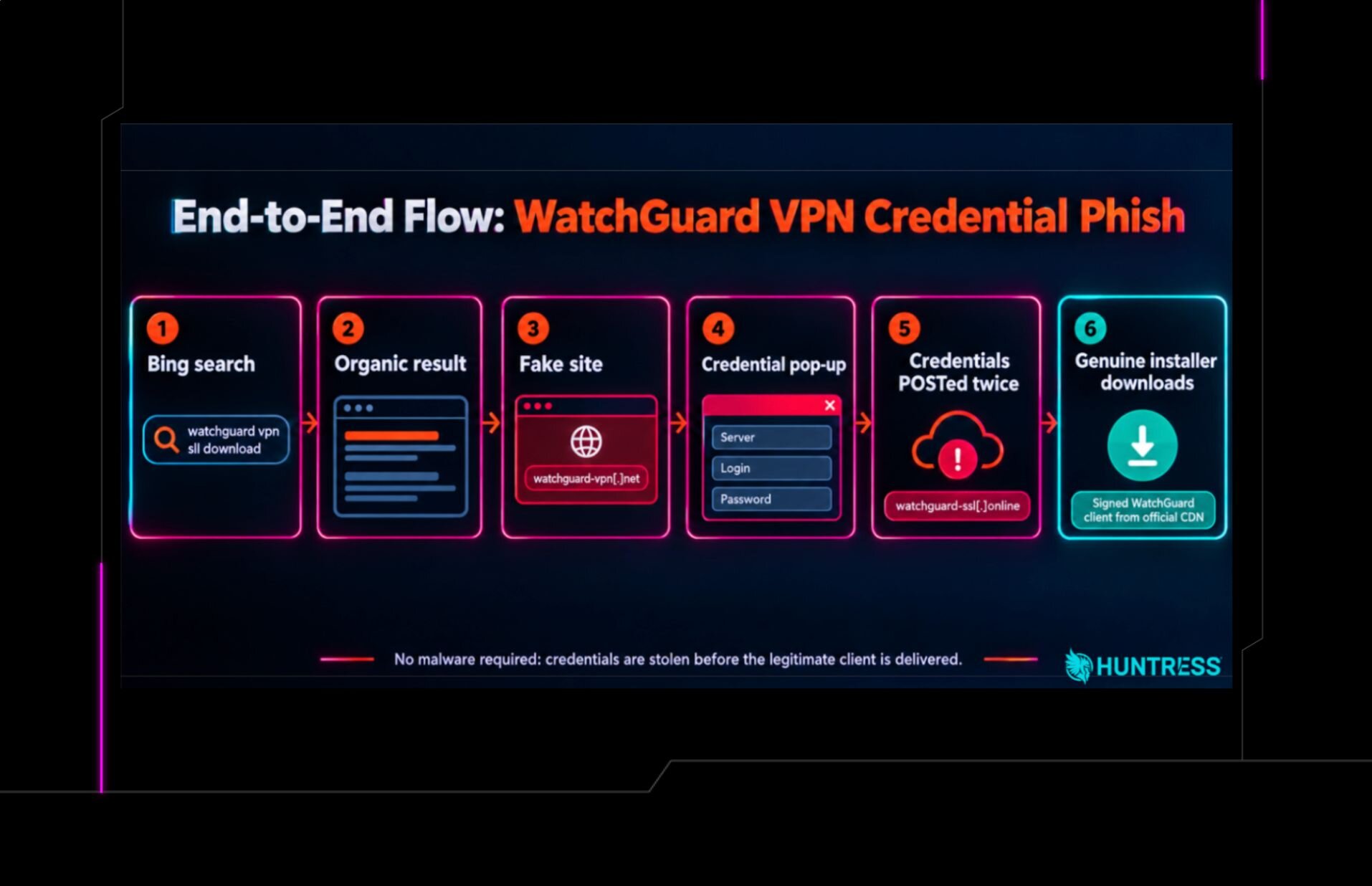
Figure 1: End-to-end flow of the WatchGuard VPN credential phish.
Technical Details
Initial access: A typo and a search engine
On October 7, Huntress Managed Defender flagged suspicious activity that stemmed back to activity from a user account at a managed service provider. Further investigation into the incident revealed that an administrator had searched Bing for "watchguard vpn sll download." Eight seconds later, they clicked through to www.watchguard-vpn[.]net, a page titled "WatchGuard Firebox VPN Client."
The click went through Bing's standard bing.com/ck/a result redirect, with the destination encoded in the u= parameter (aHR0cHM6Ly93d3cud2F0Y2hndWFyZC12cG4ubmV0Lw decodes to hxxps://www.watchguard-vpn[.]net/). This redirect is consistent with a standard Bing search-result click and, alongside the lookalike domain's apparent search-result placement, supports classifying the lure as SEO poisoning rather than malvertising. Secplicity and Microsoft have also described related activity in this campaign as SEO poisoning.
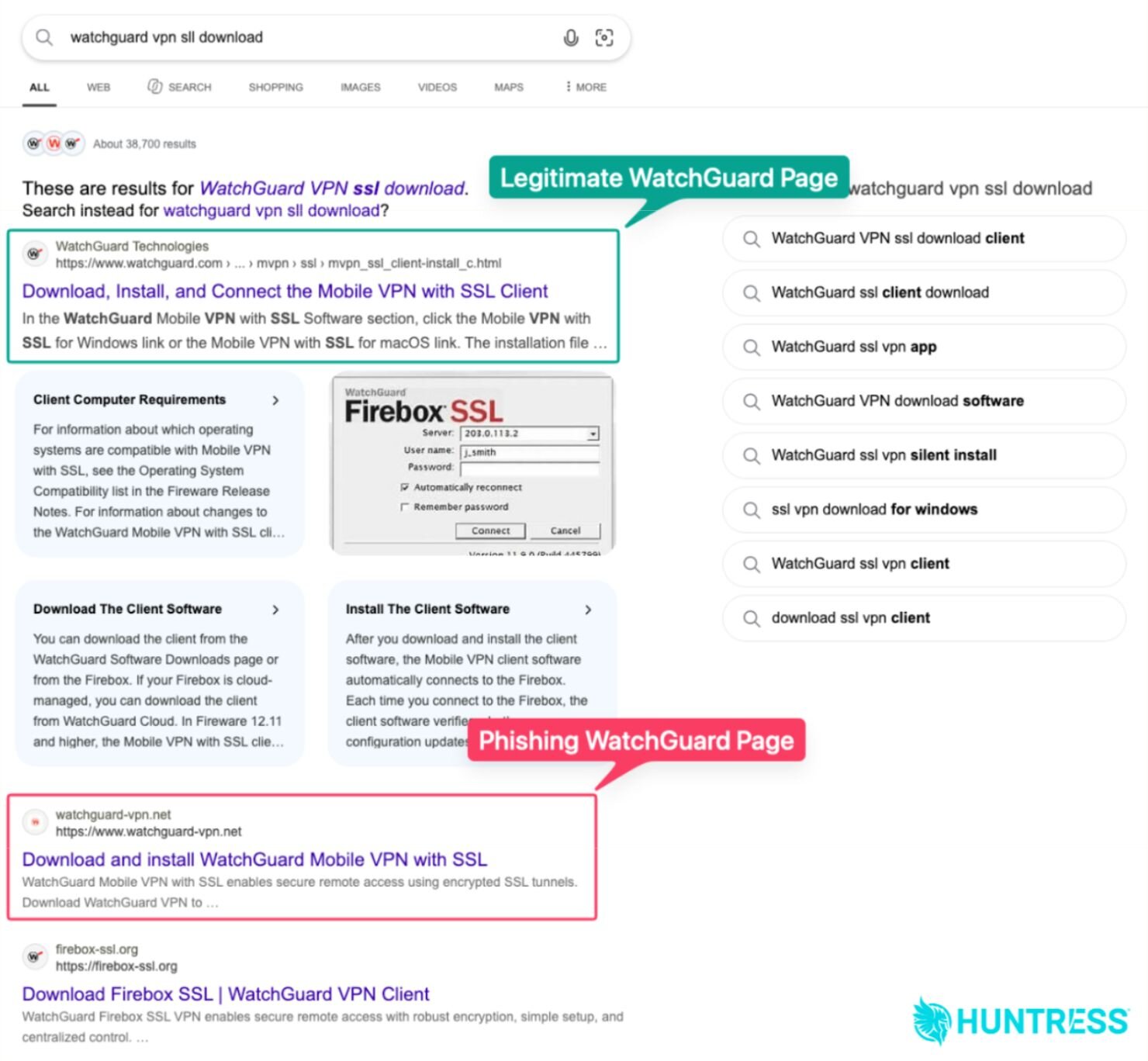
Figure 2: The lookalike domain for a routine VPN download search.
We took a closer look at watchguard-vpn[.]net as part of our investigation.
The malicious domain
Video: The attack chain
When targets arrive at watchguard-vpn[.]net, they see a domain that pretends to be the legitimate WatchGuard website, and offers an option to "Download WatchGuard SSL VPN." The fake WatchGuard website also includes information about WatchGuard products and a "WatchGuard Mobile VPN Questions" section (likely meant to bolster SEO ranking).
Ironically, at the bottom of the page, the website includes the disclaimer: "An independent English-language fan site about WatchGuard Mobile VPN. Not an official sales, download, or support channel."
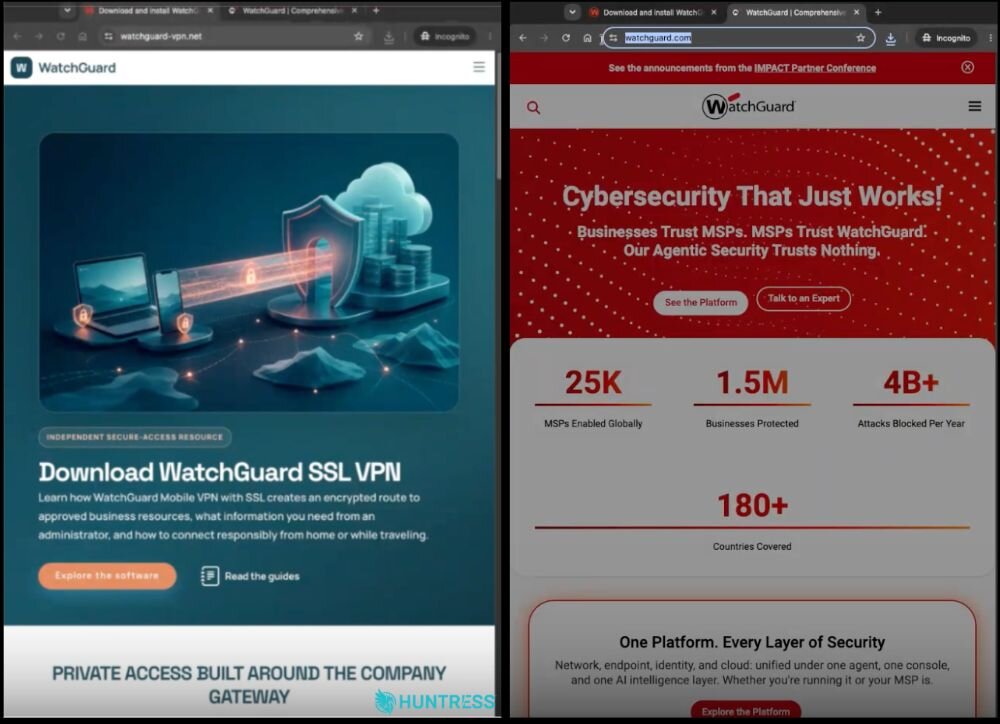
Figures 3 and 4: The malicious domain (left) versus the actual legitimate WatchGuard domain (right)
When targets click through the site, they are sent to the download page at watchguard-vpn[.]net/index.php, which poses as a "WatchGuard Support Page" and gives several options for downloading the VPN for different OS configurations.
Credential capture: Inside popup.js
Clicking on any of the download options presents victims with a pop-up prompt that reads "To install WatchGuard SSL VPN, please enter your connection details" and asks for three things: Server, Login, and Password.
The phishing logic lives in a single file, popup.js, about 150 lines of plain, unobfuscated JavaScript.
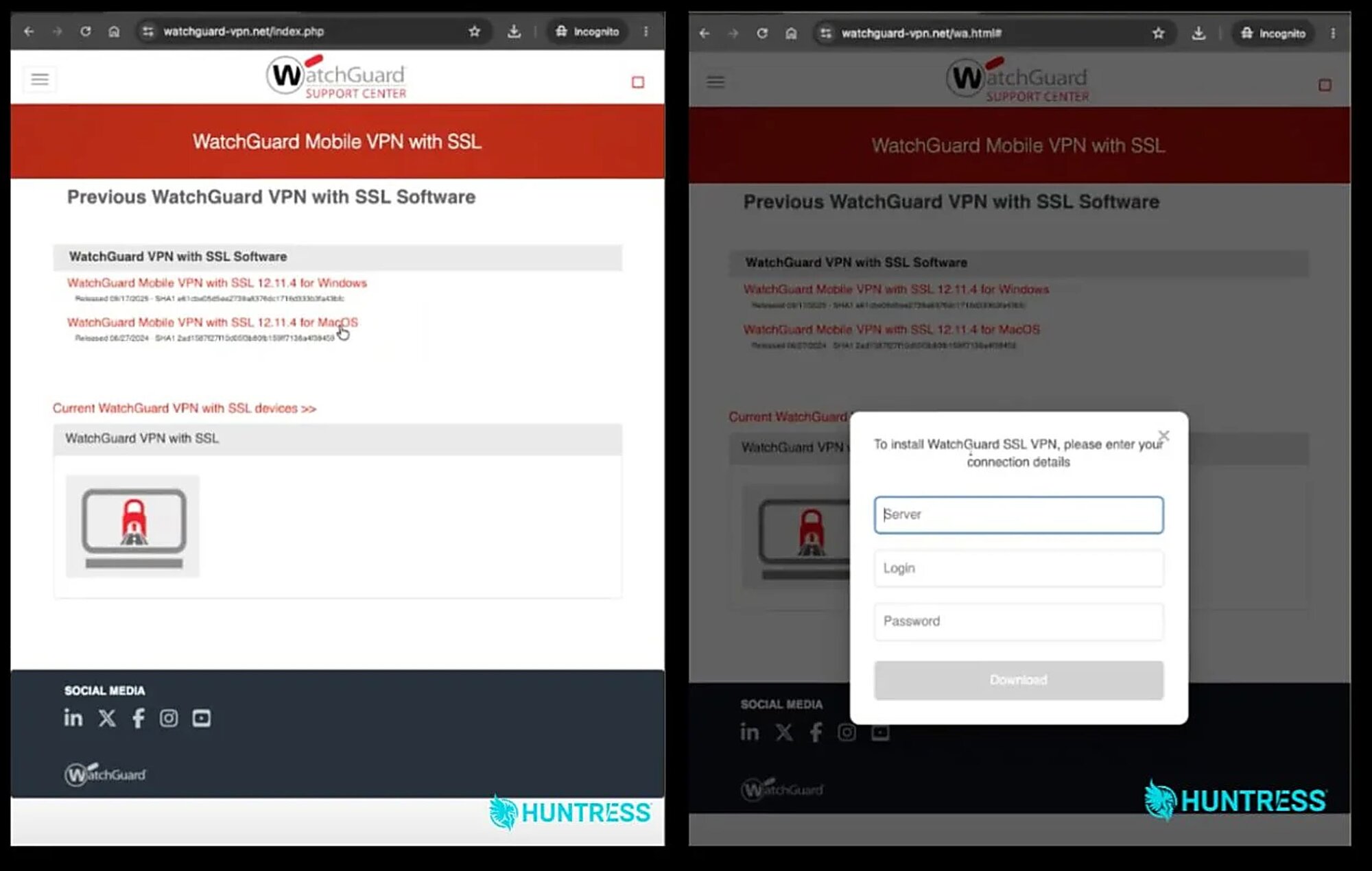
Figures 5 and 6: Targets are taken to a download page (left) and when they click "Download" the credential prompt is shown (right)
The legitimate Mobile VPN with SSL client also asks for these three values when users connect, so the prompt looks reasonable. Notably, the "Server" field is particularly useful for the attacker—it gives them the VPN server's address that they can authenticate to. The submission handler sends the form contents to the collection domain:
The user's typed input is wrapped in JSON and posted to watchguard-ssl[.]online, tagged to indicate whether this is the first or second attempt. The fetch is wrapped in a try/catch statement that only logs a console warning on failure, so even if the collector is down, the user sees nothing unusual.
Interestingly, the attack chain purposefully rejects the first submission into this pop-up from the target. The script clears all three fields and replaces the header with red text:
headerText.innerHTML = '<span style="color: #d32f2f;">Incorrect data, please enter again to start installation</span>';
attempt = 2;
Anyone who mistyped their passwords will now type more carefully, and anyone unsure which of their passwords applies is likely to try the other one, so the attacker gets a second set of credentials to validate against, with the attempt tag marking which submission came last.
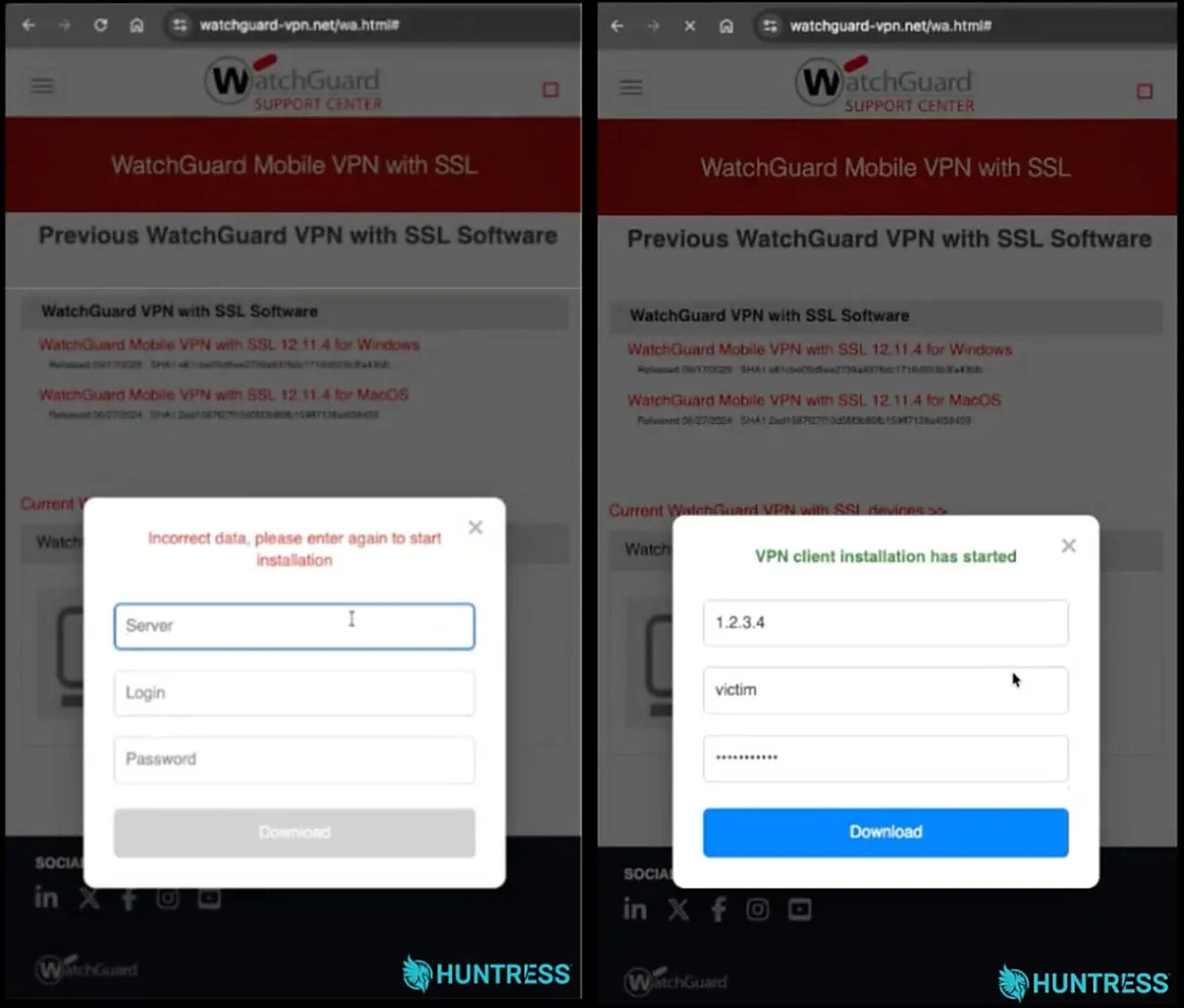
Figures 7 and 8: The forced "Incorrect data" message after the first submission (left) and then the second prompt (right)
The twist: The payload is the real thing
After the second submission, the pop-up turns green ("VPN client installation has started"), and the script creates a hidden link and clicks it:
const DOWNLOAD_FILE = 'https://cdn.watchguard.com/SoftwareCenter/Files/MUVPN_SSL/12_11_5/WG-MVPN-SSL_12_11_5.exe';
This is WatchGuard's official CDN.
The file is a Inno Setup installer for "Mobile VPN with SSL client", version 12.11.5, copyright WatchGuard Technologies.
It carries an Authenticode signature from WatchGuard Technologies, Inc., issued by Sectigo Public Code Signing CA R36, with a countersignature timestamp of 4 November 2025.
We recomputed the Authenticode SHA256 digest of the file (
fb3c39ba…0032ac1f) and it matches the digest in the signature, so the binary has not been modified since WatchGuard signed it.
For attackers, the use of a real, signed VPN client makes the phishing attack far more convincing, and more difficult to detect. First of all, there's no trojanized installer or malicious DLL for security defenses to flag. Second of all, victims are still getting their expected outcome. Because they're still getting an actual installer, this alleviates any suspicions.
This is a twist on the same idea in the attack chain that Microsoft highlighted, where attackers sent the victim to the real installer afterwards so nothing looks wrong—but now with the fake client removed from the middle.
In the particular case that we investigated, the browser history actually recorded no download from cdn.watchguard.com for the timeframe in question. Because the script only triggers the download after the second submission, this suggests the user did not complete both rounds, although they may have entered their credentials in the first round. Huntress Managed Defender flagged the incident 21 seconds after the malicious domain loaded, and the SOC was able to provide the organization with remediation steps before the attack could escalate.
Old domain, new backend
The WHOIS record for watchguard-vpn[.]net shows a creation date of August 22, 2026, with Realtime Register B.V. as registrar. Secplicity recorded the same domain in January resolving to 74.208.236[.]39; as of October 9 it resolves to 80.249.132[.]140 on Site BV hosting (LeaseWeb Netherlands, AS60781). This indicates the domain was registered again after WatchGuard's January observation, but available evidence does not establish whether the same operators controlled both registrations. The current iteration hosted a working credential-harvesting flow.
The credential collection endpoint, watchguard-ssl[.]online, was registered through Dynadot on September 14, 2026 and resolves to 158.94.209[.]19 (Omegatech LTD, AS202412, Amsterdam).
The table below outlines an infrastructure timeline for the lure and collection domains.
Date (UTC) | Event |
|---|---|
Jan 13 2026 | Secplicity reports |
Aug 22 2026 |
|
Sep 14 2026 |
|
Sep 17 and 22 2026 | urlscan.io submissions of |
Oct 7 2026 | Victim lands on |
As of October 8, detections for the domains linked to this attack were thin, which is not totally surprising given that the domains weren't actually deploying malware. Only seven VirusTotal vendors flagged the lure domain, and two flagged the collector, with no AbuseIPDB reports against either IP.
Conclusion
This attack chain raises the bar by removing the malware component and making it harder to detect. The operators give victims a convincing installation experience while bypassing many endpoint-focused security controls, through collecting VPN credentials in the browser and then delivering the legitimate, signed WatchGuard installer from WatchGuard's own CDN.
If you think you entered credentials on this or a similar site, you should immediately reset the password for every affected account and treat the VPN endpoint associated with those credentials as known to the attacker.
Defenders should also enforce multi-factor authentication (MFA) on top of a username and password. Monitor for SSL VPN logins from hosting providers, unfamiliar ASNs, or countries where the account has never connected from. Defenders should also block watchguard-vpn[.]net and watchguard-ssl[.]online as well as the IPs outlined in the IOC section below. Finally, defenders should publish (and bookmark) official VPN-client download links, including software.watchguard.com, in client documentation.
Indicators of Compromise (IOCs)
Item | Description |
|---|---|
| Lookalike WatchGuard VPN download page hosting the credential modal (registered 2026-08-22) |
| Lure hosting, Site BV / LeaseWeb Netherlands (AS60781) |
| Credential collection endpoint receiving JSON POSTs (registered 2026-09-14) |
| Collector hosting, Omegatech LTD (AS202412), Amsterdam |
| Credential capture modal script; fields |