


A plain text password is any password stored or sent in its original, readable form, with no encryption or hashing standing between it and anyone who finds it. If a file, spreadsheet, database, or email shows the password exactly as it was typed, it's in plain text.
For lean IT teams juggling a dozen priorities at once, this is an easy mistake to make and an easy one to miss. A password gets copied into a spreadsheet during onboarding. A recovery code gets saved as a text file "just for now" and never moved. None of it feels risky until a threat actor finds it.
That's exactly what happened to a Huntress partner. Later in this article, we walk through how a single plain text file on a security engineer's desktop gave a threat actor full access to their Huntress portal, and what your team can do so it doesn't happen to yours.
What is a plain text password?
A plain text password is stored or transmitted exactly as entered, with no encryption or hashing applied. If someone can open the file or message and read the password outright, it's in plain text, full stop.
Plain text vs. clear text vs. unencrypted
Plain text, clear text, and unencrypted password all describe the same problem. They're different names for a credential stored or sent in a readable, unprotected format with nothing shielding it if someone gets into where it lives. You'll see "clear text password" used just as often as "plain text password" in security write-ups. The risk behind either term is identical: anyone who can view the file, database, or message can read the password outright.
What is a hashed password & why it matters
Hashing runs a password through a one-way function that turns it into a fixed-length string of characters. Unlike encryption, hashing can't be reversed. There's no key that turns a hash back into the original password, which is exactly why it's the standard for storing credentials safely.
Security teams recommend hashing algorithms built specifically for passwords, like Argon2 and bcrypt, rather than general-purpose encryption or, worse, no protection at all.
Salting adds another layer of protection. A random value gets added to the password before it's hashed, so two identical passwords produce two different hashes. This defeats rainbow table attacks, where threat actors use precomputed tables of common password hashes to reverse-engineer credentials in bulk.
Why plain text password storage is dangerous
Storing credentials in plain text hands a threat actor everything they need the moment they find the file. Here's what that exposure actually leads to.
Data breaches: A single exposed file or database can hand over every credential inside it at once. There's no cracking or guessing required. The threat actor just reads what's there.
Insider threats: Plain text credentials aren't just at risk from outside attackers. Anyone with access to the file, current employees, contractors, or former staff whose access wasn't revoked, can read and misuse them.
Credential reuse: People reuse passwords across personal and work accounts more often than IT teams would like. One exposed plain text password can open doors to other accounts and systems that were never part of the original target.
MFA bypass: Recovery codes and backup credentials exist to get users back into their accounts when multi-factor authentication (MFA) fails them. Stored in plain text, those same codes let a threat actor skip MFA entirely and log in as if they were the legitimate user.
Two signals are worth watching for. If a service ever emails you your actual password instead of a reset link, that's a sign they're storing it in plain text on their end, not just yours. And if your own team stores credentials or recovery codes in a spreadsheet or a desktop text file, you're one compromised endpoint away from the exact scenario below.
Real example: how plain text recovery codes led to a breach
This is an offshoot of our other blog, "Huntress Threat Advisory: Active Exploitation of SonicWall VPNs," which allowed initial access and was followed by the rapid deployment of Akira ransomware across the victim environment.
This blog outlines an interesting individual case from within that timeframe.
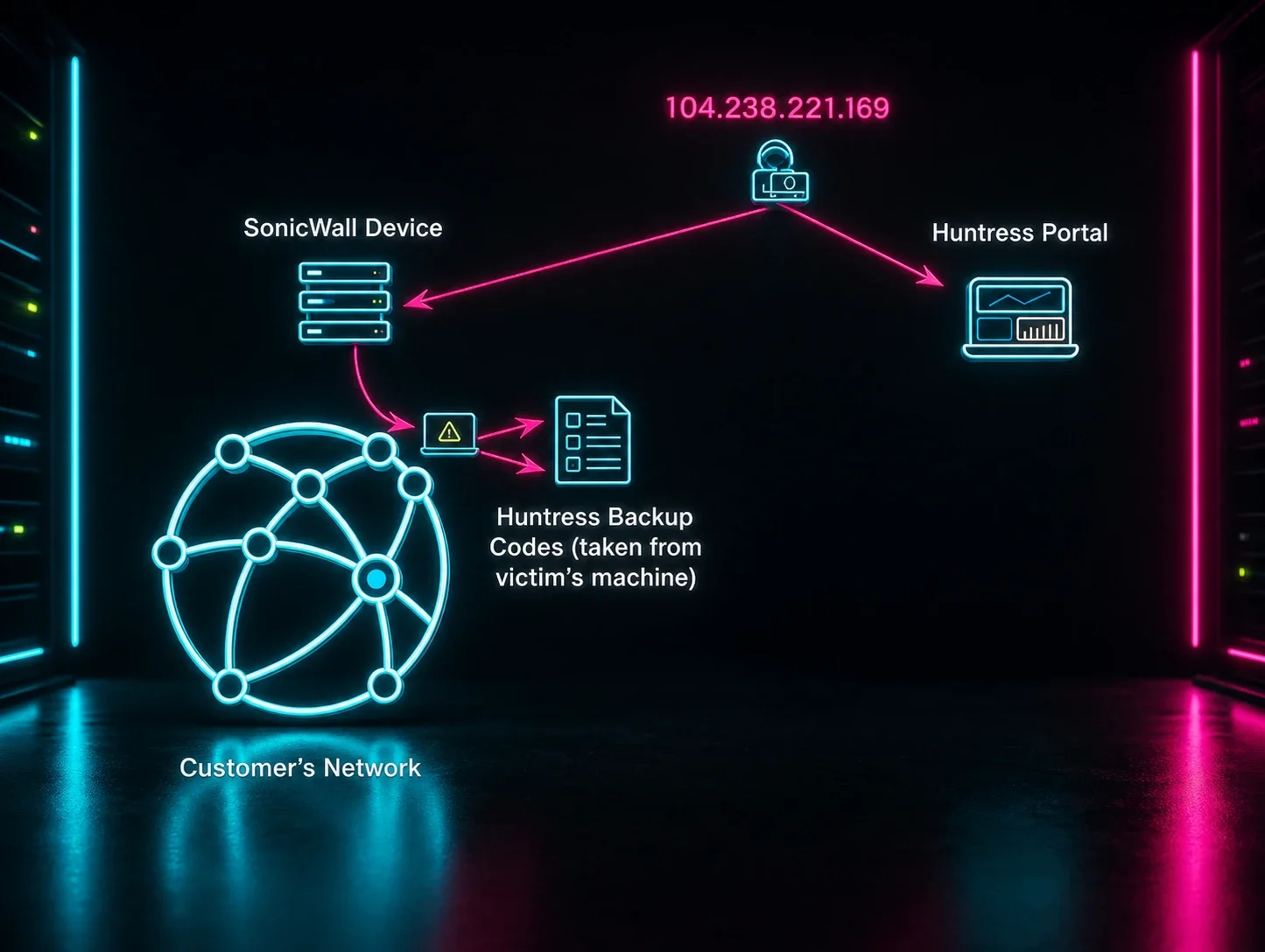
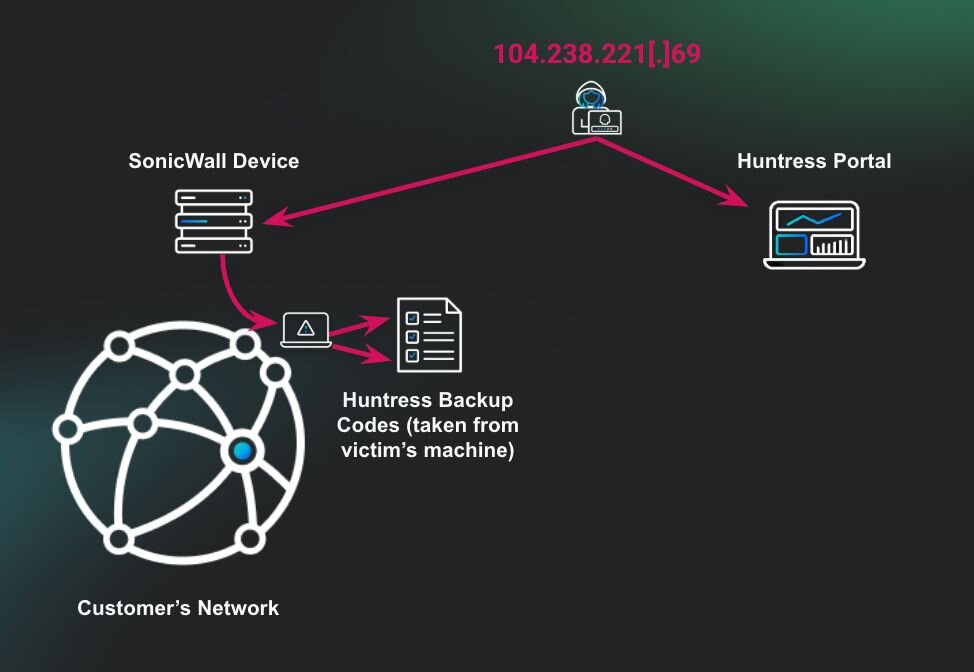
TL;DR: The threat actor entered through the organization’s SonicWall device. When searching through the host, the threat actor found a plaintext file on the user’s desktop that contained the client's Huntress recovery codes. The threat actor then used these codes to enter the client’s Huntress portal and began remediating reports and uninstalling hosts isolated by Huntress.
Key takeaway: Avoid storing recovery codes or credentials in easily accessible plaintext files. Doing so significantly increases the risk of credential compromise, allowing threat actors to pivot to other platforms within the organization. Not all services have safeguards in place to mitigate the impact of compromised accounts, potentially exposing the organization to further harm.
What happened?
The Huntress APAC region’s Security Operations Center (SOC) detected multiple administrative users executing commands to delete shadow copies across multiple hosts within an organization. Upon identifying this suspicious activity, analysts initiated a mass isolation response to ensure the threat was contained and to prevent further compromise.
The running process of the Akira ransomware binary w.exe from the user's desktop allowed the workstation to be encrypted. However, the deployment of mass isolation for containment hindered the entire environment from being encrypted.
Triaging SOC analyst Michael confirmed through event log analysis that the affected user accounts were accessed from internal IP addresses in the 192.168.x.x range. These IPs didn't have a Huntress agent installed, likely because they were assigned via DHCP to systems controlled by the Akira threat actors following their compromise of the organization’s SonicWall VPN.
This technique is commonly used by threat actors to bypass endpoint detection and response (EDR) solutions. By gaining access through a corporate VPN, threat actors blend in with legitimate internal network traffic, often appearing as trusted users from sanctioned IP ranges.
Since EDR agents are typically deployed only on known managed endpoints, any rogue systems introduced via VPN that lack the agent remain invisible to the EDR. Additionally, activity originating from a VPN-assigned IP can appear as if it's coming from a valid internal source, hindering anomaly-based detections and allowing threat actors to move laterally without immediately raising red flags.
At this stage, the Huntress SOC issued a formal incident report to the organization, outlining the suspicious activity observed and identifying the SonicWall VPN compromise as the likely root cause of the intrusion. The report also provided justification for the immediate mass isolation response. Its purpose was to inform the organization of the threat and guide them through the initial phases of incident response and containment.
Following the report, SOC analysts collaborated with the Threat Hunting & Response team to conduct a deeper analysis of the activity and extent of the compromise. Their objective was to provide the partner with comprehensive context and actionable intelligence regarding the active threat within their environment.
Certificate export and abuse?
While investigating the Domain Controller (DC), analysts observed that a compromised user executed commands to enumerate and export certificates from the local certificate store. Specifically, the attacker accessed the My (Personal) certificate store using the following command:
certutil -store My
This command will list certificates stored under the current user or the machine’s personal certificate store. These certificates may potentially contain sensitive keys used for authentication, encryption, or signing.
Shortly after, the attacker exported a certificate identified by its thumbprint (1d967729be08ef8c4bf86874c9542b4e) to both C:\temp\cert.pfx and C:\cert.pfx using:
certutil -exportPFX 1d967729be08ef8c4bf86874c9542b4e C:\temp\cert.pfx
certutil -exportPFX 1d967729be08ef8c4bf86874c9542b4e C:\cert.pfx
Note: Exporting a certificate in PFX format includes both the public and private keys. If the certificate is used for user or device authentication (e.g., VPN or RDP with certificate-based auth), its compromise could allow threat actors to impersonate legitimate users or machines. This is a common post-exploitation tactic that enables credential theft and lateral movement, especially in environments leveraging certificate-based authentication.
This activity is a strong indicator of a threat actor preparing for persistent access or further privilege escalation. However, we were unable to identify the root cause of this activity during the incident.
Huntress recovery code plaintext
Analysts observed the threat actor actively enumerating administrative shares from the DC, likely in search of sensitive data for exfiltration. During this activity, the actor accessed a plaintext file containing Huntress recovery codes located on an internal security engineer’s desktop.
"C:\windows\system32\NOTEPAD.EXE" \\192.168.1.51\c$\Users\<redacted>\Desktop\Huntress_recovery_codes-<redacted>.txt
These recovery codes serve as a backup method for bypassing multi-factor authentication (MFA) and regaining account access. If compromised, they effectively allow an attacker to circumvent MFA entirely, impersonate the legitimate user, and gain full access to the Huntress console, significantly increasing the risk of further compromise or tampering with detection and response capabilities.
Suspicion of foul play
While triaging the environment and collaborating with SOC Support, analysts noticed unusual activity tied to a security engineer account that had begun resolving active incident reports via the Huntress portal.

Given the context of the ongoing compromise, this behavior appeared anomalous and prompted immediate outreach to the partner.
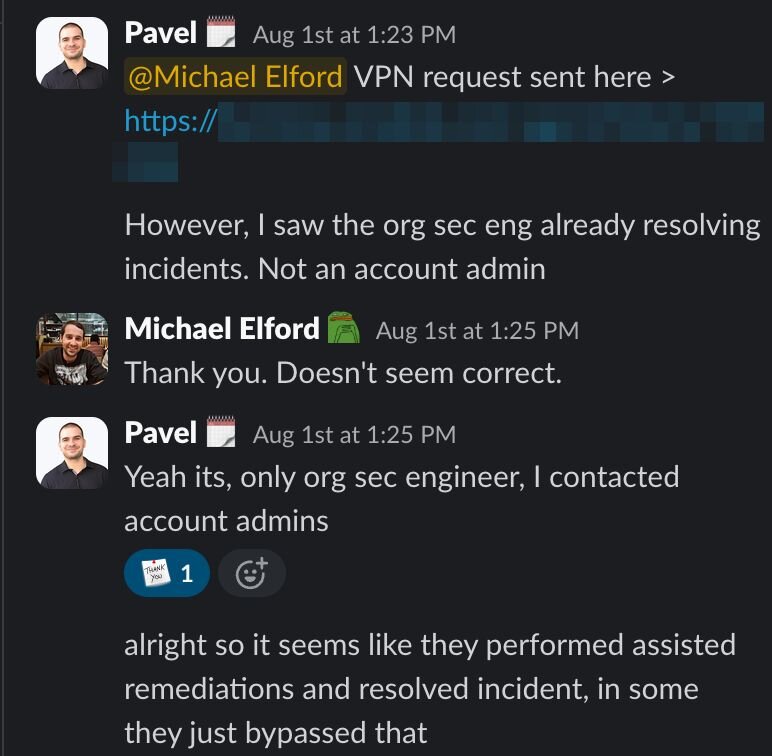
SOC analysts quickly escalated their concerns to internal Huntress Support, flagging the suspicious remediations and correlating them with prior findings.
Shortly after the outreach, Huntress Support received confirmation from the partner: the activity attributed to the security engineer account was not performed by their personnel. This revelation confirmed the threat actor had leveraged compromised credentials and recovery codes to access the Huntress portal.

With this confirmed knowledge, the Huntress team reviewed portal activity. This analysis revealed that a known malicious IP address, 104.238.221[.]69, previously associated with other SonicWall-related compromises, had successfully accessed the Huntress portal using the compromised recovery codes.
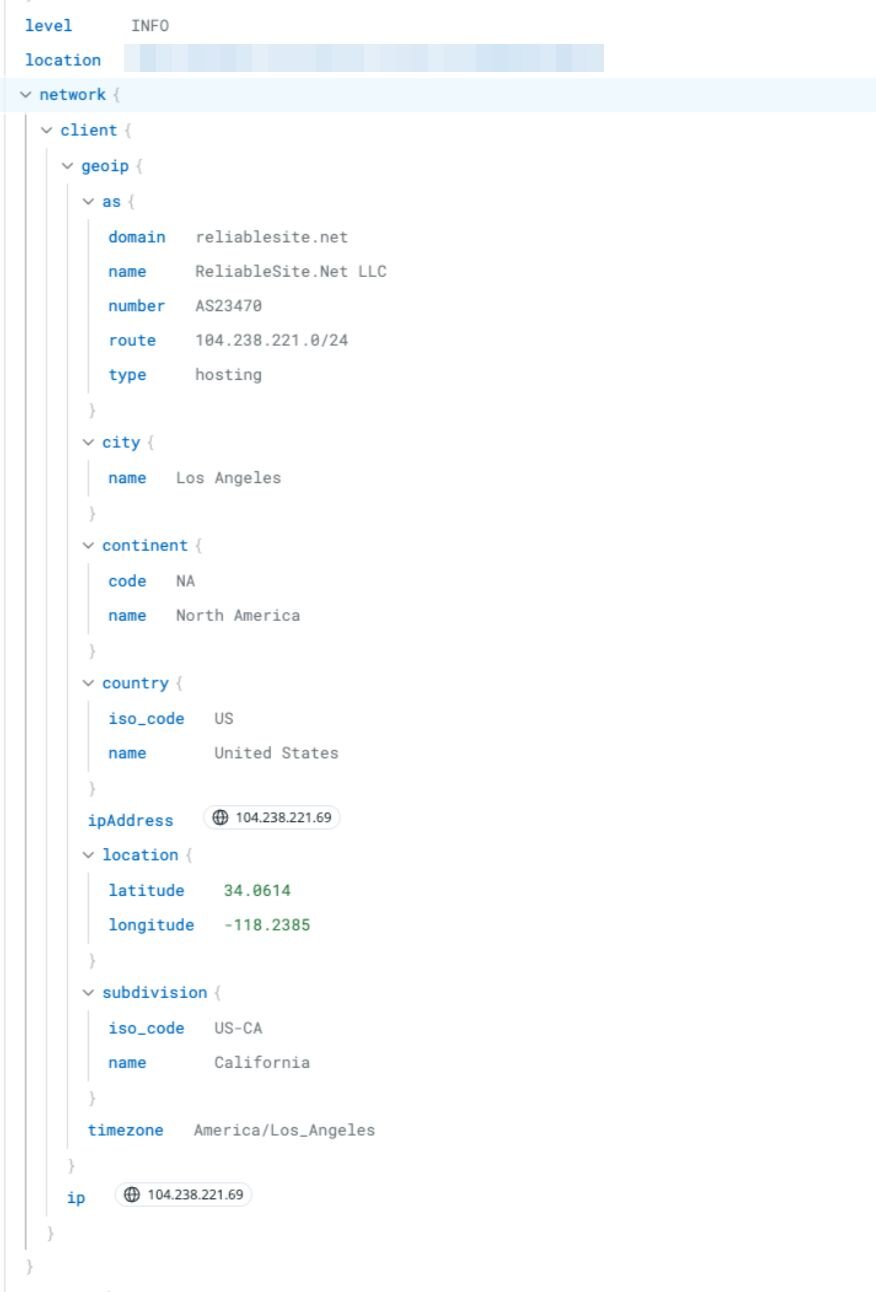
This activity led to the threat actor manually closing active incident reports to suppress visibility and hinder the partner’s response. They tasked the de-isolation and the removal of Huntress agents from compromised systems.
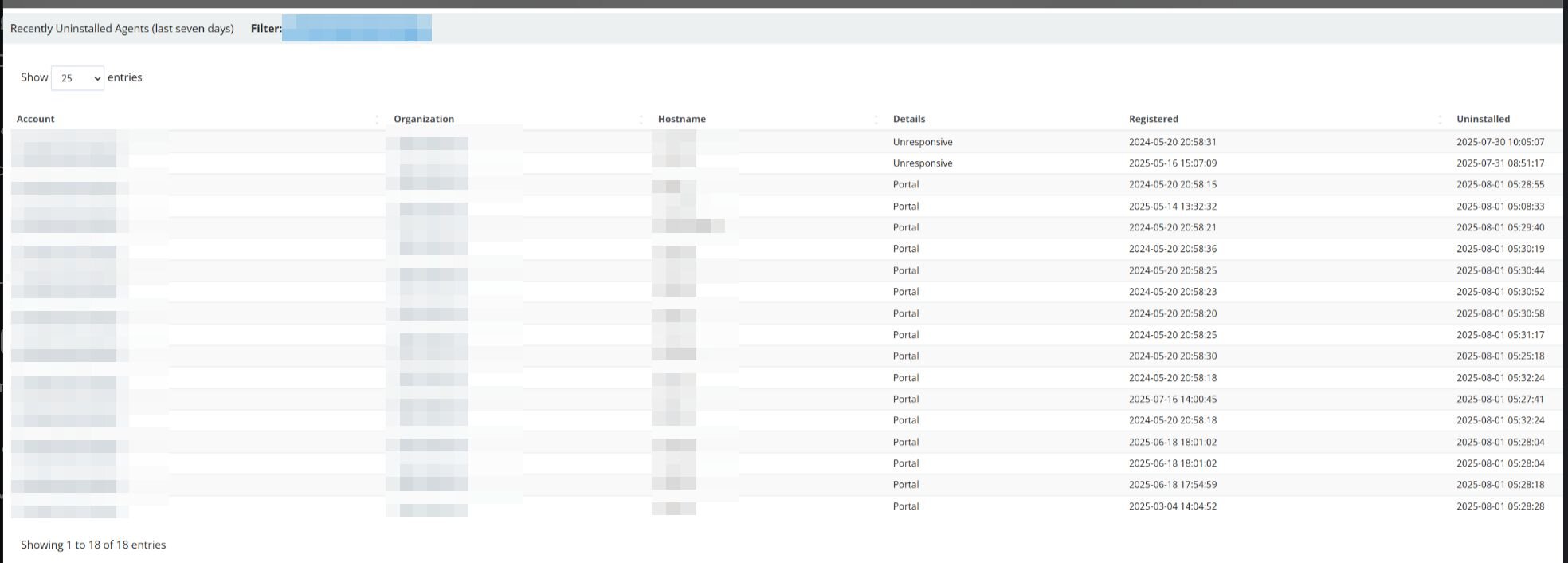
Figure 6: Recently Uninstalled Agents (last seven days) at the time of the incident
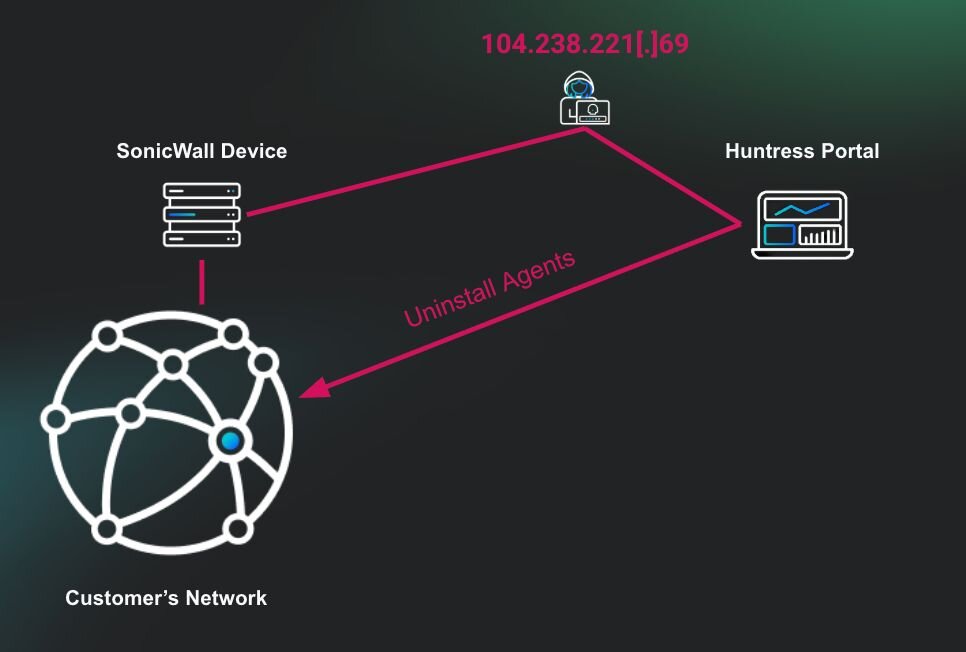
This sequence of events underscores the importance of properly securing all forms of authentication mechanisms, particularly recovery codes, which are often overlooked as “backup” credentials. In many systems, recovery codes are designed to bypass MFA in situations where users lose access to their primary authentication device (e.g., a phone or hardware token). However, when improperly stored, these codes become a single point of failure and grant full access with no secondary challenge.
In this incident, the attacker’s ability to enumerate and access recovery codes in plaintext allowed them to:
- Bypass MFA completely
- Impersonate a privileged user
- Access the Huntress portal undetected
- Suppress incident visibility by closing alerts
- Attempt to remove endpoint protections (EDR)
How to secure passwords and recovery codes
Storing credentials and recovery codes in plain text and in an easily accessible location poses real risk, one that Huntress has seen time and again. Once obtained, these credentials give a threat actor the ability to compromise hosts, move into third-party applications, and reach critical security platforms. In this incident, exposed Huntress recovery codes let the attacker log into the Huntress portal, close active alerts, and start uninstalling Huntress EDR agents, an attempt to blind the organization's defenses and leave it open to follow-on attacks.
Treat recovery codes with the same sensitivity as privileged account passwords. Here's how to keep both out of a threat actor's hands:
Use hashing and salting:Hash passwords with an algorithm built for the job, like Argon2 or bcrypt, and add a salt so identical passwords never produce identical hashes.
Avoid plain text storage: Don't save recovery codes in unprotected text files, shared drives, or unsecured folders.
Keep credentials out of configs and backups: Never log or hardcode passwords in configuration files, scripts, or backup jobs where they can sit unnoticed for months.
Use a password manager: Store recovery codes and credentials in an encrypted password manager with a strong passphrase, not a desktop text file, and skip the autofill.
Treat recovery codes like admin credentials: If a code can bypass MFA, it deserves the same handling as a privileged password, not a spot on the desktop.
Rotate and monitor: Periodically regenerate recovery codes if available and monitor login access for unusual logins.
Good credential hygiene closes off the easiest path into your environment, but it isn't the only layer you need. When hygiene fails, whether that's a reused password, an exposed recovery code, or an MFA bypass attempt in progress, Huntress Managed ITDR detects and responds to identity-based attacks in around three minutes, with a false positive rate under 5%.
The dangers of credentials stored in plaintext
Storing credentials and recovery codes in plaintext and in an easily accessible location poses significant security risks (ones that Huntress has seen time and again). Once obtained, these credentials give a threat actor the ability to compromise hosts within the network and access third-party applications and critical security platforms. This level of access can be weaponized to disable defenses, manipulate detection tools, and execute further malicious actions.
In this incident, the attacker used exposed Huntress recovery codes to log into the Huntress portal, close active alerts, and initiate the uninstallation of Huntress EDR agents, effectively attempting to blind the organization’s defenses and leave it vulnerable to follow-on attacks.
It’s important to mitigate these risks. Organizations should treat recovery codes with the same sensitivity as privileged account passwords. Here are some recommended practices for securing recovery codes and credentials.
- Avoid plaintext storage: Don’t save recovery codes in unprotected text files, shared drives, or unsecured folders.
- Use a password manager: Store recovery codes and credentials in an encrypted password manager with a strong passphrase (and without autofill).
- Encrypt offline storage: If you're unable to use digital password managers, store codes in an encrypted, password-protected file on an encrypted USB drive or hard disk.
- Rotate and monitor: Periodically regenerate recovery codes if available and monitor login access for unusual logins.
Recovery codes should not be a secondary concern; they are a direct path to bypassing MFA and gaining access.
IoCs
|
Item |
Description |
|
w.exe SHA256 |
Ransomware executable |
|
104.238.221[.]69 |
Attacker IP entered the Huntress platform |
|
cert.pfx |
Certificate Export |
Conclusion
Plain text passwords aren't just a bad habit. They're a direct path to credential theft, MFA bypass, and full organizational compromise. The Huntress incident above shows exactly how fast that escalation can happen, from a single text file on a desktop to a threat actor closing incident reports and uninstalling EDR agents inside your own security platform.
Take a look at how your team stores credentials and recovery codes today. If the answer involves a spreadsheet, a desktop file, or an email with a password in it, that's worth fixing now, before someone else finds it first.