

Introduction: The Login Page That Isn't Phishing
I was hunting for the next regsvr32. Not that binary specifically, but its category: a Microsoft-signed binary already on every Windows box that will fetch remote code and run it, so an attacker never has to drop anything unsigned. I pulled a catalog of signed binaries that don't appear in LOLBAS and filtered for anything that could reach the network and execute what it got back.
The AppX web-host family came up in that filter, and one binary stood out. WWAHost.exe, the Windows Web App Host, will render whatever web content an AppX package points it at. That alone makes it interesting. However, what made me stop was the manifest flag: declare WindowsRuntimeAccess="all" and the remote JavaScript it renders doesn't just run, it inherits the full Windows Runtime API surface, including the API that drives OAuth sign-in. That was the moment it clicked as an attack. If a page I controlled could reach that sign-in API, it could stand up a real Microsoft login and pocket the tokens it handed back. I wanted to know if it actually worked.
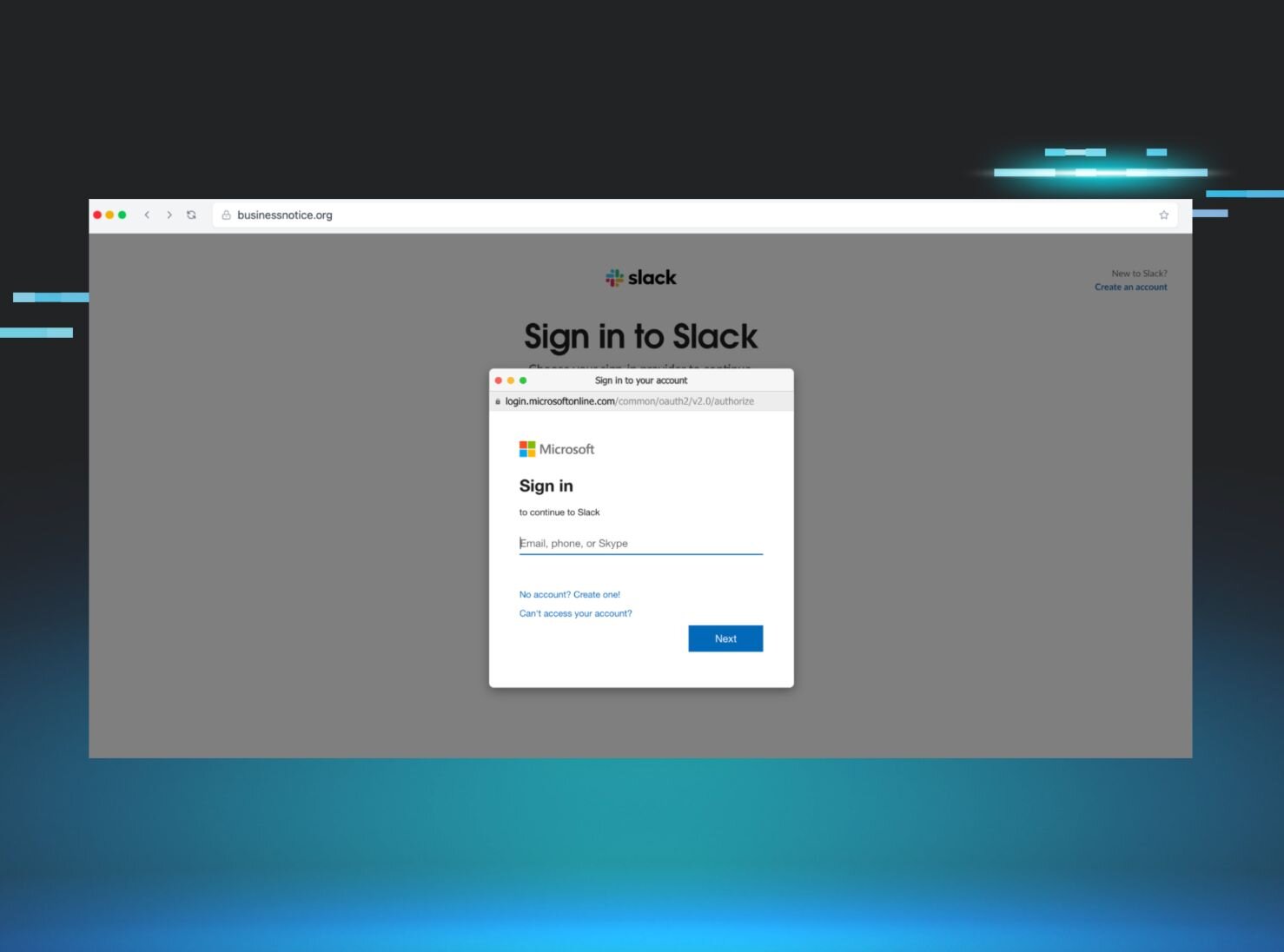
So I wired it up. A throwaway sideloaded package, a page hosted on my Kali box, and a call to WebAuthenticationBroker using Microsoft Office's own client ID. I ran it and watched a real Microsoft login dialog open on the desktop. Real, because it was: served from login.microsoftonline.com, rendered by a signed Microsoft process, with no address bar and no browser. I typed the password. I completed my MFA. A second later the access token and the refresh token were sitting in my listener.
That was the part that got me. The user does everything right and it changes nothing, because there is no phishing page to catch, no lookalike domain, no certificate warning. Nothing about it is fake. It is Microsoft's real login flow, pointed at me.
I tested this on Windows 11 24H2 (build 26100) with Developer Mode enabled. It needs no admin beyond the toggle for that one setting. Once that toggle is set, every component in the chain is a trusted, signed Microsoft binary doing exactly what it was built to do, so there is nothing signature-based defenses have an obvious reason to flag. The tokens it steals survive MFA entirely, because the user authenticates legitimately and I capture what comes back.
Prerequisites
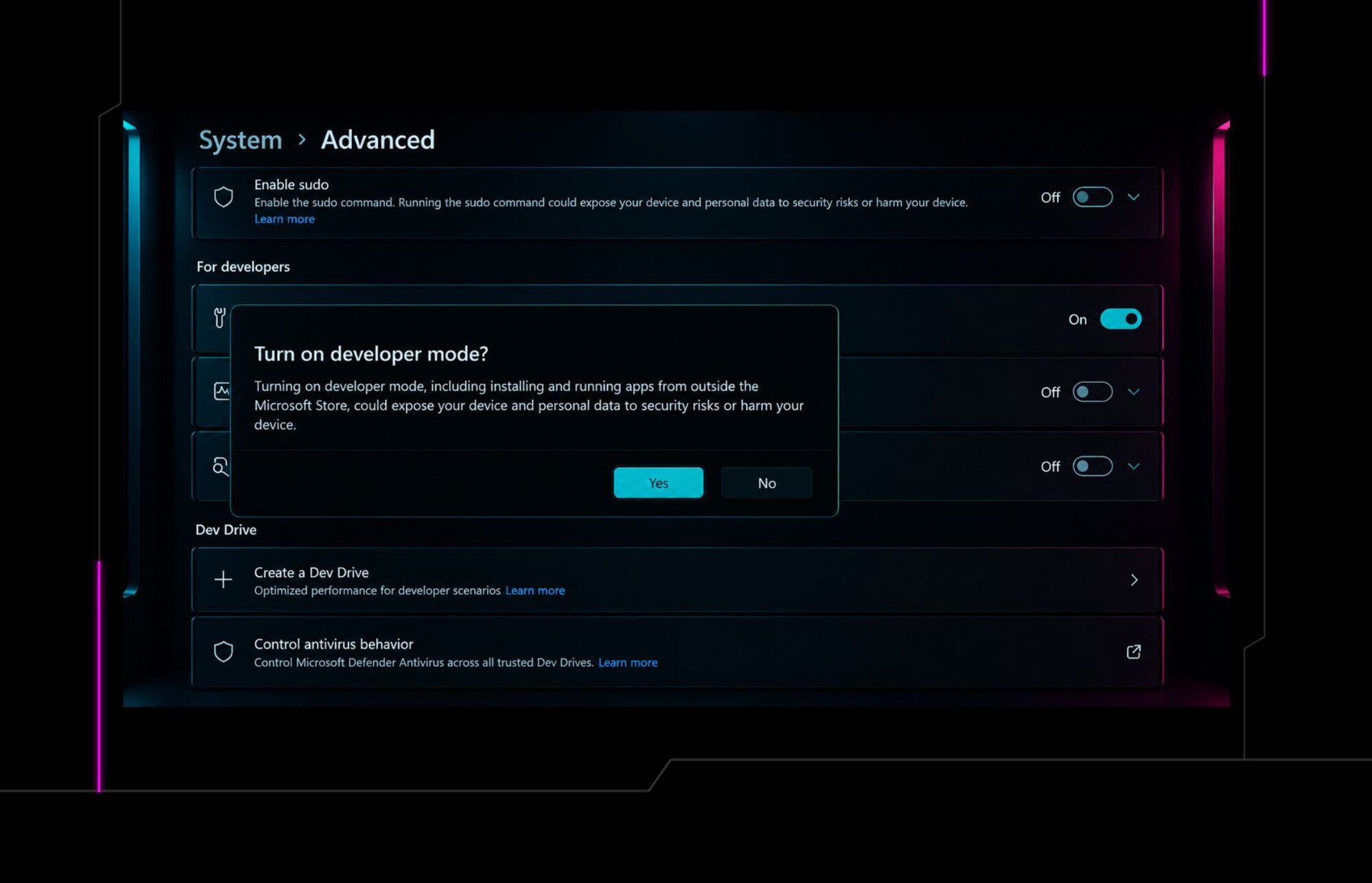
Developer Mode must be enabled. This is the primary prerequisite and the main constraint on this attack. Without it, Add-AppxPackage -Register fails immediately with 0x80073CFF. Enabling it requires local administrator rights regardless of method (Microsoft's Developer Mode documentation):
Via Settings: Settings > For developers > Developer mode > ON (UAC-gated, requires admin).
Via registry (requires admin):
reg add "HKLM\SOFTWARE\Microsoft\Windows\CurrentVersion\AppModelUnlock" `
/v AllowDevelopmentWithoutDevLicense /t REG_DWORD /d 1 /f
Once Developer Mode is on, the rest of the chain runs as a standard user: no further admin, no UAC prompt, and no code signing.
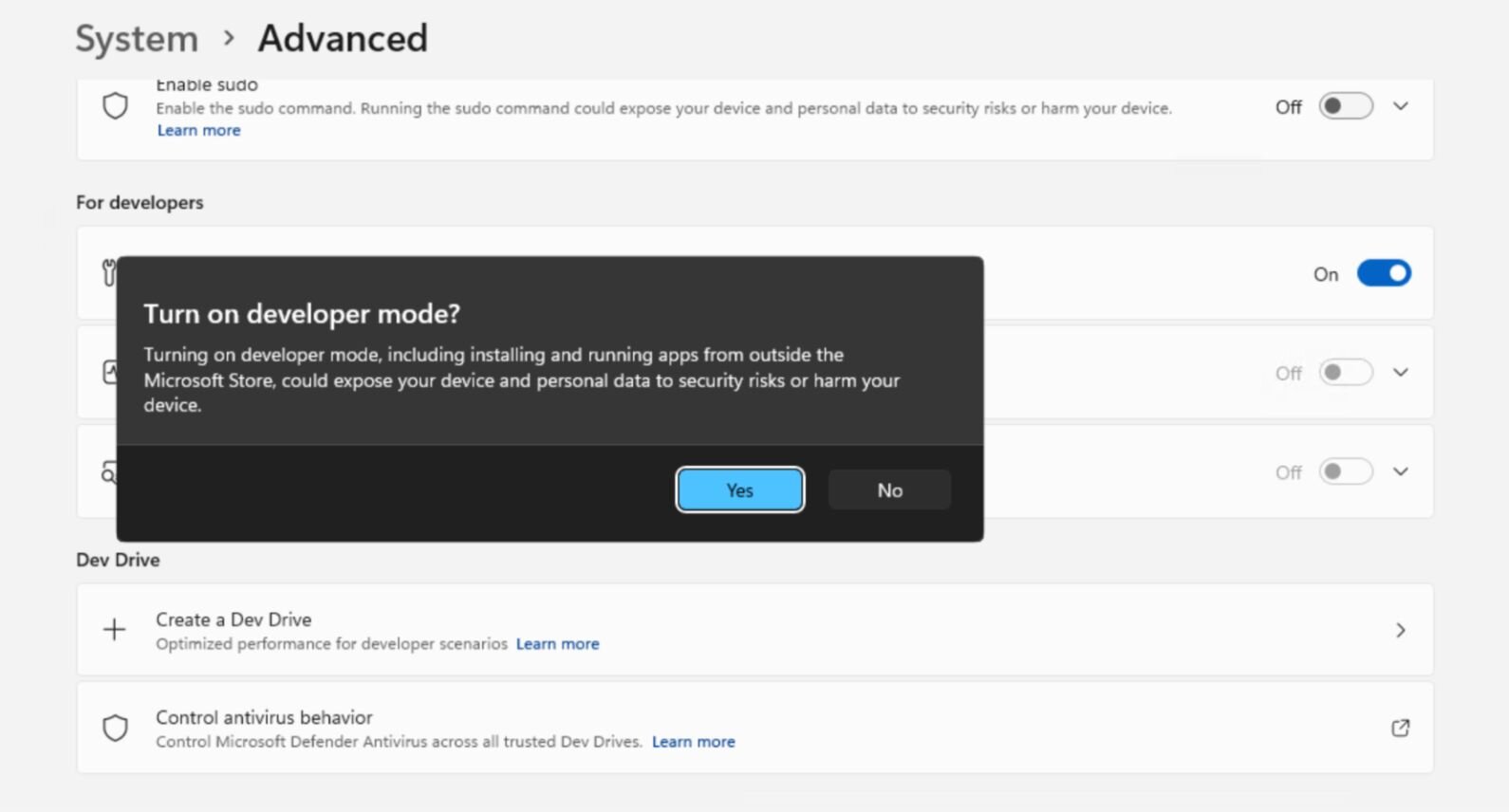
Figure 1: Enabling Developer Mode on the test machine. Windows itself warns that turning it on allows installing and running apps from outside the Store and "could expose your device and personal data to security risks." This toggle is the gate. Everything that follows depends on a user or policy having flipped it.
This matters for scoping the attack surface. Developer Mode is common on development machines, CI/CD runners, and cloud VMs, and it can be enabled across a fleet via GPO. It is not on by default on standard end-user machines. One nuance worth stating precisely: the real gate is Developer Mode or an enterprise sideloading policy (the AllowAllTrustedApps path). Registration fails closed without one of them, 0x80073CFF names both in its error text, and the enterprise policy is the more likely way a managed fleet ends up in the vulnerable state at scale. The GPO mitigation later in this post closes both.
How It Works: Turning a Signed Binary Into a Token Thief
Windows ships with WWAHost.exe (Windows Web App Host), a Microsoft-signed binary that hosts web content inside AppX packages. When an AppX manifest declares ContentUriRules with WindowsRuntimeAccess="all", any JavaScript loaded by that package gets full access to the Windows Runtime API surface, including WebAuthenticationBroker, the system-level OAuth flow handler.
One clarification for the WinRT-literate reader: this is the legacy WebAuthenticationBroker, which Microsoft has since steered developers away from in favor of the Web Account Manager (WebAuthenticationCoreManager). It remains present and reachable from inside the AppX host, which is the point. An old, still-wired API surface is exactly the kind of thing that survives long after the recommended path has moved on.
Any standard user can register a sideloaded AppX package via Add-AppxPackage -Register, provided Developer Mode is enabled. No trusted publisher signature required. The package points its ContentUriRules at an attacker-controlled URL, and attacker JavaScript is now running inside a trusted Microsoft process with full WinRT access.
From there, the kill chain is straightforward:
Prerequisite: Developer Mode must already be enabled (or the enterprise AllowAllTrustedApps sideloading policy).
Step 1. Sideload a minimal AppX package. Run Add-AppxPackage -Register as a standard user. The manifest's ContentUriRules point at the attacker's server with WindowsRuntimeAccess="all".
Step 2. Attacker JavaScript calls WebAuthenticationBroker.authenticateAsync(). It uses Microsoft Office's first-party client ID (d590ed36-52b3-4102-aeff-aad2292ab01c) and the urn:ietf:wg:oauth:2.0:oob redirect URI.
Step 3. The user sees a real Microsoft login dialog. Served from login.microsoftonline.com. Rendered by a Microsoft-signed process. No URL bar. No indicators of compromise. The user completes MFA.
Step 4. The authorization code returns to the attacker's JavaScript via the WebAuthBroker callback. The oob redirect URI sends the code directly to the calling application, which is the attacker.
Step 5. The code is exchanged for tokens and exfiltrated. Access token plus refresh token with a broad set of Microsoft Graph scopes. The refresh token provides persistent access without further MFA.
The tokens arrive with the scope set of Microsoft Office. The refresh token persists until it is revoked: by an administrator, by a token-revocation event, or by Continuous Access Evaluation. Absent one of those, the attacker can silently generate new access tokens from any location for the lifetime of the token.
Proof of Concept: Stealing a Token End to End
The PoC is a two-part setup. kali_listener.py runs on Kali and serves the payload and captures the auth code. register_appx.ps1 runs on Windows to create and register the package. Once the code lands, exchange_token.py handles the token exchange and Graph API validation.
1. The AppX Manifest
The sideloaded package is minimal. The key is WindowsRuntimeAccess="all" on the ContentUriRules entry pointing to the attacker's server:
The full AppxManifest.xml is withheld. Only one line actually does anything, and it is the ContentUriRules rule granting remote JavaScript that surface: WindowsRuntimeAccess="all" pointed at an origin the attacker controls, hosted by WWAHost.exe.
Registration as a standard user, with Developer Mode enabled:
Add-AppxPackage -Register .\AppxManifest.xml
There's no UAC prompt, no SmartScreen, and no signature check: the package loads attacker-hosted JavaScript inside WWAHost.exe.
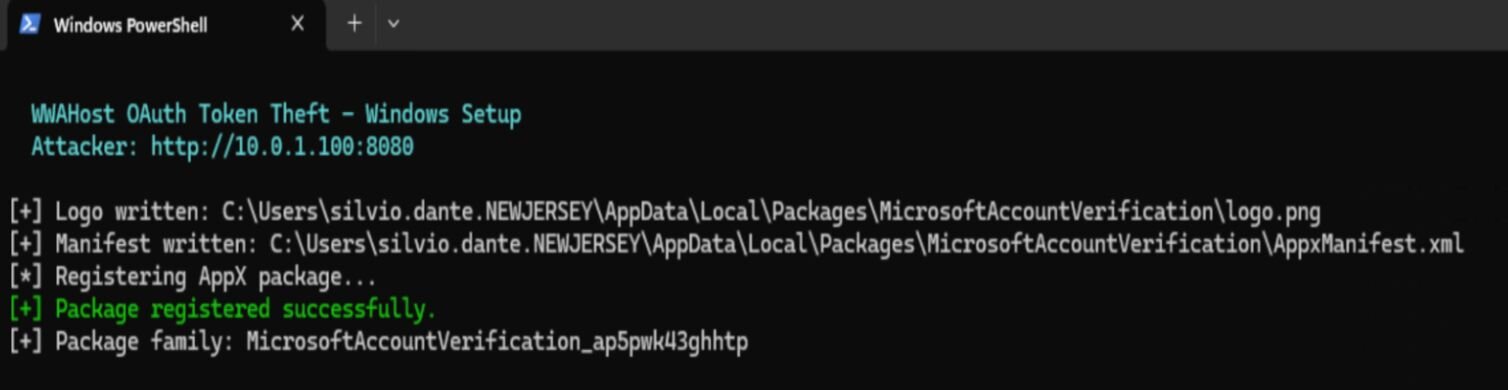
Figure 2: Package registration on the test machine, Developer Mode on. The logo and manifest are written, the package registers successfully.
2. Kali: Start the listener
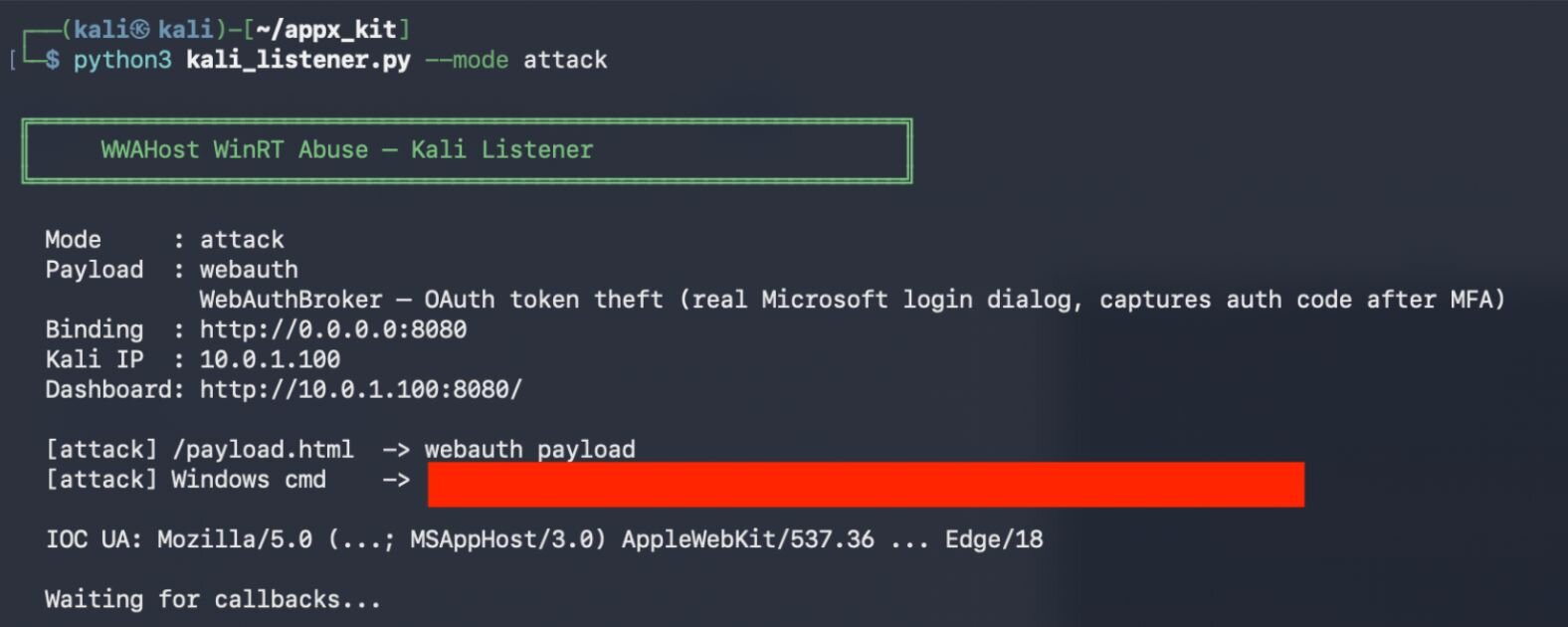
Figure 3: The Kali listener up in attack mode, waiting for callbacks.
3. The JavaScript Payload
The attacker's server hosts a page that calls WebAuthenticationBroker.authenticateAsync() using Microsoft Office's first-party client ID and the oob redirect URI.
The authorize-URL construction and the exfil call stay in the lab. Figure 4 shows what it looks like when it fires.
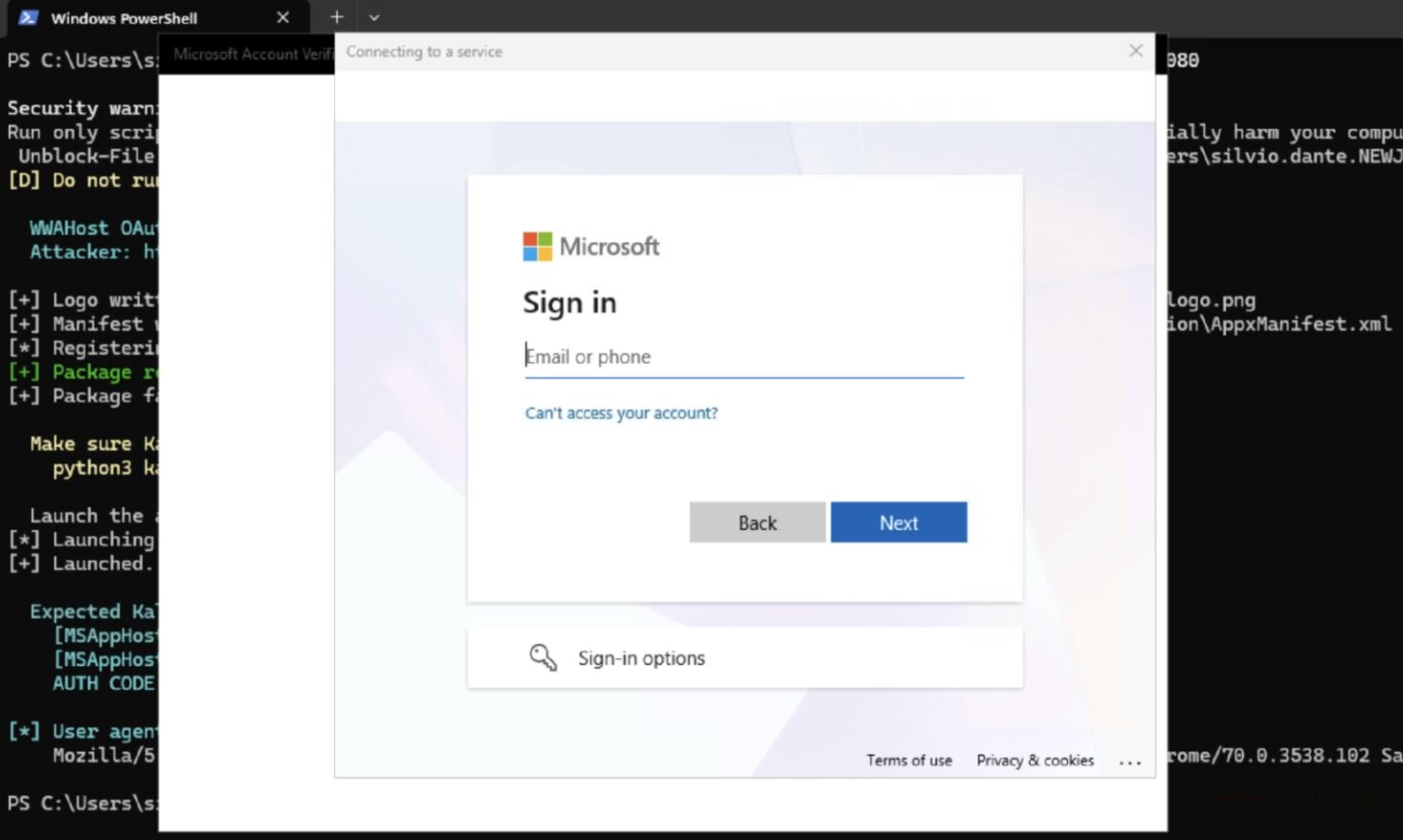
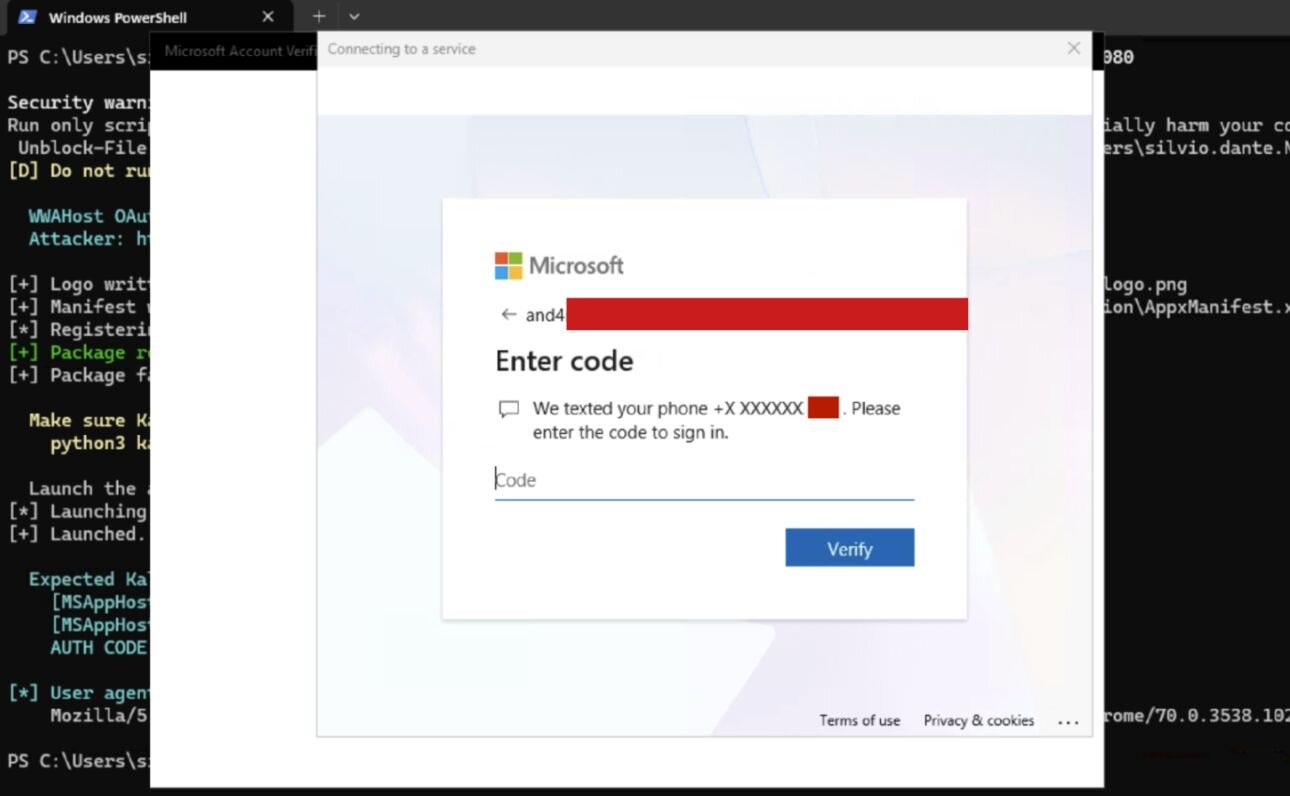
Figures 4 and 5: The sign-in sequence exactly as the user sees it, credential entry then the real MFA prompt. Rendered by WWAHost.exe. No URL bar. No browser chrome. The login.microsoftonline.com domain sits inside the dialog body, and the MFA prompt is the real one.
The user completes MFA normally. The authorization code comes back to the attacker's JavaScript and gets POSTed to the Kali listener.
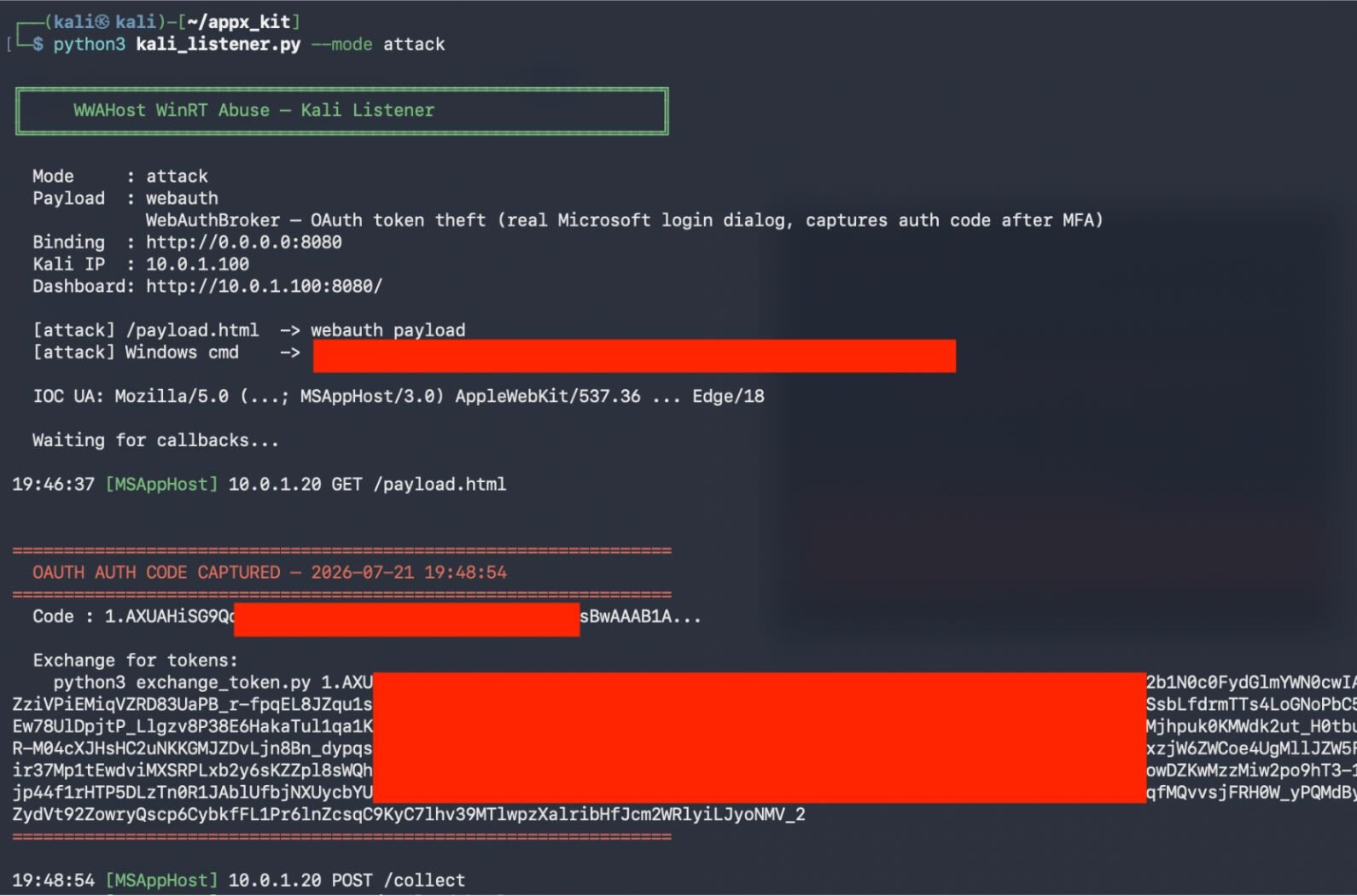
Figure 6: The listener seconds after the user finishes MFA. The "OAUTH AUTH CODE CAPTURED" banner fires and the callback lands (POST /collect). The authorization code and the exchange command are redacted.
4. Token Exchange
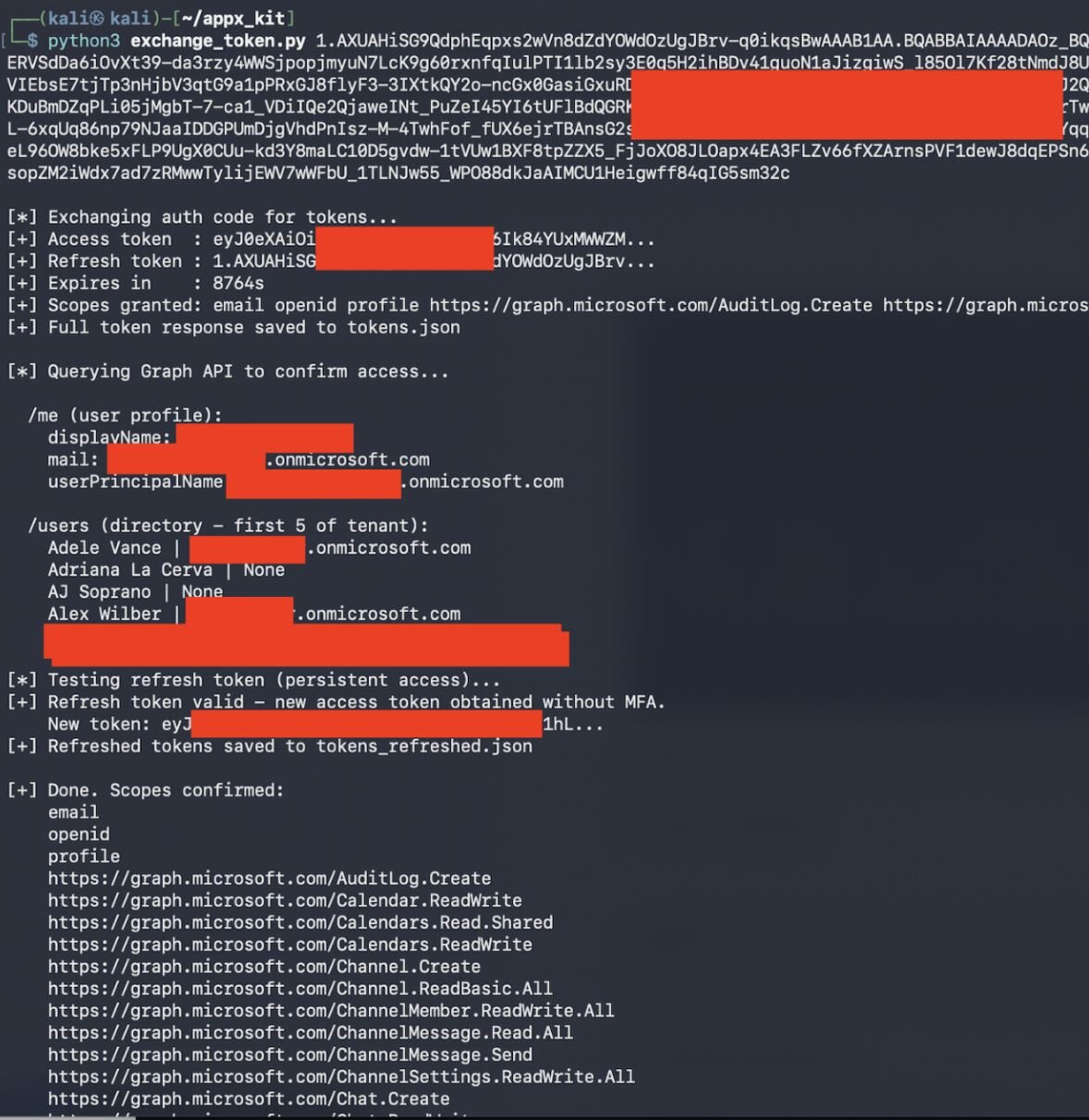
Figure 7: Token exchange on Kali. The captured auth code is exchanged for an access token and a refresh token, with the granted Graph scopes (including AuditLog.Create), then /me profile and /users directory reads confirm access. Further down, the refresh token mints a fresh access token with no re-authentication, the persistence that makes the tokens valuable after the session is gone. All data shown is from my own test tenant.
5. Confirmed Results
This was tested end-to-end against a live Entra ID (Azure AD) tenant with MFA enabled and default security configuration.
Token scopes confirmed. The captured token carried the full delegated scope set attached to Microsoft Office's first-party client ID. The exact scope string from the captured token:
email openid profile
AuditLog.Create
Calendar.ReadWrite Calendars.Read.Shared Calendars.ReadWrite
Channel.Create Channel.ReadBasic.All ChannelMember.ReadWrite.All
ChannelMessage.Read.All ChannelMessage.Send ChannelSettings.ReadWrite.All
Chat.Create Chat.ReadWrite ChatMember.ReadWrite
Contacts.ReadWrite Content.Process.User
DataLossPreventionPolicy.Evaluate
Directory.AccessAsUser.All Directory.Read.All
Files.Read Files.Read.All Files.ReadWrite.All FileStorageContainer.Selected
Group.Read.All Group.ReadWrite.All
InformationProtectionPolicy.Read
Mail.ReadWrite Mail.Send
Notes.Create
Organization.Read.All
People.Read People.Read.All
Printer.Read.All PrinterShare.ReadBasic.All PrintJob.Create PrintJob.ReadWriteBasic
ProtectionScopes.Compute.User
Reports.Read.All
SensitiveInfoType.Detect SensitiveInfoType.Read.All SensitivityLabel.Evaluate
Tasks.ReadWrite
Team.ReadBasic.All TeamMember.ReadWrite.All TeamsTab.ReadWriteForChat
User.Read.All User.ReadBasic.All User.ReadWrite Users.Read
.default
There are two things that are imperative to understand here. First, these are delegated scopes, so the token's effective power is the intersection of the scope and what the signed-in user can already do. Directory.Read.All in a delegated token reads what that user can read, and does not mean automatic tenant-admin access. The blast radius scales with the victim's own privilege, which is why this is worse when the phished user is an admin. Second, note the shape of the set: mail read/write and send, full file access across OneDrive and SharePoint, the entire Teams surface (channels, chats, messages, membership), directory and group read/write, and calendar and contacts. It is, in effect, the victim's entire Microsoft 365 working life in one token, and unlike the session it was stolen from, it keeps working from anywhere until the refresh token is revoked. AuditLog.Create is the one worth raising eyebrows: a token that can write audit-log entries is not something most defenders expect to fall out of an Office sign-in, and it has obvious value for muddying an investigation.
Refresh token persistence confirmed. New access tokens obtained hours later without re-authentication or an MFA prompt, from a different machine on a different network. This is seen in Figures 8 and 9, which show the Entra ID sign-in record for the captured run.
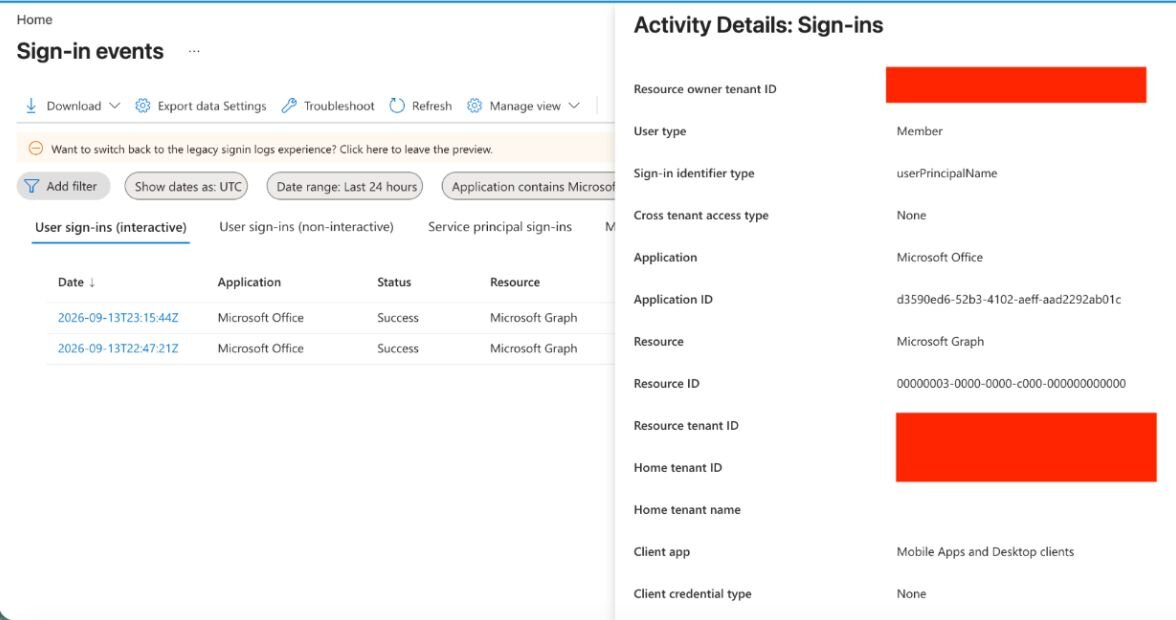
Figure 8: This upper panel is the clean-looking half: Application "Microsoft Office," App ID d3590ed6-52b3-4102-aeff-aad2292ab01c, Status Success, Client app "Mobile Apps and Desktop clients," credential type None, with no risk flags and no Conditional Access failures. It is indistinguishable from a routine Office sign-in and exactly the entry a SOC has no reason to open.
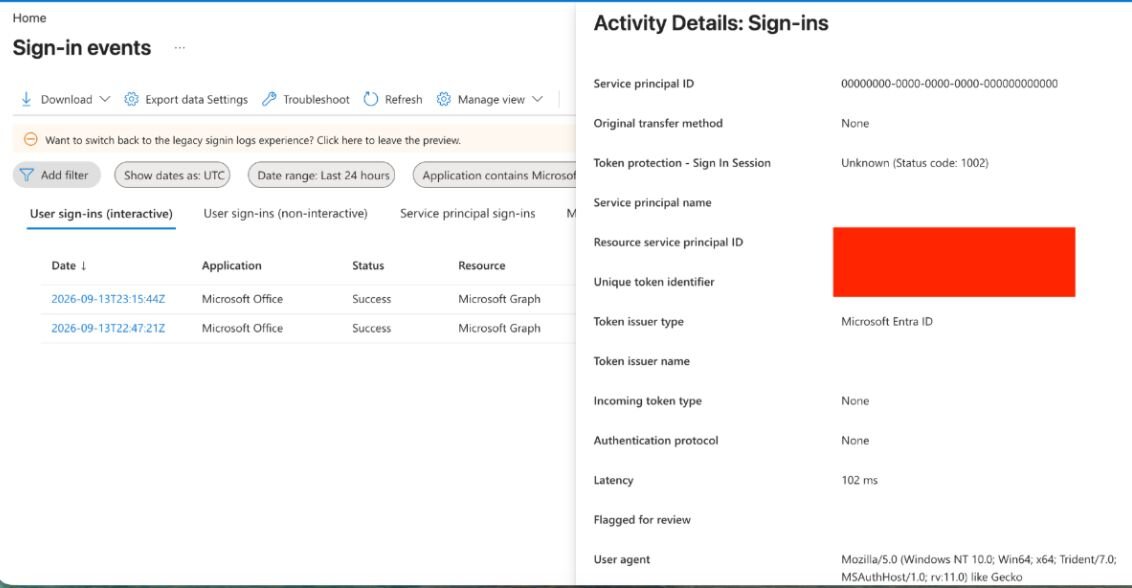
Figure 9: TheThis lower panel scrolls the same record down to the field that matters: User agent Mozilla/5.0 (Windows NT 10.0; Win64; x64; Trident/7.0; MSAuthHost/1.0; rv:11.0) like Gecko. That is MSAuthHost on the Trident engine, not MSAppHost/3.0, which is Microsoft's own log confirming the sign-in leg carries a different user agent than the exfil leg the rule keys on.
It's Not Just WWAHost: One Root Cause, a Class of Front Doors
WWAHost.exe is the binary I proved end-to-end, but it isn't special. It's one of a class of Microsoft-signed AppX host processes, and the vulnerable surface doesn't live in any of them. It lives in the shared WinRT layer they all load. So the right way to frame this isn't a count of vulnerable binaries. It's one root cause with many possible entry points, and an impact that should be read strictly by what was actually proven.
A note on what the words mean in this section, because the distinction is the whole point. "Proven" means demonstrated end-to-end to impact, and exactly one path meets that bar (WWAHost, token theft). "Available" means the WinRT namespace resolves on the tested build, which is a much weaker claim and does not imply the capability was exercised. Read what follows with those definitions in mind.
Class membership is a function of the Windows build, not a fixed constant. Hosts come and go between releases, and they don't all live in the same place. On 24H2 (build 26100), for example, some ship from System32 or SystemApps and at least one now ships from the packaged store under C:\Program Files\WindowsApps, which means an inventory that only searches system directories will under-count.
I looked at the broader set, and there are more hosts than WWAHost. I'm deliberately not publishing an enumeration of them. The detection in this post keys on the shared rendering engine, not on any host name, so it catches the whole class whether or not the individual binaries are listed, and a defender who wants to measure their own exposure can do it directly: they can sweep the signed AppX host binaries on their build for presence and signature, and query the WinRT surface with ApiInformation.IsTypePresent. That's a read-only check anyone can run against their own machine, and it's the only reason anyone needs the list. Printing the target set here would add nothing for defenders and a great deal for the other reader. What makes the hosts interchangeable is the shared activation layer they all load, which is the next point.
None of these host binaries implement the dangerous functionality themselves. They are host processes. The actual APIs are provided by shared Windows Runtime components that any AppX host can activate. So this was never a set of binaries each independently vulnerable. It is one design flaw: a sideloaded package with WindowsRuntimeAccess="all" in its ContentUriRules inherits the same WinRT surface no matter which host process renders it.
That is why patching individual binaries won't fix the problem, and why an EDR rule for WWAHost.exe alone is futile. Block one host and the attacker re-targets the next. The available hosts span search, shell, authentication, input, and backup functionality. Blocking all of them would break Windows. The fix has to live in the activation layer: WindowsRuntimeAccess="all" grants unrestricted WinRT access to remote JavaScript with no caller validation.
The WinRT classes reachable through that surface do not map to a fixed set of System32 DLLs. WinRT activates through the API-set/activation layer, and the backing module names and locations vary by build. On 24H2, two of the four modules the original testing named were not where expected:
API | WinRT class | Status on 24H2 (build 26100) |
|---|---|---|
WebAuthBroker |
| Resolves via |
Launcher |
| Resolves via |
CredentialPicker |
| Backing module not found in System32. Reachability unverified. |
DPAPI |
| Backing module not found in System32. Reachability unverified. |
The scan measures availability, whether the WinRT namespace responds from a given host, not end-to-end exploitation. Only one path was demonstrated all the way to impact:
Capability | What it yields | Proven? |
|---|---|---|
WebAuthBroker | OAuth access + refresh tokens, broad Graph scope set | Yes. Demonstrated end-to-end on WWAHost |
CredentialPicker | Plaintext credentials via a native dialog | Availability only. Full capture not re-verified on 24H2 |
DPAPI | Decrypt user-scoped secrets | Availability only. Not re-verified on 24H2 |
Launcher | Protocol-handler launching | Launch succeeds. Payloads often mitigated by Defender |
That first row contains the capability worth writing about: WebAuthBroker token theft, proven end-to-end. The rest is a shared surface worth flagging, but honestly labeled as available rather than exploited.
Beyond Token Theft: The Rest of the WinRT Surface
WebAuthBroker is the headline, but the full WinRT surface available to attacker JavaScript is broader than OAuth.
A note on evidence. The capabilities below were exercised in the original lab on Windows 11 22H2. Unlike the OAuth chain, they have not been re-confirmed end-to-end on 24H2 (see the proven-versus-available impact table above). Treat them as demonstrated-then, available-now rather than freshly proven.
CredentialPicker. Displays a native Windows credential dialog, the real one, rendered by the OS, visually identical to any legitimate Windows auth prompt. Returns the plaintext username and password to the calling JavaScript. Because WWAHost.exe renders the flow with no address bar, the user has no way to distinguish it from a legitimate system prompt, because it is a legitimate system prompt, just invoked by an illegitimate caller.
DataProtectionProvider (DPAPI). Encrypt/decrypt operations using the user's DPAPI master key context. Data encrypted with LOCAL=user scope was decrypted in the original lab, indicating the attacker's JavaScript has the same DPAPI context as any native application running under that user.
Protocol Handler Launching. Launcher.launchUriAsync invoked powershell:, cmd:, ms-msdt:, search-ms:, ms-officecmd:, and others. Some payloads are blocked by Defender, but the launch mechanism itself succeeds from within the trusted process context.
Silent Mode. WebAuthBroker exposes a silentMode parameter that attempts token acquisition from cached sessions with no UI. On a domain-joined machine with a live Entra session, this is expected to return tokens with no user interaction. But I did not confirm silent, PRT-backed acquisition end-to-end, so I am presenting it as documented/expected behavior and an open avenue, not a proven result. If you reproduce it, the whole chain runs with no user interaction while staying inside the signed-host surface, which is what makes it distinct from existing silent WAM tooling. Until then, treat it as unverified.
Why This Matters
This is a post-compromise credential harvesting technique that runs through trusted components on machines where Developer Mode is enabled. The entire chain uses documented Windows APIs, Microsoft-signed binaries, and Microsoft's own authentication infrastructure, so there is nothing for signature-based detection to flag.
Delivery is flexible. The sideloaded AppX package can be delivered as a "corporate IT tool," a "Microsoft Account Verification" app, or any social-engineering pretext. Once Developer Mode is confirmed on the target, Add-AppxPackage -Register runs silently from PowerShell with no UAC prompt. The OAuth flow presents a real Microsoft login, the kind users are trained to trust and complete.
Detection is hard. The process making the OAuth request is Microsoft-signed. The endpoint is login.microsoftonline.com. The client ID is Microsoft Office. Entra sign-in logs show a normal Office authentication – except for one thing, and that's what the next section is about.
Persistence is built in. The refresh token works from any machine, any network, with no further user interaction, and unlike the session it was stolen from, it keeps working after the machine is reimaged or the user logs off. It survives password changes until revoked: by an administrator, a revocation event, or Continuous Access Evaluation. A 30-second interaction yields long-lived access to the user's mail, files, directory, calendar, and Teams. This is one of several post-compromise token paths; what is new is the signed AppX web-host surface it runs through, and that a single network rule catches the whole class.
This is one of several post-compromise token paths. If the victim is already signed in, silent WAM token requests (Dirk-jan Mollema's askWAM, and the broader WAM/PRT tooling) get tokens without a dialog, inheriting device state and defeating Token Protection, often more quietly than an interactive sign-in. What is new here is the vector: a Microsoft-signed AppX web host performing the auth and the outbound call, which is why it has a clean network signature that catches the entire class of these hosts. The detection is the contribution.
Detection: The One Rule That Catches the Whole Class
This is where it gets interesting. The attack is designed to look like nothing: a Microsoft-signed process, Microsoft's authentication endpoint, Microsoft's own client ID. Every layer of the chain is trusted, which is exactly why endpoint and identity telemetry come up empty. But the traffic itself gives it away.
Every AppX web host renders through the same legacy EdgeHTML engine, and that engine announces itself: MSAppHost/3.0 paired with Edge/18 in the user agent. No modern browser produces that string.
Chromium-based Edge retired EdgeHTML years ago, so its only legitimate source is an AppX host talking to Microsoft. When that same user agent reaches out to anything outside Microsoft-owned infrastructure, there is no benign explanation. It is a sideloaded package with WindowsRuntimeAccess="all" phoning home to attacker-controlled infrastructure. One rule covers the entire class. It keys on that shared engine, not on any individual host binary, independent of which WinRT API the payload abuses.
The rule keys on that user agent and excludes Microsoft-owned destinations. The allow-list matters. MSAppHost/3.0 also appears in legitimate first-party traffic to Microsoft-owned domains that do not end in .microsoft.com, such as Store telemetry and other AppX-host calls, so a naive "not microsoft.com" filter would flag that benign traffic.
Sigma rule:
title: Sideloaded AppX Web Host Beaconing to Non-Microsoft Host
id: 8b1e2f34-5a6c-47d8-9e0a-1b2c3d4e5f60
status: experimental
description: >
Detects the MSAppHost/3.0 (EdgeHTML) user agent making outbound requests to
destinations outside Microsoft-owned domains. AppX web hosts (WWAHost.exe and
the wider class) only legitimately contact Microsoft endpoints; this user agent
to any other host indicates a sideloaded AppX package with
WindowsRuntimeAccess="all" reaching attacker-controlled infrastructure.
author: Andrew Schwartz
date: 2026/07/21
logsource:
category: proxy
detection:
selection:
c-useragent|contains: 'MSAppHost/3.0'
filter_microsoft:
cs-host|endswith:
- '.microsoft.com'
- '.microsoftonline.com'
- '.msauth.net'
- '.msftauth.net'
- '.windows.com'
- '.windows.net'
- '.windowsupdate.com'
- '.live.com'
- '.office.com'
- '.office365.com'
- '.sharepoint.com'
- '.msn.com'
- '.bing.com'
- '.msftconnecttest.com'
condition: selection and not filter_microsoft
falsepositives:
- First-party Microsoft Store / AppX telemetry to Microsoft-owned
domains not present in the filter list (extend the allow-list to tune)
level: high
Write that into your proxy, your SIEM, or your firewall. MSAppHost/3.0 to Microsoft endpoints is normal: Store telemetry, and the like. MSAppHost/3.0 to anywhere else is the attack.
A note on the allow-list as a tradeoff. Broadening the Microsoft allow-list cuts false positives but introduces a theoretical evasion. An attacker who can land their exfil endpoint on a Microsoft-owned domain, an open redirect, an abandoned tenant subdomain, an attacker-controlled SharePoint site, passes the filter. For most environments the false-positive reduction is worth it. A high-security environment can run the narrow list (.microsoft.com, .microsoftonline.com, .windows.net only) and accept the extra noise in exchange for closing that gap.
The captures resolve this. The exfil traffic to my server carries MSAppHost/3.0 (the EdgeHTML content host); Microsoft's own sign-in traffic to login.microsoftonline.com is rendered by a different host, MSAuthHost, on the Trident engine, and the Entra sign-in record logs its user agent as "Mozilla/5.0 (Windows NT 10.0; Win64; x64; Trident/7.0; MSAuthHost/1.0; rv:11.0) like Gecko." Two different hosts, two different user agents. So MSAppHost/3.0 to any non-loopback, non-Microsoft destination is unconditionally anomalous — the broker leg will never carry that string. (Observed on 24H2; the allow-list above still helps with other legitimate MSAppHost traffic such as Store telemetry.)
Supporting endpoint and identity IOCs
These are lower-confidence than the network rule but worth wiring up as corroboration:
Add-AppxPackage -Registerinvocations with paths outsideC:\Program Files\WindowsApps. Sysmon Event ID 1 / Windows 4688. Natively, without Sysmon:AppXDeploymentServer/Operational Event ID 400 records the register, and PowerShell script-block logging (Event ID 4104) captures the manifest — both validated in the lab.AppxManifest.xmlunder user-writable paths (%LOCALAPPDATA%,%USERPROFILE%,%TEMP%) containingWindowsRuntimeAccess="all"with an external URL, or a StartPage pointing to a non-localhost URL.Outbound connections from any AppX host binary to non-Microsoft IPs. Sysmon Event ID 3. Natively via Windows Filtering Platform auditing (Security Event ID 5156), which records the process image and destination IP — validated in the lab.
DLL loads from
C:\Users\*\AppData\Local\Packages\*\instead of System32. Sysmon Event ID 7.
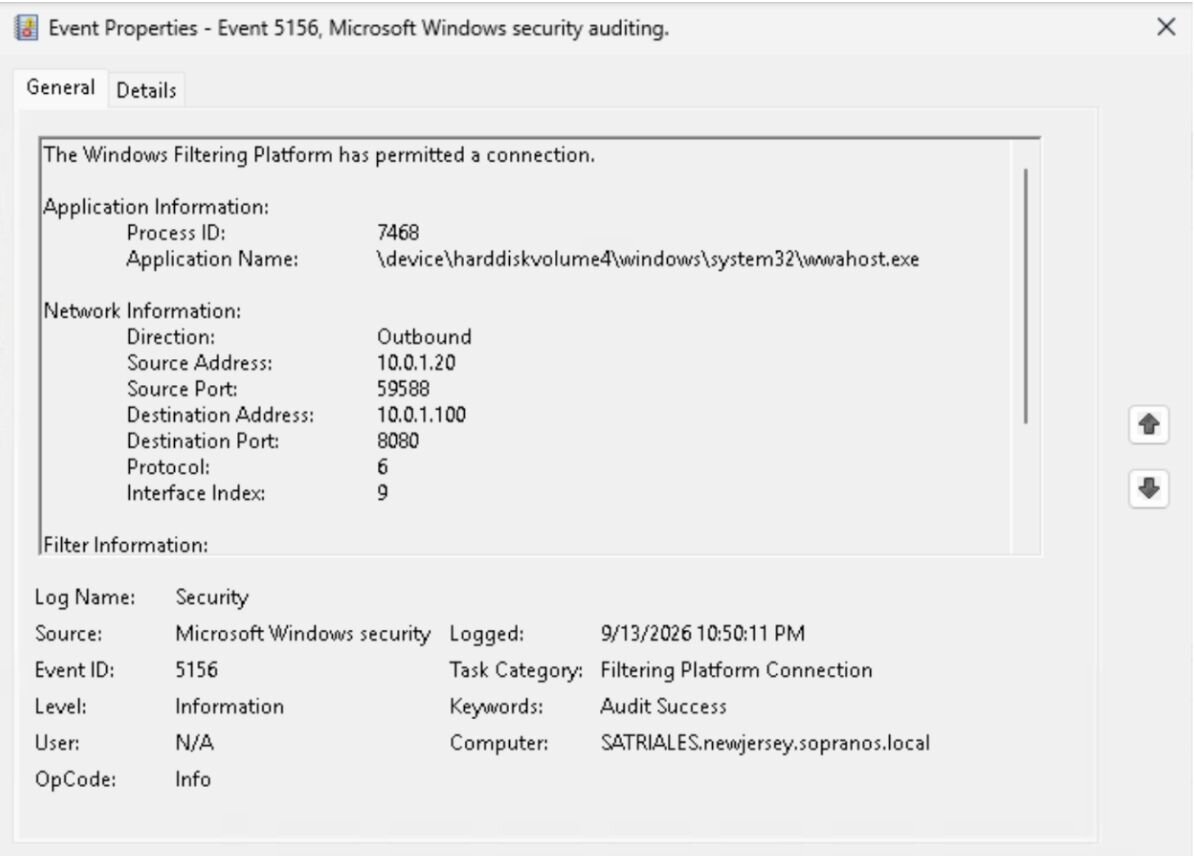
Figure 10: Security Event 5156 — wwahost.exe making an outbound connection to the attacker IP; the process image and destination address are both in the event. No Sysmon required.
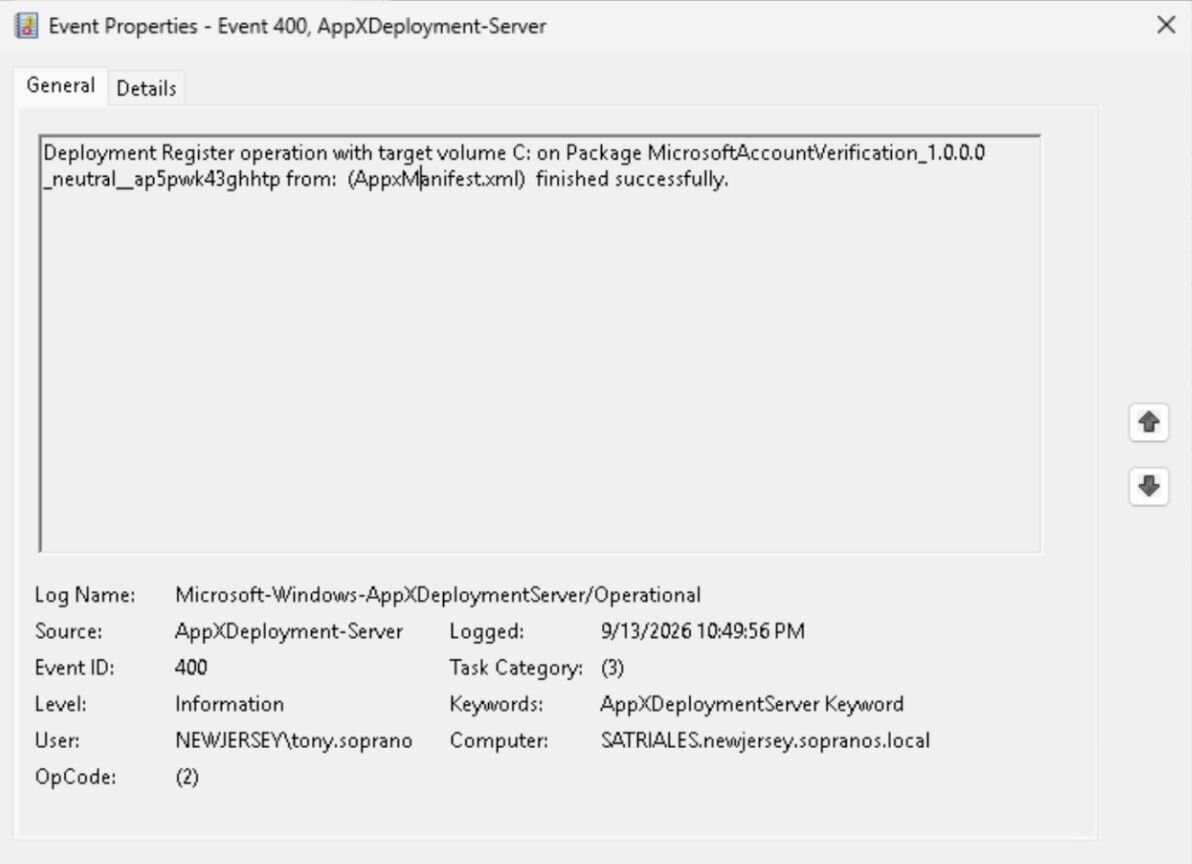
Figure 11: AppXDeploymentServer/Operational Event 400 — the sideloaded package registered successfully — alongside Get-AppxPackage output showing its InstallLocation under %LOCALAPPDATA%\Packages, the user-writable path.
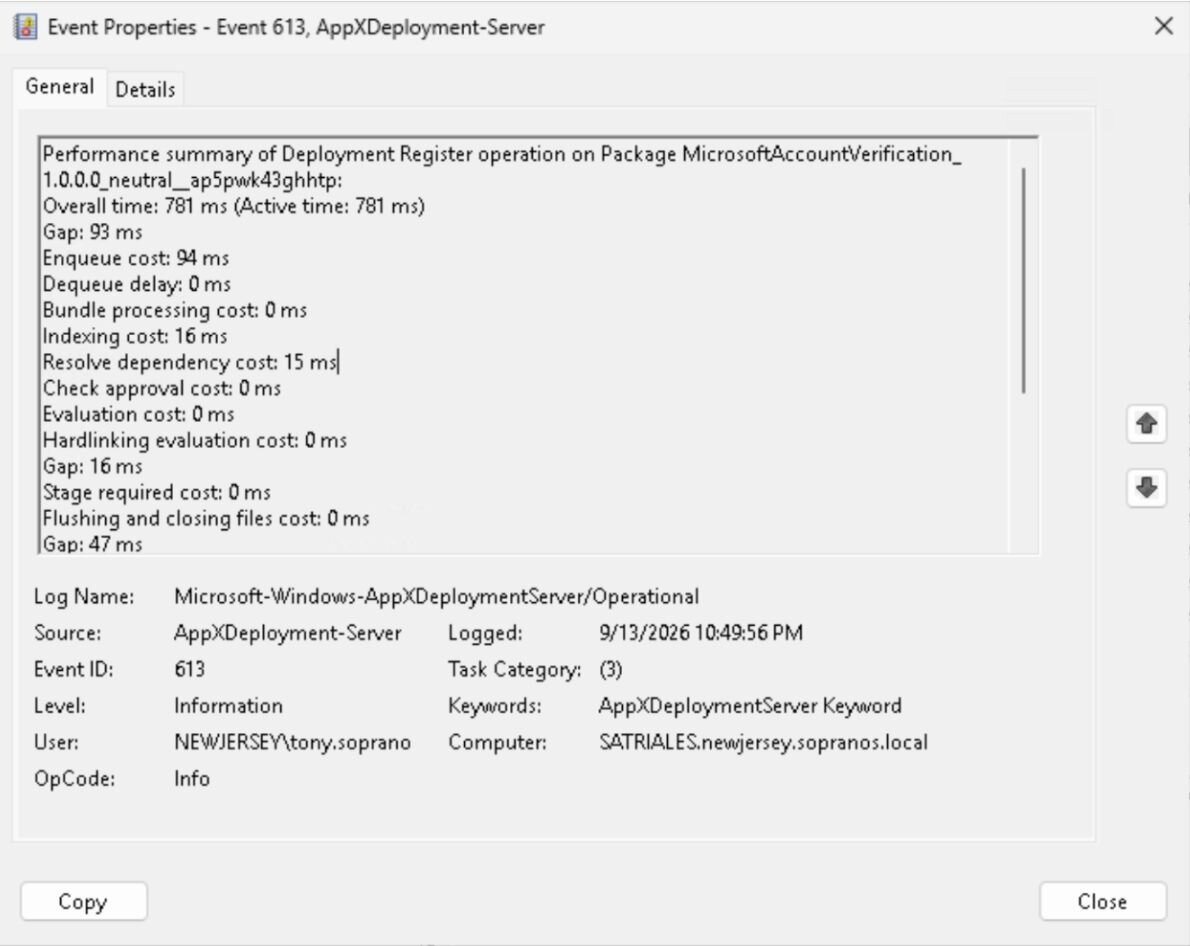
Figure 12: AppXDeploymentServer/Operational Event ID 613 — the deployment engine's performance summary for the sideloaded package MicrosoftAccountVerification_1.0.0.0_neutral__ap5pwk43ghhtp. This is a timing event only, it records the duration of each stage of the register operation and is purely supplemental, included for enhanced context. The evidentiary record is the companion Event ID 400 ("Deployment Register operation … finished successfully").
Recommendations for Defenders: Mitigation Is on You
1. Deploy the MSAppHost/3.0 proxy rule (above). One rule, whole AppX-host class, highest confidence, lowest false-positive rate once the allow-list is tuned.
2. Audit and restrict Developer Mode across the fleet. This is the prerequisite gate. Standard end-user machines should not have it enabled. Disable via GPO: Computer Configuration > Administrative Templates > Windows Components > App Package Deployment > Allow all trusted apps to install > Disabled. Inventory current state:
$devMode = Get-ItemProperty `
-Path "HKLM:\SOFTWARE\Microsoft\Windows\CurrentVersion\AppModelUnlock" `
-Name "AllowDevelopmentWithoutDevLicense" -ErrorAction SilentlyContinue
if ($devMode.AllowDevelopmentWithoutDevLicense -eq 1) {
Write-Host "DEVELOPER MODE ON: $env:COMPUTERNAME"
}
4. Conditional Access, require compliant/managed devices for token issuance. This doesn't prevent the attack on a managed device, but it limits an attacker's ability to use a captured refresh token from an unmanaged machine on a different network. Pair with Token Protection where available.
5. Shorten refresh-token lifetimes and enable CAE. Limits the persistence window if the network rule doesn't catch it in time.
Thanks to Aaron Margosis and Nick Powers for their thorough review of this post, and to Lindsey O'Donnell-Welch for reviewing, formatting, and publishing it.
For more on the offensive AppX and MSIX surface, check out Nick Powers' DEF CON 34 talk, MSIX'd Up: Weaponizing the Modern Windows App Packaging Ecosystem.