


Update - June 5 @ 3:00 PM ET: This blog originally attributed activity to DesckVB RAT. After it was brought to our attention and we conducted a follow-up review, we concluded that attribution was incorrect. We have updated the original post to reflect our current assessment that the malware is an unidentified .NET loader, and corrected the related references. Thank you to the community members who prompted us to take another look.
Background
In May 2026, the Huntress SOC responded to a .NET loader infection that began with a malspam. Short for “malicious spam,” malspam is email crafted to deliver malware or trick a user into taking an action that starts the infection chain, whether that is opening a booby-trapped attachment, clicking a malicious link, or handing over credentials on a fake login page. Still to this day, malspam remains one of the most prolific initial access vectors for attackers. At first glance, this case could be mistaken for just another malspam infection, but the delivery chain tells a more interesting story.
Before the victim ever reaches attacker-controlled infrastructure, the lure routes through DoubleClick, a legitimate Google-owned domain that many security tools are less likely to treat as suspicious. From there, the victim is passed into a malspam kit that personalizes itself on the fly using the victim’s email address, dynamically pulling in company branding and location details to make the page feel convincing without requiring the operators to handcraft a lure for each target.
That matters because it shows how malspam operations are becoming more scalable without becoming less believable. The attackers do not need a bespoke kit for every organization. They can reuse the same infrastructure and still give each victim a page that looks specific to them, which lowers the cost of the campaign while increasing the odds that someone clicks.
Once the victim interacts with the lure, the operation shifts from social engineering to layered malware staging. At its core, it’s a JavaScript-based Trojan, but what makes it nasty is the chain it kicks off once it lands on a machine. Rather than dropping one obvious payload, the chain moves through JScript, PowerShell, and .NET components that work together to retrieve, assemble, and run the final malware largely in memory.
From there, the loader phones home to a C2 server, handing the attacker full remote control of the box. At that point, the attacker can pull data, run commands, or use the foothold however they see fit, all while keeping a minimal detection footprint.
The loader enumerates installed AV products via WMI on the first beacon, which is standard profiling before deciding what to drop next. It also goes out of its way to specifically detect NVIDIA (GTX/RTX) and AMD (Radeon) GPUs through both WMI and direct registry reads. That level of GPU-specific interest could point toward crypto mining as a follow-on goal, or it may be used for masquerading purposes.
For defenders, that is what makes this worth paying attention to: the malspam is only the opening move, and everything behind it is built to land quietly, stay hidden, and give the attacker room to operate.
Timeline
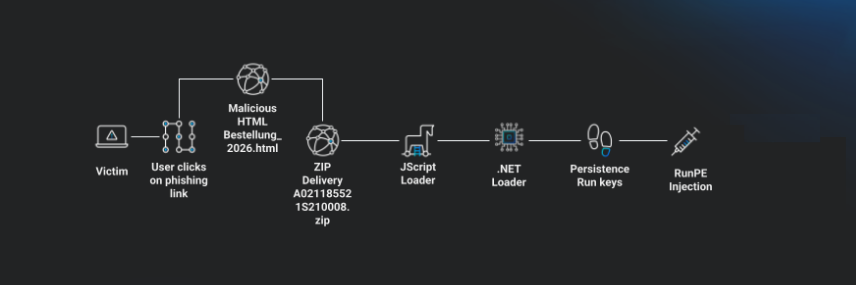
Figure 1: Diagram showing attack path
Initial discovery
Our investigation began with a process execution signal indicating the execution of a suspicious JavaScript file via WScript.exe.

Figure 2: Initial detections for WScript
The next clue was heavily encoded, obfuscated PowerShell code that, when decoded and deobfuscated, revealed it to be a PowerShell dropper.

Figure 3: Encoded and obfuscated PowerShell
Malspam analysis
Initial access occurred via a malspam email containing a malicious HTML attachment, Bestellung_2026.html (“Bestellung” = German for “order/purchase order”). The attachment is a minimal HTML file whose entire content is a zero-second meta-refresh redirect. The meta-refresh sends the browser to a Google DoubleClick Campaign Manager click-tracking URL (ad.doubleclick[.]net/ddm/trackclk/N4892.5020.4774291382421/B23999293.271539123), bearing campaign and creative identifiers (dc_trk_aid=466016770, dc_trk_cid=131101292). The next destination is appended after the ?, with the recipient's email base64-encoded in that destination's URL fragment. Why do threat actors route through DoubleClick? The likely rationale is filter and reputation evasion. ad.doubleclick[.]net is a high-reputation Google-owned domain that is rarely blocklisted and is frequently allowlisted by email security gateways, web proxies, and URL-reputation services - so the only domain visible in the email body and at the front of the chain is one defenders are unlikely to flag, deny, or sandbox.
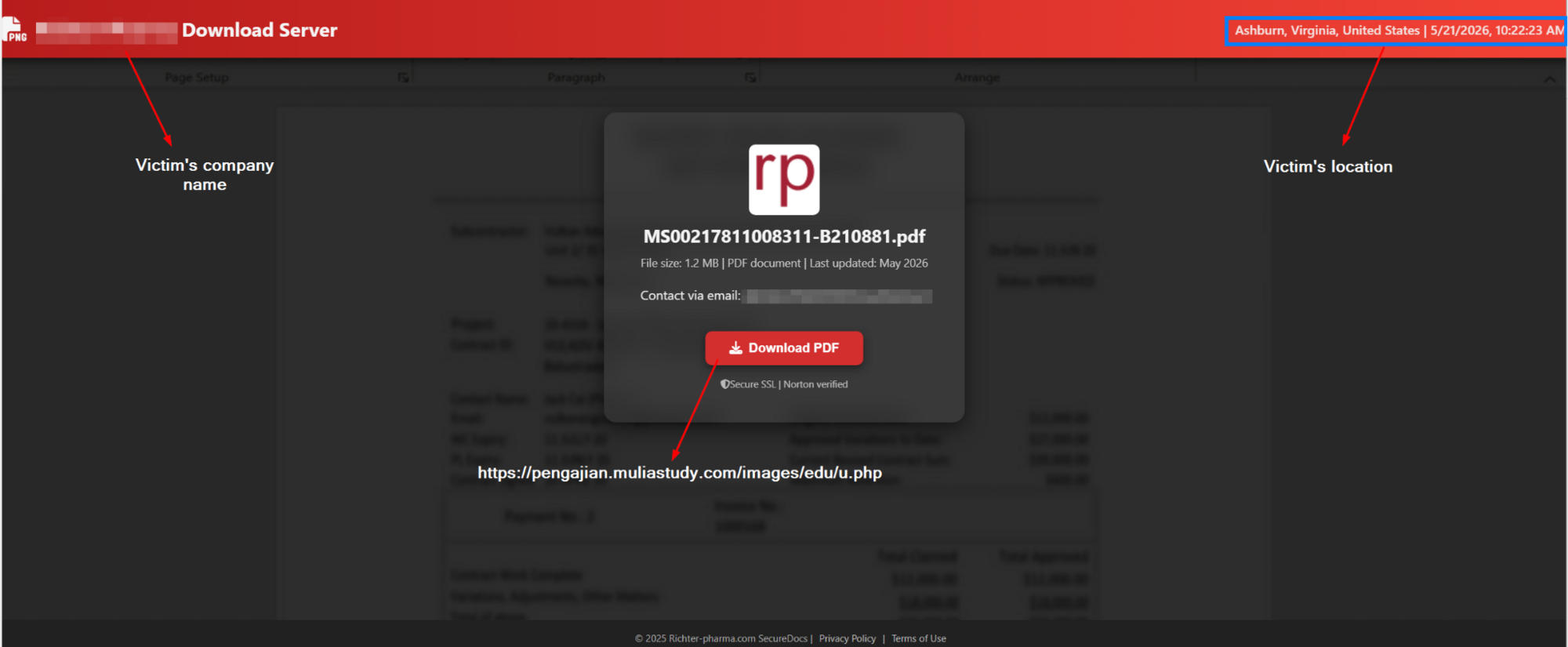
Figure 4: Malicious HTML attachment
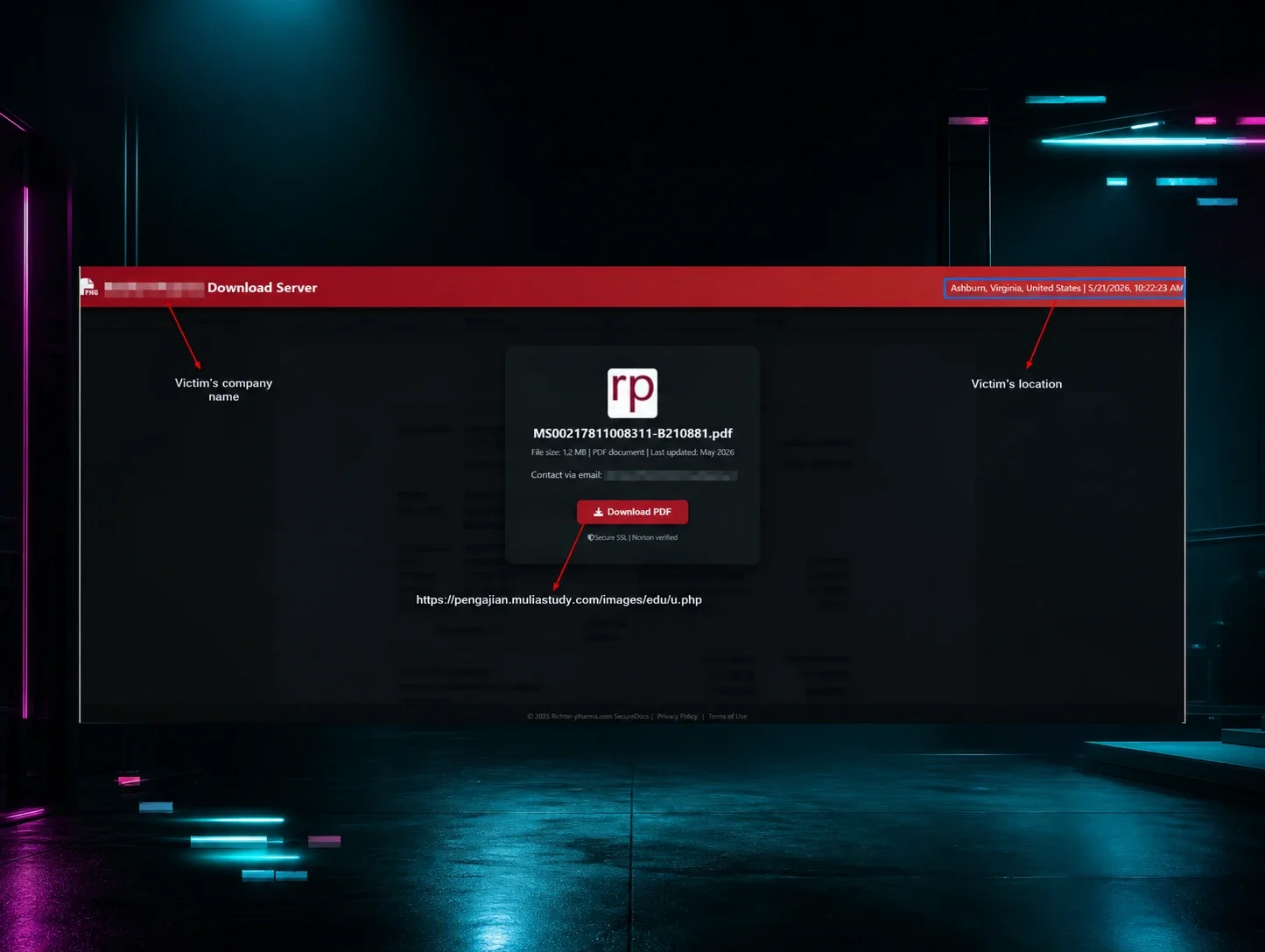
DoubleClick forwards to fostercareintheus.optimizationprime[.]com/b#<base64-email>. This host does not serve the kit, it is a redirector stage. It decodes the base64 email and forwards the browser to the kit host, carrying the email as a plaintext fragment. This stage adds a domain layer between the trusted DoubleClick front and the actual kit host. The chain lands on the delivery kit at hxxps://bth.startthewave[.]org/a/#<plaintext-email> (e.g. bth.startthewave[.]org/a/#<email_address>). Clicking “PDF herunterladen” (“Download PDF”) triggers downloadFile(), which builds a hidden HTML form and POSTs email=<address> to hxxps://pengajian.muliastudy[.]com/images/edu/u.php. The server responds with a ZIP archive (A021185521S210008-11521.zip) as the response body.
The lure page (served from bth.startthewave[.]org/a/) is a single self-contained HTML file. setupEmailAndUI() reads the recipient's email from the URL fragment (window.location.hash), extracts the domain, and rewrites the page title, header logo text, and footer to impersonate the recipient's employer. The company logo is fetched live at runtime via a fallback chain - Clearbit, logo.dev, Google favicons, favicone, DuckDuckGo, then the company's own /favicon.ico. The kit contains no organization-specific content; swapping the email rebrands it instantly.
fetchLocationAndTime() calls ipapi[.]co/json/ and prints the viewer's city, region, country, and local time into the header - social engineering to make the page feel personalized and “secure”.
The kit only renders if a #email URL fragment is present; setupEmailAndUI() builds the entire page from it. With no fragment, the page shows “E-Mail nicht gefunden. Weiterleitung…” (”Email not found. Redirecting…”) and redirects to bing[.]com after two seconds.
JScript multi-stage loader
The ZIP archive delivered by u.php contains a JScript file named A021185521S210008-11521.js. It is not the final malware itself but a multi-stage loader whose job is to retrieve and execute a .NET loader while evading analysis. The file is heavily padded with junk—hundreds of repeated dead functions, garbage Unicode strings, ;;;;; filler, and Portuguese-language comments.
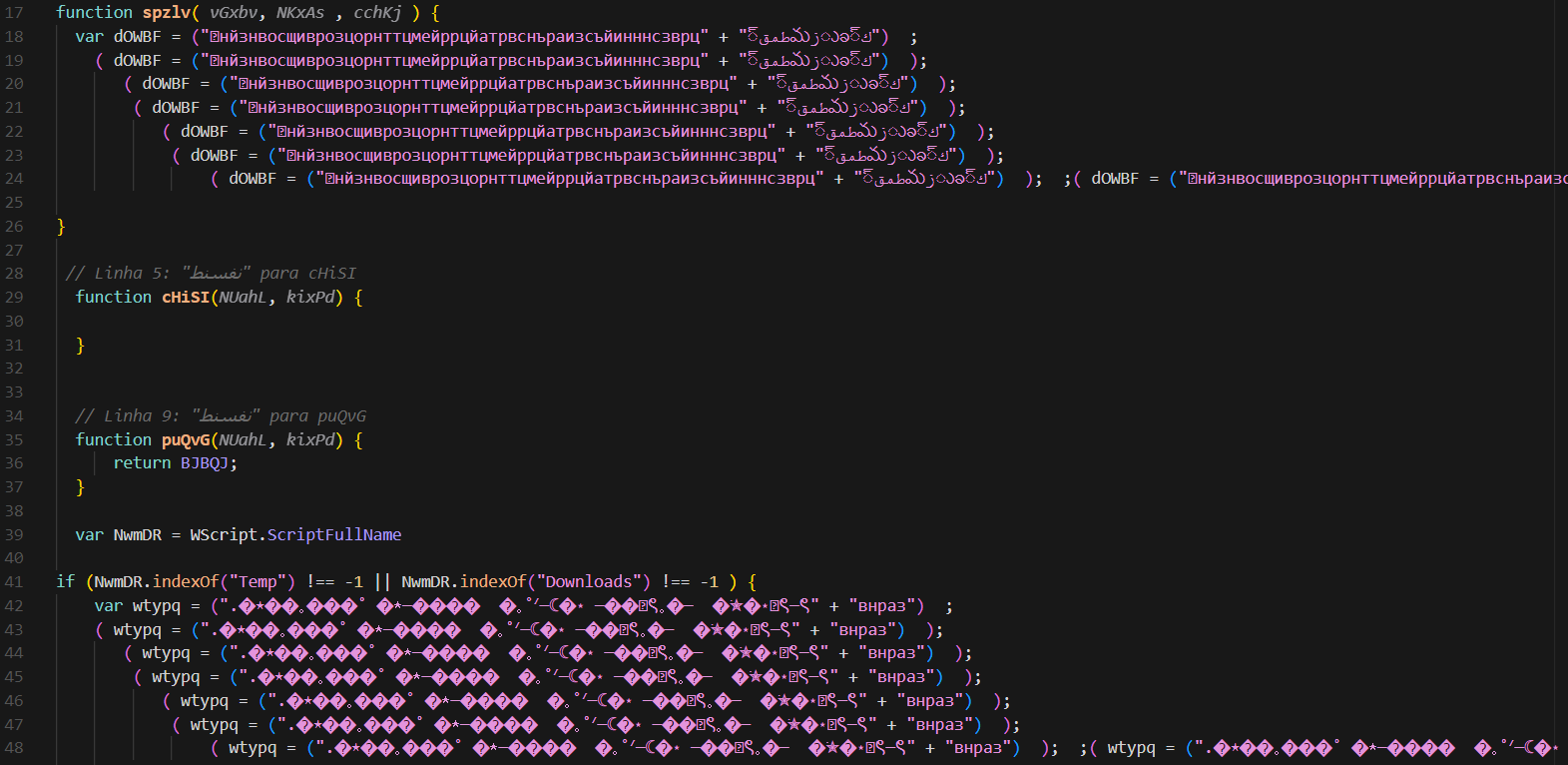
Figure 5: Contents of A021185521S210008-11521.js
On execution, the script checks its own path via WScript.ScriptFullName. If it is running from a Temp or Downloads folder - i.e. it has just been extracted from the ZIP by the victim—it copies itself to C:\Users\Public\ktncm.js, relaunches that copy with wscript.exe //nologo, and exits the current instance. If it is running from anywhere else, the relocation is skipped (the else branch is empty) and execution proceeds directly to the payload-staging logic. The net effect is that the first run relocates the script to a stable, world-writable directory, and the relocated copy, no longer in a Temp/Downloads path, falls through on its second run and proceeds to detonate.
The script holds a large base64 blob mangled with literal A characters and the token 9999 inserted throughout to defeat static detection. The function vjwNvhDoHz() repairs the blob with string replacements, base64-decodes it into a PowerShell script, writes it to C:\Users\Public\nlbzl.ps1, and executes it hidden with powershell -ExecutionPolicy Bypass -file.
The dropped PowerShell performs, in order: a connectivity check (Test-Connection to www.google.com)—if offline, it does not simply exit but invokes a function that runs Restart-Computer -Force, rebooting the machine; an anti-analysis sweep that enumerates running processes against a blocklist of debugging and sandbox tooling (Dbgview, tcpvcon, tcpview, OLLYDBG, ImmunityDebugger, Wireshark, an autoruns/runsc reference, apateDNS, and the strings any.run, sandbox, analyze), with the same Restart-Computer response if any are found; and a payload download via WebClient. For the download, the script decodes an embedded base64 string to a URL on hxxps://andrefelipedonascime1778799406970.2241107.meusitehostgator[.]com[.]br/GpazlLUWIJ_14_05_Meus_ArquivosDeTexto/03.txt, writes it to C:\Users\Public\zkrbx.txt, then reads that file back and uses its contents as the target for WebClient.DownloadData; the response is split on a %x% delimiter, and the second chunk is written to C:\Users\Public\gglhn.txt.
The dropped PowerShell (nlbzl.ps1) does not itself perform the reflective load - it acts as a builder, assembling a further PowerShell script as a string and writing it to C:\Users\Public\shmvg_01.ps1, which it then launches with powershell -ExecutionPolicy bypass -File. It is this generated script that performs the .NET reflective load ([Reflection.Assembly]::Load), resolves the type ClassLibrary3.Class1, and invokes the method prFVI. The signed Microsoft binary InstallUtil.exe (C:\Windows\Microsoft.NET\Framework\v4.0.30319\installutil) is passed as one of the arguments to prFVI for signed-binary proxy execution. Two URLs - hxxps://andrefelipedonascime1778799406970.2241107.meusitehostgator[.]com[.]br/GpazlLUWIJ_14_05_Meus_ArquivosDeTexto/PeNo and hxxp://catalogo.castrouria[.]com/c84da/bl.txt - are also passed as arguments to prFVI; they are consumed by the final .NET payload rather than fetched by any PowerShell stage.
The .NET loader (03.txt)
The retrieved 03.txt payload is not the final malware—it is a stager whose job is to verify it is not being analyzed, disable the machine's defenses, download and assemble the next stages, establish persistence, and execute the final payload.
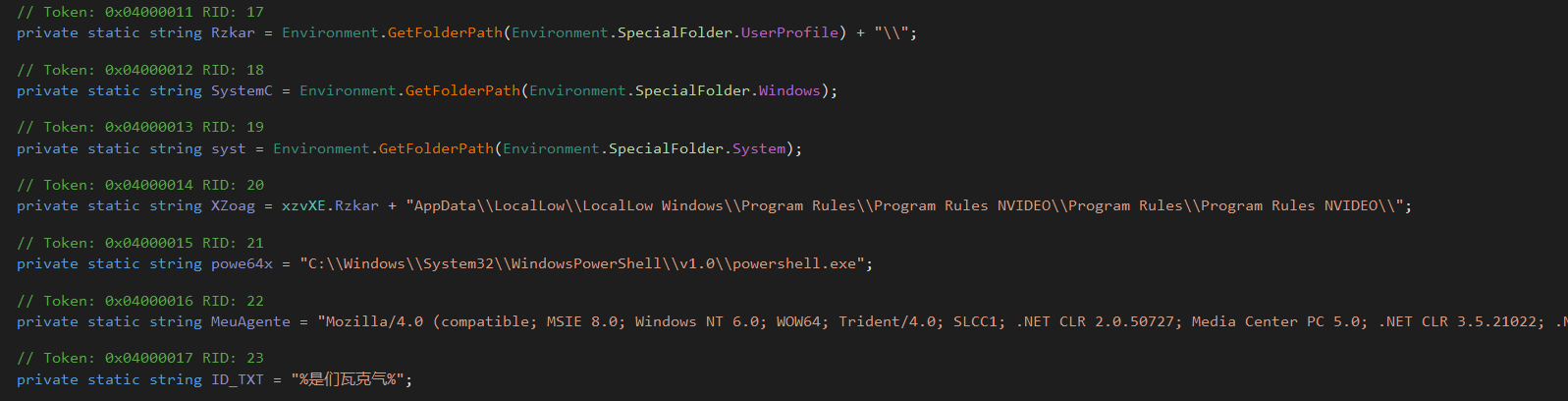
Figure 6: Hardcoded configuration fields in the .NET loader
When the loader runs, the PowerShell stage passes it two web addresses. The first, after the loader decodes it, points to hxxp://catalogo.castrouria[.]com/c84da/bl.txt. The second one is on hxxps://andrefelipedonascime1778799406970.2241107.meusitehostgator.com[.]br/GpazlLUWIJ_14_05_Meus_ArquivosDeTexto/PeNo. PeNo is not a file - it is a configuration flag. The loader reads that flag, strips it off the end of the URL, and treats what remains as a base path, appending 01.txt and 02.txt to build the two URLs it actually downloads from.
Anti-analysis checks
Before doing anything else, the loader sweeps the environment and aborts—deleting its files and, in most cases, rebooting the machine—if it detects analysis. It checks for virtual machines and sandboxes (VirtualBox, VMware, Hyper-V, Parallels, QEMU, and Sandboxie artifacts, including SbieDll.dll, vmhgfs.dll, the VirtualBox Guest Additions directory, and the Sandboxie registry key); sandbox and triage services (mksSandbox, joeboxserver, triage); cloud and RDP host indicators (WindowsAzureGuestAgent, azurearcsystray, rdpclip, Servermanager); BIOS registry values containing “virtual” or “Hyper-V”; the presence of Desktop\scan.7z; an attached debugger; and analysis tooling by process and window title (Wireshark, OllyDbg, ImmunityDebugger, apateDNS, Process Monitor, tcpvcon, handle, autorunsc, Dbgview, any.run). When a trigger fires, the loader writes a marker file describing it—vm.txt for a VM or sandbox hit, Debugger.txt for an attached debugger, 01_detect_analisse_process.txt for an analysis tool (this one records the offending process name and window title in its content) then exits.
Environment cleanup and staging directory
The loader deletes all .txt and .ps1 files from %TEMP% and C:\Users\Public, removing earlier-stage artifacts. It then creates a deeply nested working directory under %UserProfile%\AppData\LocalLow\, using NVIDIA-themed folder names (LocalLow Windows, Program Rules, Program Rules NVIDEO) repeated across multiple levels to mimic a legitimate driver installation path.
Defender tampering and AV handling
If no Avast, AVG, or Malwarebytes (MBAMService) process is running, the loader executes a PowerShell command to disable Microsoft Defender protections - real-time monitoring, intrusion prevention, MAPS reporting, and sample submission - and adds the entire system drive as a Defender exclusion path. It also terminates the security product QHActiveDefense (Qihoo 360) if present.
Payload retrieval
The loader downloads three remote files using a hardcoded legacy Internet Explorer 8 User-Agent “Mozilla/4.0 (compatible; MSIE 8.0; Windows NT 6.0; WOW64; Trident/4.0; SLCC1; .NET CLR 2.0.50727; Media Center PC 5.0; .NET CLR 3.5.21022; .NET CLR 3.5.30729; .NET CLR 3.0.30618; InfoPath.2; OfficeLiveConnector.1.3; OfficeLivePatch.0.0”:
- hxxp://catalogo.castrouria[.]com/c84da/bl.txt
- hxxps://andrefelipedonascime1778799406970.2241107.meusitehostgator.com[.]br/GpazlLUWIJ_14_05_Meus_ArquivosDeTexto/01.txt
- hxxps://andrefelipedonascime1778799406970.2241107.meusitehostgator.com[.]br/GpazlLUWIJ_14_05_Meus_ArquivosDeTexto/02.txt
The 01.txt and 02.txt URLs are built at runtime from the base path described above.
Each downloaded file is processed through several layers: a split on a multi-byte delimiter, string reversal, base64 decoding, and a character-substitution routine. The loader then substitutes a set of placeholder tokens with runtime values, assembling the final script.
Persistence
Persistence is established in three ways: a Run registry entry and a RunOnce registry entry under HKCU\SOFTWARE\Microsoft\Windows\CurrentVersion\, each named Update Drivers NVIDEO_<random> and configured to launch the staged script hidden via powershell.exe -WindowStyle Hidden -ExecutionPolicy Bypass; and a copy of the loader placed in the user's Startup folder. The NVIDIA-themed naming and randomized registry value names are intended to evade casual inspection.
Final execution
The assembled payload is written as a randomly-named .ps1 into the NVIDIA-themed LocalLow directory and executed with powershell.exe -ExecutionPolicy Bypass -File, hidden and with no window. The loader toggles WOW64 filesystem redirection around execution depending on whether the final payload targets a 64-bit or 32-bit .NET framework path - behavior consistent with a process-injection (RunPE) final stage that loads code into a target process.
The template script (02.txt)
The 02.txt file is not a standalone payload but a PowerShell template containing placeholder tokens. After the loader fills in the token values, the resulting script performs one operation: it takes the decoded 01.txt bytes and reflectively loads them as a .NET assembly (ClassLibrary1.dll), resolves the Run method through reflection, splitting the class name across string concatenations to break static signatures—and invokes it statically with three arguments:
- A string containing the InstallUtil.exe target path concatenated with delimiter-separated metadata values (staging directory path, process IDs, and configuration flags).
- A byte array containing the decoded bl.txt content - the packed loader payload.
- A boolean selecting the 32-bit or 64-bit injection path.
The template before token substitution:
The %qlxKP% token is replaced with the decoded 01.txt byte array (the RunPE injector), %nkGMv% with the decoded bl.txt byte array, %yzXVM% with the InstallUtil.exe path, and %trueorfalse% with the 32/64-bit flag. The NhqIM string serves as a delimiter that the injector's Run method parses to extract the metadata fields.
The injection target is operator-configurable—the %yzXVM% token is filled at build time by ClassLibrary3. In the sample analyzed statically, InstallUtil.exe was the configured target. In telemetry from a live intrusion, we observed MSBuild.exe being used instead.
The RunPE injector (01.txt - ClassLibrary1.dll)
The decoded 01.txt content is a .NET DLL. Its purpose is process hollowing: it takes a payload, a target process, and injects one into the other.
The payload implements the actual process hollowing using the standard RunPE API chain: CreateProcessA (create target suspended), ZwUnmapViewOfSection (unmap the original image), VirtualAllocEx (allocate new memory), WriteProcessMemory (write the payload), GetThreadContext/SetThreadContext (fix the entry point), and ResumeThread (start execution). It also handles Wow64GetThreadContext/Wow64SetThreadContext for cross-architecture injection. All API names are mangled in the binary. Notably, the CreateProcessA wrapper retains the Portuguese word “criando” (meaning “creating”) in its mangled name.
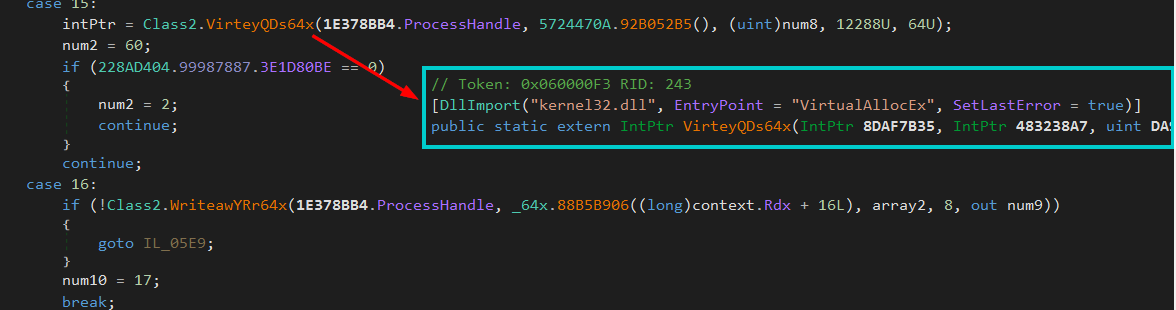
Figure 7: The VirteyQDs64x method revealed - a DllImport for VirtualAllocEx from kernel32.dll, with obfuscated parameter names
Anti-analysis
The assembly checks for attached debuggers at runtime and enumerates running processes against a hardcoded blocklist: debugger, Wireshark, apateDNS, analyze, Analysis, any.run, anyrun, and tcpvcon. If any match is found, the injector will not proceed with execution.
The Loader Analysis (bl.txt)
The bl.txt content, injected into InstallUtil.exe by the RunPE injector, is not the loader itself but another packing layer. The injected assembly triggers a multi-step unpacking chain before the actual malware executes.
When the assembly loads, a static constructor reads an embedded resource and decrypts it using a custom stream cipher. A 32-byte key and a 16-byte IV are loaded, in this sample the IV is identical to the first 16 bytes of the key, so XOR'ing the key with the IV zeros out the first half, leaving only the last 16 bytes as the effective key. The cipher processes the resource data in 4-byte blocks: for each block, a running accumulator is fed through a scramble function that generates a keystream dword via byte-swapping, multiply-accumulate operations with magic constants (9495, 10476, 22014), shift-XOR mixing (<< 9, << 1, >> 5), and cross-term combination. The resulting keystream is XOR'd against the ciphertext block to produce plaintext. The decrypted output is optionally LZX-decompressed, then reflectively loaded via Assembly.Load.
The embedded resource is accessed through a ResourceResolve hook registered on the AppDomain. The resource is then passed through two transforms: TripleDES decryption in CBC mode with PKCS7 padding, followed by GZip decompression. The TripleDES parameters:
- Key: lHxoBf+5Ft6YrDx4FyDWwg==
- IV: nFukcUaa5h0=
The decrypted payload is a .NET assembly that is itself protected by another instance of the same XOR/LZX encryption to protect its embedded protobuf-net dependency.
The loader packs the entire configuration into a single protobuf-serialized message, base64-encodes it, and stores it as one string literal. At startup, the config blob is decoded from base64, deserialized via protobuf, and loaded as the active settings:
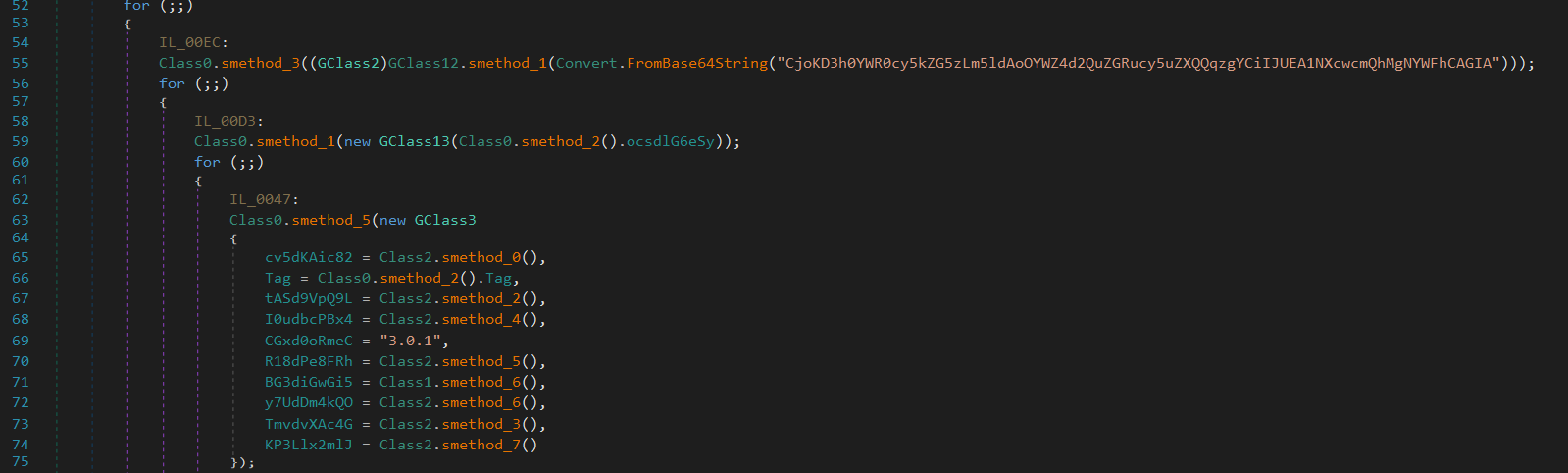
Figure 8: Loader configuration
The loader communicates over raw TCP sockets using AES-encrypted, protobuf-serialized messages. The AES key is derived from the P@55w0rd! password using Rfc2898DeriveBytes (PBKDF2). RSA is used for the initial key exchange, and the loader pins the server's identity using five embedded SHA-256 certificate hashes:
- D5B7247C497788CF0031CEB06E3DF77A45FEF59F1E49633DC7159816D64759B5
- C61B1941CF756EB7551F7C661743802362728B785ADC22E860D269713DFB01A6
- C356AFF1A01C2B0DA472E584C8E3C8F875B9A24280435D42836A77B19F5A8C18
- F1C3EBE78BD8C38559BF3CFCC9A9FA37D221E31780774A3787E26160A61F5348
- E91FB249AA97BE5C7931E430781167EDFE7BA804720B5F643E6AB70B7E6E74DD
System reconnaissance
On initial beacon, the loader collects a hardware fingerprint via WMI queries for Win32_Processor (ProcessorId), Win32_DiskDrive (SerialNumber), Win32_BaseBoard, Win32_VideoController, and Win32_OperatingSystem. It specifically detects NVIDIA (GTX/RTX) and AMD (Radeon) GPUs through both WMI and direct registry reads (HardwareInformation.AdapterString, HardwareInformation.qwMemorySize). It enumerates installed AV products via WMI (Select * from AntivirusProduct against the SecurityCenter2 namespace).
Process injection
The loader uses its own RunPE implementation (separate from the 01.txt injector), resolving Win32 APIs at runtime through an obfuscation technique: each API name is base64-encoded with @ characters inserted at random positions to break static signatures. At runtime, the @ characters are stripped and the string is base64-decoded to recover the real function name, which is then resolved via GetProcAddress:
- CreateProcessA
- ZwUnmapViewOfSection
- VirtualAllocEx
- WriteProcessMemory
- GetThreadContext
- SetThreadContext
- Wow64SetThreadContext
- ResumeThread
- ReadProcessMemory
- CloseHandle
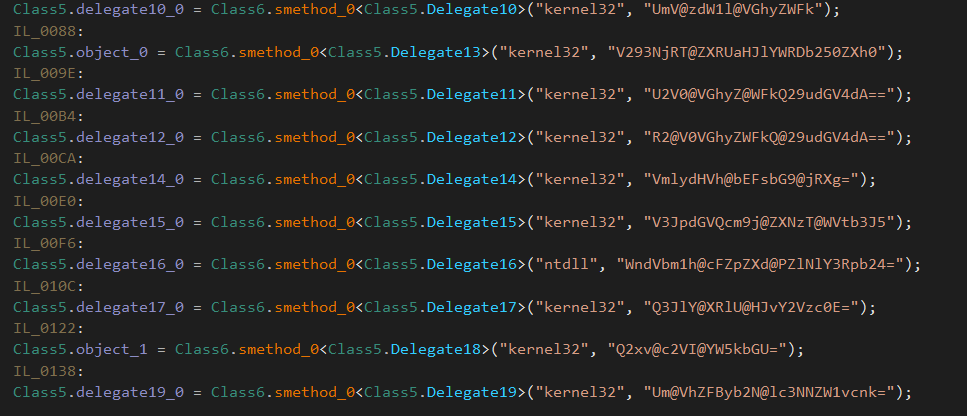
Figure 9: Each Win32 function name is stored as a base64 string with @ characters inserted at random positions
Both MSBuild.exe and InstallUtil.exe are hardcoded in the loader's string table as injection targets. Which one is used on a given victim is operator-configurable: the 02.txt template's %yzXVM% token is filled at build time by ClassLibrary3.
Installation and persistence
Before establishing persistence, the loader runs a self-install routine. It first checks whether it is already running from its intended install location under LocalApplicationData. If not, it checks whether it has administrative privileges. If running as a standard user, it relaunches itself elevated via cmd /k START “” “<self>” & EXIT with Verb = “runas”, triggering the UAC elevation prompt then exits the current instance. Once elevated, it sleeps for a randomized delay (4-7 seconds), adds Defender exclusions (described below), copies itself to the install path under a randomly generated .exe filename, registers persistence, and exits. The new copy starts on the next boot or logon via the registered persistence mechanism.
Persistence is established through registry Run and RunOnce keys (HKCU\Software\Microsoft\Windows\CurrentVersion\Run and \RunOnce) and two types of scheduled tasks. The first is a one-shot launcher: it creates a task that triggers 5 seconds after creation and expires after 20 seconds, a run-once-soon mechanism to start the newly installed copy. The second is the real persistence: a repeating task with a randomized interval of 8-11 minutes (PT{8-11}M) and no expiry, ensuring the loader restarts if terminated. Both tasks are created by writing a full XML task definition to a temp file ({GUID}.xml), executing schtasks /Create /TN “<name>” /XML “<path>” /F, waiting up to 5 seconds for completion, then deleting the XML file. The privilege level is set dynamically - HighestAvailable if the loader is running as admin, LeastPrivilege otherwise. A mutex (configurable via the config) prevents multiple instances from running simultaneously, with a 30-second acquisition timeout.
Defense evasion
During the install routine, the loader builds a PowerShell command that adds multiple Defender exclusions in a single execution: path exclusions for LocalApplicationData, the system temp directory, and the loader's own install path, plus a process exclusion for the loader's executable. The command is run via powershell.exe -ExecutionPolicy Bypass -WindowStyle Hidden -NoProfile.
The loader also patches AMSI and ETW at the native API level. It first checks the Windows build number from the registry—if the build is 26100 or higher (Windows 11 24H2), it resolves NtManageHotPatch from ntdll.dll and overwrites its prologue with a stub that returns STATUS_NOT_SUPPORTED (0xC00000BB). On 64-bit systems, the patch is mov eax, 0xC00000BB; ret; on 32-bit, mov eax, 0xC00000BB; ret 0x10. Before writing, it verifies the function prologue is intact by checking for 0x4C 0x8B (64-bit) or 0xB8 (32-bit) as the first bytes. This targets the hot-patch-based AMSI loading mechanism introduced in Windows 11 24H2.
Separately, on 64-bit systems, the loader patches EtwEventWrite by pattern-scanning ntdll.dll for its function prologue signature (with wildcard bytes for relocatable offsets) and overwriting the entry point with xor rax, rax; ret, making all ETW event logging a no-op. Both patches use VirtualProtectEx to change memory protection, WriteProcessMemory to apply the patch, and FlushInstructionCache to ensure the modified code takes effect.
Additional payload delivery
The loader can receive additional payloads from the C2 and execute them in three different modes depending on flags set by the operator.
In-memory injection mode downloads the payload bytes directly into memory, randomly selects between MSBuild.exe and InstallUtil.exe as the injection target, and performs RunPE process hollowing to execute the payload without writing it to disk. The PID of the injected process is tracked so the loader can manage or kill it later.
PowerShell mode downloads the payload to a temp file with a .ps1 extension, waits 2 seconds, then executes it via powershell.exe -NoProfile -ExecutionPolicy ByPass -File and registers it as a one-shot scheduled task.
File-drop mode downloads the payload, decrypts it (AES), writes it to disk, and registers it as a scheduled task for execution.
Self-cleanup
The loader can kill processes by PID with a configurable delay (cmd /c timeout 10 && taskkill /F /PID), delete itself (cmd /c timeout 15 && del /a /q /f), and remove its scheduled tasks (schtasks /Delete /TN).
Conclusion
What started as a malspam email quickly evolved into a more deliberate attack, likely with data exfiltration as the end goal, and, if left unchecked, a full hands-on intrusion.
This is a strong reminder of why defence in depth matters. Configuring a Group Policy Object (GPO) in Active Directory to force script files such as .vbs, .hta, and .js to open in Notepad by default can stop a threat actor at the very first stage, preventing additional payloads from ever being dropped.
On the email security front, organizations should consider deploying DMARC, DKIM, and SPF records to reduce the likelihood of spoofed or malicious emails reaching end users. Beyond that, an email gateway solution capable of sandboxing attachments and links before delivery adds another meaningful layer of protection. Blocking or quarantining macro-enabled Office documents and script-based attachments at the mail gateway is a low-effort control that pays dividends. Where feasible, enabling Safe Links and Safe Attachments (or equivalent) ensures URLs and files are inspected at time-of-click rather than time-of-delivery.
Recommendations
- Configure a GPO that forces .js, .vbs, and .hta files to open in Notepad or Notepad++ by default, neutralising their ability to execute without additional user effort.
- Run regular phishing awareness training and conduct internal simulated phishing campaigns to build a more resilient workforce. The human layer remains the most consistently exploited entry point.
- Deploy email authentication controls, including SPF, DKIM, and DMARC to harden the email perimeter and reduce exposure to spoofing and impersonation attacks.
- Implement an email security gateway with sandboxing capability and consider blocking or quarantining script-based and macro-enabled attachments at the mail layer before they reach the endpoint.
Detections
- Alert on .js, .vbs. Hta files as a child process of explorer.exe.
- Monitor for wscript.exe invoking the following directory "C:\Users\Public\ and spawning encoded and obfuscated PowerShell.
Huntress Labs has published indicators-of-compromise for this threat to our Github.
Indicators of Compromise (IoCs)
|
Indicator |
Description |
|
Bestellung_2026.html |
Malicious HTML attachment |
|
fostercareintheus.optimizationprime[.]com |
Redirector stage |
|
bth.startthewave[.]org |
Delivery kit |
|
pengajian.muliastudy[.]com/images/edu/u.php |
This serves the ZIP archive it's payload delivery |
|
A021185521S210008-11521.zip |
Delivery ZIP archive served by malspam kit (u.php) |
|
A021185521S210008-11521.js |
JavaScript loader |
|
ktncm.js |
JavaScript loader |
|
zkrbx.txt |
Staging file |
|
gglhn.txt |
Staging file |
|
nlbzl.ps1 |
PowerShell dropper |
|
shmvg_01.ps1 |
PowerShell stager |
|
andrefelipedonascime1778799406970.2241107.meusitehostgator[.]com[.]br |
Serves 01.txt, 02.txt, 03.txt staging files |
|
%USERPROFILE%\AppData\LocalLow\LocalLow Windows\Program Rules\Program Rules NVIDEO\Program Rules\Program Rules NVIDEO |
Loader's staging directory — NVIDIA-themed nested path used to mimic a legitimate driver install path |
|
catalogo.castrouria[.]com |
Serves bl.txt (the packed loader), payload delivery |
|
SHA256: D5B7247C497788CF0031CEB06E3DF77A45FEF59F1E49633DC7159816D64759B5 C61B1941CF756EB7551F7C661743802362728B785ADC22E860D269713DFB01A6 C356AFF1A01C2B0DA472E584C8E3C8F875B9A24280435D42836A77B19F5A8C18 F1C3EBE78BD8C38559BF3CFCC9A9FA37D221E31780774A3787E26160A61F5348 E91FB249AA97BE5C7931E430781167EDFE7BA804720B5F643E6AB70B7E6E74DD |
Loader's hardcoded C2 certificate pin |
|
P@55w0rd! |
Hardcoded AES password used by the loader for C2 comms derivation via PBKDF2 |
|
xtadts.ddns[.]net |
Loader's C2 server |
|
afxwd.ddns[.]net |
Loader's C2 server |
|
Mozilla/4.0 (compatible; MSIE 8.0; Windows NT 6.0; WOW64; Trident/4.0; SLCC1; .NET CLR 2.0.50727; Media Center PC 5.0; .NET CLR 3.5.21022; .NET CLR 3.5.30729; .NET CLR 3.0.30618; InfoPath.2; OfficeLiveConnector.1.3; OfficeLivePatch.0.0) |
Hardcoded IE8 User-Agent used by the loader for payload retrieval |