


Special thanks to Austin Worline for his contributions to this blog post.
The Huntress Security Operations Center (SOC) frequently comes across incidents involving rogue ScreenConnect installations. At the end of September, we saw an uptick in ScreenConnect instances being compromised by threat actors, but we've also seen a steady flow of incidents involving ScreenConnect throughout the year.
This is part of an overarching trend by threat actors to use remote monitoring and management tools (RMMs). The Huntress 2025 Cyber Threat Report found that 17.3% of all threat actor remote access methods originated from RMM abuse in 2024. Attackers are using RMMs like ScreenConnect, TeamViewer, LogMeIn, and more as a way to gain access, blend in, move laterally, and maintain persistence.
There are many ways threat actors abuse these tools. Threat actors have targeted RMMs directly, with ConnectWise on May 28 acknowledging that it had responded to suspicious activity in its environment, impacting “a very small number of ScreenConnect customers.” However, Huntress also frequently sees threat actors hijacking and using existing RMM software already installed on victims’ machines, or deploying and installing an attacker’s preferred RMM onto victims’ computers.
The latter is the core focus of this post, as many threat actors use social engineering to convince employees to download their RMMs before launching their attacks. Huntress has identified several recurring types of lures, domains, and more used by threat actors in 2025 to trick targeted employees into executing these types of rogue RMMs.
Common tactics used in attacks
The Social Security statement
Huntress has frequently come across lures purporting to be related to Social Security statement documents, as seen in the following executable names:
Social_Security_Statement_[redacted].exe
Social_Security_Statement_Documents_[redacted].exe
Social-S-Statement-May.exe
Social_Security_Statement_Viewer.exe
What we’re seeing:
In April, Huntress observed a user at an insurance agency executing a suspicious process after downloading the executable Social_Security_Statements_April2025_Updates.Client.exe from a website. The executable appeared to be a renamed ScreenConnect client.
Figure 1: A Social Security-related ScreenConnect lure

The open invite
Several lures were linked to invitations, paired with messages likely prompting targets to RSVP. Some of these lures were paired with “ClientSetUp,” and others appeared to be actual event invitations:
partyinvitecard(6).exe
RSVPINVITE(1).exe
YourInvite.Clientsetup.exe
onlineinvite01.exe
Sundayinvite.exe
accessinvite.ClientSetup(3).exe
EventPreview.exe
What we’re seeing:
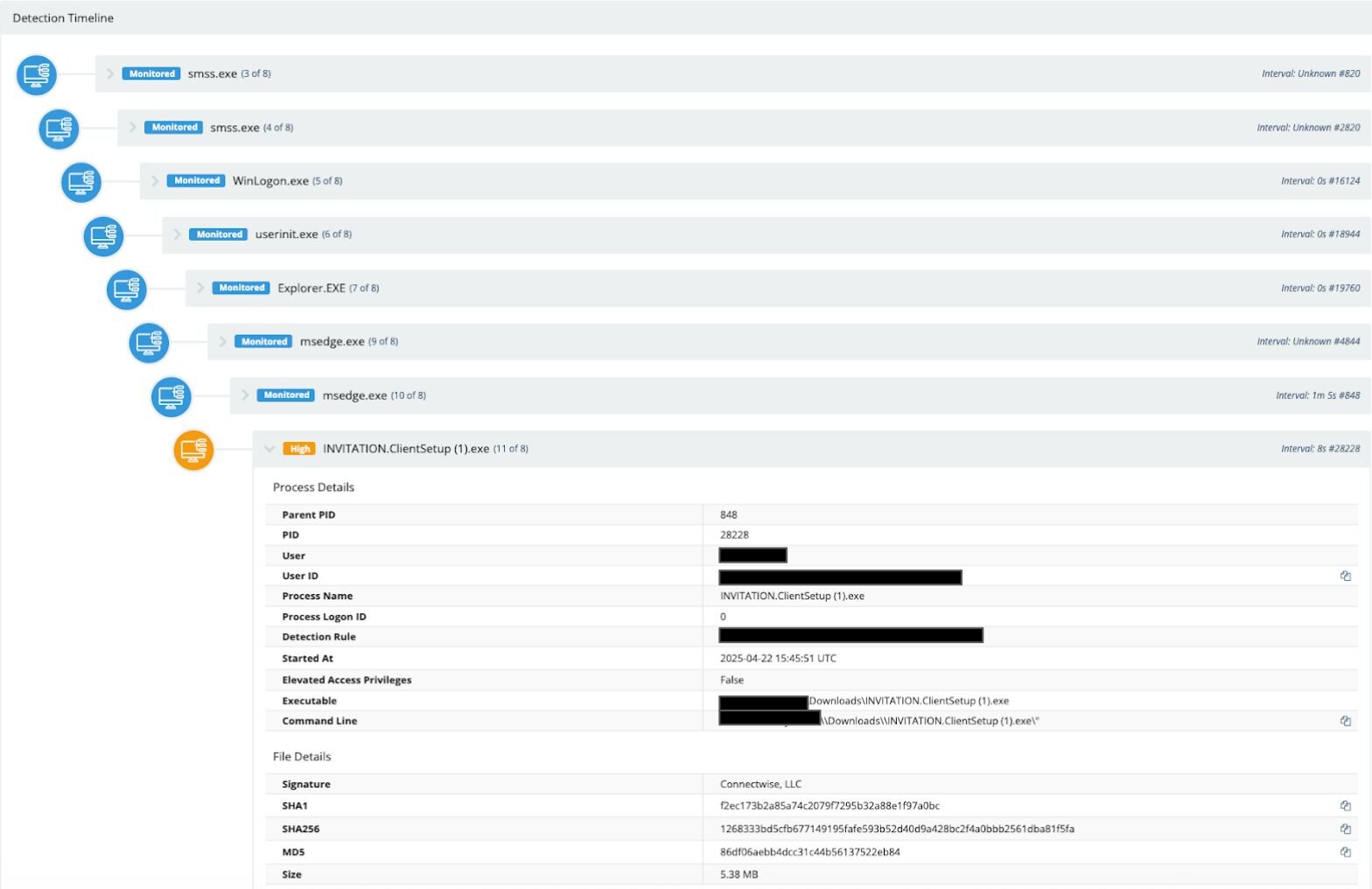
In May, Huntress observed a user at a real estate developer executing a malicious process (special invitation letter(2).exe). The SOC determined that the executable was a rogue ScreenConnect infection that was likely delivered through phishing.
Figure 2: The detection timeline for a rogue ScreenConnect infection with an “invitation” lure
The statement/invoice
Threat actors continue to rely on a classic social engineering tactic: lures involving invoices or financial statements. It may come as no surprise to see a slew of executables that include “statement” or “invoice” in them:
SSA_Earnings_Statement_2025.pdf.Client.exe
SSE_Estatement.exe
Overdue-invoice.pdf—---DocuSignViewer.Client(1).exe
Outstanding Invoices(1).exe
OrderInvoice[redacted].exe
RevisedStatementJAN2025.exe
What we’re seeing:
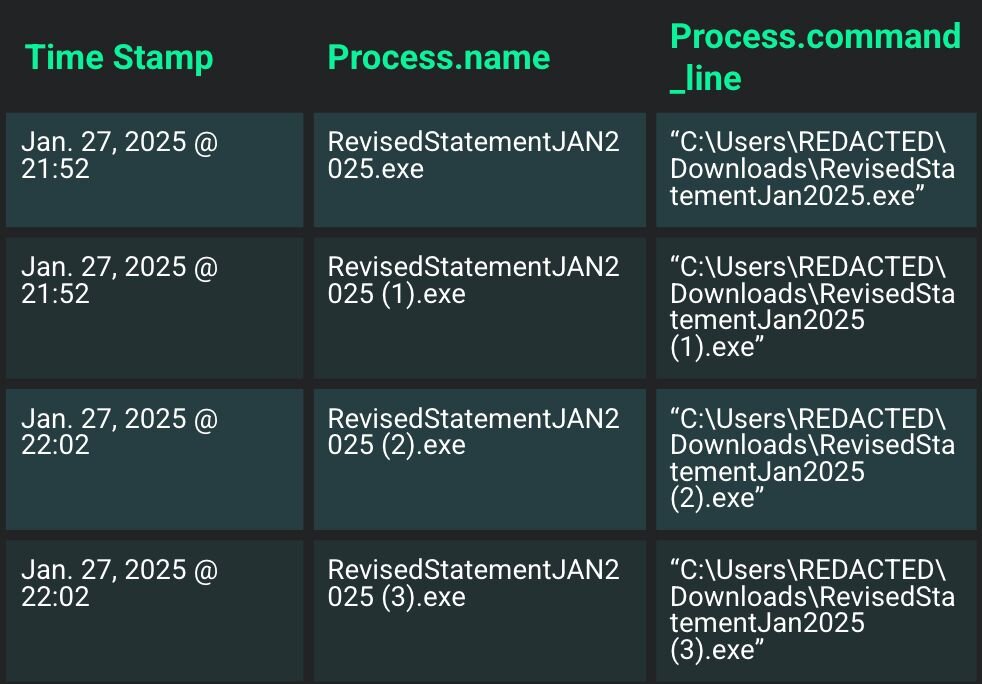
The latter executable (RevisedStatementJAN2025.exe) was part of a targeted phishing attack sent to several different users at a retail organization in January. Notably, this lure appeared to be successful for threat actors, as several users downloaded the executable. Several users even downloaded the executable multiple times:
Figure 3: A user downloading a renamed ScreenConnect executable several times
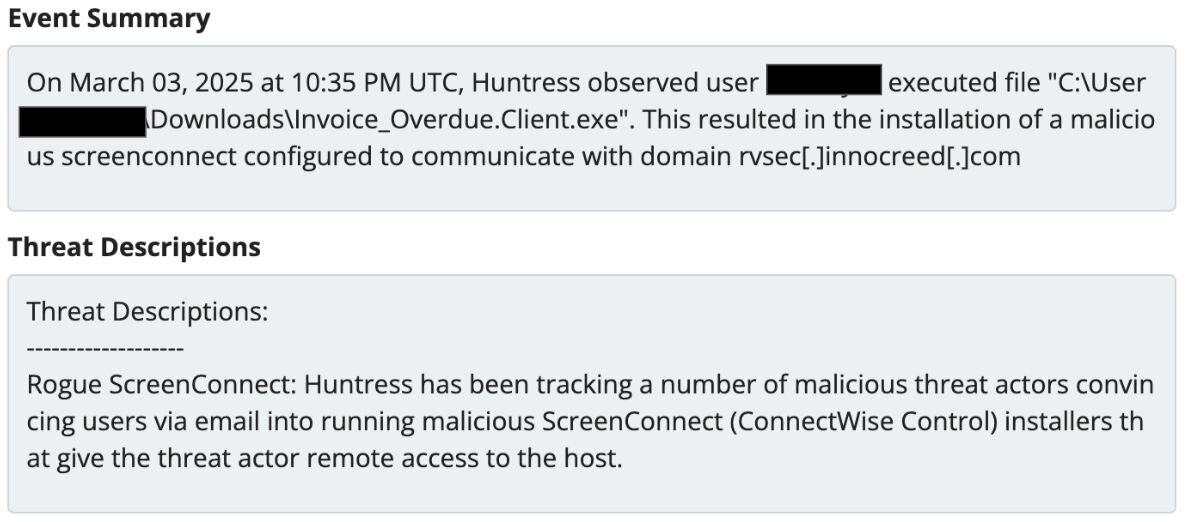
In a separate incident in March, a user at a company was observed executing a file involving Invoice_Overdue.Client.exe, which then triggered a malicious ScreenConnect installation, as highlighted in Figure 4 below.
Top domains and hashes
Huntress has been tracking IoCs linked to incidents with rogue ScreenConnect instances, including the domains, IPs, and hashes tied to each file name. Several similar domains were identified across several instances, as seen in the table below, which outlines the top five domains that we've seen.
Many of the domains were linked to files with one name, but some were linked to an array of executables with varying names and hashes. In some cases, the executables contained the victims’ names (which have been redacted below), and in other cases, they contained a variation of the same name with different numbers at the end.
|
Ranking by Number of Signals |
Domain |
Executable Filename |
SHA256 |
|
1 |
0bd0[.]adrsxpjm0rga0n[.]de |
RevisedStatementJAN2025.exe |
44b6b1de9a618c97788631bc89372435a6ea0357e50497152a67219dea400209 |
|
2 |
rok628[.]mxhelp[.]top |
INVO_[variation].exe |
bdbac9fe9e7aca3a03d55867eddd905c4e222f3045b0015b823df4f034ee007a |
|
3 |
yoc736[.]ikhelp[.]top |
OrderInvoiice[variation].exe OrderInvoiceI2890037137 (1).exe SSAstatmentens.exe |
A3e314dc43a4410e9bc8d93b27da8a7764138c6b453b8eb5fb6845f948901cf6 9d6a88f2458481cfe1b3c5f4ce4dc76a1cf04f210fb6cbaa106bde3f7116330d 1af6e82e53622e4404668aa00e2772aae2515110a4440721c2ece040011fe981 |
|
4 |
lory473[.]top |
[redacted]TaxDocs[variation].exe |
B3636a27cba5ba4c0c41e60c90a57a3250cbfbd1042879515cc132f74354d06e d8afcd4a1ad314c4f310a90e4f55d08155685585ac7dd03353794e493f312ce0 82cb1fee5f4a7420d378efe0c4a9fc52d547208cb04c87d17c37b714778c9935 |
|
5 |
slplegalfinance[.]com |
Edocument.exe Securedoc_[variation].exe ssa.exe |
b218a4d70fabb2b1e986449597e4c40f9b8d10b1b5038e9e53d14534703ba8d1 8b7cf22511ad2579339c7b05f513d02dd2d0d8c35f523cb79875006520f8435b 9681d73bdba27623a68e4faf1a10d928e6ca0e9fe697a378b96957c6aa46c38e |
We also collected the top SHA256 hashes linked to signals indicating rogue ScreenConnect instances from January through September 2025. The table below outlines the top hashes that we saw, along with their associated executables and domains used in attacks.
|
Ranking by Number of Signals |
SHA256 |
Executable Filename |
Domain |
|
1 |
44b6b1de9a618c97788631bc89372435a6ea0357e50497152a67219dea400209 |
RevisedStatementJAN2025.exe |
0bd0[.]adrsxpjm0rga0n[.]de |
|
2 |
bdbac9fe9e7aca3a03d55867eddd905c4e222f3045b0015b823df4f034ee007a |
INVO_[variation].exe |
rok628[.]mxhelp[.]top |
|
3 |
99d2abed5ce05b6616a33c16911038a40a7fabda7a6a4c2220daaf7ae4e6512c |
invite.exe |
subjent25[.]zapto[.]org |
|
4 |
7fdfe8b34ad911fa007d9f2c8b2cb99cea0ac760d23643850a72e75cf8aa62c3 |
Statement.exe |
pv-sq[.]innocreed[.]com |
|
5 |
afa765b692d2952cf8693c9d5b7070214e11f9f681f4b4f14142531cadaf3e92 |
IRS-Clinet document viewer.exe |
advancedaiinfrastructures[.]com |
As seen above, many files with the same names used in attacks had the same hashes, with the exception of the executables linked to SHA256 hash bdbac9fe9e7aca3a03d55867eddd905c4e222f3045b0015b823df4f034ee007a—which did have some variation. While all the executable files followed the same format following “INVO”—likely pointing to an invoice-related lure—the threat actor used some variance of numbers.
Total occurrences across different accounts
Not only did we see similar domains across several rogue ScreenConnect instances, but we saw these used in attacks targeting multiple different customers. As we sorted through the total occurrences of several of the top malicious rogue ScreenConnect domains that we saw per account name, over certain periods of time, we asked the following questions:
- How prolific are these domains across various rogue ScreenConnect incidents?
- Are attackers targeting specific organizations based on their vertical sector or otherwise, or are they casting a wide net in their usage of these domains?
- How long are the timeframes of some of the campaigns using these domains?
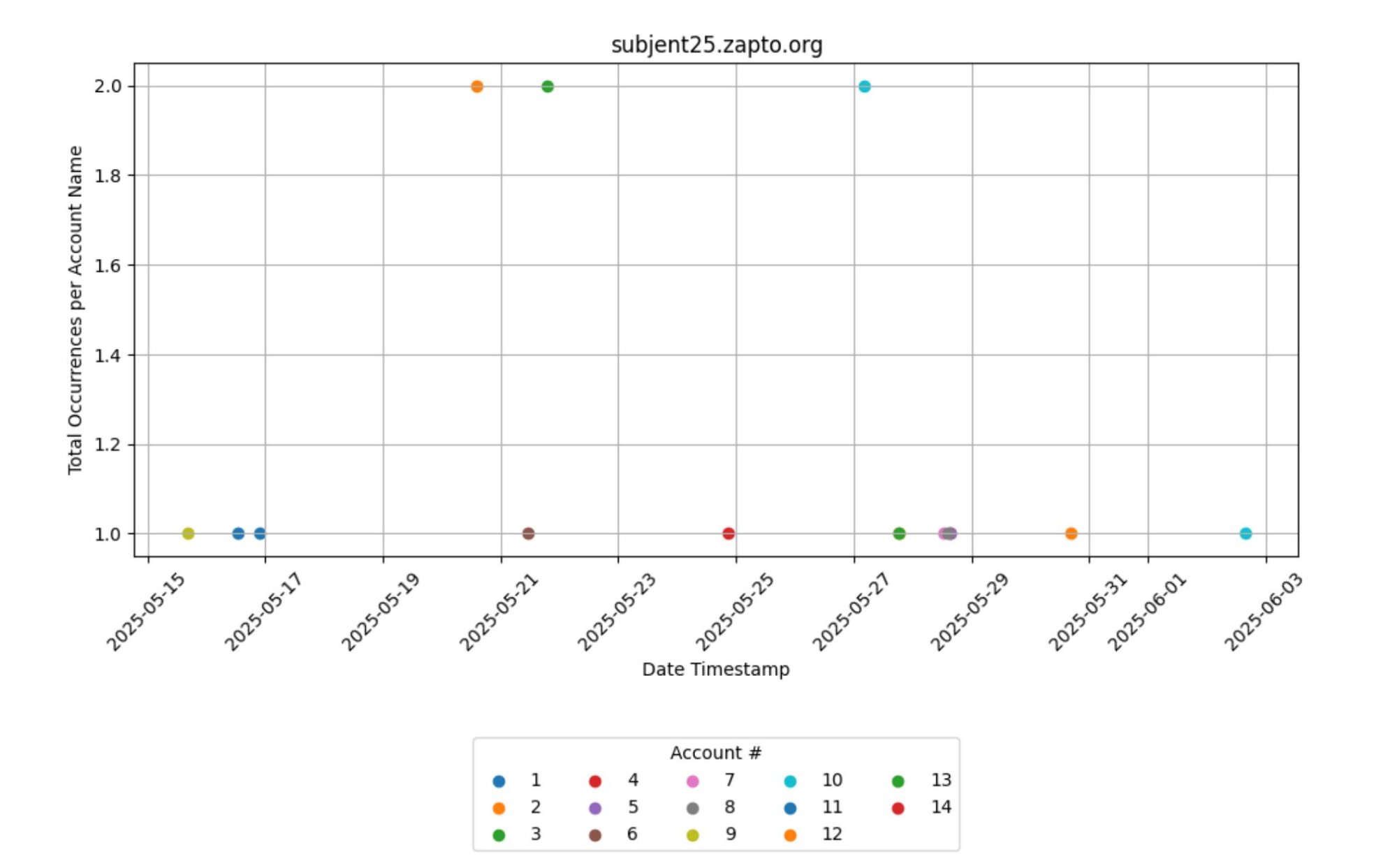
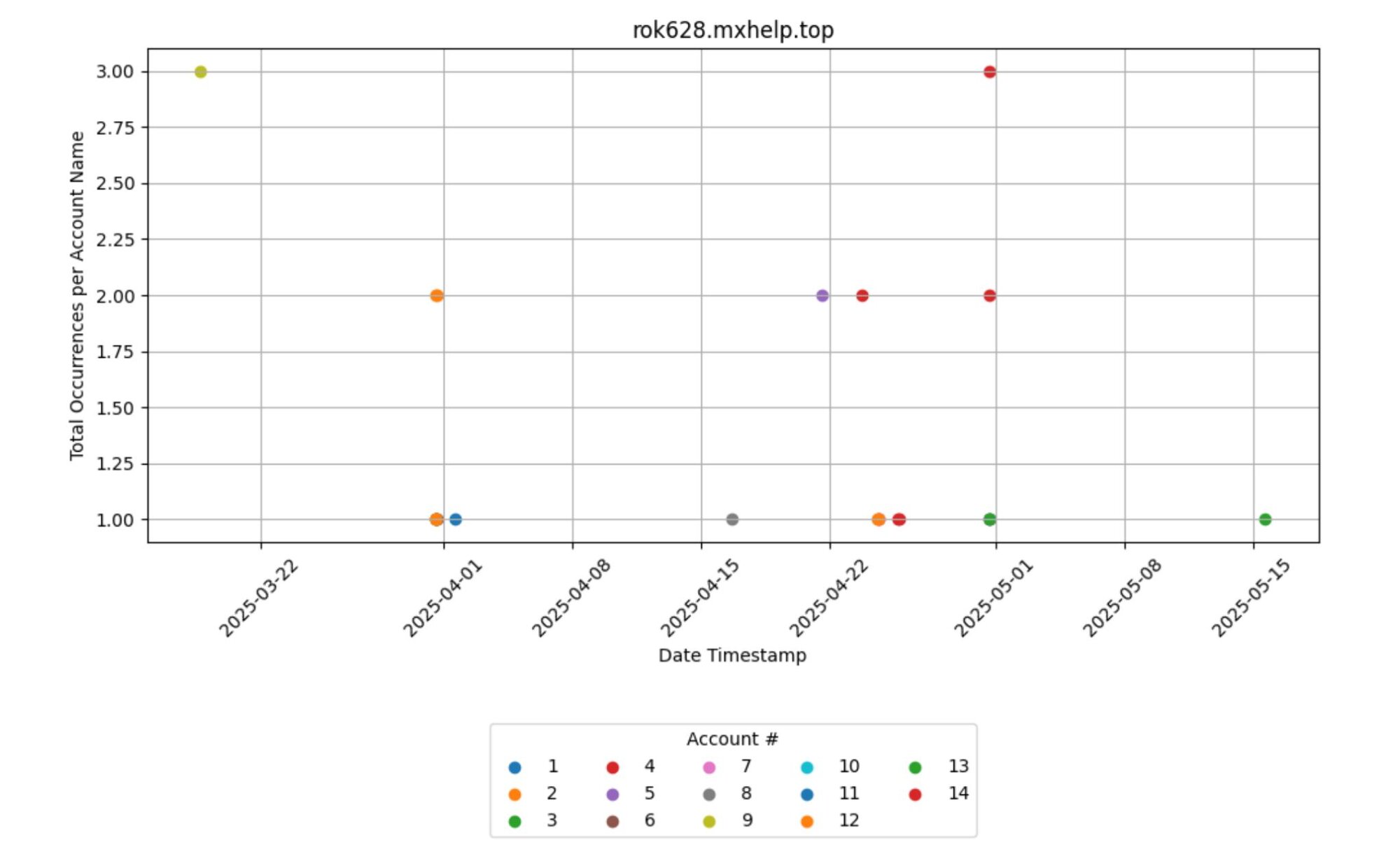
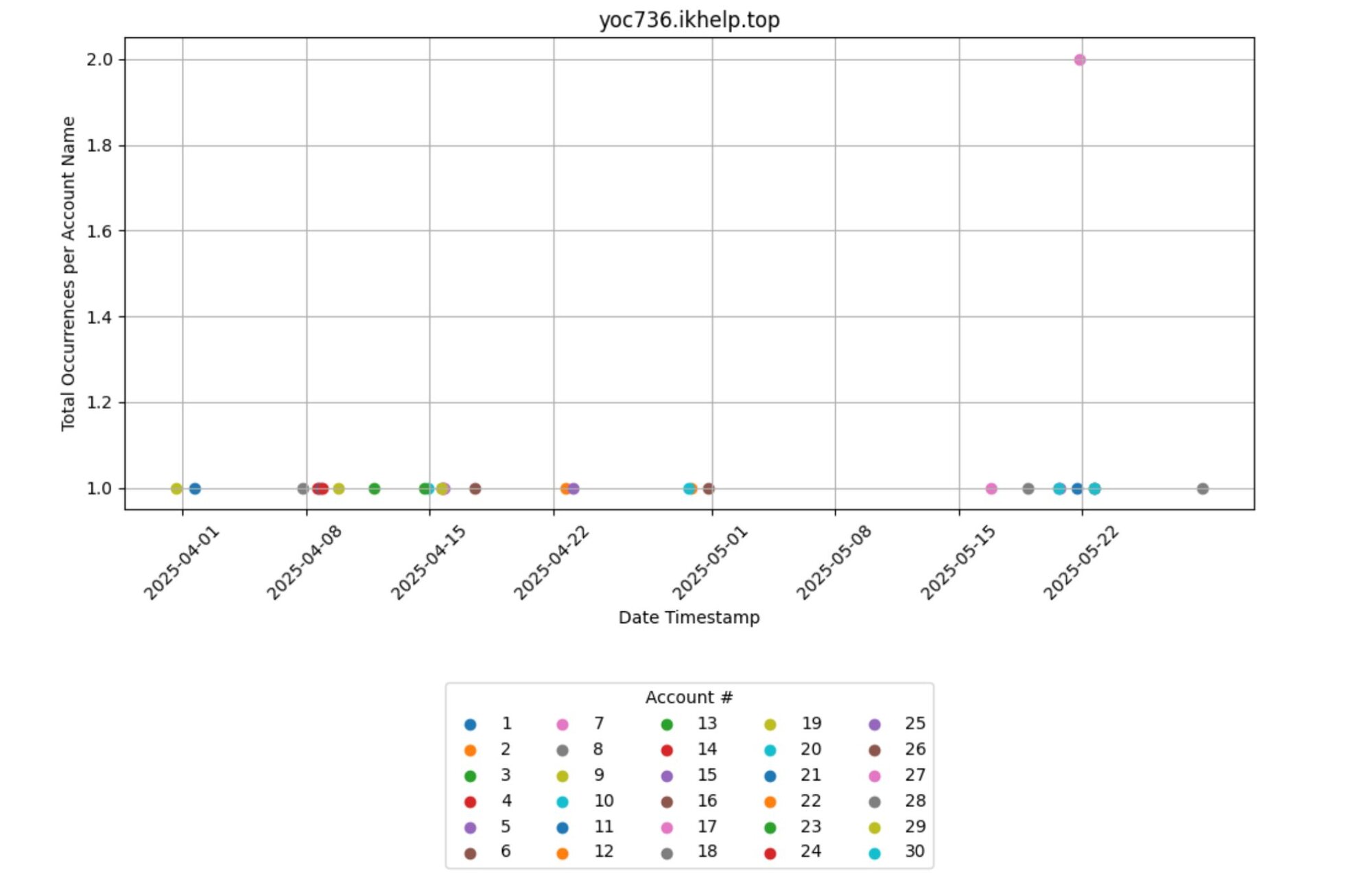
Figures 5 and 6 below show just how many times attackers are reusing the same domains in campaigns impacting multiple businesses.
For example, from January 13, 2025, through February 5, 2025, rogue ScreenConnect instances tied back to lory473[.]top were seen across 15 different accounts. As seen in Figure 5, several employees from one business were impacted. In several more incidents, businesses were only hit with one occurrence of ScreenConnect instances tied back to that particular malicious domain.
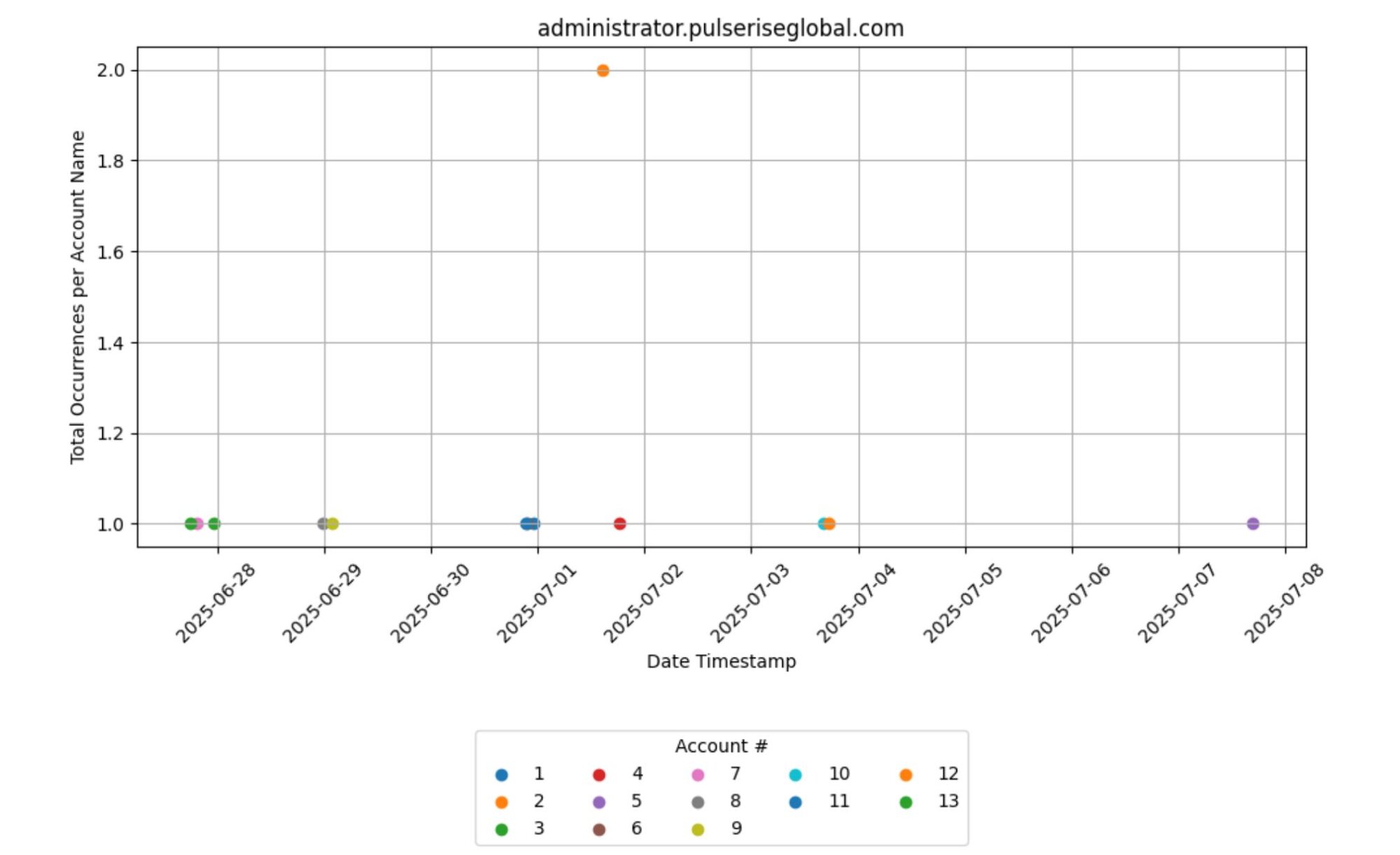
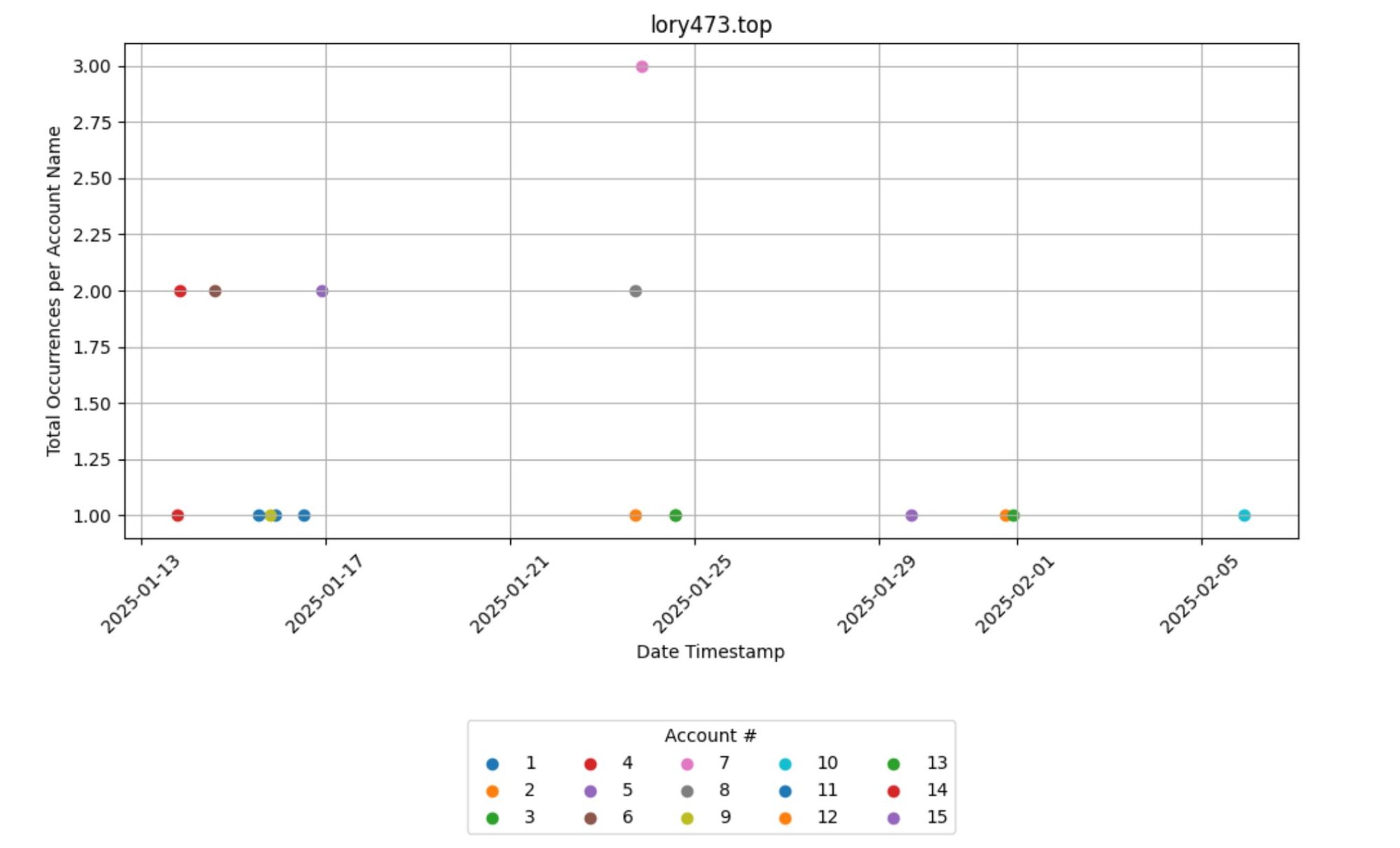
Notably, in looking at data linked to lory473[.]top (in Figure 6 above), we found that almost all the targeted businesses were firms in the accounting sector. The lures for these incidents were also related to accounting, like Davidtaxdocs5126.exe. This may be indicative of some level of specific targeting by the threat actors behind these incidents.
As seen in Figure 7 below, we also saw prolific use of Zapto[.]org domains. These are tied back to dynamic DNS domain services, which update DNS records automatically when IP addresses change. The services are legitimate, but threat actors abuse them to hide malicious infrastructure across phishing campaigns or malware callbacks.
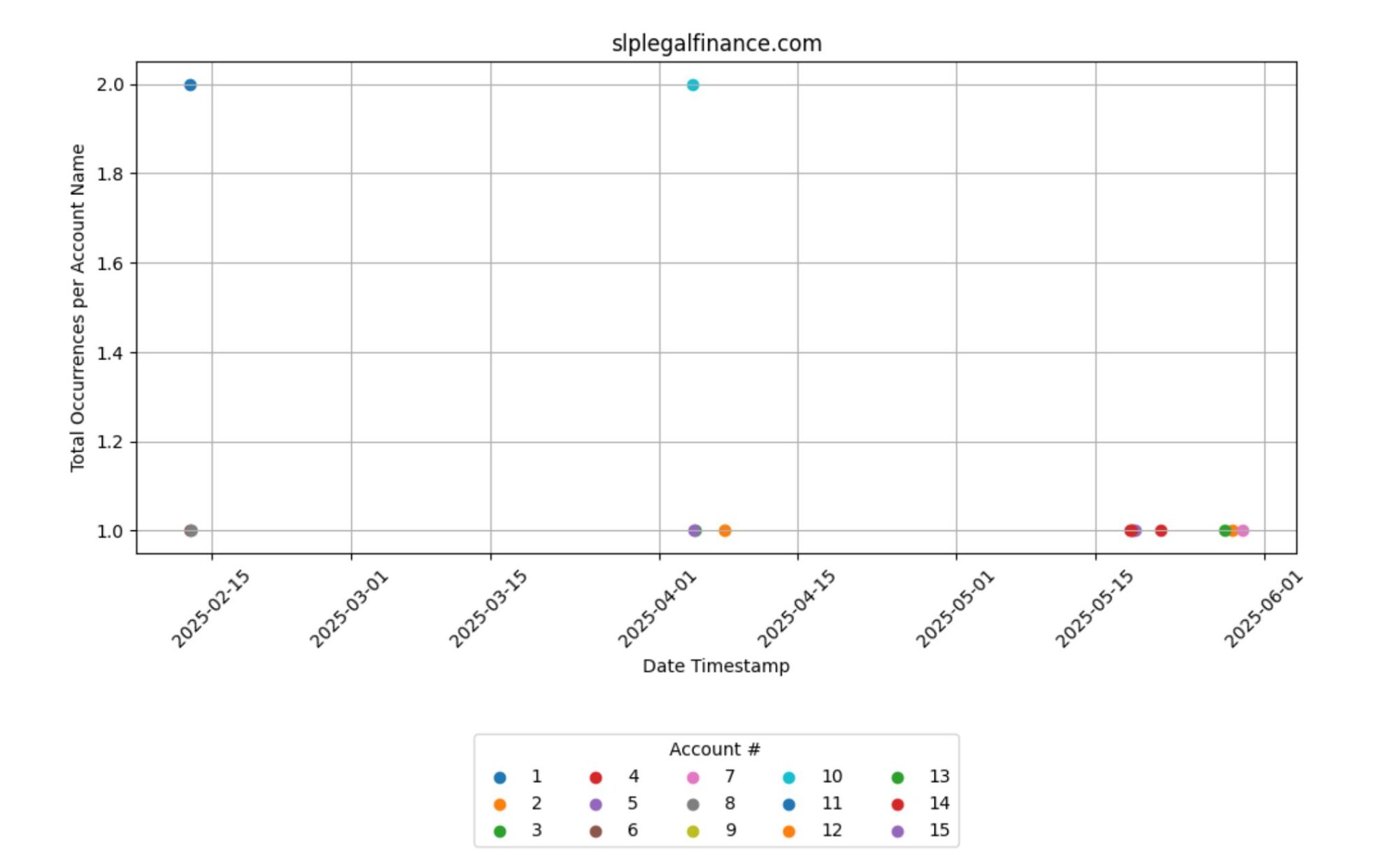
Finally, below are the total occurrences per account name for various other top malicious domains we saw that were linked to rogue ScreenConnect instances.
A ScreenConnect attack: As seen in the SOC
How do these attacks play out in real-world cases? The Huntress SOC frequently sees rogue ScreenConnect instances being used by threat actors across incidents.
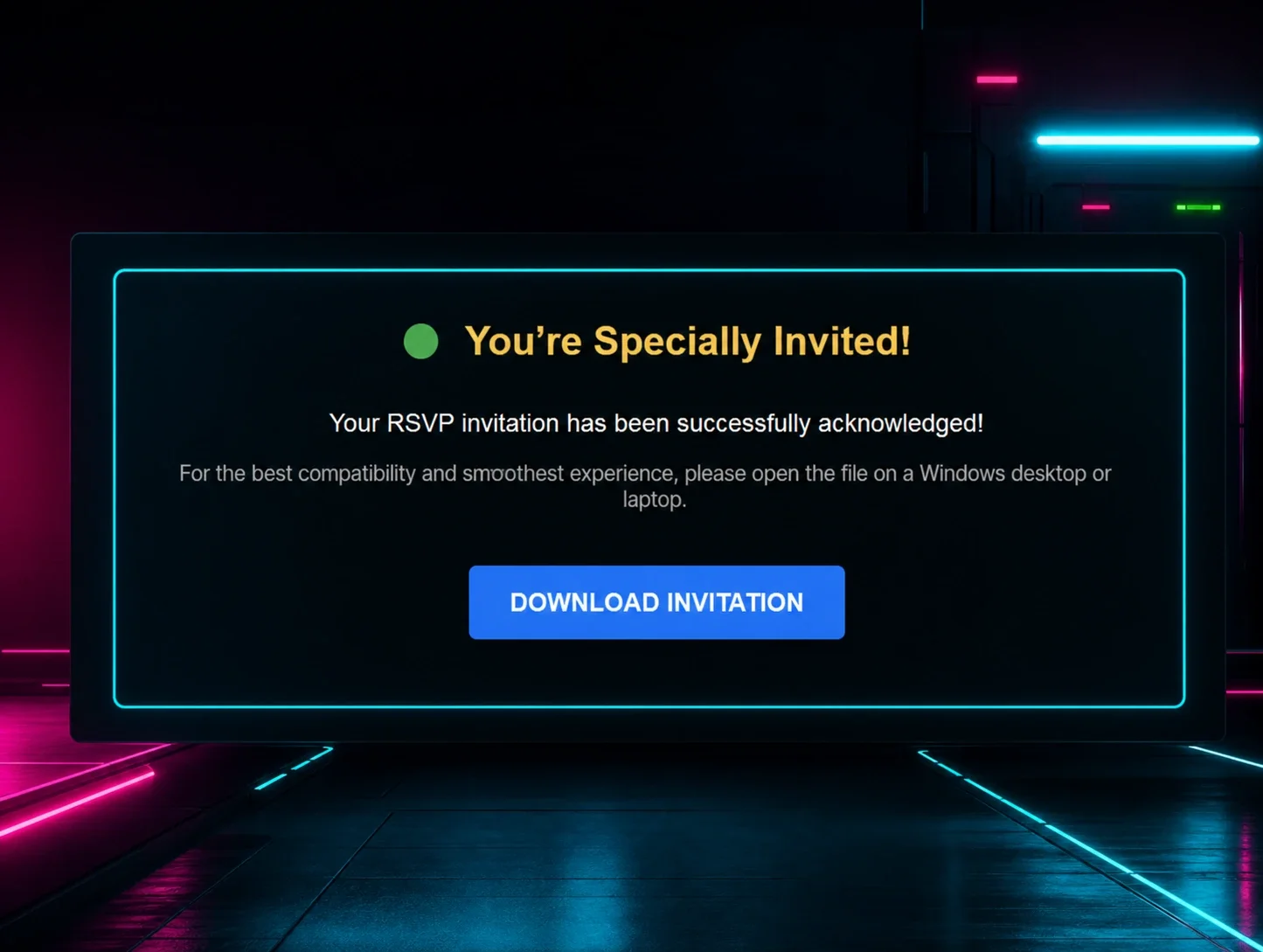
In May, the SOC came across a malicious rogue ScreenConnect installation that came from a Google Docs URL. Further investigation revealed that the victim had received a phishing email in their Outlook client, which then opened up Chrome and led to the Google Docs URL. This URL contained an “invitation” lure, which told the victim “You’re Specially Invited,” and included a button for them to “Download Invitation,” as seen in Figure 11 below.
Figure 11: A lure that led to a rogue ScreenConnect installation
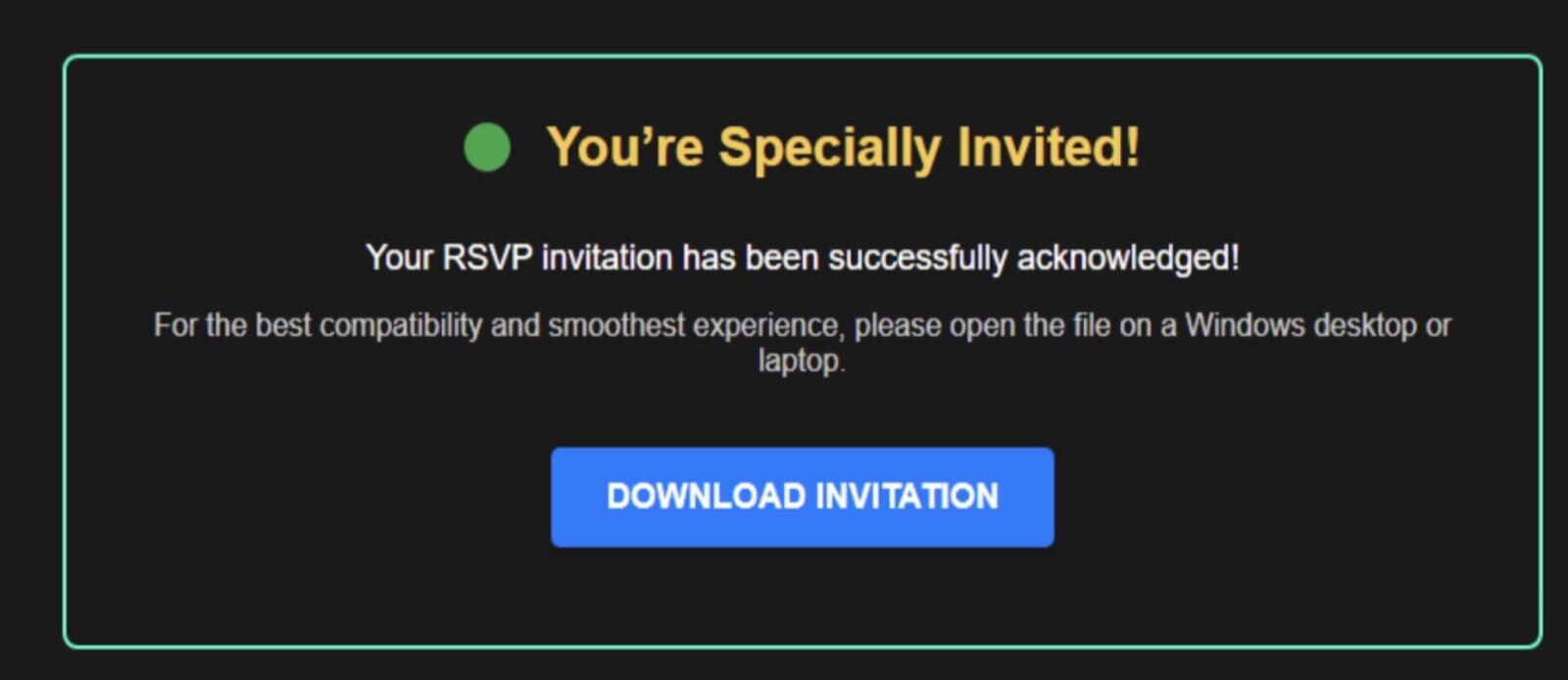
While we don’t have visibility into the initial phishing email, the invitation-aligned lures in this landing page suggest that it was also themed around an invitation.
After the user clicked the button, it set off the download for the executable Invitation[redacted].ClientSetup.exe, which was the rogue ScreenConnect installer configured for the domain sans[.]infosedi[.]de. This rogue ScreenConnect then gave the threat actor remote access to the endpoint.
Putting RMMs on lockdown
For threat actors, the use of rogue RMM tools allows them to bypass traditional antivirus (since the application is legitimate) and achieve remote access—and as we can see above, attackers are finding some degree of success with using social engineering to convince users to execute these tools. Rogue ScreenConnect instances are particularly prevalent. In fact, out of the top abused remote access tools Huntress has observed, ScreenConnect makes up 74.5%, leading other tools like RDP, LogMeIn, TeamViewer, Atera, VNC, and NinjaRMM.
For businesses, security awareness training can help employees spot red flags or suspicious requests to download executables disguised as invoices or otherwise. If a rogue ScreenConnect attack is underway, however, Huntress Managed Endpoint Detection and Response (EDR) can help businesses determine if the instance is legitimate or malicious. One way that we can determine this is through inspecting the installation’s call-back to the specific domain managing it, and performing domain reputation analysis to determine if that domain is legitimate or not.
Here are some other ways that businesses can reduce their risk when it comes to RMMs:
- Audit and monitor remote access tools to track currently used RMMs that are in current use, so that unauthorized or rogue instances stand out
- Review logs for instances where RMMs were executed to detect suspicious use
- Update RMMs to stay on top of the latest vulnerability fixes
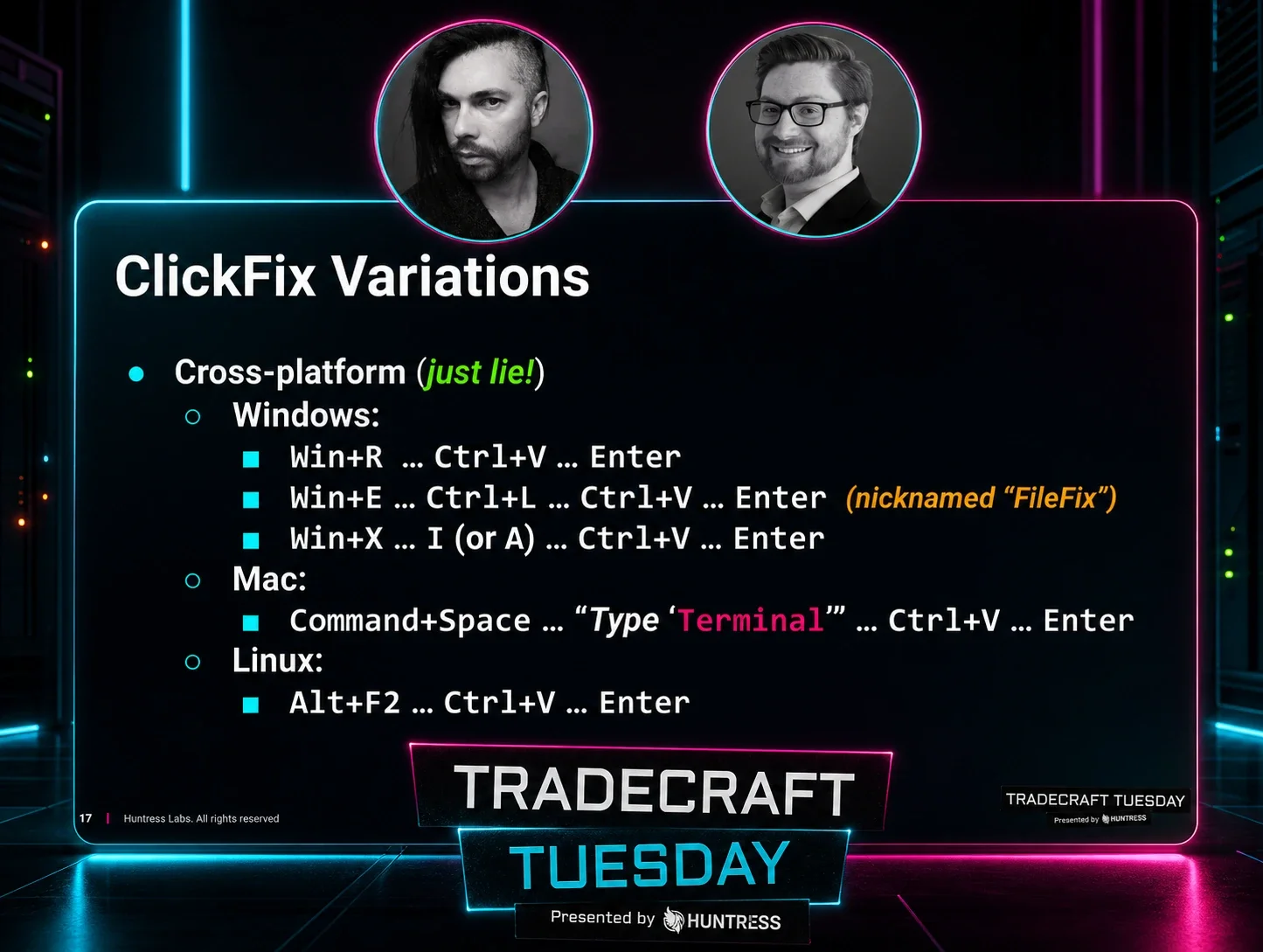
Want to learn more about threat actor tradecraft like RMM abuse? Join our team each month for Tradecraft Tuesday, where we dissect hacker techniques, talk tech, and more. Sign up today.