


Acknowledgments: Special thanks to Aaron Deal, Chris Bisnett, Aaron Bennett, Sharon Martin, Dave Kleinatland, James Northey, Josh Kiriakoff, Kamal Bennoune, and Michael Tigges for their contributions to this investigation and write-up.
Update: 8/6/26 @ 5:40 PM ET
N-able has released a second hotfix for N-central that supersedes its original hotfix to provide additional hardening measures. Hotfix 2 (2026.3.1.10) is required for organizations running N-central on-premises even if they've applied Hotfix 1 (2026.3.1.7). Organizations are advised to upgrade immediately, following N-able's upgrade instructions. N-able says organizations using hosted N-central (NCOD) do not need to take action, as mitigations have already been applied.
N-able has also published an additional security update with four more malicious IPs, which we have added to the IoC section at the end of this blog.
173.249.252[.]176185.156.46[.]15023.234.94[.]4368.235.46[.]235
We continue to monitor activity tied to this vulnerability and will add details to this blog as new information becomes available.
Update: 8/3/26 @ 2:15 PM ET
Huntress continues to investigate activity targeting N-able's critical vulnerability. We are now seeing threat actors targeting the flaw across multiple organizations, though we are not yet seeing evidence that this has become a broad, indiscriminate campaign across our partner base.
The good news is that organizations are actively applying the hotfix provided by N-able. In our last update at 12:45 AM ET, we reported that more than half (55.6%) of our partners' and customers' reachable cloud servers were still unpatched. As of publication of this latest update, almost all of the cloud-hosted servers are now patched. Overall, we see about 13.6% reachable servers overall are still unpatched (including both cloud and self-hosted reachable servers). Notably, the majority of the remaining unpatched servers are self-hosted: 28.6% of the reachable N-central self-hosted servers are still unpatched.
Across the attacks we've observed, we have seen the same pattern of behavior:
Threat actors are conducting high-level reconnaissance in order to target key servers, typically Domain Controllers. This indicates that threat actors are being strategic enough to prioritize their efforts.
After exploitation, we have seen the attackers request a process list, to enumerate processes running on a compromised system, before disconnecting.
Post compromise, threat actors moved quickly across multiple hosts in impacted organizations' environments after gaining initial access, as seen in Figure 1a.
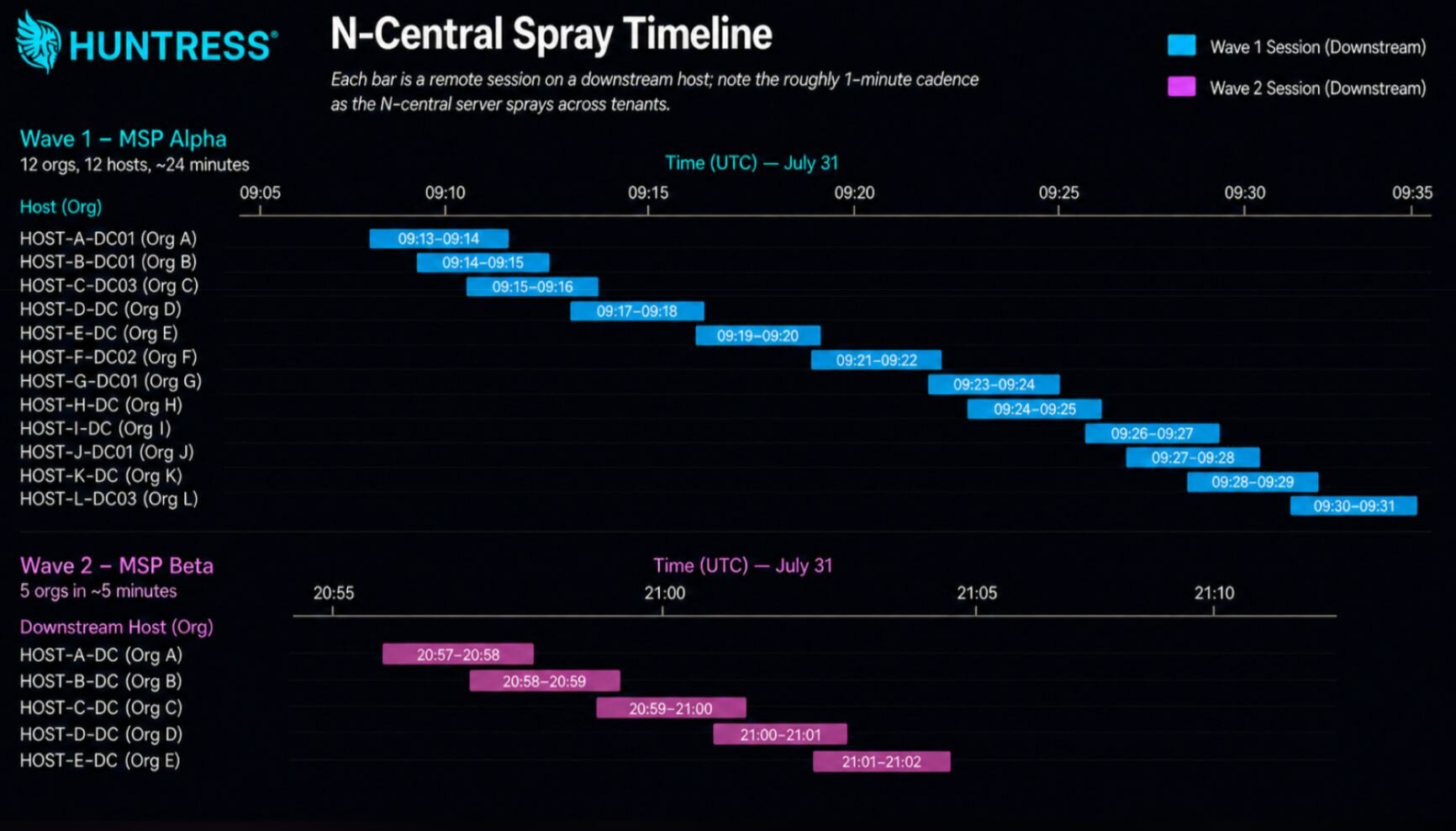
Figure 1a: Timeline of threat actors tearing through downstream hosts on two impacted organizations
Below are the Windows Application Event Logs reflecting Event IDs 4102, 8192, and 8193 for a compromised organization. These show the threat actor first making the malicious connection via "MSP Support" from 173.249.252[.]200 (one of the IP addresses listed as an IoC by N-able). "MSP Support" is the default username tied to legitimate N-Central Take Control sessions. Event IDs 8192 and 8193 then show the actor abusing the built-in Take Control feature.
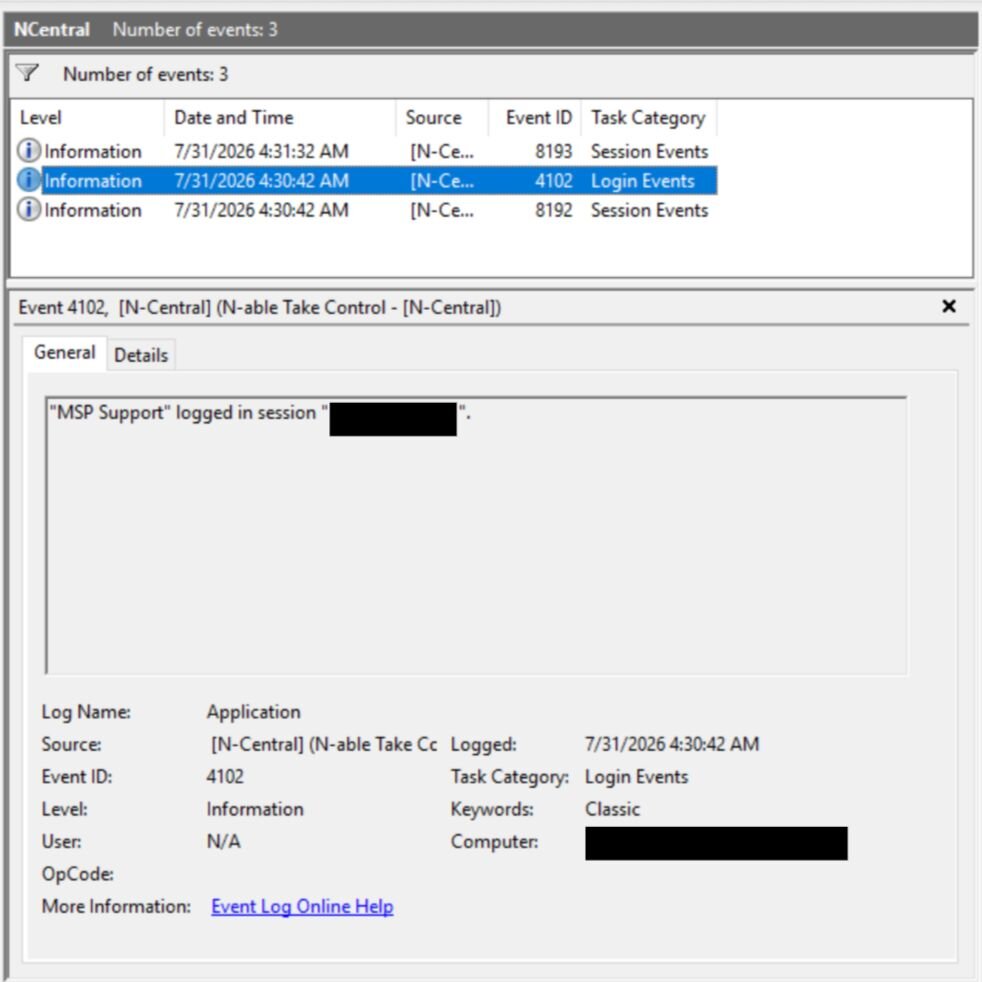
Figure 1b: Windows Event Logs reflecting "MSP Support" account session login
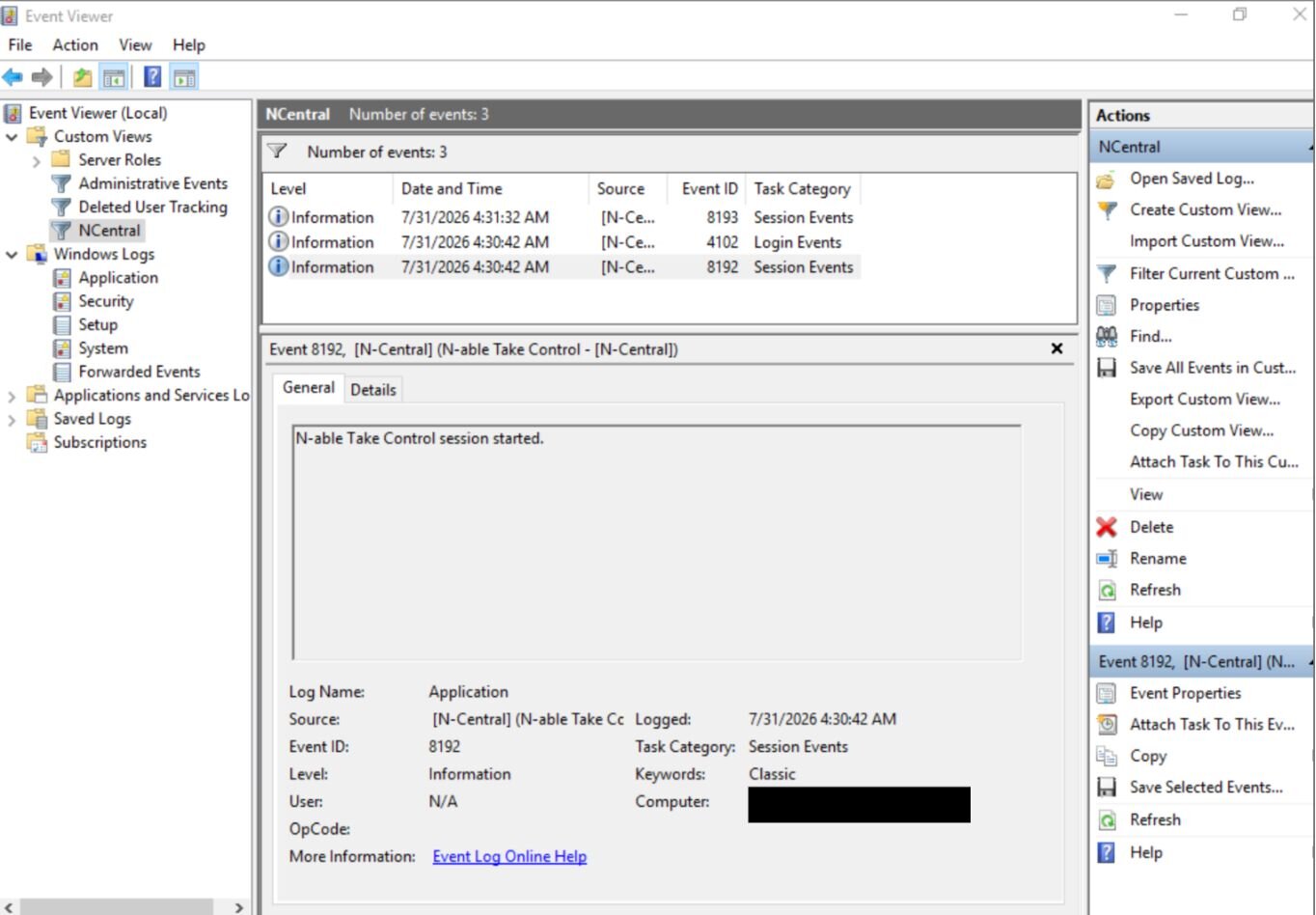
Figure 1c: Windows Event Logs reflecting Take Control session starting
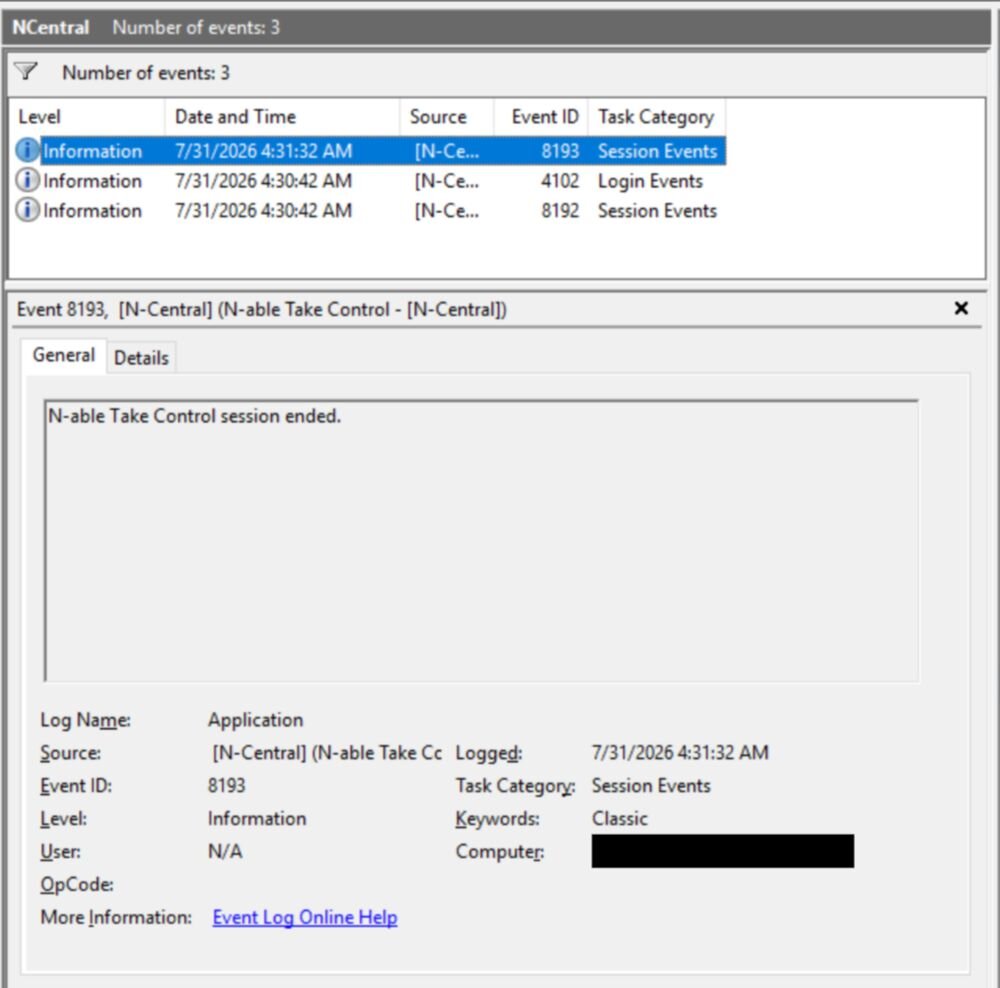
Figure 1d: Windows Event Logs reflecting Take Control session ending
As our recommendations below outline, it is important for organizations to apply the hotfix and review N-central Take Control activity in their environment. In its release notes, N-able has also said to review users' documents folder for files called svchost.exe and look for registered service names called Cloudflared. We have not seen either of these indicators across our telemetry as of this update.
Huntress continues to investigate the activity associated with exploitation of this N-able flaw, and will update our blog accordingly.
Update: 8/3/26 @ 12:45 AM ET
As Huntress continues our investigation and analysis of activity targeting vulnerable N-able N-central environments, we discovered that the four IPs N-able initially flagged as malicious are actually Mullvad or NordVPN VPN exit nodes. Notably, among the original IPs, we have seen substantial traffic with 87.249.138[.]34 directly attributed to NordVPN, as well as substantial traffic with 37.19.210[.]32 directly attributed to Mullvad VPN. 37.19.210[.]32 has been previously abused for bruteforcing, spam, and other nefarious activity prior to this incident.
In parallel, Huntress technology and teammates are rapidly identifying unpatched N-able server instances and contacting at-risk partners and customers about the imminent threat.
Beyond this specific vulnerability, we are seeing many environments where the N-central Server has yet to be updated to the 2026.3.1.7 hotfix needed to prevent exploitation of the vulnerability. At the time of posting this update, more than half (55.6%) of our partners' and customers' reachable cloud servers were still unpatched. That is especially concerning because the N-able server runs a custom distribution of AlmaLinux 9, and does not often have EDR software deployed on it due to running as an appliance.
N-able has since published an additional security update with two more malicious IPs, 37.153.90[.]88 and 92.118.112[.]181, which we have incorporated into our hunting and guidance below.
We will continue to investigate this activity and update this post as we learn more.
Background and Vulnerability Overview
On August 1–2, 2026, N-able disclosed a critical vulnerability in N-central, its flagship remote monitoring and management (RMM) platform used by MSPs to centrally monitor, patch, and remotely access servers and endpoints across all of their customers. N-able published a security update on the N-central vulnerability (which is currently down as of publication of this blog) and corresponding incident entries on their uptime / status page, describing this issue and confirming active exploitation in the wild. On August 2, N-able released a hotfix and urged all customers to upgrade to the 2026.3.1.7 hotfix version immediately.
N-able's initial security advisory linked this critical vulnerability to CVE-2026-18556; while the subsequent hotfix pointed to CVE-2026-18577. The CVE's description for CVE-2026-18577 said: "an incomplete patch for CVE-2026-18556 allows for authentication bypass and account takeover in N-central Versions through 2026.3.1."
Based on N-able's advisory and the logs we and our partners have reviewed so far, we know that remote attackers can gain administrative access to vulnerable N-central servers and then abuse the built-in Take Control feature to pivot into managed endpoints and deploy Cloudflare-based tunnels for persistence. N-able has not yet published full technical root-cause details for this vulnerability, so our understanding is limited to the behavior they have described and what we have observed in affected environments, and may evolve as more information is released.
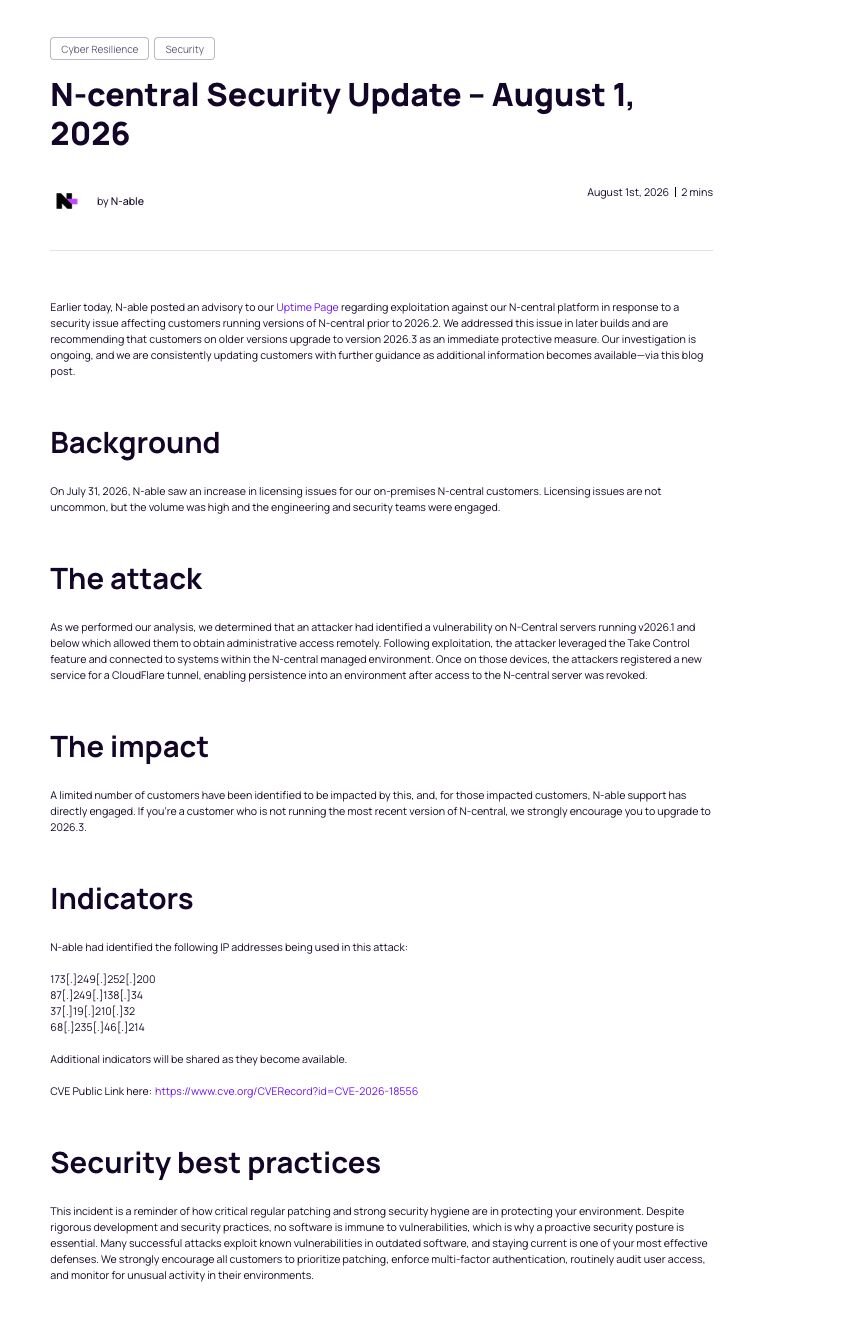
Figure 1: N-able's security advisory
Key points from N-able's communications:
The vulnerability affects all currently supported versions of N-central, including builds that were initially believed to be safe.
N-able has confirmed active exploitation of N-central.
Both cloud‑hosted and on‑premises N-central deployments are impacted.
From an MSP perspective, exploitation of this flaw can grant an attacker full administrative access to an N-central console — the same level of control normally reserved for trusted NOC and engineering staff.
Once inside the console, a threat actor can:
Push new scripts and jobs to many or all managed endpoints.
Deploy and run dual‑use tools (for example, remote tunnels or discovery utilities) via the N-able agent.
Initiate remote‑control sessions into servers and workstations, including domain controllers and other critical systems.
Modify security‑relevant configuration such as roles, accounts, and policies to pave the way for follow‑on activity.
Useful N-able resources to monitor:
Detection Opportunities
Below are concrete places defenders can look today for evidence that this tradecraft has been used against their environments.
1. N‑central UI / Remote-Access Logs
On your N-central servers, review UI and remote-control logs (for example, ui_access_control.log or equivalent in the N-central web application) and:
Filter for sessions where the viewer IP is one of N-able's published IOC IPs (see the Indicators section below).
Pay special attention to viewer accounts that appear to be N-able support identities (for example,
mspsupport@n-able.com).Flag for investigation any sessions that:
Target domain controllers, file servers, or other critical systems.
Occur at unusual times for your team.
Do not line up with a ticket or expected support work.
This combination — a session originating from an IOC IP, associated with a support account, and targeting a high-value host — should be treated as high priority for review.
2. Endpoint Breadcrumbs from N‑central Take Control (Windows)
On N-central–managed Windows hosts, suspicious Take Control activity we have reviewed created log files under:
Directory:
C:\ProgramData\GetSupportService_N-Central\Logs\Example filenames:
BASupSrvc_*.log.gz
What to do with this:
On Windows endpoints managed by N-central, look for:
The directory
C:\ProgramData\GetSupportService_N-Central\Logs\BASupSrvc_*.log.gzfiles, whose creation times align with suspicious N-able sessions
Important caveat: these logs are also created during legitimate Take Control usage, so:
Presence alone is not proof of compromise.
Treat them as a pivot and validate against:
Viewer IP (one of the IOC IPs below).
Viewer identity (support account vs your own technicians).
Target host criticality and time‑of‑day.
Taken together, N-central UI logs, network indicators, and endpoint Take Control logs can help you reconstruct whether this tradecraft has been used against your environment.
3. Network and Server-Side Indicators
We recommend that MSPs:
Search N-central server, firewall, proxy, and WAF logs for traffic involving the IOC IPs and hostnames listed below, particularly where those indicators:
Connect to N-central web consoles or APIs.
Appear as the source of remote-control viewer traffic.
As a short‑term mitigation, consider blocking the IOC IPs at the perimeter of N-central servers, with clear internal messaging that:
This is a temporary, partial control, not a complete fix.
Attackers can and will rotate infrastructure, so blocking the initial IOC set should not create a false sense of security.
Recommendations for N‑central Customers
The following guidance is intended for MSPs and organizations currently using N-able N-central.
1. Patch and Harden Your N‑central Environment
Apply N-able's hotfixes and updates as soon as they are available for your version, following the latest guidance on the N-central security update blog and uptime / status page.
Restrict who and what can reach the N-central console:
Ensure the console is not directly exposed to the public internet—restrict access with firewall/IP rules and/or VPN, and front it with SSO where available.
Enforce multi‑factor authentication (MFA) on all N-central accounts.
Limit inbound access to known IP ranges (for example, office networks, admin VPNs).
2. Review N‑central Logins, Accounts, and Configuration
Focus on changes and events that do not match your normal operational patterns:
Unusual logins
New or unexpected IP ranges or geolocations.
Access at odd hours compared to your team's normal schedule.
Activity from accounts that should no longer exist (departed staff, test accounts).
Account and permission changes
Newly created administrative users.
Sudden promotion of existing accounts to higher‑privilege roles.
Security‑relevant settings being loosened (for example, MFA removed, IP restrictions broadened).
Jobs and automation
New or modified jobs that touch a large number of customers or endpoints at once.
Scripts that you do not recognize, particularly those targeting domain controllers, DC‑adjacent infrastructure, or making broad configuration changes.
3. Evaluate whether temporarily disabling N‑central is appropriate
Turning off N-central is a significant decision, and it should be made based on risk, not panic. On one side, a compromised RMM can be used as a force multiplier against every downstream client you manage; on the other, taking N-central offline means losing central visibility, patching, and remote access when they may be needed most. Our goal is not to tell every N-able customer to shut down their RMM, but to make sure you consciously weigh this option: for higher-risk environments, or where you cannot meaningfully reduce exposure, temporarily disabling N-central until you are able to apply N-able's hotfix may be the safer choice.
4. Review Remote-Control Activity
N-central's remote‑control features are powerful — and attractive to attackers.
Review recent remote‑control / Take Control sessions for:
Connections into domain controllers, file servers, and other high‑value systems.
Viewer IPs that do not line up with your help‑desk or NOC networks.
Sessions launched at unusual times or that do not match expected customer tickets.
If you find sessions you cannot explain, treat them as high‑priority for investigation and cross‑reference them with the IOC list and endpoint breadcrumbs above.
What Huntress Is Doing for Our Customers
Huntress is taking the following actions as this situation unfolds:
Active hunting across telemetry
We are actively hunting in our telemetry for behaviors consistent with N-able's guidance and partner‑shared logs, with a focus on customers running N-central.Prioritization of at‑risk partners
Partners with N-central deployments are being treated as a priority cohort for:Deeper hunting and signal review.
Faster escalation paths when suspicious N-able‑related activity is observed.
Detection refinement
We are tuning relevant detections to better distinguish between:Normal MSP use of N-central (legitimate scripts and support sessions), and
Abnormal, high‑risk RMM abuse patterns.
Incident reporting and communication
As we confirm N-central abuse in specific customer environments, we will publish dedicated incident reports in the Huntress portal and work directly with those partners through our managed response workflows.
For Huntress Customers: Review Managed Response Settings
Because this vulnerability sits in a central piece of your tooling, fast containment and remediation matter.
For Huntress Managed EDR customers, we strongly recommend:
Confirm that Managed Response isolation is enabled wherever possible, so Huntress can quickly contain endpoints if we detect malicious activity.
Ensure active remediation is turned on so our analysts can assist with removing malicious tools or persistence that may have been deployed via N-central.
For step‑by‑step guidance, review our KB: Huntress Managed Response – Automated Remediation of Incident Reports.
If you are unsure of your current settings, work with your internal team or Huntress support to review and update them.
Huntress is fully engaged on this issue: we are hunting for abuse patterns across our telemetry, prioritizing partners where N-central is present, and standing ready to respond. We'll continue to update this post as we learn more and as the community uncovers additional details.
Indicators of Compromise (IOCs)
How to use these IOCs:
Review N-central server access logs, firewall/WAF/proxy logs, and any upstream logging for connections involving these IPs/hostnames.
Treat confirmed interaction between these indicators and N-central servers as high‑priority for investigation, and then:
Pull corresponding N-central UI / remote‑access logs to identify which accounts and endpoints were touched.
Use endpoint Take Control logs (
GetSupportService_N-Central\Logs/BASupTSHelper_*and related files) as pivots to confirm activity on specific hosts.
Item | Description |
|---|---|
| Known malicious IP addresses identified by N-able (shared in August 1 security update). Note: These are all IP addresses known to be associated with either Mullvad VPN or Nord VPN |
| Known malicious IP addresses identified by N-able (shared in August 2 security update) |
| Known malicious IP addresses identified by N-able (shared in August 6 security update). |
| Known malicious domains |