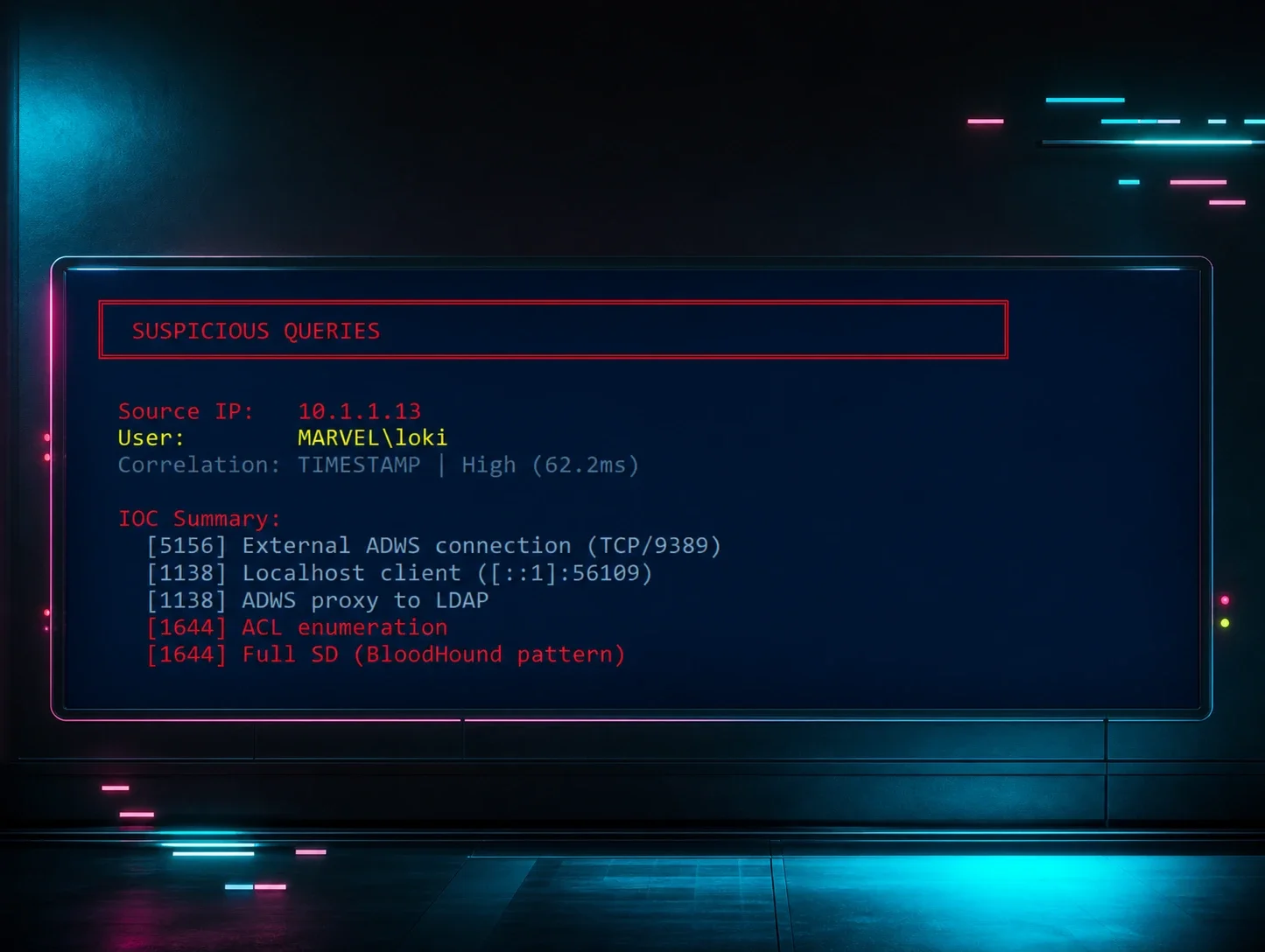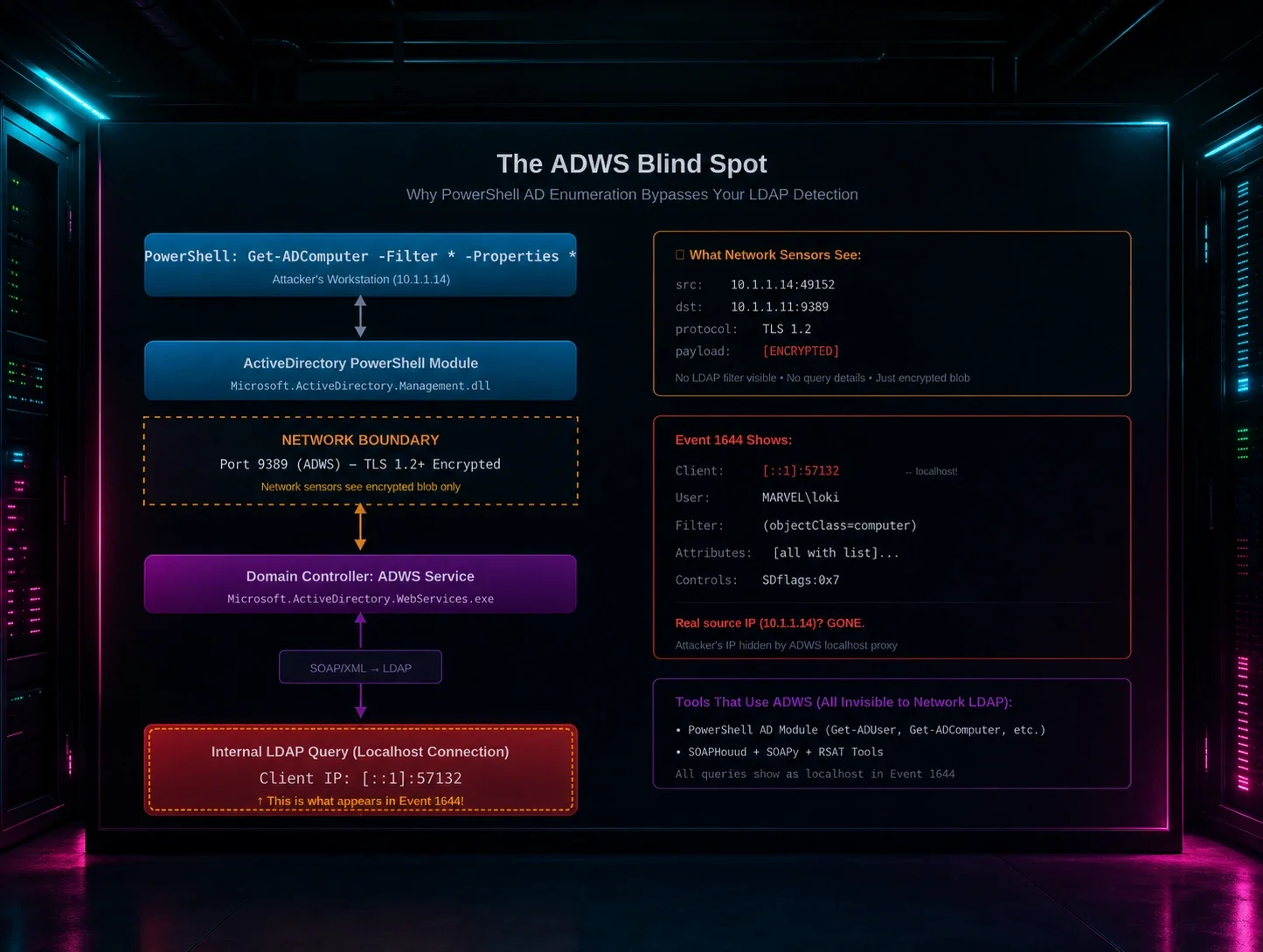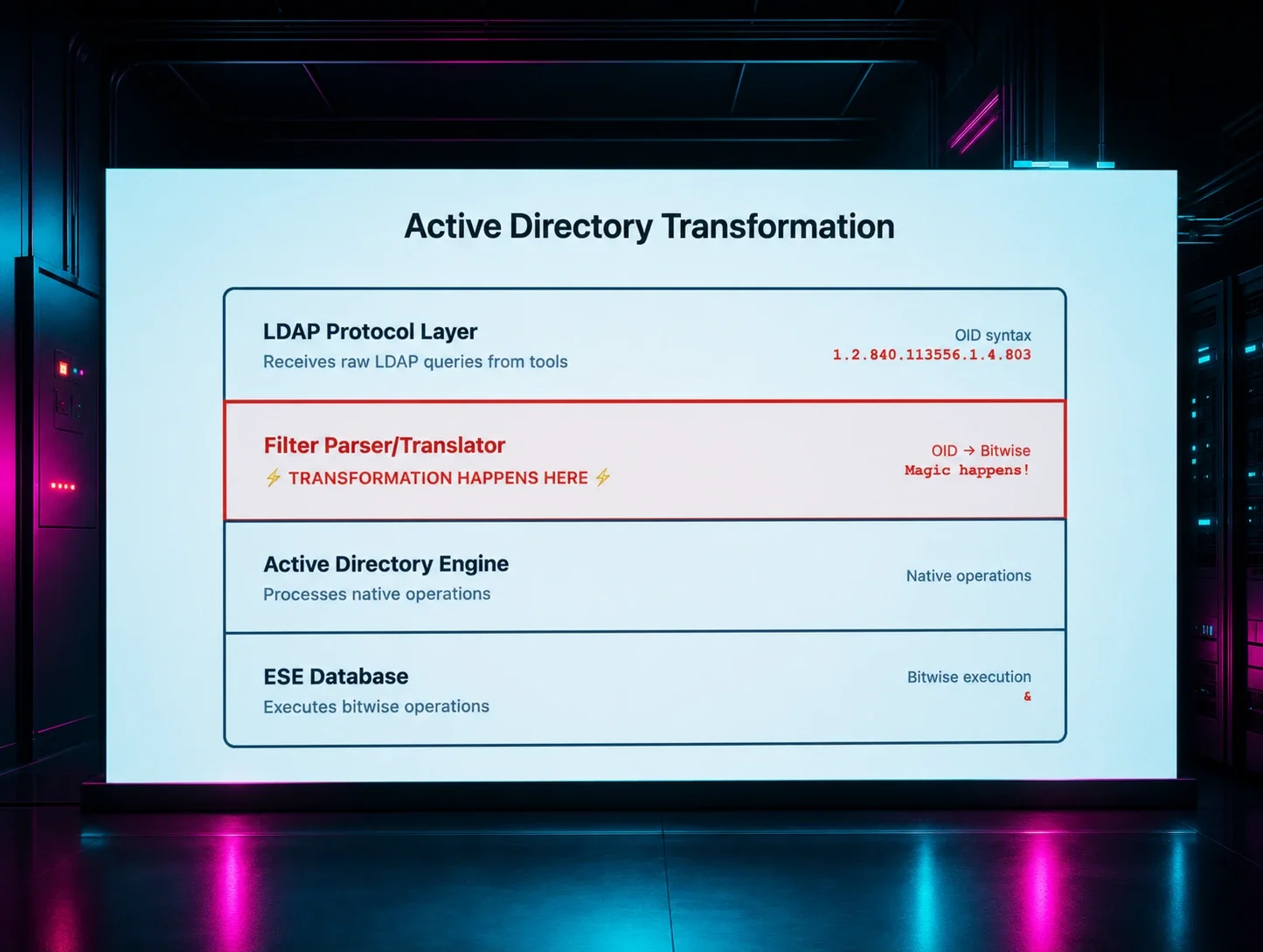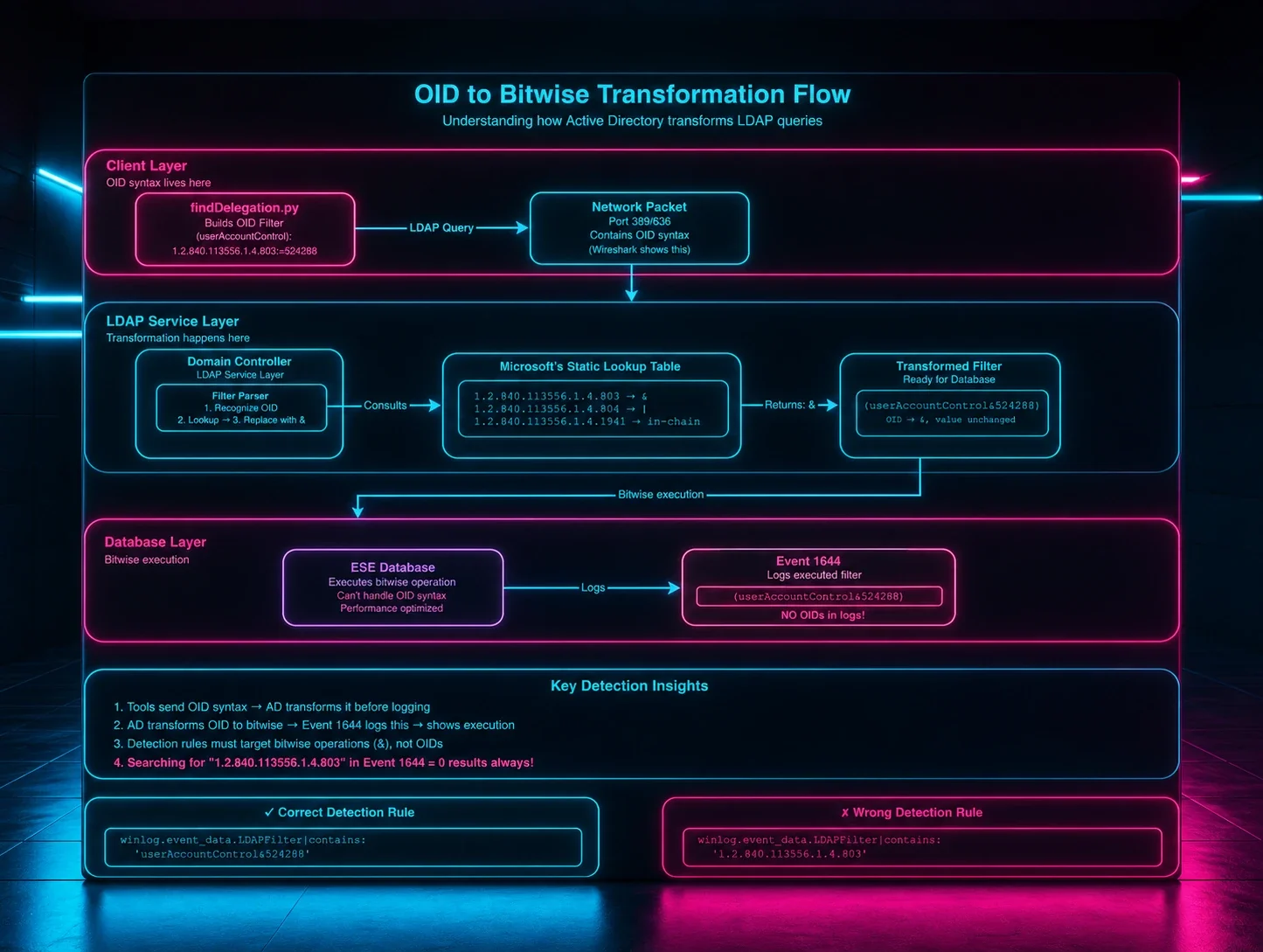


The tool says no Windows audit logs. We checked.
Part 5A proved the ADWS blind spot exists. Part 5B proved it’s solvable. Event 5156 gives you the real attacker IP behind localhost. The data was always there. Nobody was correlating it. Part 6 introduces a different blind spot. One that lives in a protocol your entire detection stack has never looked at, and a tool that is more detectable than its README claims.
Then, of course, I remembered ldapnomnom. Here we go again ¯\_(ツ)_/¯
The README is quite direct:
Quietly and anonymously bruteforce Active Directory usernames at insane speeds from Domain Controllers by (ab)using LDAP Ping requests (cLDAP) ...
No Windows audit logs generated.
No Windows audit logs. That's a strong claim. In this series, I don't take strong claims at face value. I read the source. Run it. Check the logs.
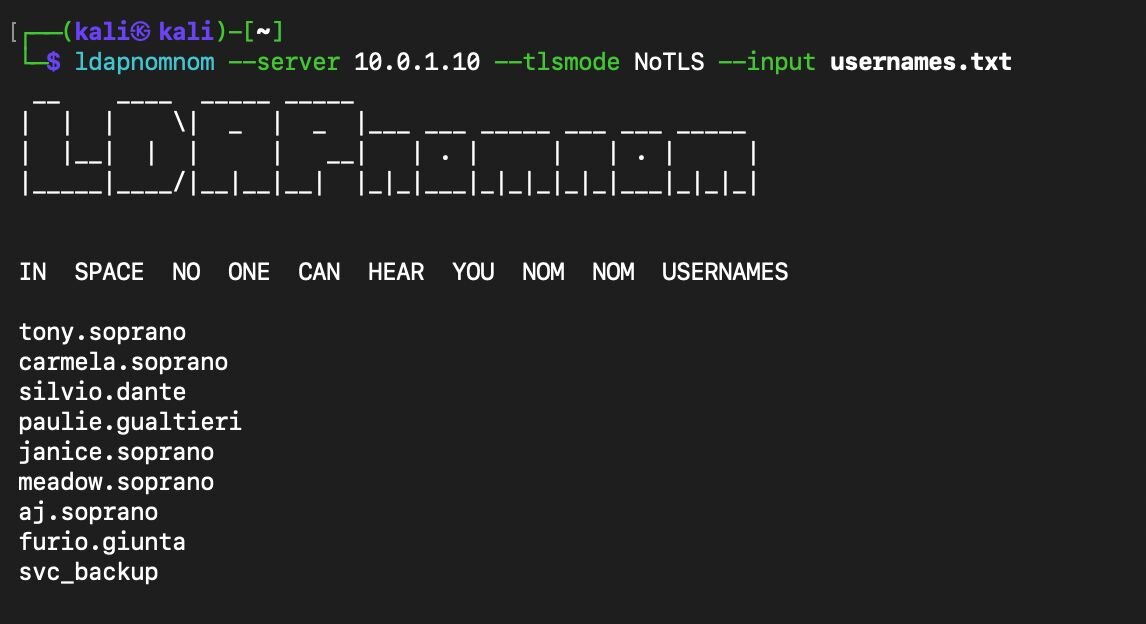
Figure 1: ldapnomnom in action: anonymous, unauthenticated, and fast, pulling valid Active Directory usernames straight from a Domain Controller. The README claims it generates no Windows audit logs. The rest of this post checks that, one log source at a time.
What I found: the README is wrong. Not completely wrong. The technique it's built on has a genuine detection gap. But the tool itself, as shipped, is more detectable than advertised. To see why, you have to go from the README down through main.go, into the underlying LDAP library, all the way to the Windows Filtering Platform. That's the From Code to Coverage methodology, and this post walks through every layer.
Where LDAP ping fits
Once an attacker has even a single low-privilege domain account, the attack surface expands dramatically. The rest of this series covers the authenticated side: how BloodHound, PowerView, and SOAPHound query the directory, what Event 1644 sees, when it doesn't fire, and how to detect low-and-slow enumeration that stays below every threshold.
LDAP Ping is a pre-credential tool. It tells you who exists. Everything after that, what they have access to, what groups they're in, which accounts are Kerberoastable, requires authentication. The two phases have completely different detection stories.
Three paths into active directory
Before going into the tool, the detection story requires understanding which processing stack handles the query on the DC. There are three distinct paths, and each has a completely different logging behavior:
Regular LDAP | ADWS (PowerShell) | cLDAP (True UDP) | |
Identity | |||
Protocol | TCP | TCP | UDP |
Port | 389 / 636 (TLS) | 9389 | 389 |
Authentication | Required (bind) | Required (Kerberos/NTLM) | None, anonymous |
Who uses it | BloodHound, Impacket, ADFind | PowerShell AD module, SOAPHound, Soapy | DC Locator, ldapnomnom (claims) |
Processing | |||
Processed by on DC | LSASS / ntdsa.dll | ADWS service → LSASS / ntdsa.dll | LSASS / netlogon.dll |
Hits LDAP engine? | Yes | Yes (via ADWS proxy) | No, separate dispatch |
Detection | |||
Event 1644 | If expensive enough | Shows localhost [::1] | Structurally impossible |
Event 5156 | With FPC auditing | With FPC auditing | UDP, WFP behaves differently |
Source IP visible | Yes, direct | No, localhost (solved in 5B) | Absent from Windows logs; needs pcap, NDR, or MDI |
The critical split is in the 'Processed by on DC' row. Regular LDAP and ADWS both eventually reach the ntdsa.dll LDAP engine inside LSASS. True UDP cLDAP goes to the netlogon.dll handler, also inside LSASS, but a different code path entirely. Event 1644 is generated by the LDAP engine. This is why Event 1644 cannot log true cLDAP. The two code paths share no overlap in the query-processing path.
LDAP ping is not LDAP search
This is worth being precise about because it is the most common misconception about this technique. LDAP Ping and regular LDAP search share the wire format. Both are BER-encoded LDAP SearchRequests sent to port 389. But they are completely different operations processed by completely different code on the DC.
Regular LDAP search: what BloodHound and PowerView use
Requires authentication. The client must bind before issuing queries
Queries the AD directory tree: users, groups, computers, GPOs, ACLs, everything
Processed by ntdsa.dll, the LDAP server stack inside LSASS.exe
That is why Event 1644 can see it. The query goes through the expensive query machinery that 1644 monitors
That is why it needs credentials. Anonymous clients cannot read the directory tree by default
LDAP Ping: what ldapnomnom and cldap_ping.py use
Zero authentication required, anonymous by design
Does NOT query the directory tree at all
The filter (&(NtVer=...)(AAC=...)(User=...)) is dispatched to the netlogon.dll handler before it ever touches the LDAP engine
Netlogon does a single targeted lookup against the directory NC for that sAMAccountName. No LDAP engine, no filter parsing, no candidate set walk
Returns a hardcoded NETLOGON_SAM_LOGON_RESPONSE_EX blob. Not an actual directory entry, not the result of an LDAP search
That is why Event 1644 never fires. The query never reaches the LDAP engine
Think of it like this:
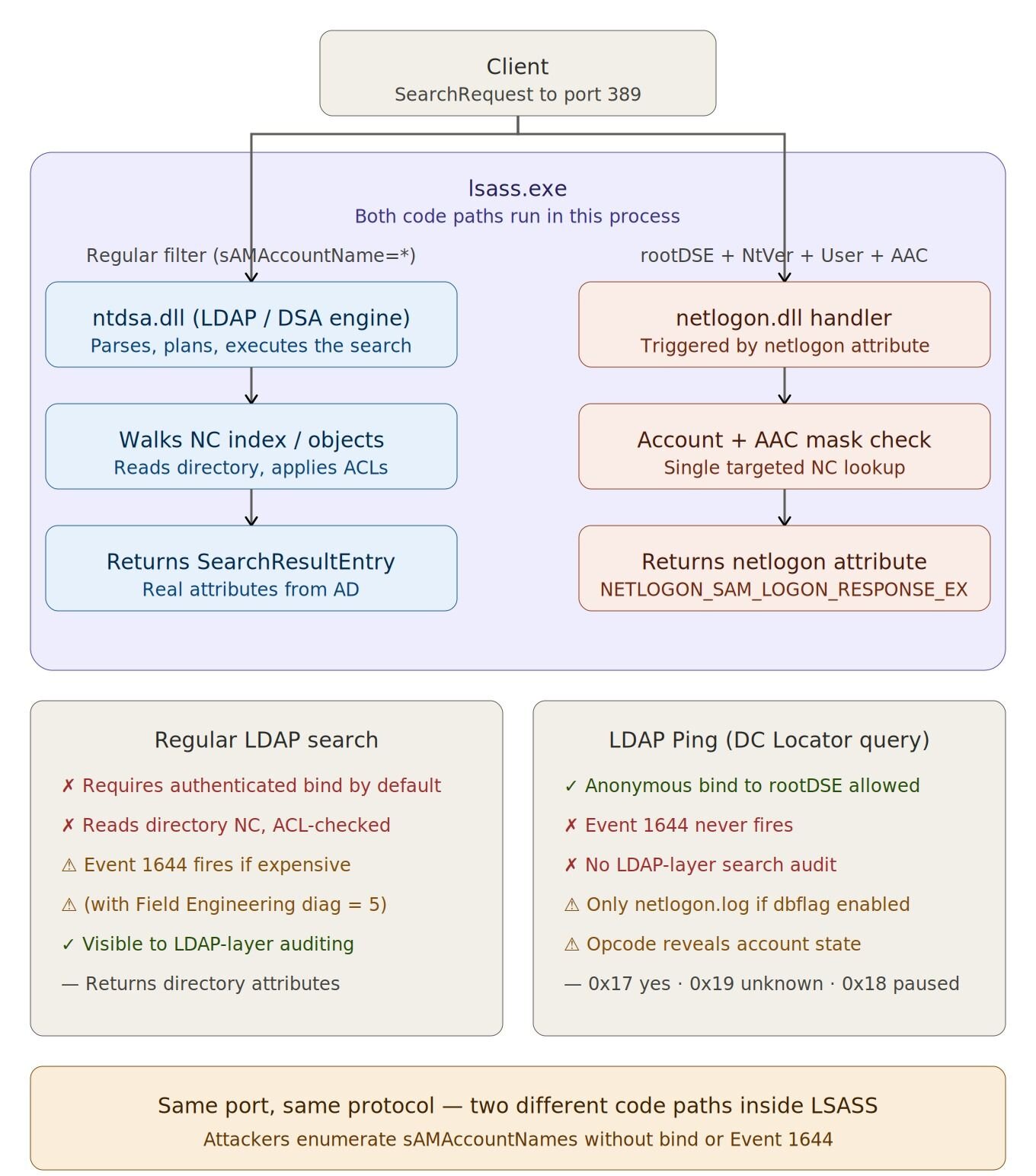
Figure 2: Inside a Domain Controller, a regular LDAP search and an LDAP Ping share port 389 but run in different code paths, only one of them is visible to LDAP-layer auditing.
! This is not a logging configuration problem. There is no registry key, no verbosity setting, no Sigma rule that makes Event 1644 log LDAP Ping traffic. The two operations share a port but nothing else. The processing stacks are architecturally separate.
The LDAP Ping is a Microsoft-specific mechanism for DC Locator: the process by which Windows clients find a Domain Controller on boot. It’s anonymous by design. It has to work before any user is authenticated. That is the door ldapnomnom walks through.
The filter includes a User= element. When populated, the Netlogon service resolves it against the directory NC, applies the AAC bitmask test, and sets the response OperationCode based on the result:
Opcode | Symbolic name | Account state on the DC | Result |
0x17 | LOGON_SAM_LOGON_RESPONSE_EX | Exists, enabled, matches AAC mask | HIT |
0x19 | LOGON_SAM_USER_UNKNOWN_EX | Does not exist | MISS |
0x19 | LOGON_SAM_USER_UNKNOWN_EX | Exists but DISABLED | MISS, defender advantage |
0x19 | LOGON_SAM_USER_UNKNOWN_EX | Exists but fails AAC bitmask test | MISS |
Reference: [MS-ADTS] § 6.3.1.3 Operation Code for the value table, and § 6.3.3.2 Domain Controller Response to an LDAP Ping for the disabled/AAC routing logic.
The bottom three rows are the defender asymmetry we'll see in the lab data. The attacker receives the same Unknown response whether the account doesn't exist, exists but is disabled, or exists but doesn't match the AAC mask. The DC has the information to tell them apart. The attacker does not. The wire response doesn't carry it, and at default logging levels the DC leaves no record of the request. Netlogon debug logging (nltest /dbflag:0x2080FFFF) does capture inbound pings as [MAILSLOT] entries when enabled, but it isn't on by default, and outside of active account-lockout troubleshooting, it's rarely turned on.
The natural follow-up question: if LDAP Ping works anonymously and uses the same port as regular LDAP, can't an attacker use it to dump users, groups, computers, and SPNs without credentials?
No, and the reason is architectural, not a configuration gap. The LDAP Ping isn't really an LDAP search. It's a fixed-function DC Locator probe wearing LDAP packaging. The DC matches the rootDSE base-scope + netlogon attribute pattern and routes to a switch statement in netlogon.dll, not to the search engine in ntdsa.dll. The handler returns a fixed-format NETLOGON_SAM_LOGON_RESPONSE_EX blob: DC identity, site info, capability flags, and if the request included User=, an opcode telling you whether that account exists and qualifies for logon. That's the entire output surface. There is no field for group membership, password last set, description, SPNs, or ACLs, and the filter grammar doesn't accept arbitrary LDAP. It's a fixed set of equality matches against named elements. Attackers can't broaden the query because there's no broadenable code on the other end.
The pre-credential ceiling
The complete anonymous AD attack surface. Everything an unauthenticated attacker can get from a DC:
Operation | What you get | Credentials required |
rootDSE anonymous query | Domain name, forest name, DC FQDN and IP, functional levels, site name, SASL mechanisms, DC role flags (PDC/GC/KDC/RODC) | No |
LDAP Ping | Per username: valid enabled / not found / disabled (indistinguishable to attacker) | No |
Everything else | Users, groups, computers, GPOs, SPNs, ACLs, descriptions, password policies, trusts, certificates. The full directory | Yes |
The third row is a hard wall. Anonymous LDAP binds to port 389 will fail or return nothing useful for directory queries. AD has required at minimum a low-privilege domain account for directory searches since Windows Server 2003.
The value of LDAP Ping is specifically in the pre-credential phase: confirm which usernames exist before attempting authentication, without generating auth failures that defenders can alert on. It answers "which of these 10,000 usernames are real?" before a password spray. That's the threat model: reconnaissance prerequisite, not a replacement for authenticated enumeration.
Reading the source code
ldapnomnom is a single Go file. Let's walk through the critical sections from main.go, with line numbers from v1.5.1 (commit bdc7fae), the current release at the time of writing.
The Defined Flags: No UDP Flag Exists
// main.go: flag definitions (lines 50-73)
port          := flag.Int("port", 389, "LDAP port to connect to (389 or 636 typical)")
tlsmodeString := flag.String("tlsmode", "NoTLS", "Transport mode (TLS, StartTLS, NoTLS)")
// Evasive maneuver flags
throttle     := flag.Int("throttle", 0, "Only do a request every N ms, 0 to disable")
maxrequests  := flag.Int("maxrequests", 0, "Disconnect and reconnect after n requests")
Notice what is absent: no --udp flag, no --cldap flag, no --protocol flag. The only transport options are TLS mode variants. All TCP. This was confirmed in the lab: an attempt to run --ldap udp returned flag provided but not defined: -ldap. The TCP-only conclusion was reached through source code analysis, not by running transport flags that don't exist. The TLS mode enum makes this explicit:
// TLS mode constants: every option is TCP
type TLSmode byte
const (
    TLS      TLSmode = 0   // TCP + TLS on port 636
    StartTLS TLSmode = 1   // TCP, upgrade with STARTTLS
    NoTLS    TLSmode = 2   // TCP, plaintext (DEFAULT)
)
The connection: Always TCP
Every connection path in main.go leads to TCP. The switch on tlsmode appears three times in the code (lines 204–217, 297–310, 371–383) and every branch calls ldap.Dial with "tcp" explicitly:
// main.go: connection establishment (lines 371-383)
// This exact switch appears 3 times. Every case: TCP.
switch tlsmode {
case NoTLS:
    conn, err = ldap.Dial("tcp", fmt.Sprintf("%s:%d", server, *port))
case StartTLS:
    conn, err = ldap.Dial("tcp", fmt.Sprintf("%s:%d", server, *port))
    if err == nil {
        err = conn.StartTLS(&tls.Config{ServerName: server})
    }
case TLS:
    conn, err = ldap.DialTLS("tcp", fmt.Sprintf("%s:%d", server, *port), config)
}
TCP. TCP. TCP. Every single case. The tool never calls ldap.DialURL with a cldap:// scheme. It always uses the legacy ldap.Dial and ldap.DialTLS functions, both of which hardcode "tcp" as the network parameter.
The LDAP ping request: The filter that queries netlogon
The core of the tool is the search request construction (lines 403–409). This is the actual packet sent to the DC for every username:
// main.go: LDAP Ping search request (lines 403-409)
request := ldap.NewSearchRequest(
    "",                           // Base DN: empty = rootDSE
    ldap.ScopeBaseObject,         // Scope: base object only
    ldap.NeverDerefAliases,
    0, 0, false,
    fmt.Sprintf(
        "(&(NtVer=\x06\x00\x00\x00)(AAC=\x10\x00\x00\x00)(User="+username+"))",
    ),
    []string{"NetLogon"},          // Attribute: triggers Netlogon response path
    nil,
)
Note: a second filter without the User element, (&(NtVer=\x06\x00\x00\x00)(AAC=\x10\x00\x00\x00)), exists at line 231 in the benchmark code path. The enumeration filter is line 406. Don't confuse the two if you grep the source.
Breaking down the filter elements:
Element | Value | Meaning |
NtVer | | Little-endian 0x00000006 = NETLOGON_NT_VERSION_5 | NETLOGON_NT_VERSION_5EX. V5EX is the bit that requests the NETLOGON_SAM_LOGON_RESPONSE_EX structure ldapnomnom parses for the 0x17 opcode. |
AAC | | AllowableAccountControlBits = 0x00000010 = USER_NORMAL_ACCOUNT per MS-SAMR § 2.2.1.12 (the SAMR account-control scheme, where a normal account is 0x10, not the userAccountControl LDAP attribute where it is 0x200). The DC AND-tests this against the target account’s UAC. Limits hits to normal user accounts only, excluding computer accounts, trust accounts, and DC accounts. |
User | | The SAM account name to look up. Netlogon does a single targeted lookup against the directory NC. No LDAP engine, no filter parsing, no candidate set walk. |
NetLogon attribute | Requested attribute | The 'NetLogon' pseudo-attribute is the trigger. Requesting it on a base object search of rootDSE routes the query to the Netlogon service handler instead of the LDAP engine. |
Sapir Federovsky documented this filter shape as an ldapnomnom fingerprint in her TROOPERS24 talk The (almost) complete LDAP guide, noting that the NtVer + AAC + User conjunction is what distinguishes username-enumeration traffic from legitimate DC Locator pings.
The Response Check: The 0x17 Byte
The response parsing (lines 426–432) is where hit/miss determination happens:
// main.go: response analysis (lines 426-432)
if len(response.Entries) > 0 &&
   len(response.Entries[0].Attributes) > 0 &&
   len(response.Entries[0].Attributes[0].ByteValues) > 0 {
    res := response.Entries[0].Attributes[0].ByteValues[0]
    if len(res) > 2 && res[0] == 0x17 && res[1] == 00 {
        outputqueue <- username    // Valid user found, write to output
    }
}
The check res[0] == 0x17 is the key. 0x17 is decimal 23, the OperationCode for LOGON_SAM_LOGON_RESPONSE_EX, the "user exists and is enabled" response from MS-ADTS § 6.3.1.3. Any other OperationCode, including LOGON_SAM_USER_UNKNOWN_EX (0x19) for non-existent and disabled accounts alike, does not start with 0x17. The username is silently discarded.
This single-byte check is why ldapnomnom only outputs enabled accounts, and why the tool cannot distinguish between a fake account and a disabled one. The defender sees the distinction. The tool does not.
The library: The UDP path that's never taken
ldapnomnom uses a fork of the go-ldap library maintained by Lars Karlslund (github.com/lkarlslund/ldap). This library does implement true UDP cLDAP. But ldapnomnom never calls it.
From the library's conn.go (lines 155–213):
// github.com/lkarlslund/ldap/v3: conn.go
// DialURL connects to the given ldap URL.
// Schemas supported: ldap://, ldaps://, ldapi://,
// and cldap:// (RFC1798, deprecated but used by Active Directory).
func DialURL(addr string, opts ...DialOpt) (*Conn, error) {
    u, err := url.Parse(addr)
    ...
    switch u.Scheme {
    case "cldap":  // ← TRUE UDP PATH (RFC1798 connectionless LDAP)
        if port == "" { port = DefaultLdapPort }
        return dc.dialer.Dial("udp", net.JoinHostPort(host, port))
    case "ldap":   // ← TCP plaintext
        if port == "" { port = DefaultLdapPort }
        return dc.dialer.Dial("tcp", net.JoinHostPort(host, port))
    case "ldaps":  // ← TCP + TLS
        if port == "" { port = DefaultLdapsPort }
        return tls.DialWithDialer(dc.dialer, "tcp", ...)
    }
}
The UDP dial path exists. cldap:// → Dial("udp", ...). It's there. It works. It's real cLDAP. RFC1798, connectionless, handled by the Netlogon service, invisible to Event 1644 and Event 5156.
ldapnomnom never calls DialURL. It calls the legacy ldap.Dial and ldap.DialTLS functions directly, both hardcoded to TCP. The UDP path in the library is dead code from ldapnomnom's perspective.
→ The library knows how to speak true cLDAP. ldapnomnom doesn't use it.
The complete call chain
Tracing from the command line to the wire shows no UDP anywhere:
// Complete execution path: ldapnomnom --server 10.0.1.10 --tlsmode NoTLS
main.go:   tlsmode = NoTLS  →  ldap.Dial("tcp", "10.0.1.10:389")
                ↓
conn.go:   legacy Dial()   →  net.DialTimeout("tcp", addr, ...)
                ↓
           TCP SYN  →  10.0.1.10:389
                ↓
LSASS.exe  receives TCP connection  →  Windows Filtering Platform sees it
                ↓
main.go:   SearchRequest  →  (&(NtVer=\x06...)(AAC=\x10...)(User=tony.soprano))
                ↓
LSASS:     NetLogon handler  →  SAM lookup for tony.soprano
                ↓
LSASS:     response  →  0x17 0x00 ... (LOGON_SAM_LOGON_RESPONSE_EX)
                ↓
main.go:   res[0]==0x17  →  outputqueue <- "tony.soprano"
                ↓
Windows Filtering Platform:  Event 5156 (source: 10.0.1.100, dest: 389, TCP, if WFP audit enabled, off by default)
Because LSASS handles the TCP connection, the Windows Filtering Platform sees every connection. With Filtering Platform Connection auditing enabled, Event 5156 fires for every single request with the full source IP.
Lab results: What Windows actually logs
Event 1644: nothing
Event 1644 logs expensive or interesting LDAP queries against the directory. With Field Engineering set to 5 and the search threshold at its lowest practical value, ldapnomnom running 40 usernames against the DC generated zero Event 1644 entries.
This is expected. The LDAP Ping filter is dispatched to the netlogon.dll handler in LSASS before the LDAP engine ever sees it. Event 1644 monitors the LDAP search engine. The two have no shared code path. This is not a threshold issue. It is structural.
Event 1644: ZERO events generated during a 40-username ldapnomnom run. No threshold, no filter, no verbosity setting changes this. The LDAP Ping never reaches the LDAP engine.
netlogon.log: Every username, every response
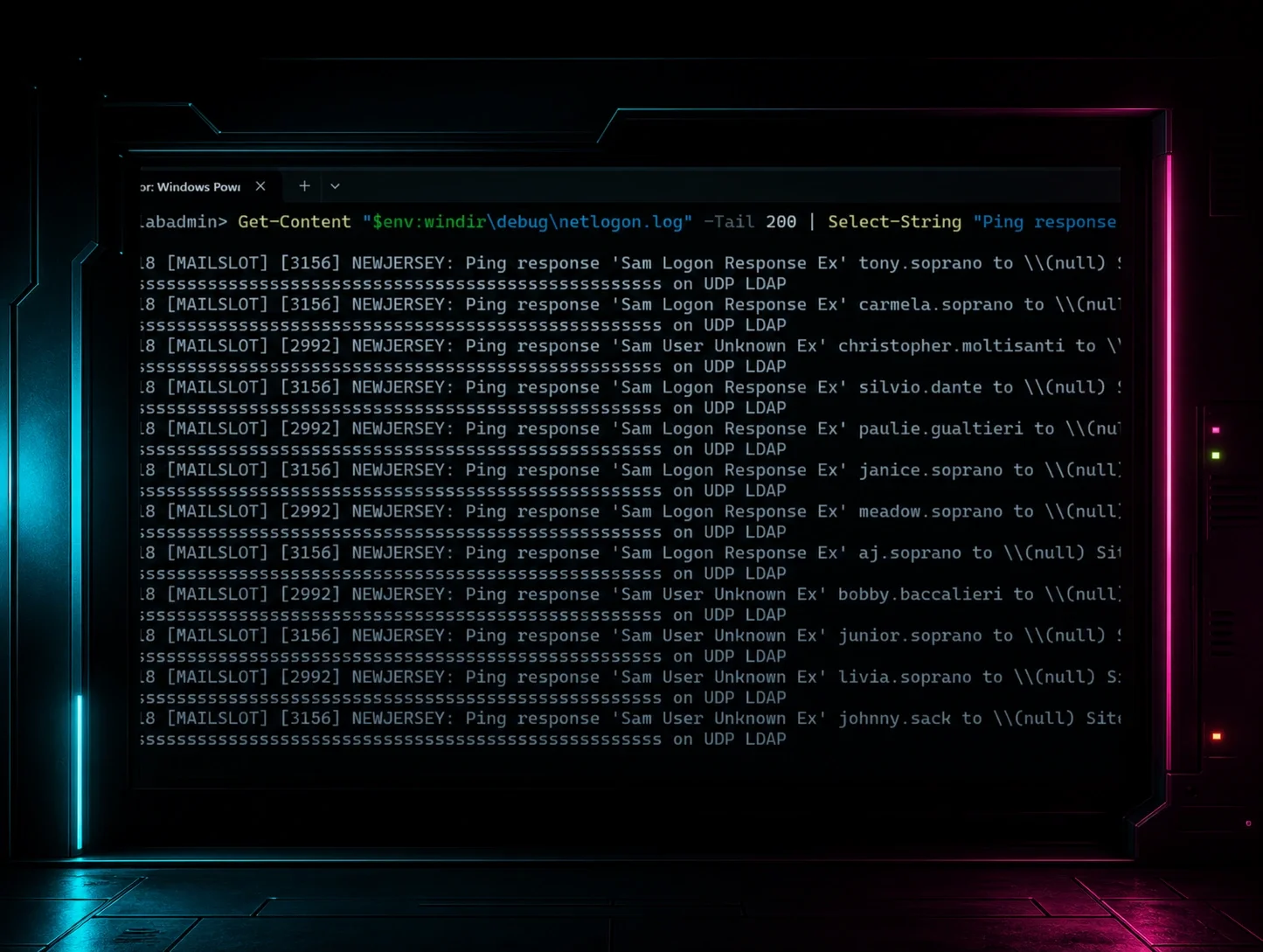
With nltest /dbflag:0x2080ffff enabled, netlogon.log captured every single LDAP Ping query. The format shows two lines per username. A received line when the ping arrives, and a response line when Netlogon replies:
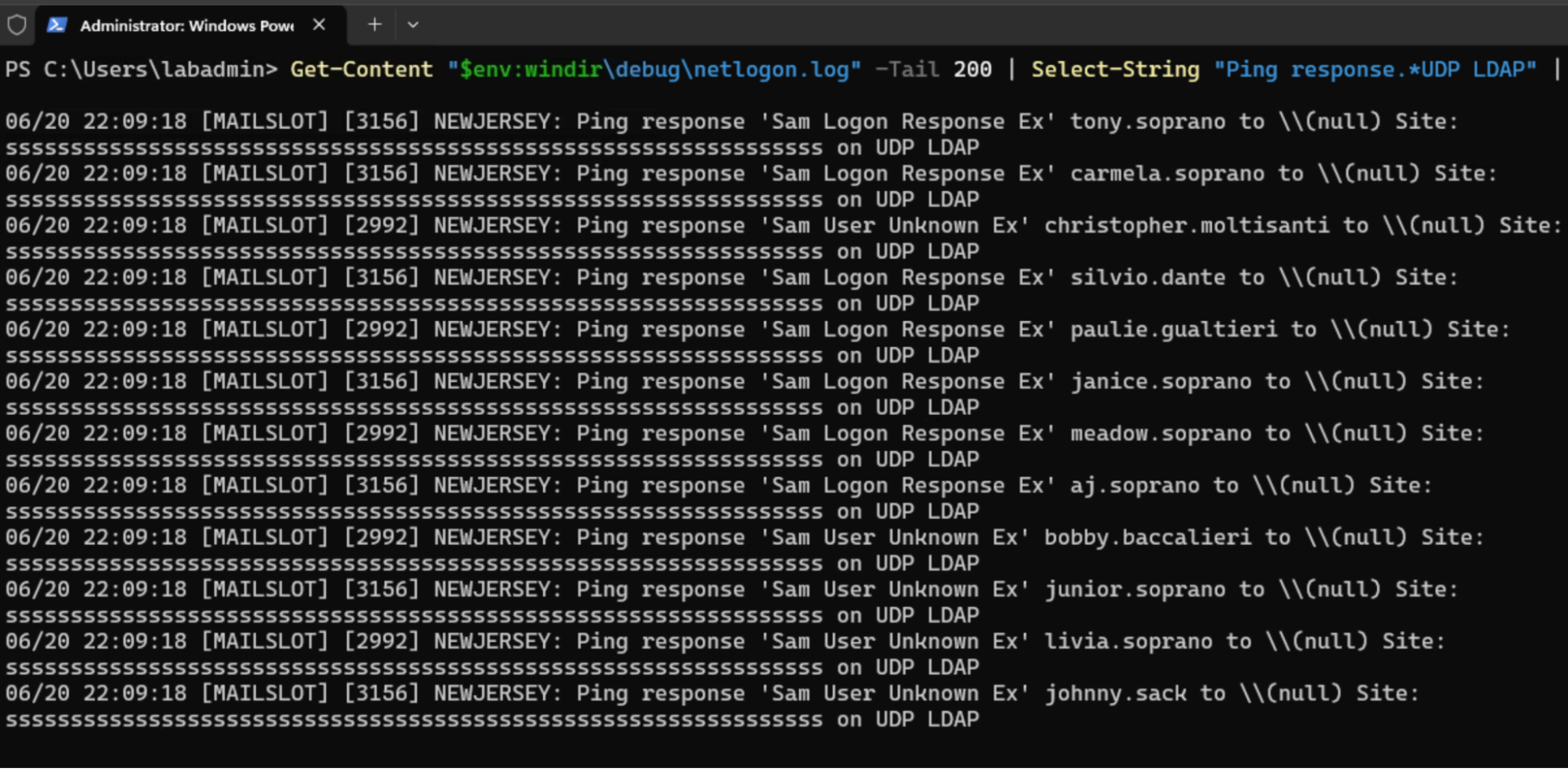
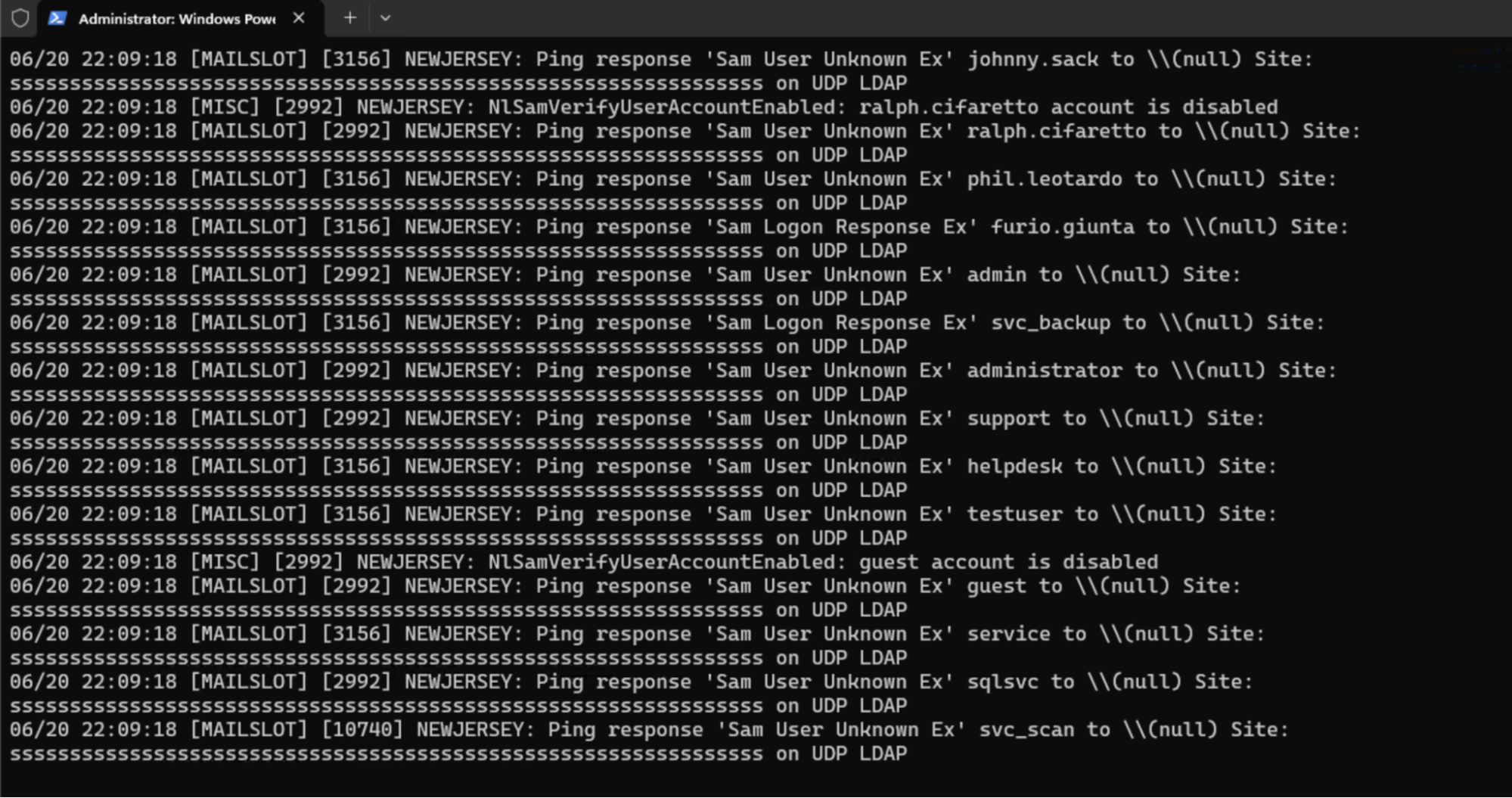
Figures 3 & 4: The defender advantage. ralph.cifaretto and guest show the [MISC] NlSamVerifyUserAccountEnabled "account is disabled" line before their Sam User Unknown Ex; the nonexistent names get only the Unknown. The DC separates a disabled account from a fake; the attacker sees one identical Unknown for both.
Three things stand out in this output
First, the transport label. The log says "on UDP LDAP" even for ldapnomnom's TCP connections. This is a Netlogon log format quirk. It labels all LDAP Ping traffic as UDP LDAP regardless of actual transport, because LDAP Ping conceptually originated as a UDP protocol. The transport field in netlogon.log is not reliable for distinguishing TCP from UDP. Event 5156 is the source of truth for transport.
Second, source IP. The attacker shows as (null) throughout. netlogon.log has no mechanism for recording the source IP of an LDAP Ping. The log tells you what was enumerated, not who did it.
Third, ralph.cifaretto. This is the defender's advantage.
The defender visibility advantage
ldapnomnom receives Sam User Unknown Ex for ralph.cifaretto, the same response it gets for a completely fabricated account. The tool logs nothing, treats it as a miss, and moves on. But netlogon.log shows the NlSamVerifyUserAccountEnabled line before the response, explicitly naming the disabled account.
netlogon.log records three distinct outcomes per query, and the gap between them is the defender's advantage:
Enabled: Sam Logon Response Ex. The account exists and is active.
Disabled: a [MISC] NlSamVerifyUserAccountEnabled "...account is disabled" line, then Sam User Unknown Ex. The account exists but is turned off.
Nonexistent: Sam User Unknown Ex with no NlSamVerify line. There was no account to check.
The attacker only ever sees two of these. A disabled account and a name that was never created both return the identical Sam User Unknown Ex on the wire, so to the attacker they are the same miss. The defender sees the third dimension: the NlSamVerifyUserAccountEnabled line fires only for accounts that actually exist, so its presence separates a real-but-disabled account from a fake one. In the figure, ralph.cifaretto and guest show that line; the generic guesses show only the Unknown.
Defenders see three states. Attackers see two. This is not a gap in ldapnomnom's logic. It is how Netlogon works by design. The asymmetry is real. Any wordlist that includes your disabled accounts gives you earlier warning than if those accounts didn't exist at all.
The netlogon.log captures every username queried and every response type, and it surfaces disabled accounts that the attacker only ever sees as a miss. Source IP is absent (null) in all cases. Attribution requires Event 5156 correlation.
Event 5156: Source IP on Every Connection
With Filtering Platform Connection auditing enabled, Event 5156 fired for every ldapnomnom connection to both port 389 and port 636:
// Security Event Log: Event 5156 (SOPRANOS lab EVTX)
Event ID:       5156
Time Created:   2026-06-19T16:52:53
Direction:      %%14592  (Inbound)
SourceAddress:  10.0.1.100         <- Kali attacker, fully visible
SourcePort:     58402
DestAddress:    10.0.1.10          <- DC
DestPort:       389
Protocol:       6                  <- TCP, confirmed
Application:    \device\harddiskvolume2\windows\system32\LSASS.exe
FilterRTID:     65536
The source IP is 10.0.1.100, the Kali attacker. The application is LSASS.exe, confirming the connection is handled by the LDAP server stack. Protocol 6 is TCP, which confirms the actual transport despite the cLDAP marketing. This applies equally to port 636. TLS encryption hides the payload but not the source IP from the Windows Filtering Platform.
ldapnomnom defaults to 8 parallel connections per server. That means 8 Event 5156 entries per enumeration run, all timestamped within a few milliseconds. The burst pattern is itself a detection signal independent of any username content.
Event 5156 fires for every ldapnomnom connection with full attacker source IP, both port 389 (NoTLS) and port 636 (TLS). TLS encrypts the LDAP payload; it does not hide the connection from WFP.
What Does Not Fire
Event 1644: zero events, structurally impossible for LDAP Ping
Source IP in netlogon.log: absent, attacker shows as (null)
Event 5807: did not fire. The Kali subnet (10.0.1.0/24) was deliberately mapped to an AD site in the lab to remove 5807 from the picture. Event 5807 only fires for source IPs that don’t map to any known AD site, and we wanted to verify the detection story for the worst case: attacker on a mapped subnet.
True UDP cLDAP: The real blind spot
ldapnomnom uses TCP. But the LDAP Ping protocol works equally well over UDP. That is what cLDAP originally meant. The library supports it. Any tool that calls DialURL with a cldap:// scheme sends real UDP datagrams and hits the Netlogon service with no TCP connection, no LSASS involvement at the network layer, and no Event 5156.
To characterize this detection gap precisely, we built cldap_ping.py: a pure Python implementation using only stdlib with no external dependencies. It sends genuine BER-encoded LDAP SearchRequests over SOCK_DGRAM to port 389. Zero TCP. Zero authentication.
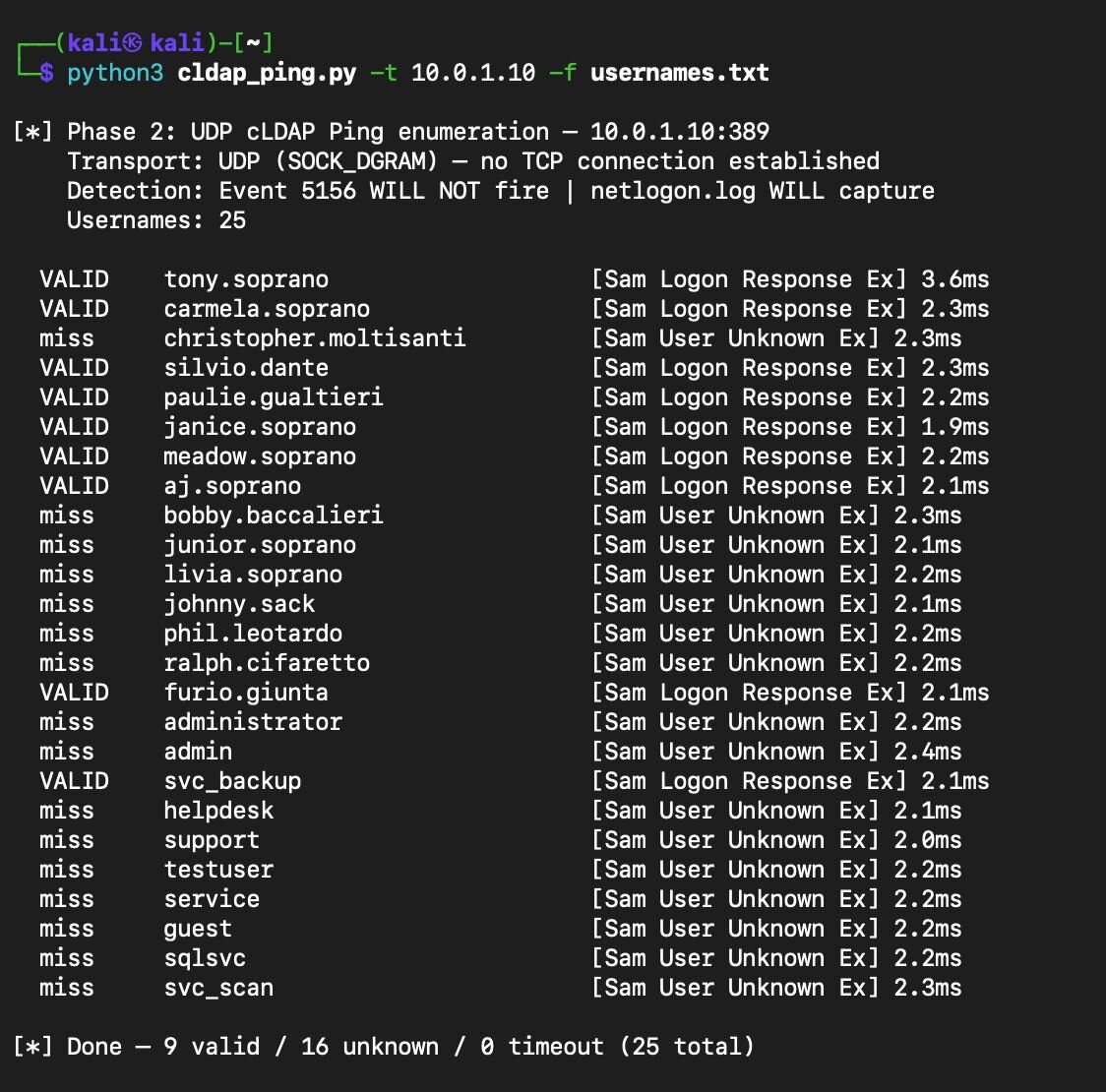
Figure 5: cldap_ping.py enumerating over genuine UDP (SOCK_DGRAM, no TCP connection established). 9 valid, 16 unknown out of 25. The 16 unknowns are a mix of disabled accounts and names that do not exist, and every one returns the identical Sam User Unknown Ex, so the attacker cannot tell a disabled account from a fake one. The DC can, and netlogon.log records the difference. No Event 5156 fires; only netlogon.log captures the run.
The results match the actual AD state precisely. The 9 valid accounts are all enabled. The 16 misses are a mix of disabled accounts and accounts that do not exist at all. Both return Sam User Unknown Ex. The attacker cannot distinguish between them.
Event 5156 did not fire for any of the 25 UDP queries. netlogon.log fired for every one. Here’s the real blind spot: UDP cLDAP gives the attacker complete anonymity at the Windows event log layer. netlogon.log shows what was enumerated but not who did it. To attribute true UDP cLDAP, you need network-layer visibility: packet capture, NDR, or firewall logs. Windows event logging alone cannot do it.
ldapnomnom defaults to TCP, so Event 5156 attribution works in practice. But any attacker using cldap_ping.py or any tool that sends UDP 389 packets loses the 5156 record entirely.
The detection story for true UDP cLDAP is netlogon.log only.
Anonymous recon: What you can and cannot get
The --recon flag in cldap_ping.py issues an anonymous TCP LDAP bind to rootDSE before username enumeration. This is a standard unauthenticated operation that any LDAP client can perform. It has a different detection footprint from the LDAP Ping:
Operation | Transport | What you get | Event 5156 | netlogon.log | Event 1644 |
rootDSE query | TCP | Domain name, forest, DC FQDN, functional level, site, SASL mechs, DC capabilities | Fires | Silent | Silent |
LDAP Ping (cldap_ping.py) | UDP | Per-username: enabled / not found / disabled (to us) | Silent | Fires | Silent |
LDAP Ping (ldapnomnom) | TCP | Per-username: enabled / not found / disabled (to us) | Fires | Fires | Silent |
Directory search | TCP | Users, groups, computers, GPOs, SPNs, ACLs, everything | Fires | Silent | Fires (if expensive) |
The directory search row requires authentication. The first three rows do not. This is the complete anonymous AD attack surface before any credentials are obtained.
The rootDSE query uses TCP. Event 5156 fires. It does not generate netlogon.log entries because it is a regular LDAP search against the special empty-DN entry that AD exposes anonymously. Event 1644 does not fire because rootDSE queries are not expensive in the 1644 sense.
What changes when you use real UDP
Event 5156 did not fire for UDP LDAP Ping in any of our test runs. The Windows Filtering Platform tracks TCP connections by design. UDP datagrams are handled differently by WFP and do not generate 5156 events for individual packets the same way TCP connections do. LSASS receives the UDP datagram via the Netlogon socket, processes it, and responds without any WFP connection tracking.
netlogon.log still fired for every username. The Netlogon service does not distinguish between TCP and UDP LDAP Ping requests at the logging level. The same MAILSLOT lines appear, with the same (null) source IP, regardless of transport.
For UDP cLDAP, the Windows host-based picture stops at netlogon.log. Source attribution requires going off-host: packet capture, NDR, firewall logs, or MDI. That last one is worth its own section.
Other tools: ldeep
ldeep is a Python post-exploitation LDAP enumeration tool maintained on PyPI and included in Kali Linux. It has an enum_users subcommand described as "Anonymously enumerate users with LDAP pings." The critical question is what transport it actually uses.
ldeep takes an LDAP URL as its server parameter (-s ldap://IP). That URL scheme, ldap://, maps to TCP in standard LDAP library implementations. The tool uses the ldap3 library which does not implement UDP cLDAP natively.
Run this against your DC while monitoring Event 5156 to confirm:
# Kali: install ldeep
pip3 install ldeep
# Run enum_users while watching DC for 5156
ldeep ldap -d newjersey.sopranos.local -s ldap://10.0.1.10 -a enum_users /tmp/sopranos.txt
If Event 5156 fires: ldeep enum_users is TCP, same detection story as ldapnomnom. If Event 5156 is silent: ldeep uses true UDP, and netlogon.log is your only Windows host-based source.
Based on the library implementation, ldeep is expected to be TCP. But verify this in your lab. The source code analysis methodology matters more than assumptions.
Why MDI can see what Windows logs cannot
Microsoft Defender for Identity added detection 2437 in version 2.228 (February 2024) specifically for LDAP Ping enumeration. The MDI documentation describes it as detecting LDAP search activities from sensors running on domain controller servers.
"Sensors running on domain controller servers" is the key phrase. The MDI sensor installs on the DC as a network capture component and reads packets off the NIC directly, before any Windows event logging infrastructure is involved. It sees both TCP and UDP LDAP Ping traffic, parses the binary NETLOGON_SAM_LOGON_RESPONSE_EX structure, and counts the volume of LOGON_SAM_USER_UNKNOWN responses.
This is why MDI can detect true UDP cLDAP and Event 5156 cannot. MDI operates at the packet level, below the WFP connection tracking layer that generates 5156.
In the lab, a 25-username ldapnomnom run against BADABING produced exactly what the architecture predicts. Zero Event 1644 entries on the DC. Full netlogon.log capture. Event 5156 attribution on every TCP connection. And in MDI, a single high-confidence alert that pulled the whole story together: source host, target DC, attempt count, classification.
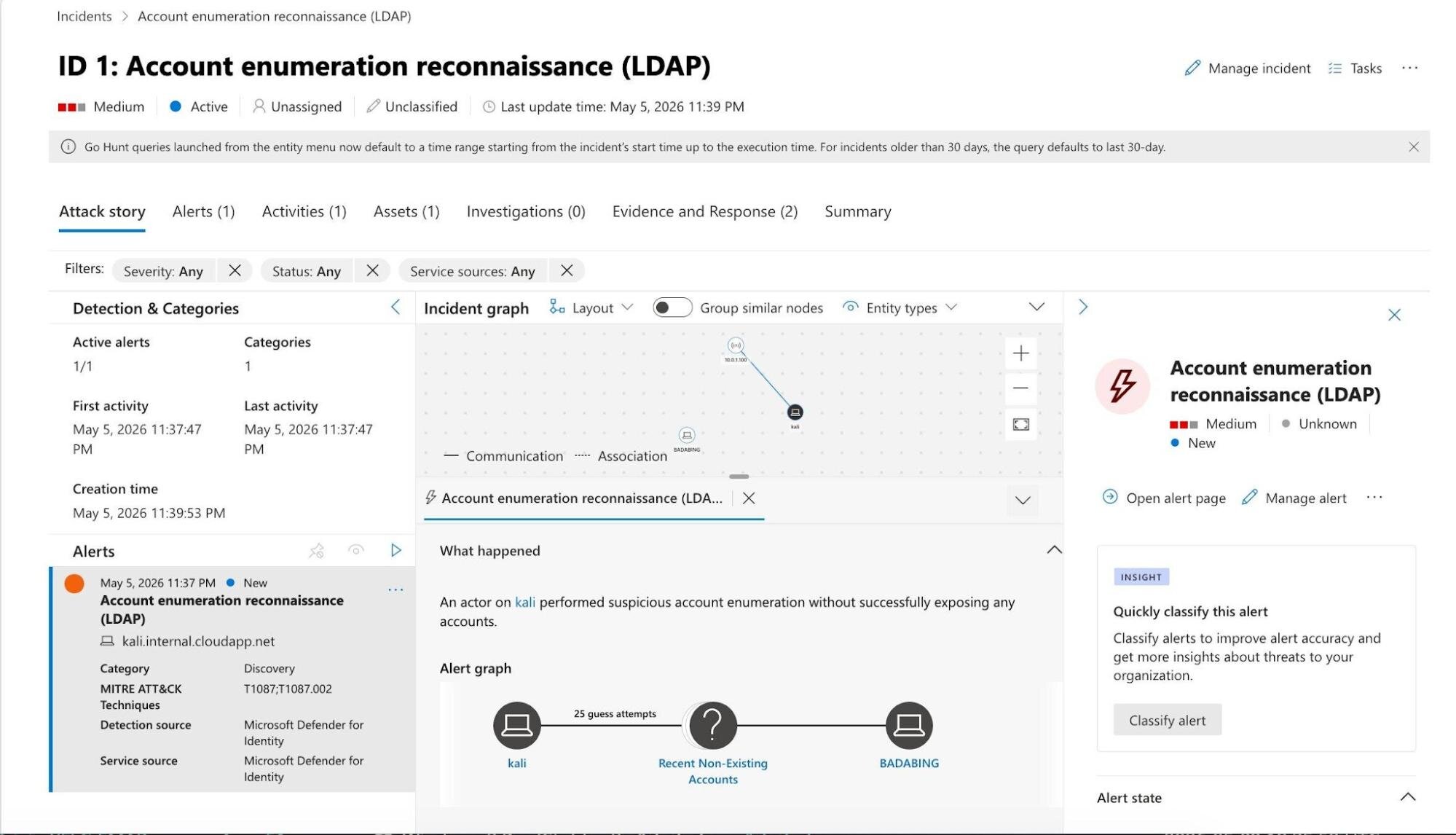
Figure 6: MDI external ID 2437 firing against ldapnomnom in the SOPRANOS lab, attributing the enumeration to kali (10.0.1.100). The same run produced zero Event 1644 entries on the DC.
The MDI sensor read this off the wire. No event log infrastructure was involved. That’s why it sees what 5156 misses on UDP. Same packet-capture vantage point, different detection layer.
Note the phrasing: "without successfully exposing any accounts." MDI’s 2437 logic counts the misses, not the hits. A run against a curated wordlist of mostly-real accounts produces fewer 0x19 responses and may stay below the threshold entirely.
The limitation is the detection mechanism itself: external ID 2437 fires when "too many unknown users" accumulate past an undisclosed threshold. The ldapnomnom README explicitly documents the evasion:
// ldapnomnom README: evasion flags
--throttle 20      // 20ms delay between requests (slows to ~50/sec)
--maxrequests 1000 // Close and reconnect after 1000 requests
                   // Resets per-connection counters that MDI may track
A targeted attacker using a curated 50-name wordlist against known high-value targets never approaches any volume threshold. the Synacktiv team documented in their MDI research that ldapnomnom produced no MDI alerts in their testing. The 2437 detection was added after that research was published.
MDI: external ID 2437 reads packets directly off the NIC via the sensor’s Npcap-based capture. It sees UDP cLDAP that Windows event logs miss entirely. But it’s threshold-based, requires sensor deployment on the DC, and the --throttle flag is a documented evasion. For organizations without MDI on every DC, netlogon.log plus Event 5156 is the practical detection path.
Correlating the two sources
netlogon.log gives you usernames. Event 5156 gives you the source IP. Neither is complete alone. A five-second timestamp correlation window reliably joins the two sources across all tested configurations. The 5156 event fires at TCP connection time, and the netlogon.log entry appears within milliseconds when Netlogon processes the response.
Question | netlogon.log | Event 5156 |
Was enumeration attempted? | Yes | Yes (connection burst) |
What usernames were probed? | Yes, every one | No |
Which accounts are enabled? | Yes | No |
Which accounts are disabled? | Yes, more than attacker sees | No |
When did it happen? | Yes | Yes |
Who did it (source IP)? | No, (null) | Yes, full IP + port |
Port 636 (TLS) detection? | Yes | Yes |
True UDP cLDAP? | Yes | No |
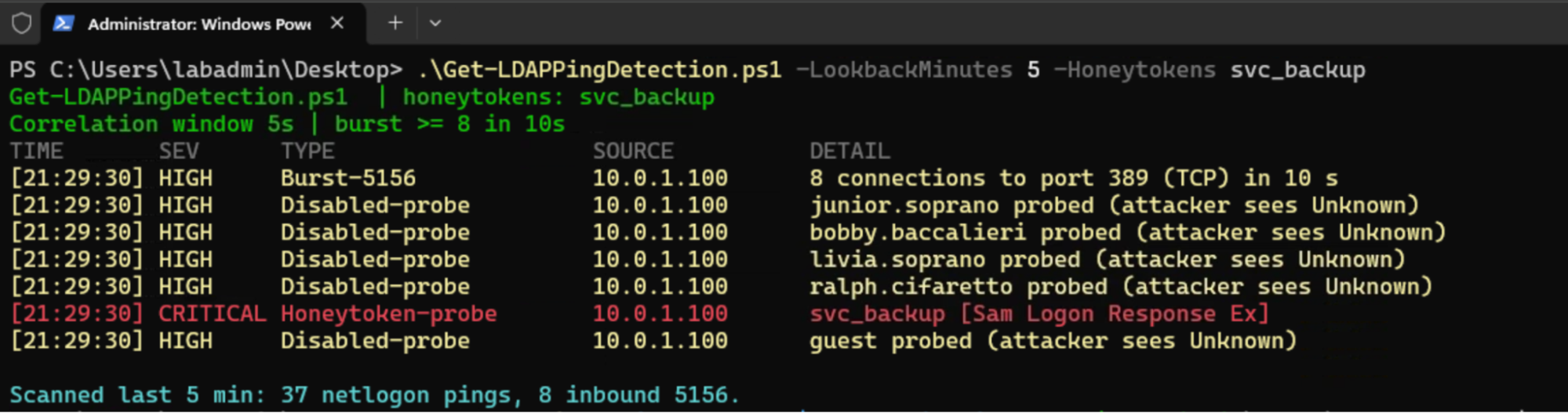
Figure 7: Get-LDAPPingDetection.ps1 output during a SOPRANOS lab ldapnomnom run. The script correlates netlogon.log usernames with Event 5156 source IPs in a five-second window, then escalates on honeytoken hits, burst volume, or disabled-account probes. Source IP (10.0.1.100) was attributed within seconds of the attack starting.
Detection: What’s free, what’s cheap, what’s worth building
The full detection picture for ldapnomnom and true UDP cLDAP, what fires, what doesn’t, and what it costs to enable:
The full detection matrix
Detection Method | ldapnomnom (TCP) | True UDP cLDAP | Confirmed? | Config Required |
Event 1644 | No, never fires | No, never fires | Lab confirmed | N/A |
Event 5156 (port 389) | Yes, full source IP | No, does not fire | Lab confirmed | Audit FPC: enable |
Event 5156 (port 636) | Yes, full source IP | N/A (TCP only) | Lab confirmed | Audit FPC: enable |
netlogon.log usernames | Yes, every query | Yes, every query | Lab confirmed | nltest /dbflag:0x2080ffff |
netlogon.log source IP | No, shows (null) | No, shows (null) | Lab confirmed | Not available from this source |
Event 5807 | Unmapped subnet only | Unmapped subnet only | Lab confirmed | None |
MDI external ID 2437 | Yes (volume threshold) | Yes (volume threshold) | Lab confirmed | MDI sensor deployment |
Filter shape: NtVer+AAC+User conjunction | Yes, high-fidelity | Yes, high-fidelity | Documented by Sapir (TROOPERS24) | Packet capture / NDR / Zeek LDAP parser |
Honeytoken accounts | Yes, if in wordlist | Yes, if in wordlist | Lab confirmed | Account creation + alerting |
Network IDS (UDP sig) | N/A (it's TCP) | If unencrypted | Inferred | IDS infrastructure |
The blind spots that remain
The detection picture described here is not complete.
UDP transport eliminates Event 5156 attribution. An attacker using cldap_ping.py or any tool that sends raw UDP 389 packets will not generate 5156 events. netlogon.log still fires, but source IP requires network-layer visibility: packet capture, NDR, or firewall logs.
netlogon.log is not shipped by default. It is a flat file on the DC. Without an active log shipping agent, all of this data sits on disk unmonitored.
The --throttle flag in ldapnomnom inserts delay between requests. At --throttle 20 (20ms between requests), the burst pattern disappears and volume-based detection fails. Individual netlogon.log entries still appear but the signal is noise-level.
The --maxrequests flag rotates connections, potentially resetting per-connection counters that MDI uses for threshold detection.
MDI external ID 2437 is threshold-based. Targeted enumeration against a curated list of 50 known high-value accounts may never reach the threshold. MDI also requires sensor deployment on every DC you want to cover.
Event 5156 Is the Gift That Keeps Giving
This is the second time in this series that Event 5156 has solved a problem that seemed unsolvable from a Windows event log perspective.
In Part 5B, the problem was ADWS attribution. Event 1644 showed localhost for all PowerShell AD queries because ADWS translates them internally before passing them to LSASS. Event 5156 captured the real source IP on the ADWS port, and a 60-80ms timestamp correlation window joined the two sources. The BloodHound Slack said source IP attribution wasn't really possible. The data disagreed.
Here, the problem is that LDAP Ping bypasses the LDAP engine entirely. Event 1644 is blind to it by design. But ldapnomnom uses TCP, and Event 5156 sees every TCP connection through the Windows Filtering Platform regardless of what the application layer does with the data. Same technique, different attack surface, same result.
The pattern is consistent: when a technique is designed to evade a specific log source, look one layer down in the network stack. WFP sees everything that reaches LSASS over TCP regardless of whether the query hits the LDAP engine, the ADWS proxy, or the Netlogon handler.
Pattern: Event 5156 has solved two separate "no Windows audit logs" problems in this series. It is not a detection source most organizations have in their SIEM. It should be.
Arc 2 Complete
Post | Blind Spot | Root Cause | Solution |
Part 5A | PowerShell AD enumeration | ADWS (port 9389) proxies queries. Event 1644 fires but shows localhost, hiding source IP | Documented the ADWS architecture and the source-IP gap in Event 1644 |
Part 5B | ADWS source IP | ADWS is a TCP proxy. LSASS never gets the original connection, only a loopback one | Event 5156 on port 9389 + 60-80ms timestamp correlation |
Part 6 | LDAP Ping enumeration | Netlogon dispatches LDAP Ping to a separate handler. Event 1644 structurally cannot fire | netlogon.log + Event 5156 (TCP) correlated by timestamp |
The lesson from Part 6: read the source code before trusting the README. "No Windows audit logs generated" is a claim that deserves checking. The source code told us it was TCP. The event logs confirmed Event 5156 fires. The netlogon.log confirmed every username is captured. The README was wrong in a way that matters for defenders.
→ The tool said UDP. The code said TCP. The logs said Event 5156. Always follow the code.
In Arc 3, we move to behavioral and volumetric detection. The attacker who switches to true UDP cLDAP, stays below MDI's threshold, and uses a targeted wordlist still leaves a statistical footprint.
References
ldapnomnom source: github.com/lkarlslund/ldapnomnom (Lars Karlslund), v1.5.1 / commit bdc7fae
lkarlslund/ldap library: github.com/lkarlslund/ldap (fork of go-ldap/ldap)
RFC 1798: Connection-less Lightweight Directory Access Protocol
MS-ADTS § 6.3: DC Locator and LDAP Ping (Microsoft Open Specifications)
MS-ADTS § 6.3.3.2: Domain Controller Response to an LDAP Ping
MS-SAMR § 2.2.1.12: USER_ACCOUNT Codes (USER_NORMAL_ACCOUNT = 0x00000010, the AAC bitmask values)
MDI release notes v2.228: Account enumeration reconnaissance (LDAP), external ID 2437
MDI Account Enumeration Reconnaissance (LDAP) external ID 2437: learn.microsoft.com/en-us/defender-for-identity/reconnaissance-discovery-alerts
Synacktiv: A dive into Microsoft Defender for Identity (MDI pre-2437 blind spot documentation)
Sapir Federovsky, The (almost) complete LDAP guide, TROOPERS24, 2024.https://troopers.de/downloads/troopers24/TR24_The_(almost)_complete_LDAP_guide_KYNUWX.pdf
Microsoft KB: Enable debug logging for the Netlogon service (nltest /dbflag)
Windows Security Event 5156: The Windows Filtering Platform has permitted a connection
From Code to Coverage Parts 1–5B: huntress.com/blog
Acknowledgments
Lars Karlslund for building and open-sourcing ldapnomnom. The source code was the starting point for understanding the detection surface.
The Synacktiv team for their detailed MDI research, which confirmed the pre-2437 blind spot and documented that ldapnomnom produced no MDI alerts in their testing.
Sapir Federovsky for the TROOPERS24 LDAP guide, which documented the NtVer + AAC + User filter shape as an ldapnomnom signature and informed the content-layer detection approach in this post.