

Remember “From Code to Coverage: Part 1”? That deep-dive post where we spent all that time figuring out that Impacket tools use bitwise operations instead of OID values? Where we finally celebrated understanding that findDelegation.py searches for userAccountControl&524288?
Yeah, well...I've got bad news for you.
That was the easy part.
See, I thought I was done. I had my detection logic figured out. I understood the tools. I knew exactly what to look for. I deployed my rules to production with the confidence of someone who'd just solved a really hard puzzle. Then I got a Slack message at 2am: "Hey, we definitely saw Impacket activity during the red team exercise, but your rules didn't fire."
That's when I learned that understanding WHAT to detect (Part 1) is completely different from making it actually WORK in production (welcome to Part 2).
Grab a coffee. Or maybe something stronger. This is going to get frustrating.
Understanding the transformation: Why this mess exists
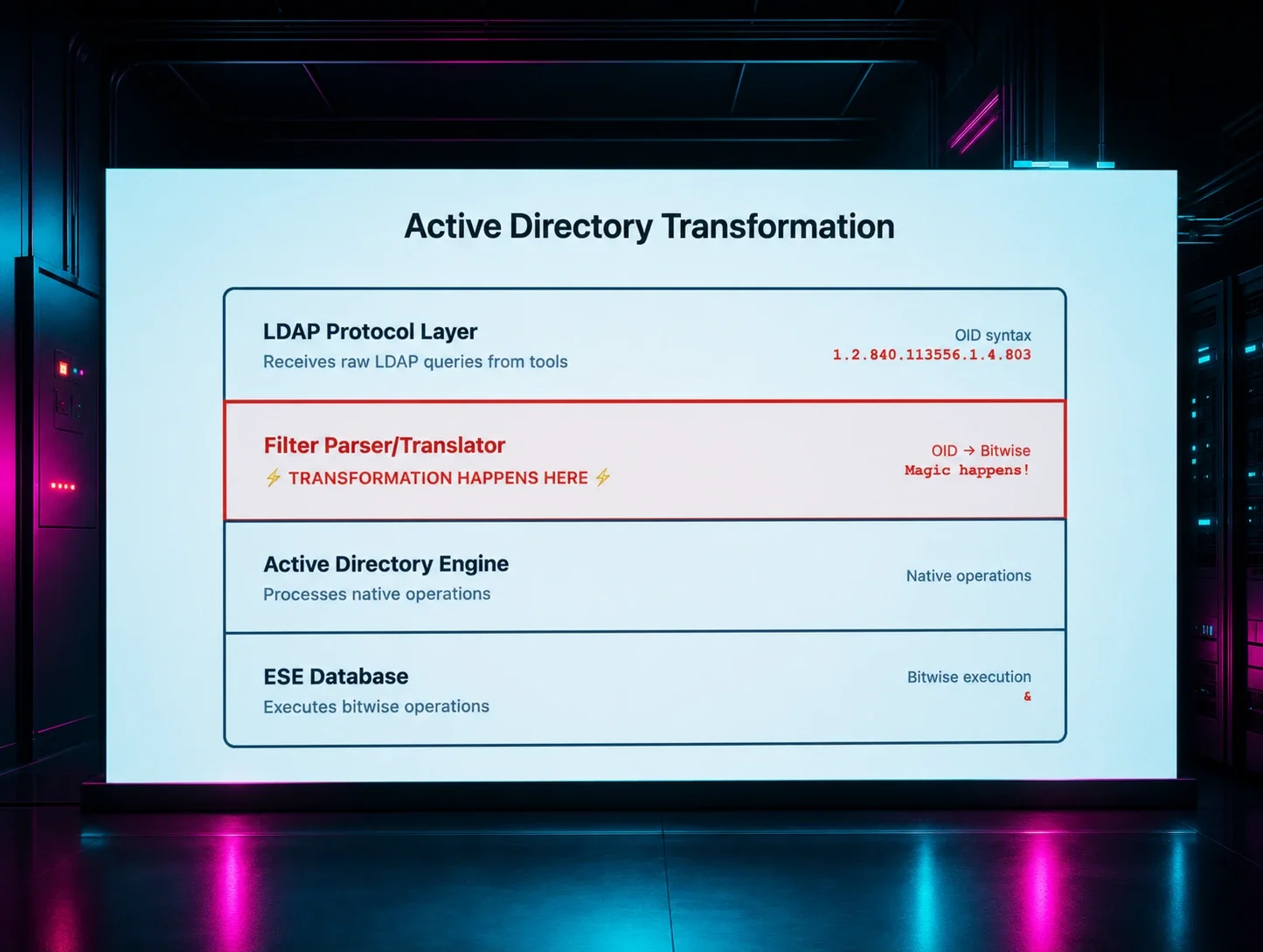
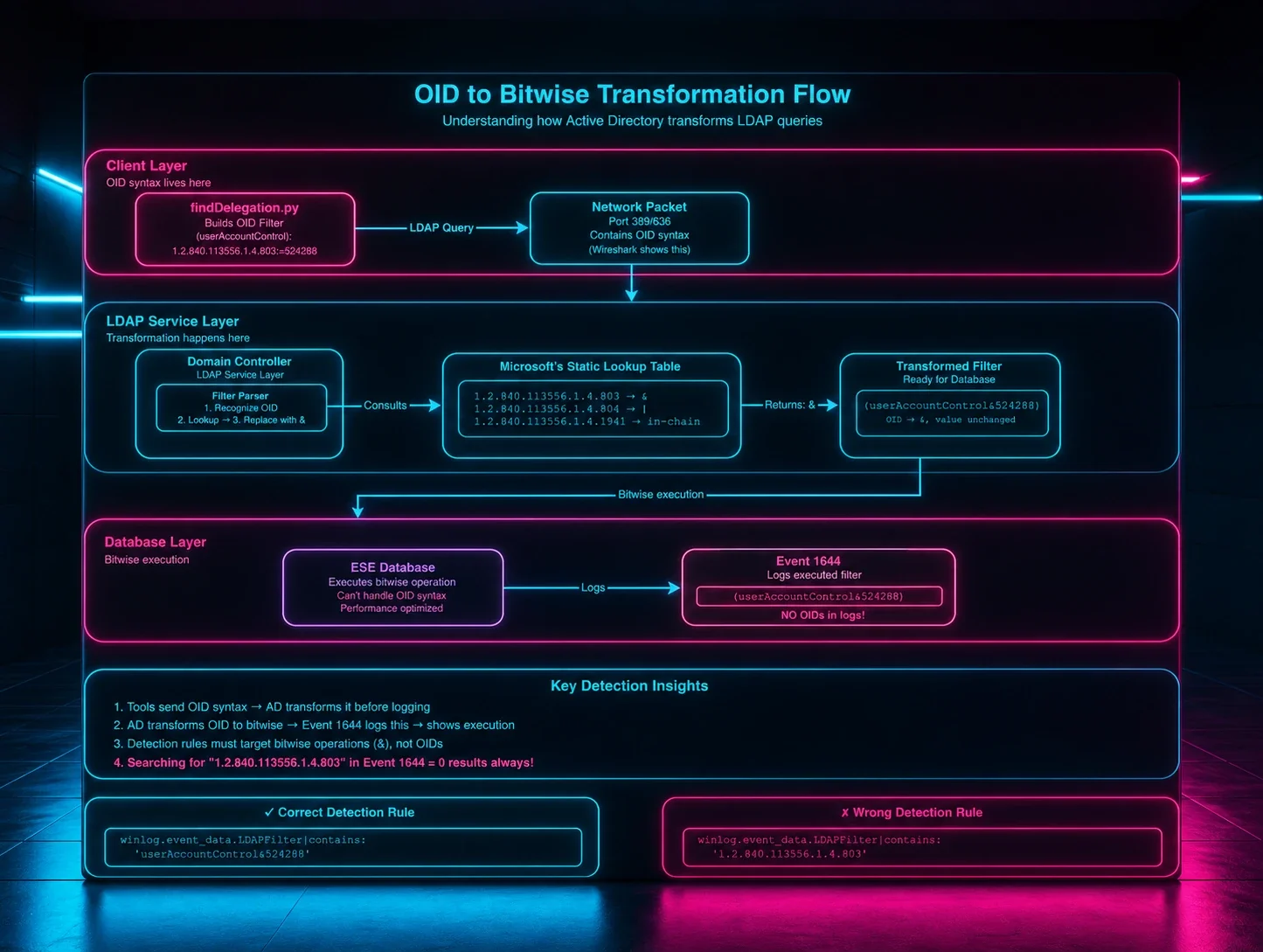
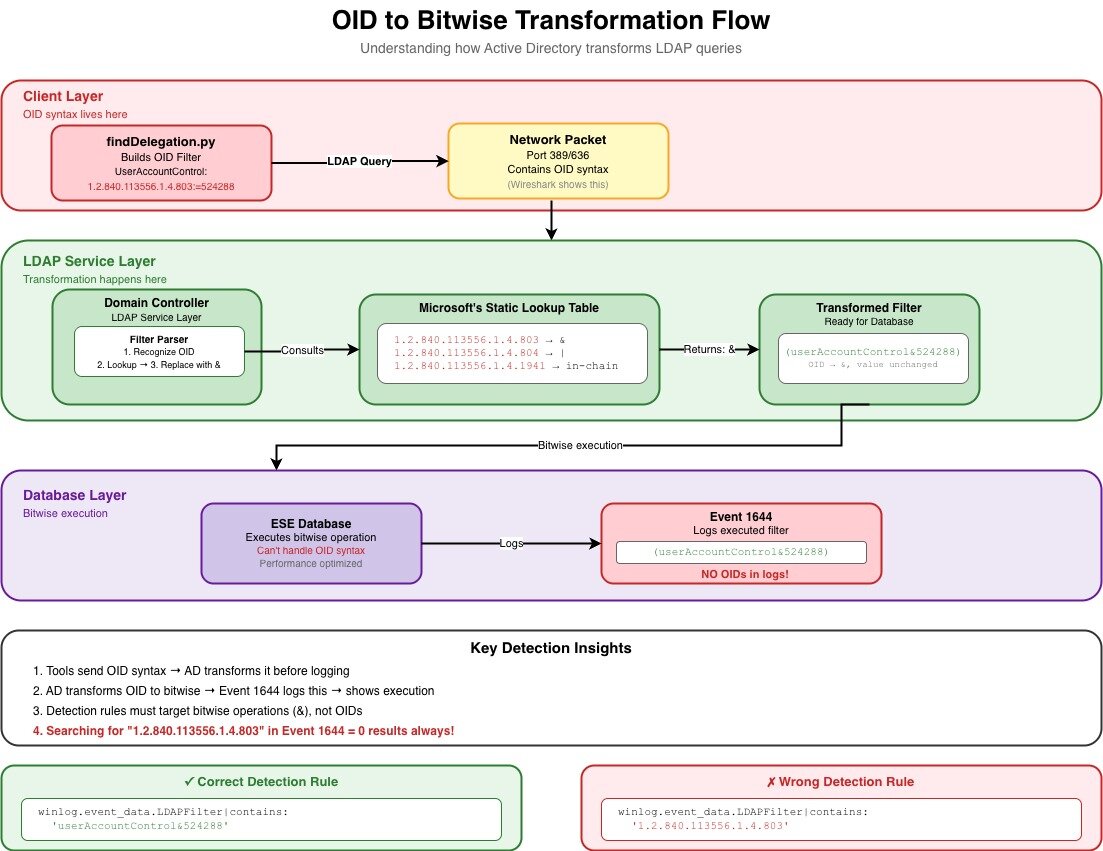
Before we dive into the nightmare, let me show you WHY this happens. Here's the actual flow of how your LDAP queries get transformed as they travel through Active Directory (based on my understanding from Part 1's deep dive into how Active Directory processes these queries):
Figure 1: The OID to Bitwise transformation flow - Where clean OID syntax goes to die and emerges as whitespace chaos
Key detection insights from this flow:
- Tools send OID syntax → AD transforms it before logging → proves tool behavior
- Active Directory (AD) transforms OID to bitwise → Event 1644 logs this → shows execution
- Detection rules must target bitwise operations (&), not OIDs
- THE CRITICAL POINT: The transformation in the LDAP Service Layer doesn't normalize whitespace!
The problem: Your logs are lying to you (sort of)
Now that you understand WHERE the transformation happens, here's the kicker: that LDAP Service Layer transformation? It doesn't give a damn about consistent formatting. The Filter Parser only cares if your query makes semantic sense—whitespace is irrelevant to the bitwise operation, so it gets preserved (or added, or removed) based on mysterious internal processing.
Here's what drove me absolutely insane for weeks. I had rules that targeted userAccountControl&524288, and they worked...sometimes. Like, 30% of the time. Which is worse than not working at all, because at least then you KNOW something's broken.
The problem? Event 1644 doesn't log LDAP filters with consistent whitespace. And when I say "doesn't," I mean it's completely random. I've seen all of these variations in real environments:
(userAccountControl&524288)
(userAccountControl & 524288)
( userAccountControl&524288 )
( userAccountControl & 524288 )
(userAccountControl& 524288)
( userAccountControl &524288)
Look at that mess. LOOK AT IT. That's the same exact query, six different ways.
Why does this happen? Look back at our flow diagram—the transformation happens in the LDAP Service Layer, but the exact spacing depends on:
- How the original query was formatted by the client tool
- Internal string processing routines in the AD engine (which, by the way, Microsoft hasn't documented)
- Event logging formatting and serialization (also undocumented, thanks Microsoft)
- Whether the query went through additional processing steps (you guessed it - undocumented)
So basically, it's chaos. Complete chaos happening right there in that green LDAP Service Layer box.
My journey through the five stages of grief (detection engineering edition)
Let me walk you through how my rules evolved as I slowly lost my mind over this problem.
Stage 1: Denial ("My rules are perfect.")
selection:
winlog.event_data.LDAPFilter|contains: 'userAccountControl&524288'
This worked in my lab where I was using the same tool in the same way every time. "Ship it to production!" I said. "It's bulletproof!" I said.
30% hit rate in production.
I spent three days thinking our SIEM was broken. Spoiler: it wasn't. The LDAP Service Layer was just laughing at my assumptions.
Stage 2: Anger ("I'll just list every possibility.")
selection:
winlog.event_data.LDAPFilter|contains|any:
- 'userAccountControl&524288'
- 'userAccountControl & 524288'
- ' userAccountControl&524288'
- 'userAccountControl&524288 '
Better, but still missing edge cases. Plus, this was getting ridiculous fast. I was basically trying to enumerate every possible spacing combination that could emerge from that transformation layer, which is like trying to list every way someone could possibly sneeze. It's impossible, and you look stupid trying.
Stage 3: Bargaining ("Maybe Regex will save me.")
selection:
winlog.event_data.LDAPFilter|re: '.*userAccountControl\s*&\s*524288.*'
Much better! The \s* matches zero or more whitespace characters, so it handles most spacing variations. I thought I was clever. The universe (and the LDAP Service Layer) laughed at me. I was still missing hits because I wasn't accounting for parentheses spacing.
Stage 4: Depression ("Why did I choose this career?")
After all, I got a certificate from Gelato University, thinking I was escaping this chaos. Turns out, LDAP filters are harder to master than stracciatella.
Stage 5: Acceptance ("Fine, I'll handle everything.")
selection:
winlog.event_data.LDAPFilter|re: '.*\(\s*userAccountControl\s*&\s*524288\s*\).*'
Now we're accounting for spaces around the parentheses too. This finally gave me consistent hit rates in production. It only took me three weeks and probably a few years off my life.
From Part 1 theory to Part 2 reality: A comparison
Remember how confident we were at the end of Part 1? Let's see how that worked out:
|
What Part 1 taught us |
What Part 2 slapped us with |
|
GetUserSPNs.py uses userAccountControl&2 (in the !(userAccountControl&2) exclusion filter) |
Could appear as userAccountControl & 2 or twenty other ways |
|
findDelegation.py uses &16777216 and &524288 |
Might show up with random spacing that changes based on the phase of the moon |
|
OIDs get transformed to bitwise operations |
Those operations have infinite formatting variations after transformation |
|
Event 1644 shows the LDAP filter |
But doesn't normalize the formatting because that would be helpful |
|
The transformation happens in the LDAP Service Layer |
That layer has zero documentation about whitespace handling |
Building Sigma rules that actually work (and won't make you cry)
After years of pain, here are the patterns that actually work in production:
For simple Bitwise operations:
# Handles: userAccountControl&524288 with any spacing
# This is what Part 1 taught us to look for, Part 2 makes it actually work
selection:
winlog.event_data.LDAPFilter|re: '.*userAccountControl\s*&\s*524288.*'
For complex multi-condition filters:
Remember findDelegation.py from Part 1? Here's how to actually catch it after it goes through the transformation:
# findDelegation.py detection with spacing tolerance
# Part 1: "Look for these flags"
# Part 2: "Look for these flags in 47 different formats"
selection:
winlog.event_data.LDAPFilter|re: '.*userAccountControl\s*&\s*16777216.*'
winlog.event_data.LDAPFilter|re: '.*userAccountControl\s*&\s*524288.*'
condition: all of selection
For attribute lists with spacing issues:
# Handles spacing in attribute lists
# Because of course attribute lists have spacing issues too
selection:
winlog.event_data.AttributeList|re: '.*msDS-PrincipalName\s*,\s*objectSid.*'
For negation filters:
# Handles: !(userAccountControl&2) with spacing
# Yes, even the exclamation point can have spaces after it
# I wish I was joking
selection:
winlog.event_data.LDAPFilter|re: '.*!\s*\(\s*userAccountControl\s*&\s*2\s*\).*'
Advanced patterns for when basic Regex isn't enough
Case sensitivity (because why would anyone be consistent?):
I've seen userAccountControl, UserAccountControl, and even useraccountcontrol. In the same environment. On the same day. The LDAP Service Layer doesn't care about case either.
# Case-insensitive bitwise detection
# For when admins can't agree on capitalization
selection:
winlog.event_data.LDAPFilter|re: '(?i).*useraccountcontrol\s*&\s*524288.*'
Multiple operators (When "&" isn't the only problem):
Some tools use bitwise OR instead of AND, because standardization is for quitters:
# Catches both & and | operations
selection:
winlog.event_data.LDAPFilter|re: '.*userAccountControl\s*[&|]\s*524288.*'
Testing your Regex (or: How I learned to stop trusting and verify everything)
Here's my battle-tested process:
1. Collect real data (not lab data)
Lab data is a lie. It's too clean. Too consistent. Run your target tools in production (safely!) and collect actual Event 1644 logs. Watch them go through that transformation layer in real-time.
2. Create a "Wall of Shame" test file
I literally have a file called whitespace_hell.txt with every variation I've ever seen:
(userAccountControl&524288)
(userAccountControl & 524288)
( userAccountControl&524288 )
( userAccountControl & 524288 )
(userAccountControl& 524288)
( userAccountControl &524288)
3. Test your Regex against the wall
Use regex101.com or whatever tool you prefer. If your pattern doesn't match every line in your Wall of Shame, it's not ready for production.
4. Deploy with paranoid logging
Enable detailed logging so you can see what you're matching and what you're missing. You will be missing something. Accept it now.
Common pitfalls (learn from my pain)
Pitfall 1: "This worked in the lab."
# Too specific - will miss 70% of legitimate hits
selection:
winlog.event_data.LDAPFilter|contains: '(userAccountControl&524288)'
Fix: Always use regex with whitespace tolerance. Always.
Pitfall 2: "I'll cast a wide net."
# Too broad - will match your grandmother's grocery list
selection:
winlog.event_data.LDAPFilter|re: '.*524288.*'
Fix: Include the attribute name and operator. Context matters.
Pitfall 3: "I know how Regex works."
# Wrong - parentheses have special meaning in regex
selection:
winlog.event_data.LDAPFilter|re: '(userAccountControl&524288)'
# Right - escape the parentheses or cry later
selection:
winlog.event_data.LDAPFilter|re: '\(userAccountControl&524288\)'
Pitfall 4: "Windows is case-insensitive, right?"
Sometimes. Maybe. It depends. The LDAP Service Layer might preserve case, might not. Just make everything case-insensitive and move on with your life.
Pitfall 5: "I'll just look for the OID."
# THIS WILL NEVER WORK
selection:
winlog.event_data.LDAPFilter|contains: '1.2.840.113556.1.4.803'
Look at the flow diagram! The OID is transformed to & in the LDAP Service Layer BEFORE it gets to Event 1644. You're searching for something that doesn't exist in these logs!
Performance (because your SIEM admin is already mad at you)
Regex patterns can murder your SIEM performance. Here's how to not get fired:
Pre-filter before Regex:
# Fast string match first, expensive regex second
selection_prefilter:
winlog.event_data.LDAPFilter|contains: 'userAccountControl'
selection_regex:
winlog.event_data.LDAPFilter|re: '.*userAccountControl\s*&\s*524288.*'
condition: selection_prefilter and selection_regex
Your SIEM admin will thank you. Or at least stop glaring at you in meetings.
The actual production rule (battle-tested and tear-stained)
After all this pain, here's the actual Sigma rule I use for findDelegation.py. Notice how it handles multiple spacing variations—this isn't paranoia, it's experience:
Note: The following are detection logic excerpts showing the key selection criteria. Field names use Elastic Common Schema (ECS). Adjust for your SIEM. The Source filter matches remote IP:port connections, filtering out local DC operations.
detection:
selection_event:
event.code: 1644
selection_attrs:
winlog.event_data.AttributesRequested|contains|all:
- sAMAccountName
- pwdLastSet
- userAccountControl
- objectCategory
- msDS-AllowedToActOnBehalfOfOtherIdentity
- msDS-AllowedToDelegateTo
selection_delegation_attrs:
winlog.event_data.LDAPFilter|contains|all:
- (msDS-AllowedToDelegateTo=*)
- (msDS-AllowedToActOnBehalfOfOtherIdentity=*)
selection_excl_8192:
winlog.event_data.LDAPFilter|contains:
- (!(userAccountControl&8192))
- ( ! (userAccountControl&8192) )
- ( ! (userAccountControl&8192) )
selection_excl_disabled:
winlog.event_data.LDAPFilter|contains:
- (!(userAccountControl&2))
- ( ! (userAccountControl&2) )
- ( ! (userAccountControl&2) )
selection_src:
winlog.event_data.Source|re: '^\d{1,3}\.\d{1,3}\.\d{1,3}\.\d{1,3}:\d{1,5}$'
selection_uac_bits:
winlog.event_data.LDAPFilter|contains|all:
- userAccountControl&16777216
- userAccountControl&524288
condition: selection_event and selection_uac_bits and selection_delegation_attrs and selection_excl_disabled and selection_excl_8192 and selection_attrs and selection_src
Look at those test cases! The first one has zero spaces. The second one has spaces in places I didn't even know could HAVE spaces. This is why we need multiple variations in our detection logic.
Lessons learned (the hard way)
- Test with production data, not lab data. Your lab is a beautiful lie. Production is the ugly truth.
-
Assume nothing about log formatting. Seriously. Nothing. That space you're counting on? It won't be there when you need it. The LDAP Service Layer doesn't care about your assumptions.
-
Start with flexible patterns. You can tighten them later when you understand YOUR environment's specific chaos.
-
Monitor your rules obsessively. That rule that worked for six months will randomly stop working on a Tuesday.
-
Document everything. When you write a regex pattern at 2am after your fourth energy drink, document what you were trying to handle. Future you will thank past you.
-
Make friends with your SIEM admin. You're going to break things. Having a friend helps.
- Understand the transformation flow. Know WHERE your logs come from and WHAT happens to them along the way. The OID → bitwise transformation is just one example of many transformations that can mess with your detection logic.
Final thoughts: The detection engineering reality check
In Part 1, we learned to think like an attacker—understanding how Impacket tools construct their LDAP queries. We felt smart. We felt accomplished.
In Part 2, we learned to think like a log parser having an existential crisis—handling every possible variation those queries might take after going through the transformation gauntlet. We feel tired. We feel humbled.
The OID to Bitwise Transformation Flow shows us exactly WHERE things go wrong—that LDAP Service Layer is where our clean, predictable OID syntax gets transformed into the whitespace chaos we see in Event 1644. Understanding this flow matters because:
- It explains why you'll NEVER find OIDs in Event 1644 (they're already transformed)
- It shows why whitespace is so inconsistent (the transformation doesn't normalize it)
- It demonstrates why testing in production is essential (you can't predict the transformation variations)
For now, though, take a break. Update your rules to handle whitespace. Test them against your Wall of Shame. And remember, every senior detection engineer has been through this exact same journey. We're all in this whitespace nightmare together.
And if someone tells you their LDAP detection rules work perfectly in production on the first try? They're lying. Or they haven't checked their detection rates. Or they haven't looked at the transformation flow. Probably all three.
Stay strong, my friends. The logs are messy, but we'll make sense of them together.
p.s. If you're wondering why Microsoft doesn't just normalize the whitespace in the LDAP Service Layer before logging...join the club. I mostly just cry.
Thanks to Jonathan Johnson, Charlie Clark, Anton Ovrutsky, Matt Anderson, Tyler Bohlmann, Lindsey O'Donnell-Welch, Michael Haag, Nasreddine Bencherchali, and Adam Bienvenu for their help in reviewing this post.