

The detection engineering gap
Most input detection rules come from one of two places: vendor feeds or breach reports. But there's a third way that's surprisingly underutilized—reading attacker source code and building detections directly from it.
The challenge? What you see in the code rarely matches what you'll find in the logs. Variable names change. Functions get translated into Windows events. Attack patterns that look obvious in Python become obscure chains of Event IDs. This gap between code and logs is where most detection efforts fail.
This post walks through a systematic approach to bridge that gap, using Impacket's LDAP reconnaissance tools as our test case.
The overlooked pillar
Active Directory rests on three pillars: DNS, authentication, and LDAP. Of the three, LDAP is probably the most overlooked, which is unfortunate because it's also the most revealing. Every domain-joined system depends on LDAP to look up users, groups, and permissions. It's the query engine that makes Active Directory work.
Attackers figured this out a long time ago. The Impacket tool suite, used by both adversaries and red teamers, hammers LDAP endpoints to map out environments. The good news is that these queries leave traces. The bad news is that most defenders miss them because they're looking in the wrong place or for the wrong thing.
The kicker
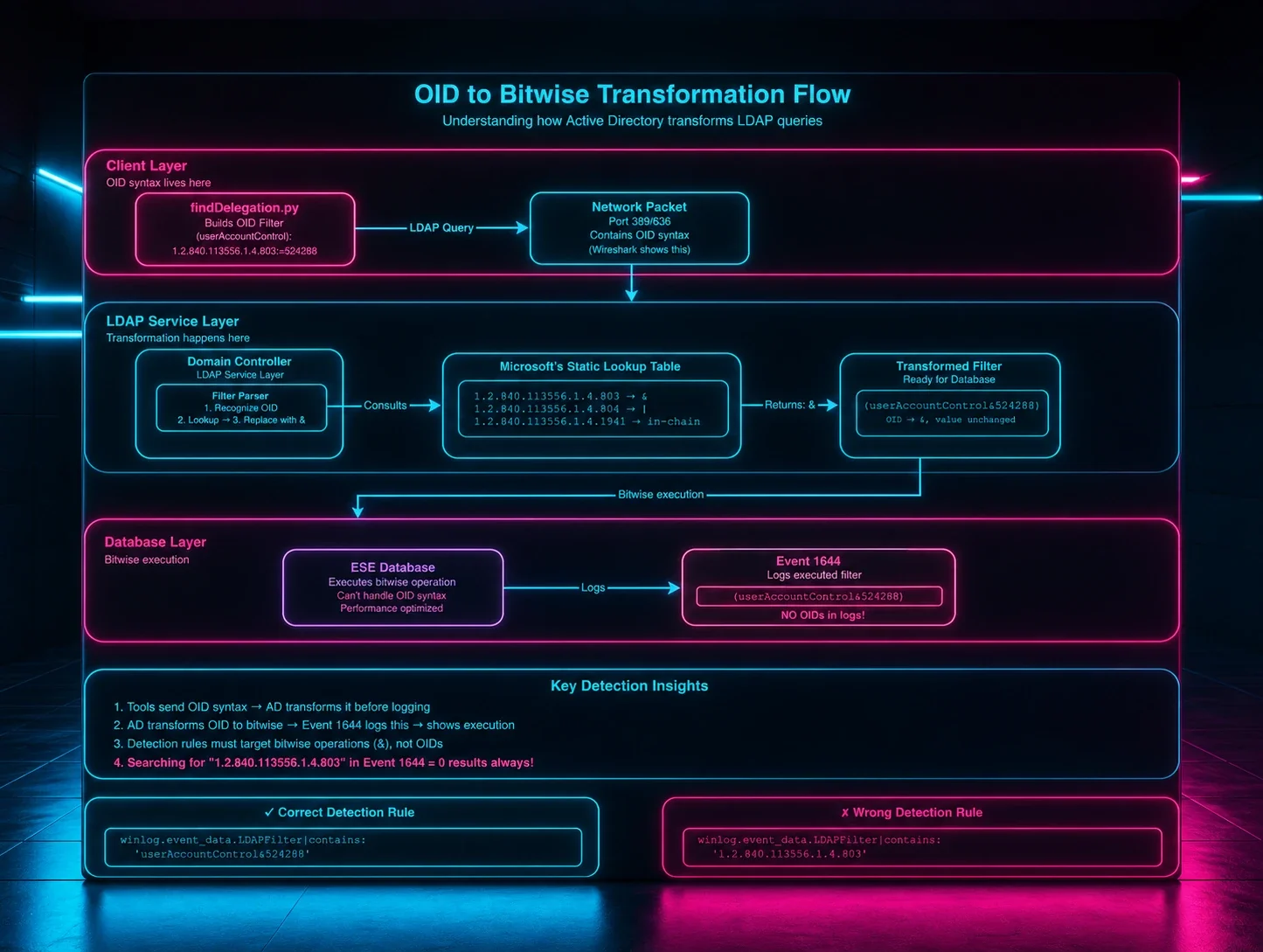
Here's the kicker: what you see in the source code isn't what shows up in the logs. Impacket sends queries like (userAccountControl:1.2.840.113556.1.4.803:=16777216), but Domain Controllers log them as (userAccountControl&16777216). Same behavior, different format. The OID 1.2.840.113556.1.4.803 gets replaced with the & bitwise operator. I've seen plenty of detection rules that look perfect on paper but never fire because they're hunting for OIDs in logs that only contain bitwise operations.
This took me longer than I'd like to admit to figure out. These transformations appear in Event ID 1644, which you'll find under:
Applications and Services Logs -> Directory Service
Note: Event 1644 isn't logged by default. To enable it on your Domain Controllers:
- Open Registry Editor and navigate to: HKEY_LOCAL_MACHINE\SYSTEM\CurrentControlSet\Services\NTDS\Diagnostics
- Set the value "15 Field Engineering" to 5
See Microsoft's documentation for details. On the client side, Event ID 30 lives in:
Applications and Services Logs -> Microsoft-Windows-LDAP-Client/Debug
Note: In Event Viewer, first click View -> Show Analytic and Debug Logs. Then navigate to Applications and Services Logs -> Microsoft-Windows-LDAP-Client, right-click Debug, and select Enable Log. Alternatively, you can use ETW tracing (countless other posts and tools cover this). Or you can use LDAPMon by Jonathan Johnson, which is my preferred tool, complementary to the event logs. Be aware this logs on the client machine, not the DC, so you'll need to enable it on the endpoints you want to monitor.
Both perspectives matter. The server shows what the Domain Controller recorded, while the client shows who made the query, from where, and with what process.
Why LDAP reconnaissance works so well
LDAP queries are perfect for reconnaissance because they're:
- Legitimate by design: Every domain-joined system uses LDAP constantly
- Information-rich: One query can dump users, groups, and permissions
- Too critical to disable: Restricting LDAP breaks Active Directory, so defenders can't block it
- Easy to overlook: Most teams watch authentication logs, not directory queries
This makes LDAP the ideal attack vector. It looks like normal traffic while giving attackers everything they need to map your environment.
The translation problem
The challenge isn't just that logs and code don't match, but that most people don't realize they don't match. I've reviewed dozens of LDAP detection rules that search for OID strings in Event 1644, which will never work because Domain Controllers translate those OIDs into bitwise operations before logging them.
Without accounting for this translation, rules that validate syntactically will never trigger. The gap between source code and event logs isn't a trivial point—it's a fundamental problem detection engineers need to solve.
How I build detection rules from source code
I developed this approach after getting burned too many times by rules that looked perfect but never fired. Here's the process that actually works:
-
Step 1: Source Code Analysis - See exactly how tools build queries
Start with the actual Impacket source, specifically findDelegation.py and similar LDAP query tools. You'll see exactly how they construct their LDAP filters, what attributes they request, and what patterns remain consistent across different queries.
-
Step 2: Lab Emulation - Generate real telemetry
Run the actual tools in a controlled environment. Don't guess what the logs might look like - generate real telemetry. This is where you'll discover those OID-to-bitwise transformations I mentioned earlier.
-
Step 3: Log Analysis - Discover OID transformations
This is where most people get stuck. You need to check Event ID 1644 and look for the translated queries. For example, findDelegation.py's filter contains (userAccountControl:1.2.840.113556.1.4.803:=16777216), but Event 1644 logs it as (userAccountControl & 16777216). The OID :1.2.840.113556.1.4.803:= becomes &. That transformation happens here, and if you don't catch it, your rules won't work.
-
Step 4: Sigma Development - Write rules based on actual logs
Now write your Sigma rules based on what you actually found in the logs, not what the code suggested would be there. Rules that search for OID strings will never fire.
-
Step 5: Validation & Tuning - Test and reduce false positives
The rule should fire on a known-good replay in the lab and remain quiet across one business day of normal traffic. If it's too noisy, you probably caught legitimate LDAP behavior.
-
Step 6: Attribution Enhancement - Correlate Event 1644 + Event 30
Pair server logs (Event 1644) with client logs (Event 30) for full attribution (note: Event 30 only works for tools using wldap32.dll). The server shows what happened, the client shows who did it.
- OUTPUT: Production-ready detection rules
Figure 1: My detection development process. Step 3 (Log Analysis) is highlighted as the critical stage where the OID-to-bitwise transformation is discovered, fundamentally changing how rules must be written.
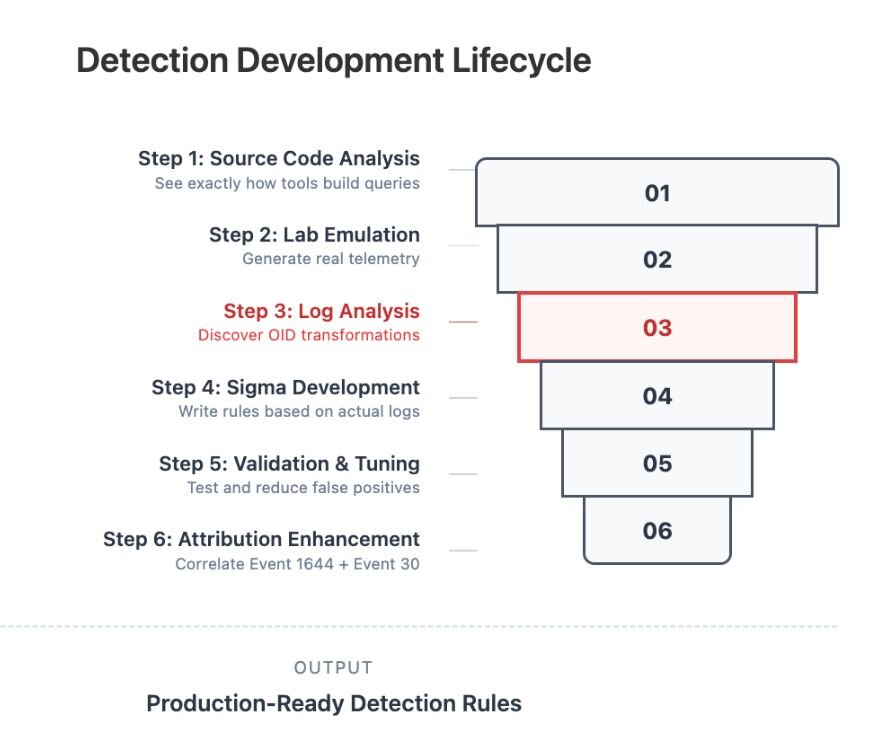
This method grounds detections in observable reality. Each step builds on the last, so you move from theory to evidence to coverage with a clear chain of custody.
Why this process works
- Traditional approach: Read docs, write rules, hope it works
- Systematic approach: Analyze code, generate logs, study transformations, build rules, and validate thoroughly
The systematic path surfaces the subtle differences between what tools send and what Domain Controllers log. Those differences are often why promising detections fail in production.
The validation gap
Most detection engineering stops at rule creation. The hard lessons show up in validation:
- Format mismatches: OIDs in code vs. bitwise in logs
- Timing and correlation: When events fire and how to stitch them
- False positives: Legitimate admin tools or inventory scans that look similar
- Attribution opportunities: Ways to tie anonymous server events to specific identities, hosts, and processes
Building detection confidence
By the end of this process, you should have more than a Sigma rule. You should have:
- Verified coverage: Proof that the rule fires on the intended behavior
- Known limits: Clarity on what it detects and what it misses
- Analyst context: Short notes on why it fires and what to check next
- Tuning guidance: Concrete levers for thresholds, filters, and correlations
This is how detection development moves from guesswork to engineering.
Step 1 - Actually reading the source code (and some basic Googling)
This might sound obvious, but you need to look at what these tools actually do, not what you think they do. Every Impacket script builds LDAP filters explicitly, and if you want to detect them, you need to understand the patterns.
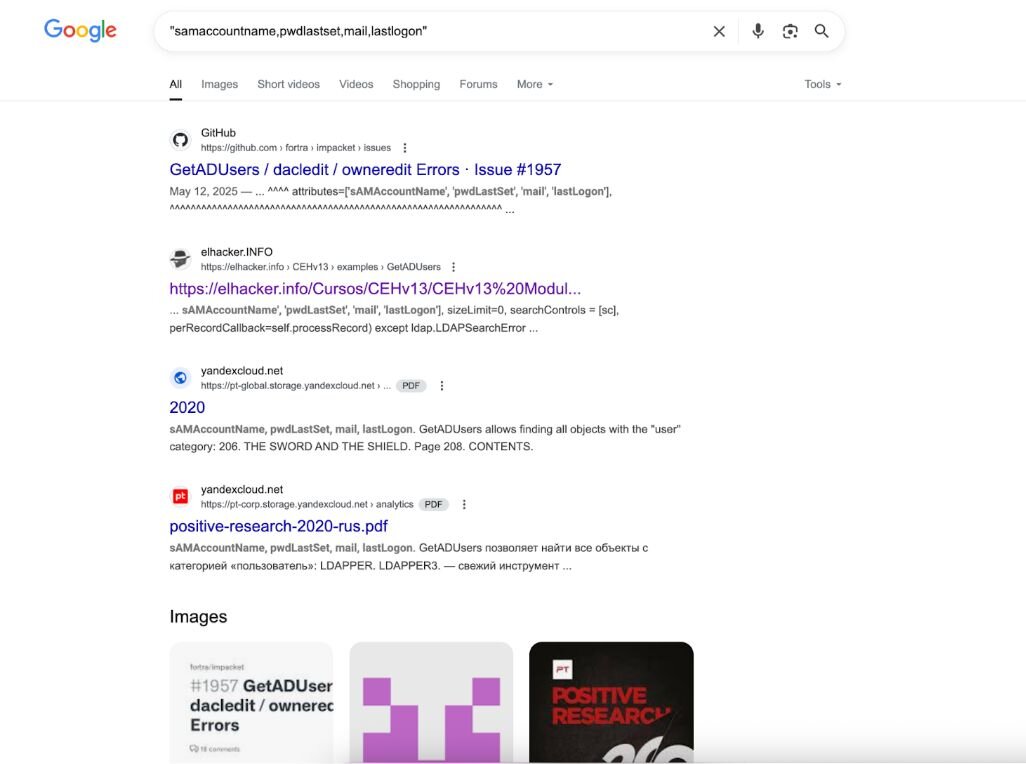
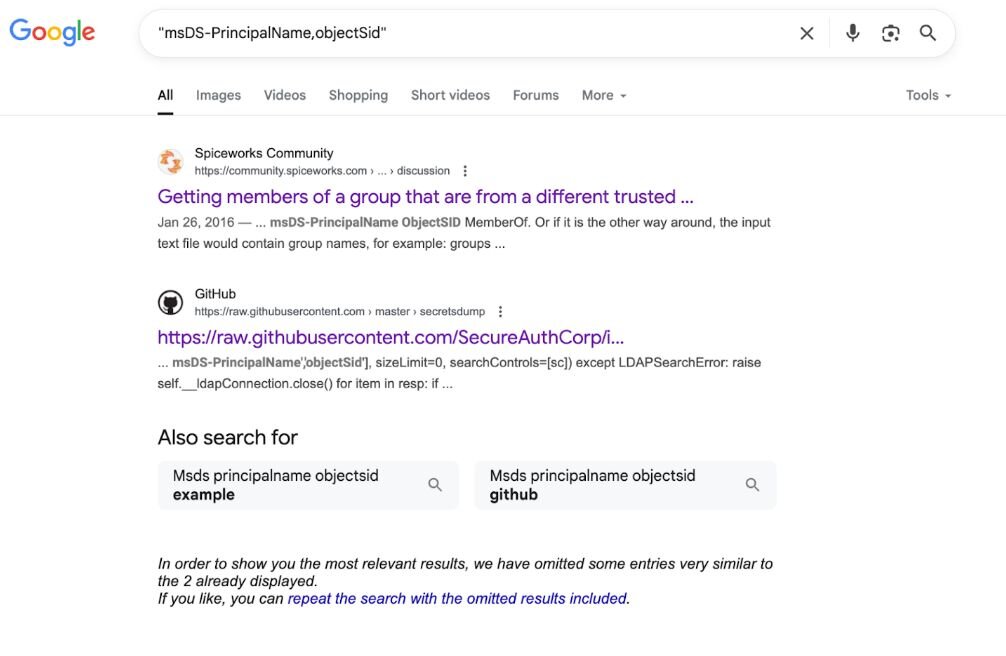
Sometimes the easiest way to find these patterns is just to Google them. I'm not kidding—basic searches like "sAMAccountName,pwdLastSet,mail,lastLogon" or "msDS-PrincipalName,objectSid" will show you exactly where these attribute combinations appear in the wild. GitHub issues, security research, even random PDFs from penetration testing courses—it's all there if you look.
Figure 2: Google search results for "samaccountname,pwdlastset,mail,lastlogon" showing GetADUsers.py references in GitHub issues and security training materials. The distinctive attribute combination appears across multiple sources, demonstrating how basic Google searches can reveal tool signatures.
Let's start with GetADUsers.py because it has this weird quirk that immediately caught my attention:
Figure 3: Code snippet of GetADUsers.py's LDAP search filter
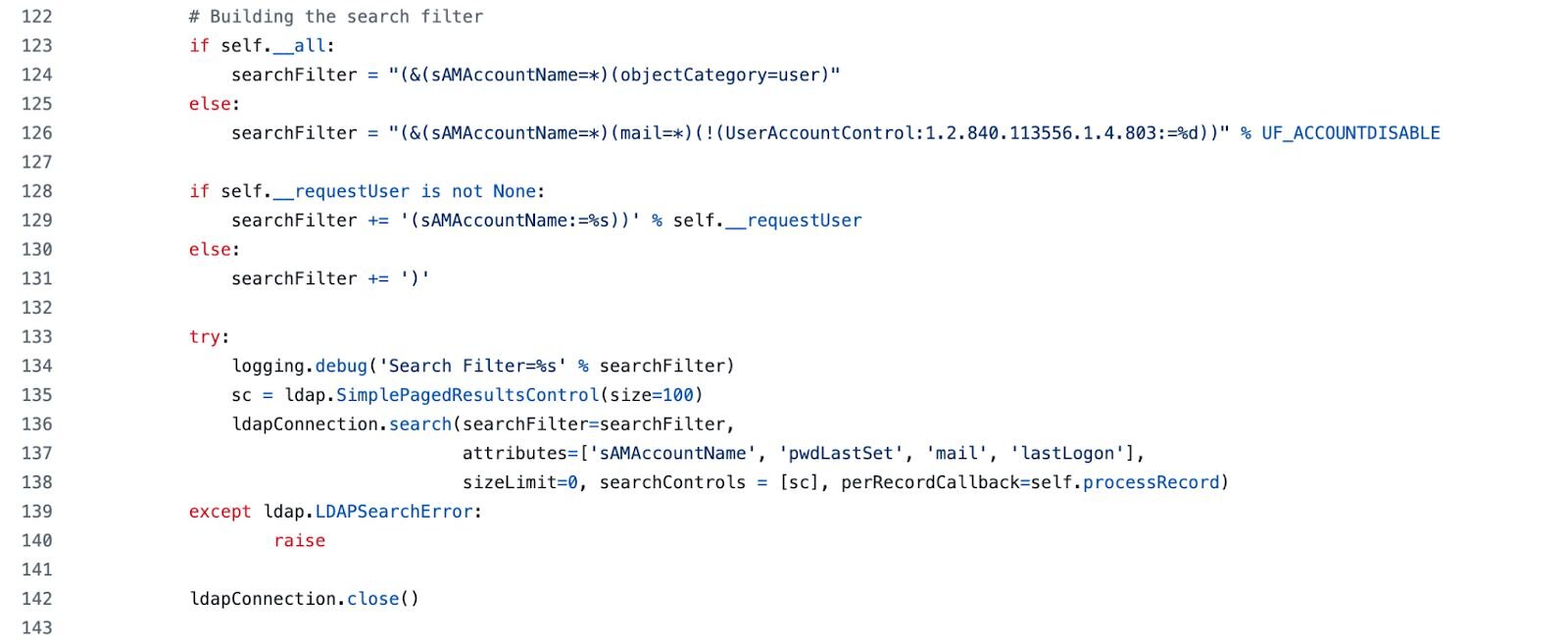
The first time I saw that mail attribute request, I was like "wtf, why is a recon tool asking for email addresses?" Turns out it's useful for building target lists for phishing, but it's also a pretty distinctive signature. What legitimate admin tool requests user accounts along with their email addresses, password last set and last logon times? Almost none.
Now look at secretsdump.py when supplying a LDAP filter (-ldapfilter) it goes completely minimal:
Figure 4: Code snippet of secretsdump.py's LDAP search filter

That's it. Just two attributes: msDS-PrincipalName and objectSid. But why those two together? That was a red flag to me.
- msDS-PrincipalName = cross-forest authentication/Kerberos principal names
- objectSid = unique security identifiers
- Together = "give me authentication names and security IDs for all users"
When you request both together, you're essentially asking for exactly what you need to target accounts for DCSync attacks. No legitimate admin tool needs this specific combination.
These two examples show you the spectrum—GetADUsers.py requests normal-looking attributes but in a suspicious combination, while secretsdump.py requests attributes that are almost never used by legitimate tools.
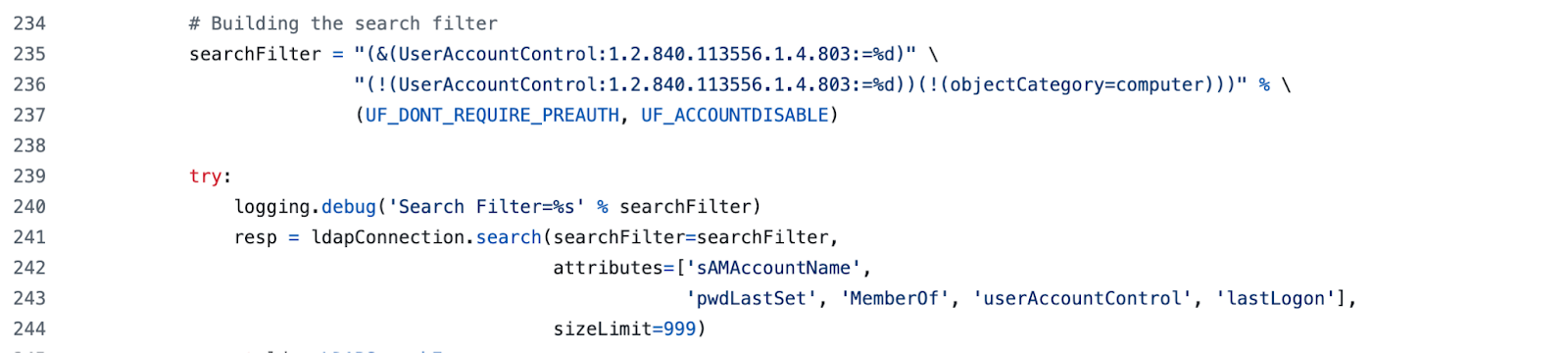
Other tools have their own patterns. GetNPUsers.py does AS-REP roasting:
Figure 6: Code snippet of GetNPUsers.py's LDAP search filter
GetUserSPNs.py looks for the infamous servicePrincipalName=* pattern:
Figure 7: Code snippet (1 of 2) of GetUserSPNs.py's LDAP search filter
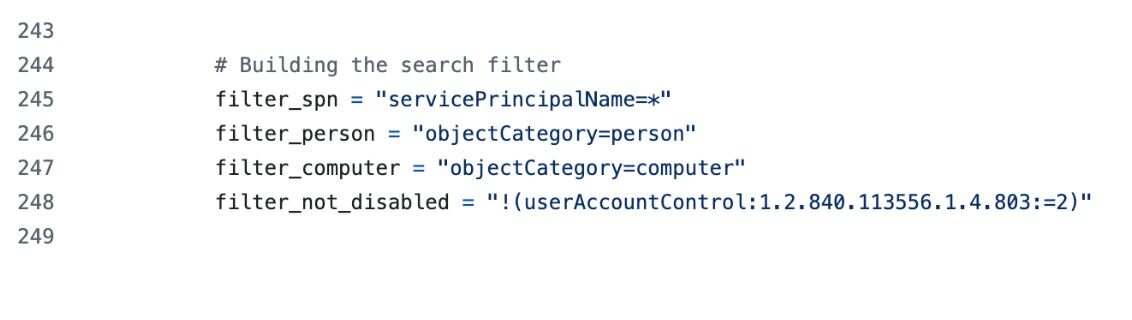
Figure 8: Code snippet (2 of 2) of GetUserSPNs.py's LDAP search filter
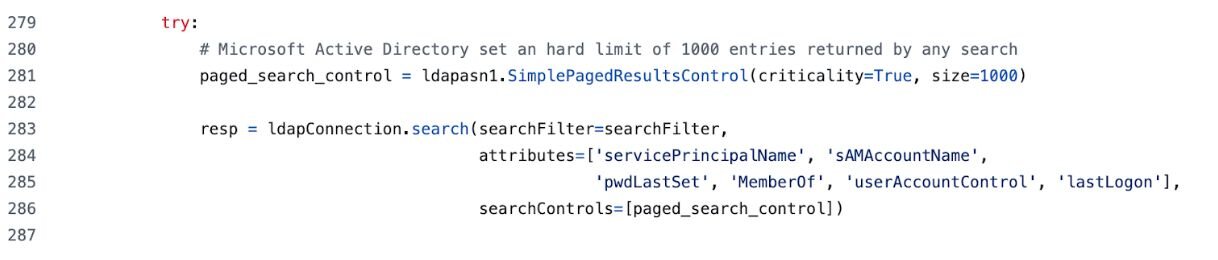
That's Kerberoasting prep right there.
GetADComputers.py requests OS information:
Figure 9: Code snippet of GetADComputers.py's LDAP search filter

Those operatingSystem and operatingSystemVersion attributes are dead giveaways for computer enumeration.
And findDelegation.py gets complex with delegation-specific attributes:
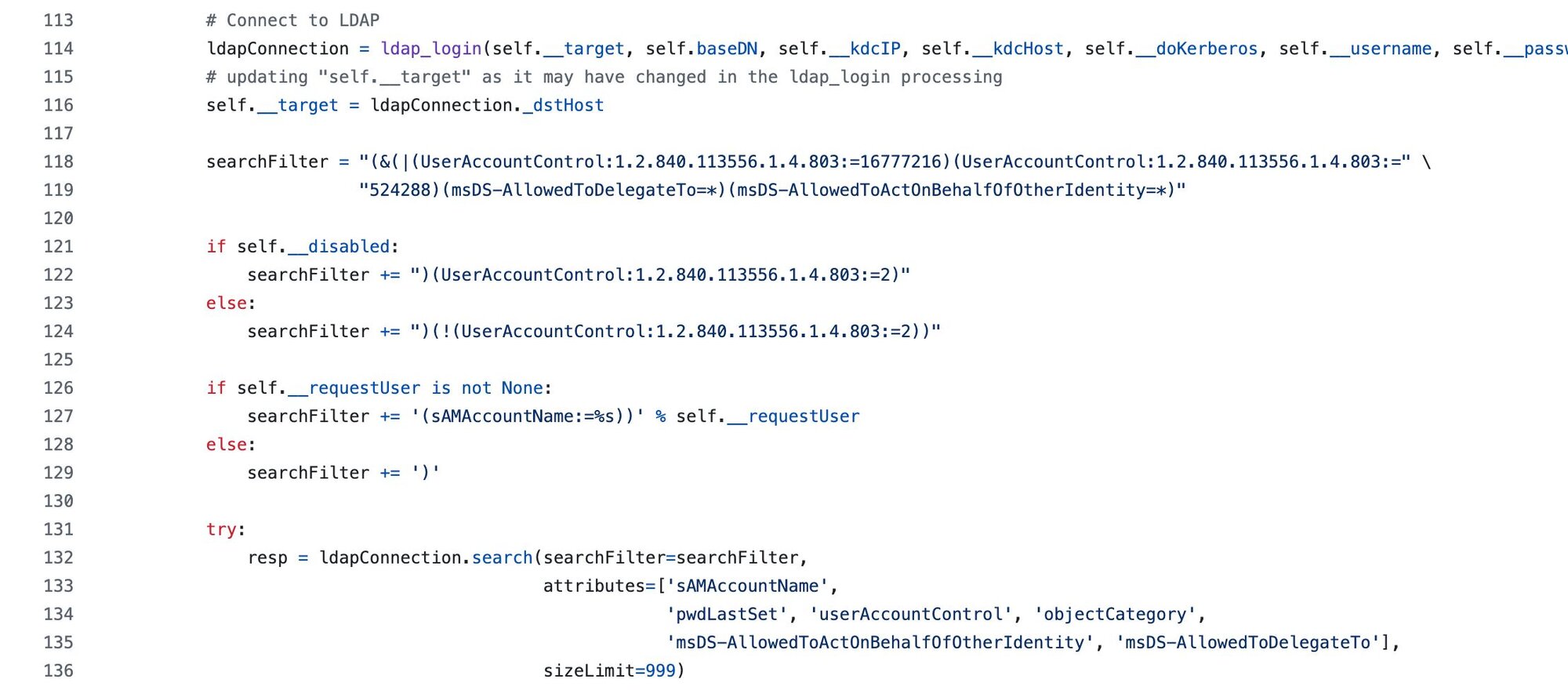
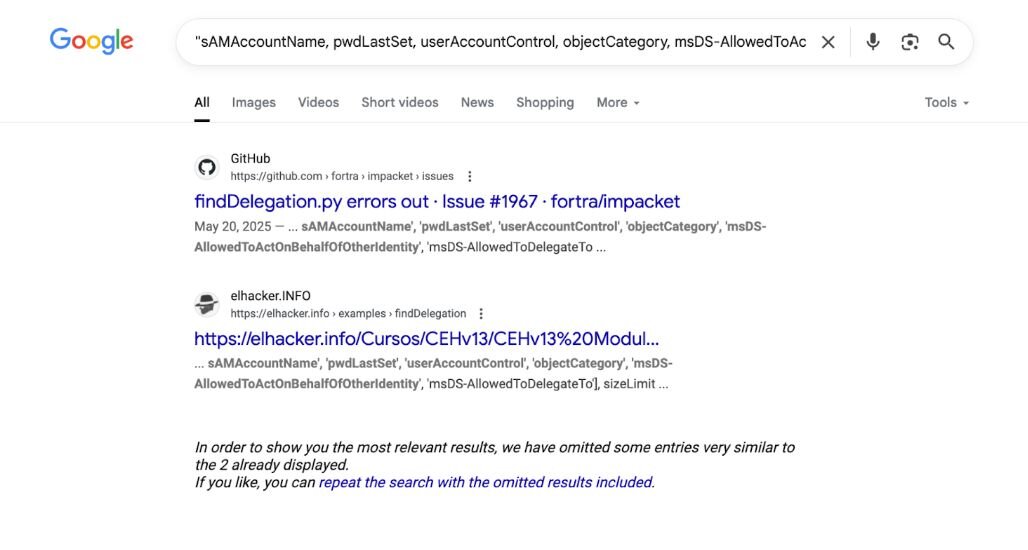
The point is, these attribute combinations are so specific that they're basically signatures. And the best part? They're all over the internet if you know how to search for them. Sometimes the simplest approach—just Googling the exact attribute list—tells you more about a tool's behavior than hours of code analysis.
Step 2 - Running it in the lab
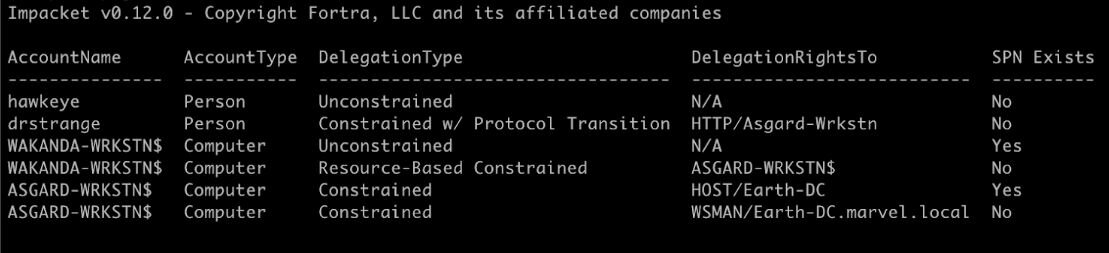
You can't just read the code and assume you know what the logs will look like. You have to actually run the tools and see what happens. Here's what I get when running findDelegation.py:
The Event 1644 log that gets generated looks like this:
Figure 13: Event 1644 corresponding to findDelegation.py activity logged on DC
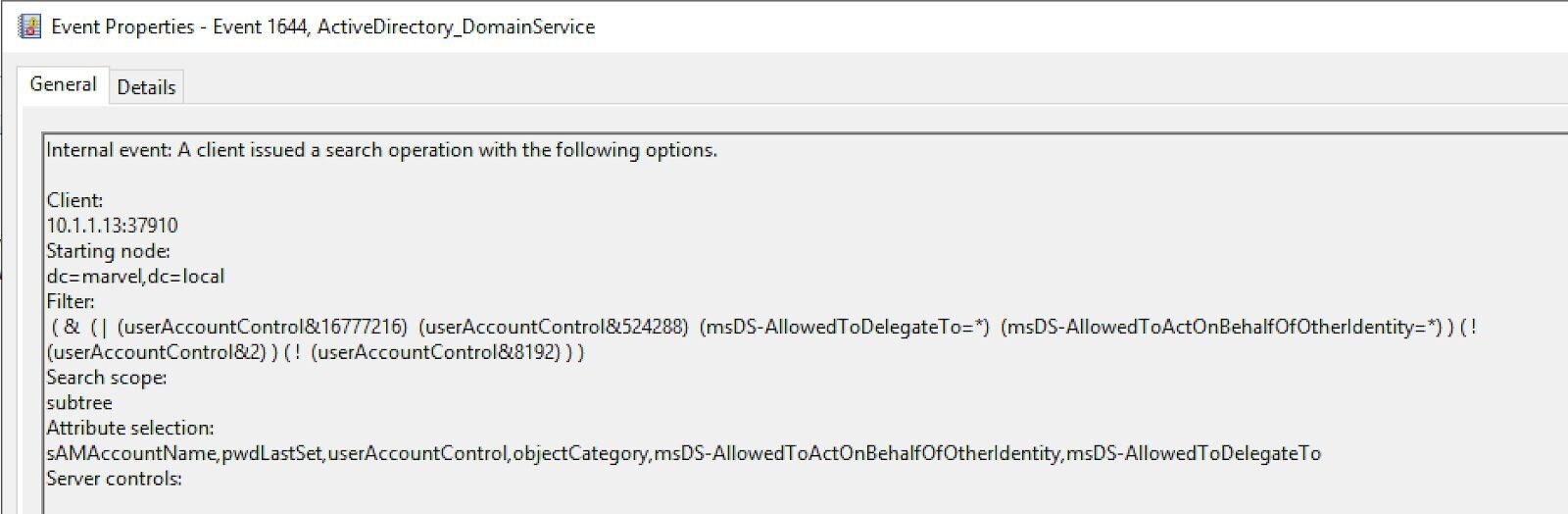
Notice something? The OIDs are completely gone. They've been replaced with bitwise operations using &. This is the key insight—what you see in the source code isn't what you get in the logs.
Step 3 - Why your rules don’t fire
This is where most detection engineers trip up, and honestly, it took me way too long to figure this out. What appears in the logs looks nothing like what's in the source code - and if you don't know this, your rules will never fire.
Look at this side by side:
What the tool sends: (userAccountControl:1.2.840.113556.1.4.803:=524288)
What Event 1644 logs: (userAccountControl&524288)
Same logical operation, totally different syntax. Here's why this happens: the OID 1.2.840.113556.1.4.803 is LDAP's way of saying "do a bitwise AND operation." Active Directory understands this and translates it into the actual bitwise operation before logging it in Event 1644.
So if you write a Sigma rule like this, they will never match:
selection:
winlog.event_data.LDAPFilter|contains: '1.2.840.113556.1.4.803'
You'll get zero hits because OIDs don't appear in Event 1644 logs. Instead, you need:
selection:
winlog.event_data.LDAPFilter|contains: 'userAccountControl&524288'
I spent three days debugging a rule once before I realized this. Don't be me.
Step 3.5 - Technical deep dive: How OID transformation actually works
The heart of the problem: How Active Directory transforms OID filters
This is the part that broke my brain for days. I kept writing detection rules that should have worked, validated the syntax, tested them in my SIEM, and got absolutely nothing. The logs were there, the events were firing, but my rules targeting 1.2.840.113556.1.4.803 never matched. It wasn't until I started looking at what was actually in Event 1644 that I realized the fundamental disconnect.
The journey of an LDAP query: From OID to bitwise
Let me walk you through exactly what happens when Impacket sends an LDAP query to a Domain Controller. This isn't about event logging - this is about how Active Directory's LDAP service actually processes queries at the protocol level.
Step 1: The tool crafts the query
When findDelegation.py wants to find accounts with delegation permissions, it builds this filter:
searchFilter = "(&(|(userAccountControl:1.2.840.113556.1.4.803:=16777216)(userAccountControl:1.2.840.113556.1.4.803:=" \
"524288)(msDS-AllowedToDelegateTo=*)(msDS-AllowedToActOnBehalfOfOtherIdentity=*)..."
#(truncated for brevity)
This is pure LDAP protocol syntax. The 1.2.840.113556.1.4.803 is Microsoft's registered OID (Object Identifier) which means "perform a bitwise AND matching operation." Think of OIDs as a standardized way for different LDAP implementations to understand complex operations without hardcoding vendor-specific syntax.
The tool packages this into an LDAP SearchRequest packet and sends it over port 389 (or 636 for LDAPS) to the Domain Controller.
Step 2: Domain Controller receives the raw query
The DC's LDAP service, running as part of lsass.exe, receives this SearchRequest. At this point, the OID is still completely intact. If you were doing a packet capture with Wireshark, you'd see the exact OID string in the LDAP packet.
For tools using Windows' native LDAP library (wldap32.dll), this is where Event 30 would capture the query if you had client-side logging enabled.Event 30 shows you what was actually sent over the wire, which is why it still contains the OID format.
Step 3: The critical translation inside the LDAP service
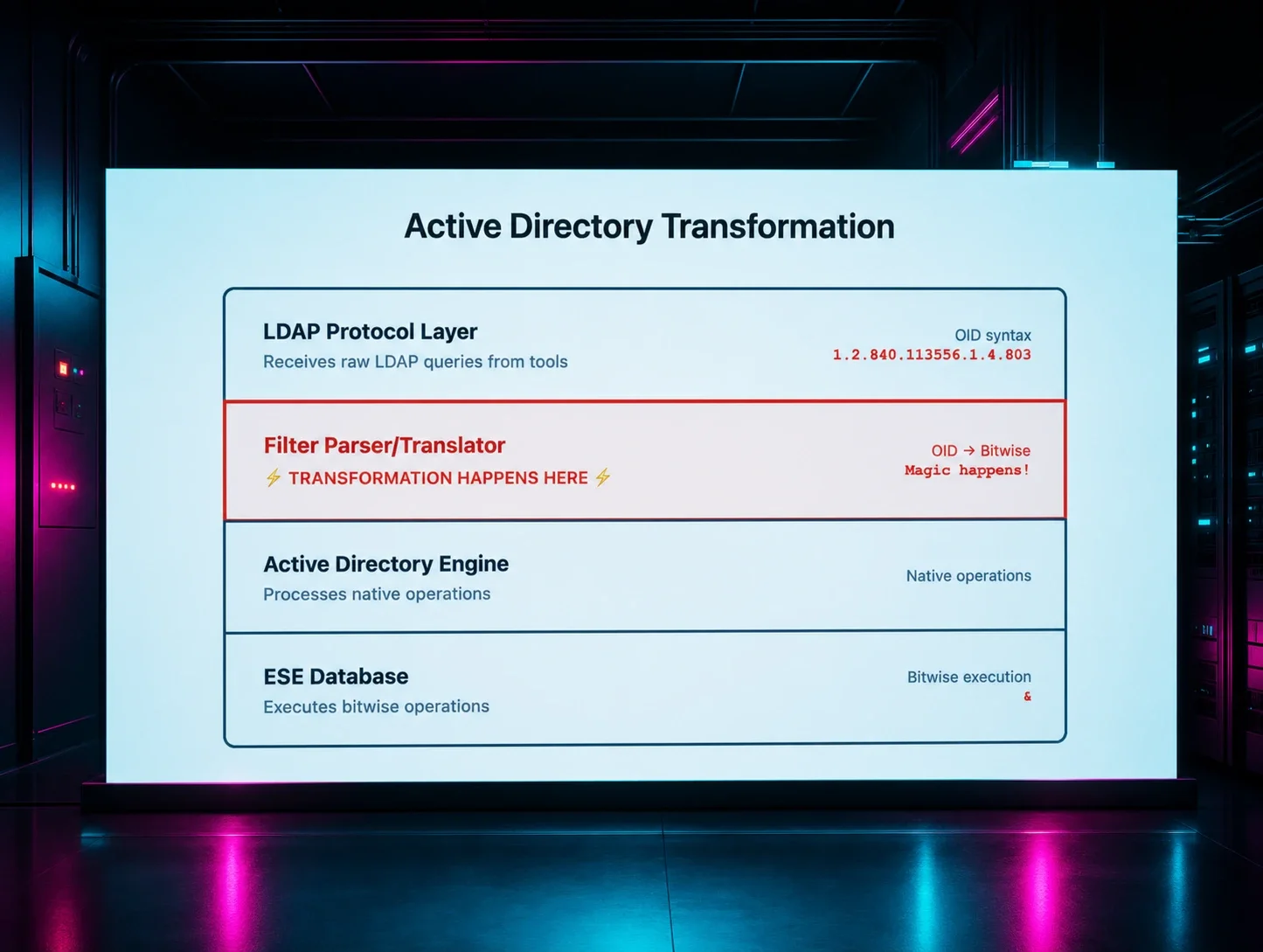
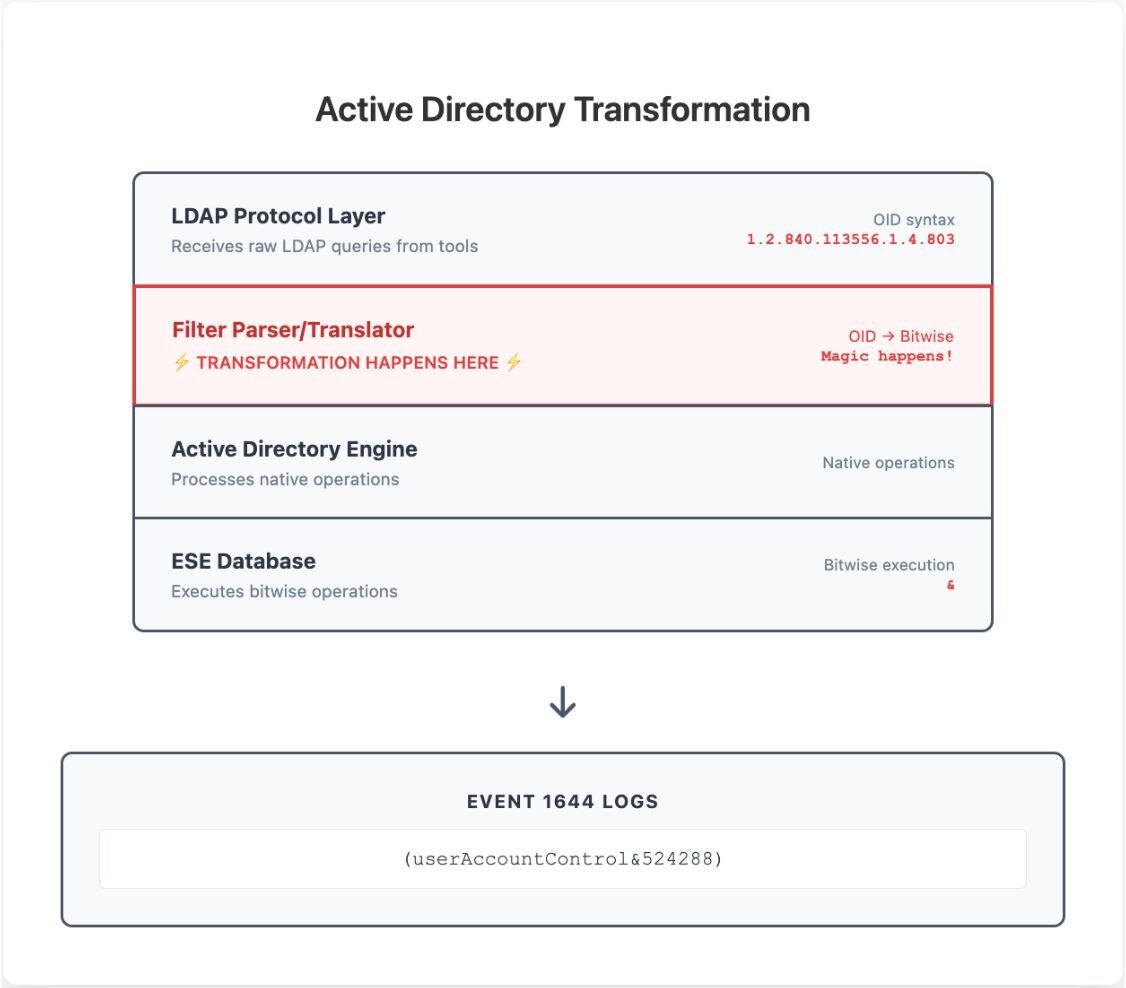
Here's where it gets interesting. The Domain Controller's LDAP service doesn't just pass queries directly to the database. There's a filter parsing engine inside Active Directory's LDAP implementation that has to interpret and validate the LDAP filter before it can be executed.
When the parser encounters userAccountControl:1.2.840.113556.1.4.803:=524288, it goes through this process:
- OID recognition: The parser sees the :1.2.840.113556.1.4.803: syntax and recognizes this as an extended matching rule
- Static lookup: It consults Microsoft's predefined mapping table to understand what this OID means
- Syntax translation: It converts the OID-based syntax into the equivalent native operation
- Validation: It ensures the target attribute (userAccountControl) supports the requested operation
The static mapping table
Microsoft has hardcoded a lookup table in their LDAP implementation that maps specific OIDs to operations. This isn't dynamic or calculated—it's a fixed set of mappings.
The mechanical transformation process
Let's trace through exactly what happens with the findDelegation.py filter to show how mechanical this process is:
For each OID occurrence:
- Original: userAccountControl:1.2.840.113556.1.4.803:=16777216
- Recognize pattern attribute:OID:=value
- Look up 1.2.840.113556.1.4.803 in static table
- Table returns bitwise AND operator (&)
- Result: userAccountControl&16777216
Complete findDelegation.py transformation:
Before (what Impacket sends):
(&(|(userAccountControl:1.2.840.113556.1.4.803:=16777216)
(userAccountControl:1.2.840.113556.1.4.803:=524288)
(msDS-AllowedToDelegateTo=*)
(msDS-AllowedToActOnBehalfOfOtherIdentity=*))
(!(userAccountControl:1.2.840.113556.1.4.803:=2)))
After (what Event 1644 logs):
( & ( | (userAccountControl&16777216) (userAccountControl&524288)
(msDS-AllowedToDelegateTo=*)
(msDS-AllowedToActOnBehalfOfOtherIdentity=*) ) ( !
(userAccountControl&2) ) )
Notice how:
- The LDAP matching rule userAccountControl:1.2.840.113556.1.4.803:= becomes userAccountControl& (the OID for bitwise AND is replaced with the & operator)
- Attribute names in Event 1644 use the canonical schema casing (e.g., userAccountControl)
- All numeric flag values (16777216, 524288, 2) remain exactly the same in decimal format
- Attributes without matching rules (like msDS-AllowedToDelegateTo=*) aren't changed at all
- The transformation is purely syntactic - converting LDAP extended matching rule syntax to Windows' internal query notation for logging
This transformation is deterministic and happens every single time. The static mapping table is most likely compiled into the Active Directory LDAP service binaries, which explains why the behavior is consistent across all AD environments and can't be modified through configuration.
Why does this transformation happen?
Microsoft doesn't document exactly why or where this transformation occurs. What we know from testing:
- The LDAP packet on the wire contains the OID syntax
- Event 1644 logs the bitwise syntax
- The transformation happens consistently across all AD versions I've tested
My best guess is that AD's internal query processing converts the protocol-level OID syntax into a native format before execution, and Event 1644 captures the post-conversion filter. But that's speculation. What matters for detection is knowing the transformation happens.
Figure 14: A conceptual view of Active Directory's LDAP query processing layers.
Where the matching rules are defined
The matching rule OIDs aren't stored as configurable objects in the Active Directory database. Instead, they're defined in Microsoft's protocol specifications and implemented directly in the LDAP service code.
You can find the authoritative definitions in two key Microsoft sources:
- MS-ADTS specification (section 3.1.1.3.4.4) - Documents the protocol-level behavior of LDAP matching rules
- Microsoft's Search Filter Syntax documentation - Provides the official implementation details and syntax examples
Microsoft's documentation defines these matching rule OIDs and their corresponding operators:
|
OID |
Capability Name |
Operator |
|
1.2.840.113556.1.4.803 |
LDAP_MATCHING_RULE_BIT_AND |
& |
|
1.2.840.113556.1.4.804 |
LDAP_MATCHING_RULE_BIT_OR |
| |
|
1.2.840.113556.1.4.1941 |
LDAP_MATCHING_RULE_TRANSITIVE_EVAL |
(special in-chain processing) |
|
1.2.840.113556.1.4.2253 |
LDAP_MATCHING_RULE_DN_WITH_DATA |
(DN binary linking) |
These matching rules appear to be implemented in the AD LDAP service. I haven't found them exposed as configurable schema objects.
Here's what matters for detection: when Event 1644 logs a query using these OIDs, the syntax gets transformed. The OID 1.2.840.113556.1.4.803 appears as & in the logged filter. In my testing across multiple AD environments, this behavior has been consistent.
Quick note: Most tools use .803 (AND), but .804 (OR) works too and transforms to |. Your detection rules should handle both operators. We'll cover this in Part 2.
Microsoft's documentation confirms these OIDs follow the standard LDAP extensibleMatch syntax. Tools like Impacket use this same standard when constructing queries. The transformation happens somewhere between the LDAP protocol layer and the event log. Microsoft doesn't document exactly where, but for detection purposes, knowing it happens is what matters.
This would explain why:
- I couldn't find the matching rules as queryable schema objects
- The transformation behavior appears consistent across AD environments
- Rules searching for OID strings in Event 1644 most likely won't match
Detection engineering impacts
Understanding this transformation matters because it explains why so many LDAP detection attempts fail. When I first started writing rules for Impacket detection, I made the same mistake everyone makes—I assumed the logs would contain what the tools sent.
In practice, it's more complicated:
- Protocol level: OID syntax (what tools send)
- Execution level: Bitwise syntax (what AD processes)
- Logging level: Post-transformation syntax (what Event 1644 records)
Detection rules need to target the execution level, not the protocol level. This is why searching for 1.2.840.113556.1.4.803 in Event 1644 will always return zero results.
Practical implications
This technical understanding has several practical implications for detection engineering:
Tool-agnostic detection: Since the transformation is deterministic, any tool using 1.2.840.113556.1.4.803 will produce the same bitwise signature in Event 1644. Your rules will catch Impacket, custom PowerShell scripts, and any other tool using this OID.
Future-proof rules: Microsoft can't change this transformation without breaking Active Directory's fundamental architecture. Your bitwise-based rules will continue working even if tools evolve.
Attribution through correlation: For tools that use wldap32.dll (like Rubeus and PowerShell's AD module), Event 30 captures OID syntax while Event 1644 captures bitwise syntax. Correlating both proves specific tool usage. Event 30 proves the tool sent OID-based queries, and Event 1644 proves AD executed them. Note that Impacket and other tools with custom LDAP implementations won't generate Event 30.
Validation strategy: You can test your understanding by running queries with different tools and observing the consistent transformation pattern. PowerShell's Active Directory module, ldapsearch, and custom tools should all produce the same bitwise signatures when using the same OIDs.
Validation: Proving the transformation
If you want to see this transformation in action, here's how to validate it yourself:
- Enable Event 1644 logging on a test Domain Controller
- Run any LDAP tool that uses OID-based filters (Impacket, PowerShell AD module, custom scripts)
- Capture the network traffic with Wireshark to see the OID in the LDAP packet
- Check Event 1644 to see the bitwise operation in the log
- Compare the two to confirm the transformation
This hands-on validation is what convinced me that the transformation was real and predictable, not some weird edge case or logging quirk.
The transformation from OID to bitwise isn't a bug - it's a feature. It's how Active Directory balances standards compliance with performance requirements. Understanding it is the key to writing LDAP detection rules that actually work in production environments.
Step 4 - Getting attribution right
Event 1644 tells you what happened on the Domain Controller, but it doesn't tell you much about who did it or how. That's where Event 30 comes in handy, assuming you've enabled LDAP client logging. Note that Event 30 is logged on the source machine making the query, not the DC. This requires enabling LDAP client debug logging (Microsoft-Windows-LDAP-Client/Debug), which is disabled by default and can generate significant volume.
Important caveat: Event 30 is only generated by tools that use Windows' native LDAP client library (wldap32.dll). This includes Rubeus, PowerShell's AD module, and most Windows-native tools. Impacket uses its own LDAP implementation and won't generate Event 30, so for Impacket detection you're relying on Event 1644 alone.
Event 1644 gives you the what, when, and where: what filter was executed, when it happened, and what the search base was. But it's missing the who and how: what tool made the query, what process, from what specific system.
For tools that use wldap32.dll, Event 30 captures the query exactly as the tool sent it. Here's an example from Rubeus:
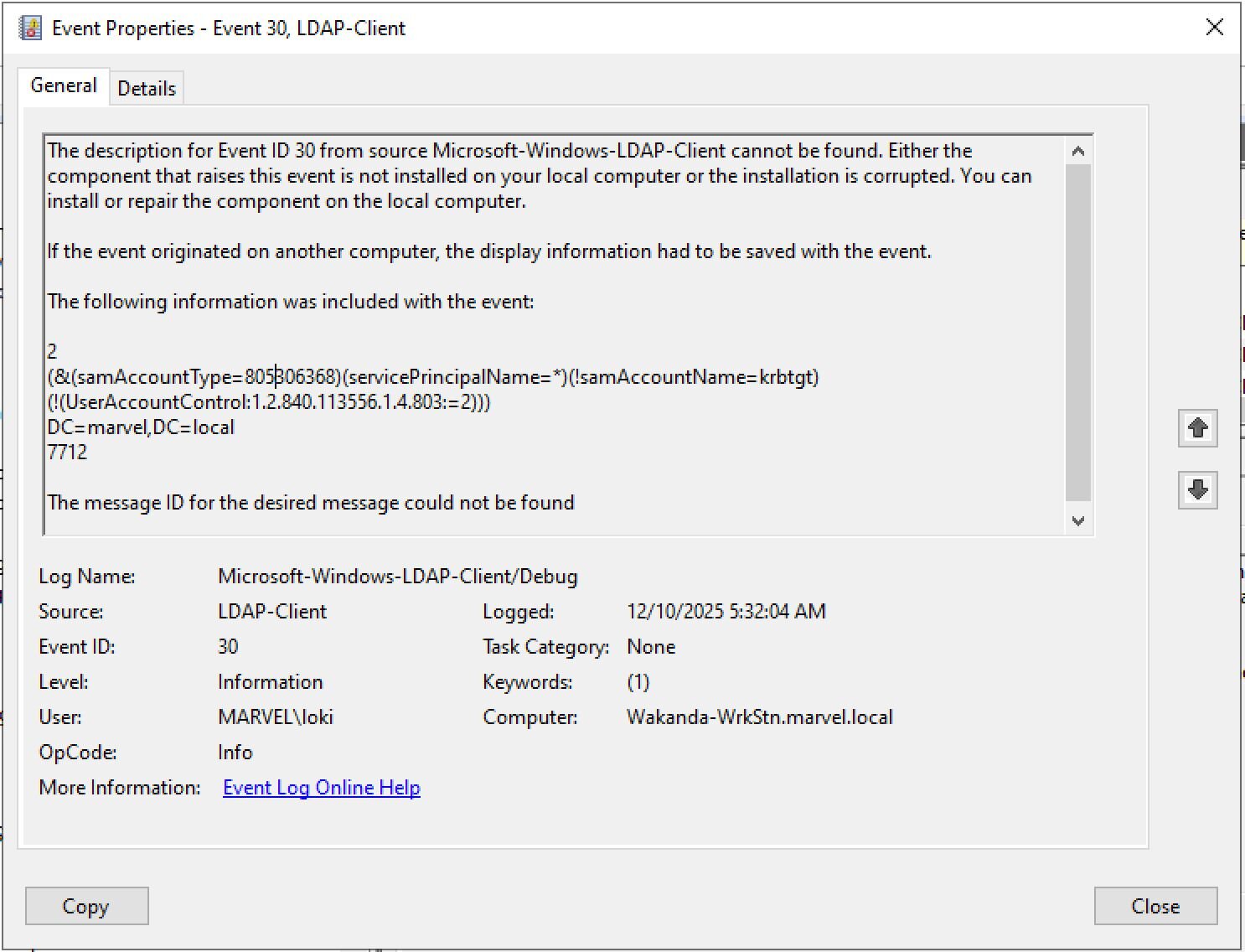
See the OID format? 1.2.840.113556.1.4.803:=2 that's what the client sent before AD translated it to bitwise.
When you correlate these by timestamp and client IP, you get the full picture. Event 30 proves the OID pattern was used, and Event 1644 confirms AD processed it as a bitwise operation. Together they give you definitive attribution instead of just "someone did LDAP queries."
This correlation is valuable for tools like Rubeus and PowerShell-based reconnaissance. For Impacket and other tools with custom LDAP stacks, you'll need to rely on Event 1644 patterns alone.
Step 5 - Writing rules that actually work
Now that you understand what actually gets logged, you can write rules that fire.
Note: The following are detection logic excerpts showing the key selection criteria. Field names use Elastic Common Schema (ECS). Adjust for your SIEM. The Source filter matches remote IP:port connections, filtering out local DC operations.
findDelegation.py (Delegation Reconnaissance):
detection:
selection_filter:
event.code: 1644
winlog.event_data.Source|re: '^\d{1,3}\.\d{1,3}\.\d{1,3}\.\d{1,3}:\d{1,5}$'
winlog.event_data.LDAPFilter|contains|all:
- 'userAccountControl&16777216'
- 'userAccountControl&524288'
selection_attrs:
winlog.event_data.AttributesRequested|contains|all:
- 'msDS-AllowedToDelegateTo'
- 'msDS-AllowedToActOnBehalfOfOtherIdentity'
condition: selection_filter and selection_attrs
GetNPUsers.py (AS-REP Roasting):
detection:
selection:
event.code: 1644
winlog.event_data.Source|re: '^\d{1,3}\.\d{1,3}\.\d{1,3}\.\d{1,3}:\d{1,5}$'
winlog.event_data.LDAPFilter|contains|all:
- 'sAMAccountType=805306368'
- 'userAccountControl&4194304'
condition: selection
GetUserSPNs.py (Kerberoasting):
detection:
selection:
event.code: 1644
winlog.event_data.Source|re: '^\d{1,3}\.\d{1,3}\.\d{1,3}\.\d{1,3}:\d{1,5}$'
winlog.event_data.LDAPFilter|contains: '(servicePrincipalName=*)'
condition: selection
Note: This rule is intentionally broader than the others. For more precise Kerberoasting filters, see this post.
GetADUsers.py (User Enumeration):
detection:
selection_event:
event.code: 1644
selection_filter:
winlog.event_data.LDAPFilter|contains: '(sAMAccountName=*)'
selection_attrs:
winlog.event_data.AttributesRequested|contains|all:
- 'sAMAccountName'
- 'pwdLastSet'
- 'mail'
- 'lastLogon'
selection_attrs_count:
winlog.event_data.AttributesRequested_Count: 4
selection_src:
winlog.event_data.Source|re: '^\d{1,3}\.\d{1,3}\.\d{1,3}\.\d{1,3}:\d{1,5}$'
condition: selection_event and selection_filter and selection_attrs and selection_attrs_count and selection_src
GetADComputers.py (Computer Enumeration):
detection:
selection_event:
event.code: 1644
selection_filter_short:
winlog.event_data.LDAPFilter|contains|all:
- '(objectCategory=computer)'
- '(objectClass=computer)'
selection_filter_long:
winlog.event_data.LDAPFilter|contains|all:
- '(objectCategory=CN=Computer,CN=Schema,CN=Configuration,'
- '(objectClass=computer)'
selection_attrs:
winlog.event_data.AttributesRequested|contains|all:
- 'sAMAccountName'
- 'dNSHostName'
- 'operatingSystem'
- 'operatingSystemVersion'
selection_attrs_count:
winlog.event_data.AttributesRequested_Count: 4
selection_src:
winlog.event_data.Source|re: '^\d{1,3}\.\d{1,3}\.\d{1,3}\.\d{1,3}:\d{1,5}$'
condition: selection_event and (selection_filter_short or selection_filter_long) and selection_attrs and selection_attrs_count and selection_src
secretsdump.py (DCSync Prep):
detection:
selection_event:
event.code: 1644
selection_attrs:
winlog.event_data.AttributesRequested|contains|all:
- 'msDS-PrincipalName'
- 'objectSid'
selection_attrs_count:
winlog.event_data.AttributesRequested_Count: 2
selection_src:
winlog.event_data.Source|re: '^\d{1,3}\.\d{1,3}\.\d{1,3}\.\d{1,3}:\d{1,5}$'
condition: selection_event and selection_attrs and selection_attrs_count and selection_src
Step 6 - Testing and not fooling yourself
Testing is where you find out if your rules actually work or if you're just fooling yourself. I've seen too many rules that look perfect but never fire on real activity.
When I first started building detection rules for Impacket's delegation queries, my initial approach seemed logical - look for the exact LDAP syntax that Impacket sends:
# My first attempt - seemed logical
selection:
winlog.event_data.LDAPFilter|contains: '1.2.840.113556.1.4.803'
# Result: 0 hits, always
The rule deployed successfully. It looked correct. But it never fired. Not once.
That's when I dug into Event 1644 logs and discovered the OID transformation we covered earlier. Windows doesn't log the LDAP matching rule OIDs—it logs the converted bitwise syntax. Once I understood this, the fix was straightforward:
# After understanding the transformation
selection:
winlog.event_data.LDAPFilter|contains: 'userAccountControl&'
# Result: Actually fires on Impacket activity
AD usually preserves case, but not always:
winlog.event_data.LDAPFilter|contains:
- 'useraccountcontrol&524288'
And different tools might use different bitwise operators:
winlog.event_data.LDAPFilter|contains|any:
- 'userAccountControl&'
- 'userAccountControl|'
The real test is: does your rule fire on a known-good replay in the lab, and does it stay quiet during a normal business day? If it fails either test, you've got more work to do.
What I've learned the hard way
After years of writing LDAP detection rules, here's what really matters:
- Always validate against actual logs, not theoretical behavior. I can't count how many rules I've seen that target OIDs in Event 1644—they look smart but never fire.
- Event 1644 by itself isn't enough for attribution. Pairing it with Event 30 turns "someone did LDAP queries" into "this specific tool from this IP performed delegation reconnaissance." (Note: This correlation works for tools using wldap32.dll like Rubeus, but not for Impacket which has its own LDAP stack.)
- Tools evolve. Impacket gets updated, new tools emerge, and attack techniques change. Build methodologies, not just rules. The process of analyzing code, generating telemetry, understanding transformations, and validating coverage works regardless of which specific tool you're trying to detect.
- Don't overlook the obvious patterns. Everyone focuses on complex LDAP filters, but tools requesting weird attribute combinations like msDS-PrincipalName,objectSid are often easier to detect and more reliable indicators.
The next layer of Hell: When your perfect rule still doesn't match
We've solved the OID transformation puzzle. You now know to search for userAccountControl&524288 instead of 1.2.840.113556.1.4.803. But here's the thing - even with this knowledge, your rules might still fail.
Why? Because there's another transformation happening that's even more insidious: whitespace normalization (or the lack thereof).
That beautiful, clean LDAP filter in your detection rule? It assumes the log will be equally clean. Spoiler: it won't be. Active Directory's Event 1644 preserves every space, tab, and newline exactly as processed. And different tools format their filters differently. The same logical query can appear as:
- (userAccountControl&524288)
- ( userAccountControl & 524288 )
- (userAccountControl&524288 )
- Even with newlines and tabs in production logs
In Part 2, we'll tackle the whitespace nightmare and show you how to write Sigma rules that handle the chaos of real-world LDAP logs. Because knowing about OID transformation is only half the battle—your rules still need to match what actually gets logged, spaces and all.
The bigger picture
The specific rules in this blog will get outdated as tools change. The methodology won't. Always start by understanding tool behavior through code analysis. Always test in controlled environments. Always validate against actual telemetry. Always iterate and improve.
This approach works for any LDAP-based reconnaissance tool—BloodHound collectors, custom PowerShell scripts, commercial pen testing tools, whatever. The process stays the same: analyze, emulate, understand the transformation, build rules, and validate exhaustively.
Understanding the OID-to-bitwise transformation is just the beginning. The real value comes from building a systematic approach that turns any offensive LDAP behavior into reliable detection logic. That's how you move from reactive detection to proactive coverage.
What we covered
Throughout this process, I've used these Impacket tools as examples:
- GetNPUsers.py for AS-REP Roasting detection
- GetADUsers.py for user enumeration
- GetADComputers.py for computer inventory
- GetUserSPNs.py for Kerberoasting preparation
- findDelegation.py for delegation reconnaissance
- secretsdump.py with -ldapfilter for DCSync preparation
The techniques apply to any tool that uses LDAP for Active Directory reconnaissance. The key is understanding that what you see in source code isn't what you get in logs, and building a process that accounts for that gap.
Thanks to Jonathan Johnson, Charlie Clark, Anton Ovrutsky, Matt Anderson, Tyler Bohlmann, Lindsey O'Donnell-Welch, Michael Haag, Nasreddine Bencherchali, and Adam Bienvenu for their help in reviewing this post.