




Cybersecurity 101
What Is Debug Logging? Benefits & Best Practices
Learn what debug logging is, how it helps in cybersecurity, and key best practices to reduce risk and boost incident response
What is Device Code Phishing?
Written by: Lizzie Danielson
Published: 9/25/2026
Device code phishing is a social engineering attack that tricks someone into authorizing an attacker’s device through a legitimate login flow. The attacker generates a real device code, sends it to the victim in a convincing email or message, and directs them to a genuine authentication page—often microsoft.com/devicelogin. When the victim enters the code and completes authentication, they authorize the attacker’s session instead of their own.
Unlike traditional phishing, this attack may not involve a fake login page, stolen password, malware, or a bypassed MFA prompt. The victim can complete MFA successfully while the attacker receives the resulting OAuth tokens.
Device code authentication is a legitimate way to sign in when a device can’t easily display a full browser or accept a username and password.
For example, when setting up a streaming app on a smart television:
This separates the device displaying the code from the device used to authenticate.
The design is convenient, but it creates an opportunity for attackers to start the authentication process themselves.
A typical attack follows this sequence:
The crucial detail is that the victim is authenticating the attacker’s pre-existing session, not starting a session for themselves.
Traditional phishing awareness often teaches people to look for:
Device code phishing can avoid many of these warning signs. The URL may be legitimate, the code may be valid, and the user may be completing a normal authentication process.
Email security tools can also fall short when attackers use trusted infrastructure. In the EvilTokens campaign, Huntress observed legitimate authentication flows, clean URLs, and infrastructure associated with trusted services, allowing messages to pass through multiple email security controls.
In February 2025, the suspected Russian state-sponsored threat actor Storm-2372 used convincing communications through platforms like WhatsApp, Signal, and Microsoft Teams. After building rapport, the attackers directed targets to enter attacker-generated device codes on legitimate Microsoft login pages.
Microsoft 365 users in government, defense, telecommunications, healthcare, energy, and other sectors were targeted. The campaign demonstrates how device code phishing can combine impersonation, social engineering, and legitimate identity infrastructure.
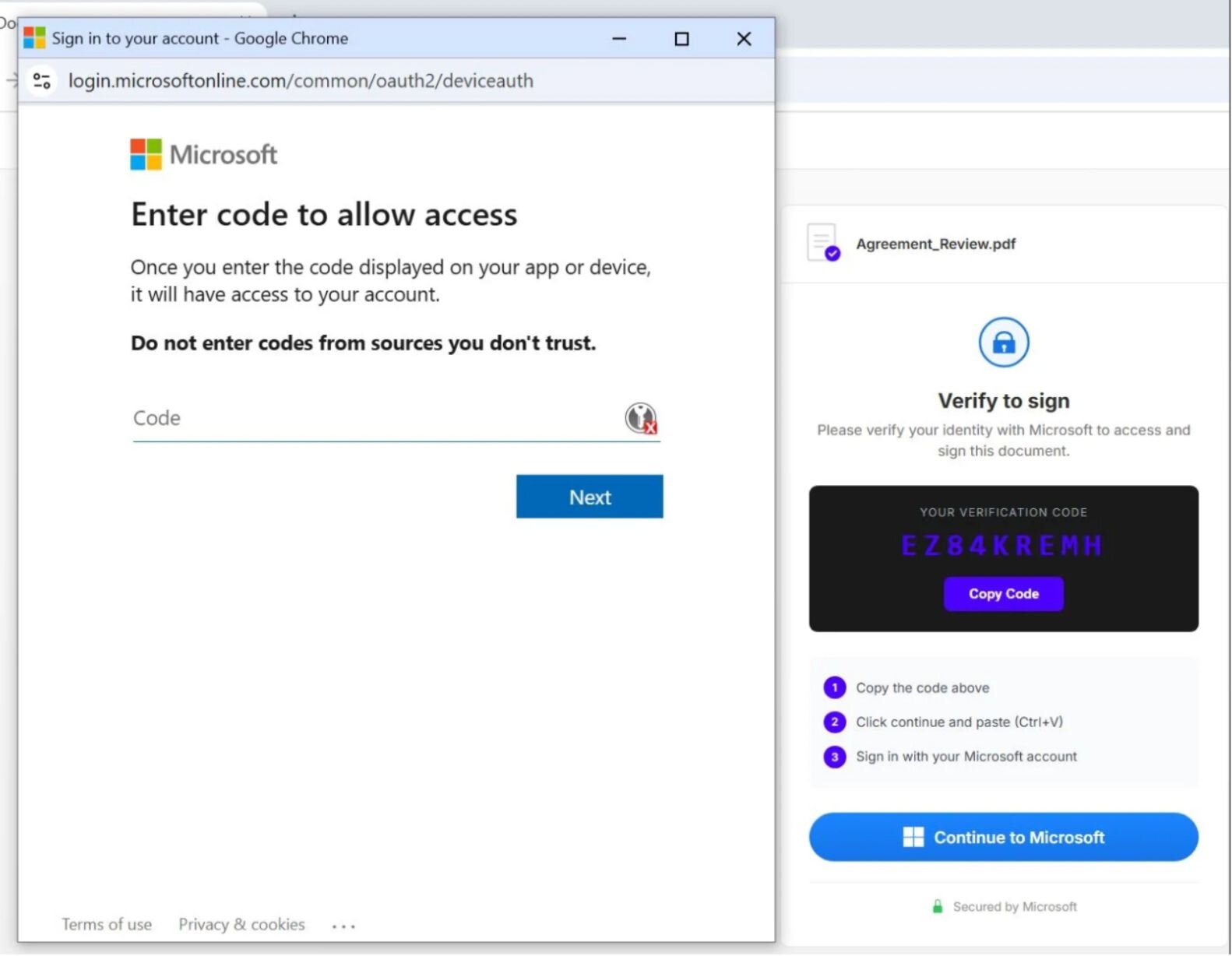
Figure 1: Example of a device code phishing lure.
In March 2026, Huntress investigated a large-scale campaign that affected 344 organizations across the United States, Canada, Australia, New Zealand, and Germany. Attackers used Railway, a legitimate platform-as-a-service provider, as part of the token-harvesting infrastructure.
The campaign used highly personalized lures, including construction bid requests, DocuSign-themed messages, voicemail notifications, and document-sharing prompts. The campaign was later attributed to EvilTokens, a phishing-as-a-service platform that included automated lure generation and dynamic device-code creation.
Huntress observed Kali365 activity involving Microsoft 365 device-code authentication events from Tencent Cloud infrastructure. The platform included multiple lure templates, token management, mailbox access, and post-compromise capabilities.
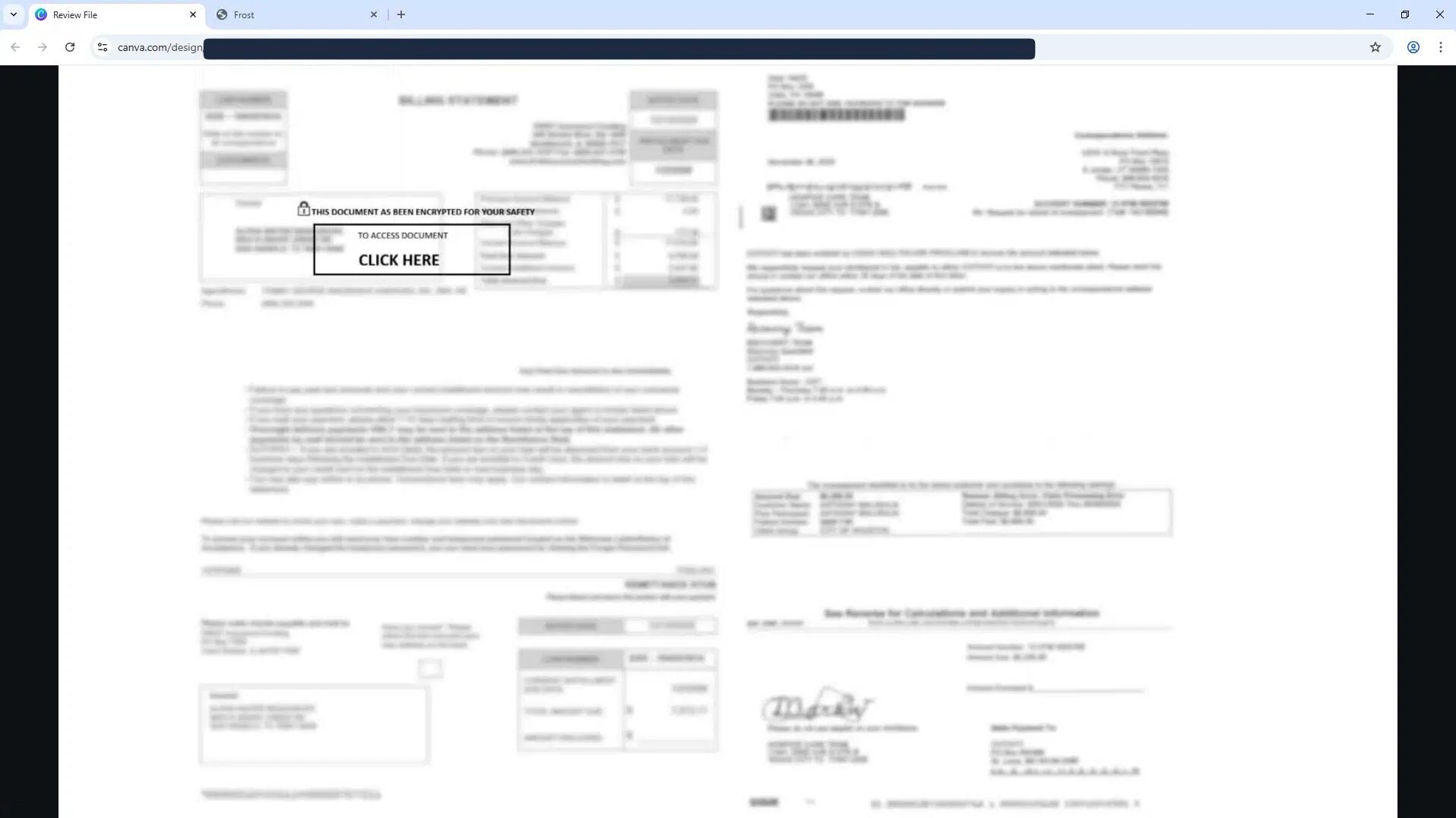
In one observed flow, a victim clicked through a document-themed lure, opened a legitimate Microsoft login page, entered the supplied code, and was redirected to an “expired document” page hosted on Canva. Huntress reported that the attacker gained persistent access in as little as 42 seconds.
Figure 2: Canva-hosted phishing website
Device code phishing uses a legitimate authentication flow to make malicious activity look like a normal sign-in. Read the report to see how attackers combine this technique with AI-powered lures, token theft, and automated follow-on activity.
Not necessarily. MFA can still be completed during the attack, but the authentication is applied to the attacker’s device-code session. The resulting token may carry an MFA claim, allowing the attacker to access resources without completing another MFA challenge.
MFA remains important, but organizations should pair it with controls that restrict authentication context, device state, application use, and authentication method.
Phishing-resistant methods like FIDO2 security keys and passkeys can strengthen identity security, but enabling them does not automatically disable device code authentication. Device code flow must be explicitly blocked or restricted where appropriate.
Use Microsoft Entra Conditional Access to block device code authentication wherever it isn’t operationally necessary. If certain users or applications require it, restrict the flow to approved identities and use cases.
Look for:
authenticationProtocol == "deviceCode" in interactive sign-in logsoriginalTransferMethod == "deviceCodeFlow"Interactive logs can identify the initial device-code authentication, while non-interactive logs can help scope later token use.
If a user enters an unexpected code, treat the event as a potential account compromise. Revoke active sessions and refresh tokens, review audit logs, and investigate mailbox, file, and administrative activity.
Teach employees:
If you didn’t start the login, don’t enter the code.
An unexpected code request through email, Teams, text message, or another chat platform should be reported to IT or security.
Password changes may not invalidate every existing token, so session and token revocation is essential.
Device code phishing is an attack in which a threat actor tricks a victim into entering an attacker-generated authentication code on a legitimate login page. The victim unknowingly authorizes the attacker’s device.
No. In device code phishing, the attacker generally isn’t intercepting the victim’s live login session. Instead, they start a legitimate device authorization flow and convince the victim to complete it for them.
It may not need to. The primary objective is often to obtain OAuth access and refresh tokens rather than the user’s password.
Because it may be real. Attackers abuse legitimate Microsoft authentication endpoints and direct victims to them with a code the attacker generated.
Yes. Microsoft Entra Conditional Access can block device code flow or restrict it to approved users and scenarios. Organizations should evaluate operational requirements before enforcing the policy.
Not necessarily. Huntress research found that Google’s device-code implementation supports a narrower set of OAuth scopes, which can significantly limit the impact compared with Microsoft’s implementation.
Block device code flow where it isn’t required, monitor identity activity, and teach users never to enter an unexpected code.
Additional Resources
Learn what debug logging is, how it helps in cybersecurity, and key best practices to reduce risk and boost incident response
Learn the steps in vulnerability management, how to assess and prioritize risks, the best tools, and tips for a strong vulnerability management lifecycle.
Learn how fileless malware works, why it's so effective, and essential strategies to detect and prevent these memory-based cyberattacks.

