Don’t let overlooked obligations become incidents. Learn how.
Utility navigation bar redirect icon
Portal LoginSupportBlogContact
Search
Close search
Huntress Logo in Teal
  • Platform Overview
    Managed EDR

    Get full endpoint visibility, detection, and response.

    Managed EDR

    Get full endpoint visibility, detection, and response.

    Managed ITDR: Identity Threat Detection and Response

    Protect your Microsoft 365 and Google Workspace identities and email environments.

    Managed ITDR: Identity Threat Detection and Response

    Protect your Microsoft 365 and Google Workspace identities and email environments.

    Managed SIEM

    Managed threat response and robust compliance support at a predictable price.

    Managed SIEM

    Managed threat response and robust compliance support at a predictable price.

    Managed Security Awareness Training Software

    Empower your teams with science-backed security awareness training.

    Managed Security Awareness Training Software

    Empower your teams with science-backed security awareness training.

    Managed ISPM

    Continuous Microsoft 365 and identity hardening, managed and enforced by Huntress experts.

    Managed ISPM

    Continuous Microsoft 365 and identity hardening, managed and enforced by Huntress experts.

    Managed ESPM

    Proactively secure endpoints against attacks.

    Managed ESPM

    Proactively secure endpoints against attacks.

    Integrations
    Integrations
    Support Documentation
    Support Documentation
    See Huntress in Action

    Quickly deploy and manage real-time protection for endpoints, email, and employees - all from a single dashboard.

    Huntress Cybersecurity
    See Huntress in Action

    Quickly deploy and manage real-time protection for endpoints, email, and employees - all from a single dashboard.

    Huntress Cybersecurity
  • Threats We Stop
    Phishing
    Phishing
    Business Email Compromise
    Business Email Compromise
    Ransomware
    Ransomware
    Infostealers
    Infostealers
    View Allright arrowView Allright arrow
    Industries We Serve
    Education
    Education
    Financial Services
    Financial Services
    State and Local Government
    State and Local Government
    Healthcare
    Healthcare
    Law Firms
    Law Firms
    Manufacturing
    Manufacturing
    Utilities
    Utilities
    View Allright arrowView Allright arrow
    Tailored Solutions
    MSPs
    MSPs
    Resellers
    Resellers
    SMBs
    SMBs
    Compliance
    Compliance
    What Gets Overlooked Gets Exploited

    Most days, nothing happens. But one day, something will.

    Huntress Cybersecurity
    Cybercriminals Have Evolved

    Get the intel on today’s cybercriminal groups and learn how to protect yourself.

    Huntress Cybersecurity
  • Pricing
  • Community Series
    The Product Lab

    Shape the next big thing in cybersecurity together.

    The Product Lab

    Shape the next big thing in cybersecurity together.

    Fireside Chat

    Real people. Real perspectives. Better conversations.

    Fireside Chat

    Real people. Real perspectives. Better conversations.

    Tradecraft Tuesday

    No products, no pitches – just tradecraft.

    Tradecraft Tuesday

    No products, no pitches – just tradecraft.

    _declassified

    Exposing hidden truths in the world of cybersecurity.

    _declassified

    Exposing hidden truths in the world of cybersecurity.

    Resources
    Upcoming Events
    Upcoming Events
    Ebooks
    Ebooks
    On-Demand Webinars
    On-Demand Webinars
    Videos
    Videos
    Whitepapers
    Whitepapers
    Datasheets
    Datasheets
    Cybersecurity Education
    Cybersecurity 101
    Cybersecurity 101
    Cybersecurity Guides
    Cybersecurity Guides
    Threat Library
    Threat Library
    Real Tradecraft, Real Results
    Real Tradecraft, Real Results
    2026 Cyber Threat Report
    2026 Cyber Threat Report
    The Huntress Blog
    “Service Agreement” Email Kickstarts Rogue RMM Tiflux Triple Threat
    Huntress Cybersecurity
    “Service Agreement” Email Kickstarts Rogue RMM Tiflux Triple Threat
    Huntress Cybersecurity
    Employee Spotlight: Andrea Colon, Restoring Peace of Mind in a Paranoid Digital World
    Huntress Cybersecurity
    Employee Spotlight: Andrea Colon, Restoring Peace of Mind in a Paranoid Digital World
    Huntress Cybersecurity
    dMSA Ouroboros: Self-Sustaining Credential Extraction in Windows Server 2025
    Huntress Cybersecurity
    dMSA Ouroboros: Self-Sustaining Credential Extraction in Windows Server 2025
    Huntress Cybersecurity
  • Why Huntress

    Go beyond AI in the fight against today’s hackers with Huntress Managed EDR purpose-built for your needs

    Huntress Cybersecurity
    Why Huntress

    Go beyond AI in the fight against today’s hackers with Huntress Managed EDR purpose-built for your needs

    Huntress Cybersecurity
    The Huntress SOC

    24/7 Security Operations Center

    The Huntress SOC

    24/7 Security Operations Center

    Reviews

    Why businesses of all sizes trust Huntress to defend their assets

    Reviews

    Why businesses of all sizes trust Huntress to defend their assets

    Case Studies

    Learn directly from our partners how Huntress has helped them

    Case Studies

    Learn directly from our partners how Huntress has helped them

    Community

    Get in touch with the Huntress Community team

    Community

    Get in touch with the Huntress Community team

    Compare Huntress
    Bitdefender
    Bitdefender
    Blackpoint
    Blackpoint
    Breach Secure Now!
    Breach Secure Now!
    Crowdstrike
    Crowdstrike
    Datto
    Datto
    SentinelOne
    SentinelOne
    Sophos
    Sophos
    Compare Allright arrowCompare Allright arrow
  • HUNTRESS HUB

    Login to access top-notch marketing resources, tools, and training.

    Huntress Cybersecurity
    HUNTRESS HUB

    Login to access top-notch marketing resources, tools, and training.

    Huntress Cybersecurity
    Partners
    MSPs

    Join our partner community to deliver expert-led managed security.

    MSPs

    Join our partner community to deliver expert-led managed security.

    Resellers

    Partner program designed to grow your cybersecurity business.

    Resellers

    Partner program designed to grow your cybersecurity business.

    Tech Alliances

    Driving innovation through global technology Partnerships

    Tech Alliances

    Driving innovation through global technology Partnerships

    Microsoft Partnership

    A Level-Up for Your Business Security

    Microsoft Partnership

    A Level-Up for Your Business Security

  • Press Release
    Huntress Announces Collaboration with Microsoft to Strengthen Cybersecurity for Businesses of All Sizes
    Huntress Cybersecurity
    Press Release
    Huntress Announces Collaboration with Microsoft to Strengthen Cybersecurity for Businesses of All Sizes
    Huntress Cybersecurity
    Our Story

    We're on a mission to shatter the barriers to enterprise-level security.

    Our Story

    We're on a mission to shatter the barriers to enterprise-level security.

    Newsroom

    Explore press releases, news articles, media interviews and more.

    Newsroom

    Explore press releases, news articles, media interviews and more.

    Meet the Team

    Founded by former NSA Cyber Operators. Backed by security researchers.

    Meet the Team

    Founded by former NSA Cyber Operators. Backed by security researchers.

    Careers

    Ready to shake up the cybersecurity world? Join the hunt.

    Careers

    Ready to shake up the cybersecurity world? Join the hunt.

    Awards
    Awards
    Contact Us
    Contact Us
  • Portal Login
  • Support
  • Blog
  • Contact
  • Search
  • Get a Demo
  • Start for Free
Portal LoginSupportBlogContact
Search
Close search
Get a Demo
Start for Free
HomeBlog
“Service Agreement” Email Kickstarts Rogue RMM Tiflux Triple Threat
Published:
May 7, 2026

“Service Agreement” Email Kickstarts Rogue RMM Tiflux Triple Threat

By:
Andrew Brandt
Share icon
Glitch effectGlitch effectGlitch effect

Key Takeaways

  • A lesser-known RMM called Tiflux is being used in a growing number of attacks against Huntress customers and others.

  • Huntress has observed Tiflux being used in attacks that aim to establish persistence, transmit screenshots, and run commands to collect system profiling information.

  • Threat actors behind the rogue Tiflux incidents also installed UltraVNC, an open-source remote access tool, sideloaded other commercial RMMs, including Splashtop and ScreenConnect, and installed an outdated driver that can permit the threat actor to elevate their own privileges on an infected system.

  • Threat actors continue to test and weaponize the use of commercial remote access management tools.

Acknowledgements: Huntress wishes to recognize the contributions of SOC analysts Tanner Filip, Jose Oregon, and Priscilla Ibarra, and Lindsey O’Donnell-Welch for help hunting telemetry for incidents and finding additional evidence.

TL;DR: Since February 27, Huntress has observed an uptick in incidents using Tiflux, a lesser-known commercial RMM. Upon closer inspection of one such incident involving Tiflux, we found that threat actors sent a phishing campaign using fake document lures to establish initial access, before chaining that access into additional remote control tools including UltraVNC, Splashtop, and in some cases ScreenConnect. The campaign fits a broader pattern Huntress has seen repeatedly: threat actors abusing legitimate remote management software for stealthy access and persistence. What makes this activity especially concerning is that the Tiflux installer also includes outdated and suspicious components, including a vulnerable HwRwDrv.sys driver associated with privilege elevation and signed with long-expired certificates, increasing the risk beyond simple remote access alone.


Threat actors and Tiflux 

This is the first time Huntress has written about a threat actor using Tiflux, a Brasil-originated RMM product, to gain remote access to a target’s machine. The SOC has seen an increase in the use of Tiflux across various incidents since February. We haven’t seen much else written about this particular RMM, but it seems to continue the pattern we’ve observed that threat actors continue to test and use new RMMs as a way to establish access to and persistence in victim environments.

Several of the Tiflux-linked incidents seen by the SOC had similarities across their attack chain, such as the deployment of multiple RMMs and vulnerable kernel drivers. Some of these incidents led to unauthorized access and credential theft. We dug deeper into one incident involving Tiflux, which revealed capabilities that threat actors had set up for persistence, system information profiling, and screenshot transmission.  


Technical details 

The incident that caught our eye initially started with a malspam email sent on May 1 from businessservices@hg[.]lawdepotisland[.]com, as seen in Figure 1 below.
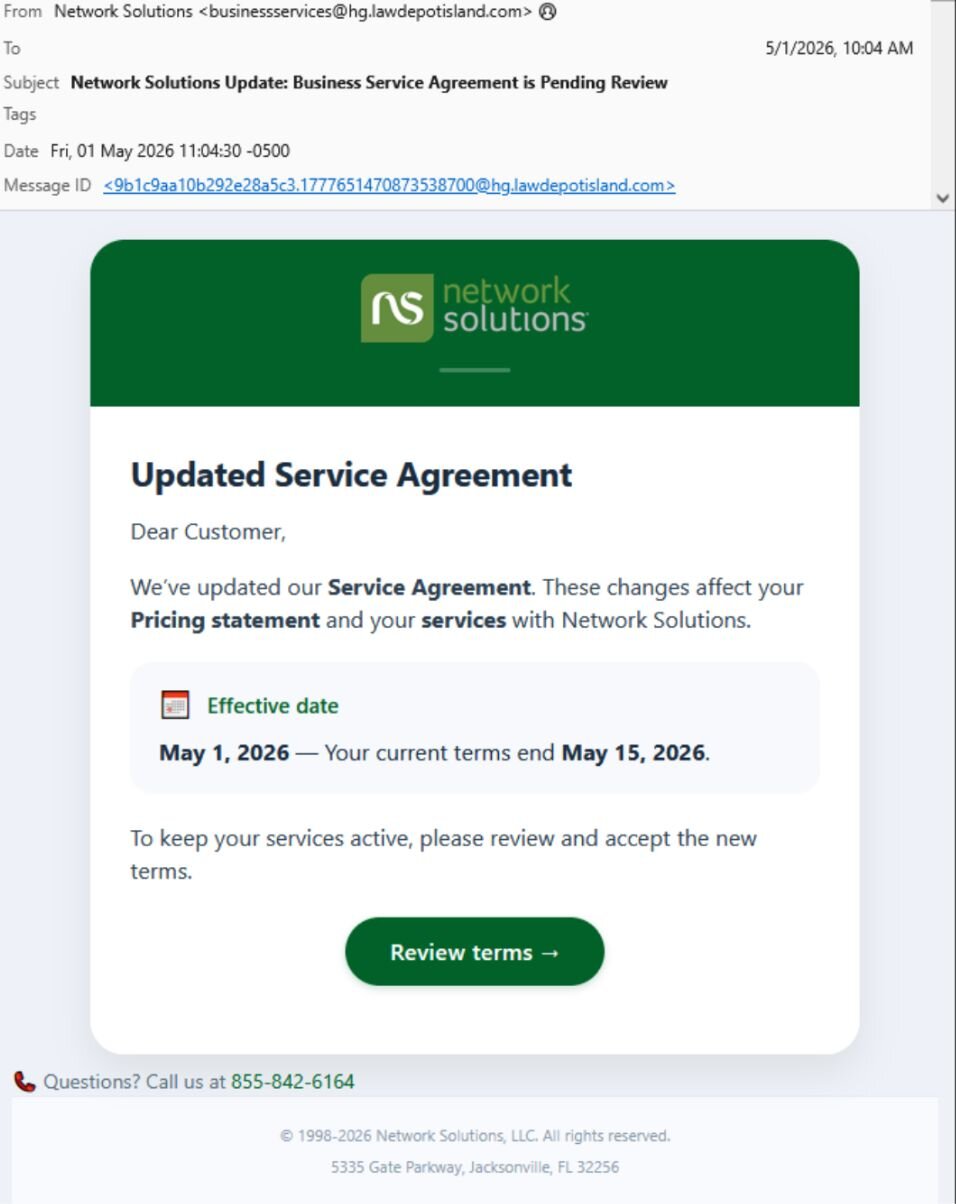
Figure 1: One of the original email messages


The link in the email message led to a page gated with a CloudFlare CAPTCHA, hosted on lenwillfilenetwork[.]com. Once completed, it took targets to the next page:
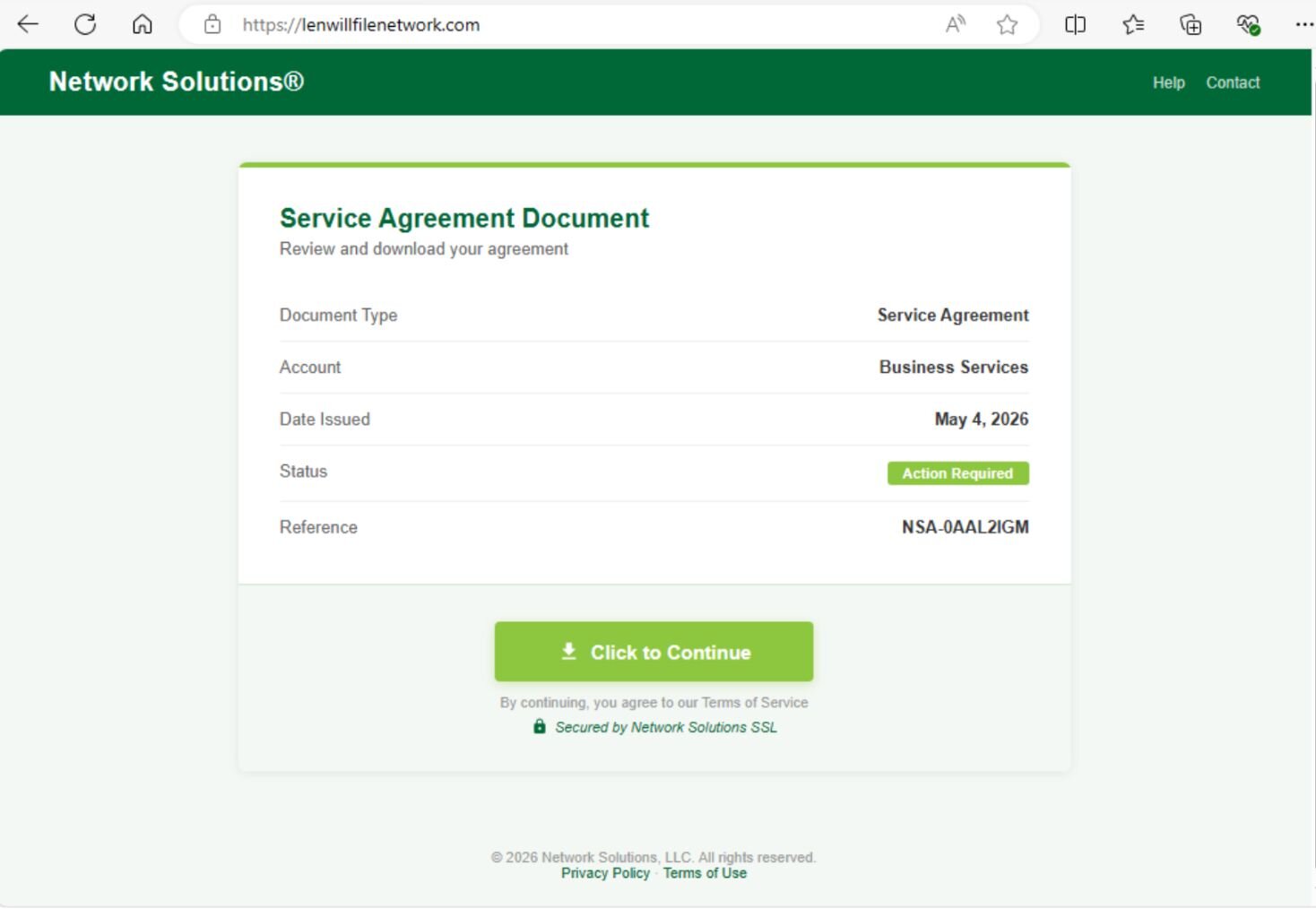
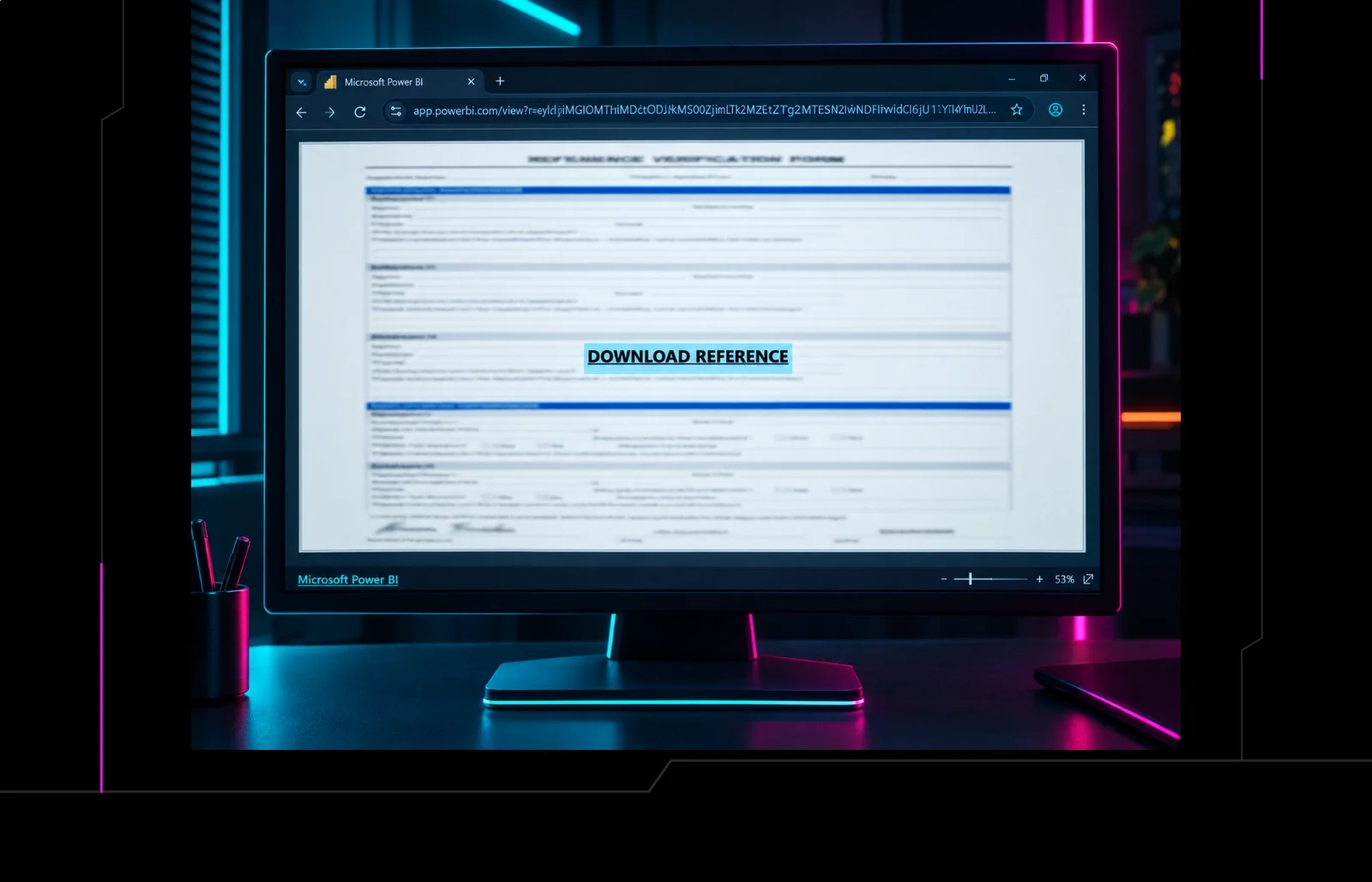
Figure 2: The fake "service agreement document" download page


We have seen several variations of this initial part of the attack. A newer attack, spotted the next day, used a CAPTCHA-like dialog box that, oddly, generated a small popup (within Edge on Windows) that looked like it was trying to mimic something from a Mac.

Figure 3:  The fake CAPTCHA running on Windows that pretends to be on a Mac computer


After a few seconds, a new page appeared that prompts the viewer to download a “secured document.”

Figure 4: One of the download pages that delivers the Tiflux installer


The link in either page led to the installer for Tiflux, Network Solutions Agreement.msi, which is seen in Figure 5.
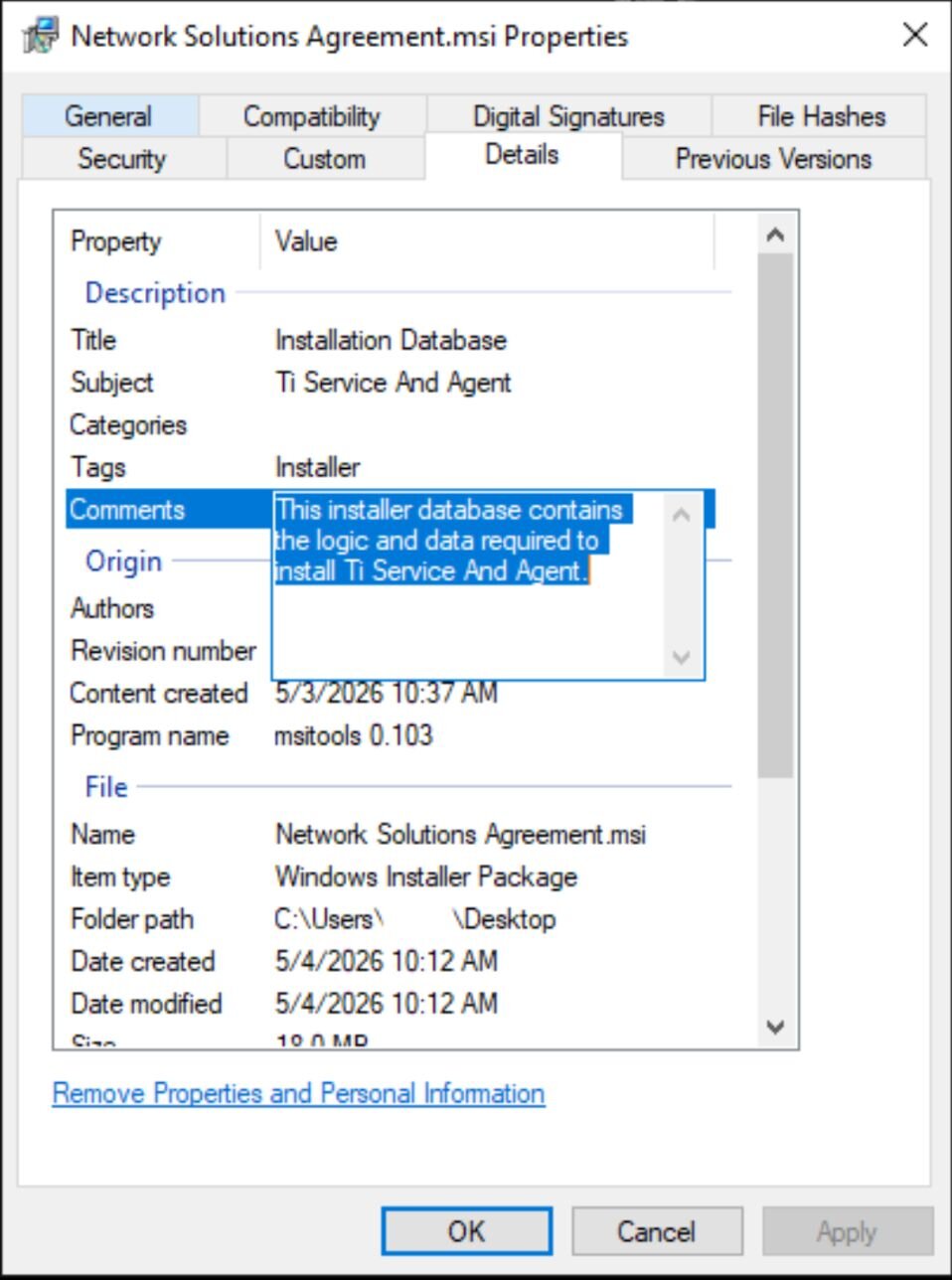
Figure 5: The installer was renamed to reference the purported rationale for its delivery


The installer

The installer, an  .msi executable, was cryptographically signed by Tiflux Sistema de Gestão LTDA, one day prior to when we analyzed it. 

As seen in Figure 6, the installer contains various components of Tiflux, including TiAgent, which acts as an orchestrator for the RMM, and TiPeerToPeer, which is a component that acts as a backchannel (in a legitimate installation) for the support team that ostensibly delivers the RMM to communicate with their customer. We will dig deeper into some of the other components, like si.exe, later.
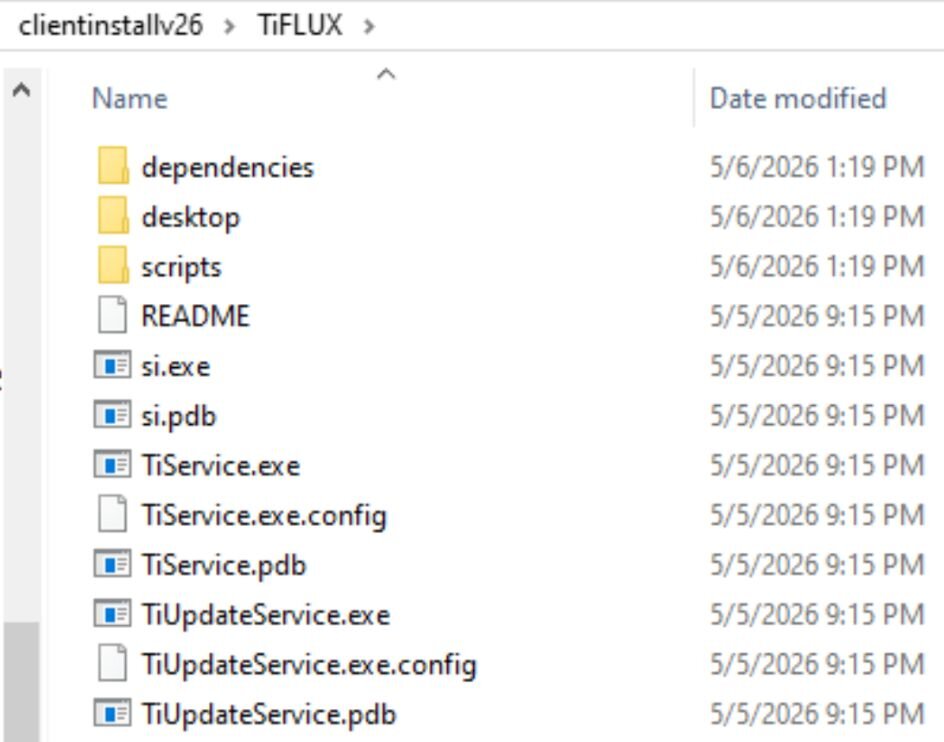
Figure 6:  Extracted components of the Tiflux msi installer


The installer also contains three “dependencies” – UltraVNC and Windows components of the compression utilities 7zip and tar.
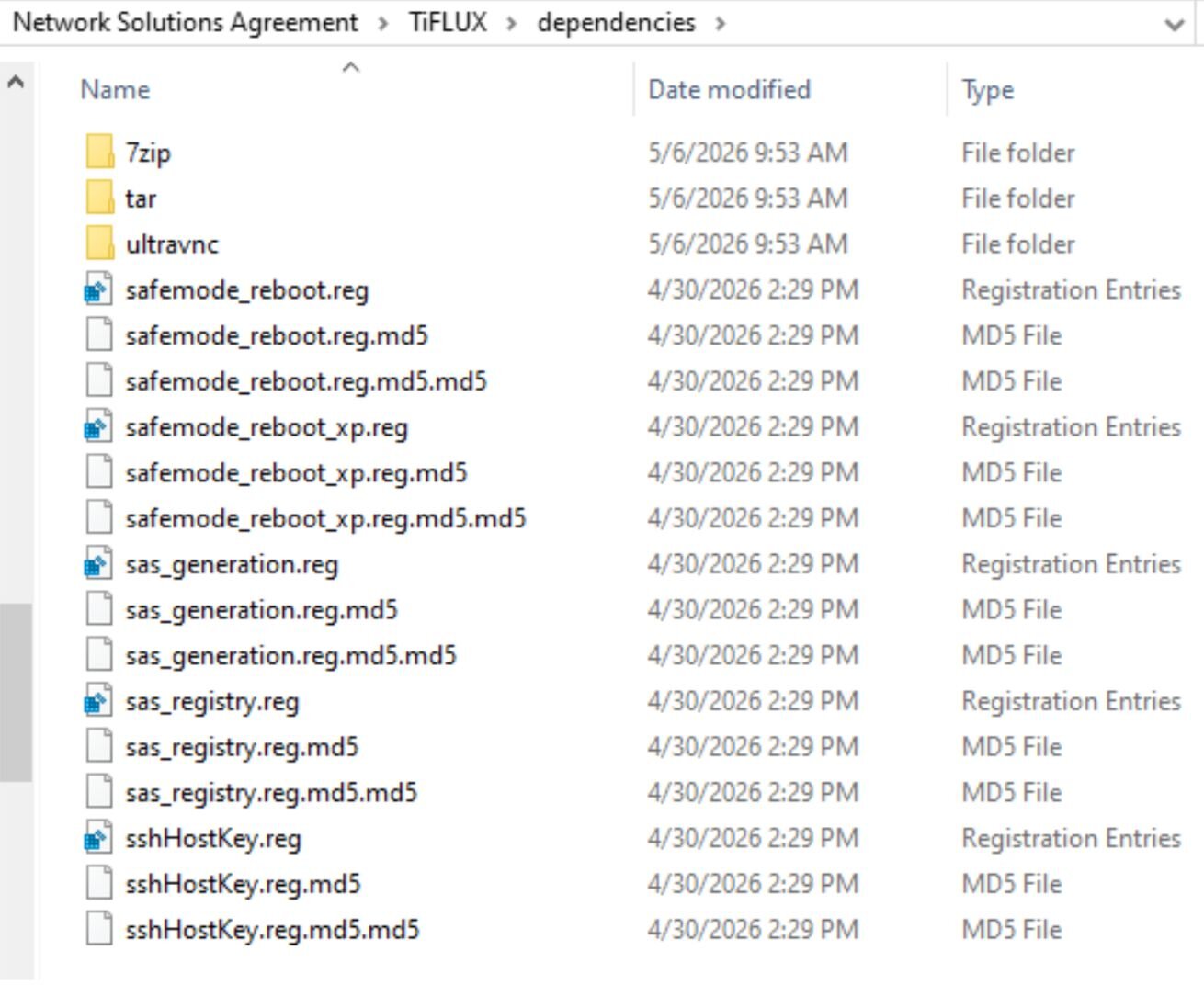
Figure 7: Dependencies included silent installers for three other components, one of which is a version of the remote access tool VNC


Once the target installs the Tiflux agent, the threat actor behind the campaign uses a capability in Tiflux to push down ScreenConnect and/or Splashtop (sometimes just one, sometimes both) to the target’s computer. After digging into the Tiflux agent, we observed the test system install and then start services related to Splashtop – with no notification to the person operating the computer. When installing a different Tiflux distribution, we observed it install and use ScreenConnect.
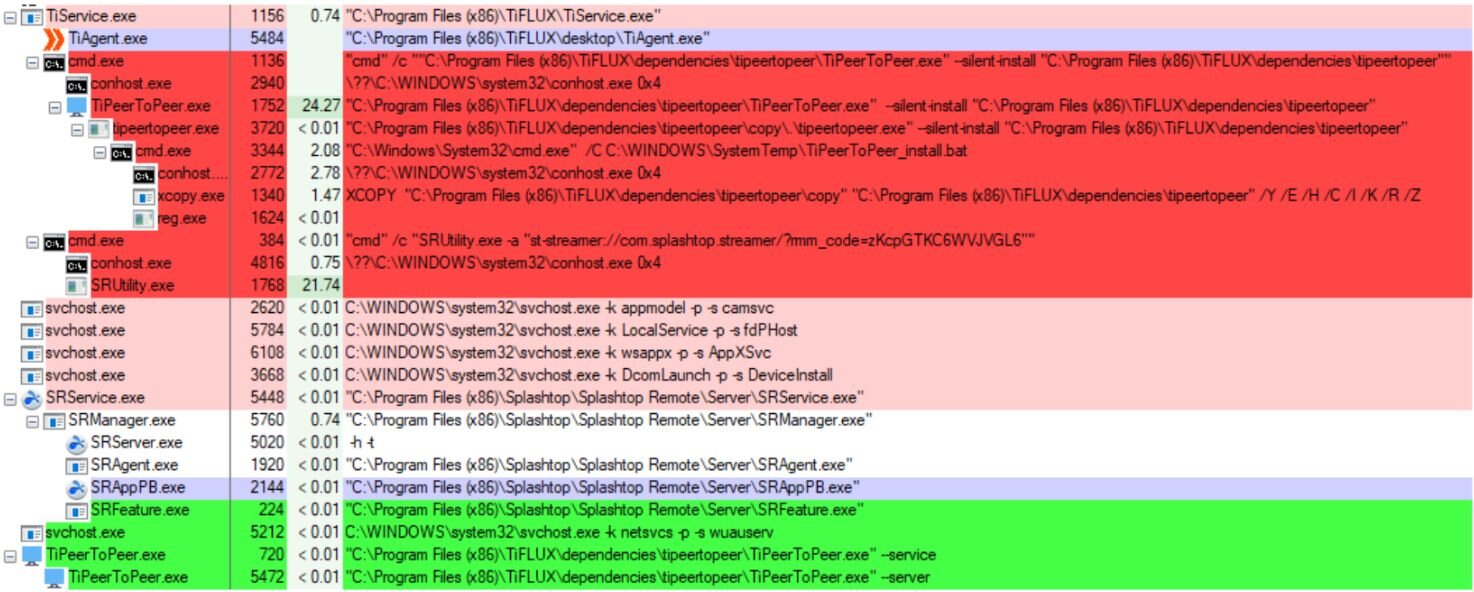
Figure 8: A Process Explorer view shows the Tiflux "TiService" executing commands that install Splashtop (in red) and then starting the Splashtop service (in green)


With both Tiflux and Splashtop running, we observed the two RMMs connect to the servers used to manage them, transmit screenshots and screenshot thumbnails, and run commands to collect system profiling information and interrogate the operating system.
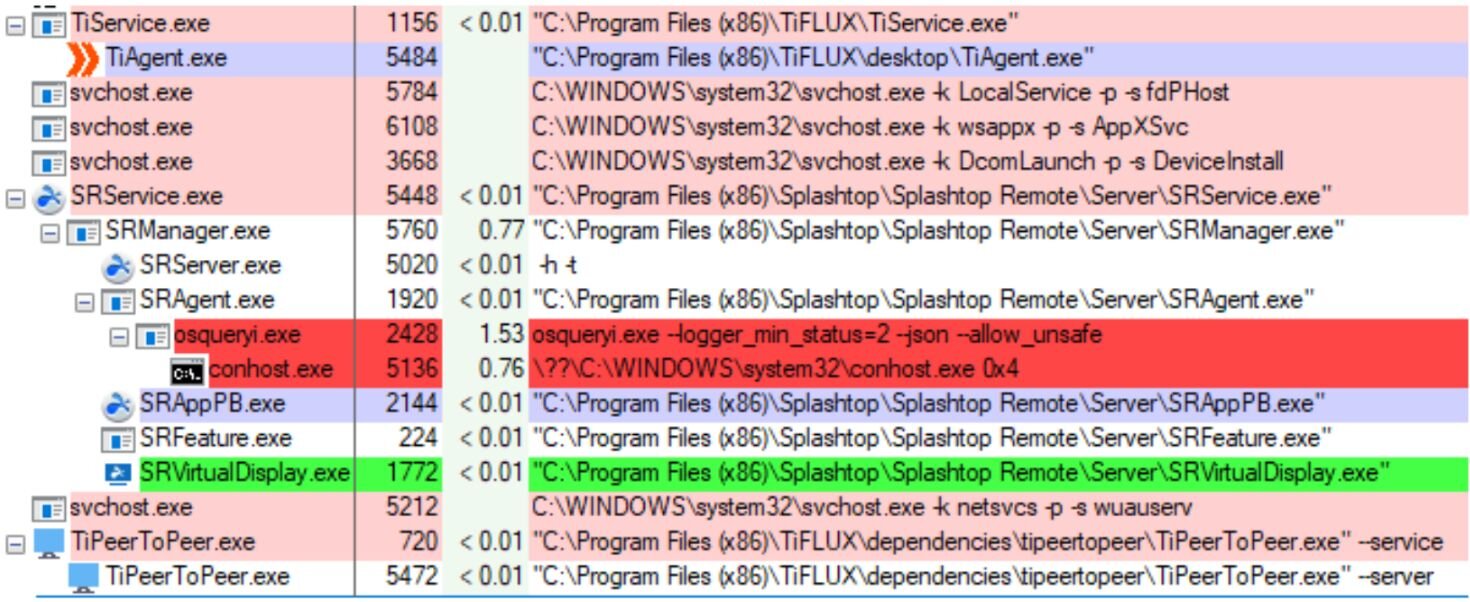
Figure 9: The Splashtop service ran a tool called osqueryl.exe (in red) to retrieve data from the infected computer


Suspicious installer contents

In addition to installing these two commercially-available management tools, the installer file contained several other files that, taken together, raise suspicions.

The UltraVNC components this installer contains are woefully out of date. How old, you ask? Several of the components identify themselves as version 1.2.0.1 of VNC, which dates back to (at least) 2014 (the current version, 1.6.4.0, was published last year). 

The installer also contains a software publishing certificate issued to uvnc bvba (the legitimate publisher of the UltraVNC tool), but that certificate expired in March 2014. 

The UltraVNC installation also leaves behind an entry in the Windows device manager for a display adapter named mv video hook driver2 – this driver, used to share video over VNC, was published on April 11, 2007. A human the same age might be finishing its first undergraduate year of college right about now.
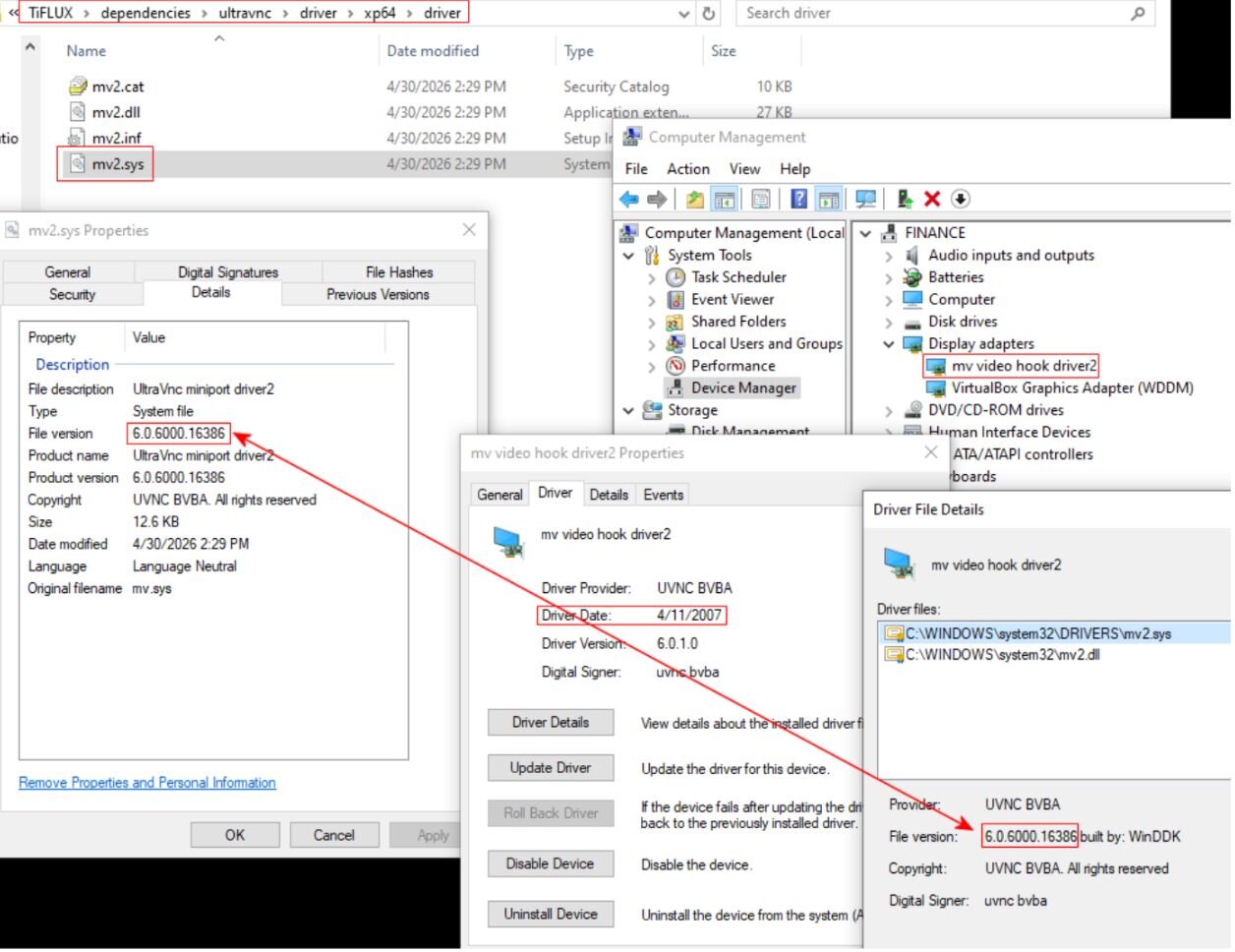
Figure 10: An installed video hook driver that is almost old enough to hit the bars


In addition to the software dependencies, the .msi installer also contained five Windows Registry (.reg) files, which it could use to make modifications to the computer. While we did not observe the installer pushing any of these into the Registry, either Splashtop or Tiflux appeared to be capable of doing so at any time.

One of the Registry changes added a Services entry for another VNC clone, named TightVNC, to the Windows Services, and set it to be enabled even if Windows was rebooted into Safe Mode. Oddly, the attack chain was not observed installing TightVNC, only UltraVNC. 
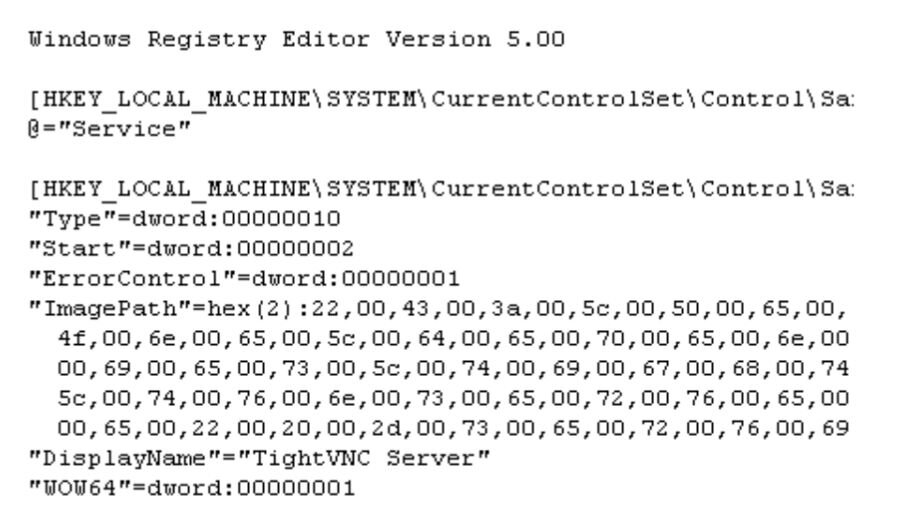
Figure 11: The registry file installs the driver for TightVNC so that it runs even in Windows Safe Mode


Even more suspiciously, the key contained a nonstandard installation path for TightVNC: C:\PeopleOne\dependencies\tightvnc\tvnserver.exe -service
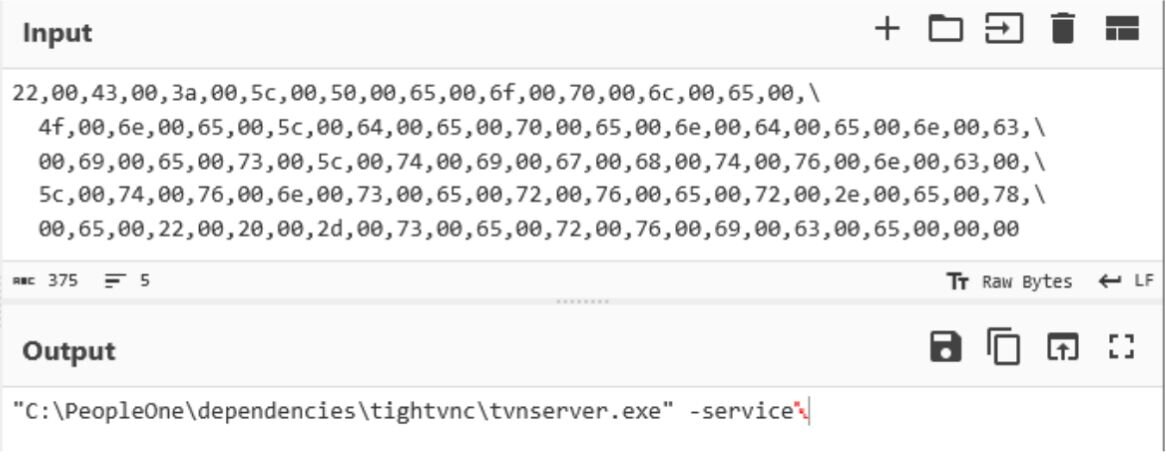
Figure 12: Converting the hex registry value to text reveals the unusual path where TightVNC will install


Another of the .reg files adds an SSH host key for the Windows SSH client, PuTTY, which is also strange because the Tiflux installer does not install the PuTTY application. The host key allows passwordless authentication from the machine on which the key is installed to a server (offline as of publication of this blog, on May 7, 2026) located at the address remote1a[.]peopleone[.]com[.]br.
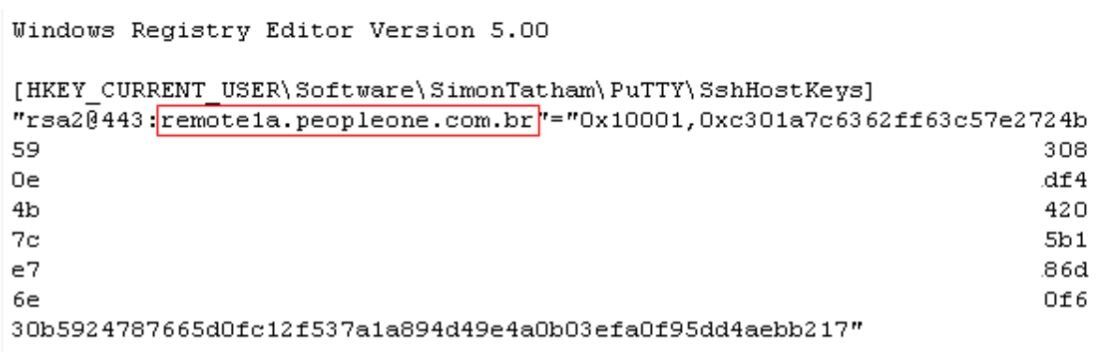
Figure 13: The .reg file that adds an SSH login key for PeopleOne's server


Two of the Registry files make changes to Windows that could conceal the presence of a VNC service (or someone using it) on the device. Among other undesirable changes, the modified policies prevent “consent” prompts (and other types of notifications) from appearing either to the target or to whoever is controlling the target’s machine – a set of behaviors in Windows called the Secure Attention Sequence (SAS). 

At one point, the TiFlux tool drops a known vulnerable driver, named HwRwDrv.x64, into the TEMP directory in the user’s profile, and registers it in Windows. 
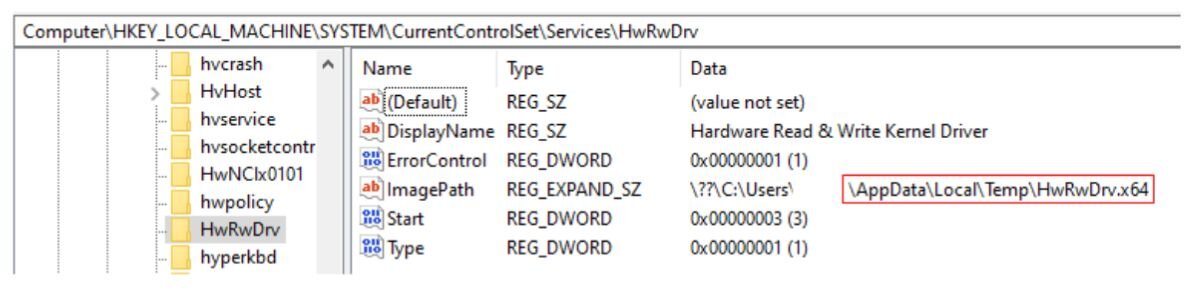
Figure 14: The vulnerable driver installs itself in Windows 


While it isn’t clear what this driver is used for in this instance, background information about the driver flags it as having been previously abused for privilege escalation. The driver’s signing certificate was revoked years ago.
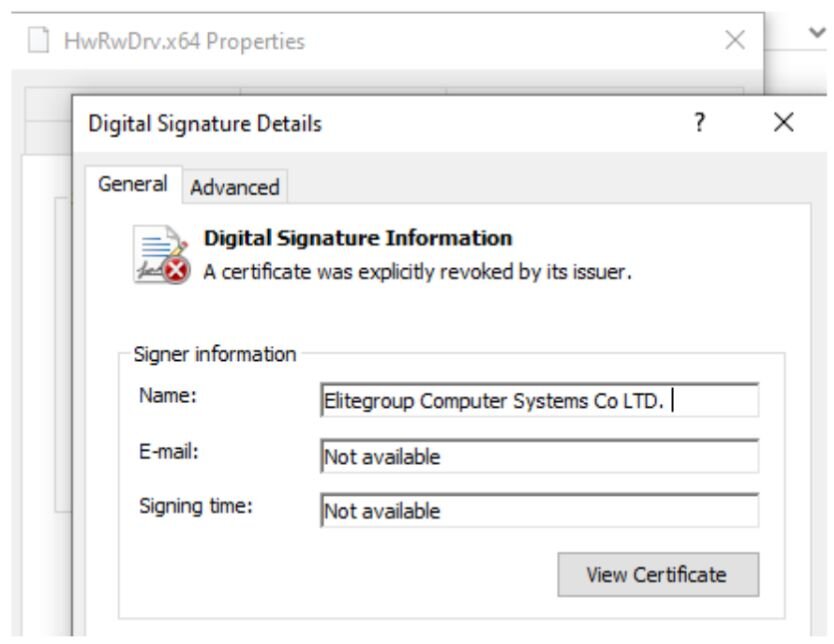
Figure 15: Certificate revocation displayed on the file's properties sheet


The initialization files bundled with the UltraVNC package contained two hardcoded passwords. While the passwords are encoded in the .ini as hexadecimal values, those are easily reversed. 
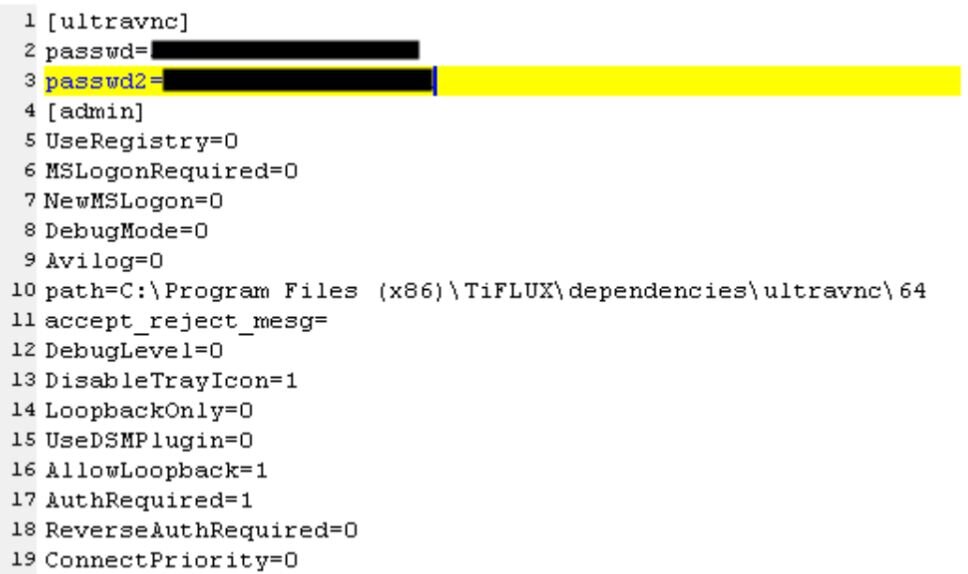
Figure 16: UltraVNC initialization files for the Tiflux installation with hardcoded credentials


There were two of these .ini files present inside the installer – one for a 32-bit version, one for a 64-bit version of the program – but only the .ini file for the 32-bit version contained a string that seems to identify the person who built the installer in a build path. OSINT searches tie this person to both “PeopleOne” and to Tiflux.
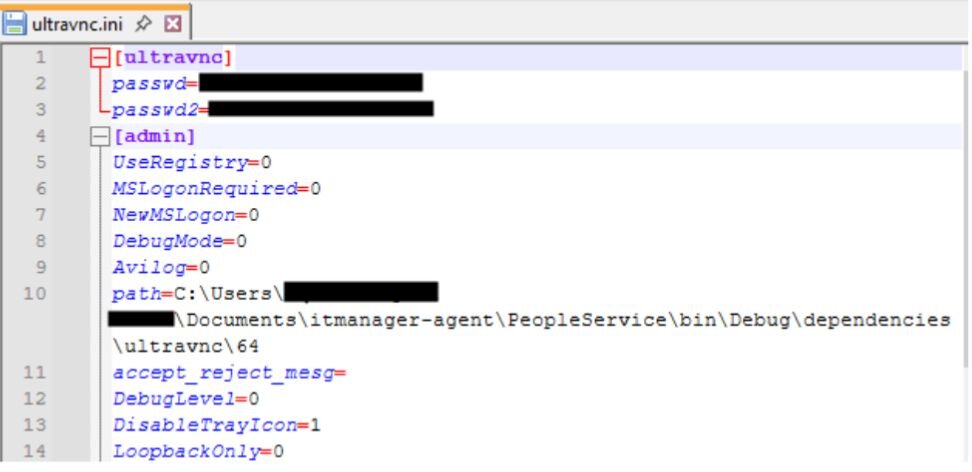
Figure 17: The initialization file for UltraVNC x86 installer includes both hardcoded passwords and, possibly unintentionally, the Tiflux developer’s build path


Other components

As referenced above, Tiflux also installed what appears to be a messaging app, called TiPeerToPeer. The purpose of this app appears to be a way for the managed service provider who might be using Tiflux as an RMM to communicate with the customer they support. The secret key used with the client is hardcoded in a file inside the installer. This file also reveals the UDP port that the client sends pings to on the remote server; in this case, it used 21116/udp – with data confirming the attempts at communication over a 14 hour period following the initial installation.
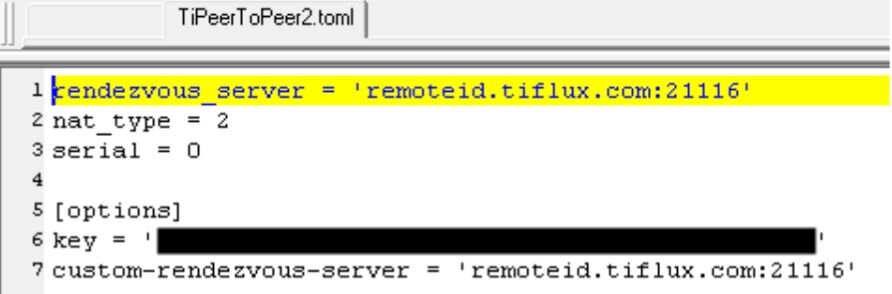
Figure 18: The configuration file for Tiflux shows the server and UDP port it phones home to


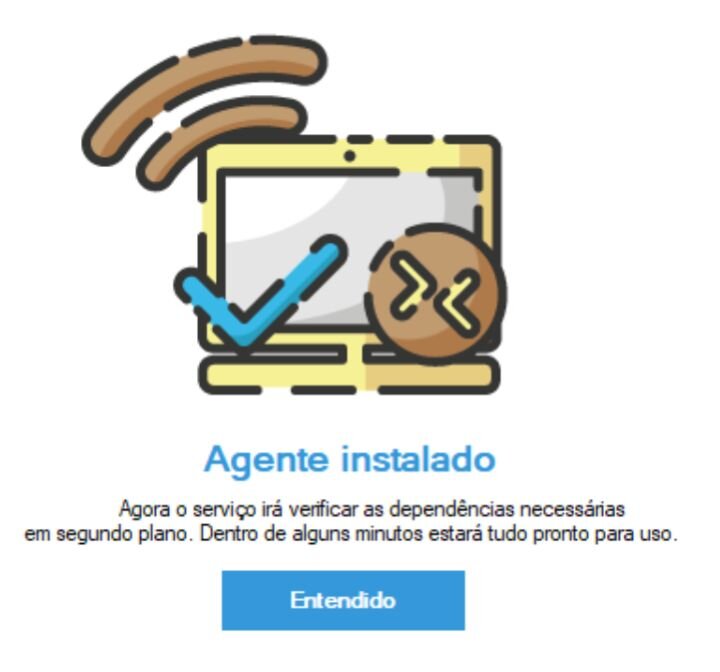
One completely benign file installed with every instance of Tiflux is si.exe, a file whose sole purpose is to display a popup window when the installer is finished. While this executable is not harmful in any way, it is a useful component for threat hunters to pivot from when looking for other Tiflux installers on their estate or in repositories. End users who see this screen appear when they weren’t expecting to be reading a dialog box written in Portuguese should contact their IT support team for help.


Figure 19: Tiflux’s si.exe file only exists to show this popup that tells you it has been installed. 

Must-see dangers of .msi files

Threat actors show no signs of slowing down their hunt for abusable commercial RMMs, chaining multiple together to form webs of persistent access to compromised internal devices. This Tiflux campaign is just another in a list of “LOLRMM” attacks we expect to continue.

Microsoft installer files, such as those with the .msi extension, are not typically viewed with as much suspicion as conventional executables with a .exe extension. But these installers can lead to drastic consequences by giving the threat actor behind the campaign full remote access to whatever computer the target runs the installer on.

Most modern browsers, including Chrome, Firefox, and Edge, will warn the user when they are downloading an .msi file, with a message that explains it could harm your device. Heed the warning: If you aren’t intentionally downloading something from a site you know and trust, click that Delete button and move on.
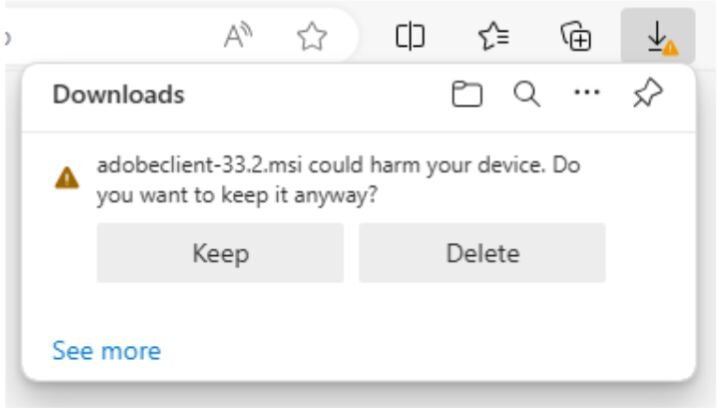
Figure 20: This warning message might be the only thing that stands between you and disaster


In the case of Tiflux, it may be easier than some RMMs to detect its presence.

Tiflux does not attempt to conceal itself on a device when it is running, and apparently (unlike Splashtop) has no capability to do so. The Tiflux services add an icon (two rightward-pointing chevrons) to the Windows system tray when it is running. If you see something that looks like this icon in your system tray, reach out to your IT department.

Figure 21: The Tiflux client System Tray icon looks like two red or orange chevrons, pointed to the right


Another rogue RMM 

Threat actors have used all kinds of RMMs in their attacks – including ScreenConnect, TeamViewer, Atera, NinjaRMM, and more – because their authenticity makes malicious use difficult to detect. As we’ve mentioned before, businesses can defend against RMM abuse – like these recent incidents involving Tiflux – several ways, including: 

  • Establishing a comprehensive asset inventory of all installed applications in order to implement strict application controls (specifically targeting the management of RMMs and the blocking of unauthorized software).

  • Regularly auditing authorized RMMs and cross-referencing them against databases like LOLRMM to find tools frequently abused by threat actors.

  • Review logs for RMM activity to investigate suspicious usage patterns.


Indicators of Compromise 

Item

Description

Network Solutions Agreement.msi


SHA256:

f792d82e4472c001852998a3575e492907f38daa8d58ecdb3b3604b38d7b8a07

Tiflux installer msi file

Adobeclient-33.2.msi


SHA256:

87074c1bfd071fc47410a52af863e9ca62b2b85950c4cf643a220f0ea5717952

Tiflux installer msi file

ScreenConnect.msi 


SHA256:

0b95524e5b00688f7f5efe56a74b93985feb2152d9336d44ca7a8dd9ca25d2d5

ScreenConnect installer msi file

https://lenwillfilenetwork[.]com/downloads/Network%20Solutions%20Agreement.msi

Payload URL

https://anythinghere[.]woremix[.]icu/Viewfiles/download[.]php

Payload URL

http://84.54.33[.]192:8040/Bin/ScreenConnect.ClientSetup.msi

Payload URL

84.54.33[.]192

ScreenConnect download and C2

shankar.woremix[.]icu

Threat actor controlled domain

anythinghere.woremix[.]icu

Threat actor controlled domain

lenwillfilenetwork[.]com

Threat actor controlled domain

84.54.33[.]192:8040

ScreenConnect download IP and port


Categories
Threat Analysis
ChatGPT logoChatGPTOpens in new tabClaude logoClaudeOpens in new tabPerplexity logoPerplexityOpens in new tabGoogle Gemini logoGoogle AIOpens in new tab
AI sparkle iconSummarize This Page
ChatGPT logoChatGPTOpens in new tabClaude logoClaudeOpens in new tabPerplexity logoPerplexityOpens in new tabGoogle Gemini logoGoogle AIOpens in new tab

See Huntress in action

Our platform combines a suite of powerful managed detection and response tools for endpoints and Microsoft 365 identities, science-backed security awareness training, and the expertise of our 24/7 Security Operations Center (SOC).

Book a Demo
Share
Facebook iconTwitter X iconLinkedin iconDownload icon
Glitch effect

You Might Also Like

  • Huntress Managed ITDR for Google Workspace: Defending the New Identity Attack Surface

    Huntress now delivers ITDR for Google Workspace to protect identities against BEC, inbox rule manipulation, and account takeover, all with a 24/7 SOC-led response.
  • The Power of People: Inside Huntress EDR and 24/7 Operations

    Watch the webinar recording for an overview of the Huntress platform for our community—and how our human analysts make all the difference.
  • OpenClaw, Rogue Agents, and Application Hygiene

    OpenClaw AI agents pose identity and data risks if deployed with broad cloud permissions. Learn how to find and secure these apps before an attacker does.
  • Understanding the Recent Surge in Cybersecurity Threats to Dental Practices

    Learn why the FBI recently warned dental practices of potential cyberattacks and discover how Huntress Security Awareness Training can help prevent them.
  • Closing the Gap: Managed ITDR Now Supports Identity Disablement for Active Directory Synced Identities

    Huntress Managed ITDR closes the gap with AD-synchronized identity disablement. Secure identities on-prem and in the cloud with this powerful update.
  • How Huntress & DEFCERT Are Streamlining CMMC Assessment Prep

    Huntress and DEFCERT partnered to help with CMMC compliance. Use their Shared Responsibility Matrix and operation plans to streamline your Level 2 assessment
  • Breaking Down the NIST Cybersecurity Framework

    A comprehensive guide to the NIST cybersecurity framework, its five main functions and how you can use the NIST framework to improve your cybersecurity posture.
  • The Mechanics of Defense Evasion

    Continuing our blog series on defense evasion, this blog dives into some practical, real-world examples of defense evasion in action.

Sign Up for Huntress Updates

Get insider access to Huntress tradecraft, killer events, and the freshest blog updates.
Privacy • Terms
By submitting this form, you accept our Terms of Service & Privacy Policy
Huntress Managed Security PlatformManaged EDRManaged EDR for macOSManaged EDR for LinuxManaged ITDRManaged SIEMManaged Security Awareness TrainingManaged ISPMManaged ESPMBook a Demo
PhishingComplianceBusiness Email CompromiseEducationFinanceHealthcareManufacturingState & Local Government
Managed Service ProvidersResellersIT & Security Teams24/7 SOCCase Studies
BlogResource CenterCybersecurity 101Upcoming EventsSupport Documentation
Our CompanyLeadershipNews & PressCareersContact Us
Huntress white logo

Protecting 250k+ customers like you with enterprise-grade protection.

Privacy PolicyCookie PolicyTerms of UseCookie Consent
Linkedin iconTwitter X iconYouTube iconInstagram icon
© 2025 Huntress All Rights Reserved.

Join the Hunt

Get insider access to Huntress tradecraft, killer events, and the freshest blog updates.

By submitting this form, you accept our Terms of Service & Privacy Policy