SPF vs. DKIM vs. DMARC: What each does & how they work together
Written by: Lizzie Danielson
Published: 10/12/2026
Your email domain is one of your most valuable assets—and one of the most frequently targeted. Threat actors use email spoofing to impersonate brands, ruin reputations, and gain access to networks. While proper email authentication protects your brand, figuring out how the different layers work often makes the process overwhelming.
This guide clarifies the differences between SPF versus DKIM versus DMARC and how these tools work to protect your inbox. We’ll also explore the limitations of these tools and why they can’t stop threat actors who log in with stolen passwords.
Key Takeaways
- When properly enforced and configured, Sender Policy Framework (SPF), DomainKeys Identified Mail (DKIM), and Domain-based Message Authentication, Reporting, and Conformance (DMARC) all help prevent threat actors from faking your email address.
- These tools suffer from a business email compromise (BEC) gap because they can’t spot when a threat actor breaks into a legitimate email account.
- Companies need 24/7 monitoring to spot unusual activity coming from real users’ hacked accounts.
What’s DMARC, SPF, & DKIM?
While SPF and DKIM validate the email’s origin, DMARC acts as the manager. Here’s SPF, DKIM, DMARC explained:
- SPF: You publish a public list of approved servers (IP addresses) allowed to send mail for your domain. When an email arrives, the recipient’s server checks that list. If the email comes from an unlisted server, it’s flagged.
- DKIM: This adds a cryptographic digital signature to your outgoing emails. It proves the message wasn’t altered in transit and that it came from a domain holding the correct private key.
- DMARC: You provide clear instructions for what to do with emails that fail SPF or DKIM. This tool blocks threat actors from hijacking your identity and sends you reports on who’s trying to impersonate your brand.
Think of these three email security tools form a multilayered check that reduces your risk of domain spoofing by 90%. Keep in mind that these tools only verify your domain. They stop threat actors from pretending to be you, but they don’t protect you from lookalike domains, which call for additional defensive strategies, like employee awareness training.
How SPF, DKIM, & DMARC work together: The key differences
When an email arrives, the receiving server evaluates SPF and DKIM to see whether it was sent from an approved source and carries a valid signature. DMARC then looks at those results and checks whether at least one of them aligns with your visible “From” domain. Based on your DMARC policy, the server can deliver, quarantine, or reject messages that fail.
This unified front keeps threat actors out of your recipients’ inboxes and protects your email reputation. Without these tools, receiving servers treat your domain as unauthenticated, which can hurt deliverability and increase the chances your legitimate emails land in spam.
Here’s a summary of how these three tools compare:
Tool | What it verifies | How it works | What it protects against |
SPF | The server: Did the email come from an approved location? | Checks if the sending server’s IP address is on your public list | Unauthorized servers sending mail as you (domain spoofing) |
DKIM | The content: Was the email altered mid-transit? | Adds a hidden digital signature to prove no one changed the text | Threat actors tampering with your message content or forging messages that appear to come from your domain |
DMARC | The action: What do you do with failures? | Compares the SPF and DKIM results, handles failures, and sends you reports | Brand impersonators and fake “From” addresses that misuse your exact domain (not lookalike domains) |
How to set up SPF, DKIM, & DMARC
No matter what email provider you use, the setup logic is the same. You’ll always generate specific text codes (TXT records) from your admin panel and paste them into your domain’s Domain Name System (DNS) settings.
For the best results, follow this order.
Set up SPF email security
When setting up these email protocols, start with the Sender Policy Framework. Follow these basic steps:
- Identify your senders: Make a list of every service that sends emails using your domain (like Mailchimp, Salesforce, or your internal servers).
- Create the record: Generate a TXT record starting with v=spf1 that includes all your authorized services.
- Publish to DNS: Add this record to your DNS settings so recipient servers can verify your source.
Keep in mind that SPF has a technical limit of 10 DNS lookups. If you list too many services, the security checks might fail, and your real emails could land in the spam folder.
Set up DKIM email security
The next step is implementing the DKIM, taking these actions:
- Generate your keys: Go to your email platform’s admin panel and select “Generate DKIM Key” to create a public-private key pair for your domain.
- Publish the public key: Copy the public code from your panel and add it as a TXT record in your DNS settings so anyone can verify your digital signatures.
- Enable signing: Go back to your email admin panel and turn on DKIM signing so it starts stamping your outgoing mail with your private key.
Set up DMARC email security
The final step implements the DMARC, taking these actions:
- Confirm your foundation: Make sure you’ve fully set up and activated SPF and DKIM.
- Define your policy: Create a TXT record under _dmarc.yourdomain.com, and select an enforcement level, like monitoring (p=none), quarantine, or reject.
- Turn on reporting: Include your email address in the record (using the rua tag) so you can get daily reports showing who’s trying to send mail as you.
Experts recommend starting with a policy of p=none (monitoring mode). This lets you watch the reports for a few weeks to make sure you haven’t accidentally blocked your own legitimate senders before shifting to stricter enforcement.
What email authentication doesn't stop: The BEC gap
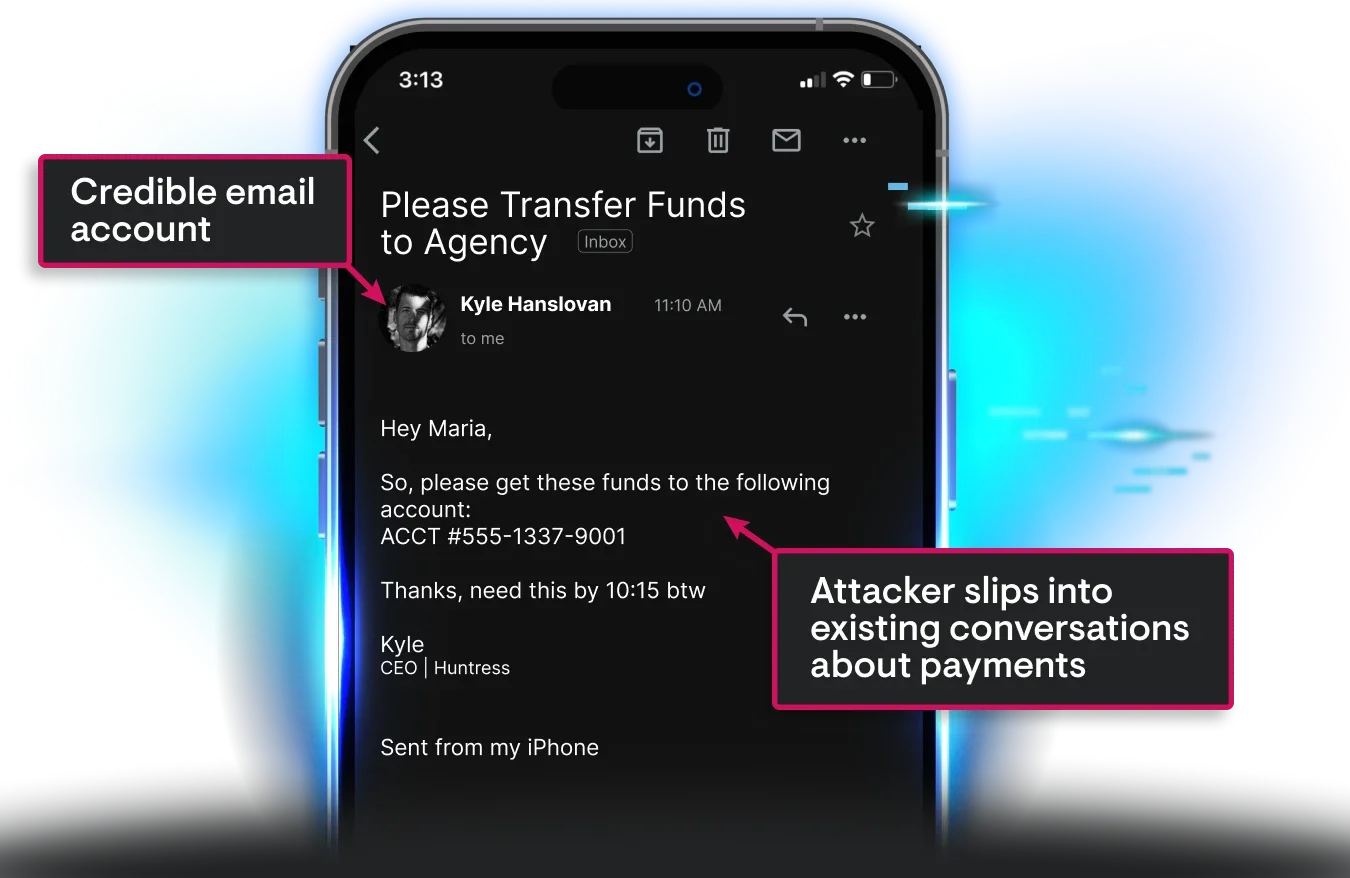
While SPF, DKIM, and DMARC stop domain spoofing, they fail to address the BEC gap. Threat actors take advantage of this gap when they break into real corporate inboxes using stolen passwords or phishing links. According to the FBI, BEC scams cost individuals and businesses more than \$30 billion in 2025 alone.
Because these compromised accounts belong to real users, they already have full permission to send mail. This means the messages pass all three checks:
- SPF: The email comes from an approved sending server for your domain.
- DKIM: The digital signature is valid from your domain.
- DMARC: The visible “From” address aligns with your domain, so DMARC passes.
To a receiving server, the fraudulent email looks 100% legitimate. That’s why it’s important to pair these tools with 24/7 monitoring for suspicious account activity.
How Huntress Managed ITDR spots the attacks email authentication misses
While SPF, DKIM, and DMARC form an essential first line of defense, they only validate the server—not the person behind the keyboard. These tools effectively stop email spoofing, but they can’t spot a threat actor using a stolen password.
Huntress Managed ITDR fills this critical gap by monitoring identity and email behavior across your Microsoft 365 and Google Workspace environments, not just their email headers. Our AI-centric SOC provides 24/7 oversight and maintains a three-minute MTTR, so suspicious logins, malicious inbox rules, and other BEC tradecraft are contained quickly, often before attackers can move laterally.
Ready to close your hidden email security gaps? Get started with a free trial.
FAQs
No. DMARC only requires one or the other to pass. As long as your visible “From” address matches the domain authenticated by either SPF or DKIM, the email will pass the DMARC check.
Not necessarily. DMARC will still pass as long as DKIM passes and matches your domain. This redundancy saves the day because outside servers frequently break SPF when they forward your emails through unauthorized servers.
No, these protocols can’t prevent BEC on their own. They stop domain spoofing, but the technical controls won’t catch someone who hijacked a legitimate account via phishing or other attacks.
After you set up DMARC, you’ll receive reports that show every server sending mail using your domain name. Reviewing these reports regularly helps you spot threat actors trying to abuse your brand while also making sure you haven’t accidentally blocked your own legitimate email services.

Additional Resources
- Read more about What Does an Identity and Access Management Specialist Do?Learn what IAM specialists do, their key responsibilities, required skills, and why they're critical for modern cybersecurity and compliance.
- Read more about What's Virtualization-Based Security VBS?What's Virtualization-Based Security VBS?Learn how Microsoft's Virtualization-Based Security (VBS) uses hardware isolation to defend against credential theft, ransomware, and kernel-level attacks.
- Read more about What is Binary Code? | Definition, Examples, and ApplicationsWhat is Binary Code? | Definition, Examples, and ApplicationsUnderstand binary code, the foundation of modern computing. Learn what it is, how it works, its importance in digital technology, and real-world applications.
- Read more about What is a DLP Antivirus?What is a DLP Antivirus?Uncover how DLP antivirus protects against data leaks, combines with cybersecurity tools, and strengthens sensitive information protection.
- Read more about Secure Your Digital Presence – Protect, Own, and ThriveSecure Your Digital Presence – Protect, Own, and ThriveSafeguard your digital footprint with expert tools and strategies. Schedule a free consultation to protect your brand, stay secure, and succeed in a digital-first world.
- Read more about What is NGFW IPS?What is NGFW IPS?NGFW IPS integrates next-gen firewall and intrusion prevention to block cyber threats in real-time. Explore its advanced features and role in network security.
- Read more about What Is Vishing? Learn How to Avoid Phone ScamsWhat Is Vishing? Learn How to Avoid Phone ScamsThink you’re too smart for phone scams? Vishing tactics are smarter than ever, using tricks like AI voice cloning to steal sensitive info. Discover how these scams work, red flags to watch for, and tips to protect yourself. Stay safe and informed!
- Read more about What is Device Code Phishing | Protect From PhishingWhat is Device Code Phishing | Protect From PhishingLearn what Device Code Phishing is, see real examples from the Huntress SOC and learn how to protect your organization from these threats.
- Read more about What is a Potentially Unwanted Application (PUA)?What is a Potentially Unwanted Application (PUA)?Potentially Unwanted Applications (PUAs) can slow systems and compromise security. Learn how to identify and defend against these hidden software threats.