




Prologue
Feature parity is often desired from a cybersecurity technology provider, but it’s not an easy ask to deliver. Pursuing parity across platforms needs to be done to achieve common and consistent outcomes for customers (e.g., not just for marketing purposes).
As a technology provider offering multiple products across various operating systems (OS) and platforms, Huntress continually seeks ways to enhance the customer experience, enabling seamless experiences. Our Managed Endpoint Detection and Response (EDR) product supports Windows, macOS, and Linux. Pursuing parity, while making the most sense, can be a non-trivial challenge. In this blog, the Principal EDR Product Researchers at Huntress explain where parity made the most sense, and inversely, where it did not, and why.
Huntress is a decade old, and because of such, the OSs we support have matured at different rates. Managed EDR for Windows has been around for almost five years, the EDR for macOS for a year, and EDR for Linux for only a few months. As a result, prioritizing feature requests across the board becomes infinitely more challenging.
We’ll address a few highly requested parity features, and we’ll showcase why we’ve decided to take a slightly different avenue forward.
How Huntress collects endpoint telemetry
We want to take a moment and talk about how Huntress approaches telemetry collection. We approach it differently from other EDR products in the industry. Since we don’t run to chase the “newest” telemetry mechanism, it has to be backed by real-world activity to justify the collection. Internally, we call this the “Swiss cheese” model.
We try to apply a layered approach to collection and capabilities, which allows us to be effective without deploying an agent that uses a lot of resources. You can also think of this in the Pareto principle, where we’re looking to extract 80% of the value from 20% of the possible data, meaning yielding the most value out of the smallest amount of telemetry. Let’s dive into how we approach this for each product.
Windows
As mentioned previously, Huntress’ Windows EDR has been around for about five years. This means that over time, we’ve had to evolve how we collect telemetry in order to identify malicious behavior. Luckily, on Windows, there isn’t a shortage of ways to collect telemetry, which our counterparts in macOS and Linux consistently deal with. To accomplish effective telemetry collection, we leverage the following approaches:
Real-time collection
Huntress leverages real-time collection for detection and prevention capabilities. Event sources for real-time collection can come in various forms, including kernel callbacks, Event Tracing for Windows (ETW), function hooking, and tapping into the Event Log.
We leverage kernel callbacks heavily here at Huntress. Kernel callbacks provide deep insights into object activity—processes, threads, registry, files, etc. This allows us to collect telemetry related to those objects and perform a deep inspection analysis of them, as well as stop suspicious activity (a feature coming soon).
We recognize that in order to get a good collection summary of activity, we can’t use kernel callbacks solely. To help with this, we’ve invested in tapping into other event sources via the event log. This allows us to collect other logs, do on-agent behavioral summaries, and ship other helpful logs that would give the SOC additional insight into activities being performed on the machine. We continue to grow in our real-time collection and have invested time researching and discovering other mechanisms, like ETW, that would be helpful in future collection capabilities.
Point-in-time
The first capability Huntress Managed EDR ever came out with was our AutoRuns. This capability allows us to perform a point-in-time collection mechanism (survey) on a timer to get information about specific actions—scheduled tasks, services, etc. This also allows our SOC to perform on-demand surveys to enhance suspicious activity detections/insights.
Both of these technologies combined allow Huntress to collect what we care about without collecting a lot of noise. We do this to make sure we’re not deploying a heavy agent on a customer's machines, which allows customers to deploy us by ourselves, or also next to other antivirus tools.
macOS
On macOS, to access low-level process behavior, using Apple’s Endpoint Security API is the only option, especially the Apple-recommended approach. To accomplish this, Huntress—and security software in general—needs to build a system extension. This system extension, which has to be granted a special entitlement from Apple, allows your security software to listen to certain events that Apple’s API exposes, and in turn, take action against those events. More specifically, Endpoint Security gives security vendors two primary options—an audit mode that Apple calls “notify,” and block mode, called “auth.”
Figure 1: How the kernel interacts with a security application leveraging Endpoint Security
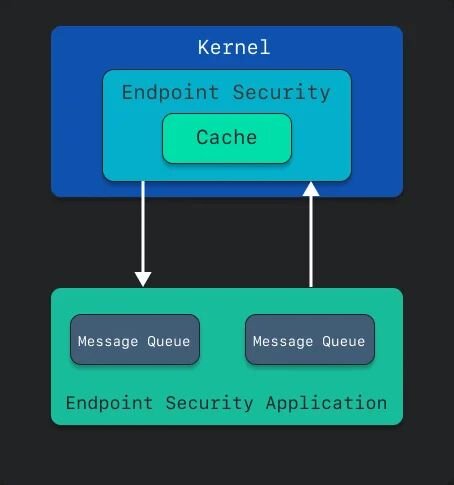
There is a BIG caveat to this. In an attempt to value the end user’s privacy, Apple has put multiple guardrails in place to guard sensitive user data. They implemented a framework called Transparency, Consent, & Control, which was a design to do just that. What that did, though, was very much hamper the ease of deployment of software to Mac devices. Administrators are now required to onboard Mobile Device Management (MDM) software, or, if not, manually approve system extensions, grant full disk access, and walk through installers.
But to collect process data—once the system extension is approved and permissions granted—is quite trivial. Huntress collects telemetry any time a process executes, along with a slew of associated data. Some of the nuances here from the other platforms include code signing information, such as Developer IDs, that can give visibility into malware attempting to masquerade as legitimate software.
Visibility into these processes and subsequent enriched data allows us to track malicious (or suspicious) behaviors by malware. It could give us insight into whether a script is executing in the context of a Terminal login session (meaning hands-on-keyboard), or if it’s being spawned from elsewhere.
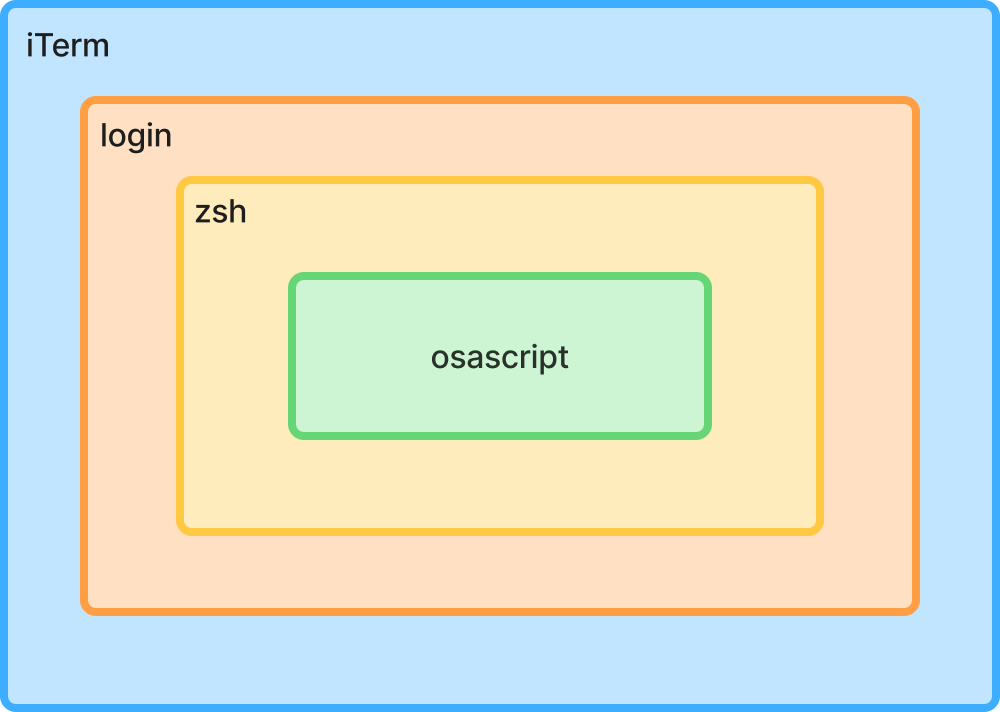
When we combine this with our persistence items—LaunchDaemons or LaunchAgents most frequently—(or “AutoRuns,” as Windows folks will say), we have much deeper visibility into the endpoint and suspicious activity.
Linux
The new kid on the Huntress Managed EDR block, Linux brings visibility and detection of malicious and suspicious activity in ways that are only possible with open-source software. On Linux, we primarily rely on eBPF (extended Berkeley Packet Filter), which turbocharges the collection of process telemetry.
While old-school BPF was originally designed for in-kernel network packet filtering, eBPF allows for numerous hooks into the Linux kernel in a performant, privileged context. These hooks give the Linux EDR agent unparalleled visibility into user-space process creation, process lineage, and the context around how a process is run in Linux. By hooking into only what we care about, we can laser-focus on tactics, techniques, and procedures of interest. This filters out the noise while hunting for shady tradecraft.
Even though eBPF is the bedrock of collecting and filtering process information in Linux EDR, the old Unix/Linux adage of “everything is a file” plays a role in the Linux EDR agent. Compared to macOS or Windows, the Linux agent can use file activity as a proxy to detect persistent footholds as they’re being created, alerting the SOC to stop them in their tracks.
Achieving parity
Now that we’ve covered the three platforms, hopefully you can see how Huntress approaches the issue of parity. Across all ecosystems, we elect to collect real-time data created by processes executing, add in the items that persist (AutoRuns on Windows, persistence mechanisms like BTM on macOS, and persisting tasks like cron jobs on Linux, to name just a few), and then we can get a well-rounded view into the endpoint and its activities. One of the largest benefits is a unified backend where SOC analysts and Detection Engineering simply need to context-switch between operating systems, as opposed to whole separate and disparate data sets. The data and keys remain the same.
Huntress Capabilities
We want our customers to feel protected equally (where possible), whether you’re on macOS, Linux, or Windows. A good example of this is our Ransomware Canaries capability.
Ransomware and canaries
One of the most commonly asked questions we see around parity revolves around ransomware and how Huntress protects against it. Let’s break it down.
Windows
Ransomware is one of the biggest threats organizations face. Windows ransomware variants have evolved immensely, for example, leveraging SMB to perform remote ransomware (making detection harder). A good example of this is the Akira variants. They’re significantly abusing SMB to deliver ransomware, which we’ve tracked for the past couple of years.
Tackling the ransomware problem is difficult for many reasons—it’s hard to tell if an encryption of a file is legitimate or not, if encryption is being performed, and the source of the encryption (especially with the rise of remote ransomware). This is why Huntress has, and continues to, invest a significant amount of resources in tackling these problems. Stay tuned for some new ransomware capabilities in 2026!
But one technology we’ve used, and that’s been a pillar for detecting ransomware, is our canaries. As mentioned above, knowing the legitimacy of a file operation can be difficult, but when it comes to our canaries, we can track those operations closely and perform a deep inspection on them. Doing this in the traditional sense of Windows is incredibly difficult. One could baseline one environment for common file operations from users, applications (like RMMs), and administrator tasks. But at Huntress, we can’t baseline one environment. We needed a solution to bridge this gap, and our Ransomware Canaries are that bridge that allows us to understand the applications that are messing with random files and why.
Huntress deploys multiple canary files on a machine, and we detect when certain operations are performed on those canaries. In 2025 alone, we’ve had over 260 alerts that relate to our ransomware canaries that have confirmed ransomware behavior.
By having our canaries on disk, we can also control a lot more. Outside of the advanced logging of our driver, we can also increase the security of those canaries to allow or deny the ability to modify or delete these canaries. At Huntress, we believe in the evolution of technology, which is also why our Ransomware Canaries capability went through a revamp over the past year, allowing us to gain even deeper insights into these file actions, which have led to fewer false positives and enhanced identification of ransomware. This capability has driven research efforts to prevent certain ransomware variants, which is a capability we look forward to launching in early 2026.
macOS
With the prevalence of ransomware on Windows, it seems as if it would be a major and rising threat on macOS. However, it really hasn’t seen a significant uprise. EvilQuest was one of the primary ransomware strains known to target macOS, but the numbers have been completely inflated. If you were to look at VirusTotal, it would appear that there are new strains of EvilQuest (also called ThiefQuest) almost daily. However, the new version of this ransomware triggered a loop in the VirusTotal sandbox, causing VirusTotal to reflect well over half a million samples. This leads to false reporting of threat landscape numbers across the industry.
Back in 2023, Objective-See released a blog describing an emergent Lockbit ransomware variant targeting macOS; however, according to Patrick Wardle at Objective-See, “It worth nothing [sic] that this sample is far from ready for prime time. From it’s [sic] lack of a valid code-signing signature to its ignorance of TCC and other macOS file-system protections as it stands it poses no threat to macOS users.”
This leads to another interesting fact about ransomware on macOS—arguably, the hardest part isn’t writing the encryption. In fact, one could easily use native Apple APIs in order to perform encryption. The hardest part is getting around Apple’s Transparency, Consent, and Control (TCC) protections. Now, we won’t dive into the intricacies of TCC other than to say that if a script is being executed from the context of the Terminal, the Terminal itself will need to be (or have previously been) granted access to files and folders such as the Desktop, Documents, or other user-sensitive files. If the attacker elected to run a binary, the executable would need TCC permissions. To add to the complexity, Gatekeeper would likely check the contents of the newly downloaded files, meaning that users would need to be social-engineered into overriding its checks. All of this is quite tedious, which is why we believe attackers have strayed their targets from the macOS platform.
Could there be ransomware on macOS in the future? Probably. But with all the current security value we can derive from Apple, such as events coming from the Endpoint Security API, it makes more sense to be prepared, but also to wait and cross that bridge once we arrive at it.
Linux
While Huntress saw an explosion of ransomware attacks against Linux-like ESXi hosts in 2025 (“up from just 3% in the first half of the year to 25% so far in the second half”), reported ransomware attacks against actual Linux hosts remain rare. Ransomware operators haven’t historically targeted Linux systems in the same numbers as Windows hosts. Despite this fact, Linux ransomware isn’t hypothetical, with the emergence of several strains within the last year.
Not all hope is lost, however, as several mitigating factors come into play. Many common Linux distributions come with security features, like SELinux and AppArmor, out of the box. Huntress’ coverage of Linux, when combined with sound security practices and system hardening, can dovetail nicely with Linux’s existing security. The Linux EDR agent looks for initial footholds that ransomware operators favor, allowing our SOC to kick them out and shut the door before they can do more damage.
We developed our Linux agent from the ground up. And as we’re building in features, we’re looking for telemetry, detections, and mitigations that have the widest impact with the smallest footprint. We focus on where we get the biggest value for the investment. That means Ransomware Canaries, right now, may not provide the threat detection return we expect, but as our team of badass threat experts monitors the threat landscape, if it changes, we'll react.
The Huntress Way
Balancing security value with business impact plays a crucial role in shaping how new research and features are integrated into the product. Given the prevalence of ransomware on Windows, it’s logical to prioritize addressing that issue through both product development and research. However, when considering the relatively lower volume of ransomware attacks on macOS and Linux, as well as the additional five years of maturity our Windows product has achieved, we found greater value in focusing elsewhere. For example, enhancing our Collection capabilities or improving the ease of installation on macOS provided more meaningful security benefits to our partners and customers.
We also want to note that although we try to pursue parity as much as possible, sometimes that’s unrealistic. Not all threats on Windows are replicated on Linux or Mac and vice versa. However, we explore these threats regardless. That is the job of research: to identify those threats our customers are facing, but also to try and predict what they will face and then create solutions for those.
Epilogue
While a uniform product experience across all platforms is an ideal goal, Huntress recognizes that technical maturity and platform-specific requirements often make total feature parity difficult. Given our established Windows presence, a newer Linux offering, and Apple’s unique approach to macOS security, we must frequently navigate divergent development paths to ensure the best performance on each operating system.
As Huntress grows, we not only grow our existing products but also create new ones to deal with the rapidly expanding threat landscape. When evolving EDR for these operating systems, we approach them from a threat- and business-impact perspective. We want to drive parity, where applicable, but we also have to weigh whether it’s appropriate to bring a feature to market.
Is that feature truly going to help our customers? Does this feature collect the right telemetry for our Detection Engineering and SOC teams to be successful? These are the questions we continually ask ourselves as we evolve and innovate Managed EDR and all of our products.