Cybersecurity 101
What Is Server Monitoring? Complete Guide
Learn what server monitoring is, why it's critical for cybersecurity, and how to implement effective monitoring strategies to protect your IT infrastructure.
What Is ConsentFix?
Written by: Lizzie Danielson
Published: 8/24/2026

ConsentFix is a phishing technique that uses ClickFix-style social engineering to steal a Microsoft OAuth authorization code from a legitimate authentication flow. Instead of tricking someone into handing over their password directly, the attacker tricks them into completing a familiar authentication step that exposes an authorization code in a redirect URL tied to their session. The attacker can then exchange that code for access and refresh tokens, allowing account access even though the victim used a real Microsoft authentication flow.
Below, we'll break down where ConsentFix came from, how the attack unfolds, and the steps that help reduce your exposure to it.
ConsentFix borrows its name, and its core trick, from an older technique called ClickFix. ClickFix attack usually begins when a user encounters a fake error or verification prompt that tells them to solve a fake CAPTCHA or click a "Fix" button presented in the page. This action secretly copies a malicious command to the user's clipboard. They are then instructed to press a specific keyboard shortcuts, and that action pastes and runs the attacker-supplied code on the victim's own machine. There's no software vulnerability involved. The whole attack relies on a user following instructions that look routine.
ConsentFix takes that same idea and points it at something different: the consent portion of Microsoft 365's OAuth flow—the screen you often see right after signing in, when approving an app's access to your account. Most people click through these screens without a second thought, and that habit is exactly what ConsentFix depends on.
A typical ConsentFix attempt starts with a phishing lure. Delivery varies from file sharing services like Dropbox or link sharing tools that show up often, sometimes placed behind a password to make the lure harder for security tools to inspect, but SEO poisoning, malvertising, and compromised websites are also common delivery methods and may be encountered even more frequently. Our team has covered these tactics in more detail in our dark web playbook.
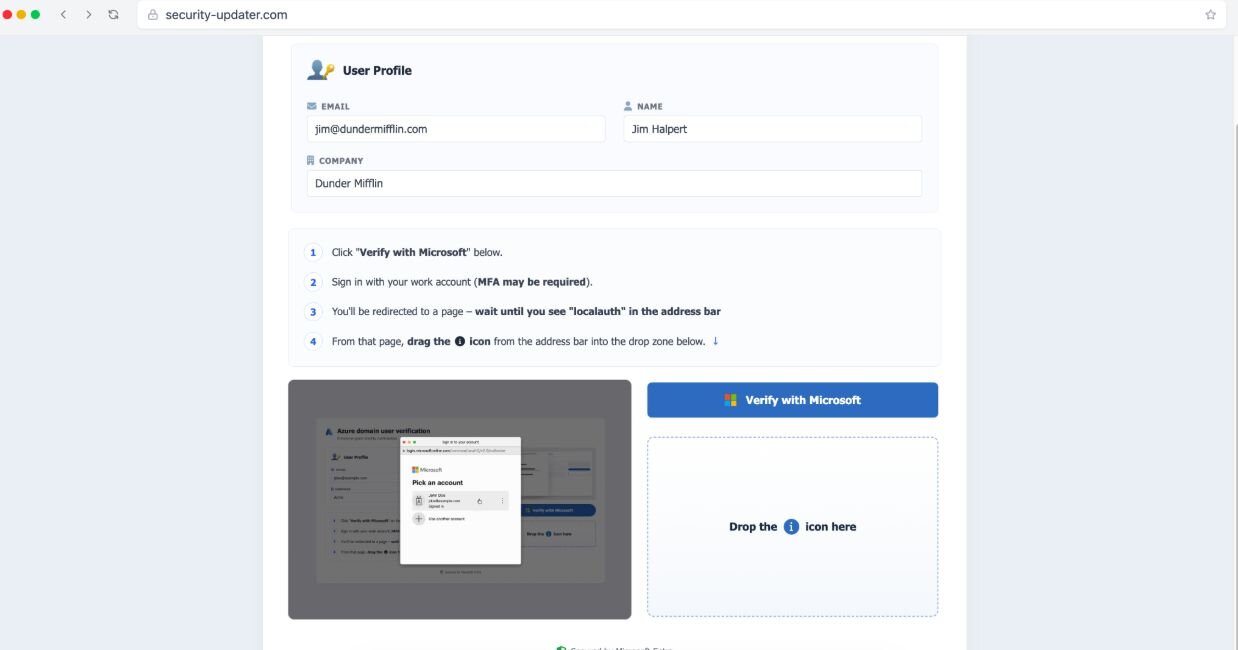
Figure 3: ConsentFix plays on ClickFix techniques to steal OAuth authorization codes
Take a look at the figure 3 for an example ConsentFix attack. First, the user is asked to click a "Verify with Microsoft" button and sign in with their work account. There is an important distinction here—while the user will be prompted to enter their sign-in details to complete this request, the request is going to the Azure command line interface (CLI), not a typical Microsoft 365 sign-in session. Azure kicks back an OAuth authorization code meant to grant access to the Azure CLI. But since there is nothing on the user's system to catch that code, the victim sees a "This site can't be reached" error. However, that authorization code is right there, visible in the URL returned.
From there, the malicious page asks the user to complete the process by dragging the URL into their browser. To the victim, it just looks like an extra step to finish signing in. Once dragged, the attacker captures that code and redeems it on their own device, completing the OAuth handshake and receiving valid access and refresh tokens, no password or MFA bypass required on their end.
What makes ConsentFix dangerous is what it doesn't do. It doesn't ask for a password. It doesn't need to beat MFA, because the user completes a real, legitimate Microsoft authentication flow start to finish. Even security keys and other phishing-resistant login methods don't stop it, since the attacker isn't after the login itself. They're after the token produced after that login completes. Not fluent in identity jargon? No worries, our breakdown of what token theft actually means walks through why a stolen token can do more damage than a stolen password in today's cloud-first world.
That token can also outlast the moment it's stolen. Depending on how your Microsoft 365 environment is configured and which tokens are issued, a stolen token can remain valid for some time even after a password reset—until it's explicitly revoked or expires.
Because the entire interaction happens inside real Microsoft infrastructure, in a browser, with no malware or unusual files involved, traditional endpoint tools often have nothing to flag. The attack looks, on the surface, like a normal sign-in.
Recently, detailed ConsentFix walkthroughs; including code samples, infrastructure screenshots, and even video tutorials have surfaced on public cybercrime forums. Some posts have even covered how to research and profile targets ahead of time using tools like LinkedIn, so lures could be tailored to specific people at specific companies.
That kind of packaging matters. A technique that once required real technical skill to pull off now comes with a how-to guide attached, which lowers the bar for less experienced attackers to try it. Security researchers have also noted follow-on toolkits building on the original approach, refining the lure and speeding up how quickly an attacker can act once a token is stolen. The same trend shows up in phishing-as-a-service kits like the Kali365 device code phishing kit, which package OAuth and device-code abuse into turnkey offerings for less-skilled attackers.
Awareness still matters here. These attacks count on people moving through a familiar process without slowing down, so training users to pause and ask why a sign-in step wants them to drag a link into their browser, or press an unusual key combination, can stop an attempt before it starts.
But awareness alone won't close the gap, because ConsentFix is built to look routine. A few technical steps that help:
The Cybersecurity and Infrastructure Security Agency (CISA) publishes secure configuration baselines and guidance for Microsoft 365 and Google Workspace through its Secure Cloud Business Applications (SCuBA) project, which is a useful reference point for tightening these settings. You can find it under CISA's Secure Cloud Business Applications (SCuBA) guidance. ConsentFix is also a close cousin of our research into device code phishing in Azure and Google, another technique that abuses legitimate Microsoft sign-in flows to steal access without a password.
ConsentFix is proof that phishing doesn't have to look like phishing anymore. There's no fake login page and no password to steal. Just one familiar-looking step, dropped into a process people already trust, and just like that, the keys change hands.
That's exactly why layered defense matters here. Security Awareness Training helps your people spot the moment something feels off, whether it's a link they're asked to drag somewhere it doesn't belong or a sign-in step that doesn't quite add up. But people are human, and even well-trained ones have an off day. That's where Managed ITDR comes in, watching for the traces a stolen token leaves behind so a brief lapse in judgment doesn't turn into a full account takeover.
Train your people to catch it. Build the safety net for when they can't. That's how you close the gap ConsentFix is built to slip through.
Not exactly. A phishing email is often how the attack starts, but ConsentFix itself is the technique used once someone clicks through: getting the user to complete a fake step in a real Microsoft sign-in flow that quietly exposes an OAuth authorization code (via the redirect URL), which the attacker then trades for access and refresh tokens.
No. ConsentFix works around MFA rather than through it. The user completes a legitimate authentication step that has already satisfied MFA, so no additional challenge is triggered in that flow, and the attacker walks away with a valid token instead of a password. For more background on why MFA still matters, and where its limits are read how multi-factor authentication saves the SMB.
ClickFix tricks a user into running malicious code on their own device through a fake verification prompt. ConsentFix uses that same trick-the-user approach, but targets Microsoft 365's OAuth consent screens instead, aiming to steal an OAuth authorization code—and the access and refresh tokens it turns into—rather than execute code locally.
Not always. Depending on how your Microsoft 365 environment is configured and which tokens the attacker stole, those tokens can remain valid until they're revoked or expire—even if you reset the password. That's why fast token revocation and app-consent review matter just as much as password hygiene.
Any organization using Microsoft 365 can be targeted, but users with access to sensitive data or elevated permissions represent higher-value targets, since a stolen token can carry whatever access that user already has.
Additional Resources
Learn what server monitoring is, why it's critical for cybersecurity, and how to implement effective monitoring strategies to protect your IT infrastructure.
Learn about cybersecurity manager roles, responsibilities, skills, and career outlook. Discover how these leaders protect organizations from cyber threats.

ARP spoofing is a cyberattack that tricks devices into sending sensitive data to attackers. Learn how it works and how to protect against it. | Huntress